Canva's marketing strategy is to let the product and search do most of the selling: a free design tool anyone can start using in a minute, found through tens of thousands of template pages that match what people type into Google, in over 100 languages. Cofounder Cameron Adams says on First Round's podcast that only a minority of Canva's traffic comes through marketing or other paid channels, and that the rest is organic, mostly users bringing in new users. On top of that engine Canva gives its paid features away to schools and nonprofits, stages a yearly launch event called Canva Create, pays a community of creators to keep the template library growing, and now runs TV campaigns such as What Will You Canva Today?, whose first TV spot was set to air nationally during NBC Sunday Night Football on November 1, 2026. By Canva's own figures, reported by TechCrunch in February 2026, that added up to more than 265 million monthly active users and over 31 million paid users in 2025, and $4 billion in annual recurring revenue by the end of the year.
It's also a strategy under pressure. In a note to staff published on November 3, 2026, CEO Melanie Perkins wrote that Canva's growth had slowed for the first time in a decade and that 1,271 people, 22% of the company, would be affected by a restructuring. This page goes through how Canva grew, with the numbers Canva and its founders published, says which parts an app maker can copy and which only work at Canva's size, and shows how to run the copyable parts for your own app without a marketing team.
| Canva key facts | Figure | Source and date |
|---|---|---|
| Launched | 2013, in Australia, as an online design and publishing tool | About Canva, opened November 2026 |
| Founders | Melanie Perkins (chief executive), Cliff Obrecht (chief operating officer) and Cameron Adams (chief product officer) | Fortune, October 2022; First Round, 2025 |
| Users | Over 265 million monthly active users and over 31 million paid users in 2025 | Canva figures in TechCrunch, February 18, 2026 |
| Revenue | $3.5 billion in 2025; $4 billion annual recurring revenue at the end of 2025 | Canva Newsroom, December 16, 2025; TechCrunch, February 2026 |
| Valuation | $42 billion in its last share sale | TechCrunch, February 2026 |
| Marketing approach | Mostly organic: search, word of mouth and localization; only a minority of traffic from marketing or paid channels | Cameron Adams on the First Round podcast, 2025 |
| Templates | 1.6 million free templates and 3.6 million on paid plans | Canva pricing page, opened November 15, 2026 |
| Reach | 190 countries and over 100 languages | About Canva, opened November 2026 |
| Latest | Growth slowed for the first time in a decade; a restructuring affecting 1,271 people, 22% of staff | Canva Newsroom, November 3, 2026 |
| Main channels | Template and landing pages for search, word of mouth, 100+ languages, free education and nonprofit plans, Canva Create, creators, brand campaigns | Our reading of the sources on this page, November 2026 |
How Canva Started: Fusion Books, 100 Rejections and a Kitesurfing Trip
Canva started as a yearbook business run from Melanie Perkins's mother's living room in Perth, and the idea behind it came from Perkins teaching design to other students. Fortune's 2022 profile dates the frustration to 2007, and Perkins's own account to 2008: she was teaching design programs part time at university and found the tools clunky and expensive. Perkins tells the rest in her own words in a 2018 post on the Canva Newsroom. Her boyfriend, Cliff Obrecht, became her business partner, her mom's living room became the office, and they took out a loan to build their first piece of software after doing the rounds of every development company in Perth that would meet them.
That business was Fusion Books, an online tool for schools to design their own yearbooks. The dates don't line up perfectly between sources. Fortune says Fusion Books launched in 2011 and at its peak published yearbooks for 400 high schools. Perkins's own post says the first customer found them through the web in March 2008, a school on the other side of Australia asking for a quote for 200 to 250 yearbooks. We can't reconcile the two dates from the sources, so we give both. What both accounts agree on is that Fusion sold to schools, and Perkins's version has the first sale coming from a stranger who found them online.
Perkins admits in the same post that they had no idea about SEO at the time, which is why a customer finding them from across the country felt remarkable. The deposit was $100, and the two of them debated framing the check before deciding they needed the money more. File that away. A decade later, search would become Canva's biggest growth engine, and the people who built it started out amazed that search worked at all.
More Than 100 Investor Rejections
Canva's funding story is famous mostly for how often it went wrong. Fortune reports that Perkins heard more than 100 noes from venture capitalists, and lists the reasons she was given: investors were uncomfortable backing cofounders who were a couple, didn't want an overseas deal, didn't want to invest in Australia at all, and doubted two arts and commerce students from the University of Western Australia with no technical background. On Lenny's Podcast in November 2025, the episode description puts it at over 100 investors in her first round.
Her own account adds the detail that matters to anyone raising money. The first investor she ever met was Bill Tai, who had flown in from Silicon Valley to speak at an awards event and told her he'd meet her if she ever came to Silicon Valley. She went. In her Newsroom post she describes a three month trip to San Francisco in 2011 spent learning about startups and chasing engineers, which ended when her visa ran out, $9,000 poorer and feeling, as she puts it, like a complete failure. Fortune describes a later stretch in 2012 sleeping on her older brother's floor for months.
The turning point, she writes, was changing the question. Instead of asking investors to invest, she asked them for advice. That way a meeting couldn't end in rejection: she'd take their notes, fix the deck or the strategy, and come back later to ask for advice again. It's a small trick, and it works as well for a first customer or a first press contact as it does for a seed round.
The money finally came from an odd place. Fortune tells how Perkins and Obrecht heard about a gathering of investors and founders in Maui that was really for kitesurfers, spent months learning the sport, and spent nearly half their business bank account getting there. Through the group they met Rick Baker, a fellow Australian who was launching a Sydney venture firm called Blackbird Ventures. They pitched him a product then called Canvas Chef, where you add graphic elements to a blank template the way a chef tops a pizza. Baker stayed interested; the pizza metaphor didn't survive, and neither did the letter s, which Fortune says was dropped because canvas.com wasn't available. Blackbird became the first big firm to invest, and its $1.3 million, plus a matching grant from the Australian government, got Canva running. Investors also wanted a technical cofounder, which is how Cameron Adams, a former Google engineer and designer in Sydney, joined to build the product.

A Quiet Launch in 2013
Canva launched in 2013, and launch day was a letdown. Adams tells the story on the First Round podcast: the team had press articles lined up and expected thousands of visitors. They watched the analytics dashboard. After about 30 seconds, one person arrived. Two minutes later, another. By about 11 at night they gave up and went to the pub. His lesson is the one most launch guides skip: the launch gets you over a line, but growth comes from every day after it, from how you show up, answer users and get them talking about the product to their own audience.
It worked out. Fortune reports that Canva reached 750,000 users in its first year. That's still a slow start next to what came later, and that's the encouraging part if your own launch was quiet too. Canva's growth didn't come from the launch. It came from a few things the team built in the years after, and we'll go through each one.
If you make an app, you'll probably recognize the quiet launch. The fix Adams describes, turning up every day and getting people to talk about the product, is mostly a posting habit, and that's the part Spreadcast takes off your hands. Spreadcast runs your app's marketing: branded posts, made and scheduled for you. Paste your App Store or Google Play link once and it reads the listing, builds a brand kit from your app's colors, fonts, icon and real screenshots, and plans a week of designed posts, from one a week up to twice a day. The mobile apps page shows what a week looks like.
Canva's Product Led Growth: Freemium and Word of Mouth
Canva grew through its product more than its advertising: a free tool good enough that people showed it to colleagues, with paid features for the ones who needed more. Cameron Adams puts it bluntly on the First Round podcast. Word of mouth in the first couple of years was like gold, he says, and still is; an amazing amount of Canva's traffic is organic, and only a minority comes through marketing or other paid channels. In his words, it's about Canva users bringing new Canva users into the fold.
The First Users Were Social Media Managers
Canva didn't try to win everyone at once. Adams says the early user tests kept turning up one group that got excited: social media marketers. It was 2013. Pinterest was new, Instagram was taking off, and people had started adding images to their Twitter posts. Many social media managers worked alone, ran their own business, and needed a lot of visual content without the budget to hire a designer. He calls them extremely time poor. Canva built its first product around what they needed, then built a community around them.
That choice did a lot of the marketing. Social media managers live on social media. They loved telling people which tools they used, sharing tips and tricks, and, of course, posting the things they'd made. Every graphic they published was a small advert for Canva, seen by their clients and followers. If you're picking a first audience for your own app, steal this: find the users whose work is visible to other people.
Onboarding: A Monkey in a Hat
Early testing showed Canva's real competitor was fear. People who'd never designed anything were scared of making a mess. Instead of the usual onboarding with arrows pointing at buttons, which Adams says people forget the moment they finish, Canva showed a short video of the editor in action and then got new users to do something themselves right away: drag a monkey onto the page, put a hat on it, change the hat's color, and search for a slice of pizza. Adams says the response was amazing, because people suddenly felt they could be designers, and started imagining how they'd use it at work.
Product led growth, in one scene. The marketing promise, that anyone can design, is proven in the first minute, by the user, with a silly picture they made. It's also why Canva's free plan matters so much. Nobody pays before the monkey has its hat.
From $1 Images to Canva Pro
Canva's first business model wasn't the subscription. Adams says the early pitch decks promised $1 design elements, a cheap alternative to stock images that could cost designers hundreds of dollars each. That earned real money, around $2 million by his recollection. Then, toward the end of the second year, the team noticed a group of users who wanted more and built a premium tier around four features for brands and businesses. It was called Canva for Work, and it's now Canva Pro.
This bit cuts against his own advice about launches. Canva for Work had a real marketing campaign behind it, and 200,000 people joined the waiting list. It launched well, and within about three months the subscription had overtaken the $1 image revenue and was growing far faster. Two launches, two opposite results. The difference was that the second one had an audience waiting for it, built by two years of people using the free product.
Freemium isn't free of risk, and the press said so. In Fortune's 2022 profile, analysts asked whether a freemium model could support a company the size of Adobe, and Blackbird's Rick Baker noted that the vast majority of users logged in about once every two weeks. Canva's answer since has been to move into work tools people open every day: documents, presentations, whiteboards and websites. We'll come back to that in the enterprise section.
For an app maker, the order matters most. Canva made the free experience good enough to talk about, let the people who used it do the telling, and only then asked for money. Your app's posts can do some of that telling for you. Spreadcast starts free with three AI posts so you can judge the quality before paying anything, and every post it designs shows your real app, built from your actual screenshots, so new people see the product doing its job. For more ideas on getting current users to spread the word, see our list of app promotion ideas.
Canva's SEO Strategy: Template Pages at Scale
Canva's SEO strategy is to publish a page for almost every design job people search for, each one leading straight into the editor with a matching template, and it has been one of Canva's two biggest growth drivers since its first years. Both cofounders have said so. Melanie Perkins listed it among her lessons in her 2018 Newsroom post: when people are looking for your product, she wrote, it would be crazy not to let them find it.
Cameron Adams told the full story on the First Round podcast. Before launch, the team had only vague ideas about SEO, and eventually realized they knew nothing about it. Then they found a growth leader in Australia who set Canva up properly for search. He thought about the whole path: someone types a search, lands on a Canva page, gets into the product, and finishes the job they came for. Canva put as much thought into that path as into the editor itself.
In practice, Adams says, the team mapped out hundreds of terms people might search for when they wanted to design something, then built a landing page for each that spoke to that person's job to be done, gave them an easy way into the editor, and made it clear inside the editor how to finish the task. Returns showed up within three months. Over the next couple of years it became a massive engine for Canva, and, in his words, it's still a massive source of traffic.
What Canva's Sitemaps Show Today
Canva doesn't publish its search traffic, and we won't quote the traffic estimates that SEO tools put out. What anyone can check is what Canva asks Google to crawl. On November 15, 2026 we downloaded the two sitemap indexes named in Canva's robots.txt file: the main sitemap and a separate landing page sitemap. Together they listed 132,672 addresses, across the main site and 116 country and language versions.
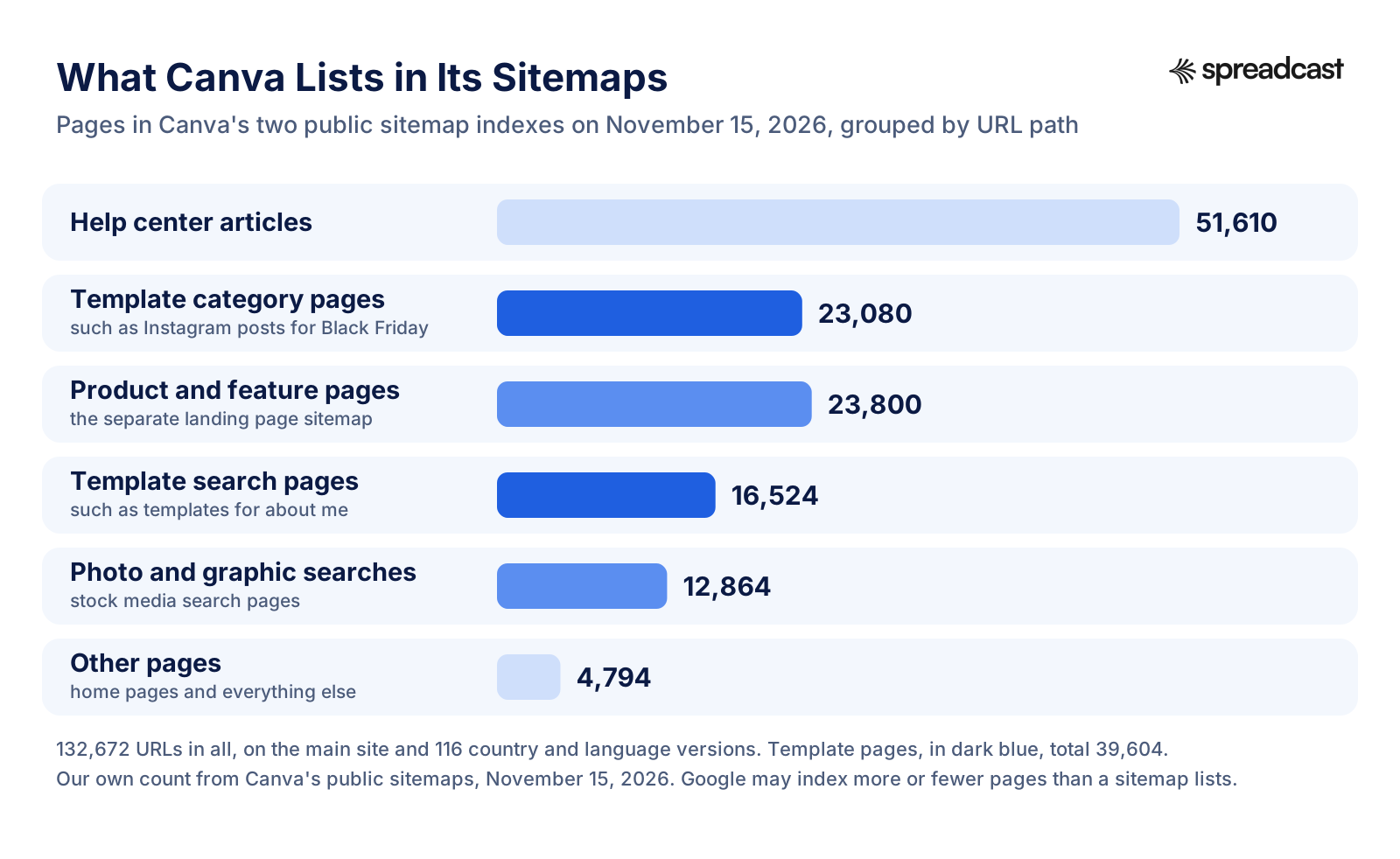
The template pages are the part Adams described. We counted 39,604 of them. Some are category pages that pair a format with an occasion: on the English site alone there are 64 pages of Instagram post templates, one for Black Friday, one for anniversaries, one for Black Business Month and so on. Others are template search pages, such as templates for an about me page, which catch the long tail of things people type. Each is a door into the editor with the right template already open.
Two other bars in the chart are easy to skip past. The help center lists 51,610 articles across its language versions, and every how to article doubles as a search page for someone stuck on a task. And the separate landing page sitemap lists 23,800 pages for Canva's products, features and apps, such as its AI art generator, in many languages. Canva even advertises for the job in its robots.txt file, a text file only crawlers and curious marketers ever read: a line at the top says Canva is hiring SEOs and engineers.
A caveat on our count. A sitemap is a list of pages a site wants crawled, not proof that Google indexed them all, and it doesn't include every template page Canva has. Treat 39,604 as the floor of what Canva puts in front of search engines on purpose, on one day.
The New Search Box: AI Assistants
The same thinking now points at AI chatbots. In February 2026, TechCrunch reported that users had more than 26 million conversations with the Canva app inside ChatGPT by October 2025, that Canva was one of the top 10 domains ChatGPT referred people to, and that traffic referred by AI models was in the double digit percentages. Monthly active users grew 20% over 2025, partly thanks to Canva's AI tools. Cliff Obrecht tied it straight back to the early SEO work: Canva drove a lot of its early growth through Google by understanding what people searched for and giving them content they could open and edit in the product, and he said Canva now sees ChatGPT and other AI models as top of funnel acquisition platforms in the same way. Search, he added, is still a big driver.
What a small app should copy is Canva's habit, not its scale. Canva has always put a useful page wherever people are already asking for help, first Google, now chatbots. A small app can't publish 40,000 pages, and doesn't need to. It needs a handful of honest pages for the searches its users really make, and a store listing that answers them. Our guides to App Store optimization and Google Play ASO cover the store side.
Canva's templates also teach a second lesson: give people something finished to start from. We built Spreadcast's free Instagram post templates and Instagram carousel templates on that idea for app makers. Paste your App Store or Google Play link and the designs fill with your app's name, screenshots and details, ready to edit and download. When you'd rather not make posts one at a time, Spreadcast designs a full week of them in your brand and schedules them for you.
Templates as Canva's Product and Its Marketing
Canva's templates are both the thing people come for and the thing that brings them, and the library has grown to millions of designs, many made by outside creators who earn royalties. On Canva's pricing page in November 2026, the free plan included more than 1.6 million templates and the paid plans more than 3.6 million, with over 141 million stock photos, graphics, fonts, videos and audio files on paid plans. Adams calls content the other side of Canva that people often don't appreciate: having the right templates, illustrations, photos, video and music ready at the moment someone wants to create.
The Canva Creators Program
Canva doesn't make all of that itself. The Canva Creators program lets graphic designers, photographers, illustrators, artists, video template makers and educators publish their work to Canva and earn royalties. Template creators apply with a portfolio of five to ten designs and are reviewed before they're accepted. There are three kinds, template creators, element creators and education specialty creators, and Canva encourages them to design in their own language and represent their own country, which feeds the localization engine we'll get to next.
When Canva launched its AI suite, Magic Studio, on October 4, 2023, as it marked a decade since launch, it tied the creators into it. The Magic Studio announcement committed $200 million in content and AI royalties to the creator community over three years, and said creators who opt in to the Creator Compensation Program would be paid for their content being used to train Canva's own AI models. Canva says it won't use creators' content for training without explicit permission.
It's a flywheel. Every new creator adds templates, every template is a possible search page, every page brings in users, and a bigger audience makes the library worth more to creators. Canva pays for content with royalties instead of salaries, so the library grows at the pace of a community rather than an in house team.
Every Campaign Ships a Template Collection
Look at Canva's 2026 campaigns and a pattern shows up: each one ends inside the product as templates. When Canva made Gemma Collins its pretend UK Creative Director in February 2026, the Newsroom post announced a collection of templates inspired by her, plus a limited edition Gemma Collins tone of voice in Magic Write. When the US campaign built around a giant squirrel statue in Brooklyn Bridge Park was revealed in May, Canva launched a Squirrelites template collection with it. In October, Canva and Mattel released 230 free templates featuring Barbie, Hot Wheels, Masters of the Universe, Pingu and Polly Pocket.
Most brands end a campaign with a hashtag. Canva ends one with something you can open and use, which turns attention into a session in the editor. You can do this at any size. When you get attention, have something ready that people can try straight away.
Templates also explain why Canva looks consistent across millions of users: everyone starts from a designed layout instead of a blank page. Your app needs the same consistency in its own feed, and that's where Spreadcast fits. Its brand kit holds your app's colors, fonts, icon and real screenshots, and every post in your weekly plan is designed from it, so your Instagram, TikTok and LinkedIn read as one brand. If you want to see what goes into a kit, try the free brand kit generator or read what a brand kit actually needs.
How Canva Expanded Globally: 100+ Languages
Canva expanded globally by translating the product into about 100 languages within four years of launch, then filling each language with local templates and local search pages, and Cameron Adams calls it Canva's other key growth driver next to SEO. His reasoning on the First Round podcast is very Australian: with 25 million people at home, you can never build a big online company thinking only about your own market. A company in the US can be tempted to serve the US alone; an Australian one can't.
Adams says Canva started its international push about three years after launch, launched eight languages that year, and launched Canva in a hundred languages the following year. That opened huge markets with many people who don't speak English, Brazil, Mexico, Indonesia and India among them, and he says it reshaped the product itself, from how content is surfaced to the experience wherever people are. Canva's top five markets, by his account, are now the US, Brazil, Indonesia, India and the Philippines.
Sources differ slightly on the first step. Fortune's profile says internationalization was Perkins's priority for 2016 and that the platform launched in six languages besides English that year; Adams remembers eight. Both agree on where it ended up: about 100 languages, and Canva's About page now says 100+ languages and 190 countries.
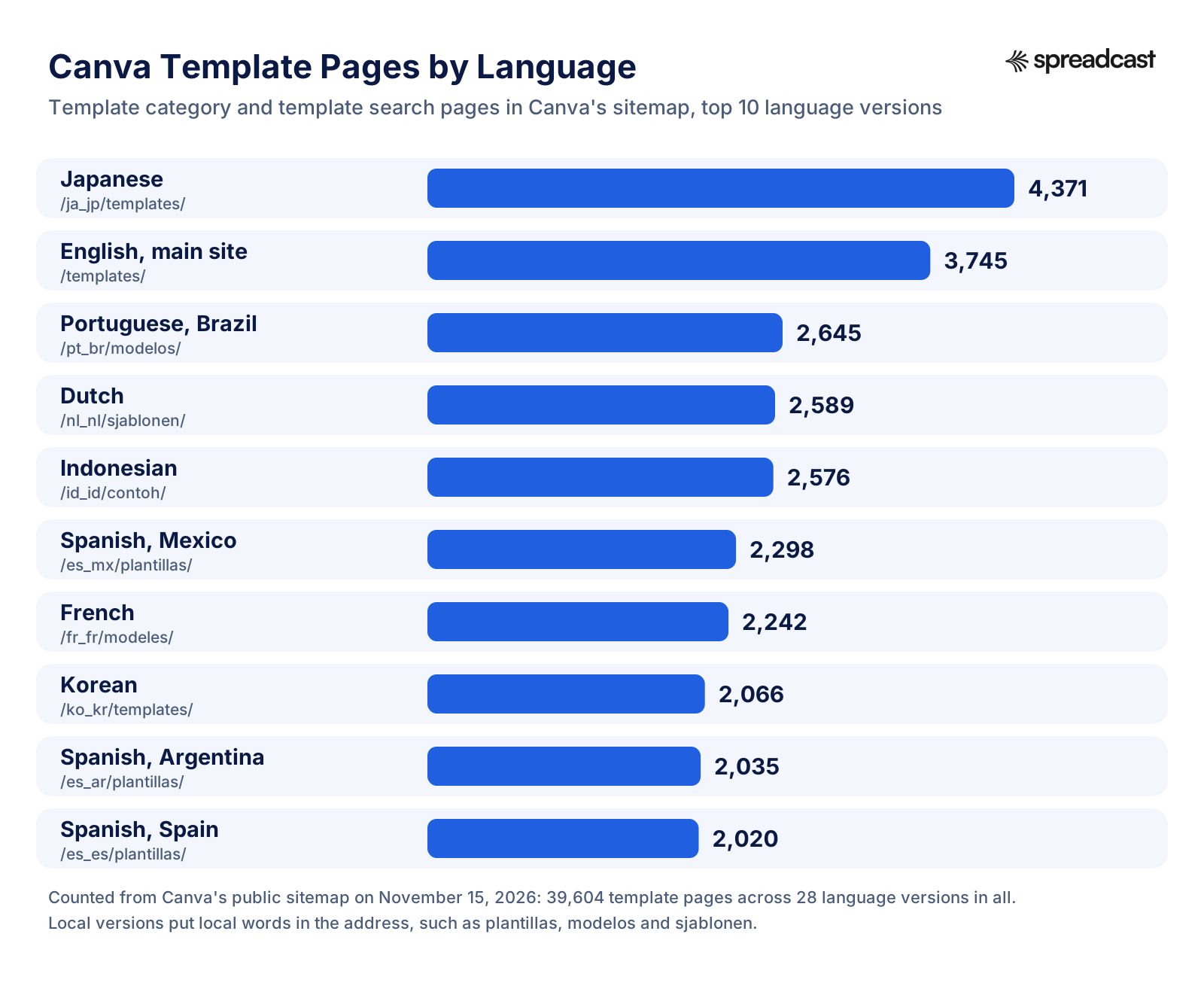
The sitemap shows localization isn't only a translated interface. Japanese has more template pages listed than the main English site, 4,371 against 3,745. Brazilian Portuguese, Dutch and Indonesian each have more than 2,500. And the pages are written for local searches: the Spanish versions live under plantillas, Brazilian Portuguese under modelos, Dutch under sjablonen, Indonesian under contoh. The Taiwanese version has template search pages for the Mid Autumn Festival and Qixi, holidays an English team would never think to target.
Pricing is localized too. TechCrunch reported in February 2026 that Canva had introduced lower priced subscriptions in Pakistan, Uruguay, Morocco and Jamaica, while North America still brings in most of the business. When we opened the pricing page for this article, it showed prices in the local currency of the country we opened it from. Translating a product is one job. Charging a price that makes sense in Jakarta or Manila is another, and Canva does both.
For an app maker, the realistic version is smaller. You probably can't translate into 100 languages next month. You can check which countries already download your app, translate your store listing for the biggest ones, and post on the networks people there use. Our guide to promoting an Android app covers markets like Brazil, Indonesia and India where Android dominates, and how to market an app lays out the full plan.
Canva for Education and Nonprofits: Free as Distribution
Canva gives its paid features away free to schools and nonprofits, and those programs have become one of its widest distribution channels, reaching 100 million teachers, students and education leaders every month in 2025 by Canva's count. The 2025 review on the Canva Newsroom calls it a simple idea, free creative tools for every classroom, that grew into a community in more than 190 countries, supported by ministries of education.
The terms are generous. The Canva Education page calls it a 100% free platform for every classroom; teachers sign up with an education email or proof of employment and are verified within a few days. It plugs into the tools schools already use, including Google Classroom, Microsoft Teams, Canvas, Moodle, Blackboard, D2L and Schoology. For nonprofits, the Canva Nonprofits page offers all Canva Pro features plus team tools free for up to 50 users, and says more than a million nonprofits in 175+ countries have free access.
Giving the product away makes sense because students grow up. A teenager who makes every school poster in Canva arrives at a first job already fluent in it, and a nonprofit volunteer brings it to their day job. Canva's company values include being a force for good, and it clearly means it, but the programs also put Canva in front of millions of future buyers years before they have a budget. Fusion Books started in schools too; Canva never really left them.
Design School, Certifications and the World Tour
Canva also teaches. The Canva World Tour, which ran from September 14 to November 30, 2026, brought free training online and in person, built around short Design School lessons made for phones, some as short as 90 seconds, and a new free AI Essentials certification. The pitch is aimed at people who never set out to learn design: they want a CV that gets noticed, a presentation that lands, or a logo for a side business.
Teaching is marketing that people thank you for. Each lesson shows the product solving a real problem, and the certification gives people a reason to come back and finish. You can do a small version of this for your app in your feed: show people how to get more out of it, one tip at a time. Spreadcast puts tips carousels into your weekly plan, built from your app's real features and designed in your brand, so your followers learn something from your posts instead of just being told to download. The Instagram carousel maker page shows how they're made.
Canva Create and Product Launches as Marketing
Canva turns product launches into events, and its yearly Canva Create keynote has become the center of its marketing calendar, with the biggest launches of each year saved for the stage. The event has grown along with the company. The 2025 review describes Canva Create in Los Angeles that year as a huge highlight with thousands of people attending. For 2026, Canva booked SoFi Stadium in Los Angeles and expected 6,000 people in person and millions more watching online.
The Rhythm of Canva's Biggest Launches
| Date | Launch | What Canva said about it | Source |
|---|---|---|---|
| October 4, 2023 | Magic Studio, a decade after Canva launched | Its suite of AI design tools, with a $200 million creator royalty commitment | Canva Newsroom |
| March 26, 2024 | Affinity joins Canva | Professional design software trusted by more than three million creatives | Canva Newsroom |
| July 30, 2024 | Leonardo.Ai joins Canva | A generative AI team of 120; Magic Studio used more than 7 billion times | Canva Newsroom |
| 2025 | Creative Operating System and the all new Affinity | Called the biggest product launch in Canva's history; Affinity made free | Canva Newsroom |
| April 16, 2026 | Canva AI 2.0 at Canva Create | Called the most significant product evolution since 2013 | Canva Newsroom |
| September 16, 2026 | Canva ProSuite | Affinity, Cavalry, Flourish and Leonardo as one suite for professionals | Canva Newsroom |
Notice the language. Each big launch is introduced as the biggest or most significant yet, and each one is wrapped in a date people can put in a calendar. Before Canva Create 2026, Canva published a build up post on April 13 promising what it called the most significant moment in Canva's history, without saying what it was. The AI 2.0 announcement added a game: a secret password revealed during the keynote, with early access and a gift for whoever found it first. That's how you get millions of people to watch a product demo on purpose.
The launches also come with numbers that make good headlines. In the build up post, Canva said its AI products had been used more than 27 billion times, with usage tripling over the past year, and that a new feature called Magic Layers had been used more than nine million times within a few weeks. Canva described itself as the third most used AI product in the world, a claim from Canva that we couldn't check independently.

What Canva AI 2.0 does says something about where Canva thinks marketing work is going. The announcement describes starting from a goal instead of a template, connectors that pull context from tools like Slack, Gmail, HubSpot and Notion, brand intelligence that applies your fonts and colors automatically, and scheduled tasks such as generating a batch of social content every Friday. Obrecht summed up the shift to TechCrunch: Canva is becoming an AI platform with a bunch of design tools.
The habit to copy is the rhythm, not the stadium. Canva saves up news, gives each launch a name and a date, tells people it's coming, and makes a moment of it. Most app makers ship an update and mention it in release notes nobody reads. Our app update announcement examples show apps that do it better.
Spreadcast gives every release its own moment. When a new version of your app ships on the App Store, Spreadcast notices and designs an update post about it in your brand, with your real screenshots, ready for you to approve or to go out on Full Autopilot. Between releases, the weekly plan keeps feature posts coming, each about a real feature on your listing, so a launch keeps getting seen for weeks. The free release notes generator helps with the store text itself.
Canva Marketing Campaigns: From Love Your Work to What Will You Canva Today?
Canva's recent brand campaigns lean on real users and humor, and in 2026 alone it ran separate campaigns in the UK, the US and North America, each with its own idea. The run started in September 2024, when The Drum called Love Your Work Canva's first major campaign in three years. Through all of it, Canva's homepage asked one question for nearly 13 years, What will you design today?, according to the Newsroom post that retired it in October 2026.
| Date | Campaign | What it did | Source |
|---|---|---|---|
| September 2024 | Love Your Work | Six real Canva users shown as busy professionals reaching their goals | The Drum |
| February 2026 | Gemma Collins, UK Creative Director | A UK mockumentary at Canva's London office, plus Gemma templates and a Gemma tone of voice in Magic Write | Canva Newsroom |
| May 2026 | The Thing That Makes Anything A Thing | A US campaign: an unbranded giant squirrel statue in Brooklyn Bridge Park, revealed as Canva the following week | Canva Newsroom |
| October 2026 | What Will You Canva Today? | A North America brand platform: three TV spots built on real moments, by Goodby Silverstein & Partners | Canva Newsroom |
Love Your Work
The Drum reported on September 4, 2024 that Canva's Love Your Work campaign featured six actual Canva users, each shown as an ambitious, busy professional using Canva to reach a particular goal, and that it arrived less than a month after Canva's first major rebrand since 2013. Using real users instead of actors is the same instinct as the social media managers in 2013: the most convincing advert for a tool is someone you recognize getting their work done with it.
Gemma Collins and the Squirrelites
The 2026 campaigns got stranger, and better. In the UK, Canva appointed Gemma Collins as its new UK Creative Director in a mockumentary filmed at its London headquarters, with real members of Canva's UK marketing and engineering teams appearing alongside her. One joke has her mistaking MAU, monthly active users, for MUA, make up artist. The campaign ran on digital and social channels.
In the US, Canva ran a mystery first. A giant squirrel statue appeared in Brooklyn Bridge Park with no branding and no explanation, surrounded by what looked like a squirrel obsessed movement called the Squirrelites: knitting circles making acorn hats, a squirrel choir, squirrel balloons, posters, billboards, social posts and influencers. Only then did Canva reveal itself, with a hero film about a woman whose encounter with a squirrel grows into a movement with its own posters, billboards and swag. The campaign ran across experiential, social, influencer, outdoor, digital and audio channels.
The squirrel is the product demo in disguise. Every poster and sign in the stunt is the kind of thing you'd make in Canva, so by the time people learn who's behind it, they've already seen what the product can do.
What Will You Canva Today?
On October 30, 2026, Canva launched What Will You Canva Today? as a new North America brand platform, made by Goodby Silverstein & Partners with social, radio and outdoor developed together with Canva's in house team. The idea is in the name: Canva wants to be a verb. The Newsroom post explains why the old homepage question went: Canva now does much more, from websites and social posts to video and photo editing, and many people don't realize how much is possible.
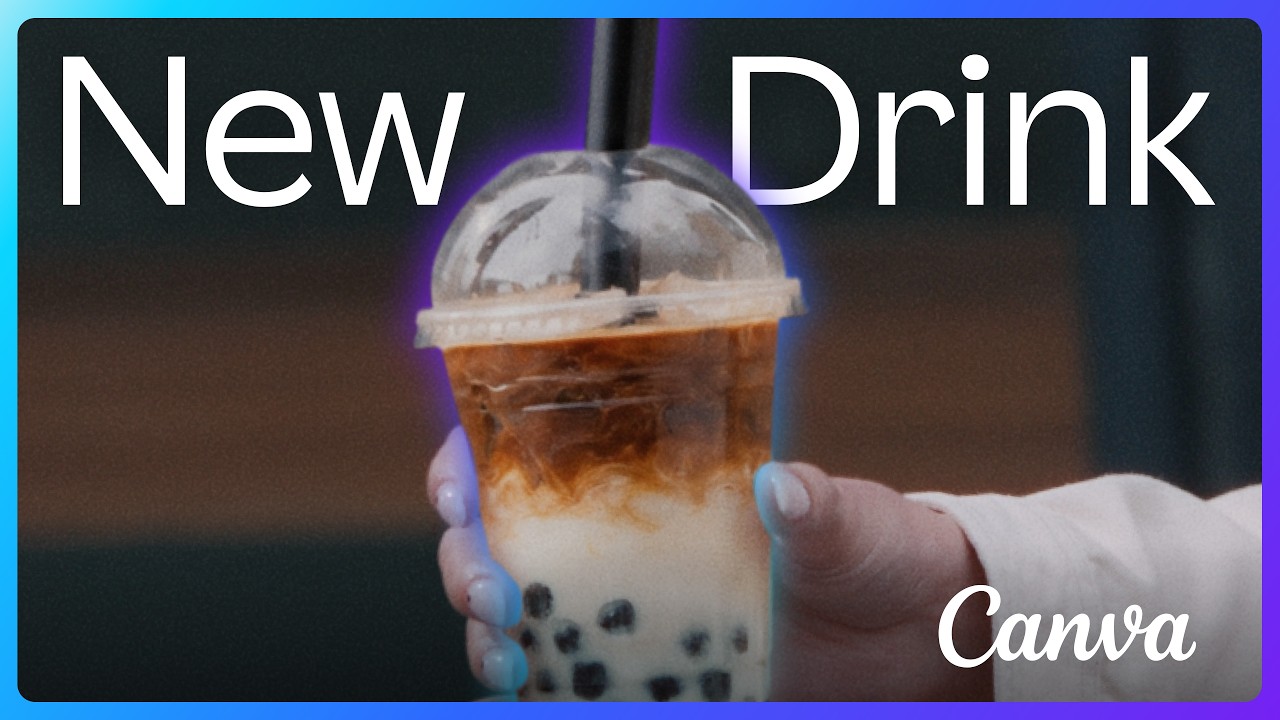
Each of the three TV spots is built on a small, real moment. In one, a woman keeps editing photos of her questionable exes, then hits Undo when one texts that he misses her. In another, a coffee shop marketing team argues through drink ideas, from birthday cake flavor to a flambéed hot honey espresso, before settling on a lavender latte and printing the poster together. The third follows a high schooler remaking his promposal sign as his friend reports who's already taken. Outdoor ads in New York and San Francisco show people mid design, with lines such as no classroom sign left undesigned. Canva scheduled the first spot to air nationally during NBC Sunday Night Football on November 1.
All four campaigns sell the same feeling, pride in something you made yourself, and none of them lists features. The Newsroom post even frames it against AI, saying that in a world where anything can be generated instantly, Canva wants people to feel ownership of what they make. It's a bold line for a company that had just launched an agentic AI platform. We think it's the right one: pride is a reason to pick Canva that a cheaper AI tool can't easily copy.
You won't be buying a Sunday Night Football spot for your app. What you can borrow is the structure: one real moment, one person, the product as the way the moment gets solved. Spreadcast builds that into your feed with problem and fix posts, which show a pain your app removes and how, and seasonal posts tied to a real feature, like a budgeting feature in January or a packing list before summer. While you plan your own bigger campaigns or work with creators, Spreadcast keeps your accounts posting designed posts every week, and the social media approval page shows how you check each draft first.
Canva's Enterprise Push and Acquisitions
Canva has spent the last three years moving from a tool for individuals into a platform for whole companies and professional designers, and it has bought much of that reach through acquisitions. The business side is growing fastest. TechCrunch reported that Canva's business with accounts of more than 25 seats doubled in 2025 to $500 million in annual recurring revenue. The 2025 review marked a year of Canva Enterprise, cited 95% of the Fortune 500 as users, and introduced Canva Business, a plan between Pro and Enterprise for individuals and small teams.
The acquisitions read like a marketing plan as much as a product plan. Each one brings an audience Canva didn't have:
- Affinity, bought in March 2024. Canva's announcement said its professional design apps were trusted by more than three million creative professionals, and that after a decade focused on the 99% of knowledge workers without design training, Canva wanted to serve professional designers too. In 2025 Canva relaunched Affinity as one app and made it free for everyone.
- Leonardo.Ai, bought in July 2024. The announcement said more than 19 million people used Leonardo's products two years after it launched, and that its 120 researchers, engineers and designers would join Canva.
- Cavalry and MangoAI, in February 2026. Cavalry added motion design, and MangoAI strengthened Canva's content marketing products, bringing Nirmal Govind, formerly a data science vice president at Netflix, in as Canva's first Chief Algorithms Officer, per the Newsroom post.
- Simtheory and Ortto, in April 2026. The announcement says Ortto, a customer data and marketing automation company, strengthens Canva's marketing products, with the aim that teams can create, publish, measure and optimize without leaving Canva.
In September 2026 Canva bundled the professional tools as the Canva ProSuite: Affinity, Cavalry, Flourish and Leonardo connected for the first time. The post argues that the more AI floods the world with generic content, the more real craft stands out. Making Affinity free fits the old playbook exactly: give the professional tool away, become the default for a new group of people, and earn from the teams they work in.
There's a reason this matters to marketers rather than only investors. Freemium for individuals worked for a decade, but Fortune's 2022 profile quoted analysts who doubted it could carry a company Adobe's size. Enterprise seats, professional tools and marketing automation are Canva's answer to that doubt, and they change who Canva markets to: from a social media manager with no budget to a marketing director with one.
How Canva Makes Money: The Canva Business Model
Canva makes money from subscriptions: a free plan for everyone, then paid plans for individuals, small teams and large organizations, with AI add ons and printing on top. On the pricing page in November 2026, the plans were Free; Pro, for one person; Business, priced per person for individuals and teams; and Enterprise, sold through Canva's sales team. Canva Teams, the old plan for groups, is closed to new sign ups, and an add on called AI Pass gives more AI usage on Pro or Business.
The page showed us prices in the currency of the country we opened it from, so we won't quote a US price we couldn't see. When we opened the page, yearly billing was listed as saving from 16% on the monthly price, and Business cost about 1.6 times Pro per person. School and nonprofit plans are free, as covered above. The page also mentions Canva Print, its printing service, and one more line worth noting: more than six million teams use Canva.
| What was reported | Figure | Who said it, and when |
|---|---|---|
| Revenue in 2021 | Just over $1 billion from subscribers; 10 million paid subscribers by 2022 | Fortune, October 2022 |
| Annualized revenue | $2.5 billion, with over 200 million monthly users | Canva announcement in PetaPixel, October 22, 2024 |
| Revenue in 2025 | $3.5 billion | Canva Newsroom, December 16, 2025 |
| Annual recurring revenue at the end of 2025 | $4 billion, with over 31 million paid users | Cliff Obrecht and Canva figures in TechCrunch, February 2026 |
| Revenue growth outlook | Cut by a third, to 20% | Fortune, August 12, 2026 |
The $3.5 billion and $4 billion figures for 2025 aren't a contradiction. Revenue counts what Canva earned across the year; annual recurring revenue is the yearly value of subscriptions running at the end of it, which is higher when a business is growing. Canva is private, so none of these numbers is audited, and you should read each one as Canva's own claim.
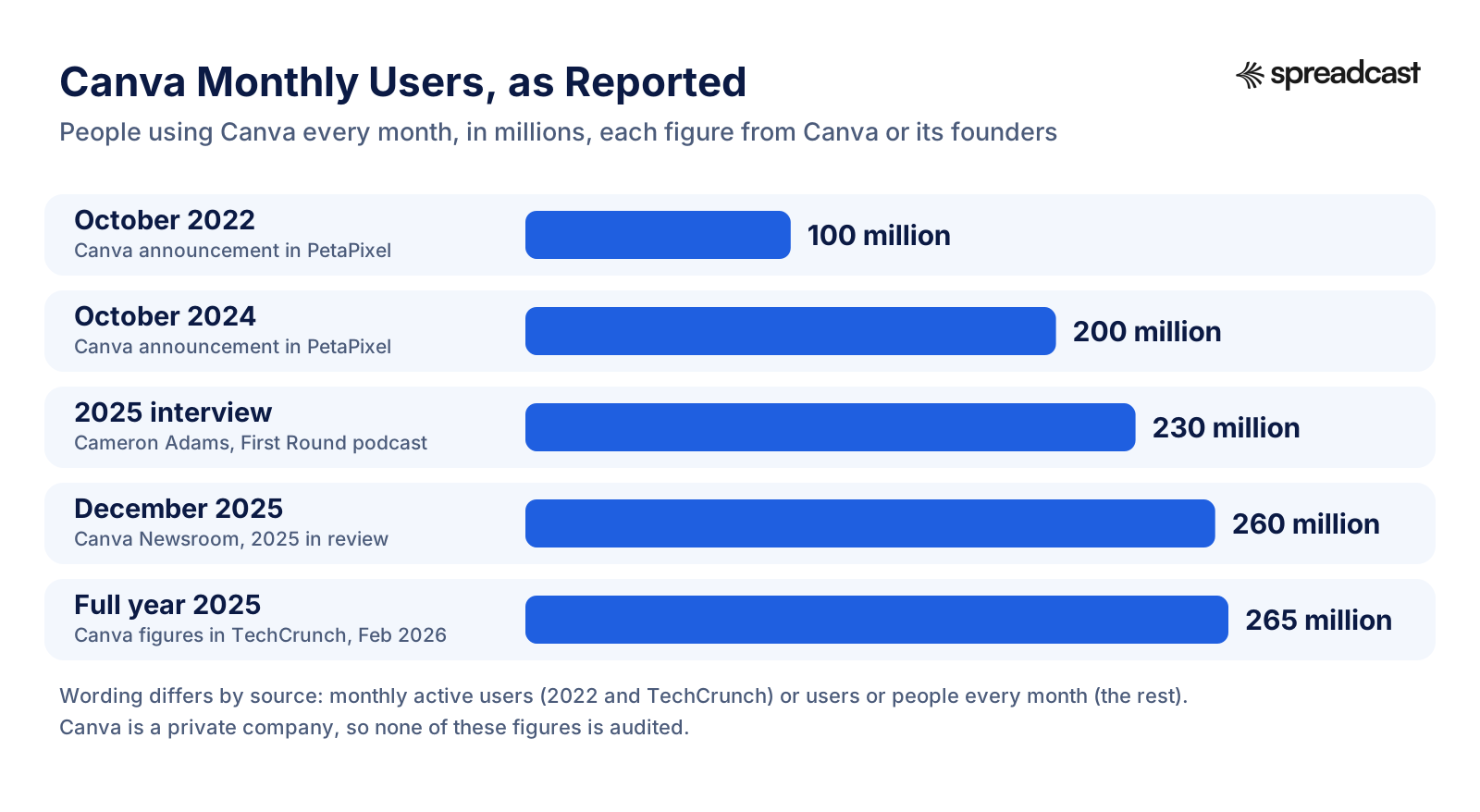
User growth roughly doubled from 100 million monthly active users in October 2022, as PetaPixel reported from Canva's announcement, to over 200 million two years later. The 2025 figures differ by source: 260 million in Canva's own December review, more than 265 million in the figures Canva gave TechCrunch. We used the higher one in our title because it's the latest, and it's within a few percent of the other.
The model explains the marketing. Canva earns from a small share of a huge free audience, about 31 million paid users out of 265 million monthly, by those 2025 figures. So the marketing job is mostly to keep the free audience growing cheaply, through search, languages, schools and word of mouth, and let the product turn some of it into subscribers. The brand campaigns sit on top of that engine. The What Will You Canva Today? post says their job is to show people how much Canva now does, which is a different job from finding new users one search at a time.
If you're working out what you can afford to spend to get a user for your own app, our startup marketing budget guide and LTV to CAC ratio explainer help with the math. And if you'd rather spend a fixed amount every month on steady marketing, Spreadcast Pro is $29 a month or $290 a year. It includes one app with up to 10 social accounts, the brand kit, the weekly plan of designed posts, moment posts for new versions and rating milestones, publishing to your networks, and Full Autopilot or approval first. Studio, at $79 a month, covers five apps.
Where Canva's Growth Strategy Hit Limits
Canva's strategy has worked for more than a decade, and 2024 to 2026 also showed where it strains: pricing, the cost of AI and the size of the company. Everything below was reported by Canva or the press, and none of it is unique to Canva: a growing app meets the same pressures, only smaller.
The 2024 Canva Teams Price Rise
In September 2024, The Verge reported that some Canva Teams subscribers in the US were reporting price increases from $120 a year for up to five users to $500 a year, reduced to $300 for the first 12 months by a 40% discount. Canva had already moved new Teams customers in April to $10 a month per user with a minimum of three users. Canva's communications lead Louisa Green told The Verge the change reflected the current price of the plan and the value of an expanded product experience, citing the Visual Suite and Magic Studio. Pro and Enterprise plans didn't appear to be affected, The Verge said, and some users posted online that they'd cancel.
For app makers, this one is about expectations more than price. People who joined when a product was cheap feel a jump harder than the new number alone would suggest, especially when the reason is features they didn't ask for. By November 2026, Teams was closed to new sign ups and Business had taken its place on the pricing page.
The Cost of AI
On August 12, 2026, Fortune reported that Canva had cut its expected revenue growth rate by a third, to 20%, after the cost of running AI features turned out higher than expected. Perkins told Fortune by email that demand for the new AI features had significantly exceeded expectations, and that Canva had chosen to slow the rollout while it rebuilt the architecture and cut the cost per task, which she said had fallen by nearly 90% since Canva AI 2.0 launched in April. She added that Canva AI users were creating three times as many designs as with the previous version of Canva AI.
Fortune also quoted Derek Hernandez, a senior research analyst at PitchBook, who said AI is making software no longer a zero marginal cost product. Fortune wrote that rising inference costs, the recurring cost of processing AI requests, now show up as slower growth for Canva. For any app with a free tier and AI features, that's the same math to plan for: every AI request costs something, including the free ones.
Growth Slowed and Canva Restructured
Then, on November 3, 2026, Perkins told staff that Canva was making significant changes affecting 1,271 people, 22% of the company, including role changes, relocations to central hubs and departures. She called it the hardest moment in the company's thirteen years and wrote that growth had slowed for the first time in a decade. Canva is bringing its Product, Growth and Platform teams into one product organization and making Sydney the main home for more product teams. Departing staff get at least six months of salary, and Canva set up a fund of $10,000 grants for those who want to start something of their own.
It's too early to say what this means for Canva's marketing. One detail is relevant to this page: the Growth team is being brought together with Product and Platform in one product organization. Perkins's stated reason is that improving one part of the product often required navigating between the three, with more handovers and coordination than necessary.
Two Years Without a New Feature
One older setback is useful because Canva got through it. In 2017, by Fortune's account, Perkins's priority was a project called Editor 2, a rewrite of Canva's code so it could take on bigger tasks. The Lenny's Podcast episode describes the team spending two years unable to ship a new feature during that rewrite. Canva came out the other side, and Fortune says the new code base is what let it add a video editor in 2021, just as people started wanting to make brand ads for TikTok.
What an App Maker Can Copy From Canva's Marketing Strategy
Canva's marketing strategy can be copied by a small app in its habits, even without its budget or its 39,604 template pages. Here's what transfers, in the order we'd do it if we started this week.
- Pick a first audience whose work is seen by others. Canva won social media managers, who posted what they made. Find the users whose results other people see.
- Prove the promise in the first minute. Canva's monkey in a hat made people feel like designers before they'd read anything. Let new users do one small, satisfying thing straight away.
- Build pages for the searches your users really make. Canva mapped hundreds of terms to landing pages. You need a handful, plus a store listing that answers the same questions.
- Start people from something finished. Templates beat blank pages. In your marketing, show the finished result your app makes, not a list of features.
- Go where your users already are. Canva supports the Facebook groups people started instead of building a forum. Post on the networks your users already open every day.
- Turn launches into moments. Canva names its releases and gives them a date. Announce every version of your app with a post that says what changed and why it matters.
- Let users vouch for you. Real users star in Canva's campaigns. Your best store reviews belong in your feed.
- Teach. Canva's Design School and certifications are marketing people thank it for. Share tips that help people get more from your app.
What's missing from that list: translating into 100 languages, buying Affinity, hiring Goodby Silverstein & Partners and filling SoFi Stadium. Those are real parts of Canva's strategy, and they need Canva's money. Everything on the list needs consistency more than cash. For channels that cost little, see how to promote an app for free, and for the founder's side of it, founder led marketing.
This page is part of a series. Duolingo's marketing strategy is the case for posting every day with one recognizable character, Spotify's marketing strategy is the case for a product that markets itself through Wrapped, and Cal AI's marketing strategy is the case for growing through creators and short video. Notion's marketing strategy is the closest cousin to Canva's, a community built on templates, while Netflix's marketing strategy and Airbnb's marketing strategy show a release driven calendar and a brand built on users' stories. Uber's marketing strategy and Monopoly Go's marketing strategy cover a marketplace and a mobile game. Our roundup of mobile app marketing examples puts more apps side by side.
Run Canva's Playbook on Autopilot With Spreadcast
Spreadcast runs your app's marketing: branded posts, made and scheduled for you. It takes the parts of Canva's strategy that don't need a stadium (one consistent look, a post for every release, tips that teach, users who vouch for you) and runs them for your app every week.
It starts with one link. Paste your App Store or Google Play link at /start and Spreadcast reads your listing. From it, Spreadcast builds a brand kit with your app's colors, fonts, icon and real screenshots, so every post looks like your app, the way every Canva design starts from a finished template rather than an empty page. Our guide to brand consistency without a design team explains why that consistency matters more than any single post.
Then it makes your first week of posts. The weekly plan runs from one post a week up to twice a day, with choices of 1, 2, 3, 5, 7 or 14 posts a week, published at the times you pick. The plan mixes post kinds that map to Canva's playbook:
| Canva tactic | What Spreadcast makes for your app |
|---|---|
| Templates that give everything one look | Every post designed from your brand kit on a weekly plan, 1 to 14 a week |
| Canva Create and named launches | Update posts when a new version ships on the App Store, and feature posts from your listing's real features |
| Design School, tips and how to content | Tips carousels built from your app's real features |
| Real users in campaigns, Fortune 500 proof | Review quote posts from your real App Store and Google Play reviews |
| Real moments in What Will You Canva Today? | Problem and fix posts that show the pain your app removes |
| Seasonal template collections | Seasonal posts tied to a real feature of your app |
| Milestones in every announcement | Rating milestone posts when your app passes a round number of ratings |
| Being where users already are | Publishing to 11 networks from one place |
You choose how hands on to be. With Approve First, every draft waits for your OK before it goes out. With Full Autopilot, posts are scheduled automatically at your posting times. You can start with approval for a week or two and switch once you trust the output; the auto post to social media page explains both modes, and cross posting shows how one post reaches every network.
Spreadcast publishes to Instagram, Facebook, LinkedIn, TikTok, YouTube, Pinterest, Threads, Bluesky, Mastodon, Telegram and Discord, and shows followers, interactions and reach for each network as the network reports them. If you'd rather work from Claude or ChatGPT, Spreadcast also connects through its MCP server, covered on the Claude for social media page.
Canva's launch day brought one visitor in the first 30 seconds. What changed its fortunes was everything the team did after that, every day, for years. You can start that habit for your own app today. Paste your store link at Spreadcast, look at the first week of posts it designs, and decide from there. The Free plan gives you three AI posts to judge the quality, and Pro at $29 a month runs the whole plan.
How We Researched This
We built this page in November 2026 from Canva's own words first. Canva is a private company and files no annual reports we could read, so we relied on the Canva Newsroom and on its founders speaking for themselves. On the Newsroom we opened Melanie Perkins's November 3, 2026 note to staff, the 2025 review, the posts on Canva Create 2026 and Canva AI 2.0, the campaign posts for What Will You Canva Today?, the squirrel campaign and Gemma Collins, the Mattel templates, the acquisitions of Affinity, Leonardo.Ai, Cavalry and MangoAI and Simtheory and Ortto, the ProSuite, Magic Studio, the World Tour and Perkins's 2018 post on Canva's early years. We also read Canva's About, pricing, Creators, Education and Nonprofits pages.
For the founders' accounts we read the transcript of Cameron Adams on the First Round podcast and watched the Lenny's Podcast episode with Melanie Perkins. For numbers and outside views we used TechCrunch, Fortune twice, The Verge, PetaPixel twice and The Drum. For the SEO section we downloaded Canva's robots.txt, main sitemap and landing page sitemap on November 15, 2026 and counted the addresses ourselves, grouping them by the words in each address; Canva didn't publish these counts. Every page linked here was opened on November 15, 2026.
Where sources disagreed, we said who said what: the year Fusion Books started (Fortune says 2011, Perkins's own account has a first customer in 2008), the number of languages at the start of Canva's international push (six besides English in Fortune, eight in Adams's memory) and 2025 users (260 million in Canva's review, over 265 million in TechCrunch). We left out figures we couldn't trace to Canva or a credible outlet, including search traffic estimates from SEO tools, social media follower counts, the prices Canva paid for its acquisitions and a US price for each plan, since Canva's pricing page showed us local prices only. Spreadcast features described here are the ones in the product on the same date.
Frequently Asked Questions
What is Canva's marketing strategy?
Canva lets its free product and search do most of the selling: template pages that match what people search for, in over 100 languages, plus word of mouth, free plans for schools and nonprofits, a yearly Canva Create launch and, more recently, TV campaigns. Cofounder Cameron Adams says only a minority of its traffic comes from marketing or paid channels.
How did Canva grow so fast?
By its founders' account, through two main levers: SEO landing pages built around the design jobs people search for, and translating Canva into about 100 languages within four years of launch. Word of mouth from early users, especially social media managers, did the rest.
How many people use Canva?
Over 265 million monthly active users and over 31 million paid users in 2025, according to figures Canva gave TechCrunch in February 2026. Canva's own December 2025 review said 260 million people use it every month.
How does Canva make money?
From subscriptions. Canva is free to use, with paid Pro, Business and Enterprise plans, an AI add on and printing. It reported $3.5 billion of revenue in 2025 and $4 billion of annual recurring revenue at the end of that year.
Is Canva's growth slowing?
Yes. In August 2026 Fortune reported Canva cut its revenue growth outlook to 20% because of AI costs, and in November 2026 Melanie Perkins wrote that growth had slowed for the first time in a decade as Canva restructured.
Can a small app copy Canva's marketing?
The habits, yes: one consistent look, a post for every release, tips that teach and real reviews in your feed. Spreadcast runs those for an app from its store link, with branded posts made and scheduled for you.
Where These Facts Come From
Every outside number, rule and price on this page links to the page it was taken from.
- An important update on our team, note from Melanie PerkinsCanva Newsroom
- New campaign asks What Will You Canva Today?Canva Newsroom
- A transformative year for Canva: 2025 in reviewCanva Newsroom
- The next era of CanvaCanva Newsroom
- Introducing Canva AI 2.0Canva Newsroom
- Canva invites you to Make Anything A Thing with new campaignCanva Newsroom
- UK brand campaign starring Gemma Collins as Creative DirectorCanva Newsroom
- The Mattel template collection is hereCanva Newsroom
- Welcome to Canva, LeonardoCanva Newsroom
- Welcome to Canva, AffinityCanva Newsroom
- Introducing Magic StudioCanva Newsroom
- 21 questions from Aussie startups: highs, lows and lessons from Canva's journeyCanva Newsroom
- Canva World Tour returnsCanva Newsroom
- Introducing the Canva ProSuiteCanva Newsroom
- Welcoming Simtheory and Ortto to CanvaCanva Newsroom
- Welcoming MangoAI and CavalryCanva Newsroom
- About CanvaCanva
- Plans and pricingCanva
- Canva CreatorsCanva
- Canva EducationCanva
- Canva NonprofitsCanva
- robots.txtCanva
- Main sitemap indexCanva
- Landing page sitemap indexCanva
- Cameron Adams on the growth levers behind CanvaFirst Round Review
- Canva gets to $4B in revenue as LLM referral traffic risesTechCrunch
- Canva founder Melanie Perkins's design startup is ready to take on Microsoft and GoogleFortune
- Canva, the rare startup that grew fast and made money, sees AI cut its growth forecast by a thirdFortune
- Canva says its AI features are worth the 300 percent price increaseThe Verge
- Canva passes 100 million monthly active usersPetaPixel
- Canva used by 95% of Fortune 500 companiesPetaPixel
- Real Canva users urge audiences to love your work in new campaignThe Drum
- Video: Melanie Perkins on Lenny's PodcastLenny's Podcast on YouTube
- Video: Introducing Canva AI 2.0 at Canva Create 2026Canva on YouTube
- Video: What Will You Canva Today? New DrinkCanva on YouTube
Researched and written by Mark Weizer. Last checked on November 15, 2026.
Keep Reading
- Playbooks
Uber Marketing Strategy: How a Two Sided App Won 215 Million Monthly Users
Uber's marketing strategy, taken apart from its own filings: the city by city launch playbook, ice cream and kittens, referrals on both sides, the 2018 brand reset, safety, Uber One, the Uber Eats Super Bowl ads, the ads business, what it spends and how it makes money. Then how to run the copyable parts for your own app.
- Playbooks
Monopoly Go Marketing Strategy: The Budget, the Ads and What It Bought
How much Monopoly Go spent on marketing, who said it and when, and what the money bought: localized ads, a celebrity TV campaign, friend invites, sticker trading, live ops seasons and crossovers. Then how a small studio can keep its own channels as busy as a big launch.
- Playbooks
Netflix Marketing Strategy: How 325 Million Paid Memberships Were Won
Netflix's marketing strategy, read from its own filings: originals as ads, personalized artwork, the Top 10, Tudum, live events, the ads plan and paid sharing. Then how to run the same release driven playbook for your own app.