Schedule Social Media Posts in One Calendar
See every post by hour, day or month, each in the color of its network. Drag a post to another time and it moves.
- Groceries$312
- Rent$1,100
- Coffee$46
- Split with a partner
- Monthly goals
- Bank sync in 40 countries
- Groceries$312
- Rent$1,100
- Coffee$46
- Split with a partner
- Monthly goals
- Bank sync in 40 countries
- Groceries$312
- Rent$1,100
- Coffee$46
- Split with a partner
- Monthly goals
- Bank sync in 40 countries
- Groceries$312
- Rent$1,100
- Coffee$46
- Split with a partner
- Monthly goals
- Bank sync in 40 countries
What a Telegram Scheduler Does, and When You Need One
A Telegram scheduler holds a finished channel post, text with a picture, an album or a video, and publishes it at a time you picked. Telegram has one built into every one of its apps, and it costs nothing. The third party tools work another way: you add their bot to your channel as an admin, the tool keeps your post on its own servers, and at the chosen minute the bot publishes it through Telegram's Bot API. Almost everything on this page follows from that difference: what each kind of scheduler can do, what it asks you to hand over, and what tends to go wrong.
Telegram is worth planning for. TechCrunch reported in March 2025 that Telegram's founder said the service had passed 1 billion active users. Channels are its broadcast tool: Telegram's channels tour says a channel can have an unlimited number of subscribers, only admins can post, and each post sends a notification to subscribers' phones. That last part is why timing matters more here than on a feed: a post at 3 in the morning can wake people up, or sink under the next morning's notifications.
We make Spreadcast, so read the comparison with that in mind. Spreadcast is a marketing automation tool that also makes the posts. It designs the picture in your brand, writes a caption for Telegram and for each other network you tick, checks each one against that network's limits, then schedules it. Telegram is one of the 11 networks it publishes to. It is strongest for App Store apps, where it also turns a new version or a rating milestone into a post, but anyone can upload their own pictures or video and schedule them the same way.
If you only want to use the scheduler inside the Telegram app, our step by step guide on how to schedule Telegram channel posts walks through the phone, the desktop app, groups and repeating messages. If the channel is new, how to grow a Telegram channel covers the part before scheduling matters. This page is about choosing and using a Telegram scheduling tool. Every outside fact here was read on November 11, 2026, with the source linked next to it.
- Groceries$312
- Rent$1,100
- Coffee$46
Every one of them read.
Two people, one budget, zero spreadsheets. The shared goals alone saved us an argument a week.
For Every
Trail
Does Telegram Have a Scheduler? Yes, and It Is Free
Telegram added scheduled messages in September 2019. The blog post that introduced them says to hold the Send button in any chat and choose Schedule Message to send it automatically at a set time. The same post says scheduling also works in Saved Messages, which turns a planned message into a reminder, and that you get a notification when a scheduled message is sent. The channels tour describes the same feature for channel owners: plan posts ahead and let them go live at a specified time, with silent messages as an option for late night or non urgent updates.
What makes the native scheduler dependable is where the post waits. Telegram's API page on scheduled messages says the message is added to a server side schedule queue for that chat and is sent automatically at the specified time, and that each private chat, group, supergroup and channel has its own queue. So the answer to "telegram schedule message offline" and "telegram schedule message need wifi" is the same: you need a connection only to set the schedule. After that, Telegram's servers send the post whether your phone is on, off or out of signal.
Repeats arrived later. Telegram's November 19, 2025 update post says scheduled messages and reminders can now repeat at intervals such as every day, and tells you to hold the Send arrow and tap Repeat. The API page is more precise: repeating scheduled messages are for Premium users, the allowed intervals are every day, every week, every two weeks, every month, every three months, twice a year and every year, and a repeat works only for a single message, not for an album.
Two smaller rules from the same API page are worth knowing. A message scheduled for less than 10 seconds in the future is sent right away. And the queue can be managed after the fact: the API lets Telegram's apps list it, send a queued message right now, edit one or delete it. On "telegram schedule message limit", there is a cap, but Telegram does not publish the number. Its reference for sending a message lists an error for "too many scheduled messages" and another for a date too far in the future, while neither the scheduled messages page nor the client configuration page gives a figure for either. ContentStudio's Telegram page puts the cap at 100 per chat; that is a vendor's figure, not Telegram's. If you plan to load a few hundred posts at once, try it on a test channel first.
So for one channel that posts a few times a week, written and illustrated by the person who schedules it, Telegram's built in scheduler is often enough, and it is free. A separate Telegram post scheduler starts to pay off when the post has to be made as well as timed, when you run several channels, or when the same news also has to land on Instagram, LinkedIn or Threads.
“I haven’t slept this well since I was a kid.”
Telegram's Built In Scheduler at a Glance
What the scheduler in Telegram's own apps does, with the Telegram page each line comes from. Read on November 11, 2026.
| Question | Telegram's answer | Where Telegram says it |
|---|---|---|
| How you schedule | Hold the Send button and choose Schedule Message | Scheduled messages announcement |
| Where it works | Any chat: private chats, groups, supergroups and channels, each with its own queue | Scheduled messages API page |
| Does your phone need to be on | No. The message waits in a server side queue and is sent automatically | Scheduled messages API page |
| Repeating posts | Every day up to every year, for Premium users, single messages only | Repeated messages post and API page |
| Silent posts | A notification with no sound, for late night or non urgent posts | Channels tour |
| Less than 10 seconds ahead | Sent immediately | Scheduled messages API page |
| Maximum queued messages | A cap exists, with an error for too many scheduled messages, but no number is published | sendMessage reference |
| Who can post in a channel | Only admins | Channels tour |
Telegram's apps differ slightly between iPhone, Android and desktop. If a menu looks different on yours, the feature is the same.
Telegram's Scheduler on a Computer
The desktop app hides scheduling behind the Send button, the same as the phone apps. This short tutorial shows it on a PC.

Where Telegram's Built In Scheduler Stops
The native scheduler is built around one chat at a time, which is exactly right for a quick post and limiting for a content plan. These are the gaps people run into once a channel becomes part of their marketing.
No calendar. Each chat has its own queue, shown as a list inside that chat. There is no week or month view, and no single place to see what goes out across three channels. A gap on Thursday or two posts an hour apart is easy to miss.
No making of the post. The scheduler sends what you already have. The picture, the album cover, the caption that fits under the picture: all of that has to exist before you hold the Send button.
Telegram only. A post scheduled in Telegram stays in Telegram. If the same announcement also belongs on Instagram, Facebook, LinkedIn, Bluesky or a Discord server, each one is a separate job in a separate app.
No drafts for someone else to check. Any admin with the right to post can schedule straight into the live queue. There is no step where a client or a colleague approves the post before it is queued.
Repeats need Premium and skip albums. The scheduled messages page limits repeating to Premium users and to single messages, so a weekly album or a recurring post from a free account still means scheduling each one by hand.
None of this is a flaw in Telegram. It is the boundary between a messaging feature and a planning tool, and it is where every Telegram scheduling tool, Spreadcast included, tries to earn its price.
Telegram's Own Scheduler Compared With Spreadcast
Both send your post while your phone is off. The difference is what happens before the post is queued and how many places it goes. Telegram's column comes from its own pages linked above; Spreadcast's from its code.
| Telegram's own scheduler | Spreadcast | |
|---|---|---|
| Where the post waits | In Telegram's server side queue for that chat | On Spreadcast's calendar, sent by its bot at the time |
| Phone needed at post time | No | No |
| How exact the time is | The moment you set; under 10 seconds ahead goes at once | Within minutes; the publisher runs every five minutes |
| Where one post goes | One chat | Every channel and network you tick |
| Seeing the plan | A list inside each chat | Week, month and list views across all accounts |
| Making the post | You bring the picture and the text | Designs the picture in your brand and writes the caption |
| Groups | Yes | No, channels only |
| Formatting | Telegram's full formatting | Plain text |
| Silent posts | Yes | No |
| Repeating posts | Premium users, single messages | No |
| Someone checks it first | No step for that | Drafts to approve, or Full Autopilot |
| Results | View counters, and statistics for larger channels | Views and reactions for public channels, members for all |
| Price | Free | From a $19 Post Pack, or Pro at $29 a month |
Telegram Scheduler Bot or Scheduler App: How Outside Tools Post
Every outside tool that posts to a Telegram channel does it through a bot, because that is the access Telegram offers to software. Telegram's bot features page explains that @BotFather creates a bot and generates the token that lets software act as it. The channel side is plain Telegram: only admins post in a channel, so the bot has to be made an admin with the right to post messages, which the Bot API reference calls can_post_messages.
Here is the part most comparisons skip. The Bot API has no scheduling field. Its send methods, sendMessage, sendPhoto, sendMediaGroup and sendVideo, publish when they are called. The schedule_date field that puts a message into Telegram's own queue belongs to the client API that Telegram's apps use, as the scheduled messages page shows. Telegram's reference for sending a message is blunt about it: one of its errors reads "Bots cannot schedule messages." So the honest answer to "telegram schedule message api" is: a bot cannot hand Telegram a post to send later. A Telegram post scheduler keeps the post on its own servers and calls the Bot API at the minute it is due.
That has three practical effects. Posts from a tool do not appear in the scheduled messages list inside the Telegram app; they live in the tool until they go out. You edit or move them in the tool, right up to the minute they are sent. And the tool's own timing decides how close to the minute a post lands: Spreadcast's publisher runs every five minutes, so a post goes out within minutes of its time.
Telegram scheduler bots, sometimes called planner bots, are the version of this that lives inside Telegram. You chat with the bot, send it the post, set a time, and the bot posts it to the channel where it is an admin. Controller Bot is a well known one; its Telegram page describes it as a bot for channel owners that helps create rich posts and view stats. A scheduler bot suits someone who lives in Telegram and only posts there. A scheduler app with a web calendar suits someone who plans across several channels or several networks, wants the post designed, or works with other people.
Building your own is the third route. An automation tool such as n8n has a Telegram node with Send Message, Send Photo and Send Media Group actions, which you run on a timer with a bot token from BotFather. It is flexible, and it is a small software project: you write the posts somewhere, you handle failures, you keep the token safe. Our n8n social media automation article covers that path in depth.
Telegram Bot API Limits Every Scheduler Works Within
These limits apply to any tool that posts through a bot on Telegram's servers, Spreadcast included. When a tool promises more, it is either running its own Bot API server or using a different route. From Telegram's Bot API reference and Bot FAQ, read November 11, 2026.
| Limit | What Telegram allows a bot | Where Telegram says it |
|---|---|---|
| Text post | 1 to 4,096 characters | Bot API, sendMessage |
| Caption under a picture or video | 0 to 1,024 characters | Bot API, sendPhoto and sendVideo |
| Album | 2 to 10 photos or videos in one group | Bot API, sendMediaGroup |
| File uploaded by the bot | Photos up to 10 MB, other files up to 50 MB | Bot API, sending files |
| File passed as a link | Photos up to 5 MB, other files up to 20 MB | Bot API, sending files |
| Own Bot API server | Uploads up to 2,000 MB | Bot API, local Bot API server |
| Posting speed | About one message a second in a chat; 20 a minute in a group | Bot FAQ, hitting limits |
| Silent post | disable_notification sends with no sound | Bot API, sendMessage |
| Scheduling | No scheduling parameter; the tool sends at the time itself | Scheduled messages API page |
Telegram's own apps send much larger files than a bot can. That gap is why a long video may post fine by hand and fail from a scheduler.
What to Check Before You Make a Scheduler Bot an Admin
Adding a bot as an admin gives software a standing right in your channel. A few minutes of checking up front is worth it, whichever Telegram scheduling tool you pick.
Which Rights It Asks For
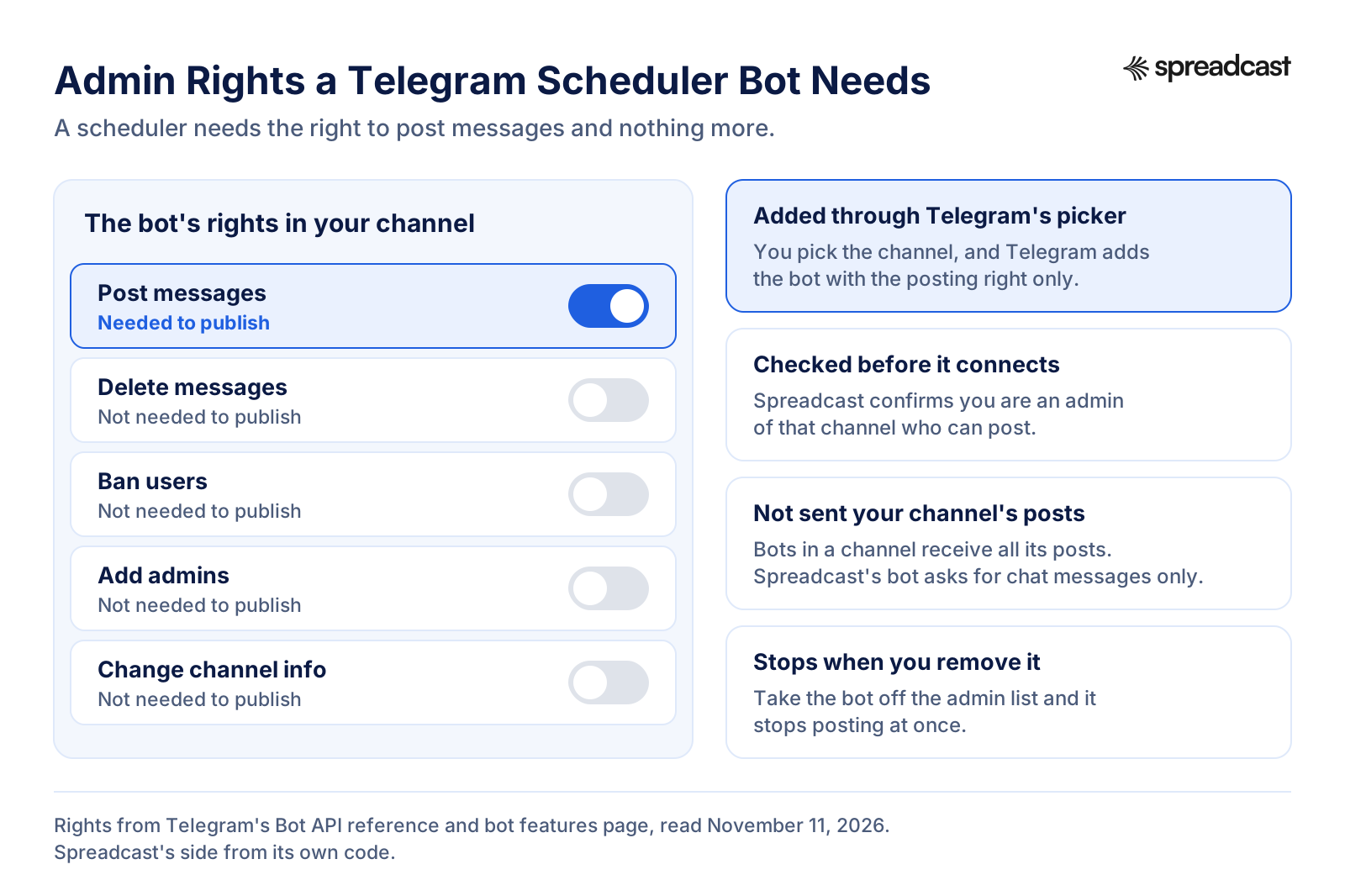
A scheduler needs to post messages and nothing more. When you add the bot, look at the switches: deleting messages, banning users, adding admins and changing channel info are not needed to publish. The Bot API reference lists each admin right separately, so a tool that asks for all of them is asking for more than posting.
What the Bot Can Read
Telegram's bot features page says every bot receives all messages from channels where it is a member, whatever its privacy setting. In plain words, a scheduler bot can be sent every post in your channel. Spreadcast's bot asks Telegram for chat messages only, the kind it needs to connect a channel, and not for channel posts, so the posts in your channel are not delivered to it.
Who Connected It
Anyone who can add admins can add a bot. In a team, agree on who connects the channel to which tool, and check the admin list every few months for bots nobody uses anymore. Removing a bot from the admin list stops it posting at once.
Private Channels and Invite Links
Some tools ask for the channel's username or an invite link after you add the bot. Publer's Telegram help notes that for a private channel, the invite link it needs is visible to the owner only, so an admin who is not the owner may get stuck there.
Whose Name Shows on the Post
In a channel, posts show the channel's name, not the bot's or yours. Telegram's channels FAQ says a channel message is signed with the channel's name, and that an owner can switch on admin signatures if readers should see who posted.
One Bot, One Running Copy
If you build your own scheduler, Postiz's Telegram docs warn that Telegram allows only one connected process per bot token at a time, and that running the same token in two places causes conflict errors. Make a separate bot for each environment.
Admin Rights a Telegram Scheduler Bot Needs
Of the switches Telegram shows when you add a bot as an admin, a scheduler needs one.
Using Spreadcast as Your Telegram Post Scheduler
The whole path, in a web browser on a computer or a phone. Connecting happens inside Telegram, in a chat with Spreadcast's bot; after that every post is one editor and one calendar.
- 1
Connect Your Channel From Telegram's Picker
In Accounts, press Connect next to Telegram, then Open Telegram. Press Start in the chat with Spreadcast's bot and tap Choose Channel. Telegram opens its own list of channels where you can post. Pick one and confirm, and Telegram adds the bot as an admin with the right to post messages; the other switches, such as deleting messages or adding admins, stay off. Spreadcast then checks with Telegram that you are an admin of that channel who can post. The link is good for 15 minutes.
- 2
Make the Post or Upload Your Own
Open Create. Generate a Post designs a picture in your brand from a sentence; Upload My Own takes your own picture, up to 10 pictures, or a video. A Telegram post can also be text only. If you have an App Store app, the designs use your real screens, icon, colors and fonts.
- 3
Tick Telegram and Read the Caption
Spreadcast writes a separate caption for Telegram: a channel post of up to three short paragraphs, under 900 characters and without hashtags, so it fits under a picture. Edit it as you like. Telegram takes up to 4,096 characters, and the editor shows a preview of how the post will look in the channel.
- 4
Let the Check Run
Before anything is scheduled, Spreadcast checks the post against Telegram's limits: the text fits, there are no more than 10 pictures, and a video whose size is known is not over Telegram's 50 MB. A problem is named in plain words with what to change. Fix it, or schedule the post without Telegram so the other networks still go out.
- 5
Pick the Time or Drag It
Pick a day and time, or use a quick pick such as this evening. Times are shown in your device's time zone unless you set another in settings. Scheduled posts sit on a calendar with week, month and list views, and you can drag a card to another day to move it.
- 6
It Goes Out Within Minutes of Its Time
Spreadcast's publisher runs every five minutes, so the post reaches your channel within minutes of the slot. Open it from the calendar and a link takes you to the post in the channel. If Telegram refuses it, the calendar marks the post with Telegram's reason and a Try Again button.
What Happens When Spreadcast Sends Your Telegram Post
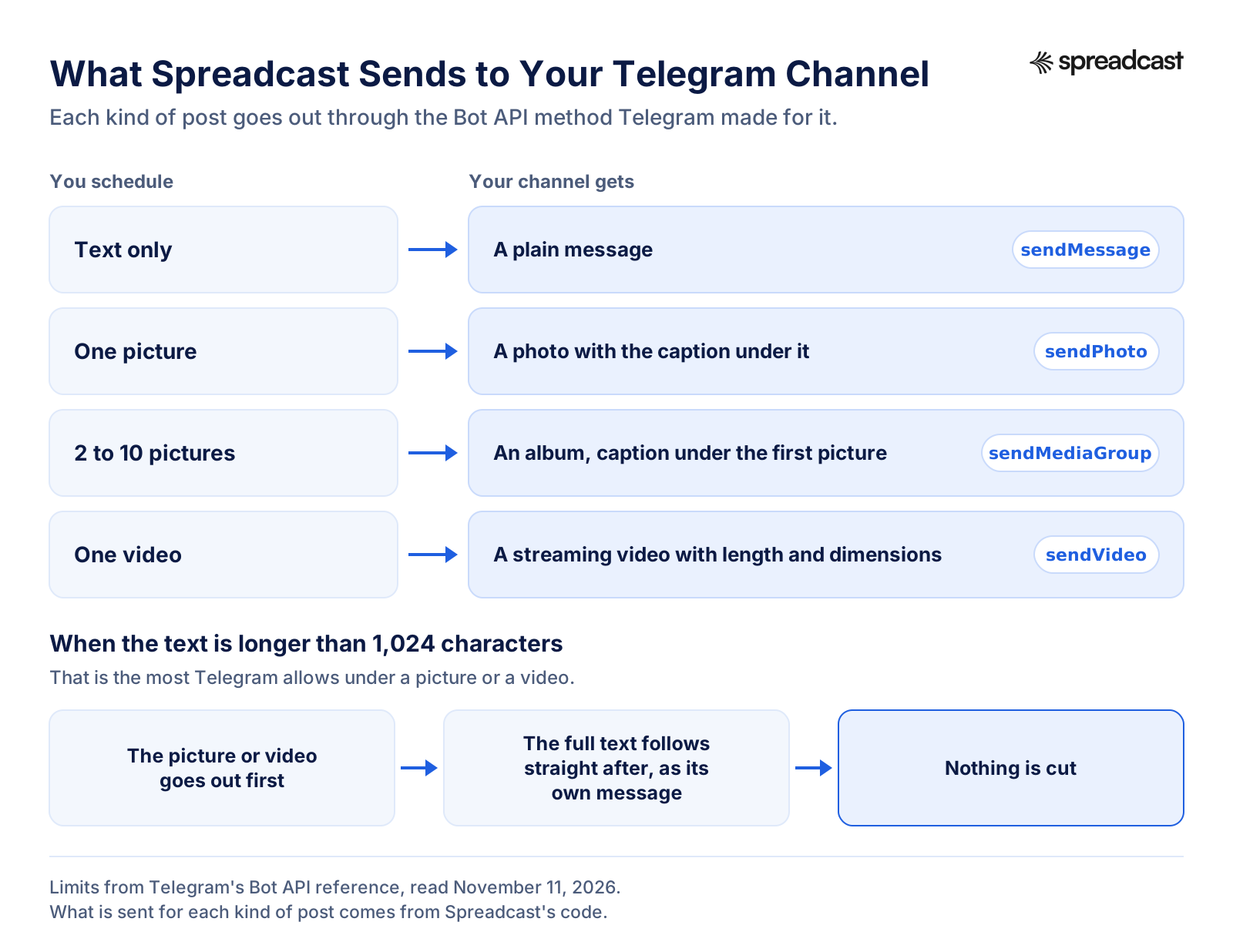
Knowing what a scheduler sends helps when something looks different in the channel than it did in the editor. Spreadcast talks to Telegram directly through the Bot API, with no service in between, and each kind of post goes out through the method Telegram made for it.
Text only goes out as a plain message. One picture goes out as a photo with the caption under it. Two to ten pictures go out as an album, with the caption under the first picture, which is how Telegram shows an album caption anyway. A video goes out as a streaming video, with its length and dimensions passed along so Telegram's apps can show it properly before it loads.
Files are uploaded to Telegram rather than handed over as links. The Bot API reference allows 10 MB for a photo and 50 MB for a video when the bot uploads it, against 5 MB and 20 MB when Telegram has to fetch the file from a link, so uploading lets more of your files through. Each picture can be up to 10 MB, and a video up to 50 MB.
Long text with a picture is handled for you. Telegram allows 1,024 characters under a picture or a video. When your text is longer, Spreadcast posts the picture or video first and the full text as its own message straight after, so nothing is cut. If the picture went out but the text did not, the calendar says exactly that, so pressing Try Again does not post the picture twice without you knowing.
When the post is live, Spreadcast keeps its link. A public channel's post has a link anyone can open. A private channel's post gets a link that opens for members of the channel. Either link opens from the post on your calendar, which is the quickest way to check it landed where you meant it to.
How Each Kind of Telegram Post Goes Out
Text, one picture, an album and a video each take a different Bot API method, and long text with a picture is split in two.
How to Choose a Telegram Scheduling Tool
Most Telegram schedulers look alike on their landing pages. These are the questions that separate them once you connect a real channel, and where to find the answer.
Channels, Groups or Both
Some tools post to channels only, others to groups as well. If you run a discussion group next to your channel, check the vendor's Telegram page for the word group before you pay. Spreadcast is channels only.
How It Connects
Every tool uses a bot. The difference is how much you do by hand: add the bot as an admin, then paste a username or an invite link, or pick the channel in Telegram's own picker and let the tool add the bot with the right it needs.
Formatting You Need
If your posts rely on bold lines, hidden links or code, look for HTML formatting in the tool's Telegram help, as Publer's guide lists. A tool that sends plain text is fine for short news, less so for long reads.
Album and Video Size
Telegram allows a bot albums of up to 10 items and uploads of up to 50 MB for a video on its own servers. A tool that promises far larger files is either running its own Bot API server or quoting the Telegram app's limits, so test one big file before you rely on it.
Where the Numbers Come From
The Bot API gives no post views. A tool that shows Telegram analytics is reading them some other way, such as public post pages, so ask what it reads for a private channel.
Who Approves Before It Posts
A channel post notifies every subscriber, so a mistake is loud. If more than one person writes, look for drafts that someone approves before the post is queued.
Price per Channel
Some tools price by account, so each extra channel costs more; others price by brand or by plan with a set number of accounts. Count your channels and your other networks together before you compare.
Telegram Channel or Group: What Your Scheduler Posts To
Nearly every vendor's Telegram FAQ answers one question early: channels, groups or both. The two are built for different jobs. Telegram's FAQ describes groups as the place for sharing and working together, able to grow to 200,000 members, with admins given detailed rights. A channel is for broadcasting to an audience of any size: a post is signed with the channel's name and photo rather than yours, and every post carries a view counter.
That difference shows up in a scheduler in three places. The first is whose name sits on the post. In a channel, a scheduled post looks like any other post from the channel. In a group, the bot that sent it shows: Publer's Telegram guide says its bot always appears alongside the posts it sends to a group, while a post in a channel appears as posted by the channel itself. If group members should see your brand rather than a tool's bot, that settles it.
The second is pace. The Bot FAQ says a bot cannot send more than 20 messages a minute in a group, on top of the one message a second it asks bots to stay under in any chat. A plan that fires a batch of posts at the same minute meets that ceiling sooner in a group. The third is what the bot sees. Telegram's bot features page says bots added to a group run in privacy mode by default and only see messages meant for them, except bots added as admins, which receive all messages. Publer, for one, asks to be made an admin in groups as well as channels, so in practice its bot can read the whole conversation.
Many brands use both, linked together. The channels tour explains that adding a discussion group from the channel info page puts a comment button under each post, and the comments show up in threads under the posts and in the group as well. In that setup the scheduler only has to post to the channel; the conversation takes care of itself in the group. That is the setup Spreadcast is built for, since it connects channels and not groups. If you need scheduled posts inside a group itself, Publer, ContentStudio, Nuelink and Postiz say on their own pages that they post to groups, and Fedica's Telegram page covers channels.
Best Telegram Scheduler Tools Compared: Spreadcast, Publer, Fedica, Postiz
Eight ways to schedule Telegram channel posts, with prices and Telegram features read on each vendor's own page on November 11, 2026. Spreadcast comes first because it is the only one here that designs the post in your brand and writes a Telegram caption as well as scheduling it. Then Telegram's own scheduler, the tools with a free plan, the paid tools from the cheapest up, and the build it yourself route.
- 1
Spreadcast
Free for 3 posts to download; scheduling from a $19 Post Pack or Pro at $29 a monthBest when you want the Telegram post made for you, then scheduled
Spreadcast designs the picture, writes a caption for Telegram and every other network you tick, checks each against that network's limits, then sends it to your channel at its time. You connect a channel by picking it in Telegram's own channel picker, and the bot gets the right to post and nothing else.
It publishes to Instagram, Facebook, LinkedIn, TikTok, YouTube, Pinterest, Threads, Bluesky, Mastodon, Telegram and Discord from one calendar. For an App Store app it also reads your listing every day and turns a new version or a rating milestone into a post, next to a weekly plan of posts at your posting times.
Pro is $29 a month for 1 app or brand and 10 social accounts, with design, captions, checks, publishing and analytics included; each Telegram channel counts as one account. The Post Pack is $19 once for 10 posts designed and published. Claude and ChatGPT can schedule Telegram posts through the Spreadcast MCP server, covered on our Telegram MCP server page.
Pros
- Makes the picture and the caption, not only the schedule
- Channel connected through Telegram's own picker
- Bot asks for the posting right only
- Same post to 10 other networks
Cons
- Channels only, not groups
- Plain text, no bold or buttons
- Free plan does not publish
- 2
Telegram's Own Scheduler
Free; repeating posts need PremiumBest free Telegram scheduler for one channel, one post at a time
Built into every Telegram app. Telegram's API page says scheduled messages wait in a server side queue per chat and go out automatically, so your phone can be off. Repeats every day up to every year are for Premium users and single messages only.
No other software touches your channel, and nothing has to be connected. It has no calendar across channels, no other networks and no help making the post.
Pros
- Free
- Sends with your phone off
- Silent posts
Cons
- One chat at a time
- Telegram only
- Repeats need Premium
- 3
Publer
Free for 3 accounts, then from $5 a monthBest cheap Telegram scheduler priced per account
Publer's plans article lists a free plan with up to 3 social accounts, excluding X, and up to 10 scheduled posts at a time per account. Professional starts at $5 a month for one account with a 7 day trial, and every tenth account is free.
Publer's Telegram connection help has you add its bot, publr_bot, as an admin of a group or channel and paste the username or invite link. Its Telegram guide lists text, links, single and multi photo posts of up to 10, videos and GIFs, styling with HTML tags, a 1,024 character photo caption, and says silent messages are not yet supported. The connection help adds that Telegram gives no insights through its API. Our best Publer alternatives compares it further.
Pros
- Very low starting price
- Groups as well as channels
- Bold, italic and links
Cons
- No silent posts
- You make every post
- 4
Fedica
Free, then $15 a month or $10 billed annuallyBest free plan if Telegram is one of a dozen networks
Fedica's Telegram scheduler page says Telegram scheduling is free on Fedica, and has you add @fedica_bot as a channel admin with access to post messages. The page covers channels and does not mention groups.
Fedica's pricing page lists a free plan of 12 accounts, one per platform, with up to 10 scheduled posts at a time. Publish is $15 a month, or $10 billed annually, with up to 100 scheduled posts.
Pros
- Telegram on the free plan
- Many networks, one per platform
Cons
- 10 queued posts at a time on free
- One account per network
- 5
ContentStudio
From $19 a month billed annually, 7 day trialBest for agencies running many client channels
ContentStudio's Telegram page says it manages unlimited Telegram channels and groups from one dashboard, takes up to ten photos and videos in one media group, supports formatting and link previews, and has you add its bot as an admin. It says its analytics cover Telegram along with the other networks.
ContentStudio's pricing page lists Standard at $19 a month billed annually, or $29 month to month, for 5 social accounts and 1 user, with a 7 day trial and no card.
Pros
- Channels and groups
- Client connection without sharing logins
Cons
- No free plan
- You make every post
- 6
Nuelink
From $24 a month, or $192 a year; 7 day trialBest when one brand posts a lot to many channels
Nuelink's Telegram page says it schedules to Telegram channels and groups, with text, images, videos and carousels of up to 10 items, and images up to 10 MB each.
Nuelink's pricing page lists Standard at $24 billed monthly, or $192 a year billed yearly, for 1 brand, 10 channels and 365 posts in the queue, Telegram included on every plan, a 7 day trial and a 30 day money back guarantee.
Pros
- Telegram on every plan
- 30 day money back
Cons
- One brand on Standard
- No free plan
- 7
Postiz
From $29 a month, or $23 billed yearly; 7 day trialBest if you want an open source scheduler you can run yourself
Postiz's Telegram page says it posts to channels and groups, handles media groups of up to 10 files, supports a subset of Telegram's HTML formatting, and links to its open source code. Its pricing page lists Standard at $29 a month, or $23 billed yearly, for 5 channels, with a 7 day trial and no free plan on its cloud.
Run yourself, Postiz needs your own bot: its Telegram docs start with creating one in BotFather. See our best Postiz alternatives.
Pros
- Open source
- Channels and groups
Cons
- No free cloud plan
- Self hosting is a project
- 8
n8n With Your Own Bot
Community Edition to run yourself; cloud from €20 a month billed annuallyBest for builders who want full control
n8n's Telegram node sends messages, photos and media groups through a bot you create. n8n's pricing page says the self hosted Community Edition is on GitHub, and lists the Starter cloud plan at €20 a month billed annually.
You decide where posts are written, when they go and what happens when one fails. You also own every one of those problems.
Pros
- Any logic you can build
- Self hosted version on GitHub
Cons
- You build and maintain it
- No calendar or design
Telegram Scheduler Prices Side by Side
The lowest plan that publishes to Telegram for each tool, from the pages linked above, on November 11, 2026. Prices in US dollars except n8n, which prices in euros.
| Tool | Lowest plan that posts to Telegram | What it covers | Free plan or trial |
|---|---|---|---|
| Spreadcast | Post Pack $19 once, or Pro $29 a month | Pro: 10 social accounts, posts designed and captioned for each network, Telegram channels and 10 other networks | Free plan with 3 posts to download, no publishing |
| Telegram's own scheduler | Free | Any chat you can post in; repeats need Premium | Free |
| Publer | From $5 a month | Professional, starting at 1 account | Free for 3 accounts |
| Fedica | $15 a month, or $10 billed annually | Publish, 100 scheduled posts at a time | Free plan, Telegram included |
| ContentStudio | $19 a month billed annually | Standard, 5 social accounts, 1 user | 7 day trial, no card |
| Nuelink | $24 a month, or $192 a year | Standard, 1 brand, 10 channels, 365 queued posts | 7 day trial |
| Postiz | $29 a month, or $23 billed yearly | Standard, 5 channels | 7 day trial; open source to run yourself |
| n8n | €20 a month billed annually | Starter cloud, 2,500 executions a month | Community Edition to run yourself |
Prices exclude tax. Buffer is not listed because Telegram is not on Buffer's supported channels list. Spreadcast's yearly billing gives 2 months free, and Pro and Studio come with a full refund within 7 days.
A Telegram Post Scheduler for App Makers
A Telegram channel is a natural home for an app's news: a new version, a feature people asked for, a rating milestone, a sale. The people who join an app's channel chose to hear about it, and each post reaches their phones as a notification, which is more than a feed post can promise. The hard part is keeping it fed while you are also building the app.
This is where Spreadcast differs from the other Telegram schedulers on this page. It reads your App Store listing every day. When a new version appears, it turns the release notes into a post with a picture made from your real screens, writes a short channel post for Telegram and a caption for each other network, and either schedules it or waits for your Approve. A new rating milestone works the same way. The weekly plan fills the days between with posts about a feature, a review, tips or a problem the app solves.
You still decide what goes out. Each post can be edited before it is scheduled, the Telegram caption can be rewritten or shortened, and anything can be moved on the calendar. If release notes are your weak spot, the free app release notes generator helps write them, and how to promote an app on social media covers where Telegram fits next to the other networks.
Without an App Store app, none of this is lost: you upload your own pictures or video, Spreadcast writes the Telegram caption and schedules it, and the other networks get theirs. The automatic posts from app news are simply not there.
Telegram Auto Post Tools Versus a Scheduler
"Telegram auto post" covers two different things, and it helps to know which one you are after before you pick a tool. One kind of Telegram auto poster copies content in from somewhere else: an RSS feed, a website, another channel. The post is whatever the source said, sent the moment it appears. The other kind is a scheduler with automation on top: it decides what to post and when, and still lets a person look at it first.
The first kind is useful for a news feed that mirrors a blog. It is risky for a brand channel, because nobody reads the post before it reaches thousands of phones with a notification. A Telegram channel post can be edited or deleted after the fact, which the channels tour points out, but subscribers have already been notified by then.
Spreadcast is the second kind. For an App Store app it reads your listing every day, and a new version or a rating milestone becomes a post with a picture and a caption for each network, Telegram included. A weekly plan adds posts of other kinds, such as a feature, a review or tips, at your posting times. You choose how much runs on its own. On approve first, each post waits as a draft on your Dashboard, and Approve schedules it for its day. On Full Autopilot, Spreadcast schedules the posts itself and they go to your Telegram channel at their times with the other networks.
That is the honest version of a Telegram automatic post: made from something real that happened in your product, checked against Telegram's limits, and either approved by you or sent on a plan you set. More on the two modes is on our auto post to social media page, and on approving posts as a team on social media approval. If you want the broader picture, how to automate social media posts compares the approaches across networks.
A real 5 star review from the App Store, shown big on the cover.
How to Read the Results of Scheduled Telegram Posts
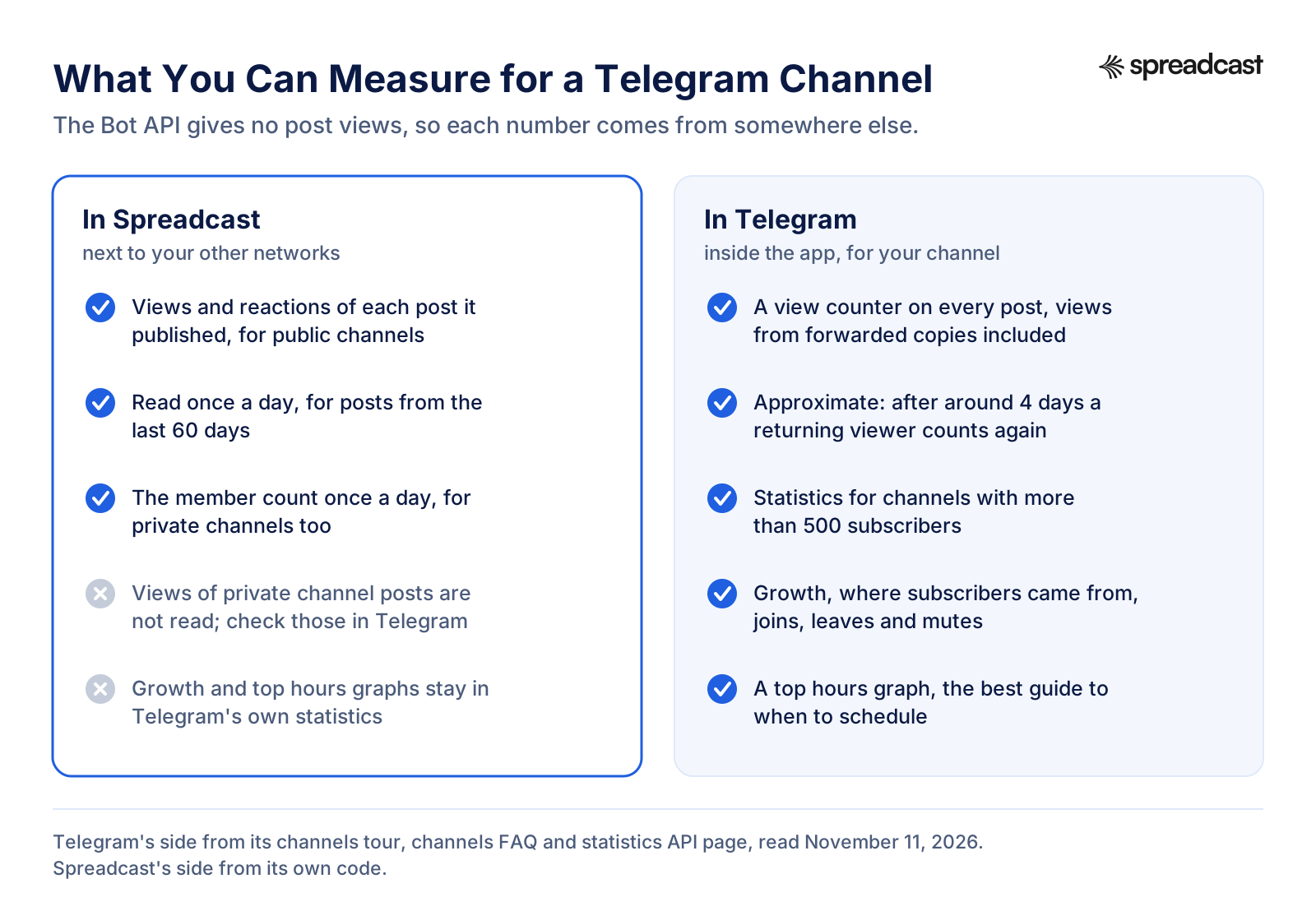
Telegram gives channels two kinds of numbers. Every post has a view counter. Telegram's channels FAQ says views from forwarded copies are included, that the numbers are approximate, and that after around 4 days Telegram forgets you saw a post and counts you again if you return to it. So views are a good guide to reach over time and a poor one for small differences between two posts.
The second kind is channel statistics. The channels tour says advanced statistics are available for channels with more than 500 subscribers, with graphs of growth, post performance, where subscribers came from, and how many join, leave and mute. Telegram's statistics API page says the exact size limit is a server setting, and lists what the statistics hold, including a graph of top hours. That top hours graph is the most useful chart a Telegram scheduler user has, and it lives in Telegram, not in any outside tool.
Outside tools can see less than you might expect. Publer's Telegram connection help says Telegram does not provide insights through its API. Spreadcast works around it where it can: for a public channel, it reads the views and reactions of each post it published from the post's public page, once a day, for posts from the last 60 days. It also reads the channel's member count once a day through the Bot API, which works for private channels too. A private channel's posts have no public page, so their views and reactions are not read; check those in Telegram.
Put together, that is enough to compare scheduled posts with each other on one page, next to your other networks, while the deeper audience numbers stay in Telegram's statistics. Our social media analytics page explains what Spreadcast reads on each network, and where the numbers stop.
Telegram Post Views in Spreadcast and in Telegram
Which numbers a scheduler can read for your channel, and which stay inside Telegram.
When to Schedule Telegram Posts
Telegram publishes no best time to post, and with notifications in the mix a general rule would not travel well anyway: a channel for traders in one time zone and a channel for app users in thirty behave nothing alike. Your own channel is the better source.
If your channel is big enough for statistics, start from the top hours graph described on Telegram's statistics page. Pick two or three slots from it, schedule a month of posts across them, then compare views by slot rather than by single post. Move the weakest slot and repeat. A scheduler makes this cheap, because moving a slot is dragging cards on a calendar, not staying up for it.
Three Telegram features help with timing. Silent messages, which the channels tour suggests for late night or non urgent updates, arrive with no sound. Albums arrive as one notification for the whole batch, so five pictures in one album interrupt people once, not five times. And Telegram scheduling works across time zones by design: you set a moment, and it goes out at that moment for everyone. In Spreadcast, times follow your device unless you set a time zone in settings, and each post is saved as an exact moment, so it does not shift when you travel.
How often depends on what the channel promised its subscribers. A product channel that posts real news two or three times a week keeps people longer than one that fills every day. Plan a month at a time in a social media content calendar, and if you post the same news elsewhere, our guide to a month of social content in one afternoon shows how to batch it.
- Groceries$312
- Rent$1,100
- Coffee$46
When a Scheduled Telegram Post Does Not Go Out
The usual reasons a post from a Telegram scheduler does not appear, or appears wrong, in the order worth checking. For problems with scheduling inside the Telegram app, see our step by step guide linked above.
The Bot Lost Its Admin Rights
If someone removed the bot or switched off its right to post, every post after that fails. Spreadcast says so in plain words, that it can no longer post to this channel, and asks you to connect Telegram again and choose the channel. The Accounts page also asks Telegram about each channel and marks one the bot was removed from.
The Video Is Too Big
A bot on Telegram's servers can upload videos up to 50 MB, per the Bot API reference. When the video's size is known, Spreadcast checks it before scheduling and greys Telegram out for a file that is too big; it checks again when it sends the file. Export a shorter or smaller file, or post that one from the Telegram app, which takes much larger files.
Telegram Asked to Slow Down
The Bot FAQ says a bot should avoid more than one message a second in a chat and will get errors if it keeps going. Spreadcast waits and tries once more when Telegram asks for a short pause; if it still refuses, the post is marked with a Try Again button. Spacing posts a few minutes apart avoids it.
The Caption Moved Below the Picture
Text over 1,024 characters cannot sit under a picture or a video in Telegram. Spreadcast posts it as a message of its own right after the picture. If you want it under the picture, shorten it below 1,024.
It Went Out a Few Minutes Late
A tool that posts through a bot sends at its own run, not inside Telegram's queue. Spreadcast's run is every five minutes, so a post can land a few minutes after its slot. For a post that must go out at an exact second, such as a countdown, use Telegram's own scheduler.
It Is Not in Telegram's Scheduled List
That is expected. Bots cannot use Telegram's schedule queue, so posts from any outside scheduler wait in that tool, not in the Telegram app. Look for them on the tool's calendar.
Telegram Post Specs Spreadcast Checks Before Scheduling
What Telegram allows a bot, and what Spreadcast's editor checks for Telegram. If a scheduled post fails, it is usually one of these.
| Spec | What Telegram allows a bot | Spreadcast for Telegram |
|---|---|---|
| Text only post | 1 to 4,096 characters | Allowed, up to 4,096, counted as you type |
| Caption with a picture or video | Up to 1,024 characters | Longer text follows as its own message |
| Pictures in one post | 2 to 10 in an album | Up to 10 |
| Picture size | Up to 10 MB uploaded | Up to 10 MB each, uploaded |
| Video size | Up to 50 MB uploaded | Up to 50 MB, checked before scheduling and again when sent |
| Video length | Limited by size, not length | Up to 4 hours in the editor; the 50 MB limit comes first |
| Pictures and video together | Allowed in an album | One video, or pictures |
| Formatting | Bold, italic, underline, strikethrough, spoilers, quotes and links | Plain text |
| Silent post | Optional | Not offered |
Limits from Telegram's Bot API reference, read November 11, 2026. Our social media character limits page lists every network's numbers side by side.
Post the Same News to Telegram and Every Other Network
For most brands a Telegram channel is one place the news goes, not the only one. In Spreadcast you tick each network under Post To, and each one gets its own caption from the same idea: a short channel post for Telegram, a longer one for LinkedIn, a few lines with hashtags for Instagram, a title and a link for a pin. The check before scheduling covers each network's own rules, so a picture count that works for Telegram but not for Bluesky is flagged for Bluesky only.
The other networks have their own scheduler pages. The Instagram scheduler covers Reels, carousels and per picture framing. The TikTok scheduler covers feed or drafts. The Pinterest scheduler covers boards, titles and links. The YouTube scheduler covers titles and video settings. The Facebook post scheduler covers Pages and groups, and the LinkedIn scheduler covers profiles and company pages. The general social media scheduler page compares tools across all of them.
If you run several brands or several channels, each Telegram channel is its own account in Spreadcast, and on Studio each brand keeps its own channels, colors and voice. Our manage multiple social media accounts page explains how they stay apart, and cross posting covers what each network expects from the same post.
Telegram Scheduling From Claude or ChatGPT
If you already plan in an AI assistant, you can schedule from the chat. Through Spreadcast's MCP server, Claude or ChatGPT can make a post, write the Telegram caption and put it on your calendar: "a post for the channel on Thursday at 9, about the new export feature, with the release screenshot". Posts arrive as drafts unless you let the connection publish, and every post passes the same Telegram check as in the editor.
What the assistant can and cannot do with Telegram is laid out on our Telegram MCP server page. Two guides go further: how to schedule social media posts with Claude and with ChatGPT.
What Spreadcast Does Not Do on Telegram
Worth knowing before you connect a channel, with what to do instead.
Channels Only, Not Groups
Spreadcast connects Telegram channels. It does not post to groups or private chats. For a group, Publer, ContentStudio, Nuelink and Postiz say on their pages that they support groups, or use Telegram's own scheduler.
Plain Text, No Formatting
Posts go out as plain text, without bold, italic, hidden links or buttons under the post. If formatting matters for a post, Publer and Postiz support Telegram's HTML formatting, or finish that post in the Telegram app.
No Silent Posts, Pins or Polls
Every post goes out with a normal notification. Spreadcast does not pin posts or send polls. Both are a tap in the Telegram app once the post is live.
No Repeating Posts
There is no repeat setting. For a message that goes out every week, Telegram's own repeat option, for Premium users, is the simplest route.
Videos Up to 50 MB
That is Telegram's limit for a bot on its servers, and Spreadcast keeps to it. For a larger video, post it from the Telegram app.
Strongest With an App
The designs come from your brand and, for App Store apps, your real screens and release notes. Without an app you upload your own pictures or video and Spreadcast schedules them; the design is yours. The free plan makes posts to download and does not publish.
What Spreadcast Costs for Telegram Scheduling
Every plan designs the posts. What changes is whether Spreadcast publishes them and how many brands and accounts it covers. Full details are on the pricing page.
| Plan | Price | What you get for Telegram |
|---|---|---|
| Free | $0, no card | 3 posts made for you, to download with a small Spreadcast mark and post yourself. No scheduling |
| Post Pack | $19 once, never expires | 10 posts designed and published, $1.90 a post, to your Telegram channel and any other network you connect |
| 30 Day Pass | $39 once, nothing renews | Everything in Pro for 30 days |
| Pro | $29 a month | 1 app or brand, 10 social accounts, posts designed and captioned for each network, calendar, autopilot or one tap approval, Claude and ChatGPT |
| Studio | $79 a month | Up to 5 apps or brands and 50 social accounts, each brand with its own channels, and 3 seats |
Each Telegram channel counts as one social account. Yearly billing gives 2 months free. Pro and Studio come with a full refund within 7 days.
How We Checked This
On November 11, 2026 we read Telegram's 2019 post introducing scheduled messages, its November 2025 post adding repeating ones, the channels tour, the channels FAQ and the main FAQ on telegram.org, and on Telegram's developer site the reference for sending a message, the scheduled messages page, the client configuration page, the channel statistics page, the Bot API reference, the Bot FAQ and the bot features page. Where Telegram's pages leave something open, such as a cap on queued messages, we say so rather than guess.
Every competitor price and Telegram feature comes from that vendor's own pricing page, help article or Telegram page, read the same day, and we say whose page it is in the text. We ran no tests of other tools and quote no results we did not read. The video is a third party tutorial; we checked its title, date, length and the steps in its description against Telegram's own announcement, and dropped a second one whose steps we could not confirm against today's app.
Spreadcast's behavior on Telegram was checked in its code the same day: how a channel is connected and which right the bot gets, what is sent to Telegram for each kind of post, the limits the editor checks, and which numbers are read back. If something here goes out of date, the features overview is updated with each change.
Frequently Asked Questions
Is there a free Telegram scheduler?
Yes. Telegram's own scheduler is free in every Telegram app: hold the Send button and choose Schedule Message. Among outside tools, Fedica says Telegram scheduling is on its free plan, and Publer's free plan covers 3 accounts with 10 queued posts each. Spreadcast's free plan makes posts to download but does not publish.
Do scheduled Telegram messages send if my phone is off?
Yes. Telegram's documentation says a scheduled message waits in a server side queue for that chat and is sent automatically at its time. You need a connection only to set it. Posts from an outside scheduler are sent by that tool's servers, so they do not need your phone either.
Can a Telegram bot schedule messages?
Not inside Telegram's own queue. The Bot API has no scheduling parameter, so a scheduler bot or app keeps the post itself and calls the Bot API at the time it is due. That is why posts from a scheduler do not show in the Telegram app's scheduled list.
Is there a limit to scheduled messages on Telegram?
There is a cap, but Telegram does not publish the number. Its API reference has an error for too many scheduled messages, and ContentStudio's Telegram page puts the cap at 100 per chat, which is its figure, not Telegram's. Repeating scheduled messages are limited to Premium users, to single messages rather than albums, and to fixed intervals from every day to every year.
What is the best Telegram scheduler?
For one channel and posts you make yourself, Telegram's own scheduler. For a cheap tool with groups and formatting, Publer. For a free plan across many networks, Fedica. If you want the post designed and captioned for you and sent to Telegram with your other networks, Spreadcast.
Can Spreadcast post to a Telegram group?
No. Spreadcast connects Telegram channels only. Publer, ContentStudio, Nuelink and Postiz say on their own pages that they also post to groups, and Telegram's built in scheduler works in groups too.
What rights does a Telegram scheduler bot need?
Only the right to post messages in the channel. Spreadcast's bot is added through Telegram's channel picker with that one right, and Spreadcast checks that the person connecting is an admin of the channel who can post.
Where These Facts Come From
Every outside number, rule and price on this page links to the page it was taken from.
- Scheduled messages, reminders, custom cloud themesTelegram
- Live stories, repeated messages, auctions for giftsTelegram
- Telegram channels tourTelegram
- Channels FAQTelegram
- Telegram FAQTelegram
- messages.sendMessageTelegram APIs
- Scheduled messagesTelegram APIs
- Client configurationTelegram APIs
- Channel statisticsTelegram APIs
- Telegram Bot APITelegram APIs
- Bots FAQTelegram APIs
- Telegram bot featuresTelegram APIs
- Controller BotTelegram
- Telegram founder says app now has 1B usersTechCrunch
- What are Publer's plans and pricingPubler Help
- How to connect TelegramPubler Help
- Managing Telegram accounts in PublerPubler Help
- Telegram schedulerFedica
- Fedica pricingFedica
- Telegram post schedulerPostiz
- Telegram provider docsPostiz Docs
- Postiz pricingPostiz
- Schedule Telegram postsContentStudio
- ContentStudio pricingContentStudio
- Telegram schedulingNuelink
- Nuelink pricingNuelink
- Supported channelsBuffer Help Center
- Telegram noden8n Docs
- n8n pricingn8n
- How to schedule messages in Telegram on PCSmart Fixer on YouTube
Researched and written by Mark Weizer. Last checked on November 11, 2026.