How to Use the Free Brand Kit Generator
The tool at the top of this page reads one web page and shows you what it found. This is the whole flow, with the words you will see on screen.
- Step 1
Type the Website Address
Paste the address into the field that says yourwebsite.com. You can leave out the https part, because the tool adds it. Use the page where the brand shows itself most clearly, which is nearly always the homepage. It can be your own site, a client's site or any public site you want to study.
- Step 2
Press Extract My Brand
The button changes to Reading Your Site, and a line underneath says the tool is reading the page for colors, fonts and the logo. Our run on the Spreadcast homepage took under two seconds; a slow host takes longer. Nothing is installed and you do not sign in.
- Step 3
Copy the Brand Colors
Under Palette you get up to five swatches with their hex codes. Click a swatch and its code is copied to your clipboard, and the label reads Copied for a moment. These are colors the page itself uses or declares, not colors guessed from a screenshot.
- Step 4
Read the Typefaces and the Logo
Under Typefaces you get up to four font names, the strongest signal first. Under Logo you see the image the tool judged to be the site's own mark. If the site does not let other pages show its images, the logo row is left out rather than showing a broken picture.
- Step 5
Check the Product Voice
The last row, Product voice, is two or three sentences on what the product is, who it is for and what it gives them, written by an AI model from the visible text of the page. Treat it as a draft of your one line description and correct anything that is wrong.
- Step 6
If It Fails, Change the Address
Some hosts block automated visits, and the tool then says it could not read the site. Try the address with or without www, or another page of the same site. After six lookups in ten minutes it asks you to wait a few minutes before the next one.
What the Brand Kit Generator Gives You From a Website
A brand kit is the short set of things that make a product look like itself everywhere: the logo, the colors with exact codes, the typefaces and a line about who the product is for. The longer case for what belongs in one, with examples, is in what a brand kit actually needs. This page is about getting those values out of a website quickly and putting them to work.
Most brands already have a kit. It is just undocumented, spread across a stylesheet, a logo file and a homepage. A brand kit generator from a website does the reading for you. It works as a brand color extractor, a website font finder and a logo finder in one, and returns four rows: Palette, Typefaces, Logo and Product voice. That is enough to start a brand kit for a website redesign, a pitch deck, social posts or a store listing, and it gives a small business that never wrote its brand down a first version in seconds.
It is a reading tool, not a design tool. It reports what a live page already uses. It will not draw a logo, invent a palette for a brand that does not exist yet or decide which color is primary. Those decisions stay with you, and the rest of this page shows how to make them: how the reading works and where it stops, how to give each color a role, how to test contrast, how to check the same values by hand, what you may legally reuse and where to keep the kit so it gets used.
How the Generator Reads a Website: Brand Colors From a URL
Everything happens on our server in one pass. The diagram shows the order, and the steps under it explain each part.
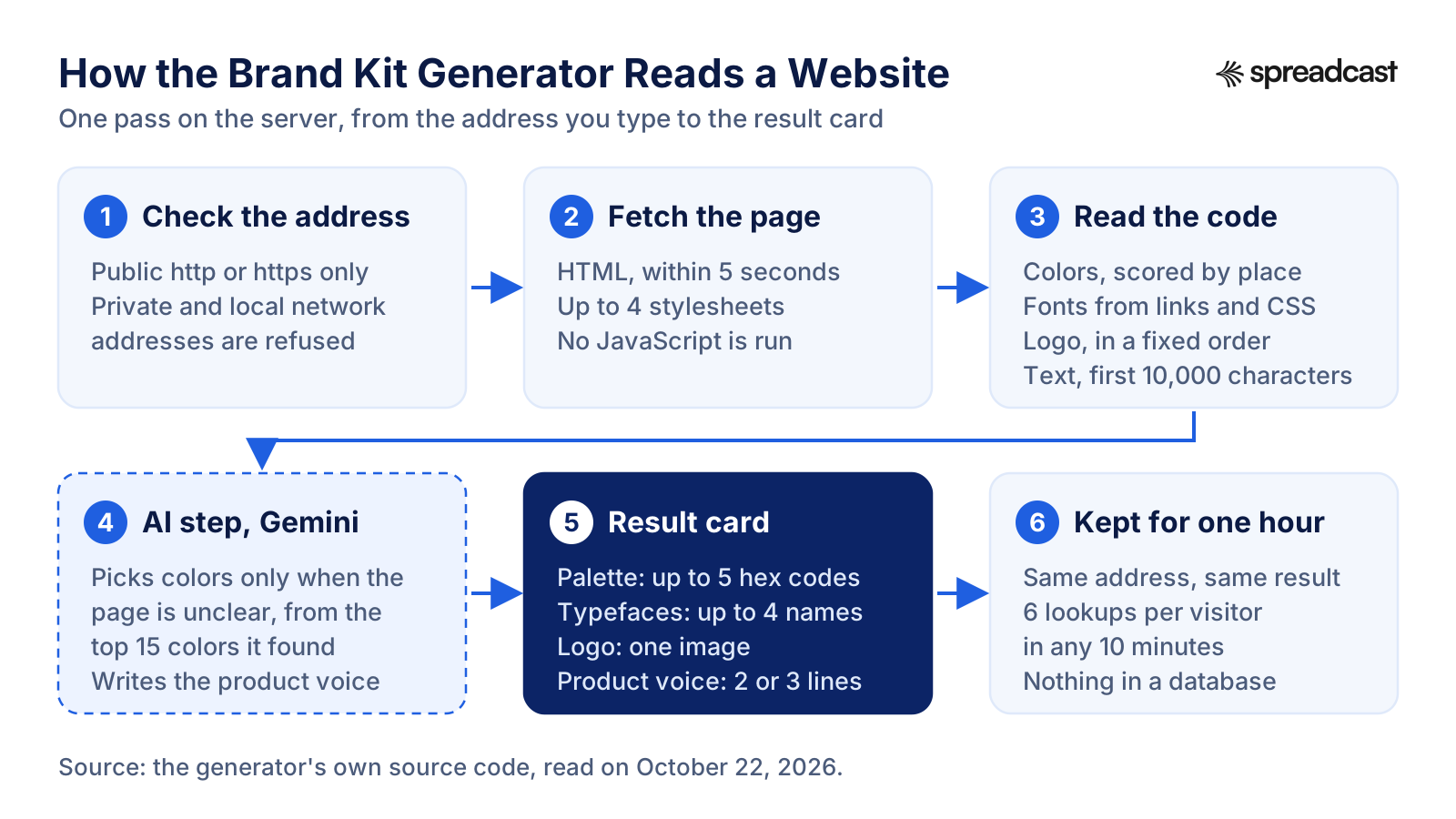
How It Extracts Brand Colors, Fonts and the Logo, Step by Step
This is the same reading code that Spreadcast's signed in setup uses on a website, so the free tool is an honest preview of what the product does with one. Every limit below comes from that code.
- Step 1
It Checks the Address First
Only http and https addresses on the public internet are accepted. The tool looks up the host name and refuses anything that points at a private or local network address, so the box cannot be used to reach servers that are not meant to be public. A typo or a dead domain gets a message that the site could not be reached.
- Step 2
It Fetches the Page and Up to Four Stylesheets
The server asks for the page once, identifying itself as SpreadcastBot, and gives up after five seconds. It then fetches the first four stylesheets the page links to, allowing two and a half seconds for each, and reads any styles written into the page itself. It does not run the page's JavaScript, so it sees the HTML and CSS the site sends, not what scripts build later in the browser.
- Step 3
It Scores Every Color by Where It Appears
A color earns points for where it is used. The page background, the main headline, the top banner and the header count most. Section backgrounds, footers, buttons and gradients count less, and CSS variables with primary, accent, brand or theme in their name count lower still. Pure white, pure black and the stock grays that common CSS frameworks ship are dropped, and two colors that look nearly the same are kept once.
- Step 4
It Builds the Palette, With AI Only When Needed
When the page clearly states a headline color and a background and yields at least three usable colors, the top scored colors become the palette and no AI is involved. When it does not, a Gemini model from Google is shown the fifteen best scored colors and told to pick three to five brand colors from that list only, never inventing one. Each pick is snapped to a close color the page really uses when there is one, and if the model returns fewer than two usable picks, the scored palette is used instead.
- Step 5
It Reads the Typefaces the Site Loads
Font names come from three places, strongest first: families requested from Google Fonts or a similar font service in the page's links, families declared in font face rules in the CSS, and the first family of each font family declaration. Generic names, icon fonts and faces every computer already has, such as Arial, Helvetica, Roboto and Segoe UI, are ignored because they say nothing about the brand. The four strongest names are shown.
- Step 6
It Looks for the Logo in a Fixed Order
First a logo address given as plain text in the page's structured data. Then an image in the header or navigation whose file name, alt text or class mentions logo, wordmark or brand. Then the home screen icon the site provides for phones, and last the share image used for link previews. Images inside customer, partner, press or integration strips are skipped, because those are other companies' logos.
- Step 7
It Writes the Product Voice From the Page Text
The visible text of the page, with scripts and styles removed, is cut to the first 10,000 characters, and up to 6,000 of them go to the model with an instruction to say what the product is, who it is for and its core value in two or three plain sentences. If the model call fails, the tool shows the opening 400 characters of the page text instead.
- Step 8
It Keeps the Result for an Hour
The finished kit is held in the server's memory for up to an hour, so asking for the same address again returns the same result at once. Each visitor can run six lookups in ten minutes, and a result served from that memory does not count toward the six.
When a Website Blocks the Brand Kit Generator
Sometimes the result is empty. The tool then says: We could not read that site. Some hosts block automated visits. That message appears when the page gave back no readable text and no colors at all, which almost always means the host refused the request, answered with an error or took longer than five seconds.
Three things cause most failures. Bot protection services that challenge unknown visitors turn a server request away. Sites built entirely in JavaScript send an almost empty page, so there is little text and few colors to read. And some sites keep their styles where the tool never looks, in a fifth stylesheet or in styles a script adds later, which leaves the palette short. Other tools hit the same wall: Google's help notes that some websites will not work with Pomelli when they use bot blocking such as captchas, and Canva's Brand Kit Builder help says some websites may block it, in which case you add brand elements by hand.
What to try, in order: the address with and without www, the plain homepage instead of a deep link, then another page of the same site, such as the pricing page, which usually shares the homepage's styles. If the site still refuses, read the colors and fonts yourself with the browser tools described further down this page. They work on any page your browser can open.
A missing logo on an otherwise full result has a different cause. The site does not allow its images to be shown on other sites, and the tool hides the row instead of showing a broken image. The colors, fonts and summary are still valid, and the logo file is better taken from whoever designed it anyway.
Privacy: What the Generator Fetches, Sends and Keeps
The tool fetches only the address you type and up to four stylesheets that page links to. It does not crawl the rest of the site, sign in anywhere, run scripts or download font files. The logo you see on the result card is loaded by your own browser straight from the site.
Besides the requests to the site itself, two kinds of request leave our server. When the palette needs the AI step, the list of scored colors, the site's name and the first 1,500 characters of page text go to Google's Gemini API. For the product voice, up to 6,000 characters of page text go the same way. Nothing about you is in either request: the model sees the website, not the visitor.
What we keep is small and short lived. The finished kit sits in the server's memory for up to an hour, keyed by the address, so a repeat lookup is instant. To stop one visitor from running thousands of lookups, the server counts requests per IP address over a ten minute window, also in memory. The tool does not write the address or the result to a database, and there is no account, so nothing is saved under your name. Copy what you need before you close the tab.
A Real Result: The Generator Run on the Spreadcast Website
To show what a result looks like, we ran the same code on our own homepage, spreadcast.app, on October 22, 2026. The picture redraws the four rows it returned.
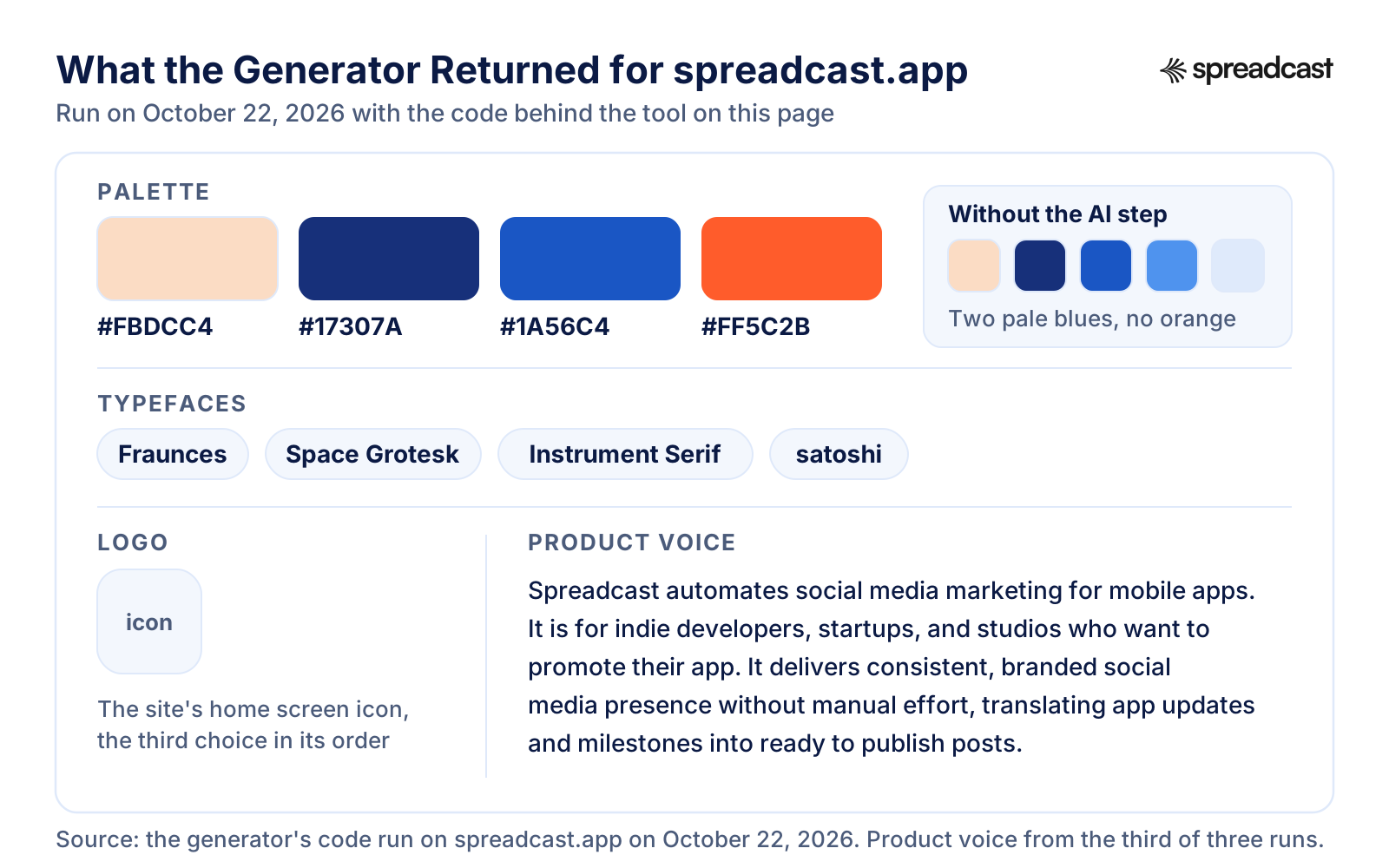
What Came Back for Our Homepage, and Why
Each row of the result has a reason behind it, and knowing the reason tells you how far to trust it on your own site.
| Row | What the tool returned | Why it returned that |
|---|---|---|
| Palette | #FBDCC4 peach, #17307A deep blue, #1A56C4 blue and #FF5C2B orange | The peach and the blue come from the sky gradient behind the homepage hero. The deep blue scored high because a stylesheet rule that starts at the html element sets it as a background, in this case for a hover state, a reminder that scoring by selector is a strong hint rather than proof. The page states no headline color, so the AI step ran. Without it the palette would have been #FBDCC4, #17307A, #1A56C4, #4F93EE and #DFEAFB. The model dropped the two pale gradient blues and added the orange, which our stylesheet declares as a brand color variable. |
| Typefaces | Fraunces, Space Grotesk, Instrument Serif and satoshi, written in lower case exactly as the stylesheet writes it | All four are named in the site's CSS. The order follows how strongly each one is signaled in the code, not where it appears on screen, so look at the headline on the live page to see which face does which job. |
| Logo | The site's home screen icon, the square image a phone uses for a bookmark | The page does name a logo in its structured data, but as an image object rather than a plain address, which the tool's check does not read. The header holds no image labeled as a logo either, so the tool fell through to the third choice in its order. A square icon in this row usually means something like that happened. |
| Product voice | Three sentences: Spreadcast automates social media marketing for mobile apps, it is for indie developers, startups and studios, and it turns app updates and milestones into ready to publish posts | Written from the homepage text. The wording changed on each of three runs, which is why the summary is a draft to edit, not final copy. |
| Time | Under two seconds in total | Fetching and reading took about 0.4 seconds, and the two AI calls about one second more. A slower host or a heavier page takes longer. |
The result is honest about our own site, including the parts we would change: a square icon instead of a wordmark, and a summary that needed editing. Expect the same kind of small corrections on yours.
Turn the Brand Color Palette From a Website Into Roles
The generator lists colors. It does not say what each one is for, and giving every color a job is the step that turns a list into a brand kit. Here is that step for the palette above, plus a text color, which a palette built from backgrounds and highlights often misses. The roles are our reading of the site, not something the tool outputs.
| Color | Where it shows on the site | Role in the kit | Rule to write down |
|---|---|---|---|
| #17307A deep blue | A dark ink the stylesheet uses for dark gradient panels and hover states | Primary | Headlines on light backgrounds, dark panels and buttons. White text on it is safe at any size |
| #1A56C4 blue | The blue band of the hero sky | Secondary | Large shapes, links on light backgrounds and charts. White text on it passes for body text |
| #FBDCC4 peach | The warm band low in the hero sky | Background | Light panels behind dark text. Never used as a text color |
| #FF5C2B orange | Declared as a brand color variable and used in gradients | Accent | One highlight per design, with dark text on it. White text only at large sizes |
| #0B1A44 dark ink | Declared in the stylesheet and found by the tool, but scored too low to make the palette | Text | Paragraphs and small labels on light backgrounds |
Two habits make this faster on your own site. Find each swatch on the live page before you name it, because the tool ranks colors by signal, not by importance. And keep the list short: Nielsen Norman Group's guidance on visual hierarchy suggests limiting a simple design to 2 primary and 2 secondary colors. A hex code is just a # followed by red, green and blue values from 00 to ff, and MDN's reference on hex colors notes that the letters are case insensitive, so #ff5c2b and #FF5C2B are the same color.
Test the Palette for Contrast Against WCAG 2.2
A palette can be right for the brand and still hard to read. The chart measures ten pairs from the palette above with the WCAG formula.
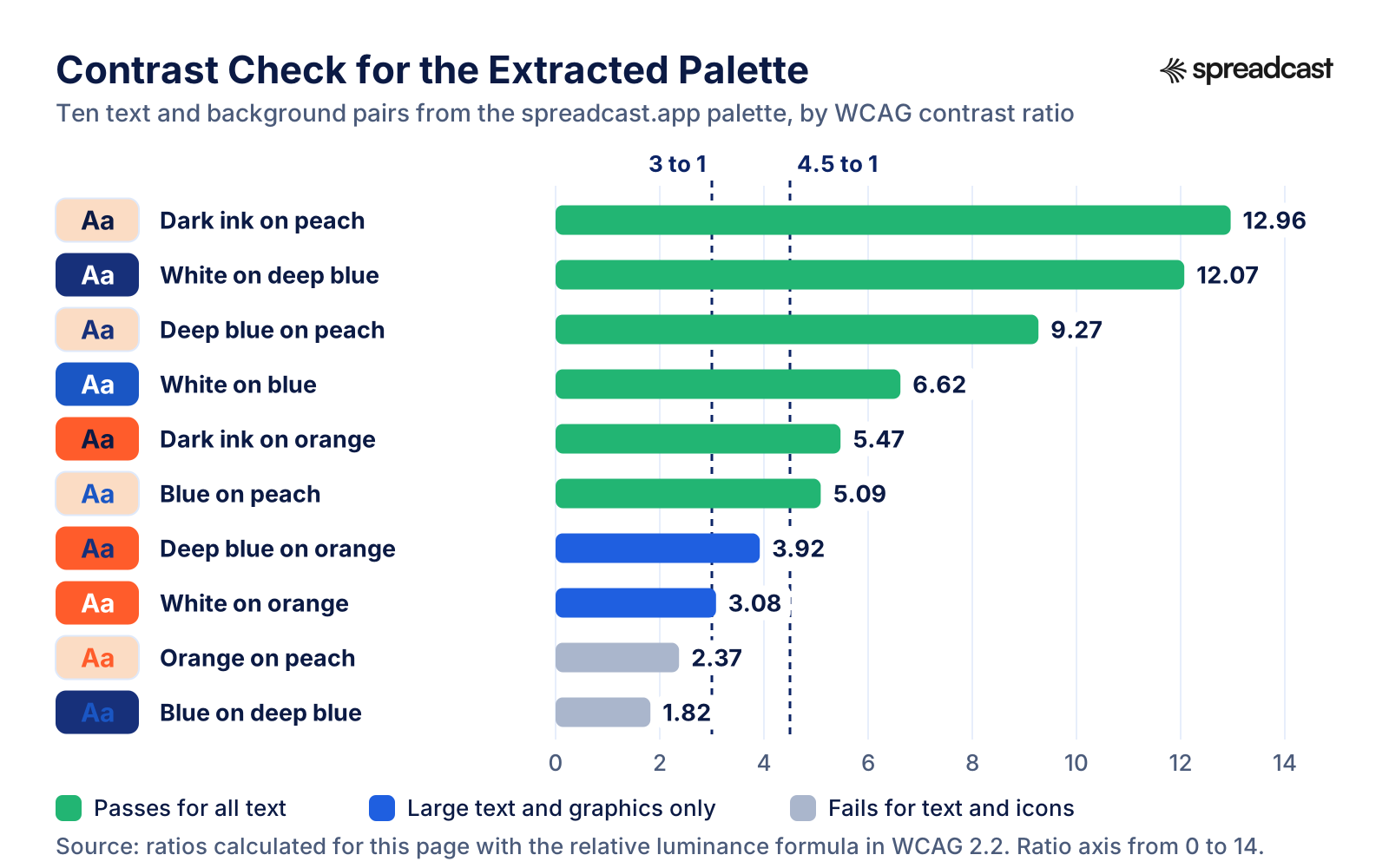
What the Contrast Numbers Mean for Your Brand Colors
The W3C guidance on minimum contrast sets the bar most teams use: a ratio of at least 4.5 to 1 between text and its background, or 3 to 1 for large text, which it treats as 18 point, or 14 point bold. Text that is part of a logo is exempt. The thresholds are hard lines, and the same page says computed values should not be rounded, so 4.499 to 1 fails.
Shapes count too. The separate rule on non text contrast asks for 3 to 1 between the parts of buttons, icons and charts that people need to see and the colors next to them. A pale accent outline on a pale background can fail this even when no text is involved.
Read the chart with those lines in mind. White on the deep blue, at 12.07 to 1, and dark ink on the peach, at 12.96 to 1, pass at any size. White on the blue reaches 6.62 to 1 and blue on peach 5.09 to 1, both fine for body text. The orange is the trap. White text on it is 3.08 to 1, good enough only for large headlines, while dark ink on the same orange reaches 5.47 to 1. Orange on peach, at 2.37 to 1, and blue on deep blue, at 1.82 to 1, fail for text and for icons alike, so those two pairs never meet in a design.
To check your own pairs, paste the hex codes from the tool into the WebAIM contrast checker. The usual fix for a bright brand color is the one this palette needs: keep it as a background with dark text on it, or add a darker shade of the same hue to the kit for text.
Video: How to Check Color Contrast in Figma
If your kit lives in a Figma file, you can run the same test there. Figma's own short demo shows the check on a real layout.

How to Get Brand Colors From a Website by Hand
You can check the generator's answer, or do the whole job yourself, with the developer tools built into every desktop browser. It takes longer, but it works on sites that block automated visits, on pages behind a login you have access to and on colors that scripts add after the page loads.
In Chrome, right click the element you care about, choose Inspect and look at the Styles pane. Every color value has a small preview square next to it, and clicking it opens the Color Picker. Chrome's Color Picker documentation lists what is inside, including an eyedropper, a contrast ratio for text colors and a palette switcher. Two of those palettes do most of the work here. The CSS Variables palette lists all the custom CSS variables on the page, which is where a well built site keeps its brand colors, and the Page colors palette is built from all the colors in the page's stylesheets. Shift click the preview square for a menu of formats, including hex.
To sample a color you can see but cannot find in the code, open the Color Picker and press C to start the eyedropper, then click anywhere on the page, or even outside Chrome on your screen. When a value is written as a variable, Chrome's CSS features reference explains that hovering over the variable shows its value in a tooltip, and that the Computed tab shows only the values that actually apply to the selected element.
For the whole palette at once, use CSS Overview. Chrome's CSS Overview guide says to open it from More tools in the DevTools menu and click Capture overview. The Colors section groups every color on the page into kinds such as background colors and text colors, points out text with low contrast and lists the elements that use a color when you click it. That makes Chrome itself a website color palette extractor, with no extension to install.
Firefox has the same tools under other names. The Firefox Eyedropper works like a magnifying glass over the page with pixel precision. Open it from the Browser Tools menu or the Page Inspector toolbar, and a click copies the color value to your clipboard in the color unit set in the Inspector settings. Selecting the headline, a button and the page background in turn and reading their values in the Rules view gives you a palette in a few minutes.
The generator automates exactly those clicks: it reads the same CSS, weights each color by where it is used and removes the near duplicates. Doing it by hand once is still worth it, because you see which element owns each color, and that is the information you need to give every color a role.
Video: Chrome's CSS Overview Lists the Colors and Fonts of a Page
The Chrome DevTools team's own short tip shows the panel described above on a real page.

How to Find the Font Used on a Website
The Typefaces row works as a website font finder: paste a URL and you get names. These steps confirm them and show which face does which job, which the generator does not tell you.
- Step 1
Select the Headline in Firefox's Fonts Tab
Open the Page Inspector, select the main headline and choose the Fonts tab. Firefox's guide to its font tools describes a Fonts used section for the selected element and an All fonts on page list below it. The first list tells you which face the headline uses. Select a paragraph next to see the body font.
- Step 2
See Whether It Is a Web Font
In the All fonts on page list, each web font shows the address of its font file, or System when it comes from your own computer, along with the font face rule that loads it. A face marked System may exist only on your machine, so confirm it on another computer before you write it into the kit.
- Step 3
Confirm It in Chrome's Rendered Fonts
In Chrome, select the text, open the Computed tab and scroll to the bottom. Chrome's rendering documentation uses that Rendered Fonts section to show whether a face came from local files or from the web, which is how you tell the intended web font from a fallback.
- Step 4
Look for the Font Link in the Page Source
View the page source and search for fonts.googleapis.com. The names after family= in that link are the Google Fonts the site requests, one of the two strongest signals the generator reads. Self hosted fonts show up instead as font face rules, the CSS rule that names a custom font and says where its file lives.
- Step 5
Write Down the Job, Not Just the Name
Record the headline face, the body face and the weights you saw, such as 700 for headlines and 400 for text. Apple's typography guidelines advise minimizing the number of typefaces and avoiding light weights that are hard to read at small sizes, so two families and two or three weights are plenty.
- Step 6
Check the License Before You Use It
A font name is not permission to use the font. Who publishes the typeface decides how you may use it, which the licensing section further down covers.
Brand Kit Generator From a Logo: Get Brand Colors From a Logo File
This generator reads a website, not an image file. If all you have is a logo, you can still pull exact colors from it in a few minutes, and a logo color extractor is already on your computer.
- Step 1
Open the SVG File as Text
A logo saved as SVG stores its colors as text. Open it in any text editor and look for fill values. MDN's reference on the SVG fill attribute explains that fill defines the color used to paint a shape or text, so a value such as #FF5C2B is the exact color the designer chose, with no guessing.
- Step 2
On a PNG, Use a Color Picker
On a Mac, Digital Color Meter shows the value of the color under the pointer, and Apple's Digital Color Meter guide explains how to copy that value as text with Shift Command C and how to lock the aperture first with Command L. On Windows, the PowerToys Color Picker opens with Windows Shift C and copies the picked color as a HEX code by default.
- Step 3
Sample the Middle of a Shape, Never the Edge
Pixels on the border of a letter or shape blend the logo color with the background to smooth the curve. Click the solid middle of the largest shape. If two clicks a few pixels apart give different codes, you are on an edge or on a compressed image, so find a cleaner file.
- Step 4
For a Photo, Pull a Palette and Then Cut It
A photo has thousands of colors. The image picker on Coolors suggests a palette from an uploaded photo, which is a fair start for a mood. Keep two or three of its colors at most and give each one a role, as in the table above.
- Step 5
Add the Neutrals the Logo Does Not Have
A logo rarely contains a usable text color or a background. Add a dark neutral for text and a light one for backgrounds, then test every text pair against its background with the contrast rules above. A bright logo color often fails with white text, and the fix is the same as for any palette.
- Step 6
Or Let an AI Tool Build Around the Logo
Some AI generators start from a logo you already have. Hedra's brand kit page, for one, says you can hand it what you already use as the reference instead of asking it to invent a look. Check what such a tool gives back as carefully as anything else, because image models are not built to keep exact hex values.
Brand Guidelines From a Website: Check the Result Against the Official Brand Page
When a company publishes a brand page, that page beats any generator. Here is what five public brand pages offer, opened on October 22, 2026. The last column is our own arithmetic: the contrast of white text on the main color, calculated with the WCAG formula from the published code.
| Company | Colors published | Typeface named | White text on the main color |
|---|---|---|---|
| Discord | Three: Blurple #5865F2, Light Blurple #E0E3FF and Black #000000 | No | 4.61 to 1 on Blurple. Passes, narrowly |
| Mastodon | Five, each with hex, Pantone and CMYK values, among them #6364FF and #563ACC | No | 4.38 to 1 on #6364FF, large text only. 7.31 to 1 on #563ACC |
| Linear | Two named accents, Mercury White #F4F5F8 and Nordic Gray #222326. The primary blue is described but given no code | No | No main color code to test. Nordic Gray on Mercury White is 14.41 to 1 |
| Raycast | Brand Red #FF6363 and two dark backgrounds, #151515 and #202123 | No | 2.91 to 1 on Brand Red, which fails for text. Brand Red on #151515 is 6.28 to 1, in line with the page's preference for dark backgrounds |
| Signal | None. Logo rules instead: clear space of half the logo's size and a 26 by 26 pixel minimum | No | No code to test |
Two lessons. None of the five names a typeface, so for these brands the fonts their sites load are the only public record of their type, and that is what the generator's Typefaces row reads. And published codes are exactly what a contrast check needs, so when an official brand page exists, take its codes over anything a tool extracts.
Fonts and Logos You Find on a Website Are Not Automatically Yours
The generator gives you names and a preview. It does not give you rights. A web font on someone else's site is licensed to them, and Google Fonts' explainer on licensing notes that a retail font license is priced by the kind and volume of use it allows, such as the number of desktop users, the number of website visitors served or the ways the font can be embedded in an app. Using the same font in your posts or your app needs a license of your own that covers that use.
Open source fonts keep this simple. Most of them use the SIL Open Font License, and the OFL FAQ says you may use such fonts for any kind of design work, logos included, without extra permission, and that artwork made with an OFL font does not itself fall under the OFL. What you may not do is sell the font files on their own.
Logos are a matter of trademark. The USPTO's trademark basics describe a trademark as any word, phrase, symbol or design that identifies the source of goods or services, and a logo is the plainest example. Showing another company's logo while you talk about that company is common. Putting it, or something confusingly similar, on your own product is not. Some brand pages go further: Discord's tells third parties not to copy or imitate its look and feel, color combinations and typefaces included.
So use the generator in two ways. On your own site, it documents what you already own. On someone else's, it is research: learn how they pair a dark color with a bright one, then choose your own values. This is general information, not legal advice. For anything that matters, read the actual license or ask a lawyer.
Brand Kit for Social Media: Keep Every Post Consistent
Social posts are where a brand kit gets used most and drifts fastest. Six rules keep a feed recognizable once the kit exists.
Start From the Right Canvas Size
Sizes differ by network and change over time. Keep one template per format you actually post, built on the current numbers in the social media image sizes guide, and put the brand colors and fonts into each template once.
One Accent per Post
Use the primary color for the frame or background and the accent for one thing only: a word, a badge, a button shape. A post that uses every palette color at full strength stops looking like the brand.
Two Typefaces With Fixed Jobs
The headline face for the hook, the body face for everything else, at the weights you wrote down. Changing fonts from one post to the next makes a single account look like several.
The Logo Small and in the Same Place
A small mark in the same corner every time does more than a big logo now and then. On networks that show your avatar beside every post, the mark can often go entirely.
Captions in the Voice You Wrote Down
The Product voice row is the seed of a caption style. Edit it into one sentence about who you help, then keep captions consistent with it. The social media caption generator page shows how Spreadcast writes a separate caption for each network from one description.
Check the Grid, Not Just the Post
Once a month, look at the last nine posts together. If one color or layout takes over or disappears, fix the template rather than the next post. Brand consistency without a design team covers this habit in depth, and the Instagram post generator page shows how Spreadcast builds app posts from a brand.
Brand Kit for an App: Icon, Screenshots and App Store Rules
An app's brand lives on its App Store listing as much as on its website, and Apple sets rules for several parts of it.
The App Icon Is the Logo
For most apps the icon is the mark people know. Apple's app icon guidelines give a 1024 by 1024 pixel layout for iPhone, iPad and Mac icons, with default, dark, clear and tinted appearances, and say to include text only when it is essential. Keep the master file in the kit and check exports with the app icon size checker.
Colors That Match the Icon
Apple's color guidelines suggest a limited palette that coordinates with your app logo and warn against using the same color to mean different things. If the website and the icon disagree, the icon usually wins, because it is what people tap every day.
Screenshots Are Your Product Photography
Apple's product page guidance allows up to 10 screenshots and says the first one to three appear in search results when there is no app preview. Keep clean exports in the kit. Sizes are in App Store screenshot sizes, and the iPhone mockup generator puts a screen in a device frame for posts.
The App Store Badge Has Its Own Rules
The App Store marketing guidelines ask for the preferred black badge, one badge per layout, clear space of at least a quarter of the badge's height and a minimum height of 40 pixels on screen. Apple product images must be used as they are, with no added reflections, tilting or cropping. Our plain words summary is in App Store marketing guidelines.
One Line About Who the App Is For
Every caption, store subtitle and post gets easier once that sentence exists. The generator's Product voice row is a starting draft. Cut it to one sentence you would say out loud.
A Written Version for the Team
When more than one person makes assets, turn the kit into a short guide. The brand style guide template has a place for every value on this page, and iOS app marketing shows where those assets get used after launch.
Where to Save Your Brand Kit: Canva Brand Kit, Adobe Express, Figma or a Document
A kit you cannot reach while you design gets ignored, so keep it in the tool you already make things in. The facts below come from each product's own help and pricing pages, checked on October 22, 2026.
| Where | How the kit gets in | What it holds | Plan needed |
|---|---|---|---|
| Canva Brand Kit | Per Canva's help page on Brand Kits: choose Brand in the homepage side panel, then Create new Brand Kit, then upload logos, add color palettes or upload fonts. Brand Kit Builder can also fill a new kit from a website or a PDF | Logos, colors, fonts, graphics, photos and icons, plus guidelines, brand voice and Brand Templates | Canva's pricing page lists 1 Brand Kit limited to 3 colors on Free, 5 Brand Kits on Pro at US$144 a year for one person and 100 on Business at US$250 a year per person |
| Adobe Express | Per Adobe's brand kit help: Your stuff, then Brands, then Create brand. An existing Creative Cloud Library can also become a brand through its Use as brand option | Logo, colors, fonts, graphics and templates, with colors tagged primary or secondary and fonts tagged header or body | Adobe's pricing page lists brand kits under Premium, and under Teams with brand controls and template locking |
| Figma | Color variables for each brand color, with modes for light and dark themes, as in Figma's guide to variables, and text styles for the headline and body fonts, as in Figma's guide to styles | Color variables and color styles. Text styles hold the font family, size, line height and letter spacing together | Anyone with edit access can create variables in a file. Publishing them to a team library needs a paid or Education plan |
| Microsoft Copilot | Per Microsoft's page on official brand kits: in Copilot's Create area, choose More, then Brand Kits, then Create Brand Kit. A brand manager can make a kit official for the organization | PowerPoint templates, colors with hex codes, fonts, logos, images and icons, brand voice and terminology | A Microsoft Copilot Premium license |
| CapCut | CapCut's guide to brand assets says to open your space from the desktop app's home screen and upload brand assets, which then appear in your video projects | Logos, fonts and video templates | The guide does not tie it to a plan |
| A plain document | Paste the hex codes, font names and links to the logo files into one page, using the brand style guide template | Anything, with the rule for each value written next to it | Free, and readable by anyone you send it to |
Wherever the kit lives, keep the master logo files and the hex codes in a plain document as well. Editors change their plans and limits, and a text file with your values does not. For a closer look at the two biggest editors, see Canva vs Adobe Express.
Video: Canva Sets Up a Brand Kit With AI
If Canva is where your kit will live, Canva's own Design School lesson shows the setup end to end.
Brand Kit Generators Compared: Free, AI and From a Website
Brand kit generator means two different things. A reading tool reports the brand a website already has. An inventing tool, often sold as an AI brand kit generator, brand kit maker or brand identity generator, proposes a new one from a name and a description. The table puts both kinds side by side, with the free tool on this page first. Facts come from each vendor's own page, checked on October 22, 2026.
| Tool | Starts from | What you get | Cost | Best for |
|---|---|---|---|---|
| Spreadcast brand kit generator, on this page | A website address | Up to five hex codes, up to four typeface names, the logo and a product voice summary | Free, no account | Reading the brand a live site already has, in seconds |
| Google Pomelli | A website, or files and a chat with Pomelli Agent | A profile of fonts, colors, values and images, then campaigns, photoshoots, brand books and websites | No charge at present, per Google's Pomelli help | Small businesses that want on brand marketing assets made for them |
| Canva Brand Kit Builder | A website or a brand guidelines PDF | A Canva Brand Kit with logos, colors, fonts, graphics, photos, brand voice and guidelines | Paid, Education and Nonprofit Canva plans | Teams that already design in Canva |
| Selzee brand kit generator | A website address | Colors ranked by use in the CSS, heading and body typefaces, the logo file and a voice section with quotes | Free, with a cap on runs | Writing down how a site sounds as well as how it looks |
| Hedra | A written description, or the logo and colors you already use | Images and video in one consistent look | Billed per generation, by model | Keeping generated pictures and clips on brand |
| Mavic AI Brand Book | Voice, colors, fonts, products and a ban list that you save | Content made with that Brand Book applied to every request | Free start with 1 brand workspace and 50 AI credits a month | Applying a saved brand to AI made content |
| Stockimg AI brand kit generator | A brand name, a short description and an optional image | Slogans, vision and mission lines, a palette, logos, social posts and font suggestions | Free, per its December 2024 launch post | A starter identity for a brand with no site yet |
| Brandfetch | A brand name or a URL | Logos, colors and assets from a library of existing brands, with an API | Not stated on its homepage | Looking up an established company's assets |
| Coolors | A color you pick, or a photo | Palettes from a generator or an image picker, plus a contrast checker | Free to use, with a Pro plan | Building or testing a palette by hand |
| Browser developer tools | Any page you can open | Every color and font on the page, element by element | Free | Sites that block tools, and checking any result |
Some names people search no longer lead to a brand kit tool. On October 22, 2026, HubSpot's brand kit generator address forwarded to its free business tools page, which lists no brand kit generator, and the brand kit generator address on Pixelcut's site forwarded to its product photo tool. Canva, Adobe Express, Microsoft Copilot and CapCut kits are compared above as places to keep a kit, and the Canva alternative and Adobe Express alternative pages compare those editors with Spreadcast.
AI Brand Kit Generators Reviewed One by One
Short verdicts on the tools in the table, written from each vendor's own pages. Spreadcast's generator comes first because it is the one on this page, and its limits are stated as plainly as everyone else's.
- 1
Spreadcast Brand Kit Generator
Free, no accountBest for reading the brand a live website already has
Paste an address and get the palette, the typefaces, the logo and a product voice summary from the page itself, in seconds. The AI step is narrow: it picks colors only when the page is ambiguous, from colors found on that page, and it writes the summary.
It is also the same reading code Spreadcast's signed in setup runs on a website, so what you see here is what the product would start from.
Pros
- Exact hex codes from the site's own CSS
- Names the web fonts a site loads
- No account and nothing to upload
Cons
- Reads one page and up to four stylesheets
- Cannot read sites that block automated visits
- Does not invent a brand that does not exist yet
- 2
Google Pomelli
No charge at presentBest for small businesses that want campaigns built from their site
Pomelli is a Google Labs experiment built with Google DeepMind. Google's launch post of October 28, 2025 describes the Business DNA it builds from your website, covering tone of voice, custom fonts, images and color palette, which then feeds campaign ideas and marketing assets.
It has grown quickly. Google brought it to the EU, the UK and other European countries in English on April 21, 2026, and on May 19, 2026 added Pomelli Agent, brand books and websites. The list of places it is available now names 202 countries and territories, for users 18 and over, in English only.
Google's help on building the profile, which now calls it a Business Profile, says the website analysis can take up to eight minutes, and that you can instead start from up to 20 uploaded files or a template and edit any field afterwards.
Pros
- No charge at present
- Goes from brand profile to finished campaign assets
Cons
- English only
- Some sites with bot blocking such as captchas do not work
- An experiment, so features and limits can change
- 3
Canva Brand Kit Builder
Paid Canva plansBest when your team already designs in Canva
Brand Kit Builder fills a Canva Brand Kit from a company website or a PDF of brand guidelines. From a website it may extract or generate logos, colors, fonts, graphics, photography, brand voice and guidelines. From a PDF it takes brand colors, font styles, brand voice and guidelines.
Canva asks you to review everything it extracted before you use the kit. It is available on Pro, Teams, Enterprise, Education and Nonprofit plans, in every country except China, to team owners, admins and brand designers who can edit the kit.
Pros
- The kit lands where the designing happens
- Can also read a guidelines PDF
Cons
- Not on the Free plan
- The kit lives inside Canva only
- 4
Best for documenting how a site writes
Selzee's brand kit generator also reads a website instead of inventing a brand. It ranks colors by how often your CSS uses them, with framework defaults and neutrals removed, names heading and body typefaces, returns the logo file and adds a voice section built from quotes on your page.
It deliberately does not pick your primary color, and its page says the page you submit is read once and nothing on it is stored. No account is needed, with a cap on runs per page load.
Pros
- Strong on written voice
- Leaves fields blank rather than inventing them
Cons
- Reads one page
- Sites rendered in JavaScript or behind a bot wall return little
- 5
Hedra
Billed per generationBest for keeping generated images and video in one look
Hedra's brand kit page treats a kit as a reference that every later image or clip must follow, built from a written description of the brand or from the logo and colors you already use.
It is candid about its limits. Small type in generated images is unreliable, so a generated wordmark should be treated as a placeholder, and a color holds its hue rather than an exact value from one asset to the next. Billing is per generation, at a rate that depends on the model.
Pros
- Works from assets you already have
- Carries one look into video
Cons
- No exact hex codes or font files as output
- Paid per generation
- 6
Mavic AI
Free start, then paid plansBest for applying a saved brand to AI content
Mavic's Brand Book stores your voice, colors, fonts, products, customers, templates and a ban list of words, and combines them with every request before anything is made.
It starts free with 1 brand workspace and 50 AI credits a month, with no card. The Brand Book page describes saving your brand rather than reading it from a site, so a reading tool is a quick way to get exact values to save into it.
Pros
- A ban list keeps unwanted words out
- One saved brand for every tool in the app
Cons
- The Brand Book page does not say it reads a website
- Credits cap the free start
- 7
Stockimg AI
Free, per its launch postBest for a starter identity before a brand exists
Stockimg's launch post from December 9, 2024 describes a brand kit generator that takes a brand name, a short description and an optional image, and returns slogans, vision and mission statements, brand colors, logos, social media posts and font recommendations.
That makes it an inventing tool, useful on day one. Everything it proposes still needs the checks on this page: contrast for every text pair, a license for every font and real ownership of the logo.
Pros
- Words and visuals in one pass
- Free to try
Cons
- Invents a brand rather than reading yours
- The launch post dates from 2024, so check the current product
- 8
Brandfetch
Not stated on its homepageBest for looking up an established company's logo and colors
Brandfetch calls itself a brand data platform, with a searchable library of logos, colors and assets for millions of brands and an API for developers who need brand data in their own apps.
It answers what a known company's assets are. For your own new site, a reading tool or the browser tools above get you the values directly.
Pros
- Fast lookups of well known brands
- An API for developers
Cons
- A library of records, not a reader of your live page
- 9
Coolors
Free, with a Pro planBest for building or testing a palette by hand
Coolors offers a palette generator, an image picker that pulls colors from a photo, a contrast checker and a palette visualizer.
It does not read a website, so it works best as the place where you test and adjust a palette you extracted elsewhere.
Pros
- Quick palette ideas from a photo
- A built in contrast checker
Cons
- Does not read a website
Video: Google Labs Walks Through Pomelli
To see what an inventing tool adds on top of reading a site, watch Google's own product walkthrough.

What an AI Brand Kit Generator Does Well and Where It Falls Short
Is there a free AI brand kit generator? Yes, several, including the one on this page. The more useful question is which job the AI is doing. In a reading tool it sorts and summarizes facts from a live site. In an inventing tool it proposes a logo, colors and fonts that did not exist before. Searches for an AI brand kit creator or builder usually mean the second kind.
AI is good at the parts that are tedious for people: ranking dozens of CSS colors, summarizing a homepage in two sentences, drafting a first palette and font pairing for a business that has nothing yet, and applying a saved kit to many images. On our own homepage, the model's one palette decision was a sensible one. It swapped two pale gradient blues for the orange the stylesheet names as a brand color.
It is weaker where exactness matters. Image models keep a hue, not a hex code, as Hedra's own page admits, and small type in generated images is unreliable. A summary repeats what the page says, whether or not it is still true. And an inventing tool works only from the few words you give it, so two businesses that describe themselves the same way can be handed very similar kits.
Ownership is the other open question. The U.S. Copyright Office's announcement of its report on the copyrightability of AI outputs, released January 29, 2025, concluded that such outputs can be protected only where a human author has determined sufficient expressive elements, and not by the mere provision of prompts. A logo generated from a prompt alone may therefore be hard to protect, while creative changes a person makes to the output can count.
Whichever kind you use, check the result the same way: every text color against its background, every typeface against its license, the logo against a file you actually hold, and the palette cut down to colors that have a job.
Brand Kit Checklist Before You Use It
Run through this once after the generator and the role assignment above. A kit that passes every row is ready to hand to anyone.
| Item | Done when |
|---|---|
| Palette with roles | Every color has one job, such as primary, secondary, background, text or accent, and colors with no job are gone |
| Text color | A dark color for body text is in the kit, since the generator drops pure black and plain grays on purpose |
| Contrast | Every text and background pair reaches 4.5 to 1, or 3 to 1 for large text, without rounding |
| Headline and body fonts | Two families are named, with the weights you actually use |
| Font licenses | You know who publishes each family and that your license covers posts, the website and the app |
| Logo files | You hold the original vector file and PNG versions for light and dark backgrounds, not a preview taken from a tool |
| App icon | The 1024 by 1024 master and its dark and tinted versions sit next to the logo |
| Screenshots | Clean exports without marketing text, at the current App Store sizes |
| Voice line | One sentence about who the product is for, checked fact by fact |
| Templates | One template per post format, built with the kit |
| Home | The kit lives in the tool you design in, with a plain document copy |
Seven Mistakes When You Build a Brand Kit From a Website
Each one is easy to make with any website color palette extractor, ours included.
Keeping Every Color the Tool Returns
A homepage shows more colors than a brand owns: an illustration, a partner badge, a sale banner. Without the AI step, our own homepage would have returned two pale gradient blues that have no job in a kit. Keep only the colors with a role.
Putting White Text on a Bright Brand Color
White on our orange is 3.08 to 1 and white on Raycast's Brand Red is 2.91 to 1, both under the 4.5 to 1 minimum for normal text. Put dark text on bright colors.
Using a Font You Have Not Licensed
The tool gives you a name, not a license. Open source families under the OFL are fine for posts and logos. A family from a commercial foundry needs a license of your own.
Taking the Share Image for the Logo
When a site labels no logo, the tool falls back to the home screen icon and then to the share image, which is often a wide banner with a headline on it. If the Logo row shows a banner, get the real file from whoever drew the logo.
Pasting a Blog Post or a Docs Page
Article and documentation templates are often plainer than the homepage, so the palette comes back thin. Paste the homepage.
Copying Another Company's Kit
Studying a competitor's palette is research. Reusing it invites confusion, and some brand pages, Discord's among them, forbid imitating their colors and typefaces outright.
Leaving the Result in a Browser Tab
There is no account, so nothing is saved for you. Copy the hex codes and font names into your kit the same day, next to the logo file.
Where Spreadcast Fits
The free generator reads one website. Spreadcast is built for apps on the App Store, where an app's brand already lives. Paste your App Store link at the start page and the listing becomes the kit: the app icon is the logo, up to five screenshots are copied in as the app's real screens, and up to three colors are read from the icon. When someone sets up from a website instead of a listing, the same reading code that runs on this page fills in the colors and drafts the product description.
You review it all on the brand kit screen, which redraws example posts as you change the colors, the name or the logo, so you see the kit working before anything is published. From then on Spreadcast checks your App Store listing every day. When a new version ships, it designs a post about the update with real app screenshots in an iPhone frame, in your brand colors and fonts, and writes the caption for each network. It also posts when the app reaches a rating milestone.
It publishes to Instagram, TikTok, LinkedIn, Facebook, Threads, Pinterest, Bluesky, Mastodon, Telegram and Discord, plus YouTube for video posts, on full autopilot or with one tap approval. It watches the App Store only, not Google Play.
The Free plan covers 1 app and makes 3 posts for you to download, with a small Spreadcast mark and no publishing. Pro is $29 a month or $290 a year for 1 app and 10 social accounts, published for you, including creating and posting from Claude or ChatGPT. Studio is $79 a month for 5 apps and 50 social accounts. Details are on the pricing page. If your product is not an App Store app, the generator, the contrast check and the checklist on this page are the useful parts, and they stay free.
Frequently Asked Questions
Is the brand kit generator free?
Yes. It is free, needs no account and has nothing to download: you copy the values from the result. To keep it free for everyone, each visitor can run six lookups in ten minutes. Spreadcast's own plans are on the pricing page.
How do I extract brand colors from a website?
Paste the address into the generator and copy the hex codes from the Palette row. To do it by hand, open Chrome DevTools, click a color swatch in the Styles pane and look at the CSS Variables or Page colors palette in the Color Picker, or run CSS Overview to list every color on the page at once.
How do I find out what font a website is using?
Read the Typefaces row in the tool, then confirm it in the browser. In Firefox, select the text and open the Fonts tab in the Page Inspector. In Chrome, open the Computed tab and scroll to Rendered Fonts. The page source also shows any Google Fonts link with the family names in it.
Can I make a brand kit from a logo?
Yes, though this tool needs a website. Read the colors from the logo's SVG file, where each fill value is an exact hex code, or sample the solid middle of each shape in a PNG with Digital Color Meter on a Mac or the PowerToys Color Picker on Windows. Then add a dark and a light neutral and test the pairs for contrast.
Is there a free AI brand kit generator?
Yes. The tool on this page uses AI for two narrow jobs: choosing brand colors when a page is ambiguous, from colors found on the page, and writing the product summary. Google's Pomelli is free at present and builds a fuller brand profile from a website, in English.
Does Canva have a brand kit generator?
Yes. Canva's Brand Kit Builder fills a Brand Kit from a website or a brand guidelines PDF, on Pro, Teams, Enterprise, Education and Nonprofit plans. Canva Free includes 1 Brand Kit limited to 3 colors, which you fill by hand.
Does HubSpot have a brand kit generator?
Not at the moment. On October 22, 2026, the address HubSpot used for its brand kit generator forwarded to its free business tools page, which lists no brand kit generator. The tools compared on this page cover the same need.
What is Google Pomelli and is it free?
Pomelli is a Google Labs experiment that builds a brand profile, which Google first called Business DNA, from your website and uses it to make on brand marketing content. Google's help says you can currently use it at no charge, for users 18 and over, in English.
Can I use the fonts I find on another website?
Only if your own license covers it. A commercial font on someone else's site is licensed to them. Fonts under the SIL Open Font License, which most open source fonts use, can be used for any design work, logos included.
Why did the tool miss my logo or pick the wrong colors?
The usual causes are a site that builds its page with JavaScript, a host that blocks automated visits, a logo that is not an image labeled as a logo, or styles kept outside the first four stylesheets. Try the plain homepage, and correct the result by hand where it is off.
What contrast ratio should brand colors have?
For text, at least 4.5 to 1 against the background, or 3 to 1 for large text, under WCAG 2.2. Icons and the visible parts of buttons need 3 to 1 against the colors next to them. Bright brand colors often fail with white text and pass with dark text.
Does the brand kit generator store the websites I check?
Not in a database. The result is kept in the server's memory for up to an hour so a repeat lookup is instant, and requests are counted per IP address for ten minutes to limit abuse. There is no account, so nothing is saved under your name.
How many colors should a brand kit have?
Four or five covers most small brands: a primary, a secondary or accent, a background and a text color. Nielsen Norman Group suggests 2 primary and 2 secondary colors for simple designs, and Apple suggests a limited palette that coordinates with your app logo.
What is the difference between a brand kit and a brand style guide?
The kit is the material: files, color codes and font names. The style guide adds the rules for using them. Start with the kit, and use the brand style guide template when you need the rules written down.
Where These Facts Come From
Every outside number, rule and price on this page links to the page it was taken from.
- Understanding contrast (minimum), WCAG 2.2W3C Web Accessibility Initiative
- Understanding non text contrast, WCAG 2.2W3C Web Accessibility Initiative
- Web Content Accessibility Guidelines 2.2W3C
- Contrast checkerWebAIM
- Human Interface Guidelines: app iconsApple Developer
- Human Interface Guidelines: colorApple Developer
- Human Interface Guidelines: typographyApple Developer
- Creating your product pageApple Developer
- App Store marketing guidelinesApple Developer
- The font face rule in CSSMDN Web Docs
- Hex color notation in CSSMDN Web Docs
- The SVG fill attributeMDN Web Docs
- Page Inspector: view and edit fontsFirefox Source Docs
- EyedropperFirefox Source Docs
- Inspect and debug colors with the Color PickerChrome for Developers
- CSS features referenceChrome for Developers
- CSS Overview: identify potential CSS improvementsChrome for Developers
- Apply other effects, including rendered fontsChrome for Developers
- Visual hierarchy in UX: definitionNielsen Norman Group
- Discord brand guidelinesDiscord
- Mastodon brand toolkitMastodon
- Linear brand guidelinesLinear
- Raycast press and media kitRaycast
- Signal brand assetsSignal
- Set up Brand KitsCanva Help Center
- Set up your Brand Kit automaticallyCanva Help Center
- Canva pricingCanva
- Brand kit in Adobe ExpressAdobe Help Center
- Adobe Express plans and pricingAdobe
- Guide to variables in FigmaFigma Help Center
- Guide to styles in FigmaFigma Help Center
- Create and manage official brand kits in Microsoft CopilotMicrosoft Support
- Managing a brand: building distinct brand assetsCapCut
- Create on brand marketing content for your business with PomelliGoogle
- Google brings Pomelli in English to small businesses in EuropeGoogle
- Pomelli adds new ways to build brand content and design websitesGoogle
- Get started with PomelliGoogle Labs Help
- Build your Business Profile and Catalog in PomelliGoogle Labs Help
- Where you can use PomelliGoogle Labs Help
- Free brand kit generatorSelzee
- Brand kit generatorHedra
- Brand BookMavic AI
- Stockimg brand kit generator is outStockimg AI
- Brandfetch homepageBrandfetch
- Coolors color toolsCoolors
- Free business toolsHubSpot
- Product ShowcasePixelcut
- Licensing, Fonts KnowledgeGoogle Fonts
- OFL frequently asked questionsSIL Open Font License
- What is a trademark?United States Patent and Trademark Office
- Copyright Office releases Part 2 of its artificial intelligence reportU.S. Copyright Office
- Digital Color Meter user guide for MacApple Support
- Color Picker utility in PowerToysMicrosoft Learn
- Video: checking color contrast in FigmaFigma
- Video: the CSS Overview panel in Chrome DevToolsChrome for Developers
- Video: keep your brand consistent with AICanva
- Video: Pomelli product walkthroughGoogle
Researched and written by Spreadcast. Last checked on October 22, 2026.