If you searched "bluesky schedule posts", here is the short answer: you can't do it inside Bluesky. When we checked on October 28, 2026, the official app had no schedule button, and the feature request for scheduled posts on Bluesky's GitHub was still open, more than two years after it was filed in July 2024. What Bluesky did add, in February 2026, is drafts. A draft waits for you to come back and press Post. It never publishes on its own.
So every scheduled Bluesky post goes out through a third party tool. That's less of a hassle than it sounds. Bluesky runs on an open protocol, and any tool can post for you once you hand it an app password, which is a second password you make in Bluesky's settings and can delete at any moment. Some of those tools are free, some cost $5 a month, and some are full social media suites that also post to Instagram, Threads, LinkedIn and the rest.
This guide covers all of it: why the app can't schedule, how a scheduler signs in and what it can and can't touch, the free and paid tools that support Bluesky with their prices checked on the day, step by step setup, the 300 character limit (and how links and emoji count toward it), images, video, alt text, threads, the best times to post, and what usually breaks when a scheduled post fails.
Can You Schedule Posts on Bluesky?
Not in the app itself. Open the composer on iPhone, Android or the web and you get Post, Drafts, the media buttons, language and who can reply. There's no clock. The request for one sits on Bluesky's public tracker as issue 4810, "Scheduled Posts", labeled as a feature request, with 38 reactions and a steady trickle of "plus one" comments from creators and small brands. No one from the Bluesky team had replied in the thread when we read it, and there's no date anywhere for it.
People ask the same question on Reddit, usually after they move over from a network that had scheduling built in. The answer there is the same as here. You either post by hand at the right moment, or you let a scheduler hold the post and publish it for you.
If you need one post out at 7 a.m. tomorrow and nothing more, you don't need to pick a tool for life tonight. Write it as a Bluesky draft, set an alarm and post it from your phone when it rings. That covers the odd announcement. Once you want a post out every day, or at hours you're asleep, the free plans below take about five minutes to set up and save you from living by alarms.
Bluesky Drafts Are Not Scheduled Posts
Drafts arrived in version 1.116 on February 9, 2026. Bluesky's own post pitched them at "the overthinkers and perfectionists", and TechCrunch's write up described the button in the top right corner of the new post screen. They're useful, but they aren't a scheduler. The draft schema has fields for the text, pictures, video, a link and who may reply. It has no field for a publish time. A draft can't go out at 9 a.m. tomorrow unless you're awake at 9 a.m. tomorrow to press the button.
Two details are worth knowing if you plan to use drafts as a holding pen. First, a draft can hold up to 1,000 graphemes, so you can write long and trim to the 300 a post allows. Second, the app's draft code keeps the text of a draft with your account but stores attached photos and video on the device where you added them. Start a draft with pictures on your phone and open it on your laptop, and the text will be there while the pictures may not.
Why Bluesky Can't Schedule but Third Party Tools Can
A Bluesky post is a record in your account's data repository. The record is written at the moment you publish, with a createdAt time the posting app sets itself. There's no server side queue that holds a record until later. So "scheduling" has to live somewhere else: in a tool that keeps your post and writes the record at the right minute. Because the AT Protocol is open, any tool can do that writing for you, and Bluesky made that official in July 2024 when it announced Buffer as a partner "to make posting to Bluesky even easier".
Since the posting app sets that time itself, you might wonder whether writing a future time works as a schedule. It doesn't. The post still appears in feeds the moment it's written, only with a wrong looking date on it, so a real scheduler is the only way to have a post go live later.

How We Researched This
Everything here was checked on October 28, 2026. For Bluesky's limits we went to the source rather than to other scheduling blogs, because several of those still quote the 2025 numbers. That meant the release posts on Bluesky's official account, the record schemas (Bluesky calls them lexicons) published on GitHub, the open source code of the Bluesky app, the AT Protocol specification and Bluesky's developer docs for rate limits and posts.
- Tool prices and Bluesky support come from each vendor's own pricing page, help page or product update on the day. Prices are in US dollars, before tax. Where a page showed only a yearly rate, we say so.
- We did not take any tool's word for another tool. If a vendor's page didn't say it supports Bluesky, we don't say it does.
- Engagement timing comes from Buffer's published analysis of Bluesky posts. It's the largest public dataset we found, and we name it every time we use it.
- What Spreadcast does on Bluesky comes from reading its own publishing code, not its marketing. Where it doesn't do something (threads, for example), we say so.
What we couldn't confirm, we left out. SocialBee's and SocialPilot's pricing pages list Bluesky among their networks but don't say whether their Bluesky composers take alt text or threads, so the table keeps those rows general. We also didn't buy every plan to test it. The checks at the end of this guide are the ones we'd run on any tool in its first week, and they take ten minutes.
If you want the audience numbers before you invest in scheduling, our Bluesky statistics page has registered users by month, daily active estimates and how Bluesky compares with Threads and Mastodon. The short version: TechCrunch reported in August 2026 nearly 46 million registered accounts and about 3 million daily users of the mobile app. A smaller daily crowd than the big networks, which is exactly why posting at the hour they're online matters.
How a Bluesky Scheduler Works Behind the Scenes
Before you hand any tool access to your account, it helps to know what it does with it. The whole process is short. Every scheduler that supports Bluesky does some version of these steps, whether it's a free open source script or a paid suite.
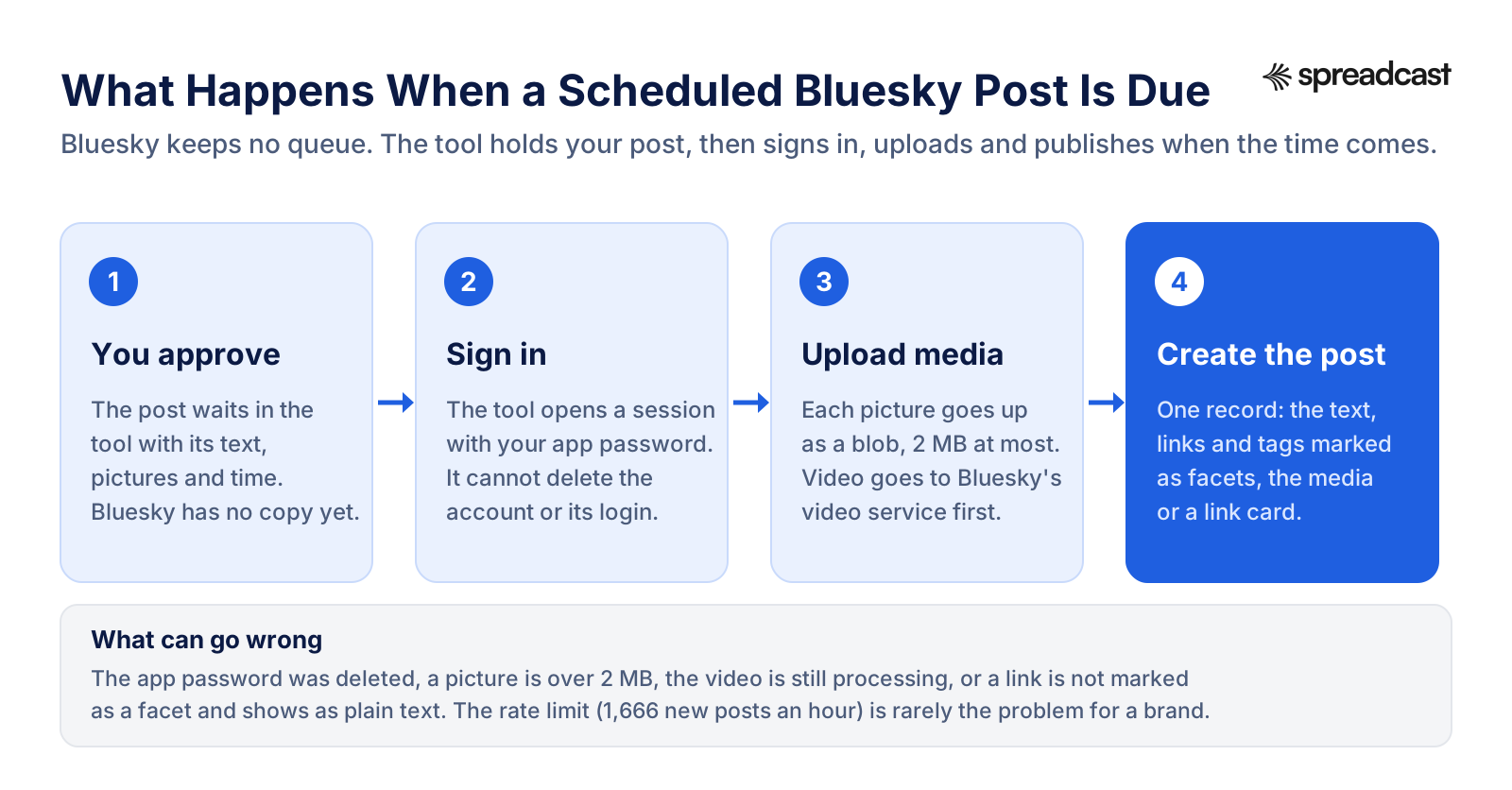
- You write the post in the tool and pick a time. Until that time, the post lives only in the tool's database. Bluesky has never seen it.
- When the time comes, the tool signs in to your account. It sends your handle and the app password you gave it, and gets back a session: a short lived access token and a longer lived refresh token.
- It uploads each picture or video to your account's server as a "blob". Pictures must be 2 MB or less. Video goes through Bluesky's video service, which processes the file before the post can point at it.
- It writes the post record: the text, the time, a list of "facets" that mark which bits of the text are links, mentions and hashtags, and the embed that points at the uploaded media or at a link card.
- Bluesky returns the address of the new post, and it shows up in your followers' feeds like any other.
Step four has a catch most people never hear about. Bluesky doesn't detect links or hashtags in your text by itself. Bluesky's post docs explain that the posting app has to mark each one with its position in the text. A tool that skips this publishes your link as plain grey text no one can tap. If you test a scheduler, post one link and one hashtag first and tap both.

What a Bluesky App Password Can and Cannot Do
Bluesky schedulers usually ask for an app password, not your real one. The AT Protocol specification describes app passwords as a way to reduce risk when logging in to third party clients. You make them and delete them separately from your main password. They log in the same way, but they can't take destructive actions like deleting the account, and they can't change your login settings, including app passwords themselves.
- An app password can post, delete posts, like, repost, follow and upload media. That's the access a scheduler needs.
- It can't delete or deactivate your account, change your handle or email, or move the account to another server.
- It can't read your direct messages unless you tick "Allows access to direct messages" when you make it. A scheduler has no reason to need that, so leave it off.
- Delete the app password in Bluesky's settings and the tool loses access at once, without you changing your real password.
Bluesky also supports OAuth, the "Sign in with" flow you know from other networks. Its auth specification defines a transitional permission that matches what an app password allows, which tells you where things are heading. For now many schedulers still ask for an app password, and that's fine as long as you give each tool its own password with a name you'll recognize.
How to Create a Bluesky App Password
- Open Bluesky and go to Settings, then Privacy and Security.
- Tap App passwords, then Add App Password.
- Give it a name that says which tool it's for, such as "Buffer" or "Spreadcast", so you can delete the right one later.
- Leave direct message access off unless the tool truly needs it.
- Copy the password right away (it looks like four groups of four letters and numbers) and paste it into the tool with your handle.
If you run a brand account on your own domain, such as @yourapp.com, use that full handle. Tools that are built properly read where your account lives and sign in there, so accounts hosted outside Bluesky's own servers work too.
Rate Limits: How Many Posts a Scheduler Can Send
Bluesky's rate limit docs give each account 5,000 points an hour and 35,000 a day for writing records. A new record costs 3 points, so the ceiling is about 1,666 new records an hour and 11,666 a day. Logins are limited separately: 30 every five minutes and 300 a day per account. No brand schedule comes anywhere near either number. The login limit matters only for badly built tools that sign in fresh for every single post, which is one more reason to prefer a tool that keeps its session and refreshes it.
How to Schedule Posts on Bluesky, Step by Step
The steps are nearly the same in every tool. Here is the general route, followed by the specifics for the free options people ask about most.
- Make an app password in Bluesky (Settings, Privacy and Security, App passwords).
- In the tool, choose Bluesky from its list of networks and enter your full handle and the app password.
- Write the post. Keep it to 300 characters, links included. If the tool shows a counter for Bluesky, trust it over a general counter.
- Add pictures or a video. Write alt text for every picture if the tool offers a field for it.
- Pick the date and time, check the time zone, and save. Most tools also offer a queue: fixed slots you fill in order.
- After the first post goes out, open it in Bluesky and tap the link and any hashtag to make sure they work.
Checklist Before You Schedule a Bluesky Post
- The text fits in 300 characters with the link counted at its full length, unless your tool shortens links the way the Bluesky app does.
- Every picture is under 2 MB and has alt text that says what is in it and reads out any words on it.
- The link is clean, without a long string of tracking tags in the visible text.
- One or two hashtags at most, spelled the way people search them.
- The time is set in your audience's time zone, not your own.
- If it's an announcement, reply controls are set the way you want before it goes out.
- You have read it once more, since you can't edit it after it's published.
Schedule Bluesky Posts Free With Buffer
Buffer is the tool Bluesky itself pointed people to. Its Bluesky page promises scheduling, queues, posts with images, GIFs and links, and threads, which it calls "a feature not yet available natively" on Bluesky. On Buffer's pricing page the Free plan connects up to 3 channels with 10 scheduled posts per channel at any one time, refilled as posts go out. That's enough for a personal account posting a few times a week. A brand that wants a real calendar moves to Essentials, listed at $5 a month per channel on yearly billing, or $60 a year.
We go deeper on Buffer's limits, support and plan quirks in our Buffer review, and our list of Buffer alternatives covers the tools people move to when they outgrow it.
Schedule Bluesky Posts Free With Publer or Metricool
Two more suites have free plans that include Bluesky. Publer's plans article describes a free forever plan with up to 3 social accounts, 10 scheduled posts at a time per account and 25 saved drafts, with Professional starting at $5 a month for one account. Threads and follow up comments are Professional features. One limit to know: Publer's Bluesky help page says it can only connect accounts hosted by Bluesky itself, not accounts on their own server. Metricool's free plan covers one brand and up to 20 scheduled posts a month, and its network table lists Bluesky with one account on the free plan. Metricool is strongest on analytics; our Metricool review covers the rest.
SkyScheduler: A Free, Open Source Bluesky Scheduler
If you only post to Bluesky and want something built for it, SkyScheduler describes itself as a free, open source service. On its site it lists scheduling up to two years ahead in half hour slots, threads with up to 10 posts under the first one, media with alt text and content labels, automatic reposts on an interval you choose, and support for multiple accounts and most AT Protocol servers. The source code is MIT licensed and runs on Cloudflare Workers. If you host it yourself, the README warns that the free Cloudflare tier hits its CPU limits, so budget for a paid Workers plan.
It's a community project credited to one developer, which is both the appeal and the risk. For a personal account it's hard to beat on price. For a company account you'll want to weigh who you call when a post doesn't go out.
Self Host Postiz for Free
Postiz is an open source scheduler that lists Bluesky among about a dozen networks. The Postiz repository on GitHub is under the AGPL 3.0 license and calls the self hosted edition free forever, with you paying only for your own servers. The catch is in the same README: for most networks you have to create and get approval for your own developer apps. Bluesky is the easy one, since it only needs an app password. If you'd rather not run a server, Postiz's hosted plans start at $29 a month, or $23 a month on yearly billing, for 5 channels. Our Postiz alternatives page compares it with the other open source options.
Bluesky Scheduler Comparison: Free and Paid Tools
Here is every tool we could confirm supports Bluesky on its own pages, with the cheapest way in. Prices change often, so the source column links to where we read each one. Spreadcast leads the table because it designs the picture for each post in your brand, not only publishes it.
| Tool | Free option | Paid from | What it does on Bluesky | Source |
|---|---|---|---|---|
| Spreadcast | 3 designed posts to download, no publishing | $29 a month for Pro, or $19 once for 10 posts | Designs the image in your brand, writes a Bluesky sized caption, publishes and reads likes, replies, reposts and quotes | Spreadcast pricing |
| Buffer | 3 channels, 10 scheduled posts each | $5 a month per channel (yearly) | Scheduling, queues, images, links and threads | Buffer |
| Publer | 3 accounts, 10 scheduled posts each | $5 a month for one account | Scheduling, threads on paid plans, Bluesky hosted accounts only | Publer |
| Metricool | 1 brand, 20 posts a month | $20 a month (yearly) or $25 monthly | Scheduling and analytics | Metricool |
| SocialBee | 14 day trial | $29 a month, or $24 a month yearly | Direct posting to Bluesky profiles | SocialBee |
| SocialPilot | 14 day trial | $20 a month, or $17 a month yearly | Bluesky listed among supported platforms | SocialPilot |
| Hootsuite | Trial only | From $99 a month (annual billing basis) | Single posts, no native threads | Hootsuite |
| Postiz | Free if you self host | $29 a month, or $23 a month yearly | Scheduling across about a dozen networks | Postiz |
| SkyScheduler | Free | None | Bluesky only: threads, alt text, reposts | SkyScheduler |
Spreadcast starts before the post exists. A scheduler publishes what you hand it, so you still write the caption and make the picture yourself. With Spreadcast, you paste your App Store link (or a website, or a line about your brand), and it builds a brand kit from it, then designs each post in your colors with your real screenshots in an iPhone frame, writes one caption for Bluesky and another for each other network, and publishes on the schedule you set. Pro is $29 a month and covers 10 social accounts across any mix of networks. If you only want to try it, a Post Pack is $19 once for 10 posts designed and published.
Be honest with yourself about which problem you have. If you already have a designer or a folder of finished graphics, any scheduler in the table will do, and Buffer's free plan may be all you need. If the reason your Bluesky account is quiet is that making each post takes an hour, a scheduler alone won't fix that.
Bluesky Post Scheduler Free: What the Free Plans Really Allow
Free plans look alike until you count what they hold. Buffer and Publer cap scheduled posts per account at ten at a time, so you can plan about two weeks ahead if you post daily, then you top up. Metricool caps the month at 20 posts across all networks, which is fine for one network and tight for three. SkyScheduler publishes no cap, but it also names no company behind it. And self hosted Postiz is free in license, not in time: you run the server, the updates and the backups.
- Posting a few times a week to Bluesky alone: Buffer Free or SkyScheduler.
- Bluesky plus two other networks, under 20 posts a month: Metricool Free or Publer Free.
- Threads of posts on a free plan: SkyScheduler, or Buffer if you're within its 10 post limit.
- You're a developer and like running things: Postiz on your own server.
Can You Schedule Bluesky Posts on Hootsuite?
Yes. Hootsuite announced Bluesky publishing on September 25, 2025, letting you plan, schedule and publish Bluesky posts in its dashboard. Hootsuite's own guide, dated May 19, 2026, says it supports scheduling individual Bluesky posts. To post a thread you schedule each post a few minutes apart, or add a third party app. The same guide lists 4 images and video up to 3 minutes and 100 MB, which were Bluesky's limits before its June and August 2026 updates, so check the composer for what it accepts today.
Price is the bigger question. Hootsuite's plans page starts paid plans at $99 for Standard, on an annual billing basis, for 10 social accounts. If Bluesky is one of many networks your team already manages there, it's a natural add. If you're choosing a tool mainly to post to Bluesky, it's a lot to pay. Our Hootsuite review and Hootsuite alternatives cover the tradeoffs.
Which Big Schedulers Skip Bluesky
Not every well known tool has added it. Later's pricing page lists the networks it supports as Instagram, Facebook, TikTok, Threads, YouTube, Pinterest, LinkedIn and Snapchat, with no Bluesky. If you're on Later and want Bluesky in the same calendar, you need a second tool or a switch. Our Later alternatives page lists the options. Telegram and Mastodon get skipped just as often, which is worth checking before you commit to a tool for a year.
Bluesky Character Limit: 300, Counted in Graphemes
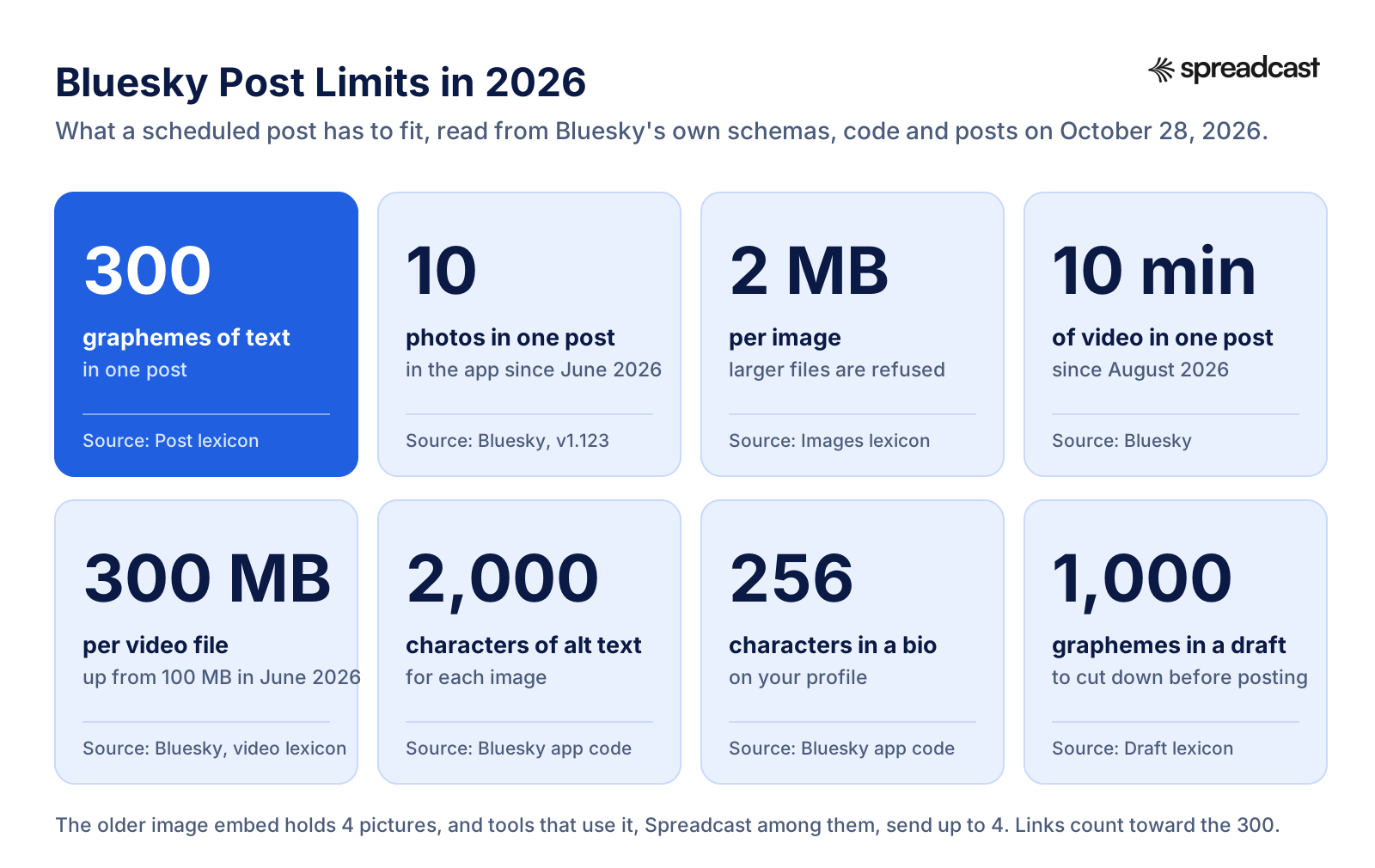
The Bluesky character limit is 300. The post schema actually sets two limits on the text: at most 300 graphemes and at most 3,000 bytes. A grapheme is what a reader sees as one character. "A" is one. "é" is one even when it's stored as two pieces. A family emoji built from several code points is still one. The Unicode standard on text boundaries is where that rule comes from, and it's why a post full of emoji can fit when a simple character counter says it won't.
Does the Bluesky Character Limit Include Spaces?
Yes. Spaces, line breaks and punctuation all count, each as one grapheme. A post of 280 letters and 20 spaces is full. Line breaks are easy to forget: a caption with a blank line between each sentence spends two graphemes on every gap.
Bluesky Character Limit With a Link
Links count toward the 300 too, but how much depends on the app that posts. In the official app, a pasted link is shortened before it's counted. The app's URL helper keeps the domain and the first 13 characters of the path, then adds three dots. A link like yourapp.com/blog/launchnotes2026 becomes yourapp.com/blog/launchn... in the post, and only that shortened text counts. The full address still sits behind it, so the link works.
Third party tools don't all do this. Many post the full address in the text, and then every character of a long tracking link counts. A link with campaign tags can easily run past 100 characters, which leaves under 200 for what you actually want to say. Two fixes: use a short clean link in the text, or let the link become a card under the post and keep the text for the message.
About those cards. Bluesky doesn't make link previews by itself. Its post docs explain that the posting app fetches the page's title, description and picture and stores them in the post as an external embed. A scheduler that skips this step posts a bare link with no preview, which looks unfinished. A post can carry either pictures or a link card, not both, so pick the one that tells your story better.
Other Bluesky Limits to Know
| Field | Limit | Source |
|---|---|---|
| Post text | 300 graphemes, 3,000 bytes | Post schema |
| Display name | 64 characters | Bluesky app constants |
| Profile bio | 256 characters | Bluesky app constants |
| Alt text per image | 2,000 characters | Bluesky app constants |
| Draft text | 1,000 graphemes per post in the draft | Draft schema |
| Extra hashtags stored on a post | 8 tags of up to 64 graphemes each | Post schema |
| Languages tagged on a post | Up to 3 | Post schema |
For the same table across every network, from Instagram captions to Telegram messages, see our social media character limits. If you write one caption and adapt it, the social media caption generator drafts each network's version inside its limit.
Images, Video and Alt Text on Scheduled Bluesky Posts
Bluesky's media limits moved a lot in 2026, and many scheduling guides haven't caught up. On June 8, 2026, version 1.123 raised the photo limit to 10 per post, with a new carousel that appears only when a post has five or more. On June 4 Bluesky raised the video file size from 100 MB to 300 MB, and on August 25 it allowed videos up to 10 minutes long, uploading two to three times faster.
How Many Images Can You Schedule in One Bluesky Post?
In the Bluesky app, 10. Through a scheduler, often 4. The original images embed holds at most 4 pictures, each up to 2 MB, and that's what most tools were built on. Bluesky's newer gallery embed allows more, but a tool has to be updated to use it. If a carousel matters to you, schedule one test post with five pictures and see how many arrive.
Size matters more than count. A picture over 2 MB is refused outright, and phone photos and PNG screenshots often pass that. Good tools shrink the file before upload; others fail the post. For the pixel sizes that look best in the feed, our social media image sizes page has Bluesky alongside the rest.
Scheduling Video on Bluesky
The video schema takes one MP4 per post, up to 300 MB, with optional subtitle files in up to 20 languages and its own alt text. Unlike pictures, a video goes through Bluesky's processing service before the post can point at it, and that can take a while for long files. That's the step most likely to make a scheduled video post late or fail. If a tool lets you, schedule video posts a few minutes off the hour so a slow upload doesn't collide with your next post.
Alt Text on Scheduled Posts
Bluesky has taken alt text seriously for years. Since version 1.38 in July 2023, people can turn on a setting that requires alt text before they can post an image, and each picture can carry up to 2,000 characters of it. Before you pick a scheduler, check that its Bluesky composer has an alt text field for each picture. Not all do.
Good alt text for a brand post describes what's in the picture and the words on it. For an app screenshot, say what the screen shows and read out any headline text. For a chart, give the takeaway and the key numbers. Skip "image of" and skip keyword stuffing.

How to Schedule a Thread on Bluesky
The Bluesky app has had a thread composer since version 1.93 in November 2024, and thread numbering came out of beta in September 2026, so each post in a thread shows its place automatically. Under the hood, every post after the first is a reply that points at two posts: the one right above it and the first post of the thread. That's why scheduling a thread is harder than scheduling a single post. The tool has to publish them in order, wait for each address, and point the next post at it.
- Buffer: lists threads for Bluesky among its features.
- Publer: lists threads for supported networks as a Professional feature in its plans article. Check that Bluesky is offered in the composer before you count on it.
- SkyScheduler: up to 10 posts under the first one, free.
- Hootsuite: single posts only, per its own guide. Schedule each part a few minutes apart, or reply to yourself by hand.
Spreadcast publishes single Bluesky posts, each with a designed picture or a video. It does not post threads. If threads are your main format on Bluesky, use one of the tools above for them.
Control Who Can Reply to a Scheduled Post
Bluesky lets you limit replies on any post, which is useful for announcements. The reply control schema allows up to five rules at once: people you mention, people who follow you, people you follow, or members of a list. An empty rule set means no one can reply. Few schedulers expose this. If yours doesn't, you can still change reply settings on a post after it goes out, from the three dot menu in the app.
Best Time to Post on Bluesky
Scheduling is only worth it if the time is right. The largest public dataset we found is Buffer's analysis of over 3 million Bluesky posts, published August 5, 2026. Weekends win clearly: Saturday averaged a 6.17% engagement rate and Sunday 6.05%, against 4.32% on Monday, the best weekday, and 3.44% on Thursday, the worst. The single best slot was Saturday at 5 p.m. Times are in each audience's local time.
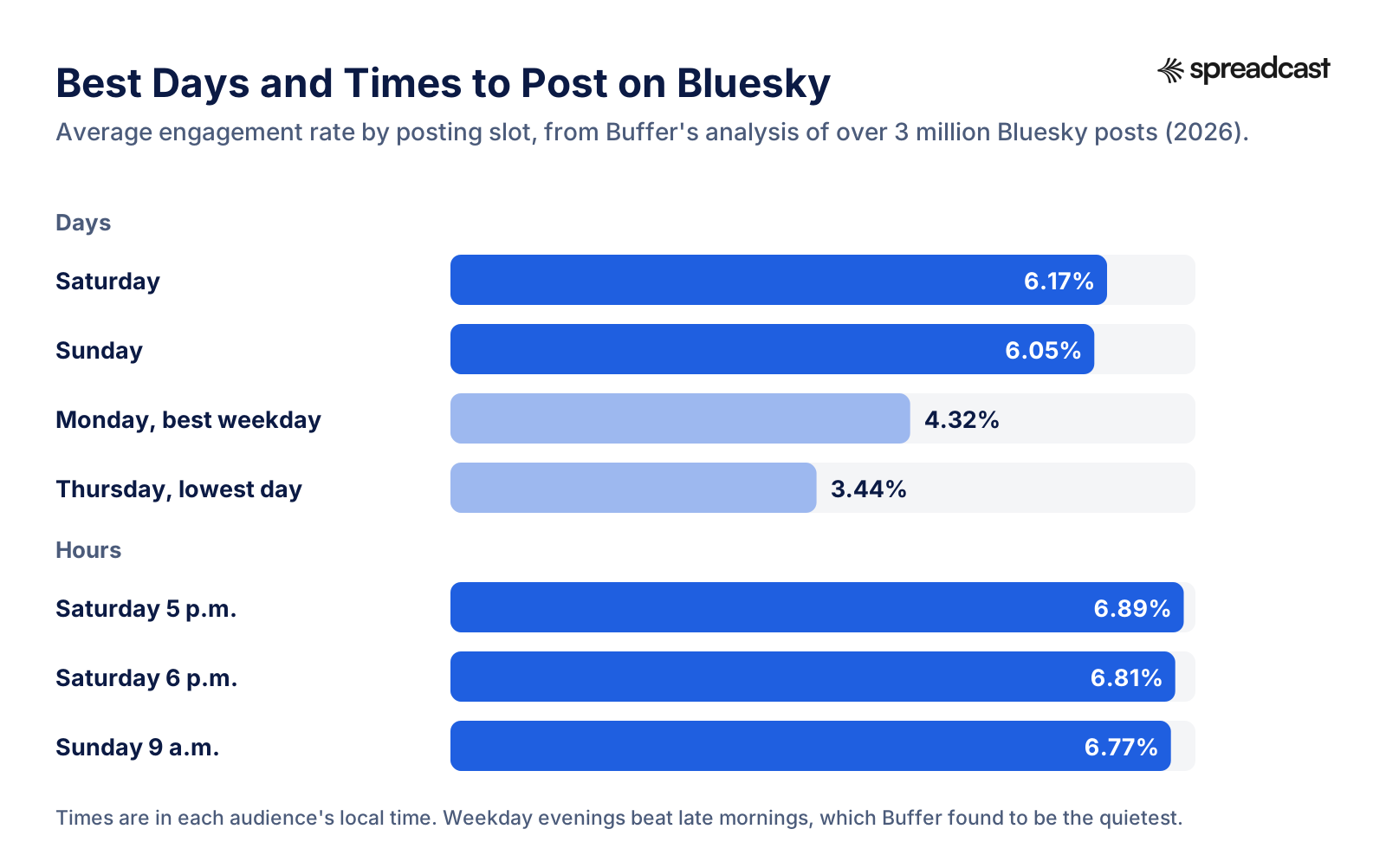
On weekdays the evening wins: Buffer's best weekday slots fall between 6 p.m. and 9 p.m., and late morning to early afternoon (roughly 10 a.m. to 1 p.m.) was the quietest. That's the opposite of what many brands do by default, posting at 10 a.m. on a Tuesday because that's when the team is at a desk. It's exactly the case scheduling exists for.
Treat these as a starting point, not a rule. Buffer's own article says there's no magic number and consistency matters more than volume. Post at the suggested times for a month, then compare your own numbers. Our engagement rate calculator works out the rate per post, and the social media KPIs page covers what else to track.
How Often to Post on Bluesky
Bluesky's community guidelines ask you not to send spam or repeatedly post content in ways that disrupt normal conversations. For a brand, once a day is plenty, and three to five good posts a week beats fourteen thin ones. Bluesky is built around conversation, so leave room in the schedule to reply by hand.
If a week of posts takes you a whole day to make, batch them. Our guide to making a month of social content in one afternoon shows the routine, and the social media content calendar gives you a template to plan it in.
Time Zones When You Schedule Bluesky Posts
Every scheduler stores times in one zone and shows them in another, and this is where most complaints about a post going out at the wrong time start. Set the tool's time zone to where most of your audience lives, not where you are. If your users are split between Europe and the US, a 6 p.m. post in London lands at 1 p.m. in New York, right in the quiet window. Two posts at different hours often beat one post at a compromise time. And check your schedule twice a year: daylight saving starts and ends on different dates in Europe and North America, so for a week or two in spring and autumn the gap between them shrinks by an hour.
What to Post on a Scheduled Bluesky Account
A scheduler only moves the work to a better hour. The posts still have to be worth reading, and Bluesky rewards a different tone than Instagram or LinkedIn. Short, plain and a little personal works. Polished ad copy with five hashtags reads like it wandered in from somewhere else.
For a brand or an app, a handful of post types carry most of the year. Here are three written to Bluesky's length, with their exact character counts, all well under the limit so there's room for a link.
| Post type | Example caption | Length |
|---|---|---|
| Release | Version 3.2 is out. You can now share a packing list with friends and tick items off together. Free update on the App Store today. | 130 characters |
| Tip | Small tip: hold the plus button to add a whole outfit at once. Most people never find it, so here it is. | 104 characters |
| Milestone | We just passed 1,000 ratings on the App Store, with an average of 4.8. Thank you to everyone who took ten seconds to leave one. | 127 characters |
Each of those works better with a picture: the new screen in a phone frame, the button with an arrow on it, the rating in big type. A plain text post can do well on Bluesky, but in a busy feed a clear image is what stops the scroll. Our app update announcement examples collect real posts of each kind, and what to post on social media has 52 more ideas if you run dry.
Mix in posts that ask for nothing. A short note on what the team is working on, a question to your users, a thank you to someone who reported a bug. Schedule the announcements, and keep a few slots free for these, which are better written on the day.
Hashtags on Bluesky
Hashtags work on Bluesky and can be searched, but one or two is plenty. The post schema also lets an app attach up to 8 extra tags that don't show in the text, which keeps a caption clean. Whatever your scheduler does, check that the hashtags in your text turn into links once posted. If they stay plain text, the tool didn't mark them and nobody can tap them.
Why Scheduled Bluesky Posts Fail, and How to Fix Them
When a scheduled Bluesky post doesn't appear, it's almost always one of a short list of causes. Most of them trace back to the steps in the diagram above.
| What you see | Likely cause | Fix |
|---|---|---|
| Every post fails with a sign in error | The app password was deleted, or the account was deactivated | Make a new app password and reconnect the account in the tool |
| Fails after weeks of working fine | The session expired and the tool can't sign in again on its own | Reconnect. Prefer a tool that signs in again without asking you |
| Fails only on posts with pictures | A picture is over 2 MB | Export as JPEG or use a tool that shrinks files before upload |
| Video post is late or missing | Bluesky's video service was still processing a long file | Shorter or smaller files, and schedule a few minutes off the hour |
| Link shows as plain grey text | The tool didn't mark the link as a facet | Test with one link first, or switch tools |
| No preview card under a link | The tool doesn't build link cards, or the page has no title tag | Check the page's preview, or attach your own picture instead |
| Post is cut off or refused | Text over 300 graphemes, often because of a long link | Shorten the link or the text, and count with the tool's Bluesky counter |
| Old links to your posts break | You changed your handle and the tool saved links by handle | Use links built on your account's permanent ID where the tool offers them |
The session problem is the sneaky one. A Bluesky refresh token is replaced every time it's used and expires if the account goes quiet for a long time. A brand account that posts twice a month can find its connection dead after a long break. Spreadcast keeps the app password on the server side of the connection for exactly this reason: when the refresh token has run out, it signs in again by itself instead of failing the post. It also shrinks any picture over 2 MB into a JPEG that keeps its shape, marks every link, hashtag and mention so they can be tapped, builds the link card the way Bluesky's own app does, and saves post links by account ID so they survive a change of handle. Those are the details you only notice when they go wrong, and the reason we built Bluesky into Spreadcast with them from the start.
You Can't Edit a Bluesky Post After It Goes Out
This makes the check before publishing more important than on networks with an edit button. Bluesky still has no way to edit a post once it's live: the request to allow editing of posts has been open on GitHub since May 2023 and had 113 reactions when we looked. A typo in a scheduled post stays there until you delete the post and publish it again, which also throws away any likes and replies it already had. So read the queue the evening before, especially links, prices and dates. Most schedulers let you edit freely until the moment a post goes out, and that window is the only one you get.
Bluesky Schedule Posts Not Working After a Handle Change
Changing your handle, for example from yourapp.bsky.social to yourapp.com, doesn't change the account underneath. Your followers and posts stay. Most schedulers keep working, because the app password still belongs to the same account. If a tool shows an error after the change, disconnect and reconnect it with the new handle.
Build Your Own Bluesky Scheduler
If you write code, a small Bluesky scheduler is a weekend project, and some developers prefer it to any paid tool. The core is three steps described in Bluesky's post docs: sign in with your handle and an app password to get a session, upload each picture as a blob, then create the post record that points at those blobs. Run it from a cron job, a GitHub Action or an automation tool, read the posts from a spreadsheet or a folder, and you have a scheduler.
The first version always works. The edge cases are where the time goes, and they're the same ones the paid tools had to solve.
- Facets are counted in bytes of UTF8 text, not characters. An emoji before a link shifts every position after it, and a wrong offset makes the wrong words clickable.
- Link cards are your job. Fetch the page, read its title, description and picture, upload the picture as a blob of 1 MB or less, and attach it.
- Pictures over 2 MB are refused, so resize before upload and send the width and height so the feed shows them in their real shape.
- Keep the session and refresh it. Signing in fresh for every post runs into the login limit of 30 every five minutes once you post in bursts.
- Video is a separate service with its own upload and a processing job you have to wait for.
- Accounts on their own server sign in at that server, not at Bluesky's, so read the account's address before you log in.
If you want the scheduling without writing the code, our guide to n8n social media automation shows how to wire a calendar to several networks with templates, and the AI agent for social media page covers letting an assistant do the posting with an approval step in between.
Reading the Numbers on Scheduled Bluesky Posts
Every Bluesky post carries public counts for likes, replies, reposts, quotes and bookmarks, listed in the feed view schema. There's no view or impression count in it, so reach on Bluesky has to be judged from interactions and follower growth instead. Any tool or script can read those counts without signing in, which is why even free schedulers can show basic Bluesky stats. Compare posts by engagement rate rather than raw likes, since your follower count changes over the weeks.
Should a Brand Automate Its Bluesky Account?
Scheduling your own posts isn't the same as running a bot, and Bluesky treats them differently. The app now has an automation label setting. Its description says the label lets the world know an account is automated, and shows next to the account's name on its profile and posts. It's meant for accounts that post without a person behind each post, like news feeds, weather alerts and art bots.
A brand that writes or approves each post and simply picks when it goes out isn't that. You don't need the label, and adding it may make people scroll past. If you set up a fully automatic flow, such as posting every new blog article or every app release with no one looking first, think about it. The guidelines don't ask for the label in so many words, but if no person looks at the posts before they go out, saying so is the honest choice.
Where automation helps is the busywork around a post: noticing there's something to say, sizing the picture, writing the short version of the caption. Where it hurts is replies. Bluesky is a conversation network, and an account that posts on schedule but never answers anyone reads as an ad. Our guide on how to automate social media posts draws that line network by network.
One Tap Approval Instead of Full Autopilot
Spreadcast offers both modes for exactly this reason. On full autopilot, it notices a new version of your app on the App Store or a ratings milestone, designs the post and publishes it. With approval on, it does the same work and waits for one tap from you before anything goes to Bluesky. Most teams start with approval and switch once they trust the output. You can also start any other post from one line in Create. See how it works on the features page.
Scheduling Bluesky Alongside Threads, Mastodon and Instagram
Few brands post only to Bluesky. The usual set is Bluesky, Threads and Mastodon for the text heavy conversation crowd, plus Instagram or LinkedIn where the bigger audience is. Scheduling them together saves time, but only if each network gets a post that fits it.
| Network | Text limit | Pictures per post | Source |
|---|---|---|---|
| Bluesky | 300 graphemes | 10 in the app, 4 through most tools | Post schema, Bluesky |
| Threads | 500 characters | Carousel posts | Threads API docs |
| Mastodon (mastodon.social) | 500 characters, a link counts as 23 | 4 | mastodon.social settings |
The trap is pasting one caption everywhere. A 480 character Threads post is cut off on Bluesky. A Mastodon post that relies on its 23 character link rule runs long on Bluesky, where the full link may count. And Threads publishes at most 250 posts through the API in a 24 hour window per Meta's docs, which only matters if you run many accounts. Write the Bluesky version first, since it's the tightest, then let it grow for the others. Our guides on how to schedule Threads posts and Threads statistics cover the Meta side.
This is where Spreadcast saves the most time. You start from one idea, and it writes a separate caption for each network you've connected: one or two conversational sentences for Bluesky, kept well under the 300 limit with at most a couple of hashtags, and longer versions for LinkedIn or Instagram. The same designed picture goes to all of them in one pass, to Bluesky, Threads and Mastodon along with Instagram, Facebook, LinkedIn, Pinterest, TikTok, YouTube, Telegram and Discord. If Telegram is in your mix too, our guide to scheduling Telegram channel posts covers that side.
How to Post to Bluesky Every Day Without a Designer
Most Bluesky accounts that go quiet don't lack a scheduler. They lack posts. Here is what a typical week looks like for a small app team doing it by hand, and what changes with Spreadcast.
Before: Doing It by Hand
- Notice you shipped something worth posting, usually days later when someone asks.
- Open a design tool, find the brand colors, take fresh screenshots, place them in a phone frame, export in the right size.
- Write a caption, then cut it down to 300 characters for Bluesky, then rewrite it again for LinkedIn and Instagram.
- Paste it into a scheduler, upload the picture to each network, set the time, check the link on Bluesky.
- Repeat for every post. At an hour each, five posts a week is a part time job.
After: With Spreadcast
- Paste your App Store link at the start. Spreadcast builds a brand kit from the listing: icon, colors and screenshots in an iPhone frame. No app? Start from your website or a short description of the brand.
- Spreadcast checks your listing every day. When a new version goes live or the app hits a ratings milestone, it designs the post, writes a caption per network and publishes it on autopilot, or after one tap from you.
- For anything else, type one line in Create, or pick one of twelve post types for apps such as a testimonial, a how to or a feature. Single image posts and carousels come out in your brand.
- Have your own photos or video? Upload them and schedule them in the same calendar.
- Analytics shows followers and interactions per network, and likes, comments and reach per post. For Bluesky that means likes, replies, reposts and quotes, which are public on every post.
The cost compares well with doing it yourself. Our breakdown of the real cost of designing social posts by hand puts numbers on the hours. Spreadcast's pricing starts with a free plan for one app that makes 3 posts to download, with a small Spreadcast mark, and no publishing. Pro is $29 a month or $290 a year for clean posts with no cap, publishing to 10 social accounts across any mix of networks, autopilot or one tap approval, and posting from Claude or ChatGPT. Studio is $79 a month for 5 apps and 50 accounts, each with its own brand. If you'd rather not subscribe, the Post Pack is $19 once for 10 posts designed and published, and the 30 Day Pass is $39 once for everything in Pro for 30 days. Paid plans come with a 7 day full refund.
Start with your App Store link and see the first posts in your brand before you connect Bluesky or pay anything.
Schedule Bluesky Posts From Claude or ChatGPT
If you already work in an AI assistant, you can skip the dashboard. Spreadcast runs an MCP server that Claude, ChatGPT, Cursor, Claude Code and other MCP clients connect to, with OAuth sign in for the Claude and ChatGPT connectors or an API key for the rest. From the chat you can design a post or carousel, write captions, create and schedule the post to Bluesky and your other networks, approve it, and read the numbers afterwards. Our guides to scheduling social media posts with Claude and with ChatGPT walk through it, and the social media MCP server page compares the options.
Which Bluesky Scheduler Should You Pick?
Pick by the problem you have, not by the longest feature list.
| Your situation | Good fit | Why |
|---|---|---|
| You have finished graphics and post to Bluesky a few times a week | Buffer Free or SkyScheduler | Free, and Bluesky's own partner or built only for Bluesky |
| You want threads scheduled for free | SkyScheduler | Threads of up to 10 posts, alt text, no cost |
| You post to Bluesky plus a few networks and want analytics | Metricool or Publer | Free plans that include Bluesky, paid plans that grow |
| Your team already lives in Hootsuite | Hootsuite | Bluesky single posts sit beside your other networks |
| You want to run it on your own server | Postiz | Open source and free to self host |
| You have no designer and want posts made, not just scheduled | Spreadcast | Designs each post in your brand, writes a caption per network and publishes |
Whichever you choose, do the same three checks in the first week: post one link and one hashtag and tap both, post one picture over 2 MB to see whether the tool shrinks it, and look at a post in the Bluesky app to confirm the alt text arrived. Those three tell you more than any feature page. For the wider field of tools, including ones that don't support Bluesky yet, see our roundup of social media automation tools and, if you market an app, the guide on how to promote an app on social media.
Switching later is cheap, which takes some pressure off the first choice. Bluesky doesn't tie your account to any tool. Delete the old tool's app password in Settings, make a new one for the next tool, and your followers, posts and handle stay exactly where they are. The only thing you lose is the queue of posts still waiting in the old tool, so publish or copy those first.
Frequently Asked Questions
Can you schedule posts on Bluesky?
Not in the Bluesky app. It has drafts since February 2026 but no publish time, and the scheduled posts request on its GitHub is still open. You schedule through a third party tool such as Buffer, Publer, Metricool, Hootsuite, SkyScheduler or Spreadcast, which signs in with an app password and publishes at the time you pick.
Is there a free Bluesky scheduler?
Yes. Buffer's free plan covers 3 channels with 10 scheduled posts each, Publer's free plan 3 accounts with 10 each, and Metricool's free plan 20 posts a month. SkyScheduler is a free, open source tool built only for Bluesky, and Postiz is free if you host it yourself.
Can you schedule Bluesky posts on Hootsuite?
Yes, since September 2025. Hootsuite schedules single Bluesky posts. Its own guide says threads have to be scheduled post by post or through an add on app. Paid plans start at $99 on an annual billing basis.
What is the Bluesky character limit?
300 graphemes per post, which is roughly 300 characters as a reader sees them. The schema also caps the text at 3,000 bytes. Bios allow 256 characters, display names 64 and alt text 2,000 per image.
What is the Bluesky character limit with a link?
The link counts toward the 300. The official app shortens a link to its domain plus the first 13 characters of the path before counting it. Many schedulers post the full link instead, so a long tracking link can eat a third of the post.
Does the Bluesky character limit include spaces?
Yes. Spaces, line breaks and punctuation each count as one. An emoji usually counts as one too, even when it's built from several code points.
How many images can you post on Bluesky?
Up to 10 in the Bluesky app since June 2026, each up to 2 MB. Many scheduling tools still use the older image embed, which holds 4. A post can have pictures or one video, not both.
Is it safe to give a scheduler my Bluesky password?
Don't give it your main password. Make an app password in Settings, Privacy and Security, App passwords, one per tool. It can post for you but can't delete the account or change your login, and deleting it cuts the tool off at once.
How long can a scheduled Bluesky video be?
Bluesky accepts videos up to 10 minutes and 300 MB since August 2026, one per post, as MP4. Check your scheduler's own limit, since some tools set a shorter one.
Where These Facts Come From
Every outside number, rule and price on this page links to the page it was taken from.
- Scheduled Posts feature request, issue 4810Bluesky on GitHub
- Allow editing of posts, issue 673Bluesky on GitHub
- Version 1.116 launches DraftsBluesky
- Bluesky finally adds draftsTechCrunch
- Draft schema (app.bsky.draft.defs)Bluesky on GitHub
- Version 1.123: up to 10 photos in postsBluesky
- Videos up to 10 minutes longBluesky
- Bluesky partners with BufferBluesky
- Version 1.93 adds the thread composerBluesky
- Thread numbering is out of betaBluesky
- Version 1.38 adds a setting to require alt textBluesky
- Post schema (app.bsky.feed.post)Bluesky on GitHub
- Images embed schema (app.bsky.embed.images)Bluesky on GitHub
- Video embed schema (app.bsky.embed.video)Bluesky on GitHub
- Reply controls schema (app.bsky.feed.threadgate)Bluesky on GitHub
- Bluesky app constantsBluesky on GitHub
- Bluesky app URL helpersBluesky on GitHub
- Bluesky app draft media codeBluesky on GitHub
- Automation label settings screenBluesky on GitHub
- HTTP API (XRPC) specification, app passwordsAT Protocol
- OAuth specificationAT Protocol
- Rate limitsBluesky Developer Docs
- PostsBluesky Developer Docs
- Community guidelinesBluesky
- Bluesky's active user base is shrinking as its focus expands beyond the appTechCrunch
- Feed views schema (app.bsky.feed.defs)Bluesky on GitHub
- Unicode text segmentation (grapheme clusters)Unicode Consortium
- Buffer pricingBuffer
- Buffer for BlueskyBuffer
- Best time to post on BlueskyBuffer
- Hootsuite plansHootsuite
- Bluesky publishing in HootsuiteHootsuite
- How to schedule posts on BlueskyHootsuite
- SocialBee pricingSocialBee
- SocialPilot pricingSocialPilot
- What are Publer's plans and pricing?Publer Help Center
- How to connect Bluesky accountsPubler Help Center
- Metricool pricingMetricool
- Postiz pricingPostiz
- Postiz source code and licensePostiz on GitHub
- SkySchedulerSkyScheduler
- SkyScheduler source codeTangled
- Later pricingLater
- Threads API overviewMeta for Developers
- mastodon.social instance settingsMastodon
- Bluesky CEO Jay Graber on CNBC (video)Bluesky on YouTube
- Building apps with ATProto (video)CascadiaJS on YouTube
- How to write good alt text (video)Silktide on YouTube
Researched and written by Spreadcast. Last checked on October 28, 2026.
Keep Reading
- Playbooks
Founder Led Marketing: Strategy and Examples for Small Startups
What founder led marketing is, seven real founders who did it with small budgets, and a weekly system for LinkedIn, Threads, Instagram, TikTok and Bluesky that fits beside building the product.
- Playbooks
How to Schedule Threads Posts: The Threads Scheduler, Desktop and Tools
Threads has its own scheduler in the composer. Here is how to schedule Threads posts in the app and on desktop, where scheduled posts hide, how to edit them, what to do when scheduling fails, and when a paid Threads scheduler earns its price.
- Playbooks
How to Schedule Posts in a Telegram Channel (Phone, Desktop and Bots)
Every way to schedule a post in a Telegram channel, checked against Telegram's own docs in October 2026: the hold Send menu on iPhone and Android, Telegram Desktop, repeating posts, groups, bots, n8n and Zapier, and schedulers that post to Telegram and Instagram from one calendar.