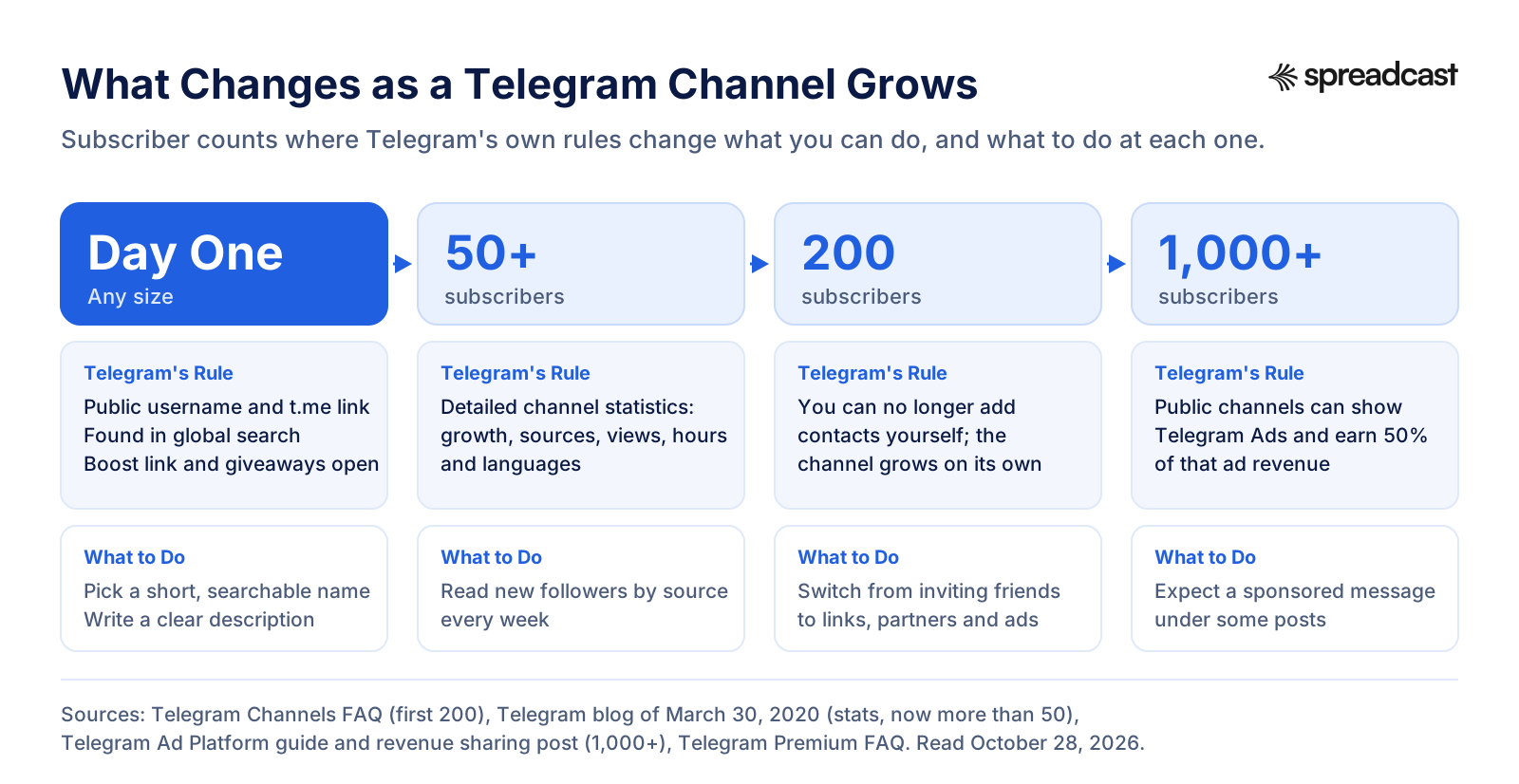
If you want to know how to grow a Telegram channel, start with one fact from Telegram's own Channels FAQ: as the owner you can add the first 200 subscribers yourself, and after that "the channel is on its own". Every subscriber past 200 has to find you and choose to join. Telegram gives you more ways to be found than most people use, and almost all of them are free. This guide walks through 15 of them, with the settings, limits and rules Telegram publishes for each.
The short version: post on a steady schedule, make posts people forward, get into Telegram search and the similar channels list, put your link everywhere your readers already are, and track where each new subscriber came from. Add Telegram Ads or a giveaway once the basics work. Skip bought members entirely. Telegram's Terms of Service and its spam rules explain why, and we cover both below.
This page is about growth. If you need the mechanics of planning posts ahead, our guide on how to schedule posts in a Telegram channel covers the hold Send menu, Telegram Desktop, bots and tools. Here we focus on getting more people to join, read and stay.
How to Grow a Telegram Channel: The Short Answer
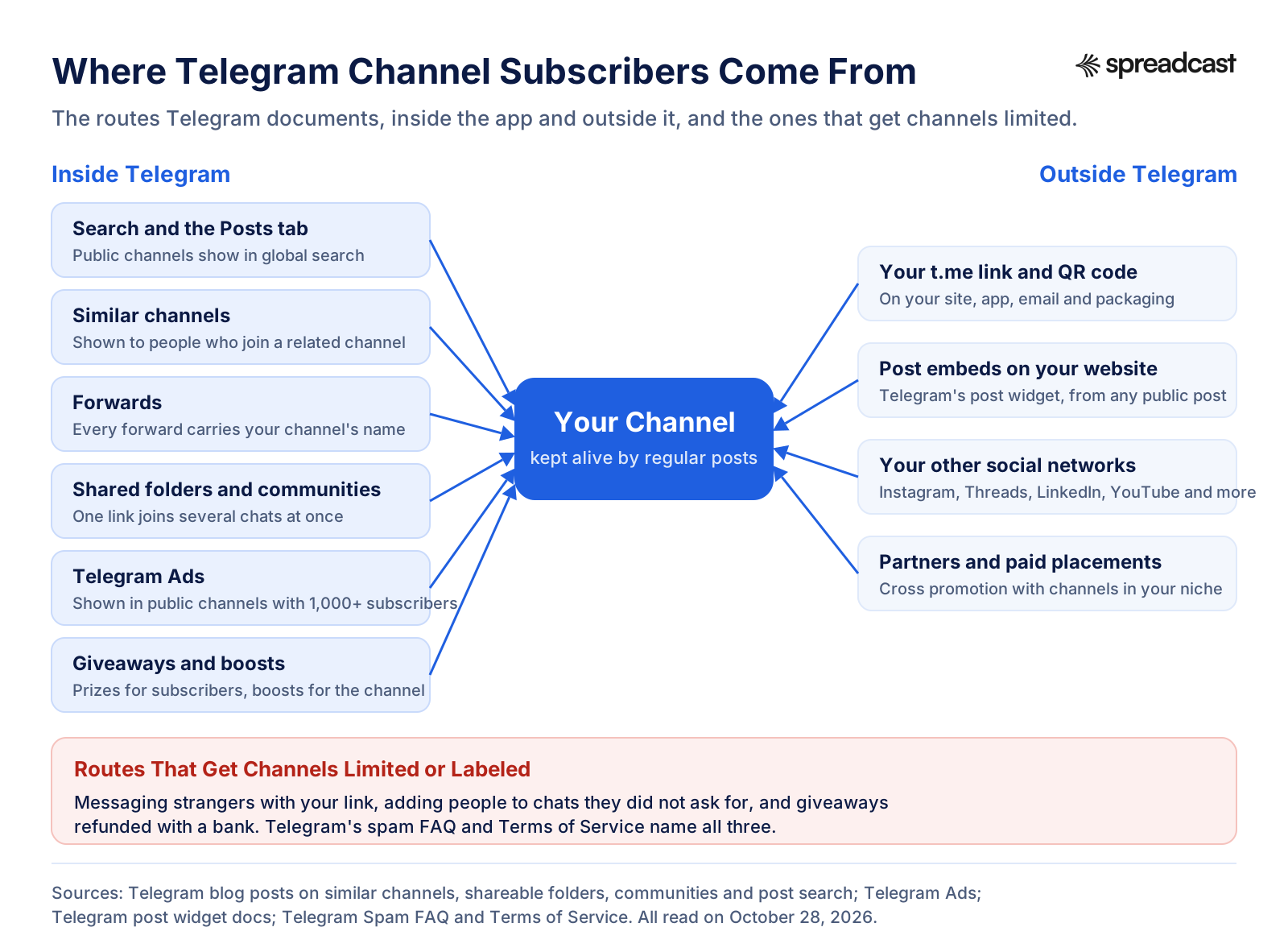
Here are the 15 ways, in the order we'd try them for a new channel. The first eight cost nothing but time. The last few cost money or need a bigger channel first. Each one has its own section further down with the exact steps.
- Post on a schedule your readers can count on.
- Write posts worth forwarding, because forwards carry your channel's name.
- Get found in Telegram search with a clear name, username and description.
- Earn a place in the similar channels list Telegram shows after someone joins a channel like yours.
- Put your t.me link everywhere you already have readers.
- Embed your best channel posts on your website.
- Cross promote from Instagram, Threads, LinkedIn and your other networks.
- Trade shoutouts and suggested posts with channels in your niche.
- Share a chat folder or build a Telegram community with partner channels.
- Run Telegram Ads in channels your future readers already follow.
- Run a giveaway that follows Telegram's rules.
- Ask Premium subscribers to boost the channel.
- Turn on comments, reactions and direct messages.
- Track every source with named invite links.
- Reuse your best posts and the content you already make for other networks.
None of these is a trick. A channel grows when people who would like it can find it, and when the people who already joined have a reason to stay and share. Every tactic below serves one of those two jobs.
How We Researched This
On October 28, 2026 we read Telegram's Channels FAQ, Spam FAQ, main FAQ, Premium FAQ and Terms of Service on telegram.org; the API pages for channel statistics, similar channels, boosts, giveaways and invite links on core.telegram.org; the Telegram Ad Platform's front page, getting started guide and ad policies on ads.telegram.org; and the Telegram blog posts that introduced each feature we describe, from channel stats in 2020 to welcome messages in August 2026. User numbers come from Telegram's own milestone posts and from TechCrunch's report of Pavel Durov's 1 billion update.
- Every setting path is quoted the way Telegram's own pages give it. Telegram moves menus between versions, so if a label differs on your phone, look one level up.
- We quote Telegram's numbers (200 subscribers, more than 50 for stats, 1,000 for ads, 160 characters per ad) and do not invent growth rates. Nobody outside Telegram can see how fast the average channel grows, and pages that promise "1,000 members in a week" are guessing or selling.
- Telegram does not publish a best time to post or an ideal posting frequency. Where we give a cadence, it is our own working rule, and we say so.
- We make Spreadcast, which posts to Telegram channels. Where it fits, we say what it does, and the facts about it come from its own code and pricing page.
Telegram Channel Statistics: Know Your Starting Numbers
You can't grow what you can't see, so open your stats before you change anything. Telegram added detailed channel statistics in its March 30, 2020 update. That post now reads that a channel with more than 50 subscribers can see detailed statistics about its growth and the performance of its posts; the original 1,000 is struck through on the page. Many tutorials still say 1,000, so if a guide tells you to wait, check your own channel first.
Telegram's November 2023 update moved stats, boosts and giveaways under Channel Info, then Edit, then Statistics and Boosts. The API documentation for channel statistics lists what the screen is built from, which is the most complete description of what you get:
- Followers: the absolute count at the start and end of the period, so you see net growth.
- Views per post, shares per post and reactions per post, each compared with the previous period of the same length.
- The share of subscribers who have notifications turned on. This is the closest thing Telegram gives you to a "really reads it" number.
- A growth graph, a followers graph (joins and leaves) and a mute graph (people who muted or unmuted you).
- Top hours: when your subscribers are online.
- Views by source and new followers by source, which tell you whether people found you through search, links, other channels or ads.
- Languages of your audience, a reactions by emotion graph, and separate stats for stories.
Each post also has its own stats page with a views graph, and Telegram can list the public channels a post was forwarded to. Keep that list: it shows which channels already share your work, and they are the first ones to ask about a shoutout swap later.
How Telegram Counts Views
The eye icon under each post is not a unique reader count. The Channels FAQ says views from forwarded copies of your message are included in the total, so a post that spreads keeps counting. It also says the numbers are approximate: after about 4 days Telegram forgets that someone saw a post and counts them again if they come back. Compare posts with each other, not with your subscriber count, and you will read the numbers the way they are meant to be read.

Five Numbers to Write Down Before You Start
- Subscribers today, and net growth over the last 30 days.
- Average views per post over the last 30 days.
- The share of subscribers with notifications on.
- Your top three sources of new followers.
- Your three most forwarded posts, and what they have in common.
Write these in a note or a sheet and check them once a week. Our social media KPIs guide shows how to set up a simple tracker, and the engagement rate calculator has a views based formula that fits Telegram better than the follower based one most networks use.
Set Up Your Channel So People Want to Join
Every growth tactic sends people to the same place: your channel's profile and its last few posts. If that page doesn't say what the channel is for in two seconds, you pay for every visitor and keep few of them. Fix this first.
Public or Private
Telegram's FAQ puts it plainly: public channels have a username and anyone can find them in Telegram search and join, while private channels need an invite link or an add from the owner. If growth is the goal, go public. A private channel can still grow through invite links, but it gives up search, the similar channels list and Telegram Ads placements, which are all for public channels.
Pick a Username People Can Type and Search
A public channel's username becomes its t.me link. Telegram's FAQ on usernames allows a to z, 0 to 9 and underscores, and usernames are not case sensitive. Pick something short, spelled the way people say it, and close to your brand or topic. If the name you want is taken, the same FAQ explains that Telegram can recall usernames from unused channels and openly squatted ones, and that collectible usernames are bought and sold on Fragment.
Put the words people search for in the channel title as well. A channel called only by a brand name is hard to find. "Alex's App Notes, iOS Tips and Updates" tells both search and readers what they'll get.
Write the Description Like a Promise
The description is your pitch. Say who it's for, what you post and how often: "Short iPhone productivity tips, one a day, plus release notes for our app." Add a link to your website if you have one. Avoid walls of emoji; they look like spam to the people you most want.
Pin a Welcome Post and Turn On the Welcome Message
New subscribers can see the channel's whole history, which helps only if the top of that history is good. Pin a short post that explains what the channel is, links to your three best posts and tells people how to share the channel. Since Telegram's August 25, 2026 update, channels can also send a welcome message that only the person who just joined sees. You set it in the channel profile under Edit, then Welcome Message. Use it to point newcomers to the pinned post.
Your avatar matters more than people think, because it is all that shows in search results, forwards and the similar channels list. Use a clear logo or face on a solid color, readable at the size of a thumbnail. If you're unsure your colors and logo work together, our free brand kit generator pulls them from your website so the channel looks like the rest of your brand.
15 Ways to Grow a Telegram Channel That Work in 2026
Each way below says what it is, how to set it up and what to expect. Do the first five before you spend a cent. They make every later tactic work better, because any visitor you buy or borrow lands on a channel that is already active and easy to understand.
1. Post on a Schedule Your Readers Can Count On
A channel that posts every day at 9:00 trains readers to look at 9:00. A channel that posts five times on Monday and then goes quiet for two weeks trains them to mute it. Telegram doesn't publish an ideal frequency, but its own rules show that silence costs you. The Telegram Ads policies reject empty or abandoned channels as ad destinations and require at least one post published in the two weeks before review. The FAQ reserves the right to recall usernames from unused channels.
Research on other networks points the same way. Buffer's study of more than 100,000 of its users found that those who posted in 20 or more of 26 weeks got about 5 times more engagement per post than those who posted in 4 weeks or fewer. Telegram wasn't one of the networks Buffer measured, so treat it as a pattern, not a Telegram benchmark. Our own working rule for a new channel: one good post a day on weekdays, at the hour your top hours graph shows, beats three rushed posts.
The hard part isn't knowing this. It's keeping it up for months when the channel is one of five places you post. This is where most channels stall: the owner has to write, design a picture and post by hand every single day, and the day they get busy, the channel goes quiet.
If that's you, Spreadcast can carry the daily part. It designs the picture in your brand, writes a caption that fits Telegram and every other network you use, and posts it to your channel at the planned minute from one calendar. You approve with one tap or let it run. Our guide to scheduling Telegram channel posts covers the free native scheduler too, if you'd rather plan by hand.
2. Write Posts Worth Forwarding
Forwards are how Telegram channels spread. When someone forwards your post to a friend or into a group, it arrives with your channel's name on it, one tap from the join button. A post that gets forwarded 50 times is 50 small ads you didn't pay for, and the views from those copies count on your post too.
What gets forwarded is usually useful to someone other than the reader: a checklist, a clear explanation, a number people will quote, a deal, a warning, a template. Opinions get reactions. Useful things get forwards. Look at your three most forwarded posts from the stats screen and make more posts like them.
- Lead with the point in the first line. Telegram shows the first lines in the chat list and in forwards.
- Make each post stand alone. A forwarded post that says "as I said yesterday" loses the new reader.
- Use a picture when it carries information: a chart, a screenshot, a before and after. Pictures stop the scroll in a busy chat list.
- Keep captions under Telegram's limit. A caption under a picture holds 1,024 characters, so long posts work better as text with a link preview or as a picture followed by a text message.
- Add a short line at the end of your best posts: "Forward this to someone who needs it." It feels obvious, and it works because people often don't think of it.
For ideas that people share, our list of what to post on social media has 52 post types, and the nine design principles behind a good post apply to Telegram pictures as much as to Instagram ones.
3. Get Found in Telegram Search
Telegram search is where people go when they already want what you post. Public channels show in global search by username and title, and since the July 31, 2025 update, search also has a Posts tab with results from public channels. That means your posts can be found by their words, not only your channel by its name.
- Use your topic's words in the title: "Budget Travel Deals Europe" is found; "Wanderlust Club" isn't.
- Write posts in the words people type. A post titled "How to export iPhone contacts" can turn up in Posts search for that phrase.
- Keep the username close to the title, so the t.me link and the search result match.
- Post in one main language. Search and the similar channels list work best when your audience is consistent, and the languages graph in your stats shows whether it is.
4. Earn a Place in the Similar Channels List
This is the most underrated growth source on Telegram. Since November 30, 2023, when someone joins a channel, Telegram shows them a list of similar public channels. Telegram says only public channels appear, and they are selected automatically based on similarities in their subscriber bases. The list is also in each channel's profile, and the API documentation adds a Similar Channels section in the Channels tab of global search, built from the channels a person already follows.
You can't apply for the list, but you can make it likely. Subscriber overlap is the signal, so you want people who follow the big channels in your niche to also follow yours. Every cross promotion with a related channel, every forward that lands in a related group and every ad placed in a related channel grows that overlap. A channel with a scattered audience, pulled in by a giveaway in an unrelated niche, sends Telegram the wrong signal.

5. Put Your t.me Link Everywhere You Already Have Readers
The Channels FAQ suggests posting your t.me link on social networks and advertising it in magazines. The same FAQ also asks you not to send channel links to strangers. The difference is consent: a link on your own website is an invitation, a link in a stranger's inbox is spam. Put it where people who already like you will see it.
- Your website header or footer, and the end of every blog post.
- Your email newsletter signature and your welcome email.
- Your app's settings or about screen, and your release notes.
- Your bio on Instagram, Threads, TikTok, LinkedIn, YouTube and Bluesky.
- Your podcast or video descriptions.
- Printed material: packaging, flyers, business cards and slides, with a QR code that opens the t.me link.
Telegram's FAQ notes that a username link works as both t.me/username and username.t.me, and that opening either fires up the Telegram app. Public channels also have a web preview at t.me/s/ followed by the username, as the Telegram News preview shows, which lets someone without the app read your recent posts in a browser before they install it.
6. Embed Your Best Channel Posts on Your Website
A link says "we have a channel". An embedded post shows what it's like. Telegram's post widget lets you embed messages from public channels anywhere: open the post's t.me link in a web browser, click Embed, and copy the code. You can choose the width, whether the author photo shows and an accent color.
Put one or two of your best posts on the pages where readers already trust you: a blog post on the same topic, your changelog, your press page. Each embed has a link back to the channel, so a reader who likes the post is one click from joining.
7. Cross Promote From Instagram, Threads, LinkedIn and Your Other Networks
If you already have followers somewhere else, they're your fastest free source of Telegram subscribers. The trick is to give them a reason to follow you in a second place. "Join my Telegram" is not a reason. "I post the daily deals on Telegram first, an hour before anywhere else" is.
- Give Telegram something the other networks don't get: early access, the full version, files, the daily post.
- Post a teaser on Instagram or Threads and say where the rest lives.
- Mention the channel in a story or short video, with the link in your bio.
- Pin a post on LinkedIn or Bluesky about what the channel is for.
- Repeat it every few weeks. Most of your followers missed the first mention.
The catch is the work. Posting to Telegram plus Instagram, Threads, LinkedIn and Bluesky by hand means resizing the same picture five times and writing five captions, and most schedulers skip Telegram entirely. Spreadcast posts to Telegram channels from the same calendar as Instagram, Threads, LinkedIn, Bluesky and the rest: one post becomes a designed picture with a caption written for each network. You can start free with three designed posts to see whether it fits your brand.
For a network by network plan, see how to promote an app on social media, and the image sizes and character limits guides keep each version inside each network's rules.
8. Trade Shoutouts and Suggested Posts With Channels in Your Niche
Cross promotion between channels is the oldest Telegram growth method, and it still works when the channels are a real fit. You post about their channel, they post about yours, and both audiences find something new. It also builds the subscriber overlap that feeds the similar channels list.
- List 10 to 20 public channels in your niche at about your size or up to three times bigger. Bigger channels rarely swap with small ones.
- Check that they post regularly and that their views look natural for their size.
- Message the admin with a short, specific offer: what you'll post, when, and why their readers would like your channel.
- Write the shoutout as a recommendation, not an ad: one useful reason to join, one example post, the link.
- Use a named invite link for each partner (way 14 below), so you see who sent real readers.
Telegram added a built in way to do paid placements in its July 1, 2025 update. Subscribers can send a channel a suggested post through its direct messages, offer a reward and pick a time, and Telegram says the post can be anything from fan art to promotional videos and product reviews. Telegram says the owner receives the reward 24 hours after posting, and if the post is removed earlier the full amount goes back to the sender. Telegram describes it as a way for channels of any size to take part in affiliate marketing. For a small channel, accepting good suggested posts adds content and income; for a growing one, sending suggested posts to bigger channels is a cleaner way to buy a shoutout.
Whichever way you pay for a placement, say so in the post. Readers trust a channel that labels its ads, and in many countries paid promotion has to be disclosed by law.
9. Share a Chat Folder or Build a Telegram Community
Two features let several channels grow together. Shareable chat folders, added in April 2023, let you share a whole folder with one link: with one tap, people add the folder and join all its chats. You can include any public chats and any chats where you have admin rights to add people, and if you add more chats later and update the link, members see a suggestion to join the new ones. You create a folder under Settings, then Chat Folders.
Folders make a good group launch. Five related channels each share one folder link with their own readers, and every reader who adds it joins all five. A "Best iOS Developer Channels" folder shared by five developers reaches all five audiences at once.
Telegram Communities, added on July 14, 2026, go a step further. Several groups, channels and bots can be linked into a community around a shared topic, and members can see the other chats and join them without an invite link. Chats can be visible to all members or hidden, and the owner can limit who adds more chats. For a brand with a news channel, a support group and a bot, a community puts all three in front of anyone who joins one of them.
10. Run Telegram Ads in Channels Your Readers Already Follow
Telegram Ads are the official way to pay for growth, and they work differently from ads on other networks. The Telegram Ad Platform guide says ads are sponsored messages shown in public channels with 1,000 or more subscribers, and you choose the exact channels by entering their links. Telegram's revenue sharing post adds that ads are not based on user data and never appear in chats or the chat list. You are not targeting people. You are renting a line under the posts of channels whose readers would like yours.
- Format: up to 160 characters of text including spaces, plus a button, per the ad policies. No line breaks, bullet points or numbered lists, and no gimmicky capitals or emoji.
- Links: the guide says every link in the ad must point to a channel or bot on Telegram, written as t.me/link or @link, and that links to external sites are not allowed.
- Destination: your channel needs a profile image, a complete description and at least one post in the two weeks before review.
- Language: the language of the channel you target should match the language of your ad and of your channel.
- Price: you set a CPM, the price for 1,000 views, and a budget. The guide gives a minimum CPM of 0.1 Toncoin. The platform's front page now says you pay with Gram, the cryptocurrency Telegram uses, so check the current currency when you add funds.
- Results: each ad has a statistics tab with views and the number of people who joined your channel or started your bot after seeing it.
- Changes: you can edit the text, CPM and budget, but not the targeting. To retarget, use Create a similar ad.
Start small. Pick five to ten channels whose readers clearly overlap with yours, write two versions of the ad, and give each a modest budget. Compare joins per 1,000 views, keep the winner and drop the rest. Because Telegram ads land in topic channels, the channels you choose matter more than the wording. One more rule worth knowing: Telegram Premium subscribers don't see these sponsored messages, according to the Premium FAQ.

11. Run a Giveaway That Follows Telegram's Rules
Telegram has built in giveaways for channels. The giveaways API page says admins can randomly distribute Telegram Premium subscriptions and other gifts among their followers, limit entry to people who join after the giveaway starts, require entrants to join other channels too, and restrict it to a list of countries. Telegram picks the winners at the end date and sends each one a gift code.
Two details make giveaways a growth tool. First, the "other channels" option lets two or three partner channels run one giveaway together, so each one gains the others' entrants. Second, the Terms of Service say a channel gets 4 boosts for each Premium subscription it gives away, active for the length of the prizes. Boosts let a channel post stories and add custom reactions, covered in the next way.
The same Terms carry a warning. Channels that mislead users into joining through giveaways later refunded with a third party, such as a bank, may be terminated or labeled as a scam and removed from Telegram search, and the subscribers gained may be removed from the sponsor and every channel listed in the giveaway. If you announce extra prizes beyond Premium, you are solely responsible for delivering them. Run giveaways you can pay for, and give away something your future readers want, not a generic prize that attracts people who leave the next day.
12. Ask Premium Subscribers to Boost the Channel
Boosts come from Telegram Premium users. The Premium FAQ explains that channels level up as they gain boosts, and for each level they can post 1 more story a day and add 1 more custom reaction, with options like emoji status, themes and custom wallpapers along the way. The boosts API page adds automatic translation of the channel and custom accent colors at higher levels. The number of boosts you need depends on your subscriber count.
Why this helps growth: stories put your channel in your subscribers' story feeds, where their friends can see reposts, and Telegram lets people repost channel stories to their own page. Find your boost link under Channel Settings, then Statistics and Boosts, then Boosts, and share it in a pinned post once you have a few Premium readers. Don't nag; one clear ask, with what the boost unlocks for readers, is enough.
13. Turn On Comments, Reactions and Direct Messages
A channel is one to many by design, but readers stay longer when they can answer. The Channels FAQ explains that you can add a discussion group, so each post gets a comment button and the comments also land in the group. Reactions give readers a one tap way to respond; the November 2023 update added an interface for channel admins to pick which emoji are allowed and to add custom ones, plus a reaction sentiment graph in stats.
Since June 3, 2025, readers can also send direct messages to a channel, and the owner and admins answer without sharing their personal accounts. You turn it on under Channel Settings, then Direct Messages. For a brand, this is a support line inside the channel. It's also where suggested posts arrive.
Comments and replies bring people back, and returning readers forward more posts. Answer the first comments on each post within a few hours, at least in the early months. A channel where the owner talks back feels alive, and a live channel is one people recommend.
14. Track Every Source With Named Invite Links
Your stats show new followers by source, but "URL" or "link" doesn't tell you which post, partner or ad brought them. Extra invite links do. Telegram's invite links documentation says private invite links can have an expiry date, a usage limit and a join request step that sends each request to the admins for approval. Each link can also carry a title and keeps a usage count of how many people joined through it, and the Bot API caps that name at 32 characters.
- Make one link per source: "Website footer", "Instagram bio", "Partner Alex", "October ad".
- Put each link only in its own place, so the join counts stay clean.
- Check the counts monthly. Drop the sources that bring nobody and double the ones that work.
- Use a join request link for a members only channel, so you approve each person and can greet them first.
For links from outside Telegram to your website or App Store page, the same idea applies with campaign links. Our App Store campaign link generator builds them in bulk, so you can see which channel posts send people to your app.
15. Reuse Your Best Posts and the Content You Already Make
You probably make more content than you think: blog posts, newsletters, release notes, videos, threads on other networks. Each one can be a Telegram post with a few changes. And your best Telegram posts can come back months later for readers who joined since; most of them never scrolled that far.
- Turn a blog post into three channel posts: the main point, a checklist, and a question for the comments.
- Turn release notes into a short "what's new" post with a screenshot. Our app update announcement examples show 33 ways to word one.
- Repost your top post of each quarter, updated, with a note that it's a reader favorite.
- Post the same idea on Instagram, Threads or LinkedIn with a line that the full version lives on Telegram.
If you build an app, Spreadcast does the reuse for you. It checks your App Store listing daily, and when a new version goes live or the app hits a ratings milestone, it designs the post in your brand, writes a caption for Telegram and each other network, and publishes it on autopilot or after one tap of approval. Our page on Spreadcast for mobile apps shows what those posts look like.
How to Grow a Telegram Channel Fast
"Fast" on Telegram means you pay with money or with partnerships. There are three honest ways to compress months into weeks, and all three work much better on a channel that already has 20 or 30 good posts.
- Telegram Ads in a tight list of topic channels, with two ad versions and a daily check on joins per 1,000 views.
- A shoutout swap round with five to ten partner channels in the same week, each with its own named invite link.
- A joint giveaway with two or three partner channels, open to new subscribers only, with a prize your niche wants.
What doesn't work fast, or at all: bought members, adding people to chats they didn't ask for, and messaging strangers with your link. They inflate a number for a few days, then cost you reach, trust and sometimes the channel. The next section explains why.
A realistic expectation: the first few hundred subscribers come from people who already know you. Growth past that comes from discovery inside Telegram, mostly similar channels, search and forwards, and it compounds. Channels that keep posting through the slow first months are the ones that reach the stage where Telegram starts sending readers on its own.
How to Grow a Telegram Channel Organically and for Free
If your budget is zero, you can still do 12 of the 15 ways above. This is how to increase Telegram channel subscribers for free, roughly in order of effort:
| Free Tactic | Time It Takes | What It Does |
|---|---|---|
| Clear title, username and description | 30 minutes once | Makes search and every other tactic convert better |
| Pinned welcome post and welcome message | 30 minutes once | Keeps more of the people who arrive |
| t.me link on your site, bio, email and app | One hour once | Turns readers you already have into subscribers |
| Post embeds on your website | 15 minutes per page | Shows what the channel is like to site visitors |
| Daily posting on a fixed schedule | 20 to 60 minutes a day | Keeps readers and feeds every discovery source |
| Shoutout swaps with partner channels | One to two hours a month | Builds subscriber overlap for similar channels |
| Shared folder with partner channels | One hour once | Grows several channels together |
| Named invite links per source | 15 minutes once | Tells you which free tactic works |
| Cross promotion on your other networks | 10 minutes per post | Moves followers from one network to another |
Organic growth is slow at first and steady later. It also brings readers who chose you, which is the only kind that reads, forwards and buys. If you build an app, our guide on how to promote an app for free ranks 14 more free tactics, and many of them send people to a Telegram channel as well as to the App Store.
How to Increase Telegram Channel Views and Reach
More subscribers don't always mean more views. A channel with 5,000 subscribers and 300 views a post has a reach problem, not a growth problem. The fixes below raise the reach of a Telegram channel you already have.
Watch the Mute Graph and Notifications Share
Your stats show the share of subscribers with notifications on and a graph of mutes. If mutes jump after a certain kind of post, or after a day with many posts, you've found what your readers don't want. Muted subscribers still count as subscribers but rarely see posts as they arrive.
Post When Your Readers Are Online
The top hours graph tells you when your subscribers use Telegram. Post your most important message of the day at the start of that window, not at the time that suits you. If your audience spans time zones, the languages graph and the top hours graph together tell you which zone to favor.
Post Less, but Better
Each post sends a notification to everyone who has them on. Five notifications a day from one channel is how readers end up muting it. If you have five things to say, combine them into one post or spread them over the week. You can also send minor posts silently by holding the send button and choosing to send without sound.
Use Formats That Earn Attention
- A strong first line that shows in the notification and the chat list.
- A picture or short video when it adds information.
- An album of up to 10 pictures for step by step guides.
- A poll when you want a quick signal from readers; polls get people to open the post.
- Stories, once boosts allow them, for short updates that don't need to sit in the feed.
Get Forwards Into Groups
Views from forwarded copies count on your original post. A post that gets forwarded into a busy group can bring more views than your whole subscriber base. Posts that answer a question people ask in groups, such as a checklist, a comparison or a short how to, are the ones that get forwarded there.
Why You Should Never Buy Telegram Channel Members
Search for "how to increase Telegram channel members" and half the results sell members: "10,000 subscribers for $20". They're cheap because they're worthless, and they cost you more than the price.
- They break Telegram's rules. The Terms of Service forbid using the service to send spam or scam users, and the Spam FAQ says people mind getting unsolicited invite links to groups or channels and anything related to commerce or online popularity. Services that add accounts to your channel usually rely on exactly that.
- They wreck your stats. Fake accounts don't read, so your views per post drop, your notifications share falls and every number you use to decide what to post stops meaning anything.
- They hurt discovery. The similar channels list is built from subscriber overlap. Thousands of random accounts make your channel look similar to nothing in particular.
- They waste ad money. Advertisers and partners check views against subscribers. A channel with 10,000 members and 200 views a post gets no swaps and no suggested posts.
- They can cost you the channel. The Terms say channels that mislead users through refunded giveaways can be labeled as scams and removed from search, and that subscribers gained that way can be removed. Bought growth sits on the same side of that line.
The same goes for "member adder" bots that pull people from groups into your channel, and for mass messages with your link. The Spam FAQ says accounts reported for this are limited, first for a few days and then for longer with repeated offences. If you want to pay for growth, pay Telegram for ads or pay a real channel for a labeled placement.
Telegram Channel Advertising: Telegram Ads vs Paid Shoutouts
There are two ways to advertise a Telegram channel: Telegram's own ad platform and paid posts in other channels, either arranged directly or through suggested posts. They suit different stages.
| Question | Telegram Ads | Paid Shoutout or Suggested Post |
|---|---|---|
| Where it shows | A sponsored message under posts in public channels with 1,000+ subscribers | A full post inside the partner channel's feed |
| Who sees it | Readers of the channels you pick, except Premium subscribers | Every reader of that channel, Premium or not |
| Length | 160 characters and a button | A full post with pictures, as long as the partner agrees |
| Pricing | A CPM you set, minimum 0.1 Toncoin per the guide | Whatever you agree; suggested posts hold payment until 24 hours after posting |
| Tracking | Views and joins in the ad's statistics tab | A named invite link per partner |
| Rules | Telegram's ad policies and a review before it runs | Telegram's Terms, the partner's rules and your country's disclosure law |
| Best for | Steady, measurable growth once you know which channels convert | A first push, a launch, or a niche where a trusted voice matters |
The table pulls from the Ad Platform guide, the ad policies, the Premium FAQ and Telegram's suggested posts announcement. Whichever you pick, send people to a channel that's ready for them: a good pinned post, at least a few weeks of regular posts, and a description that matches the ad.
What Changes as Your Telegram Channel Grows
A few subscriber counts change what Telegram lets you do. Knowing them helps you plan: what to focus on now, and what becomes possible next.
At 1,000 Subscribers: Ads and Revenue Sharing
On March 31, 2024 Telegram announced that owners of public channels with at least 1,000 subscribers receive 50% of the revenue from ads shown in their channels. The announcement says you can see this under Channel Settings, then Statistics, then Monetization; that withdrawals go through Fragment with no fees; and that you can put the money back into Telegram ads, collectible usernames or Premium giveaways. So the ad revenue a channel earns can pay for the ads that grow it.
It also means some of your readers will see a sponsored message under your posts that you didn't choose. The Terms of Service note that Premium subscribers don't see Telegram's sponsored messages, but they do see any promotions you post yourself.
How Big Is Telegram in 2026?
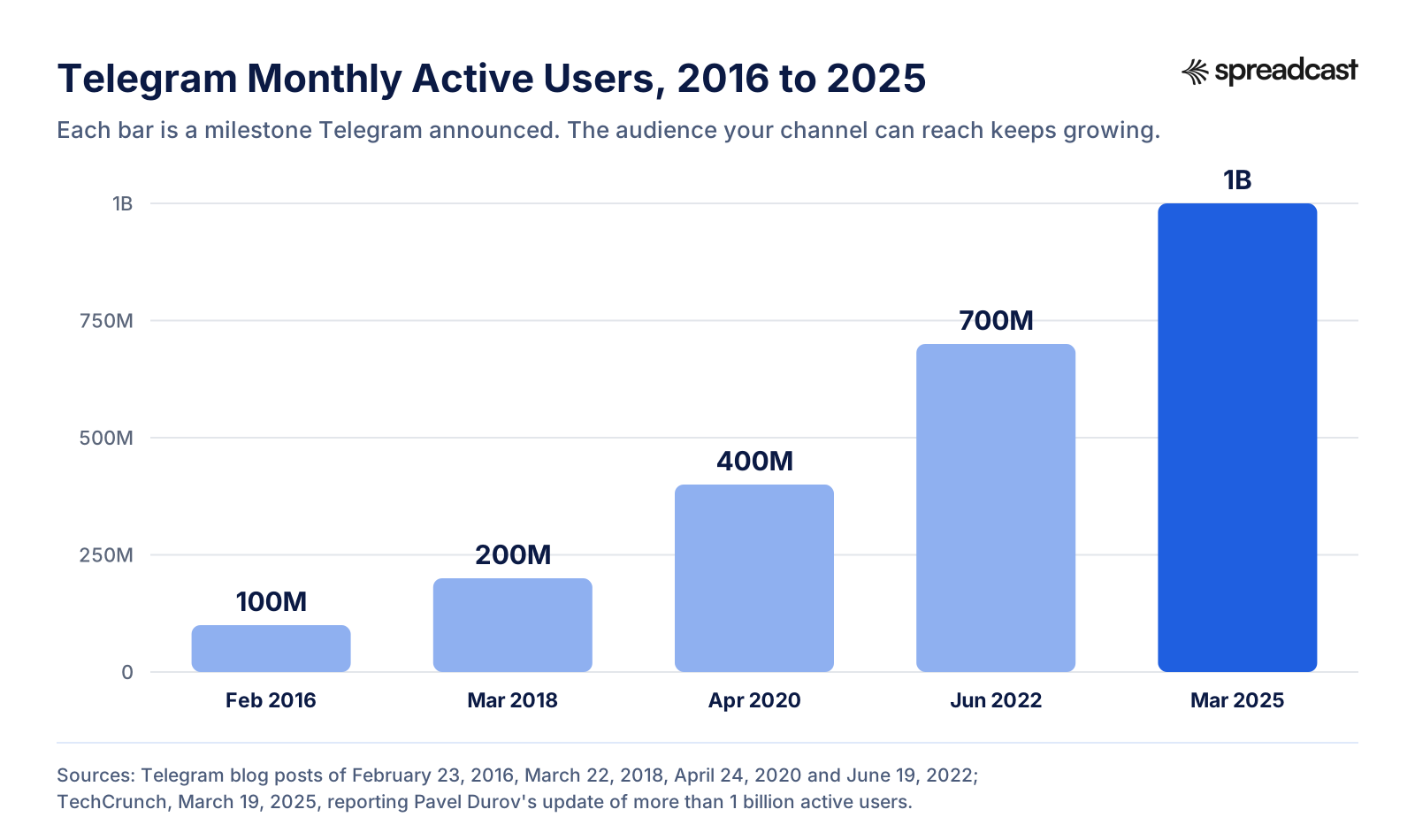
Telegram has grown roughly tenfold in nine years, by its own count. It announced 100 million monthly active users in February 2016, 200 million in March 2018, 400 million in April 2020 and 700 million in June 2022. In March 2025, TechCrunch reported Pavel Durov's update that the app had passed 1 billion active users, up from a reported 950 million a year earlier.
Channels are a big part of that use. Telegram's revenue sharing post said users generate over 1 trillion views in channels every month, and the Telegram Ads front page now says 1 billion users generate 1 trillion views a month in public broadcast channels. The audience is there. The question is only whether your channel is easy to find and worth staying in. For a wider view of where people spend time online, see our social media statistics.
A 30 Day Plan to Grow a New Telegram Channel
Here's how we'd spend the first month of a new channel, assuming an hour or so a day. It front loads the free work, so any money you spend later lands on a channel that's ready.
Week 1: Set Up and Stock the Shelves
- Make the channel public, pick the username, write the title and description, set the avatar.
- Write and pin the welcome post; turn on the welcome message, reactions and a discussion group.
- Publish 7 to 10 strong posts before you invite anyone, so a new subscriber sees a full feed.
- Create named invite links for each place you'll share the channel.
Week 2: Invite Everyone Who Already Knows You
- Add your link to your website, email signature, bios on other networks and your app.
- Announce the channel once on each network, with a reason to join that the other networks don't offer.
- Email your list once, with your best post as a preview.
- Embed one post on the most visited page of your site.
- Keep posting daily at the same hour.
Week 3: Reach Into Telegram
- List 10 to 20 related channels and message five admins about a shoutout swap.
- Pitch two partners on a shared chat folder.
- Check your first stats: top hours, sources and your most forwarded post.
- Move your posting hour to the start of your readers' top hours.
Week 4: Measure, Then Spend
- Compare joins per invite link and drop the sources that brought nobody.
- If you have a budget, run a small Telegram Ads test in five to ten channels.
- Plan a joint giveaway with your best swap partner for month two.
- Write down the five numbers from the stats section and set a date to compare them in 30 days.
If you plan posts for several networks at once, our social media content calendar template lays out a month on one page, and batching a month of content in one afternoon shows how to write the 20 posts this plan needs in a single sitting.
What to Post: A Weekly Telegram Content Mix
Readers stay for variety within a clear topic. Below is a weekday mix that works for most topic channels. Swap the post types for what your readers forward most.
| Day | Post Type | Example for an App Channel | Why It Helps Growth |
|---|---|---|---|
| Monday | Useful tip | One feature most people miss, with a screenshot | Gets forwarded to friends who use the app |
| Tuesday | News or update | What's new in this week's version | Gives existing readers a reason to keep notifications on |
| Wednesday | Question or poll | Which feature should we build next? | Brings comments and reactions, which bring readers back |
| Thursday | Deep post | A short guide or checklist on the app's topic | Turns up in Posts search and gets saved |
| Friday | Proof or story | A review from a real user, or a milestone | Shows new visitors that people use and like it |
Keep weekends light: one post or none. Our caption generator helps with the wording, and the release notes examples show how to turn a version's changes into words users care about.
Telegram Channel for Digital Marketing: Using It for a Brand or App
Telegram channels started as a tool for news and creators, but brands use them too, and for a good reason: a channel post reaches subscribers directly, with a notification, without an algorithm deciding who sees it. For a brand, that makes a channel closer to an email list than to a social feed.
- Product updates: every release, in plain words, with a picture.
- Early access: beta invites, waitlists and launch day links go to channel subscribers first.
- Support: answers to common questions, plus direct messages for the rest.
- Offers: discount codes and seasonal deals, posted where your most loyal users already read.
- Community: a linked discussion group or a Telegram Community for power users.
Telegram matters most for brands whose users are already there, which varies a lot by country and niche. Look at your own analytics, or ask your users where they read updates, before you build a channel just because others have one. If you're launching an app, our app launch checklist and Product Hunt launch guide show where a Telegram channel fits in launch week, and founder led marketing covers when the channel should be your voice rather than the brand's.
Telegram Channel Growth Tips by Channel Type
News and Topic Channels
Speed and reliability win. Post the important item first, with the source, and correct mistakes in a new post rather than quietly editing. Topic channels grow most from the similar channels list and from forwards into groups, so a clear, narrow topic beats a broad one.
App and SaaS Channels
Your users are your best source. Link the channel from inside the app, from release notes and from your support pages. Post every update with a screenshot of what changed, and give channel readers something first: a beta, a feature vote, an early discount. For a fuller plan, see SaaS social media marketing.
Creator and Expert Channels
People follow a person. Write in your own voice, share your process and your mistakes, and answer comments. Cross promotion from your other networks will be your biggest early source, and suggested posts become a real income line once the channel has a loyal audience.
Local and Community Channels
Pair the channel with a discussion group or a Telegram Community, so readers can talk as well as listen. Printed QR codes, local partners and shared folders with nearby channels do more here than ads.
Common Mistakes That Stall Telegram Channel Growth
- Inviting people before the channel has posts. The first visitors see an empty feed and leave.
- Posting in bursts. A week of daily posts followed by a month of silence teaches readers to mute you.
- A vague name. If the title doesn't say the topic, search and the similar channels list can't place you.
- Too many posts in one day. Each one is a notification, and the mute graph will show it.
- Messaging strangers with your link. Telegram's Spam FAQ says this gets accounts limited.
- Buying members. It breaks stats, discovery and trust, as covered above.
- Running ads to a channel that isn't ready: no pinned post, no description, nothing posted in two weeks. Telegram's ad policies will reject some of these anyway.
- Never checking the sources. Without named invite links, you keep doing the tactics that feel busy rather than the ones that bring readers.
A quarterly review catches most of these. Our social media audit template has a checklist you can run on a Telegram channel alongside your other networks.
How to Keep a Telegram Channel Posting Without a Designer
Most of the 15 ways above depend on one thing: a steady stream of good posts. Search needs posts to find, forwards need posts worth sharing, ads need a channel that posted in the last two weeks, and cross promotion needs something to promote. That stream is where most channels break, because it's daily work on top of everything else.
Before: Doing It by Hand
Here's a typical week for a small brand that posts to Telegram plus three other networks. Each day: decide what to say, design a picture in a design tool, export it in two or three sizes, write a Telegram post and a caption for each other network, post to Telegram from the app, then open a scheduler for the other networks, because most schedulers don't post to Telegram. Then check comments in four places. On a busy day, all of it gets skipped.
After: Spreadcast Posts for You
- You paste your App Store link on the start page, or from your website or a short description if you don't have an app. Spreadcast builds a brand kit with your icon, colors and screenshots in an iPhone frame.
- For app makers, it checks your App Store listing every day. When a new version goes live or the app reaches a ratings milestone, it designs the post and writes the captions.
- For anything else, you type one line in Create, or pick one of twelve post types for apps, such as a feature, a how to or a testimonial. It designs single image posts and carousels in your brand, and you can upload your own pictures and video too.
- It writes a caption for each network, so the Telegram post reads like a Telegram post and the LinkedIn one like LinkedIn.
- It publishes to your Telegram channel and to Instagram, Facebook, Threads, LinkedIn, Pinterest, TikTok, YouTube, Bluesky, Mastodon and Discord from one calendar, on autopilot or after one tap of approval.
- Analytics show your channel's member count over time, and views and reactions per post for a public channel, beside followers and interactions on your other networks.
Connecting a Telegram Channel
In Spreadcast you open Accounts, press Connect next to Telegram and follow a link to its bot in Telegram. Press Start, tap Choose Channel, pick your channel and confirm adding Spreadcast as an admin that can post. There's no bot of your own to build and no token to paste. Our scheduling guide has the full steps and what Spreadcast sends to the channel, including how it handles text longer than Telegram's 1,024 character caption limit.
What It Costs
Free costs nothing for one app and makes 3 posts to download with a small Spreadcast mark, without publishing. Pro is $29 a month or $290 a year: clean posts with no cap, publishing to 10 social accounts across any mix of networks, autopilot or one tap approval, and posting from Claude or ChatGPT. Studio is $79 a month for 5 apps and 50 accounts, each with its own brand. If you'd rather not subscribe, a Post Pack is $19 once for 10 posts designed and published, and a 30 Day Pass is $39 once for everything in Pro for 30 days, enough to run the 30 day plan above. Paid plans have a 7 day full refund. Details are on the pricing page.
Compare that with the hand route: a design tool subscription, a scheduler that charges per channel and skips Telegram, and an hour a day of your own time. If you're weighing that against hiring help, our breakdown of what social media management costs puts the options side by side.
Grow Your Telegram Channel From Claude or ChatGPT
If you already plan content with an AI assistant, you can run the channel from the same chat. Spreadcast's MCP server lets Claude, ChatGPT, Cursor, Claude Code and other MCP clients design posts and carousels in your brand, write captions, create, schedule and approve posts, and read analytics. Claude and ChatGPT sign in with OAuth; other clients use an API key.
A prompt like "look at last month's Telegram stats, find the three posts with the most views, and draft five posts like them for next week at 9:00" becomes drafts on your calendar, with pictures, waiting for your approval. The Telegram MCP server page compares this with bot based servers you run yourself, and our guide to scheduling posts with Claude walks through the setup.
Which Growth Tactic Should You Start With?
If your channel is new, start with the setup: a public username, a clear title and description, a pinned welcome post and 7 to 10 posts before you invite anyone. Then share it with everyone who already knows you. That gets most channels to their first few hundred readers.
If your channel has a few hundred subscribers and growth has slowed, turn to Telegram itself: shoutout swaps, a shared folder with partner channels, named invite links to see what works, and posts built to be forwarded. That's how you get into the similar channels list.
If your channel is past 1,000 and you have a budget, test Telegram Ads in a short list of topic channels and run a joint giveaway with a partner. And at every stage, keep posting on a schedule. It's the one tactic every other tactic depends on, and the one that's easiest to hand to software.
Frequently Asked Questions
How can I grow my Telegram channel fast?
Get the basics right first: a public username, a clear description, a pinned welcome post and a few weeks of regular posts. Then compress the timeline with Telegram Ads in a short list of related channels, a round of shoutout swaps with partner channels, and a joint giveaway open to new subscribers only. Bought members look fast but hurt your stats and discovery.
How do I increase Telegram channel subscribers for free?
Put your t.me link on your website, email signature, app and bios on other networks; embed posts on your site; trade shoutouts with channels in your niche; share a chat folder with partner channels; write posts people forward; and post on a steady schedule so search and the similar channels list keep sending readers.
How many subscribers do you need to see Telegram channel statistics?
Telegram's post that introduced channel stats now says a channel needs more than 50 subscribers to see detailed statistics, with the original 1,000 struck through. You'll find them under Channel Info, then Edit, then Statistics and Boosts.
How much does it cost to advertise on Telegram?
On the Telegram Ad Platform you set your own CPM, the price per 1,000 views, and a budget. Telegram's getting started guide gives a minimum CPM of 0.1 Toncoin. Ads show in public channels with 1,000 or more subscribers that you pick yourself. Paid shoutouts in other channels cost whatever you agree with the admin.
Is it safe to buy Telegram channel members?
No. Telegram's Terms of Service forbid spam and scams, its Spam FAQ says unsolicited invite links get accounts limited, and fake members drag down your views per post and confuse the similar channels list. Channels caught misleading users can be labeled as scams and removed from search.
How often should I post on a Telegram channel?
Telegram doesn't publish an ideal frequency. Our working rule for a new channel is one good post a day on weekdays, at the start of your top hours. Too many posts a day pushes readers to mute you, and Telegram's ad policies require at least one post in the two weeks before an ad is reviewed.
How do I get my Telegram channel to show in search?
Make it public with a username, and put the words people search for in the title and description. Since July 2025, Telegram search also has a Posts tab with results from public channels, so posts written in the words people type can be found too.
Can you make money from a Telegram channel?
Yes. Owners of public channels with at least 1,000 subscribers receive 50% of the revenue from Telegram ads shown in their channel, withdrawn through Fragment. Channels of any size can also accept paid suggested posts, where Telegram releases the payment 24 hours after the post goes up.
Why are my Telegram channel views low compared to subscribers?
Common causes are muted subscribers, posting outside your readers' top hours, too many posts a day, or inactive and fake members. Check the mute graph, the notifications share and the top hours graph in your channel statistics, and post fewer, better posts at the right hour.
Where These Facts Come From
Every outside number, rule and price on this page links to the page it was taken from.
- Terms of ServiceTelegram
- Channels FAQTelegram
- Spam FAQTelegram
- Telegram FAQ: usernames and t.meTelegram
- Telegram Premium FAQ: boosts and sponsored messagesTelegram
- Chat folders and channel statistics (March 30, 2020)Telegram Blog
- Channel statistics APITelegram Core
- Similar channels, reposting stories and 9 more features (November 30, 2023)Telegram Blog
- Similar channels and bots APITelegram Core
- Post search and story albums (July 31, 2025)Telegram Blog
- Shareable chat folders and custom wallpapers (April 21, 2023)Telegram Blog
- Rich text editor and Telegram Communities (July 14, 2026)Telegram Blog
- Post widgetTelegram Core
- Telegram News channel web previewTelegram
- Welcome messages, buttons in messages and signed gifts (August 25, 2026)Telegram Blog
- Direct messages for channels (June 3, 2025)Telegram Blog
- Checklists, suggested posts and new monetization options for channels (July 1, 2025)Telegram Blog
- Invites and join requests APITelegram Core
- Telegram Bot API: createChatInviteLinkTelegram Core
- Channel and supergroup boosts APITelegram Core
- Giveaways and gifts APITelegram Core
- Telegram AdsTelegram
- Telegram Ad Platform explainedTelegram
- Ad policies and guidelinesTelegram
- Sharing revenue with channel owners (March 31, 2024)Telegram Blog
- Fragment: collectible usernames and payoutsFragment
- 100,000,000 monthly active users (February 23, 2016)Telegram Blog
- 200,000,000 monthly active users (March 22, 2018)Telegram Blog
- 400 million users (April 24, 2020)Telegram Blog
- 700 million users and Telegram Premium (June 19, 2022)Telegram Blog
- Pavel Durov says Telegram now has 1B users (March 19, 2025)TechCrunch
- Consistent posting means 5x more likes, comments and sharesBuffer
- How to see Telegram channel statistics (video)How To Do It on YouTube
- What is Telegram similar channels (video)Learn With Moradi on YouTube
- How to advertise on Telegram Ads (video)Girl in Tech on YouTube
Researched and written by Spreadcast. Last checked on October 28, 2026.
Keep Reading
- Growth
How to Market an App in 2026: A Stage by Stage Plan for Small Teams
The full plan for a founder or a small team with no marketing department: what to do before launch, in launch week and after launch, with the App Store limits, the benchmarks worth knowing and a 30 day schedule.
- Growth
How to Promote an App on Social Media: A Network by Network Guide
What to post about your app, which format and size each network wants, where the App Store link can go on TikTok, Instagram, Facebook, LinkedIn, X, Reddit, Pinterest, Threads, Bluesky and YouTube, and how to see which posts bring downloads.
- Growth
How to Promote an App for Free: 14 Tactics Ranked by Effort and Payoff
Fourteen free ways to promote your app, ranked by the time each one takes and what it is likely to return, with the steps, example wording and the Apple rules that apply to each.