What a Threads MCP Server Is
A Threads MCP server is a small program that lets an AI assistant post to Threads for you. Claude, ChatGPT, Claude Code or Cursor never talk to Threads directly. They talk to the server through the Model Context Protocol, which the official MCP introduction calls an open source standard for connecting AI applications to outside systems, and compares to a USB C port for AI apps. The server then calls Meta's Threads API: it makes a post, attaches a picture, publishes a carousel, reads replies or pulls the numbers on last week's posts.
People search for a Threads MCP server for a handful of reasons. Some want to write a post in a chat and see it on their profile a minute later. Some want the assistant to plan a week of Threads posts and leave them as drafts. Some want replies and insights pulled into a conversation. Developers want a repository they can run, read and change. Those needs lead to different servers, and the setup cost between them is large: one route takes a Meta developer app, a tester invite and a token you renew every two months, the other takes a sign in.
This page covers all of it for Threads only: whether Meta runs an official server, what the Threads API lets any server do, four open source servers on GitHub and how they handle the token, hosted options that skip the developer app, the setup in Claude, ChatGPT, Claude Code and Cursor, prompts that work, and the errors you will see. Spreadcast runs a hosted MCP server that posts to Threads, and we explain how it works near the end, but every limit and every check here applies to whichever server you pick.
One naming trap first. Some results for "thread MCP" are about Thread, a service desk product for IT service providers. Its MCP server guide describes an endpoint at api.getthread.com that searches tickets, looks up clients and devices and logs time. It has nothing to do with Meta's Threads app. If a listing talks about tickets, boards or ConnectWise, it is the help desk, not the social network.
If you want every tool Spreadcast's server offers across all eleven networks, read the social media MCP server page. For a ranked field of vendors with servers, see the best social media MCP servers.
How We Researched This
On October 28, 2026 we read Meta's Threads API pages end to end: the overview with its rate limits, the publishing guide, the get started guide, the long lived token page, the troubleshooting page and the insights reference. Every limit on this page comes from one of them, and we name the page next to the number.
We then opened the four most active Threads MCP repositories we could find on GitHub, read their README files and checked their last commit dates through GitHub's own API. We read the Threads listing on Glama's MCP directory, and the MCP pages of the hosted services that list Threads: Buffer, Upload Post, Blotato and Composio. Competitor facts come from those vendors' own pages only.
For the assistant side we used Anthropic's help article on custom connectors, OpenAI's developer guide to connecting a server in ChatGPT, the Claude Code MCP docs and Cursor's MCP docs. For Spreadcast we read our own publishing code for Threads and the MCP server's documentation, and we describe only what that code does today. Menus and limits move, so when a vendor's page disagrees with this one later, trust the vendor's page.
Is There an Official Meta Threads MCP Server?
No. On October 28, 2026 Meta runs one MCP server, and it is for ads. Meta's Ads MCP server overview describes a server hosted at mcp.facebook.com/ads with seven groups of tools: reporting, ad creation and management, catalogs, signals and datasets, help and troubleshooting, A/B tests and lift studies, and activity logs. It does not mention Threads, and it does not publish organic posts anywhere.
We found no Meta page, developer blog post or GitHub repository from Meta that describes a Threads MCP server. So when people search for a Meta Threads MCP, what they find is one of two things: a community server that calls Meta's official Threads API with a token you create, or a hosted service that has its own approved Meta app and lets you sign in. Both are legitimate. Neither is Meta's.
What Meta does publish is the API itself and a reference app. The Threads API launch post, dated June 18, 2024, says the API is open to all developers and lists publishing, fetching your own posts, reply management and insights. Meta also keeps an open source sample app on GitHub that shows the sign in and publishing calls. Every honest Threads MCP server is a wrapper around those same calls, which is why the limits in the next sections apply to all of them.
Video: What the Model Context Protocol Is
Before the Threads specifics, the idea behind every server on this page, from the people who made the protocol.

What the Threads API Lets Any MCP Server Do
The Threads API is what decides what a Threads MCP server can and cannot do. A server can be clever about how it calls the API, but it cannot add a feature Meta does not offer. Anthropic introduced MCP on November 25, 2024, five months after the Threads API opened, and every Threads server since has been built on top of that June 2024 API.
Publishing works in two calls. Meta's publishing guide says you first create a media container with the text and any picture or video, then publish that container. For a carousel you make one container per item, flagged as a carousel item, then a carousel container that lists them, then publish. Meta recommends waiting about 30 seconds on average before publishing a container, so the picture or video has time to process. Media is not uploaded as a file: Threads fetches it from a link, and the get started guide says that link must be on a publicly reachable server at the moment of the attempt.
Beyond plain posts, the API supports a few Threads specific extras. A text post can carry a link preview through a link attachment field. A post can carry one topic tag of 1 to 50 characters, without periods or ampersands. A text post can attach a GIF, with GIPHY as the only provider. Polls, spoilers, text attachments, quote posts and reposts each have their own reference pages. The API also lets you read your own posts, read and hide replies, reply as yourself and pull insights.
Insights deserve a line of their own, because many people want an assistant to report on Threads. Meta's insights reference lists views, likes, replies, reposts, quotes and shares per post, and views, likes, replies, reposts, quotes, link clicks, follower count and follower demographics per profile. Two catches: reading insights needs its own permission, and follower demographics need a profile with at least 100 followers.
What the API does not have matters as much. There is no scheduling: you cannot hand Threads a post and a future time. Any server that schedules keeps the post itself and publishes it when the time comes. There is no endpoint to like posts, follow people or read someone's follower list. One of the GitHub servers below removed its like, follow and follower list tools in its latest rewrite for exactly that reason. If a server promises any of those, ask how.
Threads API Limits Every Threads MCP Server Inherits
These numbers apply to every server on this page, ours included. Each row comes from Meta's Threads API overview, the publishing guide or the troubleshooting page, all read on October 28, 2026. For every network's text limits side by side, see social media character limits.
| What you want to do | What Meta's Threads API allows | What it means when an assistant posts |
|---|---|---|
| Posts per day | 250 API published posts per profile in a moving 24 hours. A carousel counts as one | One person will never hit it. A server shared by a team, or a loop that misfires, can. |
| Replies per day | 1,000 replies in a moving 24 hours | An assistant answering replies has room, but should still ask before each one. |
| Deletes per day | 100 in a moving 24 hours | Cleaning up a bad batch is possible, slowly. |
| Text | 500 characters. Emojis count as their number of UTF 8 bytes | A line full of emojis is shorter than it looks. Count bytes, not letters. |
| Links | 5 links at most in one post. Posts over that fail at container creation since December 22, 2025 | Paste five links and the sixth kills the whole post, not just the extra link. |
| Pictures | JPEG or PNG, up to 8 MB, 320 to 1440 pixels wide, aspect ratio up to 10:1 | A WebP or HEIC picture is refused. A good server converts it first. |
| Video | MOV or MP4, up to 5 minutes and 1 GB, 23 to 60 frames a second, 9:16 recommended | Long videos take time to process. The server has to wait before it publishes. |
| Carousel | 2 to 20 items, pictures, videos or a mix | One item is not a carousel. Send it as a single picture post. |
| Containers | A container not published within 24 hours expires | A server that prepares tomorrow's post today must make it again at publishing time. |
| API calls | 4,800 calls in 24 hours times the profile's impressions, with impressions counted as at least 10 | Even a brand new profile gets 48,000 calls a day. Posting never comes close. |
You can check what is left with the threads_publishing_limit endpoint, which Meta says apps should watch themselves, especially for scheduled posts. If Meta's pages say something different when you read them, trust Meta's pages.
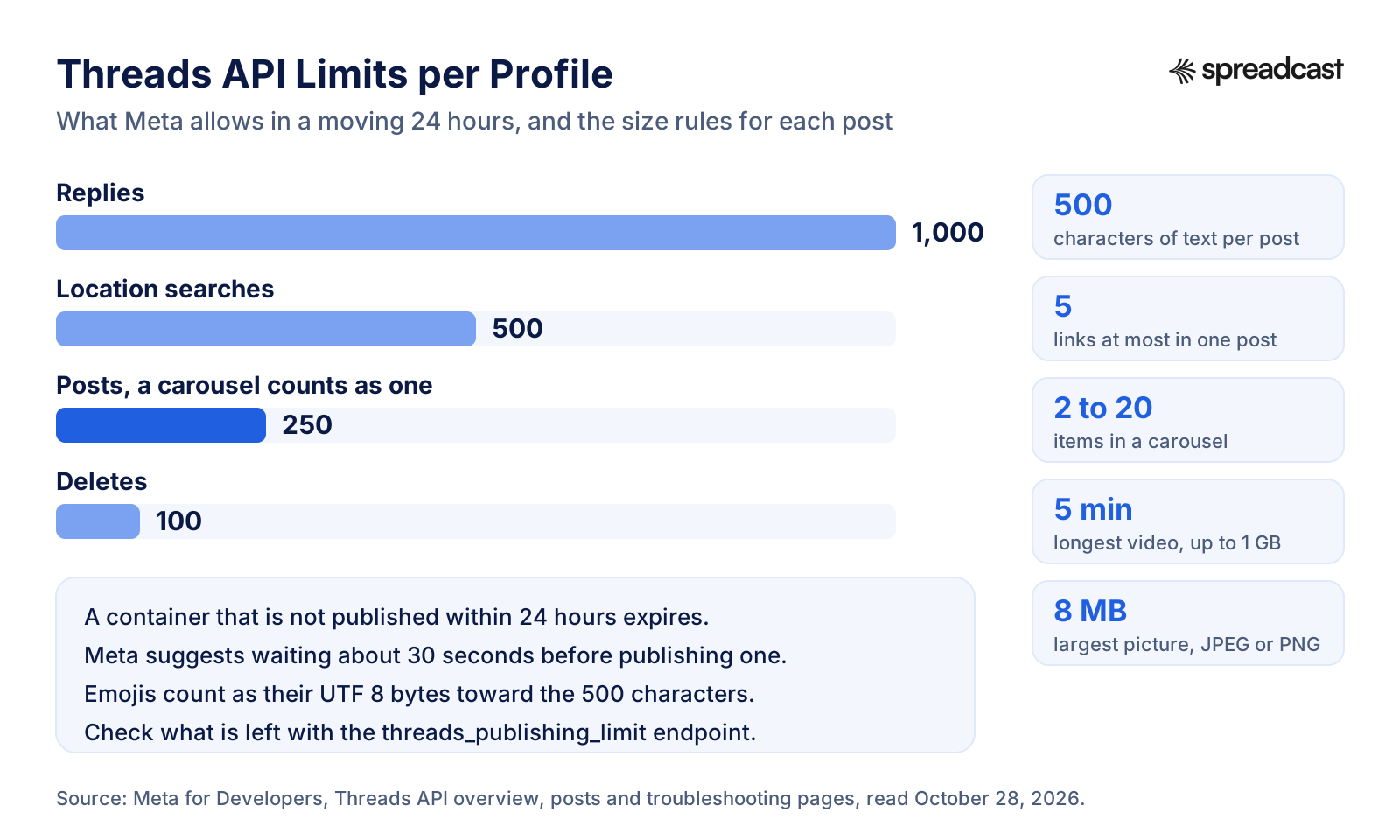
The Threads API Limits at a Glance
The same quotas as a picture. Posting is the tightest daily quota after deletes, and replies get four times as much room as posts.
Why Emojis, Links and Topic Tags Break Threads Posts
Three Threads rules catch assistants more than any others, and none of them is obvious from the Threads app. The first is how the 500 character limit counts. Meta's publishing guide says emojis are counted as the number of UTF 8 bytes. Most emojis take four bytes, so a post with 20 emojis has spent 80 of its 500 before a word is written. A language model asked to keep a post under 500 characters counts letters, not bytes, and will now and then be wrong in public. The mcp threads project on GitHub counts bytes in code for exactly this reason.
The second is links. Meta caps a post at five links, and from December 22, 2025 a post with more fails at the very first step, when the container is made. That is easy to trip with a roundup post: five tools plus your own site is six. The fix is boring: one link in the post, the rest in a reply or on a page you link to.
The third is topic tags. Threads turns one tag into a topic, and the API has a topic tag field that takes one tag of up to 50 characters. Old style hashtags in the text still work for backward compatibility, but only one becomes a topic. An assistant used to Instagram will happily write eight hashtags, and seven of them do nothing on Threads except make the post look like it was written for another network.
A good Threads MCP server guards against all three before anything is sent. When you test one, ask it for a post with a dozen emojis and six links and see what happens. If the answer is an error from Meta after the fact, the server leaves the checking to you.
Five Kinds of Threads MCP Servers
Every Threads MCP server we found on October 28, 2026 falls into one of these groups. The group tells you who holds the Threads permission and who renews it, which matters more than the tool count.
Local Servers From GitHub
These run on your computer when your assistant starts them, and call the Threads API with a token you made in your own Meta app. threads mcp by baguskto and threads mcp by griffinwork40 are two examples. They are free and complete, and the token lives in your assistant's config file.
Self Hosted Long Running Servers
The same idea, but run as a service on a machine that stays on, reached over HTTP. mcp threads by pete builds is built this way so it can refresh the token on schedule even when your laptop is closed, and serve several clients from one stored credential.
Hosted Posting Services
A company runs the server and owns an approved Meta app, so you sign in instead of making one. Upload Post's MCP server, Blotato's Threads MCP page and Buffer's MCP server all list Threads. You pay the service, and it handles tokens and processing.
Developer Toolkits
Built for people wiring their own agent in code. Composio's Threads toolkit lists 24 tools and manages token refresh, but its page says Threads connections must go through your own OAuth app, so you still create the Meta app and paste its client id and secret.
Tools That Design and Post
A tool that makes the post as well as sending it. Spreadcast is in this group: the assistant asks for a post, Spreadcast designs the picture in your brand and writes a Threads length caption, and the draft waits for your approval. The Threads connection lives in Spreadcast, never in the assistant.
Threads MCP on GitHub: Four Servers Compared
The four most active open source Threads MCP servers we found, compared from their README files and GitHub's API on October 28, 2026. All four call Meta's official Threads API, and all four need your own Meta app and token.
| Server | What it covers | How it handles the token | Worth knowing |
|---|---|---|---|
| threads mcp by baguskto | 42 tools: posts, carousels of 2 to 20 items with alt text, polls, replies, quotes, reposts, insights, search and local scheduling. A read only mode | A long lived token in the client's environment. A tool refreshes it, and another swaps a short token if you give it your app secret | MIT license, last updated October 20, 2026. Scheduled posts sit in a local file and only go out if the server is running at that time. |
| threads mcp by griffinwork40 | 26 tools for profile, reading, publishing, replies and discovery | You make the token in the Graph API Explorer's Threads tester and run curl commands to extend and refresh it | Keyword search and profile lookup need App Review. Last updated June 10, 2026, and no license file listed on GitHub. |
| mcp threads by pete builds | 13 tools over HTTP, with posting split into an inert container step and a separate publish step | Stored on a Docker volume, refreshed on its own at day 45, expiry logged at every start | Needs a machine that stays on. Counts the 500 limit in bytes. MIT license, last updated October 27, 2026. |
| threads mcp by poisonstefani dev | Publishing, carousels, reading, replies, moderation, insights, search, locations and setup checks | A local helper runs the Threads sign in and writes the token into a .env file | Sticks to calls Meta documents. MIT license, last updated May 4, 2026. |
Stars, commits and tool counts change weekly. Read the README of the version you install, and check the date of the last commit before you trust it with an account you care about.
Threads MCP on GitHub: What You Take On
Searching GitHub for a Threads MCP server turns up dozens of repositories. Several are good. All of them make you the operator: you install Node or Python, create the Meta app, keep the token alive, and fix things when Meta changes a field. That is fine if you are a developer posting to your own profile. It is a lot of quiet work if you just wanted Claude to post on Thursday.
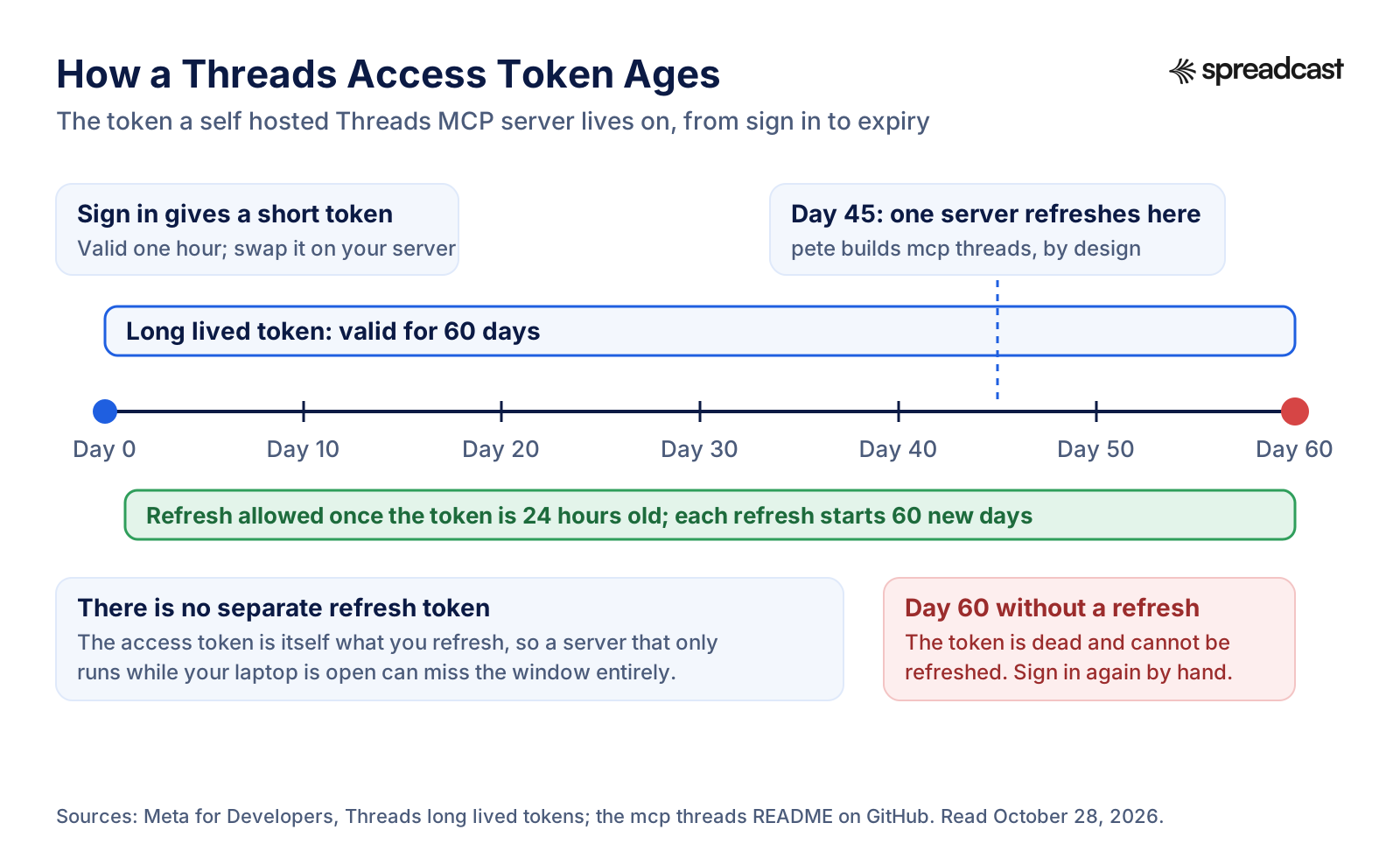
The token is the main chore, and it is a Threads specific one. Meta's long lived token page says a short lived token from the sign in lasts one hour and a long lived token lasts 60 days. You can refresh the long lived token once it is at least 24 hours old, and each refresh starts a fresh 60 days. But a token that is not refreshed within 60 days expires and can no longer be refreshed. There is no separate refresh token kept on the side. Miss the window and the only fix is to sign in again by hand and paste the new token into your config.
That is why the mcp threads README argues for a server that runs all the time: a server your assistant only starts while a chat is open cannot promise to refresh anything in 60 days, so the credential dies without warning two months after setup, usually on the day you wanted to post. Its fix is to refresh at day 45, store the new token on a volume, and log days to expiry at every start.
There is a privacy side too. The token sits in a config file, in plain text, on your computer. Anyone who gets that file can post as you until the token expires or you remove the app in your Threads settings. Keep it out of any repository, and give the Meta app only the permissions you use: posting needs the basic permission and the content publish permission, and insights, replies, keyword search and profile lookup each need their own. The poisonstefani dev README lists which tool needs which.
A Threads quirk that GitHub READMEs rarely mention: Meta's get started guide says permission grants from public profiles last 90 days and can be extended by refreshing the token, while grants from private profiles cannot be extended, and the person has to grant them again. If your Threads profile is private, expect to sign in again every 90 days whatever the server does.
How to Set Up a Threads MCP Server From GitHub
These steps follow Meta's get started guide, the Threads use case page and the README of threads mcp by baguskto, read October 28, 2026. Other GitHub servers differ only in the last two steps.
- Step 1
Create a Meta App With the Threads Use Case
Sign in at developers.facebook.com, open My Apps and create an app. When it asks for a use case, pick Threads. The Threads use case stands on its own: you do not need a Facebook Page or an Instagram business account.
- Step 2
Copy the Threads App ID and Secret
Open the use case, then Settings. The Threads app ID and Threads app secret are on that page, and they are not the same as the general app ID at the top of the dashboard. Using the wrong pair is the most common reason a token exchange fails. Add a redirect address there too if your server runs its own sign in.
- Step 3
Add Yourself as a Threads Tester
From the same Settings page, choose Add or Remove Threads Test Users, then Add People with the Threads Testers role. Open Threads, go to your account settings and accept the invite under website permissions. Until App Review, only people with a role on the app can connect.
- Step 4
Grant the Permissions You Need
Ask for the basic permission and the content publish permission for posting. Add insights, read replies and manage replies only if you want those tools. Keyword search and profile discovery need App Review before they work beyond testers.
- Step 5
Get a Token and Make It Last 60 Days
Sign in through the server's helper or the Graph API Explorer to get a short lived token, which lasts an hour. Swap it for a long lived token with your app secret on your own machine, never in a browser. Write the date down: you have 60 days.
- Step 6
Add the Server to Your Assistant
For Claude Desktop, add an entry to its config file with the command that starts the server and the token as an environment variable. For Claude Code, one claude mcp add command does the same. Restart the assistant and ask it to run the server's setup check, which confirms the token, its expiry and any missing permission.
- Step 7
Put the Refresh on a Calendar
Refresh the token after the first day and well before day 60, or use a server that does it for you. If you plan to let anyone else connect their Threads profile, you need App Review and a published app first.
How a Threads Access Token Ages
The one chart to keep in mind if you run your own Threads MCP server. Every date on it comes from Meta's token page, except day 45, which is one project's choice.
Do You Need a Meta Developer App to Post to Threads From Claude?
Only if you run the server yourself. The Meta app is how Meta knows which software is asking for permission to post. A server from GitHub uses your app. A hosted service uses its own app, which has already been through Meta's App Review, so you only sign in to Threads and approve it.
Here is how the hosted options handle it. Blotato's Threads MCP page says it needs no developer app and holds the platform integration and tokens itself. Upload Post's MCP guide describes a hosted address and an API key or an OAuth sign in. Composio's Threads toolkit is the exception among hosted options: it manages the token refresh, but still requires your own Threads OAuth app.
If what you want is a Thursday post on Threads rather than a weekend project, a hosted server saves you most of the setup above. Spreadcast is one: you connect Threads once inside Spreadcast, add one address to Claude or ChatGPT and sign in, and the Meta app, the 60 day token and the processing waits become Spreadcast's job. It also designs the picture, which none of the GitHub servers do. Setup for every assistant is on the MCP page.
Claude Threads MCP: Using a Threads Server in Claude Code and Cursor
Claude Code and Cursor are where most developers first try a Threads MCP server, because both read config files and run local servers. Claude Code's MCP docs show two ways to add a remote server. With a key, you run claude mcp add with the http transport, a name, the address and an Authorization header carrying the key as a Bearer token. Without a key, you add the address alone, type /mcp inside Claude Code and finish the sign in in your browser. The docs say tokens from that sign in are stored securely and refreshed automatically, and that Clear authentication in the same menu revokes access.
A local GitHub server is added the same way, except the command starts a program instead of pointing at an address, and the Threads token travels as an environment variable. The baguskto README shows exactly that: one claude mcp add line with the token passed in, followed by the npx command that runs the server. Node 20 or newer is required.
Pick the scope on purpose. Claude Code keeps servers in three places: local to one project (the default), shared with the project through a .mcp.json file in the repository, or available in all your projects. A Threads token should never sit in a project scoped file that you commit. The docs add that Claude Code asks for approval before it uses project scoped servers from a .mcp.json file, and warn you to verify you trust each server before connecting it.
Cursor's MCP docs put servers in .cursor/mcp.json inside a project, or in the same file in your home folder for every project. A remote server takes a url and optional headers, and a header can read the key from an environment variable rather than holding it in the file. Cursor also signs in with OAuth for servers that support it. Local servers take environment variables through an env field or an envFile, which only works for local servers.
Why use a coding tool for Threads at all? Because it can read your project while it writes. Ask Claude Code to read the last changelog entry and write the Threads post about it, and it works from the real change rather than your summary. With a server that designs, it can make the picture too. For the wider workflow, read Claude Code for social media.
Video: Adding MCP Servers in Claude Code
The Claude team's own walkthrough of adding and scoping servers, which is the same step for a Threads server.

Hosted Threads MCP Servers: Buffer, Upload Post, Blotato and Composio
If you already pay for a scheduler, check whether it has a server before adding another tool. Buffer's MCP guide lists Threads among the networks its create post tool works for, and connects at mcp.buffer.com with OAuth in most AI tools. Buffer charges per channel: its pricing page shows Essentials at $5 a month per channel billed yearly, $60 a year, Team at $10, and a free plan for up to 3 channels. Buffer sends the picture you give it. It does not design one. Our Buffer MCP server review goes through its tools.
Upload Post's MCP guide describes a hosted server on its own mcp subdomain with nearly 60 tools, an API key sent in the Authorization header, and OAuth 2.1 for clients that cannot send headers. It lists Threads options such as posting long text as one post and setting reply control, and it links its source under the MIT license. Its free media staging tier allows 20 staged files a month.
Blotato's Threads MCP page gives a hosted address at mcp.blotato.com, says no developer app is needed, and prices Blotato at $29 a month flat for 20 connected accounts. The same page notes that API and MCP access is not part of the 7 day trial: generating a key starts the paid Starter plan. It covers posts, threads, pictures and video, and scheduling, but not Threads comments or direct messages.
Composio's Threads toolkit is for developers building their own agent in code. It lists 24 tools, including creating text, picture, video, carousel, quote, poll and GIF posts, deleting posts, searching public posts and reading insights. Its MCP address is made per session in code, and Threads connections go through your own OAuth app.
Glama's directory page for Threads listed nine more servers on October 28, 2026, most of them from multi network posting services such as PostProxy, and one that reads Threads data from Metricool. Hootsuite runs its own hosted servers too, which we cover in the Hootsuite MCP server guide. What they share: each one sends a post you bring. None of them starts from your brand and makes the picture.
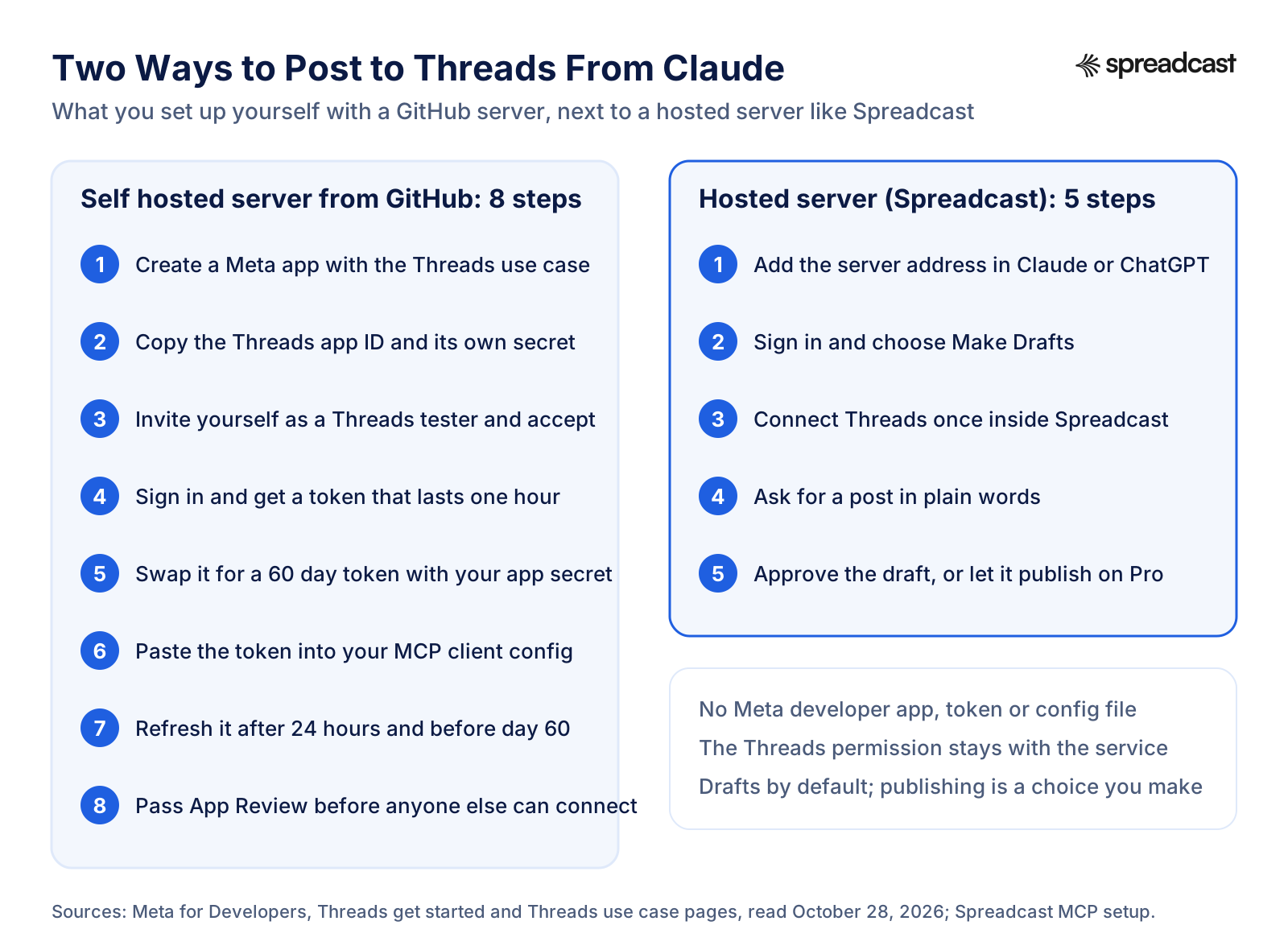
Two Ways to Post to Threads From Claude
The setup gap between a self hosted server and a hosted one, step by step.
What to Check Before You Connect a Threads MCP Server
These checks take ten minutes and apply to any server, ours included. You can answer each one from the server's README, its docs or its first screen.
- Step 1
It Uses Meta's Official Threads API
The README should name the Threads API and the permissions it asks for. A server that wants your Threads or Instagram password is logging in as you, which gives it the whole account rather than one narrow permission. Stop there.
- Step 2
You Know Who Renews the Token
Ask how the 60 day token is refreshed. A hosted service should do it for you. A local server should either refresh on its own when it runs, or tell you clearly that the job is yours.
- Step 3
It Checks the Limits Before It Sends
Look for checks on the 500 limit counted in bytes, the five link cap, carousel size and picture format. A server that leaves this to Meta hands you errors after the fact.
- Step 4
It Waits for Media Processing
Pictures and especially video need time before publishing. A server should check the container's status and keep a slow video pending instead of failing or uploading it twice.
- Step 5
New Posts Start as Drafts
An assistant can misread a request, and a Threads post is public the moment it publishes. Prefer a server where a post waits for your approval, or that splits making a container from publishing it, and where publishing is something you switch on deliberately.
- Step 6
It Has a Read Only Mode or Narrow Permissions
For research and reporting, a server that can only read is safer. Some GitHub servers have a read only switch. Hosted services usually separate drafting from publishing at sign in.
- Step 7
Someone Maintains It
Meta changed the link rules in December 2025 and will change more. Check the last commit date, or that a company with a support address stands behind it.
How Spreadcast's Threads MCP Server Works
Spreadcast is a remote MCP server at spreadcast.app/api/mcp, starting with https, built for people who market an app or a small business. You add that address to Claude or ChatGPT once and sign in with your Spreadcast account. There is no key to copy for those two. Claude Code and Cursor can use a key made in Settings, AI Assistants, or sign in the same way through the browser.
Your Threads profile connects to Spreadcast itself, in Accounts, never to the assistant. Any Threads profile can connect: Threads has no business account type and no Page to link. You never create a Meta developer app, invite yourself as a tester or paste a token. Renewing the 60 day Threads token before it runs out is Spreadcast's job, and the token never reaches your assistant or your computer.
When you connect an assistant, a consent screen asks what it may do: Make Drafts or Make and Publish. Make Drafts is the default. With it the assistant can design posts, write captions and put drafts on your calendar, and nothing reaches Threads until you approve it in Spreadcast. Scheduling and publishing also need a paid plan. Each connection shows in Settings, AI Assistants, and removing it there stops it at once.
When a Threads post does go out, Spreadcast handles the parts of the API that trip up simpler servers. A text post can go out on its own, since Threads allows it. A post with several pictures goes out as one real Threads carousel: each picture becomes a carousel item, Spreadcast waits until Threads has processed it, then joins them with one caption. A picture that is not JPEG or PNG, or is over 8 MB, is sent as a JPEG copy no wider than 1440 pixels, and each picture is placed in its frame the way the editor's preview shows it. A video goes out as a video post, and if Threads is still processing it when the wait runs out, Spreadcast carries on in the next run with the same container instead of uploading it twice. If an earlier run already published it, Spreadcast notices and does not post it again. After publishing it saves the link to the live post.
Spreadcast does not do everything the Threads API can. It publishes one post per draft, so it does not post reply chains, replies, quote posts, reposts, polls or GIFs, and it does not mix videos into a carousel. It has no tools for reading or answering replies or direct messages. If those matter, a GitHub server such as baguskto's covers them, and the two can sit side by side in the same assistant.
What Spreadcast Makes for Threads From a Chat
Most Threads MCP servers send what you already have. Spreadcast's server also makes the post, from your brand kit and, for apps, your App Store listing.
Designed Threads Posts in Your Brand
Ask for a post about a feature and the assistant designs a picture in your brand's colors, fonts and logo, with a headline written for it and, for an app, a real screenshot in an iPhone frame. Kinds include feature, how to, launch and testimonial.
Carousels of 3 to 8 Slides
For a carousel it designs 3 to 8 slides in one look: a cover, the middle slides and a last slide that sends people to the app or site. On Threads they go out as one carousel with one caption.
Captions Written for Threads
Spreadcast's caption writer treats Threads as its own network: one to three short sentences, conversational, under 400 characters, sometimes ending with a question, and at most one tag, since Threads turns only one into a topic.
Text Only Posts
Threads is one of the networks where a post needs no picture. The assistant reads Spreadcast's posting rules first, so it knows Threads takes text alone and 500 characters, while Instagram in the same draft needs a picture.
Posts From App Store Moments
For an app, Spreadcast watches the App Store listing. When a new version ships or the app reaches a ratings milestone, the assistant can design the matching post with what changed, taken from your release notes.
A Check Before Anything Is Saved
A dry run puts the post through every check Spreadcast runs without saving it, so a caption over Threads' limit or a missing picture for Instagram shows up in the chat, not at publishing time.
The Same Post on Other Networks
The draft can also go to Instagram, Facebook, LinkedIn, Bluesky, Mastodon, Pinterest, TikTok, YouTube, Telegram and Discord, each with its own caption, if you connected them. Bluesky gets a shorter text, since it takes 300 characters.
How Your Threads Account Is Growing
Later, ask how the month went. The assistant reads Spreadcast's analytics: followers and interactions per network, with Threads followers read from Threads' own insights, plus your top posts and best hours.
Threads Through Spreadcast Next to the Threads API
What Meta's API allows, from Meta's Threads API overview and publishing guide, next to what Spreadcast does with it today.
| Format or feature | Threads API | Spreadcast through MCP |
|---|---|---|
| Text only post | Yes, up to 500 characters | Yes, with the limit checked before saving |
| Single picture | JPEG or PNG, up to 8 MB | Yes. Designed by the assistant or attached from a link, converted when needed |
| Carousel | 2 to 20 pictures or videos | Yes, pictures only, published as one carousel. The assistant designs 3 to 8 slides and you can attach up to 10 |
| Video | Up to 5 minutes and 1 GB | Yes, from a video link, waiting for processing across runs |
| Reply chains, replies, quotes, reposts | Yes | No |
| Polls, GIFs, link attachments, spoilers | Yes, with limits | No |
| Scheduling | Not part of the API | Yes, on Pro, once you allow publishing |
| Drafts waiting for approval | Not part of the API | Yes, the default for every new connection |
| Picture design in your brand | Not part of the API | Yes, single posts and carousels |
Checked against Spreadcast's Threads publishing code and Meta's pages on October 28, 2026.
How to Post to Threads From Claude With an MCP Server
These steps use Spreadcast and follow Anthropic's guide to custom connectors, read October 28, 2026. With another hosted server, the Claude part is the same and only the address changes.
- Step 1
Connect Threads in Spreadcast
Start at spreadcast.app/start with your App Store link, your website or a line about your brand. Then open Accounts and connect Threads. You approve access in a sign in window, and Spreadcast never asks for your Threads password.
- Step 2
Add the Connector in Claude
In Claude, open Customize, then Connectors, click the plus Add button and choose Add custom connector. Name it Spreadcast, paste spreadcast.app/api/mcp with https in front, click Continue and then Add. On Team and Enterprise an Owner adds it for the organization first, and members then click Connect.
- Step 3
Sign In and Choose Make Drafts
Claude opens Spreadcast. Log in, keep Make Drafts for your first week and allow access. You can connect again later with Make and Publish.
- Step 4
Ask for a Threads Post
In a chat, switch the Spreadcast connector on and type something like "Write a Threads post about this week's update and design a picture for it." Approve the Spreadcast tools when Claude asks. The picture shows in the chat.
- Step 5
Approve It in Spreadcast
Open the Spreadcast calendar, read the post, change what you want and approve. Spreadcast publishes it to Threads at the time you picked.
Video: How Connectors Work in Claude
Anthropic's walkthrough of connectors. Menu names may have moved since it was recorded, so follow the steps above where they differ.
Which Claude Plans Can Use a Threads MCP Server
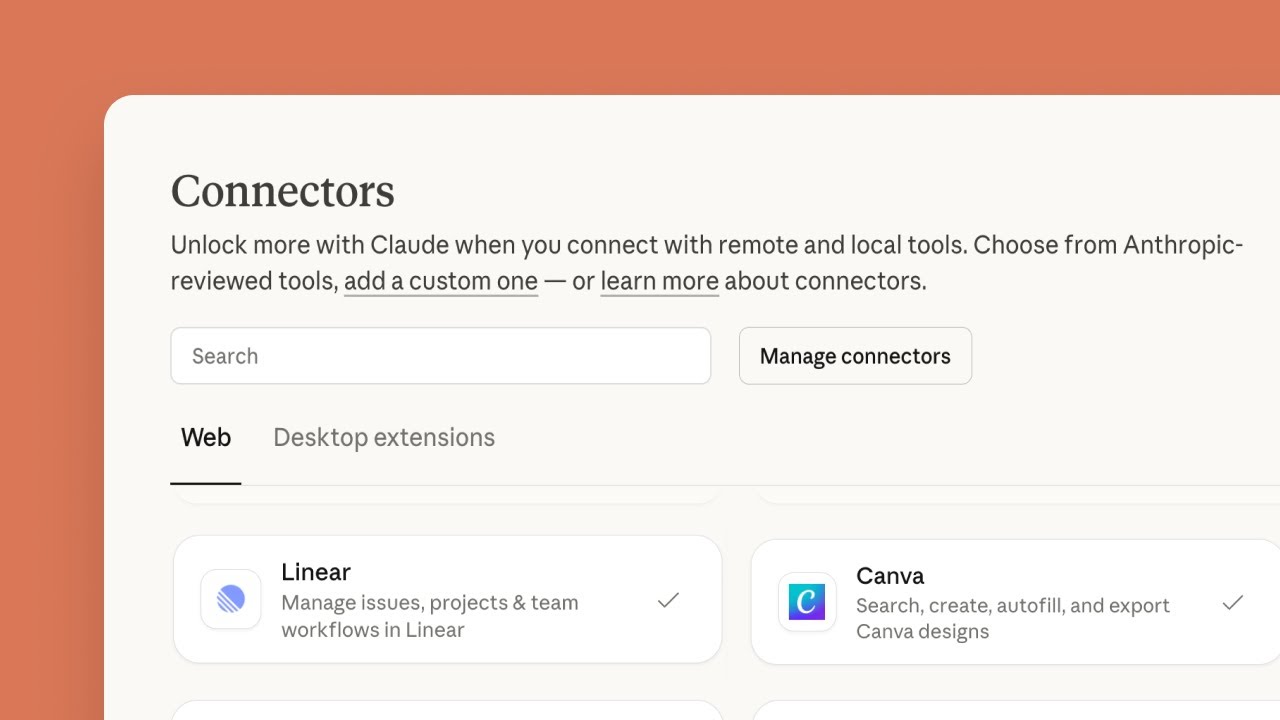
Every Claude plan can. Anthropic's connector guide lists custom connectors on Free, Pro, Max, Team and Enterprise, with Free users limited to one custom connector. One is enough for one hosted Threads server. On Team, Owners and Primary Owners add connectors for the organization. On Enterprise, Owners, Primary Owners and people with a custom role that can manage access to libraries can.
The same guide carries warnings worth reading before you connect anything that posts. Anthropic does not verify custom connectors, and Claude can take actions in the connected service. A malicious server could hide instructions in what it returns, so watch what tools receive and send, and choose Allow always only for tools you trust. Research mode can call connector tools without asking again, so turn off write tools before you run it. A hosted server must also be reachable from Anthropic's cloud, which is why a server on your laptop needs Claude Desktop or Claude Code instead.
For a Threads server in particular, the practical rule is simple: let the read tools run freely, and keep any tool that publishes behind a confirmation. With Spreadcast that confirmation is built in, because a Make Drafts connection cannot publish at all.
How to Use a Threads MCP Server in ChatGPT
These steps follow OpenAI's developer guide to connecting a server in ChatGPT, read October 28, 2026. ChatGPT reaches remote servers only, so a GitHub server on your laptop will not work here without a tunnel.
- Step 1
Open Plugins in ChatGPT
In ChatGPT on the web, open Plugins, select the plus button and choose Add custom MCP server. OpenAI's guide says account and workspace policies apply, so if the option is missing, your plan or your role in the workspace does not allow it and an admin has to add it.
- Step 2
Enter the Server
Give it a name such as Spreadcast and a short description. Under Connection, enter the public address with its path, for Spreadcast spreadcast.app/api/mcp with https in front.
- Step 3
Set Authentication and Accept the Warning
Choose OAuth for a hosted server that signs you in. Read the risk warning, select I understand and want to continue, then Create as a plugin. ChatGPT lists the tools it found.
- Step 4
Sign In With Spreadcast
ChatGPT sends you to Spreadcast. Log in, pick Make Drafts or Make and Publish, and allow access.
- Step 5
Ask for the Threads Post
Start a chat, pick Spreadcast for the message and ask for the post. ChatGPT may ask you to confirm before it saves a draft. The draft then waits in your Spreadcast calendar.
ChatGPT and the Threads API Without MCP
People also search for a ChatGPT Threads API, meaning a way to have ChatGPT call Threads directly. ChatGPT has no built in Threads connection. It can write a Threads post in a normal chat, and it can help you write code that calls the Threads API, but publishing needs something that holds a Threads permission: a custom MCP server, or your own code running somewhere with a token.
The do it yourself route is a script, not ChatGPT itself. Meta's sample app shows the sign in and publishing calls, and ChatGPT or Claude can adapt it for you. You still create the Meta app, keep the token alive and host the media at a public link. If what you want is ChatGPT writing posts and something else publishing them, the guide to scheduling social media posts with ChatGPT covers the options, and ChatGPT social media automation shows what ChatGPT can post with a server attached.
Claude Threads API, GitHub Code and Claude Skills
The same goes for Claude. There is no Claude Threads API, only the Threads API with Claude on one side. Claude can call it three ways: through an MCP server, which is what this page is about; through code Claude writes and you run, for example a short script built from Meta's sample app; or through a skill that bundles instructions and scripts.
Anthropic's help article on skills describes skills as folders of instructions, scripts and resources that Claude loads when they are relevant, available on Free, Pro, Max, Team and Enterprise, and requiring code execution to be on. A Threads skill is a good home for your voice and your rules: how long posts run, which topic you tag, what you never say. It is a poor home for a posting credential, because a script in a skill still needs the token from somewhere. The usual setup pairs the two: a skill for how you write on Threads, an MCP server for actually posting.
Searching GitHub for Claude Threads code turns up the MCP servers above, a few scripts and some skills that bundle Threads posting tips. Read any script before running it, and never paste a Threads token into a chat to make one work. For the skills worth installing for social media in general, see Claude skills for social media, and for the broader Claude setup, Claude for social media.
Threads Claude Prompts and ChatGPT Threads Prompts That Work
Prompts we use with a Threads MCP server attached. They work in Claude and ChatGPT alike. Each one names the network, the length and what should happen to the result, which is what keeps an assistant from guessing.
One Post From a Release
"Read the release notes for version 3.2 and write one Threads post about the change people will notice most. Two sentences, plain words, no hashtags, under 400 characters. Save it as a draft for Tuesday at 9 in the morning my time."
A Week of Threads Drafts
"Plan five Threads posts for next week about our app: one tip, one question for users, one behind the scenes line, one feature, one thank you. Each under 300 characters. Save all five as drafts, one per weekday, and show me the list."
A Carousel for Threads and Instagram
"Design a carousel of five slides on how to set up reminders in our app. Write a Threads caption of two sentences and a longer Instagram caption with four hashtags. Save it as one draft for both networks."
Rewrite for Threads
"Here is a LinkedIn post. Rewrite it for Threads: half the length, conversational, one question at the end, no hashtags. Then check it against Threads' limit counted in bytes."
A Reply Draft, Not a Reply
"Read the replies to my last Threads post and draft an answer to the three that ask a question. Do not post anything. Show me the drafts here."
Monthly Threads Report
"Read my Threads analytics for October. Tell me follower change, my three posts with the most interactions and what they have in common, in five lines."
Check Before You Schedule
"Run the dry run on this draft for Threads, Bluesky and Mastodon and tell me which network would refuse it and why. Do not save anything."
A Launch Day Post
"We launch today. Write a Threads post that says what the app does in one line and who it is for in another, with the App Store link. Design a picture with the main screen in an iPhone frame. Draft only."
Where Prompts Stop and Design Starts
The prompts above get you good Threads text from any server. The picture is where most setups stall. A GitHub server posts a picture only if you hand it a public link to one, so someone still opens a design tool, makes the image, exports it, uploads it somewhere public and pastes the link into the chat. For a post a week that is fine. For a post a day across Threads, Instagram and Bluesky, it is the part that stops happening by week three.
That is the gap Spreadcast fills inside the same chat. The assistant asks Spreadcast for the picture, and it comes back in your brand's colors, fonts and logo, with your app's real screenshot in an iPhone frame when you have one, sized for each network. Threads gets its short caption, Instagram its longer one, and the draft waits on your calendar. If you would rather not use an assistant at all, the social media caption generator and Create inside Spreadcast do the same from one line. More prompts grouped by job are in Claude prompts for social media.
Example: A Week of Threads Posts From One Claude Chat
This example uses an invented budgeting app called Tally, on Spreadcast Pro with Threads, Instagram and Bluesky connected and a Make Drafts connection in Claude. It shows the mechanics, not a customer result.
- Step 1
Alex Asks for the Week
On Sunday evening Alex types "Plan five Threads posts for this week about Tally 4.1, which added shared budgets. Two of them with a picture, one as a carousel for Instagram too." Claude reads the Spreadcast account first and sees Threads, Instagram and Bluesky connected and a drafts only connection.
- Step 2
Claude Reads the Brand, the Moment and the Rules
It reads Tally's brand kit: a deep green, a rounded font, the logo and screenshots of the app. It lists moments and finds the 4.1 release with its notes. It reads the posting rules: Threads takes text alone and 500 characters, Instagram needs a picture, Bluesky takes 300 characters.
- Step 3
Claude Writes and Designs
Three posts are text only: a question about splitting rent, a one line tip, a thank you to early testers. One is a single picture with the shared budget screen in an iPhone frame. The fifth is a five slide carousel on setting up a shared budget, with a short Threads caption and a longer Instagram caption.
- Step 4
Claude Checks and Saves Drafts
The dry run flags the Bluesky version of the carousel caption as too long, so Claude writes a shorter one for Bluesky. Five drafts land on Monday to Friday at 8:30 in the morning.
- Step 5
Alex Approves Over Coffee
On Monday Alex opens the calendar, cuts one emoji, rewrites a headline and approves all five. Spreadcast publishes each at its time. On Friday Alex asks Claude how the week went and gets followers gained and the interactions per post.
Common Threads API Errors When an Assistant Posts
Most failed Threads posts from an assistant come from a few rules, all in Meta's publishing guide and troubleshooting page. Knowing them helps you read an error in the chat whichever server you use.
The token expired. A long lived token not refreshed within 60 days is dead, and every call fails with an authentication error until you sign in again. With a GitHub server, check the expiry date first. Hosted servers renew the token for you.
The app is still in development. Until App Review, only people with a role on the Meta app can connect. If the token exchange fails or a second person cannot connect, check that the profile accepted the tester invite in Threads' settings.
The wrong app ID. The Threads use case has its own app ID and secret. Using the general Meta app ID in the token exchange fails, and the error does not always say why.
The media is not ready. Threads processes each upload before publishing. Publish too early and the container is not finished. Meta's troubleshooting page suggests checking status about once a minute for no more than five minutes. A container left unpublished for 24 hours expires.
The link is not public. Threads fetches the picture or video from the address the server gives it. A file on your computer, a private folder or an expired signed link fails. The server must host the file somewhere public.
Too many links or too much text. Six links fail at container creation. A post that looks like 480 characters with a row of emojis can be over 500 in bytes.
The daily cap. 250 posts in a moving 24 hours per profile. A loop that keeps retrying a failed post can burn through it. Good servers read the remaining quota from the API rather than counting on their own, because a post you made from your phone counts too.
When a Different Threads MCP Server Fits Better
Spreadcast is built for app makers and small brands: posts start from your brand kit and, for apps, from the App Store listing. If that is not you, or you need something it does not do, another server may fit better.
If you want an assistant to read, hide and answer replies, or post reply chains, polls and quote posts, Spreadcast has no tools for that. threads mcp by baguskto covers replies, polls, quotes, chains and reply approvals on your own Meta app. If you want a server that runs on your own machine around the clock with careful token handling, mcp threads by pete builds is built for exactly that.
If you are building your own agent in code and want managed connections across many apps, Composio is made for developers, with the caveat that Threads still needs your own OAuth app. If you already schedule everything in Buffer and only want Claude to fill the queue, Buffer's server keeps you in one tool.
Pick Spreadcast when you want the post made, not only sent: a Threads post about a feature, a carousel about a new version or a thank you for a rating, designed in your look, written to Threads' length, saved as a draft you approve, and published to Threads and the other networks you connected. For the posting habit around it, read how to schedule Threads posts, and for how big the audience is, Threads statistics.
Where Spreadcast Fits: Posting to Threads Every Day Without a Designer
Here is what a daily Threads habit looks like by hand for a small team. You think of the post, write it in the Threads app, notice it would be better with a picture, open a design tool, find the brand colors again, export, go back, attach, post. Then you remember Instagram and Bluesky want the same news, rewrite the caption twice because the limits differ, and make a second picture in a different shape. Forty minutes for one idea, and the next day you skip it.
Here is the same day with Spreadcast. You tell Claude or ChatGPT what happened, or Spreadcast notices it first because your app shipped a new version. Spreadcast designs the picture from your brand kit, writes the Threads caption short and conversational, writes longer ones for the networks that take them, checks every limit, and puts the draft on your calendar. You read it, change a word and approve. On autopilot, App Store moments can go out without the tap.
Before: a Meta developer app, a tester invite, a token on a calendar, a design tool, three caption rewrites. After: one address in your assistant, Threads connected once, a draft to approve. Spreadcast publishes to Threads, Instagram, Facebook, LinkedIn, Pinterest, TikTok, YouTube, Bluesky, Mastodon, Telegram and Discord, so one idea reaches all of them. Start free at spreadcast.app/start with your App Store link or your website, see everything it does on features, and the setup for each assistant on the MCP page.
If you post to several networks every week, compare that with the arithmetic of a per channel scheduler that does not design: three networks on Buffer Essentials is $15 a month billed yearly before anyone makes a picture. Spreadcast Pro is $29 a month for designed posts with no cap, publishing to 10 social accounts across any mix of networks, and posting from Claude or ChatGPT.
Spreadcast Plans for Posting to Threads From an Assistant
The MCP server is part of every plan. What changes is whether the assistant can schedule and publish.
| Plan | Price | What you get for Threads |
|---|---|---|
| Free | $0 | One app. The assistant can design and draft, and 3 posts download with a small Spreadcast mark. No publishing. |
| Pro | $29 a month or $290 a year | Clean posts with no cap, publishing to 10 social accounts across any mix of networks, autopilot or one tap approval, posting from Claude or ChatGPT. |
| Studio | $79 a month | Everything in Pro for 5 apps and 50 accounts, each with its own brand. |
| 30 Day Pass | $39 once | Everything in Pro for 30 days, with no subscription. |
| Post Pack | $19 once | 10 posts designed and published, with no subscription. |
Paid plans come with a 7 day full refund. Current details are on the pricing page.
Threads MCP Servers for Other Networks
Threads rarely runs alone. If you are setting up one network's server, the same questions come up for the rest, and the answers differ a lot: Instagram needs a professional account, LinkedIn splits personal profiles from company pages, TikTok audits apps before public posting, and Telegram posts through a bot.
We wrote the same guide for each: the Instagram MCP server, the Facebook MCP server, the LinkedIn MCP server, the Pinterest MCP server, the TikTok MCP server, the YouTube MCP server and the Telegram MCP server. If Bluesky is next to Threads on your list, how to schedule Bluesky posts covers it, and for marketing servers beyond social, see the best MCP servers for marketing.
Frequently Asked Questions
Is there an official Threads MCP server from Meta?
No. On October 28, 2026 Meta's only MCP server is for ads, described in Meta's Ads MCP overview. Every Threads MCP server is built by someone else on top of Meta's official Threads API.
Can Claude post to Threads?
Yes, with an MCP server that can post. Add a hosted server as a custom connector on any Claude plan, Free included with one connector, or add a GitHub server to Claude Desktop or Claude Code with your own token. With Spreadcast, Claude saves a draft you approve, or publishes after asking if you allowed publishing.
Can ChatGPT post to Threads?
Not on its own. ChatGPT can post through a custom MCP server added under Plugins, as OpenAI's connection guide describes, where your account and workspace allow it. The server must be reachable on the internet, so a local GitHub server needs a tunnel.
Do I need a Meta developer app for a Threads MCP server?
For a server you run yourself, yes: an app with the Threads use case, you as a Threads tester, and a token. Hosted services such as Spreadcast, Blotato and Upload Post use their own approved app, so you only sign in.
How long does a Threads API token last?
A short lived token lasts one hour and a long lived token 60 days, per Meta's token page. You can refresh it once it is a day old, and each refresh restarts the 60 days. Miss the window and you must sign in again.
How many posts can a Threads MCP server publish per day?
250 API published posts per profile in a moving 24 hours, with a carousel counting as one, plus 1,000 replies and 100 deletes. One person rarely gets near it.
What is the Threads character limit through the API?
500 characters per post, with emojis counted as their UTF 8 bytes, so emojis use the limit up faster than letters. A post can hold at most 5 links.
Is Thread MCP the same as a Threads MCP server?
No. Thread is a service desk product for IT service providers, and its MCP server handles tickets and clients. A Threads MCP server posts to Meta's Threads social network.
Where These Facts Come From
Every outside number, rule and price on this page links to the page it was taken from.
- Threads API overview and rate limitsMeta for Developers
- Threads posts and publishing guideMeta for Developers
- Get started with the Threads APIMeta for Developers
- Threads long lived access tokensMeta for Developers
- Threads API troubleshootingMeta for Developers
- Threads insights referenceMeta for Developers
- Customize the Threads use caseMeta for Developers
- The Threads API is finally hereMeta for Developers
- Threads API sample appGitHub
- Ads MCP server overviewMeta for Developers
- threads mcp by bagusktoGitHub
- threads mcp by griffinwork40GitHub
- mcp threads by pete buildsGitHub
- threads mcp by poisonstefani devGitHub
- Threads MCP servers directoryGlama
- MCP server integration guideUpload Post
- Threads MCP serverBlotato
- Buffer MCP server guideBuffer Developers
- Buffer pricingBuffer
- Threads toolkitComposio
- Thread MCP server developer guideThread
- Get started with custom connectors using remote MCPAnthropic Help Center
- What are skillsAnthropic Help Center
- Introducing the Model Context ProtocolAnthropic
- Connect and test your plugin in ChatGPTOpenAI Developers
- Connect Claude Code to tools via MCPClaude Code Docs
- Model Context Protocol in CursorCursor Docs
- What is the Model Context ProtocolModel Context Protocol
- Video: The Model Context ProtocolAnthropic
- Video: MCP in Claude CodeClaude
- Video: Getting started with connectors in ClaudeAnthropic
Researched and written by Spreadcast. Last checked on October 28, 2026.