What Are the Best App Promotion Ideas?
The best app promotion ideas are built around moments your app already has: launch day, every new version, each rating milestone, the seasons your users plan around, and In App Events on the App Store. A moment gives you something true to say, a reason for Apple's editors and the press to look again, and a post that people who already use the app actually want to see. Ideas that start from nothing, such as a generic "download our app" ad, cost more and usually work less.
If you only have an afternoon, these seven are where we would start for a small team with an iPhone app:
- Rewrite the app name, subtitle and keyword field in the words people type into the App Store. Apple's advertising site says 70% of App Store visitors use search to discover apps, a figure from Apple's worldwide data for 2022.
- Add Apple's rating prompt at a moment when the user has just succeeded at something.
- Create one App Store campaign link for each channel, so you can see later which idea sent downloads.
- Turn every new version into a short post with a real screenshot of what changed.
- Post when the app reaches a rating milestone, and thank the people who rated it.
- Plan one In App Event and one featuring nomination around your next big update.
- Choose one community and one social network that your users already use, and keep both going every week.
Below are 48 promotion ideas for apps, grouped by moment and place. Each one says how to do it, what it costs, how long it takes, which kinds of apps it suits, a real public example where we could verify one, and the deeper guide on this site when there is one. Every rule, limit and number was checked against Apple's own pages and the other sources linked in October 2026.
How We Chose and Rated These Ideas
Cost is the money you pay someone else: Apple, an ad network, a printer, a translator. Time is our estimate of the hours one person needs to do the idea properly the first time. Payoff is our judgment of what the idea usually returns for a small team with a live iPhone app, from low to high, and whether it lasts after you stop or spikes for a day. Best for names the kinds of apps that gain the most. These ratings are opinions, so the numbers and rules inside each idea are linked to their sources and the ratings are not.
The examples are public: developer blog posts, App Store listings, Apple's own developer stories, a press release and interviews, each linked with its date. Where we could not open a page and confirm an example, we left it out rather than describe one from memory. The list is about iPhone apps, because App Store tools such as In App Events, custom product pages and campaign links only exist there. Most ideas outside the App Store sections work the same for an Android app.
This page is a menu of app marketing ideas, built so you can pick the next three. Three other guides on this site go deeper in different directions: how to promote an app for free ranks 14 zero budget tactics step by step, how to market an app is the full plan from positioning to paid ads and retention, and mobile app marketing examples collects longer case studies of apps that did these things well.
App Promotion Ideas Rated by Effort and Payoff
All 48 ideas in one table, in the order they appear below. Money and time are what one idea costs once. Payoff is our rating for a small team, and "lasting" means the idea keeps working after you stop.
| # | Idea | Money | Time | Payoff | Best for |
|---|---|---|---|---|---|
| 1 | Pre orders on the App Store | Free | 1 to 2 hours | Medium, a release day spike | Games, apps with a date |
| 2 | A public TestFlight beta | Free | 2 to 4 hours, then weekly | Medium, builds a launch list | Indie apps with followers |
| 3 | Invite links past a waitlist | Free, plus build time | 1 to 3 days | Medium to high when friends matter | Social and money apps |
| 4 | Crowdfunding | Platform fees and rewards | Weeks | High with an audience, low without | Known developers, games |
| 5 | Product Hunt | Free | 1 to 2 days, plus launch day | A spike | Tools for makers |
| 6 | Show HN | Free | 1 hour, plus a day of replies | A spike | Developer and Mac tools |
| 7 | A launch week offer code | The discount | 1 hour | Medium | Subscription apps |
| 8 | A launch date chosen around Apple's calendar | Free | 1 hour | Medium, protects every other idea | Every app |
| 9 | A post for every new version | Free | 30 to 60 minutes per release | Medium, compounding | Apps that ship monthly |
| 10 | Release notes people read | Free | 15 to 30 minutes per release | Low to medium | Apps with a voice |
| 11 | Promotional text on release day | Free | 10 minutes | Low to medium | Every app |
| 12 | Shipping on the day the new iOS ships | Free | Weeks of summer work | High when it lands | Apps that adopt new system features |
| 13 | A Major Update In App Event | Free | 2 to 3 hours, plus artwork | Medium | Big releases, games |
| 14 | Featuring nominations | Free | Under 1 hour | Low odds, large upside | Every app with news |
| 15 | An anniversary relaunch | Free | The work behind it | Medium | Apps a few years old |
| 16 | Apple's rating prompt | Free | 2 to 4 hours of development | High, lasting | Every app |
| 17 | Replies to reviews | Free | 15 minutes a day | Medium, lasting | Every app |
| 18 | Rating milestone posts | Free | 20 minutes each | Low to medium | Apps with steady ratings |
| 19 | Awards and permitted quotes | Free | 1 hour | Low to medium | Apps with awards or press |
| 20 | A listing in the words people search | Free | 1 to 2 days, then 1 hour a month | High, lasting | Every app |
| 21 | Custom product pages | Free | 2 to 3 hours per page | Medium to high | Apps with several audiences |
| 22 | Product page optimization tests | Free | Half a day, then weeks of waiting | Medium, lasting | Apps with steady traffic |
| 23 | Seasonal In App Events and offers | Free, or the discount | 2 to 3 hours per event | Medium | Games, fitness, education |
| 24 | A localized product page | Free to a translator's fee | Half a day per language | Medium, lasting | Apps already seen abroad |
| 25 | Promoted In App Purchases | Free | 1 hour per purchase | Low to medium | Subscriptions, games, several apps |
| 26 | One network chosen by audience | Free | 1 to 3 hours a week | Medium, compounding | Every app |
| 27 | Short screen recordings | Free | 1 to 2 hours per video | Unpredictable | Apps with a visible result |
| 28 | App promotion graphics | Free | 30 minutes per graphic | Medium | Every app |
| 29 | Building in public | Free | 20 minutes a day | Slow, then compounding | Indie developers |
| 30 | A result worth sharing | Build time | Days to weeks | High for the right app | Fitness, habit, music, travel |
| 31 | Creators | Free product to monthly fees | Hours a week | High variance | Consumer apps |
| 32 | Reddit and niche forums by hand | Free | 2 to 3 hours a week | Medium to high for niche apps | Niche apps |
| 33 | A Bluesky starter pack | Free | 1 hour | Low to medium | Apps with a Bluesky audience |
| 34 | Pitches to niche newsletters and writers | Free | Half a day per round | Medium | Apps with news |
| 35 | Podcast guest spots | Free | 2 hours each | Medium, lasting | Founders with a story |
| 36 | Cross promotion with a developer | Free | 1 to 3 hours | Low to medium | Developers with a partner |
| 37 | A yearly data report | Free | 2 to 5 days | Medium to high with press | Apps with interesting data |
| 38 | Honest comparison pages | Free | Half a day per page | Medium, lasting | Apps with known rivals |
| 39 | Apple Ads | Your budget | 2 hours, then 30 minutes a week | Medium to high | Apps whose page converts |
| 40 | Ads matched to custom product pages | Your budget | 2 hours per variation | Medium to high | Apps with distinct groups |
| 41 | Boosting posts that worked | Your budget | 30 minutes | Medium | Apps that post short video |
| 42 | QR code posters | Printing | An afternoon | Low to medium, local | Venue, campus and local apps |
| 43 | App Clip Codes | Build time | Weeks to build an App Clip | High in the right place | Apps used at a place |
| 44 | Offer codes at events | The discount and printing | 1 hour | Low to medium | Subscription apps at events |
| 45 | Referral offer codes | The rewards | Days to build | Medium | Subscription apps |
| 46 | Win back offers | The discount | 1 to 2 hours | Medium | Subscription apps |
| 47 | An In App Event for lapsed users | Free | 2 to 3 hours | Medium | Apps with many lapsed users |
| 48 | Opt in push and email for real news | Free to a small monthly fee | 30 minutes per message | Medium | Apps with opted in users |
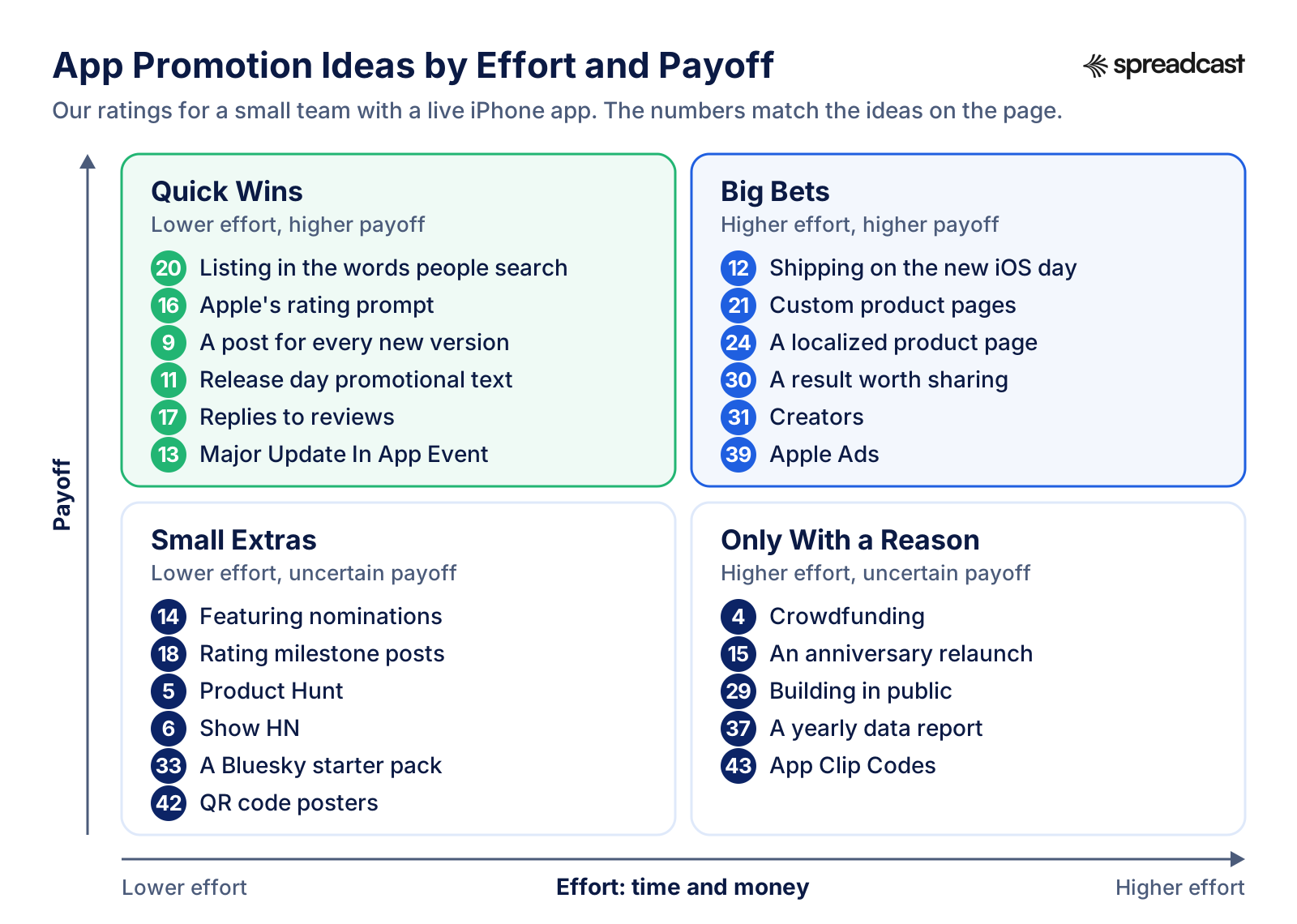
Read the grid from the top left. Quick wins cost an hour or a day and keep paying: the listing, the rating prompt, a post per release. Big bets take weeks or a budget and can change an app's year. Small extras are cheap lottery tickets worth buying when you have news. The bottom right is for ideas that only make sense when you already have the audience, the data or the reason.
New App Promotion Ideas for Launch
Launch is the one moment that never comes back, and most of its ideas need lead time. A featuring nomination wants weeks of notice, a TestFlight beta needs App Review approval for its first build, and Apple only offers campaign links once the app has been live and generating downloads for at least 24 hours. So these eight new app promotion ideas start one to three months before release day. The sequence for the day itself, with posts for each network, is in our app launch announcement examples and the app launch checklist.
1. Open Pre Orders on the App Store
With pre orders, Apple publishes a limited version of your product page before the release. People order the app, and on release day it downloads to their devices automatically and they get a notification. Apple's pre order page says a brand new app can set a release date 2 to 180 days after the pre order is published, and an existing app entering a new region can set one 2 to 365 days ahead. Pre orders show up in search results, and on the Today, Games and Apps tabs when the app is being featured.
Two details are easy to miss. Apple does not notify people who pre ordered if the date moves or the pre order is removed, so leave the date out of your marketing unless it is fixed, and tell people yourself if it changes. And the preorder_date field in the receipt lets you recognize pre order customers in the app, so you can thank them or unlock a small reward. Use Apple's pre order badge until release day, then swap every badge for the download one.
Cost: free. Time: one to two hours once the build has passed App Review. Best for: games, apps with a launch date people can wait for, and existing apps entering a new country. Go deeper: pre orders as a featuring hook are covered in how to get featured on the App Store, and for games in mobile game marketing.
2. Turn a Public TestFlight Beta Into Your Launch List
TestFlight lets you invite up to 10,000 external testers, by email or with a public link you can put in posts, a newsletter or your bio. You can set criteria such as device type and OS version for people who join through the link, and see how many viewed and installed the beta. The first build needs App Review approval for TestFlight. Testers send screenshots with feedback from inside the app, which makes a beta both a test and an early audience.
Real example: Roddy Munro's Söka launch retrospective from June 2023. He gave about 20 handpicked people access first, then opened the beta and shared screenshots with the TestFlight link; reposts by people with large followings brought in more testers, and by launch the app had just over 270. He added a screen that appeared for TestFlight users after launch, linking to the App Store version and a launch week discount. He reports more than 300 downloads in the first two days without spending anything, mostly from social media.
Cost: free. Time: two to four hours to set up, then an hour a week reading feedback. Best for: indie apps with some social following, and any app that needs testing on real devices before launch.
3. Let Early Users Skip the Waitlist With Invite Links
If you run a waitlist, let each early user bring a friend past it. Monzo's golden tickets were a link a customer could send that let a friend skip the waiting list and open an account straight away. Monzo switched them off for about three months, and their return in January 2018 got its own blog post. The same mechanic works for an app in a limited beta: give every tester or early subscriber a few invite links, and the people who care most do your inviting.
Cost: free, plus the engineering to issue and check links. Time: one to three days to build. Best for: apps with a waitlist, social apps, money apps and anything that is better with friends.
4. Crowdfund the App to Build an Audience First
A crowdfunding campaign is promotion that pays for itself, because every backer is a launch day user who has already paid. On February 29, 2024 the Iconfactory wrote that the base Kickstarter for Project Tapestry had been funded within the first few days, and pushed for stretch goals with appearances on three podcasts. That worked because the studio had decades of fans. Without an audience, a campaign mostly advertises that nobody came.
Cost: the platform's fees and the rewards you promise. Time: weeks of preparation and a month of daily updates while the campaign runs. Best for: established developers, apps for a passionate niche, and games.
5. Launch on Product Hunt
Product Hunt is free to use, and its launch guide explains that makers submit products which compete on the homepage leaderboard for the top spots, including Product of the Day. Launch on a day you can answer comments from morning to night, give the app a short tagline and a gallery of real screens, and put a campaign link on the listing so you can see what it sent.
Be realistic about the result. Söka's developer found his launch comments filled with spam from accounts created that day, and no sign that the listing increased downloads. The maker of Minimalist Phone wrote on Product Hunt's forum that a relaunch three years after the first finished 6th on its day, and that at least seven people then offered paid help boosting it, at prices from $40 to $450 and up. Paying for votes is the one thing to refuse.
Cost: free. Time: one to two days of preparation and one full day live. Best for: tools for makers, productivity apps and AI apps with a technical audience. Go deeper: how to promote an app for free walks through Product Hunt preparation step by step.
6. Post a Show HN on Hacker News
Hacker News has a format for things you made: a submission whose title begins with Show HN. The Show HN guidelines ask for something people can try, ideally without signups or emails, that you worked on personally and are around to discuss. Landing pages, fundraisers and blog posts are off topic. A routine new version is generally not substantive enough, although a major overhaul probably is, and asking friends to upvote or comment is not allowed.
Cost: free. Time: an hour to write the post, then a day of replies. Best for: developer tools, privacy focused apps, Mac apps and anything with an interesting technical story. It is a weak fit for most consumer iPhone apps, because readers on a laptop cannot try them in a minute.
7. Give Launch Week Buyers an Offer Code
A launch week price gives every launch post a reason to act this week rather than someday. For subscriptions and In App Purchases, Apple's offer codes give a free or discounted period for a limited time. They come as one time use codes of 18 digits, or as custom codes you name, such as SPRINGPROMO in Apple's own example. People redeem them on the App Store, through a redemption URL, or inside your app if it supports redemption. Söka's developer reported a healthy uptake of his launch week code.
Cost: the discount. Time: an hour in App Store Connect. Best for: subscription apps. For an app with an upfront price, Apple's promotion page offers up to 100 promo codes per version per platform, and those are meant for press and influencers rather than the public.
8. Pick a Launch Date Around Apple's Calendar
Söka launched just before WWDC 2023. Its developer built a press kit and contacted about 20 journalists three weeks ahead, and got no coverage at all, because the press was covering WWDC rumors. His own conclusion was to aim for a quieter stretch next time, which he put at late October through February. Apple's calendar can also work for you: an app that adopts a new iOS feature on the day the new iOS ships has news on the one day everyone is looking for it, as idea 12 shows.
Cost: free. Time: an hour of planning. Best for: every app. Count back from the date: featuring nominations three weeks or more ahead, press pitches about three weeks ahead, the TestFlight beta a month or more ahead.
App Marketing Ideas for Every Update
Launch happens once. Updates happen every few weeks for as long as the app lives, and that is where most of an app's life, and most of its revenue, takes place. RevenueCat's State of Subscription Apps 2026, built on data from more than 115,000 apps, found that monthly launches of new subscription apps rose from about 2,000 in January 2022 to more than 14,700 by January 2026, yet apps launched before 2020 still generate 69% of all subscription revenue. An app that keeps shipping keeps having true things to say, and every release can feed a post, release notes, promotional text, an In App Event and a featuring nomination.
9. Turn Every New Version Into a Post
Read your release notes, pick the one or two changes a user will notice, take a real screenshot of each, and post them with the version number: one sentence on what changed, one on why it matters, and where to get it. Developers who are good at this make it a habit. Bear publishes a blog post for releases such as Bear 2.9 on July 16, 2026, which explained its new Workspace feature through an invented user and real screenshots, and closed with a prompt to update.
Cost: free. Time: 30 to 60 minutes per release by hand. Best for: every app that ships at least once a month. Go deeper: ready wording for each network is in app update announcement examples, and the free app release notes generator turns a changelog into the changes worth mentioning. This is also one of the two ideas Spreadcast runs for you, as the last section explains.
10. Write Release Notes People Actually Read
The What's New text is often the first place a current user hears about a change, so write it for people, not for a changelog. Carrot Weather's App Store listing shows the extreme version: every set of notes is written in the voice of the app's sarcastic AI character and tied to the season. Version 6.9.2, dated October 9, opens with a fall greeting before it lists the new features. You do not need a character. You need specifics in user words, and a plain line for each bug people reported and you fixed.
Cost: free. Time: 15 to 30 minutes per release. Best for: apps that already have a voice, and apps that update often. Go deeper: app release notes examples.
11. Change the Promotional Text on Release Day
Promotional text is the line of up to 170 characters at the top of your App Store description. Apple's product page guide says you can change it at any time without submitting a new version, and suggests using it for news such as limited time sales or upcoming features. The same page notes that it does not affect search ranking, so write it for the person reading, not for keywords. On release day, replace it with the update's headline. When a sale or an event ends, change it back.
Cost: free. Time: ten minutes. Best for: every app, and especially apps whose description rarely changes.
12. Ship on the Day the New iOS Ships
Apple's fall release is the one day every iPhone owner goes looking for what is new. On September 14, 2026, the day Apple released OS 27, Cultured Code published Things for OS 27 and Siri AI, announcing that Things 3.24 was ready with support for the new Siri, integration with Spotlight and a new extra tall widget. The post was written for users: what works, what does not yet, and tips for talking to the new Siri.
The best known example is older. David Smith launched Widgetsmith on September 16, 2020, the day iOS 14 brought home screen widgets to the iPhone. Two days later a creator's TikTok walkthrough of the app went viral, Widgetsmith became the number one app on the App Store and stayed there for a couple of weeks, and by September 2025 he counted around 131 million downloads. Nobody can plan a viral video, but being ready on the day was what made it possible.
Cost: free. Time: weeks of work on the new system features during the summer beta. Best for: apps that can adopt new widgets, Siri and Shortcuts support, Live Activities or design changes. Pair it with a featuring nomination sent weeks before the release.
13. Run a Major Update In App Event
In App Events appear as event cards on your product page, in search results and in editorial selections and personalized recommendations on the Today, Games and Apps tabs, according to Apple's In App Events page. The Major Update badge is for significant new features, content or experiences, and Apple says these go beyond minor changes such as interface tweaks or bug fixes. People can ask to be notified when an event starts, and someone who does not have the app can download it straight from the event card.
The limits: an event can last up to 31 days and be promoted up to 14 days before it starts. The event name has up to 30 characters in Title Case, the short description 50 and the long description 120, both in sentence case. Prices in the metadata lead to rejection. You submit events for review independently of an app version, and an app can have up to 10 events published at a time. The card needs a 16:9 image or video of at least 1920 by 1080 pixels and the details page a 9:16 one of at least 1080 by 1920.
Cost: free. Time: two to three hours plus artwork. Best for: apps with a big release and games with new content. Go deeper: App Store In App Events covers every field, the seven badges and a sample calendar.
14. Nominate Every Launch and Big Update for Featuring
In App Store Connect, open the app, choose Nominations under Featuring in the sidebar and create a nomination of one of three types: App Launch, App Enhancements or New Content, as Apple's nomination help page describes. Describe what is new and why it matters, pick the publication date or range, and add supporting details. The help page recommends a minimum lead time of three weeks, while Apple's featuring page asks for at least two weeks and suggests up to three months for wider consideration. Three weeks or more satisfies both.
Apple says there is no checklist, but its editors consider user experience, interface design, innovation, uniqueness, accessibility, localization and the quality of the product page, including ratings and reviews. If the app is featured as App of the Day or Game of the Day, the App Store Connect app notifies you and offers ready made visual assets to share on social media, which is a free promotion in itself.
Cost: free. Time: under an hour per nomination. Best for: every app with real news. The odds are low and the upside is large, so send one for every launch and major update. Go deeper: how to get featured on the App Store.
15. Relaunch on an Anniversary
An anniversary is a moment you can plan years ahead. Marco Arment marked the tenth anniversary of Overcast 1.0 on July 16, 2024 by launching a rewrite and redesign of most of the iOS app. His post used four plain headings: what's new, what's not, what's gone and what's next. Being open about what had been removed, streaming playback, and why, made the rest of the post believable.
Cost: free. Time: as long as the work behind it. Best for: apps a few years old with loyal users who will share the news. A smaller version works too: a one year post that thanks users and lists what the app learned from them.
Promotion Ideas Around Ratings and Reviews
Your rating appears next to the app in search results and on the product page, and Apple's search guidance lists ratings and reviews among the user behavior that search results are based on. That makes every rating both a ranking signal and a small advertisement. These four ideas grow the rating honestly and turn it into something you can post.
16. Ask for Ratings at a Moment of Success
Use Apple's SKStoreReviewController prompt. Apple's ratings page says you can prompt up to three times in a 365 day period, and people can rate and write a review without leaving the app. Ask when someone has just completed an action, a level or a task, never on first launch and never in the middle of something. Section 5.6.1 of the App Review Guidelines disallows custom review prompts, and section 3.2.2 says an app must not force users to rate or review it to access features.
Cost: free. Time: two to four hours of development. Best for: every app. Go deeper: wording, timing and reply templates are in how to get App Store reviews.
17. Reply to Reviews, Worst First, and Again After the Fix
Apple's ratings page suggests prioritizing the lowest star reviews and those that mention technical problems, keeping replies concise and personal, and leaving out marketing language. When the reviewer gets your reply they are notified and can update the review. Apple also suggests that when an update fixes something mentioned in older reviews, you say so in the release notes and reply to those reviewers. That turns each update into a quiet promotion aimed at the people most likely to raise their rating.
Cost: free. Time: 15 minutes a day, with extra time in the days after a big release, when Apple suggests replying promptly. Best for: every app, and most of all apps rated below four stars.
18. Post Every Rating Milestone
A rating milestone is a moment worth sharing: the first 100 ratings, a 4.8 average, 10,000 ratings. Apple's ratings page allows your rating in marketing materials as long as it accurately reflects the current rating. Write the post as thanks: the number, one sentence about what users told you, and what comes next. Flighty's comparison page states its 4.8 star App Store rating next to its Apple Design Award and Editors' Choice pick, which shows how a rating reads as proof.
Cost: free. Time: about 20 minutes per milestone. Best for: apps that collect ratings steadily. Spreadcast watches the App Store listing for this moment and makes the post when the app reaches a rating milestone.
19. Show Awards and Permitted Quotes, Never Bought Reviews
Customer reviews may be used in marketing only with the reviewer's permission, per Apple's ratings page. Awards and press coverage need no one's permission to mention: Carrot Weather's App Store description opens with its App of the Year, Apple Design Award and Editors' Choice wins and the outlets that have featured it. Apple's product page guide recommends putting accolades at the end of the description or in the promotional text.
Never pay for ratings. In a May 2026 newsroom post, Apple said it processed over 1.3 billion ratings and reviews in 2025 and blocked close to 195 million fraudulent ones before they appeared. The App Review Guidelines warn that developers who manipulate reviews with paid, incentivized, filtered or fake feedback may be expelled from the Apple Developer Program.
Cost: free. Time: an hour to collect quotes and ask permission. Best for: apps with awards, press mentions or loyal users who write thoughtful reviews.
Mobile App Promotion Ideas on the App Store Itself
Every other idea on this page sends people to your product page, so improvements here multiply all the rest. Apple's advertising site counts over 850 million people visiting the App Store every week in 2026, and says almost 65% of downloads happen directly after a search, from its worldwide data for 2022. These six mobile app promotion ideas cost nothing but time, and most of them keep working after you stop.

20. Write the Listing in the Words People Search
Apple's search guidance says results depend on text relevance, meaning matches for your app's title, subtitle, keywords and primary category, and on user behavior such as downloads, ratings and reviews. The app name and the subtitle each take up to 30 characters, and the keyword field takes 100 characters, separated by commas with no spaces. Do not repeat words that are already in the name, subtitle or category, and skip plurals of words you already have, generic words such as app, and filler words. Apple warns that popular terms such as jobs, and seasonal ones such as Christmas, are highly competitive for a newer or smaller app.
Cost: free. Time: one to two days, then an hour a month. Best for: every app. Go deeper: keyword research step by step is in App Store optimization.
21. Build a Custom Product Page for Each Audience
You can publish up to 70 extra versions of your product page, each with its own screenshots, promotional text and app previews, its own URL and an optional deep link. Apple's custom product pages overview says you can also assign keywords to a page, so it appears in search results for those keywords in place of your default page. Apple adds that developers see a 2.5 percentage point increase in conversion on average when they send people to a custom product page, against a 1.6% average conversion rate on default pages.
Apple's developer stories on the same page show two ways to use one: CBS Sports built a March Madness page for visitors from its mobile website, and the game State of Survival built a page with screenshots that matched the role playing features in its ads. Make one page per audience or channel, and send each campaign link to the matching page.
Cost: free. Time: two to three hours per page. Best for: apps with distinct audiences, several headline features or seasonal content. Go deeper: iOS app marketing covers custom product pages with Apple Ads.
22. Test Icons and Screenshots With Product Page Optimization
Product page optimization tests up to three alternative versions of your icon, screenshots and app previews against the original, for up to 90 days, with a share of traffic you choose. Apple's page notes that tests without new icons can be submitted without a new app version, while alternative icons must be included in the binary. Its developer stories show both outcomes: Peak Brain Training tested three icons for 44 days and a brain design beat the original by 8%, while Simply Piano's test of an app preview video found the original page without the video performed better. Apple also suggests testing seasonal content.
Cost: free. Time: half a day to set up, then weeks of waiting. Best for: apps with steady daily traffic, since a small app may need a long time to reach a result. Go deeper: App Store screenshot examples.
23. Plan Seasonal In App Events and Seasonal Offers
In App Events are not only for updates. Apple's badges also include Challenge, Competition, Live Event, New Season, Premiere and Special Event. Apple calls challenges, competitions and special content launches good candidates, and rules out daily tasks or rewards, price promotions that add nothing new, and general awareness campaigns. A fitness app's January challenge or a reading app's summer reading challenge fits; "20% off this week" does not.
Seasonal offers belong in your own posts and promotional text instead. Bear ran a back to school discount from August 31 to September 10, 2026, with 30% off its yearly subscription for everyone rather than only students. Sebastian Röhl, who makes the habit tracker HabitKit, wrote at the end of 2024 that the New Year period is especially significant for habit trackers, because so many people set resolutions. Find the two or three dates your users plan around and build one moment for each.
Cost: free, or the discount. Time: two to three hours per event. Best for: games, fitness, education, food and travel apps. Go deeper: App Store In App Events has a sample calendar for a quarter.
24. Localize the Product Page for Your Next Country
Apple's localization page says the App Store is available in 175 regions and 50 languages, and suggests looking at product page views, units, sales and active devices by territory to see where the app already attracts people. You can localize the name, description, keywords, screenshots and app previews for each market. Translate the listing before the app, research keywords again in the new language, and ask a native speaker to read the result.
Cost: free if you translate yourself, or a translator's fee. Time: about half a day per language. Best for: apps that already get impressions in countries where the listing is not in the local language.
25. Promote Your Subscription or In App Purchases on the Product Page
You can promote up to 20 In App Purchases at a time, including subscriptions and introductory offers. Apple's subscriptions page says promoted purchases appear on the product page, can show in search results and may be featured on the Today, Games and Apps tabs, and people can start a purchase before they have even downloaded the app. If you make several apps, Apple's promotion page also describes app bundles, which let people buy up to 10 of your apps or games in one purchase.
Cost: free. Time: about an hour per purchase, plus a promotional image. Best for: games with content packs, subscription apps with an introductory offer, and developers with more than one app.
App Promotion Social Media Post and Video Ideas
Social media is the channel you control between releases, and the one where app promotion social media posts either look like the app or look like an ad. The six ideas here are about choosing where to post, what to film and how to design it. The guides for each network go further: how to promote an app on Instagram, how to promote an app on TikTok and how to promote an app on social media.
26. Pick One Network by Who Your Users Are
Pew Research Center's 2026 fact sheet, based on a survey of 5,511 U.S. adults conducted from January 30 to June 18, 2026, found that 84% use YouTube, 70% Facebook, 51% Instagram, 37% TikTok, 31% LinkedIn, 26% Snapchat, 25% Reddit and 18% X. Those are shares of all adults, not of your users. Pick the one network where the people your app serves already spend time, post there every week, and add a second only when the first runs without effort.
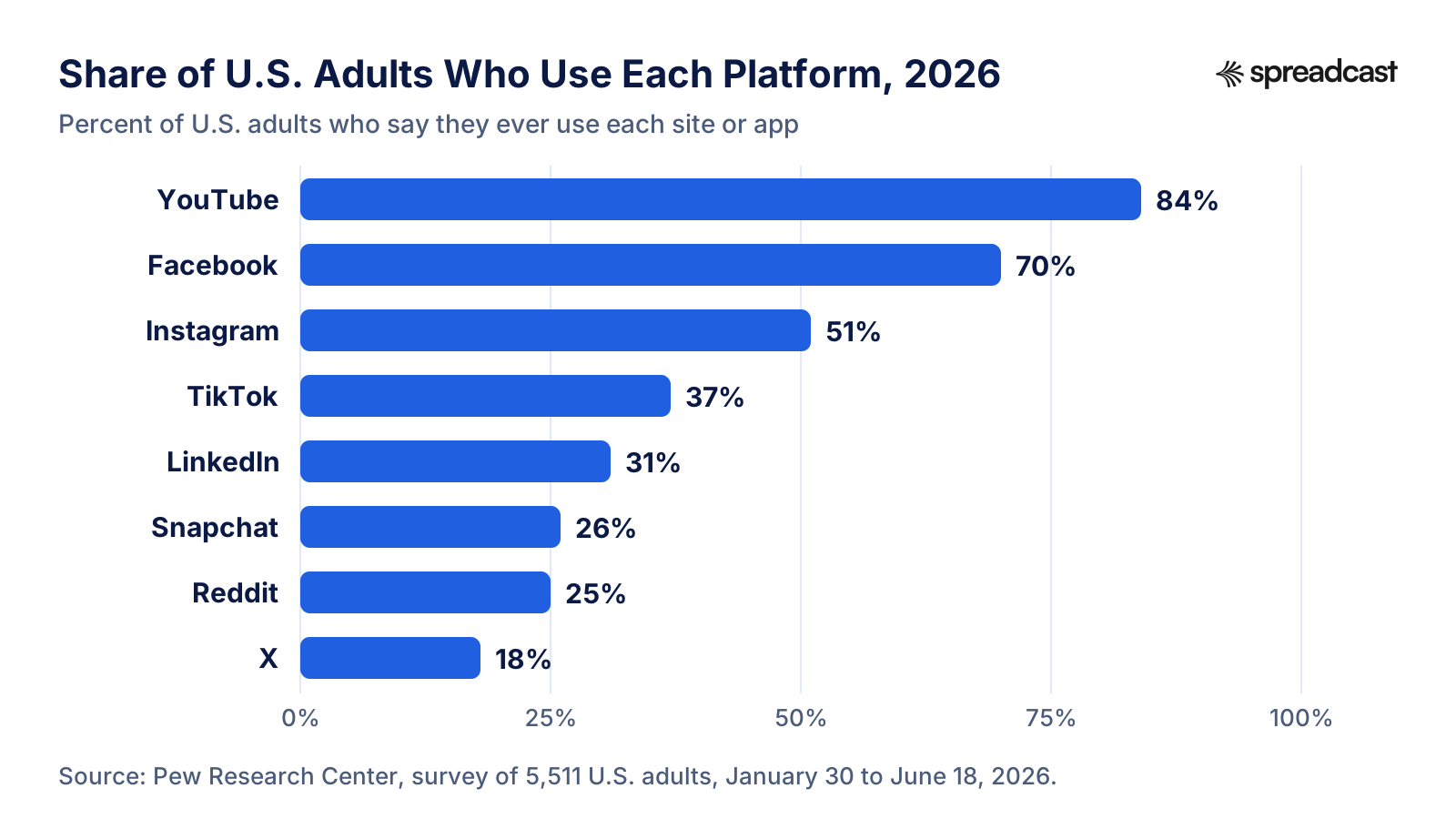
As a rough guide: apps people use at work belong on LinkedIn, visual and lifestyle apps on Instagram and Pinterest, and consumer apps for younger users on TikTok and YouTube Shorts. Cost: free. Time: one to three hours a week. Best for: every app. Go deeper: Pinterest for app founders covers the network most app makers skip.
27. Post Short Screen Recordings: App Promo Video Ideas
The cheapest app promo video is a screen recording of one task. Apple's product page guide says app previews on the App Store can be up to 30 seconds long, you can show up to three, and they autoplay with the sound muted, so the first seconds have to work without audio. The same footage, cropped to 9:16, becomes a Reel, a TikTok or a YouTube Short. These app promo video ideas need no studio:
- One task from start to finish in about 20 seconds, with no cuts.
- Before and after: the messy way people do the job today, then the same job in your app.
- The update in 15 seconds: the new feature on screen, with the version number as text.
- A question people ask in reviews, answered on screen.
- A day with the app: three moments when someone opens it, morning to night.
- The founder on camera explaining one decision, such as why the app has no ads.
- A thank you for a rating milestone, with the number on screen.
Cost: free. Time: one to two hours per video. Best for: any app with a visible result. Go deeper: the App Store app preview video guide covers sizes, recording and editing for the version that goes on your product page.
28. Design App Promotion Graphics That Show the Real App
The strongest app promotion graphics, and the best app promotion poster designs, show the app as it really looks: a real screenshot in a device frame, one short line of text, and the app's own colors and fonts. Söka's developer found that what he called fancy screenshots with a call to action stood out in feeds and drove both follows and beta signups. The rules for the App Store badge are in Apple's marketing guidelines: one badge per layout, placed so it stays secondary to the main image or message, never modified, angled or animated, at least 40 pixels high on screen and 10 mm in print.
The same guidelines ask you to show your app as it appears when it runs, to use Apple's product images as they are, and to keep the badge off food packaging promotions and vehicle decals. Cost: free with your own tools. Time: about 30 minutes per graphic once you have a template. Best for: every app. Go deeper: the free iPhone mockup generator puts a screenshot in a frame, and App Store marketing guidelines summarizes Apple's rules.
29. Build in Public
Share the numbers, decisions and mistakes behind the app on a regular schedule. In his 2024 year in review, Sebastian Röhl wrote that he had published more than 42 blog articles that year and shared his journey with more than 14,000 followers on social media. An editor at MKBHD's The Studio channel found him on Threads and mentioned HabitKit in a December video, which made December his most successful month so far. He had not contacted them first.
Cost: free. Time: about 20 minutes a day. Best for: indie developers and apps for other makers. Judge it after three months, not three weeks.
30. Give Users a Result Worth Sharing
A yearly recap or a result screen turns users into promoters. Spotify said, as TechCrunch reported, that Wrapped 2025 reached over 200 million engaged users in its first 24 hours and was shared more than 500 million times, 41% more than the year before. A small team can build the same idea at a smaller size: a share button on the screen where users finish something they are proud of, exporting a 9:16 image with the app's name on it.
Cost: development time. Time: days to weeks. Best for: fitness, habit, music, reading and travel apps, where the result is personal and worth showing. Go deeper: Flighty's lifetime travel stats are among the cases in mobile app marketing examples.
31. Work With Creators, Then Boost What Works
Creators reach people who would never follow an app's own account. In the Sub Club clip below, the founders of the app Coconote explain why they hired content creators rather than influencers and how they managed a team of 12 part time contractors; the clip's description says they crossed $100K in annual recurring revenue in 45 days and $1M in 4 months with organic short form video alone. Widgetsmith's spike, in idea 12, came from a creator nobody paid.

Pay creators to make videos you can post and boost, give them the app and a clear brief, and require the disclosure each network asks for. Cost: from free access to the app up to monthly fees. Time: a few hours a week to find, brief and review. Best for: consumer apps with a visible result. Boosting the videos that work is idea 41.
App Promotion Ideas in Communities
Communities reward people who help first and say plainly that they made the app. They punish anything that looks automated. Both ideas here are done by hand, from a real account.
32. Answer Questions on Reddit and in Niche Forums by Hand
The people who would use a plant app are in plant communities, the people who need a budgeting app in personal finance communities. Spend a few weeks answering questions before you post anything about the app, read each community's rules on self promotion, and when someone asks for an app like yours, answer honestly, name an alternative or two, and say that you made one and what it costs. Write a different post for each community, never the same text pasted everywhere.
Cost: free. Time: two to three hours a week for a month before the first post. Best for: niche apps with an existing community around their problem. Go deeper: how to promote an app on Reddit lists the subreddits that accept app posts, with their actual rules.
33. Make a Bluesky Starter Pack for Your Niche
Bluesky's starter packs are invites that recommend up to 150 people and up to 3 custom feeds. Each one comes with a link and a QR code, and its creator is notified when people join Bluesky through it. A good starter pack for your app's niche, such as climbers, home cooks or iOS developers, is useful to everyone who opens it, and it puts your own account in front of each of them.
Cost: free. Time: about an hour. Best for: apps whose audience is already active on Bluesky. Starter packs did not show up in Bluesky search when they launched, so share the link yourself. Once people follow you, schedule Bluesky posts so the feed keeps moving.
App Promotion Ideas With Partners and Press
Other people's audiences are bigger than yours, and borrowing them works best when you bring something they want: early access, a story, data or an honest comparison.
34. Pitch Niche Newsletters and Writers With Promo Codes
Apple's promotion page says promo codes are for giving press and influencers early access, up to 100 per version of the app per platform and up to 100 per In App Purchase. Pick 15 writers and newsletters whose readers match your users, write one short email each with what the app does, what is new and a TestFlight link or a promo code, and send it about three weeks before the release. Söka's experience in idea 8 is the warning: the best pitch fails in WWDC week.
Cost: free. Time: about half a day per round of pitches. Best for: apps with a clear news hook. Go deeper: an example pitch is in how to promote an app for free.
35. Be a Guest on Podcasts Your Users Hear
Podcasts give you half an hour with an audience that chose to listen. The Iconfactory used three podcast appearances to push its Tapestry Kickstarter toward its stretch goals, and Sebastian Röhl appeared on two podcasts in 2024, including RevenueCat's Sub Club. Shows about indie development reach other developers, and shows about your niche reach users. Pitch a story, such as how you built the app, what you learned or a mistake you fixed, not the app itself.
Cost: free. Time: about two hours per appearance. Best for: founders with a story and apps for a defined hobby or profession.
36. Cross Promote With Another Developer
Swap a mention with a developer whose users match yours: a line in each other's newsletter, a post, a page on the website. If you recommend their app inside yours, Apple's campaign link help page explains that SKStoreProductViewController can show the product page without sending people to the App Store app, and that passing your campaign and provider tokens attributes those downloads to a campaign in App Analytics. Keep it to one relevant recommendation, because section 3.2.2 of the App Review Guidelines lists an interface that displays third party apps like the App Store, or as a general interest collection, as unacceptable.
Cost: free. Time: one to three hours. Best for: developers with a second app or a friendly developer in a nearby category.
37. Publish a Yearly Data Report
Journalists like numbers they can quote. In December 2025 Strava released its 12th annual Year in Sport trend report, built from billions of activities and a survey of more than 30,000 people. Its headline led with a trend, doomscrolling out and movement in, rather than with the app. The small team version is one page of aggregate, anonymized numbers from your own users, such as the most logged habit of the year or the busiest day, sent to the writers from idea 34.
Cost: free. Time: two to five days. Best for: apps with plenty of usage that says something interesting about people. Only publish aggregates, never anything that could identify a user.
38. Publish Honest Comparison Pages
People search for one app versus another before they download. Flighty publishes a comparison with FlightAware that says plainly that FlightAware is one of the data providers behind Flighty, lists what each one is better at, and tells readers when to choose FlightAware instead. That honesty is what makes the page believable, and it answers a search the App Store itself cannot.
Cost: free. Time: about half a day per page. Best for: apps in categories with well known competitors.
App Advertising Ideas for a Small Budget
Paid promotion works once the product page converts and new users stay; before that, ads bring more people to the same leak. These three app advertising ideas are the smallest useful tests. The full comparison of Apple Ads, Google App campaigns, Meta and TikTok, with how to measure them, is in the paid section of how to market an app.
39. Start Apple Ads on Your Name and Category Terms
Apple Ads appear in search results, at the top of the Search tab, on the Today tab and at the bottom of product pages. Apple's promotion page says they are available in 91 countries and regions, and that eligible developers who sign up get a 100 USD credit. Start with search results ads on your app's own name and the category terms you already rank for, then watch which keywords people tap through from, and carry the winning words into your listing.
Apple's developer story about Up, an Australian banking app, shows the second benefit: keyword level data showed which themes, such as budgeting, and which features, such as Apple Pay, drove conversions, and the team redesigned its screenshots around them. Apple reports that Apple Ads was Up's top channel for installs from new customers, with a 58% conversion rate and a cost per install 37% lower than the average of all its paid channels.
Cost: your budget, from a few dollars a day. Time: two hours to set up, then 30 minutes a week. Best for: apps whose product page already converts. Go deeper: iOS app marketing.
40. Match Each Ad to a Custom Product Page
Apple Ads can send each ad to a custom product page whose screenshots match it. Pillow, a sleep tracking app, built some pages around tracking sleep with an Apple Watch and others for people interested in sleep tracking with an iPhone. In Apple's developer story, ad variations focused on Apple Watch features drove 63% higher tap through rates and 83% more installs than the default ad.
Cost: your ad budget. Time: about two hours per variation, plus the page itself. Best for: apps with distinct groups of users or devices.
41. Boost Posts That Already Worked
Instead of making an ad from scratch, put money behind an organic post that already earned comments and shares. On TikTok, Spark Ads use posts from your own account, or creators' posts with their authorization, and the views, likes and follows the ad earns count toward the original post. Reddit lets you promote your own post in a similar way, as the Reddit guide explains. The rule is the same everywhere: boost after proof, never before.
Cost: a daily budget you set. Time: about 30 minutes. Best for: apps that post short video regularly and have one post that clearly outperformed the rest.
Offline App Promotion Ideas: Posters, QR Codes and Events
Some apps are found in person: at a gym, a cafe, a campus, a clinic, a meetup or a conference. An app promotion poster or a printed code costs little and sends people straight to the store at the moment the app makes sense to them.
42. Put QR Code Posters Where Your Users Already Are
Put the poster where the app solves a problem on the spot: a climbing app at the gym, a study app on a campus board, a menu app at the counter. Point the QR code to a campaign link named for the place, so every location shows up separately in App Analytics. Apple's marketing tools generate short links, QR codes and App Store badges for your product page, and the badge rules from idea 28 apply in print: at least 10 mm high and one badge per layout. Print the code large enough to scan from a step away, and test it on two phones before you print a batch.
Cost: printing. Time: an hour to design and an afternoon to place. Best for: venue, campus, local and event apps. Go deeper: the free App Store QR code generator and App Store campaign link generator build both pieces in a browser.
43. Use App Clip Codes for In Person Moments
Apple's promotion page describes App Clip Codes as codes that encode the URL of an App Clip, which Apple's App Clip documentation defines as a lightweight version of your app that offers some of its functionality without the need to install the full app. A code can include an NFC tag, so people open the App Clip by holding their iPhone near it or by scanning it with the camera. They suit apps whose first use happens at a place: paying for parking, ordering at a table, renting a bike.
Cost: development time. Time: weeks to build and test an App Clip. Best for: apps tied to physical places, where a full download is the obstacle.
44. Hand Out Offer Codes at Events
Apple's promotion page notes that subscription offer codes can be provided digitally or offline at physical events, alongside products and in other places. Print a custom code on a card at a conference stand, a meetup or a partner's shop, and give every event its own code so you can count redemptions.
Cost: the discount and the printing. Time: about an hour. Best for: subscription apps with a presence at events. The Sub Club episode below goes further, into radio, TV and podcast advertising for a large subscription app.

Promotion Ideas That Bring Users Back
Promotion does not stop at the download. RevenueCat's report found that around 50% of paid conversions happen on the day of install, and that 55% of cancellations of three day trials happen on the day the trial starts, so the first session decides more than any message later. Once someone has the app, these four ideas bring them back, and they cost far less than finding a new user. For what normal day 1, day 7 and day 30 retention looks like, see app retention benchmarks.
45. Turn Subscribers Into Referrers With Offer Codes
Apple's subscriptions page suggests a peer to peer member referral program in which current subscribers share an offer code and receive a benefit for promoting the app, and notes that you are responsible for delivering any reward. A free month for the person who invites and for the friend who joins is a common shape. Every referral has to be a real person: section 5.6.3 of the App Review Guidelines says manipulating charts, search, reviews or referrals is not permitted.
Cost: the rewards you give. Time: a few days to build the invite screen. Best for: subscription apps whose users talk to each other about the problem the app solves.
46. Win Back Lapsed Subscribers
Win back offers let you offer former subscribers a discounted or free period to return. Apple shows them to eligible customers on your product page, in their subscription settings, inside your app, where an offer sheet appears automatically, and through a direct link you can share by email. Apple's own example is a pay up front offer of $9.99 for six months for a subscription that normally renews at $39.99 a year. Pair the offer with the update that fixed the reason people left.
Cost: the discount. Time: one to two hours in App Store Connect. Best for: subscription apps with a pool of former subscribers.
47. Aim an In App Event at Lapsed Users
When you create an In App Event, you choose its purpose: attract new users, keep active users informed, or bring back lapsed users, meaning people who downloaded the app but have not opened it recently. Apple says the purpose is one of the factors the App Store uses for personalized recommendations, and the event stays visible to everyone either way. A new season of content or a challenge with a reward is the kind of event that gives a lapsed user a reason to open the app again.
Cost: free. Time: two to three hours per event. Best for: apps with many downloads and few active users, and games between seasons.
48. Send Opt In Push and Email for Real News
Section 4.5.4 of the App Review Guidelines says push notifications should not be used for promotions or direct marketing unless customers have explicitly opted in through consent language in your app, and you give them a way to opt out. So ask for that consent, then use it rarely: a feature people asked for, an event they can join, a fix for a bug they reported. An email to users who signed up does the same job without any of the push rules.
Cost: free, or a small monthly fee for an email tool. Time: about 30 minutes per message. Best for: every app with users who opted in. One message per real update keeps them opted in.
Dating App Promotion Ideas and Ideas for Other App Types
The same 48 ideas rank differently by type of app. Dating apps have it hardest. Section 4.3(b) of the App Review Guidelines names dating among the kinds of apps that are well established on the App Store, and says Apple will not accept new submissions in those categories unless they offer a meaningfully different or improved experience. Paid promotion has its own rules: Google's Dating and Companionship Ads policy, in force since March 2025, requires advertisers to be certified by Google before running dating ads, and prohibits ads whose landing page imagery or text does not represent the people the service actually markets to.
So the strongest dating app promotion ideas are the ones that prove the difference and bring people in through friends: invite links (idea 3), posts about each safety or matching feature as it ships (idea 9), creators who show the app honestly (idea 31), QR posters at local events and on campuses where the app is launching (idea 42) and referral offer codes (idea 45). The table shows where we would start for other kinds of apps.
| Type of app | Ideas to start with | Watch out for |
|---|---|---|
| Dating apps | 3 invite links, 9 feature posts, 31 creators, 42 local posters, 45 referrals | Apple's rule on saturated categories, certification for Google dating ads, honest imagery |
| Games, see mobile game marketing | 1 pre orders, 13 and 23 In App Events, 14 featuring, 27 gameplay clips, 31 creators | Events must add new content; price promotions alone are not events |
| Subscription utilities | 7 launch offer code, 22 page tests, 25 promoted purchases, 46 win back offers | Trial cancellations cluster on the first day, so fix onboarding first |
| Apps people use at work | 26 LinkedIn, 35 podcasts, 38 comparison pages, 6 Show HN for technical tools | Long decisions, so measure over weeks, not days |
| Local and venue apps | 42 QR posters, 43 App Clip Codes, 44 offer codes at events | Badge rules in print, and one campaign link per location |
| Habit, fitness and education apps | 23 seasonal events and offers, 30 shareable results, 29 build in public | Seasonal peaks such as New Year and back to school come every year, so plan them |
An Idea Calendar for One Update
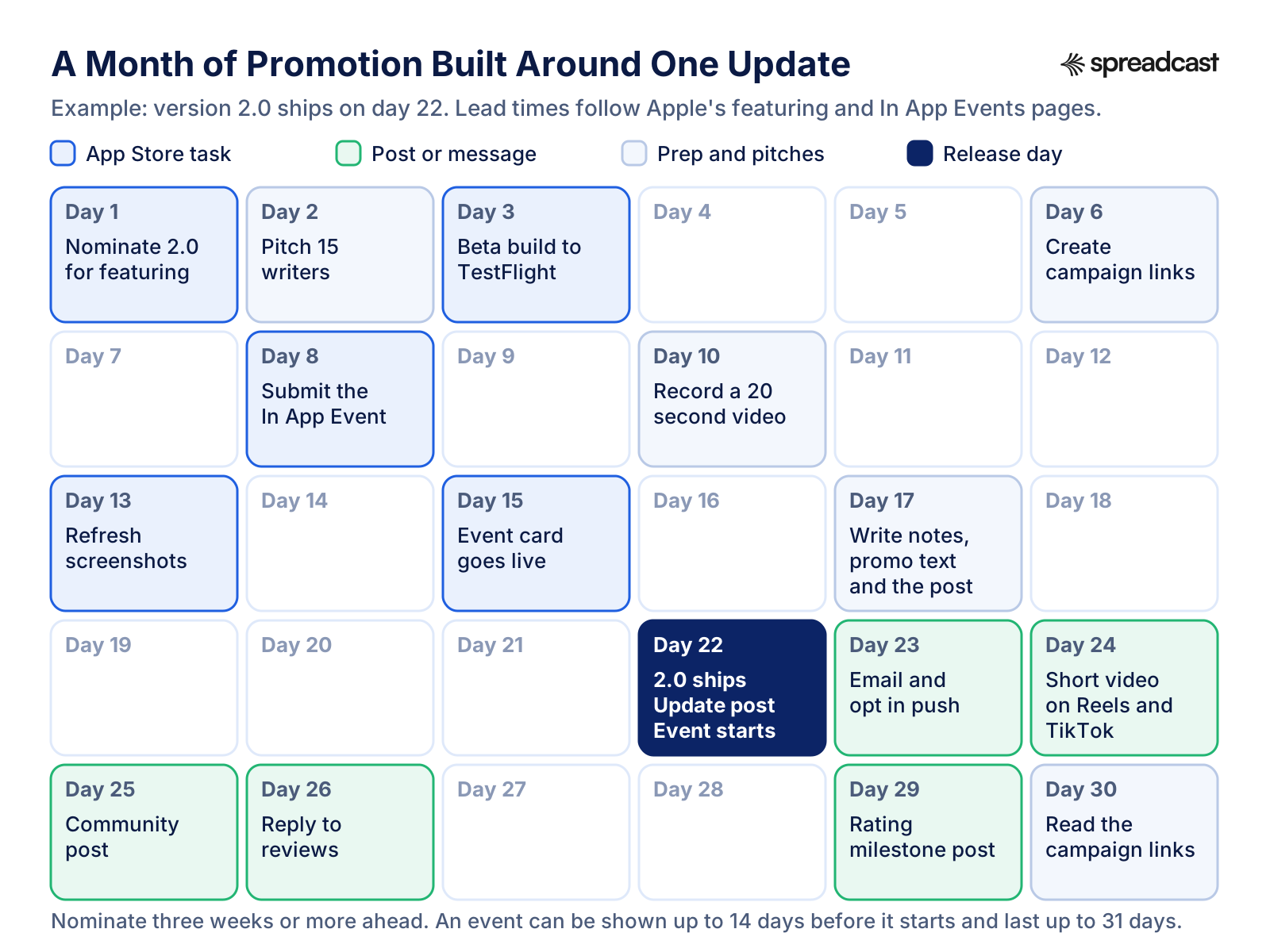
Most of these ideas can hang off a single release. Here is a month built around an invented version 2.0 that ships on day 22. The featuring nomination goes out three weeks ahead, the In App Event appears on the App Store a week before it starts, and the posts, emails and replies follow the release. The same shape repeats for every major update; smaller releases need only the update post and the promotional text.
| Day | What to do | Idea |
|---|---|---|
| 1 | Nominate version 2.0 for featuring as an App Enhancements nomination, three weeks ahead | 14 |
| 2 | Pitch 15 writers and newsletters with a TestFlight link or promo codes | 34 |
| 3 | Send the 2.0 beta to TestFlight testers and ask what to fix | 2 |
| 6 | Create a campaign link for every channel you will use this month | All |
| 8 | Submit a Major Update In App Event that starts on day 22 | 13 |
| 10 | Record a 20 second screen video of the new feature | 27 |
| 13 | Refresh the screenshots, or start a product page test with the new feature | 22 |
| 15 | The event card appears on the App Store, a week before it starts | 13 |
| 17 | Write the release notes, the new promotional text and the update post | 9, 10, 11 |
| 22 | Version 2.0 ships: the event starts, the update post goes out, the promotional text changes | 9, 11, 13 |
| 23 | Email and push to users who opted in | 48 |
| 24 | Post the short video on Reels, TikTok and Shorts | 27 |
| 25 | One community post, where the rules allow it | 32 |
| 26 | Reply to every review of 2.0, worst first | 17 |
| 29 | Post the rating milestone, if 2.0 carried you past one | 18 |
| 30 | Read the campaign links and event analytics, then plan the next cycle | All |
Ideas That Waste Time or Break the Rules
Some popular app promo ideas cost more than they return, and a few can cost you the developer account. Leave these out.
- Buying ratings or reviews, or rewarding people for them. Apple blocked close to 195 million fraudulent ratings and reviews in 2025, and its guidelines allow expulsion from the Apple Developer Program.
- A custom popup that asks for a rating, or a feature locked until someone rates the app. Both break sections 5.6.1 and 3.2.2 of the App Review Guidelines.
- Paying strangers to push a Product Hunt launch, or asking friends to upvote a Show HN. Product Hunt makers report the offers; Hacker News says plainly it is not ok.
- Pasting the same promotional post into many communities in one evening. It reads as spam to moderators and filters alike.
- Prices or calls to action in In App Event metadata. Apple rejects specific prices, and asks for the real name of the event rather than a tagline.
- Marketing push notifications without opt in, which section 4.5.4 rules out.
- A billboard for a small app. Sebastian Röhl won a contest that featured HabitKit in New York's Times Square in June 2024, and wrote in his year in review that in downloads and revenue it was not a huge success, although it was a fun moment.
- Six networks for two weeks, then silence. One network kept up for six months does more.
How to Tell Which Ideas Worked
Give every idea its own App Store campaign link, so App Analytics can tell them apart. Apple's campaign link help page explains that the campaign name becomes the campaign token in the link, the ct= parameter, and can be up to 30 alphanumeric characters and spaces. The feature appears only after the app has received analytics data, so wait until it has been live with downloads for at least 24 hours. A metric shows in the dashboard once it reaches at least 5 in the date range you select, so name campaigns broadly enough to cross that line: "reddit launch" rather than one link per comment.
| Idea | What to measure | Where to find it |
|---|---|---|
| Posts, pitches, posters, podcasts | First time downloads and conversion for each campaign link | App Analytics, Acquisition, Campaigns |
| In App Events | Downloads by event, event impressions, details page views, app opens and people who asked to be notified | App Analytics, filtered by event |
| Custom product pages | Impressions, downloads and conversion per page, and whether those users stay or spend more | App Analytics, Acquisition |
| Product page optimization | Conversion of each treatment against the original, with its confidence | App Analytics, the test's results |
| Pre orders | Pre orders by date, region and source, and cancellations | App Analytics, and Sales and Trends |
| Offer codes and win back offers | Redemptions and how offers perform across the customer lifecycle | The Offers dashboard in App Store Connect |
| Every channel | Day 7 retention of the users each channel sent | App Analytics, compared with retention benchmarks |
Campaign links undercount, because many people see a post, close it and search the App Store later. Compare App Store search downloads on the days after a big post with ordinary days, and read both numbers together. A channel is good when the people it sends are still using the app a week later, not when it sends the most downloads. Our free App Store campaign link generator builds the links in a browser once you have your provider token.
Where Spreadcast Fits
Most of the ideas on this page are yours to run: the listing, the In App Events, the nominations, the community posts, the pitches, the creators. Two of them repeat for the whole life of the app and are the easiest to let slide: a post for every new version (idea 9) and a post for every rating milestone (idea 18). Those are the two moments Spreadcast handles.
You paste your App Store link once at the start page, and Spreadcast checks your App Store listing every day. When a new version ships, it designs a post about the update with your real app screenshots in an iPhone frame and your app's colors and fonts, and writes the caption for each network. When the app reaches a rating milestone, it makes a post about that too. It publishes to Instagram, TikTok, LinkedIn, Facebook, Threads, Pinterest, Bluesky, Mastodon, Telegram and Discord, plus YouTube for video posts, on full autopilot or after you approve each post with one tap. It watches the App Store only, not Google Play, and it does not post to Reddit, which works best by hand.
The free plan covers one app and makes three posts for you to download, with a small Spreadcast mark, but does not publish. Pro is $29 a month, or $290 a year, for one app and up to ten social accounts, published for you on full autopilot or with one tap approval, and you can also create and post from Claude or ChatGPT. Studio is $79 a month for five apps and fifty social accounts. The details are on the pricing page.
Frequently Asked Questions
What are some good app promotion ideas?
Start with the moments your app already has. Write the App Store listing in the words people search, ask for ratings with Apple's prompt at a moment of success, post about every new version and every rating milestone, run an In App Event and a featuring nomination for each big update, and pick one community and one social network to keep up every week.
What are the best new app promotion ideas before launch?
Open pre orders up to 180 days ahead, run a public TestFlight beta with up to 10,000 testers, nominate the launch for featuring at least three weeks ahead, pitch niche writers about three weeks before release, and avoid launching in WWDC week, when the press covers little else.
How do I promote my app after an update?
Post the one or two changes users will notice with a real screenshot, change the promotional text on the product page, reply to reviewers whose complaint the update fixes, and for a major release run a Major Update In App Event and send a featuring nomination three weeks ahead.
What are good app promo video ideas?
A screen recording of one task in about 20 seconds, a before and after of the job your app replaces, the new feature of an update in 15 seconds, an answer to a question from your reviews, and the founder explaining one decision. App Store previews can be up to 30 seconds and play muted, so the first seconds must work without sound.
How do I make app promotion graphics or a poster?
Use a real screenshot in a device frame, one short line of text and your app's own colors and fonts. Follow Apple's badge rules: one App Store badge per layout, never modified, at least 40 pixels high on screen and 10 mm in print. On a poster, add a QR code that points to a campaign link for that location.
What are good dating app promotion ideas?
Grow through friends and proof: invite links, referral offer codes, posts about each safety or matching feature, honest creator videos and posters at local events where the app is launching. Apple only accepts new dating apps that are meaningfully different, and Google requires certification before you can run dating ads.
Do In App Events help promote an app?
They can. Events appear on your product page, in search results and in editorial and personalized spots on the Today, Games and Apps tabs, and people without the app can download it from the event card. An event lasts up to 31 days and can be shown up to 14 days ahead, and it has to be a real, limited time moment.
What are cheap app advertising ideas?
Start Apple Ads on your own app name and category terms, using the 100 USD credit Apple gives eligible new accounts, send each ad to a matching custom product page, and boost organic posts that already worked, such as with TikTok Spark Ads. Make sure the product page converts first.
Can I pay for App Store ratings or reviews?
No. Apple blocked close to 195 million fraudulent ratings and reviews in 2025, and the App Review Guidelines allow expelling developers who use paid, incentivized or fake feedback. Use Apple's rating prompt, and quote a review in marketing only with the reviewer's permission.
How do I know which promotion idea worked?
Give each idea its own App Store campaign link and read first time downloads per campaign in App Analytics. Campaign links appear once the app has been live with downloads for at least 24 hours, and a metric shows once it reaches 5. Then compare day 7 retention by channel.
Does Spreadcast promote my app automatically?
For two moments, yes. Spreadcast checks your App Store listing every day and designs and publishes a post when a new version ships and when the app reaches a rating milestone, to Instagram, TikTok, LinkedIn, Facebook, Threads, Pinterest, Bluesky, Mastodon, Telegram and Discord, plus YouTube for video posts. The other ideas on this page are yours to run.
Where These Facts Come From
Every outside number, rule and price on this page links to the page it was taken from.
- In App EventsApple Developer
- Product page optimizationApple Developer
- Custom product pagesApple Developer
- Getting featured on the App StoreApple Developer
- Nominate your app for featuringApp Store Connect Help
- Campaign linksApp Store Connect Help
- Offering apps and games for pre orderApple Developer
- TestFlightApple Developer
- Ratings, reviews and responsesApple Developer
- Promoting your apps and gamesApple Developer
- Marketing resources and identity guidelinesApple Developer
- Creating your product pageApple Developer
- App Store searchApple Developer
- Auto renewable subscriptions and offersApple Developer
- LocalizationApple Developer
- App ClipsApple Developer Documentation
- App Review GuidelinesApple Developer
- Ads on the App StoreApple Ads
- Success story: UpApple Ads
- Success story: PillowApple Ads
- The App Store stopped over $2.2 billion in fraudulent transactions in 2025Apple Newsroom
- Söka: launch retrospectiveRoddy Munro
- Project Tapestry's home stretchThe Iconfactory
- Golden tickets are backMonzo
- Things for OS 27 and Siri AICultured Code
- Bear 2.9: use tag as workspaceBear
- Bear Pro back to school discountBear
- Carrot Weather on the App StoreApple App Store
- Ten years of Overcast: a new foundationMarco Arment
- Widgetsmith five years laterDavid Smith
- 2024: my indie app business year in reviewSebastian Röhl
- Spotify says Wrapped 2025 is its biggest yetTechCrunch
- Strava releases 12th annual Year in Sport trend reportStrava
- Flighty vs. FlightAwareFlighty
- What I learned relaunching my app on Product Hunt after 3 yearsProduct Hunt forums
- Product Hunt launch guideProduct Hunt
- Show HN guidelinesHacker News
- Introducing Bluesky starter packsBluesky
- Spark AdsTikTok Ads Help Center
- Dating and Companionship Ads policy and advertiser certificationGoogle Ads Help
- Americans' use of social media in 2026Pew Research Center
- State of Subscription Apps 2026RevenueCat
- Video: Get started with app discovery and marketingApple Developer
- Video: How we grew our app to $1M ARR with zero paid adsSub Club by RevenueCat
- Video: Marketing an award winning language app through offline channelsSub Club by RevenueCat
Researched and written by Spreadcast. Last checked on October 23, 2026.
Keep Reading
- Growth
How to Grow a Telegram Channel: 15 Ways That Work in 2026
Fifteen honest ways to grow a Telegram channel, checked against Telegram's own rules in October 2026: search, similar channels, forwards, shared folders, Telegram Ads, giveaways, boosts, named invite links and cross promotion, plus channel stats, a 30 day plan and why bought members backfire.
- Growth
How to Market an App in 2026: A Stage by Stage Plan for Small Teams
The full plan for a founder or a small team with no marketing department: what to do before launch, in launch week and after launch, with the App Store limits, the benchmarks worth knowing and a 30 day schedule.
- Growth
How to Promote an App on Social Media: A Network by Network Guide
What to post about your app, which format and size each network wants, where the App Store link can go on TikTok, Instagram, Facebook, LinkedIn, X, Reddit, Pinterest, Threads, Bluesky and YouTube, and how to see which posts bring downloads.