What the Hootsuite MCP Server Is
The Hootsuite MCP server is really four servers, one for each part of Hootsuite, all run by Hootsuite at mcp.hootsuite.com. Perch covers publishing and analytics, Nest covers the social inbox, Lumen covers social listening, and Parliament covers employee advocacy. Hootsuite's MCP page gives each one its own address, such as mcp.hootsuite.com/perch, and says they work with ChatGPT, Claude, Copilot and Gemini. Once one is connected, you can type a request like show me what is planned on our Instagram account tomorrow, and the assistant runs the matching Hootsuite tool and answers from your real account.
The servers arrived with a bigger change. On June 24, 2026, Hootsuite's Wisdom announcement rebuilt the product as Social OS, a set of named apps, and launched MCP connectors across Perch, Nest and Lumen on the same day. Parliament followed: Hootsuite's product update of September 30, 2026 added Content Admin tools to the Parliament server, on top of the advocate tools it already had. If you read about Hootsuite before the summer, the names Plan, Inbox, Listening and Amplify are the same products under their old labels; Hootsuite's Social OS notice maps each old menu to its new home and says the switch back to the classic layout ends on November 15, 2026.
MCP is short for Model Context Protocol. The official MCP introduction describes it as an open standard for connecting AI applications to outside systems, so one server works in many assistants instead of needing a separate plugin for each. In practice your assistant does the reading and writing in plain language, and Hootsuite does what Hootsuite already does: holds the calendar, the inbox, the listening data and the advocacy feed. A server can only reach what your Hootsuite account can reach, which matters more here than for most tools, because each Hootsuite plan and role opens a different set of features.
This page is about the MCP servers only. For Hootsuite as a whole product, our Hootsuite review covers ratings, contracts and complaints, the Hootsuite alternatives roundup compares nine other tools on price, and our Hootsuite comparison for app founders puts it next to Spreadcast feature by feature.
How We Researched This
We read every Hootsuite page that describes the MCP servers on October 28, 2026, and we could not log in to a paid Hootsuite account, so nothing here comes from running the tools ourselves. The pages were Hootsuite's MCP page with its sample prompts, the help center article About Hootsuite MCP servers (updated September 28, 2026), the developer references for the Perch, Nest and Parliament servers, the plans page with its feature table, the product pages for Perch, Nest, Lumen, Parliament and Wisdom, the product updates feed and two Hootsuite blog posts on MCP.
Those pages do not always agree, and we say so where it matters. The marketing page shows sample prompts that publish posts right away; the developer reference for Perch, dated September 16, 2026, says that server saves drafts and does not publish. The marketing page shows prompts about LinkedIn impressions; the help center says LinkedIn data is kept out of any chat where a connector is on. When two Hootsuite pages differ, we quote both and tell you how to check which one applies to your account.
For the assistant side we read the help pages of Anthropic, OpenAI, Google and Microsoft on the same day. Spreadcast facts come from our own product. We make Spreadcast, so the comparison near the end is ours, and we kept it to things you can check.
Hootsuite's Own Walkthrough of the MCP Connectors
A short video from Hootsuite's channel that tours all four connectors. It is the vendor's demo, so treat it as the best case, and read the limits further down before you plan around it.

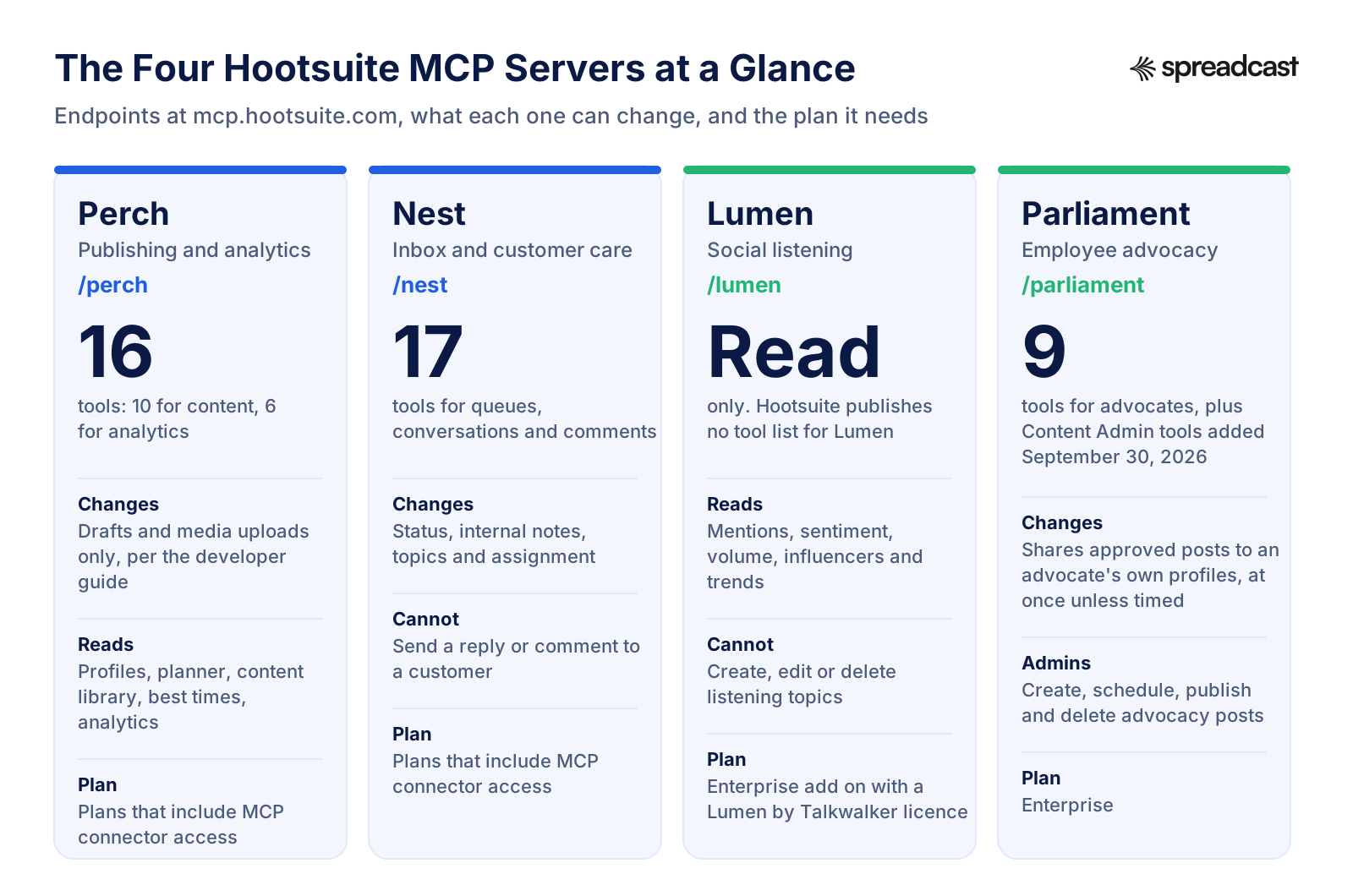
The Four Hootsuite MCP Servers at a Glance
Each server has its own address, its own tools and its own plan rule. This is the map to keep in mind for the rest of the page.
Hootsuite Perch MCP: Every Tool and What It Does
Hootsuite's Perch developer reference lists 16 tools on one endpoint, split into two services: 10 for content and 6 for analytics. Here they are grouped by job, with the tool names for anyone who wants to check. One rule runs through all of them: almost every call needs an id from an earlier call, and the guide tells assistants to copy those ids exactly and never guess one.
Workspaces and Profiles: Where You Can Post
The get_entitled_workspaces tool returns the Hootsuite organizations you belong to, plus your personal scope. The get_social_profiles tool then lists the profiles in the chosen workspace with their network type, such as Instagram or a LinkedIn company page. The server keeps no memory of which workspace you picked, so the assistant sends it with every call, and the guide asks it to let you choose when there is more than one.
Drafts: Create, List and Rewrite
The create_draft tool saves a post with text, the target profiles and optional media. The list_drafts tool filters drafts by profile, campaign, tag, and whether they have a date. The update_draft tool edits one, and the guide warns that it overwrites the whole draft: any field the assistant leaves out is wiped, so it has to read the draft first and send everything back.
Putting a Draft on the Calendar
Adding a scheduledDate to a draft places it on the Planner at that time. The guide is precise about what that means: scheduled drafts show in grey next to real scheduled posts, which show in bold, and a draft will not publish automatically. A person still has to publish it in Hootsuite.
Uploading Images and Video
Media goes in through two tools. The request_media_upload tool takes the file type and exact size and returns a short lived upload link, the assistant sends the file there, and poll_media_upload checks every 3 seconds, up to 20 times, until the file is ready. Accepted types are PNG, JPEG, GIF, MP4 and QuickTime video, up to 1 GB.
Best Times and What Is Already Planned
The get_recommended_times tool returns suggested posting times for a date range in your time zone, and the guide suggests keeping the window to a week. The get_planned_content_details tool returns the full text of planned posts for a date range, ideally a single day, because it is not paginated. A get_message tool reads one existing Hootsuite message, but no tool on the server hands out the id it needs.
Analytics: Providers, Sources, Metrics and Queries
The analytics side works in four stages. The list_providers tool names the data services available, search_sources finds the profiles and pages behind them, search_metrics finds the right metric and its options, and query_analytics runs the numbers. A query can cover any range inside the last 25 months, as one total or by day, week or month, with breakdowns and filters where the metric allows.
Does the Hootsuite Perch MCP Publish Posts or Only Save Drafts?
This is the question that matters most, and Hootsuite's pages give three different answers. Hootsuite's MCP page shows sample prompts such as publish this to our Hootsuite LinkedIn page right now, and post this to X and Instagram at the same time. The help center article About Hootsuite MCP servers, updated September 28, 2026, says Perch can publish posts or save drafts to any connected profile your account is entitled to manage, and adds that Perch handles one post per instruction.
The Perch developer reference, updated September 16, 2026, says the opposite in a heading of its own: Perch saves drafts but does not publish, and the server provides no tools to publish or schedule posts directly. Its write list reads drafts and media uploads only. It even asks apps built on the server to make clear to users that a final publishing step is needed in Hootsuite.
The plain reading is that the tool set changes faster than the pages. The developer reference is the most technical and lists each tool by name, but the help article is twelve days newer. Hootsuite's Claude guide on its blog sits in between: it says Claude can schedule or publish, and also that a post which normally needs sign off still needs it, because Claude follows the same approval workflows your team uses.
You can settle it for your own account in one minute. After connecting Perch, ask your assistant to list every Perch tool it can see and say which ones write. If the list stops at create_draft, update_draft and the two media tools, you are on the drafts only version, and every post still goes live from the Hootsuite Planner. If a publish or schedule tool appears, keep your client's approval prompt on for it, since a post sent to a network cannot be pulled back through the server.
Either way, the help center's note about one post per instruction is worth taking literally. Hootsuite suggests running campaigns of many posts in Hootsuite itself, and the bulk scheduler on Hootsuite's publishing page takes up to 350 posts at once, which no chat will match.
What the Perch MCP Leaves to You: The Picture
No Perch tool makes an image. The Perch developer reference says the upload tools are the only media path on the server, so every picture or video in a post is a file you already have. Inside Hootsuite, the Perch product page offers Canva and Adobe Express templates in the composer and says Wisdom, the built in AI, can generate captions, images and hashtags. None of that is exposed through the MCP server, so from Claude or ChatGPT the image still comes from you or from whatever your assistant can draw on its own.
For a team with a designer, that is fine. For one person who has to post every day, it is the slow part. Writing a caption in a chat takes a minute; finding a screenshot, laying it out in your colors and exporting it at the right size for each network takes a lot longer, and that is the step the server skips.
If that is your bottleneck, it is the gap Spreadcast was built for. Its MCP server designs the post picture itself in your brand, with your logo, colors and real app screenshots in an iPhone frame, writes a caption for each network and saves the result as a draft for you to approve. You type one line in Claude; you get a finished post back, not a text field waiting for an attachment.
Hootsuite Nest MCP: Inbox Tools and Their Limits
Hootsuite's Nest developer reference lists 17 tools. Nest used to be called Hootsuite Inbox, which is why the tool names start with inbox. The reference is blunt about one thing first: Nest cannot send replies. It changes status, adds internal notes, tags topics and assigns conversations, and saved replies come back as text for you to send from Hootsuite.
| Job | Tools | What to know |
|---|---|---|
| Finding your queues | get_entitled_workspaces, list_inboxes, list_social_accounts | Lists your named queues, including saved inboxes, and the pages and profiles behind them. Hidden saved inboxes are left out |
| Counting what is waiting | get_inbox_count | Totals for all, new and pending, without listing rows. A count can come back as more than a number when the network gives no exact figure |
| Reading the queue | list_inbox_conversations | New conversations first, then pending ones. 10 by default, up to 100 when you ask for more |
| Reading one thread | get_conversation | The latest 50 messages and internal notes at most, oldest to newest. Not paginated, so long threads show only their tail |
| Moving a conversation | set_conversation_status | To pending or resolved only. Reopening a conversation to new is not supported through the server |
| Notes and topics | add_note_to_conversation, list_topics, add_topic_to_conversation | Notes are internal and never reach the customer. Topics are added, not replaced, and picked by id |
| Assigning work | list_conversation_assignees, assign_conversation | To a person, a team, or a person within a team. The guide asks for a fresh list of assignees right before each assignment |
| Published posts and comments | list_posts, get_post, list_comments_on_post | Posts from roughly the last 14 days, up to 5 accounts per call, and the public comments on each, with sentiment when the network supplies it |
| Saved replies | list_saved_replies, get_saved_reply | Returns the template text only. The reply is sent by a person in Hootsuite |
Sentiment is best effort. The reference says a missing sentiment label does not mean neutral, and that the thread level label appears only when the organization has the sentiment feature switched on. Hootsuite's Nest page describes the same product from the dashboard side.
What the Nest MCP Is Good For, and Where Roles Get in the Way
Nest is the most useful of the four servers on a busy Monday. An assistant can count what is new, read the oldest unassigned threads, summarize each in a sentence, tag the ones about billing, add a handoff note and assign them to the support team, all from one request. Hootsuite's MCP page shows exactly that kind of compound prompt: pull my inbox, find all new conversations, assign them to the support team, and mark them as pending.
Two things limit it. The first is the missing send button. The help center article says sending public replies to customers is not supported through MCP and points you back to the Hootsuite web app. So the assistant can draft a reply and load the right saved reply, but a person pastes and sends it.
The second is your role and plan. The help article says assigning inbox conversations requires an agent or admin role in Nest, and the plans page puts assigning messages to teammates on Advanced and Enterprise only, with topics and tag automations starting on Professional. On Standard, the assign and topic tools have nothing to work with, and the assistant will get a permissions error. Check the role your login has before you build a triage habit around it.
One more detail from the reference: if your workspace blocks data from certain networks, Nest returns a restricted error for them. The reference tells assistants not to retry and not to guess the missing content, so a summary of your inbox may quietly cover fewer networks than your inbox does.
Hootsuite Lumen MCP: Listening Data in Your Assistant
Lumen is Hootsuite's social listening product, built on Talkwalker, which Hootsuite owns. Hootsuite's Lumen page says the Lumen MCP lets assistants such as ChatGPT, Claude and Gemini analyze brand mentions, monitor competitors, identify trends and explore sentiment. The help center article lists what that means in tools: searching and filtering mentions by date, sentiment and source, summaries of mentions and themes, mention volume over time, breakdowns by channel, sentiment, language and country, top influencers on a topic, and broader trends.
Lumen is read only. You cannot create, edit or delete listening topics from a chat; that stays inside Lumen. You also need a project id for nearly every question, and the help article suggests asking the assistant to run the lumen_list_projects tool to find yours. Because the connectors keep no memory between sessions, you will repeat that step in each new conversation.
The plan rule is the strictest of the four. The help article says Lumen requires an active Lumen powered by Talkwalker licence in addition to MCP access. The feature table on the plans page lists the Lumen MCP connector as an Enterprise add on, not included on Standard, Professional or Advanced. Hootsuite has not published a developer reference for Lumen the way it has for Perch, Nest and Parliament, so there is no public tool list or tool count to check.
There is a lighter option that is easy to confuse with it. On October 7, 2026, Hootsuite added a Lumen agent inside Wisdom that answers listening questions from a quick search over the last 7 days, with citations, and needs no Lumen by Talkwalker account. That agent lives inside Hootsuite's own Wisdom chat. It is not the Lumen MCP server, and it does not bring listening data into Claude or ChatGPT.
Hootsuite Parliament MCP for Advocates and Content Admins
Parliament is Hootsuite's employee advocacy app, formerly Amplify: the company curates approved posts and employees share them on their own profiles. Hootsuite's Parliament developer reference, updated September 25, 2026, lists 9 tools for advocates. They read the advocate's workspace and roles, list their own connected profiles, list the topics they follow, browse and search the content feed, open one item, load a dashboard of all of that in a single call, share an item, and fetch two kinds of server side guidance.
The share tool is the one to respect. The reference puts it in bold: Parliament publishes to social networks. When no time is given, a share goes out immediately, with no draft step, review gate or undo. Content is shared exactly as approved, so the assistant cannot rewrite the copy first, and a share to three profiles can succeed on two, which the assistant is told to report profile by profile. Profiles that need reconnecting must be left out before the share.
Admins got their own tools on September 30, 2026. Hootsuite's product update says Content Admins can now create, draft, schedule, publish, edit and delete advocacy posts from an assistant, with text, links, topics, target networks and media, and that a new post is saved as a draft by default. The help center article adds that admin tools need the Content Admin role, that advocate sharing needs an active advocate account and works only with the advocate's own private profiles, and that post personalization is not supported. Topic and advocate management stay in the Parliament web app.
Parliament itself is an Enterprise feature: the plans page marks employee advocacy as Enterprise only, and the Parliament product page describes it as a way for employees, executives and advocates to share approved content across their own networks. If your company does not run an advocacy program in Hootsuite, this server has nothing to connect to.
Parliament by Hootsuite, Including the MCP Connector
Hootsuite's tour of Parliament from an advocate's side. The last part shows the connector in AI tools, which helps if your company is rolling Parliament out.

Which Networks the Hootsuite MCP Keeps Out of Your Chat
This is the limit most guides skip. Hootsuite's help center says that, because of agreements with certain networks, data from X, LinkedIn, Reddit, Snapchat and YouTube is excluded whenever a connector is enabled for a chat session. With a connector on, data from those networks is not available for any purpose in that chat.
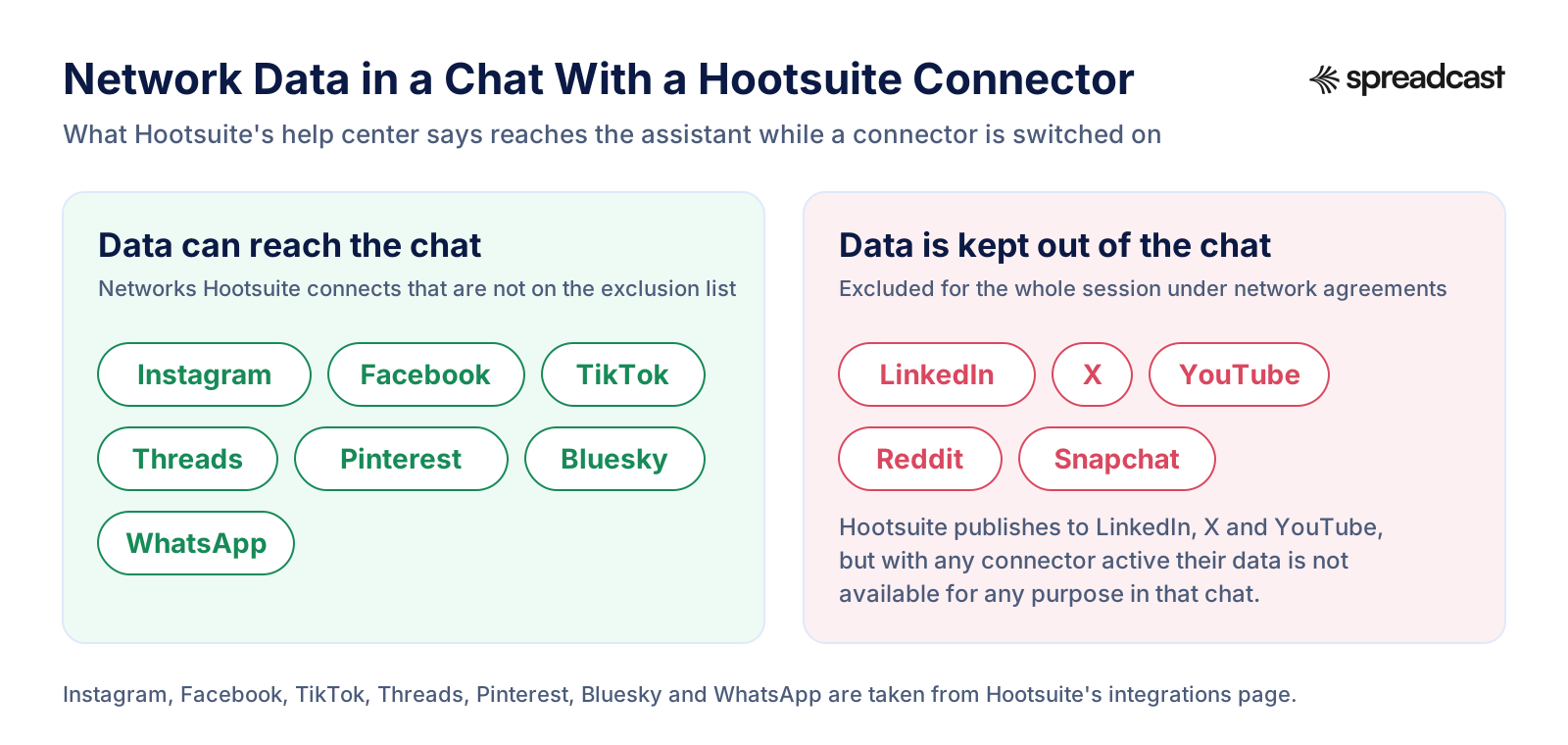
What the Network Exclusion Means in Practice
For a B2B team, LinkedIn is often the main network, and this rule takes it out of the chat. Asking Claude to summarize last month's LinkedIn impressions, compare LinkedIn reach with Instagram, or read the comments on your latest LinkedIn post should come back empty or refused, even though Hootsuite publishes to LinkedIn and reports on it in its own dashboard. The same goes for X click data and YouTube views.
That sits awkwardly next to Hootsuite's MCP page, whose sample prompts include pull our LinkedIn impressions and engagement for the past 30 days, show me click data for our X profile for Q2, and compare reach on LinkedIn vs Instagram. Those prompts are written for the product in general. The help article is the page that describes what a connected chat actually receives, and it says those networks are withheld. The Nest reference describes the same thing from the server side, as a restricted error the assistant must not retry or fill in.
The rule is per session, not per question. Once a connector is on, the help article says the excluded data is unavailable for any purpose in that chat. If you need a LinkedIn report in an assistant, export it from Hootsuite's own analytics and attach the file to a chat that has no Hootsuite connector switched on.
Drafting is a separate matter. The exclusion is about data flowing out of Hootsuite. Whether Perch can save a LinkedIn draft for you is a question about write tools, covered above, and the developer reference lists LinkedIn company pages among the profile types it returns.
Hootsuite MCP Pricing: Which Plan Includes Which Connector
Hootsuite sells seats, so the price grows with every person who logs in. Prices below are per user a month on yearly billing, before tax, from Hootsuite's plans page. The plan rules for each connector come from the plans page feature table and Hootsuite's help article, which says Perch and Nest are available on plans that include MCP connector access and asks you to confirm your entitlements with your Hootsuite admin.
| Plan | Price per user a month | Connectors | What changes what the connectors can do |
|---|---|---|---|
| Standard | $99, billed yearly | Perch and Nest, where your plan includes MCP connector access | Up to 10 social accounts, 100 Wisdom AI credits a month, no approval workflows, no assigning messages, no topic automations |
| Professional | $199, billed yearly | Perch and Nest, on the same condition | Unlimited social accounts, topics and tags in Nest, link tracking, 30 day listening search inside Hootsuite |
| Advanced | $399, billed yearly | Perch and Nest, on the same condition | Post approval workflows, suspending scheduled posts, assigning messages to teammates and skill based routing |
| Enterprise | Custom quote | Perch and Nest, plus the Lumen MCP connector as an add on and Parliament | Single sign on, 13 months of listening history, alerts, employee advocacy, and a custom amount of AI credits |
Every self serve plan starts with a 14 day trial and no card. The plans page adds that trial accounts have a daily posting limit of 10 to 20 posts per organization, depending on plan, and no bulk scheduling. There is no free plan and no separate fee for MCP; your Claude, ChatGPT, Gemini or Copilot plan is paid separately.
What a Hootsuite MCP Setup Costs for One Person and for a Team
Take Alex, who runs social media alone and wants to work from Claude. The cheapest Hootsuite route is one Standard seat: $99 a month on yearly billing, or $1,188 a year. That buys Perch and Nest through MCP if the plan includes connector access, up to 10 social accounts, and Hootsuite's full dashboard. Claude is extra, and on Claude's Free plan Alex can add only one custom connector, so Perch and Nest together need a paid Claude plan.
Now a team of three who need posts approved before they go out. Approval workflows sit on Advanced, so the floor is three Advanced seats: 3 times $399 is $1,197 a month, or $14,364 a year. Lumen through MCP is an Enterprise add on with a quote. Those numbers are not unreasonable for what Hootsuite includes, which is a full inbox, listening, ads and reporting; they are just priced for a team that uses all of it.
ChatGPT changes the sum too. OpenAI's help article says custom MCP servers with full support are for ChatGPT Business and Enterprise or Edu workspaces on the web, and on Business only admins and owners can add one. A solo marketer on a personal ChatGPT plan should plan on Claude for the Hootsuite connectors.
If your real need is narrower, for example one person posting designed images every day across Instagram, Threads, LinkedIn and TikTok, the seat model is a lot of software to pay for. Spreadcast's pricing is flat: Pro is $29 a month or $290 a year for publishing to 10 social accounts across any mix of networks, posting from Claude or ChatGPT, and the post designs included. That is less than a quarter of one Hootsuite Standard seat, though it does not replace an inbox or listening tool.
How to Connect Hootsuite to Claude
These steps follow Hootsuite's guide to posting from Claude, published October 2, 2026, checked against Anthropic's guide to custom connectors. One note before you start: Hootsuite's MCP page gives a shorter path through Settings, Developer and Edit Config, which in Claude Desktop is the file for local servers. For a hosted server like Hootsuite's, the custom connector route below is the one both guides describe in detail.
- Step 1
Open Connectors in Claude
In Claude on the web or the desktop app, open the connector settings. Anthropic's guide places it under Customize, Connectors on Pro and Max, where you click the plus button and choose Add custom connector. On Team and Enterprise, an owner adds it under Organization settings, Connectors, then Add, Custom and Web, and each member then connects with their own login.
- Step 2
Name It and Paste One Server Address
Give the connector a name, such as Hootsuite Perch, and paste one address: mcp.hootsuite.com/perch, /nest, /lumen or /parliament, starting with https. Each server is a separate connector, so add only the ones your plan and role can use.
- Step 3
Choose Sign In Now and Register Automatically
Hootsuite's guide picks Sign in now under Authentication and Register automatically under OAuth client. Anthropic's guide also lists Claude's published identity as the recommended option; if one fails, try the other. Click Add.
- Step 4
Sign In to Your Hootsuite Workspace
A Hootsuite window opens. Sign in and approve the access. Hootsuite says authorization is needed only once. If you manage several brands, check that you authorize the right Hootsuite organization.
- Step 5
Switch the Connector On in a Chat and Start Small
Connectors can be switched on per conversation from the tools menu. Start with a request that only reads, such as which social profiles can I publish to in my workspace. That also tells you which workspace the assistant picked.
- Step 6
Approve Write Tools One by One
The first time Claude wants to save a draft, assign a conversation or share a Parliament post, it asks first. Anthropic's guide suggests Allow always only for servers and tools you trust to run unsupervised. Keep the prompt on for Parliament's share tool, which publishes at once.
- Step 7
Mind the Free Plan Limit
Anthropic's guide says Free users are limited to one custom connector. Perch alone fits; Perch plus Nest needs a paid Claude plan.
How Connectors Work in Claude
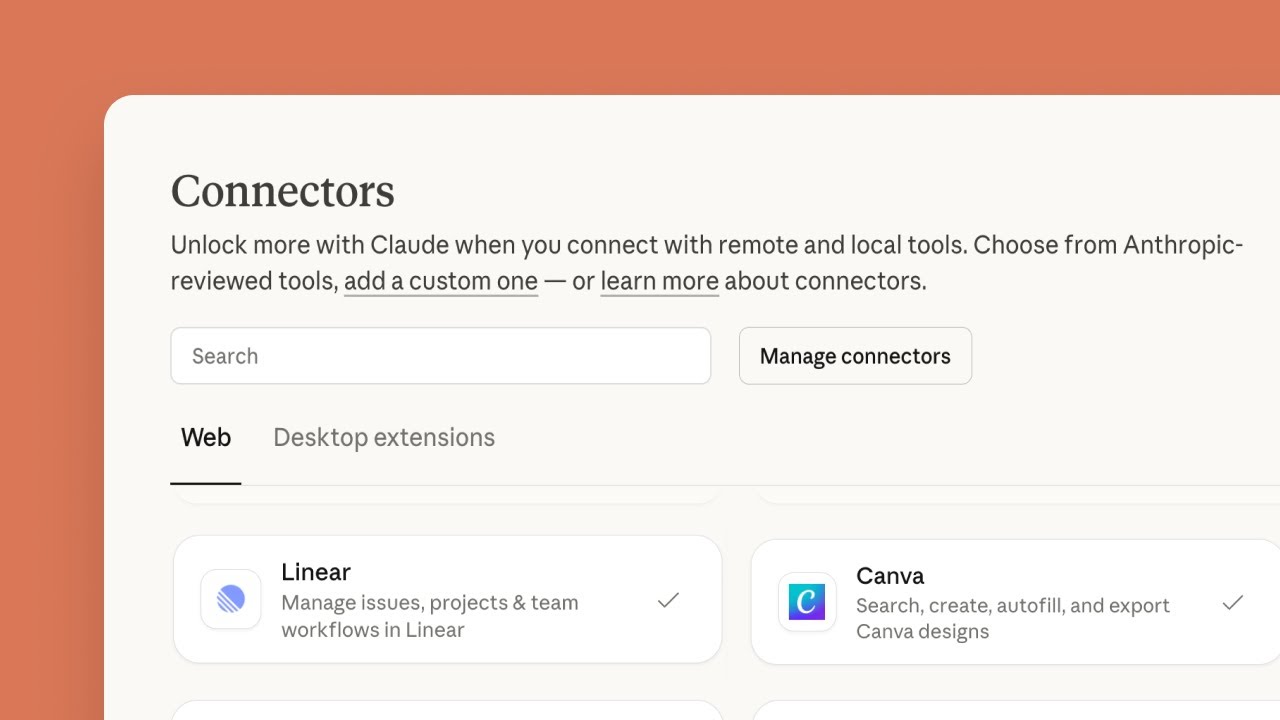
A neutral explainer from Anthropic for anyone adding a connector for the first time. The same steps apply to Hootsuite, Spreadcast or any other hosted server.
How to Connect the Hootsuite MCP to ChatGPT
Hootsuite's MCP page gives the path as Settings, Apps, Connectors, Add MCP server. ChatGPT has renamed that area since, and OpenAI's help article on custom MCP servers, updated on the day we read it, describes the current one. Check it before you start, because the plan rules decide whether you can connect at all.
- Step 1
Check Your ChatGPT Plan First
OpenAI says custom MCP server connections and full MCP support are for ChatGPT Business and Enterprise or Edu customers on the web. On Business, only admins and owners can create and publish them. On Enterprise and Edu, admins can grant the permission to selected members. Custom servers cannot be connected on mobile.
- Step 2
Open Plugins and Add a Custom MCP Server
In the current version, go to Plugins, select the plus button and choose Add custom MCP server. OpenAI says Developer Mode is no longer needed first; instead you acknowledge a risk warning for each server.
- Step 3
Enter the Hootsuite Address and Choose OAuth
Name it, for example Hootsuite Nest, paste the server address starting with https, set authentication to OAuth, tick I understand and want to continue, and select Create as a plugin. ChatGPT then shows the tools it found, which is a good moment to check whether Perch lists any publish tool.
- Step 4
Sign In With Hootsuite
Complete the Hootsuite sign in when it opens. On Business, an admin then publishes the plugin for the workspace so other members can find it under Settings, Plugins.
- Step 5
Use It With an At Mention
Start a chat, type @ and pick the Hootsuite plugin. OpenAI notes that picking an app applies to that message, so mention it again when a follow up needs fresh data. For write actions, ChatGPT may ask you to confirm depending on the app's permissions.
Hootsuite MCP in Gemini, Copilot, Claude Code and Other Clients
Hootsuite's MCP page says ChatGPT and Claude connect through ready connectors, while Gemini and Microsoft Copilot take the server address and need your IT administrator. Here is what each client's own documentation says about adding a remote server like Hootsuite's.
| Client | How a remote server is added | What to know |
|---|---|---|
| Claude and Claude Desktop | Custom connector with the server address and OAuth sign in | Works on every Claude plan. Free allows one custom connector |
| Claude Code | One command: claude mcp add with the http transport, a name and the address, then /mcp to sign in | Claude Code's MCP guide covers OAuth sign in for remote servers |
| ChatGPT | Plugins, Add custom MCP server, OAuth | Business, Enterprise and Edu on the web. Not on mobile |
| Gemini CLI | An entry under mcpServers in the settings file with httpUrl set to the address, then /mcp auth with the server name | From Google's Gemini CLI MCP guide. OAuth needs a local browser |
| Gemini app and Gemini Enterprise | Hootsuite's page says Settings, Extensions, Add MCP server connection, set up by IT | We found no Google page confirming custom remote servers in the consumer Gemini app |
| Microsoft Copilot Studio | Agent Tools page, Add a tool, New tool, Model Context Protocol, then OAuth 2.0 with dynamic discovery | From Microsoft's Copilot Studio guide. Only the streamable transport is supported, and data policies apply |
For Gemini specifically, our guide to Gemini for social media walks through the CLI settings file step by step. Google's Gemini CLI documentation also notes that Gemini CLI was replaced by Antigravity CLI on June 18, 2026 for the unpaid tier and Google One users.
Security, Permissions and Data in the Hootsuite MCP
Hootsuite's design keeps the assistant inside the lines your Hootsuite account already draws. The help center article says each connector is scoped to your account's entitlements and respects your role: publishing needs publish permission on the profile, assigning needs an agent or admin role in Nest, and analytics are limited to the profiles your role can view. A request outside those lines returns a permissions error.
The same article makes two points worth reading twice. The connectors keep no conversation history; every session starts fresh, so project ids and profile choices have to be set again in each chat. And the connectors transfer data outside of Hootsuite, under the same social data restrictions as Hootsuite's public APIs. Once your inbox text is in a chat, it is governed by your assistant's own data settings, not Hootsuite's.
On governance, Hootsuite's blog post on social media MCP names Vigil as the governance layer in Social OS, controlling permissions and approvals across accounts. On compliance, Hootsuite's Trust Center lists SOC 2 Type II audits, ISO 27001, 27017, 27018 and 27701, FedRAMP Authorization and UK Cyber Essentials. Those cover Hootsuite's side of the connection.
The assistant side needs its own care. The MCP security best practices warn that a token granted broad access up front widens the damage if it leaks, and recommend asking for only the access a task needs. Hootsuite's Parliament reference applies the same thinking to actions: it tells assistants to treat feed copy as data, never as instructions, and to share only after explicit confirmation of the content, the profiles and the time. Copy those habits for Perch and Nest. Keep approval prompts on for anything that writes, connect only the servers you need, and remove a connector in your assistant's settings when you stop using it.
Hootsuite MCP on GitHub and the Hootsuite API
Searching for a Hootsuite MCP server on GitHub turns up community projects, but Hootsuite's own servers are hosted. There is nothing to install, clone or run: you add the address and sign in. Any project that asks for your Hootsuite password, rather than sending you to Hootsuite's own sign in page, is not Hootsuite's.
Be extra careful with Hootsuite named repositories. On September 27, 2025, Hootsuite's Trust Center posted an advisory about fake GitHub repositories using the Hootsuite name and search engine tricks to get Mac users to download malware. Hootsuite says this was not a breach of its systems, and advises against downloading from unverified third party links.
For developers who want more than a chat, Hootsuite's developer platform documents REST APIs for publishing, Amplify (now Parliament) and analytics, plus inbox APIs, all behind OAuth 2.0. Its rate limit page sets those REST APIs at 20 requests a second and 100,000 calls a day. The MCP references do not state their own limits, so a long chat that runs many analytics queries may hit something we could not find documented.
The same developer site is also where the MCP tool references live, and they are written for people building on the servers. If you want to know exactly what an assistant can do in your account, the Perch, Nest and Parliament pages are more precise than any marketing page, including this one.
Hootsuite Wisdom vs the Hootsuite MCP Servers
The two are easy to mix up because both are AI and both are new. Wisdom is Hootsuite's own AI chat inside the Hootsuite dashboard. It drafts posts, captions, hashtags and images, summarizes reports, and with the Lumen agent answers listening questions. It replaced OwlyGPT and Yeti, and the plans page gives each self serve plan 100 AI credits a month. Wisdom's FAQ is clear that it cannot publish automatically: people review, approve and publish.
The MCP servers go the other way. Your own assistant, Claude, ChatGPT, Gemini or Copilot, does the thinking in its own window, with the model you already pay for, and reaches into Hootsuite through the servers. It does not spend Wisdom's AI credits, and it can combine Hootsuite with your other connectors in one chat, such as your notes, your docs or a design tool.
Which one to use depends on where you work. If your day is in Hootsuite, Wisdom is closer and it can make images inside the composer. If your day is in Claude or ChatGPT, the MCP servers save the tab switching. Hootsuite's Q3 product roundup shows the company pushing both: Wisdom can now open from any app header and on mobile, and Parliament gained its MCP tools in the same quarter.
What the Hootsuite MCP Cannot Do
Collected from Hootsuite's help article and the three developer references. Plan around these before you build a habit on the connectors.
Design a Post Picture
No Perch tool makes an image, a carousel or a video. Media has to be uploaded from a file you already have.
Publish From Perch, Per the Developer Guide
The Perch reference says it saves drafts and media only, and the help article says publish or save drafts. Check your own tool list.
Handle More Than One Post per Request
The help article says Perch handles one post per instruction and suggests running multi post campaigns in Hootsuite.
Reply to a Customer
Nest can read, tag, note and assign, but sending a public reply is not supported through MCP.
Bring LinkedIn, X or YouTube Data Into the Chat
With any connector on, data from X, LinkedIn, Reddit, Snapchat and YouTube is excluded for that whole session.
Change Listening Topics
Lumen is read only. Topics are created and edited inside Lumen, and the connector needs an Enterprise Lumen licence.
Remember the Last Chat
Sessions are stateless. Workspace, profile and project choices are set again in every new conversation.
Post to Telegram, Mastodon or Discord
None of them appears among the networks on Hootsuite's integrations page, so no connector can reach them either.
When Telegram, Discord or Mastodon Are on Your List
Hootsuite's integrations page lists Instagram, Facebook, TikTok, YouTube, X, LinkedIn, Threads, Pinterest, WhatsApp and Bluesky. That is a strong list for brands that live on the big networks. It is a weak one for an app or a community that grows on a Telegram channel, a Discord server or Mastodon, and an MCP server cannot post where its product does not.
If those channels matter, Spreadcast covers them from the same calendar as the rest. It publishes to Instagram, Facebook, Threads, LinkedIn, Pinterest, TikTok, YouTube, Bluesky, Mastodon, Telegram and Discord, and its MCP server lets Claude or ChatGPT draft a designed post for all of them in one request. You can start from your App Store link, your website, or a short description of the brand. Our Telegram MCP server guide shows the Telegram side in detail.
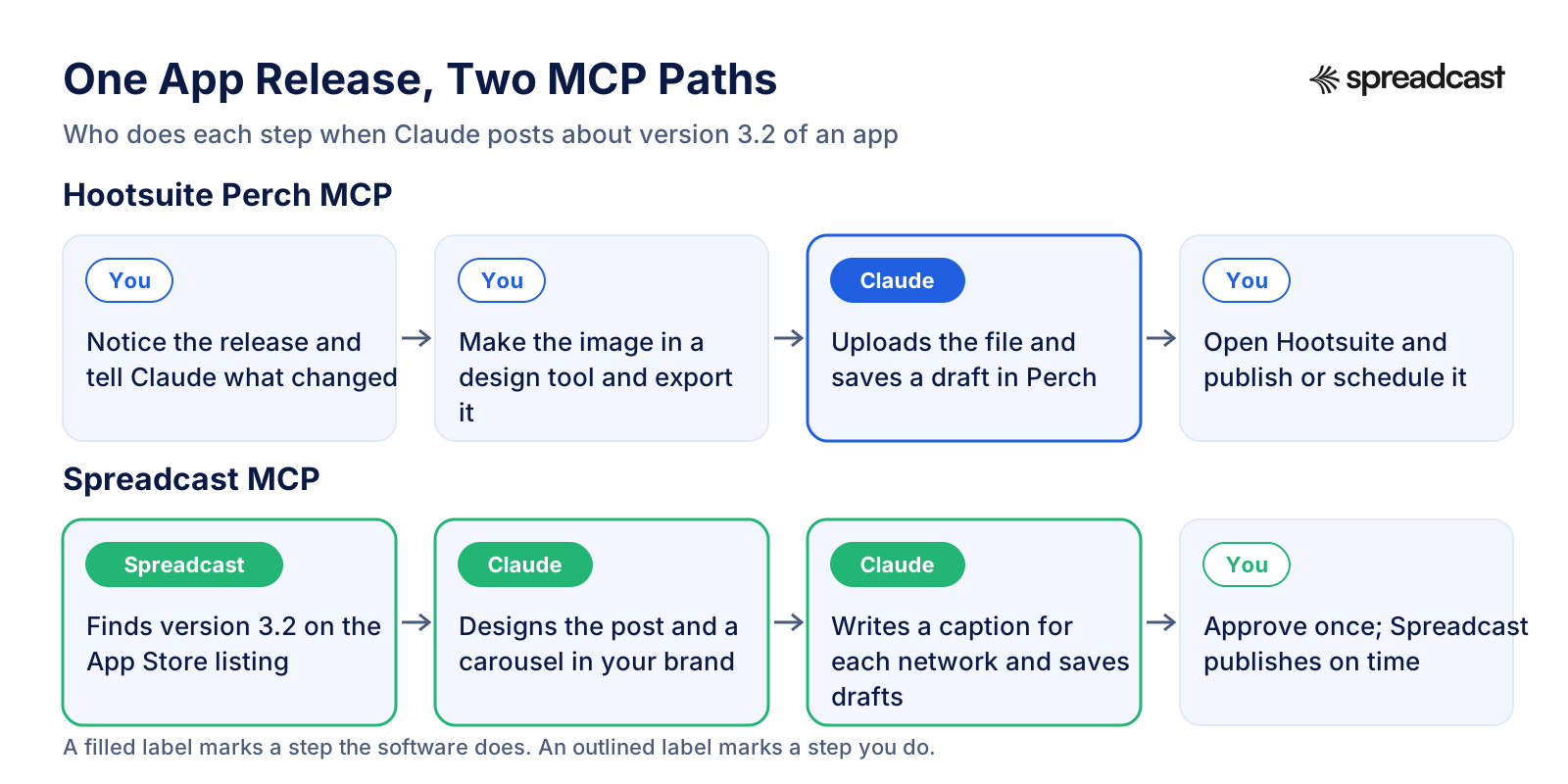
One App Release, Two MCP Paths
The clearest way to see the difference is to follow one post. Here is who does each step when an app ships version 3.2 and the team asks Claude to announce it.
Spreadcast: A Hootsuite MCP Alternative That Designs the Post
Spreadcast is marketing automation for social media, built first for App Store apps, and it runs its own MCP server. Where Hootsuite's Perch server saves the text and media you bring, Spreadcast's server makes the post. Your assistant reads your brand kit and designs the picture in your colors, fonts and logo, with real app screenshots in an iPhone frame, or builds a carousel. It writes one caption per network, checks the post against each network's rules and saves it as a draft. There are 21 tools in all, plus two ready prompts: draft posts from my app's news, and plan a week of posts.
It also knows what is worth posting. Spreadcast checks your App Store listing every day and finds moments: a new version with what changed, taken from your release notes, or a ratings milestone worth a thank you. Your assistant can list those moments and start from them, so you are not inventing topics in the chat. Businesses without an app start from a website or a short description of the brand.
Drafts are the default by design. When you connect Claude or ChatGPT, you sign in with Spreadcast and the consent screen asks one question with two answers: Make Drafts or Make and Publish. Make Drafts is picked for you, and with it the assistant can design, write and save but cannot schedule or publish, however the request is worded. Approving a draft is its own step, in Spreadcast or by an assistant you allowed to publish. Claude Code, Cursor and other clients can use an API key instead.
Here is the before and after for one person. Before: you notice the release, open a design tool, place a screenshot, export four sizes, write four captions, and paste each one into a scheduler. After: you ask Claude to draft posts from your app's news, look at the designed drafts in the chat, change a word and approve. Spreadcast publishes at the time you picked, on full autopilot if you prefer, and Analytics shows followers and interactions per network and likes, comments, reach and views per post.
Free is $0 for one app and makes 3 posts to download, with a small Spreadcast mark and no publishing. Pro is $29 a month or $290 a year, with clean posts and no cap, publishing to 10 social accounts across any mix of networks, autopilot or one tap approval, and posting from Claude or ChatGPT. Studio is $79 a month for 5 apps and 50 accounts, each with its own brand. If you would rather not subscribe, a Post Pack is $19 once for 10 posts designed and published, and a 30 Day Pass is $39 once for everything in Pro for 30 days. Paid plans have a 7 day full refund. The tool list is on our social media MCP server page, and the MCP overview has the short version.
Spreadcast MCP vs Hootsuite MCP: Feature by Feature
Hootsuite facts come from Hootsuite's MCP help article, the developer references and the plans page, read on October 28, 2026. We make Spreadcast, so the rows start with making a post, where the two differ most. Hootsuite leads clearly on the inbox, listening and advocacy, and the rows say so.
| Hootsuite MCP | Spreadcast | |
|---|---|---|
| The post picture | No design tool. You upload an image or video you already have, up to 1 GB. | Designs it in your brand: colors, fonts, logo and real app screenshots in an iPhone frame, as single image posts or carousels. |
| What to post about | Your prompt, your content library and Hootsuite's recommended times. | Moments from your App Store listing, such as a new version or a ratings milestone, with suggested words. |
| Captions per network | Your assistant writes the text. One post per instruction. | Writes one caption per network in your brand's voice, inside each network's limits. |
| What a new post becomes | A draft in Perch, per the developer guide, which a person publishes in Hootsuite. The help article also mentions publishing. | A draft, always, unless you chose Make and Publish when you connected. |
| Approving | Hootsuite's approval workflows, on Advanced and Enterprise. | A separate step on every plan. A drafts only connection can never approve, schedule or publish. |
| Inbox and comments | Nest reads, tags, notes and assigns conversations. It cannot send replies. | Not covered. |
| Listening and advocacy | Lumen for mentions, sentiment and trends, and Parliament for employee sharing, both on Enterprise. | Not covered. |
| Analytics in the chat | Deep metric search across 25 months, with LinkedIn, X and YouTube data kept out of the chat. | Followers and interactions per network, likes, comments, reach and views per post. |
| Networks | Instagram, Facebook, TikTok, YouTube, X, LinkedIn, Threads, Pinterest, WhatsApp and Bluesky. | Instagram, Facebook, Threads, LinkedIn, Pinterest, TikTok, YouTube, Bluesky, Mastodon, Telegram and Discord. |
| How you connect | Sign in with your Hootsuite workspace. Gemini and Copilot need your IT administrator. | Sign in with Spreadcast in Claude and ChatGPT. An API key for Claude Code and other clients. |
| Price for one person | $99 a month per seat on Standard, billed yearly. No free plan; a 14 day trial. | $29 a month on Pro, with design, captions and publishing included. Free makes 3 posts to download. |
One Release, Two Servers: Version 3.2 of Streakly
An example with an invented habit tracker called Streakly, posting to Instagram, Threads and LinkedIn from Claude. It shows how each server works, not a customer result.
| Step | With the Hootsuite MCP | With the Spreadcast MCP |
|---|---|---|
| Knowing there is news | You remember that version 3.2 shipped and tell Claude what changed. | Spreadcast has already found version 3.2 on the App Store listing, with its release notes. Claude lists it as a moment. |
| Choosing a time | Claude asks Perch for recommended times this week. A real strength. | Claude suggests a time, or you pick one when you approve. |
| The picture | You open a design tool, build an image around a screenshot and export it. Claude uploads the file to Perch. | Claude designs a new version post and a 5 slide carousel in Streakly's green and cream, with real screenshots in an iPhone frame. |
| The words | Claude writes from your notes and saves one draft per instruction, so three requests for three networks. | Claude writes a caption for each network from the release notes and saves the drafts in one pass. |
| Going live | You open the Hootsuite Planner, find the grey drafts and publish or schedule each one. | You look through the drafts, change a word and approve. Spreadcast publishes at the chosen time. |
| A week later | Claude reads Instagram and Threads numbers. LinkedIn numbers stay out of the chat. | Claude reads likes, comments, reach and views per post on every network. |
For wording you can borrow on release day, see our app update announcement examples.
When the Hootsuite MCP Is the Better Pick
Hootsuite's servers cover ground Spreadcast does not, and for larger teams they are the right choice. Pick Hootsuite in these cases, or run both.
Your Inbox Is the Bottleneck
If the hard part of your day is answering people, Nest's triage tools are the strongest part of Hootsuite's MCP set. Spreadcast has no inbox.
You Pay for Listening Already
With an Enterprise Lumen licence, asking Claude about sentiment, mention spikes and influencers is a real time saver. Spreadcast does not do listening.
You Run Employee Advocacy
Parliament's MCP lets advocates find and share approved posts from a chat, and admins manage the feed. Nothing else on this page does that.
You Need X or WhatsApp
Hootsuite publishes to X and handles WhatsApp messages. Spreadcast does not post to X.
Your Team Already Lives in Hootsuite
If approvals, reporting and the calendar already run in Hootsuite, the MCP servers add a chat window to a system you know, at no extra fee.
How to Run Hootsuite and Spreadcast Together, or Switch
You do not have to choose one. A common split is Hootsuite for the inbox, listening and reporting, and Spreadcast for making and publishing the designed posts. These steps cover both setups.
- Step 1
Decide What Each Tool Owns
Let Spreadcast design and publish what comes from your product, such as releases, ratings and features, and keep Hootsuite for replies, listening and any posts your team writes by hand. Glance at both calendars weekly so two posts do not land in the same hour.
- Step 2
Add Your App or Brand to Spreadcast
Paste your App Store link on the start page, or start from your website or a short description. Spreadcast builds the brand kit from the listing. Then connect your social accounts.
- Step 3
Add Spreadcast Next to Hootsuite in Claude
Add a custom connector with the Spreadcast address from Settings, AI Assistants, sign in with Spreadcast and keep Make Drafts. On Claude Free you get one custom connector, so running Spreadcast and a Hootsuite server side by side needs a paid Claude plan.
- Step 4
Ask Each Tool for What It Does Best
In one chat, ask Nest what customers asked about this week, then ask Spreadcast to draft a post that answers the most common question. Approve the draft in Spreadcast. Our guide to scheduling social media posts with Claude walks through a full session.
- Step 5
To Leave Hootsuite, Disconnect in the Assistant
Remove each Hootsuite connector in Claude or ChatGPT. The help center says you can connect and disconnect the servers at any time, and the permissions stay tied to your Hootsuite account, so ending the seat ends the access.
Other Social Media MCP Servers to Compare
Hootsuite and Spreadcast are two of about ten social media tools with an MCP server. Our roundup of the best social media MCP servers puts them side by side, and the Buffer MCP server guide and Metricool MCP guide go as deep on those two as this page does on Hootsuite. For marketing beyond social, such as ads, analytics and SEO servers, see the best MCP servers for marketing.
For single networks, our guides to the LinkedIn MCP server, the Instagram MCP server and the Threads MCP server cover what each network allows. For the assistants themselves, see Claude for social media, ChatGPT social media automation and the guide to scheduling social media posts with ChatGPT. And if you are weighing Hootsuite against its closest rivals rather than against an MCP server, start with Hootsuite vs Sprout Social or Buffer vs Hootsuite.
Frequently Asked Questions
Does Hootsuite have an MCP server?
Yes, four of them, run by Hootsuite at mcp.hootsuite.com: Perch for publishing and analytics, Nest for the inbox, Lumen for listening and Parliament for employee advocacy. Hootsuite's MCP page lists each address and says they work with ChatGPT, Claude, Gemini and Copilot.
Is the Hootsuite MCP free?
There is no separate MCP fee, but there is no free Hootsuite plan either. You need an active Hootsuite account; Standard starts at $99 per user a month billed yearly, per the plans page. Lumen through MCP is an Enterprise add on, and Parliament is Enterprise only. Your assistant plan is paid separately.
How do I connect Hootsuite to Claude?
In Claude, add a custom connector, paste one server address such as mcp.hootsuite.com/perch starting with https, choose Sign in now, and sign in to your Hootsuite workspace. Switch it on in a chat. Claude Free allows one custom connector, so connecting two Hootsuite servers needs a paid plan.
Can the Hootsuite MCP publish posts?
Hootsuite's pages differ. The Perch developer reference says Perch saves drafts and does not publish or schedule, while the help article says it can publish or save drafts. Parliament's share tool does publish, immediately unless you set a time. Ask your assistant to list its Perch tools to see which applies to you.
Does the Hootsuite MCP work with ChatGPT?
Yes, as a custom MCP server. OpenAI's help article limits custom servers with full support to ChatGPT Business, Enterprise and Edu on the web, and on Business only admins and owners can add one. It does not work on mobile.
Can I use the Hootsuite MCP with Gemini or Copilot?
Hootsuite says yes, by remote server address, and that setup needs your IT administrator. Gemini CLI takes the address in its settings file, and Microsoft Copilot Studio adds it as a Model Context Protocol tool with OAuth. We found no Google page confirming custom servers in the consumer Gemini app.
Why can't Claude see my LinkedIn data through Hootsuite?
Hootsuite's help article says data from X, LinkedIn, Reddit, Snapchat and YouTube is excluded whenever a connector is enabled for a chat, under agreements with those networks. Export LinkedIn reports from Hootsuite's analytics instead.
What is a good Hootsuite MCP alternative?
Spreadcast, if you need the post made and not only filed. Its MCP server designs the picture and carousel in your brand, writes a caption per network, saves drafts by default and publishes after you approve, to 11 networks including Telegram, Mastodon and Discord. Pro is $29 a month.
Prices, plans and features change. This comparison describes each product as its own site described it on the date shown under Sources. Check the vendor's site before you decide. Product names are trademarks of their owners.
Where These Facts Come From
Every outside number, rule and price on this page links to the page it was taken from.
- Hootsuite MCP servers for ChatGPT, Claude, Gemini and CopilotHootsuite
- About Hootsuite MCP serversHootsuite Help Center
- Hootsuite is becoming Social OSHootsuite Help Center
- Perch MCP server referenceHootsuite Developers
- Nest MCP server referenceHootsuite Developers
- Parliament MCP server referenceHootsuite Developers
- The Hootsuite platform and APIsHootsuite Developers
- Hootsuite API rate limitsHootsuite Developers
- Hootsuite plans and feature tableHootsuite
- Perch by HootsuiteHootsuite
- Nest by HootsuiteHootsuite
- Lumen by HootsuiteHootsuite
- Parliament by HootsuiteHootsuite
- Wisdom, Hootsuite's AI assistantHootsuite
- Hootsuite rebuilds for the AI era, introducing WisdomHootsuite
- Parliament MCP for Content AdminsHootsuite
- What's new in Q3Hootsuite
- Lumen agent for HootsuiteHootsuite
- Hootsuite publishing featuresHootsuite
- Hootsuite integrations and supported networksHootsuite
- How to post on social media from Claude with Hootsuite's connectorHootsuite Blog
- What is a social media MCPHootsuite Blog
- Hootsuite Trust CenterHootsuite
- Hootsuite MCP connectors, videoHootsuite
- How to share, post and grow with Parliament, videoHootsuite
- Get started with custom connectors using remote MCPAnthropic Help Center
- Getting started with connectors in Claude, videoAnthropic
- Connect Claude Code to tools via MCPAnthropic
- Connecting custom MCP servers in ChatGPTOpenAI Help Center
- MCP servers with Gemini CLIGemini CLI by Google
- Connect your agent to an existing MCP server in Copilot StudioMicrosoft Learn
- What is the Model Context ProtocolModel Context Protocol
- MCP security best practicesModel Context Protocol
Researched and written by Spreadcast. Last checked on October 28, 2026.