Schedule Facebook Posts on One Calendar
Every post for your Facebook Page sits next to the rest of your week, in the color of its network. Drag a post to another day and it moves.
- Groceries$312
- Rent$1,100
- Coffee$46
- Split with a partner
- Monthly goals
- Bank sync in 40 countries
- Groceries$312
- Rent$1,100
- Coffee$46
- Split with a partner
- Monthly goals
- Bank sync in 40 countries
- Groceries$312
- Rent$1,100
- Coffee$46
- Split with a partner
- Monthly goals
- Bank sync in 40 countries
- Groceries$312
- Rent$1,100
- Coffee$46
- Split with a partner
- Monthly goals
- Bank sync in 40 countries
What a Facebook Post Scheduler Does, and Who Needs One
A Facebook post scheduler holds a finished post, the words with a picture, several pictures or a video, and publishes it to your Page at the time you picked. Meta has one built into Facebook and Meta Business Suite, and it costs nothing. Outside scheduling tools work another way: you sign in with Facebook through them once and choose the Pages they may post to, the tool keeps your post on its own servers, and at the chosen minute it publishes the post through Meta's official Pages API. Most of what follows comes from that difference: where each kind of scheduler can post, what it can post, and what tends to go wrong.
Facebook is still the widest net in social media. Pew Research's 2025 report found that 71% of US adults use Facebook, and 37% of US adults visit it several times a day. Meta's results for the third quarter of 2026 put the people using its apps each day at 3.64 billion on average in September. For a local business, an app, a club or a shop, those are customers who check their feed while the kettle boils. A post that lands at lunchtime on a Wednesday finds them; the same post at 2 in the morning sinks under everything that came after it.
We make Spreadcast, so weigh the comparisons here with that in mind. Spreadcast is a marketing automation tool that also makes the posts. It designs the picture in your brand, writes a caption for Facebook and for each other network you tick, checks every version against that network's limits, then schedules it. Facebook is one of the 11 networks it publishes to. It is strongest for App Store and Google Play apps, where it also turns a new version or a rating milestone into a post, but anyone can bring their own pictures or video and schedule them the same way.
This page covers both routes. First, how to schedule a post on Facebook itself: in Meta Business Suite on a computer and on a phone, for Reels and Stories, in a group, and what is possible on a personal profile, with every step linked to Meta's own help. Then what Meta lets an outside tool do, how Spreadcast schedules Facebook posts, and how the main Facebook scheduling tools compare on what they post and what they cost. Every outside fact was read on November 15, 2026, with the source linked next to it.
- Groceries$312
- Rent$1,100
- Coffee$46
Every one of them read.
Two people, one budget, zero spreadsheets. The shared goals alone saved us an argument a week.
For Every
Trail
How to Schedule a Post on Facebook in Meta Business Suite
Meta Business Suite is Meta's free tool for running a Facebook Page and an Instagram account together, and it is where Facebook's own scheduling lives. These steps follow Meta's help article on scheduling posts for a Page, read on November 15, 2026, on a computer.
Open Facebook and switch to your Page, the way you would to post as it. In the menu on the left, click Meta Business Suite, then Create post. Write the text and add your photos or a video. Further down the composer, turn on the toggle for Set date and time and pick the day and the time. If you are not sure when to post, click Active times: Business Suite suggests slots from when your followers were most active. Then click Schedule.
You can start from Business Suite directly as well. Meta's guide to creating posts in Business Suite has you click Create post from the Home page or the Content tab, then choose where it goes under Post to. That list can hold your Facebook Page, your Instagram profile or a Facebook group, so one post can be scheduled to several places at once, with the text changed for Facebook and for Instagram. Meta's guide to saving and scheduling adds Finish later, which saves a draft you can come back to.
Times follow your current time zone, so a post set for 9 in the morning goes out at 9 where you are when you set it. Meta's help also says scheduled posts can be created and edited by anyone with Facebook access or task access to the Page, which matters if you share a Page with a colleague or an agency.
“I haven’t slept this well since I was a kid.”
Facebook's Built In Scheduling at a Glance
What Meta's own tools let you schedule, with the Meta page each line comes from. Read on November 15, 2026.
| Question | Meta's answer | Where Meta says it |
|---|---|---|
| Where you schedule | Meta Business Suite, on a computer or in its phone app | Business Suite app help |
| How far ahead | Between 20 minutes and 29 days away | Schedule posts for a Page, timing |
| Who can schedule for a Page | People with Facebook access or task access to the Page | Schedule posts for a Page, access |
| Picking a time | Active times suggests slots from the past 7 days of follower activity | Create posts in Business Suite |
| Reels | Yes, from Business Suite on a computer or the app | Reels in Business Suite |
| Stories | Yes, up to 10 photos or videos per story | Stories in Business Suite |
| Groups | Admins and moderators schedule inside the group | Schedule group posts |
| Managing scheduled posts | Planner: edit, duplicate, reschedule, move to drafts or delete | Schedule posts for a Page, Planner |
| Price | Free | How Meta Business Suite works |
Meta tests its menus on different accounts at different times. If a button sits somewhere else on yours, the feature is usually the same.
Scheduling a Facebook Post in Meta Business Suite, on Screen
The route above, shown in a short tutorial by a business systems consultant.

How to Schedule Facebook Posts on Your Phone
On a phone, scheduling happens in the Meta Business Suite app rather than the main Facebook app. Meta's help for the Business Suite app gives the order: tap Content, choose Posts, Reels or Stories at the top, tap Create, add the text and media, tap Next, choose Schedule for later, pick the date and time, and tap Schedule. You need at least partial access to the Page to do it.
Scheduled posts then show in the app's Planner, the same calendar you see on a computer, so a post scheduled on the train can be moved from your desk later. Facebook posts can also be saved as drafts in the app if you want to finish them on a bigger screen.
Meta moves the entry points inside the main Facebook app around between accounts and versions, which is why most guides, ours included, send you to the Business Suite app for phones: it is the one route Meta documents step by step. It is free in the App Store and Google Play.
“I haven’t slept this well since I was a kid.”
How Far in Advance Can You Schedule a Facebook Post?
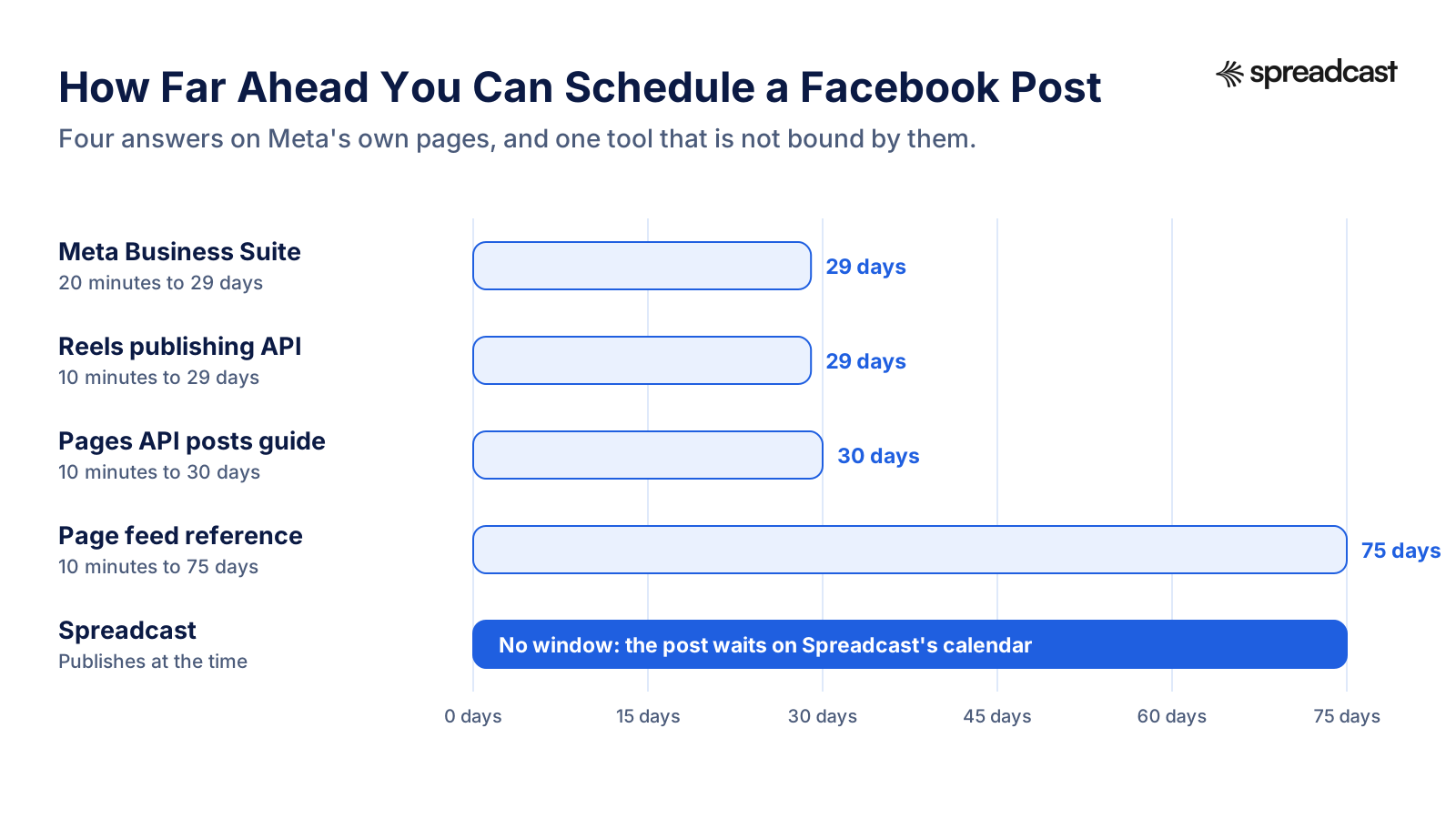
In Meta Business Suite, up to 29 days. Meta's help on scheduling Page posts says a post can be set to publish between 20 minutes and 29 days away. So a full month of daily posts cannot be loaded in one go: the last few days of a long month have to wait until the first ones are inside the window.
Meta's developer pages, which outside tools read, give other numbers for the same thing. The Pages API guide to posts says a scheduled publish time must be between 10 minutes and 30 days from the request. The Page feed reference gives the same field 10 minutes to 75 days. The Reels publishing guide asks for more than 10 minutes and within 29 days. When Meta's own pages disagree, the safe reading is the shortest window.
That matters only for tools that hand the post to Facebook early and let Facebook publish it. A tool that keeps the post on its own calendar and publishes it at the planned minute is not bound by any of these windows, because to Facebook it is simply a post published now. Spreadcast works that way: a Facebook post can sit on your Spreadcast calendar two months ahead, and goes out at its time.
- Groceries$312
- Rent$1,100
- Coffee$46
Every one of them read.
Two people, one budget, zero spreadsheets. The shared goals alone saved us an argument a week.
For Every
Trail
How Far Ahead Each Route Lets You Schedule a Facebook Post
The same question has four answers on Meta's own pages. A tool that publishes at the time is not bound by any of them.
How to Schedule Facebook Reels and Stories
Reels are scheduled from the same place. Meta's help on reels in Business Suite has you click Create reel on a computer, choose the Page under Post to, add the video, pick a thumbnail and write the caption, then click Next, where you can trim it, change the aspect ratio or add audio before you schedule, share or save it as a draft. In the app, tap the plus button, then Reel, edit it, pick the Page under Share to, and choose Schedule for later under Scheduling options. The same page notes that reels from business and creator Pages can only be posted publicly.
Meta is folding video on Facebook into reels. Meta's announcement of June 17, 2025 said that in the coming months all videos on Facebook would be shared as reels, and that reels would no longer have length or format restrictions. Outside tools are held to tighter rules: Meta's Reels publishing guide for developers says reels can only be published to Pages, must run 3 to 90 seconds in a vertical 9 by 16 frame, and a Page can publish at most 30 of them through the API in 24 hours.
Stories are scheduled in Business Suite too. Meta's help on stories has you click Create story, choose the Page, the Instagram account or both, upload up to 10 photos or videos, edit them with crops, text, stickers or a link, then open Scheduling options and schedule. Scheduled stories wait under Content, Stories, Scheduled, where you can publish one early, reschedule it or delete it.
A story disappears after a day, so scheduling one makes most sense for something with a clock on it: a sale that starts at 9, an event tonight, a version that went live this morning. For anything people should find next week, a post or a reel works better.
Rain on a tin roof, 45 minutes, then silence. Lumi’s new sleep timer fades out on its own
How to Schedule a Post in a Facebook Group
Groups schedule from inside the group, not from Business Suite's Page tools. Facebook's help on scheduling group posts says admins and moderators can schedule posts in a group they manage. Go to your group, click Write something and start typing; the calendar icon next to Post appears only once there is text. Click it, pick the date and time, and click Schedule.
Scheduled group posts live under Admin tools, Scheduled posts, where you can reschedule one, post it now, or open Options to edit or delete it. The same article describes recurring posts: admins, not moderators, can set a post to go out daily, weekly or monthly through Admin Assist, by choosing to publish a custom post, and each recurring post shows in the scheduled list 24 hours before it goes out.
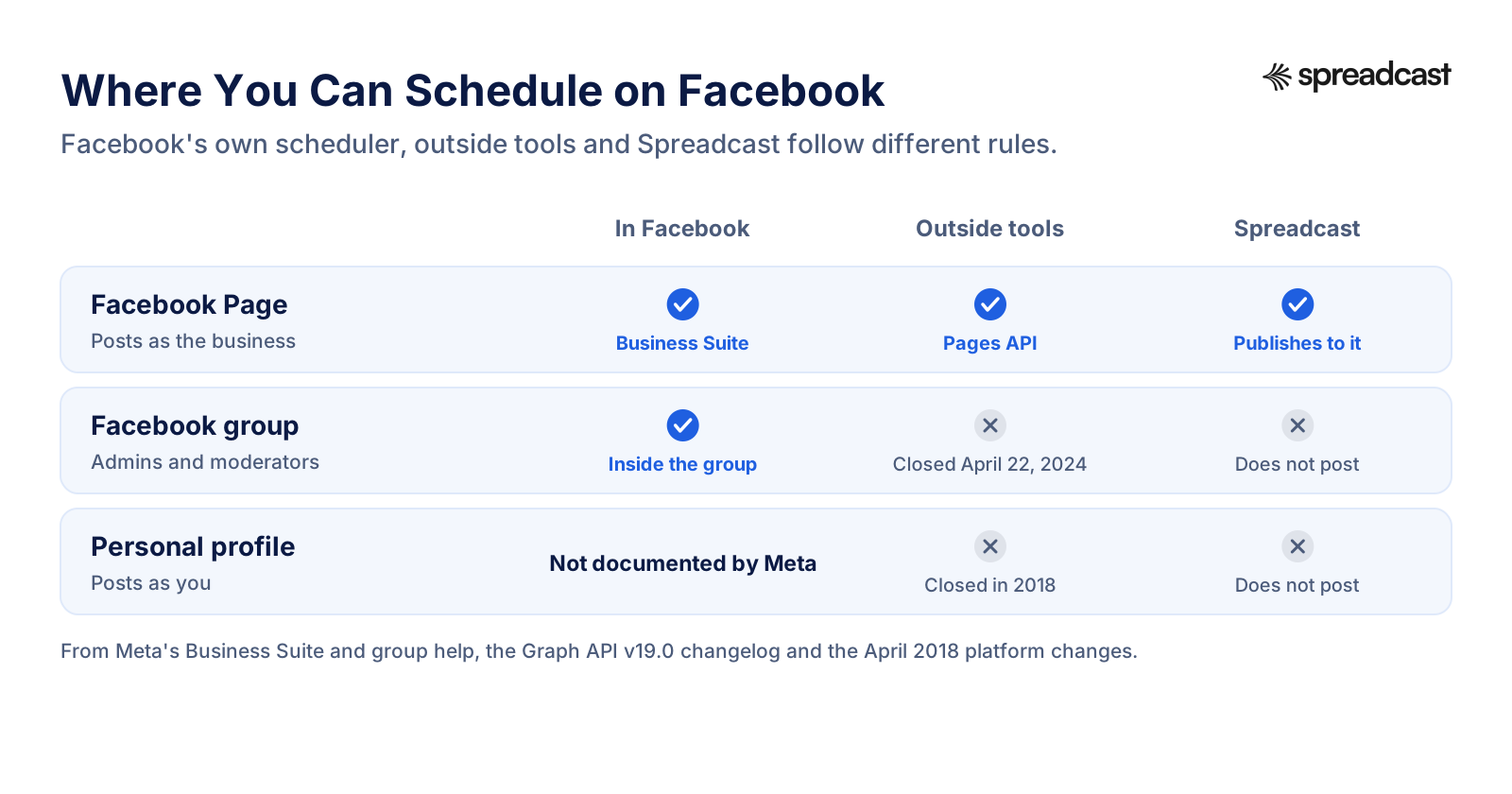
Outside tools cannot do this for you. Meta's changelog for Graph API version 19 deprecated the Groups API along with the publish_to_groups permission and removed them on April 22, 2024. Since then no scheduling tool, Spreadcast included, can publish to a Facebook group directly. Tools that list groups do it by reminder: they send a notification at the time and you post by hand. If a group is central to your plan, use Facebook's own scheduler there, and let a tool handle your Page and your other networks.
Can You Schedule Posts on a Personal Facebook Profile?
Meta documents no way to do it. Facebook's help explains scheduling for Pages and groups, and its page on professional mode for profiles lists insights, moderation tools, discovery and monetization without mentioning scheduling. Some vendor guides, such as Buffer's, say a profile in professional mode can schedule in the Facebook app; that is their report, not Meta's, and the option may not be on every account.
What is certain is that outside tools cannot post to a personal profile. Meta deprecated the publish_actions permission, which let apps publish as the person who signed in, in its platform changes of April 24, 2018. Since then an app can publish as a Page a person manages, never as the person. Any tool that promises to post to your profile is either sending you a reminder or driving a browser with your login, which Facebook's terms do not allow.
So if you post for a business, a product or a brand, the answer is a Page. Creating one takes a few minutes, it is free, and it opens Business Suite, Active times, insights and every outside scheduler, Spreadcast included. Your profile stays yours, and you can share the Page's posts from it by hand when you want your friends to see them.
Where You Can Schedule on Facebook
Pages, groups and profiles follow different rules for Facebook's own scheduler and for outside tools.
How to See, Edit or Reschedule Scheduled Facebook Posts
Business Suite keeps every scheduled post for a Page in the Planner. Per Meta's Page scheduling help, click Planner in the left menu, switch between the week and month views, and open a post. Its Options menu has five choices: edit the post, duplicate it, reschedule it, move it back to drafts or delete it.
The same posts are listed under Content. Meta's guide to posts in Business Suite puts them under Posts and reels, with tabs for published, scheduled and drafts, and the three dot menu on each post opens Manage post, where you can edit, reschedule, move to drafts or delete it. Rescheduling from the Planner is a matter of picking a new time; per Meta's guide to saving and scheduling, you can also do it from the Scheduled tab.
Group posts are managed inside the group under Admin tools, Scheduled posts, as the group section above explains. Stories have their own Scheduled tab under Content, Stories.
What none of these lists show is anything scheduled outside Meta. A post waiting in an outside tool is not in the Planner, because the tool publishes it through the API at the time instead of handing it to Facebook early. If a post you scheduled elsewhere is missing from Business Suite, that is expected; look for it on the tool's own calendar.
- Groceries$312
- Rent$1,100
- Coffee$46
Every one of them read.
Two people, one budget, zero spreadsheets. The shared goals alone saved us an argument a week.
For Every
Trail
Where Meta Business Suite Stops
Business Suite is a good free scheduler for a Page, and better than most people expect: a calendar, Active times, drafts, Reels and Stories. It stops in a few places that matter once Facebook becomes one part of a steady marketing plan.
Meta's apps only. Business Suite posts to Facebook and Instagram, and Meta's help on cross posting adds Threads from a computer. If the same launch also belongs on LinkedIn, TikTok, Pinterest, Bluesky or a Telegram channel, each is a separate job in a separate app, with its own caption to write.
No making of the post. The composer publishes what you bring. The designed picture, the carousel of product shots, the first lines that have to earn a tap on See more: all of that has to exist before you open Create post. Business Suite offers some editing and suggestions, but it does not design a post in your brand from your product's news.
A 29 day window. Anything further out has to wait, so a quarter's plan is loaded month by month.
No approval step for someone outside the Page. Anyone with access can schedule straight into the live queue. There is no draft that a founder or a client approves before it is scheduled, unless that person also has access and checks the Planner.
None of this is a flaw in Meta's tools. It is the line between a posting feature and a planning tool, and it is where every Facebook scheduling tool, Spreadcast included, tries to earn its price.
Meta Business Suite Compared With Spreadcast
Both publish while you are busy with something else. The difference is what happens before the post is scheduled and how many places it goes. Meta's column comes from its help pages linked above; Spreadcast's from its code.
| Meta Business Suite | Spreadcast | |
|---|---|---|
| Where the post waits | In Facebook's Planner | On Spreadcast's calendar, published through the Pages API at the time |
| How far ahead | 20 minutes to 29 days | Any future time you pick |
| How exact the time is | The minute you set | Within minutes; the publisher runs every five minutes |
| Where one post goes | Your Page, Instagram, a group, and Threads from a computer | Your Page and every other network you tick, 11 in all |
| Making the post | You bring the picture and the words | Designs the picture in your brand and writes the caption |
| Reels and Stories | Yes | Video posts; no Stories |
| Groups | Yes, where your account offers it | No |
| Someone approves it first | No step for that | Drafts to approve, or Full Autopilot |
| Numbers | Full insights for posts and the Page | Your Page's followers once a day, on a direct connection |
| Price | Free | From a $19 Post Pack, or Pro at $29 a month |
What Meta's API Lets a Facebook Scheduler Post
Every outside Facebook scheduler, Spreadcast included, publishes through Meta's Pages API. These are the rules it works within, from Meta's developer pages, read November 15, 2026.
| Rule | What Meta allows | Where Meta says it |
|---|---|---|
| Where a tool can post | Pages you manage, as the Page | Pages API posts guide |
| Permission to post | pages_manage_posts, with pages_read_engagement and pages_show_list | pages_manage_posts reference |
| Personal profiles | Closed to apps since publish_actions was deprecated in 2018 | 2018 platform changes |
| Groups | Groups API removed from every version on April 22, 2024 | Graph API v19.0 changelog |
| Video | Uploaded to the Page's videos with the same permissions | Video publishing guide |
| Reels | Pages only, 3 to 90 seconds, 9 by 16, 30 a day per Page | Reels publishing guide |
| Scheduling inside Facebook | 10 minutes to 30 days, or 75 days in the feed reference | Pages API posts guide |
| How long a sign in lasts | A long lived Page token has no expiration date, though it can still be invalidated under certain conditions | Long lived tokens |
When a tool promises more than this, such as posting to your profile or into a group, it is sending you a reminder to post by hand, or using your login in a way Meta's terms do not allow.
Using Spreadcast as Your Facebook Post Scheduler
The whole path, in a web browser on a computer or a phone. You connect your Page once; after that every post is one editor and one calendar.
- 1
Connect Your Facebook Page
In Accounts, press Connect next to Facebook. Facebook opens its own sign in and asks which Pages may be posted to; pick yours and allow it. The account you sign in with has to manage at least one Page, so if it manages none, create a Page or be added as an admin first.
- 2
Make the Post or Upload Your Own
Open Create. Generate a Post designs a picture in your brand from a sentence, a single picture or a carousel of slides; Upload My Own takes your own pictures or a video. A Facebook post can also be text only. If you have an App Store or Google Play app, the designs use your real screens, icon, colors and fonts.
- 3
Tick Facebook and Read the Caption
Spreadcast writes a separate caption for Facebook: one to three short paragraphs, conversational, under 600 characters, sometimes ending with a question to the reader, with at most a couple of hashtags. Edit it freely. The preview shows the post as your Page's followers will see it, with long text folded behind See more.
- 4
Let the Check Run
Before anything is scheduled, Spreadcast checks the post against Facebook's limits as it applies them: no more than 10 pictures in one post, and a video no longer than 4 hours. A problem is named in plain words with what to change. Fix it, or schedule the post without Facebook so the other networks still go out.
- 5
Pick the Time or Drag It
Pick a day and time, or a quick pick such as this evening or tomorrow morning. Times follow your device's time zone. Scheduled posts sit on a calendar with week, month and list views, and you can drag a card to another day to move it.
- 6
It Goes Out Within Minutes of Its Time
Spreadcast's publisher runs every five minutes, so the post reaches your Page within minutes of its slot. If Facebook refuses it, the calendar marks the post as failed with Facebook's reason, the post itself has a Try Again button, and the other networks are not held back.
What Happens When Spreadcast Publishes to Your Facebook Page
Knowing what a scheduler sends helps when something looks different on the Page than it did in the editor. Spreadcast publishes through Meta's Pages API as your Page, and each kind of post goes to the place in the API that Meta made for it. Some Pages are connected through a partner service that holds an approved Meta app instead, and that service then publishes the post to the Page; what follows is what Spreadcast sends when it posts to the Page itself.
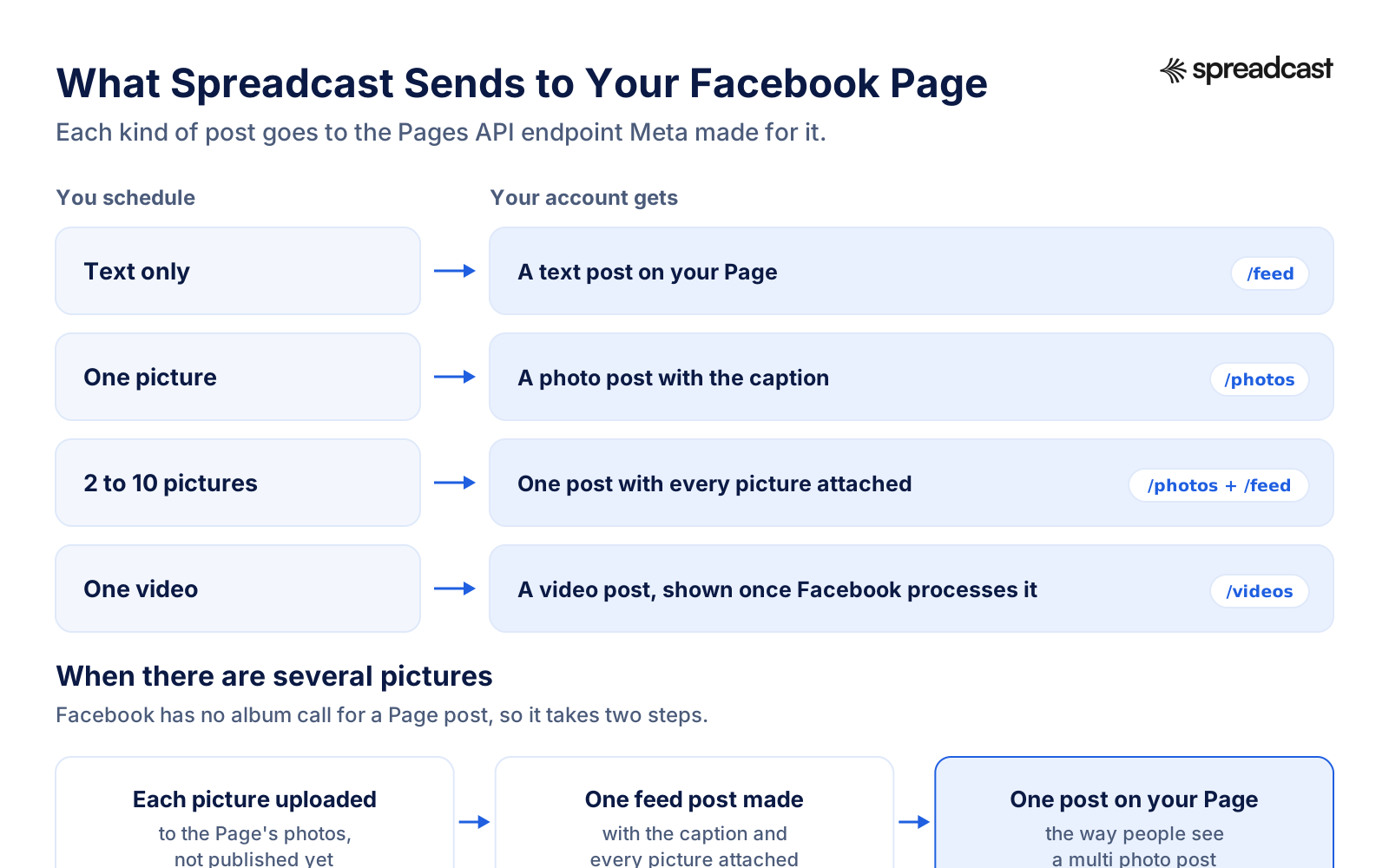
Text only goes out as a text post on the Page's feed. One picture goes out as a photo post with the caption, and Spreadcast keeps the address of the post people see, not only the photo. Two to ten pictures take two steps, because a Page post has no single album call: each picture is first uploaded to the Page's photos without being published, then one feed post is made with the caption and every picture attached, which is how a multi photo post appears to your followers. A video is handed to Facebook's video upload with the caption as its description; Facebook answers at once and shows the post when it has processed the video.
Facebook fetches each file from a public address rather than receiving it in the request, which is why a picture that has been deleted from storage before its time cannot be posted. Your Page token, the key that lets Spreadcast post as the Page, comes from a long lived sign in. Meta's page on long lived tokens says such a token has no expiration date, though it can still be invalidated under certain conditions. In practice it stops working when something changes on your side, such as a password change or the app being removed from the Page's business integrations, and Spreadcast's Accounts page checks each account for a sign in that has ended.
If you allowed several Pages when you signed in directly, the Accounts page lets you choose which one posts. On Studio, each brand or app keeps its own accounts, so the Page for one product never receives another product's post.
How Each Kind of Facebook Post Goes Out
Text, one picture, several pictures and a video each take a different route through the Pages API.
Facebook Post Specs Spreadcast Checks Before Scheduling
What Facebook says about each spec, and what Spreadcast's editor checks for Facebook. Where Meta publishes no number, we say so.
| Spec | What Meta says | Spreadcast for Facebook |
|---|---|---|
| Text length | No limit on Meta's pages; 63,206 characters per Hootsuite's and Later's help | Up to 63,206, counted as you type; captions written under 600 |
| Pictures in one post | No number on Meta's pages | Up to 10, posted as one multi photo post |
| Video formats | MP4 or MOV recommended, about 30 formats accepted | MP4 or MOV from your computer or phone |
| Video length | Meta said in June 2025 that reels would have no length limit | Up to 4 hours |
| Reels through the API | 3 to 90 seconds, 9 by 16, 30 a day per Page | Not offered as Reels; video goes out as a Page video |
| Stories | Up to 10 photos or videos in Business Suite | Not offered |
| Hashtags | Allowed | At most a couple per caption |
| Where it posts | Pages through the API; groups and profiles not | Pages you manage |
From Meta's video formats help, June 2025 video announcement, Reels publishing guide and stories help, and Hootsuite's and Later's Facebook help for the text figure, read November 15, 2026. Our social media character limits and image sizes pages list every network side by side.
Writing a Facebook Page Post People Stop For
A scheduled post still has to be worth reading when it lands. Meta's explanation of how Facebook distributes content names the predictions that decide who sees a Page post: how likely a person is to comment on it, to spend time with it and to find it informative, and how likely it is to be clickbait or to link to a low quality page. In plain words, a useful post that starts a conversation travels; a teaser that only wants a click does not.
Facebook folds long text behind See more, so the first lines carry the post. Say the specific thing first: "Shared budgets are live: plan the month with your partner and split anything in two taps" beats "Big news today!". Then one or two short paragraphs, and, where it fits, a question a follower can answer in a sentence. That is the shape Spreadcast asks for when it writes a Facebook caption, kept under 600 characters, with a hashtag or two at most, because hashtags do far less work on Facebook than on Instagram.
Pictures carry more weight than links. A post with a picture stops the scroll, and a link pasted on its own leaves the feed to decide what to show. Spreadcast designs the picture in your brand, and for an app it uses real screens in a phone frame. Meta's Facebook posting tips add two habits worth keeping: post often, and post while the news is fresh.
If writing is the hard part, our free Facebook post generator drafts a Page post from a sentence, and the social media caption generator writes versions for several networks at once.
Shared budgets are here. Invite your partner, plan the month together and split anything in two taps. Link in bio. #budgeting #moneytips #couples
No more arguing over who paid for groceries. Shared budgets are live in Ledgerly. #moneytok #budgeting
Ledgerly 3.0 is out. Couples told us the hardest part of budgeting was talking about it, so shared budgets let two people plan one month together and split any expense. What would you add next?
Shared budgets just shipped. Two people, one month, zero spreadsheets.
Ledgerly 3.0 adds shared budgets: plan the month with your partner and split anything. On the App Store now.
How to Choose a Facebook Scheduling Tool
Most Facebook scheduling tools look alike on their landing pages. These are the questions that separate them once you connect a real Page, and where to find the answer.
Pages, Groups and Profiles
Every tool can post to a Page. For groups and profiles, read the help page closely: since 2024 and 2018 respectively, a tool can only remind you to post there. A tool that claims to post to them directly is either out of date or using your login.
Reels and Stories
Some tools publish Reels and Stories to a Page, within Meta's API limits of 3 to 90 seconds for a reel. If short vertical video is your main format, check the tool's Facebook help for both words before you pay.
Who Makes the Post
Most schedulers publish what you bring. If designing the picture and writing the text is the slow part of your week, look for a tool that makes them in your brand, from facts you give it, and lets you edit before anything is scheduled.
Who Approves It
A Page post speaks for the business. If more than one person writes, look for drafts that a founder or a client approves before the post is scheduled, rather than a shared queue anyone can change.
What It Does When Something Fails
Expired sign ins and refused files happen to every tool. Check that the tool tells you which post failed, why, in plain words, and gives you a way to send it again without posting it twice.
Price per Account
Some tools price per channel, so your Page, your Instagram and your LinkedIn each add to the bill; others price by brand or by plan with a set number of accounts. Count every account on every network before you compare.
Best Facebook Post Schedulers Compared: Spreadcast, Buffer, Publer, Metricool
Ten ways to schedule Facebook posts, with prices and Facebook features read on each vendor's own page on November 15, 2026. Spreadcast comes first because it is the only one here that designs the picture in your brand and writes the Facebook caption from your product's real news, as well as scheduling the post. Then Meta's own tool, the tools with a free plan, the paid tools from the cheapest up, and the large suites.
- 1
Spreadcast
Free for 3 posts to download; scheduling from a $19 Post Pack or Pro at $29 a monthBest when you want the Facebook post designed and written for you, then scheduled
Spreadcast designs the picture, writes a caption for Facebook and every other network you tick, checks each against that network's limits, then publishes to your Page at its time. Up to 10 pictures go out as one multi photo post, and video up to 4 hours as a Page video.
It publishes to Instagram, Facebook, LinkedIn, TikTok, YouTube, Pinterest, Threads, Bluesky, Mastodon, Telegram and Discord from one calendar. For an App Store or Google Play app it also reads your listing every day and turns a new version or a rating milestone into a post, next to a weekly plan of posts at your posting times, approved by you or sent on Full Autopilot.
Pro is $29 a month, or $290 a year, for 1 app or brand and 10 social accounts, with design, captions, checks, publishing and analytics included; your Facebook Page counts as one account. Ten accounts on a per channel tool cost more than that before anything is designed. Claude and ChatGPT can schedule Facebook posts through the Spreadcast MCP server, covered on our Facebook MCP server page.
Pros
- Designs the picture and writes the caption
- Posts made from your app's real news
- Approve first or Full Autopilot
- Same post to 10 other networks
Cons
- Pages only, like every API tool
- No Stories or first comment
- Free plan does not publish
- 2
Best free Facebook scheduler for one Page and posts you make yourself
Meta's own tool schedules posts, Reels and Stories to your Page and Instagram, from 20 minutes to 29 days ahead, per Meta's help. It suggests Active times and keeps everything in the Planner.
Nothing has to be connected, and it is the only way to schedule Stories and group posts from one place. It covers Meta's apps only, Facebook, Instagram and, by cross posting from a computer, Threads, and it does not make the post.
Pros
- Free
- Reels, Stories and groups
- Full insights
Cons
- 29 day window
- Meta's apps only
- No approval step
- 3
Buffer
Free for 3 channels, then $5 a channel a month billed yearlyBest cheap scheduler with a free plan, priced per channel
Buffer's pricing page lists a free plan of 3 channels with 10 scheduled posts per channel, and Essentials at $5 a channel a month billed yearly, with a first comment on paid plans. Buffer's own Facebook guide covers Pages, Reels and Stories, and says groups are published by reminder.
Because the price is per channel, a Facebook Page and nine other accounts come to $50 a month billed yearly. Our Buffer review and best Buffer alternatives go further.
Pros
- Free plan
- Reels, Stories and first comment
- Simple queue
Cons
- Groups by reminder only
- Price grows with every channel
- You make every post
- 4
Publer
Free for 3 accounts, then from $4 an account a month billed yearlyBest low price per account
Publer's plans page lists a free plan of 3 accounts with 10 scheduled posts at a time each, and Professional from $4 an account a month billed yearly. Publer's post types help covers Reels of 3 to 90 seconds, videos under 2 GB, and Stories on Pages, and the plans page says posts the API cannot take, such as group posts, go out by push reminder.
See our best Publer alternatives for how it compares across networks.
Pros
- Very low price
- Reels and Stories
- Free plan
Cons
- Groups by reminder
- You make every post
- 5
Metricool
Free for 1 brand, then from about $20 a monthBest when you want Facebook analytics beside the scheduler
Metricool's pricing page lists a free plan of 1 brand with 20 scheduled posts a month, and Starter from $20 a month, or $25 billed monthly. Metricool's Facebook help covers posts, Reels of 3 to 90 seconds, Stories of up to 60 seconds and a first comment, for Pages.
Our Metricool review and best Metricool alternatives cover the rest.
Pros
- Reels, Stories and first comment
- Strong analytics
- Free plan
Cons
- Pages only
- You make every post
- 6
Later
From $18.75 a month billed yearlyBest if Instagram is your main network and Facebook comes second
Later's pricing page lists Starter at $18.75 a month billed yearly, for one social set. Later's Facebook help says it posts to Pages only, not to profiles or groups, publishes carousels of up to 10 photos and Reels on paid plans, and cannot schedule Facebook Stories.
See best Later alternatives for the wider field.
Pros
- Visual calendar
- Reels on paid plans
Cons
- No Facebook Stories
- No free plan
- 7
SocialBee
$29 a month, or $290 a yearBest for recycling evergreen posts by category
SocialBee's pricing page lists Bootstrap at $29 a month, or $290 billed yearly, for 5 profiles, and lists scheduling the first comment among its features. SocialBee's Facebook help covers Pages directly with text, links, images, video, Reels and Stories, and profiles and groups through reminders.
Our SocialBee review covers its categories and recycling.
Pros
- Content categories
- First comment
Cons
- No free plan
- You make every post
- 8
Predis.ai
From $19 a month; auto posting from $40 a monthBest if you want AI made posts and do not need auto posting at first
Predis.ai's Facebook scheduler page covers Pages and Stories with AI made content. Its pricing page lists Core at $19 a month for 1 brand, without auto posting, and Rise at $40 a month, which adds it, with a 3 day trial that asks for a card.
Like Spreadcast it makes the posts, from a prompt rather than from your product's own news; publishing them for you starts on the second plan.
Pros
- AI made posts
- Stories
Cons
- Auto posting from $40 a month
- Card needed for the trial
- 9
Hootsuite
From $99 a user a month billed yearlyBest for larger teams that need a full social suite
Hootsuite's plans page lists Standard from $99 a user a month billed yearly, for 10 social accounts, with a 14 day trial and no free plan. Hootsuite's Facebook help covers Pages, Reels up to 90 seconds, Stories of one item and a first comment, and says it cannot post to profiles.
Our Hootsuite review and best Hootsuite alternatives compare it in depth.
Pros
- Reels, Stories and first comment
- Inbox and listening
Cons
- $99 per user
- No free plan
- 10
Sprout Social
From $79 a seat a month billed yearly, $99 monthlyBest for agencies and brands reporting to clients
Sprout Social's pricing page lists Essentials at $79 a seat a month billed yearly or $99 monthly, for up to 5 profiles, with a 30 day trial. Sprout's post types help covers Facebook images, video, Reels, links, text and Page polls, and says Stories must be made in Facebook directly.
See best Sprout Social alternatives for cheaper options.
Pros
- Detailed reports
- Page polls
Cons
- No Facebook Stories
- Priced per seat
Facebook Post Scheduler Prices Side by Side
The lowest plan that publishes to a Facebook Page for each tool, from the pages linked above, on November 15, 2026. Prices in US dollars before tax.
| Tool | Lowest plan that posts to Facebook | What it covers | Free plan or trial |
|---|---|---|---|
| Spreadcast | Post Pack $19 once, or Pro $29 a month | Pro: 10 social accounts, posts designed and captioned for each network, Facebook and 10 other networks | Free plan with 3 posts to download, no publishing |
| Meta Business Suite | Free | Your Page and Instagram, posts, Reels and Stories | Free |
| Buffer | $5 a channel a month billed yearly | Essentials, priced per channel | Free for 3 channels |
| Publer | $4 an account a month billed yearly | Professional, priced per account | Free for 3 accounts |
| Metricool | From $20 a month, $25 monthly | Starter | Free for 1 brand, 20 posts a month |
| Later | $18.75 a month billed yearly | Starter, 1 social set | 14 day trial |
| SocialBee | $29 a month, or $290 a year | Bootstrap, 5 profiles | 14 day trial |
| Predis.ai | $40 a month for auto posting | Rise; Core at $19 has no auto posting | 3 day trial with a card |
| Hootsuite | $99 a user a month billed yearly | Standard, 10 social accounts | 14 day trial |
| Sprout Social | $79 a seat a month yearly, $99 monthly | Essentials, up to 5 profiles | 30 day trial |
Spreadcast's yearly billing gives 2 months free, and Pro and Studio come with a full refund within 7 days. Vendors change prices often, so check the linked page before you buy.
Scheduling Facebook Posts as a Team or for Clients
On Facebook, who can schedule is a question of Page access. Meta's Page scheduling help says scheduled posts can be created and edited by anyone with Facebook access or task access to the Page. That makes Business Suite a shared queue: an assistant, a freelancer and the owner can all add posts, and each can change the others'. It works well when everyone with access is trusted to publish, and less well when one person writes and another must say yes first.
Agencies and studios usually want the second shape. A writer drafts, the client or the founder reads, and only an approved post goes on the calendar. Meta's tools have drafts, but no step where a draft waits for a named person's approval before it can be scheduled.
Spreadcast covers part of that shape. On approve first, every post Spreadcast drafts for you waits on the Dashboard until someone taps Approve, and none of those drafts reaches the Page before that. On Studio, three people share one account, each with their own sign in, and any of them can approve; there are no review links for a client outside the account, so an agency whose clients sign off on every post is better served by a tool built for that. Up to five brands or apps each keep their own Pages, colors and voice, so a post for one client never lands on another's Page. Our social media approval page covers the workflow, and manage multiple social media accounts covers keeping brands apart.
Whatever tool you use, keep Page access tidy. Give each person the least access their job needs, remove people who have left, and check every few months which apps are connected to the Page. A removed admin or app stops posting at once, which is exactly what you want when someone leaves.
A real 5 star review from the App Store, shown big on the cover.
Planning a Month of Facebook Posts in One Sitting
Scheduling pays off most when you batch. Instead of writing a post every morning, set aside one afternoon a month, plan the posts against the calendar, and let the scheduler publish them. The work is the same; the interruptions are gone, and the Page keeps posting during the weeks you are busy with something else.
Start with the dates that already exist: a release, a sale, an event, a holiday your customers care about. Then fill the weeks with a few repeatable kinds of post, such as a tip, a customer question answered, a look behind the scenes, a feature explained with a picture. Three or four kinds, rotated, are easier to keep up than a new idea every day, and they teach followers what to expect from the Page.
In Business Suite, the 29 day window means a month is about the most you can load at once, so the batch has to be repeated each month. In Spreadcast there is no window, and for an app most of the month fills itself: new versions and rating milestones become posts as they happen, and the weekly plan adds posts of other kinds at your posting times, so your afternoon goes into reading and approving rather than writing from nothing.
Our guide to a month of social content in one afternoon walks through the batch step by step, and the free social media content calendar gives you the grid to plan it in.
Best Time to Schedule Facebook Posts
Meta publishes no best time to post. What it offers is better for your own Page: Active times in Business Suite, which Meta's guide to posts says is based on when your followers were most active over the past 7 days. Meta's Facebook posting tips put it plainly: no single time, number of posts or type of post works across all publishers.
The big studies agree on little beyond the middle of the week. Sprout Social's 2026 study, published March 31, 2026 and based on nearly 2 billion engagements across about 307,000 profiles, found the best windows on Tuesday and Wednesday from noon to 8 in the evening, with Sunday the weakest day. Buffer's study of more than 14 million posts, published October 19, 2026, put Thursday at 9 in the morning on top, Wednesday as the best day and Saturday as the worst. Hootsuite's study, from November 19, 2025, pointed to early mornings, with 5 in the morning on Tuesdays as its best time for 2025.
Read together: midweek beats the weekend, and the hour depends on who your followers are. Start with Active times, pick two or three slots it suggests, schedule a month of posts across them, and compare the slots rather than single posts. Move the weakest slot and repeat. A scheduler makes that cheap, because moving a slot is dragging cards on a calendar.
Time zones are the other half. Business Suite uses your current time zone, and so does Spreadcast, which takes it from your device; each post is saved as an exact moment, so it does not shift when you travel. Our guide to the best time to post on social media covers the other networks the same way.
- Groceries$312
- Rent$1,100
- Coffee$46
Facebook Auto Post Versus Scheduling
"Facebook auto post" covers two different things. One is a tool that copies content in from somewhere else, a blog feed, a shop's new products, another account, and posts it the moment it appears, with nobody reading it first. The other is a scheduler with automation on top: it decides what to post and when, and still lets a person read it before it goes out.
The first kind suits a news feed that mirrors a website. It is risky for a brand's Page, because nobody checks the post before your followers see it. A post can be edited or deleted afterwards, but the people who saw it in the first hour already saw it.
Spreadcast is the second kind, and you choose how much runs on its own. On approve first, each new post waits as a draft on your Dashboard, and one tap on Approve schedules it for its day. On Full Autopilot, Spreadcast schedules the posts itself and they go to your Page at their times with the other networks. Most people start with approve first, read what Spreadcast writes for a few weeks, then decide.
More on the two modes is on our auto post to social media page, and on approving posts as a team on social media approval. For the wider picture, how to automate social media posts compares the approaches across networks.
A real 5 star review from the App Store, shown big on the cover.
A Facebook Post Scheduler for App Makers
A Facebook Page is where many people check whether an app is still alive: when it last changed, what is new, whether anyone answers. A Page that went quiet six months ago says the opposite of what you want. Keeping it fed is easy to plan and hard to keep doing while you also build the app.
This is where Spreadcast differs from the other Facebook schedulers on this page. For an App Store or Google Play app, it reads your listing every day. When a new version appears, it turns the release notes into a post with a picture made from your real screens, writes a Facebook caption and one for each other network, and either schedules it or waits for your Approve. A new rating milestone works the same way. A weekly plan fills the days between with posts about a feature, a review, tips or a problem the app solves, at the posting times you set.
You still decide what goes out. Each post can be edited before it is scheduled, the Facebook caption can be rewritten in your own words, and anything can be moved on the calendar. If release notes are your weak spot, the free app release notes generator helps write them, and how to promote an app on social media covers where Facebook fits next to the other networks.
Without an app, nothing here is lost: you upload your own pictures or a video, or let Spreadcast design them from a sentence, and it writes the Facebook caption and schedules it with the rest. The posts made from app news are simply not there.
How to Read the Results of Scheduled Facebook Posts
Meta keeps the detailed numbers in Business Suite. Under Insights, Meta's help on audience insights lists your Page's lifetime followers, their age and gender and top cities and countries, and for video how fast followers and one minute views grew over the last 14 days, along with how many followers and how many other people watched. Meta notes that all of these are estimates. Each post's own reach and reactions are under Content, next to the post.
Spreadcast reads less. For a Facebook Page it posts to itself, it records the follower count once a day, starting the day you connect, so growth is measured week by week next to your other networks; for a Page connected through the partner service it reads no Facebook numbers. It does not read the reach, reactions or comments of single Facebook posts; those stay in Business Suite.
A monthly habit makes the two work together. Note your five best Facebook posts by reach in Business Suite, look at their first lines and their formats, and plan the next month in that shape on Spreadcast's calendar. Our social media analytics page explains what Spreadcast reads on each network and where the numbers stop, and the engagement rate calculator turns Facebook's raw numbers into one figure you can compare.
When a Scheduled Facebook Post Does Not Go Out
The usual reasons a post from a Facebook scheduler does not appear, or appears wrong, in the order worth checking.
The Page Connection Ended
A Page token does not expire on its own, but a password change or removing the app from the Page's business integrations ends it. Spreadcast's Accounts page checks each account and marks one that is signed out; connect Facebook again and press Try Again on the post.
The Account Manages No Page
Facebook lets apps post to Pages only. If you signed in with an account that is not an admin of any Page, there is nothing to connect and the sign in stops with an error. Create a Page, or ask its owner to add you, then connect again.
The Video Is Still Processing
Facebook accepts a video at once and shows the post when it has processed the file, which for a long video can take a while. If it never appears, export the video again as an MP4 and replace it.
Too Many Pictures
Spreadcast checks Facebook's limits as it applies them before scheduling: 10 pictures in one post and a video up to 4 hours. A post over them is stopped in the editor with what to change, rather than failing at the minute it is due.
It Went Out a Few Minutes Late
A tool publishes at its own run. Spreadcast's runs every five minutes, so a post can land a few minutes after its slot. For a post that must go out at an exact minute, use Business Suite.
It Is Not in the Planner
That is expected. Spreadcast publishes at the time rather than handing the post to Facebook early, so it never appears in Business Suite's Planner. Look for it on Spreadcast's calendar.
Post the Same News to Facebook and Every Other Network
For most businesses a Facebook Page is one place the news goes, not the only one. In Spreadcast you tick each network under Post To, and each gets its own caption from the same idea: a few friendly paragraphs for Facebook, a considered post for LinkedIn, a few lines with hashtags for Instagram, a short line for Threads or Bluesky. The check before scheduling covers each network's own rules, so a picture count that works for Facebook but not for Bluesky is flagged for Bluesky only.
The other networks have their own scheduler pages. The LinkedIn scheduler covers profiles, pictures and timing. The Instagram scheduler covers Reels, carousels and framing. The TikTok scheduler covers feed or drafts. The YouTube scheduler, Pinterest scheduler and Telegram scheduler cover theirs, and the general social media scheduler page compares tools across all of them.
If you run several brands or apps, each Facebook Page is its own account in Spreadcast, and on Studio each brand keeps its own Pages, colors and voice. Our manage multiple social media accounts page explains how they stay apart, and cross posting covers what each network expects from the same post.
Scheduling Facebook Posts From Claude or ChatGPT
If you already plan in an AI assistant, you can schedule from the chat. Through Spreadcast's MCP server, Claude or ChatGPT can make a post, write the Facebook caption and put it on your calendar: "a post for the Page on Wednesday at noon about the new export feature, with the release screenshot". Posts arrive as drafts unless you let the connection publish, and every post passes the same Facebook check as in the editor.
What an assistant can and cannot do with Facebook is laid out on our Facebook MCP server page. Two guides go further: how to schedule social media posts with Claude and with ChatGPT.
What Spreadcast Does Not Do on Facebook
Worth knowing before you connect a Page, with what to do instead.
Pages Only, Not Groups or Profiles
Spreadcast posts to Facebook Pages you manage. Meta closed groups and personal profiles to every outside app, so for those use Facebook's own scheduler in the group, or share the Page's post from your profile by hand.
No Stories
Spreadcast does not post Facebook Stories. Business Suite schedules them for free, up to 10 photos or videos at a time.
Video as a Page Video, Not Reels Options
Video goes out through Meta's video publishing route as a Page video. Reels options such as Facebook's audio library or a reel thumbnail picked in Facebook are not set; for those, schedule the reel in Business Suite.
No First Comment or Tags
Spreadcast does not add a first comment or tag other Pages. Add them on Facebook once the post is live.
Followers, Not Post Numbers
Spreadcast records your Page's followers once a day when it posts to the Page itself, and never the reach or reactions of single Facebook posts. Read those in Business Suite's insights.
Strongest With an App
The designs come from your brand and, for App Store and Google Play apps, your real screens and release notes. Without an app you upload your own pictures or let Spreadcast design them from a sentence. The free plan makes posts to download and does not publish.
What Spreadcast Costs for Facebook Scheduling
Every plan designs the posts. What changes is whether Spreadcast publishes them and how many brands and accounts it covers. Full details are on the pricing page.
| Plan | Price | What you get for Facebook |
|---|---|---|
| Free | $0, no card | 3 posts made for you, to download with a small Spreadcast mark and post yourself. No scheduling |
| Post Pack | $19 once, never expires | 10 posts designed and published, $1.90 a post, to your Facebook Page and any other network you connect |
| 30 Day Pass | $39 once, nothing renews | Everything in Pro for 30 days |
| Pro | $29 a month, or $290 a year | 1 app or brand, 10 social accounts, posts designed and captioned for each network, calendar, autopilot or one tap approval, Claude and ChatGPT |
| Studio | $79 a month, or $790 a year | Up to 5 apps or brands and 50 social accounts, each brand with its own Pages, and 3 seats |
Each Facebook Page counts as one social account. Yearly billing gives 2 months free. Pro and Studio come with a full refund within 7 days.
How We Checked This
On November 15, 2026 we read Meta's help on scheduling and managing Page posts, creating posts, saving and scheduling, the Business Suite app, reels, stories, cross posting, audience insights and video formats, Facebook's help on group scheduling and professional mode, Meta's June 2025 announcement on video and its third quarter 2026 results, and on Meta for Developers the Pages API posts guide, the Page feed reference, the Reels and video publishing guides, the pages_manage_posts reference, the page on long lived tokens, the 2018 platform changes and the v19.0 changelog. Meta's help pages were read in a browser, since they do not load for plain fetchers. Where Meta's pages disagree, such as how far ahead a post can be scheduled, we give each answer with its page.
Where Meta publishes no number, such as a text limit or the number of photos in one post, we say so and name whose figure we quote instead. Every competitor price and Facebook feature comes from that vendor's own pricing page or help article, read the same day, and we say whose page it is in the text. We ran no tests of other tools and quote no results we did not read. The best time figures are each study's own, linked to the study.
Spreadcast's behavior on Facebook was checked in its code the same day: how a Page is connected and which permissions are asked for, what is sent to Facebook for each kind of post, the limits the editor checks, and which numbers are read back. If something here goes out of date, the features overview is updated with each change.
Frequently Asked Questions
How do I schedule a post on Facebook for free?
Switch to your Page, open Meta Business Suite from the left menu, click Create post, write it and add media, turn on Set date and time, pick when, and click Schedule. It is free, and a post can be set from 20 minutes to 29 days ahead.
Can I schedule posts on my personal Facebook profile?
Meta documents scheduling for Pages and groups, not for personal profiles, and outside tools have not been able to post to profiles since 2018. Some vendors say profiles in professional mode can schedule in the Facebook app. For business posts, use a Page.
How far in advance can you schedule a Facebook post?
Up to 29 days in Meta Business Suite, and at least 20 minutes ahead. A tool that keeps the post on its own calendar and publishes it at the time, as Spreadcast does, is not bound by that window.
Can you schedule posts in a Facebook group?
Yes, from inside the group. Admins and moderators start a post, click the calendar icon next to Post, and pick a time. Outside tools cannot post to groups since Meta removed the Groups API on April 22, 2024.
Where do I find scheduled posts on Facebook?
In Meta Business Suite, open the Planner, or Content, Posts and reels, Scheduled. From there you can edit, reschedule, move to drafts or delete a post. Group posts are under Admin tools, Scheduled posts.
Can Spreadcast schedule Facebook Reels and Stories?
Spreadcast publishes videos to your Page as Page videos and does not post Stories. Meta Business Suite schedules both Reels and Stories for free.
Where These Facts Come From
Every outside number, rule and price on this page links to the page it was taken from.
- Schedule a post and manage scheduled posts for your Facebook PageMeta Business Help Center
- Create and manage posts in Meta Business Suite on desktopMeta Business Help Center
- Save, schedule or reschedule posts in Meta Business SuiteMeta Business Help Center
- Schedule content on the Meta Business Suite mobile appMeta Business Help Center
- Create and manage reels in Meta Business SuiteMeta Business Help Center
- Create and manage stories in Meta Business Suite on desktopMeta Business Help Center
- How Meta Business Suite worksMeta Business Help Center
- About cross posting to Facebook, Instagram and Threads in Meta Business SuiteMeta Business Help Center
- Audience insights in Meta Business SuiteMeta Business Help Center
- Facebook posting tipsMeta Business Help Center
- How Facebook distributes contentMeta Business Help Center
- Schedule a post or set up recurring posts in a groupFacebook Help Center
- Turn pro mode on or off for your profileFacebook Help Center
- Video formats you can uploadFacebook Help Center
- Making it easier to create videos on FacebookMeta Newsroom
- Meta reports third quarter 2026 resultsMeta Investor Relations
- Pages API, postsMeta for Developers
- Page feed referenceMeta for Developers
- Reels publishingMeta for Developers
- Video publishingMeta for Developers
- pages_manage_posts permissionMeta for Developers
- Long lived access tokensMeta for Developers
- Platform product changes, April 2018Meta for Developers
- Graph API v19.0 changelogMeta for Developers
- Americans' social media use 2025Pew Research Center
- Best times to post on FacebookSprout Social
- Best time to post on FacebookBuffer
- Best time to post on FacebookHootsuite
- Buffer pricingBuffer
- How to schedule Facebook postsBuffer
- Hootsuite plansHootsuite
- Create a Facebook postHootsuite Help
- Later pricingLater
- Facebook on LaterLater Help
- Sprout Social pricingSprout Social
- Post types you can publishSprout Social Support
- Metricool pricingMetricool
- Schedule and publish on FacebookMetricool Help
- Publer plansPubler
- Supported post types and limitsPubler Help
- SocialBee pricingSocialBee
- Facebook on SocialBeeSocialBee Help
- Facebook posts schedulerPredis.ai
- Predis.ai pricingPredis.ai
- How to schedule Facebook and Instagram posts via Meta Business SuiteShelly Shulman on YouTube
Researched and written by Mark Weizer. Last checked on November 15, 2026.