Claude Design Social Media Posts: The Short Answer
Yes, Claude Design can make social media posts. When Anthropic launched it on April 17, 2026, its announcement listed "marketing collateral, including landing pages, social media assets, and campaign visuals" among the jobs it was built for. You describe the post in plain words, Claude lays it out on a canvas next to the chat, and you change it by talking, by commenting on a single element or by dragging things yourself. A single Instagram post, a ten slide carousel, a LinkedIn document or a Pinterest pin are all just artboards of a different shape.
What it does not do is post. None of Anthropic's Claude Design pages describe publishing or scheduling to any social network, and the export list in the getting started guide ends at files and other design tools. So a Claude Design social media post is a finished picture or PDF that still has to travel to Instagram, LinkedIn or wherever your audience is. That last step is where most of the real work sits for anyone who posts every week, and we cover it in full further down.
This page is a working guide for people who market a product on social media and want to use Claude Design for it: founders, app makers, small marketing teams and freelancers. It covers where Claude Design lives now, how to set it up so posts come out in your brand, the exact sizes each network accepts, prompts you can paste for carousels and single posts, what to do about Reels, how it fits with MCP connectors, and an honest verdict on whether it is good for social media.
If you want the wider picture of Claude as a social media tool, with Projects, connectors and Cowork, read Claude for social media marketing. If you live in the terminal, Claude Code for social media goes deeper on that side. Here we stay on the design surface and on what it takes to get a design from the canvas to a live post.
How We Researched This
On October 28, 2026 we read every Claude Design page Anthropic publishes: the launch post, the getting started guide in the Help Center, the guide to moving from the standalone site, Anthropic's June post on design systems, the Claude Design product page and its FAQ, the Claude release notes, the artifacts article and the Claude pricing page. Where those pages disagree, we use the newest one and say so.
For the size and slide limits we went to each network's own documentation, not to third party cheat sheets: Meta's developer pages for Instagram and Threads, TikTok's developer reference, LinkedIn's and Pinterest's help centers, Bluesky's published schema, Mastodon's user docs and Telegram's Bot API. Engagement numbers come from two named studies, Socialinsider and Buffer, with their sample and method stated where we use them.
We did not invent a test account or results. Where we describe how a step feels, it is because Anthropic's own help article describes it that way, and we link the line. Where Anthropic does not say something, such as whether Claude Design exports a PNG, we tell you it does not say so rather than guess.
Spreadcast, which publishes this page, makes a tool that designs and publishes social media posts and connects to Claude. We point out where it fits, but every fact about Claude Design, Canva and the networks below holds whatever you use to post.
What Claude Design Is and Where It Lives in 2026
Claude Design started as a separate product from Anthropic Labs, at its own address, claude.ai/design. The launch post says it was powered by Claude Opus 4.7 and opened as a research preview for Pro, Max, Team and Enterprise subscribers. Anthropic's June update added design system imports, a new editor with drag, resize and align controls, and a line worth knowing for scale: over one million people used Claude Design in its first week.
The big change came on September 16, 2026. The release notes for that day carry the entry "Create designs, decks, and docs in any conversation" and say Claude Design works inside your conversations with all of its features, on every plan including Free. Anthropic's artifacts article now treats anything made in a chat before September 16, 2026 as a legacy artifact, which tells you the date the new system took over.
So in practice there are now four ways in, all listed in Anthropic's getting started guide. You can ask for a design in any conversation and it builds on a canvas beside the chat. You can pick Output, then Design, in the message box. You can open the Artifacts tab and choose the Design template. Or you can type /design in Claude Code on desktop or in the terminal. On the iOS and Android apps you can request a design and view it full screen in the Artifacts tab, but sharing settings need the web or desktop app.
The old standalone site is on its way out. Anthropic's move guide says claude.ai/design closes on December 14, 2026, becomes read only after that, and public links to standalone projects stop working. Chats and comments made there do not move with the projects. If you made social media templates on the standalone site earlier this year, move them or export them before that date.
For Enterprise accounts there is one more date. The help article says Claude Design turns on by default for Enterprise plans on October 15, 2026, and owners could enable it sooner under Organization settings, then Artifacts. If you work inside a company account and do not see it, that setting is the first thing to ask your admin about.
Watch: Anthropic Introduces Claude Design
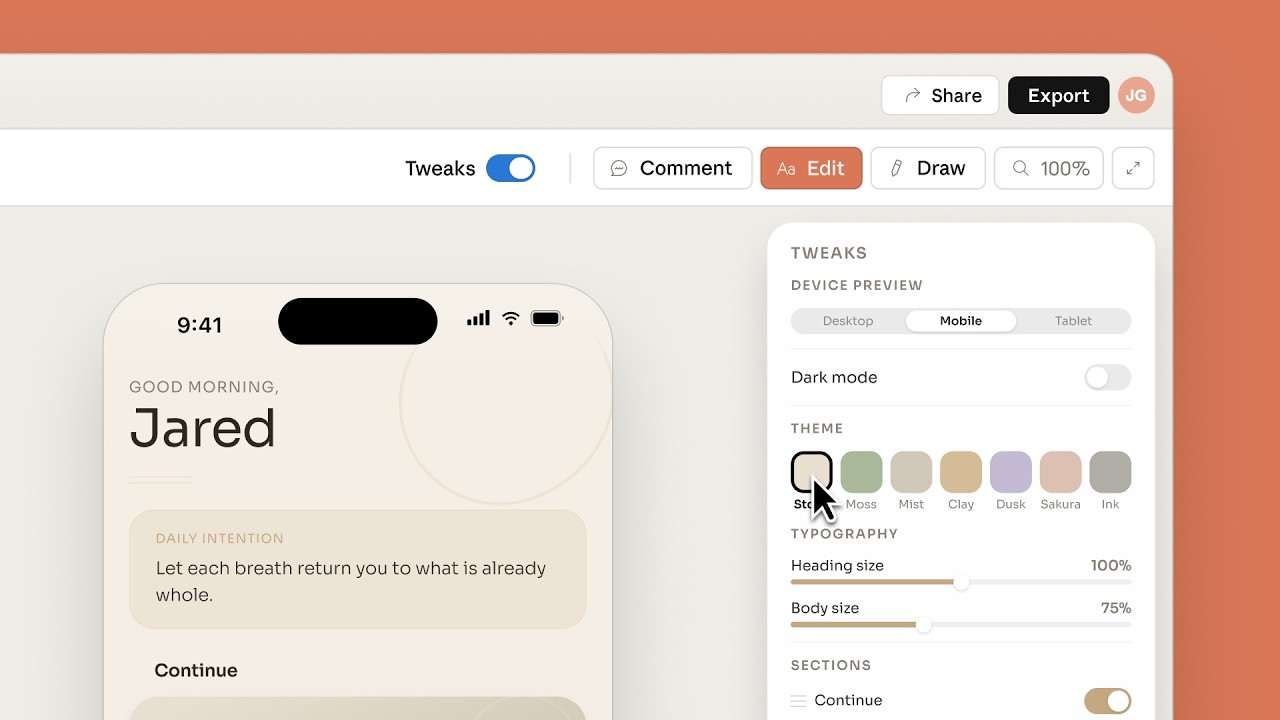
Anthropic's own launch video is 82 seconds long and shows the canvas, the chat beside it and the kind of polished one page visuals the tool makes.
Can Claude Design Make Social Media Posts?
It can, and it is better at it than a plain chat ever was. A normal Claude chat can write a caption and describe a picture, but it cannot hand you a laid out graphic with your logo in the corner and your font in the headline. Claude Design can, because it builds real layouts: text layers, shapes and images arranged on artboards, not a generated photo.
Anthropic's help article describes a design as a canvas of artboards, where each artboard holds layers such as text, shapes and images, and layers can contain other layers. For social media that maps neatly onto what you need. One artboard is one post. A carousel is a row of artboards of the same size. A LinkedIn document is a set of pages that you export together as one PDF.
It is strongest on typographic and layout heavy posts: a tip with a big headline, a list of five steps, a quote card, a before and after comparison, a product announcement with a screenshot, a stat with a chart. Those are the posts most brands publish week after week, and they are exactly the kind that a designer used to make by hand in Figma or Canva.
Where it is not the right tool is photography. Claude Design arranges images you give it or images it can draw as shapes and code; it is not an AI photo generator, and none of Anthropic's pages position it as one. If your feed depends on lifestyle photos of people, you still need a camera, stock photos or a separate image model. The same goes for video: Claude Design itself makes still artboards, and the separate Claude Motion template, covered in the Reels section below, animates text, charts and shapes rather than filming anything.
And it cannot publish. The design stays a design until a person or another tool moves it onto a network. Keep that in mind when you plan a workflow around it, because for a single launch graphic the export is a minute's work, while for a feed that needs four posts a week on five networks the hand off becomes the bottleneck.
What Claude Design Can and Cannot Do for Social Media
Every row was read on Anthropic's pages on October 28, 2026, mostly in the getting started guide and the product page.
| Job | Claude Design | What it means for a social media post |
|---|---|---|
| Lay out a single post | Yes. Each artboard holds text, shapes and images as layers | Give it the exact size in pixels and it lays out the post to that shape. |
| Make a carousel | Yes, as several artboards in one design | Ask for every slide at the same size, because Instagram crops all slides to the first one. |
| Stay on brand | Yes, from an imported design system with colors, fonts and components | Set the system up once and new designs pick it up on their own. |
| Use your screenshots and logo | Yes. You can upload screenshots, images and existing assets | Upload the real files rather than describing them. |
| Make photos | Not described anywhere by Anthropic | Bring your own photos or use a separate image tool. |
| Make video | Not in Claude Design. Claude Motion makes MP4 explainers, in beta on Team and Enterprise | Reels and TikTok videos need Motion or a video editor. |
| Export | A zip, PDF, PPTX, Google Slides or standalone HTML, or send to Canva and other apps | No PNG or JPEG is named in the export list. LinkedIn takes the PDF as is. |
| Write captions | Claude in the same chat can, but Design does not attach them to the post | You copy each caption into each network yourself. |
| Post or schedule | No | A connector or a scheduling tool has to do this step. |
| Keep versions | No version history yet | Ask Claude to save the project before you try a new direction. |
| Plans | Free, Pro, Max, Team and Enterprise | Usage counts toward the same limits as the rest of Claude. |
Anthropic's help article also lists known issues: inline comments occasionally fail to appear, and editing by several people at once is basic.
How to Use Claude Design for Social Media, Step by Step
This is the order Anthropic's own getting started guide recommends, start a design, attach a design system, add context, describe the goal, review, refine, then export, with the social media details filled in.
- Step 1
Start a Design in Any Chat
Open a new conversation and say what you want, for example "design an Instagram carousel about our new feature". Claude builds on a canvas beside the chat. If you prefer a clean start, pick Output, then Design, in the message box, or open the Artifacts tab and choose the Design template. Keep one chat per campaign so the canvas, your uploads and your feedback stay together.
- Step 2
Attach Your Brand Before the First Prompt
New projects inherit your organization's design system, which the help article says covers colors, fonts and components. If you have none yet, upload your logo, two or three past posts you like and a short style note: hex colors, the headline font, the body font, and words you never use. A one page brand style guide is the right size for this.
- Step 3
Give It the Real Material
Upload the actual screenshots, product photos, stats and quotes the post is about. Anthropic's guide lists screenshots, images, existing assets, wireframes and decks or documents with a style to match as inputs. A post built from your real screenshot looks like your product; a post built from a description looks like everyone else's.
- Step 4
State the Network, Size and Slide Count
Say the network and the pixel size in the first message: "Instagram carousel, 1080 x 1350 pixels per slide, 7 slides". Claude Design does not know where the post is going unless you tell it, and a canvas in the wrong shape gets cropped later. The size table further down lists what each network takes.
- Step 5
Ask for Two or Three Directions
Anthropic's tips include asking for 2 to 3 variations. For social media, ask for directions that differ in one clear way, such as a big number on the cover versus a bold question, so you can actually choose. Pick one and delete the rest to keep the canvas light.
- Step 6
Refine With Comments, Then by Hand
Use chat for big changes ("make every slide darker"), inline comments for one element ("move this logo to the bottom right") and direct editing for small nudges. Be specific: Anthropic's own example of good feedback is an 8px spacing change. If a comment does not show up, the guide suggests checking the comments view or pasting the note into chat.
- Step 7
Check Readability and Contrast
Ask Claude to review accessibility, contrast and hierarchy, which the help article also recommends. Body text that looks fine on a laptop often disappears on a phone, so check it at phone size. WCAG's contrast rule asks for at least 4.5 to 1 for normal text and 3 to 1 for large text, which is a fair bar for a busy feed.
- Step 8
Export or Hand It to a Publishing Tool
Use the Export button in the upper right. For LinkedIn, export a PDF. For Instagram, Threads and the rest you need image files, which the export list does not name, so see the export section below. Then write a caption for each network and schedule it, by hand or through a connector in the same chat.
Watch: The Comment and Edit Loop in Practice
This is not a social media example, but it is the clearest official look at the refine step. A designer at Anthropic asks for options, leaves comments on what works, fixes details himself in the editor and then moves on.

Claude Design Social Media Sizes for Every Network
Claude Design draws whatever size you name, so the size has to come from you. These are the shapes and slide limits each network documents, read on October 28, 2026. For profile pictures, banners and every other field, see our full social media image sizes reference.
| Network and format | Size to ask Claude Design for | What the network's own docs say |
|---|---|---|
| Instagram feed post | 1080 x 1350 (4:5) | Meta's media reference for publishing: JPEG only, up to 8 MB, 4:5 to 1.91:1, 320 to 1440 pixels wide, sRGB. |
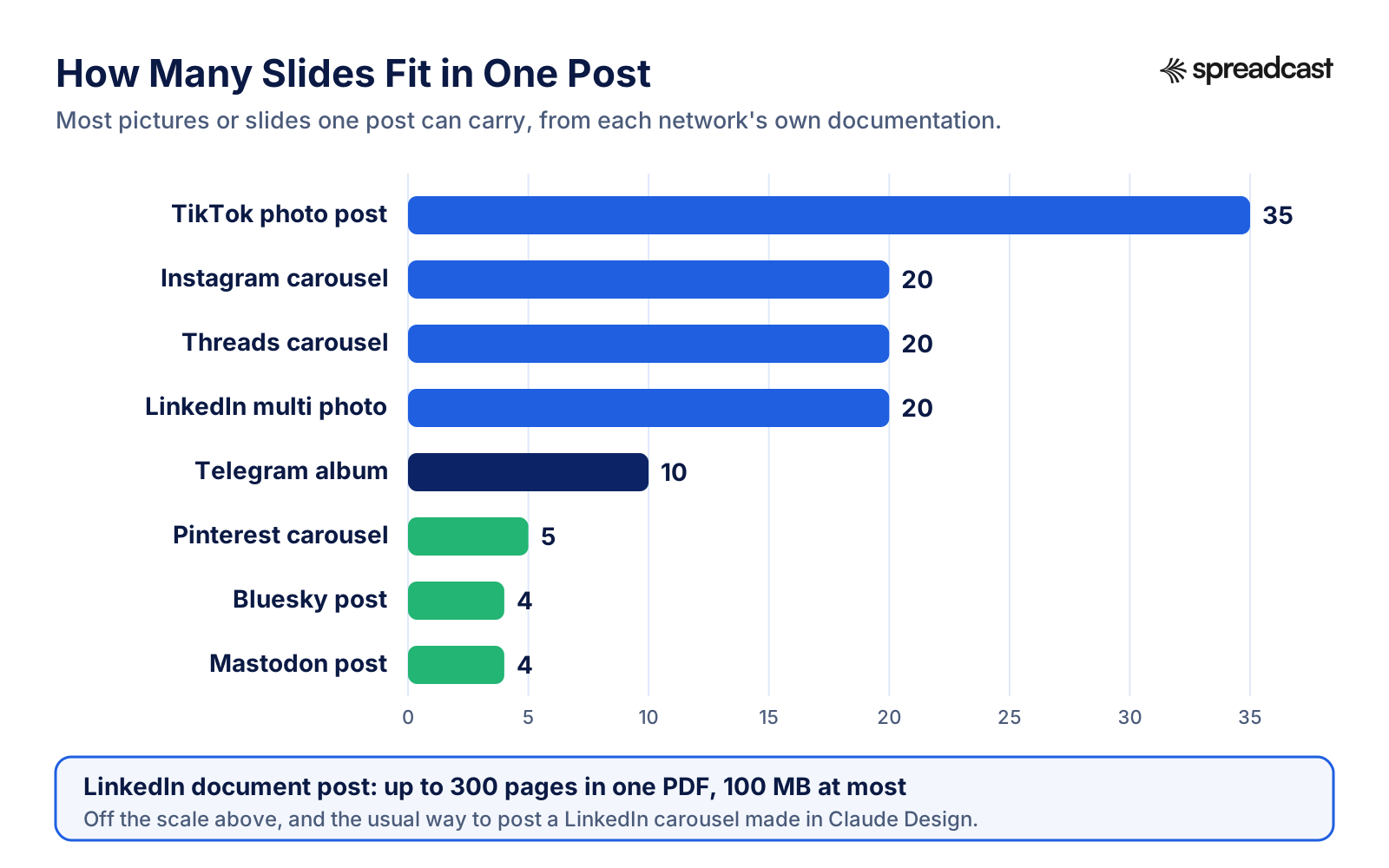
| Instagram carousel | 1080 x 1350 per slide | Up to 20 images, videos or a mix, and all slides are cropped based on the first one, per Meta's content publishing guide. |
| Threads image or carousel | 1080 x 1350 per slide | Meta's Threads posts reference: JPEG or PNG, up to 8 MB, 320 to 1440 wide, carousels of 2 to 20 items. |
| LinkedIn carousel (document post) | 1080 x 1350 or 1080 x 1080 pages in one PDF | LinkedIn's help page on documents: PDF, PPT, PPTX, DOC or DOCX, 100 MB, 300 pages, flattened layers, one page size. |
| LinkedIn image post | 1080 x 1350 or 1080 x 1080 | LinkedIn's photo requirements: up to 20 photos, 5 MB each, 1080 pixels wide recommended, 3:1 to 4:5. |
| Facebook feed post | 1080 x 1350 (4:5) | The same 4:5 portrait works in the Facebook feed and avoids a second export for Instagram. |
| TikTok photo post | 1080 x 1920 (9:16) | TikTok's photo post reference: up to 35 photos, title up to 90 and description up to 4,000 characters. |
| Pinterest pin | 1000 x 1500 (2:3) | Pinterest's specs: 2:3 recommended, PNG or JPEG, up to 20 MB on desktop. Carousels of 2 to 5 images at 1:1 or 2:3. |
| Bluesky post | 1080 x 1350 or 1080 x 1080 | Bluesky's image schema: up to 4 images, each under 2,000,000 bytes, so export at sensible quality. |
| Mastodon post | 1080 x 1350 or 1080 x 1080 | Mastodon's posting guide: up to 4 images, 16 MB each, downscaled to 8.3 megapixels. |
| Telegram channel album | 1080 x 1350 per picture | Telegram's Bot API: an album holds 2 to 10 items and a caption runs to 1,024 characters. |
Pinterest's carousel numbers come from its ad specs. YouTube and Discord are left out because Claude Design's natural output, a still picture, is not their main format.
How Many Slides Each Network Takes in One Post
If you design a 12 slide carousel for Instagram and then want to reuse it on Bluesky, you will have to cut it to four. Decide the slide count per network before you prompt.
How to Make an Instagram Carousel With Claude Design
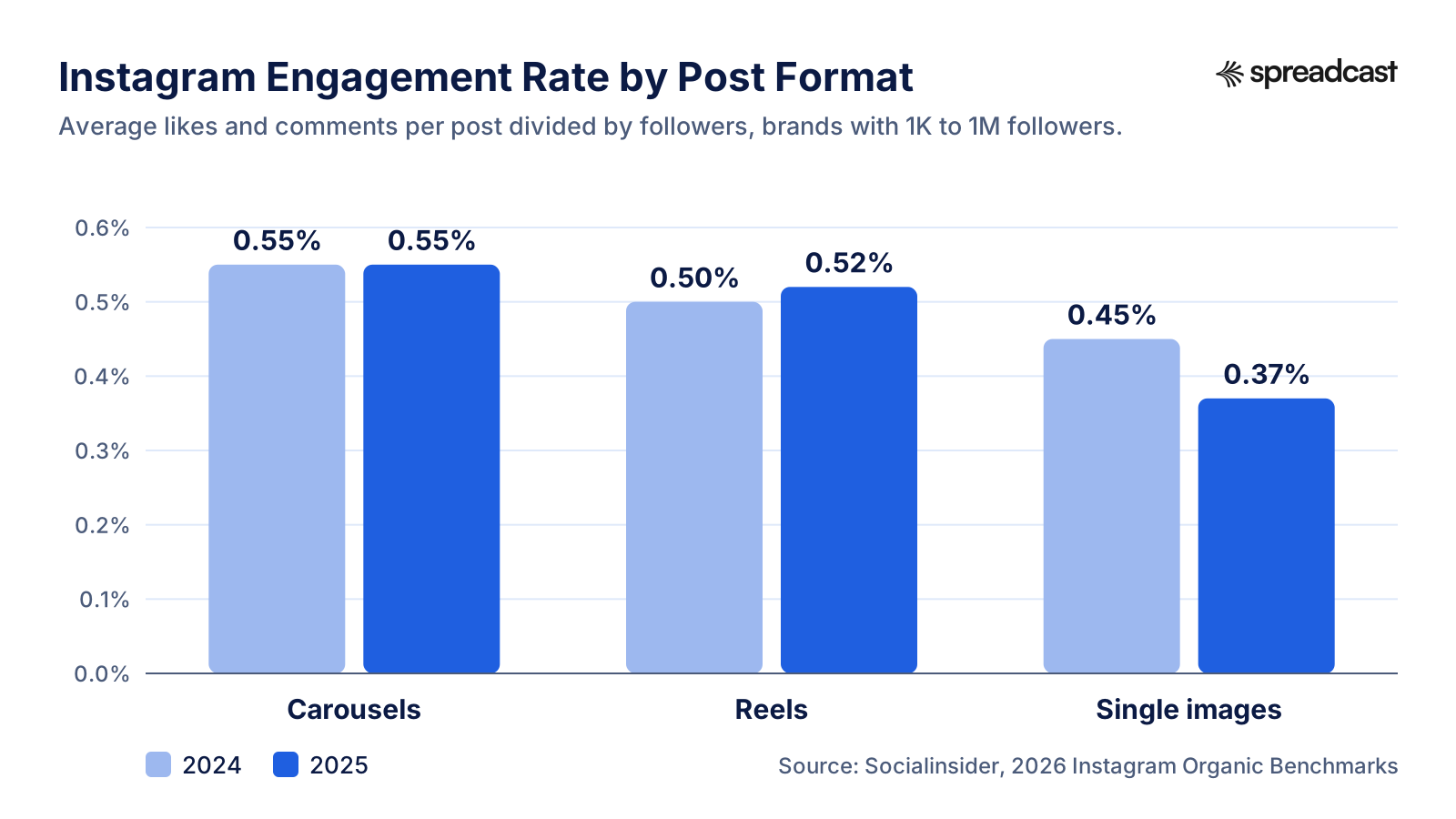
Carousels are the format where Claude Design saves the most time, because a carousel is many slides that must look like one piece. They are also worth the effort. Socialinsider's 2026 Instagram benchmarks, based on 67,541,436 posts from brands with 1K to 1M followers, put carousels at a 0.55% engagement rate in both 2024 and 2025, ahead of Reels at 0.52% and single images at 0.37% in 2025. Buffer's 2026 engagement report measures differently, as engagement divided by reach, and still has carousels first on Instagram with a 6.90% median.
Start the chat with the facts, not the design. Paste the five or six points the carousel should make, in your own words, and the one action you want at the end. Then give the format: "Instagram carousel, 7 slides, 1080 x 1350 each, cover slide with a short hook, one idea per slide, last slide tells people where to go". Attach your logo and any screenshots. If a design system is set up, say "use our design system" so there is no doubt.
Look at the cover first. On Instagram the first slide is the post in the feed, and Meta's publishing guide says every slide is cropped based on the first one. If the cover is 1080 x 1350, every slide must be too. Ask Claude Design to keep a fixed margin of about 80 pixels on every side so nothing important sits where the app overlays the dots and the caption preview.
Then go slide by slide with inline comments. Typical fixes are a headline that wraps onto four lines, a screenshot that is too small to read on a phone, and a last slide that says "learn more" instead of naming the place. Keep each slide to one idea and one short block of text. If you have more to say, it goes in the caption.
Now the part that catches people out: getting the slides out as pictures. Instagram's API takes JPEG only, and the export list in Anthropic's help article names a zip, PDF, PPTX, Google Slides and standalone HTML, not PNG or JPEG. The route that works with documented tools is to send the design to Canva, which is on Anthropic's list of apps you can send designs to, and download it there. Canva's help page on file types lists JPG and PNG downloads up to 8000 x 3125 pixels, and you choose which pages to download.
Finally, write the caption. Claude in the same chat can write it, but Claude Design does not attach it to the slides, so you copy it into Instagram yourself, along with alt text for each slide. Meta's media reference allows up to 2,200 characters, 30 hashtags and 20 mentions in a caption, and alt text of up to 1,000 characters per image. For more prompt ideas aimed at ChatGPT, which work just as well in Claude, see our ChatGPT Instagram carousel prompts.
If you make an app and that export and upload loop sounds like your Sunday evening, this is the gap Spreadcast closes. You paste your App Store link at Spreadcast's start page, it builds a brand kit from the listing, and from then on a carousel is designed in your brand with real screenshots in an iPhone frame, captioned per network and published to Instagram, Threads, LinkedIn and the rest without a single file download.
Why Carousels Are Worth Designing Well
Socialinsider's yearly numbers show carousels holding steady while single image posts lost engagement.
Claude Design Instagram Carousel Prompts to Copy
Each prompt assumes you have uploaded your logo and screenshots and set a design system. Replace the bracketed parts. They work for Threads too; cut them to four slides for Bluesky and Mastodon.
Feature Walkthrough Carousel
"Design an Instagram carousel, 6 slides, 1080 x 1350 each, using our design system. Slide 1: a hook that names the problem [problem] in under eight words. Slides 2 to 5: one step each of how [feature] solves it, each with the matching screenshot I uploaded, large enough to read on a phone. Slide 6: the app name and 'Search [app name] on the App Store'. Keep an 80 pixel margin on every side."
Tips List Carousel
"Make a 7 slide Instagram carousel of tips for [audience] about [topic]. Cover: the number of tips and the payoff, big. Each tip slide: a large number, a headline of at most six words and one supporting sentence. Use our brand colors with plenty of empty space. Give me two cover options, one with a big number and one with a question."
Release Notes Carousel
"Turn these release notes into a 5 slide carousel at 1080 x 1350: [paste notes]. Slide 1: 'New in version [x]' with the app icon. One slide per change, plain words, no jargon, the screenshot of that screen in a phone frame. Last slide: 'Update now' with the App Store badge area left empty for me to place."
Stat or Myth Busting Carousel
"Design a 5 slide carousel about [myth]. Slide 1 states the myth in quotes. Slide 2 says what is actually true with the number [stat] and its source [source] in small type. Slides 3 and 4 explain why, with a simple chart drawn from these numbers: [numbers]. Slide 5 gives one thing to do today. Do not invent any numbers."
Before and After Carousel
"Make a 4 slide carousel showing before and after for [use case]. Slide 1: the hook. Slide 2: 'Before' with the old way described in three short lines. Slide 3: 'After' with our screenshot. Slide 4: the result in one sentence and our logo. Use the same layout on slides 2 and 3 so the swipe feels like a reveal."
Customer Quote Carousel
"Design a 5 slide carousel of real App Store reviews. Here are the reviews and names exactly as written: [paste]. One review per slide in large serif type, five stars above, the first name below. Cover: '[app name], in our users' words'. Do not change the wording of any review."
How To Guide Carousel
"Create an 8 slide how to carousel: 'How to [task] in [app name]'. Each step slide has a big step number, an instruction of at most ten words and the screenshot of that step cropped to the relevant part. End with a slide that recaps all steps in a short list. Size 1080 x 1350."
Turn One Carousel Into Every Network
"Take the carousel on the canvas and make three versions: Instagram and Threads at 1080 x 1350 with all slides, Bluesky with the four strongest slides, and a 1000 x 1500 Pinterest pin that combines the cover and the best tip. Keep the design system identical."
Claude Design LinkedIn Carousel: Export a PDF Document
LinkedIn is the network where Claude Design fits best, because LinkedIn's carousel is a PDF and PDF is the first format in Claude Design's export menu. On LinkedIn a "carousel" in the organic feed is a document post. LinkedIn's help page on sharing documents accepts PDF, PPT, PPTX, DOC and DOCX up to 100 MB and 300 pages, and asks that PDFs with several layers be flattened and that mixed page sizes be resized to one common size.
The format is worth the work. Buffer's 2026 engagement report gives LinkedIn carousels a median engagement rate of 21.77%, against 7.35% for video and 6.52% for images, using LinkedIn's own definition of engagement, which counts clicks. Clicking through pages counts, which is part of why the number is high, but it is still the format most worth designing well on LinkedIn.
Prompt it the same way as an Instagram carousel, with two differences. First, the shape: 1080 x 1350 portrait pages fill more of the feed on a phone, while 1080 x 1080 squares look tidier on desktop. Pick one and keep every page that size, because LinkedIn wants a single page size. Second, the tone: LinkedIn readers will read a little more text per page than Instagram users, so a headline plus two short lines works, and a closing page with your name and role often does better than a logo alone.
Export as PDF, open the file once to check that fonts came through and every page is the same size, then upload it as a document post with a clear title. The caption is written separately, in LinkedIn's post box or through your publishing tool.
For page counts, design ideas and the full LinkedIn spec, including ad formats, see the LinkedIn carousel size guide and our LinkedIn carousel examples. If you want Claude to post to LinkedIn for you rather than hand you a file, the LinkedIn MCP server page covers what LinkedIn's API allows.
Claude Design Instagram Posts and Single Images
Single image posts are the quickest thing to make in Claude Design and also the quickest to get wrong, because they have one shot to stop the scroll. Ask for 1080 x 1350, a single message, and one visual anchor: a big number, a screenshot, a short quote or a bold question. Everything else is noise on a phone screen.
A pattern that works for product brands is the announcement card: the feature name as the headline, one line on what it does for the reader, and the screenshot in a phone frame taking up the lower half. Another is the quote card: one sentence from a customer or a review in large type, with the name below and a small logo. A third is the stat card: one number, what it means, and the source in small type at the bottom.
Ask Claude Design for the same post in two or three shapes in one go: 1080 x 1350 for Instagram, Facebook, Threads and LinkedIn, 1000 x 1500 for Pinterest, and 1080 x 1920 if you want a Story or TikTok photo version. Because the design system holds the colors and fonts, the three come out as one family, which is the whole point of brand consistency. Our piece on keeping a brand consistent without a design team explains why that matters more than any single post.
For what separates a post that gets stopped on from one that gets scrolled past, our nine design principles for social posts and the 35 creatives we took apart are a good brief to paste into the chat before you start. If the screenshot is the hero of the post, our free iPhone mockup generator makes the phone frame without any design tool at all.
Can Claude Design Make Instagram Reels?
Not Claude Design itself. It makes still artboards. Anthropic's video like option is a different template, Claude Motion, described in Anthropic's article on Dashboards and Motion dated October 8, 2026. Motion makes animated explainers from a prompt, such as a 30 second explainer or an animated chart, by writing code that animates your text, charts, shapes and images. It exports an MP4.
Three limits matter for Reels. Motion is in beta on Team and Enterprise plans only, and on Enterprise an admin has to switch it on. It does not use a video generation model, so there is no generated footage and no AI generated people; Anthropic says plainly it is built for explaining your own work. And the article does not mention social media or vertical video, so you have to ask for a 1080 x 1920 frame yourself and check the result.
If the MP4 fits, it can go up as a Reel. Meta's media reference gives Reels a length of 3 seconds to 15 minutes and a file size of up to 300 MB. An animated tip, a chart that builds up, or a feature walkthrough with moving text are the realistic uses. A talking head video, a trend with a sound, or anything filmed are not.
Motion also lists apps you can open animations in, including Adobe, Descript, HeyGen and Runway, with Canva and Captions marked as coming soon. For anything more than a short motion graphic, plan on finishing the video in one of those. If TikTok is your main channel, our guide to promoting an app on TikTok covers the kinds of video that work there.
Claude Design Templates and Design Systems for Social Media
When people search for Claude Design templates, they usually mean one of two things, and Anthropic uses the word for only one of them. In Anthropic's language, Design is itself a template: the artifacts article lists Docs, Slides, Design, Dashboards and Motion as the templates you start artifacts from, with Docs, Slides and Design on all plans. There is no gallery of ready made Instagram post templates from Anthropic, and we found none on its pages.
The thing that does the work of a template is the design system. Anthropic's help article says new projects inherit your organization's design system, including colors, fonts and components, and that you can import one from a GitHub repository, design files or raw uploads, or sync it from a local codebase through Claude Code. Claude then checks its output against the system and corrects it. The product page FAQ adds that brand systems with fonts, colors and guidelines work best set up in an ordinary conversation, while code based component libraries work best built in Claude Code.
For social media, build your own templates on top of that. Make one design per format you post often, such as a tip card, a carousel cover, a quote card and a release post, get each one exactly right, and save the project. Next time, open it and ask Claude to make a new post "in the same layout as the tip card, with this text". Because there is no version history yet, ask Claude to save the project before you experiment, as the help article suggests.
Teams get one more control. Admins can approve one standard design system and lock edits, and on Enterprise they can reserve publishing, default setting and deletion of design systems for chosen people. That stops the classic problem of five colleagues making five slightly different blues.
If you do not have a written brand yet, start smaller. Our brand kit generator pulls colors, fonts and the logo from your website for free, and what a brand kit actually needs explains the five things worth writing down. Upload the result to Claude Design as your first design system.
Claude Design MCP: Using Connectors in the Same Chat
MCP, the Model Context Protocol, is in its own words an open source standard for connecting AI applications to external systems. In Claude, an MCP server you add yourself is called a custom connector. Because Claude Design now runs inside ordinary conversations, the connectors you have switched on in that chat sit right next to the canvas. That is what people usually mean by Claude Design MCP.
Three Anthropic pages define what is possible. The custom connectors guide says custom connectors using remote MCP work on Free, Pro, Max, Team and Enterprise, with Free limited to one, and that you switch connectors on per conversation from the plus button, then Connectors. The artifacts article says artifacts can connect to apps you have connected to Claude and to custom connectors, asks you to approve the tools the first time, and notes that connecting apps and storing data inside artifacts needs Pro, Max, Team or Enterprise. And the same article warns that connector tools which need approval for each action are not available to artifacts.
So there are two patterns. In the first, the design itself pulls data through a connector, for example a chart slide that reads your numbers; that is the artifact using a connector. In the second, which matters more for social media, Claude in the chat uses a connector after or alongside the design: it reads your analytics, writes captions, or sends a post to a publishing tool. Anthropic's product page shows this second pattern in a campaign example that plans a promotion, makes Canva assets and stages a HubSpot campaign, and ends with the instruction "Show me everything before anything goes out."
Claude Code works the same way from the terminal. Claude Code's MCP docs show one command to add a remote server, either with a key in an Authorization header or with a browser sign in started from /mcp, and remind you to verify that you trust each server before connecting it. With /design in the same session, you can make the post and hand it on without leaving the terminal.
That is the slot a publishing connector fills. Spreadcast's MCP server adds tools to the chat that design a post or a 3 to 8 slide carousel in your saved brand kit, write a caption for each network, save it as a draft on your calendar, and publish once you approve. You add it as a custom connector with the address spreadcast.app/api/mcp, sign in, and choose Make Drafts or Make and Publish. For every tool it offers, see the social media MCP server reference, and for other options, the best social media MCP servers and the wider best MCP servers for marketing.
Is Claude Design Good for Social Media Marketing?
For the design itself, yes, with caveats. For social media marketing as a weekly habit, it covers one step out of five. Here is the honest split as we see it after reading everything Anthropic publishes about it.
What it does well: it turns a messy brief into a clean layout in minutes, it stays on brand once a design system is set up, it handles text heavy formats like tips, lists and announcements very well, and a carousel comes out as a family of slides rather than ten unrelated pictures. It is free to start on the Free plan, and it lives in the same chat where you already write captions with Claude. For a founder without a designer, that is a real step up from a blank Canva page.
What holds it back for social media: there is no PNG or JPEG in the documented export list, so image networks need a detour. There is no version history. Anthropic's help article lists inline comments that occasionally fail to appear, editing by several people that is basic and may be unreliable, and import quality that depends on the source file. Usage counts toward the same limits as the rest of Claude, including Claude Code, and when you hit them Claude Design is unavailable until they reset unless you have usage credits. Large projects and many iterations use more of the allowance, which matters if you make a month of carousels in one sitting.
And the biggest gap: it does not know your networks. It cannot see what you posted last week, it does not write a caption per network inside the post, it cannot post, and it cannot tell you what worked. Those are the jobs that take the time in social media marketing, more than the design.
So our verdict: Claude Design is good for social media posts you make once in a while, such as a launch, a campaign or a pitch to a partner, and good as the design step inside a bigger workflow. On its own it is not a social media tool. It needs a publishing step next to it, whether that is you with a phone, a scheduler, or a connector in the same chat.
Common Claude Design Problems and How to Fix Them
Each problem and fix below comes from the known limitations and tips in Anthropic's getting started guide, read on October 28, 2026, applied to social media work.
| Problem | What Anthropic says | What to do for a social post |
|---|---|---|
| Your comment on a slide does not appear | Inline comments occasionally fail to appear | Open the comments view, or paste the note into the chat with the slide number. |
| The chat shows a chat upstream error | Open a new chat tab in the same project | Your canvas stays put. Repeat the last request in the new tab. |
| You lost a design you liked | There is no version history yet | Before trying a new direction, ask Claude to save the project and note where it saved it. |
| Posts drift away from the brand | Claude checks output against an imported design system | Import a complete system with styles, fonts and components, and name the components you want used. |
| A teammate's edits collide with yours | Editing by several people at once is basic and may be unreliable | Let one person own each carousel and use comments for feedback. |
| You cannot change who sees a design on your phone | Sharing settings cannot be changed in the iOS or Android app | Change sharing on the web or in the desktop app. |
| Delete removes the wrong thing | In the layers list, Delete and cut act on the canvas selection | Press Return on the layer row first, then delete. |
| You run out of room mid campaign | Design shares usage limits with the rest of Claude, and large projects use more | Make one carousel per chat, keep canvases light, or turn on usage credits. |
Claude Design Plans and Prices for Social Media Work
From the Claude pricing page on October 28, 2026. Claude Design itself has no separate price; it comes with the plan and uses its limits.
| Plan | Price | What it adds for social media design |
|---|---|---|
| Free | $0 | Claude Design, Slides and Docs, with limits sized for everyday tasks. One custom connector. |
| Pro | $20 a month, or $17 a month billed yearly ($200 up front) | At least 5 times the Free usage per five hour session, connectors inside artifacts and Dashboards in beta. |
| Max | From $100 a month | 5 or 20 times Pro's usage per session, useful if you make many carousels in one sitting. |
| Team Standard | $25 a seat a month, or $20 billed yearly | Claude Motion in beta for animated explainers, plus Dashboards in beta. |
| Team Premium | $125 a seat a month, or $100 billed yearly | 5 times the usage of a Standard seat. |
Usage resets on a rolling five hour window, and paid plans also have weekly limits, according to the pricing page.
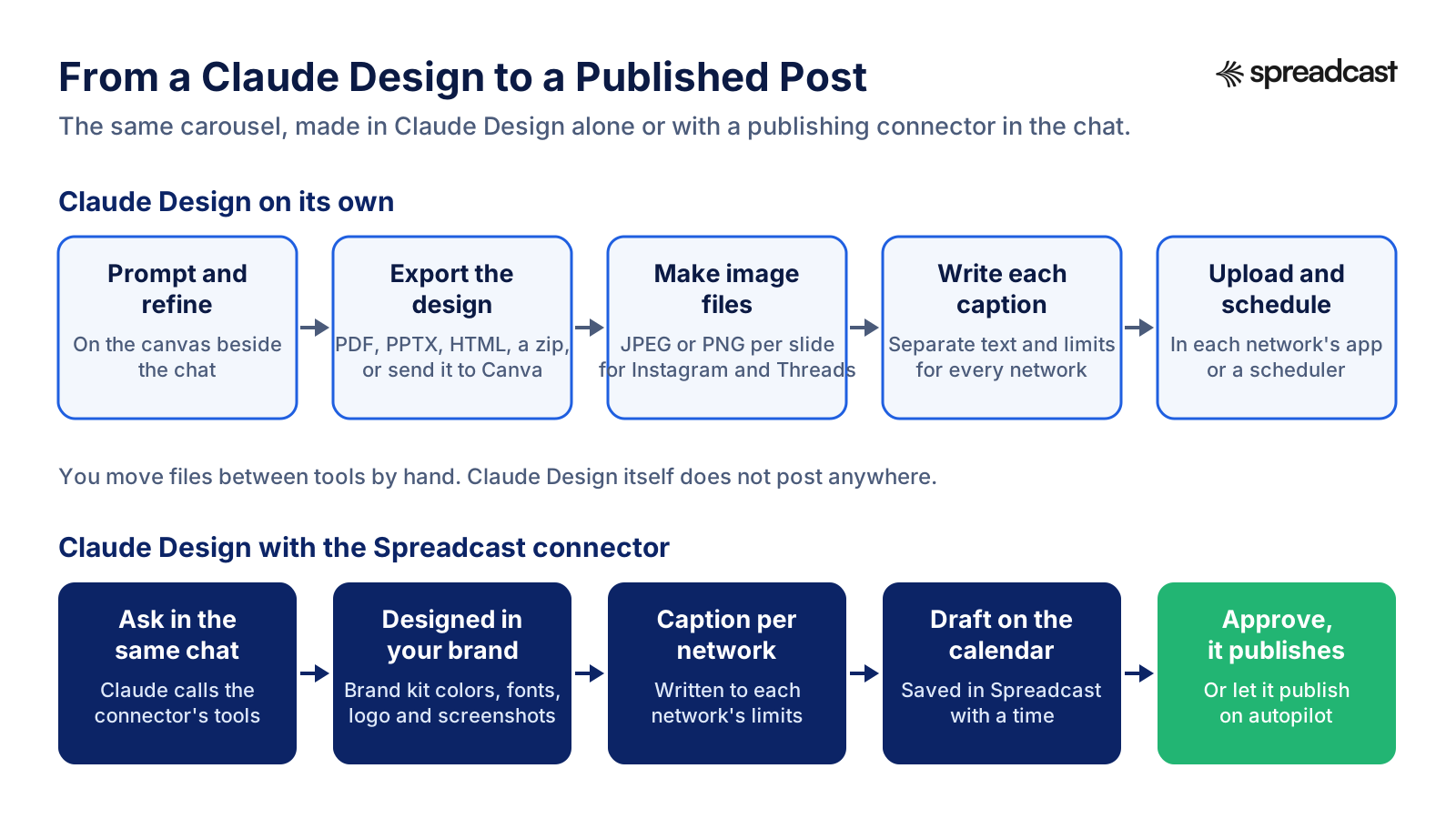
From a Claude Design to a Published Post
The design is the first box. The diagram shows what comes after it, by hand and with a publishing connector in the same chat.
The Gap: A Design Is Not a Published Post
Count the steps for one ordinary week. Say you post a carousel to Instagram, the same carousel to Threads, a PDF version to LinkedIn, four slides to Bluesky and one pin to Pinterest. In Claude Design you make the carousel and the pin in one chat, which is fast. Then you send it to Canva and download the slides as images, export a PDF for LinkedIn, pick four slides for Bluesky, and resize nothing because you planned the sizes. That is already a handful of downloads.
Then the captions. Instagram allows 2,200 characters and wants hashtags, Threads text posts are limited to 500 characters by Meta's reference, Bluesky and Mastodon set their own limits, LinkedIn wants a different voice, and Pinterest's specs allow a title of up to 100 characters and a description of up to 800. Claude can write all five, but you still copy each one into the right box. Our social media character limits list every field if you do this by hand.
Then the uploads: open each app or scheduler, attach the right files in the right order, paste the caption, add alt text, pick a time, and do it again next network. Even at a few minutes per network, it adds up across a month, and it is exactly the kind of job that slips when you are busy, which is why so many brand feeds go quiet after a launch.
None of that is a flaw in Claude Design. It is a design tool and it says so. But it is worth being clear about where the time goes before you decide that a design tool has solved your social media.
Where Spreadcast Fits: Design and Publish From the Same Chat
Spreadcast is marketing automation for social media, built first for App Store apps. It does the steps after the design, and it can do the design too, in your brand, without a file ever touching your desktop. Here is the same week as above, done with it.
Before: you prompt Claude Design, refine, send to Canva, download images, export a PDF, write five captions, open five apps, upload, paste, schedule. After: in the same Claude chat, with the Spreadcast connector on, you say "make a carousel about the new widget, five slides, for Instagram, Threads, LinkedIn and Bluesky, schedule it for Tuesday at 9". Spreadcast designs it in your brand kit, with your colors, fonts, logo and real app screenshots in an iPhone frame, writes a caption for each network that fits that network's limits, and saves it as a draft on your calendar. You look, approve once, and it publishes.
It also covers the posts you would never think to make. Spreadcast checks your App Store listing every day. When a new version goes live or the app hits a ratings milestone, it designs the post, writes the captions and publishes, on full autopilot or after one tap of approval. For anything else, you start from one line in Create or from twelve post types for apps, such as a testimonial, a how to or a feature post, and you can upload your own pictures and video to schedule, including slides you made in Claude Design.
It publishes to Instagram, Facebook, Threads, LinkedIn, Pinterest, TikTok, YouTube, Bluesky, Mastodon, Telegram and Discord, which includes networks some schedulers leave out, such as Telegram and Bluesky. Analytics show followers and interactions per network, and likes, comments, reach and views per post, so the "what worked" question has an answer next month.
On price: Free is $0 for one app and makes 3 posts to download with a small Spreadcast mark, no publishing. Pro is $29 a month or $290 a year and includes clean posts with no cap, publishing to 10 social accounts across any mix of networks, autopilot or one tap approval, and posting from Claude or ChatGPT. Studio is $79 a month for 5 apps and 50 accounts, each with its own brand. If you would rather not subscribe, a Post Pack is $19 once for 10 posts designed and published, and a 30 Day Pass is $39 once for everything in Pro for 30 days. Paid plans have a 7 day full refund. The details are on the pricing page, and the full feature list is on the features page.
If you have no app, you can still use it: start from your website or a short description of the brand instead of an App Store link. Keep Claude Design for the big one off pieces, a pitch deck, a launch landing page, a campaign hero, and let Spreadcast keep the feed going every week.
How to Add the Spreadcast Connector Next to Claude Design
These steps follow Anthropic's custom connectors guide for Pro and Max. On Team and Enterprise, an owner adds the connector in Organization settings first and members then connect it.
- Step 1
Create a Spreadcast Account and Brand Kit
Go to Spreadcast's start page and paste your App Store link, or a website, or a short description of the brand. Spreadcast builds the brand kit: icon, colors and screenshots in an iPhone frame. Connect the social accounts you want to post to.
- Step 2
Add the Custom Connector in Claude
In Claude, open Customize, then Connectors, click the plus button and choose Add custom connector. Give it a name, paste the address spreadcast.app/api/mcp with https in front, and click Add. On the Free plan this uses your one custom connector.
- Step 3
Sign In and Choose What Claude May Do
Claude shows a Connect button. Spreadcast's sign in page opens and asks one question: Make Drafts, or Make and Publish. Pick Make Drafts if you want every post to wait for your approval in Spreadcast. You can remove the connection at any time from Spreadcast's settings.
- Step 4
Switch It On in the Chat Where You Design
In the conversation, click the plus button at the lower left, choose Connectors and turn Spreadcast on. Now the same chat holds Claude Design and the publishing tools, and Claude can design in Spreadcast, write captions and save drafts.
- Step 5
Ask for the Post and Approve It
Ask in plain words, for example "design a carousel about the new widget for Instagram and Threads and schedule it for Thursday morning". Claude shows you what will go out, where and when. Approve in the chat or in Spreadcast's calendar, and it publishes on time.
Claude Design for Social Media Marketing: A Weekly Routine That Works
If you want to keep Claude Design in your routine, here is a rhythm that holds up for a small brand posting three or four times a week. On Monday, spend twenty minutes in one chat planning the week's topics with Claude, using real material: what shipped, what customers asked, a stat you can source. Our Claude prompts for social media give you planning prompts to start from.
Then design the one piece that deserves real design attention, usually the carousel, in Claude Design with your design system. Use the other posts of the week for simpler formats: a quote card, a screenshot with one line, a question. Those do not need a fresh canvas each time; reuse the saved layouts.
Batch the exports and captions in one sitting rather than one post at a time. Writing four captions in a row is quicker than switching tools four times, which is the main lesson of batching a month of content in one afternoon. Then schedule everything at once, with a scheduler, a connector or by hand, and come back on Friday to look at the numbers. If you want those numbers in one place, our engagement rate calculator explains each formula.
The routine works because the design tool does what it is good at and the rest of the week is handled in bulk. The common failure is the opposite: a beautiful first carousel, then two weeks of silence because the export and upload steps felt heavy. Plan the publishing step first and the design habit lasts.
If you would rather the whole loop ran from Claude, our step by step guide on how to schedule social media posts with Claude walks through it, and Claude Cowork for social media covers the recurring tasks that can run it on a timer.
Quality Checks Before Any Claude Design Post Goes Live
Whatever route you use to publish, run the same short check on every design. It takes two minutes and catches most of the problems that make a post look made by a machine.
Read it on a phone, not on the canvas. Shrink the preview to phone size or send it to yourself. Text that looked fine on a large screen is often too small, and screenshots inside a phone frame need to stay readable. Check contrast against WCAG's minimum of 4.5 to 1 for normal text and 3 to 1 for large text, which WCAG defines as at least 18 point, or 14 point bold.
Check every number and name. Claude Design lays out what you give it, but if you let Claude fill in a stat or a quote, verify it before it goes out. In our prompts above we tell it not to invent numbers for that reason. The same goes for customer reviews: paste them exactly and tell Claude not to edit them.
Check the shape and the file. Make sure every carousel slide is the same size as the cover, that the export is JPEG for Instagram if you publish through a tool that uses Meta's API, and that Bluesky images stay under the 2,000,000 byte limit in Bluesky's schema. For LinkedIn, open the PDF and confirm the fonts and page sizes.
Write alt text. Instagram allows up to 1,000 characters of alt text per image, Mastodon's posting guide asks for media descriptions too, and every screen reader user who follows you depends on it. One plain sentence per slide is enough. Then match the caption to the network, using our caption generator if you want a starting point per network.
Frequently Asked Questions
Can Claude design social media posts?
Yes. Claude Design, which now works inside any Claude chat on every plan including Free, lays out posts and carousels on a canvas, and Anthropic's launch post names social media assets among its uses. It does not publish them; you export or hand them to a publishing tool.
Is Claude Design free?
It is included on the Free plan. Claude's pricing page lists Claude Design, Slides and Docs on Free, and paid plans give more usage. Design work counts toward the same usage limits as the rest of Claude.
Can Claude Design post to Instagram?
No. Claude Design makes the design and exports it, but it has no way to publish to Instagram or any other network. To post from Claude, add a connector that can publish, such as Spreadcast, or upload the images yourself.
How do I export a Claude Design carousel as images for Instagram?
Anthropic's export list names a zip, PDF, PPTX, Google Slides and standalone HTML, not PNG or JPEG. Send the design to Canva, which is on Anthropic's list of apps, and download the slides as JPG or PNG there, as Canva's file type page describes.
Can Claude Design make a LinkedIn carousel?
Yes, and it is the easiest network for it. Design the slides at one size, such as 1080 x 1350, export a PDF and upload it to LinkedIn as a document post. LinkedIn accepts PDFs up to 100 MB and 300 pages.
Can Claude Design make Instagram Reels?
Not directly. Claude Design makes still artboards. Claude Motion, a separate template in beta on Team and Enterprise, makes animated explainers and exports MP4, which you can upload as a Reel if you ask for a vertical frame.
Does Claude Design have templates for social media?
We found no gallery of Instagram or LinkedIn templates on Anthropic's pages. Design itself is one of Claude's artifact templates, and your design system acts as the template: set it up once and every new post uses your colors, fonts and components. Save your best layouts as projects to reuse.
Does Claude Design work with Canva?
Yes, Canva is one of the apps Anthropic lists for sending a finished design to, alongside tools such as Adobe, HubSpot, Miro and Wix. From Canva you can edit further and download images or a PDF.
Where These Facts Come From
Every outside number, rule and price on this page links to the page it was taken from.
- Introducing Claude Design by Anthropic LabsAnthropic
- Get started with Claude DesignAnthropic Help Center
- Move from standalone Claude Design to ClaudeAnthropic Help Center
- Claude Design now stays on brand for daily workAnthropic
- Claude Design product page and FAQAnthropic
- Claude release notesAnthropic Help Center
- What are artifacts and how do I use themAnthropic Help Center
- Build live dashboards and animate explainers with ClaudeAnthropic
- Get started with custom connectors using remote MCPAnthropic Help Center
- Connect Claude Code to tools via MCPClaude Code Docs
- Claude plans and pricingAnthropic
- What is the Model Context ProtocolModel Context Protocol
- Instagram content publishing guideMeta for Developers
- Instagram media reference for publishingMeta for Developers
- Threads posts referenceMeta for Developers
- Content Posting API photo post referenceTikTok for Developers
- Pinterest product specsPinterest Help Center
- Share documents in a LinkedIn postLinkedIn Help
- Image post requirements on LinkedInLinkedIn Help
- Bluesky images embed schemaBluesky on GitHub
- Posting to your profileMastodon Documentation
- Telegram Bot APITelegram
- Choose the right download file type for your Canva designCanva Help Center
- Understanding contrast minimum, WCAG 2.2W3C
- 2026 Instagram Organic BenchmarksSocialinsider
- The State of Social Media Engagement in 2026Buffer
- Video: Introducing Claude Design by Anthropic LabsClaude
- Video: Build an App With Claude DesignClaude
Researched and written by Spreadcast. Last checked on October 28, 2026.