If you want to know how to launch on Product Hunt, the short answer is: join at least a week early, schedule the launch for 12:01 am Pacific time, write a first comment, and spend the whole day replying to people. Product Hunt itself says it's 100% free to use, and you don't need a hunter. The long answer is the rest of this guide, because the details decide whether your launch gets featured, lands in the Daily Digest the next morning, or quietly sits on the "all products" list.
A Product Hunt launch in 2026 also runs on different rules than the playbooks from 2019 suggest. "Launch Now" is gone, so every launch is scheduled or saved as a draft. One person can schedule two hunts a day at most. The homepage ranks by points, and Product Hunt says one upvote does not always equal one point. And the featuring guidelines, dated March 2026, list what the team won't feature at all, which rules out more launches than most founders expect.
This guide covers all of it in the order you'll need it: how Product Hunt picks and ranks launches, what launching costs, the best day and time with real numbers, the listing specs, the images, the video, the first comment, the extra steps for an App Store app, launch day hour by hour, and a launch week posting plan with copy you can adapt for LinkedIn, Threads, Bluesky, Instagram and the rest. It ends with the rules that get launches pulled and how often you can come back.
How We Researched This
On October 28, 2026 we read Product Hunt's own launch guide page by page, from preparing for launch to the two weeks after, and fourteen articles in its help center, including the featuring guidelines, the ranking explainer and the relaunch rules. For the best day to launch we used two analyses Databox posted on Product Hunt's own forum, the larger covering 4,962 launches from January 1 to September 1, 2026. For apps we checked Apple's App Store Connect help on release options, preorders and campaign links. For the posting plan we used LinkedIn's and Threads' own documentation for limits.
- Where Product Hunt's pages disagree with each other, we show both and tell you which one to plan around. That happens twice: the description length, and how long you wait before a relaunch.
- We didn't use upvote counts from blog posts about famous launches. They're hard to check and say little about a launch today.
- The Databox numbers come from a single analysis, made with an AI analyst tool and posted by a Databox employee. We quote them because they're the largest 2026 sample we found, and we name their limits next to them.
- We make Spreadcast, a tool that designs and publishes social posts. It appears in the sections on launch posts. Read those parts knowing that, and check the claims against the pricing page yourself.
How to Launch on Product Hunt: The Short Version
If you only read one section, read this one. It's the whole launch in order, with the rule or number behind each step. Every step has its own section further down.
- Make a personal account at least a week before you post. New accounts wait one week before they can post a product, and company accounts can't post, vote or comment at all.
- Fill in your profile with your real name, a clear photo and a headline, then spend that week commenting on other launches and in the forums.
- Check your product against the featuring guidelines. It has to be available now, not a waitlist, a landing page or a service.
- Make the assets: a square thumbnail, at least two gallery images at 1270 by 760, an optional YouTube video, a tagline of 60 characters or fewer and a short description.
- Submit with the Post button, fill in every field, write your first comment, and choose Schedule. You can schedule up to 30 days ahead.
- Pick the day. Weekends need fewer points to reach the top five. Weekdays bring bigger crowds. Choose based on what you want from the launch.
- Go live at 12:01 am Pacific time unless you have a reason not to, so you get the full 24 hours.
- On the day, reply to every comment, email your list, post on your own networks and ask people for feedback, never for upvotes.
- For two weeks after, keep sending people to the launch page, collect reviews and follow up with the people who commented.
That's the skeleton. Most launches that disappoint get the skeleton right and miss one detail: a profile that looks fake, a gallery image nobody can read on a phone, a post on every network that says "please upvote", or an app that isn't live on the App Store yet when the day starts. The sections below are about those details. If you're launching an app rather than a web product, keep our app launch checklist open next to this guide, since Product Hunt is one line of a longer launch.
How Product Hunt Works in 2026
Product Hunt runs in 24 hour days on Pacific time. Each day, people post products, the community upvotes and comments, and the products compete on a leaderboard for Product of the Day. Two things decide how far a launch gets: whether the team features it, and how many points it earns once it's live.
Featured vs Not Featured
Not every launch reaches the homepage. Product Hunt says the homepage is curated by its team each day, that votes alone don't decide it, and that "not everything is guaranteed to make it." A launch that isn't featured is still live. It shows up under the button at the bottom of the homepage that lists all of today's products, and on your profile. But it gets a small share of the attention, and it can't win Product of the Day, which is picked from featured launches.
The featuring guidelines, dated March 10, 2026, say the team judges launches on four things: usefulness, novelty, craft and creativity. A featured launch doesn't have to score high on all four, and often it stands out on one or two. Engagement counts, but it isn't the only factor. The team reviews a launch several times before it goes live, and decisions are usually final.
What Product Hunt Will Not Feature
This list matters more than any growth tactic, because no amount of promotion gets an excluded product onto the homepage. Product Hunt's guidelines say it focuses on digital products and services and only features products that are available right now. These are named as not featured:
- Waitlisted products, unless people who sign up get access straight away.
- Directories, lists, templates and boilerplates.
- Podcasts, courses, reports, events and books.
- Services, commerce sites, stores and deal sites.
- Submissions that aren't about tech.
- Kickstarter projects, unless the product works and is ready to use at launch.
- Hardware, unless it has a prominent digital part. The guidelines give AI wearables as the example.
- Vaporware, and small undifferentiated products built mainly to make money quickly.
If your product sits near one of these lines, say a template marketplace with real software around it, make the software the star of the listing. Lead the gallery with the product working, not the catalog. The guidelines also say that in rare cases two launches from the same company on the same day may be moved to a later date, so don't plan a double launch.
Points, Not Upvotes
The leaderboard orders launches by points. Product Hunt's help center says points come from upvotes, but one upvote does not always equal one point. The value of a vote depends on things like featured status, overall community engagement and how authentic the vote looks, and Product Hunt doesn't publish the full list so people can't game it. The awards page describes points as a mix of upvotes and meaningful engagement, such as comments and shares.
In practice this means three things. A vote from a long standing member who also comments likely counts for more than a vote from an account made that morning. Comments are worth getting, because they feed points and they're the signal the team can see. And points can go down: Product Hunt filters out inauthentic activity such as bots, fake profiles and AI generated actions, and removes points that didn't come from real users. If your count drops in the afternoon, that's usually why.
Product of the Day, Week and Month
Product of the Day goes to the launch with the most points among that day's launches. Product of the Week compares launches from Monday to Sunday, and Product of the Month the whole calendar month. There's also the Daily Digest, a newsletter that goes out every weekday with the previous day's ten most upvoted products, sent to more than 350,000 readers. You don't have to be in the top ten to get into the newsletter. Its editorial section can pick launches for trends and collections, too.
So a realistic goal for a small team is not Product of the Day. It's to get featured, reach the top ten so the Digest carries you the next morning, and turn the day's visitors into users and followers. A top five finish on a quiet day can be worth more to you than tenth place on a crowded one, which is why the day you pick matters.
How Much Does It Cost to Launch on Product Hunt?
Launching on Product Hunt costs nothing. The launch guide says the site is 100% free to use, and there's no paid tier for makers that changes where a launch ranks. You don't need to hire a hunter either: Product Hunt encourages makers to post their own products and says there's no discernible advantage to a third party hunter.
Product Hunt does sell advertising. Its sponsor page lists display ads, a wide billboard ad on the homepage leaderboard, and sponsorship of its daily, weekly and AI newsletters. It doesn't publish prices there. It says 49% of its audience works at startups and that its newsletters average a 42% open rate. Ads sit beside the leaderboard. They don't move your launch up it.
The real costs are time and assets. Here's what a typical small launch spends, in cash or in hours. None of the cash lines are required.
| Item | Cash cost | Time cost | Can you skip it? |
|---|---|---|---|
| Listing on Product Hunt | $0 | An hour to fill in the form well | No |
| Hunter | $0. Post it yourself | None | Yes, Product Hunt says there's no advantage |
| Thumbnail and gallery images | $0 if you make them | A day, more if you're not a designer | No, two gallery images are the minimum |
| Launch video | $0 for a screen recording | Half a day to a few days | Yes, it's optional |
| Launch day offer | The discount you give | Setting up a code | Yes |
| Social posts for launch week | $0 by hand, or a tool | One to two hours a post by hand | No, it's how your people find out |
| Your launch day itself | $0 | The whole day, replying | No |
| Product Hunt ads | Not published, ask the sales team | Briefing the campaign | Yes, most small launches don't buy them |
The one cost to never pay is for upvotes. Services that sell votes or "launch support" break Product Hunt's community guidelines, the points they bring get filtered out, and the launch can be dropped from the homepage. We cover the rules in detail further down. If you're budgeting the whole launch, our startup marketing budget guide has line item budgets from $0 a month upward.
Best Day to Launch on Product Hunt
Product Hunt's own answer is that the best day is the day you're most prepared. That's true, and it's not much help if you're picking a date on a calendar. So here's what the 2026 data says, and how to use it.
What the 2026 Launch Data Shows
The largest 2026 sample we found is a Databox analysis of 4,962 Product Hunt launches from January 1 to September 1, 2026, across 244 days. It measured how many points it took to reach the top five on each day of the week. Saturday needed a median of 165 points. Thursday needed 235. Friday, at 205, had the lowest bar of any weekday, and Tuesday (210) was slightly easier than Monday (220). The analysis also counted launches: Tuesday averaged 30.4 a day, Saturday 10.7.
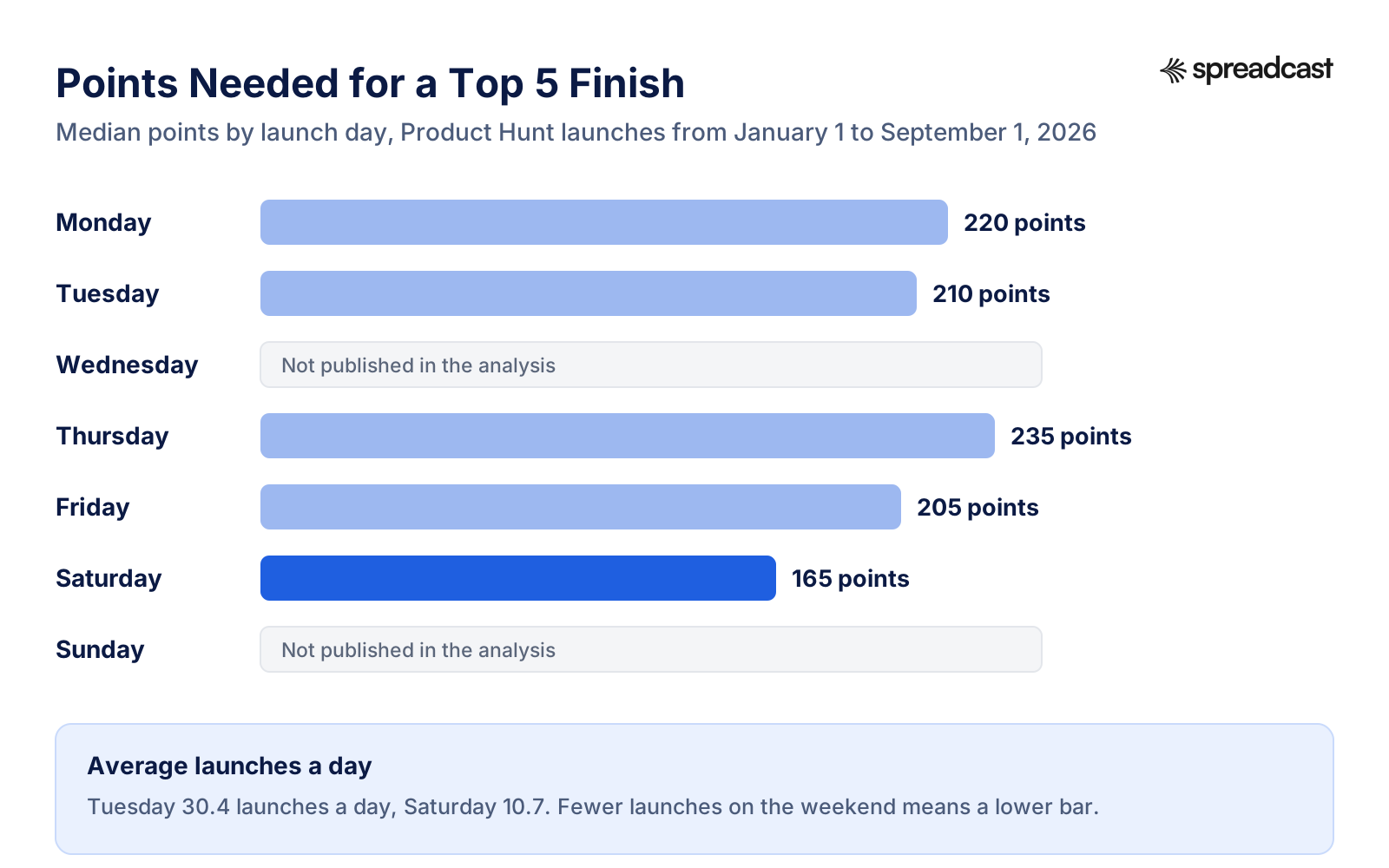
Read the numbers with their limits. The author says the data covers points and rank only, with no categories and no traffic sources, and that it can't separate the effect of the day from the kind of maker who launches on it. An earlier Databox post on 2026 launches put the bars higher, with a median of 266 points for the top five on Saturday, 322 on Monday and 360 on Wednesday, and said Saturday sees about a third as many launches as Tuesday. The exact numbers moved between the two posts. The order didn't: Saturday had the lowest bar in both.
Weekday or Weekend: Which Goal Are You Chasing?
Fewer launches means a lower bar. It doesn't seem to mean fewer clicks: Product Hunt's launch guide says weekend launches got 15% more clicks on the Visit button than weekday launches. It also says larger companies tend to launch on weekdays, because that follows normal business hours, which is part of why weekdays need more points. So the weekend isn't empty. It's quieter for competitors and still busy with people browsing.
| If your goal is | Launch on | Why |
|---|---|---|
| A badge for your site and App Store page, and a top five finish | Saturday | The lowest points bar in the 2026 data, and Product Hunt saw more Visit clicks on weekends. Sunday wasn't measured |
| Being seen next to the big launches in your field | Tuesday to Thursday | Larger companies launch on weekdays, so the attention is there, and so is the competition |
| A good weekday result with less competition | Friday | The lowest top five bar of any weekday in the 2026 data |
| Business buyers who read at work | Tuesday or Wednesday | Your email and LinkedIn posts land when your audience is at a desk |
| Timing around your own news | The day of the news | A press embargo, a conference or an app release beats any day of the week |
Three more things to check before you lock a date. Look for announced launches and conferences in your category that week, since a big company launching the same day takes the attention. Check how the Daily Digest covers your day: Product Hunt describes it as a weekday newsletter with the previous day's top ten, so read a few Monday editions before you count on it after a weekend launch. And check your own calendar: you need to be awake and replying for most of the 24 hours, so a day when you're traveling or have a release going out is a bad day whatever the data says.
What Time to Launch on Product Hunt
Launch at 12:01 am Pacific time. The how to post article says launches run in 24 hour periods and go live at 12:01 am, and the launch guide recommends that slot because it gives people the full day to find you. Product Hunt's pages write the zone as PST all year. In practice the day follows California time, which is on daylight saving time from March to early November.
That's late at night or early in the morning for most makers outside the US west coast. Here's what 12:01 am Pacific means where you are, in mid year and at year end, when most places are on their summer and winter clocks respectively.
| Where you are | In June | In December |
|---|---|---|
| San Francisco | 12:01 am | 12:01 am |
| New York | 3:01 am | 3:01 am |
| London | 8:01 am | 8:01 am |
| Berlin and Paris | 9:01 am | 9:01 am |
| Bengaluru | 12:31 pm | 1:31 pm |
| Singapore | 3:01 pm | 4:01 pm |
| Sydney | 5:01 pm | 7:01 pm |
| UTC | 7:01 am | 8:01 am |
For a week or two each spring and autumn, the US and Europe change their clocks on different dates, so the launch starts an hour earlier in Europe than the table shows. If your launch falls in late March or the last week of October, check the conversion for that exact date.
When should you pick another time? The launch guide names two cases: lining up with a press embargo or your team's hours, and audiences in Europe, Asia or Africa. Look at the table before you change anything, though. The default slot already lands in the European morning, so a team in Berlin gets its whole working day on the leaderboard. Teams in Singapore or Sydney get it in their afternoon or evening, which means the busiest US hours fall in their night. If that's you, plan shifts or bring in a teammate in another time zone rather than giving up the full day.
How to Get Listed on Product Hunt
Getting listed is a form, not an application. There's no approval to post. There's an approval to be featured. Here are the steps from Product Hunt's how to post a product article, with what each one means for you.
- Use a personal account. Product Hunt says company or branded accounts can't post, vote or comment. If your account is new, you wait one week before you can post. Subscribing to the newsletter may give immediate access, but don't rely on that the night before.
- Complete your profile. The community guidelines ask for a real first and last name, a clear photo of you, a headline or about section, and a username that isn't a company or generic name. Incomplete profiles get reviewed more and seen less.
- Click Post at the top right and enter your product's URL. A preview builds as you go.
- Fill in the name, tagline, launch tags, links, thumbnail, gallery, video, description, pricing, makers and an optional promo code. The next sections cover each field.
- Add your first comment. Product Hunt asks for it in the form.
- Choose Schedule Launch or Create Draft. Since February 2025 there's no Launch Now button. A draft lets your team review the full launch page before you pick a date, and drafts aren't indexed.
Do You Need a Hunter?
No. The person who posts a product is its hunter, and the people who built it are its makers. Product Hunt's definitions page says a hunter is anyone with a free personal account who posts a new product, and the launch guide says there's no discernible advantage to having someone else do it. Hunting your own launch gives you full control over the listing and the schedule.
There's also a practical limit now. Each person can schedule two hunts a day, a rule built into the scheduling system. A well known hunter who has already used their two slots for your date can't add yours, and you can't ask for an exception. Notifications are different too: the help center says hunter followers don't get an email about the post, while maker followers get one only if the post reaches the homepage.
Scheduling Your Launch and Sharing the Scheduled Page
You can schedule a launch up to 30 days ahead, and you can keep editing it from My Products until it goes live. Until then the page isn't indexed and nobody can upvote it. By default a scheduled launch is visible only to its makers and their team. You can make the scheduled page public from the lock icon in the banner at the top, so anyone with the link can see it before launch day.
Share that public scheduled page in your newsletter and on your social accounts a week or two out. The launch guide says scheduling ahead lets you tease the launch, drive traffic and collect followers before the day. People who follow then hear about it when you go live, and you start the day with an audience instead of a cold page.
Add your other makers by their Product Hunt usernames, and ask them to make accounts well before the day so the one week wait doesn't catch them out. Each maker then shows on the launch page and can reply to comments as themselves.
Product Hunt Launch Checklist
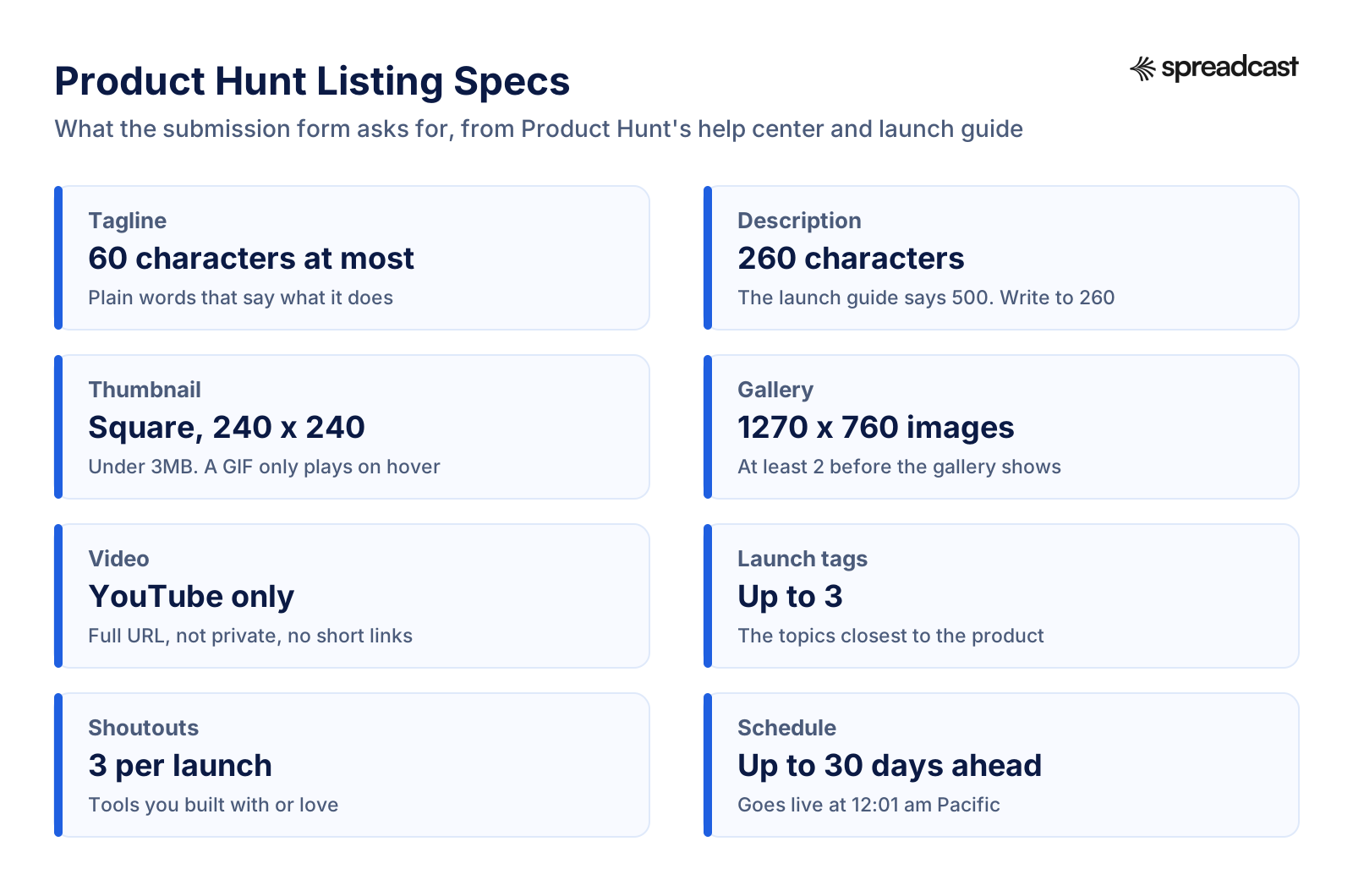
Here's every field and task in one Product Hunt launch checklist, with the spec Product Hunt gives and when to have it ready. Specs come from the how to post article and the preparing for launch page of the launch guide. Copy it into your own doc and tick it off.
| Item | Product Hunt's spec | Ready by | Notes |
|---|---|---|---|
| Personal account | No company accounts, one week wait for new accounts | 2 weeks before | Real name, real photo, headline |
| Other makers' accounts | Added by Product Hunt username | 2 weeks before | Each one also waits a week if new |
| Product name | The name only, no description or emoji | 2 weeks before | Unless the emoji is part of the name |
| Tagline | 60 characters at most | 10 days before | Say what it does, in plain words |
| Description | 260 characters in the help center, 500 in the launch guide | 10 days before | Write to 260 and it fits both |
| Thumbnail | Square, 240 by 240 recommended, under 3MB | 10 days before | A GIF only animates on hover |
| Gallery | 1270 by 760 recommended, at least 2 images | 1 week before | The first image does the most work |
| Video | YouTube only, full URL, not private | 1 week before | Optional. Upload it before launch day |
| Interactive demo | Optional, added to the gallery like a video | 1 week before | Arcade, Storylane, Supademo and others are free for launches |
| Launch tags | Up to 3 | 1 week before | The ones closest to the product |
| Links | Product page first, then App Store and Google Play | 1 week before | Use campaign links you can measure |
| Pricing | Free, paid, or paid with a free trial or plan | 1 week before | Match what the product really does |
| Promo | Offer, code and expiry date all required | 1 week before | Optional. A launch discount gives people a reason to act |
| Shoutouts | 3 per launch | 1 week before | Optional |
| First comment | Posted with the launch | 3 days before | See the template below |
| Scheduled date | Up to 30 days ahead, live at 12:01 am Pacific | 2 to 4 weeks before | Then share the public scheduled page |
| Launch week social posts | Your own networks | 3 days before | Designed, written, scheduled |
| Email to your list | Your own newsletter | 3 days before | Ask for feedback, not votes |
Product Hunt Launch Images: Thumbnail and Gallery
Most people decide whether to click your launch from two things: the thumbnail in the list and the first gallery image on the page. Both are small on a phone. Design for that.
The Thumbnail
The thumbnail is square, 240 by 240 recommended, under 3MB. Use your app icon or logo on a clean background, nothing else. You can use a GIF, but it only animates when someone hovers over it, so its first frame has to work as a still image. Product Hunt discourages strobing, quick cuts and unreadable text, and says the team may edit thumbnails that break this.
The Gallery
Gallery images are recommended at 1270 by 760 pixels, wider than they are tall. You need at least two before the gallery shows at all. Product Hunt gives no maximum. Five to eight is a sensible range: enough to show the product working, few enough that people see all of them. Here's an order that works for most products:
- The promise. One short headline that says what the product does, next to the product's main screen. This image appears first on the launch page, so it has to make sense alone.
- The main flow. The two or three screens someone sees in their first minute, left to right.
- The feature people will ask about. The one that makes your product different from the obvious alternative.
- Proof. A real quote from a beta user, a rating, or a number you can stand behind. Never invent one.
- Who it's for. One line per audience, with the screen each one uses.
- Pricing or the launch offer, if you have one.
Keep text big. A headline that reads fine on your 27 inch monitor turns into grey fuzz on a phone, and a lot of people browse Product Hunt on one. A good test: shrink the image to the width of your thumb on screen and check you can still read the headline. Use the same fonts and colors as your website and app, so the launch feels like one product from the listing to the sign up page.
Ryan Hoover, who started Product Hunt, gave the same advice on a Y Combinator podcast: clear images, a clear tagline, and testing both on people who don't know your product.
Your social posts for launch week need the same look in different sizes: a 1080 by 1350 portrait for Instagram, a square for LinkedIn, and so on. Our social media image sizes guide has every one. This is where launches without a designer lose a day. Spreadcast takes that day back: paste your App Store link or website at Spreadcast's start page, and it builds a brand kit from it (icon, colors, real screenshots in an iPhone frame) and designs the launch posts for each network in that brand. You still make the Product Hunt gallery yourself, but the week of social posts around it is done.
Product Hunt Launch Video
The video is optional. If you add one, it has to be a YouTube link: the full URL, not a shortened one, on a video that isn't private, uploaded before launch day. It sits in the gallery, so people meet it right after your first image.
Keep it short and show the product, not the team. A 30 to 90 second screen recording that goes from the problem to the result works better than a two minute brand film. Put captions on it, because many people browse with the sound off, and make the first five seconds show the product doing the thing your tagline promises. Upload it as unlisted or public, then check the link in a private browser window before you paste it in.
If a video is too much work right now, Product Hunt suggests an interactive demo instead. The preparing for launch page names Arcade, Storylane, Hexus, Supademo, Layerpath and ScreenSpace, all free for Product Hunt launches, and you add the demo link to the gallery the way you'd add a YouTube link. For apps, a screen recording from the simulator or a device is usually enough. Our guide to the App Store preview video covers how to record one that also works on your product page.
Product Hunt's own team ran a 45 minute session on how to launch, with makers talking through their launches. It's from 2022, so some buttons have changed, but the advice on preparing and on launch day still holds.

Tagline, Description and First Comment
These three bits of text do most of the persuading on the launch page. They also get read in the list, in the Digest and in search, often with nothing else around them.
The Tagline
The tagline gets 60 characters. Use them to say what the product does and for whom, in the words a person would type into search. Clever lines lose here. Tuesdays averaged 30 launches in the 2026 data, and someone scanning a list that long gives each tagline a glance. Compare these:
| Weak tagline | Why it's weak | Stronger tagline |
|---|---|---|
| Money, reimagined | Says nothing about what it does | Track shared bills with your roommates in one tap |
| Your AI copilot for everything | Every launch says this | Turn meeting notes into a task list in your inbox |
| The future of habits | Vague, and a little grand | A habit tracker that works from your lock screen |
| Finally, a better way to read | Doesn't name the thing | Save articles and listen to them as a podcast |
Write ten versions, read them out loud, then show your top three to someone who has never seen the product and ask them what it does. Pick the one they explain back most accurately.
The Description
Product Hunt's how to post article says the description takes up to 260 characters. The preparing for launch page says 500. Write to 260 and you're safe under either. That's about two sentences: what it does and how, then who it's for and what's different. Leave out the story of why you built it. That belongs in the first comment.
Here's a 230 character example for a made up budgeting app called Ledgerly: "Ledgerly splits shared bills between roommates and reminds whoever owes. Snap a receipt and it reads the items and splits them. Free for up to 4 people, with no ads and no bank login needed. For students and anyone sharing a flat."
The First Comment
The first comment sits right under the gallery, and it matters more than most makers think. Product Hunt says 70% of products that won Product of the Day, Week or Month had a first comment from the maker. It suggests covering the key features, who it's for, your story, your goals, pricing or offers, and a request for feedback, not upvotes. It also asks for a humble tone, few emojis and no marketing speak.
A structure that covers all of that in about 150 to 250 words:
- Hi, and who you are in one line. "Hi everyone, I'm Alex, I built Ledgerly with my flatmate."
- The problem, from your own life. "We spent two years settling bills in a group chat and still lost track."
- What it does, in three short points.
- Who it's for and who it isn't for yet. Being honest about limits earns trust in the comments.
- The launch offer, if any, with the code and when it ends.
- One specific question. "What would make you trust an app with shared bills?" gets real answers. "Let us know what you think!" gets very few.
Write it days ahead and have someone outside the team read it. Then on the day, answer every reply under it. The comments are where the ranking picks up engagement, and they're where you meet your first users.
How to Launch an App on Product Hunt
An App Store app needs a few steps a web product doesn't, because Apple's review and release timing sits between you and launch day. Get these wrong and people click through to an App Store page that doesn't exist yet.
Be Live Before the Day Starts
Product Hunt only features products that are available right now, and it doesn't feature waitlists unless people get access straight away. An App Store preorder or a TestFlight invite list isn't something people can use today, so by our reading of the guidelines it won't be featured. The form does have a status option for products that aren't fully released yet, which tells people where you stand, but it doesn't change the featuring rule. Launch on Product Hunt after the app is on the App Store.
Plan the release around Apple's timing. In App Store Connect you can choose to release a version manually, automatically after review, or automatically but no earlier than a date you set. Apple says that after a manual release a version may take up to 24 hours to appear on the App Store. So release at least a day before your Product Hunt launch, then open the live listing on a phone that isn't signed in to your developer account, and tap through from the link you'll put on Product Hunt. Our guide on App Store review times shows how long to leave for review itself.
Preorders deserve one more note. Apple lets you put a brand new app up for preorder with a release date between two and 180 days out. That's a good way to build a list before launch, and you can mention it in your social posts. Just don't make the preorder page your Product Hunt launch. Launch on the release day or after.
Links, Badges and Measuring App Store Traffic
Product Hunt asks for your product's own page as the main link, with App Store and Google Play links in the download links field. Put an Apple campaign link there instead of your plain App Store URL. A campaign link adds a campaign token (ct) and your provider token (pt), and App Store Connect then shows product page views, downloads and sales for that campaign. Our free App Store campaign link generator builds them in bulk.
Know the limits before you promise anyone numbers. Apple shows campaign data only after at least 24 hours, and a metric only appears once it reaches five in the date range you pick. A download counts for a campaign if it happens within 24 hours of using the link. On a small launch, the campaign may show nothing on day one and fill in over the following days.
If you put the App Store badge on a gallery image, follow Apple's marketing guidelines: use Apple's own badge artwork, don't change or animate it, use one badge per layout, and keep it at least 40 pixels tall on screen. Apple product images have to be used as they are and be at least 200 pixels tall on screen, and the screen should show your app as it really runs, with made up account details instead of a real person's data. Our summary of the App Store marketing guidelines covers the rest.
Gallery Images for a Phone App
The gallery is wide and your screenshots are tall, so a raw screenshot shows up as a thin strip with empty space on both sides. Put two or three screens side by side in device frames on a background in your brand color, with a short headline above them. Our free iPhone mockup generator makes the frames without a watermark, and the App Store screenshot examples page shows how strong apps caption their screens. Reuse those captions: if they already work on your product page, they'll work in the gallery.
Apple's developer team has a short overview of how people discover apps and what makes a product page convert. It's worth ten minutes before launch, because every Product Hunt visitor who taps your App Store link lands on that page.

For the wider plan around an app launch, from the App Store listing to press, our guides on how to market an app and app launch marketing for startups go further. For example posts other apps made on launch day, see our app launch announcement examples.
Product Hunt Launch Strategy: The Month Before
A launch day is only as big as the audience you bring to it. Product Hunt's sharing your launch page is blunt about the most common mistake: asking your community to join only on launch day. Here's a four week plan that avoids it.
| When | On Product Hunt | Everywhere else |
|---|---|---|
| 4 weeks before | Make or tidy your personal account. Start commenting on launches in your category | Pick the date. Start a simple list: a landing page with one call to action |
| 3 weeks before | Keep showing up in comments and forums. Draft the listing | Tell your existing users and followers a launch is coming. Share what you're building |
| 2 weeks before | Schedule the launch and make the scheduled page public | Share the scheduled page. Line up teammates for launch day shifts |
| 1 week before | Final gallery, video, tagline and first comment | Write and design the launch week posts and the launch email. Schedule them |
| Day before | Check every field in preview. Release the app version | Brief your team on who replies when. Sleep |
Product Hunt calls a week in the community the "bare minimum" before you post. The sharing page suggests building in public, hosting an AMA, and getting teammates in design, product, marketing and engineering to take part in discussions and comment on other launches. It also asks you to update your profile, because profile views rise around a launch, and to build a landing page focused on the product's main value with one call to action, possibly with a launch offer for the Product Hunt community.
Behind all of this is an idea Y Combinator has pushed for years: a launch isn't a single day. In her Startup School talk, Kat Mañalac argues that founders should launch again and again, to friends, to communities, to the press, to Product Hunt, each time with a sharper pitch. Product Hunt is one of those launches. If it goes quietly, you'll have another. If you're a solo founder telling this story on your own accounts, our guide to founder led marketing covers the weekly habit that makes a launch land.

Launch Day on Product Hunt, Hour by Hour
Launch day is a long shift of replying. Product Hunt's launch day page points you to the Launch Day dashboard, which tracks your position, upvotes, comments and reviews and lets you reply to the latest comments from one place. Here's how the 24 hours usually go for a small team launching at 12:01 am Pacific.
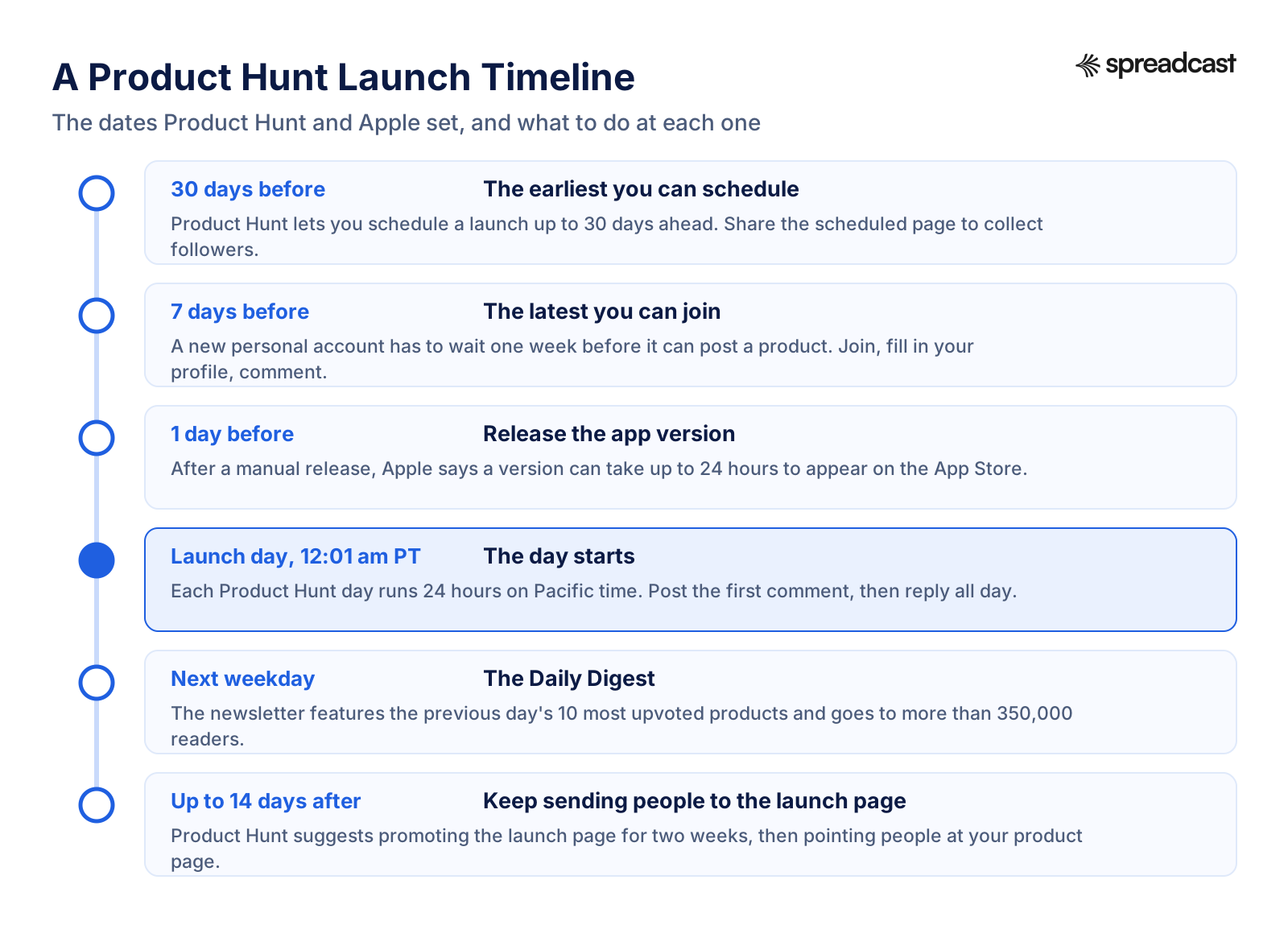
| Pacific time | What to do | Why |
|---|---|---|
| 12:01 am | Check the page is live and the first comment is posted. Test every link | A broken App Store link at hour one costs the most visitors |
| 12:15 am | Send the launch email to your list and turn on the in app banner | Your own people are the first visitors, and Product Hunt says email is one of your strongest tools |
| 12:30 am | Post on your own networks: LinkedIn, Threads, Bluesky, Instagram and the rest | Europe is waking up, and posts need time to spread |
| 1 am to 8 am | One teammate in Europe or Asia replies to every comment | Product Hunt asks you to reply in real time, or as close as you can |
| 6 am to 9 am | Second round of posts for the US morning. Share in communities you're already part of | The US audience starts browsing |
| Noon | Post an update in the comments: what people asked, what you're changing | Shows you're listening, and gives people a reason to come back |
| Afternoon | Thank people by name on your networks, quote good comments with permission | Turns the launch into a story people can follow |
| Evening | Last reply round. Note every feature request in one doc | The comments are free user research |
| Next weekday | Check the Daily Digest. Share it if you're in | It goes to more than 350,000 readers |
Split the day into shifts if you have a team. Product Hunt suggests exactly that on its sharing page. Nobody does good replies at hour twenty on no sleep. And watch your tone in the replies: the community guidelines ask makers to stay respectful when they get criticism, and a calm reply to a harsh comment often reads better than ten thank yous.
One more launch day tool: badges. Product Hunt offers embeds and badges from the Embed link at the top right of your launch page. Put one on your homepage or in a banner across your site on the day, so visitors who already know you can find the launch.
Product Hunt Launch Post: Copy for Every Network
Your launch posts on social media bring the people who start the conversation on Product Hunt. The rule for all of them is the one Product Hunt repeats on every page: ask for feedback, comments and help spreading the word, not upvotes. "We're live, come tell us what you think" is fine. "Please upvote us" breaks the rules, and so does any contest that rewards upvotes.
Launch Week Posting Plan
One post on launch day isn't a launch. People need to see it more than once, on the network they actually use. Product Hunt's own after launch page says a lead typically needs about 10 marketing touches before becoming a customer. Here's a week that gives them several, without repeating yourself.
| Day | Post | Networks | Format |
|---|---|---|---|
| 7 days before | What's coming and the date, with a link to the public scheduled page | LinkedIn, Threads, Bluesky, Instagram, Telegram, Discord | One designed image with the date |
| Launch day, early | We're live on Product Hunt, what it does, one question for people | Every network you use | The first gallery image, resized per network |
| Launch day, evening | What people asked today, and one thing you're changing because of it | LinkedIn, Threads, Bluesky, Mastodon | Text, or a quote card from a real comment |
| Day 2 | Thank you and the result, honestly, whatever it was | Every network you use | Designed image with the finish or a screenshot |
| Day 3 | The main feature, shown step by step | Instagram, LinkedIn, Facebook, Pinterest | Carousel |
| Day 4 | A short demo | TikTok, YouTube, Instagram | Screen recording with captions |
| Day 5 | The launch offer and when it ends | Telegram, Discord, Facebook, Threads | Designed image with the code |
| Day 7 | What the week taught us | LinkedIn, Threads, Bluesky | Text post |
That's around ten posts, each one designed for its network and written for its audience. By hand, that's a day or two of a founder's time in launch week, the week you have least of it. Spreadcast is built for exactly this: it designs each post in your brand from your App Store listing or website, writes a caption for each network that fits its limits, and publishes to Instagram, Facebook, Threads, LinkedIn, Pinterest, TikTok, YouTube, Bluesky, Mastodon, Telegram and Discord from one calendar. The Post Pack is $19 once for 10 posts designed and published, which is about this launch week. If you want the whole launch month, the 30 Day Pass is $39 once for everything in Pro.
LinkedIn Launch Post Example
LinkedIn posts can run to 3,000 characters, but the feed shows only the first lines before "see more", so the first two sentences carry it. Product Hunt's sharing page has a small LinkedIn tip of its own: write the image description as well as the post. Here's an example for the made up Ledgerly app:
"Two years ago my flatmate and I lost $340 to a bill we both thought the other had paid. Today we launched the fix on Product Hunt. Ledgerly splits shared bills between roommates and reminds whoever owes, without anyone connecting a bank. Snap a receipt, it reads the items, and everyone pays their part. We'd love your honest take, especially if you've ever shared a flat: what would stop you trusting an app with this? Link in the first comment."
That post opens with a story, says what the product does in one sentence, and ends with a real question. For more launch post structures, our LinkedIn post generator page and the LinkedIn carousel examples show what works on the network.
Threads and Bluesky Launch Post Examples
Threads posts take up to 500 characters and up to five links. Bluesky is shorter, at 300 characters, as our social media character limits page lists. Write the Bluesky version first, then let the Threads one breathe a little. Example for both:
"We launched Ledgerly on Product Hunt today. It splits shared bills between roommates and nudges whoever owes, no bank login needed. If you've ever kept a spreadsheet for the electricity bill, I'd love to hear what you'd want from it."
Add the link, an image with the first gallery shot, and alt text that says what's in it. On Threads, a second post in the thread can carry the launch offer. For both networks, our guides on how to schedule Threads posts and how to schedule Bluesky posts cover the timing and tools, and the character limits page covers every other field, from bios to alt text.
Instagram and Facebook Launch Post Examples
Instagram is visual first. Make the image do the work: the product on a phone, a short headline, your brand colors. Links in captions aren't clickable, so point people to the link in your bio or a story link sticker. Example caption:
"Splitting bills with roommates shouldn't need a spreadsheet. Ledgerly launched today: snap a receipt, it splits the items, and it reminds whoever owes. It's on Product Hunt today if you want to tell us what's missing. Link in bio."
On Facebook, the same caption works with the link in the post itself. If you have a Facebook group or page with real users, post there too, with a sentence on why you're telling them first. For more on the network, see our guide to how to promote an app on Instagram.
Telegram, Discord and Mastodon
These are the networks where your keenest users often already are, and most launch guides skip them. A Telegram channel or Discord server full of beta users is the warmest audience you have. Post there first, with a personal note:
"You've been testing Ledgerly with us since March, and today it's on Product Hunt. Thank you for every bug report. If you have a minute, the comments there are the best place to tell other people what it's like to use. And if something's still broken, tell us here first."
On Mastodon, keep it plain and add hashtags for discovery, since the network leans on them. Telegram and Discord are easy to forget in a launch plan, so they often end up as a rushed post by hand at 1 am. If you run a channel, our guide on how to schedule Telegram channel posts shows the native options.
Prefer to write in Claude or ChatGPT? Ask it for the week of launch posts, then connect Spreadcast's MCP server in the same chat: it designs the images in your brand, writes a caption per network and schedules every post as a draft for you to approve. Our walkthrough on scheduling posts with Claude shows the setup.
Product Hunt Launch Reddit and Hacker News: What the Rules Allow
When founders search product hunt launch reddit, they're usually after two things: honest accounts of how other launches went, and whether to post their own launch on Reddit or Hacker News the same day. The accounts vary too much to sum up, and we couldn't verify most of them. The rules, though, are clear.
Product Hunt's sharing page says to post in communities where you've already been active, and not to start spamming Reddit or Indie Hackers on launch day. Reddit communities set their own self promotion rules, and moderators remove posts that break them. Read each subreddit's rules before you post, and lead with something useful: what you learned building it, real numbers, a question. Our guide on how to promote an app on Reddit covers which communities allow what.
Hacker News has written rules for Show HN. It's for things people can run or hold, that you built yourself and are around to discuss. People should be able to try it without signing up or giving an email. Landing pages and fundraisers don't qualify, and neither do reading materials like blog posts or newsletters. Like Product Hunt, Hacker News asks you not to get friends to upvote or comment. Start the title with "Show HN".
Should you do both on the same day? Only if you can reply well in both places. Each community notices a maker who posts and leaves. One option that works for a small team: Product Hunt first, then a Show HN a few days later with what you learned, which also gives the launch week a second moment.
Product Hunt Rules That Get Launches Pulled
Most launches that get dropped from the homepage break one of a short list of rules. Product Hunt's help center says asking for or incentivizing upvotes may trigger the algorithm to drop the product, which can mean a lower rank or leaving the homepage entirely. The community guidelines add that trying to game the system can lead to the removal of the launch and loss of posting access.
| Don't | Why | Do instead |
|---|---|---|
| Ask for upvotes, in any words | Breaks the rules and can drop the product | Ask for feedback, comments or help sharing |
| Run a contest that rewards upvotes | Product Hunt may unfeature the product | Run a separate contest that doesn't depend on votes |
| Buy votes or use bots | Points from fake accounts are removed | Bring real users who care |
| Mass message people | Counts as spam, including sending hundreds the same message | Write to people you know, one at a time |
| Post or vote from a company account | Company accounts can't post, vote or comment | Use personal accounts for every team member |
| Promote yourself in other launches' comments | Self promotion in comments gets removed | Leave real comments on launches you like |
| Leave a half empty profile | Incomplete profiles get reviewed more and seen less | Real name, photo and headline |
There's a legal side as well, for reviews. Product Hunt product pages collect reviews over time, and in the US the FTC's 2024 rule on fake reviews bans buying reviews, paying for reviews tied to a positive opinion, and buying fake followers or views to look more popular for commercial reasons. Ask happy users for an honest review. Don't pay for one, and don't reward only the positive ones.
How Often Can You Launch on Product Hunt?
You can launch again, but not often. Product Hunt's relaunch article says to wait at least two months between posts for the same product or from the same company, and products on the same root domain follow the same two month gap. A relaunch also needs a significant update that serves a substantially different use case or user. New designs and pricing changes don't count.
To relaunch within two months, you submit a relaunch request explaining what changed, and the team reviews it. The two weeks after launch page adds that products with very big updates can skip the wait. Approval doesn't promise a spot on the homepage.
If your launch wasn't featured, a different help article says you can resubmit after 6 months once you've acted on feedback. The two numbers answer different questions: two months is the minimum gap between launches, and six months is the suggested wait for a product that didn't make the homepage. If you're not sure your case qualifies, Product Hunt asks you to email hello@producthunt.com before you build the new post.
For an app, this lines up well with your release cycle. A major version with a genuinely new use case is a relaunch. A redesign or a price change isn't, so post those on your own networks instead. Our study of how often apps update shows most apps ship far more often than every two months, which means most updates belong on social media, not on Product Hunt.
After Launch Day: The Two Weeks That Follow
The launch page keeps working after the day ends. Product Hunt's after launch page suggests promoting the launch page for two weeks, then pointing people at your product page, which collects reviews, awards and followers for the life of the product. People who upvoted your launch also become followers of your product page.
- Claim your product page from "Claim this page" or "Request access to manage this page", if you haven't.
- Add the badges. Product Hunt emails makers embed links after launch for the Featured badge, the product page, any award, and a Leave a Review badge.
- Keep answering comments on the launch page. Late comments are often from people who found you through the Digest.
- Email the people who signed up during launch. Product Hunt asks for a sincere and humble tone, and a reminder of any launch offer.
- Follow up with commenters who match your target users. Their questions are your roadmap.
- Ask happy users for an honest review, with the badge or a short email.
- Share what the launch taught you. A post about real numbers and real lessons often travels further than the launch post did.
Then keep posting. A launch puts you in front of new people for a week. The feed you keep after it is what they see when they look you up a month later. For an app, the easiest steady source of posts is your own release notes: every new version is something to show. Spreadcast checks your App Store listing daily, and when a new version goes live or the app hits a ratings milestone, it designs the post, writes the captions and publishes them, on full autopilot or after one tap of approval. See what Spreadcast automates, or our app update announcement examples if you'd rather write them yourself.
How to Measure a Product Hunt Launch
Rank is the number everyone screenshots, and the least useful one. Decide before launch day what you'll measure, and set up the links so you can.
| Measure | Where to find it | Why it matters |
|---|---|---|
| Visits from Product Hunt | Your analytics, with UTM parameters on the product link | How many people the launch actually sent |
| Sign ups or downloads | Your product analytics, or Apple campaign links for App Store downloads | Whether those visitors became users |
| Comments and their content | The Launch Day dashboard | What people want, in their words |
| Followers of your product page | Your Product Hunt product page | People who'll hear about your next launch |
| Social reach and interactions on launch posts | Each network's analytics, or your posting tool's | Which networks brought your people |
| New followers that week | Each network | Whether the launch grew your own audience |
| Rank and points | The leaderboard | Useful for the badge, little else |
Google Analytics reads UTM parameters such as utm_source, utm_medium and utm_campaign. Tag the main product link on Product Hunt (for example utm_source=producthunt and utm_campaign=launch), and tag the link in each social post with its own source, so you can see which network sent people. For App Store downloads, the campaign links above do the same job. Our list of social media KPIs and the engagement rate calculator help you read the social side.
Write the numbers down the day after and again two weeks later. The second set tells you more: whether launch visitors stayed, and how many followers you kept. Those are the numbers to compare against when you launch again.
How to Post Your Product Hunt Launch Everywhere Without a Designer
Here's the part of a launch that quietly eats the most time. The Product Hunt listing takes a few days. The launch week posts take longer than anyone plans for, because each one has to be designed, sized and captioned for each network, and they all land in the week you're busiest replying to comments.
| Step | By hand | With Spreadcast |
|---|---|---|
| Brand look | Pick fonts and colors, cut out the logo, take fresh screenshots | Paste your App Store link or website. It builds the brand kit: icon, colors, real screenshots in an iPhone frame |
| Designing ten posts | Open a design tool, resize each one per network | Describe the post in one line, or pick one of twelve app post types. It designs single images and carousels in your brand |
| Captions | Rewrite the same news to fit LinkedIn, Threads, Bluesky and the rest | It writes one caption per network, within each network's limits |
| Publishing | Log in to each network, or a scheduler plus a design tool | It publishes to 11 networks from one calendar, after your approval |
| After launch | Remember to post about every update | It watches your App Store listing and posts new versions and ratings milestones on autopilot or after one tap |
What it costs, framed by what it does: Free makes 3 posts to download, with a small Spreadcast mark, so you can see the quality before paying. The Post Pack is $19 once for 10 posts designed and published, about one launch week. The 30 Day Pass is $39 once for everything in Pro for 30 days, enough to cover the run up and the launch itself. Pro is $29 a month for posts with no cap, publishing to 10 social accounts, autopilot and posting from Claude or ChatGPT. Paid plans come with a 7 day full refund.
What it doesn't do: it doesn't post to Product Hunt, it won't reply to your comments for you, and it doesn't make your Product Hunt gallery. Those stay with you, and they're the parts of a launch where a person matters. If you're launching an app this month, start with your App Store link and see the first posts before you decide. If you're a solo developer, our page for indie hackers shows how other solo makers use it, and SaaS teams can start from a website instead of an App Store listing.
Common Product Hunt Launch Mistakes
- Launching before the product is available. A waitlist or preorder won't be featured.
- Making the account the week of the launch, so the one week wait pushes the date.
- A tagline that sounds good and says nothing. People scanning the list can't tell what you make.
- Gallery images built for a desktop monitor, unreadable on a phone.
- Asking for upvotes on social media, in email or in DMs. One message can drop the launch.
- Going quiet after the first hour. Comments that wait half a day for a reply stop coming.
- Telling your community about the launch only on the day itself.
- Posting once on launch day and nothing after, so the people who missed it never hear about it.
- Measuring only rank, so you can't tell which channel brought users.
- Launching again a month later with a redesign. It isn't a significant update under the rules.
A Product Hunt launch is one day in a longer story. Do the prep, show up all day, and keep posting after. If you want more ideas for the months around it, our list of app promotion ideas and the guide on how to promote an app for free are good next reads.
Frequently Asked Questions
Is it free to launch on Product Hunt?
Yes. Product Hunt says it's 100% free to use, and you don't need a paid hunter. Product Hunt sells ads and newsletter sponsorships, but they don't change where a launch ranks. Your real costs are the time to make the assets and to reply on the day.
What is the best day to launch on Product Hunt?
For a top five finish, the weekend. A Databox analysis of 4,962 launches in 2026 found Saturday needed a median of 165 points for the top five, against 235 on Thursday. Weekdays bring more visitors but more competition. Product Hunt's own advice is to launch on the day you're most prepared.
What time should I launch on Product Hunt?
At 12:01 am Pacific time, when the Product Hunt day starts, so your launch gets all 24 hours. That's 3:01 am in New York and 8:01 am in London. Launch later only if a press embargo or your team's hours require it, or if most of your audience is in Europe or Asia.
Do I need a hunter to launch on Product Hunt?
No. Product Hunt encourages makers to post their own products and says there's no discernible advantage to a third party hunter. Each person can also schedule only two hunts a day, so a busy hunter may not have room for your date anyway.
How often can you launch on Product Hunt?
At most every two months for the same product, company or root domain, and only with a significant update that serves a substantially different use case or user. New designs and pricing changes don't count. Relaunching sooner needs a relaunch request. If a launch wasn't featured, Product Hunt suggests resubmitting after six months.
What size are Product Hunt gallery images?
Product Hunt recommends 1270 by 760 pixels for gallery images, and you need at least two before the gallery shows. The thumbnail is square, 240 by 240 recommended and under 3MB. Videos must be YouTube links.
Can I ask people to upvote my Product Hunt launch?
No. Product Hunt says asking for or rewarding upvotes may trigger the algorithm to drop the product. Ask people to visit, try it and leave a comment or feedback instead. Sharing your launch link anywhere is fine.
Why was my Product Hunt launch not featured?
The team curates the homepage and judges usefulness, novelty, craft and creativity. Its featuring guidelines exclude waitlists, templates, directories, services, courses, books and products that aren't available yet. Decisions are usually final, and a launch that isn't featured is still visible in the list of all of the day's products.
How many upvotes do you need to be Product of the Day?
There's no fixed number. The homepage ranks by points, and one upvote doesn't always equal one point. Product of the Day goes to the launch with the most points that day, so the bar depends on who else launched. For scale, the 2026 Databox data puts the median for a top five finish between 165 and 235 points depending on the weekday.
Where These Facts Come From
Every outside number, rule and price on this page links to the page it was taken from.
- Product Hunt launch guideProduct Hunt
- Preparing for launchProduct Hunt
- Sharing your launchProduct Hunt
- Launch day dutiesProduct Hunt
- Days after launchProduct Hunt
- Two weeks post launchProduct Hunt
- Launch guide definitionsProduct Hunt
- Advertise on Product HuntProduct Hunt
- How to post a productProduct Hunt Help Center
- How to schedule a postProduct Hunt Help Center
- Product Hunt featuring guidelinesProduct Hunt Help Center
- How is the homepage ranked?Product Hunt Help Center
- How do things end up on the homepage?Product Hunt Help Center
- Can I ask my community, friends or family to upvote a product?Product Hunt Help Center
- Can I relaunch my product?Product Hunt Help Center
- How can I get access to post?Product Hunt Help Center
- Daily hunt limitsProduct Hunt Help Center
- Where did Launch Now go?Product Hunt Help Center
- Product of the Day, Week and MonthProduct Hunt Help Center
- How to share a scheduled launchProduct Hunt Help Center
- Why did my launch points go down?Product Hunt Help Center
- Community guidelinesProduct Hunt Help Center
- Best day to launch on Product Hunt: what 4,962 launches in 2026 showDatabox on Product Hunt
- An analysis of 2026 launches to find the best day to launchDatabox on Product Hunt
- Select an App Store version release optionApple Developer
- Publish for preorderApple Developer
- Campaign links in App Store Connect analyticsApple Developer
- Marketing resources and identity guidelines for the App StoreApple Developer
- Show HN guidelinesHacker News
- Final rule banning fake reviews and testimonialsFederal Trade Commission
- URL builders: collect campaign data with custom URLsGoogle Analytics Help
- Threads API: postsMeta for Developers
- Post and share updatesLinkedIn Help
- Ryan Hoover on Product Hunt's acquisition and lessons learned about startup launchesY Combinator
- How to launch on Product Hunt, the official guide (video)Product Hunt on YouTube
- How to launch again and again, Kat Mañalac (video)Y Combinator on YouTube
- Get started with app discovery and marketing (video)Apple Developer on YouTube
Researched and written by Spreadcast. Last checked on October 28, 2026.
Keep Reading
- Playbooks
Founder Led Marketing: Strategy and Examples for Small Startups
What founder led marketing is, seven real founders who did it with small budgets, and a weekly system for LinkedIn, Threads, Instagram, TikTok and Bluesky that fits beside building the product.
- Playbooks
How to Schedule Bluesky Posts: Free and Paid Ways in 2026
Bluesky still has no schedule button, so every scheduled post goes out through a third party tool. Here is how that works, which free and paid schedulers support Bluesky, and the limits your posts have to fit.
- Playbooks
How to Schedule Threads Posts: The Threads Scheduler, Desktop and Tools
Threads has its own scheduler in the composer. Here is how to schedule Threads posts in the app and on desktop, where scheduled posts hide, how to edit them, what to do when scheduling fails, and when a paid Threads scheduler earns its price.