What a YouTube MCP Server Is
A YouTube MCP server is a small program that gives an AI assistant hands on YouTube. Claude, ChatGPT, Claude Code or Cursor never talk to YouTube directly. They talk to the server through the Model Context Protocol, which the official MCP introduction describes as an open source standard for connecting AI applications to outside systems. The server then does the YouTube part: it fetches a transcript, searches for videos, reads a channel's numbers, or uploads a video file to your channel with a title and description.
That last sentence hides the most important thing about this search. "YouTube MCP server" means two different tools to two different groups of people. Most people who search for it want a reader: paste a link into Claude and get a summary of a 40 minute video. A smaller group wants a publisher: finish a vertical video, hand it to Claude, and have it go up on the channel at 9 tomorrow morning with a proper title. The two kinds share a name and almost nothing else. A transcript server needs no Google account at all. An upload server needs a Google Cloud project, an OAuth client, a consent screen and a daily quota.
This page covers both, in proportion. We go through the transcript servers briefly, because they are simple and well documented. Then we spend most of the page on uploading and scheduling: what Google's YouTube Data API lets any server do, what the quota really allows since Google changed it in 2025 and 2026, how Shorts are decided, the Google sign in setup for a server you run yourself, the hosted services that skip it, and the errors you will meet.
Spreadcast runs a hosted MCP server that uploads to YouTube, and we explain exactly what it does and does not do near the end. Every limit and check on this page applies to whichever server you choose. If you want the tools Spreadcast's server offers across all eleven networks, read the social media MCP server page. For a ranked field of vendors, see the best social media MCP servers.
How We Researched This
On October 28, 2026 we read Google's YouTube Data API documentation page by page: the videos.insert reference, the videos resource, the quota calculator, the quota and compliance audit guide, the resumable upload guide, the developer policies and the revision history, which is where Google announces changes. For the sign in side we read Google's OAuth 2.0 overview, the Google Auth Platform page on managing an app's audience and the sensitive scope verification guide. For Shorts and video length we used YouTube Help.
We then opened the YouTube MCP repositories that come up most on GitHub, read their README files, and checked stars, licenses and last push dates through GitHub's own API. We read Glama's YouTube directory page, Google's list of Google Cloud MCP servers, and the YouTube pages of the hosted services that publish there: Blotato, Upload Post and Buffer. Competitor facts come from those vendors' own pages only.
For the assistant side we used Anthropic's help article on custom connectors, OpenAI's guide to connecting a server in ChatGPT, the Claude Code MCP docs and Cursor's MCP docs. For Spreadcast we read our own YouTube publishing code and the MCP server's documentation, and we describe only what that code does today. Google edits these pages often, and one rule on this page changed quietly within the last few months, so when Google's page disagrees with ours later, trust Google's.
Is There an Official YouTube MCP Server?
No, not on October 28, 2026. Google runs a long list of remote MCP servers, and the Google Cloud MCP supported products page, last updated October 26, 2026, lists endpoints for BigQuery, AlloyDB, Bigtable, Cloud Billing, API keys and dozens more Google Cloud products. YouTube is not among them. Google also keeps a public GitHub repository of MCP examples, and it describes itself as not an officially supported Google product.
We also found no YouTube connector made by Anthropic or Google for Claude, and no YouTube app from OpenAI for posting from ChatGPT. So when people search for an official YouTube MCP or a Claude YouTube connector, what they find is one of three things: a community server on GitHub that calls Google's official YouTube Data API with credentials you create, a community server that reads YouTube's public pages without the API, or a hosted company that has its own Google project and lets you sign in.
All three can be legitimate, and the difference matters. A server built on the YouTube Data API acts with a permission Google gave it, inside Google's quota and policies. A server that downloads pages or captions without the API sits closer to the line in YouTube's Terms of Service, which forbid accessing the service by automated means such as robots or scrapers, except for public search engines or with YouTube's prior written permission. That is a reason to know which kind you are running, not a reason to panic about summarising a video for yourself.
Five Kinds of YouTube MCP Servers
Every YouTube MCP server we found on October 28, 2026 falls into one of these groups. The group tells you whether you need a Google project, who holds the channel permission, and whether anything can go public.
Transcript Readers
They fetch the captions of any public video and hand the text to the assistant. No Google account, no key. kimtaeyoon83's transcript server and jkawamoto's transcript server are the two most starred. This is what most searchers want.
Data API Readers
They use a YouTube Data API key to search videos, read channel details, list playlists and pull statistics. ZubeidHendricks' YouTube MCP server is the best known, with 10 read tools. A key is free to create but counts against Google's daily quota.
Self Hosted Uploaders
They sign in to your channel with OAuth and call videos.insert to upload. anwerj's YouTube uploader is the most used one we found. You create the Google Cloud project and the OAuth client, and the channel token lives on your computer.
Hosted Posting Services
A company runs the server and owns the Google project, so you sign in to YouTube once on their site. Blotato, Upload Post and Buffer all list YouTube. You pay the service, and it carries the quota and the token refresh.
Tools That Write and Post
A tool that prepares the post as well as sending it. Spreadcast is in this group: you bring the video, the assistant writes a YouTube title and description in your brand's voice and captions for your other networks, and the draft waits for your approval. The YouTube connection lives in Spreadcast, never in the assistant.
YouTube Transcript MCP Servers in Brief
If all you want is "summarise this video" in Claude, a transcript server is the right tool and it costs nothing. kimtaeyoon83's server has one main tool, get transcript, which takes a video link, a Shorts link or a bare video ID, a language code with automatic fallback, and options for timestamps and for stripping sponsor segments based on chapter markers. An optional second tool sends a direct video file to a separate video model for videos with little speech, and needs that company's key.
jkawamoto's server is built for long videos. Its README says it splits transcripts into chunks of 50,000 characters by default so the assistant can page through hours of video without overflowing its context, and it supports residential and standard proxies, in its words to avoid YouTube rate limits and IP bans. It was pushed to on October 27, 2026, so it is actively kept up. anaisbetts' mcp youtube is the oldest and smallest: it uses the open source downloader yt dlp, which you install yourself, to pull subtitles.
Why do none of them use the official API for captions? Because Google's captions.download method only works for someone with permission to edit the video, and costs 200 quota units a call. You cannot use it to read the captions of someone else's video. So transcript servers read the captions YouTube serves to its own player, which is fast and free and is also the reason a proxy appears in one README. If YouTube changes its player, these servers break until someone updates them. Check the last commit date before you rely on one.
One practical tip: a transcript is only as good as YouTube's captions. Auto captions on a video with music, accents or product names are rough, and a summary built on them inherits every mistake. For your own videos, the caption track you upload yourself is the one worth reading. That is also where the rest of this page starts, because reading YouTube and posting to it are separate jobs.
YouTube MCP on GitHub: Five Servers Compared
The most used open source YouTube MCP servers we found, compared from their README files and GitHub's API on October 28, 2026. All five are MIT licensed. Only one of them uploads.
| Server | What it does | What it needs from you | Worth knowing |
|---|---|---|---|
| kimtaeyoon83 transcript server | Fetches a public video's transcript, with language fallback, timestamps and sponsor stripping | Node and one line in your assistant's config. No Google account | About 600 stars, last pushed July 21, 2026. Reads captions, never writes to YouTube. |
| jkawamoto transcript server | Transcripts and video metadata, split into pages of 50,000 characters for long videos | The uv tool for Python. Optional proxy settings | About 490 stars, last pushed October 27, 2026. Built for hours long videos. |
| anaisbetts mcp youtube | Downloads subtitles so Claude can summarise a video | yt dlp installed on your machine | About 550 stars, last pushed August 16, 2026. The shortest README of the five. |
| ZubeidHendricks YouTube MCP server | 10 read tools: video details, search, transcripts, channels, creator discovery, playlists | A YouTube Data API key in the config, with room for a second key | About 590 stars, last pushed August 8, 2026. Searches spend Google's search quota, 100 a day by default. |
| anwerj YouTube uploader | Uploads with title, description, tags, category, privacy and a scheduled time. Later adds playlists, thumbnails, subtitles and the made for kids setting | Your own Google Cloud project, an OAuth client of the desktop type and its client_secret.json file | About 60 stars, last pushed September 20, 2026. Free, but the Google setup is yours. |
Stars and dates change weekly. Read the README of the version you install and check the last commit before trusting a server with a channel you care about.
What the YouTube Data API Lets a YouTube MCP Server Do
Every honest upload server is a wrapper around Google's YouTube Data API v3. A server can be careful or careless in how it calls the API, but it cannot add a feature Google does not offer. So it pays to know the API before you compare servers.
Uploading is one method, videos.insert. The videos.insert reference says it uploads a video and optionally sets its metadata, accepts any video type or a generic binary file, and takes files up to 256 GB. It needs one of four OAuth scopes, the narrowest being youtube.upload. In the same request a server can set the title, description, tags, category, language, privacy status, a scheduled publish time, the made for kids flag and, since October 2024, a flag for altered or synthetic content.
Large files go up in pieces. Google's resumable upload guide describes the pattern: one request announces the file and gets back an upload address, then the file goes to that address in chunks, each a multiple of 256 KB except the last, and the server can ask where it left off if the connection drops. A server that sends a 2 GB video in one request is a server that will fail on a hotel wifi.
The videos resource sets the text rules. A title holds 100 characters, a description 5,000 bytes, and neither may contain the angle brackets used in HTML. Bytes matter here the same way they do on Threads: an emoji or an accented letter takes more than one byte, so a description that looks like 4,900 characters can be over the limit. The same page notes that links in a description only become clickable on channels that meet YouTube's requirements, such as a verified channel.
Beyond the upload, the API lets a server set a custom thumbnail, add the video to a playlist, upload a caption file, update the title or privacy later, and read views, likes and comment counts. What it does not have is just as important for anyone shopping for a YouTube MCP: there is no field that makes a video a Short, no way to post to the Community tab, and no endpoint for Stories. If a server promises one of those, ask it how.
YouTube Data API Limits Every YouTube MCP Server Inherits
These numbers apply to every upload server on this page, ours included. Each row comes from the videos.insert reference, the videos resource, the quota calculator or YouTube Help, all read on October 28, 2026. For text limits on every network side by side, see social media character limits.
| What you want to do | What Google allows | What it means when an assistant uploads |
|---|---|---|
| Uploads per day | 100 videos.insert calls per project per day, in their own quota bucket | Plenty for one channel. A hosted service shares one project across all its users. |
| Every other call | 10,000 units a day shared by all other methods | Reading stats is cheap at 1 unit. Editing is not: videos.update costs 50. |
| Searches | 100 search.list calls a day in their own bucket | A research server that searches a lot runs dry before lunch. |
| File size | Up to 256 GB, any video type | The real limit is your upload connection and the server's patience. |
| Video length | 15 minutes by default, longer once the account is verified | Verification is done once in YouTube, not through the API. |
| Title | 100 characters, no angle brackets | An assistant fond of arrows and tags in titles gets refused. |
| Description | 5,000 bytes, no angle brackets | Count bytes, not letters, when emojis are involved. |
| Scheduled publish | Only for a private video that has never been published | Schedule at upload, or keep the file and upload later. |
| Shorts | No API field. YouTube decides from length and shape | The edit makes a Short, not the server. |
| Captions download | 200 units a call, only with edit permission on the video | Fine for your own videos. Not a way to read other channels. |
Video length from YouTube Help on videos longer than 15 minutes. If Google's pages say something different when you read them, trust Google's pages.
The YouTube API Quota at a Glance
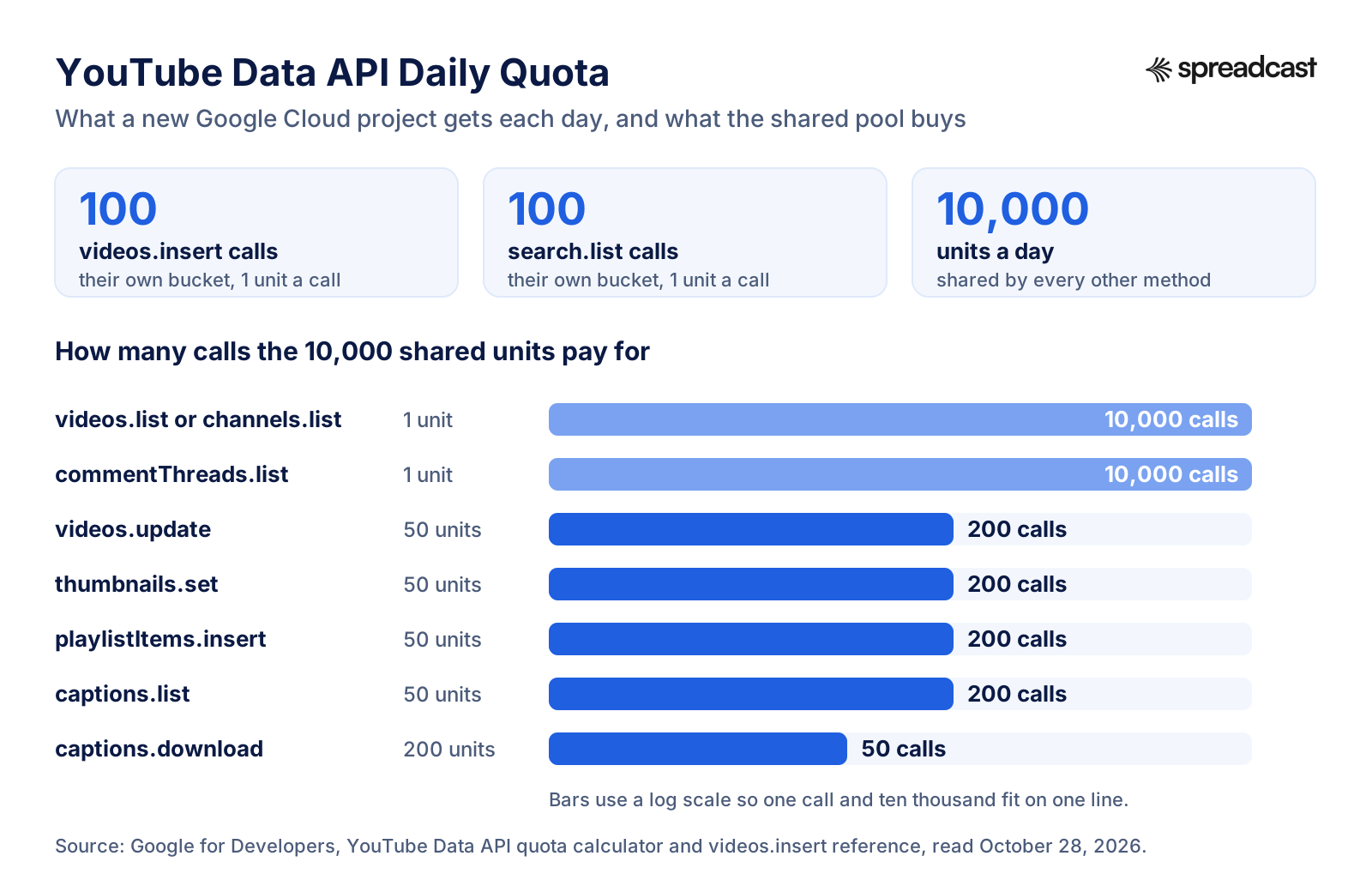
Since June 2026 uploads and searches each have their own daily allowance, and everything else shares one pool of 10,000 units. Here is how far that pool goes.
YouTube API Quota: What 100 Uploads a Day Really Means
If you read an older guide to the YouTube API, you will be told that an upload costs 1,600 units and that a new project can upload about six videos a day. That was true for years and is no longer. The revision history records two changes. On December 4, 2025 Google cut the cost of an upload from about 1,600 units to about 100. Then on June 1, 2026 it moved to what it calls a granular quota system, starting with videos.insert and search.list, which now draw on their own buckets while every other method stays in the old pool.
The result, in the words of Google's quota and compliance audit guide, is a default allocation of 100 search.list calls, 100 videos.insert calls and 10,000 units a day for all other endpoints. For one person with a self hosted server, 100 uploads a day is more than any channel needs. The pool of 10,000 is where a careless server can hurt you: a thumbnail costs 50 units, adding the video to a playlist 50, updating its title 50. An assistant that uploads, then fixes the title three times, then sets a thumbnail, has spent 200 units on one video. Still fine, but not free.
The picture changes for a hosted service. One Google project serves every customer, so its 100 uploads a day are shared by everyone who posts through it. A serious service has to ask Google for more, and Google only gives more after an audit. When you compare hosted YouTube MCP servers, it is fair to ask what happens on a busy day. Spreadcast's answer is in its error messages: if YouTube says the day's allowance is used up, Spreadcast tells you so in plain words and the post can go out the next day, rather than failing silently.
How do you get more quota for your own project? Google's audit guide says you must first complete an audit showing the project complies with the YouTube API Services Terms of Service, by filling in the Audit and Quota Extension Form, after which a member of YouTube's API team contacts you. Projects that passed an audit within the last 12 months use the same form to ask for more. Google's guide lists no paid tier for extra quota.
Do Unverified Apps Still Upload as Private?
This is the question that sinks most first attempts, and the honest answer on October 28, 2026 is that Google's own pages disagree with each other. Start with the history. A revision history entry dated July 28, 2020 says all videos uploaded through videos.insert from unverified API projects created after that date are restricted to private viewing, that lifting the restriction takes an audit, and that creators who upload through an unverified client get an email saying their video is locked as private. Nearly every GitHub README and tutorial written since repeats that rule, and so did our own code comments until we checked.
Now read the current videos.insert reference or the videos resource. Under the privacy status field, both say that if you set nothing the video defaults to public, that some uploads may default to private based on creator account settings, and then, in plain words, that videos uploaded from unverified API projects are not restricted to private viewing mode. The 2020 entry has not been withdrawn, and the revision history has no entry announcing the reversal.
What should you do with that? If you run your own uploader, do not take either page on trust. Upload one short test video as unlisted, then open YouTube Studio and look at its visibility and any notice on it. If it is locked, you will see it. If it is not, you have saved yourself an audit. Either way, the audit is still how you get more than the default quota, so a project that plans to serve other people will end up talking to YouTube's API team anyway.
Separately, YouTube itself may keep some uploads private regardless of the API. YouTube Help on Shorts notes, for example, that the default visibility for creators aged 13 to 17 is private. If a video you asked for as public lands as private, check the channel's own settings before blaming the server.
Google OAuth Verification and the YouTube API Audit Are Two Different Reviews
People often mix up two separate Google reviews, and a YouTube MCP server you run for anyone but yourself meets both. The first is Google's OAuth app verification, which decides who may sign in to your app at all. The second is YouTube's API compliance audit, which decides how much quota you get. They have different forms, different teams and different timelines.
Start with sign in. Every Google Cloud project's OAuth app has a publishing status. The Google Auth Platform page on managing an app's audience says a project in Testing is limited to up to 100 test users listed on the consent screen, and Google shows each of them a warning before they grant access. Google's OAuth 2.0 overview adds the catch that bites MCP users: a project with an external user type and a Testing status is issued refresh tokens that expire in 7 days, unless it only asks for name, email and profile. YouTube upload is not one of those, so a personal uploader left in Testing signs you out every week.
To leave Testing for a scope like youtube.upload, Google wants verification. Its sensitive scope verification guide asks for a public home page that explains the app, a privacy policy on the same domain linked from the consent screen, verified domain ownership, a written reason for each scope and why a narrower one will not do, and a demo video uploaded to YouTube as unlisted that shows the whole sign in flow in English, the app name on the consent screen and the OAuth client ID in the browser's address bar. The guide says the review typically takes 3 to 5 business days. For a hobby server, most people stay in Testing and live with the weekly sign in.
The YouTube audit is the second gate. It is not about sign in at all: it reviews how your client uses YouTube data against the developer policies, and it is the only route to more than the default quota. Those policies carry rules a do it yourself server rarely thinks about, such as deleting stored YouTube data within 30 calendar days once a user's authorization cannot be refreshed, refreshing other stored data at least every 30 days, and letting users set a title on every upload with the full 100 characters YouTube allows.
If reading those four paragraphs made you tired, that is the fair reaction, and it is the honest case for a hosted server. With Spreadcast, you connect your channel once with Google's normal sign in inside Spreadcast. The Google Cloud project, the consent screen, the verification paperwork, the weekly token problem and the quota conversation are Spreadcast's job, and the token never reaches your assistant or your laptop. The setup for each assistant is on the MCP page.
How to Set Up a YouTube MCP Server From GitHub
These steps follow Google's getting started guide, the Google Auth Platform pages above and the README of anwerj's YouTube uploader, read October 28, 2026. Other upload servers differ mainly in the last three steps.
- Step 1
Create a Google Cloud Project
Sign in to the Google Cloud console with the Google account that owns or manages your channel, open the project menu and create a new project. Give it a plain name you will recognise later, such as YouTube uploader.
- Step 2
Enable YouTube Data API v3
With the project selected, open the API library, search for YouTube Data API v3 and click Enable. Without this step every call fails, however good the server is.
- Step 3
Configure the OAuth Consent Screen
Choose External as the user type, enter an app name and a support email, and save. You do not need to submit anything for review if only you will use it. The app stays in Testing.
- Step 4
Add Yourself as a Test User
Open the Audience page of the Google Auth Platform and add the Google account that holds the channel under Test users. Only listed accounts can sign in while the app is in Testing, up to 100 of them.
- Step 5
Create an OAuth Client and Download the JSON
Under Credentials, create an OAuth client ID. The anwerj README asks for the desktop app type. Download the client_secret.json file and keep it somewhere safe and outside any project you commit to git.
- Step 6
Add the Server to Your Assistant
Download the server's release for your system, then add it to Claude Desktop's config file with the path to the program and the path to client_secret.json. The project's install script can edit the Claude Desktop config for you, but read the script before you run it.
- Step 7
Sign In and Test With an Unlisted Upload
Ask the assistant to run the server's authenticate tool, open the link, pick your channel, click past Google's unverified app warning and approve. Then upload a short test video as unlisted, open YouTube Studio and confirm its visibility before you trust it with a real post.
- Step 8
Plan for the Weekly Sign In
While the app is in Testing, the refresh token dies after 7 days. Put a reminder on your calendar to sign in again, or go through Google's verification if you need it to last.
Video: Configuring OAuth in Google Cloud
Google's own walkthrough of the consent screen settings. It is filmed for Workspace add ons, but the screen is the same one a self hosted YouTube MCP server needs.

YouTube Shorts Through an MCP Server
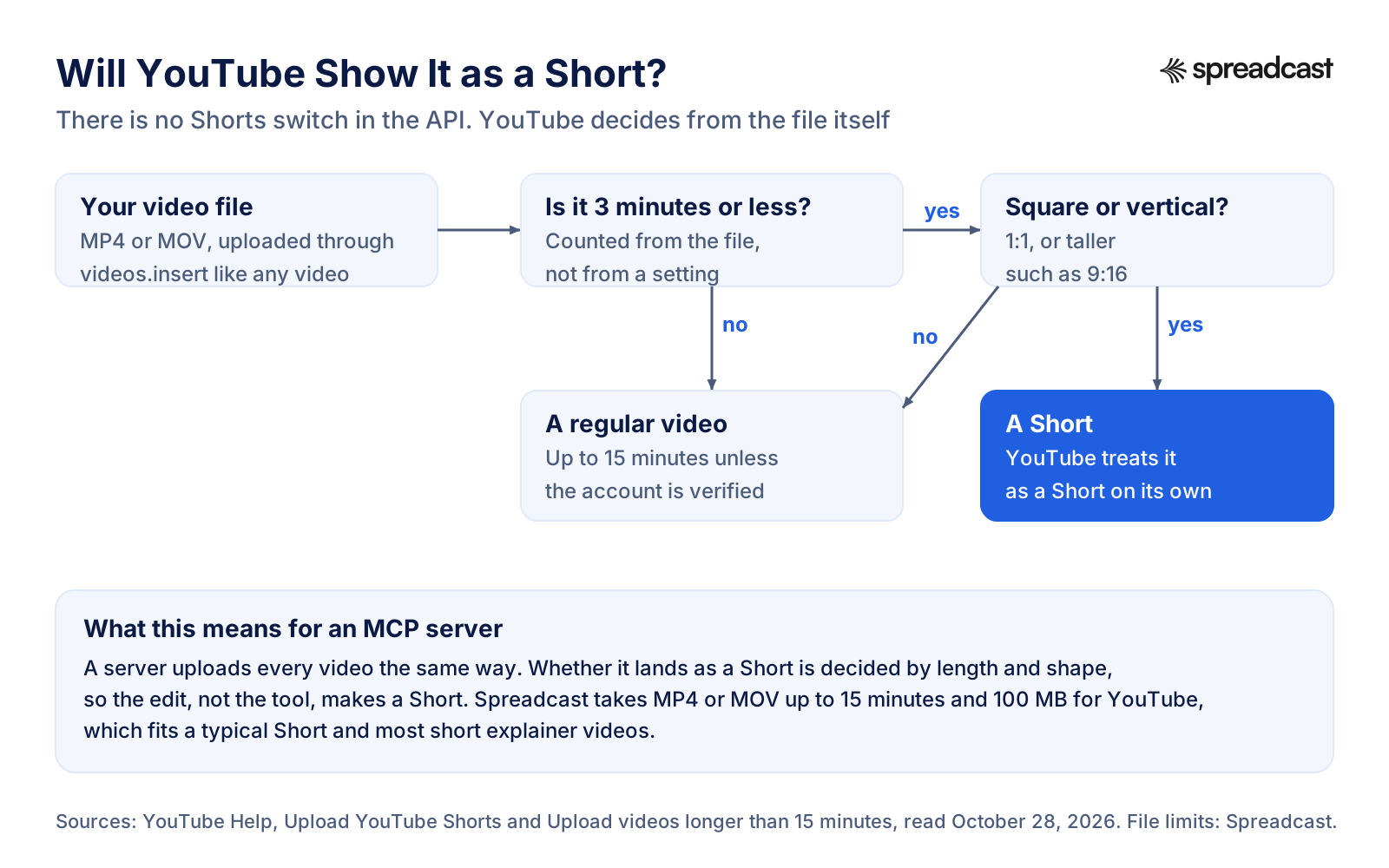
Most people who want an assistant to post to YouTube want Shorts, and here is the part almost every listing gets vague about: there is no Shorts switch. The videos resource has no field for it, and the videos.insert reference does not mention Shorts at all. A Short is uploaded exactly like any other video. YouTube decides what it is from the file.
YouTube Help on uploading Shorts gives the rule: a video of up to 3 minutes with a square or vertical aspect ratio. Anything longer, or wider than square, is a regular video. So when a hosted service says it can post Shorts, what it means is that it uploads your vertical video and YouTube takes it from there. That is not a criticism. It is simply where the work sits: in the edit. A 9:16 export of 2 minutes 50 seconds becomes a Short through any server on this page. A 16:9 clip of 40 seconds never will.
Length has a second ceiling. YouTube Help on longer videos says that by default an account can upload videos up to 15 minutes long, and verified accounts can upload longer ones. Verification is done once in the YouTube app or YouTube Studio, not through any API. If your assistant tries to upload a 22 minute tutorial from an unverified channel, expect a refusal that no server can fix for you.
Two habits make Shorts uploads through an assistant go smoothly. First, give the assistant the length and the shape of the file when you ask for the post, so it writes for a Short: a short title that reads well under the video, a one or two line description, and no chapter timestamps. Second, keep the made for kids answer in mind. Every upload must say whether it is made for kids, and that is a legal question, not a style one, as the next section explains.
Will YouTube Show It as a Short?
The whole decision, as YouTube describes it. No server can change any box on this chart.
Video: Longer Shorts Explained by YouTube
YouTube's own Creator Insider team on the move to Shorts of up to three minutes, the rule that decides what an MCP server's upload becomes.

Made for Kids, Privacy and the Other Settings an Upload Must Carry
Every YouTube upload answers a few questions, and an assistant should never guess them. The most serious is made for kids. YouTube Help on made for kids content says YouTube requires every creator, wherever they live, to say whether their videos are made for kids, under an agreement with the US Federal Trade Commission and to help comply with the Children's Online Privacy Protection Act, and that setting it wrongly can have consequences on YouTube or under the law. In the API the field is called selfDeclaredMadeForKids. A good server asks you once and stores the answer, rather than letting a model decide per video.
Privacy is the next one: public, unlisted or private. Public is what most people want for a scheduled post. Unlisted is the right choice for a first test, a video you want to send to a few people, or a video you will embed on a landing page. Private is the only state from which YouTube's own scheduled publishing works, which matters in the next section.
Then there is the category, which YouTube uses to understand the video. The API takes a number: 22 is People and Blogs, the category Google's own upload samples use. Tags, the language, the license and whether others may embed the video are optional. Since October 2024 there is also a field for content that is altered or synthetic in a way viewers could mistake for real. If your video uses realistic generated footage, that is a setting to answer honestly, and again not one to leave to a model.
If you post for an app or a small brand, the sensible defaults are public, not made for kids, People and Blogs, and a title written for the video rather than reused from Instagram. Those are exactly the defaults Spreadcast uses, which also means Spreadcast is the wrong tool for a channel whose videos are made for kids: it marks every upload as not made for kids, and you would have to change that in YouTube Studio by hand.
Scheduling YouTube Uploads From Claude: Two Ways It Works
There are two honest ways for a YouTube MCP server to schedule a video, and they behave differently in ways you will notice.
The first uses YouTube's own scheduler. The videos resource has a publishAt field that holds the date and time a video goes public. It can only be set while the video is private and has never been published, and a time in the past publishes it at once. A server using this route uploads the file now, as private, with a publish time, and YouTube flips it to public on schedule. anwerj's uploader works this way. The upside is that the video is processed long before it goes live, and you can see it waiting in YouTube Studio. The downside is that every change after the upload, a new title or a new thumbnail, is an edit that costs quota.
The second keeps the file until the time comes. The server stores the post and its video, and uploads it as public at the scheduled minute. Hosted services mostly work this way, Spreadcast included. The upside is that you can edit the title, description and even swap the video right up to the minute, and the same calendar holds your Instagram, TikTok and LinkedIn posts. The downside is that YouTube processes the video after it goes up, so the highest quality versions can appear a little after publishing.
Either route needs something running at the scheduled time, which is the quiet trap with local servers. A server your assistant only starts while a chat is open cannot upload at 9 tomorrow if your laptop is asleep. That is fine with publishAt, because YouTube does the waiting. It is not fine with a local queue. For the bigger picture of scheduling from an assistant, read how to schedule social media posts with Claude.
Hosted YouTube MCP Servers: Blotato, Upload Post and Buffer
If you already pay for a posting service, check its server before setting up a Google project. Blotato's YouTube MCP page gives a hosted address at mcp.blotato.com, says no developer app is needed, and states that 18 of its server's 35 tools reach YouTube, covering publishing videos and Shorts, scheduling and post analytics, but not comments or direct messages. It prices Blotato from $29 a month flat for 20 connected accounts, and notes that API and MCP access is not part of the 7 day trial: creating a key starts the paid Starter plan. Our Blotato review covers the rest of the product.
Upload Post's MCP guide lists YouTube options that map to the API one to one: a custom thumbnail link, tags, a category ID, public, unlisted or private status, playlists, whether the video may be embedded and the license, plus a scheduled date with a time zone. A title is required for YouTube posts. It is the most complete hosted option for YouTube metadata we found, and it is built for people who already have the video and want every field.
Buffer's MCP guide lists YouTube among the networks its create post tool works for, and says a YouTube post needs a video plus a title and category. Buffer charges per channel: its pricing page shows a free plan for up to 3 channels with 10 scheduled posts per channel, and Essentials at $5 a month per channel billed yearly. Our Buffer MCP server review goes through its tools.
Glama's YouTube page lists more servers, most of them readers and research tools, and a handful of multi network posting services. What the hosted publishers share is that each one sends the video you bring with the words you write. They differ in price, in how many fields they expose, and in whether they help you write the post for each network.
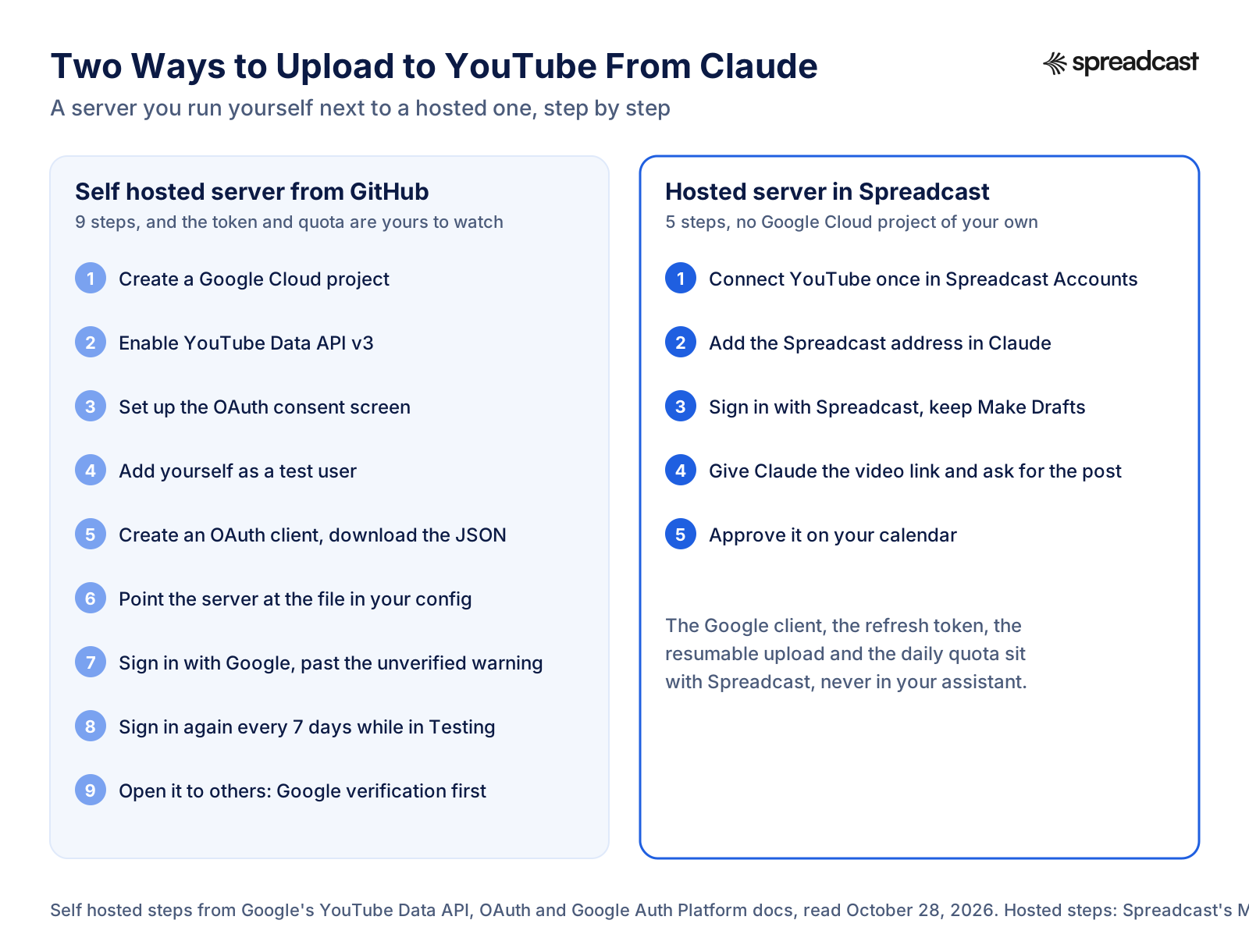
Two Ways to Upload to YouTube From Claude
The setup gap between a server you run and a hosted one, step by step.
What to Check Before You Connect a YouTube MCP Server
Ten minutes of checks that apply to any server, ours included. You can answer each one from the README, the docs or the first screen.
- Step 1
It Uses the YouTube Data API
An upload server should name the YouTube Data API and the OAuth scope it asks for, ideally youtube.upload and nothing broader. A server that wants your Google password, or drives a browser to click through YouTube Studio, gets far more than it needs. Stop there.
- Step 2
You Know Where the Token Lives
With a local server the refresh token sits in a file on your computer, and anyone who gets that file can upload to your channel. With a hosted server it sits with the company. Know which, and know how to revoke it in your Google account's security settings.
- Step 3
It Uploads in Resumable Chunks
Look for resumable uploads. A server that sends the whole file in one request fails on large videos and slow connections, and may leave a half uploaded video behind.
- Step 4
It Asks About Made for Kids
The made for kids answer is a legal declaration. A good server asks you once or exposes the setting plainly, and never leaves it to the model's guess.
- Step 5
New Uploads Start Unlisted or as Drafts
An assistant can misread a request, and a public video gets views from the first minute. Prefer a server where your first uploads are unlisted, or where a post waits for your approval before anything reaches YouTube.
- Step 6
It Explains Quota Errors
Ask what happens when the day's upload allowance is gone. You want a clear message and a retry tomorrow, not a loop that burns the rest of the quota retrying.
- Step 7
Someone Maintains It
Google changed the upload cost in December 2025 and the quota system in June 2026. Check the last commit date, or that a company with a support address stands behind it.
How Spreadcast's YouTube MCP Server Works
Spreadcast is a remote MCP server at spreadcast.app/api/mcp, starting with https, built for people who market an app or a small business. You add that address to Claude or ChatGPT once and sign in with your Spreadcast account. There is no key to copy for those two. Claude Code and Cursor can use a key made in Settings, AI Assistants, or sign in the same way through the browser.
Your YouTube channel connects to Spreadcast itself, in Accounts, through Google's normal sign in, never to the assistant. Spreadcast asks Google for two permissions: uploading videos, and reading which channel you connected. Google lets you untick each one on its consent page, so if the upload permission is missing Spreadcast says so instead of failing later. If the Google account has no YouTube channel yet, it tells you to create one first. You never create a Google Cloud project, configure a consent screen, add test users or download a client secret file. Refreshing the hourly Google token before each upload is Spreadcast's job.
When you connect an assistant, a consent screen asks what it may do: Make Drafts or Make and Publish. Make Drafts is the default. With it the assistant can write titles and captions, attach your video and put drafts on your calendar, and nothing reaches YouTube until you approve it in Spreadcast. Scheduling and publishing also need a paid plan. Each connection shows in Settings, AI Assistants, and removing it there stops it at once.
YouTube only takes video, so a YouTube post through Spreadcast always starts with a video you bring. Through the MCP server the assistant hands Spreadcast a public link to the file, from a Canva export, cloud storage or a CDN, and Spreadcast saves its own copy. MP4 and MOV are accepted, up to 100 MB and 15 minutes for YouTube, which is YouTube's own default length for channels that have not verified. A post with only pictures cannot go to YouTube, and Spreadcast's check says so before anything is saved, so you either add a video or leave YouTube off that draft.
When the time comes, Spreadcast uploads the video with YouTube's resumable upload, reading it from storage in parts of 8 MB so a large file never sits in memory whole. It sets the title, trimmed to YouTube's 100 characters, and the description, trimmed to 5,000 bytes, and swaps any angle brackets for lookalike characters YouTube accepts. It asks for public visibility, the People and Blogs category, and not made for kids. A vertical or square video of 3 minutes or less becomes a Short on YouTube's side, with nothing extra to ask for. Spreadcast then saves the link to the live video.
YouTube Through Spreadcast Next to the YouTube Data API
What Google's API allows, from the videos.insert reference and videos resource, next to what Spreadcast does with it today.
| Format or setting | YouTube Data API | Spreadcast through MCP |
|---|---|---|
| Video upload | Any video type, up to 256 GB | Yes. MP4 or MOV from a public link, up to 100 MB and 15 minutes |
| Shorts | No field. Decided by length and shape | Yes, the same way: a vertical or square video of 3 minutes or less |
| Title and description | 100 characters and 5,000 bytes | Yes, written for YouTube by the caption writer, checked and trimmed |
| Privacy | Public, unlisted or private | Public only |
| Made for kids | Your declaration on every upload | Always not made for kids |
| Scheduling | publishAt on a private video | Yes, Spreadcast keeps the post and uploads it at the time you picked, on a paid plan |
| Drafts waiting for approval | Not part of the API | Yes, the default for every new connection |
| Thumbnails, playlists, tags, caption files | Yes, each a separate call | No |
| Picture posts or carousels | Not possible on YouTube | No, though the same draft can carry them to other networks |
| Views, likes and comment counts | Yes, 1 unit for 50 videos | Yes, read daily into Analytics |
Checked against Spreadcast's YouTube publishing code and Google's pages on October 28, 2026.
What Spreadcast Does Not Do on YouTube
Spreadcast does less on YouTube than the API allows, on purpose, and you should know where the edges are before you pick it.
It does not make videos. Spreadcast designs single image posts and carousels in your brand for the networks that take them, but YouTube takes only video, so on YouTube it is the poster and the writer, not the editor. You cut the video in your phone's editor, CapCut, Final Cut or Canva, export it, and hand it over. The MCP server does not edit video either.
It does not set a custom thumbnail, add the video to a playlist, upload subtitle files, add tags or set a premiere. Every upload goes out public and marked not made for kids, so a children's channel, or anyone who needs unlisted uploads by default, is better served by a server that exposes those fields, such as anwerj's uploader or Upload Post. It does not read or answer comments.
What it does do is the part most people find tedious: it writes the YouTube title and description for the video, writes a different caption for each of your other networks, checks every limit before anything is saved, keeps the post on one calendar with the rest of your week, and reports views, likes and comments per video afterwards, with subscribers counted as followers. If that is the work you want off your plate, it fits. If you want every YouTube field from a chat, use a server built for that and keep Spreadcast for the rest.
How to Upload to YouTube From Claude With an MCP Server
These steps use Spreadcast and follow Anthropic's guide to custom connectors, read October 28, 2026. With another hosted server, the Claude part is the same and only the address changes.
- Step 1
Connect YouTube in Spreadcast
Start at spreadcast.app/start with your App Store link, your website or a line about your brand. Then open Accounts, choose YouTube, sign in with the Google account that holds the channel, pick the channel and allow both permissions.
- Step 2
Add the Connector in Claude
In Claude, open Customize, then Connectors, click the plus Add button and choose Add custom connector. Name it Spreadcast, paste spreadcast.app/api/mcp with https in front, click Continue and then Add. On Team and Enterprise an Owner adds it for the organization first, and members then click Connect.
- Step 3
Sign In and Choose Make Drafts
Claude opens Spreadcast. Log in, keep Make Drafts for your first week and allow access. You can connect again later with Make and Publish if you want Claude to publish after asking you.
- Step 4
Give Claude the Video and Ask for the Post
In a chat, switch the Spreadcast connector on, paste a public link to your exported MP4 and type something like "Write a YouTube title and description for this Short, plus captions for TikTok and Instagram, and save it as a draft for Thursday at 9 in the morning." Approve the Spreadcast tools when Claude asks.
- Step 5
Approve It in Spreadcast
Open the Spreadcast calendar, watch the video, read the title, change what you want and approve. Spreadcast uploads it to YouTube at the time you picked and saves the link.
Video: How Connectors Work in Claude
Anthropic's walkthrough of connectors. Menu names may have moved since it was recorded, so follow the steps above where they differ.
YouTube MCP Server URL: Local Command or Hosted Address
People search for a YouTube MCP server URL because the Claude and ChatGPT connector screens ask for one, and GitHub READMEs do not give one. The reason is simple. A server from GitHub usually runs on your own computer, started by your assistant with a command, and talks to it over the computer's standard input and output. It has no web address. Claude Desktop and Claude Code can run such a server. Claude on the web, Claude's mobile apps and ChatGPT cannot, because they reach servers from the internet.
A hosted server is the opposite: it lives at a public address, and that address is what you paste. Blotato's is on mcp.blotato.com, and Spreadcast's is spreadcast.app/api/mcp with https in front. Anthropic's connector guide also notes that a custom connector must be reachable from Anthropic's cloud, so a server on your laptop cannot be added as a connector unless you put it behind a public tunnel, which brings its own security questions.
So the practical rule: if you want YouTube from the Claude app on your phone, or from ChatGPT, you need a hosted address. If you live in Claude Code or Claude Desktop and are happy to run your own, a local command is fine.
Which Claude Plans Can Use a YouTube MCP Connector
Every Claude plan can add one. Anthropic's connector guide says custom connectors using remote MCP are available on Claude, Cowork and Claude Desktop for Free, Pro, Max, Team and Enterprise plans, with Free users limited to one custom connector. One is enough for a hosted YouTube server. On Team and Enterprise, an Owner adds the connector for the organization, and members find it in Customize, then Connectors, and click Connect.
The same guide carries warnings worth reading before you connect anything that uploads. Anthropic does not verify custom connectors, and Claude can take actions in the connected service. A malicious server could hide instructions in what it returns, so read what tools receive and send, and choose Allow always only for tools you trust. For a YouTube server, the practical rule is to let read tools run freely and keep anything that uploads behind a confirmation. With Spreadcast that confirmation is built in, because a Make Drafts connection cannot publish at all.
YouTube MCP in Claude Code and Cursor
Claude Code is where most developers first try a YouTube MCP server, because it runs local servers and reads config files. Claude Code's MCP docs show two ways to add a remote server. With a key, you run claude mcp add with the http transport, a name, the address and an Authorization header carrying the key as a Bearer token. Without a key, you add the address alone, type /mcp inside Claude Code and finish the sign in in your browser. A local server such as a transcript reader is added with the command that starts it instead of an address.
Pick the scope on purpose. Claude Code keeps servers local to one project, shared through a .mcp.json file in the repository, or available in all your projects. An upload server whose config points at your client_secret.json should never sit in a project file you commit. A transcript server, which holds no secret, is fine to share with a team that way.
Cursor's MCP docs put servers in .cursor/mcp.json inside a project, or in the same file in your home folder for every project. A remote server takes a URL and optional headers, and a header can read a key from an environment variable instead of holding it in the file. Cursor also signs in with OAuth for servers that support it.
Why upload to YouTube from a coding tool at all? Because it can read the project while it writes. Ask Claude Code to read the changelog for version 3.2, look at the screen recording you exported to the repository's assets folder, and write the YouTube title and description for the Short that shows the new feature. It works from the real change, not your summary. For the wider workflow, read Claude Code for social media.
YouTube MCP for ChatGPT: How to Connect It
These steps follow OpenAI's developer guide to connecting a server in ChatGPT, read October 28, 2026. ChatGPT reaches remote servers only, so a GitHub server on your laptop needs a public endpoint or OpenAI's tunnel first.
- Step 1
Open Plugins in ChatGPT
In ChatGPT on the web, open Plugins, select the plus button and choose Add custom MCP server. OpenAI's guide says account and workspace policies apply, so if the option is missing, your plan or your role does not allow it and a workspace admin has to add it.
- Step 2
Enter the Server
Give it a name such as Spreadcast and a short description. Under Connection, choose a public endpoint and enter the address with its path, for Spreadcast spreadcast.app/api/mcp with https in front.
- Step 3
Set Authentication and Accept the Warning
Choose OAuth for a hosted server that signs you in. Read the risk warning, select I understand and want to continue, then Create as a plugin. ChatGPT lists the tools it found.
- Step 4
Sign In With Spreadcast
ChatGPT sends you to Spreadcast. Log in, pick Make Drafts or Make and Publish, and allow access.
- Step 5
Ask for the YouTube Post
Start a chat, pick Spreadcast for the message, paste the link to your video and ask for the post. ChatGPT may ask you to confirm before it saves a draft, which then waits in your Spreadcast calendar.
Claude YouTube Integration and Automation Without MCP
People also search for a Claude YouTube integration or Claude YouTube automation, meaning some way to have Claude run a channel without an MCP server. Here is what exists. Claude can write a title, description and script in a normal chat, and it can help you write code that calls the YouTube Data API. Publishing needs something that holds a YouTube permission: an MCP server, or your own code running somewhere with a refresh token.
The do it yourself route is a script, not Claude itself. Google's videos.insert reference carries sample code in several languages, and Claude Code can adapt it for you in a few minutes. You still create the Google Cloud project and the OAuth client from the steps above, keep the refresh token alive past the 7 day Testing limit, and schedule the script with cron or a workflow tool. The n8n social media automation guide shows the workflow version of the same idea.
Automation that runs without you is where care matters most on YouTube. A loop that retries a failed upload can burn the day's quota, and a model that writes titles unattended will one day write a bad one in public. The setups that hold up keep a human approval between the draft and the upload, which is why Spreadcast saves drafts by default. If you want an assistant that runs your posting week end to end with that approval step, see the AI agent for social media page, and for the skills worth installing in Claude, Claude skills for social media.
Claude YouTube Prompts That Work With an MCP Server
Prompts we use with a YouTube MCP server attached. They work in Claude and ChatGPT alike. Each one says what the video is, how long it runs and what should happen to the result, which keeps the assistant from guessing.
A Short From a Screen Recording
"Here is a link to a 48 second vertical screen recording of our new budget sharing feature. Write a YouTube title under 60 characters and a two line description with the App Store link. Save it as a draft for Thursday at 9 in the morning my time."
One Video, Four Networks
"Use this video for YouTube, TikTok, Instagram and LinkedIn. Write a YouTube title and description, a short TikTok caption with three hashtags, an Instagram caption with four, and a LinkedIn post of three sentences. One draft, each network its own text."
Titles to Choose From
"Watch this video and give me five YouTube titles under 70 characters. Plain words people would search, no clickbait, no capital letters for emphasis. Do not save anything yet."
A Description With Chapters
"This tutorial runs 11 minutes. Read its transcript and write a YouTube description: two sentences on what it covers, then chapter timestamps for each step, then the link to our site. Keep it under 5,000 bytes."
A Week of Shorts
"I have five Shorts in this folder, linked below. Write a title and description for each and spread them over next week, one a day at 6 in the evening. Drafts only, then show me the list."
Check Before You Schedule
"Run the dry run on this draft for YouTube, TikTok and Instagram and tell me which network would refuse it and why. Do not save anything."
Monthly YouTube Report
"Read my YouTube analytics for October. Tell me subscriber change, my three videos with the most views and what they have in common, in five lines."
Summarise Before You Reply
"Use the transcript server to read this competitor's latest video and list the three claims they make about pricing. Then draft a Short script that answers them honestly. Do not post anything."
Where the Video Comes From, and Where Spreadcast Helps
The prompts above get you good YouTube text from any server. The video is where most plans stall, and no MCP server fixes that: someone has to record and cut it. For app makers, the cheapest honest source is a screen recording of the app doing one thing well, cut to under a minute, exported vertical. A shorter cut of the same recording can serve as an App Store preview, as our guide to the App Store app preview video explains, and as a TikTok, which how to promote an app on TikTok covers.
What Spreadcast takes off your plate is everything after the export. You give it the file once. It writes the YouTube title and description in your brand's voice, writes shorter captions for TikTok and Instagram and a longer post for LinkedIn, designs a matching picture post in your brand for the networks that want one, checks each network's limits and puts the week on one calendar. If you want a picture post for the same news on Instagram, Threads and Bluesky, it designs that too, from your brand kit and, for an app, real screenshots in an iPhone frame. See features for the full list.
Example: A Week of YouTube Shorts From One Claude Chat
This example uses an invented budgeting app called Tally, on Spreadcast Pro with YouTube, TikTok and Instagram connected and a Make Drafts connection in Claude. It shows the mechanics, not a customer result.
- Step 1
Alex Exports Three Shorts
On Sunday, Alex records three screen captures of Tally 4.1's shared budgets on an iPhone, trims each to under a minute in the Photos editor and uploads them to a cloud folder with public links.
- Step 2
Alex Asks Claude for the Week
Alex pastes the three links and types "Post these as YouTube Shorts on Monday, Wednesday and Friday at 6 in the evening, with the same videos on TikTok and Instagram. Also design one picture post about 4.1 for Instagram and Threads on Tuesday." Claude reads the Spreadcast account and sees the networks and a drafts only connection.
- Step 3
Claude Reads the Brand and the Rules
It reads Tally's brand kit and voice, lists moments and finds the 4.1 release notes, and reads the posting rules: YouTube needs a video and takes a 100 character title, TikTok wants short captions, Instagram takes 2,200 characters.
- Step 4
Claude Writes, Designs and Checks
It writes a YouTube title and two line description for each Short, a TikTok and an Instagram caption for each, and designs the Tuesday picture post with the shared budget screen in an iPhone frame. The dry run flags that the picture post cannot go to YouTube, which Alex expected. Four drafts land on the calendar.
- Step 5
Alex Approves on Monday Morning
Alex watches each video in Spreadcast, shortens one title, and approves all four. Spreadcast uploads each Short at 6 in the evening on its day. On Friday Alex asks Claude how the week went and gets views, likes and comments per video.
Common YouTube API Errors When an Assistant Uploads
Most failed YouTube uploads from an assistant come from a short list of reasons, all visible in Google's videos.insert reference and the OAuth overview. Knowing them helps you read an error in the chat whichever server you use.
Quota exceeded. The project has used its uploads or its 10,000 units for the day. Quota resets daily, so the fix is to wait, or for a heavy user, to ask Google for more through the audit form. A server should stop retrying the moment it sees this.
Upload limit exceeded. Different from quota: this is the channel, not the project, reaching how many videos YouTube lets it upload in a day. It usually means a loop went wrong. Wait a day.
No channel on the account. The Google account you signed in with has no YouTube channel. Open YouTube with that account, create the channel, then connect again.
Forbidden or insufficient permissions. The token lacks the upload scope, usually because the box was unticked on Google's consent page or the server asked for the wrong scope. Sign in again and approve every permission it asks for.
Invalid title or description. Over 100 characters in the title, over 5,000 bytes in the description, or an angle bracket in either. Models like to write arrows and tags. Strip them.
Invalid publish time. A publishAt on a video that is not private, or one that was already published. Upload as private with the time, or let the server keep the post and upload at the minute.
Signed out after a week. The classic self hosted failure: an app left in Testing gets refresh tokens that expire after 7 days. Sign in again, or put the app through Google's verification.
When a Different YouTube MCP Server Fits Better
Spreadcast is built for app makers and small brands who post the same news to several networks every week. If that is not you, or you need something it does not do, another server may fit better, and saying so is more useful than pretending otherwise.
If you only want to summarise and research videos, a transcript server such as jkawamoto's or kimtaeyoon83's is free and does exactly that. If you want channel and search data for creator research, ZubeidHendricks' server with an API key covers it. If you want every YouTube field from a chat on your own channel, with thumbnails, playlists, subtitles and YouTube's own scheduler, anwerj's uploader does it, and the Google setup is a one evening job.
If you already run a YouTube heavy posting operation and want every metadata field from a hosted address, Upload Post exposes the most. If you schedule everything in Buffer already, its server keeps you in one tool. For the marketing servers beyond social, such as ads and analytics, see the best MCP servers for marketing.
Pick Spreadcast when the video is the easy part and the posting week is the hard part: one video becoming a YouTube Short, a TikTok and an Instagram post, each with its own words, plus a designed picture post for the networks that want one, all on one calendar, waiting for your approval, and reported back afterwards.
Where Spreadcast Fits: Posting Shorts Every Week Without a Social Media Team
Here is a normal Shorts week by hand for a small team. You export the video, open YouTube Studio, upload, write a title, write a description, pick the audience, set the visibility and the schedule. Then you open TikTok and do it again with different words, then Instagram with a different caption and four hashtags, then LinkedIn with a paragraph. The video took an hour. The posting took another one, and on Wednesday nobody had that hour.
Here is the same week with Spreadcast. You drop the video links into Claude or ChatGPT, or into Create inside Spreadcast. Spreadcast writes the YouTube title and description, the TikTok and Instagram captions and the LinkedIn post, each in your brand's voice and inside each network's limit, and puts every post on the calendar. You watch, change a word and approve. When your app ships a new version, Spreadcast notices it on the App Store and designs a picture post for the networks that take pictures, ready for the same approval.
Before: a Google Cloud project if you wanted an assistant involved, plus four uploads and four rewrites by hand. After: one address in your assistant, YouTube connected once, a calendar of drafts to approve. Spreadcast publishes to Instagram, Facebook, Threads, LinkedIn, Pinterest, TikTok, YouTube, Bluesky, Mastodon, Telegram and Discord, so one video and one idea reach all of them. Start free at spreadcast.app/start, see what it does on features, and the setup for each assistant on the MCP page.
On price, compare it with a per channel scheduler that writes nothing: four networks on Buffer Essentials is $20 a month billed yearly before anyone writes a caption. Spreadcast Pro is $29 a month for designed posts with no cap, publishing to 10 social accounts across any mix of networks, and posting from Claude or ChatGPT. The full comparison is on the pricing page.
Spreadcast Plans for Posting to YouTube From an Assistant
The MCP server is part of every plan. What changes is whether the assistant can schedule and publish.
| Plan | Price | What you get for YouTube |
|---|---|---|
| Free | $0 | One app. The assistant can write and save drafts, and 3 designed posts download with a small Spreadcast mark. No publishing. |
| Pro | $29 a month or $290 a year | Clean posts with no cap, publishing to 10 social accounts across any mix of networks, autopilot or one tap approval, posting from Claude or ChatGPT. |
| Studio | $79 a month | Everything in Pro for 5 apps and 50 accounts, each with its own brand. |
| 30 Day Pass | $39 once | Everything in Pro for 30 days, with no subscription. |
| Post Pack | $19 once | 10 posts designed and published, with no subscription. |
Paid plans come with a 7 day full refund. Current details are on the pricing page.
YouTube MCP Servers for Other Networks
YouTube rarely runs alone. The same vertical video usually goes to TikTok and Instagram, and the same news to LinkedIn and Threads. Each network's server has its own catch: TikTok audits apps before public posting, Instagram needs a professional account, LinkedIn splits personal profiles from company pages, and Telegram posts through a bot.
We wrote the same guide for each: the TikTok MCP server, the Instagram MCP server, the Threads MCP server, the Facebook MCP server, the LinkedIn MCP server, the Pinterest MCP server and the Telegram MCP server. For how to measure what the videos do once they are up, the engagement rate calculator works for YouTube views as well as followers.
Frequently Asked Questions
Is there an official YouTube MCP server?
No. On October 28, 2026 Google's list of Google Cloud MCP servers has no YouTube entry, and we found no YouTube connector from Anthropic or Google for Claude. Every YouTube MCP server is built by someone else, either on Google's official YouTube Data API or by reading YouTube's public pages.
Can Claude upload videos to YouTube?
Yes, with an MCP server that can upload. Add a hosted server as a custom connector on any Claude plan, Free included with one connector, or add a GitHub uploader to Claude Desktop or Claude Code with your own Google Cloud project. With Spreadcast, Claude saves a draft you approve, and Spreadcast uploads it at the time you picked.
Can Claude watch or summarize YouTube videos?
With a transcript MCP server, Claude can read a video's captions and summarise them. It works from the words, not the picture, so a video with little speech or rough auto captions gives a thin summary.
How many videos can I upload a day with the YouTube API?
A new project gets 100 videos.insert calls a day in their own quota bucket, plus 10,000 units for all other methods, per Google's quota guide. More needs an audit through Google's Audit and Quota Extension Form.
Are videos uploaded through the API private until an audit?
Google's pages disagree. A July 2020 revision history entry says uploads from unverified projects are locked as private, while the current videos.insert reference says they are not. Test with one unlisted upload and check its status in YouTube Studio.
Can an MCP server post YouTube Shorts?
Yes, but there is no Shorts setting. YouTube treats a video of up to 3 minutes with a square or vertical shape as a Short, so any server that uploads that file posts a Short.
Why does my YouTube MCP server sign me out every week?
Google gives refresh tokens that expire in 7 days to apps with an external user type left in Testing, unless they only ask for basic profile scopes. Sign in again weekly, or put the app through Google's verification.
Is a YouTube MCP server free?
The GitHub servers are free and MIT licensed, and the default quota comes with any Google Cloud project; Google's quota guide lists no paid tier. You pay in setup time and weekly sign ins. Hosted services charge a subscription and carry the Google side for you.
Where These Facts Come From
Every outside number, rule and price on this page links to the page it was taken from.
- videos.insert referenceGoogle for Developers
- videos resource referenceGoogle for Developers
- YouTube Data API quota calculatorGoogle for Developers
- YouTube Data API revision historyGoogle for Developers
- Quota and compliance auditsGoogle for Developers
- Resumable uploads guideGoogle for Developers
- YouTube API Services developer policiesGoogle for Developers
- captions.download referenceGoogle for Developers
- YouTube Data API getting startedGoogle for Developers
- Upload YouTube ShortsYouTube Help
- Upload videos longer than 15 minutesYouTube Help
- Determining if your content is made for kidsYouTube Help
- YouTube Terms of ServiceYouTube
- Using OAuth 2.0 to access Google APIsGoogle for Developers
- Manage app audienceGoogle Cloud Help
- Sensitive scope verificationGoogle for Developers
- Google Cloud MCP servers supported productsGoogle Cloud
- YouTube transcript server by kimtaeyoon83GitHub
- YouTube transcript server by jkawamotoGitHub
- mcp youtube by anaisbettsGitHub
- YouTube MCP server by ZubeidHendricksGitHub
- YouTube uploader MCP by anwerjGitHub
- YouTube MCP servers directoryGlama
- YouTube MCP serverBlotato
- MCP server integration guideUpload Post
- Buffer MCP server guideBuffer Developers
- Buffer pricingBuffer
- Get started with custom connectors using remote MCPAnthropic Help Center
- Connect and test your plugin in ChatGPTOpenAI Developers
- Connect Claude Code to tools via MCPClaude Code Docs
- Model Context Protocol in CursorCursor Docs
- What is the Model Context ProtocolModel Context Protocol
- Video: How to configure OAuthGoogle Workspace Developers
- Video: Introducing longer ShortsCreator Insider
- Video: Getting started with connectors in ClaudeAnthropic
Researched and written by Spreadcast. Last checked on October 28, 2026.