What the Best MCP Servers for Marketing Do
The best MCP servers for marketing let an AI assistant such as Claude or ChatGPT work inside the tools you already pay for: read last month's traffic, pull keyword data, build an ad, design a post, log a lead or draft an email, all from one chat. MCP is the Model Context Protocol, which Anthropic released as an open standard in November 2024. The official MCP introduction describes it as a standard way to connect AI applications to outside systems. A vendor publishes a server, the server lists its tools, and your assistant calls those tools when your request needs them.
That is the theory. In practice, marketing teams run into a mess of directories that list hundreds of servers, most of them weekend projects that wrap someone else's API with a token you paste into a config file. This page only ranks servers the vendor runs or publishes itself, on its own domain or its own GitHub organization. If we could not find it on the vendor's site, it is not here.
Short answers first. Spreadcast is the pick for social publishing: it designs the post in your brand, writes a caption for each network and publishes after you approve. Meta's Ads MCP server is the most capable ads server and starts new ads paused. Google Analytics and Google Ads both have official open source servers that read your data and, apart from one optional Analytics annotation tool, change nothing. Amplitude covers product analytics for apps. Semrush and Ahrefs are the two SEO servers worth paying for. Canva designs. HubSpot reads and writes your CRM. Klaviyo reports on email and can create a campaign. TikTok for Business has an ads server with around 400 tools.
We make Spreadcast, and it is first for one reason: it is the only server in this set that publishes organic social posts. The others analyze, design, buy ads or manage contacts, which is useful, but none of them puts a designed post on Instagram, LinkedIn or Threads. If social media is the job you most want off your plate, start with Spreadcast's MCP server and add the others for the jobs around it. If you only want social tools, our roundup of social media MCP servers compares Buffer, Metricool, Hootsuite and seven others, and this page does not repeat them.
How We Researched This
On October 28, 2026 we opened each vendor's own MCP documentation, setup guide and pricing page, and wrote down what the server says it can read, what it can create or change, what can go live or spend money, how you sign in and what it costs. Where a page did not say something, we wrote not stated rather than guessing. Third party blogs and MCP directories were used only to find the official pages, never as the source of a fact.
We left out servers we could not trace to the vendor. Some popular names in marketing have community servers on GitHub but no first party server we could confirm on the vendor's site that day, so they are not ranked. Prices are monthly billing in US dollars before tax unless a line says otherwise. Ad platforms also bill what you spend on the ads themselves, which no MCP server changes.
Ranking: Spreadcast first for the reason above. The rest are ordered by how much a small marketing team can get done through the server on the day we checked, weighing what it can do, how hard it is to connect and what it costs. A read only server that takes an afternoon of Google Cloud setup ranks below a hosted server you add with one address, even if the data behind it is excellent.
Best MCP Servers for Marketing at a Glance
One row per server, in the order of the ranked list below. Can change things means the vendor documents tools that create or edit something in your account, not only read it.
| Server | Marketing job | Can change things | How you connect | Free option | Paid entry point |
|---|---|---|---|---|---|
| Spreadcast | Social posts: design, captions, scheduling, publishing | Yes: designs posts and carousels, saves drafts, publishes after approval | Sign in with Spreadcast in Claude and ChatGPT, or an API key | Free plan makes 3 posts to download | Pro at $29 a month with publishing to 10 social accounts |
| Meta Ads | Facebook and Instagram ads | Yes: campaigns, ad sets, ads, audiences; new items start paused | Hosted at mcp.facebook.com/ads, OAuth through Facebook Login for Business | No fee stated on Meta's MCP pages | You pay for ad spend |
| Google Analytics | Website and app analytics | No, read only (one optional annotation tool) | Open source server you run with Python and Google credentials | Yes, Google Analytics is free | None |
| Semrush | SEO, keyword and competitor data | No, read only | Hosted, OAuth or an API key; official app in Claude and ChatGPT | 7 day trial | Starter at $199 a month lists MCP access |
| HubSpot | CRM, leads, campaigns | Yes: CRM records and activities; marketing content is read only | Hosted at mcp.hubspot.com, OAuth 2.1; connectors for Claude, ChatGPT, Copilot, Gemini | Connector free on every tier, Marketing Hub Free is $0 | Free |
| Canva | Design | Yes: creates and edits designs, exports | Canva AI Connector in Claude and ChatGPT | Many tools on a free Canva account | Some tools need Canva Pro, Business or Enterprise |
| Ahrefs | SEO, backlinks, Search Console data | Not stated | Hosted at api.ahrefs.com/mcp/mcp, OAuth or an MCP key | No, Starter does not list MCP | Lite at $129 a month |
| Google Ads | Search and YouTube ads reporting | No, read only | Open source server, local or on Cloud Run with OAuth | Yes, open source | You pay for ad spend |
| Amplitude | Product analytics for apps | Yes: charts, dashboards, cohorts, experiments | Hosted, OAuth, US and EU addresses | Free plan with 2M events a month includes MCP | Plus, usage based |
| Klaviyo | Email and SMS | Yes: can create a campaign; a switch turns write tools off | Hosted at mcp.klaviyo.com/mcp, OAuth; listed connector in Claude and ChatGPT | Free plan up to 250 active profiles; MCP docs name roles, not plans | Not stated for MCP |
| TikTok for Business | TikTok ads | Yes: campaigns, targeting, budgets, pausing | Zero code setup per TikTok, details in a separate guide | Not stated | You pay for ad spend |
Read from each vendor's MCP documentation and pricing page on October 28, 2026. Sources are linked in each entry below.
What Marketing MCP Servers Cost
Most marketing MCP servers cost nothing on top of the product. The SEO tools are the exception, because the data is the product.
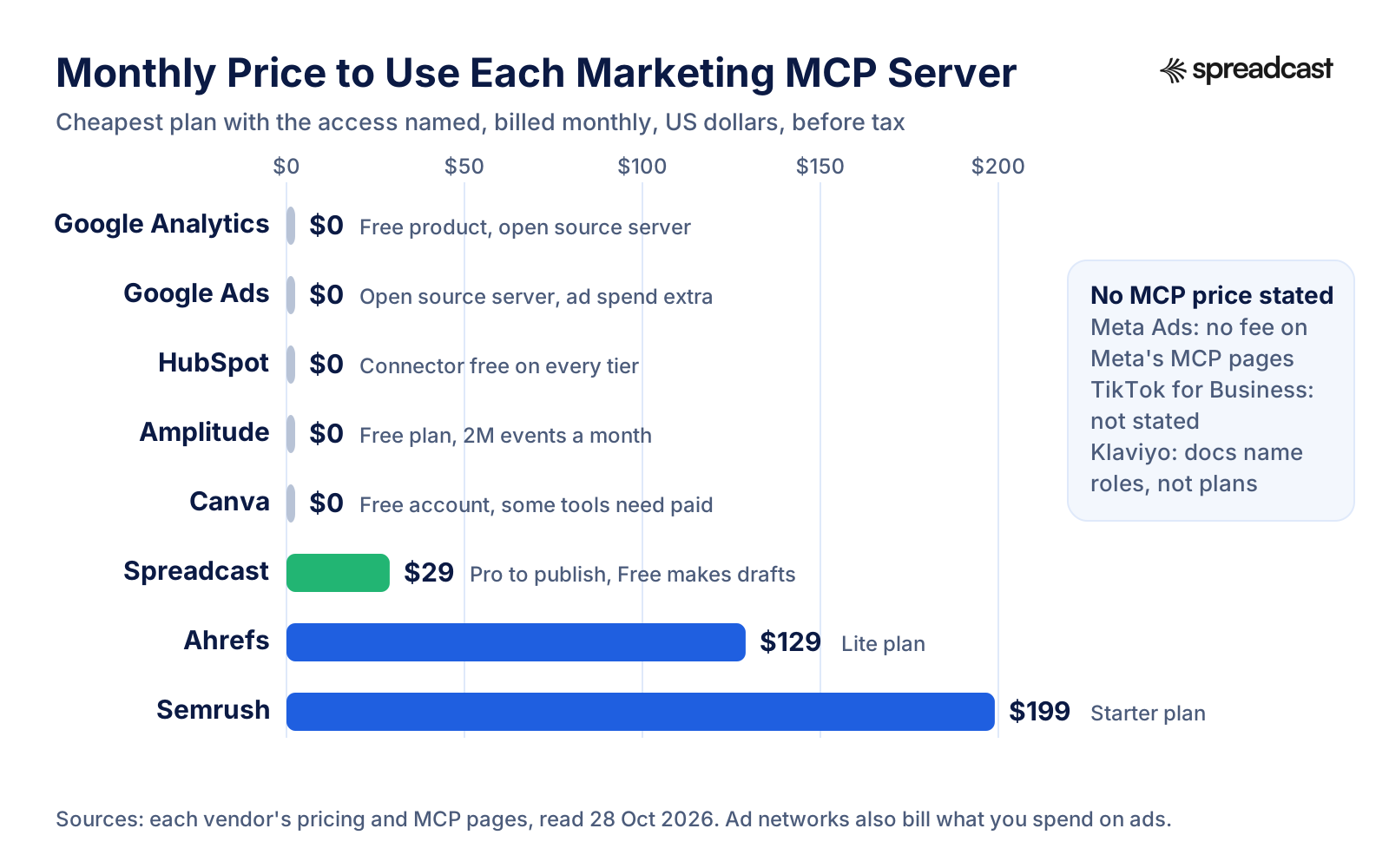
The 11 Best MCP Servers for Marketing, by Job
Spreadcast comes first because it is the only server here that publishes organic social posts, designed in your brand and approved by you. The ten after it are ranked by how much a small marketing team can do through them.
- 1
Spreadcast
Free plan makes 3 posts to download. Pro is $29 a month with publishing to 10 social accountsBest for social publishing: designs the post in your brand, writes captions per network and publishes after you approve
Spreadcast is marketing automation for social media, built first for App Store apps, and its MCP server lets Claude, ChatGPT, Claude Code, Cursor and other MCP clients run it from a chat. Ask for a post and the assistant designs the picture in your brand, with your colors, fonts, logo and a real screenshot of your app in an iPhone frame when your brand kit has one. Ask for a carousel and it designs the slides in one look. It then writes a caption for each network inside that network's limits, saves the post as a draft, and schedules or publishes it once you approve. Businesses without an app start from a website or a short description of the brand instead of an App Store link.
The server also reads what Spreadcast found on your App Store listing. Spreadcast checks the listing every day, and when a new version goes live or the app reaches a ratings milestone, it turns that moment into a post. Through MCP the assistant can list those moments, design the moment post, skip the ones you do not want, read your brand kit and posting rules, and pull analytics: followers and interactions per network, and likes, comments, reach and views per post. So one conversation can go from what happened this week to a designed post on Instagram, Facebook, Threads, LinkedIn, Pinterest, TikTok, YouTube, Bluesky, Mastodon, Telegram and Discord.
Safety is built in rather than bolted on. On the consent screen you choose whether a connection may only make drafts or may also publish. Approving a post is its own step, either in Spreadcast with one tap or through an approve tool when you granted publishing access, and the assistant is told to show you what will go out, where and when before it asks. Claude and ChatGPT connect with Sign in with Spreadcast at spreadcast.app/api/mcp, so there is no key to paste; Claude Code and Cursor can use an API key in a header. Every connection is listed in Settings and can be removed at once.
Pricing on the pricing page: Free is $0 for one app and makes 3 posts to download with a small Spreadcast mark, without publishing. Pro is $29 a month or $290 a year for clean posts with no cap, publishing to 10 social accounts across any mix of networks, autopilot or one tap approval and posting from Claude or ChatGPT. Studio is $79 a month for 5 apps and 50 accounts, each with its own brand. If you would rather not subscribe, a Post Pack is $19 once for 10 posts designed and published. The full tool list is on the Spreadcast MCP server page.
Pros
- The only server here that publishes organic social posts
- Designs posts and carousels in your brand, with real app screenshots
- A caption per network, inside each network's limits
- Drafts first, with approval as its own step
- Turns App Store releases and rating milestones into posts
- Sign in with Spreadcast in Claude and ChatGPT, no key to paste
- Posts to Telegram, Threads, Bluesky and Mastodon as well as the big networks
Cons
- Built for app makers first, so the automatic moments come from an App Store listing
- No ads, SEO or email tools: pair it with the servers below
- Publishing needs Pro or a Post Pack
- 2
Meta Ads
No fee stated on Meta's MCP pages. You pay for ad spendBest for paid social: create and manage Facebook and Instagram ads from chat, with new ads starting paused
Meta runs its own Ads MCP server at mcp.facebook.com/ads. Meta's overview calls it a Meta hosted server for managing Meta ads from an AI agent and groups its tools into seven areas: reporting, ad creation and management, catalogs, signals and datasets, help and troubleshooting, A/B tests and conversion lift studies, and activity logs. It works with any MCP client, and Meta's Business Help Center article names ChatGPT, Claude, Claude Code and Perplexity as supported agents, all using the same address.
The part that matters most is on Meta's ad creation and management page. Tools create campaigns, ad sets and ads in a paused state, and a separate activate tool switches them live, which starts spending budget. Meta says the AI client asks for confirmation before activation. The same page lists a tool that boosts an existing organic Instagram post, a search of the public Ad Library for competitor research, ad previews in Feed, Stories and Reels, and custom audience tools, including one that uploads hashed customer data and one that deletes an audience.
Meta's get started page says owning a Meta app is not required. The usual route is OAuth: your client sends you to Facebook Login for Business, you sign in and approve the permissions, and no token setup is needed. Developers can also use a user access token or an employee role system user token. The minimum permissions are ads_mcp_management plus ads_read or ads_management, with catalog, business, Pages and Instagram permissions adding more tools. The page gives a one line Claude Code command and a ChatGPT developer mode setup. The best safety feature is in Meta Business Suite, not in the chat: under Settings, Integrations, Ads MCP server, someone with full control of the business portfolio can allow or block actions per ad account, such as creating campaigns or editing budgets, and can block any budget above an amount you set. Meta says the server enforces those rules. Meta's pages we read do not mention a price. For organic Facebook posting, see our Facebook MCP server guide.
Pros
- Official and hosted by Meta
- Creates campaigns, ad sets and ads in a paused state
- Boosts an existing Instagram post
- Ad Library search for competitor creative
- No Meta app needed for the OAuth route
- Business Suite rules that block campaign creation or cap budgets
Cons
- Activating an ad spends real money, so read every confirmation
- Audience tools can upload hashed customer data and delete audiences
- Does not design the creative or publish organic posts
- 3
Google Analytics
Free. Google Analytics and the server cost nothingBest free analytics server: ask GA4 questions in plain words, read only
Google publishes the Google Analytics MCP server as open source in its googleanalytics GitHub organization, under the Apache 2.0 license. Google's developer page says it can answer questions about your data, such as user counts and top selling products, and help with data driven marketing plans, and that it is for read only requests and cannot change your Analytics settings.
The repository's README lists the tools: account summaries, property details, linked Google Ads accounts, property annotations, standard reports, funnel reports, custom dimensions and metrics, and realtime reports. One write tool exists, creating a property annotation, and it only appears when you start the server with a write flag and grant the edit scope. Everything else runs on the read only Analytics scope. The README still labels the project experimental.
Setup is the catch. It is a local Python server: you install pipx, enable the Analytics Admin and Data APIs in a Google Cloud project, create Application Default Credentials with the read only scope, and add the server to your client's config file. Google's page includes configuration for Antigravity and for Claude Desktop. If you have never touched Google Cloud, budget a quiet hour for the first setup rather than squeezing it between meetings. Google Analytics itself is free, and so is the server. If you mostly want to see how your social posts drive traffic, pair it with our campaign link generator so the sources are labeled before you ask.
Pros
- Official, open source and free
- Read only by default, on the read only Analytics scope
- Standard, funnel and realtime reports
- Shows which Google Ads accounts link to a property
Cons
- Runs locally, with Google Cloud credentials to set up
- No hosted address to paste into Claude or ChatGPT
- Still labeled experimental in the README
- 4
Semrush
MCP access listed from Starter at $199 a month, after a 7 day trialBest for SEO and competitor data inside Claude or ChatGPT, with a listed app in both
Semrush runs a hosted MCP server at mcp.semrush.com/v2/mcp. Semrush's developer docs say it exposes every SEO API method, every Trends API method your subscription covers, and read only methods from the Projects API, so an assistant can pull project data but cannot create projects or change settings. Semrush's knowledge base puts it plainly: the connection is read only, and your assistant can retrieve Semrush data but cannot modify or delete it.
Sign in is OAuth 2.1 by default, with an API key in a header as the fallback for clients without OAuth. The knowledge base says Semrush is an official app in ChatGPT, Claude and Perplexity, and the developer docs list Claude, Claude Code, ChatGPT, Cursor, VS Code, Microsoft Copilot, Perplexity, Lovable, Notion and Antigravity as supported clients.
Every query spends API units. The developer docs say the standard API route includes 50,000 units that refresh on your renewal date, with packages of 2, 5, 10 or 20 million units on higher plans, and that a Trends API plan includes MCP access. On Semrush's pricing page the Starter plan, $199 a month billed monthly or $165.17 billed yearly, lists MCP access; Pro+ is $299. The knowledge base's tip is worth following: ask for the top 50 keywords in one country, not all keywords everywhere, because an open ended question can spend far more units than you expect.
Pros
- Hosted, with OAuth and a listed app in Claude and ChatGPT
- SEO, Trends and Projects data in one server
- Read only, so nothing in your account changes
- Long list of supported clients
Cons
- $199 a month before you get MCP access
- Every question spends API units
- Traffic and market data need a Trends plan
- 5
HubSpot
Free. The connector is included on every HubSpot tierBest CRM server: read and write contacts, deals and tasks, free on every tier
HubSpot's remote MCP server at mcp.hubspot.com became generally available on April 13, 2026, per HubSpot's changelog. It reads and writes CRM records (contacts, companies, deals, tickets, line items and products) and activities such as calls, meetings, notes, tasks and emails, so an assistant can log a call, create a follow up task or draft an email. Marketing content, which covers campaigns, landing pages, blog posts, site pages and marketing events, is read only.
HubSpot's MCP page says access is controlled through a user level app and its scopes, that an admin connects first, and that custom sensitive data properties stay out of reach. Connections use OAuth 2.1 with PKCE. The remote server docs say HubSpot also offers ready connectors for Claude, ChatGPT, Microsoft Copilot and Gemini, built on the same server. HubSpot runs a second, separate Developer MCP server for people building apps with its CLI; marketers want the remote one.
HubSpot's Claude page says it is an official connector built by HubSpot, that it is free, and that all tiers get features such as leads, landing page creation, content analytics and conversations. HubSpot's pricing starts Marketing Hub at $0 for up to 2 users. For a small team that already keeps leads in HubSpot, this is the cheapest useful marketing server on the list.
Pros
- Free on every tier, including the free CRM
- Reads and writes records, tasks, notes and emails
- Ready connectors in Claude, ChatGPT, Copilot and Gemini
- Your HubSpot permissions still apply
Cons
- Campaigns, landing pages and blog posts are read only
- An admin has to connect before the rest of the team
- Writes to your CRM, so keep approval prompts on
- 6
Canva
Works on a free Canva account. Some tools need Canva Pro, Business or EnterpriseBest design server: make and edit Canva designs from chat
Canva's MCP server powers the Canva AI Connector. Canva's developer docs list what it lets an assistant do: create designs from a text description, edit existing designs in plain words, search your designs and folders, upload and organize assets, use brand kits and templates, export to PDF, PNG, JPG, PPTX or MP4, resize for different channels and add comments.
Canva's tools and limits page marks which tools every Canva user gets and which need Canva Pro, Business or Enterprise. Export works on every plan, with standard quality on Free and lossless PNG and transparent backgrounds on paid plans. Free users get a limited trial of image generation. There is a default cap of 300 requests a minute per user across all of that user's clients.
What the list does not include is posting. Canva's documented tools end at export, so the design still has to reach Instagram or LinkedIn some other way. We cover the setup and the full tool list on our Canva MCP server page.
Pros
- Creates and edits real Canva designs
- Uses your brand kits and templates
- Exports to PDF, PNG, JPG, PPTX and MP4
- Many tools work on a free account
Cons
- No posting tool in the documented list
- Best export quality needs a paid plan
- Brand consistency depends on how well your templates are set up
- 7
Ahrefs
From $129 a month (Lite). Starter at $29 does not list MCPBest for backlinks, site audits and Search Console data from chat
Ahrefs runs a hosted server at api.ahrefs.com/mcp/mcp. Ahrefs' MCP docs say it is available on paid plans from Lite up, and that each plan sets a maximum number of rows per request and a monthly allowance of API units, spent the same way as direct API use. You approve the connection on a consent screen and Ahrefs creates a dedicated key tagged with the MCP scope. New keys made this way default to 200,000 API units a month, which a workspace admin can change.
Ahrefs' tool categories page splits the tools into groups you can choose with a parameter in the address: Site Explorer overviews and reports, Keywords Explorer, site audits, web analytics, Google Search Console keywords and pages, social media channel and post metrics, Content Helper, batch analysis and account management. Some clients cap how many tools a server may advertise, and Ahrefs exceeds that cap for many of them, so there is an essentials setting with a curated set. The docs list setup guides for Claude on web, desktop and mobile, Claude Code, ChatGPT, Copilot Studio, Lovable, n8n, Manus, Le Chat and OpenClaw.
Ahrefs pricing lists Lite at $129 a month, Standard at $249 and Advanced at $449, each with API and MCP access. Starter at $29 does not list MCP. If you already pay for Ahrefs, the server costs nothing extra; if you are choosing between the two SEO tools, see the comparison further down.
Pros
- Hosted, with OAuth and a consent screen
- Search Console and site audit data alongside backlinks
- Tool groups you can trim for clients with small limits
- Per key unit caps an admin can set
Cons
- Needs Lite at $129 a month or more
- Every call spends API units
- The docs do not say which tools change anything
- 8
Google Ads
Free and open source. You pay for ad spendBest for reading Google Ads performance in plain words, without risk of changes
Google's Ads team publishes the Google Ads MCP server in the googleads GitHub organization under Apache 2.0. Google's developer page is clear that this release is read only: it cannot change bids, pause campaigns or create new assets. It has three tools: list the accounts you can reach, run a Google Ads Query Language search for metrics, budgets and status, and look up metadata about a resource such as a campaign.
You run it locally with pipx, or deploy it to Cloud Run, where Google OAuth protects it so that Claude and ChatGPT can reach it through custom connectors that use OAuth. Clients without OAuth get an error from the Cloud Run address and need the local setup. When we checked on October 28, 2026, the page was last updated October 16 and said developer tokens were sunset on September 9, 2026 and are no longer required; the project needs Explorer, Basic or Standard API access instead. The code is in the Google Ads MCP repository.
For a marketer this is a reporting tool. Ask which campaigns spent most last week and what each conversion cost, and the assistant writes the query for you. Changing anything still happens in Google Ads.
Pros
- Official, open source and free
- Read only, so it cannot spend or change anything
- No developer token needed since September 2026
Cons
- Only three tools, all for reading
- Local or Cloud Run setup, not a one click connector
- Changes still happen in Google Ads
- 9
Amplitude
Free plan with 2 million events a month includes MCPBest product analytics server for app makers, with MCP on the free plan
Amplitude's hosted server lives at mcp.amplitude.com/mcp, with a separate address for EU data. Amplitude's MCP docs list tools that run segmentation, funnel and retention queries, fetch and create charts, get, create and edit dashboards, retrieve, create and sync cohorts (with a preview and a confirmation before a sync), work with experiments and feature flags, and manage your event taxonomy. It is not an ingestion endpoint, so it cannot send events.
Sign in is OAuth with your Amplitude account. The server uses your existing permissions, and admins can block MCP for the organization. Each project has separate Use MCP read and Use MCP write permissions, and every role can read. Supported clients include Claude, Claude Code, ChatGPT, Cursor, Codex CLI, Gemini CLI, Replit, Lovable, Figma Make and Kiro. ChatGPT gets a curated subset of about 25 tools.
Amplitude's pricing page lists the Free plan at 2 million events a month and includes AI agents and MCP on every plan. For an app team this is the server that answers which feature kept people coming back after the last release, which is often the post worth writing next. Our app retention benchmarks give the numbers to compare against.
Pros
- MCP on the free plan
- Funnels, retention, cohorts and experiments from chat
- Separate read and write permissions per project
- EU data residency address
Cons
- ChatGPT gets only about 25 tools
- Write tools can change your tracking plan, so limit who has them
- Product data, not marketing channels
- 10
Klaviyo
Free plan up to 250 active profiles. Klaviyo's MCP docs name roles, not a planBest for email and SMS: campaign reports and new campaigns from chat
Klaviyo recommends its hosted server at mcp.klaviyo.com/mcp, which uses OAuth with dynamic client registration. Klaviyo's connection guide says only users with an Owner, Admin or Manager role can use it. Claude has a listed Klaviyo connector and ChatGPT a Klaviyo app for single accounts, while a custom connector is the route for several accounts, which Klaviyo says is for Claude Pro, Max, Team and Enterprise users. Cursor and VS Code are documented too.
The useful part is the set of switches you add to the address. One turns off every tool that can write to your Klaviyo account. Another hides tools that read customer written content, which Klaviyo flags as a prompt injection risk. Another loads only about 30 core tools for clients with small context windows, and another limits tools to the API scopes you list. The switches only work on a custom connector, not the listed Claude connector or ChatGPT app.
Klaviyo's MCP page lists tools across campaigns, flows, profiles, reporting, catalogs and events, and says you can ask for campaign performance over a period, compare flows by conversions or create an email campaign. It does not say whether the server can send. Klaviyo's pricing has a free plan for up to 250 active profiles and 500 email sends a month.
Pros
- Hosted, with listed apps in Claude and ChatGPT
- A switch that turns off every write tool
- Can hide tools that read customer written content
- Campaign and flow reports in plain words
Cons
- Owner, Admin or Manager role required
- Safety switches need a custom connector
- Sending behavior is not documented
- 11
TikTok for Business
No price stated. You pay for ad spendBest for TikTok ads teams who want campaign work and reports in chat
TikTok runs an official MCP server for its ads platform. TikTok's help article, last updated August 2026, describes tools for campaign management, performance reporting, audience configuration and creative operations, with examples such as creating campaigns, pulling performance reports, updating targeting, adjusting budgets and pausing ad groups. It says no developer credential, API key management or coding is needed.
There are two loading modes. Full disclosure loads around 400 tools when you connect and is the one TikTok recommends for Claude. Progressive disclosure loads around 40 core tools and finds the rest on demand, which suits clients that struggle with long tool lists.
The article does not describe permission scopes, approval steps or paused creation, and it says agents can run workflows without human intervention at every step. That is a reason to test on a small account first. This server buys and manages ads; for organic TikTok posting see our TikTok MCP server guide.
Pros
- Official TikTok server for the ads platform
- Around 400 tools, or a lighter 40 tool mode
- No developer credentials to manage
Cons
- No documented approval step or paused default
- Price and availability not stated
- Ads only, not organic TikTok posts
Which Marketing MCP Servers Read, Write and Go Live
The question that decides how careful you need to be: can the server only look, can it change things, and can it make something public or spend money?
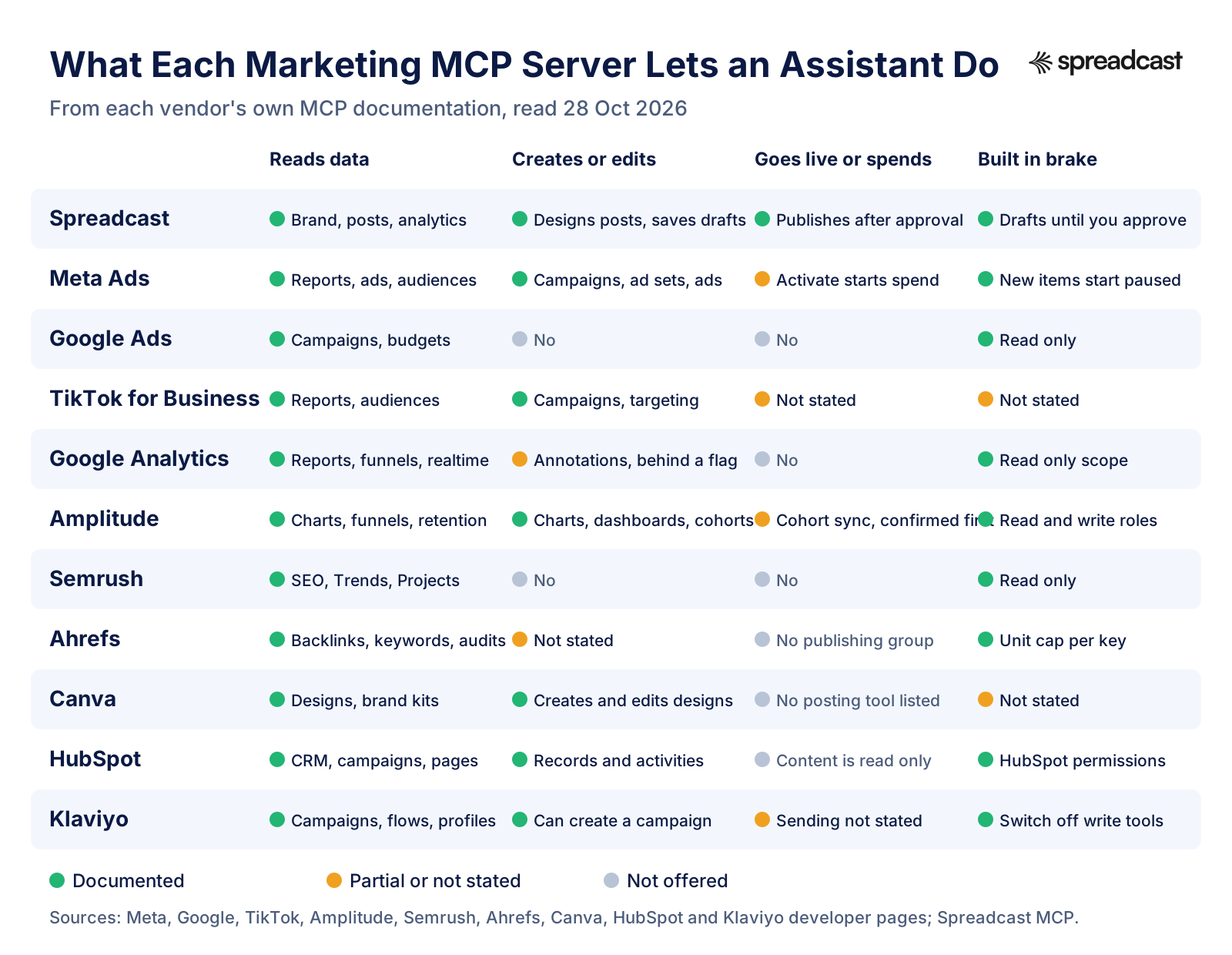
MCP Server for Marketing: Read Only, Write and Spend
Three kinds of server sit on this list, and they deserve three levels of trust. Read only servers, Google Analytics, Google Ads and Semrush, can be connected on day one with little worry. The worst they do is spend API units or return a wrong number that you then repeat in a report. Check the number once in the tool before it goes in front of anyone.
Write servers change something in your account without making it public. HubSpot writes CRM records and tasks, Amplitude builds charts and cohorts, Canva creates designs, Klaviyo can create a campaign, and Spreadcast saves drafts. A mistake here is annoying but fixable, and most of these vendors give you a way to narrow it: Klaviyo's write switch, Amplitude's per project write permission, HubSpot's app scopes.
Then there are the servers that can make something public or spend money. Meta's activate tool starts ad spend. TikTok's server adjusts budgets. Spreadcast publishes posts. These are the ones where a confirmation step matters most, and the vendors handle it differently: Meta creates everything paused and expects your client to confirm activation, Spreadcast keeps posts as drafts until you approve them in the app or through a separate approve tool, and TikTok's article does not describe a brake at all. If you connect only one server with spending power, keep your client's approval prompts on for it and read each one.
Best MCP Server for Each Marketing Job
If you only add one server per job, these are the ones we would start with.
Social Media Publishing
Spreadcast. It designs the post in your brand, writes the captions, and publishes to Instagram, Facebook, Threads, LinkedIn, Pinterest, TikTok, YouTube, Bluesky, Mastodon, Telegram and Discord after you approve. For schedulers that only post what you bring, see the social media MCP roundup.
Paid Social Ads
Meta Ads for Facebook and Instagram, because it creates everything paused and documents the activate step. TikTok for Business if TikTok is where your budget goes.
Website Analytics
Google Analytics. Free, official and read only, at the cost of a local setup with Google Cloud credentials.
App and Product Analytics
Amplitude, with MCP on its free plan of 2 million events a month. It answers the retention and funnel questions that GA4 handles less well for apps.
SEO Research
Semrush if you want a listed app in Claude and ChatGPT and Trends data. Ahrefs if backlinks, site audits and Search Console data matter more and you want a cheaper entry plan.
Design
Canva for designs from your templates. Spreadcast when the design is a social post that should also be captioned and published.
CRM and Leads
HubSpot. Free on every tier, reads and writes records and tasks, and keeps your HubSpot permissions.
Email and SMS
Klaviyo, with a switch that turns off every write tool while you learn what it does.
Meta Ads MCP in Claude: Setup and What to Watch
Meta Ads MCP with Claude is the setup most marketers ask about first, because it touches money. Meta's help article lists Claude, Claude Code, ChatGPT and Perplexity as supported agents and gives one address for all of them, mcp.facebook.com/ads. In Claude you add it as a custom connector. Claude's connector guide walks through the Customize, Connectors menu, and on Team and Enterprise plans an Owner adds the connector for the organization first. When you click Connect, Facebook Login for Business opens; you sign in, pick the permissions and come back to the chat. In Claude Code, Meta's get started page gives a one line command that adds the server over HTTP with your Meta app ID as the client ID.
Before you connect, set the rules. In Meta Business Suite, under Settings, Integrations, Ads MCP server, block budget edits or set a maximum budget for each ad account, and block campaign creation until you trust the setup. Meta says requests that break a rule are denied, whatever the assistant tries. Then start with questions, not changes. Ask Claude to list your ad accounts, then to summarize the top spending campaigns over the last 30 days. Those two prompts come straight from Meta's own page and only read. When the numbers look right, try a change on a small test campaign: ask for a new campaign, ad set and ad, check that all three arrive paused in Ads Manager, and only then let Claude activate one.
Watch the audience tools. One uploads hashed personal data into a customer list and one deletes an audience, and deleting is permanent. If you never planned to manage audiences from chat, do not grant the extra permissions those tools need. Meta lets you start with the minimum, ads_mcp_management plus ads_read, which keeps the server to reporting.
One more detail worth knowing: the boost tool turns an existing organic Instagram post into an ad. It does not make the post. If your organic feed is thin, there is nothing good to boost, and that is where a social publishing server comes in. Spreadcast keeps the organic side posting several times a week in your brand, so when a post does well you have something worth putting money behind. You can start with your App Store link and see the first designed posts before you pay.
Video: Google Analytics MCP Server, Introduced by Google
Google's own walkthrough of the server, from the team that maintains it.

Google Analytics MCP With Claude: What It Takes
Google Analytics MCP with Claude works, but it is not a paste one address job. The server runs on your machine, so you need Python and pipx, a Google Cloud project with the Analytics Admin API and Data API turned on, and Application Default Credentials for a Google account that can see your properties. Google's setup page then gives the block to add to Claude Desktop's config file, with the path to your credentials and your project ID.
Give the account the least access that works. Google's page asks for at least the Viewer role on the property, and the credentials only need the read only Analytics scope. Do not add the edit scope unless you want the annotation tool, which is the only thing the server can write.
Once it runs, the good prompts are specific. Ask for sessions and conversions by source and medium for the last 28 days compared with the 28 before, or for the top landing pages from social traffic. The second one only works if your social links carry UTM tags. Put tagged links in your posts, and use our campaign link generator builds tagged App Store links for free, so the answer separates Instagram from LinkedIn instead of lumping them into referral.
If you want Google Ads numbers in the same chat, the Google Ads MCP server installs the same way with pipx, and the Analytics server can already list which Ads accounts link to a property.
Canva Claude Connector: Design Without Publishing
The Canva Claude connector is the most popular design server on this list, and it is good at what it does: an assistant can create a design from a sentence, edit it in plain words, pull your brand kit and templates, resize for other formats and export a file. Canva's docs describe it as the server behind the Canva AI Connector, which you add from the Connectors menu in Claude or the apps menu in ChatGPT.
The job stops at the file. Nothing in Canva's documented tool list posts to a social network, so after the export someone still writes a caption for each network, uploads the image to each one or to a scheduler, and picks a time. For one post that is fine. For a post every weekday across Instagram, LinkedIn and Threads, it is the part that quietly stops happening by the third week.
That gap is what Spreadcast closes. It designs the post from your brand kit, writes a caption that fits each network, and publishes after you tap approve, from the same Claude chat where you asked for the design. If you already have Canva templates you love, keep them for one off pieces like event flyers and decks, and let Spreadcast carry the daily feed. The features page shows the designed post types, and our Claude Design guide covers Anthropic's own design option.
Best MCP Servers for SEO: Semrush vs Ahrefs
Both are hosted, both sign in with OAuth, and both spend API units on every question. The differences are in price, data and how each is listed in Claude and ChatGPT.
| Detail | Semrush MCP | Ahrefs MCP |
|---|---|---|
| Address | mcp.semrush.com/v2/mcp | api.ahrefs.com/mcp/mcp |
| Sign in | OAuth 2.1, or an API key in a header | OAuth with a consent screen, or an MCP key |
| Cheapest plan with MCP | Starter, $199 a month billed monthly | Lite, $129 a month |
| Units included | 50,000 API units on the standard route, packages up to 20 million | Monthly allowance by plan; OAuth keys default to 200,000 units |
| Data | SEO API, Trends API with a Trends plan, Projects read only | Site Explorer, Keywords Explorer, site audit, web analytics, Search Console, social metrics |
| Changes your account | No, read only | Not stated |
| Listed app | Official app in ChatGPT, Claude and Perplexity | Setup guides for Claude, ChatGPT, Copilot Studio, n8n and others |
| Tool count control | Not stated | Tool groups and an essentials set chosen in the address |
From Semrush's developer docs, Semrush's knowledge base, Ahrefs' MCP docs and Ahrefs' tool categories, read October 28, 2026.
Which SEO MCP Server to Pick
If you already pay for one of them, use that one. The servers cost nothing beyond the plan and your API units, and switching SEO tools to get a slightly different MCP server makes no sense.
If you are choosing from scratch, Ahrefs is the cheaper way in at $129 a month, and its Search Console and site audit groups mean one server covers both your own site's health and your competitors. Semrush costs more but is a listed app in Claude and ChatGPT, which makes the first connection easier for a non technical teammate, and its Trends API is the stronger choice if market and traffic share data is what you need.
Either way, the practical limit is units, not tools. Specify the database, the country and the number of rows in every prompt. A request like the top 20 keywords our competitor ranks for in the US that we do not costs a fraction of an open ended one. For the social side of SEO, the content you publish from that research, our startup marketing budget guide shows where each tool fits in a real monthly spend.
HubSpot MCP and Klaviyo MCP for CRM and Email
HubSpot MCP and Klaviyo MCP cover the part of marketing that happens after someone shows interest. HubSpot is the more open of the two: it writes contacts, deals, tasks and notes, and its changelog says the existing user permissions still apply. A useful first prompt is to ask for every contact created this week from a given campaign and create a follow up task for each owner. Because it writes, keep the client's approval prompts on until you trust the pattern.
Klaviyo is the more careful of the two by design. Start with the read only switch in a custom connector, ask for last month's campaign performance and the flows with the best conversions, and only remove the switch when you want the assistant to create a campaign. The option to hide tools that read customer written content is worth turning on if your account stores reviews or replies, since that is exactly the text a prompt injection would hide in.
Neither server writes the social posts that bring people into the list in the first place. That is the loop worth closing: Spreadcast publishes the post, the post links to a signup or the App Store, and HubSpot or Klaviyo picks up the person who arrives. Our guide to an AI marketing agent shows how to run the whole loop with approval at each step.
Video: Amplitude MCP for Product Analytics
Amplitude's own overview of what its server lets an assistant do with your product data.

Claude MCP for Marketing: Analytics for App Makers
For an app, the marketing questions that matter most are about behavior after the install: did people who came from last week's launch post stay, which feature do retained users touch first, and did the new version change anything. Google Analytics can answer some of that, but Amplitude is built for it, and its free plan includes MCP.
A good routine is weekly. Ask Claude, with Amplitude connected, for day 7 retention of users who installed in the last four weeks, split by week, and for the top three events retained users fire on day one. Then ask what changed after the latest release. Amplitude's docs note that the server can create charts and dashboards too, so save the ones you ask for every week and reuse them.
Then turn the answer into a post. If retained users love a feature that your feed never mentions, that is next week's carousel. Spreadcast has twelve post types for apps, from feature and how to posts to testimonials, and with both servers in the same chat the assistant can go from the retention number to a designed draft without you copying anything. The mobile app marketing page shows what that looks like on a real feed, and cost per install benchmarks show what the paid alternative costs.
A Marketing Week Run Through MCP Servers
How the servers above fit together when one assistant has several of them connected.
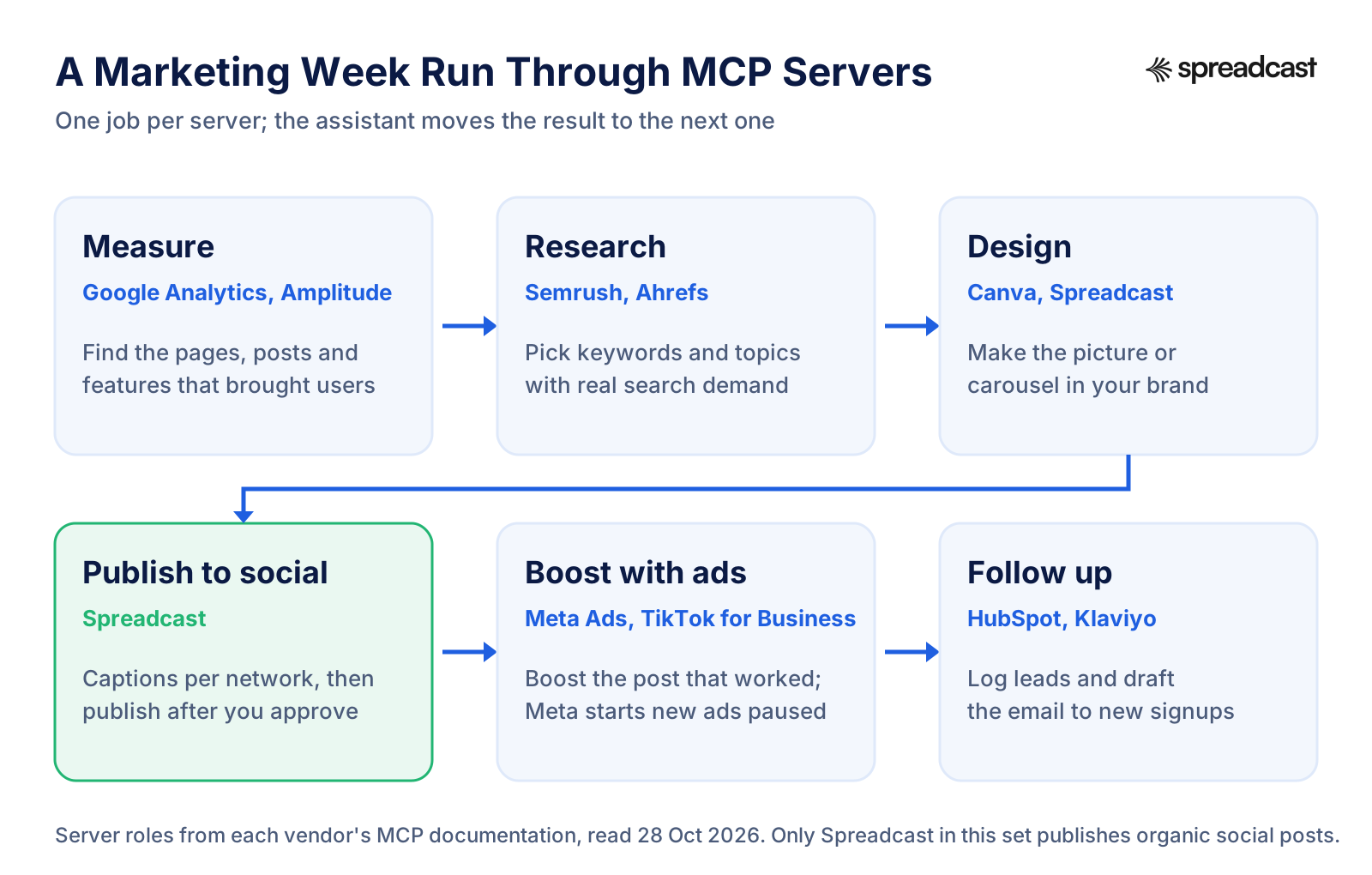
How to Run a Marketing Week With Claude and Five MCP Servers
A routine a team of one can run in one sitting on Monday, once the connectors are set up.
- Step 1
Measure Last Week
With Google Analytics or Amplitude connected, ask for sessions, signups or installs by source for the last seven days compared with the seven before, and the top three pages or features. Write down the one number you want to move this week.
- Step 2
Pick the Topic
With Semrush or Ahrefs connected, ask for five questions people search around that topic in your country, with volume. One of them becomes this week's post and, if you blog, this week's article.
- Step 3
Design and Caption the Posts
With Spreadcast connected, ask for a carousel answering the question and two single image posts from your latest release, in your brand, with captions for each network. Check the previews in the chat and ask for changes in plain words.
- Step 4
Approve and Schedule
Approve the drafts in Spreadcast or let the assistant approve them if you granted publishing access, and spread them across the week. They go to every connected network, including Threads, Bluesky and Telegram, which some schedulers do not support.
- Step 5
Boost What Worked
On Thursday, ask Spreadcast's analytics which post got the most reach and interactions. If one stands out, ask the Meta Ads server to boost that Instagram post with a small budget. It arrives paused; read it, then activate it.
- Step 6
Follow Up
Ask HubSpot for contacts created this week from social and create follow up tasks, or ask Klaviyo to draft a welcome campaign for the new signups. Review before anything sends.
Are Marketing MCP Servers Safe?
They are as safe as the access you grant and the confirmations you keep. The main risk has a name: prompt injection. OWASP defines it as user prompts that alter a model's behavior in unintended ways, and separates direct injection from indirect injection, where instructions hide in outside content the model reads, such as a website, a file, a review or an email reply. Marketing tools are full of outside content, which is why Klaviyo offers a switch to hide tools that read customer written text.
The assistant makers say the same thing in their own words. Claude's connector guide warns that custom connectors are not verified by Anthropic, says to connect only to trusted servers, to be aware of prompt injection and to click Allow always only for a tool you trust to run unsupervised. It also notes that in Research mode Claude can call connector tools without asking, so turn off write tools before using it. OpenAI's MCP docs say write actions raise both usefulness and risk, that ChatGPT asks for manual confirmation before a write action, and that you should not connect a server unless you know and trust the application behind it.
The MCP security best practices recommend a least privilege model: start with a minimal set of read scopes and ask for more only when an operation needs it. Every vendor on this list that offers a choice lets you do this. Meta's minimum permissions keep the server to reporting and its Business Suite rules can block budget changes outright, HubSpot's app scopes limit objects, Klaviyo's switches limit tools, and Spreadcast lets a connection make drafts only. Use the narrow option first and widen it after a week.
There is one more risk that is easy to miss: a confident wrong number. A server that reads data correctly can still be asked a vague question and return a plausible answer for the wrong date range or property. Check the first few answers against the tool's own dashboard before you start quoting them.
Six Checks Before You Connect a Marketing MCP Server
- Step 1
Confirm It Is the Vendor's Own Server
The address should be on the vendor's domain or its official GitHub organization, and linked from its own documentation. Directories list many lookalikes that ask for your API key.
- Step 2
Read What It Can Change
Find the vendor's tool list and sort it into reads, writes and actions that go live or spend money. Use the table on this page as a starting point.
- Step 3
Prefer OAuth Over a Pasted Key
OAuth lets you approve access on the vendor's own page, often pick a narrower scope and revoke it from a list. A key in a config file usually reaches everything and is easy to leak.
- Step 4
Start Read Only Where You Can
Klaviyo's switch, Meta's minimum permissions, Google Analytics' read only scope and Spreadcast's drafts only access all let you learn the server before it can change anything.
- Step 5
Keep Confirmations On for Spending
Leave your client's approval prompts on for anything that activates an ad, publishes a post or sends a message. Do not click Allow always on those tools.
- Step 6
Know How to Disconnect
Find the page where the connection is listed before you need it, in the vendor's settings and in your assistant's connectors menu, so you can cut access in seconds.
Claude MCP for Marketing vs ChatGPT: Where Each Server Connects
What each vendor documents for the two assistants most marketers use. Listed means a ready connector or app; custom means you add the address yourself.
| Server | Claude | ChatGPT |
|---|---|---|
| Spreadcast | Custom connector with Sign in with Spreadcast | Custom connector with Sign in with Spreadcast |
| Meta Ads | Supported as a custom connector; Claude Code command documented | Supported; developer mode with OAuth for your own app |
| Google Analytics | Claude Desktop config file, local server | Not documented |
| Semrush | Official app | Official app |
| HubSpot | Ready connector | Ready connector |
| Canva | Canva AI Connector | Canva AI Connector |
| Ahrefs | Setup guides for web, desktop, mobile and Claude Code | Setup guide for ChatGPT web |
| Google Ads | Custom connector to a Cloud Run deployment with OAuth | Custom connector to a Cloud Run deployment with OAuth |
| Amplitude | Supported, full tool set | Supported, about 25 tools |
| Klaviyo | Listed connector, or custom for several accounts | Klaviyo app, or custom for several accounts |
| TikTok for Business | Recommended for full disclosure mode | Not stated |
From each vendor's setup documentation, read October 28, 2026.
Using Several Marketing MCP Servers in One Chat
Connecting six servers at once sounds efficient and usually is not. Every server adds its tool list to the assistant's context, and some lists are long: TikTok's full mode is around 400 tools, and Ahrefs says it exceeds the tool cap of many clients. Too many tools make the assistant slower and likelier to pick the wrong one.
Turn servers on per task instead. Claude lets you switch each connector on or off for a single conversation from the plus menu, and you can disable individual tools too. A Monday analytics chat needs Google Analytics and Semrush; a Wednesday content chat needs Spreadcast and maybe Canva. Where a vendor offers a lighter mode, such as Ahrefs' essentials set, Klaviyo's core tools or TikTok's progressive mode, use it unless you need the rest.
If you want the whole thing automated on a schedule rather than run from chat, look at n8n with MCP or the patterns in our AI agent for social media guide. Keep a person on every step that publishes or spends.
Where Spreadcast Fits in a Marketing MCP Stack
Look at the servers above and notice what is missing. Analytics servers tell you what worked. SEO servers tell you what people search. Canva makes a design. Meta boosts a post that already exists. HubSpot and Klaviyo follow up with people who already arrived. None of them makes and publishes the organic social post that most small teams never find time for, and that is the gap Spreadcast fills.
Here is the before. On Monday you export a chart, notice the new version shipped, open Canva, find a template, swap the screenshot, fix the colors that drifted, export, write one caption for Instagram, shorten it for Threads, rewrite it for LinkedIn, upload to each network or to a scheduler that may not support Telegram or Bluesky, and pick times. That is a lot of steps for one post, and it is the kind of work that slips. By Thursday the feed is quiet again.
Here is the after. Spreadcast already noticed the new version on your App Store listing and has a designed post waiting with captions for each network. You open it, read it, tap approve, and it goes out to every connected account. Or you stay in Claude: ask what to post this week, look at the previews, say yes. The other servers on this page still do their jobs, and Spreadcast turns their answers into a feed that keeps posting.
It costs $29 a month on Pro for publishing to 10 accounts, or $19 once for a Post Pack of 10 posts if you want to try it on a launch first, with a 7 day full refund on paid plans. Paste your App Store link to see your brand kit and the first posts, compare plans on the pricing page, or read how to schedule social media posts with Claude and with ChatGPT step by step.
Network Specific Servers and Guides
If one network matters more than the rest, our network guides go deeper than a roundup can: the Instagram MCP server, the LinkedIn MCP server, the Threads MCP server, the YouTube MCP server, the Pinterest MCP server and the Telegram MCP server. Each covers the network's own API limits, what community servers need from you and what a hosted route saves.
For the tools that schedule rather than design, we reviewed the Hootsuite MCP server, the Buffer MCP server and the Metricool MCP server on their own pages. For the assistant side, see Claude for social media, ChatGPT social media automation and the Claude skills for social media that pair well with these servers.
And to measure whether any of it works, the social media KPIs guide lists the numbers to track, and the engagement rate calculator does the arithmetic per network.
Frequently Asked Questions
What are the best MCP servers for marketing?
By job: Spreadcast for social publishing, Meta Ads for Facebook and Instagram ads, Google Analytics for web analytics, Amplitude for app analytics, Semrush or Ahrefs for SEO, Canva for design, HubSpot for CRM, Klaviyo for email, Google Ads for ads reporting and TikTok for Business for TikTok ads. All eleven are run or published by the vendor itself.
What is an MCP server in marketing?
It is a connector that lets an AI assistant such as Claude or ChatGPT work inside a marketing tool through the Model Context Protocol. The server lists tools, such as run a report or create a campaign, and the assistant calls them when you ask. The official MCP introduction describes the protocol as a standard way to connect AI applications to outside systems.
Is there an official Meta Ads MCP for Claude?
Yes. Meta hosts it at mcp.facebook.com/ads and you add it to Claude as a custom connector, signing in through Facebook Login for Business. Meta's ad tools page says new campaigns, ad sets and ads are created paused and that a separate tool activates them, which starts spending budget.
Is there an official Google Analytics MCP server?
Yes. Google publishes it as open source in the googleanalytics GitHub organization. Google's developer page says it is for read only requests and cannot change your Analytics settings. It runs locally with Python and Google credentials, and Google's page includes configuration for Claude Desktop.
Does Canva have a Claude connector?
Yes. The Canva AI Connector runs on Canva's MCP server and lets Claude create, edit, resize and export Canva designs and use your brand kits. Its documented tools do not post to social networks, so publishing still happens elsewhere.
What are the best MCP servers for SEO?
Semrush and Ahrefs, both hosted with OAuth. Semrush lists MCP access from its Starter plan at $199 a month and is an official app in Claude and ChatGPT. Ahrefs includes MCP from Lite at $129 a month and adds Search Console and site audit data. Both spend API units on every question.
Does HubSpot have an MCP server?
Yes. HubSpot's remote MCP server at mcp.hubspot.com reads and writes CRM records and activities, while marketing content such as campaigns and blog posts is read only. HubSpot's Claude page says the Claude connector is official and free on every tier.
Are marketing MCP servers free?
Many are. Google Analytics, Google Ads and HubSpot cost nothing extra, Amplitude includes MCP on its free plan and Canva works on a free account for many tools. The SEO servers need a paid plan: Ahrefs from $129 and Semrush from $199 a month. Spreadcast's free plan makes 3 posts to download, and publishing is on Pro at $29 a month.
Can an MCP server post to social media?
Yes, a social publishing server can. In this roundup Spreadcast is the one that designs organic posts and publishes them to Instagram, Facebook, Threads, LinkedIn, Pinterest, TikTok, YouTube, Bluesky, Mastodon, Telegram and Discord after you approve. Our social media MCP roundup compares the schedulers that post what you bring.
Is it safe to connect Claude to my ad account?
It can be, if you keep the access narrow and the confirmations on. Start with read permissions, test changes on a small campaign, and never allow spending tools to run without asking. Claude's connector guide says to connect only trusted servers and to be aware of prompt injection.
Prices, plans and features change. This comparison describes each product as its own site described it on the date shown under Sources. Check the vendor's site before you decide. Product names are trademarks of their owners.
Where These Facts Come From
Every outside number, rule and price on this page links to the page it was taken from.
- What is the Model Context ProtocolModel Context Protocol
- MCP security best practicesModel Context Protocol
- Introducing the Model Context ProtocolAnthropic
- Get started with custom connectors using remote MCPClaude Help Center
- MCP and connectors, with write action and prompt injection risksOpenAI
- LLM01 prompt injectionOWASP GenAI Security Project
- Ads MCP server overviewMeta for Developers
- Manage ads from an AI agent with Meta ads AI connectorsMeta Business Help Center
- Ads MCP server get started, sign in and permissionsMeta for Developers
- Ads MCP server ad creation and management toolsMeta for Developers
- Google Ads MCP serverGoogle for Developers
- Google Ads MCP repositoryGoogle Ads on GitHub
- About TikTok for Business MCP serverTikTok for Business
- Try the Google Analytics MCP serverGoogle for Developers
- Google Analytics MCP repository and tool listGoogle Analytics on GitHub
- Google Analytics, free of chargeGoogle Marketing Platform
- Amplitude MCP serverAmplitude Docs
- Amplitude pricingAmplitude
- Semrush MCP developer documentationSemrush Developers
- Understanding Semrush MCPSemrush Knowledge Base
- Semrush plans and pricingSemrush
- What is Ahrefs MCPAhrefs for Developers
- Ahrefs MCP tool categoriesAhrefs for Developers
- Ahrefs pricingAhrefs
- About Canva MCPCanva Developers
- Canva MCP tools and rate limitsCanva Developers
- Remote HubSpot MCP serverHubSpot Developers
- Remote HubSpot MCP server is now generally availableHubSpot Developers
- HubSpot MCP servers overviewHubSpot Developers
- HubSpot connector for ClaudeHubSpot
- HubSpot Marketing Hub pricingHubSpot
- Connect to the Klaviyo MCP serverKlaviyo Developers
- Klaviyo MCP serverKlaviyo
- Klaviyo pricing and free planKlaviyo
- Introducing the Google Analytics MCP serverGoogle Analytics
- Meet MCP, connect Amplitude to AI toolsAmplitude
Researched and written by Spreadcast. Last checked on October 28, 2026.