Small Business Social Media

Social Media Marketing for Small Business: A Practical Guide With Real Numbers

Social media marketing for small business works when you pick one or two networks your customers use, post a few times a week without fail, and track the numbers that bring sales. Here is which networks fit which business, the time and money it takes, what to post, and a 30 day plan.

By Mark Weizer · Updated November 21, 2026 · 40 min read

Social media marketing for small business comes down to a short list of decisions. Pick the one or two networks where your customers already spend time. Post useful, recognizable things on them a few times a week, every week. Answer people quickly. Then check, once a month, whether any of it turned into calls, bookings, visits or sales, and keep what did. The hard part is rarely knowing what to do. It's finding the hours to keep doing it while you also run the business, which is why most small business feeds go quiet after a busy month.

This guide is for owners who do the marketing themselves: a cafe, a salon, a plumber, a boutique, a small online brand, a consultant, a SaaS or app maker. It uses current data, not round numbers from old slide decks. Who uses each network comes from Pew Research Center's 2026 survey of US adults. Ad budgets come from Meta, TikTok, LinkedIn and Pinterest's own help pages. Posting frequency comes from a study of 2.1 million Instagram posts and from LinkedIn's own advice for company pages. Local reach comes from Google's Business Profile help. On top of that you get our own work: a matrix of which networks fit which kind of business, a weekly time worksheet with the math shown, a sample week of posts, the real cost of a 30 day ad test on each network, and a 30 day plan you can start on Monday.

Every outside number links to the page it came from, and each page was opened on November 21, 2026. Where a number is our own estimate or calculation, the text says so. The method is at the end, under How We Researched This.

Social Media Marketing for Small Business: The Short Answer

If you read nothing else, read this list. It's the whole plan in eight lines, and every line gets its own section further down.

  1. Start with Google if people find you nearby. A complete Google Business Profile with photos, hours and reviews shows up in Search and Maps when someone looks for a business like yours, and you can post updates to it for free.
  2. Pick one main social network and, at most, one second network. For most local businesses that means Facebook and Instagram. Online brands lean toward Instagram, TikTok and Pinterest. Consultants and software companies lean toward LinkedIn. The matrix under Best Social Media Platforms for Small Business shows where to start for seven kinds of business.
  3. Set up business accounts, not personal ones, and fill in every field. LinkedIn says Pages with complete information get 30% more weekly views.
  4. Post three to five times a week on your main network. In Buffer's study of 2.1 million Instagram posts, the boost to weekly follower growth from posting three to five times was more than double the boost from posting once or twice.
  5. Make posts in batches. One sitting a week, or one afternoon a month, beats thinking up a post every morning.
  6. Answer comments, messages and reviews within a day. Most consumers want brands to respond within 24 hours or sooner, according to Sprout Social.
  7. Spend on ads only after a post has proven itself for free, and start small: a 30 day test costs about $150 on Meta at $5 a day, $300 at LinkedIn's $10 daily minimum, and over $600 on TikTok, where an ad group's daily budget must exceed $20.
  8. Once a month, look at four numbers: followers, reach, interactions and clicks or calls. Keep the kinds of posts that moved them and drop the rest.

That list is simple on purpose. Small business social media fails far more often from going silent than from a wrong strategy. If you want to skip the design and scheduling work entirely, Spreadcast reads your website, builds your brand kit and turns a one line idea into a branded post with captions for each network, then schedules it everywhere you post. More on that at the end. First, the reasons any of this is worth your time.

Why Social Media Is Important for Small Businesses

There are a lot of small businesses competing for attention. The SBA's Office of Advocacy counts 36,207,130 small businesses in the United States, which is 99.9% of all businesses, and they employ 62.3 million people, or 45.9% of private sector workers. Most of them have the same marketing budget problem: not much money, even less time. Social media is one of the few channels where the price of entry is zero and the audience is already there every day.

And the audience really is there. In Pew's 2026 survey, 84% of US adults use YouTube, 70% use Facebook and 51% use Instagram. Use isn't occasional either. Pew's 2025 report found that about half of US adults visit Facebook at least once a day, including 37% who visit several times a day, and 24% use TikTok daily. Your customers check these apps between appointments, in lines and on the couch. A post from a business they know shows up in the same feed as posts from their friends.

What social media does well for a small business:

  • It keeps you in mind between visits. A customer who bought once and follows you sees your new menu, your new stock or your open slots next week, without you paying for an ad.
  • It answers the question people ask before they buy: is this place real, open and any good? A profile with recent posts, real photos and replies to comments answers that in five seconds. A profile whose last post is from March answers it too, badly.
  • It turns happy customers into word of mouth you can see. Tags, shares, reviews and comments are recommendations other people read.
  • It lets you sell where people browse. Pinterest now has 661 million monthly active users worldwide, a record it reported in its third quarter 2026 results, and people use it to plan purchases. TikTok says 1.8 million American entrepreneurs sold products or services through TikTok in 2025, an estimate by PF Global that TikTok published in October 2026.
  • It gives you a cheap way to test ideas. A post that gets ten times your usual comments is a free signal about what your customers want, and a good candidate for a small ad.

What social media doesn't do is replace a good product, a clear website or a Google listing. Think of it as the place people meet you and come back to, not the place every sale closes. With that in mind, the first real decision is where to show up.

Best Social Media Platforms for Small Business

The best social media for small business is the network your customers already use, and that depends mostly on their age and on what you sell. Pew's numbers make the age part plain. Instagram reaches 79% of adults aged 18 to 29 but only 21% of those 65 and over. Facebook is the steadiest across ages, from 59% to 78%. TikTok is used by 65% of the youngest adults and 11% of the oldest. LinkedIn tracks education and income more than age: 51% of college graduates and 45% of adults in households earning $100,000 or more use it, against 13% of adults with a high school education or less.
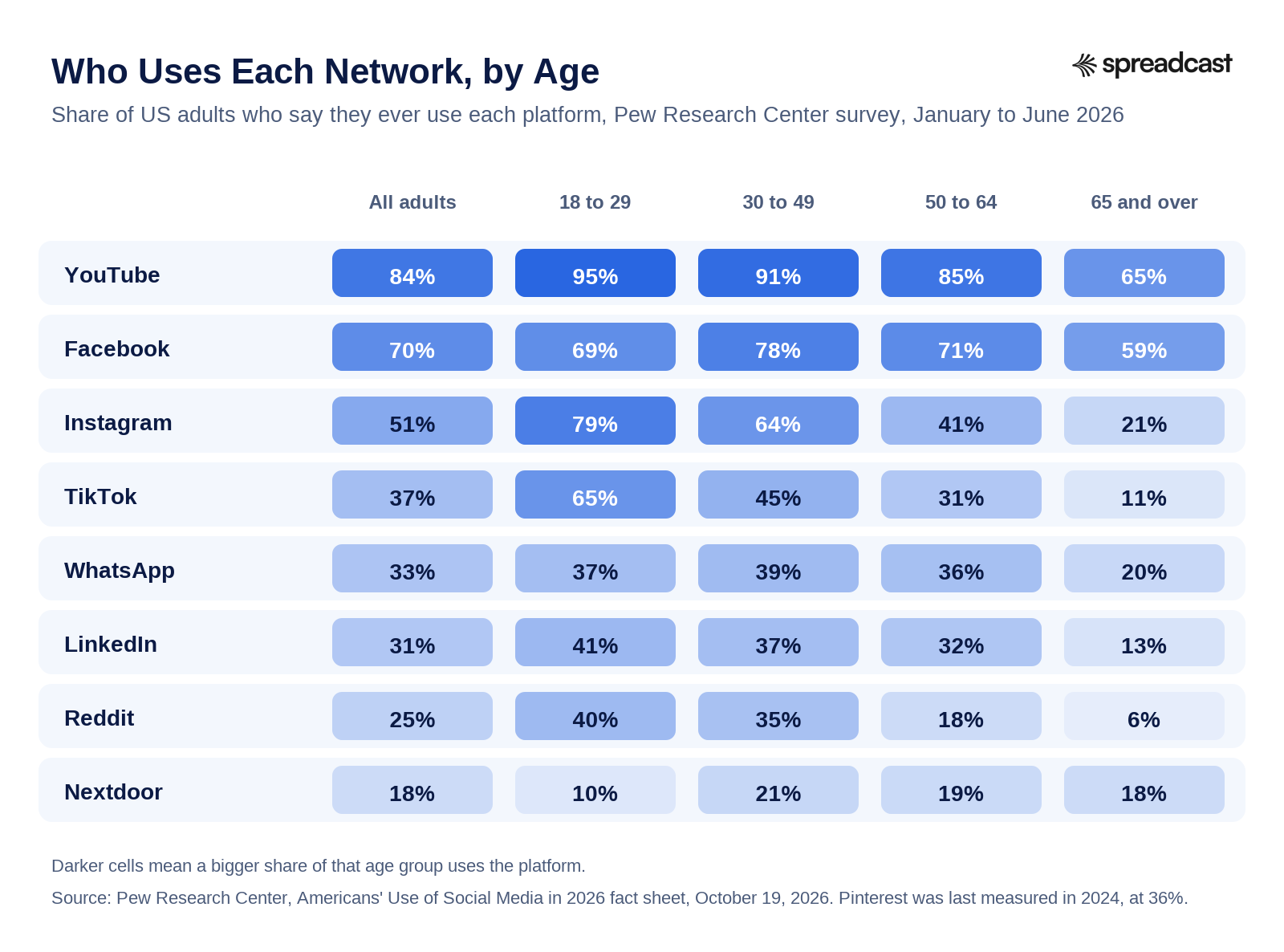
Table of the share of US adults who use each platform in 2026, overall and by age. YouTube 84% overall, Facebook 70%, Instagram 51%, TikTok 37%, WhatsApp 33%, LinkedIn 31%, Reddit 25%, Nextdoor 18%. Instagram reaches 79% of adults 18 to 29 and 21% of those 65 and over. Facebook ranges from 59% to 78% across ages
Who uses each network by age, from the Pew Research Center fact sheet published October 19, 2026, with survey data from January to June 2026.

Two more lines from the same survey matter for local businesses. Women use Facebook more than men (77% against 63%), and rural adults use it more than city or suburban ones (76% against 67% and 69%). Nextdoor is small overall at 18% but reaches 23% of suburban adults, which is exactly the crowd a cleaner, landscaper or dog groomer wants. For the full set of figures, our social media statistics page keeps the numbers in one place.

Age is only half of the choice. The other half is how people buy from you. Someone choosing a hair salon wants to see work and book a time. Someone choosing a plumber wants proof you show up and a number to call. Someone shopping for a gift wants to see the product in use. We put those two halves together in a simple matrix.
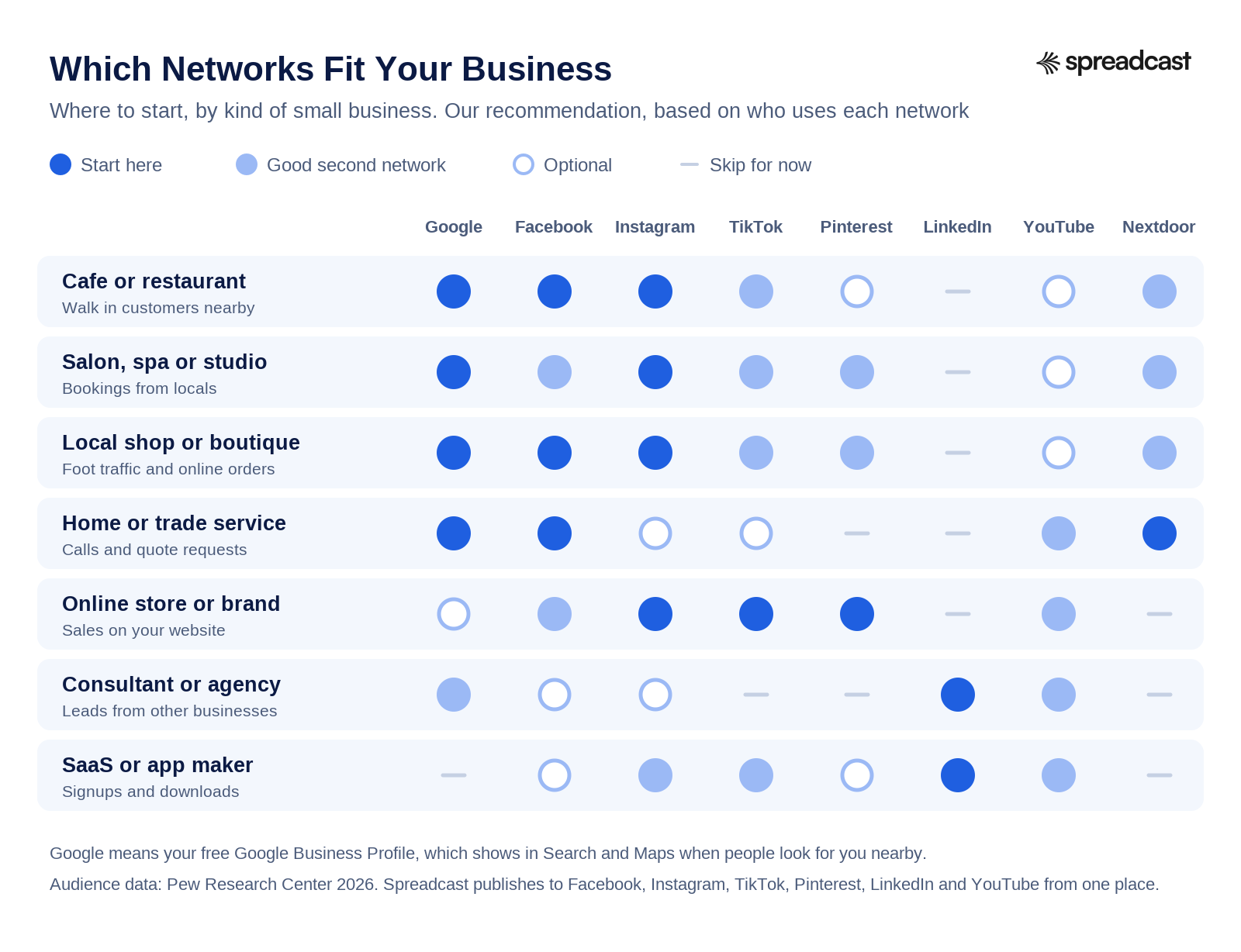
Matrix of seven kinds of small business against eight networks. Cafes and local shops start on Google Business Profile, Facebook and Instagram. Salons, spas and studios start on Google and Instagram. Home and trade services start on Google, Facebook and Nextdoor. Online stores start on Instagram, TikTok and Pinterest. Consultants start on LinkedIn. SaaS and app makers start on LinkedIn, with Instagram, TikTok and YouTube as good second networks
Our recommendation for where to start, based on who uses each network in the Pew Research Center 2026 data and on how each kind of business gets its customers. Treat it as a starting point and let your own numbers overrule it after a month or two.

Notice that no row has more than three dark circles. That's deliberate. Two networks done every week beat five networks done when you remember. If you're torn between Instagram, Pinterest and LinkedIn in particular, we compared them side by side in Instagram, Pinterest or LinkedIn: where to post.

Facebook for Small Business

Facebook is still the default for local businesses with customers over 30. It's where people check opening hours, read recommendations in local groups, message a business and find events. A Facebook Page is free, it holds your reviews and your hours, and it's the base for Meta ads on both Facebook and Instagram. Posts that do well tend to be photos of real people and real work, short videos, events and anything that gets neighbors talking in the comments. Let the post itself be the picture or the video, and send people to your website through your Page button or a link in the comments.

Instagram for Small Business

Instagram is the shop window for anything visual: food, beauty, fashion, interiors, fitness, crafts, events. Switch to a business account first. Instagram's own help says business accounts are best for retailers, local businesses, brands, organizations and service providers, and they give you insights, ads, contact details on your profile and message tools. One thing to know before you switch: a private account becomes public when it turns professional. Reels reach people who don't follow you yet, carousels keep followers swiping and saving, and Stories are where regulars see daily specials and polls.

Instagram also has a tool that's close to made for nervous small business owners: trial reels. According to Meta, trial reels are shown to non followers first, your followers don't see them in their feed, and you get views, likes, comments and shares about 24 hours later. You can let Instagram share one with your followers automatically if it does well in the first 72 hours. It's a free way to test a new style of video without cluttering your profile.

HubSpot walks through five steps for growing a small business Instagram account without paying for ads, starting with the profile itself. Watch it before you change your bio, then come back to the posting plan below. Video by HubSpot Marketing on YouTube

TikTok for Small Business

TikTok is the network where a business with no followers can still reach thousands of people, because the feed recommends videos from accounts people don't follow. It suits businesses with something to show in motion: a process, a transformation, a product in use, the people behind the counter. It also asks the most of you, since it runs on video and on a personal tone. If you're camera shy, start by posting your best Instagram Reels on TikTok too rather than making separate videos.

YouTube for Small Business

YouTube has the widest reach of any platform in Pew's data, used by 84% of adults and by 65% even among those 65 and over. For a small business it works best as a library rather than a feed: how to videos, product demos, answers to the questions customers ask you every week. Those videos keep getting found through search for years. YouTube Shorts let you post the same upright videos you make for Reels and TikTok, so a video you already have can go out on all three.

Pinterest for Small Business

Pinterest behaves more like a search engine than a social network. People go there to plan a wedding, a kitchen, an outfit or a party, and they save ideas for later. That makes it strong for online stores, interior and home businesses, florists, bakers, stylists and anyone whose product is a plan before it's a purchase. Pins also last: a good pin can bring visits for months, unlike a feed post that fades in a day. Its US and Canada audience was 107 million monthly users in the third quarter of 2026, up 4% on the year before.

LinkedIn for Small Business

LinkedIn is where you go when your customer is another business: consultants, agencies, accountants, recruiters, B2B software, commercial cleaners, office suppliers. A company Page helps, but people on LinkedIn follow people, so post as yourself too and share to the Page. LinkedIn's own guidance is specific: companies that post weekly see a 2x lift in engagement, images typically bring a 2x higher comment rate, and once a Page passes 150 followers its growth tends to speed up.

Threads, Bluesky and Other Networks

Threads, Bluesky, Mastodon, Telegram and Discord are smaller, but they aren't empty, and some audiences live there. Pew measured Threads at 8% and Bluesky at 4% of US adults in 2025. A text first network suits a business that has things to say: a bookstore, a tech product, a coach, a local news site. Telegram and Discord work for communities that want updates straight from you. None of these should be your first network, but if your posts already exist, sending them to one more place costs very little when your scheduler can cross post them for you. Our guides to growing on Bluesky and growing a Telegram channel go deeper.

Network, Best for, Main format, Share of US adults using it
NetworkBest forMain formatShare of US adults using it
FacebookLocal businesses, customers over 30, events, groupsPhotos, short video, events70% (2026)
InstagramFood, beauty, fashion, fitness, any visual productReels, carousels, Stories51% (2026)
TikTokProducts and processes worth watching, younger buyersShort upright video37% (2026)
YouTubeHow to videos, demos, answers that keep being searchedLong video and Shorts84% (2026)
PinterestOnline stores, home, weddings, gifts, recipesUpright pins that link to your site36% (2024, latest measured)
LinkedInB2B services, consultants, softwareText posts with images, documents31% (2026)
NextdoorHome services and neighborhood businessesUpdates, deals, recommendations18% (2026)
Threads and BlueskyBusinesses with a voice and things to sayShort text, images8% and 4% (2025)

Shares in the last column are from Pew Research Center. Pew last measured Pinterest in 2024, and Threads and Bluesky in 2025.

Social Media for Local Business

If customers walk in, call or book you because you're nearby, local reach matters more than follower counts. Two hundred followers who live within ten minutes of your door are worth more than ten thousand who never will. Local social media is a mix of three things: your Google listing, the neighborhood networks and the small signals on every post that tell a network where you are.

Google Business Profile Posts

Your Google Business Profile isn't a social network, but it behaves like one and it sits where buyers are: in Google Search and Maps at the moment someone types "coffee near me". Google lets you post three kinds of things to it: Updates, Offers and Events. Updates can carry a description, a photo, a video and a button. Offers need a title, dates and times. Events need a title with start and end dates. Posts without a date range are archived after six months, so an old update doesn't sit there forever. Google also notes that a post with a phone number might be rejected if the number can't be verified as yours, so leave the phone number to your profile.

Why bother? Google says local results are based on relevance, distance and prominence, that businesses with complete and accurate info are more likely to show up, and that more reviews and positive ratings can help your local ranking. A profile with recent posts, recent photos and replies to reviews looks alive. Posting the same weekly special or event you share on Instagram takes two extra minutes.

Reviews Are Part of Your Social Media

People read your reviews the way they read your comments, and your replies are public posts. Google lets you reply to reviews once your business is verified, the reply shows as the business, and the reviewer is told you replied. Thank people by name for good reviews, mention what they liked, and answer a bad review once, calmly, with a way to fix it offline. Good reviews also make great posts: turn one into a graphic with our free testimonial graphic generator, with the customer's permission.

Nextdoor for Local Businesses

Nextdoor gives every business a free Business Page with unlimited free posts, recommendations and Faves from neighbors, local deals and messages. For a home or trade service it can matter as much as Facebook. One rule changed in 2026: Nextdoor's self promotion policy update of August 19, 2026 says businesses must promote from a free Business Page, not a personal neighbor account, and that covers posts and comments in the main feed as well as unsolicited direct messages. If you used to post deals from your own profile, move them to the Page.

Location Tags and Local Hashtags

On Instagram, Facebook and TikTok, add your city or your business location to posts that are about a place: your shop, an event, a job you did in a neighborhood. Mention the neighborhood in the caption in normal words, the way people search ("bathroom remodel in Park Slope" rather than a string of tags). Use two or three local hashtags that real people follow, such as your city's name plus food, style or events, and skip the giant generic ones where your post disappears in seconds. Instagram has made that choice for you anyway: it began limiting captions on posts and Reels to five hashtags in December 2025, saying a few specific tags work better than many generic ones. Tag local partners when you work with them, and share local events you're part of. Each of these is a small signal that you belong to a place, and together they help the right neighbors find you.

How to Start Social Media for Small Business

Starting takes one afternoon. The goal of this first step isn't to post. It's to have accounts that look finished, so that the first person who taps your name sees a real business and knows what to do next.

Set Up Business Accounts, Not Personal Ones

  1. Claim the same name on every network you plan to use, even the ones you won't post on yet. Your business name, or your name plus your city if it's taken.
  2. Create a Facebook Page and switch Instagram to a business account. Connect them, since Meta's ads and inbox work across both.
  3. On TikTok, Pinterest and LinkedIn, use the business or company version of the account, which comes with analytics.
  4. Claim and verify your Google Business Profile, and your Nextdoor Business Page if you serve neighborhoods.
  5. Turn on two step verification for every account and give a second person access, so a lost phone never locks you out of your own business.

Fill In Every Field

A half finished profile loses people. LinkedIn measured it: Pages with complete information get 30% more weekly views. The same logic applies everywhere. Use your logo as the profile picture, write a bio that says what you do, where, and for whom in one sentence, add your hours, address or service area, phone number and a link to the page where people book or buy. Pin your three best posts. Check the bio and caption lengths each network allows in our social media character limits guide, and the right picture sizes in social media image sizes.

Get Your Brand Kit Ready

Before the first post, decide what your posts will look like. Two or three colors, one or two fonts, your logo, and a sentence about your tone of voice. That's a brand kit, and it's the difference between a feed people recognize in a second and a feed of random templates. You don't need a designer for it. Our free brand kit generator pulls the colors, fonts and logo from any website, our brand style guide template gives you a page to write it all down, and what a brand kit actually needs explains which parts matter. If design is the part you dread, read brand consistency without a design team.

This is also where Spreadcast saves the most time on day one. Type your website and it reads your brand colors and what you do, writes a short description of your business you can edit, and picks fonts for your posts. You add your logo and photos, choose a caption voice (Plain, Friendly or Playful), and every post from then on is made in that brand.

How Much Time Should a Small Business Spend on Social Media?

Owners rarely ask how much social media costs. They ask how much time it eats, because time is the budget that actually runs out. Nobody publishes a reliable average for small businesses, so we built a worksheet instead. It assumes three main posts a week, each shared to three networks, plus a weekly Google update, and the minutes are our estimates for someone doing the work by hand with a phone and a free design app. Change any line to match your own week.

Weekly task, By hand, With a tool that designs and schedules, Notes
Weekly taskBy handWith a tool that designs and schedulesNotes
Decide what to post30 min30 minStill your call either way
Take photos and short videos60 min60 minReal photos of your work are worth keeping
Design 3 graphics60 min15 min20 min each by hand, 5 min each to describe and check
Write 3 captions30 minIncluded aboveWritten for each network from your idea
Resize and adapt for 3 networks45 min6 min9 versions at 5 min, against a quick preview check
Publish or schedule each copy27 min6 min9 uploads at 3 min, against one schedule per post
Post a Google Business Profile update10 min10 minDone in Google either way
Reply to comments, messages, reviews75 min75 min15 min on 5 days; this part should stay human
Check the numbers15 min10 minOne analytics page instead of three apps
Total per week352 min, about 5 h 52 min212 min, about 3 h 32 minA saving of 140 min a week

To put a price on those hours, we used the median pay for public relations specialists, a job whose duties include social media programs, which the Bureau of Labor Statistics puts at $35.94 an hour, or $74,750 a year, in May 2025. At that rate, the by hand week is worth about $210.85, or about $913.67 a month (weekly figure times 52, divided by 12). The tool week is worth about $126.99, or about $550.28 a month. The difference is roughly $363 a month of time, which is the real number to hold against the price of any social media tool. We ran the same kind of math for design alone in the real cost of designing social posts by hand.

So, a realistic answer: plan on three to six hours a week for two networks, or about 30 to 50 minutes a day spread across the week. Less than that and the replies slip. More is fine if social media is your main source of customers, but at that point it's worth asking whether you should automate the repetitive parts or hire help.

The single biggest time saver is batching. Thinking of a post every morning is slow and stressful. Sitting down once a week, or once a month, to make everything at once is fast, because you're already in the right frame of mind and your photos are in one place. We walk through it step by step in a month of social content in one afternoon, and the free social media content calendar gives you a grid to fill.

How Often Should a Small Business Post on Social Media?

Post as often as you can keep up for a year, and no less than once a week on each network you use. For most small businesses that lands at three to five posts a week on the main network and one or two on the second. Consistency beats volume: a calendar of three posts every week for six months does more than daily posting for three weeks followed by silence.

The best data we found supports that. Buffer looked at 2.1 million feed posts from 102,000 Instagram accounts and published the results in August 2025. Buffer compared each account's posting weeks with its own weeks without posts. Posting one or two times a week raised the weekly follower growth rate by 0.12 percentage points, three to five times by 0.26, six to nine times by 0.44, and ten or more by 0.66. Buffer points out that this is a change in the growth rate, not in total followers, so the numbers look small. Reach per post rose too: about 12% more at three to five posts a week than at one or two, 18% more at six to nine, and 24% more at ten or more. Going from one or two posts to three to five more than doubles the growth boost, and every step after that adds more, but each step also asks for several extra posts a week.

Buffer also measured what happens when you stop. Weeks with no posts at all came in below each account's normal growth. So a week off isn't neutral. It costs you some of the momentum you built.

Network, Starting frequency for a small business, Why
NetworkStarting frequency for a small businessWhy
Instagram3 to 5 feed posts or Reels a week, Stories on most daysBuffer's data shows the growth boost more than doubles from 1 or 2 posts to 3 to 5
Facebook3 to 5 posts a weekMostly the same posts as Instagram, shared
TikTok3 to 5 videos a week if video is your strengthReach comes from each video, not from followers
LinkedInAt least 1 post a week, ideally 2 to 3LinkedIn says weekly posting brings 2x engagement
PinterestA few new pins a weekPins keep working for months, so steady beats bursts
Google Business Profile1 update a week, plus offers and eventsShows the listing is active
Nextdoor1 to 2 posts a monthNeighbors react badly to constant promotion

These are our starting points, built from the data above and the networks' own advice. After a month, your own analytics will tell you more than any table.

How Often Should a Small Business Post on Instagram?

Three to five feed posts or Reels a week is the sweet spot for most small businesses, based on Buffer's Instagram study. Add Stories on days you have something small to share: today's special, a quick behind the scenes clip, a poll. Stories don't need design. A phone photo with a line of text is fine.

How Often Should a Small Business Post on Facebook?

For most local businesses, Facebook gets the same three to five posts a week as Instagram. You don't need different content. Share the same photos and videos, adjust the caption slightly (Facebook readers like a little more text and a clear detail such as the date, time or price), and add events to your Page so they show up in people's event lists.

How Often Should a Small Business Post on TikTok?

On TikTok, each video lives or dies on its own, so frequency matters less than having a format you can repeat. Three to five videos a week is a strong pace if you enjoy video. One or two a week is fine if most of them are your Reels posted again. What hurts is posting ten videos in a week and then nothing for a month.

How Often Should a Small Business Post on LinkedIn?

At least once a week. LinkedIn's own advice for Pages is that companies that post weekly see a 2x lift in engagement. Two or three posts a week from the owner's profile, shared to the company Page, is a good rhythm for a consultant or B2B business.

What time of day matters less than showing up every week, but it does matter a little. Our guide to the best time to post on social media has the data by network, and your own analytics will show when your followers are online.

Social Media Post Ideas for Small Business

Most owners don't run out of time first. They run out of ideas. The fix is a short list of post types you rotate, so you never start from a blank page. Here's a mix that works for nearly any small business, from most to least frequent:

  • Your work, shown. The dish, the haircut, the finished deck, the product on a real person. This should be about half of what you post.
  • Behind the scenes. Morning prep, packing orders, the team, the workshop, the delivery van at 6 a.m. People buy from people.
  • Answers to questions customers ask. If three people asked it this month, it's a post. How long does a balayage last? What do I do before the plumber arrives?
  • Proof from customers. Reviews, tagged photos (shared with permission), before and after pictures, a thank you note.
  • News and offers. New stock, a seasonal menu, open slots, an event, holiday hours. Useful, but keep it to about one post in five.
  • Local and seasonal moments. A street festival, the first cold week, back to school, a local team's big game.
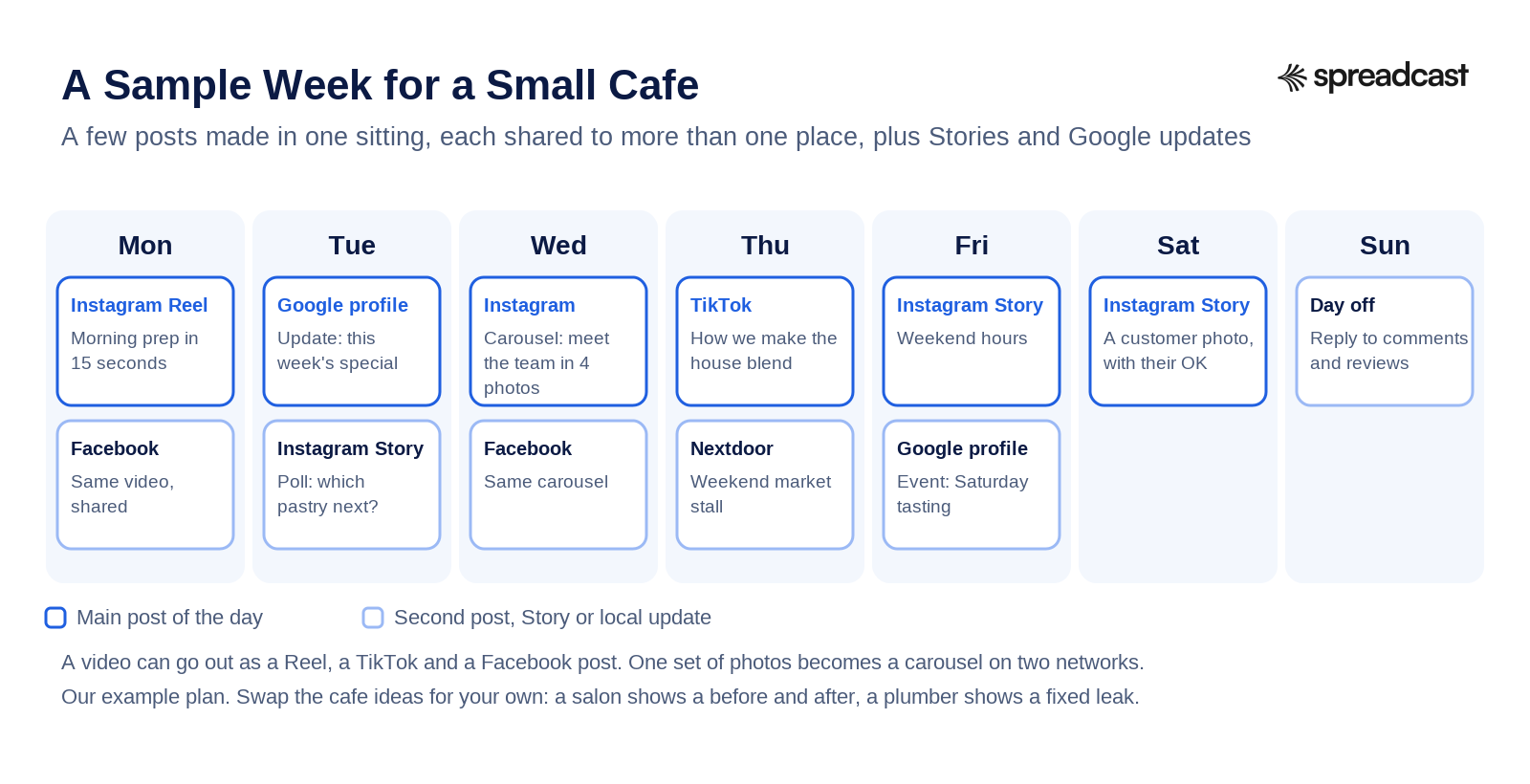
Sample week of posts for a small cafe. Monday an Instagram Reel of morning prep shared to Facebook. Tuesday a Google profile update with the weekly special and an Instagram Story poll. Wednesday an Instagram carousel meeting the team shared to Facebook. Thursday a TikTok on how the house blend is made and a Nextdoor post about a weekend market stall. Friday a Story with weekend hours and a Google event for a Saturday tasting. Saturday a Story sharing a customer photo. Sunday off, replying to comments and reviews
Our example plan for a cafe. Most of it can be made in one sitting, and each main post goes to more than one place. Swap in your own ideas from the lists below.

Below are ideas by kind of business. They are starting points, not scripts. The best version of each is the one only you could post, because it shows your real place, people and customers.

Post Ideas for Cafes and Restaurants

  • A 15 second Reel of the first hour of the day: lights on, oven open, first pour.
  • This week's special, posted on Instagram and as a Google Business Profile update on the same day.
  • Meet the team: one person, one photo, one sentence about their favorite thing on the menu.
  • A poll in Stories asking which item to bring back next season, then a post announcing the winner.
  • Holiday hours and event nights, added as Facebook events so they show in people's calendars.

Post Ideas for Salons, Spas and Studios

  • Before and after photos, with the client's written permission, and the name of the service in the caption.
  • Open slots this week, posted on Monday morning with a booking link in your bio.
  • A short how to: how to keep a color fresh, how to stretch after class, how to care for a new tattoo.
  • A carousel of five looks or classes, saved by people planning their next visit.
  • A client review turned into a branded graphic, shared on Instagram, Facebook and your Google profile.

Post Ideas for Local Shops and Boutiques

  • New arrivals, shown on a person or in a room rather than on a white background.
  • Three ways to wear or use one item, as a carousel.
  • Gift guides by budget or by person before holidays, also pinned on Pinterest.
  • The story of a maker or brand you stock, with their account tagged.
  • A Story every morning the shop is open, with one item you love today.

Post Ideas for Home and Trade Services

  • Before and after of a job, with the neighborhood named in the caption.
  • A 30 second video answering a question you get every week: why a drain smells, when to service a boiler.
  • Seasonal reminders, like gutter cleaning in the fall or AC checks before summer, on Facebook and Nextdoor.
  • The team on the way to a job, so customers recognize who is at their door.
  • A thank you post for a review, with the review shown as a graphic.

Post Ideas for Online Stores and Small Brands

  • The product in use by a real customer, shared with permission.
  • How it's made: materials, packing orders, the workshop.
  • Upright pins for every product and every gift guide, each linking to its own page.
  • A trial reel testing a new style of video with non followers before you show it to your audience.
  • Launch countdowns for new collections, with a clear date.

Post Ideas for Consultants, Agencies and B2B Services

  • A short lesson from a recent project, with the client's permission or without names.
  • A checklist or framework as a LinkedIn document post or carousel.
  • Your take on news in your industry, in three short paragraphs.
  • Results in numbers, when a client agrees to share them.
  • Events and talks you're part of, before and after.

Post Ideas for SaaS and App Makers

  • A feature spotlight with a real screen of the product, one feature per post.
  • What changed in the latest update, in plain words, with the screens that show it.
  • A real review from a user, quoted as written.
  • The problem your product solves, shown as a before and after.
  • Tips that help users get more from the product, as a carousel.

For app makers there is more in how to promote an app on social media, and Spreadcast goes further for you than for anyone: add your App Store or Google Play link and its autopilot plans a set of posts every week from your listing (feature spotlights, real reviews, things to try, the problem your app solves and dates that fit it) and makes a post for each new version and rating milestone.

One rule for any business that runs a giveaway: on Instagram you're responsible for the promotion's official rules, eligibility and legal compliance, and Instagram's promotion guidelines say entries must include a complete release of Instagram and an acknowledgement that Instagram doesn't sponsor the promotion. They also say you must not encourage people to tag themselves in photos they aren't in. So asking people to tag themselves in a product photo they aren't in breaks the rules, while asking them to comment or tag a friend in the comments doesn't touch that line.

Influencer Marketing for Small Business

For a small business, influencer marketing rarely means famous names. It means a local creator with a few thousand followers who live where your customers live: the food account that reviews new places in your city, a parent who posts about weekends out in your suburb, a trainer whose clients would also book your massage. Their followers know them, so a visit or an unboxing from them can land like a recommendation from a friend. Some will happily start with a free meal, product or service rather than a fee, which suits a small budget.

  1. Start with people who already know you. Check who tags your business, posts from your street or reviews places like yours, and contact them before strangers with bigger numbers.
  2. Agree on the details in writing, even in a short message: what you give, what they post, on which network, by when, and whether you may share or reuse the post on your own accounts.
  3. Ask them to use the network's own label. On Instagram, the branded content policies require the paid partnership label when a creator posts organic branded content, your business needs a professional account to be tagged, the first tag arrives as a request for you to approve, and once the post is live you can see its insights. On TikTok, creators switch on the content disclosure setting, and TikTok says labeling a post as a paid partnership won't change how it recommends the video.
  4. Remember that a free product counts. The FTC treats free or discounted products as a material connection, so the creator should disclose it even when no money changes hands.
  5. Give each creator their own discount code or tracked link, so after a month you know which partnerships brought customers and which only brought likes.

Your customers are the cheapest creators you have. Reshare tagged photos with permission, turn good reviews into posts, and thank people by name. It costs nothing, it's real, and it shows new visitors that other people already chose you.

How Much Should a Small Business Spend on Social Media?

There's no correct number, but there is a sensible way to think about it. Social media costs a small business in three ways: time, tools and ads. Most owners only count the ads, and that's why the budget always feels wrong.

Cost, What it covers, Typical range for a small business
CostWhat it coversTypical range for a small business
Your timeMaking posts, replying, checking numbersAbout 3.5 to 6 hours a week in our worksheet, worth about $550 to $914 a month at the BLS rate above
Free toolsNative apps, Meta Business Suite, Google Business Profile, free design apps$0, paid in extra time
A tool that makes and schedules postsDesign, captions, scheduling to many networks, analyticsSpreadcast Pro is $29 a month
AdsReaching people who don't follow you yetFrom $0 to whatever a test proves is worth it; see the next section
Freelancer or agencySomeone else makes and posts contentPriced by scope, so ask for a monthly quote that names the posts and networks
Hiring staffA person in houseMedian pay for PR specialists: $74,750 a year

The salary line is from the Bureau of Labor Statistics. If you're weighing a person against software, our guide on whether to hire a social media manager lays out what each option really includes, and how to automate social media posts covers the software side. For the wider marketing budget, including how much of it should go to social, see how much a startup should spend on marketing.

Our practical advice for a business doing it alone: spend money first on whatever buys back your time, because a steady feed is what makes ads work later. A boosted post on a dead profile sends people to a page that gives them no reason to stay. Once you post every week and you know which posts people like, a small ad budget behind your best post goes much further.

Social Media Advertising for Small Business

Organic posts keep your existing customers close. Ads reach new ones. For a small business, social media advertising works best as an amplifier: you take a post that already did well for free, and you pay to show it to more people like your followers, near your shop, or interested in what you sell. Each network sets its own starting budgets, and they differ more than most owners expect.

Meta Ads on Facebook and Instagram

Meta doesn't publish one fixed dollar minimum. Its help center says minimum budgets may vary by country and objective, that Ads Manager shows an alert if your budget is too low, and that if you use a cost per result goal your daily budget should be at least five times that goal (a $5 goal needs at least $25 a day). On its pricing page, Meta's advice for a first Instagram ad is to start with at least $5 for your budget and choose a duration over six days, and to give any campaign at least seven days so the system can learn. Two details surprise people: Meta may spend up to 75% over your daily budget on a given day, although over a week you won't spend more than seven times your daily budget.

TikTok Ads

TikTok's floors are the highest of the four. In TikTok Ads Manager, a campaign daily budget must exceed $50 and an ad group daily budget must exceed $20. A lifetime budget for an ad group must be at least the number of days times that daily minimum. In practice the smallest steady test is one ad group a little above $20 a day, which is more than $600 over 30 days.

LinkedIn Ads

LinkedIn states that the minimum daily budget to start is $10, for any ad format, and that new campaigns need a lifetime budget of at least $100 before launch. It suggests $25 a day for new advertisers and $50 to $100 a day for existing ones paying in US dollars. Those starting amounts are well above Meta's, so LinkedIn ads make the most sense when one customer is worth a lot to you, as with consulting or B2B software.

Pinterest Ads

Pinterest's campaign budget help describes lifetime budgets, flexible daily budgets and fixed daily budgets, and leaves the exact amount to you in Ads Manager. Pinterest ads suit products people plan to buy, so they work best for online stores and seasonal products, with the ad running a few weeks before the season rather than during it.
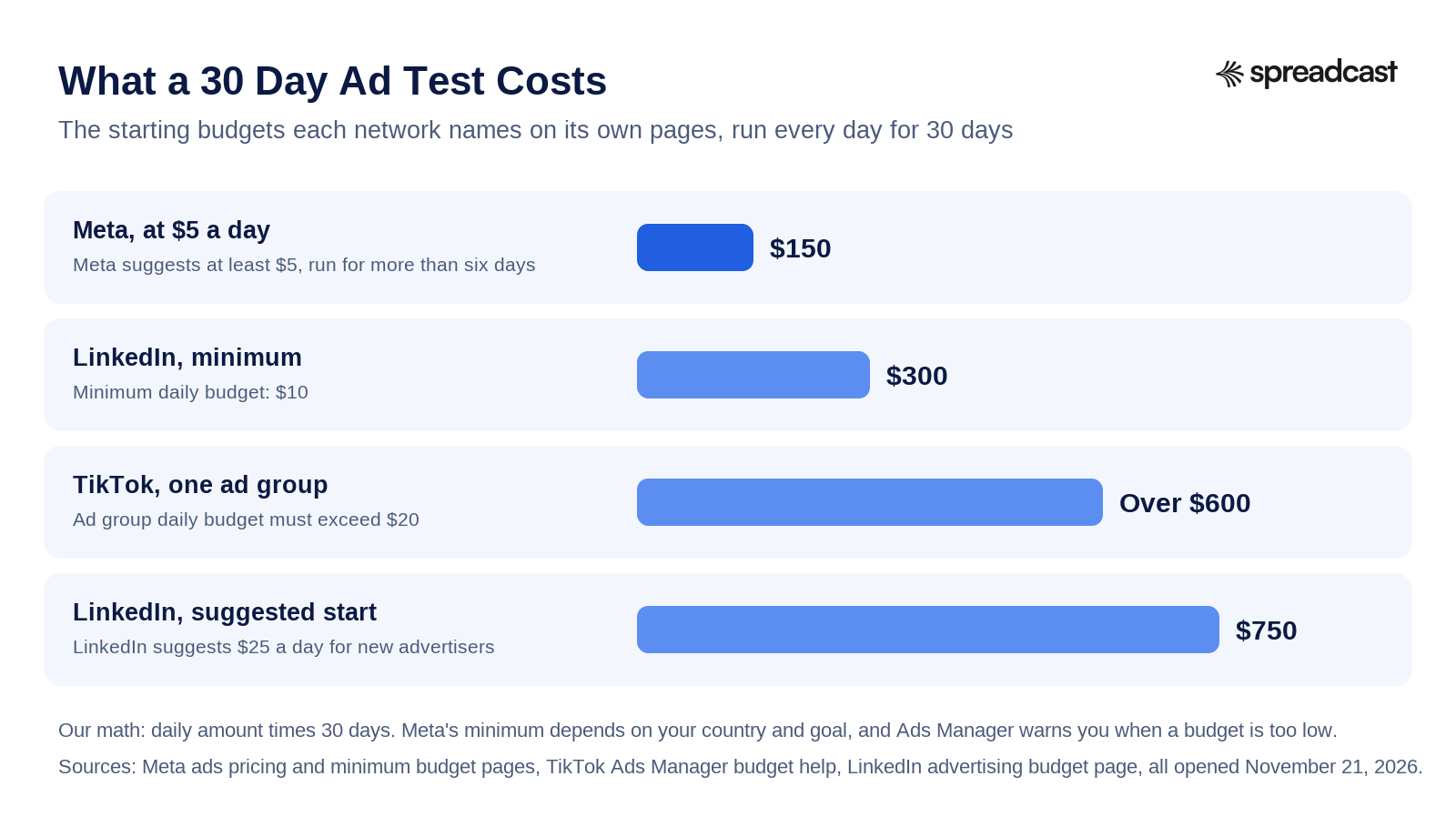
Bar chart of the cost of a 30 day ad test at each network's starting budget. Meta at $5 a day: $150. LinkedIn at its $10 daily minimum: $300. TikTok with one ad group above $20 a day: over $600. LinkedIn at its suggested $25 a day: $750
Our math: each daily amount times 30 days. Daily amounts from Meta's pricing page, TikTok's budget help and LinkedIn's budget page. Meta's suggestion is a starting budget over more than six days, so treat $5 a day as an assumption rather than a Meta minimum.

Here's a simple way to run your first test without wasting money:

  1. Pick the post that got the most saves, shares or comments in the last month. Don't write a new ad.
  2. Choose one goal you can measure: messages, calls, bookings, visits to one page.
  3. Target the area you serve and keep the rest broad. Meta's pricing page notes that ad sets with an audience of at least 2 million people often perform better, so don't shrink a local audience further with long lists of interests.
  4. Set a budget you would not mind losing, such as $5 to $10 a day on Meta for a week or two.
  5. Write down the cost per message, call or booking at the end and compare it with what a customer is worth to you. If one new customer pays for the whole test, run it again.
A short Meta Blueprint lesson on making ads that fit the Reels format, such as building the video around sound. The same habits help your unpaid Reels too. Video by Meta for Business on YouTube

Should You Boost a Post?

Boosting is the quick version of an ad: a button under a post on Facebook, Instagram or LinkedIn that turns it into an ad with a few choices. It's a fair way to start, because it pushes a post you already know works. The limits are fewer options for goals and targeting than in Ads Manager. Boost to learn, then move to Ads Manager once you know what you want to measure.

Small Business Social Media Strategy: A 30 Day Plan

A strategy is just a set of decisions you write down so you stop making them every morning. Here's one you can start on any Monday. It assumes two networks plus Google, and three main posts a week.

Week 1: Set Up and Audit

  1. Decide your one main network and your one second network using the matrix above.
  2. Finish every profile: logo, bio, hours, links, location, pinned posts. Claim your Google Business Profile.
  3. Run a quick audit of what you have posted before, using our social media audit template. Note your current followers and reach on each account so you have a starting point.
  4. Write down your brand kit: colors, fonts, logo, tone of voice.
  5. List 20 post ideas using the types above. Ten from your work, five answers to customer questions, three proof posts, two offers.

Week 2: Make a Batch and Start Posting

  1. Take photos and short videos for the next two weeks in one go, ideally on a quiet morning.
  2. Make six posts in one sitting, with captions, and schedule them for the next two weeks.
  3. Post one Google Business Profile update.
  4. Reply to every comment and message within a day. Put 15 minutes in your calendar for it on weekdays.

Week 3: Engage and Learn

  1. Follow and comment on ten local businesses or partners whose customers overlap with yours.
  2. Ask happy customers for a Google review, and share one review as a post.
  3. Try one new format, such as a Reel, a carousel or a trial reel, and compare it with your usual posts.
  4. Make the next batch of posts for weeks four and five.

Week 4: Measure and Decide

  1. Compare followers, reach and interactions with your week one numbers.
  2. Find your three best posts and write down what they have in common.
  3. Decide one thing to do more of and one thing to stop.
  4. If one post clearly beat the rest, consider a small ad test behind it.
  5. Make next month's batch with what you learned.

After the first month, the plan becomes a loop: one batch session, steady posting, daily replies, a monthly look at the numbers. That loop is the whole strategy. Most of the businesses whose accounts you admire are simply further along the same loop.

How to Measure Social Media Marketing for Small Business

Measure what tells you whether social media brings customers, not what looks good in a screenshot. For a small business that's a short list, checked once a month rather than every hour.

Number, What it tells you, Where to find it
NumberWhat it tells youWhere to find it
FollowersWhether your audience is growing, and how fastEach network's insights or a combined analytics page
Reach or viewsHow many people saw your postsPost and account insights
InteractionsLikes, comments, shares, saves and replies: whether people carePost insights
Engagement rateInteractions compared with reach or followers, so small accounts can compare fairlyCalculate it, or use a free calculator
Clicks, calls, messages, bookingsWhether people took a step toward buyingLink clicks in insights, your booking system, a tracked link
Where customers heard of youThe truth the apps can't seeAsk at the counter or in the booking form

Our social media KPIs guide explains each number and how to read it, and the free engagement rate calculator does the math for you. One habit beats any dashboard: ask new customers how they found you. If "I saw you on Instagram" keeps coming up, you know the time is well spent, whatever the follower count says.

Checking each network's app separately takes longer than it should, which is one reason owners stop checking at all. A tool with social media analytics for all your accounts on one page, compared with the previous period, makes the monthly review a ten minute job.

Small Business Social Media Mistakes to Avoid

Most of these mistakes aren't about strategy. They are about running out of time, or about rules owners did not know existed.

  • Being on too many networks. Five half empty accounts look worse than two active ones. Start with two and add a third only when the first two run on their own.
  • Going silent. The feed that posts daily in January and stops in February is the most common small business pattern. A slower, steadier pace wins.
  • Only posting offers. If every post asks for money, people stop looking. Keep promotions to about one post in five.
  • Ignoring comments and messages. A question left unanswered for days is a lost customer, and it's public.
  • Posting the same text everywhere without checking it. Each network has its own length limits and picture sizes, and a cut off caption or a cropped photo looks careless.
  • Using random templates. A feed that changes colors and fonts every post doesn't build recognition. Use your brand kit every time.
  • Measuring likes instead of customers. Likes are a signal, not a result.
  • Buying followers or reviews. The FTC's final rule announced August 14, 2024 prohibits fake reviews and testimonials, paying for reviews that must say something positive or negative, using threats to suppress bad reviews, and buying or selling fake indicators of social media influence such as followers or views.
  • Forgetting disclosures when you work with creators. If you give a local creator free products or pay them to post, the FTC says they must disclose it: free or discounted products count as a material connection, and the disclosure should be hard to miss and placed with the endorsement itself, in the video when it's a video.
  • Posting other people's photos or music without permission. Share customer photos only with their OK, and use the networks' own music libraries for business accounts.

How Spreadcast Runs Social Media for a Small Business

Everything above works by hand. It also takes the three to six hours a week most owners don't have, and it falls apart the first busy month. Spreadcast is a marketing automation platform built for exactly that gap: it runs your marketing, with branded posts made and scheduled for you, so the plan keeps going when you're busy. Here's how that works for a small business.

Your Brand Kit From Your Website

Sign up and type your website. Spreadcast reads your brand colors and what you do, writes a short description of your business and who it's for, and picks fonts for your posts. You add your logo and your photos, choose how captions sound, and that brand kit is used for every post from then on. No website yet? Describe your business in a few lines instead. If you have an App Store or Google Play app, paste its link and Spreadcast reads your name, icon, screens and colors from the listing.

Branded Posts From One Line

Describe a post in a sentence, such as "our new spring menu, three dishes" or "open slots this Thursday", and Spreadcast designs it in your brand and writes the caption. You see it right away in each network's own frame. Want a carousel or a text only post? Say so. Prefer your own photos or video? Upload up to ten pictures for a carousel, or one video, and Spreadcast writes the caption from your description. Change the caption for one network only, or open the picture editor to adjust the text, colors and font. This is the part that takes the design and caption hours out of the worksheet above, and it's why a batch of a week's posts fits into one short sitting. Our free Instagram post maker gives you a taste of the designs without an account.

Scheduled and Published on Every Network You Use

Spreadcast publishes to Instagram, Facebook, LinkedIn, TikTok, YouTube, Pinterest, Threads, Bluesky, Mastodon, Telegram and Discord from one social media scheduler. One post goes to every account you pick, each in the right shape, and if a network needs something different, such as a shorter caption for Bluesky, Spreadcast tells you before it's scheduled. Pro connects up to ten social accounts, so a Facebook Page, an Instagram account and a TikTok for each of your two locations all fit, and our guide to managing multiple social media accounts shows how. Your calendar shows what's scheduled, published or needs a second try.

Analytics That Say What to Do Next

Analytics puts your followers, views and interactions for all accounts on one page, each compared with the period before, plus a day by day view that starts on your top post of the period. A Recommendations card reads the numbers and tells you what to do: make more of the kind of post that did best, move your posting time to the day and hour that got the most interactions, or post less if you're posting a lot for the size of your audience. That's the monthly review from the 30 day plan, done for you.

What It Costs

Start free: the Free plan makes your first three posts in your brand so you can see the quality before you pay, and connecting accounts is free on every plan. Pro is $29 a month ($290 a year) and adds publishing to all your networks, clean posts without the Spreadcast mark, and posting from Claude or ChatGPT if you use them. Next to the roughly $363 a month of time in our worksheet, it pays for itself in the first week, and every paid plan comes with a 7 day refund. For a launch month or a busy season, the 30 Day Pass gives you everything in Pro for 30 days with no renewal.

Social media marketing for small business isn't complicated. It's a weekly habit that's hard to keep. Try Spreadcast free, type your website, and get your first three branded posts made for you before you decide anything.

How We Researched This

On November 21, 2026 we collected the questions people type into Google about small business social media, using Google's search suggestions for phrases such as "social media for small business", "how often should a small business post" and "how much should a small business spend on social media", and used the most common ones as headings. We read the guides that rank for social media marketing for small business, including long guides from Salesforce, Adobe Express and Intuit QuickBooks, and noted what they cover thinly or skip: each network's ad minimums, the hours the work takes, and local reach through Google and Nextdoor.

We then opened every source cited here on the same day: Pew Research Center's 2026 fact sheet and 2025 report on social media use, the SBA Office of Advocacy's 2026 small business facts, the Bureau of Labor Statistics pay data, Pinterest's third quarter 2026 results, TikTok's October 2026 economic impact announcement, Buffer's Instagram frequency study, Sprout Social's response time guide, the ad budget pages of Meta, TikTok, LinkedIn and Pinterest, Instagram's, TikTok's and LinkedIn's business help pages, Social Media Today's report on Instagram's hashtag limit, Google Business Profile help, Nextdoor's business pages, the FTC's fake reviews rule and its disclosure guide for influencers. The time worksheet, the 30 day ad cost chart, the network matrix and the sample week are our own work; the worksheet minutes are estimates, not survey results, and the text shows the math. The two videos come from HubSpot Marketing and Meta for Business on YouTube. Spreadcast is our product, and every claim about it was checked against its own documentation on the same day.

Questions

Frequently Asked Questions

How often should a small business post on social media?

Three to five times a week on your main network and at least once a week on any other network you use is a good start. In Buffer's study of 2.1 million Instagram posts, the boost to weekly follower growth from posting three to five times a week was more than double the boost from posting once or twice. Consistency matters more than volume.

How much should a small business spend on social media?

Count time first: three to six hours a week for two networks is realistic. Tools range from free apps to about $29 a month for one that designs and schedules posts. For ads, start with a small test behind a post that already did well, for example $5 to $10 a day on Meta for a week or two, and only scale what brings customers.

What is the best social media for small business?

The one your customers use. For most local businesses that's Facebook and Instagram plus a Google Business Profile. Online stores do well on Instagram, TikTok and Pinterest. Consultants and B2B companies should start on LinkedIn. Pick one main network and one second one rather than all of them.

How do I start social media marketing for my small business?

Claim your name on the networks you need, set up business accounts, fill in every profile field, and decide on your colors, fonts and tone. Then make a batch of posts for two weeks in one sitting, schedule them, reply to every comment within a day, and check your numbers after a month.

Is social media good for small business?

Yes, when it's kept up. It's free to start, your customers already use it every day, and it keeps you in mind between visits. It works best alongside a complete Google Business Profile and a clear website, not instead of them.

How much time should a small business spend on social media?

Plan on three to six hours a week for two networks, including replies. Our own worksheet came to about 5 hours 52 minutes a week by hand for three posts on three networks, and about 3 hours 32 minutes with a tool that designs, captions and schedules the posts.

Is Facebook still good for small business?

For local businesses, yes. Pew Research Center's 2026 survey found 70% of US adults use Facebook, including 78% of adults aged 30 to 49 and 76% of people in rural areas. It's also where Meta ads for Facebook and Instagram are run.

Sources

Where These Facts Come From

Every outside number, rule and price on this page links to the page it was taken from.

  1. Americans' use of social media in 2026, fact sheetPew Research Center
  2. Americans' social media use 2025Pew Research Center
  3. Frequently asked questions about small business 2026U.S. Small Business Administration, Office of Advocacy
  4. Public relations specialists, Occupational Outlook HandbookU.S. Bureau of Labor Statistics
  5. Pinterest third quarter 2026 resultsPinterest via SEC EDGAR
  6. TikTok supported $81 billion in US GDP and 410,000 American jobsTikTok Newsroom
  7. Social media response time guideSprout Social
  8. How often should you post on Instagram? Data from 2 million postsBuffer
  9. Facebook and Instagram ads pricing and cost: an overviewMeta for Business
  10. Best practices for minimum budgetsMeta Business Help Center
  11. About budgets for ads in TikTok Ads ManagerTikTok Ads Help Center
  12. Maximize your budgetLinkedIn Ads
  13. LinkedIn Pages best practicesLinkedIn Marketing Solutions
  14. Set up campaign budgetsPinterest Business Help
  15. Set up a professional Instagram accountInstagram Help Center
  16. Promotion guidelinesInstagram Help Center
  17. Trial reels: try content with non followers firstMeta Newsroom
  18. Create and manage posts on your Business ProfileGoogle Business Profile Help
  19. Tips to improve your local ranking on GoogleGoogle Business Profile Help
  20. Manage customer reviewsGoogle Business Profile Help
  21. What do you get from a free Business Page?Nextdoor for Business
  22. Changes to self promotion policyNextdoor Blog
  23. How to use the paid partnership label to tag organic branded contentInstagram Help Center
  24. About the content disclosure setting for creatorsTikTok Ads Help Center
  25. Instagram implements new limits on hashtag useSocial Media Today
  26. Final rule banning fake reviews and testimonialsFederal Trade Commission
  27. Disclosures 101 for social media influencersFederal Trade Commission
  28. 5 steps to grow your Instagram organically, small business strategyHubSpot Marketing on YouTube
  29. Optimize your ad creative using Reels best practicesMeta for Business on YouTube

Researched and written by Mark Weizer. Last checked on November 21, 2026.

Social Media Management

Put Your App's Marketing on Autopilot

Paste your App Store link once. Your next update, review and rating milestone becomes a post, published for you.

First 3 posts free · No credit card