Every scheduling company publishes a best time to post, and they rarely agree. Buffer's Instagram data puts the top slot at Thursday 9 a.m. Sprout Social's points to Tuesday and Wednesday afternoons. Later's says 5 a.m. None of them is lying. They count different things, on different customers, with different ways of handling time zones, and once you see how each study was built the disagreement makes sense.
This guide does three jobs. It puts the published studies side by side for each of the 11 networks Spreadcast posts to, with the sample size, method, time zone and date of each, so you can see where they agree. It explains why they disagree and why timing matters far more on a chronological feed than on a ranked one. And it shows where each network's own analytics tells you when your followers are around, with a 2 week test that turns all of it into a schedule of your own. We have no posting data of our own to add, so you will not find a made up study here. X is left out on purpose. Everything below covers Instagram, Facebook, LinkedIn, TikTok, YouTube, Pinterest, Threads, Bluesky, Mastodon, Telegram and Discord.
The Short Answer
If you need a time for tomorrow's post: in the studies that count engagement, weekdays beat weekends on almost every network, and Tuesday to Thursday are the safest days. The newest large study, which counts how often posts are seen, finds the opposite for reach: Sunday posts get a few percent more impressions, though not more likes or comments. Late morning to mid afternoon in your audience's local time is the safest window for Facebook, Instagram, LinkedIn and Pinterest. YouTube and TikTok are the exceptions, with weekend slots near the top. For the smaller networks there is little or no published data, so the answer is your own followers' hours. Use the table below as a first guess, then replace it with your own numbers within a month.
| Network | First slot to test | Where that comes from |
|---|---|---|
| Wednesday or Thursday, 9 a.m. to 1 p.m. | Buffer's top slots are Thursday 9 a.m. and Wednesday noon (Buffer); Sprout's windows run through Tuesday and Wednesday afternoons (Sprout Social) | |
| Tuesday to Thursday, 9 a.m. to 1 p.m. | Thursday 9 a.m. (Buffer), Tuesday 9 a.m. (Hootsuite), Tuesday and Wednesday from noon (Sprout Social) | |
| Tuesday to Thursday, 11 a.m. to 5 p.m. | Tuesday to Thursday 11 a.m. to 5 p.m. (Sprout Social); Wednesday 4 p.m. (Buffer) | |
| TikTok | A weekday afternoon or evening, then a weekend morning | Studies split between weekday afternoons, evenings and weekends; see the TikTok section |
| YouTube | Long videos Sunday morning, Shorts Friday afternoon | Sunday 10 a.m. for long videos and Friday 4 p.m. for Shorts (Buffer) |
| Tuesday to Thursday, 10 a.m. to 1 p.m. | Sprout Social; Pins can keep earning for months, so timing counts less | |
| Threads | Weekday mornings, 8 to 9 a.m. | Tuesday 8 a.m. (Hootsuite); Thursday 9 a.m. (Buffer) |
| Bluesky | Weekday mornings, 9 to 11 a.m. | Wednesday 9 to 10 a.m. was the best slot in SocialPilot's 1 million post sample |
| Mastodon | Waking hours in your followers' main time zone | No study with a stated sample; the home feed is chronological |
| Telegram | When subscribers read, not when they scroll | No published study; use the channel's own statistics |
| Discord | When members are already talking | No published study; use Server Insights or watch the channel |
Best Time to Post on Social Media: What the Big Studies Found
Six companies publish large, recent best time studies built from their own customers' posts. Before using any of their numbers, it helps to know what each one actually measured. The table below is taken from each study's own methods note, as published on the date shown. Where a study does not say something, the cell says so.
| Study | Sample | What it counts | Data period | Time zone | Published |
|---|---|---|---|---|---|
| Sprout Social | Nearly 2 billion engagements on about 307,000 profiles from over 30,000 customers | Total volume of interactions: reactions, comments, shares, direct messages and clicks | November 27, 2025 to February 27, 2026 | Local time | March 31, 2026 |
| Buffer | Over 52 million posts in total; 9.6 million on Instagram, 4.8 million on LinkedIn, over 14 million on Facebook, 7.1 million on TikTok, about 1.8 million YouTube videos | Median engagement rate; on Instagram, likes, comments, shares and saves divided by followers (method) | January 2024 to December 2025, as stated on the Instagram page | Normalized to local time | March 25, 2026, with network pages updated July to October 2026 |
| Hootsuite | Over 1 million posts, analyzed with the agency Critical Truth | Engagement, not defined further | Not stated | Normalized across 118 countries | November 19, 2025 |
| Later | Over 6 million Instagram feed posts | Engagement rate over time | January to October 2024 | Audience's local time | April 21, 2026 |
| SocialPilot | About 7 million posts from over 50,000 accounts per network | How engagement rates varied by hour and weekday | Not stated | Described as global, not tied to a time zone | December 2, 2025 |
| Vista Social | 11.4 million posts from 63,000 brand profiles managed from 13,000 Vista Social accounts, on seven networks | Impressions and engagements per post, each brand compared with its own posts at other times, median across brands | November 1, 2025 to October 31, 2026 | The brand's local time, as set for the profile | November 9, 2026 |
Two warnings before the numbers. First, every sample comes from one company's own customers, so each study describes accounts that use that tool, not the whole network. Second, they measure different things: Sprout counts how much engagement happened in an hour, Buffer looks at how well the typical post did relative to its followers, and Vista Social counts how often a post was shown compared with the same brand's other posts. We come back to why that matters in the next section. We also looked for current numbers from CoSchedule, which many roundups quote, and found no dataset with a stated sample, so they are not in this guide.
Here is what the studies say for each network, in one place. Times are local to your audience unless the study says otherwise. Bluesky has one study of any size. Mastodon, Telegram and Discord have none we could verify, and their own sections further down explain what to do instead. If you want these as a planning grid, the social media content calendar lays out a week in the same shape.
| Network | Sprout Social | Buffer | Hootsuite | Best days | Weakest days |
|---|---|---|---|---|---|
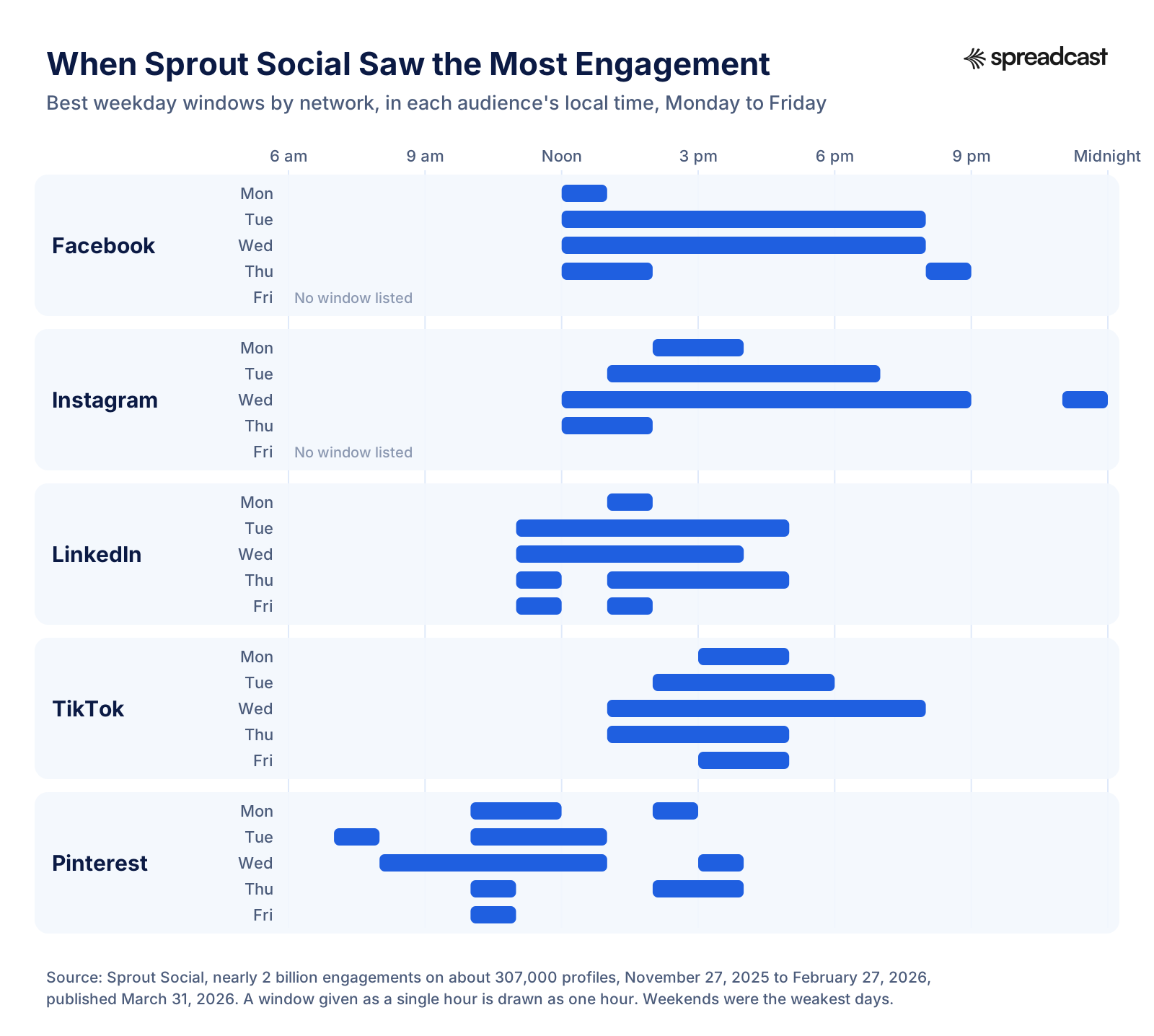
| Mon 2 to 4 p.m.; Tue 1 to 7 p.m.; Wed noon to 9 p.m. and 11 p.m.; Thu noon to 2 p.m. | Thu 9 a.m.; Wed noon; Wed 6 p.m. | Mon 3 to 9 p.m.; Tue 5 to 8 a.m. and 3 to 7 p.m.; Thu 5 to 7 p.m. | Wednesday, Thursday, Tuesday | Weekends (Sprout); Friday and Saturday (Buffer) | |
| Mon noon to 1 p.m.; Tue and Wed noon to 8 p.m.; Thu noon to 2 p.m. and 8 p.m. | Thu 9 a.m.; Wed 8 a.m.; Sun 10 a.m. | Tue 9 a.m. | Wednesday, Thursday, Tuesday | Weekends (Sprout); Saturday (Buffer) | |
| Mon 1 to 2 p.m.; Tue 11 a.m. to 5 p.m.; Wed 11 a.m. to 4 p.m.; Thu 11 a.m. and 1 to 5 p.m.; Fri 11 a.m. and 1 to 2 p.m. | Wed 4 p.m.; Fri 3 and 4 p.m. | Tue and Wed 4 to 6 a.m. | Wednesday, Thursday, Friday (Buffer); Tuesday to Thursday (Sprout) | Weekends (Sprout); Monday, then Tuesday (Buffer) | |
| TikTok | Mon 3 to 5 p.m.; Tue 2 to 6 p.m.; Wed 1 to 8 p.m.; Thu 1 to 5 p.m.; Fri 3 to 5 p.m. | Sun 9 a.m.; Mon 1 p.m.; Sun 1 p.m. | Thu 7 to 11 a.m. | Weekdays (Sprout); Saturday and Monday (Buffer) | Weekends (Sprout); Wednesday (Buffer) |
| YouTube | Not covered | Long videos Sun 10 a.m.; Shorts Fri 4 p.m. | Not covered | Sunday for long videos; Friday for Shorts | Thursday for long videos; Tuesday for Shorts |
| Tue to Thu 10 a.m. to 1 p.m., plus Mon 10 a.m. to noon | Not covered | Tue and Fri noon | Weekdays | Weekends (Sprout) | |
| Threads | Not covered | Thu 9 a.m. | Tue 8 a.m. | Wednesday (Buffer) | Saturday, Sunday and Monday (Buffer) |
Best Days to Post on Social Media
People search for the best time to post on a Monday, a Friday or a Sunday, so here is what the studies say day by day. In the engagement studies the pattern is steady: the middle of the week is strongest, the weekend is weakest for business networks, and video networks are the exception.
| Day | What the studies say | Good for |
|---|---|---|
| Monday | Sprout lists afternoon windows on all five networks this guide takes from it. Buffer ranks Monday the weakest day on LinkedIn and among the weakest for YouTube Shorts, but second best on TikTok. | TikTok, an Instagram post in the afternoon |
| Tuesday | One of Sprout's two best days across networks (Sprout Social). Hootsuite's best slots for Facebook and Threads fall on Tuesday morning. | Facebook, LinkedIn, Threads, Pinterest |
| Wednesday | Sprout's other best day. Buffer's best day for Instagram, Facebook, LinkedIn and Threads (Buffer). Hootsuite's overall best time is Wednesday at 8 a.m. | Almost everything |
| Thursday | Buffer's single best slot for both Instagram and Facebook is Thursday at 9 a.m.; Hootsuite's best TikTok window is Thursday 7 to 11 a.m. | Instagram, Facebook, LinkedIn |
| Friday | Buffer calls Friday the worst day on Instagram, yet two of its three best LinkedIn slots are Friday afternoon, and Friday 4 p.m. is its top slot for YouTube Shorts. | LinkedIn in the afternoon, YouTube Shorts |
| Saturday | Buffer's quietest day on Facebook and one of the weakest on Threads, but its best day overall for TikTok. | TikTok, YouTube Shorts |
| Sunday | Sprout's worst day across networks. Buffer's best day for long YouTube videos (10 a.m.) and home of its top TikTok slot (9 a.m.). Vista Social found Sunday posts got more impressions than the same brand's other posts on all seven networks it measured. | Long YouTube videos, TikTok, reach |
So the honest answer to "best time to post on social media on a Sunday" depends on what you count. In the engagement studies, Sunday is good on YouTube and maybe TikTok, and the slot to skip on LinkedIn and Facebook. In the one study that counts impressions, a Sunday post is seen a little more often on every network, because fewer brands post then. If your customers browse at the weekend, test one weekend slot anyway.
Why Best Time Studies Disagree
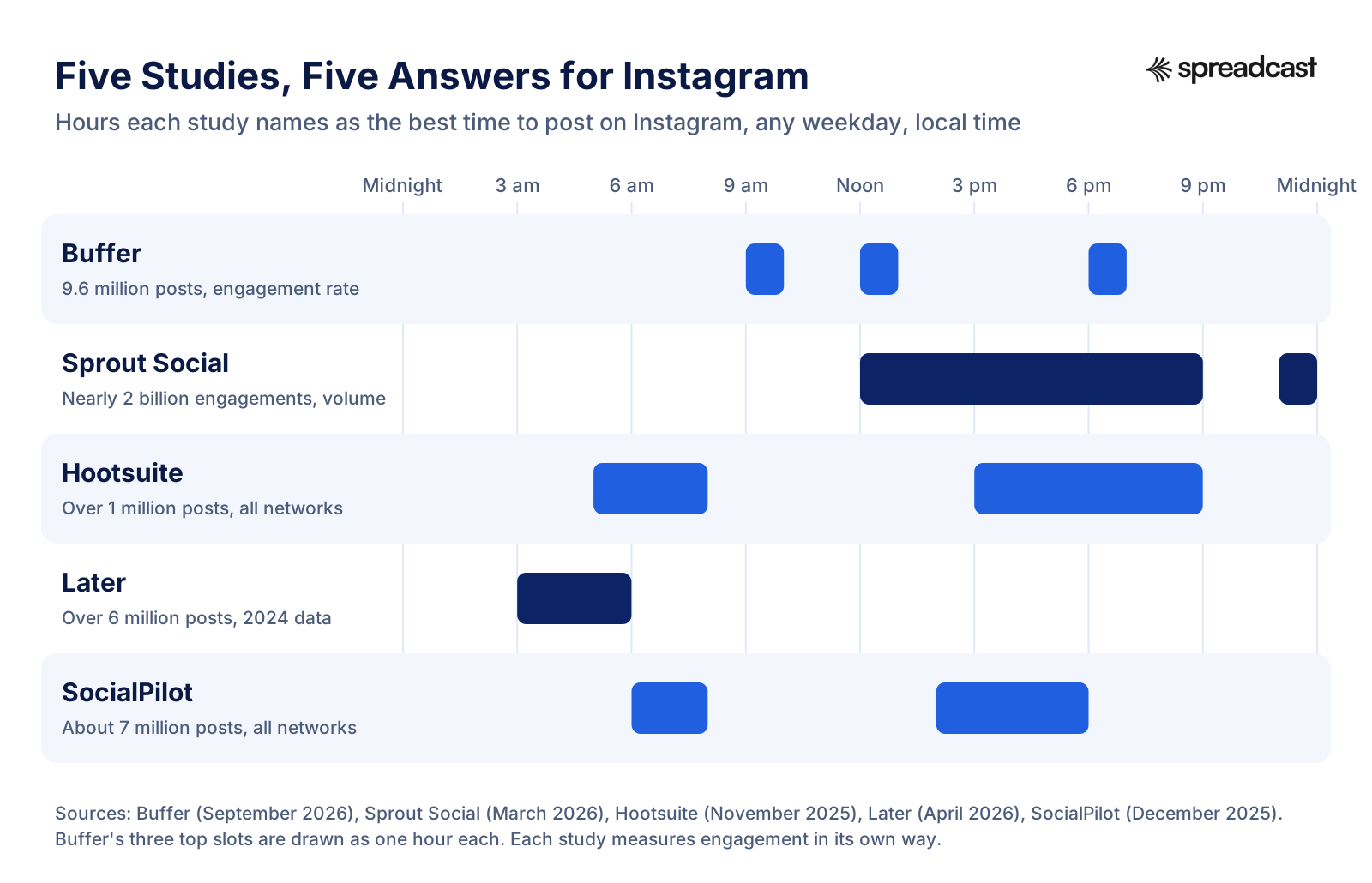
Put the Instagram answers from five studies on one 24 hour clock and they barely overlap. One study points only at the early morning, one at midday into the evening, two at both the early morning and the afternoon, and one at three separate hours. That does not mean timing is random. It means each study is answering a slightly different question, and knowing which question each one asks tells you which answer fits you.
They Measure Different Things
Sprout Social counts the total volume of interactions posts receive in a window: reactions, comments, shares, direct messages and clicks. Volume is highest when the most people are online and the most brands are posting, which is why Sprout's windows sit in the busy middle of the day. Buffer uses the median engagement rate of a post, its likes, comments, shares and saves divided by the account's followers. A rate can look strongest at hours when fewer accounts post, because each post meets less competition. Neither is wrong. If you want the most total attention in one hour, Sprout's question is closer to yours. If you want each single post to do as well as it can for the audience you have, Buffer's is.
They Only See Their Own Customers
Sprout's sample is about 307,000 profiles from over 30,000 of its customers. SocialPilot studied accounts connected to SocialPilot, and Buffer's numbers come from posts sent through Buffer. A company's customers share habits: the plans they can afford, the industries they work in, the countries they sell to. A study built mostly on marketing teams and one built mostly on solo creators can both be right and still point at different hours. Before borrowing a study's answer, ask whether its customers look like you.
They Handle Time Zones Differently
Sprout records every engagement in local time, so its 9 a.m. means 9 a.m. in Los Angeles, London and Sydney alike. Hootsuite says its times are normalized across 118 countries and are time zone agnostic. SocialPilot describes its times as global, yet gives its YouTube times in Eastern time. Buffer says its figures were adjusted to apply in any zone. Each method is reasonable, but a sample that leans on one region can drift when it is folded into one clock, and none of the studies publishes its time zone mix.
They Come From Different Years and Seasons
Later's Instagram study is dated April 2026, but the data behind it runs from January to October 2024. Sprout's covers three winter months, November 27 to February 27, so the December holidays are in it. Buffer's Instagram data spans two full years, January 2024 to December 2025. Feeds change, and so do habits. A two year sample smooths out the seasons. A three month sample shows one season very precisely.
Early Hours Can Look Strong in Rate Studies
Later found that Instagram posts published between 3 and 6 a.m. did better than average every day, with 5 a.m. the best overall. Hootsuite also lists 5 to 8 a.m. on Tuesdays. Later's own explanation is less competition: few accounts post at that hour, so an early post can catch people on their first scroll of the day, even a few hours after it went up. Later also points out that many accounts have followers in several locations. If your followers really do scroll first thing in the morning, an early post can work. If they are night owls in another time zone, ignore it.
The Newest Study Counts Impressions and Finds Sunday
Vista Social's study, published November 9, 2026, asks a different question again: how often is a post shown, compared with the same brand's other posts? Across 11.4 million posts on seven networks, Sunday posts got more impressions on all of them, from 3% more on TikTok to 10% more on YouTube, and 7% more on LinkedIn. Brands publish only 14 to 22% of their posts on the weekend, and Vista Social's reading is that each weekend post simply meets fewer brand posts in the feed. The busiest slot for brand posts, 9 a.m. to noon, got fewer impressions than other hours on all seven networks. Evenings did best on Facebook (6 to 9 p.m., 5% more) and Instagram (9 p.m. to midnight, 5% more).
The catch is in the same report: likes, comments and other engagements per post stayed within 3% on every day of the week, and on most networks Sunday posts had a slightly lower engagement rate. So a Sunday post is seen a little more, not liked more. The gaps are also small, a few percent either way. If reach is what you want, a weekend slot is worth a test, even on LinkedIn. If replies and clicks are what you want, the day matters less than the engagement studies suggest.
Where the engagement studies do agree is worth more than any single hour:
- For engagement, weekdays beat weekends on Facebook, Instagram, LinkedIn and Pinterest. Sprout lists weekends as the worst days on all of them, and Buffer names Saturday the quietest day on Facebook and Friday and Saturday the weakest on Instagram.
- Tuesday, Wednesday and Thursday are the safest days to post on the business networks.
- The middle of the night is the worst time on Facebook and Instagram: Hootsuite names midnight to 4 a.m. for Facebook and the hours before 4 a.m. for Instagram, and Buffer calls 1 to 5 a.m. the weakest Instagram hours on every day.
- Video is the exception. Buffer's best day for long YouTube videos is Sunday, and its best TikTok slot is Sunday at 9 a.m. (Buffer).
Chronological vs Ranked Feeds: Where Timing Matters Most
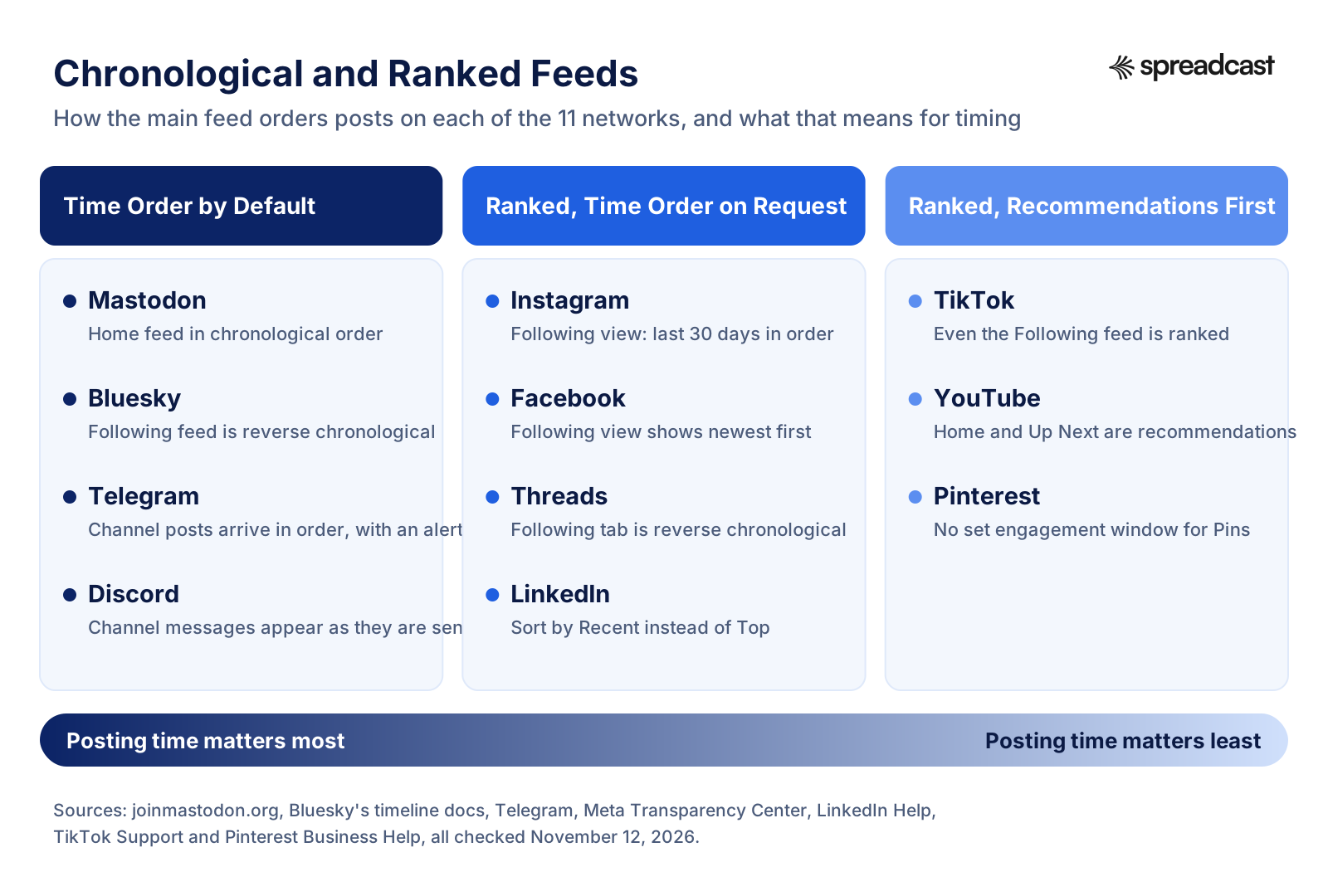
How much the time of day matters depends less on the network's size than on how its feed is ordered. On a chronological feed, a post's place depends only on when it was published. Mastodon says it plainly: you follow people and "receive their posts in chronological order", with no algorithms deciding. Once your followers scroll past the moment you posted, the post is behind them. On those networks, posting while people are awake and reading is most of the game.
On a ranked feed, the network picks what to show by predicted interest, so a strong post can still be shown hours later. Meta's Facebook Feed card describes gathering all the posts from friends, Pages and groups, selecting about 500 of the most relevant, giving each a relevance score and ordering the feed by that score. Instagram says its feed uses thousands of signals, including when a post was shared. TikTok ranks even its Following feed with its recommender systems. Pinterest goes furthest: there is "no set engagement window" for a Pin, which can gain engagement "hours, days, months, or even years" after it is published. Timing still matters on these networks, because recency is one signal among many and a post shown to people who are around gets its first reactions sooner. It just matters less than what the post is.
| Network | Default feed | Time ordered view | Source |
|---|---|---|---|
| Ranked by thousands of signals | Following shows the last 30 days of posts from accounts you follow in chronological order | ||
| Ranked: about 500 candidate posts scored for relevance | Following shows content from accounts you follow in reverse chronological order | Meta Transparency Center | |
| Threads | Ranked blend of accounts you follow and recommendations | Following, in reverse chronological order, with no recommendations | Meta Transparency Center |
| Top posts, personalized by interests and activity | Recent, in reverse chronological order from people you follow | LinkedIn Help | |
| TikTok | Recommendation feeds, For You and Following alike | None | TikTok Support |
| YouTube | Home is "primarily a personalized surface"; the watch page suggests what to play next | Not described | YouTube Help |
| Distributed by engagement, with no set engagement window | None | Pinterest Business Help | |
| Bluesky | Following timeline, plus over 40,000 algorithmic feeds to choose from | The home timeline is "expected to be some form of reverse chronological feed" | Bluesky docs, Bluesky FAQ |
| Mastodon | Home feed of accounts and hashtags you follow, in chronological order | It is the default | Mastodon, Mastodon docs |
| Telegram | Channel posts in the order they are published, each with a notification unless muted | It is the default | Telegram |
| Discord | Messages in a channel, in the order they are sent | It is the default | Discord's own channel view |
The practical rule: the more time ordered a network is, the more your posting time should follow your audience's waking hours. On Mastodon, a Bluesky account whose followers read Following, a Telegram channel or a Discord server, a post at 3 a.m. for the people it is meant for is mostly wasted. On TikTok, YouTube and Pinterest, time spent on the hook, the title or the picture pays back more than time spent on the clock. The four in the middle, Instagram, Facebook, Threads and LinkedIn, sit in between: ranked by default, but with a time ordered view some of your followers will use. Getting the first hour right still helps there, and our guide to what makes a social creative convert covers the part that matters more.
Best Time to Post on Instagram
Instagram has the most data of any network. Buffer's 9.6 million post study, covering January 2024 to December 2025, names Thursday at 9 a.m., Wednesday at noon and Wednesday at 6 p.m. as the strongest slots, with Wednesday, Thursday and Tuesday the best days. Sprout Social sees the most engagement on Tuesdays from 1 to 7 p.m. and Wednesdays from noon to 9 p.m. Hootsuite gives Monday 3 to 9 p.m., Tuesday 5 to 8 a.m. and 3 to 7 p.m., and Thursday 5 to 7 p.m. Later is the outlier at 5 a.m., and SocialPilot recommends 6 to 8 a.m. and 2 to 6 p.m.
The overlap is midweek, from late morning into the early evening. A sensible first schedule is one post at Wednesday noon or Thursday 9 a.m. and, if you post more than once a week, a second in the early evening, around 6 or 7 p.m. on Tuesday or Wednesday, where Buffer and Sprout both see strength. Avoid Friday night and Saturday until your own numbers say otherwise.
Best Days to Post on Instagram
| Day | Buffer's top 3 slots, in order | Buffer's rating | Sprout Social's window |
|---|---|---|---|
| Monday | 7 p.m., 6 p.m., 8 p.m. | Moderate | 2 to 4 p.m. |
| Tuesday | 7 p.m., 3 p.m., 5 p.m. | High | 1 to 7 p.m. |
| Wednesday | Noon, 6 p.m., 8 a.m. | Highest | Noon to 9 p.m., and 11 p.m. |
| Thursday | 9 a.m., 8 a.m., 7 a.m. | Highest | Noon to 2 p.m. |
| Friday | 10 p.m., 9 p.m., 6 a.m. | Low | None listed |
| Saturday | 9 p.m., 10 p.m., 8 p.m. | Low | Weekends weakest |
| Sunday | 9 p.m., 10 p.m., 8 p.m. | Moderate | Weekends weakest |
Sources: Buffer's best time to post on Instagram, updated September 2026, and Sprout Social, March 2026. The weekend evenings in Buffer's list are the best hours on weak days, not strong slots overall.
Best Time to Post a Reel on Instagram
Buffer analyzed all Instagram post types together, so its times are not Reels only. Its page still suggests evenings, 6 to 11 p.m., for Reels, with Wednesday and Thursday strongest, and recommends testing early morning and midday slots too. For Stories it says one or two a day, and that consistency matters more than the exact time (Buffer). There is a structural reason Reels care less about your followers' hours: Instagram says Reels and Explore mostly show content from accounts people do not follow, ranked by how likely they are to watch, like or share it. A Reel is placed in front of strangers whenever they happen to be scrolling, so its quality decides its reach far more than its time stamp.
How to Find Your Best Time in Instagram Insights
Instagram tells you when your own followers are online. According to the Instagram Help Center, public accounts get free insights, and once you have at least 100 followers the Total followers insight shows your growth, your followers' top locations, their age range and the times they are most active on Instagram. You can pick a preset or custom timeframe within the past 90 days.
- Open your profile in the Instagram app and tap the insights or professional dashboard entry near the top.
- Tap Total followers. If you have fewer than 100 followers, this section is not available yet.
- Scroll to the chart of the times your followers are most active, and note the two or three busiest hours on the days you post.
- Check Top locations on the same screen. If your followers are split across time zones, the active times reflect the mix.
- Compare those hours with the reach of your recent posts, which you can see by tapping View insights under each post.
If you are building an app's account, the guide to promoting an app on Instagram shows what to post in those hours, and Spreadcast's Instagram scheduler publishes at the times you pick.
Best Time to Post on Facebook
Buffer's Facebook study of more than 14 million posts calls Thursday at 9 a.m. the single best slot of the week, with Wednesday the best day, then Thursday and Tuesday, and Saturday the weakest. On four of the five weekdays, Buffer's top slot is 8 or 9 a.m. Hootsuite agrees on the morning, with 9 a.m. on Tuesdays, and says the worst hours are midnight to 4 a.m. Sprout Social leans later: Monday noon to 1 p.m., Tuesday and Wednesday from noon to 8 p.m., and Thursday noon to 2 p.m. and 8 p.m., with weekends the weakest. SocialPilot offers three windows, 7 to 9 a.m., 1 to 3 p.m. and 7 to 9 p.m., with Wednesday and Thursday the best days.
The split is the morning (Buffer, Hootsuite) against midday to evening (Sprout), which is the rate versus volume difference again. Start with 9 a.m. on Tuesday, Wednesday or Thursday. If you post twice a week, make the second one at lunchtime, noon to 1 p.m., and compare the two after a month.
Best Days to Post on Facebook
| Day | Buffer's top 3 slots, in order | Sprout Social's window |
|---|---|---|
| Monday | 9 p.m., 10 p.m., 7 p.m. | Noon to 1 p.m. |
| Tuesday | 8 a.m., 7 p.m., 7 a.m. | Noon to 8 p.m. |
| Wednesday | 8 a.m., 9 a.m., 6 p.m. | Noon to 8 p.m. |
| Thursday | 9 a.m., 8 a.m., 10 a.m. | Noon to 2 p.m. and 8 p.m. |
| Friday | 8 a.m., 7 a.m., 6 a.m. | None listed |
| Saturday | 10 p.m., 6 a.m., 9 p.m. | Weekends weakest |
| Sunday | 10 a.m., 9 a.m., 8 a.m. | Weekends weakest |
Sources: Buffer's best time to post on Facebook, October 2026, and Sprout Social. Buffer marks Thursday 9 a.m., Wednesday 8 a.m. and Sunday 10 a.m. as the three strongest slots of the week, which makes Sunday morning the one weekend slot worth a test on Facebook.
Active Times in Meta Business Suite
Facebook's own answer is built into the scheduler. When you create a post in Meta Business Suite on desktop, Meta's help page says you can click Active times under Scheduling options "to select recommended times based on when followers were most active on Facebook and Instagram over the past 7 days." That is a short window, so a holiday week or a viral post can skew it. Read it over several weeks before you move your schedule. Facebook's main feed is ranked, but Meta also offers a Following view that shows content from accounts people follow in reverse chronological order, and some of your followers will be reading it. To send one post to Facebook, Instagram and the rest at once, see cross posting.
Best Time to Post on LinkedIn
LinkedIn is where the studies disagree most about the hour while agreeing about the week. Buffer's study of 4.8 million LinkedIn posts, updated September 9, 2026, finds the peak window on weekdays from 3 to 8 p.m., with Wednesday at 4 p.m., Friday at 3 p.m. and Friday at 4 p.m. the top slots. Sprout Social puts the best times at Tuesday to Thursday, 11 a.m. to 5 p.m. SocialPilot focuses on 10 a.m. to noon, Tuesday to Thursday. Hootsuite is the outlier at 4 to 6 a.m. on Tuesdays and Wednesdays, and says the worst times are after 7 p.m. and at weekends.
Because the feed defaults to Top posts, personalized by interests and activity, and only switches to time order when someone picks Recent (LinkedIn Help), a LinkedIn post is not tied to the minute it went up the way a post on a chronological feed is. LinkedIn says it uses algorithms to organize the feed and to taper the reach of low quality content. That makes the day more important than the minute. A reasonable test: one post at 11 a.m. on Tuesday and one at 4 p.m. on Wednesday for four weeks, then keep the better slot. For what to put in those posts, see our LinkedIn post generator.
Best Days to Post on LinkedIn
| Day | Buffer's top 3 slots | Buffer's view of the day | Sprout Social's window |
|---|---|---|---|
| Monday | 10 p.m., 5 p.m., 9 p.m. | Lowest engagement of the week | 1 to 2 p.m. |
| Tuesday | 4 p.m., 5 p.m., 10 p.m. | Close behind Monday as a weak day | 11 a.m. to 5 p.m. |
| Wednesday | 4 p.m., 3 p.m., 5 p.m. | Best day | 11 a.m. to 4 p.m. |
| Thursday | 5 p.m., 7 p.m., 9 p.m. | Second best | 11 a.m. and 1 to 5 p.m. |
| Friday | 3 p.m., 4 p.m., 5 p.m. | Third best | 11 a.m. and 1 to 2 p.m. |
| Saturday | 9 a.m., 6 p.m., 10 p.m. | Weekend | Weekends weakest |
| Sunday | 10 p.m., 9 p.m., 6 a.m. | Weekend | Weekends weakest |
Sources: Buffer's best time to post on LinkedIn and Sprout Social. Tuesday is the one real disagreement: Sprout rates it among the best, Buffer among the weakest. Both agree on Wednesday and on skipping the weekend, which makes Wednesday the best day and time to post on LinkedIn to start with.
How to Find Your Best Time in LinkedIn Page Analytics
LinkedIn does not show a chart of when your followers are online. Page analytics covers content, followers, visitors, page appearances, competitors, employer brand and newsletters, and is open to every page admin. The content analytics list shows each post with its impressions, clicks, reactions, comments, reposts and engagement rate, and a Created column with the date it was posted, but not the hour. So the way to find your best LinkedIn time is to keep a note of the hour you posted and line it up with those numbers. You can export the analytics as a spreadsheet from the Content tab, add a column with your posting hour and sort by engagement rate. After eight to ten posts, the pattern is usually clear enough to act on.
Best Time to Post on TikTok
TikTok gets a short section here because we cover it day by day in a separate guide, the best time to post on TikTok. The headline numbers: Buffer's TikTok data, about 7.1 million posts, puts the top slots at Sunday 9 a.m., Monday 1 p.m. and Sunday 1 p.m., with Saturday the best day, Monday close behind and Wednesday the weakest (Buffer). Across most days Buffer sees evenings, 6 to 11 p.m., as the strongest hours and afternoons as the weakest. Sprout Social sees the most engagement on weekdays, Tuesday to Friday from 2 to 6 p.m., and the least at weekends. Hootsuite names Thursday 7 to 11 a.m. Those are three different answers, which tells you something on its own: on TikTok, the hour is a weak lever.
The reason is the feed. TikTok's support pages describe For You, Following and Friends all as recommendation feeds, ranked by predicted interest from your interactions, the content and your settings, so a video is shown to people over hours and days rather than once at the moment it is posted. Your own timing data lives in TikTok Studio: its account analytics include a Viewers tab with "key metrics, demographics, and activity times of your viewers." Start with a weekday afternoon or evening and a weekend morning, and let that Viewers tab settle it. If you schedule from a tool, Spreadcast's TikTok scheduler covers what TikTok allows schedulers to do.
Best Time to Post on YouTube
YouTube has less published data than you would expect, and the best of it splits long videos from Shorts. Buffer's YouTube study, about 1.8 million videos published July 24, 2026, finds long videos do best on Sunday at 10 a.m., followed by Sunday 9 a.m. and Friday noon. Its best days for long videos are Sunday, Tuesday and Monday, and the weakest are Wednesday and Thursday, with Thursday lowest. SocialPilot gives 2 to 4 p.m. on weekdays and 9 to 11 a.m. at weekends, in Eastern time, with Sunday the best day. Sprout Social and Hootsuite do not cover YouTube in their current studies.
Timing on YouTube matters less than on a feed network, because the main surfaces are recommendations rather than a list of new uploads. YouTube's help page on recommendations calls the homepage "primarily a personalized surface" and says it relies mostly on your watch history, while the watch page suggests videos based on the one you are watching. What the upload time does decide is who sees it first: your subscribers who are online, and the people who get the notification.

Best Time to Post on YouTube Shorts
Shorts behave differently from long videos in Buffer's data. The best slot is Friday at 4 p.m., followed by Friday at 6 p.m. and 7 p.m. The best days are Friday, Saturday and Thursday, and the weakest are Tuesday and Monday (Buffer). That is close to the opposite of the long video pattern, which makes sense: a Short is watched in a feed people flick through when they have a spare minute, and Friday afternoon is full of spare minutes. If you publish both, do not put them on the same schedule.
When Your Viewers Are on YouTube
YouTube gives every channel a report built for this question. In YouTube Studio, choose Analytics in the left menu, then Audience at the top. The report called When your viewers are on YouTube shows "when your viewers are online across YouTube in the last 28 days", and YouTube's help page suggests using it to plan a Premiere or a live stream. It shows when your viewers use YouTube in general, not only when they watch you. A useful habit is to publish an hour or two before the darkest block in that chart, so the video is live and indexed when your viewers arrive. For scheduling uploads from one place, see the YouTube scheduler.

Best Time to Post on Pinterest
Pinterest is the network where the clock matters least, and Pinterest says so itself. Its business help page on distribution states there is no set engagement window for Pins: a Pin can gain engagement hours, days, months or even years after it is first published, and engagement can be affected by seasons, holidays and trending topics. Pinterest's advice on rhythm is about consistency instead: create Pins frequently, aim to create original content weekly, and you can schedule Pins up to two weeks in advance.
The studies that do cover Pinterest lean toward weekday daytime. Sprout Social puts the best times at Tuesday, Wednesday and Thursday, 10 a.m. to 1 p.m., with Monday 10 a.m. to noon and 2 to 3 p.m., Wednesday 8 a.m. to 1 p.m. and Friday 10 to 11 a.m. also strong, and weekends the weakest. Hootsuite names noon on Tuesdays and Fridays, with daily picks from Monday 10 a.m. to Sunday 4 p.m. SocialPilot suggests 8 p.m., 4 p.m. and 9 p.m., but says it took those from other websites' Pinterest studies rather than its own data, so we give it less weight.
What matters more on Pinterest is the season. Because Pins keep resurfacing, a Christmas Pin published in early December is late, and one published in October has weeks to be saved before people start buying. Pinterest's own advice is to look for trending and seasonal searches before you create. Pinterest Analytics shows overall performance, top Pins and boards for the last 30 days, and lets you look back over the past year and a half, but its help page describes no hour by hour report, so judge Pinterest timing by week and season. More on how Pinterest fits a small brand is in Pinterest for app founders, and the Pinterest scheduler publishes Pins at the times you set.
Best Time to Post on Threads
Threads has two studies of any size. Buffer found the best time is 9 a.m. on a Thursday, with weekday mornings from 7 a.m. to noon close behind, the best day is Wednesday, and Saturday, Sunday and Monday see the lowest engagement. Hootsuite names Tuesday at 8 a.m. and gives one pick per day: Monday 9 a.m., Tuesday 8 a.m., Wednesday noon, Thursday 9 a.m., Friday 2 p.m., Saturday noon and Sunday 1 p.m. Both point to weekday mornings, and that is the place to start: 8 or 9 a.m. on Tuesday to Thursday.
The Threads feed is a ranked blend of posts from accounts you follow and recommended posts, but Meta's Threads feed card also describes a Following view, reached from the Threads logo, that shows only accounts you follow in reverse chronological order. Threads runs on replies, so posting when you can be around to answer them is worth more than hitting an exact minute.
Threads gives you little to go on here. Meta's Threads insights documentation, which describes the numbers apps and schedulers can read, lists views, likes, replies, reposts, quotes, shares, clicks, follower count and follower demographics, with demographics only for profiles with at least 100 followers, and no time of day metric. So keep a simple log of when you posted and what each post earned. Our guides to scheduling Threads posts and the Threads statistics page cover the rest.
Best Time to Post on Bluesky
Bluesky is a network where timing matters a lot, because of how its main feed works. Bluesky's developer documentation describes the home timeline as "expected to be some form of reverse chronological feed." In a 2023 post on algorithmic choice, Bluesky called a feed of people you follow ordered only by time "also an algorithm", a very simple one. Besides Following, the Bluesky FAQ counts over 40,000 algorithmic feeds to choose from. A post that lands in a topic feed can be found later, but for your own followers reading Following, a post published while they sleep has mostly passed by the morning.
Published data is thin. The largest sample we found is SocialPilot's Bluesky study: more than 1 million posts from 5,000 accounts connected to SocialPilot, read by its own suggested time engine, with no date range stated. SocialPilot itself calls the windows general averages across time zones, not a guarantee for any one account. It finds weekday mornings outperform weekends, especially Tuesday and Wednesday, names Wednesday 9 to 10 a.m. the best time of the week, gives 6 to 8 p.m. as the usual evening window and calls midnight to 7 a.m. a dead zone. Its weekend windows come later: 11 a.m. to 2 p.m. on Saturday and noon to 3 p.m. on Sunday.
The only other analysis with a stated method shows how fragile small samples are. Fanpage Karma ran a worked example on nine well known authors' Bluesky accounts in January and February 2025, and the best hours moved between the two months: Tuesday 4 p.m. in January, Tuesday 2 to 6 p.m. in February. Its own conclusion is that there is no single perfect time. Treat any Bluesky time as a guess to test, and remember that most Bluesky audiences are spread across time zones.
Bluesky has no built in report of when your followers are active, so the log method below is the way to learn it. To grow the audience first, see how to get followers on Bluesky. To post at a morning hour without being awake for it, see how to schedule Bluesky posts. For the network's size, there is the Bluesky statistics page.
Best Time to Post on Mastodon
We found no Mastodon study with a stated sample, method and date, so there is no researched best time to quote, and any Mastodon time table you find online deserves caution. What is documented is how the feed works, and that is enough to plan. Mastodon promises a home feed with no algorithms, where you receive posts in chronological order. Per Mastodon's posting docs, a public post goes into your followers' home feeds and can be boosted into other people's home feeds; a reply only appears in a follower's home feed if they follow both you and the person you replied to.
Three things follow from that. First, post when your followers are awake: on a chronological feed nothing brings an old post back except a boost. Second, boosts are your second wave, so posting when the people most likely to boost you are online matters more than the total follower count. Third, start a thread with a fresh post rather than a reply if you want all your followers to see it. Look at the server names in your followers' handles, since many servers are regional or built around a language, and they hint at where your audience lives. Then use the same 2 week log as for Bluesky, counting boosts, favorites and replies per post.
Best Time to Post on Telegram
Telegram channels are the plainest feed of all: your posts arrive in your subscribers' chat list in the order you publish them, and channels can have an unlimited number of subscribers. We found no published study on the best time to post on a Telegram channel, so the answer comes from how the app delivers posts. Each post can trigger a notification on your subscribers' phones. Telegram also has silent messages: hold the Send button and the post is delivered without sound, while the recipient still gets a notification as usual. That makes timing a matter of manners as much as reach. A channel that buzzes people at 2 a.m. gets muted.
Each channel post shows a view counter, and Telegram's FAQ says it includes views of forwarded copies, is approximate, and counts a person again if they open the post after about four days. Larger channels also get a statistics page. Telegram's API documentation on channel statistics lists graphs for growth, followers, muted notifications, a top hours graph, views by source and languages, and says the size a channel needs before statistics appear is set on Telegram's side. If your channel has the top hours graph, use it. If not, post at the hours your readers are likely to have a few quiet minutes, morning commute, lunch or evening, send less urgent posts silently, and watch views per post after 24 hours.
Our guides on scheduling Telegram channel posts and growing a Telegram channel go further, and the Telegram scheduler page shows how scheduled posts reach a channel.
Best Time to Post on Discord
Discord is a chat app, so there is no feed to rank and no study of the best time to post. A message in a channel sits in the conversation in the order it was sent, and in an active server it scrolls out of view as people keep talking. The best time to post an announcement is when members are around but the channel is not mid conversation, so your post is not buried within minutes.
Discord's own data is limited here. Server Insights is available to people who help run a Community server with more than 500 members and have the View Server Insights permission. It shows growth, engagement (how many people are talking and which channels they use), audience and announcement channel numbers, with dates in UTC. Charts can be grouped daily, weekly or monthly, and the help page still lists hourly as coming soon, so it tells you which days are busy, not which hours. For the hours, read your own channel: scroll back a week and note when the conversation picks up, adjusted for the UTC dates in Insights. Smaller servers have only that method, and it works well.
Time Zones: Posting for a Global Audience
Most studies above give times in the audience's local time. Sprout Social spells out what that means: a peak at 9 a.m. is 9 a.m. in Los Angeles, 9 a.m. in London and 9 a.m. in Sydney. So the first job is to know where your audience lives. Instagram's Total followers insight shows top locations, LinkedIn's follower analytics show the demographics of your page's followers, and TikTok Studio's Viewers tab shows your viewers' demographics.
If most of your followers sit in one time zone, schedule in that zone and stop worrying. If they are split, you have three choices. Post at the time that overlaps both waking days: 9 a.m. in New York is 2 p.m. in London in winter, which is good for both. Post twice, once for each region, on the text networks, Threads, Bluesky and Mastodon, where a second post the same day looks normal. Or pick the region that buys and accept that the other gets the post a few hours late.
Watch the clock changes. In the United States, daylight saving time starts on the second Sunday in March and ends on the first Sunday in November (NIST), while in the European Union summer time starts on the last Sunday in March and ends on the last Sunday in October (EU Directive 2000/84/EC). For two or three weeks in March and about a week around the turn of October and November, the gap between New York and London is four hours instead of five, and a schedule pinned to one zone shifts by an hour for the other. A scheduler that stores your times in your own time zone handles this for your zone only, so check the other region's posts in those weeks.
| Your audience | A slot that works for both | Why |
|---|---|---|
| United States East Coast and United Kingdom | 9 a.m. New York, 2 p.m. London | Morning in one, early afternoon in the other, both within weekday windows |
| United States East and West Coast | Noon New York, 9 a.m. Los Angeles | Lunch in the east, start of the working day in the west |
| United Kingdom and Central Europe | 9 a.m. London, 10 a.m. Berlin | Only one hour apart; post once |
| Europe and India | 8 a.m. London, 1:30 p.m. Delhi in winter | Morning in Europe, lunchtime in India |
| United States and Australia | Two posts: 7 p.m. New York and 8 a.m. Sydney the next day | Too far apart for one slot that suits both |
How Often to Post on Each Network
Frequency and timing interact: if you post once a week, the slot you pick carries all your reach; if you post daily, no single slot matters much. Only a few networks have a frequency study with a stated sample, and they are below. For the rest we give our own starting point and say so.
| Network | What the data says | Source | Where to start |
|---|---|---|---|
| Instagram feed | In 2.1 million posts from 102,000 accounts, the follower growth rate rose with frequency: about 0.12% for 1 to 2 posts a week, 0.26% for 3 to 5, 0.44% for 6 to 9 and 0.66% for 10 or more, compared with weeks without posts. Reach per post was about 12% higher at 3 to 5 posts a week than at 1 to 2, which Buffer calls likely the sweet spot. | Buffer, August 2025 | 3 to 5 posts a week |
| Instagram Stories | One to two a day; consistency matters more than the exact time. | Buffer | 1 to 2 a day on days you post |
| In 2 million posts from 94,000 accounts, 2 to 5 posts a week is the sweet spot. Against one post a week, that added about 1,182 impressions per post; 6 to 10 a week added 5,001 and 11 or more added 16,946. | Buffer, August 2025 | 2 to 5 posts a week | |
| Create Pins frequently and consistently and aim to create original content weekly. | New Pins every week | ||
| TikTok | Covered in its own guide. | Best time to post on TikTok | See that guide |
| Facebook, YouTube, Threads, Bluesky, Mastodon, Telegram, Discord | No frequency study with a stated sample that we could verify. | None | Our suggestion: what you can keep up for three months, then add one post a week if it feels easy |
Both Buffer studies are built on Buffer's own users and show a link between frequency and results; Buffer notes that fast growing accounts may simply post more, and corrects for it by comparing each account with its own usual growth. Still, the direction is consistent, and it matches Buffer's consistent posting study of more than 100,000 users, where people who posted in 20 or more of 26 weeks got more than five times the engagement per post of those who posted in 4 weeks or fewer. A steady three posts a week beats ten in one week and none the next. Our guide to making a month of social content in one afternoon shows how to keep that pace without living in the apps, and why your feed is empty covers the reasons it usually slips.
A 2 Week Test to Find Your Own Best Time
Every study in this guide ends with the same advice: test against your own audience. Here is a test small enough to finish. Two weeks gives a main network six to ten posts, which is not proof, but it is enough to see whether one slot is clearly ahead. Run it again a quarter later and the picture gets sharper.
- Pick one or two networks that matter to your business. Testing all 11 at once spreads the posts so thin that no slot gets a fair trial.
- Choose two candidate slots per network. Take one from the studies above (for Instagram, Wednesday noon or Thursday 9 a.m.) and one from the network's own data: Instagram's most active times, Meta's Active times, TikTok Studio's Viewers tab or YouTube's When your viewers are on YouTube report. On LinkedIn, Bluesky, Mastodon and Threads, which have no such report, take the second slot from a different part of the day.
- Alternate the slots. In week 1, post in slot A on Monday, Wednesday and Friday and in slot B on Tuesday and Thursday; in week 2, swap them. Each slot then gets a fair mix of days.
- Keep everything else as similar as you can. Use the same kind of post in both slots: do not test a Reel at 9 a.m. against a photo at 6 p.m., or you are testing the format.
- Log every post: network, date, time, format, and after 24 hours and again after 7 days, its views or reach, interactions and follows.
- Compare the typical post in each slot, not the total. Use the median, the middle value, so one post that took off does not decide the test for you.
- Decide. If one slot is clearly ahead on the median, keep it and test a new challenger against it next month. If the two are close, keep the one that is easier for you to hit every week, because consistency is worth more than a small timing edge.
For the comparison, use a rate rather than raw counts, so a slot is not punished for a week when your follower count was lower. Interactions per 1,000 views works on every network: a post with 40 interactions on 1,600 views scores 25. Our engagement rate calculator does the arithmetic, and the social media KPIs page explains which numbers to trust on each network.
| Column in your log | What to write | Why |
|---|---|---|
| Network and format | Instagram carousel, LinkedIn text post, Threads post | Different formats reach people in different ways, so compare like with like |
| Date, weekday and time | In your audience's time zone, not yours | This is the variable you are testing |
| Views or reach after 24 hours | From the post's own insights | Most of a post's first wave arrives in the first day on time ordered feeds |
| Interactions after 24 hours | Likes, comments, shares, saves, reposts | Shows whether the people who saw it cared |
| Views and interactions after 7 days | Same numbers, a week later | Ranked feeds and Pinterest keep showing posts for days |
| Interactions per 1,000 views | Interactions divided by views, times 1,000 | Lets you compare posts with different reach |
| Anything unusual | A holiday, a viral reply, a boost | So one odd post does not decide the test |
Where Spreadcast Fits
Spreadcast writes, designs, schedules and publishes posts to all 11 networks in this guide from one calendar: Instagram, Facebook, LinkedIn, TikTok, YouTube, Pinterest, Threads, Bluesky, Mastodon, Telegram and Discord. When you schedule a post, it fills in the next usable time, at least half an hour away, or you pick any day and time, and times are shown in your own time zone. One post goes to every network you tick at the same moment, so if you want LinkedIn at 11 a.m. and Instagram at noon, schedule them as two posts. On the calendar you can drag a post to another day and it keeps its time, or drop it on another hour in the week view. More on how it works on the social media scheduler page.
For autopilot, you choose your posting times of day: one, or up to three when your weekly plan posts more than once a day. They are read in your own time zone, and 9 a.m. is used until you pick. The weekly plan's posts are placed at those times, as drafts to approve or, on Full Autopilot, scheduled to go out by themselves. For App Store apps on Full Autopilot, a post Spreadcast makes from a new update or rating goes to the next posting time that is at least half an hour away and at least an hour from any other post. On TikTok, autopilot posts go to your TikTok drafts or wait for your one tap choice, never straight to the feed unattended.
To run the test above without a spreadsheet, Spreadcast's analytics show your best day to post and the part of the day that works best for you, mornings, afternoons, evenings or nights, once a few of your posts have numbers, for all your networks together or for one network at a time. It does not set a different best time for each network by itself, and it does not guess your hours from the studies above: the slots are the ones you choose, and the analytics show you whether to move them. The free plan makes 3 AI posts for you to download, without publishing. A Post Pack is $19 once for 10 posts that never expire, a 30 Day Pass is $39 once and never renews, and Pro is $29 a month; details are on the pricing page. If you work in Claude or ChatGPT, the Spreadcast MCP server lets them create and schedule posts too.
How We Researched This Guide
On November 12, 2026 we opened every study and help page linked here and checked each number, day, time and date against the page itself: Sprout Social, Buffer's overview, its Instagram, Facebook, LinkedIn, TikTok and YouTube pages and three studies on how often to post, Hootsuite, Later, SocialPilot's overview and Bluesky study, Vista Social, and Fanpage Karma. For how each feed is ordered and what each analytics tool shows, we used only the networks' own documentation: Instagram's Help Center and ranking post, Meta's Business Help Center and Transparency Center, the Threads insights docs, LinkedIn Help, TikTok Support, YouTube Help, Pinterest Business Help, Bluesky's docs, blog and FAQ, Mastodon's site and docs, Telegram's FAQ, blog and API docs, and Discord Support.
What we could not confirm, we left out or flagged: CoSchedule's current figures, any study of Mastodon, Telegram or Discord timing, and the exact menu labels inside each app, which change often; the steps above follow each network's help pages as published on that date, and we did not log in to every network's analytics to check them. Spreadcast has no posting data of its own in this guide. The two videos were checked to exist and allow embedding on the same day. The Spreadcast section describes the product as it works on November 12, 2026.
Frequently Asked Questions
What is the best time to post on social media in 2026?
Across the large recent studies, weekdays from late morning to mid afternoon in your audience's local time, with Tuesday to Thursday the strongest days. Sprout Social puts the overall peak at Tuesdays and Wednesdays from 11 a.m. to 6 p.m. Each network differs, and YouTube and TikTok do well at weekends, so use the network sections and then test your own slots.
What is the best day to post on social media?
Wednesday is the safest choice. It is one of Sprout Social's two best days across networks and Buffer's best day on Instagram, Facebook, LinkedIn and Threads. Tuesday and Thursday are close behind.
What is the worst day to post on social media?
For engagement, Sunday on most business networks. Sprout Social calls it the worst day across the board, and Buffer names Saturday the quietest day on Facebook. Video is the exception: Buffer's best day for long YouTube videos is Sunday. And for reach, Vista Social found Sunday posts got slightly more impressions on every network it measured.
Does the time you post really matter?
It matters most on chronological feeds such as Mastodon, Bluesky's Following feed, Telegram channels and Discord, where a post is seen when people are online or not at all. On ranked feeds like TikTok, YouTube and Pinterest, the post itself matters far more, because it can be shown for days.
What is the best time to post on social media today?
On a weekday, start with late morning to early afternoon in your audience's time zone, around 9 a.m. to 1 p.m. on Facebook and Instagram and 11 a.m. to 5 p.m. on LinkedIn. On a Saturday or Sunday, favor YouTube, TikTok and Shorts, and skip LinkedIn.
How often should you post on social media?
Buffer's data points to 3 to 5 feed posts a week on Instagram and 2 to 5 a week on LinkedIn, and Pinterest recommends creating original Pins every week. More important than the number is keeping it steady: Buffer found people who posted most weeks got about five times the engagement per post of those who posted rarely.
Where These Facts Come From
Every outside number, rule and price on this page links to the page it was taken from.
- Best times to post on social media, nearly 2 billion engagementsSprout Social
- The best time to post on social media in 2026, 52 million postsBuffer
- Best time to post on Instagram, 9.6 million postsBuffer
- Best time to post on Facebook, 14 million postsBuffer
- Best time to post on LinkedIn, 4.8 million postsBuffer
- Best time to post on YouTube, about 1.8 million videosBuffer
- Best time to post on TikTok, 7.1 million postsBuffer
- Best times to post on social media, 2027 report, 11.4 million postsVista Social
- How often to post on Instagram, 2.1 million postsBuffer
- How often to post on LinkedIn, 2 million postsBuffer
- Consistent posting study, more than 100,000 usersBuffer
- Best time to post on social media, over 1 million postsHootsuite
- Best time to post on Instagram, over 6 million postsLater
- Best times to post on social media, about 7 million postsSocialPilot
- Best time to post on Bluesky, over 1 million postsSocialPilot
- The best time to post on Bluesky, nine profilesFanpage Karma
- Instagram ranking explainedInstagram
- About Instagram insightsInstagram Help Center
- Facebook Feed AI systemMeta Transparency Center
- Instagram Threads Feed AI systemMeta Transparency Center
- How to create and manage posts in Meta Business SuiteMeta Business Help Center
- Threads insightsMeta for Developers
- Sort your feed by Top or Recent postsLinkedIn Help
- LinkedIn relevanceLinkedIn Help
- LinkedIn Page analyticsLinkedIn Help
- Content analytics for your LinkedIn PageLinkedIn Help
- Export your LinkedIn Page analytics reportLinkedIn Help
- How TikTok recommends contentTikTok Support
- TikTok StudioTikTok Support
- How YouTube recommendations workYouTube Help
- Understand your YouTube audienceYouTube Help
- Pin performance and distributionPinterest Business Help
- Review Pinterest AnalyticsPinterest Business Help
- Mastodon home pageMastodon
- Publishing postsMastodon documentation
- Algorithmic choiceBluesky
- app.bsky.feed.getTimeline lexiconBluesky on GitHub
- Bluesky FAQBluesky
- Channels FAQTelegram
- Silent messages and slow modeTelegram
- Channel statisticsTelegram API documentation
- Server Insights FAQDiscord Support
- Daylight saving timeNIST
- Directive 2000/84/EC on summer time arrangementsEuropean Union
- Video: YouTube algorithm 2026, what creators need to knowCreator Insider
- Video: Analytics in YouTube StudioYouTube Creators
Researched and written by Mark Weizer. Last checked on November 12, 2026.
Keep Reading
- Playbooks
Canva Marketing Strategy: How Templates and SEO Grew 265 Million Monthly Users
Canva's marketing strategy from its newsroom, its founders and its own sitemaps: freemium and word of mouth, 39,603 template pages built for search, 100 languages, free plans for schools, Canva Create and the TV campaigns. Then how to run the same playbook for your own app.
- Playbooks
Uber Marketing Strategy: How a Two Sided App Won 215 Million Monthly Users
Uber's marketing strategy, taken apart from its own filings: the city by city launch playbook, ice cream and kittens, referrals on both sides, the 2018 brand reset, safety, Uber One, the Uber Eats Super Bowl ads, the ads business, what it spends and how it makes money. Then how to run the copyable parts for your own app.
- Playbooks
Monopoly Go Marketing Strategy: The Budget, the Ads and What It Bought
How much Monopoly Go spent on marketing, who said it and when, and what the money bought: localized ads, a celebrity TV campaign, friend invites, sticker trading, live ops seasons and crossovers. Then how a small studio can keep its own channels as busy as a big launch.