If you're looking into how to hire a social media manager for an app, you probably want one thing: posts that keep going out while you build. We priced every way to get that in October 2026. A freelance social media manager on Upwork charges $14 to $35 an hour, and Upwork adds a 5 percent marketplace fee on its Basic plan. A full time hire averages $65,700 a year on Indeed. Those are the people options. There are three others, and for most small apps they cover the same posts for much less.
Our view, after doing the sums: hire a person for the work that needs a person. That means replies, community, video and campaigns. Don't hire one to turn release notes into posts. Software does that now from your App Store listing, and paying a human hourly rate to resize screenshots is the most expensive way to keep a feed alive.
This guide prices four options for one app with a small team: Spreadcast, a freelance social media manager, a scheduler with a design tool, and doing it yourself. It also covers what a manager actually does each week, where to hire one and what each marketplace adds to the bill, the contract terms worth agreeing before day one, how to brief and measure the person you hire, and three worked monthly budgets. Every outside number links to the page it came from.
How We Priced This
Every price in this guide was opened on the seller's or publisher's own page on October 24, 2026: Upwork's rate pages and client fee page, the Fiverr and Contra help centers, the pricing pages of Buffer, Hootsuite, Later and Sprout Social, salary data from Indeed and Glassdoor, and two US Bureau of Labor Statistics releases. Apple's rules come from Apple's developer site. Where a page shows a range, we quote the range. Where we couldn't confirm a number on the day, we left it out.
- Prices are in US dollars, before sales tax, and leave out ad spend, which the networks bill separately.
- The standard workload is 12 designed image posts a month, three a week, for one app.
- The time per post, 45 minutes from an existing template, is our own worked estimate, not a published benchmark. Time yourself for a week and swap in your number.
- An hour of your own time is priced at the BLS median for software developers, because at a small app studio the person making posts is usually the person building the app.
- Marketplace fees are worked out on a single payment, the way each fee page describes them.
- Canva shows its prices in each visitor's local currency, so we link to its pricing page without quoting a number.
- Spreadcast's prices come from its own pricing page. We make Spreadcast, so read its rows with the same skepticism you'd bring to any vendor, and check the arithmetic yourself.
Salary sites disagree because they measure different things. Indeed averages pay in job postings. Glassdoor blends salaries its users report with government data and models a likely range. We show both instead of picking whichever suits the argument.
Four Ways to Run an App's Social Media, Side by Side
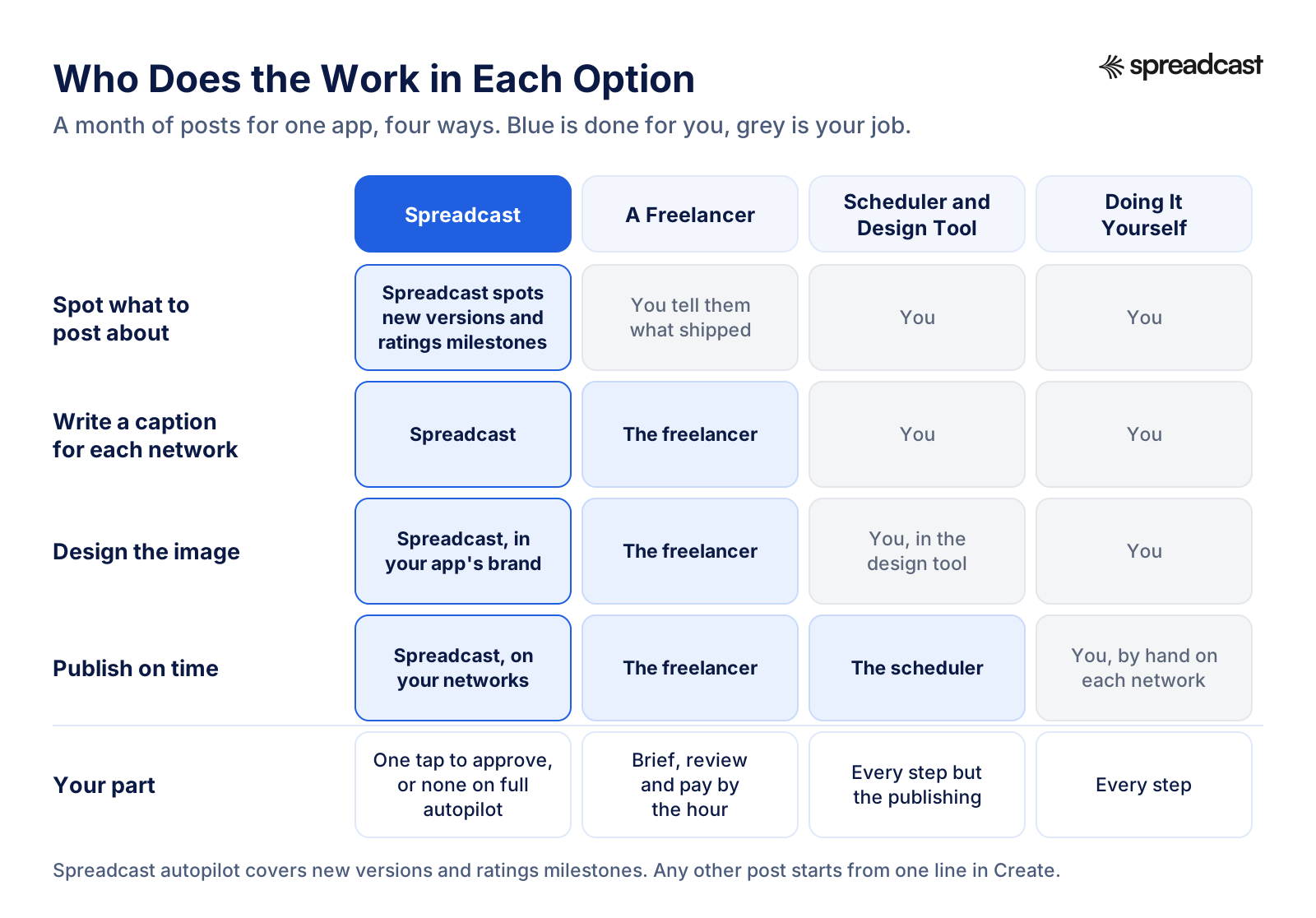
The table compares the four options on the same workload: about twelve designed posts a month for one app on a handful of networks. The last column is the part of the work that stays with you, which matters as much as the price.
| Option | What you pay | Who makes the posts | What stays with you |
|---|---|---|---|
| Spreadcast | Free to start, with 3 posts made for you. Pro is $29 a month and includes the design, a caption for each network and publishing to 10 social accounts, with no cap on posts | Spreadcast designs each post in your app's brand, writes the captions and publishes them for you | Picking topics for the posts autopilot doesn't cover, and one tap to approve each post, or nothing on full autopilot |
| A freelance social media manager | $14 to $35 an hour on Upwork, plus a 5 percent marketplace fee | The freelancer, from your brief | Briefing them on every update, reviewing drafts, paying invoices |
| A scheduler and a design tool | From $5 a channel a month billed yearly on Buffer, $6 billed monthly, plus a design tool | You, in the design tool. The scheduler publishes | Ideas, captions and every design |
| Doing it yourself | $0 in cash, about 10 hours a month in our worked example | You | Every step, including remembering to post |
The rows buy different things, which is why the prices are so far apart. An hour of a freelancer buys a person's attention. A scheduler buys a clock that publishes what you already made. Spreadcast buys the making: it reads your App Store listing, builds a brand kit from your icon, colors and screenshots, and turns each update into a finished post. Doing it yourself buys nothing and costs your evenings.
What It Costs to Hire a Social Media Manager
Hiring a social media manager can mean four different setups, each priced differently: a freelancer paid by the hour, a freelancer on a monthly package, an employee, or an agency on a retainer. For a wider look with country salaries and agency packages, see our guide to how much social media management costs. The short version for an app is below.
Freelance Social Media Manager Hourly Rates
Upwork publishes a median range of $14 to $35 an hour for social media managers on its marketplace, based on past contracts worldwide, and notes that the final rate is negotiated with each freelancer. US based specialists usually sit at the top of that range or above it. Freelancers with app experience can charge more, because they already know how release notes, App Store screenshots and ratings work, and that saves you briefing time.
Hourly billing is fair for small, well defined work. The catch with apps is that the work is lumpy. A release week can need five posts and a burst of replies, while a quiet month needs two. On hourly terms your bill swings with your roadmap. On a retainer you pay for idle hours in quiet months instead.
Freelance Social Media Manager Rates per Month
The same Upwork page lists sample monthly rates charged by intermediate, US based specialists for small businesses. Account management on two channels with all services runs $400 to $2,000 a month, and each extra channel adds $200 to $1,500. Images and graphic design alone run $200 to $950 a month, campaign creation $300 to $1,000, and customer outreach $200 to $1,000.
Treat those as ranges for scoping a conversation, not as quotes. Before you accept a monthly package, ask for the number of posts per month, the networks, whether design is included, how many rounds of edits you get, and who replies to comments. Two packages at the same price rarely hold the same work, and the cheaper one often leaves out replies.
Freelance Social Media Manager Rates per Post
Some freelancers quote per post. You can work out a fair figure from the hourly range. At our estimate of 45 minutes for a designed image post from a template, one post costs $10.50 to $26.25 of freelance time at Upwork's $14 to $35 an hour, before fees. Carousels, short videos and posts that need fresh screenshots take longer. A per post quote far above that range should include something extra, such as strategy, replies or video, and it's fair to ask which.
Salary for a Part Time or Full Time Hire
An employee is a different kind of budget. Indeed's salary data, updated October 18, 2026, puts the average US social media manager at $65,700 a year, from about 3,200 salaries in job postings over the past 36 months. That's about $5,475 a month. Glassdoor shows a median total pay of $71,000 a year with a most likely range of $54,000 to $95,000, and a median of $81,635 for social media managers in information technology. Upwork's own template puts the typical salary at $40,000 to $70,000.
Salary isn't the whole cost. The BLS Employer Costs for Employee Compensation release for June 2026 found that wages and salaries made up 70.0 percent of private employers' compensation costs, and benefits the other 30.0 percent. Grossing up Indeed's average at that ratio gives about $93,900 a year, or roughly $7,820 a month, before a laptop, software and the hours you spend managing the role. A part time hire scales those numbers down, but payroll, taxes and management don't shrink as neatly.

Agency Retainers
An agency sits higher again. Clutch's social media marketing pricing guide, updated September 21, 2026, reports an average of $5,107.28 a month for the projects reviewed on its site and a usual rate of $25 to $49 an hour, and says most projects there cost less than $10,000 in total. A retainer buys a team with strategy, content, community management and usually paid campaigns. For an app that hasn't yet found a channel that works, that's a lot of money spent before you know what to say.
Video Is Its Own Line Item
Video is a separate skill with separate rates. Upwork lists video editors at a typical $6 to $25 an hour. If your plan includes Reels or TikToks, budget editing hours on top of the social media manager, or hire one person who does both and expect them at the top of their range. Our guide to promoting an app on TikTok shows the kinds of videos that work for apps, which helps you write that part of the brief.
Freelancer, Part Time, Full Time or Agency: Which Fits an App
Each way of hiring has a shape that suits some apps and wastes money on others. The table puts the sourced numbers above next to what you get for them.
| Arrangement | Typical cost | What you get | Watch out for | Best for |
|---|---|---|---|---|
| Freelancer by the hour | $14 to $35 an hour on Upwork, plus fees | Posts made from your brief, billed for time | Hours grow in release weeks, and you brief every update | One app with a small, clear scope |
| Freelancer on a monthly package | $400 to $2,000 a month for two channels on Upwork's sample rates | Account management, often with design and replies | Packages at the same price hold very different work | Steady posting where you want one owner |
| Part time employee | A share of a salary, plus a share of benefits | Someone inside the team who learns the product | Payroll, tax and management overhead for part of a role | A studio with several apps and steady work |
| Full time employee | About $5,475 a month in salary on Indeed's average, near $7,820 with benefits | One owner for social, community and campaigns | The biggest fixed cost on this list | A funded team running campaigns and a community |
| Agency | About $5,107 a month on average on Clutch, or $25 to $49 an hour | A team for strategy, content, community and often ads | Minimums, long contracts and a junior on your account | A launch with serious budget behind it |
If we had to pick one for a typical small app, it would be a freelancer on a short paid trial, booked for the people work, with software making the recurring posts. A part time employee makes sense once you have several apps and enough steady work to fill the hours. A full time hire or an agency belongs to a later stage, when paid campaigns and a real community are part of the plan and someone has to own them every day.
One more note on agencies. They're often the right call for a single big launch, because they bring people, process and creator contacts you can't assemble in a month. They're rarely the right call for an app's ordinary weeks, where most of the work is turning small updates into small posts.
Where to Hire: Upwork, Fiverr and Contra Compared
The marketplace you hire through adds its own fees, and they're built differently enough to change which one is cheapest for your kind of work. Percentage fees grow with the bill. Flat fees weigh most on small payments. Here's what each one charges the client, worked out on a $300 monthly payment and on a $1,000 payment.
| Marketplace | What the client pays on top | On a $300 payment | On a $1,000 payment |
|---|---|---|---|
| Upwork, Basic plan | A 5 percent marketplace fee, or 3 percent for eligible US clients paying from a checking account, plus a one time contract fee of $0.99 to $14.99 (client pricing) | $315, or $309 from a US checking account | $1,050, or $1,030 from a US checking account |
| Upwork, Business Plus | 10 percent, or 8 percent for eligible US clients paying from a checking account | $330, or $324 | $1,100, or $1,080 |
| Fiverr | A 5.5 percent service fee, plus $3.50 on orders under $200 (Fiverr help center) | $316.50 | $1,055 |
| Contra | Card processing of 2.9 percent plus 30 cents, and a platform fee of $15 on payments up to $499 or $29 from $500, which is $0 when the freelancer is on Contra Pro (client help center) | About $324 by card, or $309 when the freelancer is on Pro | About $1,058 by card, or $1,029 when the freelancer is on Pro |
Upwork publishes the clearest rate data of the three, and it keeps contracts, hours and payments in one place. Keep messages on the platform while you're new to each other, so any dispute has a record. Its fee page also lists a one time contract fee of $0.99 to $14.99 for each new contract on the Basic plan, so many small contracts cost more than one ongoing one.
Fiverr sells packaged gigs, so you buy a defined bundle, such as twelve posts a month, at a listed price. That's handy when you know exactly what you want and less handy when the work changes every week. Its help center notes that every payment carries its own service fee, so an extra or a tip adds a fee of its own.
Contra is built around freelancers' portfolios. Clients pay card or bank processing, with ACH at 0.8 percent capped at $5 for clients who request access, and a flat platform fee unless the freelancer pays for Contra Pro. On small weekly invoices those flat fees add up faster than a percentage would, so ask for monthly billing.
Hiring someone from your own network skips marketplace fees, but you lose whatever payment protection and paper trail the platform gives you. For a first hire with someone you've never worked with, the fee is cheap insurance. Once you trust each other, moving the relationship off a marketplace is a business decision, and some marketplaces have rules about it, so read their terms first.
Contract and Trial Terms to Agree Before Day One
A one page agreement that covers the points below heads off the usual arguments before they start, whether you hire through a marketplace or directly. None of it needs legal language, just numbers and names.
- Scope in numbers: which networks, how many posts a week, which formats, how many rounds of edits, and whether replies, video and App Store review responses are included.
- Turnaround: how long drafts take, how fast comments get an answer, and what changes in a release week.
- Approval: who signs off before anything goes live, and what can go out without you, such as replies to simple questions.
- Ownership: under US law a commissioned work only counts as made for hire in nine listed categories, and only with a written agreement signed by both sides, according to the Copyright Office's circular on works made for hire. Social posts rarely fit those categories cleanly, so ask for a clause that assigns the copyright in finished posts and source files to you. If the content matters to your business, have a lawyer read it.
- Access: no shared passwords. Networks let you add people with roles instead. On a LinkedIn Page, for example, a content admin can create and manage posts, boost them and run events without full control of the Page.
- Confidentiality: if the freelancer will see unreleased features or beta builds, put a short confidentiality clause in writing.
- Notice and handover: two to four weeks' notice on either side, and a handover of files, captions and the content calendar when it ends.
One more point that's easy to miss. If you set the hours, supply the tools and direct how the work is done, the person may legally be an employee rather than a contractor. The IRS page on independent contractors and employees groups the evidence into behavioral control, financial control and the type of relationship. Rules differ by country, so check the ones that apply to you before a part time freelancer quietly becomes a full time one.
How to Run a Paid Trial
Four posts on one network over two weeks is enough, and you should pay for it. Give the same brief you'd give in month three, then watch how they ask questions, how many edits they need and how fast they reply. At Upwork's $14 to $35 an hour and our 45 minute estimate, four posts cost $42 to $105 before fees. That's the cheapest lesson you'll get about a working relationship before you commit to a monthly package.
Judge the trial on three things. Did the posts need less of your time by the fourth one? Did they look like your app, or like a template with your logo on it? Did the freelancer tell you something about your users or your feed that you didn't already know? Two out of three is a good start. One out of three is a reason to keep looking.
How to Brief a Social Media Manager for an App
A freelancer doesn't know what you shipped this week, which screen shows the new feature best, or which review made your day. You do, so you hand it over. A good brief takes about an hour to write once and a short while to update each month. Skip it and you'll pay for the same questions every week.
What to Hand Over Every Month
- The release notes for each new version, rewritten in plain words so someone outside the team understands what changed. Our page of app release notes examples has good models.
- Fresh screenshots of the screens that changed, taken on a clean test account so no real customer data shows. If posts need a device frame, an iPhone mockup generator saves a design step.
- Your brand assets: the icon, colors, fonts and a few posts you like. Our guide to what a brand kit actually needs lists the minimum, and a brand style guide template gives it a shape.
- Ratings milestones worth celebrating, with the numbers checked against App Store Connect.
- Access to each account through roles, never a shared password.
- The month's dates: releases, events, holidays your users care about, and anything you'd rather not post about.
- Your approval rules, so they know what needs your eyes and what doesn't.
Apple's Rules for App Marketing
There are also App Store rules to pass on. Apple's marketing resources and identity guidelines ask you not to modify, angle or animate the App Store badge, to use Apple provided device bezels as they are, to show your app on screen as it looks when it's running, and to use fictional account information instead of a real person's data. A freelancer new to apps won't know these, so either you check each post or you pay for the time it takes them to learn. Our page on App Store marketing guidelines walks through them with examples.

Which Networks to Brief Them On
YouTube and Facebook are the most widely used platforms in the US, and about half of adults use Instagram, according to Pew Research Center's 2026 survey. Age matters more than the totals. In the same survey, 79 percent of adults aged 18 to 29 say they use Instagram, against 21 percent of those 65 and older, and TikTok reaches 65 percent of the youngest group. Brief your manager on the two or three networks your users are actually on. Our comparison of Instagram, Pinterest and LinkedIn for apps helps you choose.
Put a number on the briefing, too. If it takes you an hour or two a month to gather material and review drafts, add those hours to the freelancer's bill at whatever your own hour is worth. A $14 an hour freelancer who needs three hours of your time each month can cost more than a $35 an hour one who needs one.
A Scheduler Plus a Design Tool
The middle option keeps the work in house and buys two tools: a scheduler to publish and a design tool to make the images. Buffer is a typical scheduler. Its pricing page lists a Free plan for up to 3 channels with 10 scheduled posts per channel, Essentials at $5 a channel a month billed yearly or $6 billed monthly, and Team at $10 a channel billed yearly or $12 monthly, which adds unlimited users and approval workflows. An AI assistant for writing comes with every plan.
Other schedulers price per user or per bundle of profiles rather than per channel. Here's how the starting plans compare, with Spreadcast listed first because it's the one that also makes the posts.
| Tool | Starting price | What that covers | Who makes the posts |
|---|---|---|---|
| Spreadcast Pro | $29 a month, or $290 a year | Design, a caption for each network and publishing to 10 social accounts for one app, plus autopilot posts for new versions and ratings milestones | Spreadcast, in your app's brand |
| Buffer Essentials | $5 a channel a month billed yearly, $6 monthly | Scheduling and analytics for each channel, one user, an AI writing assistant | You |
| Hootsuite Standard | $99 per user a month on the plans page | Up to 10 social accounts, unlimited scheduled posts, one inbox for messages, AI for posts and images | You, with AI help |
| Later Starter | $18.75 a month billed yearly on Later's pricing | One social set of 8 profiles and one user | You |
| Sprout Social Essentials | $79 per seat a month billed yearly, $99 monthly on Sprout's pricing | Up to 5 social profiles | You |
| Canva | Shown in your local currency on Canva's pricing | An editor and templates to design in | You |
Run the numbers for your own networks. Three channels on Buffer Essentials cost $15 a month billed yearly or $18 billed monthly. An app on Instagram, TikTok, Threads, LinkedIn, Pinterest, Facebook, YouTube, Bluesky and Mastodon needs nine channels, which is $45 a month billed yearly or $54 monthly, before the design tool and before a single post exists. Buffer's pricing page listed no Telegram or Discord channel in October 2026, so those would be posted by hand.
What this stack doesn't do is the work. A scheduler publishes what you give it, on time. It doesn't notice that version 3.2 went live yesterday, it doesn't design the image, and it doesn't know your brand. You still write, design and size every post, which is why we argue in your scheduler is not why your feed is empty that the bottleneck is making posts, not publishing them.
If you go this way anyway, pick the scheduler by how you'll work day to day. Our Buffer review and Hootsuite review go through each in detail, Spreadcast compared with Later covers the visual planner crowd, and the roundup of social media automation tools lists the rest.
Doing It Yourself: Free in Cash, Paid in Hours
Doing it yourself costs nothing on a card statement, which makes it look free. It isn't. In our worked example one designed image post with a caption takes about 45 minutes from an existing template: 5 to decide the topic and find the screenshot, 10 to write the captions, 20 to design and check the image on a phone, and 10 to export, upload and schedule on each network. Twelve posts is 9 hours. An hour of planning brings the month to about 10.
Price those hours at what an hour of your time is worth. If the person making posts is the developer, the fair rate is what development pays. The BLS puts the median pay for software developers, quality assurance analysts and testers at $64.44 an hour, from May 2025 data, so 10 hours of posts is worth about $644 of development time a month. That's the real price of free, and the figure to hold every other option against.
The bigger cost is consistency. Do it yourself social media is the first thing dropped in a hard week, and the hardest weeks are release weeks, exactly when you have the most to say. A feed that goes quiet for a month loses more than the posts it skipped, because the people who would have seen them stop expecting anything.
If you keep it in house, batch it. One planned session a month beats twelve separate ones, because you set up the template, screenshots and captions once. Our playbook for a month of social content in one afternoon shows the method step by step, and a social media caption generator takes the blank page out of the writing part.
Three Worked Monthly Budgets
Prices mean more against an actual month. Here are three common shapes for app teams, each priced four ways with the sourced numbers above. Your own hours are priced at the BLS developer median of $64.44 an hour, freelance hours at Upwork's $14 to $35 range plus the 5 percent Basic fee, and the scheduler at Buffer's per channel price. The time to approve Spreadcast drafts is our estimate. Swap in your own numbers wherever they differ.
One App That Ships a Monthly Update
Twelve posts a month on Instagram, Threads, LinkedIn and Bluesky. One post per new version, one per ratings milestone when it comes, and the rest features, tips and the occasional offer. It's a common shape for a solo developer or a two person team.
| Option | Cash per month | Your hours | What the cash includes |
|---|---|---|---|
| Spreadcast Pro | $29, or $24.17 a month on the $290 yearly plan | About 1, our estimate for picking topics and approving 12 drafts | Every post designed in your brand, a caption for each network, publishing to all four networks, and autopilot posts for each new version and ratings milestone |
| Freelancer, 10 hours | $147 to $367.50, including Upwork's 5 percent fee | 1 to 2 for briefing and review | A person's time to write, design and publish from your brief |
| Scheduler and design tool | $20 billed yearly or $24 monthly for four Buffer channels, plus the design tool | About 10 | Publishing on time, and an editor to design in |
| Doing it yourself | $0 | About 10, worth $644.40 at $64.44 an hour | Nothing. You make and publish every post |
The freelancer row is the one to compare against. A good freelancer at the bottom of Upwork's range costs about five times as much as Spreadcast Pro for the same twelve posts, and you still spend an hour or two briefing. What the extra money buys is judgment and replies. If your comments are quiet, that's money spent on nothing. If people ask questions under every post, it may be the best $150 you spend all month.
A Studio With Five Apps
Five apps, eight posts each a month, on three networks per app. That's 40 posts and 15 accounts. Each app has its own brand, its own release schedule and its own audience, so the work doesn't merge as neatly as it looks on paper.
| Option | Cash per month | Your hours | What the cash includes |
|---|---|---|---|
| Spreadcast Studio | $79, or $65.83 a month on the $790 yearly plan | About 3 to 4, our estimate for approving 40 drafts across five apps | 5 apps, each with its own brand kit and accounts, 50 social accounts in total, every post designed, captioned and published |
| Freelancer, hourly | $514.50 to $1,286.25 for 35 hours, with Upwork's fee | 3 to 5 for briefs across five apps | 40 posts at our 45 minute estimate, plus an hour of planning per app |
| Freelancer, monthly packages | $3,000 to $17,500 before fees on Upwork's sample rates | 3 to 5 | Account management on three channels per app, often with replies |
| Scheduler and design tool | $75 billed yearly or $90 monthly for 15 Buffer channels, plus the design tool | About 35 | Publishing on time for every account |
| Doing it yourself | $0 | About 35, worth $2,255.40 at $64.44 an hour | Nothing |
The package row comes from Upwork's sample rates: $400 to $2,000 per app for two channels, plus $200 to $1,500 for a third, times five apps. On Hootsuite, 15 accounts would be past the Standard plan's 10 and into a higher plan. At studio scale the time column matters more than the cash column. Thirty five hours is most of a working week every month, which is why studios that keep social in house usually end up with a part time hire. Our page for agencies and studios covers running many brands from one account.
A Launch Month
Twenty five posts over four weeks on five networks, plus three short videos: a teaser, launch day and a first week thank you. A public TestFlight link for beta testers goes in the first week's posts. Our app launch checklist and the app launch announcement examples cover what goes into each post.
| Option | Cash for the month | Your hours | What the cash includes |
|---|---|---|---|
| Spreadcast 30 Day Pass | $39 once, nothing renews | About 2, our estimate for picking topics and approving 25 drafts | Everything in Pro for 30 days: posts designed, captioned and published. Videos you upload get captions and go out on schedule, but filming them is up to you or a hire |
| Freelancer, 22 hours | $323.40 to $808.50 with Upwork's fee, plus video editing | 2 to 3 for the launch brief and reviews | 25 posts at our 45 minute estimate and 3 hours of launch planning. Editing at $6 to $25 an hour on Upwork's video rates |
| Scheduler and design tool | $25 billed yearly or $30 monthly for five Buffer channels, plus the design tool | About 22, plus the videos | Publishing on time |
| Doing it yourself | $0 | About 22 plus the videos, worth $1,417.68 at $64.44 an hour before video | Nothing |
A launch month is where a freelancer earns the fee. Replies pile up, creators need answering, video has to be shot and cut, and a person who has run launches before will spot problems you won't. If you can afford one month of a person this year, make it this one, and let software carry the image posts so their hours go to the videos and the conversations.
A Simple Formula for Your Own Budget
To price a freelancer for your own app, multiply your posts per month by the hours each one takes and by the hourly rate, add the marketplace fee, then add your own briefing hours at whatever your time is worth. The formula is short. The inputs are where people fool themselves, usually by forgetting the briefing.
Here's a worked example. Twenty posts a month at our 45 minute estimate is 15 hours. At $25 an hour that's $375, and Upwork's 5 percent Basic fee brings it to $393.75. Add two hours of your own time at the BLS developer median of $64.44 and the true monthly cost is $522.63. Doing the same twenty posts yourself, with an hour of planning, is 16 hours, or $1,031.04 of your time. Run it with your own numbers before you compare quotes, and the cheapest quote often stops being the cheapest option.
Where Spreadcast Fits
Spreadcast is marketing automation for App Store apps. You paste your App Store link on the start page, and it builds a brand kit from your listing: your icon, your colors and your screenshots, shown in an iPhone frame. Then it checks the listing every day. When a new version goes live or the app reaches a ratings milestone, Spreadcast designs the post, writes a caption for each network and publishes it for you, on full autopilot or after one tap of approval.
For every other post you start from one line in Create, or from one of twelve kinds of post for apps, from a testimonial to a how to. Spreadcast designs single image posts and carousels in your brand and publishes them to Instagram, Facebook, Threads, LinkedIn, Pinterest, TikTok, YouTube, Bluesky, Mastodon, Telegram and Discord. It shows followers and interactions on every network, and likes, comments, reach and views for each published post. If you work in Claude or ChatGPT, the MCP server lets you make and publish posts from there.
Free costs $0 for one app and makes 3 posts for you to download, with a small Spreadcast mark. Pro is $29 a month, or $290 a year, and includes clean posts with no cap, publishing to 10 social accounts across any mix of networks, full autopilot or one tap approval, and posting from Claude or ChatGPT. Studio is $79 a month for 5 apps and 50 accounts, each app with its own brand. If you'd rather not subscribe, the Post Pack is $19 once for 10 posts designed and published, and the 30 Day Pass is $39 once for everything in Pro for 30 days, with nothing to renew. Paid plans come with a full refund within 7 days. The details are on the pricing page.
Spreadcast doesn't answer comments or messages and doesn't film video for you. It publishes video you upload and writes its captions, so keep a person, yourself or someone you hire, for replies, filming and paid campaigns. For the recurring posts about your app, it does the making and the publishing, which is the part a freelancer would otherwise bill by the hour.
Frequently Asked Questions
How much does it cost to hire a social media manager?
A freelancer on Upwork costs $14 to $35 an hour plus a 5 percent marketplace fee on the Basic plan, or $400 to $2,000 a month for two channels on Upwork's sample small business rates. An employee averages $65,700 a year on Indeed, closer to $93,900 once benefits are counted at the BLS ratio. An agency averages $5,107.28 a month on Clutch.
Is hiring a social media manager worth it for a small app?
It's worth it when you need replies, community work, video or campaigns, because those need a person. For a feed made mostly of update, feature and milestone posts, software that designs and publishes from your App Store listing covers the same posts for a fraction of a freelance month.
Can I hire a social media manager part time?
Yes. Most part time social media managers are freelancers booked for a set number of hours a week or a monthly package. Agree on the networks, posts per week, edits and whether replies are included before you start, and run a short paid trial first. If you set their hours and tools, check whether they count as an employee where you are.
Which is cheaper for hiring, Upwork, Fiverr or Contra?
On a $1,000 payment, Upwork's Basic plan adds $50, Fiverr adds $55 and Contra adds about $58 by card, or about $29 if the freelancer is on Contra Pro. On small payments Contra's flat fee weighs more, and Upwork adds a one time contract fee of $0.99 to $14.99 per new contract.
What should a social media manager contract include?
The networks, posts per week, formats and rounds of edits, turnaround times, who approves posts, ownership of the finished posts and source files, access through roles instead of passwords, confidentiality for unreleased features, and notice with a handover at the end.
What does a freelance social media manager need from an app developer?
Plain language release notes for each version, fresh screenshots from a clean test account, your brand assets, the ratings milestones worth posting, role access to each account and quick approval of drafts. Budget an hour or two of your own time each month for this.
Is a scheduler enough to run an app's social media?
A scheduler publishes posts on time, but it doesn't make them. You still write, design and size every post. Buffer's pricing starts at $5 a channel a month billed yearly, or $6 monthly, and you add a design tool and your own hours on top.
Should I hire a social media manager or use an AI tool?
Use an AI tool for the recurring posts and a person for judgment, replies and video. Spreadcast designs each app post in your brand, writes the captions and publishes them for you, so anyone you hire can spend their hours on the work only a person can do.
Where These Facts Come From
Every outside number, rule and price on this page links to the page it was taken from.
- Social media manager hourly rates and cost to hireUpwork
- Social media manager job description templateUpwork
- Video editor hourly ratesUpwork
- Upwork pricing: plans and fees for clientsUpwork
- Paying for orders, extras, or custom offersFiverr Help Center
- Understanding Contra's fees as a clientContra Client Help Center
- Social media manager salary in the United StatesIndeed
- Social media manager salariesGlassdoor
- Occupational Outlook Handbook: software developers, quality assurance analysts and testersUS Bureau of Labor Statistics
- Employer Costs for Employee Compensation, June 2026US Bureau of Labor Statistics
- Social media marketing pricing guideClutch
- Independent contractor (self employed) or employee?Internal Revenue Service
- Works Made for Hire, Circular 30US Copyright Office
- LinkedIn Page admin rolesLinkedIn Help
- Community Standards: spamMeta Transparency Center
- Buffer pricingBuffer
- Consistent posting means 5x more likes, comments and sharesBuffer
- Hootsuite plans and pricingHootsuite
- Later pricingLater
- Sprout Social pricingSprout Social
- Canva pricingCanva
- What is the Model Context Protocol?Model Context Protocol
- Marketing resources and identity guidelines for the App StoreApple Developer
- Ratings, reviews, and responsesApple Developer
- Campaign links in App Store Connect analyticsApple Developer
- TestFlightApple Developer
- Americans' use of social media in 2026Pew Research Center
- The costs of hiring a freelancer vs. an in house employee (video)Upwork on YouTube
- Get started with app discovery and marketing (video)Apple Developer on YouTube
Researched and written by Spreadcast. Last checked on October 24, 2026.
Keep Reading
- Growth
How to Grow a Telegram Channel: 15 Ways That Work in 2026
Fifteen honest ways to grow a Telegram channel, checked against Telegram's own rules in October 2026: search, similar channels, forwards, shared folders, Telegram Ads, giveaways, boosts, named invite links and cross promotion, plus channel stats, a 30 day plan and why bought members backfire.
- Growth
How to Market an App in 2026: A Stage by Stage Plan for Small Teams
The full plan for a founder or a small team with no marketing department: what to do before launch, in launch week and after launch, with the App Store limits, the benchmarks worth knowing and a 30 day schedule.
- Growth
How to Promote an App on Social Media: A Network by Network Guide
What to post about your app, which format and size each network wants, where the App Store link can go on TikTok, Instagram, Facebook, LinkedIn, X, Reddit, Pinterest, Threads, Bluesky and YouTube, and how to see which posts bring downloads.