Free apps make money in a handful of ways: they sell subscriptions, they sell one time in app purchases such as coins, credits or a lifetime unlock, they show ads, or they exist to sell something else, like a ride, a meal or a bank account. Most big apps mix two or three of these. On November 20, 2026 we pulled Apple's US top grossing chart for iPhone and opened the App Store page of every app on it. All 100 of the highest earning apps were free to download, and all 100 listed in app purchases. Not one charged a price up front. Around that list sits a large market: people spent $167 billion on in app purchases and paid apps across iOS and Google Play in 2025, according to Sensor Tower, and developers earned another $151 billion from ads placed in their App Store apps that year, according to the study Apple published in June 2026.
This guide is written for an indie developer or a small team deciding how a free app will earn. Most articles on this topic list ten models and stop. Here you get each model with the numbers behind it: the store fees Apple and Google charge in November 2026, including the changes to Google Play fees in the US and Europe that started on June 30, 2026; conversion, trial, price and revenue per install benchmarks from RevenueCat and Adapty; ad rates by format; what real companies such as Duolingo and Meta report; and our own count of how the top 100 grossing apps sell. After that comes a decision table by app type, a worked example you can redo with your own numbers, the mistakes that cost small apps the most, and the part nobody can skip: every model needs users first.
Every number here links to the page it came from, and each of those pages was opened on November 20, 2026. Where a figure is our own calculation, the text says so and shows the math. The method for our App Store study is at the end, under How We Researched This.
How Do Free Apps Make Money? The Short Answer
A free app earns from a small share of its users paying, from advertisers paying to reach all of its users, or from a business the app feeds. Those three sources cover almost everything. The models below are the ways apps package them, from most to least common in our study of the top grossing chart.
- Subscriptions. People pay every week, month or year for a plan: no ads, more features, more usage. 65 of the 100 top grossing apps listed at least one recurring plan. RevenueCat's State of Subscription Apps 2026 found a median of 2.0% of installs turn into a paying subscriber within 35 days.
- Freemium. The app is useful for free, and a paid tier unlocks more. It is the most common way to sell a subscription, and the model behind Duolingo, Spotify, Tinder and most AI assistants.
- Consumable in app purchases. Coins, gems, extra lives, boosts, usage credits: things that get used up and can be bought again. 31 of the 33 games on the top grossing chart sold only this kind of purchase.
- Non consumable purchases and paid upgrades. A one time payment that unlocks something forever: the full version, a pack of filters, a lifetime plan.
- Ads. Banners, full screen interstitials, rewarded videos people choose to watch, native ads and app open ads. Meta, the largest example, reported $63.06 billion in advertising revenue from its apps in the third quarter of 2026 out of $64.60 billion in total revenue.
- Hybrid. Two or more of the above at once. 27 of the top 100 grossing apps sold both recurring plans and one time purchases, and many free apps add ads for the people who never pay.
- Driving a core business. The app itself is free and earns nothing directly, because it sells rides, food, groceries, loans or tickets. 53 of the 100 top free iPhone apps on the day we checked listed no in app purchases at all, and most of them were shopping, finance, food and travel apps.
- Smaller models: affiliate links, sponsorships, tips, selling on the web instead of in the app, and licensing data or the product to businesses. Each has strict rules, covered below.
| Model | Who pays | Best for | Example on the top grossing chart |
|---|---|---|---|
| Subscription | A small share of users, again and again | Apps used every week: tools, health, learning, streaming, AI | Disney+, Strava, Dropbox, MyFitnessPal |
| Freemium | The most engaged users | Apps with a clear free core and a clear premium extra | Duolingo, Tinder, Snapchat, Discord |
| Consumable purchases | A small share of players, often heavily | Games, live streaming, AI usage, dating boosts | Candy Crush Saga, Royal Match, Pokémon GO, TikTok coins |
| Non consumable and lifetime | Users who want to own it | Utilities, creative tools, offline content | Lifetime plans are sold by 25.7% of the subscription apps in RevenueCat's data |
| Ads | Advertisers, for every user's attention | Large free audiences, casual games, content | Meta's apps; ad free upgrades sold by Hulu and Prime Video |
| Hybrid | Payers plus advertisers | Games and freemium apps with big free audiences | ChatGPT and Claude sell plans plus usage credits |
| Core business | Customers of the company behind the app | Retail, banking, delivery, travel | Walmart, Uber, DoorDash on the top free chart |
The lifetime row needs one line of math: RevenueCat reports that 23.2% of subscription apps sell subscriptions plus a lifetime option and another 2.5% sell subscriptions, lifetime and consumables together, which adds up to 25.7% (our sum of its two figures). If you only read one table on this page, read the decision table further down, under Mobile App Monetization Strategies. It matches each type of app with the model that tends to work for it.
What We Found in the Top 100 Grossing Apps
Rankings of monetization models usually come from opinion. We wanted to see what actually earns the most money right now, so we went to the source. Apple publishes its chart of the top grossing iPhone apps as a public feed, and every App Store page shows an In App Purchases list with the names and prices of the app's best selling items. We pulled the US top grossing feed on November 20, 2026, looked up each app through Apple's free iTunes Search API, and read the In App Purchases list and the privacy label on every one of the 100 product pages. We did the same for the top 100 free apps. Then we sorted each top grossing app by what its listed purchases are.
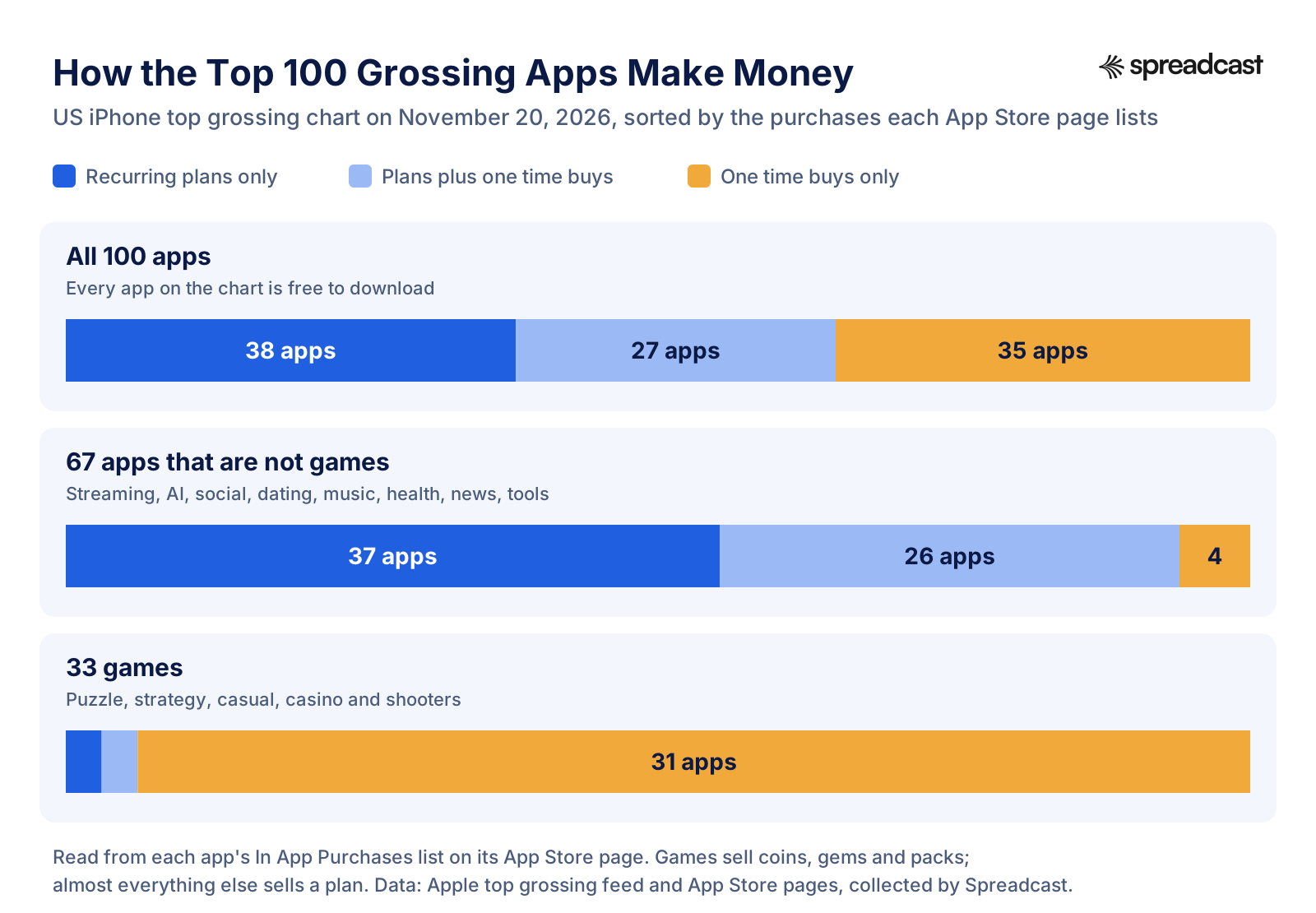
Five findings stood out, and each one is useful when you decide how your own app should earn.
- Free to download wins. All 100 top grossing apps cost nothing to install, and all 100 sell something inside. The paid app, where people pay once before they can try anything, did not appear on the list at all.
- Outside games, the money is in recurring plans. 63 of the 67 apps that are not games sold at least one subscription, membership or storage plan. 37 of them sold nothing else in their top listed purchases: streaming services, news, fitness, cloud storage, photo editors and productivity tools.
- Games sell things, not plans. 31 of the 33 games sold only one time purchases: coin packs, gems, bundles, extra moves and season passes. 12 of the 33 listed some kind of pass, the closest thing games have to a plan. Only Roblox (whose listed items are Premium memberships) and PUBG MOBILE (which lists a Prime membership next to its currency packs) showed a recurring plan among their top purchases.
- The biggest apps mix both. Half of the top 10 sold recurring plans and one time purchases side by side. ChatGPT, number 1, listed plans from ChatGPT Go at $8.00 up to a $500.00 Pro option, next to packs of usage credits. Claude, number 10, did the same. Across the whole list, 8 apps sold credits, and every AI assistant on the chart was one of them.
- The four non game apps that sold only one time purchases were all live video apps where viewers buy coins to tip creators: TikTok, Twitch, Clapper and BIGO LIVE. Tipping is a real business when the audience is large enough.
The prices tell their own story. The App Store pages listed 957 purchases across the 100 apps. The single most common price was $9.99 (94 listings), then $19.99 (87) and $4.99 (70). The median listed purchase cost $12.49, and 46.3% of listings were under $10. In games, the median listed purchase was $5.99, the cheapest item in the median game cost $0.99, and 11 of the 33 games also listed something at $99.99 or more. That spread is how games work: a cheap first purchase to turn a player into a payer, and large packs for the few who spend a lot.
| Group on the chart | Apps | How they sell |
|---|---|---|
| AI assistants and creation tools | ChatGPT, Claude, Grok, Perplexity, Suno | Monthly plans at several levels, plus packs of usage credits |
| Short drama video apps | DramaBox, ReelShort, DramaWave, NetShort, VibeShort | Weekly or monthly VIP memberships plus one time unlocks |
| Dating apps | Tinder, Hinge, Bumble, Grindr, Feeld, Raya | Memberships plus boosts, roses, pings and other one time extras |
| Streaming services | Disney+, Peacock, HBO Max, Hulu, Paramount+, STARZ | Monthly and yearly plans; several sell a cheaper tier with ads |
| Puzzle and casual games | Royal Match, Candy Crush Saga, Toon Blast, Gardenscapes | Coin packs, bundles, extra moves and passes |
| Strategy games | Whiteout Survival, Last War, Kingshot, Total Battle | Many packs from $0.99 to $99.99 or more, daily deals and passes |
| Tools and utilities | Cleanup, Acrobat Reader, Dropbox, Wyze | Weekly, monthly or yearly plans |
Weekly options showed up in 7 of the 100 apps, among them three short drama apps, Cleanup and Acrobat Reader. That fits what Adapty sees across its customers: weekly subscriptions made 55.5% of subscription revenue in its 2025 data, up from 43.3% two years earlier. Weekly plans earn fast but are easy to cancel, so they suit apps that deliver value right away.
Top Free Apps Earn Differently Than Top Grossing Apps
The top free chart, which ranks apps by downloads rather than revenue, looked very different. Only 47 of its 100 apps listed any in app purchase, and the feed we pulled had no games in it. The 53 apps without purchases were mostly companies whose app is a storefront or a service counter: 19 shopping apps (Walmart, Temu, SHEIN, Target, Costco, eBay and others), 8 finance apps (Cash App, PayPal, Venmo, Chime, Klarna and others), food apps such as DoorDash and McDonald's, and travel apps such as Uber and Lyft. Those apps make money, a lot of it, just not inside the App Store. 22 apps appeared on both charts.
| What we counted | Top 100 grossing | Top 100 free |
|---|---|---|
| Free to download | 100 | 100 |
| List in app purchases on the App Store page | 100 | 47 |
| Games | 33 | 0 |
| Declare Third Party Advertising in the privacy label | 61 | 50 |
| Sell an ad free or no ads option | 5 | 3 |
A note on the advertising row. Apple's privacy label has a purpose called Third Party Advertising, which Apple defines as displaying third party ads in your app, or sharing data with companies that do. So the label shows an advertising relationship, not proof that ads appear in the app. A game that buys installs through ad networks may declare it too. The clearer sign is when an app sells a way to turn ads off: Hulu, Prime Video and three casual games did on the grossing chart, and WhatsApp and Threads both listed no ads options on the free chart, at $4.00 for one WhatsApp account and $7.99 for one Threads account.
How Much Money Do Apps Make?
The honest answer is that a few apps make a great deal and most make very little. At the top, the market is huge. Sensor Tower counted $167 billion in consumer spending on in app purchases and paid apps across iOS and Google Play in 2025, up 10.6% on the year before. Games brought in nearly $82 billion of it, up only 1.3%, while spending in apps that are not games grew 21% and passed games for the first time. Generative AI apps alone took more than $5 billion in in app purchase revenue, nearly three times the year before. Apple's own study, published in June 2026, puts the whole App Store ecosystem at $1.4 trillion in developer billings and sales in 2025, of which $149 billion was digital goods and services, $151 billion was in app advertising and $1.1 trillion was physical goods and services sold through apps.
Lower down, the numbers shrink fast. RevenueCat tracked new subscription apps through their first two years and found that only 17.3% reach $1,000 in monthly revenue and 4.6% reach $10,000. Adapty's 2026 report, built on 16,000 apps and about $3 billion in revenue, says 57.7% of new subscription apps earn under $1,000 in total revenue, and that the median monthly revenue fell from $627 to $492 in a year as 31% more apps launched. The same report finds the top 10% of apps take 94.5% of all subscription revenue.
Read together, these numbers say two things. First, the money is real and growing, especially outside games. Second, a free app does not earn by default. The apps that reach $10,000 a month do it with a model that fits the product, a price that people accept, and a steady flow of new users. The rest of this guide covers all three.
How Much Money Do Apps Make Per Download?
The most useful single number for a subscription app is revenue per install, often shortened to RPI: total revenue divided by total installs. RevenueCat's 2026 report puts the global median at $0.23 per install by day 14 and $0.34 by day 60. The spread around that median is wide, and the figure below shows what it means for a batch of 10,000 installs.
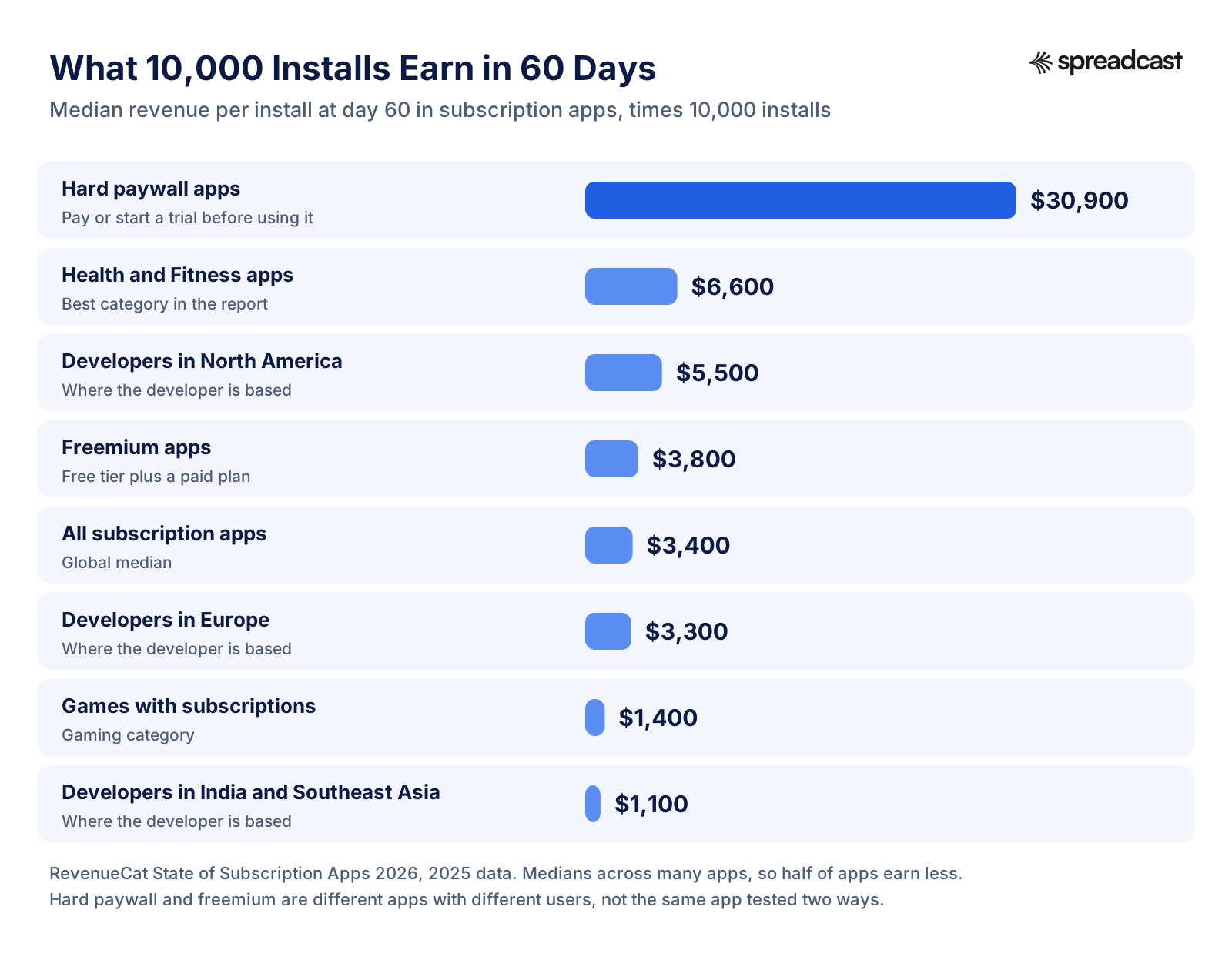
Three things decide where your app lands in that chart. The access model matters most: apps with a hard paywall, where people must start a trial or pay before using the app, earned about eight times more per install at day 60 than freemium apps ($3.09 against $0.38). The category matters: Health and Fitness led at $0.66 and Gaming trailed at $0.14. And where the developer is based matters, because it tracks where the users are and what they can pay: $0.55 for North American developers, $0.33 for Europe and $0.11 for India and Southeast Asia.
Do not read the hard paywall number as proof that you should lock your app tomorrow. Those are different apps with different users, many of them bought with paid ads and sent to a paywall on purpose. A hard paywall also means far fewer people ever try the product, which hurts word of mouth, ratings and organic search. It is a choice, not a free upgrade.
How Much Money Do Free Apps Make?
For a typical small free app the realistic first goal is the first $1,000 a month. RevenueCat found that apps which reach it take a median of 58 days to get there and 109 days to reach $10,000, counted from launch. Games that reach $1,000 got there faster, in a median of 32 days, while business apps took 113. So if your app is three months old and earning $100 a month, you are not unusual, but you are behind the apps that break out. The lever is rarely a new monetization model. It is usually more of the right users, which is why the section on marketing near the end of this guide matters as much as the sections on pricing.
Our own pages go deeper on the numbers around this: the App Store statistics page collects store wide figures, the mobile game market statistics page covers games, and the app retention benchmarks page shows how many users each category keeps after a day, a week and a month.
App Store and Google Play Fees: What You Keep
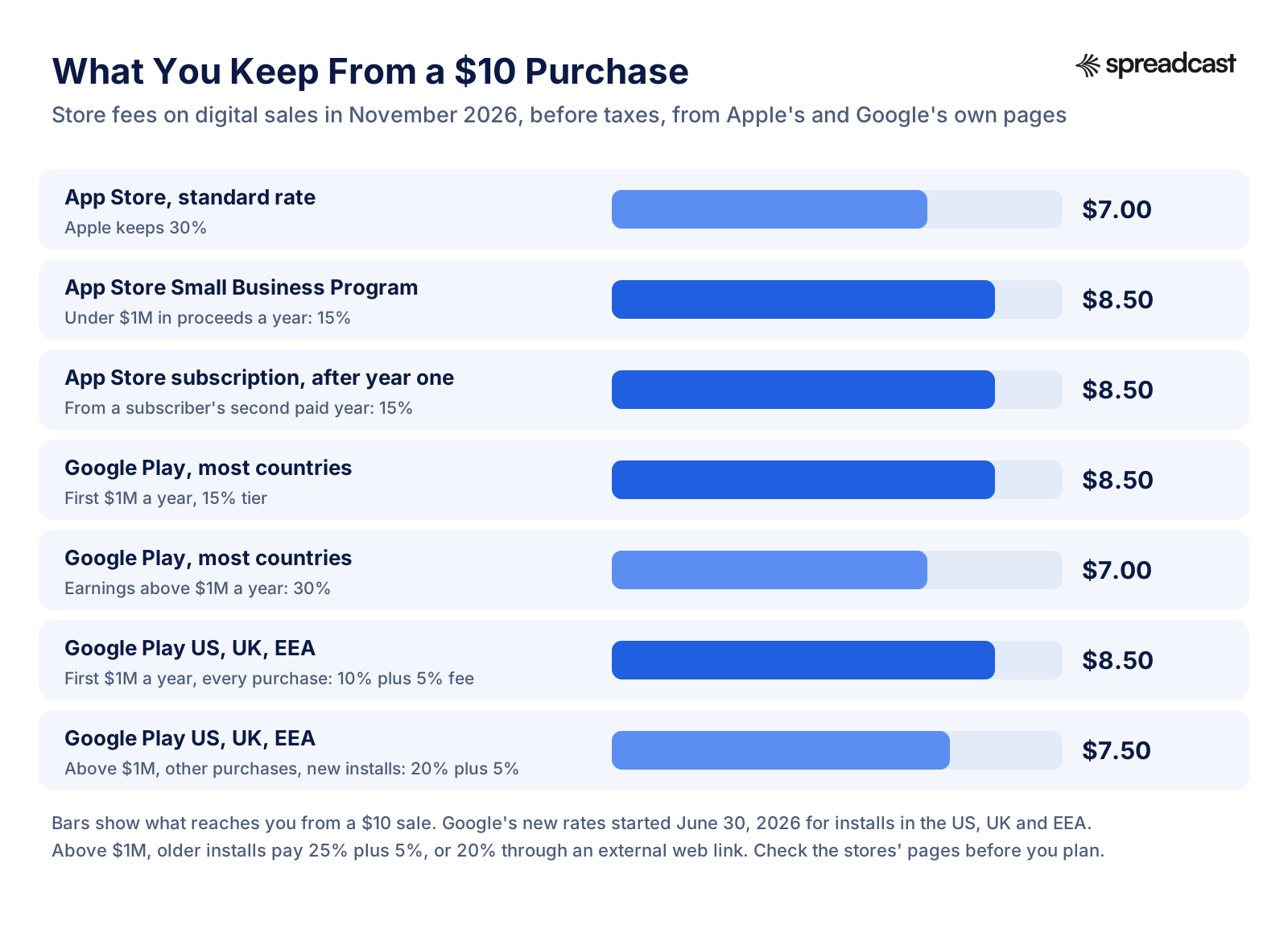
Before choosing a model, know what the stores take, because it changes the math for every model except ads and physical goods. Both stores charge a commission on digital goods sold inside an app, and both cut that commission for small developers and for subscriptions. The figure below turns the rates into what reaches you from a $10 sale.
Apple App Store Commission
Apple's standard commission on paid apps and in app purchases is 30%. The App Store Small Business Program cuts it to 15% for developers who made up to $1 million in proceeds in the previous calendar year and for developers new to the App Store; if you pass $1 million during the year, the standard rate applies to later sales. Subscriptions get their own discount. Apple's subscriptions page says you receive 70% of the price during a subscriber's first year and 85% once that subscriber has one year of paid service, and members of the Small Business Program receive 85% from the start. Free trials do not count toward the year.
For almost every indie developer, that means 15% on everything. Join the program: it is not automatic, and it is the cheapest raise you will ever get. The full membership picture, including the yearly developer fee in each country, is on our Apple Developer Program page.
Google Play Service Fees After June 30, 2026
Google changed its fees this year. According to its Play Console Help page on service fees, users in the US, the UK and the EEA moved to a new structure on June 30, 2026, with Australia and Japan following on September 30, 2026. On a developer's first $1 million of yearly earnings, every purchase pays 10% plus a 5% billing fee: subscriptions and one time purchases alike, from new and old installs. Above $1 million, subscriptions stay at 10% plus 5%, while other purchases pay 20% plus 5% for new installs, meaning users whose first install or update came on or after the rollout date. Installs from before that date pay 25% plus 5%, or 20% when the purchase goes through an external web link. Developers in Google's Play Games Level Up or Apps Experience programs pay 5 points less on those non subscription rates. The billing fee applies only when the purchase goes through Google Play Billing.
Everywhere else, until the new fees roll out there too, the older structure stands: 15% on the first $1 million a developer earns each year (for those enrolled in the 15% tier), 30% above that, and 15% on auto renewing subscriptions no matter how much you earn. In plain terms: a small developer on Google Play keeps about 85% of every sale almost everywhere, and the higher rates on one time purchases in the US, UK and EEA only start above $1 million a year.

Selling Outside the App in the US
Apple's rules now treat the US differently from every other country. The App Review Guidelines still require in app purchase for digital content, subscriptions and in game currencies sold inside an app, but they allow apps on the United States storefront to include buttons, external links and other calls to action that send people to buy on the developer's own website. In every other country, that kind of link still needs a special entitlement or is not allowed. What Apple may charge on those US web purchases is still being argued in court. In August 2026, Apple proposed to the court commissions of 15% for standard apps, 10% for subscription renewals and some partner programs, and 5% for Small Business Program apps on purchases made through such links. Check the latest ruling before you build a pricing plan around web sales.
Web sales are still small for most subscription apps. RevenueCat found that the web made up 3.2% of subscription app revenue worldwide in 2025 and 4.9% in North America, but 41% of the top earning apps already had some web revenue against 1.3% of the bottom group. If your app already has a website with traffic, a US web checkout is worth testing. If it does not, the store's own purchase flow converts better and is less work.
App Monetization Models, One by One
Here is each app monetization model in detail: how it works, who it fits, what the numbers say and where it goes wrong. Apple and Google both name the same building blocks. Apple's In App Purchase page lists four types: consumable, non consumable, auto renewable subscription and non renewing subscription. Google's Play Billing documentation splits them into one time products and subscriptions, and points out that its billing system is only for digital items; physical goods and services go through other payment methods.
Subscriptions
A subscription charges the user again every period until they cancel. It is the strongest model for apps people use for months: fitness, learning, health, photo and video editing, productivity, cloud storage, dating, streaming, news and AI tools. It gives you predictable revenue, and it lets you keep improving the app because the money keeps coming. Apple requires an auto renewing subscription to give ongoing value and to last at least seven days, and to be available on all of the user's devices.
What the benchmarks say, all from RevenueCat's 2026 report on 2025 data from more than 115,000 apps:
- Download to paid within 35 days: 2.0% median across all apps, 2.6% for developers based in North America and 2.8% for users there, 2.9% in Health and Fitness, 1.0% in Gaming.
- Trials: trials of 17 to 32 days converted to paid at a 42.5% median, trials of 5 to 9 days at 37.4%, and trials of 4 days or less at 25.5%. Yet 46.5% of trials were 4 days or less, up from 42.1% a year earlier.
- Prices: the median yearly plan rose from $31.60 to $34.80 and the most common yearly price was $30. The most common monthly price was $10, and the median weekly plan cost about $6.
- Plan length and revenue: apps that sell mostly yearly plans earned $0.46 per install by day 60, against $0.29 for mostly monthly and $0.32 for mostly weekly.
Cancellations come early. RevenueCat's March 2026 benchmarks found that 55.4% of cancellations of a 3 day trial happen on day 0, the same day the trial starts, which usually means people start a trial to get past a paywall and cancel right away to avoid being charged. The second part of the report, covered by 9to5Mac, adds that only 5% of annual subscribers who cancel come back, while monthly subscribers return at four times that rate. The lesson for a small app is simple: the first session has to show the value of the paid plan, and a yearly plan needs to earn its renewal over twelve months, because a lost yearly subscriber is usually gone.
AI apps are a special case. RevenueCat found that apps built around AI earn 41% more revenue per user but churn 36% faster than other apps. That matches what we saw on the top grossing chart, where AI apps add usage credits on top of plans: heavy users pay more, and light users can still pay a little.

How Do Freemium Apps Make Money?
Freemium apps give a real product away and charge for more of it. The free tier brings in users, ratings and word of mouth; the paid tier earns from the small share who want more. Most of the time the paid tier is a subscription, sometimes it is a one time unlock. The model works when the free version is good enough to keep people coming back and the paid version is clearly better for the people who use the app most.
Duolingo is the clearest public example. In the third quarter of 2026 it reported $309.0 million in revenue, of which $270.0 million came from subscriptions, $20.8 million from advertising, $9.9 million from the Duolingo English Test and $6.9 million from in app purchases. It ended the quarter with 13.1 million paid subscribers and 153.1 million monthly active users. By our calculation that is about 87% of revenue from subscriptions and about 8.6% of monthly users paying. The 91% or so who never pay still matter: they see ads, they buy gems, they keep streaks alive and they tell friends.
RevenueCat measured freemium conversion at 2.1% of installs paying within 35 days, with the top quarter of apps above 4.5%. Hard paywall apps converted at 10.7%, because everyone who stays has to decide. Freemium is the safer choice for an app that grows through word of mouth and store search; a hard paywall is the stronger choice for an app that grows through paid ads and a tight onboarding flow. Our Duolingo marketing strategy breakdown shows how one freemium app turned its free users into its marketing.
In App Purchases: Consumable and Non Consumable
Consumables are bought, used and bought again: coins, gems, lives, hints, boosts, credits, roses and super likes. They dominate games, and they work anywhere usage varies a lot between people, like AI credits, dating boosts or creator tips. Non consumables are bought once and kept: a premium unlock, a sticker pack, a set of filters, a level pack, a remove ads purchase. Both are sold through the store's billing system and pay the same commission.
The key fact about consumables is that revenue is extremely uneven. A small group of players buys most of it, which is why the games on the top grossing chart list a cheap first offer and a $99.99 pack side by side. If your app has a few heavy users who would happily pay for more of something, consumables let them, without forcing everyone else into a subscription. If your users all use the app about the same amount, a plan is simpler and earns more predictably.
Rules to know before you sell consumables. Apple requires apps that sell loot boxes or other random items to disclose the odds of each item before purchase. In the US, the FTC's settlement with the maker of Genshin Impact set a $20 million penalty and a proposed order to stop selling loot boxes to children under 16 without a parent's consent, and to let players buy loot boxes directly with dollars rather than only with virtual currency. Clear prices and honest odds are not only the law; they also cut refunds and one star reviews.
Paid Upgrades and Lifetime Unlocks
A lifetime unlock is a single payment for the full app, forever. It suits utilities and creative tools that people use now and then, apps with no ongoing server costs, and audiences who dislike subscriptions. The trade off is that each customer pays you once, so the business only grows while new customers keep arriving. Many indie apps now sell a lifetime option next to monthly and yearly plans, priced at roughly two to three years of the yearly plan, so subscription skeptics have a way to pay. That price ratio is a common practice, not a rule; test it.
In RevenueCat's data, apps whose revenue comes mostly from lifetime purchases earned $0.24 per install by day 60, below yearly heavy apps at $0.46. So a lifetime option works best as one choice among several, not as the only price.
Hybrid Monetization
Hybrid means using two or more models at once, and it is how most large free apps earn. The common combinations are a subscription plus consumables (Duolingo with Super and gems, Tinder with Gold and boosts, ChatGPT with plans and credits), ads plus a paid way to remove them (Hulu, Prime Video, many casual games), and in game purchases plus rewarded ads. Among subscription apps tracked by RevenueCat, 10.7% sell subscriptions plus consumables and 2.5% sell subscriptions, lifetime purchases and consumables together; in Gaming those shares were 27.5% and 9.6%.
Hybrid is powerful but adds work: more products to price, more screens to design, more to explain to users. For a first version, pick one main model and add the second only when you can see who it is for, such as heavy users who hit a limit, or free users who would watch an ad for a reward.
How Do Apps Make Money From Ads?
Apps make money from ads by selling space in the app to advertisers through an ad network or a mediation platform, which runs an auction for every ad slot. The app earns per thousand impressions shown, a rate called eCPM, and sometimes per click or per install. The audience never pays, which is why ads suit apps with large free audiences who would not buy anything. Ads are bigger than many developers assume: Apple's study puts revenue from the ads developers placed in their App Store apps at $151 billion in 2025, more than all digital goods and services sold through the App Store ecosystem that year ($149 billion).
Google's AdMob help page on ad formats lists the six formats most apps choose from. Each one earns differently and annoys users differently.
| Format | What it is | Best for | Watch out for |
|---|---|---|---|
| Banner | A strip at the top or bottom of the screen | Utilities and readers with long sessions | Earns very little per impression |
| Interstitial | A full screen ad at a natural break, such as the end of a level | Games and apps with clear breaks | Showing it unexpectedly breaks store rules |
| Rewarded | A video or playable ad people choose to watch for a reward | Games, and apps with something to give, like an extra export | The reward has to be worth the time |
| Rewarded interstitial | A full screen ad at a break that also gives a reward | Games with frequent level ends | Still in beta at AdMob |
| Native | An ad styled to match your app's own content | Feeds, lists and news apps | Must be clearly labeled as an ad |
| App open | An ad shown when people open or return to the app | Apps opened many times a day | Can feel like a toll at the door |
How Much Do Apps Make From Ads?
Ad rates vary by country, platform, format, season and app category, so treat any single number as a rough guide. One of the clearer public datasets is the Tenjin and Clever Ads Solutions benchmark for mobile games. PocketGamer.biz reported its figures for the first quarter of 2024: US eCPMs of about $27.88 for rewarded ads and $19.62 for interstitials, against $0.70 for banners on iOS and $1.22 on Android. The data is from 2024 and from games, but the gap between formats is the lesson: one rewarded view in the US was worth about as much as 40 banner impressions on iOS.
Here is the math, with assumptions you can swap for your own. Say 1,000 people in the US use your app on an average day.
- Banners: each user sees 10 banner impressions a day. 10,000 impressions at a $0.70 eCPM earn $7 a day, about $210 a month.
- Interstitials: each user sees 2. 2,000 impressions at $19.62 earn about $39 a day, about $1,180 a month.
- Rewarded: half of users watch one. 500 views at $27.88 earn about $14 a day, about $420 a month.
Those are our own illustrations, not forecasts. Fill rates below 100%, users outside the US and lower rates outside games all pull the numbers down. The takeaway still holds: ads need a big, active audience to pay well. An app with a few hundred daily users will earn pocket money from ads and real money only from people who pay.
Ad Rules Both Stores Enforce
Apple's guideline 2.5.18 keeps display ads inside the main app, not in widgets, notifications, keyboards or extensions, and requires interstitials to be clearly marked as ads with a close or skip button large enough to use. Guideline 3.2.2 rejects apps built mainly to show ads and apps that inflate impressions or clicks, but allows rewarding people for actions such as finishing a level or watching an ad. Google Play's Ads policy bans full screen ads that appear unexpectedly, ads at the start of a level during gameplay, and full screen ads that cannot be closed after 15 seconds, with an exception for rewarded ads people choose to watch.
Privacy affects ad revenue too. On iPhone, Apple requires you to ask permission through App Tracking Transparency before tracking a user's activity across other companies' apps and websites, and you may not make the app depend on that permission. People who decline see less targeted ads, which usually earn less. Plan your ad income on the assumption that many iPhone users will say no.
How Do Free Apps Make Money Without Ads or In App Purchases?
This is one of the most searched versions of the question, and the answer is that many of the most downloaded apps never sell anything in the app at all. They earn somewhere else.
Driving a Core Business
Banks, stores, airlines, delivery services and ride apps give their apps away because the app makes it easier to buy from them. On the day we checked, 53 of the top 100 free iPhone apps listed no in app purchases, and 19 of those were shopping apps. Apple's study shows how big this is: physical goods and services sold through apps came to $1.1 trillion in 2025, and Apple says more than 90% of all billings and sales in its ecosystem paid it no commission at all. Apple's guidelines require exactly this: if people buy physical goods or services used outside the app, you must use payment methods other than in app purchase, such as Apple Pay or card entry.
For a small developer this model applies more often than it seems. A booking app for your own studio, a companion app for a physical product, an ordering app for a local business or a client portal for a service all earn through the business behind them. The app's job is to make that business easier to use, and its success is measured in orders, bookings or retention, not in app revenue.
Selling on the Web
Some apps sell their plans only on their website. On the day we checked, Spotify's App Store page listed no in app purchases at all, even though it sells paid plans. Apple allows apps whose content was bought elsewhere to let people use it in the app: guideline 3.1.3(b) lets multiplatform services give access to content and subscriptions bought on other platforms or the developer's website, as long as anything sold in the app also uses in app purchase. With the US storefront now allowing links out, small apps can test a web checkout in the US too. The trade off is a harder purchase flow, which usually lowers conversion, against a lower fee.
Affiliate Links and Sponsorships
Affiliate apps earn a commission when a user buys something the app recommends: a recipe app linking to groceries, a travel app linking to hotels, a fitness app linking to gear, a deals app linking to stores. Several apps on the top free chart, such as coupon and cashback apps, run on this model. Sponsorship is the direct version: a brand pays to be featured in a newsletter style app, a podcast app or a niche community app with a loyal audience. Both need trust, so label sponsored content clearly and only recommend things that fit your users. Affiliate income also depends on the partner's terms, which can change without much notice, so treat it as a second income line, not the only one.
Data and B2B Licensing
Many people believe free apps make money by selling user data. The store rules make that very hard for an honest app. Google Play's User Data policy says apps must not sell personal and sensitive user data. Apple's guideline 5.1.2 says data collected from apps may only be shared with third parties to improve the app or serve advertising, with the user's permission, and that tracking needs explicit consent. What legitimate apps can sell to businesses is the product itself: a team plan, a white label version, an API, aggregated and anonymous insights, or a paid seat for a company.
Tips and Donations
Tips work for apps with a loyal audience and a person behind them: indie tools, open source apps, creator apps and community apps. Apple allows them inside the app through in app purchase: apps may use in app purchase currencies to let customers tip the developer or digital content providers. A tip jar with three sizes (for example $1.99, $4.99 and $9.99) is easy to add as consumable purchases. It rarely pays the bills alone, but it costs nothing to try and users often appreciate it more than a paywall.
How Do Free Apps Make Money Like WhatsApp?
WhatsApp is the usual example people ask about, because for years it showed no ads and sold nothing to most users. Its owner, Meta, earns almost all of its money from ads across its apps. On the day we checked, WhatsApp's App Store page also listed no ads options, starting at $4.00 for one account, and Threads listed similar plans from $7.99. So even the famous free apps follow the same three sources: ads for most users, a paid option for some, and a larger business behind them. A small app cannot copy that scale, but it can copy the structure.
How Do Free Game Apps Make Money?
Free games make money mostly from in game purchases, and many add ads for players who never pay. Our count of the top grossing chart showed it clearly: 31 of the 33 games sold only one time purchases, such as coins, gems, boosters, bundles and passes, and 19 of the 33 declared Third Party Advertising in their privacy label. Three casual games also sold a no ads purchase, which tells you they show ads to everyone else. In RevenueCat's subscription data, games were the weakest category for subscriptions, with 1.0% of installs paying within 35 days and $0.14 of revenue per install by day 60.
The usual design for a free to play game, seen across the chart:
- A soft currency earned by playing, and a hard currency (gems, diamonds, coins) mostly bought with money.
- A cheap starter pack, often $0.99 to $4.99, to turn a player into a payer.
- Time limited offers and bundles that appear after a loss or at the start of an event.
- A pass for each season or event, priced around $4.99 to $9.99, that rewards regular play.
- Rewarded videos for players who will not pay, giving an extra life or a booster for watching.
- A remove ads purchase in casual games that also show interstitials.
Games carry the extra rules on random items covered above, and they live or die by retention, because a player who leaves on day two never reaches the store. For marketing a game rather than pricing it, see our guides to mobile game marketing and the Monopoly GO marketing strategy, a game that sat at number 9 on the grossing chart the day we checked.
Mobile App Monetization Strategies: How to Choose a Model for Your App
There is no best model, only the best fit for how people use your app. Ask four questions. How often will people open it: daily, weekly or now and then? Does it cost you money every time someone uses it, through servers, AI or content licenses? Do a few users use it far more than the rest? And will your users ever pay, or are they a big audience that advertisers want to reach? The table below turns typical answers into a starting model.
| Type of app | Start with | Add later | Why |
|---|---|---|---|
| Habit, health, fitness, learning | Freemium subscription with a trial | Yearly plan as the default, lifetime option | Used for months; Health and Fitness has the best subscription numbers in RevenueCat's data |
| AI tool with real usage costs | Subscription tiers | Usage credits for heavy users | Every top grossing AI assistant sold plans plus credits |
| Photo, video and design tools | Subscription, often weekly or yearly | Credits or packs for exports and effects | CapCut, Facetune and FaceApp sold plans; Canva adds credits |
| Utility used now and then | One time unlock or lifetime plan | Small yearly plan for updates | People resist paying monthly for something they use twice a month |
| Casual or puzzle game | Consumables plus rewarded ads | Season pass, no ads purchase | 31 of 33 top grossing games sold only one time purchases |
| Strategy or role playing game | Consumables with many price points | Passes and limited offers | A few players spend a lot; prices from $0.99 to $99.99 are normal |
| Dating or social app | Membership tiers | Boosts, likes and other consumables | All six dating apps on the chart sold both |
| Content, news or video | Subscription, with an ad supported free tier | Ads for free users | Streaming and news apps on the chart sold plans; several sell a cheaper tier with ads |
| Creator, live video or community | Tips and gifts as consumables | Creator subscriptions | TikTok, Twitch and BIGO LIVE earned from viewers buying coins |
| Companion app for a business | Free, earns through the business | Loyalty or member perks | 53 of the top 100 free apps sold nothing in the app |
Two rules make the choice easier. First, charge for the thing your heaviest users want more of: more usage, more content, more control, or no interruptions. Second, never charge for the moment that makes people love the app. If a meditation app locks every session, nobody finds out it helps them. If it gives a week of sessions free and charges for the full library and tracking, people who come back are the ones who pay.
Pricing is part of the model. Start near the common prices in your category: RevenueCat's most common prices were $10 a month and $30 a year, and the median yearly price was $34.80. Offer a yearly plan with a clear discount, show it first, and test one change at a time. Adapty found that people who start with a trial on a weekly plan renew at 59.2% after the first billing cycle, against 37.0% for people who buy directly, so trials can help retention as well as conversion.
A Worked Example: The Revenue Math for a Small Free App
Here is the full calculation for a made up habit tracker from a small US based team, so you can redo it with your own numbers. It gets 5,000 installs a month and sells a freemium subscription with a yearly plan. The inputs are RevenueCat's 2026 medians; the math is ours.
- Installs: 5,000 a month.
- Conversion: 2.1% of installs start a paid subscription within 35 days (the freemium median). That is 105 new paying subscribers a month.
- Price: if all of them choose the yearly plan at the $34.80 median, that is $3,654 in gross sales from one month of installs.
- Store fee: in the Small Business Program, Apple keeps 15%, so about $3,106 reaches you. On Google Play in the US, a new install's subscription pays 10% plus 5%, which also leaves about $3,106.
- Check against revenue per install: 5,000 installs at the freemium day 60 median of $0.38 come to $1,900. The two answers differ because medians from different apps do not multiply cleanly, and many payers choose cheaper monthly plans. Plan with the lower number.
- A year: twelve months of 5,000 installs at $0.38 is $22,800 in first 60 day revenue, before renewals and before any growth.
Now change one input at a time and watch what moves. Double the installs and revenue doubles. Raise conversion from the median 2.1% to the top quarter's 4.5% and revenue more than doubles. Raise the yearly price by $10 and revenue rises by under a third, if conversion holds. That is why installs and conversion matter more than price for most small apps, and why the next section is about getting users.
The same math tells you what you can spend to get a user. If one install earns about $0.38 in 60 days, paying $2 or $3 for an install through ads loses money unless your app does far better than the median. Our cost per install benchmarks page shows what installs cost by country, and the LTV CAC ratio guide shows how to judge whether a channel pays back. The App Store conversion rate page covers the step before all of this: how many people who see your listing install at all.
Common App Monetization Mistakes
These are the mistakes that cost small apps the most, in roughly the order they happen.
- Choosing the model last. Monetization changes the product: what is free, what is locked, where the paywall sits. Decide before you build the onboarding, not after launch.
- Not joining the Small Business Program. On Apple, it is the difference between keeping 70% and 85% of every sale in a subscriber's first year. It takes a few minutes in your developer account.
- Showing the paywall before the value. Over half of cancellations of 3 day trials happen on the day the trial starts. A paywall in the first screen without any taste of the product invites people to start a trial and cancel it at once.
- Too many plans. Three options (weekly or monthly, yearly, and maybe lifetime) are enough. Every extra plan makes the choice harder.
- Pricing below the category. A $0.99 monthly plan rarely earns more than a $4.99 one; it signals a small product and leaves money with the users who would have paid more.
- Ads that break the rules. Unexpected interstitials, ads that cannot be closed and ads at the start of a level can get an app rejected or removed from Google Play.
- Hiding prices or odds. Unclear virtual currency, missing loot box odds and hard to find cancellation lead to refunds, bad reviews and, at scale, regulators.
- Ignoring Android pricing. Adapty found iOS took 84.75% of subscription revenue in its 2025 data, even though Android has most users worldwide. Price and package for each store's audience instead of copying one to the other.
- Treating monetization as a one time setup. Prices, trials, paywall copy and plan order should be tested regularly, one change at a time.
- Waiting for users to arrive by themselves. A perfect paywall with 50 installs a month earns almost nothing. This is the most common mistake of all.
If App Review is part of your worry, our list of App Store rejection reasons covers the payment and ad rules that trip up most first time submissions.
Every Model Needs Users: Marketing Is Half of Monetization
Look back at the worked example. The input that changes revenue the most is installs, and a free app's installs come from three places: the store's own search and featuring, paid ads, and everything the developer does outside the store, such as social media, communities, press and word of mouth. A monetization model only decides what share of those users turn into money. It cannot create the users.
The store side starts with your listing. Our App Store optimization guide and our Google Play ASO guide cover how to rank in store search and turn page visits into installs. Paid ads come next, once you know what an install earns: our guides to Apple Search Ads and Google App Campaigns show how to start small and measure. For a budget that fits a small team, see our startup marketing budget page.
Outside the store, the most reliable free channel for small apps is a steady presence on social media: showing real screens, real updates and real reviews to people who might want the app, week after week. Our guides on how to market an app, how to get app downloads and how to promote an app for free go through every channel in detail, and the Android app promotion guide covers what is specific to Google Play.
Social posting also helps monetization directly. Every model in this guide has moments worth announcing: a new yearly plan, a Black Friday discount on the premium tier, a new sticker or level pack, a limited event in a game, a free week of Pro for a holiday, a lifetime deal for the first 100 buyers. A post about that moment reaches the people who already follow the app, many of whom are free users one nudge away from paying. The apps that grow keep these posts coming every week. The apps that stall post at launch, then go quiet because the developer is busy building.
How We Researched This
On November 20, 2026 we downloaded Apple's public US iPhone app feeds: the top grossing feed and its top free counterpart, 100 apps each, both stamped as updated within a minute of each other that morning. For every app we called the iTunes Search API for its price and primary category, then opened its public US App Store page and read two things: the In App Purchases list (Apple shows up to ten of an app's top purchases with names and prices) and the purposes in its privacy label. Four pages failed on the first pass, three because of rate limits and one cut off download, and were read again a few minutes later.
We then sorted each top grossing app by hand, reading its listed purchases: recurring plans only (subscriptions, memberships, storage plans), one time purchases only (coins, gems, packs, boosts, credits, passes), or both. Game passes counted as one time purchases unless the name said they renew. The price figures (957 listed purchases, median $12.49) and the counts of weekly plans, credits and no ads purchases were computed by a script from those lists. The limits matter: the App Store page shows only the top purchases, not every product, so an app may sell more than we saw; the top grossing chart ranks by Apple's own measure and changes every day; and a privacy label purpose is the developer's own declaration.
Every other fact comes from the page linked beside it, opened on November 20, 2026: Apple's Small Business Program, subscriptions, In App Purchase, App Review Guidelines and app privacy pages, and its June 2026 ecosystem study; Google's Play Console Help pages on service fees, ads and user data, the Play Billing documentation and AdMob's ad formats page; RevenueCat's State of Subscription Apps 2026 and its March 2026 benchmarks post, plus 9to5Mac's report on its second part; Adapty's 2026 subscription report; Sensor Tower's State of Mobile 2026; PocketGamer.biz's report of the Tenjin and Clever Ads Solutions eCPM benchmark; Duolingo's and Meta's third quarter 2026 filings with the SEC; 9to5Mac's report of Apple's August 2026 court proposal; and the FTC's guidance on its Genshin Impact settlement. Derived numbers, such as Duolingo's share of paying users, the 10,000 install chart and the worked example, are our calculations and are labeled as such. The habit tracker in the example is made up. Claims about Spreadcast were checked against its pricing and product on the same day.
Frequently Asked Questions
How do free apps make money?
Mostly in three ways: a share of users pays for a subscription or for in app purchases such as coins, credits or unlocks; advertisers pay to show ads to everyone else; or the app supports a business that earns elsewhere, like a store, bank or delivery service. All 100 of the top grossing US iPhone apps on November 20, 2026 were free to download and sold in app purchases.
How do free apps make money without ads or in app purchases?
They usually support a business that sells something outside the app: products, rides, food, banking or tickets. Others sell plans on their website instead of in the app, earn affiliate commissions, take sponsorships or tips, or sell team plans to companies. 53 of the top 100 free iPhone apps we checked listed no in app purchases, most of them shopping, finance, food and travel apps.
How much money do apps make per download?
In RevenueCat's 2026 report on subscription apps, the median app earned $0.23 per install by day 14 and $0.34 by day 60. Hard paywall apps earned $3.09 per install by day 60, freemium apps $0.38, and games $0.14. Your number depends on your category, your users' countries and how you charge.
How much do apps make from ads?
It depends on the format and the audience. In a 2024 benchmark of mobile games reported by PocketGamer.biz, US rewarded ads earned about $27.88 per thousand views and interstitials about $19.62, while banners earned $0.70 on iOS and $1.22 on Android. An app needs thousands of daily users before ads add up to real income.
How much does Apple take from app sales?
Apple's standard commission is 30% on paid apps and in app purchases. Developers who earned up to $1 million in proceeds the year before, and new developers, can join the Small Business Program and pay 15%. On subscriptions, Apple takes 15% once a subscriber has a year of paid service, or from the start for Small Business Program members.
How much does Google Play take from app sales?
In most countries, 15% on a developer's first $1 million a year (in the 15% tier), 30% above that, and 15% on subscriptions. Since June 30, 2026, in the US, UK and EEA, every purchase pays 10% plus a 5% billing fee on a developer's first $1 million a year; above that, subscriptions stay at 10% plus 5% and other purchases pay 20% or 25% plus 5%, depending on when the user installed.
What is the best way to monetize an app?
Match the model to how people use the app. Apps used every week, such as fitness, learning and AI tools, do best with a freemium subscription. Games do best with consumable purchases and rewarded ads. Utilities used now and then suit a one time unlock. Companion apps for a business earn through the business. Then focus on getting users, because every model depends on them.
Where These Facts Come From
Every outside number, rule and price on this page links to the page it was taken from.
- App Store Small Business ProgramApple Developer
- Auto renewable subscriptionsApple Developer
- App Review GuidelinesApple Developer
- App privacy details on the App StoreApple Developer
- In App PurchaseApple Developer
- App Store ecosystem reaches 1.4 trillion USD as developers thrive globallyApple Newsroom
- Search APIApple Performance Partners
- Top grossing iPhone apps feed, United StatesApple
- Service feesGoogle Play Console Help
- Google Play's billing systemAndroid Developers
- Ads policyGoogle Play Console Help
- User Data policyGoogle Play Console Help
- Ad formatsGoogle AdMob Help
- State of Subscription Apps 2026RevenueCat
- Subscription app trends and benchmarks 2026RevenueCat
- New report shows annual app subscribers rarely return after they cancel9to5Mac
- State of in app subscriptions 2026: key findings on app monetizationAdapty
- State of Mobile 2026Sensor Tower
- Ad revenue has seen better years on iOS, but some ad formats can still work wondersPocketGamer.biz
- Duolingo third quarter 2026 shareholder letterDuolingo via SEC EDGAR
- Meta third quarter 2026 resultsMeta via SEC EDGAR
- Apple proposes commissions of up to 15% for off App Store purchases in the US9to5Mac
- Level up: tips for businesses from the FTC's settlement with Genshin Impact developer HoYoverseFederal Trade Commission
- How to understand Play's expanded billing options and lower feesAndroid Developers on YouTube
- The State of Subscription Apps 2026 for indie developersRevenueCat on YouTube
Researched and written by Mark Weizer. Last checked on November 20, 2026.
Keep Reading
- Growth
How to Promote an Android App: The Complete Google Play Playbook for 2026
How to promote an Android app without a big budget: a Google Play listing that converts, testing tracks, pre registration, custom store listings, ratings, Android vitals, a launch week plan, social media, short video, communities, Google App Campaigns, the markets where Android wins, measurement, budgets and a weekly routine.
- Growth
Google App Campaigns: How They Work, What They Cost and How to Set One Up (2026)
Google App campaigns show your app on Search, Google Play, YouTube, Discover and other apps from one campaign. This guide covers the three campaign types, bidding, budget rules, assets, tracking, iOS limits and a first campaign step by step.
- Growth
Google Play ASO: How to Rank Your Android App in Google Play Search in 2026
Google Play ASO is how you get an Android app found in Play search: the right words in the title and descriptions, graphics that earn the tap, and the ratings and stability Google rewards. Every rule, limit and threshold here comes from Google's own pages.