To get followers on Bluesky, give people a profile that says in one line what you post, put yourself where your future followers already look (starter packs, topic feeds and the replies under bigger accounts in your niche), post on one or two subjects every day, and spend about as much time replying as posting. Bluesky's Following feed is newest first and many of its other feeds are built by the community, so there is no single secret score to beat. People find you in a conversation or a feed, tap your name, and decide on your profile.
That is the whole method, and it is slower than most guides admit. The rest of this page is the detail, checked against Bluesky's own blog, developer docs and app on November 12, 2026: how each feed picks posts, what changed in 2026 (starter packs in search, profile links, an opt out from Discover, 10 photos a post), how to make a starter pack and get into other people's, how to find the people you followed on X, how artists grow there, the habits that get accounts muted or added to block lists, and what numbers are realistic on a network where about a million accounts like something on a typical day.
How to Get Followers on Bluesky: The Short Answer
Here are the moves that matter, in the order most people should do them. The first four take an evening once. The rest are a daily habit, and the habit is where followers come from.
| Move | Why it works on Bluesky | Time it takes |
|---|---|---|
| Write a bio that names your topic | Follows happen on your profile, and the bio holds 256 characters | 15 minutes, once |
| Pin your best post | Pinned posts sit at the top of your profile since October 2024 | 5 minutes, then monthly |
| Use your website as your handle | Bluesky calls a domain handle a form of verification | 20 minutes, once |
| Get into starter packs, and make one | A pack holds up to 150 accounts that new people follow with one tap | 1 hour, then ongoing |
| Post where topic feeds can find you | Custom feeds pick posts by keyword, hashtag or emoji rules | Every post |
| Reply to people in your niche | Replies are where strangers first see your name | 20 minutes a day |
| Post every day at similar times | The Following feed is newest first, so a quiet account vanishes | 10 to 30 minutes a day |
| Bring people you already know | Find Friends and follow finder tools match your contacts and old follows | 30 minutes, once |
| Add a picture or a short video | Buffer's 2025 data: video posts get a median of 5 interactions, text posts 3 | Each post |
| Avoid anything that looks like spam | Bluesky's rules ban manipulating follower counts and bulk follows | Always |
Each row has a section below with the source. One honest note before the detail: there are no guaranteed growth hacks on Bluesky. Bluesky's Community Guidelines say plainly that you may not "artificially manipulate features or social signals to gain unearned reach", and they name follower counts and engagement metrics in the same sentence. Bought followers, follow trains and bulk following break that rule, and the section on mistakes explains what happens to accounts that try. What works is the boring part done every day.
How Bluesky Feeds Work in 2026
Most networks have one main algorithm that decides who sees what. Bluesky has several feeds side by side and lets people choose. New accounts start with a few default feeds, including Following and Bluesky's own Discover feed, and anyone can pin others next to them. Bluesky's FAQ says anyone can build a feed and that there are "over 40,000 algorithmic feeds to choose from"; a September 2025 Bluesky blog post describes it as "a marketplace of over 100k algorithms". Either way, your post can reach people through many doors, and each door works differently.
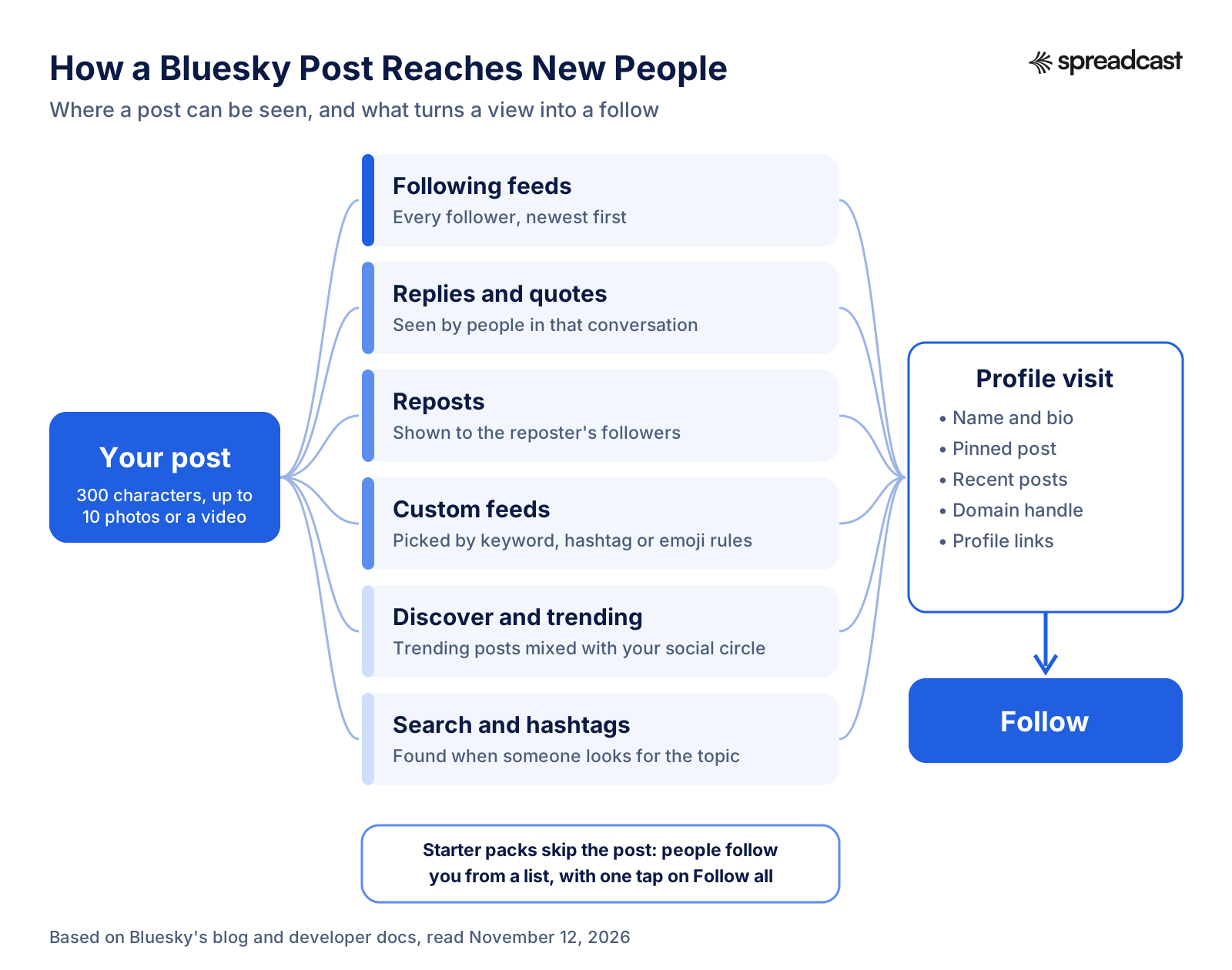
The Following Feed Is Chronological
Following shows posts from accounts you follow, newest first. There is no ranking to win there, which has two consequences. First, a post published while your followers are asleep sits under everything posted after it by the time they open the app. Second, followers are worth more on Bluesky than on networks that bury posts from people you follow, because every follower actually gets your posts in their timeline if they scroll that far.
Replies follow their own rule. In August 2024 Bluesky changed how replies show in the Following feed: a reply appears only when the conversation is between at least two people you follow, so your replies to strangers do not flood your followers' timelines. The same change means that when you reply to an older thread of your own, the thread gets bumped to the top of your followers' feeds. That is a useful tool: add a fresh update under a post that did well last week and it comes back around without a repost.
The Discover Feed
Discover is Bluesky's own algorithmic feed and the closest thing it has to a For You page. When Bluesky launched it, the company wrote that it mixes "a global view of what's trending" with posts from accounts you follow and accounts near your social graph. Since then it has added ways for readers to steer it: "Show more like this" and "Show less like this" in a post's menu, which TechCrunch reported in May 2024, and a dislikes beta announced in October 2025. Bluesky's own write up of that beta says dislikes are private and that the signal "isn't global": it mainly changes the experience of the person who dislikes and, to an extent, people in their social neighborhood.
Bluesky has also said it uses AI in the algorithms behind Discover, and that "None of these are Gen AI systems trained on user content", as Engadget reported in November 2024. The exact ranking is not published, so treat anyone who claims to know the Discover formula with caution. What is clear from Bluesky's own descriptions: Discover is built to surface trending posts and posts from people near a reader's social circle, so being liked by people in your niche is how you get there.
One 2026 change matters for growth. On August 27, 2026, Bluesky added a setting that lets you opt out of having your posts shown to people who don't follow you in Discover, for people who post for their friends and do not want to go viral. If you want new followers, make sure that setting is off.
Custom Feeds and How They Pick Posts
A custom feed is a small service run by whoever built it. The AT Protocol feeds guide describes the mechanics: when someone opens the feed, the service "returns a list of post URIs", and Bluesky fills in the posts. The builder decides what goes in the list. Some feeds take every post with a word, a hashtag or an emoji; Bluesky's own example is that any post with the test tube emoji 🧪 appears in the popular What's Science feed. Others rank by likes, pick only posts from a list of accounts, or only show posts in one language.
You do not need to code to build one. Bluesky's official account has pointed people to independent tools such as Graze and Bluesky Feed Creator for building feeds, and its 2023 post on feeds mentions SkyFeed for the same job. Since version 1.109 in October 2025, feed operators also receive interaction events: when people like, quote, repost, reply to and see posts in their feed. So a well run topic feed can learn which posts its readers enjoy and show more of them.
Feeds are where Bluesky is putting its effort. In its January 2026 plan, the company said custom feeds "power our trending topics system", that feeds are moving to the center of the app, and that it is "exploring topic tags as a way to help people find posts" so that posters can find the right audience more easily. For you as a poster, the practical lesson is simple: find the three or four feeds your future followers read, learn what gets a post into each, and write so your posts qualify.
Trending Topics and Search
Trending topics arrived in December 2024, and on August 5, 2026 Bluesky rolled out a new trending system that "catches more topics, identifies more posts within that topic, and serves them up faster". A post that is early and useful on a trending topic in your niche can be seen by people far outside your followers.
Search is the quiet door. Bluesky's search tips show that a phrase in quotes also matches the alt text on images, that #tag finds posts with a hashtag, and that people can search by language and by domain. In July 2026 version 1.127 added a Filters button for keywords, people, date range and language. People who search Bluesky for "indie game dev" or "watercolor" are telling you what they want to follow, so use the words they would type.
| Where people see you | How it picks posts | What you control |
|---|---|---|
| Following | Every post from accounts they follow, newest first | When you post and how often |
| Discover | Trending posts mixed with posts from the reader's social circle | Being liked by people in your niche; the Discover opt out setting |
| Custom feeds | Rules set by each feed's builder: words, hashtags, emoji, likes, lists, language | Words, tags and language in your post |
| Replies and quotes | Shown in the thread; ranked with people close to the reader first | Where you reply and how good the reply is |
| Trending and search | Topics detected across the network; search by words, tags, alt text | Timing and plain topic words |
| Starter packs | A list someone made, followed in one tap | Being someone curators want to include |
Set Up a Bluesky Profile That Turns Visits Into Follows
Every route in the diagram above ends on your profile. Someone sees a good reply, taps your name, looks for a few moments, and either follows or goes back. Many accounts lose people at this step without knowing it, because the profile was filled in on the day they signed up and never touched again. Fix it before you put any effort into reach.
Bluesky's profile schema sets the limits: a display name of up to 64 characters, a bio of up to 256 characters, an avatar and a banner of up to 1,000,000 bytes each as PNG or JPEG, one pinned post, and up to 10 profile links. Here is what to put in each.
| Profile part | Limit | What to put there |
|---|---|---|
| Display name | 64 characters | Your name plus your topic in two or three words, so it reads well in a reply |
| Bio | 256 characters | What you post about, who it is for, one line of proof, and where to see more |
| Avatar | 1 MB, PNG or JPEG | A clear face for a person, the logo for a brand; same as on your other networks |
| Banner | 1 MB, PNG or JPEG | Your work: a painting, the app's main screen, the product on a table |
| Pinned post | One post | Your best post or a short intro thread that shows what a follower gets |
| Profile links | Up to 10 | Website, newsletter, shop or support page, in order of importance |
| Handle | Your domain, or name.bsky.social | Your website if you have one, as explained below |
A bio that gets follows answers "what will I see if I follow you?" in plain words. Three examples, each well under the limit:
- An indie app maker: "Building Tally, a budget app for couples. I post what I ship each week, what users ask for, and the numbers. iOS developer since 2015."
- An illustrator: "Watercolor birds and the occasional cat. New painting most weekdays, process videos on Sundays. Commissions open, link below."
- A local bakery: "Sourdough bakery in Leeds. Today's bake at 7am, the odd recipe, and what we're testing. Order for pickup from the link."
Pin a post that does the selling for you. Pinned posts arrived with version 1.92 in October 2024, and a pinned post is the first thing under your bio. A good one is either your most liked post on your main topic or a short thread: who you are, what you post, three examples. Change it when something better does well.
Use profile links. On October 22, 2026 Bluesky introduced profile links, which sit directly below your bio and send people straight to the page, with no link page in between. Links to payment platforms such as Patreon show as prominent green buttons. You add them in Edit Profile, under Links, and can give each a title and drag them into order. If you sell something or run a newsletter, this is where follows start turning into customers.
Two smaller settings help too. Since June 2026 the profile has a share button that makes a personal QR code, which is handy on a slide, a poster at a fair or the back of a business card. And since July 2025 people can tap a bell on your profile to get activity notifications whenever you post. That only works if you allow it: Settings, then Privacy and Security, then "Allow others to get notified of your posts". Leave it on for everyone if you are trying to grow; it is how followers who want every post can get them.
Use Your Website as Your Bluesky Handle
Bluesky lets you replace name.bsky.social with your own domain, such as @yourstudio.com. Bluesky's own guide calls this "one form of verification on Bluesky" and recommends it for official organizations and public figures; its examples include @npr.org and the team's own @bsky.app. It is a trust signal people recognize, it makes your handle easy to remember, and it ties your social account to the website people can check. By the end of 2025, over 309,000 accounts used a domain handle.
- In the Bluesky app, open Settings, then Account, then Handle, and choose "I have my own domain".
- Bluesky shows a TXT record with your account's DID. The DID is public, so it is safe to copy.
- At your domain registrar or DNS host (for example Cloudflare, if your DNS lives there), add a TXT record named _atproto with the value did=did:plc: followed by your value.
- Wait a few minutes for DNS to update, then tap "Verify DNS Record" in the app.
- Check your profile. Old tags and mentions of your previous handle still point to your account.
Two details from the same guide remove the usual worries. Since December 12, 2024, your most recent .bsky.social username stays reserved for you when you switch to a domain, and the reservation does not expire. And teams can give each person a subdomain, such as @maria.yourcompany.com, by adding a TXT record for each name or by serving the DID from a web address, which Bluesky says most tech teams can set up easily.
Bluesky Verification: Blue Checks and Trusted Verifiers
On April 21, 2025 Bluesky added a blue verification badge. Bluesky itself verifies "authentic and notable accounts", and selected organizations called Trusted Verifiers can verify people directly; they carry a scalloped badge, and tapping a badge shows who granted it. The New York Times verifying its own journalists is Bluesky's example. The 2025 Transparency Report gives the scale: by the end of 2025, 4,327 accounts were verified, with 21 Trusted Verifiers in the network. On a network of more than 40 million accounts, that is a badge for the few.
So for most people reading this, the domain handle is the realistic trust signal, and the blue check is a bonus if you are a public figure or work for an organization that verifies its people. If you think you qualify, Bluesky's July 2025 update is clear on two points: the only place to apply is Bluesky's official form, and Bluesky never contacts people about verification or moderation by DM. Fake "get your badge" sites exist, and the same thread warns that accounts that log in on them are compromised and suspended.
Bluesky Starter Packs: How to Make One and Get Into Others
Starter packs are Bluesky's most direct growth tool. Bluesky launched them in June 2024 as "personalized invites": a named list of up to 150 people and up to 3 custom feeds, with a link and a QR code to share. Someone who opens a pack can follow everyone in it with a single Follow all button, which is in the app's own text, and new users who sign up through a pack start with its accounts already set up. The starter pack schema adds the smaller limits: a name of up to 50 characters, a description of up to 300, and no more than 3 feeds.
For growth, this changes the usual order. Normally someone sees a post, then visits the profile, then follows. In a starter pack they follow first, in bulk, because a person they trust put you on a list. That is why a place in the right two or three packs in your niche is worth more than any single post. Bluesky even tells you when it happens: the app sends notifications such as "followed you via Starter Pack" and "signed up with your Starter Pack".
How to Make a Starter Pack
- Verify your email first. The app will not let you create a starter pack until you do.
- Open your profile and go to the Starter Packs tab.
- Choose "Make one for me" to start from suggestions based on your network, or Create to choose everyone yourself.
- Write a name that says the niche ("UK Indie Game Devs", "Watercolor Painters") and a description that says who it is for.
- Add up to 150 accounts and up to 3 feeds. You can include yourself.
- Share the link or the QR code in a post, pin that post for a week, and put the link in your profile links if the pack is central to what you do.
A pack people actually use is narrow and generous. Narrow, because "Science" is a phone book and "Seismology and earthquake people" is a reason to tap Follow all. Generous, because a pack that lists only you and your friends reads as self promotion. Bluesky's own roundup of community starter packs in August 2024 shows what worked: packs for comics creators, UK MPs, chemists, policy analysts and seismologists, and one of "OC artists who are under 100 followers". Several curators asked people to suggest missing accounts in the replies, which turns the pack into a conversation and brings the curator new followers too.
When you add someone, tell them in a reply or a mention. If they repost it, your name reaches their followers as the person who made the pack. Update the pack every month or two: remove accounts that went quiet, add the new people who are doing good work.
How to Get Into Other People's Starter Packs
Since version 1.132 on September 4, 2026, starter packs show up in the main search box under their own Starter Packs tab, so finding the packs in your niche now takes a minute. Search for your topic, open the packs with recent activity, and note who made them. Then make yourself easy to add:
- Be clearly about the topic. Curators skim a profile quickly; a bio and pinned post that say "bird painter" get added to bird painter packs.
- Be active and kind in the curator's replies for a few weeks before you ask for anything. Curators add people they have noticed.
- Answer the call when a curator asks for suggestions under a pack post. Suggest two other people as well as yourself.
- Make a pack of your own and include the curators you admire. It is not a trade, but people notice who notices them.
- Do not ask strangers to add you in a DM. It reads as spam, and Bluesky's guidelines ban spam wherever it is sent.
Bluesky Starter Pack vs List
Bluesky has three kinds of lists: starter packs, curational user lists, and moderation lists. A curational list is a feed of posts from chosen accounts, which people pin to read; a starter pack is an invitation to follow. The app can turn a pack into a list, and its text notes that the list is "an independent copy" that will not change when the pack does. Moderation lists are the opposite of a pack: people subscribe to them to mute or block every account on them, which the section on visibility covers.
If someone puts you in a pack you do not want to be in, block its creator. Bluesky's starter pack post says blocking the creator filters you out of their pack, and since August 2024 the same applies to their curational lists. You can also report a pack from its three dot menu.
What to Post on Bluesky to Get Followers
People follow an account for more of something. A post earns a follow when a stranger reads it and thinks "I want this in my feed every week". So the question is not "what goes viral" but "what is the thing I can post again and again that a specific person wants more of". An illustrator's answer is the work and the process. An app maker's is what they ship and what they learn. A bakery's is today's bake and the small stories behind it.
Bluesky's crowd skews toward conversation. Many people there chose a smaller network on purpose and came for talk, not for polished ads. Posts that sound like a person, take a position, share something useful or show work in progress fit; posts that read like a press release do not. Links are welcome: in a November 2024 post Bluesky wrote "we don't demote links", and quoted publishers who saw more traffic from Bluesky than from much larger networks.
Post Formats and Limits on Bluesky
| Format | Limit in November 2026 | When it works for growth |
|---|---|---|
| Text post | 300 characters (post schema) | Opinions, questions, one useful fact, a reply that stands alone |
| Photos | Up to 10 per post since June 2026; 2 MB and 4000 by 4000 pixels each since April 2026 | Work, before and after, a step by step in pictures, a chart |
| Video | Up to 10 minutes since August 2026 | Process clips, demos, a 30 second tip |
| Thread | Numbered automatically since September 2026 | How to guides, stories, a list of resources |
| Link post | A card with title and picture | Your article or video with one line of your own take on top |
Format matters, but less than people think. Buffer's 2026 engagement report, based on its users' 2025 posts, puts the median Bluesky post at about 4 interactions (likes, replies and reposts), down from about 5 a year earlier while the number of posts it measured nearly quadrupled. By format, video had a median of 5, images 4, and links and text 3 each. That is a real gap, and it is also a small one: a picture will not save a post that says nothing, and a sharp text post can beat a dull video. Use the size guide in our social media image sizes so photos are not cropped, and the character limits page when you write one post for several networks.
Post Ideas That Earn Follows
- Work in progress: a sketch, a half built feature, a test batch. Show the messy middle and say what you are trying.
- One useful thing you learned this week, in one post, with the detail that makes it usable.
- A number from your own work with what it taught you: "Our onboarding lost 40% of people on screen 3. Here is what we changed."
- A clear opinion on your niche, with the reason, and a question at the end that people can answer from experience.
- A short thread that teaches one thing step by step, with a picture for each step.
- A link to something you made, with the one line you would say if you were sending it to a friend.
- Credit to others: a weekly post of three people or posts in your niche worth following. It gets shared, and it is how starter pack curators find you.
- Answers. Search your topic, find the question people keep asking, and post the answer as its own post.
Three worked examples, each under 300 characters:
- Indie app maker: "Shipped shared budgets in Tally today. The feature took 6 weeks; the hardest part was deciding what happens when one partner deletes an expense. We went with: it moves to a shared trash for 7 days. Would you expect that?" with a screenshot of the new screen.
- Illustrator: "Same robin, three stages: pencil, first wash, finished. The trick on the breast is letting the orange bleed into wet paper, then lifting the highlight with a dry brush." with three photos in one post.
- Bakery: "We burned 40 loaves this morning so you don't have to. New oven, new rules. Today's rye is the batch we got right, out at 7." with one photo of the good loaves.
Alt Text Is Part of Being Found
Add alt text to every picture. It is the right thing to do for blind and low vision readers, and on Bluesky it also helps people find you: Bluesky's search tips say a quoted phrase search includes posts that use the phrase in the alt text of their images. A painting described as "watercolor of a robin on a snowy branch" can show up for people searching "watercolor robin" even if your post text is a joke about winter.
How Often Should You Post on Bluesky?
Bluesky publishes no recommended number, and its limits sit far above what a person needs: the rate limits allow up to 1,666 new records an hour per account, a ceiling set, the docs say, with the network's most active humans in mind. Buffer's Bluesky timing study says there is "no magic number" and that consistency matters more than volume.
Here is a useful benchmark from the network itself. In October 2026, an average day on Bluesky saw 3,426,296 posts from 569,617 accounts that posted at least once, according to our averages of the Jaz Bluesky stats daily feed. Dividing one by the other gives about six posts per active poster per day (our arithmetic), replies included, since a reply is a post on Bluesky. You do not need to match the average. A sensible start is one to three original posts a day on your topic plus a few genuine replies, spread across the day so that people who open the Following feed at different hours see you. If that is too much, three good posts a week, every week, still beats ten in a burst followed by silence.
The way to keep that rhythm in a busy week is to write ahead: a batch of posts on Sunday, scheduled across the week, with your daily time spent on replies. Bluesky has no schedule button of its own, so our guide on how to schedule Bluesky posts compares the free and paid ways, and the free social media content calendar helps you plan which topic goes on which day. If you want to batch a month at once, a month of social content in one afternoon walks through it.
Best Time to Post on Bluesky
Buffer analyzed more than 3 million Bluesky posts for its best time to post study, published August 5, 2026. Its best single slot was Saturday at 5 p.m., with a 6.89% engagement rate, and Saturday was the best day overall at 6.17%. On weekdays, evenings from about 6 to 9 p.m. did best, late mornings and midday from about 10 a.m. to 1 p.m. were the quietest, and Thursday was the weakest day at 3.44%. These are averages across many accounts, so test them against your own audience for a month. For a side by side with the other networks, see our guide to the best time to post on social media.
How to Get Engagement on Bluesky With Replies and Quote Posts
If posting is how you keep followers, replying is how many people get them in the first place. A good reply under a bigger account in your niche is read by people who already care about the topic, and some of them tap your name. On Bluesky this matters more than on most networks, because the company has spent the last year redesigning replies.
In October 2025 Bluesky described the changes in a progress update on healthier conversations. It is building a system that maps the "social neighborhoods" that form on the network and prioritizes replies from people closer to the reader's neighborhood. Its newer model detects replies that are toxic, spammy, off topic or posted in bad faith, and ranks them lower in threads, search results and notifications. And it tested a change to the Reply button so that it opens the full thread first, to make people read before they reply. TechCrunch's report on the same day adds that dislikes may also feed into how replies are ranked. Bluesky's 2025 Transparency Report says that after this detection went live, daily reports of anti social behavior dropped by about 79%.
Put simply: replies from people who are part of a community, and who add something, rise. Drive by replies, dunks and "great post!" sink. So reply where you belong, and reply like a person who knows the subject.
Replying under your own posts is worth doing too, but for the relationship more than the ranking. Buffer's engagement report compared nearly 2 million posts from more than 220,000 accounts on six networks and found that posts where the account replied to comments tended to earn more engagement than its other posts. On Bluesky the lift was the smallest of the six, about 5%, against 42% on Threads, and Buffer says it cannot prove the replies caused it. People who get a real answer from you come back, and that is reason enough.
A 20 Minute Reply Routine
- Open your topic feed or a search for your niche words, not the Discover feed. You want posts from your future followers, not the day's argument.
- Pick three to five posts where you can add something: an answer, a counterexample, a link, a picture of how you did it.
- Write replies that stand on their own. A stranger reading only your reply should learn something.
- Answer every genuine reply on your own posts from the day before.
- Follow two or three people whose replies were good. They are the community you are building.
Twenty minutes a day of this adds up to about a hundred thoughtful replies a month. On a network built around conversation, being known for good replies is often the first step to being known at all.
Quote Posts That Add Something
A quote post shares someone else's post with your comment on top, so it reaches your followers and shows up on the original post's list of quotes. Since October 16, 2026 people can browse a post's quotes by Top as well as by Latest, which means a strong quote on a popular post can be read long after it was written. Use quotes to add context, a counterpoint with evidence, or your own example.
Do not use them to dunk. Since August 2024 the author of a post can detach their post from your quote, which leaves your quote pointing at nothing, and a pattern of hostile quotes is exactly what gets accounts added to moderation lists. Quote up, not down: quoting a smaller account to praise its work wins you two audiences at once.
Reply Settings on Your Own Posts
Bluesky lets you choose who can reply to each post: everyone, your followers, people you follow, people you mention, or nobody. In November 2025 the settings were redesigned and you can now save a default for future posts. If you are trying to grow, keep replies open to everyone on most posts, because replies are free distribution. Use the hide reply option on the odd bad one instead of closing the whole conversation.
Hashtags and Topic Feeds on Bluesky
Bluesky added hashtags in 2024, and they work the way you would expect: tap one and you see posts with that tag, or search #tag. The post schema also allows up to 8 extra tags stored with a post, in addition to any in the text. But on Bluesky a hashtag matters less for the tag page than for the feeds that read it. Many topic feeds include any post with a certain tag or word, so the right tag is how a stranger who reads an art feed or a book feed finds you.
- Find the feeds your audience reads. Search your topic in the Feeds section of the app, and look at which feeds the bigger accounts in your niche have pinned or share.
- Open each feed's description. Good builders say what qualifies: a tag, a keyword, an emoji, a language.
- Post one test that fits the rules and check the feed an hour later. If you are in it, note what worked.
- Use one or two tags that a feed or a community actually uses. Five generic tags look like spam and add nothing.
- Set the post language correctly. Posts carry up to 3 language codes in the schema, and many feeds and searches filter by language.
If no good feed exists for your niche, build one. A feed with a clear name, such as "Indie iOS Devs" or "Bird Art", that you curate well makes you the person at the center of that topic. Readers who pin it see your name on the feed page every time they open it. The custom feeds video below, from an independent creator, shows how the building works with a visual tool.

Moderation Lists and Labelers That Affect Who Sees You
Bluesky moderation is stackable. Bluesky runs its own moderation for everyone, and on top of that people can subscribe to independent moderation services called labelers, which launched in March 2024. A labeler tags posts or accounts, and each subscriber chooses whether to hide, warn about or ignore each tag. Everyone starts out subscribed to Bluesky's own moderation service and adds others on top. People can also subscribe to moderation lists, which mute or block every account on the list in one go.
This is the part of Bluesky that most growth guides skip, and it explains a lot of "why did my reach drop" posts. You can be invisible to thousands of people without any action from Bluesky itself, because a list or labeler they trust put you on it. There is no notification when that happens. The only defense is to behave in a way that list makers have no reason to add you: no spam, no hostility, no engagement bait, and honest labels on your own content.
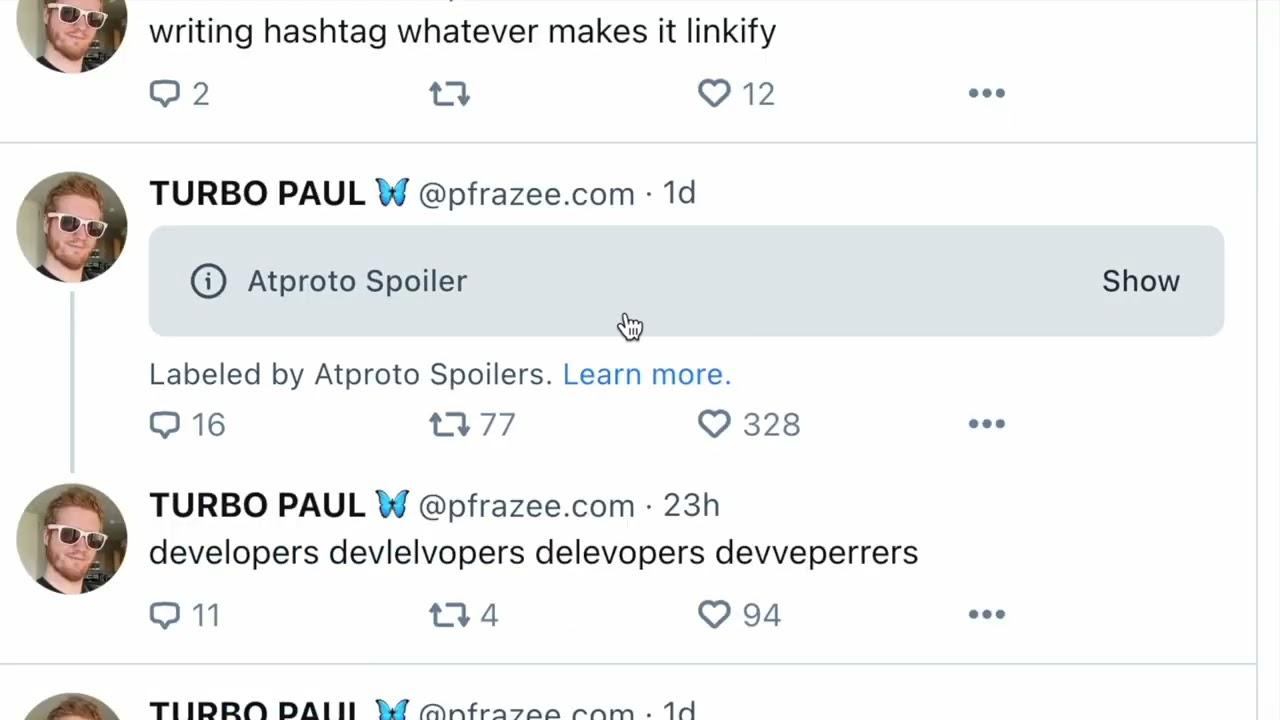
Label Your Own Posts When They Need It
The AT Protocol labels guide lists the labels Bluesky defines for everyone, including porn, sexual, nudity and graphic media for adult or violent content and a bot label for automated accounts; only labels defined this way can be put on your own posts. Bluesky's guidelines allow consensual adult content "when appropriately labeled", so labeling is part of the rules, and it also protects your reach: people who opted in to that content still see it, and you avoid reports and list adds from people who did not. Since March 2026 automated accounts can mark themselves as bots in account settings, and the label shows on the profile and every post. If a script posts for you with no human in the loop, use it.
How Bluesky's Own Enforcement Works
Bluesky moderates with people and automated systems together. In November 2025 it explained its strike system: each violation gets a severity rating from low to critical, penalties grow as violations add up, and account actions escalate from temporary suspensions to permanent bans, with immediate permanent bans for the most severe cases. Every action can be appealed. Since October 30, 2026 the app has a moderation inbox in beta that shows your reports, actions on your account and your account standing, including whether you have strikes. Strikes come off your record over time. If you see a standing banner, take it seriously; if you see none, you are in good standing.
Settings That Hide You by Accident
Two settings can quietly limit growth. The Discover opt out from August 2026, covered above, keeps your posts out of Discover for people who do not follow you. And a privacy setting asks apps and sites not to show your account to people who are not logged in; according to the app's own wording, Bluesky then hides your account from them, and the setting does not make an account private. That setting cuts you off from people who arrive from Google or a shared link without an account. If you want strangers to find you, keep both off.
How to Find Your Twitter Followers on Bluesky
There is no button that moves followers from X to Bluesky, because followers are people, and each of them has to follow you again. What you can do is find the people you followed or who followed you elsewhere, follow them on Bluesky, and tell your old audience where you are now.
Bluesky's own option is Find Friends, launched in December 2025. You verify your phone number and upload your contacts, and Bluesky matches you with people who have each other in their contacts and both opted in. Bluesky stores the numbers as hashed pairs, and you can delete your data and opt out at any time. When it launched it was limited to the mobile app in 13 countries, including the United States, the United Kingdom, Canada, Australia, Brazil, Germany, France and Japan. It finds people you know, not people who know your work, so it is most useful for a personal account.
For an audience you built on X, the best known third party option is Sky Follower Bridge, an open source browser extension for Chrome, Firefox and Edge. According to its documentation, you open your Following or Followers list on X (it also supports follows from Instagram, TikTok and Threads), launch the extension, sign in to Bluesky with OAuth or an app password, and it searches Bluesky for matching accounts so you can follow them from a list. It notes that searches may fail on Bluesky's rate limits, in which case you wait two or three minutes and try again. We describe it from its own page and did not test it with an account. Its README recommends the OAuth sign in; if you use an app password instead, you can revoke it in Bluesky's settings when you are done.
Matching only finds people who are already on Bluesky and use a recognizable name. The rest of the move is telling people: put your Bluesky handle in your bio on every other network, post a short note on X and elsewhere saying what you will post on Bluesky, link the profile in your newsletter and email signature, and add the QR code to your slides. Follow the people you find; some will follow back once they see you active there.
Cross Posting to Bluesky From Threads and Mastodon
Bluesky runs on the AT Protocol; Mastodon and Threads use ActivityPub, the protocol behind the fediverse. They do not talk to each other natively, but a bridge connects them. Bridgy Fed is the best known: it connects the fediverse, the web and Bluesky, both ways, for accounts that opt in. From Bluesky you opt in by following @ap.brid.gy (or by logging in on its site), and after a few minutes your account appears in the fediverse as @yourhandle@bsky.brid.gy. Fediverse accounts that opt in appear on Bluesky with handles ending in .ap.brid.gy.
Bridgy Fed's docs list the trade offs. Only fully public posts and interactions are bridged. Posts longer than Bluesky's 300 characters are cut short with an ellipsis. Follower counts across networks are inexact by design. Replies from people who are not bridged reach you as an hourly DM. To stop, you block the bridge account. For a Mastodon user this is a real way to keep one account and be followed from Bluesky; for growth on Bluesky it is weaker than posting natively, because bridged accounts carry the long handle and the truncated posts.
Threads is a different case. Meta lets Threads users aged 18 and over with public profiles share their posts to the fediverse, a feature it has expanded globally outside the European Region. That sends posts to Mastodon and other fediverse servers. We could not confirm that a Threads account can opt in to Bridgy Fed, so do not count on Threads posts reaching Bluesky this way.
The reliable way to be on all three is to post natively to each, with a version of the caption that fits each network: 300 characters on Bluesky, more room on Threads and Mastodon. Doing that by hand is tedious, which is what cross posting tools are for. The Threads side is covered in our guide on how to schedule Threads posts, and the size of each audience is in our Threads statistics and Bluesky statistics pages.
How to Grow on Bluesky as an Artist
Artists are one of Bluesky's biggest communities, and Bluesky has courted them openly. In November 2025 the company wrote that people on Bluesky are "being discovered as artists". A year earlier, as artists arrived from other networks, it said "We do not use any of your content to train generative AI, and have no intention of doing so". Be precise about what that covers: it is Bluesky's own promise. Engadget's report notes that Bluesky's robots.txt does not stop outside companies from crawling public posts, and a Bluesky spokesperson acknowledged that robots.txt files don't always prevent crawling.
The 2026 product changes help artists more than anyone. These are the ones to use:
- Photo quality and sets: since April 2026 photos can be 2 MB and 4000 by 4000 pixels, and since June 2026 one post holds up to 10 photos, shown as a carousel from 5 photos up. Post a finished piece with its details and stages in one post.
- Profile links with payment buttons: profile links from October 2026 show links to Patreon and similar payment platforms as green buttons right under your bio. Put commissions, shop and support links there.
- Feeds made for art: Bluesky's own post on custom feeds mentions feeds that advertise which artists have open submissions or stores. Find the art feeds for your medium and learn their tags.
- Starter packs of artists: search "artists" plus your medium under the Starter Packs tab, and make a pack of artists you admire, including smaller ones.
A weekly rhythm that works for most visual artists, about 30 minutes a day:
| Day | Post | Why |
|---|---|---|
| Monday | Work in progress with one sentence on what you are trying | Invites replies and shows the hand behind the work |
| Tuesday | No new post; 20 minutes of replies in art feeds | Where new followers find your name |
| Wednesday | A finished piece, with detail shots in the same post | The post people follow you for |
| Thursday | A short process video or a three step thread | Teaches something, gets saved and shared |
| Friday | Shop, commission or print update, with the price | Turns followers into buyers, once a week only |
| Saturday | Share three other artists' work with credit | Generous, and how curators notice you |
| Sunday | Answer a question you got this week, as its own post | Shows expertise, gives you a pin candidate |
Two rules for artists in particular. Label nudity and adult work with Bluesky's own labels so the people who opted in still see it and nobody reports it. And write alt text that describes the piece the way a buyer would search for it. A finished piece with a plain description in the alt text is easier to find than one with only a hashtag. For Instagram, which many artists run next to Bluesky, our guide on where to post: Instagram, Pinterest or LinkedIn helps decide how to split the time.
Mistakes That Get Bluesky Accounts Muted, Listed or Limited
An account that stalls has usually not been banned. More often it is muted by individual people, added to moderation lists, ranked down in replies, or simply ignored because its posts read like ads. These are the habits behind it, with what Bluesky itself says about each.
| Mistake | What Bluesky says | What tends to happen |
|---|---|---|
| Follow for follow, mass follows and unfollows | The rate limit docs say bulk or spammy follows and likes are against the guidelines | Reports, list adds and enforcement |
| Buying followers, likes or reposts | The guidelines ban manipulating follower counts and engagement metrics | Fake accounts that never read you, and risk of strikes |
| Posting the same text or link over and over | Spam and repeated posting that disrupts conversation are banned | Spam reports; spam was 2.49 million of 2025's reports |
| Replies that dunk, bait or drift off topic | Such replies are ranked lower in threads, search and notifications | Fewer people see your replies; list adds |
| Hostile quote posts | Authors can detach their post from your quote | Your quote points at nothing |
| Undisclosed sponsored posts | Commercial content must be clearly identified | Reports and enforcement |
| Changing your identity to keep followers | The guidelines name "identity churning" as deceptive | Enforcement |
| Adult content without labels | Adult content is allowed when appropriately labeled | Reports, labels added for you |
| Automated posting without a bot label | Bot labels exist for automated accounts since March 2026 | Reports from people who feel deceived |
| Logging in on a fake badge site | Bluesky never contacts people about verification by DM | Compromised and suspended account |
Bluesky's 2025 Transparency Report shows how common some of this is. Misleading content was the most reported category, with 4.36 million reports, and spam alone accounted for 2.49 million of them. Bot accounts drew about 62,800 reports and impersonation about 14,700. In May 2025 Bluesky added staff focused on bots, spam and other malicious scaled activity. In other words, the network is actively looking for exactly the shortcuts that growth services sell.
Can You Buy Followers on Bluesky?
People search for it, and some sites sell it, so here is a straight answer: you can pay for followers, and you should not. Bluesky's Community Guidelines, last updated September 19, 2025, say "Do not artificially manipulate features or social signals to gain unearned reach or mislead users, including engagement metrics, follower counts, or other measures of community interest." Bought followers do exactly that.
It also fails on its own terms. Bought accounts do not read your posts, so they do not like, reply or repost, which means they add nothing to Discover or to any feed that ranks by engagement. Your interactions per follower fall, which makes the account look weaker to anyone who checks. And the fake accounts that make up bought followers are the kind of bots and spam Bluesky added moderation staff to find in 2025, so they can vanish as fast as they arrived.
The same goes for growth hacks in general. Nothing on this page guarantees followers, and anyone who promises a number in a set time is guessing or selling. What compounds is a clear profile, a place in your niche's packs and feeds, posts people want more of, and replies people remember.
How Many Followers Can You Expect on Bluesky?
Start with the size of the room. Bluesky's FAQ says it had over 44 million users as of May 2026. Its 2025 Transparency Report says it grew nearly 60% during 2025, from 25.94 million to 41.41 million. The public Jaz Bluesky stats counter showed 47,524,745 registered accounts when we read it early on November 12, 2026 (UTC).
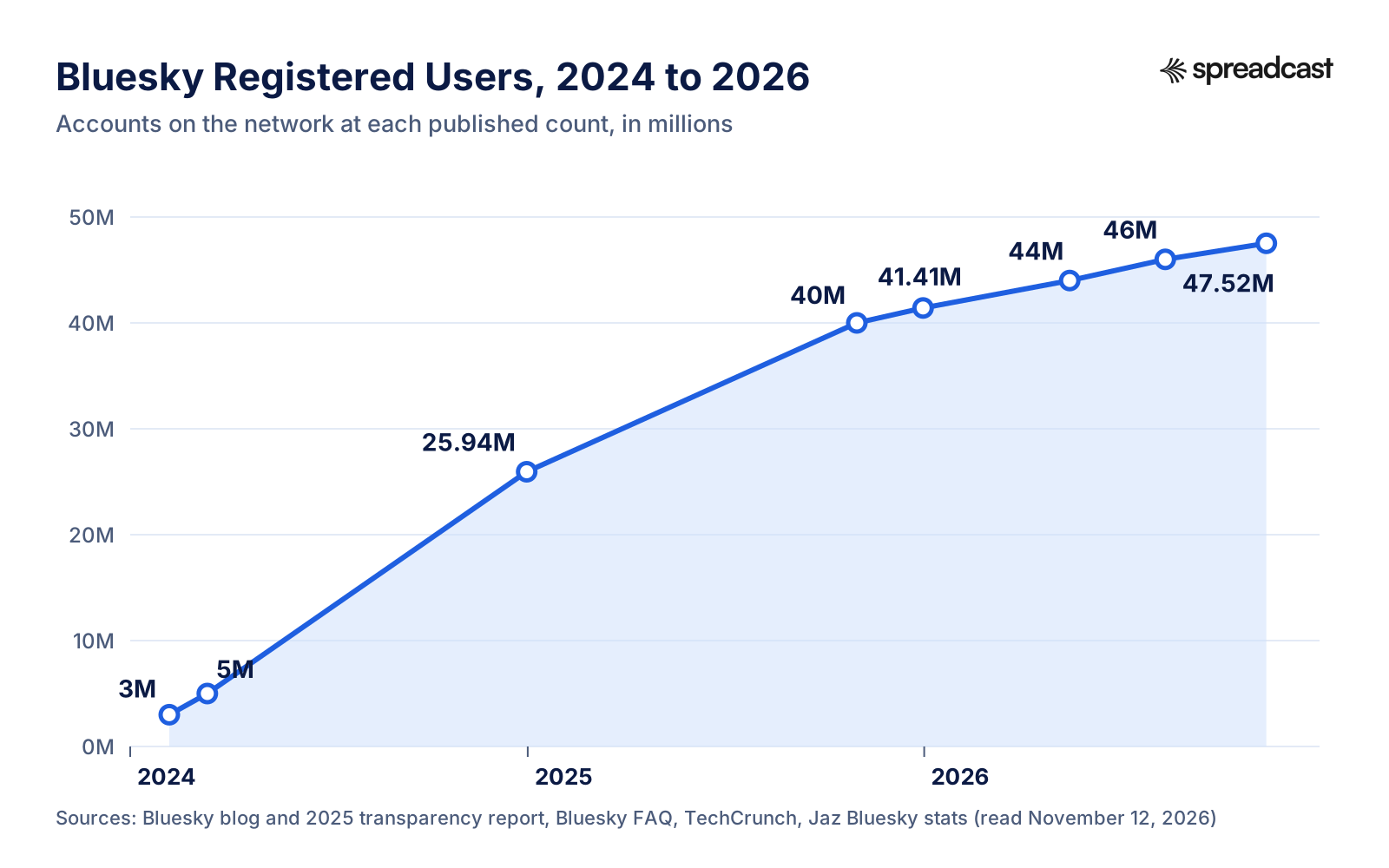
Registered is not active. Bluesky does not publish daily or monthly active users, as TechCrunch noted in August 2026. Similarweb estimates quoted there put the Bluesky mobile app at about 10.4 million monthly users in June 2026, down 27.2% from a year before, and about 3 million daily users in July 2026, down 25.6%. The network's own activity data tells the same story at a smaller scale. In our averages of the Jaz daily feed for October 2026, 998,911 accounts liked at least one post on a typical day and 569,617 posted at least once. A year earlier, in October 2025, the same averages were 1,133,630 and 631,762.
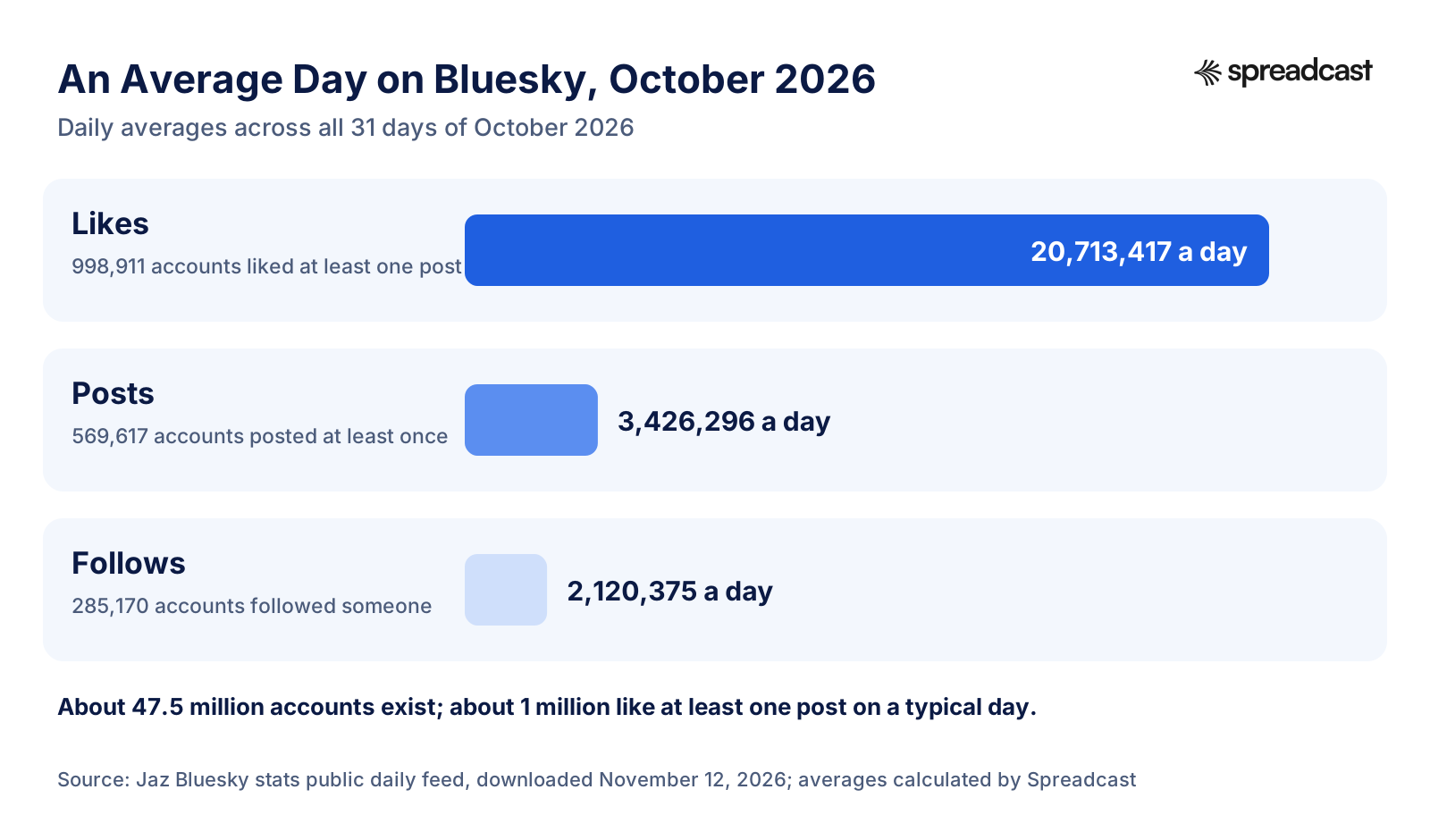
Follows are the number that matters most for this guide. On an average October day, 2,120,375 follows were made on the whole network, by 285,170 accounts. The feed does not say who received them, so it cannot tell you what a typical account gains, and no public data we found does. What it does show is the size of the pool: about 285,000 people a day are choosing someone new to follow, and every route in this guide is about being in front of them when they do. Judge your progress against your own last month, not against big accounts.
Engagement has a benchmark too. Buffer's engagement report puts the median Bluesky post at about 4 interactions in 2025. If your posts usually get more than that, your content is landing; if most get zero or one, look at the topic and the hook before you post more. Bluesky shows the like, repost, quote and reply counts on every post, which is enough to work from. Our free engagement rate calculator turns those into a rate you can compare across networks, and the social media KPIs guide covers which numbers to track weekly. For the full set of network statistics, by month and by country, see our Bluesky statistics page.
| Benchmark | Figure | Source |
|---|---|---|
| Registered accounts | 47,524,745 on November 12, 2026 | Jaz Bluesky stats |
| Users, in Bluesky's words | Over 44 million as of May 2026 | Bluesky FAQ |
| Growth in 2025 | 25.94 million to 41.41 million, nearly 60% | Bluesky 2025 Transparency Report |
| Accounts that like a post, average day | 998,911 in October 2026 | Jaz daily feed, Spreadcast average |
| Accounts that post, average day | 569,617 in October 2026 | Jaz daily feed, Spreadcast average |
| Follows made, average day | 2,120,375 in October 2026 | Jaz daily feed, Spreadcast average |
| Mobile app monthly users | About 10.4 million, June 2026 (Similarweb) | TechCrunch |
| Median interactions per post | About 4 in 2025 | Buffer |
How to Grow on Bluesky in 30 Days
If you want a plan rather than a list, here is the one we would follow for a new or stalled account. It assumes about 30 minutes a day and one topic. The best way to grow on Bluesky is the same whether you are an artist, a founder or a shop: do the setup once, then the same small things every day.
| Week | Do this | Done when |
|---|---|---|
| Week 1: Setup | Rewrite name and bio around your topic, add banner, profile links and a pinned intro post; switch to a domain handle if you have a site; check the Discover and logged out settings; turn on activity notifications for others | A stranger can tell in one look what you post |
| Week 2: Find your people | Find 3 or 4 topic feeds and pin them; search the Starter Packs tab for your niche and follow the best packs; run Find Friends or a follow finder; follow 50 active accounts in your niche, not more | Your Following feed is full of your topic |
| Week 3: Rhythm | One to three posts a day on your topic, at least one with a picture; the 20 minute reply routine daily; one thread; one post crediting others | Seven days in a row without a gap |
| Week 4: Give and review | Make a starter pack for your niche and tell the people in it; compare which posts beat 4 interactions; repin your best post; plan next month's topics | You know your two best post types |
After the first month, keep the parts that worked and cut the rest. Founders and small teams who want this to run alongside the product, not instead of it, will find more on the habit in our founder led marketing guide. If the same posts should also go to Instagram, LinkedIn and Threads, our guide on how to promote an app on social media shows how to split one idea across networks, and the social media caption generator writes a version for each.
How Spreadcast Helps You Post to Bluesky Every Day
The hardest part of this guide is not any single step. It is posting well, every day, for months, while also doing your actual work. Replies need you; the posts do not always have to.
Spreadcast writes, designs, schedules and publishes posts to Bluesky and 10 other networks: Instagram, Facebook, LinkedIn, TikTok, YouTube, Pinterest, Threads, Mastodon, Telegram and Discord. You start from one idea, and it designs the picture in your brand's colors and fonts, writes a caption for each network that fits that network's limit (300 characters for Bluesky), and puts everything on one calendar. On Bluesky it publishes text posts, posts with up to 4 images, or a video of up to 3 minutes; it makes links, hashtags and mentions tappable, and on a text post with a link it builds the link card the way the Bluesky app does. It then reads your follower count and each post's likes, replies, reposts and quotes, so you can see which posts earn follows. App makers can paste an App Store link and get posts made from each update and rating milestone, plus a weekly plan of posts at chosen times, on autopilot or with one tap approval. See the social media scheduler and auto posting pages for how it works.
What it does not do: it does not post Bluesky threads, it does not reply for you, and it will not make you starter packs or join feeds. Those are the human parts of growing on Bluesky, and they are where your 20 minutes a day should go. If you work in Claude or ChatGPT, the social media MCP server lets you create and schedule posts from the chat. The free plan makes 3 AI posts to download, without publishing. A Post Pack is $19 once for 10 posts, the 30 Day Pass is $39 once, and Pro is $29 a month; details are on the pricing page, or start from your website or App Store link.
How We Researched This Guide
On November 12, 2026 we read Bluesky's own sources first: its FAQ, Community Guidelines, blog posts from 2023 to October 2026, its developer docs on feeds, moderation and rate limits, the open source schemas for posts, profiles and starter packs, and the English text of the open source Bluesky app. We read release announcements from Bluesky's official account through its public API, so every feature date here comes from Bluesky itself. We downloaded the Jaz Bluesky stats feed and averaged its daily rows for October 2025 and October 2026; those averages, and the posts per active poster figure, are our own arithmetic.
For reach and timing we used Buffer's published Bluesky research and TechCrunch's reporting of Similarweb estimates, and we named both as outside estimates. We read the top ranking guides on this topic to make sure nothing they cover is missing here, and we did not reuse any of their numbers without finding the original source. We did not test Sky Follower Bridge or Bridgy Fed with a live account; we describe them from their own documentation. We left out anything we could not confirm, including a fixed follower target for a given number of posts, because no public data supports one.
Frequently Asked Questions
How do I get more followers on Bluesky fast?
Fix your profile so it says what you post, get into two or three starter packs in your niche (search the Starter Packs tab), post where your topic's custom feeds will pick you up, and reply well under bigger accounts in your niche every day. There is no shortcut that Bluesky allows; bought followers and follow trains break its Community Guidelines.
How do I find my Twitter followers on Bluesky?
Bluesky cannot import followers from X. Its Find Friends feature matches phone contacts when both people opt in, and third party browser extensions such as Sky Follower Bridge search Bluesky for the people in your X following or followers list so you can follow them. Then post your Bluesky handle on X and your other profiles.
Can you buy followers on Bluesky?
Sites sell them, but Bluesky's Community Guidelines ban artificially manipulating follower counts and engagement metrics. Bought followers are fake accounts that never read or like your posts, so they do not help reach and they put your account at risk of reports and strikes.
How do I get added to a Bluesky starter pack?
Search your topic under the Starter Packs tab in Bluesky search, follow the packs that fit, and become someone the curator notices: a clear bio, regular posts on the topic and good replies. When a curator asks for suggestions, suggest others as well as yourself. Making your own pack for your niche also helps.
Does Bluesky have an algorithm?
Several. The Following feed is chronological. Discover is Bluesky's own algorithmic feed, mixing trending posts with posts liked near your social circle. On top of that there are tens of thousands of custom feeds built by the community, each with its own rules, and you choose which ones to pin.
How do I go viral on Bluesky?
You cannot plan it, but posts that spread usually say something useful or sharp on a topic people are already discussing, early, with a picture or video, in words that topic feeds and trending topics pick up. Make sure you have not opted out of showing your posts to people who don't follow you in Discover.
Why am I not getting followers on Bluesky?
The usual reasons are a profile that does not say what you post, posting on too many topics, posting rarely, replying little, or never appearing in feeds and starter packs. Also check that the Discover opt out and the setting that hides your account from logged out visitors are both off.
Where These Facts Come From
Every outside number, rule and price on this page links to the page it was taken from.
- Bluesky FAQBluesky
- Bluesky Community GuidelinesBluesky
- Introducing starter packsBluesky
- Highlighting community starter packsBluesky
- A new form of verification on BlueskyBluesky
- How to set your domain as your Bluesky usernameBluesky
- Algorithmic choice with custom feedsBluesky
- Bluesky's stackable approach to moderationBluesky
- New anti toxicity features on BlueskyBluesky
- Building healthier social media: updated guidelinesBluesky
- Progress update: building healthier social mediaBluesky
- Updates to our moderation processBluesky
- Introducing the moderation inboxBluesky
- What's next at BlueskyBluesky
- Tips and tricks for Bluesky searchBluesky
- More control over your notificationsBluesky
- Bluesky 2024 year in reviewBluesky
- Join Bluesky today (bye, invites!)Bluesky
- Find Friends on BlueskyBluesky
- Introducing profile linksBluesky
- Engagement is better on BlueskyBluesky
- Bluesky 2025 Transparency ReportBluesky
- Feeds guideAT Protocol docs
- Labels guideAT Protocol docs
- Rate limitsBluesky Docs
- Starter pack schemaBluesky on GitHub
- Profile schemaBluesky on GitHub
- Post schemaBluesky on GitHub
- Bluesky app English textBluesky on GitHub
- Pinned posts arrive in version 1.92Bluesky
- Tools for building custom feedsBluesky
- Verification update and scam warningBluesky
- Feed operators receive interaction eventsBluesky
- Who can reply settings redesignedBluesky
- Choosing who can reply to a postBluesky
- Bot labels in version 1.119Bluesky
- Photo quality raised in version 1.121Bluesky
- Profile share button and QR codeBluesky
- Up to 10 photos per post in version 1.123Bluesky
- Search filters in version 1.127Bluesky
- Improved trending topicsBluesky
- Videos up to 10 minutesBluesky
- Opting out of Discover for people who don't follow youBluesky
- Starter packs in search in version 1.132Bluesky
- Thread numbering out of betaBluesky
- Quote posts by Top in version 1.135Bluesky
- Bridgy Fed documentationBridgy Fed
- Sky Follower BridgeSky Follower Bridge on GitHub
- It's now easier to see more fediverse content on ThreadsMeta
- Bluesky hits 40 million users, introduces dislikes betaTechCrunch
- Bluesky lets you personalize its Discover feedTechCrunch
- Bluesky's active user base is shrinkingTechCrunch
- Bluesky says it won't train AI on your postsEngadget
- Bluesky statsJaz
- Bluesky stats daily feedJaz
- Best time to post on BlueskyBuffer
- State of social media engagementBuffer
- Labelers on BlueskyBluesky
- Create your own custom feeds on BlueskyVladimir Campos [EN]
Researched and written by Mark Weizer. Last checked on November 12, 2026.
Keep Reading
- Growth
How to Promote an Android App: The Complete Google Play Playbook for 2026
How to promote an Android app without a big budget: a Google Play listing that converts, testing tracks, pre registration, custom store listings, ratings, Android vitals, a launch week plan, social media, short video, communities, Google App Campaigns, the markets where Android wins, measurement, budgets and a weekly routine.
- Growth
Google App Campaigns: How They Work, What They Cost and How to Set One Up (2026)
Google App campaigns show your app on Search, Google Play, YouTube, Discover and other apps from one campaign. This guide covers the three campaign types, bidding, budget rules, assets, tracking, iOS limits and a first campaign step by step.
- Growth
Google Play ASO: How to Rank Your Android App in Google Play Search in 2026
Google Play ASO is how you get an Android app found in Play search: the right words in the title and descriptions, graphics that earn the tap, and the ratings and stability Google rewards. Every rule, limit and threshold here comes from Google's own pages.