Social Media Character Limits in 2026: The Short Answer
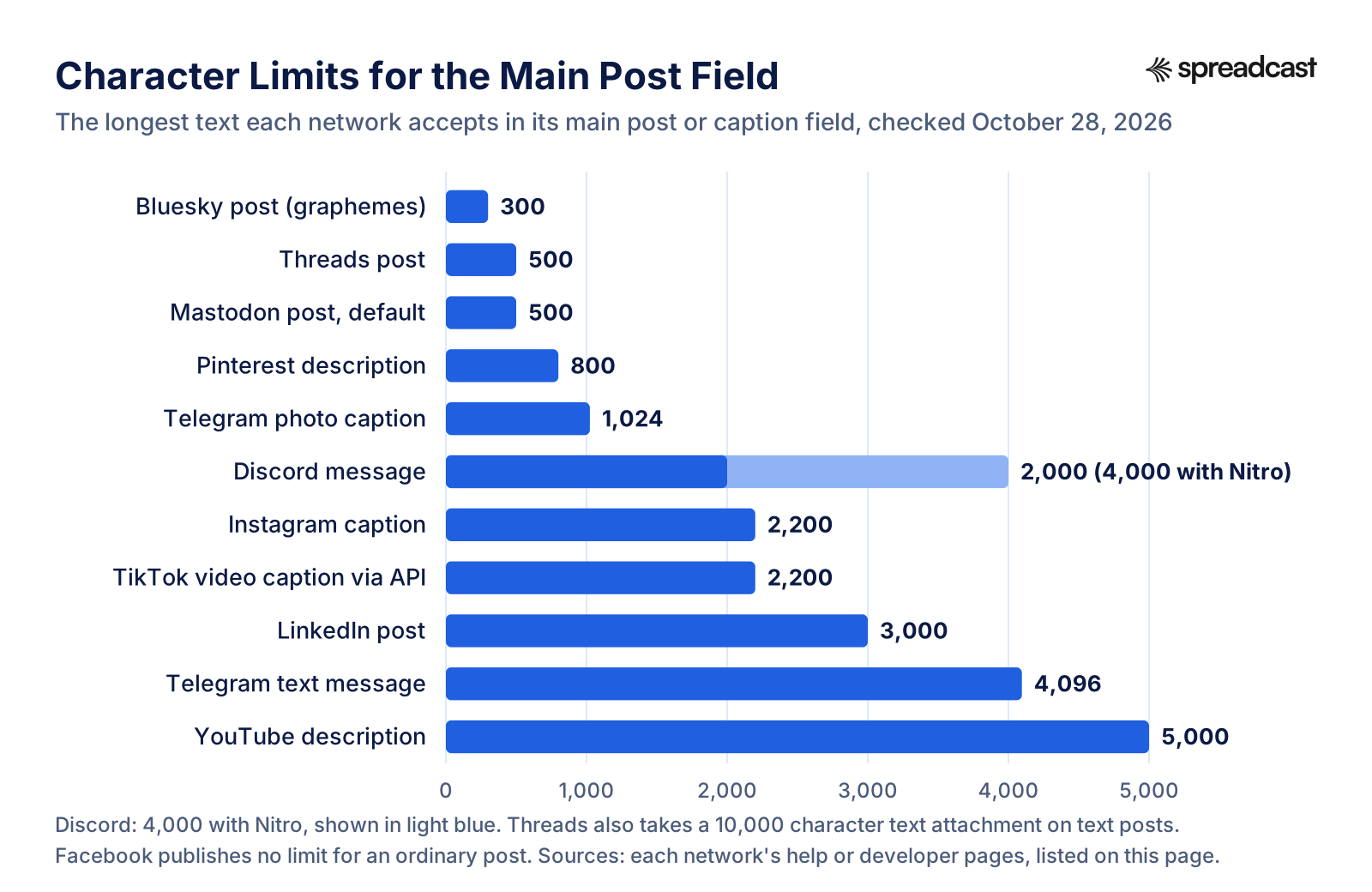
Social media character limits run from 300 on Bluesky to 5,000 for a YouTube description. In between: 500 on Threads and on a default Mastodon server, 800 for a Pinterest description, 1,024 for a Telegram photo caption, 2,000 for a Discord message, 2,200 for an Instagram caption and 3,000 for a LinkedIn post. Facebook is the odd one out: it publishes no limit at all for an ordinary post.
The post box is only one field. A bio, a display name, a username, alt text, a video title, a hashtag list and a link each have their own cap, and they differ more than the post limits do. TikTok gives you 80 characters for a bio, Instagram 150, Bluesky 256 and a default Mastodon server 500. Documented alt text caps run from 500 characters on Pinterest to 2,000 in the Bluesky app, and mastodon.social allows 10,000.
What a network calls a character also differs, and this is where posts fail in ways that are hard to spot. Bluesky and Mastodon count what you see on screen. Threads counts an emoji by its UTF8 bytes when you post through its developer interface, so one thumbs up costs 4 of your 500. TikTok counts UTF16 units. Mastodon counts every link as 23 characters whatever its length, while the Bluesky app shortens a link before it counts it. A caption that fits on one network can be rejected on the next one for reasons that have nothing to do with how many words it has.
Below you get one cheat sheet, then a table per network with every field we could find on that network's own pages, then the rules for links, emoji, hashtags and alt text that sit across all of them. Where a network publishes no number, we say so rather than repeat a figure from another blog.
How We Researched These Character Limits
On October 28, 2026 we opened the help center or developer documentation of every network on this page and copied each limit from there. Help centers that only render in a browser (Instagram, Facebook, TikTok, Pinterest and Discord's support site) were read in a browser. The rest were fetched directly. Every limit in a table links to the page it came from, and the full list of sources sits at the bottom.
Two networks publish their limits as code rather than help articles, so we read the code. For Bluesky that is the open schema for a post record and a profile record, plus the constants file of the official Bluesky app, which sets the alt text and direct message caps. For Mastodon it is the validator that measures post length and the settings each server reports about itself. We asked mastodon.social for its live settings and three other large servers for theirs, because a Mastodon limit is a default each server can change.
We also measured how emoji count, using the grapheme rules in Unicode's text segmentation standard and plain byte counts, and we ran a long App Store link through the Bluesky app's own shortening function to see what it costs inside 300 graphemes. Those are our measurements, and the page says so where they appear.
What we left out: X, and numbers that only appear on third party blogs. Several fields people search for, such as the Threads bio or the LinkedIn headline, have no official number anywhere we looked. For those, the table says not published, and where other guides agree on a figure, we name it and mark it unconfirmed.
Social Media Character Limits Cheat Sheet for All Networks
One row per network: the main post field, the bio, the alt text cap and the rule most likely to trip you up. Each number is explained, with its source, in that network's own table further down.
| Network | Post or caption | Bio or profile text | Alt text | Watch out for |
|---|---|---|---|---|
| Threads | 500 characters, plus a 10,000 character text attachment | Not published | 1,000 | Emoji count as UTF8 bytes through the API, and 5 links at most |
| Bluesky | 300 graphemes and 3,000 bytes | 256 graphemes | 2,000 in the app | Links are shortened in the app before they count |
| 2,200 characters | 150 characters | 1,000 | 5 hashtags in the app, although the API still says 30 | |
| Not published | Not published | Not published | Ads: 50 to 150 characters of primary text recommended | |
| 3,000 characters | Not published | Not published | Ad text over 150 characters gets cut off | |
| TikTok | 2,200 for a video caption through the API | 80 characters | Not published | Photo posts: 90 character title, 4,000 character description |
| YouTube | Title 100, description 5,000 | Channel description 1,000 | Not applicable | More than 60 hashtags and YouTube ignores all of them |
| Title 100, description 800 | Not published | 500 | Only the first 40 characters of a title may show | |
| Telegram | 4,096 for text, 1,024 for a media caption | 70, or 140 with Premium | Not applicable | A long caption under a photo fails, it does not wrap |
| Discord | 2,000, or 4,000 with Nitro | Not published | 1,024 per attachment | Embeds have their own limits, 6,000 in total |
| Mastodon | 500 by default, set per server | 500 by default | 1,500 in the docs, 10,000 on mastodon.social | Every link counts as 23 characters |
Checked October 28, 2026. Not published means we found no number on the network's own help or developer pages.
Post Character Limits by Network, Side by Side
The main post or caption field on each network, on one scale. The spread is the point: a caption written for LinkedIn is ten times longer than Bluesky allows.
Threads Character Limit 2026: Posts, Replies, Attachments and Bio
Meta documents Threads in two places: the Threads Help Center, which is part of Instagram's, and the Threads posting guide for developers, which scheduling tools follow. The developer pages are more precise, so most numbers below come from them.
| Field | Limit | Notes |
|---|---|---|
| Post | 500 characters | "Text posts are limited to 500 characters," per Meta's developer guide. In the app, the Help Center says a thread that runs past 500 characters gets another post added to it automatically. |
| Reply | 500 characters | A reply is published as a post of its own, so the same 500 apply. |
| Emoji | Counted in UTF8 bytes | The publishing reference says emojis count as their number of UTF8 bytes toward the post limit. A plain thumbs up is 4 bytes; a family emoji is 18. |
| Text attachment | 10,000 characters | A block of longer text attached to a post, launched in Meta's announcement of September 4, 2025. The attachment docs allow it on text only posts, never on a post with a poll. |
| Links | 5 per post | Every unique URL in the text counts, and a link attachment counts too unless it repeats one of them. Since December 22, 2025, a post with more links fails to publish through the API. |
| Topic tag | 1 per post, 1 to 50 characters | Periods and ampersands are not allowed. If a post carries several tags in its text, the first one is used. |
| Alt text | 1,000 characters | Per image or video, from the publishing reference. |
| Carousel | 2 to 20 items through the API | The app's Help Center says you can select up to 10 items to attach when posting from your phone. |
| Bio | Not published | Neither the Help Center nor the developer docs give a Threads bio limit. Third party guides list 150, the same as Instagram's documented bio limit, but Meta has not said so. |
The 10,000 character attachment is separate from the 500 character post. A reader sees the post first and opens the attachment to read the rest.
What the Threads Character Limit Means When You Write
Five hundred characters is about 80 to 90 words of plain English. That is enough for a full thought with a link, and short enough that a list of features will not fit. If an announcement needs more, the text attachment is the tool Meta built for it: write a tight 500 character post that says what changed, then put the detail in the attachment. Keep in mind that an attachment cannot sit on a post with an image, so a product shot and a long changelog have to be two posts.
The link rule took effect on December 22, 2025. Since then the developer interface refuses a sixth link, and tools that post on your behalf have to follow it. One link per post is the habit that keeps you clear of it, and it reads better anyway.
If you schedule Threads posts from a tool, the emoji rule matters more than it seems. Ten plain emoji count as 40 through the developer interface, not 10, so a caption your editor shows at 480 characters comes out at about 510 and is rejected. Trim emoji first when a scheduled Threads post fails for length. Our guide on how to schedule Threads posts covers the scheduling side, and the Threads statistics page has the audience numbers.
Bluesky Character Limit: Posts, Links, Bio and Alt Text
Bluesky publishes its limits in its open source code. The post and profile numbers come from the schema files that every Bluesky app and tool must follow; the alt text and message caps come from the official app's constants.
| Field | Limit | Notes |
|---|---|---|
| Post | 300 graphemes | The post schema sets maxGraphemes at 300 for the text field. A grapheme is one visible character, so an emoji counts as 1. |
| Post, in bytes | 3,000 bytes | The same field has a byte cap of 3,000. Plain text never reaches it, but 300 family emoji would. |
| Extra hashtags | 8 tags, 64 graphemes each | The schema allows up to 8 tags stored outside the text, on top of any hashtags you type. |
| Display name | 64 graphemes | From the profile schema, with a 640 byte cap. |
| Bio | 256 graphemes | The profile description field. The byte cap is 2,560. |
| Pronouns | 20 graphemes | A separate profile field. |
| Alt text | 2,000 characters | The official app caps image descriptions at 2,000. A comment in its code says the limit was raised from the usual advice because people asked for it. |
| Direct message | 1,000 graphemes | Set in the same constants file. |
| Images per post | 4 | Set in the schema for images embedded in a post. |
Checked in Bluesky's GitHub repositories on October 28, 2026. Spaces, line breaks and punctuation each count as one grapheme.
Bluesky Character Limit With a Link
The Bluesky app does not count a pasted URL at full length. Its link shortening function keeps the domain, keeps the first 13 characters of the path when the path is longer than 15, and adds three dots. The shortened text is what goes into the post, so that is what counts. We ran three links through the same function.
| Link you paste | Full length | What the app posts | Graphemes used |
|---|---|---|---|
| An App Store link with a campaign token | 61 | apps.apple.com/us/app/examp... | 30 |
| A blog post on example.com | 40 | example.com/blog/2026/on... | 27 |
| A short pricing page | 27 | example.com/pricing | 19 |
The full URL still sits behind the shortened text, so the link opens the right page. A tool that posts through the developer interface without shortening spends the full length. Our measurement, October 28, 2026.
Does the Bluesky Character Limit Include Spaces?
Yes. These are the questions people ask most about how the 300 is counted, answered from the schema and the app's code.
Spaces and Line Breaks Count
Each space is one grapheme, and so is each line break. A post with five short lines separated by blank lines spends ten graphemes on the gaps. Unicode's segmentation standard, which defines a grapheme, treats a space as a cluster of its own.
Emoji Count as One
Because the limit is in graphemes, a skin toned thumbs up or a family emoji counts as 1, even though it is several code points underneath. The 3,000 byte cap is the only place emoji cost more, and plain posts never get near it.
Mentions Count in Full
A mention is written as the full handle, such as @alex.bsky.social, and every character of it counts. Long custom domain handles cost more than short ones.
Link Cards Are Free
A link preview card is stored outside the text field, as a separate embed. If the card is enough on its own, the URL text in the post can go, and the post keeps its full 300 for words.
How to Write a Bluesky Post in 300 Characters
Three hundred graphemes is about 50 words. That forces a choice the longer networks never ask for: what is the one thing this post says? For a product update, it is usually the change and the reason to care, in two sentences, with the link in a card. Hashtags are optional on Bluesky and the schema stores up to 8 of them outside the text, so tools can tag a post without eating the 300.
A thread of replies is the native way to say more, and each reply gets its own 300. Our guide on how to schedule Bluesky posts shows the free and paid ways to post them ahead of time, and the Bluesky statistics page covers who is reading.
This is where posting the same update to Bluesky, Threads and Mastodon gets fiddly by hand: three networks, three ways of counting, one draft. Spreadcast writes a separate caption for each network and warns you, by how many characters, when one runs over that network's limit. If the hashtags are what push it over, it drops them from the end first, and only then cuts back to the last full sentence that fits. You can try it from the start page with your App Store link or website.
Instagram Caption Character Limit and Other Instagram Fields
Instagram's limits come from its Help Center and from the publishing reference for developers, which every scheduling tool uses. The two disagree on hashtags, and the app wins.
| Field | Limit | Notes |
|---|---|---|
| Caption | 2,200 characters | From the publishing reference. The same cap applies to feed posts, carousels and Reels published through it. |
| Hashtags | 5 per post in the app | Instagram's hashtag help page says you can use up to 5 tags on a post, and that a comment with more than 5 will not post. |
| Hashtags through the API | 30 | The publishing reference still lists 30 hashtags. Plan for 5, because that is what the app enforces. |
| Mentions | 20 @ tags | From the publishing reference. |
| Bio | 150 characters | "You can write a bio of up to 150 characters," per the bio help page. The help page adds that anyone can see your bio. |
| Alt text | 1,000 characters | Per image, single or in a carousel. The reference says Reels and stories do not take alt text through the API. |
| Carousel captions | One caption per post | Items inside a carousel cannot carry captions of their own when published through the API. |
| Username | Not published | Instagram's Help Center lists no length for usernames or display names that we could find. |
Read October 28, 2026. Our caption guide for Instagram, with hashtag sets, is on the social media caption generator page linked below.
The Instagram Hashtag Limit Changed, the API Did Not
For years the Instagram rule was 30 hashtags per post. The app now stops at 5, and the help page puts it plainly: more than 5 and your caption or comment will not post. The developer reference that scheduling tools rely on still says 30, which means a tool built to that number can send a caption the app would refuse. If a scheduled Instagram post fails and the caption looks fine, count the hashtags before anything else.
Five tags is enough for the job hashtags do now, which is telling Instagram what the post is about. Pick them the way you would pick search words: the category, the problem the post solves, the type of post. The social media caption generator page has example sets per network, and the Instagram post generator covers sizes and layout. For the wider strategy, see how to promote an app on Instagram.
Facebook Character Limits for Posts, Ads and Usernames
Facebook publishes fewer text limits than any other network on this page. Its Help Center covers usernames; Meta's ads guide gives recommended lengths for ad text. For an ordinary post or a Page bio, we found no official number.
| Field | Limit | Notes |
|---|---|---|
| Post | Not published | The 63,206 figure quoted in many guides does not appear on any Meta help or developer page we could find on October 28, 2026. In practice you will not reach it. |
| Ad primary text | 50 to 150 characters recommended | From the ads guide for a Facebook Feed image ad. A recommendation for how much shows, not a hard cap. |
| Ad headline | 27 characters recommended | Same page. Longer headlines may be cut off on small screens. |
| Username | At least 5 characters | Letters, numbers and periods only, no domain endings such as .com. Periods and capitals do not make two usernames different. |
| Profile or Page intro | Not published | The Help Center explains how to edit the intro but gives no length. |
Facebook is one of the 11 networks Spreadcast publishes to. Because Meta publishes no post limit, the practical limit is what your reader will read before scrolling past.
How Long a Facebook Post Should Be When There Is No Limit
With no hard cap, the useful number on Facebook is Meta's own advice for ads: 50 to 150 characters of primary text and a 27 character headline. Meta writes those numbers for paid placements, but the reason behind them applies to an organic post too. Feeds show the first few lines and hide the rest behind a link to read more, so the first sentence has to carry the post.
For a Page that shares product news, a good pattern is one sentence that names the change, one that says who it helps, and a link. The Facebook post generator has examples in that shape, and the social media image sizes guide covers the picture that goes with it.
LinkedIn Post Character Limit and Ad Text Limits
LinkedIn's help page on creating posts gives the post limit. Its single image ad specifications add the lengths that show before LinkedIn cuts text off, which is the number that matters for reach.
| Field | Limit | Notes |
|---|---|---|
| Post | 3,000 characters | "Posts can contain up to 3,000 characters," per LinkedIn Help. |
| Ad introductory text | 150 visible, 3,000 maximum | Use up to 150 characters, including spaces, emoji and punctuation, to avoid truncation. Up to 10 emoji. |
| Ad headline | 70 visible, 200 maximum | From the same ad specifications. |
| Ad name | 255 characters | Internal only. Members never see it. |
| Links in ad text | Shortened above 23 characters | URLs longer than 23 characters are converted to a short link in ad text. |
| Profile headline and About | Not published | LinkedIn Help does not state either limit. Guides commonly list 220 and 2,600; treat those as unconfirmed and trust the editor. |
| Comment | Not published | No official number that we could find. |
Read October 28, 2026. The ad numbers are LinkedIn's own advice on when text gets cut off, and they are the best guide to how much of an organic post shows above the fold too.
How Long a LinkedIn Post Should Be
Three thousand characters is roughly 450 words, longer than most readers give a post. LinkedIn's own ad guidance says text past about 150 characters gets cut off, which is why the strongest LinkedIn posts put the whole point in the first two lines and treat everything after the fold as optional detail.
For a product update, that means the change and the result in the opening line, then a short list of what is new, then the link. Long posts work when they teach something; release notes rarely need more than 600 characters. The LinkedIn post generator has examples at that length, and the LinkedIn carousel size guide covers document posts, which carry their text inside the slides.
TikTok Caption Character Limit, Bio and Username
TikTok's Help Center covers profile fields. Caption limits are published only in its Content Posting API reference, which is how scheduling tools publish to TikTok.
| Field | Limit | Notes |
|---|---|---|
| Video caption | 2,200 UTF16 units | The API's title field is the video caption. Hashtags and mentions inside it are matched automatically. |
| Photo post title | 90 UTF16 units | From the photo post reference. |
| Photo post description | 4,000 UTF16 units | Photo posts have a separate title and description; videos have one caption. |
| Caption typed in the app | Not published | TikTok's Help Center does not state the in app caption limit. Tools that post for you are held to the 2,200 above. |
| Bio | 80 characters | The bio help page says bios cannot exceed 80 characters, and that editing the bio is not available on TikTok's mobile website. |
| Username | 2 to 24 characters | Letters, numbers, underscores and periods, with no period at the end, per the username help page. It can be changed once every 30 days. |
| Nickname | Up to 30 characters | The display name, changeable once every 7 days, per the nickname help page. |
A UTF16 unit is one for a plain letter and two for most emoji, so an emoji heavy caption reaches the API limit sooner than its length on screen suggests.
How Long a TikTok Caption Should Be
On TikTok the caption sits on top of the video, and a long one stays folded until someone taps it. Its main jobs are search and context: the words someone would type to find the video, a hashtag or two, and one line that makes sense of what they are watching. A few hundred characters does that. The longer limits suit tutorials that spell out the steps in text.
Plan around 2,200 if a tool posts for you, because that is the limit the developer interface enforces, whatever the app itself allows. The TikTok app promotion guide has caption examples for app founders.
YouTube Title Character Limit, Description and Tags
YouTube states its limits in YouTube Help's page on video settings and, more precisely, in the YouTube Data API reference for videos. The API counts the description in bytes, the Help Center in characters.
| Field | Limit | Notes |
|---|---|---|
| Video title | 100 characters | The same for Shorts. The API adds that a title may not contain the characters < or >. |
| Description | 5,000 characters per YouTube Help, 5,000 bytes through the API | In plain English the two match. With accented letters or emoji, the API runs out first. |
| Tags | 500 characters in total | Commas count. A tag with a space is treated as if wrapped in quotation marks, and the quotes count, so Foo Baz costs nine characters. |
| Hashtags | 60, or YouTube ignores all of them | Per the hashtag policy. Up to three of the hashtags in a description appear next to the title. |
| Channel description | 1,000 characters | From the channels reference. |
| Channel keywords | 500 characters in total | A limit on all keywords together, not on each one. |
| Title tests | Up to 3 titles | YouTube's A/B testing feature compares up to 3 titles or title and thumbnail pairs and keeps the one with the most watch time. Not available for Shorts. |
Read October 28, 2026. The API also notes that links in a description only become clickable when the channel meets YouTube's requirements, such as verification.
Video: YouTube on Testing Titles
Since titles are capped at 100 characters, the fastest way to find the right 100 is to test them. YouTube's own Creators channel explains the A/B testing feature behind the last row of the table above.

How to Write a YouTube Title and Description That Fit
One hundred characters is the cap, but search results and phone screens show less than that, so the words a viewer needs go first. A title that front loads the topic ("Budget App Tutorial: Split a Bill in 30 Seconds") survives any cut. The description works the same way: the first two lines show before the fold, and the rest is space for chapters, links and credits.
The byte rule only bites if you write in a language with accented letters or paste emoji into the description, since each of those takes two to four bytes. For a channel that posts Shorts made from app updates, the YouTube MCP server guide covers uploading from Claude, with the quota and audit rules Google sets.
Pinterest Description Character Limit, Title and Alt Text
Pinterest lists text limits next to its image specs on the Pin specs help page. The Pins API reference confirms the same numbers and adds the alt text and link caps.
| Field | Limit | Notes |
|---|---|---|
| Pin title | 100 characters | Depending on the device, only the first 40 characters may show in feeds, per Pinterest's ad specs. In Chinese, Japanese, Korean or Arabic, only the first 30 show. |
| Pin description | 800 characters | Descriptions do not show in the home or search feed, but Pinterest says its system uses them to decide where to show the Pin. |
| Text overlay box | 250 characters | The text box you can add on top of a Pin's image. |
| Alt text | 500 characters | From the API reference. Screen readers read it; nobody else sees it. |
| Destination link | 2,048 characters | From the API reference. |
| Board name and profile about | Not published | No number on the help pages or in the API reference we checked. |
Some older Pinterest ad pages say 500 characters for a description. The Pin specs page, read October 28, 2026, says 800.
How to Write a Pinterest Title and Description
On Pinterest the title and description are search text first. People find Pins by typing, so the title should hold the words they would type, inside its first 40 characters, and the description should say in plain language what the Pin shows and who it is for. Eight hundred characters is room for two or three sentences and a few keywords; filling it with a list of tags reads as spam and gets you nothing.
The Pinterest pin generator has title and description examples, and Pinterest for app founders explains how Pin search works for an app.
Mastodon Character Limit: Defaults and Server Settings
Mastodon's posting docs and profile docs give the defaults. Each server can change them, and each one reports its own settings through the instance endpoint. The last column is what mastodon.social, the largest server, reported when we asked.
| Field | Default in the docs | mastodon.social on October 28, 2026 |
|---|---|---|
| Post | 500 characters | 500 |
| Each link in a post | Counts as 23 characters | 23 |
| Mention | Only the username part counts | Same. In @alice@example.com, the domain is free. |
| Content warning | Not stated in the docs | Counts toward the 500. The length validator adds the warning to the post text before counting. |
| Display name | 30 characters | 40 |
| Bio | 500 characters | 500 |
| Profile fields | 4 rows of label and value | 4 rows, 255 characters for each label and each value |
| Alt text | 1,500 in the docs example | 10,000 |
| Poll | 4 options, 50 characters each | 4 options, 50 characters each |
| Images per post | 4 | 4 |
Mastodon counts graphemes, as its length validator shows, so an emoji counts as 1. When the docs and a live server disagree, the server is what applies to you.
Mastodon Character Limit by Server
Because every Mastodon server sets its own limits, the same post can be fine on one and too long on another. These are four large servers, each read from its own settings endpoint on October 28, 2026.
| Server | Post limit | Bio | Display name | Poll options |
|---|---|---|---|---|
| mastodon.social | 500 | 500 | 40 | 4, 50 characters each |
| fosstodon.org | 500 | 500 | 40 | 4, 50 characters each |
| hachyderm.io | 2,263 | 500 | 40 | 4, 50 characters each |
| infosec.exchange | 11,000 | 1,000 | 80 | 10, 100 characters each |
Any Mastodon app shows your own server's limit as a counter in the composer. A post written on infosec.exchange can be read everywhere, but you cannot post it from a 500 character server.
Video: Every Feature in Mastodon's Composer
Mastodon's founder walks through the post composer, including the parts that affect the count: links, mentions, content warnings, polls and alt text.
Telegram Caption Limit, Message Length and Channel Fields
Telegram's limits are in the Bot API reference, which posting tools and bots use, and in the client configuration reference, which lists the different numbers for Premium users.
| Field | Limit | Notes |
|---|---|---|
| Text message | 1 to 4,096 characters | Counted after formatting is parsed, so bold or italic markup does not use up the limit. |
| Photo or video caption | 0 to 1,024 characters | The same cap for every media type: photo, video, document, audio and album. |
| Caption, Premium user | 4,096 | The configuration reference sets the Premium caption length at 4,096. A bot posting to a channel is held to 1,024. |
| Story caption | 200, or 2,048 with Premium | From the configuration reference. |
| Bio | 70, or 140 with Premium | Counted in UTF8 length. Telegram's Premium announcement lists the longer bio, with room for a link, as a Premium feature. |
| Channel or group title | 1 to 128 characters | From the Bot API method that sets a chat title. |
| Channel description | 0 to 255 characters | From the method that sets a chat description. |
| Poll | Question 1 to 300, options 1 to 100 each | A poll takes 1 to 12 answer options through the Bot API. |
| Username | Letters a to z, numbers and underscores | Per Telegram's FAQ. Usernames are not case sensitive. |
Read October 28, 2026. Telegram's channel post and its caption are separate limits: a 2,000 character announcement fits as a message but not under a photo.
Why Long Telegram Captions Fail and How to Fix It
The most common Telegram length error is a post that would fit as a message but is sent with a picture. A message can be 4,096 characters, a caption only 1,024, and the Bot API does not wrap the extra into a second message. It refuses the post.
There are two clean ways around it. Keep captions under 1,024 and put the long version in a text post, or send the picture first and the full text as a message straight after it. The second keeps the image and the words together in the channel, one above the other.
Spreadcast does the second one for you. When a Telegram caption runs past 1,024 characters, it posts the picture or video first and the full text as a message right under it, so a long channel post never fails for length. Telegram channels post from the same calendar as Instagram and the other networks; the features page lists all 11. For growing the channel itself, see how to grow a Telegram channel and how to schedule Telegram channel posts.
Discord Message Character Limit and Embed Limits
Discord's limits are in its developer reference for messages, channels, users and servers. The Nitro limit is on Discord's Nitro support page.
| Field | Limit | Notes |
|---|---|---|
| Message | 2,000 characters | The content field of a message, including one sent by a webhook or a bot. |
| Message with Nitro | 4,000 characters | Listed as a Nitro perk: up to 4,000 characters per message. |
| Embeds per message | 10, up to 6,000 characters in total | The 6,000 covers every title, description, field, footer and author name across all embeds. |
| Embed title | 256 characters | Field names and author names are also 256. |
| Embed description | 4,096 characters | Longer than a message, which is why bots use embeds for long text. |
| Embed fields | 25 fields, 1,024 characters per value | Footer text can be 2,048. |
| Alt text on an attachment | 1,024 characters | The description field on an uploaded file. |
| Username | 2 to 32 characters | Nicknames inside a server are 1 to 32. |
| Server name | 2 to 100 characters | Leading and trailing spaces are not counted. |
| Channel name and forum post title | 1 to 100 characters | A forum post opens a thread, and the thread's name is its title. |
| Channel topic | 1,024, or 4,096 in forum and media channels | From the channel reference. |
Read October 28, 2026. Discord trims leading and trailing spaces from embed fields before it counts them.
How Emoji and Accents Count Toward a Character Limit
The same text gives three different lengths depending on how a network measures it. This is why a caption can fit on one network and fail on another at the same visible length.
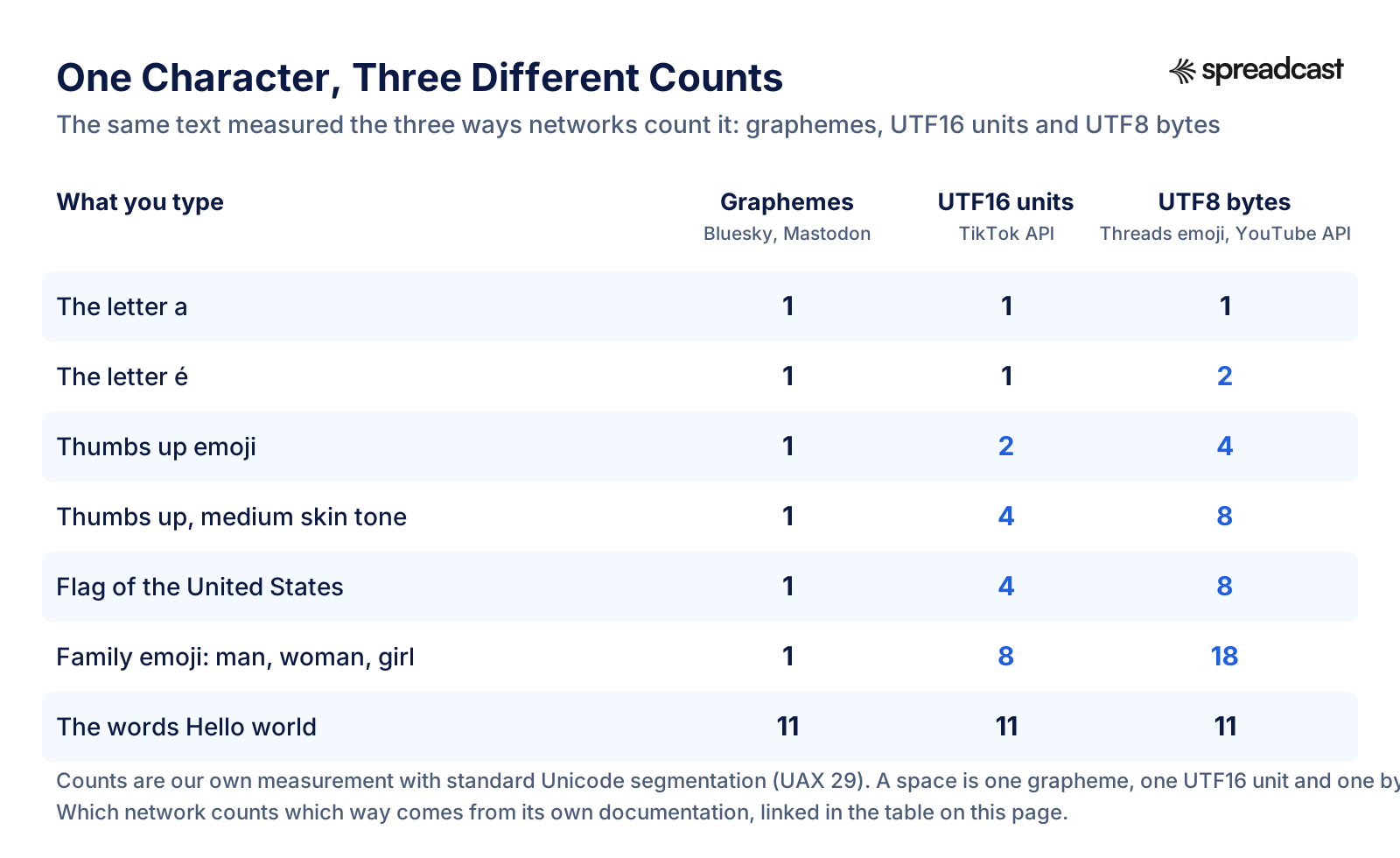
How Each Network Counts a Character
A character limit is only as useful as the counting rule behind it. These are the rules each network documents, plus how it treats links and mentions.
| Network | What one character means | Links | Mentions |
|---|---|---|---|
| Bluesky | One grapheme, with a 3,000 byte cap | Shortened by the app before counting | Full handle counts |
| Mastodon | One grapheme | Always 23 characters | Only the username, not the domain |
| Threads | One character, but emoji count as their UTF8 bytes through the API | Full length, 5 links at most | Not documented |
| TikTok | One UTF16 unit through the API | Not documented | Matched automatically in the caption |
| YouTube | One character per YouTube Help, one byte through the API for descriptions | Full length | Not applicable |
| Telegram | One character after formatting is removed; UTF8 length for bios | Full length | Full length |
| Discord | One character; spaces at the ends of embed fields are trimmed | Full length | Full length |
| One character, spaces and emoji included | Ad text shortens links over 23 characters | Not documented | |
| Instagram, Facebook, Pinterest | Not documented beyond characters | Not documented | Instagram allows 20 per caption |
Not documented means the network's pages do not say. Test with a draft before a long campaign if your captions use many emoji or links.
Alt Text Character Limits by Network
Alt text describes an image for people using screen readers. Every network that documents it sets a cap, and they range fourfold.
| Network | Alt text limit | Source |
|---|---|---|
| 500 characters | Pins API reference | |
| 1,000 characters per image | Instagram publishing reference | |
| Threads | 1,000 characters per image or video | Threads publishing reference |
| Discord | 1,024 characters per attachment | Discord message reference |
| Mastodon | 1,500 in the docs, 10,000 on mastodon.social | Mastodon instance docs |
| Bluesky | 2,000 characters in the official app | Bluesky app constants |
| Facebook, LinkedIn, TikTok | Not published | No number on their help or developer pages |
Good alt text is usually one or two sentences. The caps are there so a chart or a screenshot full of text can be described in full.
Hashtag Limits by Network
Hashtags have their own limits, and two networks punish going over rather than just refusing the post.
| Network | Hashtag limit | What happens over it |
|---|---|---|
| 5 per post | The caption or comment does not post. | |
| YouTube | 60 per video | YouTube ignores every hashtag on the video, and over tagging can get the video removed from search. |
| Threads | 1 topic tag per post | Only the first tag is used. |
| Bluesky | 8 extra tags outside the text | The schema refuses more. Hashtags typed in the text count toward the 300 like any word. |
| Mastodon | No published cap | Hashtags count toward the 500. A profile can feature up to 10. |
| LinkedIn, TikTok, Pinterest, Facebook | No published cap | They count toward the caption limit. |
Sources: Instagram's hashtag help, YouTube's hashtag policy, Threads posts guide, Bluesky post schema and mastodon.social's settings.
Social Media Bio Character Limits
Bios are where the limits are tightest. TikTok and Telegram leave room for one line; Mastodon and YouTube leave room for a paragraph.
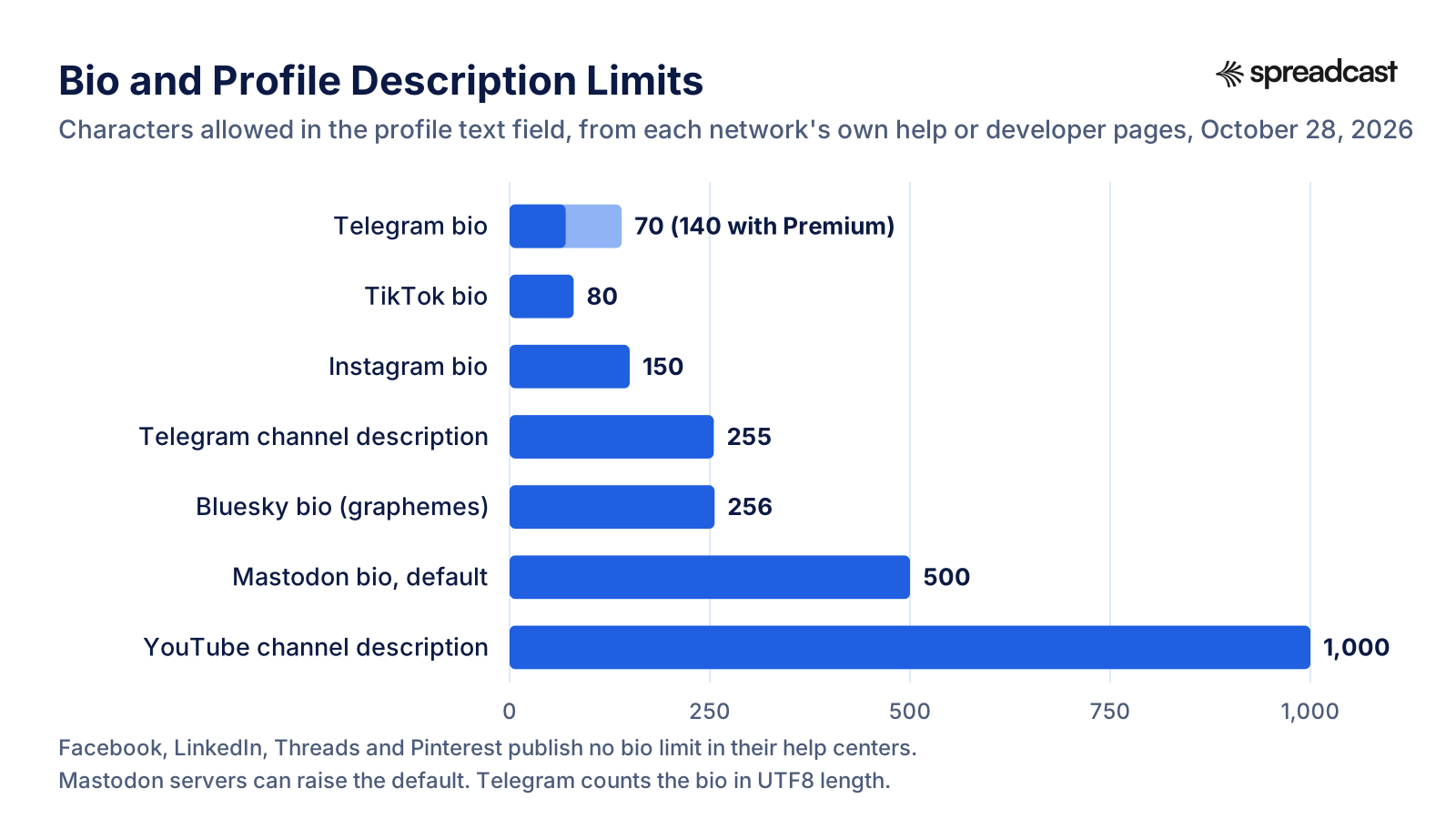
Bio, Name and Username Limits in One Table
Every profile text field we found a number for, network by network. If you keep one bio for everywhere, write it to 70 characters and expand it where there is room.
| Network | Bio | Display name | Username |
|---|---|---|---|
| Telegram | 70, or 140 with Premium | Channel title 1 to 128 | Letters, numbers and underscores |
| TikTok | 80 | Up to 30 | 2 to 24 |
| 150 | Not published | Not published | |
| Bluesky | 256 graphemes | 64 graphemes | Your handle, a domain name |
| Mastodon | 500 by default | 30 by default, 40 on mastodon.social | Set at signup |
| YouTube | Channel description 1,000 | Not published | Not published |
| Discord | Not published | Server nickname 1 to 32 | 2 to 32 |
| Not published | Not published | At least 5 | |
| Threads, LinkedIn, Pinterest | Not published | Not published | Not published |
Sources are linked in each network's own table above. Read October 28, 2026.
How Much of a Post Shows Before It Gets Cut Off
A character limit says how much you can post. These numbers say how much a reader sees before tapping to read more, where the network publishes one.
| Where | What shows | Source |
|---|---|---|
| Pinterest Pin title in feeds | The first 40 characters, depending on the device; 30 in Chinese, Japanese, Korean or Arabic | Pinterest ad specs |
| LinkedIn ad text | About 150 characters | LinkedIn ad specifications |
| LinkedIn ad headline | About 70 characters | LinkedIn ad specifications |
| Facebook Feed ad text | 50 to 150 characters recommended | Meta ads guide |
| Facebook Feed ad headline | 27 characters recommended | Meta ads guide |
| YouTube hashtags | Up to 3 shown next to the title | YouTube hashtag policy |
| Threads text attachment | Hidden until the reader opens it | Meta's announcement |
Instagram, TikTok and Threads do not publish where their feeds cut a caption. Assume one or two lines on a phone and put the point there.
How to Write One Post That Fits Every Character Limit
Most people write one caption and then trim it network by network. Working the other way, from the tightest limit up, saves the rewrite.
- Step 1
Write the Core in 300 Graphemes
Start with the Bluesky version: what changed, why it matters, and nothing else. If it fits in 300, it fits everywhere as an opening line, and it is the part every reader sees before the cut.
- Step 2
Expand to 500 for Threads and Mastodon
Add one detail or one example. Keep one link, and count it at full length for Threads and at 23 for Mastodon. On Threads, trim emoji first if you post from a tool.
- Step 3
Expand Again for Instagram, LinkedIn and Facebook
These take a short list, a question for comments, and up to 5 hashtags on Instagram. Keep the first line unchanged so the post still opens with the core.
- Step 4
Split the Long Version on Telegram
If the Telegram text runs past 1,024 characters, send it as a message and keep the image caption short, or post the image and the text one after the other.
- Step 5
Write Titles Separately
YouTube and Pinterest titles are search text with their own caps, 100 characters each, and only the first 40 of a Pin title may show. Write them as a phrase someone would type, not as a cut down caption.
- Step 6
Check Before It Goes Out
Count the tightest version against its network's rule, not your editor's counter. Or let a tool do it: Spreadcast writes one caption per network, sized to that network's limit, and shows you by how many characters a caption is over a network's limit. Plans and prices start at $0.
One App Update Written to Four Character Limits
A worked example. Daylog is a made up habit tracker shipping version 4.2, with Lock Screen logging as the new feature. Each version starts from the same core sentence and grows only as far as the network allows. The lengths are counted the strictest way each network counts, and none of the versions uses an emoji, so graphemes, characters and bytes all match.
| Network and limit | The post | Length | Room left |
|---|---|---|---|
| Bluesky, 300 graphemes | Daylog 4.2 is out. You can now log a habit from the Lock Screen with one tap, without opening the app. If you track water, meds or workouts, that is a few seconds back every time. | 179, with the App Store link in a preview card | 121 |
| Threads and Mastodon, 500 | Daylog 4.2 is out, and the most requested feature is in it: you can now log a habit from the Lock Screen with one tap, without opening the app. If you track water, meds or workouts several times a day, that is a few seconds back every time, and fewer streaks lost to "I will log it later." Update from the App Store and add the widget to your Lock Screen. #ios | 360, plus 23 for a link on Mastodon | 140 on Threads, 117 on Mastodon |
| Instagram, 2,200 and 5 hashtags | Log a habit without opening the app. Daylog 4.2 adds Lock Screen logging: one tap on the widget and today counts. It was the most requested feature of the year, and it is built for the habits you repeat all day, like water, meds and short workouts. Update from the App Store, then add the Daylog widget to your Lock Screen and pick the habits to show. Which habit would you put there first? #habittracker #productivity #iphonetips #selfcare #healthyhabits | 455, with exactly 5 hashtags | 1,745 |
| LinkedIn, 3,000 | We shipped the feature Daylog users asked for most this year: logging a habit straight from the Lock Screen. In version 4.2, one tap on the widget records today's water, meds or workout without opening the app. We built it after reading support emails from people who lost streaks because logging took too many steps. The fix was to remove the steps. If you build habit features, how do you keep logging this fast? #productdesign #ios #habits | 442 | 2,558 |
Counted October 28, 2026 with Unicode grapheme segmentation. None of the versions comes close to its limit, which is the point: the limits are ceilings, and the post that gets read is usually a fraction of them.
How to Count Characters the Way Each Network Does
The counter in a text editor counts one way. If a post keeps failing on one network, count it the way that network does. Any browser can do all three counts: open the developer console on a blank page, put your text in a variable called text, and run the line for the count you need.
- Step 1
Graphemes for Bluesky and Mastodon
Run [...new Intl.Segmenter().segment(text)].length to get the number of graphemes, which is what Bluesky and Mastodon count. For Mastodon, replace every link with 23 characters first and drop the domain from each mention.
- Step 2
UTF16 Units for TikTok's API
Run text.length. JavaScript strings are measured in UTF16 units, which is the unit TikTok's posting API uses for captions, titles and descriptions. Most emoji count as 2, some as 4 or more.
- Step 3
Bytes for Threads Emoji and YouTube Descriptions
Run new TextEncoder().encode(text).length to get UTF8 bytes. That is the number to check for a YouTube description sent through the API, and for the emoji in a Threads post sent through its developer interface.
- Step 4
Plain Characters Everywhere Else
Instagram, LinkedIn, Pinterest, Facebook, Telegram and Discord publish their limits in characters without saying more. For plain text without emoji, every method above gives the same number, so the counter in your editor is good enough.
- Step 5
Test One Draft Before a Campaign
If a campaign leans on emoji, long links or non Latin scripts, post one draft to each network, or save it as a draft in a scheduler, before writing the other twenty. A rejected draft costs a minute; a rejected campaign costs a day.
Six Character Limit Mistakes That Make a Post Fail
Each one comes straight from the rules above, and each one makes a post fail rather than just look long.
A Long Telegram Caption Under a Photo
The message limit is 4,096 but the caption limit is 1,024. A channel post that fits as text fails as soon as a picture is attached.
Thirty Hashtags on Instagram
The developer reference still says 30, the app now says 5. A caption built to the old number is refused.
Emoji in a Scheduled Threads Post
Through the developer interface, each emoji counts by its bytes. Ten emoji can add 30 or more to the count without changing what the post looks like.
Assuming Every Mastodon Server Is 500
A post written on a server with a higher limit cannot be posted from one with the default. Check your own server's counter.
Counting YouTube Descriptions in Characters
YouTube Help gives 5,000 characters; the API counts 5,000 bytes. A long description with accents or emoji can pass in one and fail in the other.
A Sixth Link on Threads
Since December 22, 2025, Threads refuses posts with more than 5 links through its developer interface. A link list in one post now has to become a text attachment or several posts.
What Changed in Social Media Character Limits in 2025 and 2026
Threads got longer and stricter at once. In September 2025 Meta added text attachments of up to 10,000 characters on text posts, the first time Threads allowed more than 500 characters in one post. Three months later, from December 22, 2025, the developer interface started refusing posts with more than 5 links.
Instagram cut hashtags to 5 per post in the app. Its developer reference was not updated, so the 30 hashtag figure lives on in tools and in older guides.
YouTube launched title testing for creators with access to advanced features in December 2025: up to three titles per video, with the winner chosen by watch time. The 100 character title limit did not change, but there is now a direct way to find out which 100 work.
Bluesky's post schema still says 300 graphemes and 3,000 bytes. What many guides miss is how little room a link takes in the official app, which posts a shortened link in place of the full URL: in our test a 61 character App Store link cost 30 graphemes.
Mastodon's documented defaults are still 500 characters for a post and 30 for a display name, but the servers people actually use report their own numbers. mastodon.social reports a 40 character display name and a 10,000 character alt text cap, both above the documented defaults, and infosec.exchange allows 11,000 characters per post.
How to Post to Every Network Without Counting Characters
Here is what posting one product update to eleven networks looks like by hand. You write the long version for LinkedIn, cut it to 2,200 for Instagram and strip it to 5 hashtags, cut it again to 500 for Threads and Mastodon, again to 300 for Bluesky, check the Telegram caption against 1,024, write a separate title for YouTube and Pinterest, and then make an image for each. That is an hour of trimming for one announcement, every time you ship.
Spreadcast is marketing automation for social media, built first for App Store apps. Paste your App Store link at the start page and it builds a brand kit from the listing: icon, colors and screenshots in an iPhone frame. Businesses without an app start from a website or a short description. When a new version goes live or the app hits a ratings milestone, Spreadcast designs the post, writes a caption for each network sized to that network's limit, and publishes it, on full autopilot or after one tap of approval.
The after picture: one draft, eleven captions, each within its limit, with the image designed in your brand. Instagram gets 3 to 5 hashtags, Threads at most one topic tag, Bluesky a version under 230 characters, Telegram a channel post under 900 so it sits under the picture, and YouTube and Pinterest a separate title under 100. Nothing goes out until you approve it, if you want it that way. It publishes to Instagram, Facebook, Threads, LinkedIn, Pinterest, TikTok, YouTube, Bluesky, Mastodon, Telegram and Discord.
It also works from the AI tools you may already use. Through the Spreadcast MCP server, Claude, ChatGPT and other MCP clients can write captions per network, design posts and carousels, and schedule them. Free makes 3 posts to download with a small Spreadcast mark. Pro is $29 a month for clean posts with no cap, publishing to 10 social accounts and autopilot; a $19 Post Pack covers 10 posts designed and published, with no subscription. The details are on the pricing page.
Related Guides and Tools
For the pictures that go with these captions, the social media image sizes guide has every size in pixels. For writing the captions themselves, see the social media caption generator, and for App Store fields such as the subtitle and keywords, the App Store character counter. If you are planning a month of posts, the social media content calendar and how to automate social media posts are the next steps.
For measuring what the posts do once they are out, see the engagement rate calculator and the guide to social media KPIs. If your updates are app releases, the app update announcement examples show how other apps fit a release into a short post.
Frequently Asked Questions
What is the character limit on Threads?
500 characters per post, and the same for each reply. You can attach up to 10,000 more characters of text to a text only post, per Meta's Threads documentation. Through the developer interface, emoji count as their UTF8 bytes and a post can hold 5 links at most.
What is the Bluesky character limit?
300 graphemes per post, with a 3,000 byte cap behind it, per Bluesky's post schema. A grapheme is one visible character, so an emoji counts as one. The bio is 256 graphemes and the display name 64.
Does the Bluesky character limit include spaces?
Yes. Every space, line break and punctuation mark is one grapheme and counts toward the 300. Links are the exception in the official app, which shortens them to the domain and the start of the path before counting.
What is the Instagram caption character limit?
2,200 characters, with up to 5 hashtags in the app and 20 mentions. The developer reference still lists 30 hashtags, but Instagram's help page says a caption with more than 5 will not post. The bio is 150 characters.
What is the LinkedIn post character limit?
3,000 characters for a post from a profile or a Page, per LinkedIn Help. LinkedIn's ad guidance says text past about 150 characters gets cut off, so put the point in the first two lines.
What is the YouTube title character limit?
100 characters for a video or a Short. The description can be 5,000 characters, which the YouTube Data API counts as 5,000 bytes, and tags share 500 characters in total.
What is the Telegram caption limit?
1,024 characters for a photo, video or album caption sent through the Bot API. A text message can be 4,096. Premium users can write captions up to 4,096 in Telegram's own apps.
What is the Discord message character limit?
2,000 characters, or 4,000 with Nitro. Embeds have their own limits: a 4,096 character description, a 256 character title and 6,000 characters across all embeds in one message.
What is the Mastodon character limit?
500 characters by default, but each server sets its own. Every link counts as 23 characters, and only the username part of a mention counts. Some large servers allow 2,000 or more.
Which social media has the highest character limit?
Of the standard limits, Threads allows the most with its 10,000 character text attachment, followed by YouTube descriptions at 5,000 and Telegram messages at 4,096. Facebook publishes no limit for ordinary posts, and a few Mastodon servers set their own, such as 11,000 on infosec.exchange.
Where These Facts Come From
Every outside number, rule and price on this page links to the page it was taken from.
- Bluesky post record schemaBluesky on GitHub
- Bluesky profile record schemaBluesky on GitHub
- Bluesky app constants, alt text and message limitsBluesky on GitHub
- Bluesky app link shortening functionBluesky on GitHub
- Threads posts guideMeta for Developers
- Threads publishing referenceMeta for Developers
- Threads text attachmentsMeta for Developers
- Attach text to your Threads postsMeta Newsroom
- Start a new thread on ThreadsInstagram Help Center
- Instagram publishing reference, caption and alt textMeta for Developers
- Use hashtags on InstagramInstagram Help Center
- Add a bio to your Instagram profileInstagram Help Center
- Image ad specs for Facebook Feed, text recommendationsMeta Ads Guide
- Guidelines for creating a custom usernameFacebook Help Center
- Create and publish posts on LinkedInLinkedIn Help
- Single image ads advertising specificationsLinkedIn Marketing Solutions Help
- Review Pin specsPinterest Help
- Create Pin, API referencePinterest Developers
- Review ad specs, character countsPinterest Business Help
- Content Posting API, direct post referenceTikTok for Developers
- Content Posting API, photo post referenceTikTok for Developers
- Changing your usernameTikTok Support
- Changing your nicknameTikTok Support
- Changing account bioTikTok Support
- Edit video settings, title and description limitsYouTube Help
- YouTube Data API, videos resourceGoogle for Developers
- YouTube Data API, channels resourceGoogle for Developers
- YouTube hashtag policiesYouTube Help
- A/B test titles and thumbnailsYouTube Help
- Posting to your profileMastodon documentation
- Setting up your profileMastodon documentation
- Instance methods and configurationMastodon documentation
- Status length validatorMastodon on GitHub
- Live server settings of mastodon.socialmastodon.social
- Live server settings of hachyderm.iohachyderm.io
- Live server settings of infosec.exchangeinfosec.exchange
- Live server settings of fosstodon.orgfosstodon.org
- Telegram Bot APITelegram
- Client configuration, Premium limitsTelegram
- Telegram FAQ, usernamesTelegram
- 700 million users and Telegram PremiumTelegram
- Message resource and embed limitsDiscord Developer Portal
- Channel resourceDiscord Developer Portal
- User resource, username rulesDiscord Developer Portal
- Guild resource, server nameDiscord Developer Portal
- What are Nitro and Nitro BasicDiscord Support
- Unicode text segmentation, grapheme clustersUnicode Consortium
- Video: A/B testing on YouTubeYouTube Creators
- Video: every posting feature in MastodonGargron
- Video: title A/B testing launchCreator Insider
Researched and written by Spreadcast. Last checked on October 28, 2026.