What Are App Marketing Tools? The Nine Jobs They Do
App marketing tools are the software an app team uses to get an app found, downloaded, kept and paid for: tools for social media posts, for the App Store and Google Play listing, for keywords and reviews, for measuring where installs came from, for push messages, for subscriptions, for paid ads and for design. No single product does all nine jobs well, so the real question is not which tool is best but which job is costing you the most right now, and which tool does that job at a price your app can carry.
That is why most "best app marketing tools" lists are hard to use. They put an attribution platform that bills per conversion next to a design app that bills per person and a keyword tool that bills per app, and rank them as if they competed. They do not. A two person team shipping its first app needs three or four of these jobs covered, mostly for free. A studio running paid campaigns across ten apps needs all nine and a contract for half of them.
So this page sorts 18 tools by the job they do, gives the price each vendor publishes today, and says who each one suits and where it falls short. We make Spreadcast, the first entry, and we say so wherever it appears. It comes first because social media is the one job on this list that every app needs and almost no app team has time for, and Spreadcast is built to run it from a store link. Every other tool is ranked inside its job by how much it does for a small app team per dollar. Every price, limit and plan name was read on the vendor's own pricing or help page on November 25, 2026 and is linked where it appears.
If you want the strategy before the shopping, start with how to market an app, which walks through what to do at each stage. If you are weighing outside help against tools, what an app marketing agency costs sets out the fees. This page is about the software.
The App Marketing Stack at a Glance, by Job and Price
Read across a row to see what a job costs at each level. Most rows start with a free option that is good enough for a first app, and the right hand columns only matter once paid installs or a large audience make the extra data worth buying.
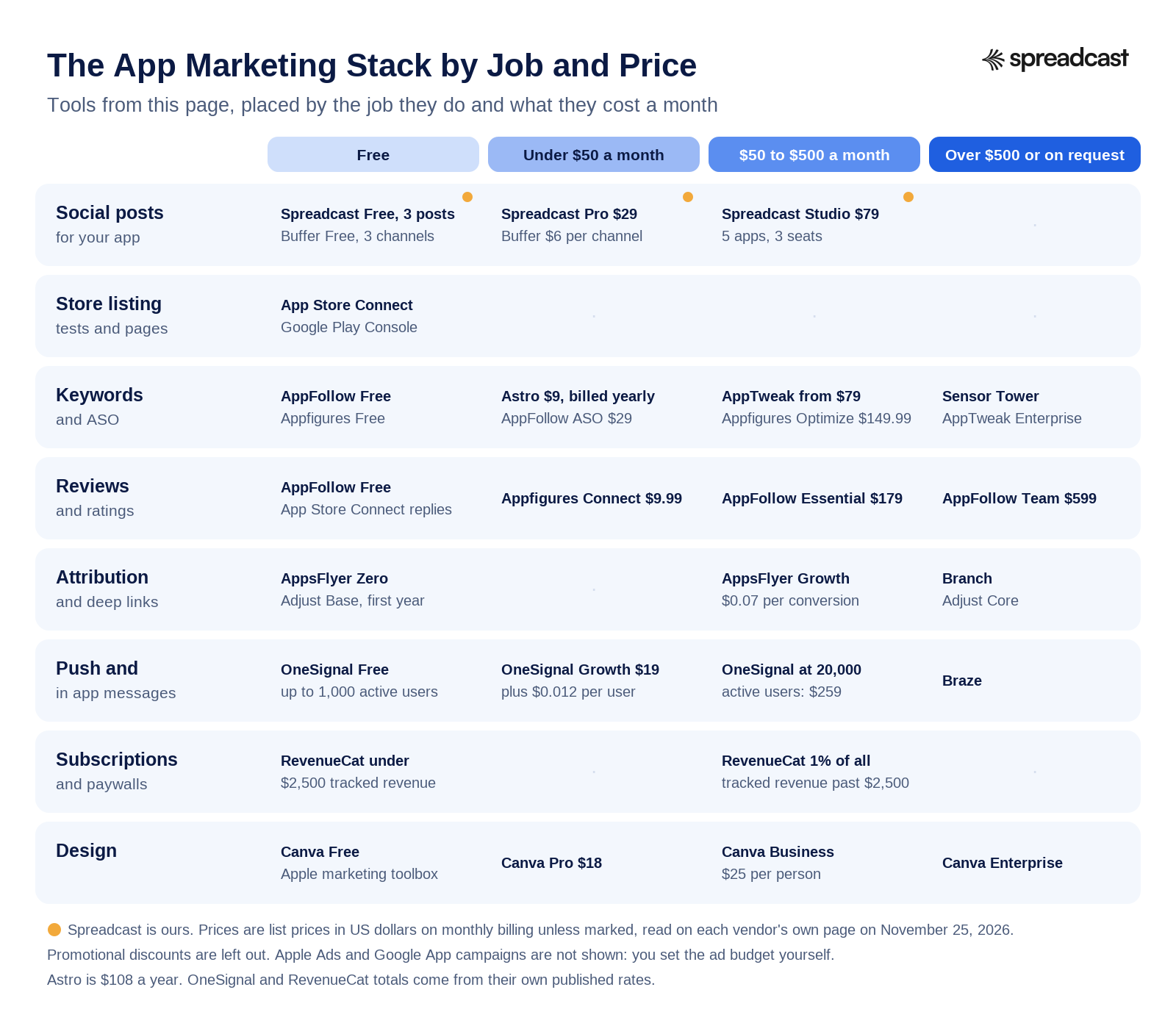
The Best App Marketing Tools Compared at a Glance
Spreadcast, which is ours, is the first row. Prices are in US dollars on monthly billing unless the row says otherwise, and leave out the Black Friday discounts several vendors were running on November 25, 2026.
| Tool | Job it does | Free plan | Paid from | Best for |
|---|---|---|---|---|
| Spreadcast | Social media posts made and published from your store link | Yes: 3 posts made and your first 3 published | $29 a month, 1 app and 10 social accounts | App teams with no time to post |
| Apple App Store Marketing Tools and App Store Connect | Badges, QR codes, social assets, listing tests, custom pages, events | Yes, all of it | Free with the Apple Developer Program | Every iOS app |
| Google Play Console listing tools | Listing experiments, custom store listings, promotional content | Yes, all of it | Free with a Play developer account | Every Android app |
| AppTweak | ASO keyword research, creative and market data | No, 7 day trial | $79 a month for 5 apps | Teams that work ASO every week |
| Appfigures | Sales analytics, reviews and ASO in one | Yes, 5 connected apps | $9.99 a month, $7.99 billed yearly | Indie developers who want numbers and reviews |
| Astro | App Store keyword research on the Mac | Trial with 1 app and 10 keywords | $108 a year, unlimited apps | Solo iOS developers |
| Sensor Tower | Market, ad and download estimates | No | Pricing on request | Publishers studying a market |
| AppFollow | Review replies, AI review analysis and ASO | Yes, 2 apps | $29 a month for ASO, $179 for Essential | Apps with a lot of reviews to answer |
| AppsFlyer | Install attribution and deep links | Zero plan, owned media only | $0.07 per conversion after 12,000 free in year one | Apps starting paid campaigns |
| Adjust | Install attribution and measurement | Base: 1,500 conversions a month for a year | Core priced on request | Small developers who want room to grow |
| Branch | Deep links and attribution | Free trial on Basics | Pricing on request | Apps that live on links from the web |
| OneSignal | Push, in app messages and email | Yes, push for up to 1,000 monthly users | $19 a month plus $0.012 per user | Every app with users to bring back |
| Braze | Lifecycle messaging across channels | Free trial | Pricing on request, by monthly users | Large consumer apps |
| RevenueCat | Subscriptions, paywalls and paywall tests | Free up to $2,500 tracked revenue a month | 1% of all tracked revenue once past $2,500 | Subscription apps |
| Apple Ads | Paid installs on the App Store | $100 credit for eligible new accounts | Your budget: per install or per tap | iOS apps with a known keyword |
| Google App campaigns | Paid installs on Google Search, Play and YouTube | No | Your budget and bid | Android apps ready to buy installs |
| Buffer | Scheduling posts you made yourself | Yes, 3 channels | $6 per channel a month | Teams that already make posts |
| Canva | Design for posts, ads and store art | Yes | $18 a month for 1 person | Anyone who designs by hand |
Prices read on each vendor's own page on November 25, 2026, before tax. Each entry below links its source.
The 18 Best App Marketing Tools in 2026, With Prices, Pros and Cons
Spreadcast is ours and comes first. After it the list runs job by job: the free official tools from Apple and Google, then store and ASO tools, reviews, attribution and deep links, push and lifecycle messaging, subscriptions, paid acquisition, and last the general social scheduler and design app that app teams use beside the rest. Inside each job, tools are ordered by how much they do for a small app team per dollar.
- 1
Spreadcast
Free, then $29 a month with posts made and published for youBest for social media marketing on autopilot from your App Store or Google Play link
Spreadcast is ours. It runs the job most app teams drop first: posting about the app on social media, every week, in a way that looks like the brand. You paste your App Store or Google Play link at the start page. Spreadcast reads the listing, takes your icon, colors and real app screens, and from then on reads the listing every day. When a new version goes live, it makes a post from the release notes with your own screens and the main change as the headline. When the app passes a ratings milestone such as 100, 500 or 1,000 ratings with an average of 4 stars or more, it makes a thank you post. Our page for mobile apps shows both designs, and the app update posts page shows the update post in detail.
Between releases, Pro and Studio add a weekly plan: feature spotlights from the features your listing names, a Things to Try carousel, a real review of the week in the reviewer's own words, a problem and fix post, and seasonal posts on dates that fit the app. You choose how many a week, from 1 up to 14, or switch it off, and every idea comes from your own listing, so each post is about something the app really does. Each post gets a caption written for each network you connect. Spreadcast publishes to Instagram, Facebook, LinkedIn, TikTok, YouTube, Pinterest, Threads, Bluesky, Mastodon, Telegram and Discord, with YouTube taking video posts.
You choose how much runs without you. Approve First holds each post on the Dashboard for one tap, and Full Autopilot publishes at your posting times on its own, as our page on social media approval describes. TikTok posts always land in your TikTok drafts or wait for a tap, so a sound and audience choice stay yours. If you also make your own posts, the same calendar schedules them. An app on both the App Store and Google Play counts as one brand, and its posts link to both stores.
On price, compare what is included. Free makes 3 posts and publishes your first 3, with a small Spreadcast mark. Pro is $29 a month, or $290 a year, for 1 app and 10 social accounts, with no cap on posts, no mark, Full Autopilot and the weekly plan, and you can run it from Claude or ChatGPT through the Spreadcast MCP server. Studio is $79 a month for 5 apps, 50 accounts and 3 seats, each app with its own look. The pricing page lists the rest, and app marketing automation shows a month of it working.
Pros
- Starts from one App Store or Google Play link, with no SDK and no code
- Notices each new version and ratings milestone and makes the post
- A weekly plan of feature, review, tips and seasonal posts on Pro
- Designs every post with your real app screens and brand colors
- Publishes to 11 networks, with a caption for each
- $29 a month flat on Pro for 10 accounts, with no cap on posts
Cons
- Covers social media, so pair it with the ASO and attribution tools below
- TikTok posts go to drafts or wait for one tap, by design
- 2
Apple App Store Marketing Tools and App Store Connect
Free with the Apple Developer ProgramBest free app store marketing tools for any iOS app
Apple's own app store marketing tools are free, official and underused. Apple's marketing toolbox lets you find your app and make three things: linked badges that send people to download it, custom promotional assets to share on social media, and a QR code that opens your App Store page. Apple's promote page adds short links and embeddable code, banners in several languages, and marketing assets in the App Store Connect app for a launch, a new version or a feature by the App Store.
The bigger free tools sit inside App Store Connect. Product page optimization tests up to three alternate versions of your icon, screenshots and app previews against your original, for up to 90 days per test. Custom product pages give you up to 70 extra versions of your product page, each with its own URL, its own keywords and, on iOS 18 or later, its own deep link. In app events put up to 10 published events on the App Store at a time, each lasting up to 31 days, with event cards that can show in search and on the Today, Games and Apps tabs.
Promo codes are here too: up to 100 per version of your app, per platform, for press and creators, per the promote page. The catch is that these are building blocks. Apple gives you the badge and the asset, not a plan for when to use them, and nothing posts by itself. Our guide to Apple's App Store marketing guidelines covers what you may and may not do with Apple's names and badges, and our in app events guide covers the event cards.
Pros
- Free, official and built into the account you already have
- Listing tests and custom pages that agencies charge for
- Badges, QR codes and social assets in one place
Cons
- Nothing runs by itself: each asset is made and shared by hand
- One product page test at a time
- 3
Google Play Console Store Listing Tools
Free with a Google Play developer accountBest free Google Play marketing tools for any Android app
Google Play's free marketing tools live in Play Console. Store listing experiments test up to 2 variants of your icon, feature graphic and screenshots against your current listing, and localized experiments add your descriptions in up to five languages. An app runs one default graphics experiment or up to five localized ones at a time, and experiments stop by themselves after six months.
Custom store listings give you up to 50 alternate listings, each aimed at countries, at people who can pre register, at a unique URL, at ads traffic, or at lapsed and churned users who have not opened the app in 28 days or have uninstalled it. That last option is one of the few free ways to speak to people who left.
Promotional content puts offers, time limited events and major updates on your store listing and, when Google's algorithms choose, on the Play homepage and in search. Google reports that apps which submitted promotional content and asked for featuring saw over twice as many explore acquisitions during a featuring window. Read the eligibility first: Google's premium growth tools guide opens promotional content to all game titles, but an app that is not a game must meet thresholds such as 1.6 million daily active users over three months with 1.6 million active installs, or $40,000 of monthly consumer spend for three months. Our Google Play ASO guide covers the listing work around these tools.
Pros
- Free listing tests with up to 2 variants
- Up to 50 custom listings, including one for lapsed and churned users
- Promotional content for every game title
Cons
- Promotional content for apps that are not games needs large audience thresholds
- Every listing and test is set up by hand
- 4
AppTweak
From $79 a month for 5 apps, 7 day trialBest ASO tool for teams that work on keywords and creatives every week
AppTweak is a full App Store Optimization suite for the App Store and Google Play: keyword research, rankings, competitor tracking, creative research and market estimates. AppTweak's pricing page lists Essential at $79 a month for 5 followed apps on monthly billing, or $949 a year, with 500 keywords, 1 seat, 6 months of history and 5 competitors per app. Ten apps cost $99 a month and twenty cost $149.
Grow, from $249 a month, raises the cap to 1,500 keywords and adds keyword impact, long tail keywords, a metadata simulator, trending keywords and automated Slack and email alerts. Expand, from $499, adds the creative side: a creative explorer, an explorer for custom product pages and custom store listings, an in app events explorer, localization insights and screenshot translation. Enterprise is priced on request. Every self serve plan has a 7 day free trial, and AppTweak also offers a free Market Intelligence plan with last month's download and revenue estimates for any app.
Pick AppTweak when someone on the team owns ASO and will open it weekly. The jump from Essential to Grow is where the most useful research tools start, so price your plan against the features you will use, not the app count. Our App Store Optimization guide shows the work these tools support.
Pros
- Covers the App Store and Google Play in one place
- Creative and custom page research on Expand
- A free market data plan for download estimates
Cons
- No free ASO plan, only a 7 day trial
- Many research tools start on Grow at $249 a month
- 5
Appfigures
Free, then $9.99 a month or $7.99 billed yearlyBest all in one dashboard for an indie developer's sales, reviews and keywords
Appfigures puts sales analytics, reviews and ASO in one dashboard. Its pricing page has a free plan for 5 connected apps, then Connect at $9.99 a month on monthly billing or $7.99 billed yearly, which pulls downloads, revenue, subscriptions, ad spend and payouts into one view and adds rankings, featuring, ratings, reviews and review replies.
Keyword tracking starts on Monitor, at $44.99 a month or $35.99 yearly, with 100 keywords and daily updates. Optimize, at $149.99 a month or $119.99 yearly, raises it to 500 keywords with hourly updates and unlimited review replies, and the free trial opens Optimize with no credit card. The top tiers add competitor download and revenue estimates and run to $1,399.99 a month. Every paid plan covers 5 apps, then $1.99 for each extra app.
For an indie developer this is often the first paid tool worth buying, because it answers the money question and the review question in one place. Answering reviews well matters: Apple's ratings and reviews guidance notes that a reviewer is notified when you respond and may update the review. Our guide on how to get App Store reviews covers the asking side.
Pros
- A free plan for 5 connected apps
- Sales, subscriptions, reviews and keywords in one dashboard
- A free trial of Optimize with no card
Cons
- No keyword tracking on Connect
- Competitor estimates sit on the most expensive plans
- 6
Astro
$108 a year, unlimited apps and keywordsBest low cost App Store keyword tool for solo iOS developers
Astro is a Mac app for App Store keyword research, made for indie developers. Astro's site lists one subscription at $9 a month billed as $108 a year, with every feature, unlimited apps and keywords, and a 14 day money back guarantee. The free trial includes one app and 10 keywords.
It reads keyword popularity from Apple Ads data, scores how hard a keyword is to rank for in the top 10, tracks rankings daily in over 90 App Store countries, suggests keywords your app and its competitors rank for, and tracks ratings by country. It also has an MCP server, so you can ask Claude or another assistant about your rankings. It needs macOS 14 or later.
Astro is App Store only, so an Android team needs a second tool. For a solo developer choosing a subtitle and a 100 character keyword field, it is the cheapest serious option on this list, and the money it saves can go to the jobs that cost more.
Pros
- $108 a year with no cap on apps or keywords
- Keyword popularity from Apple Ads data
- MCP server for asking an AI assistant about rankings
Cons
- App Store only
- Runs on a Mac with macOS 14 or later
- 7
Sensor Tower
Pricing on requestBest market intelligence for publishers sizing up a category
Sensor Tower sells estimates of the whole market: downloads, revenue, ad creatives and spend, web traffic, audiences and gaming data for apps that are not yours. Its pricing page sends you to a demo form and says plans are customized for each customer, so there is no list price to compare.
It is the tool a publisher uses before entering a category, or a studio uses to see which competitors are buying ads and with what creatives. It answers questions a small team rarely needs answered in month one. For keyword work on your own app, AppTweak, Appfigures or Astro do the job at a published price.
Pros
- Download, revenue and ad intelligence on any app
- Covers apps, ads, web and gaming
Cons
- No published price
- More than most small teams need
- 8
AppFollow
Free, then $29 a month for ASO or $179 for EssentialBest tool for answering reviews at scale with AI help
AppFollow is built around ratings and reviews. Its pricing page lists a free plan with 2 sources, an AI summary, entry level replies to reviews, spam review reporting, basic ASO tools and 7 days of history. The ASO plan, at $29 a month, adds AI keyword suggestions, advanced keyword tracking, an update timeline and 30 days of history.
Essential, at $179 a month with a 10 day free trial and no card, covers 5 sources and adds review translation, an AI support agent, sentiment tags, helpdesk integrations, data export, API access and a year of history. Team is $599 a month for 10 sources, and Enterprise is priced on request. The manual reply allowance rises from 100 on Free to 500 on Essential.
Choose AppFollow when reviews arrive faster than a person can read them, or when support and marketing share the same inbox of complaints. A small app with a few reviews a week can answer them in App Store Connect and Play Console for free.
Pros
- A free plan with AI review summaries
- AI review analysis and support agent on Essential
- Connects to Zendesk and Slack
Cons
- The free plan stops at 2 sources
- Team jumps to $599 a month
- 9
AppsFlyer
Free Zero plan, then $0.07 per conversionBest attribution platform for an app starting paid campaigns
AppsFlyer tells you which campaign, ad network or link produced each install, which is the question every paid budget depends on. AppsFlyer's pricing page lists three plans. Zero is free and meant for owned media such as your website, email and social links, and the page says it is not suitable for apps with paid activities. Growth is pay as you go for basic attribution of paid campaigns. Enterprise is priced on request.
Both Zero and Growth start with a welcome package of 12,000 free conversions in the first 12 months, plus 30 days of premium add ons. After that, Growth charges $0.07 per conversion. A conversion is an install, reengagement or reattribution that AppsFlyer attributes to a campaign, and organic installs are not counted and are free. Fraud protection, audience segmentation and data export are premium features.
Attribution becomes worth paying for the month you spend real money on ads. Before that, App Store Connect campaign links and Play Console acquisition reports answer most questions for free, and our campaign link generator builds the App Store links in seconds.
Pros
- 12,000 free conversions in the first year
- Organic installs are free and uncounted
- Deep linking and attribution from one vendor
Cons
- The free Zero plan is for owned media, not paid campaigns
- Costs scale with every paid install
- 10
Adjust
Free Base plan, Core on requestBest free attribution starter with room to grow
Adjust is AppsFlyer's closest rival in attribution and measurement. Adjust's pricing page offers Base free for small independent developers: every feature in Core, up to 1,500 attributions a month for up to 12 months, with English email support. Core covers up to 250,000 conversions a year and Enterprise over 2.5 million, both priced on request.
Every plan includes click and impression attribution, unlimited organic installs, iOS 14.5 and later measurement, Apple Ads and Google organic tracking, deep links and deferred deep links, and raw data access. Add ons for Core and Enterprise include TrueLink deep linking, fraud prevention, subscription measurement and smart banners.
Pros
- Base includes the Core features free for a year
- Unlimited organic installs on every plan
- Data stored in Europe and the US
Cons
- Base is capped at 1,500 attributions a month
- No published price after Base
- 11
Branch
Free trial, then pricing on requestBest for apps that win users through links from the web, email and social
Branch is known for deep links: a link that opens the right screen in the app if it is installed, and the right store page if it is not, then carries the person through the install to that screen. Branch's pricing page lists three plans, Basics, Essentials and Enterprise, with prices given through sales, and a free trial on Basics.
Basics allows 3 ad partners, 3 data partner webhooks and 3 ad partner postbacks. Essentials removes those caps, allows up to 25 custom ad partners and adds multi touch attribution, fraud reporting and lifetime value tracking. Enterprise adds connected TV attribution. Branch suits apps whose growth comes from shared links, such as marketplaces, media and referral programs.
Pros
- Strong deep links that survive the install
- A free trial on Basics
Cons
- No published price
- Basics caps ad partners at 3
- 12
OneSignal
Free up to 1,000 monthly users, then from $19 a monthBest push notification tool for a small app on a budget
OneSignal sends push notifications, in app messages, email and SMS from one dashboard. OneSignal's pricing page starts with a free plan: unlimited mobile push for up to 1,000 monthly active users, 10,000 emails a month, web push to up to 10,000 subscribers per send, 3 active journeys and 6 audience segments.
Growth starts at $19 a month, plus $0.012 per monthly active user for mobile push, with in app messages included and 20,000 emails before $1.50 per 1,000. We ran OneSignal's own cost calculator for an app with 20,000 monthly active users and it came to $259 a month. A monthly active user counts every device active in the app in 30 days, whether or not it accepted push. Professional and Enterprise are annual contracts priced on request.
Push is retention, not acquisition, and it is the cheapest way to bring back someone who already installed. A new app can run on the free plan until it passes 1,000 monthly users.
Pros
- A real free plan with push, in app messages and email
- Month to month Growth plan with a public calculator
- 3 active journeys even on the free plan
Cons
- The free plan covers only 1,000 monthly active users
- Every active device counts, opted in or not
- 13
Braze
Free trial, then pricing on request by monthly usersBest lifecycle messaging platform for large consumer apps
Braze is the enterprise end of push and lifecycle messaging: email, push, SMS, WhatsApp, in app messages, banners and content cards orchestrated in journeys, with AI for timing, personalization and testing. Braze's pricing page lists four editions, Go, Select, Pro and Enterprise, says pricing scales with monthly active users, and offers a free trial and a pricing request form.
Go is aimed at early stage growth teams, and each edition up adds orchestration, security, predictive AI and governance. If your app has millions of users and a lifecycle team, Braze is on the short list. If it has thousands, OneSignal covers the same channels at a published price.
Pros
- Every major channel in one journey builder
- Editions from early stage to enterprise
Cons
- No published price
- Needs a team to run it well
- 14
RevenueCat
Free up to $2,500 a month in tracked revenue, then 1%Best subscription and paywall tool for subscription apps
RevenueCat handles in app subscriptions on iOS, Android and the web, and gives the marketing side what it needs most: paywalls you can change without an app update, and experiments that test one paywall or price against another. RevenueCat's pricing page says the Pro plan is free up to $2,500 in monthly tracked revenue, then costs 1% of what you track, so $25 at $2,500.
All features are included, from paywalls and experiments to charts and the customer center. A card is optional at sign up, but some parts stop working when you pass $2,500 a month without one. Enterprise is priced on request. A paywall test is marketing in the plainest sense: the same downloads, more of them paying. Our ratio of lifetime value to acquisition cost guide shows why that matters before you buy installs.
Pros
- Free until $2,500 a month in tracked revenue
- Paywalls and experiments without an app update
Cons
- Only for apps that sell in app purchases or subscriptions
- The fee grows with revenue
- 15
Apple Ads
Your budget, per install on Basic or per tap on AdvancedBest paid app promotion tool for iOS apps with clear search intent
Apple Ads puts your app at the top of App Store search results and on other App Store placements. Search matters on the App Store: Apple Ads reports that 70% of App Store visitors use search to discover apps and that almost 65% of downloads happen directly after a search, worldwide in 2022.
Apple Ads Basic charges per install at a price you set, places ads at the top of search results, and runs on a monthly budget you can start or stop at any time. Apple Ads Advanced charges per tap, adds the Today tab, the Search tab and product pages, and lets you choose keywords and bids yourself or use Maximize Conversions bidding. Eligible new accounts get a 100 USD credit, and the promote page says Apple Ads runs in 91 countries and regions.
Start with your own app name as a keyword, which protects your brand searches, and add generic keywords once you know what an install is worth. Our Apple Search Ads guide covers setup, and our cost per install benchmarks show what installs cost by source.
Pros
- Pay per install on Basic, at a price you set
- Ads where most App Store downloads start: search
- A 100 USD credit for eligible new accounts
Cons
- Spend is on top of every tool on this page
- iOS only
- 16
Google App Campaigns
Your budget and bidBest paid app promotion tool for reaching Android users across Google
Google App campaigns promote an app across Google's largest properties from one campaign. Google Ads Help lists where the ads run: Google Search, Google Play search results, related apps and homepage, YouTube, the Display Network including Gmail and other apps, and Discover. You provide text, images, videos and HTML5 assets, a starting bid, a budget and languages and locations, and Google tests combinations and serves the ones that perform.
The upside is reach with almost no setup. The downside is control: you choose the assets and the goal, Google chooses the placements and the mix. Feed it real screenshots and short vertical video, and give it time before changing bids, which Google's own page advises during the learning period. Our Google App campaigns guide goes step by step.
Pros
- Search, Play, YouTube and Display from one campaign
- Google builds and tests the ads from your assets
Cons
- Little control over where ads appear
- Needs a budget for the learning period
- 17
Buffer
Free for 3 channels, then $6 per channel a monthBest simple scheduler for app teams that already make their own posts
Buffer is the scheduler many small app teams start with. Buffer's pricing file lists a free plan for up to 3 channels with 10 scheduled posts per channel at a time, an AI assistant for captions, basic insights and a comment inbox. Essentials is $6 per channel a month, or $5 billed yearly, with unlimited scheduled posts, and Team is $12 per channel with approvals and unlimited users.
Buffer publishes what you bring to it, on time, and does it well. What it leaves to you is the reason to post and the picture: it does not watch your App Store listing, so each update post, ratings post and feature post is written and designed by someone on the team. Our Buffer comparison sets the two approaches side by side, and the best social media automation tools covers the wider field of schedulers.
Pros
- A free plan with no end date
- Simple per channel pricing
- AI caption help on every plan
Cons
- Every post is written and designed by you
- The price climbs with each channel
- 18
Canva
Free, then $18 a month for 1 personBest design app for store art, ads and posts made by hand
Canva is where most app teams make the pictures nobody else makes: social posts, ad creatives, feature graphics and promotional art. Canva's US pricing page lists Free, Pro at US$18 a month for one person, Business at US$25 a month per person and Enterprise on request, before tax.
Pro includes over 3.6 million templates, 5 brand kits, on brand AI, ads with AI and social scheduling. Business raises that to 100 brand kits and adds approvals and team admin. For app screenshots in the store sizes, our free App Store screenshot generator is quicker. Canva is the right tool when you want full control of each design and have the hours to spend on it. Our Canva comparison shows where it and Spreadcast split the work.
Pros
- A generous free plan
- Brand kits and social scheduling on Pro
- Millions of templates
Cons
- Every design is made by hand
- Priced per person on Business
Apple App Store Marketing Tools and Google Play Marketing Tools That Cost Nothing
Before you pay for anything, use what the stores give you. This table puts Apple's and Google's free app store marketing tools side by side, with the limits each one has, as each store's own page stated them on November 25, 2026. Google's limits on promo codes and review replies come from Play Console Help.
| Job | Apple: App Store Connect and toolbox | Google: Play Console | What it is good for |
|---|---|---|---|
| Test the listing | Product page optimization: up to 3 treatments of icon, screenshots and previews, up to 90 days, one test at a time | Store listing experiments: up to 2 variants, one default graphics test or up to 5 localized tests, stop after 6 months | Finding the screenshots and icon that convert |
| Extra listing versions | Custom product pages: up to 70, each with its own URL, keywords and deep link on iOS 18 or later | Custom store listings: up to 50, by country, URL, pre registration, ads traffic or lapsed and churned users | Sending each ad, post or audience to a page that matches it |
| Time limited news on the store | In app events: up to 10 published at once, up to 31 days each, promoted up to 14 days early | Promotional content: offers, events and major updates, for games and for apps that meet the thresholds | Showing that the app is alive between versions |
| Links, badges and QR codes | Marketing toolbox: linked badges, QR codes, short links and embed code | Custom store listing URLs | Websites, emails, print and slide decks |
| Social media assets | Promote assets in the toolbox, and assets for a launch, new version or feature in the App Store Connect app | None built in | One off posts for big moments |
| Ratings and reviews | Reply to every review, and prompt for ratings up to 3 times in 365 days | One public reply per review, editable at any time | Raising the rating that every listing shows |
| Codes for press and creators | Promo codes: up to 100 per version, per platform | Promo codes: up to 500 a quarter for paid apps and one time products | Early access for reviewers and creators |
Apple limits from developer.apple.com pages on product page optimization, custom product pages, in app events, ratings and the promote page. Google limits from Play Console Help on experiments, custom listings, promo codes and review replies, and from Google Play's business guides. All read on November 25, 2026.
Apple Explains Product Page Optimization and Custom Product Pages
This official Apple session shows the two free listing tools most iOS teams leave unused. It was recorded in 2021, and the limits have grown since, to 70 custom product pages with their own keywords, but the method is the same.

Google Shows How Store Listing Experiments Work
The Android counterpart: how to set up a store listing experiment in Play Console and read the result. Some menu names have changed since it was recorded, but the method has not.

App Promotion Tools by Need: Which Ones to Pick
Most teams fall into one of five situations. Start from yours, buy only the row's paid tools, and use the free store tools in every case.
Solo Developer With No Budget
Your budget is time, so pay only where it runs out. The store consoles cover listing tests, links and review replies. OneSignal Free and RevenueCat cover push and subscriptions at your size, and if you already use Google's Firebase, its analytics, A/B testing, Cloud Messaging and in app messaging are listed as no cost. The two tools worth paying for first are Astro at $108 a year for keywords and Spreadcast, free for your first 3 posts and $29 a month after, so the app keeps posting while you build. The steps further down set this up in order, and our guide to promoting an app for free lists the free channels around it.
Small Team With One App
Add Appfigures for sales, reviews and keywords in one place, at $9.99 to $149.99 a month by keyword need, and Spreadcast Pro for the weekly posting. Add Apple Ads Basic with a small monthly budget on your own app name. Once paid spend is real, add AppsFlyer Growth or Adjust Base so you know which campaigns pay back. Canva Pro at $18 covers one off designs.
Studio With Several Apps
Per app pricing is now the thing to watch. AppTweak covers 20 apps on Essential for $149 a month, Appfigures adds $1.99 per app past 5, and Spreadcast Studio runs 5 apps with their own brand and accounts and 3 seats for $79 a month. Attribution and push are priced by conversions and users, so they grow with success rather than with app count.
Game Studio
Games get Google Play's promotional content for every title, which most apps do not, so plan offers and events into it from launch. Add Sensor Tower when you need to see competitors' downloads and ad creatives, attribution from AppsFlyer or Adjust before any user acquisition spend, and Apple in app events for live ops on iOS. Our mobile game market statistics give the market size behind those choices.
Subscription App
RevenueCat first, because paywall tests change revenue without changing downloads. Then OneSignal for trial reminders and win back messages, AppFollow or Appfigures for reviews, and custom product pages or custom store listings so each ad lands on a page that matches its promise.
Mobile App Marketing Tools Compared: How Each One Charges
The headline price hides the real question: what makes the bill grow. Some tools charge per app, some per person, some per user, some per install and some per dollar you earn. This table shows what each one meters, so you can see which costs rise as the app succeeds.
| Tool | What the price is based on | Free plan limit | First paid step | What makes the bill grow |
|---|---|---|---|---|
| Spreadcast | Flat per plan | 3 posts made, first 3 published | $29 a month, 1 app, 10 accounts | More apps or accounts: Studio at $79 |
| AppTweak | Apps followed and plan level | None, 7 day trial | $79 a month for 5 apps | More apps, keywords or research tools |
| Appfigures | Plan level, 5 apps included | 5 connected apps | $9.99 a month | Keywords, competitors, $1.99 per extra app |
| Astro | Flat yearly | Trial: 1 app, 10 keywords | $108 a year | Nothing: apps and keywords are unlimited |
| AppFollow | Sources and plan level | 2 sources | $29 a month | More sources and replies |
| AppsFlyer | Attributed conversions | 12,000 free in year one | $0.07 per conversion | Paid installs |
| Adjust | Attributed conversions | 1,500 a month for 12 months | Core on request | Paid installs |
| OneSignal | Monthly active users and emails | 1,000 monthly active users | $19 a month plus $0.012 per user | Active users |
| RevenueCat | Monthly tracked revenue | Up to $2,500 a month | 1% of tracked revenue | Revenue |
| Apple Ads and Google App campaigns | Your budget, per install or per tap | $100 Apple credit for eligible accounts | Any budget you set | Spend you choose |
| Buffer | Channels | 3 channels | $6 per channel a month | Each channel added |
| Canva | People | Free plan | $18 a month for 1 person | Each person on Business |
Read on each vendor's own pricing page on November 25, 2026. Sensor Tower, Branch and Braze publish no prices, so they are left out of this table.
What an App Marketing Stack Costs a Month
We priced two real stacks from the list. The starter stack is for a two person team before revenue. The growth stack is for the same team once the app has 20,000 monthly active users, $10,000 a month in tracked revenue and 5,000 attributed paid installs a month.
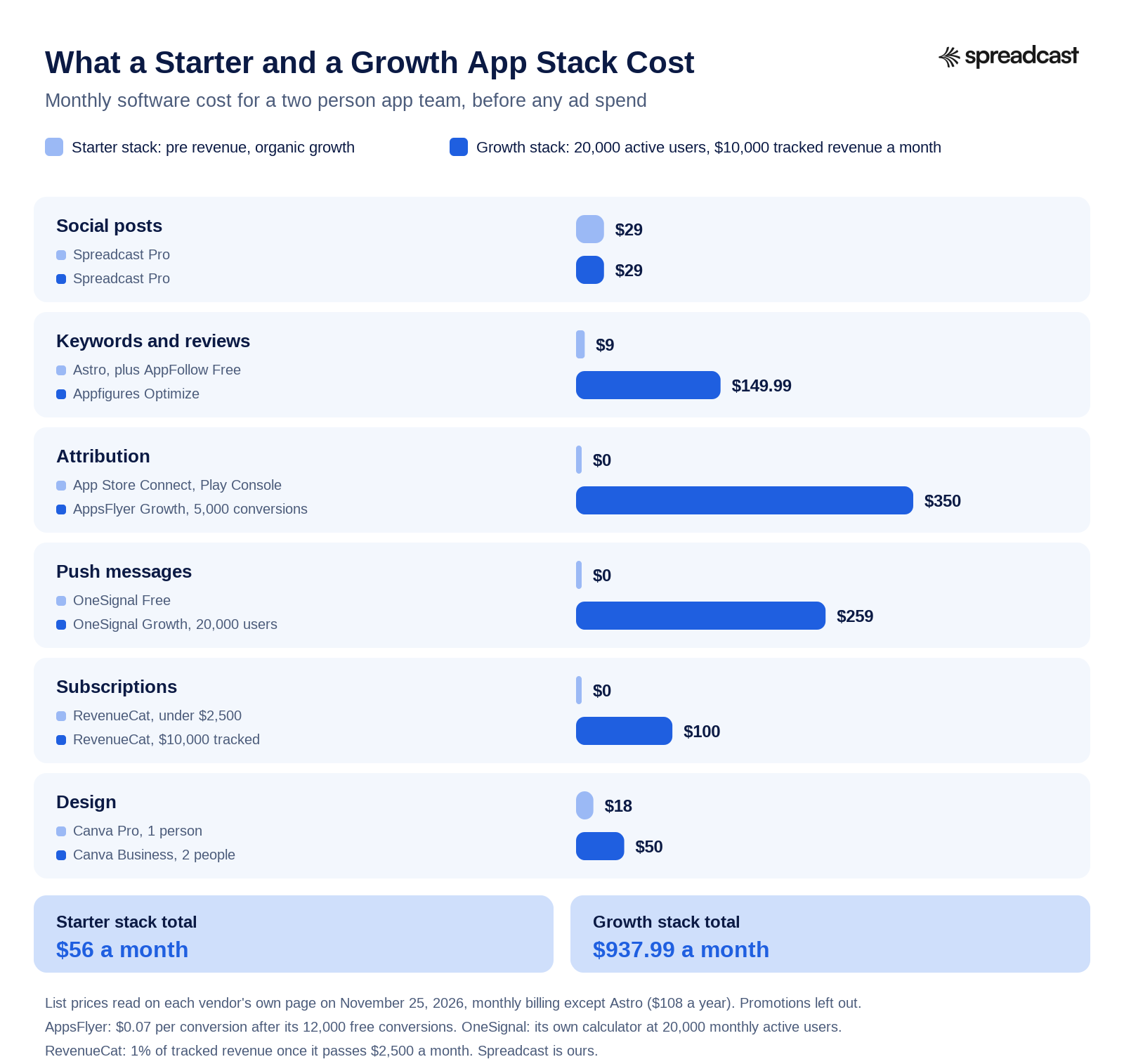
What the Numbers Show About App Marketing Software Costs
The starter stack costs $56 a month and covers every job a new app has: social posts, keywords, reviews, push, subscriptions and design. Only three of those tools charge at all, and two of the free ones, OneSignal and RevenueCat, stay free until the app has 1,000 monthly users or $2,500 a month in revenue. That is the first finding: at launch, the expensive part of app marketing is time, not software.
The growth stack costs $937.99 a month, about 17 times as much, and about 80% of the increase comes from three tools that meter success: AppsFlyer at $350 for 5,000 paid installs, OneSignal at $259 for 20,000 active users, and RevenueCat at $100 on $10,000 of revenue. Those three bills grow because the app grew. The rest of the rise is a choice rather than a meter: the $9 keyword tool becomes Appfigures Optimize at $149.99, and Canva goes from one Pro seat to two Business seats. Spreadcast stays at $29. Set against $10,000 a month in tracked revenue, the whole growth stack is under 10% of revenue, before any ad spend.
The second finding is about what to buy first. In both stacks, the social posting line is the same $29, while the cost of doing it by hand does not show up on any invoice: the hours spent writing an update post, cutting screenshots to size and posting to each network. For a team of two, those hours come out of building the app. That trade is why we built Spreadcast, and it is the line worth testing first if your feeds have gone quiet. For a sense of what a full marketing budget looks like around these tools, see our startup marketing budget guide.
A Stack for a Two Person App Team, Built From This List
This is the order we would set up the tools in for a two person team with one app on the App Store and Google Play. Each step is cheap or free, and each one feeds the next.
- Step 1
Week 1: Set Up the Free Store Tools
In App Store Connect, start a product page test on your screenshots and plan one custom product page for your main audience. In Play Console, start a store listing experiment on the icon or first screenshots. Make a badge and QR code in Apple's toolbox, or with our App Store QR code generator, for your website and email footer. Cost: $0.
- Step 2
Week 1: Turn On Social Posts From the Listing
Paste the App Store or Google Play link into Spreadcast, connect Instagram, TikTok, LinkedIn and whichever other networks your users read, and set the weekly plan to 3 posts. Keep Approve First on for the first month so you see every post before it goes out. Cost: free for the first 3 posts, then $29 a month.
- Step 3
Week 2: Fix Keywords and Answer Reviews
Use Astro for the App Store keyword field and subtitle, or Appfigures Monitor if you want keywords, sales and reviews in the same place. Answer every review from the last 90 days in App Store Connect and Play Console. Add a rating prompt at a happy moment in the app, remembering Apple's limit of 3 prompts in 365 days. Cost: $108 a year for Astro, or $44.99 a month for Appfigures Monitor with 100 keywords.
- Step 4
Week 3: Add Push and the Paywall
Install OneSignal for onboarding and win back messages and RevenueCat for subscriptions and a paywall test. Both are free at launch size. Cost: $0 until 1,000 monthly users on OneSignal and $2,500 a month in revenue on RevenueCat.
- Step 5
Week 4: Write Good Release Notes
Every update is now a post, so the release notes are marketing copy. Lead with what the person can do now, not the version number. Our free release notes generator drafts them from a list of changes. Cost: $0.
- Step 6
Month 2: Test a Small Paid Budget
Start Apple Ads Basic on your app name with a modest monthly budget, and claim the 100 USD credit if your account is eligible. Add AppsFlyer or Adjust only when paid spend grows past what App Store Connect campaign links can explain. Cost: your ad budget.
A Worked Example: One App Update Through the Whole Stack
A stack only earns its cost if the tools work together on a real moment, so here is one update traced through every tool above. The app is made up for this example: a habit tracker that Alex runs with one other developer, on the App Store and Google Play. On Monday they ship version 2.3, which adds home screen widgets.
Before the release, Alex rewrites the release notes so the first line says what a person can now do: see today's habits on the home screen without opening the app. The keyword field goes out with the same version, so Alex checks in Astro whether people search for terms like habit widget, finds one with fair popularity and low difficulty, and swaps it in for a keyword that never ranked. In App Store Connect, Alex adds a custom product page whose first screenshot shows the widget, and assigns the widget keywords to it, which Apple's custom product page rules allow as long as each keyword combination belongs to one page only.
On Tuesday, Spreadcast's daily check sees version 2.3 on the store. It makes an update post with the widget screen and the release notes cut to the main change, and it waits on the Dashboard for Alex's tap. Alex approves it, and it goes to Instagram, Threads, LinkedIn and Bluesky at the next posting time. Because the listing description now names widgets, they join the features the weekly plan takes turns on, so a widget spotlight comes round in a later week without anyone planning it.
On Wednesday, the second developer sends an in app message through OneSignal to active users who have not added a widget, with one line and a button. Widgets are a Pro feature in this app, so the paywall in RevenueCat gets a new first slide showing the widget, run as an experiment against the old paywall. In Apple Ads, the widget keywords point at the new custom product page instead of the default one.
Over the next two weeks, Alex reads reviews in Appfigures for widget bugs and replies to each one, knowing from Apple's guidance that the reviewer is notified and may update the review. At the end of the fortnight there are three numbers to read: whether the custom product page converted better than the default, whether the paywall experiment moved trial starts, and how the update post did on each network. None of these tools did the others' work, and the only step that happened without a person was the social post being made. That is the shape of a sensible stack: free store tools for the listing, a few paid tools where the data pays, and the posting taken off the to do list.
How to Choose App Marketing Software: Five Questions to Ask
Most app marketing software is sold on features, but five plainer questions decide whether a tool fits a small team. Ask them in this order and the list above shrinks to three or four tools fast.
First, which job is costing the most hours right now? If the feeds are empty because nobody has time, a social tool saves more than a keyword tool. If the rating is stuck at 3.9, review replies and a better prompt come first. Buy for the bottleneck, not for the category that has the best demo.
Second, what does the bill meter? The comparison table above shows six different meters: apps, people, channels, users, installs and revenue. A tool that meters revenue, like RevenueCat, is cheap until it is not, but by then you can afford it. A tool that meters apps, like AppTweak, gets expensive for a studio with many small apps. A flat price, like Astro's or Spreadcast's, is the easiest to plan.
Third, does a free plan cover your size? OneSignal Free covers 1,000 monthly active users, Adjust Base covers 1,500 attributions a month for a year, RevenueCat covers $2,500 a month in revenue, and Appfigures Free covers 5 connected apps. A new app often fits inside all four, which means the first paid tool can be the one that saves the most time.
Fourth, does it cover both stores? Astro and Apple Ads are App Store only, and Google App campaigns are where Android installs are bought. If half your users are on Android, check that each tool you pay for covers Google Play, or budget for a second one. Spreadcast treats an app on both stores as one brand and links its posts to both.
Fifth, how easy is it to leave? Month to month plans, like OneSignal Growth, Appfigures and Spreadcast, can be dropped in a click. Annual contracts, like OneSignal Professional or the plans priced on request, lock in a year. Yearly billing saves money on AppTweak, Appfigures, Buffer and Spreadcast, but commit to a year only once a tool has proved itself for a few months.
App Marketing Tools You Can Skip in Year One
Some of the tools on this list are excellent and still a waste of money for a new app. Skipping them is a decision, not a gap, and each has a clear sign for when to buy.
Skip paid attribution until you spend on ads. AppsFlyer's free Zero plan is for owned media, and organic installs are free on every attribution plan, so before paid campaigns App Store Connect campaign links and Play Console reports answer the question of where installs came from. The sign to buy: a monthly ad budget large enough that knowing which network wasted it pays for the tool.
Skip market intelligence until you are choosing a market. Sensor Tower answers questions about other apps' downloads and ad spend. That matters when a publisher picks its next category or a game studio studies rivals' creatives, and rarely when you are trying to get your own first thousand users. The sign to buy: a decision worth more than the contract that depends on competitor data.
Skip enterprise messaging until you have a lifecycle team. Braze is built for many channels and many people. OneSignal's free and Growth plans send the same push, in app and email messages to a small audience at a published price. The sign to buy: more than one person whose job is messaging users who already installed.
Skip a second ASO tool. AppTweak, Appfigures, Astro and AppFollow overlap on keywords, and paying for two buys the same rankings twice. Pick the one that matches the rest of your work, sales data, review replies or pure keyword research, and drop the other. And skip buying installs before the listing converts: every dollar sent to a product page that converts poorly buys fewer installs than it would after a product page test. Our guide to App Store conversion rates shows what a good one looks like.
Mobile App Marketing Platform or a Set of Tools: Which One You Need
A mobile app marketing platform is one vendor that covers several of these jobs under one contract, such as AppsFlyer with attribution, deep links and audiences, or Braze with every messaging channel in one journey builder. A set of tools is what most small teams actually run: the best or cheapest option for each job, joined by the app itself. Neither is right for everyone, and the choice mostly follows the size of the team.
A platform pays off when several people work the same users through several channels, when data has to stay in one place for privacy reviews, and when the volume earns a negotiated price. That describes a consumer app with millions of users and a lifecycle team. A set of tools pays off below that size, because each tool has a free plan or a published price, each can be dropped without touching the rest, and the total for a small team is the $56 to $938 range in the chart above rather than a contract.
One job sits outside both models: social media. Platforms for attribution and messaging work on users who already installed or clicked. Social posts reach people who have never heard of the app, and no attribution or push platform makes them. That is the gap Spreadcast fills for app teams, whether they run a single platform or ten separate tools. For the broader view of what social media tools do for apps, see how to promote an app on social media, and for iPhone apps in particular, our iOS app marketing guide.
How We Chose and Ranked These App Marketing Tools
We started from the jobs, not the vendors. We listed what an app team has to do to get an app found, installed, kept and paid for, grouped it into nine jobs, and looked for the tools app developers actually name for each one in 2026, using Google autocomplete for searches such as "app marketing tools", "app store marketing tools" and "best aso tools", and the roundups that rank for them today. Two of the jobs, listing tests and paid ads, are run mainly in Apple's and Google's own consoles, so the official tools are on the list.
On November 25, 2026, Mark Weizer opened the pricing or plan page of every vendor named here and read the plan names, prices, free plan limits and trial terms directly from it. Where a page shows prices only in a script, we read it in a browser. Where a page showed a local currency, we switched it to US dollars or loaded the US version, as with Canva. Several vendors ran Black Friday discounts that day, and we left those out and used list prices. Where a vendor publishes no price, as with Sensor Tower, Branch and Braze, we say so rather than guess. For OneSignal we entered 20,000 monthly active users into its own calculator, and for AppsFlyer and RevenueCat we multiplied their published rates by the volumes stated in the chart.
For Apple and Google we read the developer pages on product page optimization, custom product pages, in app events, ratings and reviews, promotion, Apple Ads Basic and Advanced, Google App campaigns, store listing experiments, custom store listings, promotional content and premium growth tools, and quote their limits as stated. The two videos are from Apple Developer and Android Developers, the stores' own channels.
We ranked inside each job by how much a tool does for a small app team per dollar, with a free plan or a low published price counting in a tool's favor. Spreadcast is ours and is placed first, and its facts come from our own plan configuration and help pages, checked the same day. We left out tools that overlap with one on the list without adding a different price point, such as other attribution vendors, Firebase, which is a developer platform more than a marketing tool and is mentioned under the solo developer pick, product analytics tools that measure use rather than marketing, and ad networks that sell installs. If a vendor's page changes, the date on this page tells you how current our reading is. For a roundup of AI tools that make social posts, see our list of AI social media post generators.
Frequently Asked Questions
What are the best app marketing tools for indie developers?
Start with the free store tools in App Store Connect and Play Console, then add Astro ($108 a year) for keywords or Appfigures (from $9.99 a month) for sales and reviews, OneSignal and RevenueCat on their free plans, and Spreadcast for social posts made from your listing. That covers most jobs for under $50 a month.
Are Apple's App Store marketing tools free?
Yes. Apple's marketing toolbox makes linked badges, QR codes and social assets for free, and App Store Connect includes product page optimization, up to 70 custom product pages, in app events and promo codes at no charge for members of the Apple Developer Program.
What is the best free app marketing tool?
For listings, Apple's product page optimization and Google Play's store listing experiments, both free. For push, OneSignal's free plan covers up to 1,000 monthly active users. For social posts, Spreadcast's free plan makes 3 posts from your listing and publishes your first 3.
What tools do I need to market a mobile app?
At minimum: the store consoles for your listing, one keyword tool, a way to answer reviews, a push tool and a way to post on social media. Add attribution once you spend on ads, and a subscription tool if the app sells subscriptions.
How much do app marketing tools cost?
From $0 to over $1,000 a month. Our starter stack for a two person team costs $56 a month, and the same team at 20,000 monthly users and $10,000 a month in revenue pays about $938, mostly to tools that charge per install, user or revenue. Ad spend is extra.
Is there an app marketing tool that posts to social media automatically?
Yes. Spreadcast reads your App Store or Google Play listing every day, makes a post for each new version and ratings milestone, adds a weekly plan on Pro, and publishes to 11 networks after your approval or on Full Autopilot.
Prices, plans and features change. This comparison describes each product as its own site described it on the date shown under Sources. Check the vendor's site before you decide. Product names are trademarks of their owners.
Where These Facts Come From
Every outside number, rule and price on this page links to the page it was taken from.
- AppTweak pricing and plansAppTweak
- Appfigures pricing and plansAppfigures
- Astro features, pricing and free trialAstro
- Sensor Tower pricing and demo requestSensor Tower
- AppFollow pricing and plansAppFollow
- AppsFlyer pricing, plans and welcome packageAppsFlyer
- Adjust pricing and Base planAdjust
- Branch pricing and plansBranch
- OneSignal pricing and cost calculatorOneSignal
- Braze pricing and platform editionsBraze
- RevenueCat pricingRevenueCat
- Buffer machine readable pricingBuffer
- Canva plans and pricingCanva
- App Store marketing toolsApple
- Promoting your apps and gamesApple Developer
- Product page optimizationApple Developer
- Custom product pagesApple Developer
- In app eventsApple Developer
- Ratings, reviews and responsesApple Developer
- Apple Ads on the App Store, with search figuresApple Ads
- Apple Ads BasicApple Ads
- Apple Ads AdvancedApple Ads
- About App campaignsGoogle Ads Help
- Run store listing experimentsPlay Console Help
- Create custom store listingsPlay Console Help
- Promotional content on Google PlayGoogle Play
- Premium growth tools eligibilityGoogle Play
- Create promotions and promo codesPlay Console Help
- View and analyze your app's ratings and reviewsPlay Console Help
- Firebase pricing, with its no cost productsFirebase
- Video: get ready to optimize your App Store product pageApple Developer
- Video: store listing experiments on Google PlayAndroid Developers
Researched and written by Mark Weizer. Last checked on November 25, 2026.