Your App's Social Media, Run From Its Store Listing
Spreadcast reads your App Store or Google Play listing every day. New versions, rating milestones and a weekly plan become posts in your brand, published after your yes or on their own.
Shared budgets are here. Invite your partner and plan the month together.
New: monthly goals, and bank sync in 40 countries.
- Groceries$312
- Rent$1,100
- Coffee$46
ledgerly Shared budgets are here. Plan the month together and split anything. #budgeting
What App Marketing Automation Covers
App marketing automation means software doing the repeat parts of marketing a mobile app, so a person sets the rules once and checks the results instead of doing every step by hand. For a typical app that covers six areas: lifecycle messages to people who installed (push, in app and email), store listing tests, install attribution, paid ad bidding, rating prompts, and the social media posts that reach people who have never heard of the app.
Search for the phrase and you mostly get the first of those six. On November 25, 2026 the results for "mobile app marketing automation" were guides from Braze, AppsFlyer, Adjust, OneSignal, Airship, CleverTap and Pushwoosh, plus a Wikipedia entry. They are good guides to their own slice: messages that react to what a user does inside the app. They say little about the store listing and almost nothing about social media, which those vendors do not sell.
That gap matters most for small teams. A company with a growth team buys a lifecycle platform, an attribution tool, an ASO tool and an agency for social, and has people to run each. An indie developer or a two person studio has none of those people. For them the useful question is narrower: which of these jobs can run on their own, at what cost, and which one stalls first when nobody has time. The job that stops first is usually social media, because it is the only one that needs new material every week, so this page maps the whole field and then goes deep on that part.
One promise up front: every tool fact below comes from the vendor's own page or the platform's own documentation, read on November 25, 2026, and each one links to it. Where a vendor does not publish a price, we say so instead of guessing one.
The App Marketing Automation Map
Eight jobs from first impression to loyal user. Dark blue jobs run on their own once you set them up, light blue ones automate the busywork but still need a weekly look, and the orange one is where small teams have had the fewest tools.
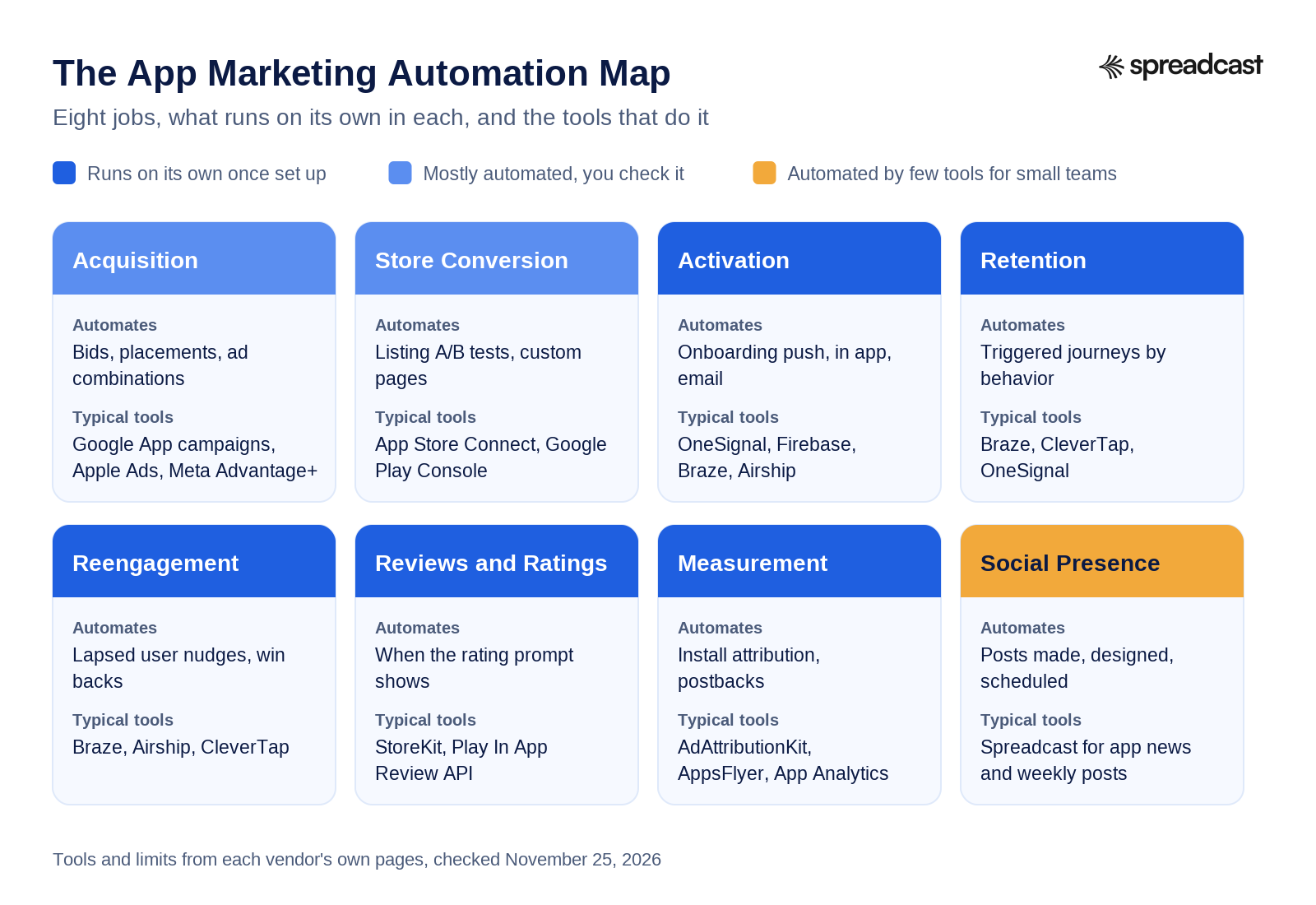
Mobile App Marketing Automation, Job by Job
The decision table. Each row is one marketing job, what software can run on its own there today, the tools that do it, the part that still needs you, and whether a team of one or two should automate it now.
| Job | What runs on its own | Typical tools | What still needs you | Two person team |
|---|---|---|---|---|
| Acquisition (paid) | Bids, placements and which ad combination shows | Google App campaigns, Apple Ads Search Match, Meta Advantage+ app campaigns | Budget, the target cost, the creative itself | Later. Only once you know what a user is worth |
| Store conversion (ASO) | A/B tests of icon, screenshots and previews; traffic split; result | App Store Connect product page optimization, Google Play store listing experiments | Keyword choice, screenshot design, deciding what to test | Yes, one test at a time. The stores run it for free |
| Activation | Welcome push, in app tips, onboarding emails after sign up | OneSignal, Firebase In App Messaging, Braze, Airship | The copy and the moment each message fires | Yes, a short sequence of three messages |
| Retention | Messages triggered by behavior, such as a streak about to break | Braze, CleverTap, OneSignal journeys | Which behaviors matter, frequency caps | Partly. One or two journeys, not ten |
| Reengagement | Nudges to lapsed users, win back emails | Braze, Airship, CleverTap | The offer, and when to stop asking | Later. Fix activation first |
| Reviews and ratings | When the system rating prompt appears | StoreKit review request, Play In App Review API | Replies to reviews, fixing what reviews report | Yes. It is a few lines of code |
| Measurement | Install sources, conversion rate, postbacks from ad networks | App Store Connect Analytics, AdAttributionKit, AppsFlyer | Reading it and acting on it | Yes for store analytics and campaign links; an attribution tool once you pay for ads |
| Social presence | Post ideas from app news, design, captions per network, scheduling, numbers | Spreadcast for app makers; schedulers for posting only | Replies, community, collaborations, launch strategy | Yes. It is the job that stalls first without help |
Tools and limits from each vendor's and platform's own pages, checked November 25, 2026. The last column is our recommendation for a team without a marketer.
Mobile Marketing Automation Platforms: Push, In App and Email
Mobile marketing automation platforms send messages to people who already installed your app, triggered by what they do or do not do. This is what Braze, OneSignal, Airship and CleverTap sell, and it is what most articles mean by mobile app marketing automation. A welcome sequence, a reminder when someone abandons a half finished setup, a note when a feature they asked for ships: you design each journey once and the platform runs it for every user.
The price models differ more than the features. OneSignal's pricing page lists a Free plan with unlimited mobile push for up to 1,000 monthly active users, 10,000 emails a month and 3 active journeys, and a Growth plan from $19 a month that charges $0.012 per monthly active user for mobile push. CleverTap's pricing page lists Core, Pro and Ultimate plans priced by monthly active users, with a 30 day trial on Core and a demo call for the other two. Braze's pricing page names four editions, Go, Select, Pro and Enterprise, says the price scales with monthly active users and publishes no figure. Airship's pricing page offers its full Airship Experience Platform on a quote, plus Airship Essentials, a self service package you sign up for yourself; the page shows no price for either.
For a two person team, the free floor is real. Firebase's pricing page lists Cloud Messaging, In App Messaging, A/B Testing and Analytics among its products that cost nothing, available on the free Spark plan. That is enough to send a welcome push, show an in app tip on day two and test two versions of either. The OneSignal free tier covers the same ground with email added, until the app passes 1,000 monthly active users.
What to automate first here is short: three onboarding messages (a welcome on day zero, the one feature that makes people stay on day one or two, a nudge on day five if they have not come back) and one in app message that announces each release to people who open the new version. That is a weekend of setup and almost no weekly work. Resist building twenty journeys before you know which behavior predicts that a user stays. Our app retention benchmarks show what day 1, day 7 and day 30 retention look like by category, which tells you whether onboarding is the leak.
Every journey starts from one of three triggers. A time trigger fires on a schedule, such as day five after install. An event trigger fires when someone does or skips something, such as finishing a first workout or leaving setup half done. A predictive trigger fires when the platform's model scores a user as likely to churn or to buy. Small teams should live on the first two; predictive triggers need enough users for the model to learn from.
None of it works without permission, and both platforms now make you ask. On iOS, Apple's notification docs say you must obtain permission before sending alerts, sounds or badges, that the system prompts only on the first request, and that asking in context, for example after someone schedules a first task, works better than asking on first launch. Apple also offers provisional authorization: notifications arrive quietly in Notification Center with Keep and Turn Off buttons, so people can judge them before they decide. On Android, notifications are off by default for apps newly installed on Android 13 (API level 33) or higher until the user grants the POST_NOTIFICATIONS permission, and Google suggests asking after a relevant action, or after the third or fourth launch. Put the ask behind a success moment, exactly like the rating prompt below, and your welcome journey reaches far more of the people it was built for.
What these platforms do not do is find you new users. Every message goes to someone who already has the app, so a lifecycle platform makes the users you have worth more, while the number of new people reaching the store depends on the store listing, ads and social media.
App Store Optimization: The Parts That Run on Their Own
Store listing automation is free and built into both stores: you upload alternative assets, and the store splits traffic and tells you which version converts better. It matters because the listing is where most installs happen. Apple Ads states that 70% of App Store visitors use search to discover apps and that almost 65% of downloads happen directly after a search (App Store, worldwide, 2022).
On the App Store, product page optimization tests up to three treatments of your icon, screenshots and app previews against the original. One test runs at a time, for up to 90 days, and new metadata in a treatment must pass App Review. Apple suggests waiting until a treatment performs better or worse than the baseline with at least 90% confidence before applying it. Custom product pages go further: up to 70 extra versions of your page, each with its own screenshots, promotional text and previews, its own URL for ads or social links, and keywords of its own so it can appear in search results in place of the default page.
On Google Play, store listing experiments test up to two variants against the current listing: one default graphics experiment (icon, feature graphic, screenshots) or up to five localized experiments, which can also test descriptions. Experiments stop on their own after 6 months.
Both stores also give you free promotion slots that behave like scheduled posts inside the store. Apple's in app events let an app keep up to 10 events published at a time, each lasting up to 31 days and promoted up to 14 days before it starts, shown in search, on the Today, Games and Apps tabs and on your product page. Google Play's promotional content covers offers, time limited events and major updates, shown on the Apps or Games tab, the Events tab, search results and your listing, for all games and for apps that meet Google's eligibility criteria.
What stays human: choosing the search phrases, deciding what the first screenshot says, and designing the variants worth testing. A test only tells you which of your ideas won. Our guides to App Store optimization and App Store conversion rates cover the ideas; the App Store screenshot generator makes the variants.
How Product Page Optimization Works
Apple's own walkthrough of setting up a product page test in App Store Connect: picking treatments, splitting traffic and reading the result.

Store Listing Experiments on Google Play
The Google Play side from Android Developers: what a store listing experiment can test and how to read the result before you apply it.

Attribution and Measurement Without a Data Team
Measurement automation tells you where installs came from and which of them stayed, without anyone pulling numbers by hand. For a small app the first layer costs nothing: App Store Connect and Google Play Console already collect it.
App Store Connect Analytics counts unique impressions, measures conversion rate as total downloads divided by unique impressions, and breaks downloads out by source such as App Store Search, App Store Browse, App Referrers and Web Referrers. Campaign links add your own source names, so a link in a social post or newsletter shows up as its own line, and retention can be filtered by source type or campaign. The campaign link generator builds those links.
Attribution across ad networks is the next layer, and Apple sets its rules. AdAttributionKit, available from iOS 17.4, measures ad campaigns while keeping user privacy: ad networks sign ads, receive postbacks after a conversion, and the system offers up to three conversion windows. Developers can opt in to receive copies of the winning postbacks. A mobile measurement partner collects those postbacks alongside Android data. AppsFlyer's pricing page describes a free Zero plan with 12K free conversions in the first year, meant for owned media and not suited to apps with paid activity, a pay as you go Growth plan and an Enterprise plan through sales.
For two people the order is clear. Use the store analytics and campaign links from day one. Add an attribution tool the month you start paying for installs, because that is when you need to know which ad network earned its cost. Before that, it measures nothing you could act on.
Reading Acquisition in App Store Connect
Apple Developer on the free measurement layer: where downloads come from, what campaign links add, and how to read conversion by source.

Paid Ads Automation: App Campaigns, Apple Ads and Advantage+
Every major ad platform for apps now automates bidding and placement; what it leaves to you is the budget, the target and the creative. That makes paid acquisition one of the easiest jobs to automate and one of the easiest to overspend on.
Google's App campaigns ask you for text, a starting bid and budget, languages and locations, plus images, videos and HTML5 assets if you have them. Google Ads then tests ad combinations and serves the best performing ones across Google Search, Google Play, YouTube, Discover and the Google Display Network. On the App Store, Apple's Search Match matches your ad to searches automatically, using the metadata from your App Store listing, information about similar apps and other search data; it is on by default for Manage Bids campaigns and required for the automatic ad group in Maximize Conversions campaigns. Meta's Advantage+ app campaigns use machine learning to run app install ads in a single campaign with one ad set and multiple ads; Meta's own comparison table puts the limit at 50 creative combinations to test.
Notice what each one automates: who sees the ad and how much each impression costs. None of them decides whether an install is worth $2 or $20 to you, and none of them makes the creative. A two person team should hold off until it knows roughly what a user earns over a few months, then start with one platform and one target. Our pages on Apple Search Ads, Google App campaigns and cost per install benchmarks give the numbers to set that target.
There is one overlap with social media worth using. The same designed pictures that go into organic posts are the raw material ad platforms ask for, so a steady social feed also builds the library of tested creative an App campaign or Advantage+ campaign needs later.
Reviews and Ratings: Automate the Ask, Not the Answer
Rating prompts should be automated, review replies should not. Apple lets an app prompt for ratings up to three times in a 365 day period with the standard prompt, and advises asking when people are most likely to feel satisfied, such as right after they complete a task, without interrupting them. You can reply to any review in App Store Connect; the reviewer is notified and may update their review.
Google is stricter about timing. Its In App Review API enforces a quota on how often one user sees the dialog, says calling it more than once in a short period such as a month might not show anything, and tells developers not to trigger it from a button, because the user may have hit the quota and see nothing. Google also offers a Reply to Reviews API that reads reviews created or changed in the last week and accepts replies of up to 350 characters, up to 2,000 a day.
So the automated part is the trigger: fire the system prompt after a success moment, such as the third completed workout or the first exported file, and route new reviews to wherever you will see them. The reply itself is a person talking to a customer who took the time to write; a templated answer to a one star review reads as exactly that. Our guide on how to get App Store reviews covers which moments work.
Reviews are also free marketing material. A real five star review in the reviewer's own words is one of the most believable posts an app can publish, and passing 1,000 ratings is news worth sharing. Spreadcast uses both, as described below.
What Apple, Google, Instagram and TikTok Let You Automate
Every automation tool for apps works inside rules the platforms set. This is the dated list of the limits that shape what can run on its own, each from the platform's own page.
| Rule | Platform | Limit | What it means for automation |
|---|---|---|---|
| Push permission | iOS | Ask once; provisional notifications arrive quietly | Ask after a success moment, or start provisional |
| Push permission | Android 13+ | Off by default for new installs until the user allows it | No journey reaches people who never said yes |
| Rating prompt | App Store | Up to 3 times in 365 days | Fire it after a success moment, never on first launch |
| Review dialog | Google Play | A time bound quota, value not published; no button | One well placed trigger; send people to the store from a button instead |
| Review replies | App Store | Any review, any age; the reviewer is notified | A reply is read, so write it yourself |
| Review replies by API | Google Play | Last week's reviews, 350 characters, 2,000 replies a day | Tools can fetch and post; the words should be yours |
| Product page tests | App Store | 3 treatments, one test at a time, up to 90 days | Test one idea per test; a running test cannot be changed |
| Custom product pages | App Store | Up to 70, each with its own URL and keywords | One page per audience or campaign, linked from posts and ads |
| Listing experiments | Google Play | 2 variants; 1 graphics or 5 localized tests; stop at 6 months | Run graphics tests one at a time |
| In app events | App Store | 10 published, 31 days each, promoted 14 days ahead | Schedule them like posts, a month at a time |
| Promotional content | Google Play | Offers, events and major updates; all games, eligible apps | Add one with each major update |
| Ad attribution | iOS | AdAttributionKit from iOS 17.4, up to three conversion windows | Measured in delayed postbacks, not per user |
| Posting by API | 100 posts per account in a moving 24 hours, though the carousel section of the same page says 50; a carousel counts as one | Either figure is far above what an app needs | |
| Direct posting | TikTok | Privacy picked by hand with no default, preview and consent | A person confirms each TikTok post; drafts are the safe default |
Each limit read on the platform's own page on November 25, 2026. Platforms change these without much notice, so check the linked page before you build on one.
Automated Social Media Posting for Your App: The Missing Piece
Social media is the part of app marketing automation that reaches people who do not have your app yet, and it is the part small teams automate least. Lifecycle platforms message installed users, ad platforms need a budget, and the store listing only works once someone is already looking. A feed that posts every week is how people hear about an app for free.
The audience is large. Pew Research's social media fact sheet reports that 84% of US adults use YouTube, 70% Facebook, 51% Instagram, 37% TikTok and 31% LinkedIn (survey of January 30 to June 18, 2026). And regular posting pays: Buffer's study of more than 100,000 users found that accounts posting in 20 or more of 26 weeks got 450% more engagement per post than accounts posting in 4 weeks or fewer.
Consistency is exactly what breaks first. Each post needs an idea, a picture, a caption that fits each network and a slot in the calendar, and at about 45 minutes a post (the figure from our cost breakdown of designing posts by hand) three posts a week is over two hours that compete with shipping code. A scheduler only automates the last step, the posting. The idea, the design and the captions are still yours, which is why so many app feeds go quiet a month after launch. We wrote about that pattern in your scheduler is not why your feed is empty.
Full social automation for an app therefore needs five things: a source of things to say (the app's own news and features), a brand to say it in, design and captions made per network, a calendar with an approval step, and numbers that feed back into the next week. It also has to respect each network's rules. Instagram's publishing docs cap an account at 100 API published posts in a moving 24 hour period, with a carousel counting as one (the carousel section of the same page still says 50, so plan for the lower number). TikTok's content sharing guidelines require that users pick the privacy setting by hand with no default, see a preview, and consent before an app uploads, and that they have full awareness and control of what is posted. A tool that claims to post to TikTok with nobody looking is working against those rules.
A Scheduler Next to Social Automation for Apps
Scheduling is one step of seven. This is who does each step with a scheduler on its own, and with Spreadcast reading your app's listing.
| Step | With a scheduler on its own | With Spreadcast |
|---|---|---|
| Find something to post | You | Your listing: new versions, rating milestones, the features your description names, your reviews, dates that fit your category |
| Make the picture | You, in a design tool | Designed in your brand kit with your real app screens |
| Write captions | You, or the tool's AI writer if it has one | A caption for each network, in the voice you picked |
| Decide when | You pick each slot | Your posting time, with the weekly plan's days |
| Check before it goes | Optional | Approve First, or Full Autopilot once you trust it |
| Publish | Yes | Yes, to 11 networks; TikTok to your drafts or one tap |
| Learn from results | Reports to read | Recommendations that suggest your next posting time and post kind |
A scheduler is the right tool when you already make your own posts. For that, Spreadcast also works as a plain social media scheduler.
A Weekly Marketing Routine for a Small App Team
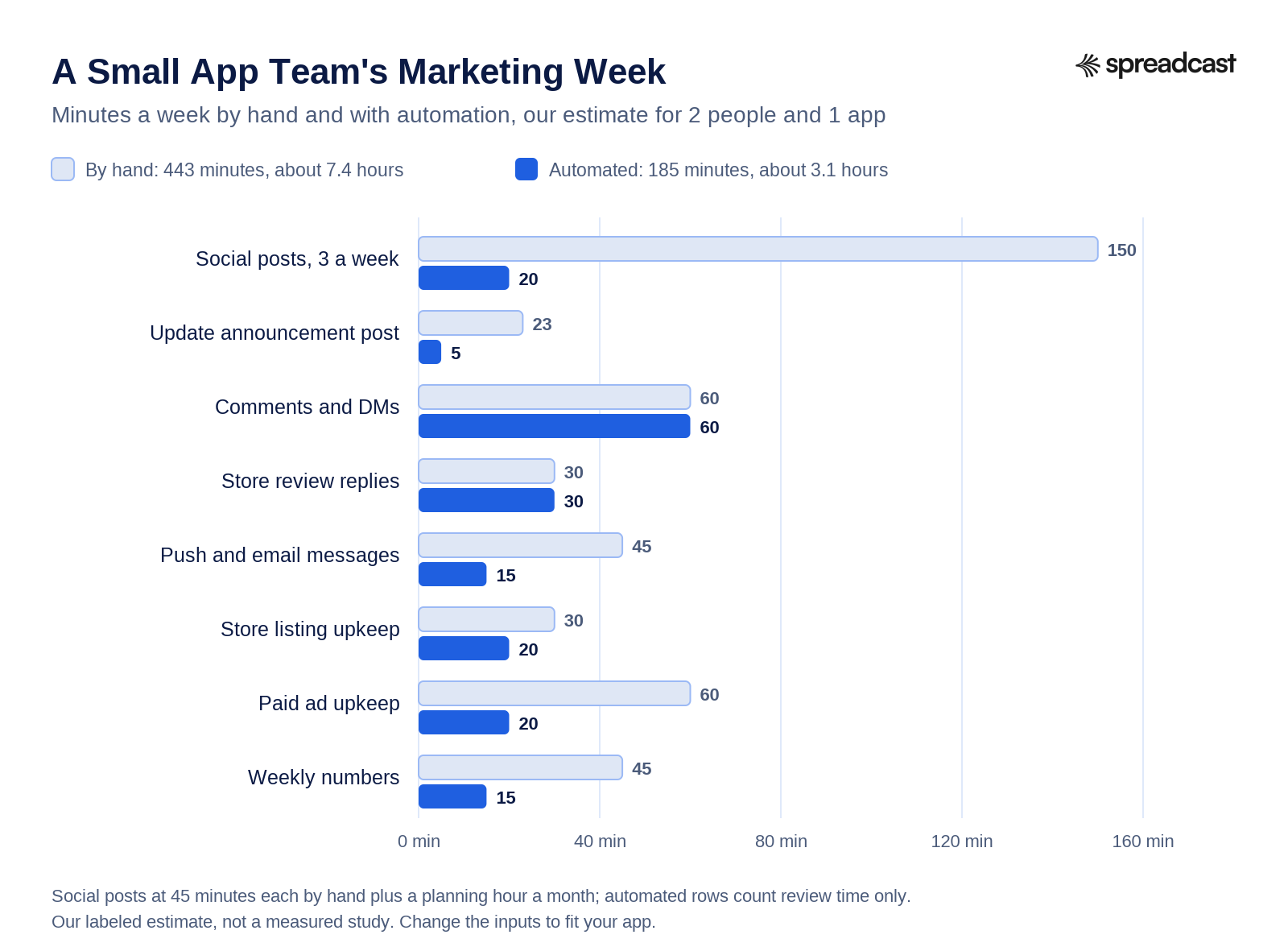
What a realistic week looks like for two people with one app on both stores, shipping an update every two weeks and posting three times a week. Minutes a week, by hand and with the automation from this page. These are our estimates, not a study; the method is under the table.
| Task | How often | By hand | Automated | What does the work when automated |
|---|---|---|---|---|
| Social posts | 3 a week | 150 min | 20 min | Spreadcast weekly plan; you approve or edit |
| Update announcement post | Every 2 weeks | 23 min | 5 min | Spreadcast app update post; you approve |
| Comments and DMs | Daily | 60 min | 60 min | You. Stays human |
| Store review replies | About 10 a week | 30 min | 30 min | You, with new reviews routed to you |
| Push and email messages | 1 send a week | 45 min | 15 min | OneSignal or Firebase journeys; you check results |
| Store listing upkeep | Weekly look | 30 min | 20 min | A running product page or listing experiment |
| Paid ad upkeep | Weekly | 60 min | 20 min | App campaign, Search Match or Advantage+; you check cost per install |
| Weekly numbers | Weekly | 45 min | 15 min | Store analytics and Spreadcast Analytics instead of a spreadsheet |
| Total | 443 min, about 7.4 hours | 185 min, about 3.1 hours | About 4.3 hours a week back |
Our estimate, November 2026. Social posts by hand use 45 minutes a post plus one planning hour a month (15 minutes a week); an update post counts as one post every two weeks. Automated rows count only the time to review, approve or read results. One time setup, about a weekend for onboarding messages and the rating prompt, is left out.
Where the Hours Go Each Week
The same estimate as a chart. Social posts are the largest single block by hand and the one that shrinks most once automated; replies stay where they are on purpose.
How the Weekly Estimate Was Built
We counted tasks, not tools. Each row is a job a small app team actually does every week, with a frequency we picked to match a typical indie app: one update every two weeks, three posts a week, about ten new store reviews and one paid campaign. If you ship weekly or post daily, scale the rows that change.
The by hand minutes are our assumptions. The 45 minutes per social post comes from our own breakdown of the work (finding the idea, making the picture, writing captions for each network, scheduling) in the cost of designing posts by hand. Review replies assume three minutes each. Push and email assume writing and sending one manual broadcast a week. Paid ads assume an hour of manual bid and keyword changes.
The automated minutes count only what a person still does: opening each post to approve or fix it, reading a journey's results, checking the cost per install. They assume the automation is already set up. The honest reading is the shape, not the decimals: social posts drop from the largest block to a small one, ads and messages drop by about two thirds, and replies to people do not drop at all, because they should not.
Plug in your own numbers before you decide what to automate. If your app gets 100 reviews a week, review replies are your biggest block and a review tool with alerts and saved replies is worth more to you than anything else on this page.
Which Mobile App Marketing Tools to Automate First
For a solo developer or a two person team with no marketer, in this order. Each step is cheap or free and pays back before the next one.
- 1
The Rating Prompt
A few lines of StoreKit or Play Core code, fired after a success moment. Ratings show next to your app in search results, and the prompt keeps asking the right people without you.
- 2
Store Analytics and Campaign Links
App Store Connect and Play Console are free. Tag every link you share, so you can see which posts and pages bring users who stay.
- 3
Social Posts From Your App
The job that stalls first. Automate the making, not only the posting: Spreadcast turns updates, ratings and your features into posts in your brand.
- 4
Three Onboarding Messages
Welcome, the one feature that makes people stay, and a nudge on day five. Firebase or OneSignal's free tier covers this.
- 5
One Store Listing Test
Test your first screenshot against a new one. Apple and Google split the traffic and report the winner at no cost.
- 6
Paid Ads, Last
Only once you know what a user is worth. Start with one automated campaign type and one target cost, and add an attribution tool the same month.
Where to Start by Type of App
The same six steps, weighted for the kind of app you make. Our recommendations, based on where each kind of app finds its users and what its users expect to hear about.
| Type of app | Automate first | Social networks to start with | Keep human |
|---|---|---|---|
| Subscription utility (habits, budgeting, notes) | Onboarding messages up to the trial's end; weekly Feature Spotlight and Problem and Fix posts | Instagram, Pinterest, Threads | How you explain a price change |
| Game | Update posts for each content drop; in app events and Play promotional content for live events | TikTok, YouTube, Discord | Discord moderation and player feedback |
| Productivity or work app | Release posts for each version; onboarding emails | LinkedIn, YouTube, Threads | Sales conversations and team demos |
| Social or community app | Review of the Week posts; reengagement nudges | Instagram, TikTok, Threads | Community rules and moderation |
| Paid upfront app | The rating prompt and one store listing test, since there is no trial to nurture | Instagram, Bluesky, Mastodon | Launch pricing and discounts |
| Tool for developers or makers | Release posts; Things to Try carousels | Bluesky, Mastodon, LinkedIn, Threads | Answering technical questions |
Our recommendations for teams without a marketer. Check where your own users are before you connect a network: the one your users open daily beats the one with the most users overall.
What an Automated Marketing Stack Costs a Small Team
Four ways to put the pieces together, from free to a studio with several apps. Prices are the published ones from each vendor's page; ad budgets are left out because they are yours to set.
| Stack | What it includes | Monthly cost |
|---|---|---|
| Free start | Rating prompt in code; store listing tests and App Store Connect Analytics; Firebase messaging and A/B tests; Spreadcast Free for your first 3 posts | $0 |
| Solo developer | Everything in the free start, plus Spreadcast Pro for the weekly plan, update and rating posts and Full Autopilot | $29 |
| Growing app | Spreadcast Pro plus OneSignal Growth for push, in app and email journeys, from $19 a month plus $0.012 per monthly active user for mobile push; AppsFlyer Zero for owned media measurement in the first year | From $48, rising with active users |
| Studio or agency | Spreadcast Studio for up to 5 apps and 3 seats, a lifecycle platform per app, an attribution tool once ads run | From $79, plus quotes for Braze, Airship or CleverTap |
Prices from each vendor's own page on November 25, 2026. Braze, Airship and CleverTap's Pro and Ultimate plans publish no price, so they are shown as quotes.
What Spreadcast Automates for Your App
Spreadcast is our product, and this is the part of app marketing automation it runs end to end: from your store listing to designed posts on 11 networks, with your numbers coming back to set the next posting time.
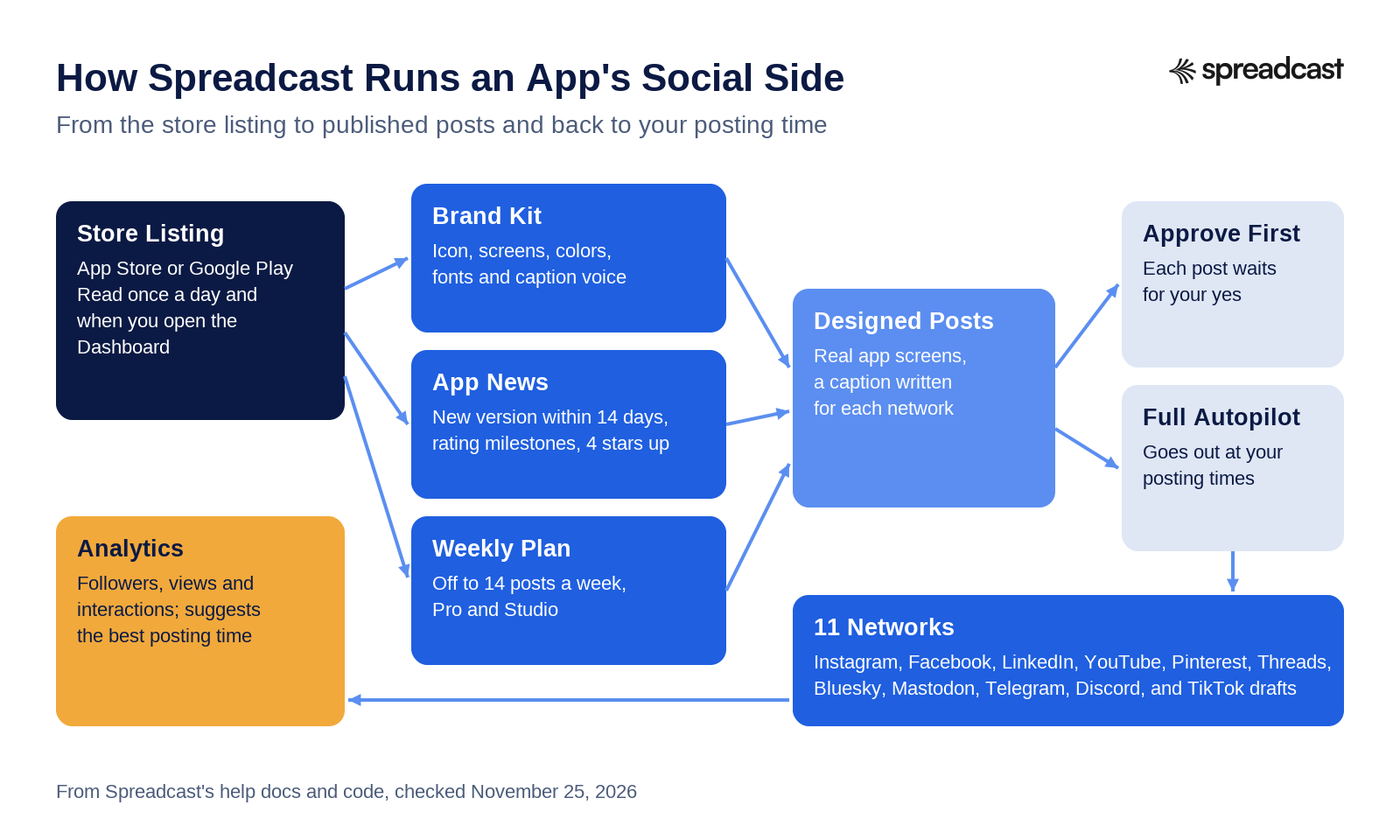
A Brand Kit Read From Your Store Listing
Spreadcast starts from the link to your app. Paste an App Store or Google Play URL and it reads your name, icon, screenshots and colors from the listing, picks fonts for your brand, and offers a caption voice (Plain, Friendly or Playful), each shown with a real sample caption for your app. You check it on the Brand page, change anything, and save. Every post after that is made from this kit, so the feed looks like your app and not like a template.
The screenshots matter most. Posts show your real app screens inside a phone: an iPhone for App Store apps, an Android phone for apps only on Google Play. If your store pictures are marketing designs rather than plain screens, Spreadcast asks for two or three screenshots from your phone instead, and those go in the frame. An app that is on both stores under the same name and developer counts as one app, and its posts link to both.
Nothing here needs a designer or a brief. For a product without an app, Spreadcast reads colors and what you do from a website instead; see your brand kit for every field.
For Every
Trail
App Updates and Rating Milestones Become Posts
Spreadcast reads your listing once a day, and again whenever you open the Dashboard. When a new version appears, it makes a post from your release notes with your own screens, labeled with the version, for example "New in 2.4", and the main change as its headline. A version counts for 14 days after release, so the post is ready while the news is fresh.
Ratings work the same way. Each time your app passes 100, 250, 500, 1,000, 2,500, 5,000 or 10,000 ratings and on up, while its average is 4 stars or more, you get a thank you post. Milestones count from the day you add the app, so the first one celebrates the next milestone you reach. Each kind has its own switch on the Autopilot card, and both start on.
Release notes are a craft of their own, and we cover them on a separate page: app update posts shows how a version becomes a post, and app updates and ratings has every rule.
A Weekly Plan Between Updates
Updates and milestones come when they come, so on Pro and Studio a weekly plan keeps the feed going between them. You pick how many posts a week on the Autopilot card: Off, 1, 2, 3, 5, 7 or 14. A paid plan starts at 3, on Monday, Wednesday and Friday. At 14, posts go out twice a day.
There are five kinds of weekly post, and they take turns, never the same kind twice in a row. A Feature Spotlight shows one feature with a real screen. A Review of the Week quotes a real review from your listing in the reviewer's own words, never the same one twice. Things to Try is a carousel of three features worth trying. Problem and Fix names a problem your users have and how the app solves it. A Seasonal Post marks a date that fits your app's store category, such as New Year for a fitness app or World Sleep Day for a sleep app, on the last post day before it.
Every idea comes from your own listing: the features your description names and the praise in your reviews. Each feature gets its turn before one comes back. The first plan fills the rest of the current week from tomorrow, even before you connect an account, so you see what is coming; after that each week is made about a week ahead, with a caption for each network in your voice. The details are in weekly posts.
Posts per Week and the Days They Go Out
The choices on the Autopilot card and the days each one posts on, from Spreadcast's weekly plan as it works today.
| Posts a week | Days | Good for |
|---|---|---|
| 1 | Tuesday | Keeping a quiet account alive |
| 2 | Tuesday and Thursday | A solo developer's first month |
| 3 | Monday, Wednesday and Friday | The default on paid plans; enough to count as consistent |
| 5 | Monday to Friday | Apps with many features or frequent reviews |
| 7 | Every day | Consumer apps on Instagram and TikTok |
| 14 | Twice a day, at your two posting times | Large apps with a lot of material |
From Spreadcast's weekly plan and its help page, checked November 25, 2026. Weekly posts need Pro, Studio or a 30 Day Pass; a new Free account sees a preview of its first week.
Approve First or Full Autopilot
You decide how much runs without you. On Approve First, where everyone starts, each post waits on the Dashboard with Approve, Edit and Skip. Approve schedules it: app news at your next posting time, a weekly post on its own day. On Full Autopilot, which comes with Pro, Studio and the 30 Day Pass, posts go out on their own at your posting times, and you can still open any post first, change it or send it sooner. You can switch at any time; see approve posts and how autopilot works.
Posting time is one setting: a time of day in steps of 15 minutes, starting at 9:00 in your own time zone, with a second time from 18:00 when you post 14 times a week. Approved app news goes to the next posting time at least half an hour away, on a slot with nothing else in the hour around it. Posting times explains the rules.
TikTok stays in your hands. Autopilot never posts to your TikTok feed on its own: with Send to Drafts, the default, TikTok posts land in your TikTok inbox, where you add a sound and post them; with Post to Feed, they wait on the Dashboard for one tap, because TikTok asks you to choose who sees each post. That follows TikTok's own rules quoted above, and it is the only network handled this way.
A real 5 star review from the App Store, shown big on the cover.
Analytics That Report Back
Automation without numbers is posting into the dark, so Spreadcast reads results back from the networks that share them. Analytics shows followers, views, interactions and posts published for 24 hours, 7 days, 30 days or any dates in the last 90 days, each compared with the period before. A Recommendations card turns the numbers into a next step: Create Similar Post when one kind did best, Apply Posting Times when a day and hour got the most interactions per post, Adjust Posting Plan when you post a lot for the size of your audience.
What comes back depends on the network. Instagram shares likes and comments; TikTok views, likes, comments and shares; YouTube views, likes and comments; Pinterest impressions, saves and clicks; Bluesky likes, replies, reposts and quotes; Mastodon favourites, boosts and replies; Telegram views and reactions on public channels. For posts on Facebook, LinkedIn, Threads and Discord, the post numbers are on the network itself. Social media analytics lists every card, and the analytics feature page shows it.
The loop is the point. Apply Posting Times takes you to the Dashboard to set the hour that worked, so next week's plan goes out when your audience answers most.
- Groceries$312
- Rent$1,100
- Coffee$46
A Month of Automated Posts: A Worked Example
Here is how the rules above play out over one month, for an invented habit tracker run by one developer, Alex. It is an illustration built from how Spreadcast works today, not a customer story, and it quotes no results.
Week one. On a Monday, Alex pastes the App Store link. Spreadcast reads the icon, screens and colors into a brand kit, and Alex picks the Friendly voice. Alex is on Pro, which starts at 3 posts a week. The first plan fills the rest of the current week from tomorrow, spread over the days that are left, so on a Monday signup three posts appear: a Feature Spotlight on streak reminders for Tuesday, a Review of the Week quoting a real five star review from the listing for Thursday, and a Things to Try carousel with three features for Saturday. Alex reads them on the Dashboard, changes one word in a caption, and approves them.
Week two. From now on the plan uses the regular days for 3 a week, Monday, Wednesday and Friday, and it was made about a week ahead, so Alex sees it before it starts: a Problem and Fix post about forgetting a daily habit for Monday, a Feature Spotlight on weekly charts for Wednesday and another Review of the Week for Friday. The kinds take turns, so no two in a row are the same, and no review is quoted twice. On Thursday Alex ships version 2.4. Within a day the daily check spots it and makes a post labeled "New in 2.4" from the release notes, with the new screens. Alex approves it, and it goes out at the next free posting time.
Week three. The app passes 1,000 ratings with a 4.6 average, so a thank you post joins the three weekly ones. Alex has edited two captions in three weeks, so on Sunday Alex switches the Autopilot card to Full Autopilot. TikTok stays on Send to Drafts: each TikTok post lands in the TikTok inbox, and Alex adds a sound and posts it from the phone in under a minute.
Week four. Analytics now has a few weeks of numbers, and the Recommendations card suggests Apply Posting Times for a weekday evening. Alex moves the posting time and leaves everything else alone. Over the month that is 14 posts (twelve weekly ones, one update and one milestone) across Instagram, Threads, Pinterest and TikTok drafts, with Alex's own time spent on approvals in the first three weeks, the TikTok sounds and replying to comments. If the month had held a date that fits the app's category, such as New Year for a health and fitness app, a Seasonal Post would have taken the last post day before it.
Post From Claude or ChatGPT With MCP
Some developers would rather ask than click. Spreadcast runs an MCP server, and MCP is an open standard for connecting AI applications such as Claude and ChatGPT to outside tools. Connect Spreadcast in Claude, ChatGPT, Claude Code or Cursor, sign in (Cursor and similar apps take a key instead), and choose Make Drafts or Make and Publish.
Then ask in plain words: "Make a post about the new widget in 2.4 for Instagram and LinkedIn", or "What did my posts do this week?". The assistant reads your brand kit, designs the picture with your real screens, writes the captions, and saves a draft for your approval or, if you allowed it, schedules it. App makers can also ask it to list moments, such as a new version or a rating milestone, and design the post for one. Every plan can design posts and save drafts this way; publishing from an assistant comes with Pro and Studio, and Free can publish its first 3 posts that way too. The MCP page has the setup for each assistant.
For a solo developer who already spends the day in Claude Code or Cursor, this puts marketing in the same window as the code: ship the build, then ask for the post.
Studio for Agencies and Studios Running Several Apps
A studio with five apps has five brands, five sets of accounts and five release schedules. Studio covers up to 5 brands, each with its own brand kit and its own connected accounts, plus 50 social accounts across them and 3 seats, so you and two teammates work in one place. Autopilot reads each app's own listing, so every app gets posts about its own updates, ratings and features. You switch apps in the bottom corner of the sidebar, and a post for one brand never lands on another brand's feed; Calendar and Drafts show the posts of all your brands together.
For agencies this is where the routine above multiplies. Five apps posting three times a week is fifteen posts, which by hand at 45 minutes each is over eleven hours a week; with weekly plans running, it is fifteen approvals. Managing several accounts explains how brands and accounts stay apart, and Spreadcast for agencies covers client work.
Spreadcast Next to a Lifecycle Platform
They do different jobs and most apps that grow use both. A lifecycle platform talks to people who installed the app; Spreadcast talks to people who have not heard of it yet.
| Lifecycle platform (Braze, OneSignal, Airship, CleverTap) | Spreadcast | |
|---|---|---|
| Who it reaches | People who installed your app | Followers and new people on 11 social networks |
| Where messages go | Push, in app, email, SMS | Instagram, Facebook, LinkedIn, TikTok, YouTube, Pinterest, Threads, Bluesky, Mastodon, Telegram, Discord |
| What starts it | A user's behavior in the app, after an SDK is installed | Your store listing: a new version, a rating milestone, the weekly plan. No SDK |
| Who writes and designs | You write each message | Spreadcast designs pictures and writes captions in your brand |
| Price model | By monthly active users; several publish no price | Flat: Free, Pro $29 a month, Studio $79 a month |
| Best first use | Three onboarding messages | Three posts a week from your app's real features and reviews |
What Spreadcast Costs
Every plan designs posts in your brand. What changes is how many get published, whether the weekly plan and Full Autopilot run, and how many apps you manage. Full details are on the pricing page.
| Plan | Price | For app marketing automation |
|---|---|---|
| Free | $0, no card | 1 app, 10 social accounts, 3 posts made for you and your first 3 published, update and rating posts spotted, a preview of your first week, a small Spreadcast mark |
| Post Pack | $19 once | 10 posts published to all your accounts, with no mark |
| 30 Day Pass | $39 once, nothing renews | Everything in Pro for 30 days, such as a launch month |
| Pro | $29 a month, or $290 a year | 1 app, 10 social accounts, posts made without limit, weekly plan, Full Autopilot or one tap approval, posting from Claude or ChatGPT |
| Studio | $79 a month, or $790 a year | Up to 5 apps or brands, each with its own kit and accounts, 50 social accounts, 3 seats |
From Spreadcast's plan settings, checked November 25, 2026. Yearly billing costs ten months. Pro and Studio come with a full refund within 7 days.
What to Keep Human
Automation should take the repeat work, not the relationships. These are the parts we recommend you keep, even with every tool above running.
Replies and Comments
Answer comments, DMs and store reviews yourself. A real reply from the developer is one of the few things a big competitor cannot copy, and it turns a complaint into a fix people see.
Community
Discord servers, subreddits and forums where your users gather run on trust. Show up as a person, answer questions, share what you are building. Post links there only where the community allows them.
Creator and Influencer Deals
Choosing who to work with, agreeing terms and briefing them is judgment work. Automation can make the assets they share, not the deal.
Launch Strategy
When to launch, on which channels, at what price and with which story is a decision. Plan it yourself, then let automation carry the launch posts and the weeks after. Our app launch checklist helps.
What You Say in a Crisis
An outage, a bad update or a privacy question needs a human answer fast. Move or delete the posts scheduled for the next days on the calendar first; on Approve First nothing goes out without you anyway.
Reading the Numbers Monthly
Recommendations help, but once a month look at what actually brought installs. Keep what works, drop what does not, and change the weekly plan to match.
Common App Marketing Automation Mistakes
The patterns that make automation cost more than it saves, and the fix for each.
Templated Replies to Reviews
Apple notifies the reviewer when you respond to a review, so a canned answer is read by the one person you most want to win back. Automate the alert, write the reply.
Twenty Journeys Before One Works
A lifecycle platform makes it easy to build a message for every event. Start with three onboarding messages, measure day 7 retention, then add one journey at a time.
Ads Before You Know What a User Is Worth
Automated bidding spends the budget it is given, efficiently. Without a target cost per install tied to what a user earns, efficient spending can still lose money.
Testing Everything at Once
Apple runs one product page test at a time and a test cannot be changed once it starts. Change the first screenshot or the icon, not both, so the result tells you something.
One Caption Pasted Everywhere
A LinkedIn reader and a TikTok viewer want different words. Automation should write a caption for each network, not copy one across eleven.
Links Nobody Can Trace
Social posts that link to the plain store URL show up as generic referrals. Use a campaign link in the bio and in posts, so you can see which installs social media brought.
How to Get the Most From Automated Posts
Automated posts work best with a few habits around them. Keep the store listing current, because Spreadcast's ideas come from it: a description that names your real features gives the weekly plan more to show, and every new review is a candidate for Review of the Week. Write release notes people can understand, since an update post leads with the main change in them.
Start on Approve First for two or three weeks and read every post before it goes. When you stop changing them, switch to Full Autopilot and look once a week. Connect the networks your users actually use rather than all 11; a quiet account on a network nobody in your audience opens adds little. For TikTok, leave Send to Drafts on and add a sound when you post, since that is the step TikTok wants a person to take.
Last, pair the feed with the free tools from earlier. Tag the link in your bio with a campaign link, so App Store Connect shows how many installs social sends you. That one number tells you whether posting is worth more of your time, and it costs nothing to find out. For a full plan beyond automation, see how to market an app and how to promote an app on social media; for the bigger picture of social tools, Spreadcast for mobile apps.
How We Researched This
On November 25, 2026 we checked what people search for (Google autocomplete for app marketing automation, automated marketing app, app marketing tools and mobile marketing automation) and read the pages that rank for mobile app marketing automation. Then we read each tool's own pricing or product page (OneSignal, CleverTap, Braze, Airship, Firebase, AppsFlyer), each platform's own documentation (Apple's product page optimization, custom product pages, in app events, ratings and reviews, Apple Ads, Search Match, AdAttributionKit, App Store Connect Analytics and notification permission; Android's notification permission; Google Play's store listing experiments, promotional content, In App Review API and Reply to Reviews API; Google Ads App campaigns; Meta's Advantage+ app campaigns; Instagram's content publishing limits; TikTok's content sharing guidelines), Pew Research's social media fact sheet and Buffer's posting study. Every fact links to the page it came from.
We ran no tests of other tools and quote no results we did not read. Where a vendor publishes no price, we say so. The weekly routine is our own estimate, labeled as one, with its inputs stated so you can replace them with yours.
Spreadcast's behavior was checked the same day in its code and help docs: the weekly plan and its post kinds and days, app update and rating milestone rules, approval and Full Autopilot, posting times, the TikTok setting, which networks report numbers, the assistant connection and the plans. If something changes, the help docs are updated first; start at features.
Frequently Asked Questions
What is mobile app marketing automation?
Software that runs a mobile app's repeat marketing jobs once you set the rules: onboarding and reengagement messages, store listing tests, install attribution, ad bidding, rating prompts and social media posts. Most tools sold under the name cover only the messages to installed users.
How can I automate marketing for my app as a solo developer?
In this order: a rating prompt after a success moment, store analytics with campaign links, social posts made from your app's updates and features, three onboarding messages on a free tier, one store listing test, and paid ads only once you know what a user is worth.
What are the best app marketing automation tools?
It depends on the job. OneSignal, Braze, Airship and CleverTap for push and email journeys, Firebase for free messaging and tests, App Store Connect and Play Console for listing tests and analytics, AppsFlyer for attribution, and Spreadcast for social media posts made from your app.
Can app marketing be fully automated?
Most of the repeat work can, but not all of it. Replies to users, community, creator deals and launch decisions should stay with a person, and TikTok asks you to choose who sees each post yourself.
Does Spreadcast replace Braze or OneSignal?
No, it does a different job. Braze and OneSignal message people who installed your app. Spreadcast makes and publishes social media posts that reach people who have not, so many apps use one of each.
How much does app marketing automation cost?
It can start at $0. Firebase messaging and both stores' listing tests are free, OneSignal's Growth plan starts at $19 a month, several lifecycle platforms quote by monthly active users, and Spreadcast is $29 a month on Pro.
Where These Facts Come From
Every outside number, rule and price on this page links to the page it was taken from.
- OneSignal pricingOneSignal
- CleverTap pricingCleverTap
- Braze pricingBraze
- Airship pricingAirship
- Firebase pricingGoogle Firebase
- Asking permission to use notificationsApple Developer Documentation
- Notification runtime permissionAndroid Developers
- Product page optimizationApple Developer
- Custom product pagesApple Developer
- In app eventsApple Developer
- Store listing experimentsPlay Console Help
- Promotional contentPlay Console Help
- Apple Ads for the App StoreApple
- Understand Search MatchApple Ads Help
- About App campaignsGoogle Ads Help
- Advantage+ app campaignsMeta for Developers
- AdAttributionKitApple Developer Documentation
- AppsFlyer pricing, full plan viewAppsFlyer
- App Store Connect AnalyticsApple Developer
- Ratings, reviews and responsesApple Developer
- Google Play In App Review APIAndroid Developers
- Reply to Reviews APIGoogle for Developers
- Content sharing guidelinesTikTok for Developers
- Instagram content publishingMeta for Developers
- What is the Model Context ProtocolModel Context Protocol
- Social media fact sheetPew Research Center
- Consistent posting studyBuffer
- Get started with product page optimizationApple Developer on YouTube
- Store listing experimentsAndroid Developers on YouTube
- Measure and improve acquisition with App AnalyticsApple Developer on YouTube
Researched and written by Mark Weizer. Last checked on November 25, 2026.