Apple Search Ads is Apple's own ad system for the App Store, and since April 14, 2025 it is called Apple Ads. You pay to show your app in four places: in search results, at the top of the Search tab, on the Today tab and in the You Might Also Like list on other apps' product pages. Apple Ads Advanced charges per tap and lets you choose keywords and bids. Apple Ads Basic charges per install, runs only in search results and caps spending at $10,000 a month per app. In 2025 the median search results tap cost $0.92 worldwide and $1.91 in the US, and the median install $1.80 and $4.06, according to AppTweak's 2026 benchmarks. A sensible start is Advanced, a brand campaign and a small daily budget, judged by cost per paying user rather than cost per install.
That is the short version. The rest of this guide is the detail: what changed with the rename, where each ad shows, how Basic and Advanced differ, what four published benchmark reports say about cost, how to build a first campaign in the order Apple recommends, how attribution works under Apple's privacy rules, the mistakes that waste budget, a plan for a developer with a few hundred dollars a month, and how paid search fits next to App Store optimization and social posts. Every Apple rule here comes from Apple's own help pages, and every number links to the page it came from. All of them were opened on November 12, 2026.
This page is about Apple's ad product only. If you are choosing between paid channels (Apple Ads, Meta, TikTok, Google and the rest), start with the broader guide on how to advertise an app, then come back here for the App Store part.
What Is Apple Search Ads?
Apple Search Ads is a self serve auction that sells ad space inside the App Store, run by Apple, using data Apple already has about what people search for and download. It launched in 2016 with one placement, an ad at the top of search results. Apple has since added the Search tab, the Today tab and product pages, and that growth is the reason for the new name. In a note to developers reported by 9to5Mac on April 14, 2025, Apple wrote that advertisers can now run ads in multiple placements across the App Store, so it had decided to change the name. The Apple Ads news page lists the same day with the headline "Apple Search Ads is now Apple Ads".
The appeal is the audience and the moment. On its App Store advertising page, Apple says more than 850 million people visit the App Store every week, that 70% of visitors use search to find apps, and that almost 65% of downloads happen directly after a search. The last two figures are from 2022 App Store data, as Apple's own footnotes say. The same page claims conversion rates over 60% for ads at the top of search results, measured from November 2024 to October 2025. A person typing "budget tracker" into the App Store is already holding the phone they would install on, already looking for an app, and one tap away from the Get button. Few ad channels get that close to the download.
You still pay for that closeness, and the price varies a lot by category and country, which the cost section below breaks down. Apple Ads also only works for apps that are live (or on pre order) on the App Store. It does nothing for a website, an Android app or an app that is still in TestFlight. If you are new to the store itself, our guide to the Apple Developer Program covers the account you need first.
Apple Search Ads or Apple Ads: Which Name to Use
Both names refer to the same product, the same accounts and the same help center. Apple's pages now say Apple Ads everywhere, the sign in pages moved with the rename, and Apple Ads also sells ads on Apple News and, since August 21, 2026, on Apple Maps in the United States and Canada, per the news page. Most developers, agencies and tools still say Apple Search Ads or ASA, and people search for both. In this guide "Apple Ads" means the App Store product unless a sentence says otherwise. If you find a guide that talks about "Search Ads Basic" or "Search Ads Advanced", the advice may still hold, but check its numbers: several rules changed in 2025 and 2026, and they are listed in the next section.
What Changed in 2025 and 2026
Apple Ads changed a lot in 2025 and 2026. These are the changes that matter for a new advertiser, in date order, from Apple's news page and help center.
| Date | Change | What it means for you |
|---|---|---|
| April 10, 2025 | Apple Ads registered with AdAttributionKit, starting with SKAdNetwork versions 1 to 3, per Apple's attribution overview | Apple Ads installs can now be compared side by side with installs from other ad networks |
| April 14, 2025 | Apple Search Ads renamed Apple Ads | Same product and accounts, new name and sign in pages |
| December 17, 2025 | Apple announced more ads per search, further down the results | More ad slots per query; you cannot pick or bid for a slot |
| February 25, 2026 | Maximize Conversions bid strategy launched for search results | An auto bidder that aims at a target cost per install you set |
| March 3, 2026 | Extra search results ads started in the UK and Japan, then the US and other markets by the end of March, per MacRumors | Existing search results campaigns became eligible automatically |
| June 2026 | Campaigns using a lifetime budget were paused, per Apple's budget help page | Every campaign now runs on a daily budget |
| June 8, 2026 | Apple announced creative assets: images and videos you design yourself, coming to Today tab and search results ads | Ads will no longer have to reuse your App Store screenshots |
Where Apple Ads Show on the App Store
Apple Ads Advanced offers four placements, according to Apple's placement overview. Every ad is built from the metadata and assets you already uploaded in App Store Connect, and every ad carries an ad disclosure icon. Some app categories cannot run ads on some placements because of Apple's policies, and that can vary by country.
| Placement | Where people see it | What the ad shows | Keywords | Where a tap goes |
|---|---|---|---|---|
| Search results | In the results after someone searches, at the top or further down | Your app name, icon, subtitle and screenshots or app preview, from the default page or a custom product page | Yes, or Search Match | Default product page or a custom product page, with an optional deep link |
| Search tab | Top of the suggested apps list, before anyone types | App name, icon and subtitle | No | Default product page or a custom product page, with an optional deep link |
| Today tab | The front page of the App Store | App name, icon and subtitle over animated assets from a custom product page | No | A custom product page, with an optional deep link |
| Product pages | Top of the You Might Also Like list at the bottom of other apps' pages | App name, icon and subtitle | No | Your product page |
Search Results Ads
This is the original placement and the one most budgets go to. Apple's search results page says your ad can appear at the top of the results or further down the page. Since March 2026 more than one ad can show for the same search, and Apple's page is clear on one point: your ad can show in any of the available positions, and you cannot select or bid for a particular one. Apple weighs relevance and bids together, and an app that is not relevant to the search will not show, whatever you are willing to pay.
Search results are also the only placement with keywords. You either pick the keywords and bids yourself (Manage Bids) or let Apple's auto bidder choose (Maximize Conversions). Both are covered in the setup section.
Search Tab Ads
A Search tab ad sits at the top of the suggested apps list that people see when they open the Search tab, before they type anything. It reaches the same searching audience a moment earlier, without a keyword. That makes it a reach play: lots of people see it, few tap. Since July 2022 Search tab campaigns are priced per tap, per the Apple Ads news page, so you only pay when someone does.
Today Tab Ads
A Today tab ad is the first thing people see when they open the App Store. Apple says more than half a billion people start their App Store visit there each week. The ad shows your app name, icon and subtitle, with assets from a custom product page animating in the background in a color taken from your icon. You must pick a custom product page as the destination, and the name, icon, subtitle and page assets all have to be approved for advertising first. Apple positions it for launches, events and seasonal pushes. It is the most expensive way to buy an install, as the benchmark figure below shows, so it is rarely the right first campaign for a small app.
Product Page Ads
Product page ads show at the top of the You Might Also Like list to people who have scrolled to the bottom of another app's page. They reach people who are comparing apps, and you can let them run across all categories or limit them to the ones you choose. They are not available on the App Store in mainland China.
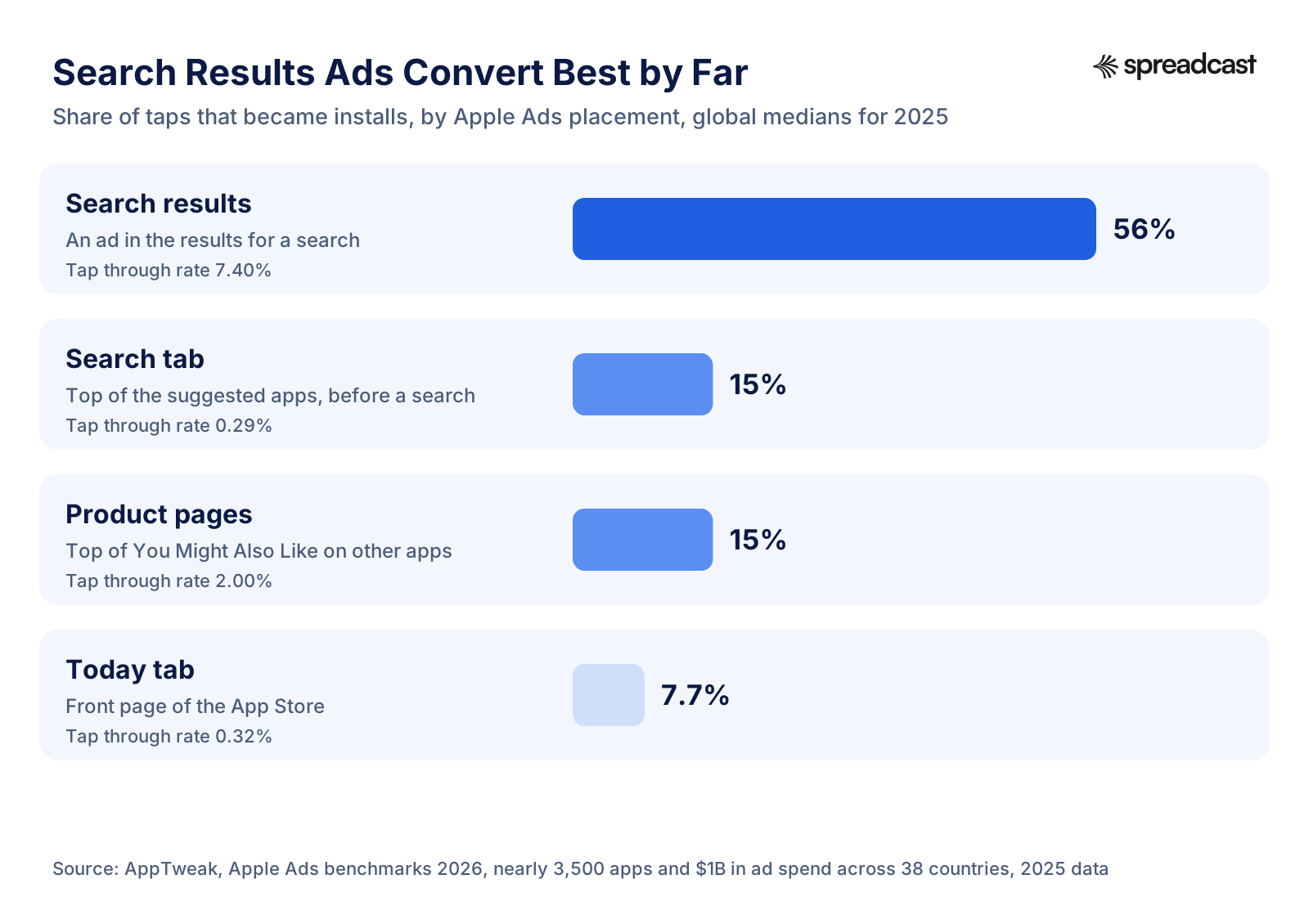
Read the chart as intent. Someone who typed a search and saw your app in the results is close to a download: more than half of those who tap install. Someone browsing the Today tab was not looking for anything, and fewer than one in ten taps turns into an install. That is why most small advertisers spend almost everything on search results and add the other placements only once search is working.
Countries and Regions
Apple's placement table lists the Today tab, Search tab and search results in 91 countries and regions, and product pages in 90 (all but mainland China). Advertising in mainland China needs your business and app to be approved first. In some markets, Brazil among them, Apple's campaign setup page says your app's metadata and screenshots must be translated into the local default language before a campaign can run there.
Apple Ads Basic vs Advanced
Apple sells two versions. Apple's comparison page sets them side by side. The table follows it, with a few details from Apple's other help pages.
| Feature | Apple Ads Basic | Apple Ads Advanced |
|---|---|---|
| Built for | Developers | Developers, advertisers and agencies |
| Placements | Search results only | Today tab, Search tab, search results and product pages |
| You pay for | An install (cost per install, CPI) | A tap (cost per tap, CPT) |
| Cost control | A maximum cost per install you choose | A maximum price per tap, or a target cost per install with Maximize Conversions, plus a daily budget |
| Budget limit | Up to $10,000 per app per month | No maximum |
| Apps | Up to 50 | Unlimited |
| Keywords | None, automation matches your ad | You choose them in Manage Bids campaigns |
| Audience settings | None | Device, customer type and location within some countries |
| Custom product pages | Not offered | Yes, as ad variations and tap destinations |
| Reporting | A quick view dashboard | Detailed reports and Insights across the account |
| APIs | AdServices attribution API only | AdServices attribution API and the Apple Ads Platform API |
Apple Ads Basic
Basic is Apple's set and forget option. Apple's Basic page describes it as paying only for installs at a price you set, with the ad created automatically. Setup has four steps on Apple's Basic help page: choose an app (you can promote up to 50), choose the countries or let it run everywhere your app is sold, add a monthly budget that is shared across all those countries, and set a maximum cost per install. Apple suggests a maximum CPI based on your app and on what other developers pay to reach the same users, and recommends you use it so your ad is more likely to show.
Basic suits a developer who wants downloads without learning a new tool, and who is happy not to know which searches brought them. The trade off is control. You never see keywords, you cannot add negative keywords to stop the ad showing for the wrong searches, you cannot use a custom product page, and the dashboard shows installs and spend rather than anything you can act on. Because you pay per install, Basic also hides the tap price from you. If Apple's suggested CPI is $3.50 in your category, you pay up to $3.50 per install and learn little else.
Apple Ads Advanced
Advanced is the full product: all four placements, keywords, match types, negative keywords, audience settings, custom product pages, reports by keyword and search term, and the API. It charges per tap, so you pay when someone taps your ad whether or not they install. That sounds riskier than paying per install, but because more than half of search results taps turn into installs, the cost per install usually lands around twice the cost per tap: $0.92 per tap and $1.80 per install worldwide in 2025, in AppTweak's medians. In exchange you see which search terms bring installs, which do not, and what each one costs. That information is what makes a budget better each week.
Which One Should You Pick?
Pick Basic if you have under an hour a month to spare, your app sells in many countries, and you only want a steady trickle of paid installs at a known price. Pick Advanced if you want to protect your brand name from competitors, need to know which keywords pay back, plan to spend more than a few hundred dollars a month, or have a subscription app where some searches bring buyers and others bring browsers. For most people reading this guide, Advanced is the better start, because the search terms report shows you where the money goes from the first week.
You can use both, but Apple's help page on switching warns that running Basic and Advanced for the same app gives no advantage in the auction. Only one ad per app is eligible for each auction, so you may simply move impressions from one to the other, and optimizations made in Advanced are not considered in Basic. One more detail from the account setup page: if you start creating an Advanced account and try to switch to Basic before you finish, you get an error. Finish the Advanced account and link it to App Store Connect first.
How Much Does Apple Search Ads Cost?
There is no price list. Every ad slot is sold in an auction, and you set the most you are willing to pay. In Advanced that ceiling is a maximum cost per tap. Apple's bidding page says you only pay if your ad is the one shown and someone taps it, that you never pay more than your maximum, and that the actual price is often lower. It comes from Apple's dynamic pricing, which weighs relevance, your bid, other advertisers' bids, the user experience and, in some auctions, a reserve price. In Basic you set a maximum cost per install instead. With the Maximize Conversions strategy in Advanced you set a target cost per install, and the auto bidder aims to hit it on average.
Apple does not publish average prices. The public benchmarks come from companies that sell Apple Ads software or services and report on their own customers' campaigns. Each one uses a different set of apps, so their numbers differ. Here are the four main reports, all published in 2026.
| Report | Data behind it | Cost per tap | Cost per install | Conversion rate | Tap through rate |
|---|---|---|---|---|---|
| AppTweak, global | Nearly 3,500 apps, 50,000 campaigns, $1 billion in spend, 38 countries; medians | $0.92 | $1.80 | 56% | 7.40% |
| AppTweak, US | Same dataset, US only; medians | $1.91 | $4.06 | 55% | 6.60% |
| SplitMetrics | Its 2026 search results benchmarks report on 2025 data, top 15 categories; averages | $2.25 | $3.76 | 66.2% | 9.7% |
| MobileAction | MobileAction and SearchAds.com customer data for 2025 | $1.26 in Q2, rising to $1.88 in Q4 | $2.51 | 65.82% | 8.08% |
| Adapty, US | Subscription apps in Adapty's dataset | $1.58 | $2.51 | 62.7% | Not given |
All figures are for search results ads. "Conversion rate" here means installs divided by taps, as MobileAction's methodology page defines it, and SplitMetrics and MobileAction call the cost per install CPA, cost per acquisition. The spread between reports is normal. Medians sit below averages because a few very expensive apps pull an average up. A dataset heavy in games or in cheap markets shows lower costs than one heavy in US finance apps. Use the reports to sanity check your own numbers, not as a quote: if your US cost per install sits between $2.50 and $4 in an ordinary category, you are in the range everyone reports.
Apple Search Ads Cost per Tap
The cost per tap (CPT) is what Advanced bills you for: spend divided by taps. It depends most on the country, the category and the keyword. AppTweak publishes the median search results CPT for seven large markets in its 2026 benchmarks.
| Country | Median cost per tap, 2025 | Median cost per install, 2025 | Conversion rate |
|---|---|---|---|
| United States | $1.91 | $4.06 | 55% |
| United Kingdom | $1.35 | $2.60 | 57% |
| Canada | $1.17 | $2.24 | 56% |
| Australia | $1.15 | $2.19 | 56% |
| Japan | $1.11 | $2.57 | 46% |
| Germany | $1.11 | $2.14 | 55% |
| France | $0.92 | $1.78 | 57% |
Japan shows why a cheap tap is not always a cheap install: its tap costs the same as Germany's, but only 46% of taps convert, so the install costs more. The gaps get much wider outside these markets. AppTweak's medians put an install at $1.05 in Brazil, $0.89 in India and $0.73 in the Philippines. Adapty reports in its Apple Ads guide that the tap price varies about 14 times between the US and Algeria. Cheap markets are only a bargain if people there will pay for your app, which is the question the indie budget plan below starts from.
Prices also move through the year. In AppTweak's US data, the cost per tap on generic keywords peaks in November at 8.8% above its yearly average and bottoms out in January at 10.3% below it, while brand keywords peak in September and fall to 8.7% below average in December. SplitMetrics found September the most expensive month across its data and named April as the most cost efficient. If you can choose when to test, avoid starting in the autumn rush.
Apple Search Ads Cost per Install
The cost per install (CPI, or CPA in most tools) is spend divided by installs. In Advanced it follows from two numbers you can see every day: CPI equals cost per tap divided by conversion rate. A $2.00 tap that converts 50% of the time is a $4.00 install. A $2.00 tap that converts 70% of the time is a $2.86 install. That second lever is in your hands. The same bid gets cheaper installs when your product page convinces more of the people who tap, which is why a better page lowers your ad cost.
Medians do not multiply neatly, so do not try the formula on the benchmark tables. Use it on your own campaigns, and use our cost per install benchmarks to compare Apple Ads with Meta, TikTok and Google installs. The install is still not the goal. What you want to know is the cost of a paying user, which is the cost per install divided by the share of installs that pay. A $4.00 install that turns into a subscriber 2% of the time costs $200 per subscriber. Whether that is good depends on what a subscriber is worth, and our LTV to CAC ratio guide shows how to work that out.
Apple Search Ads Cost by Category
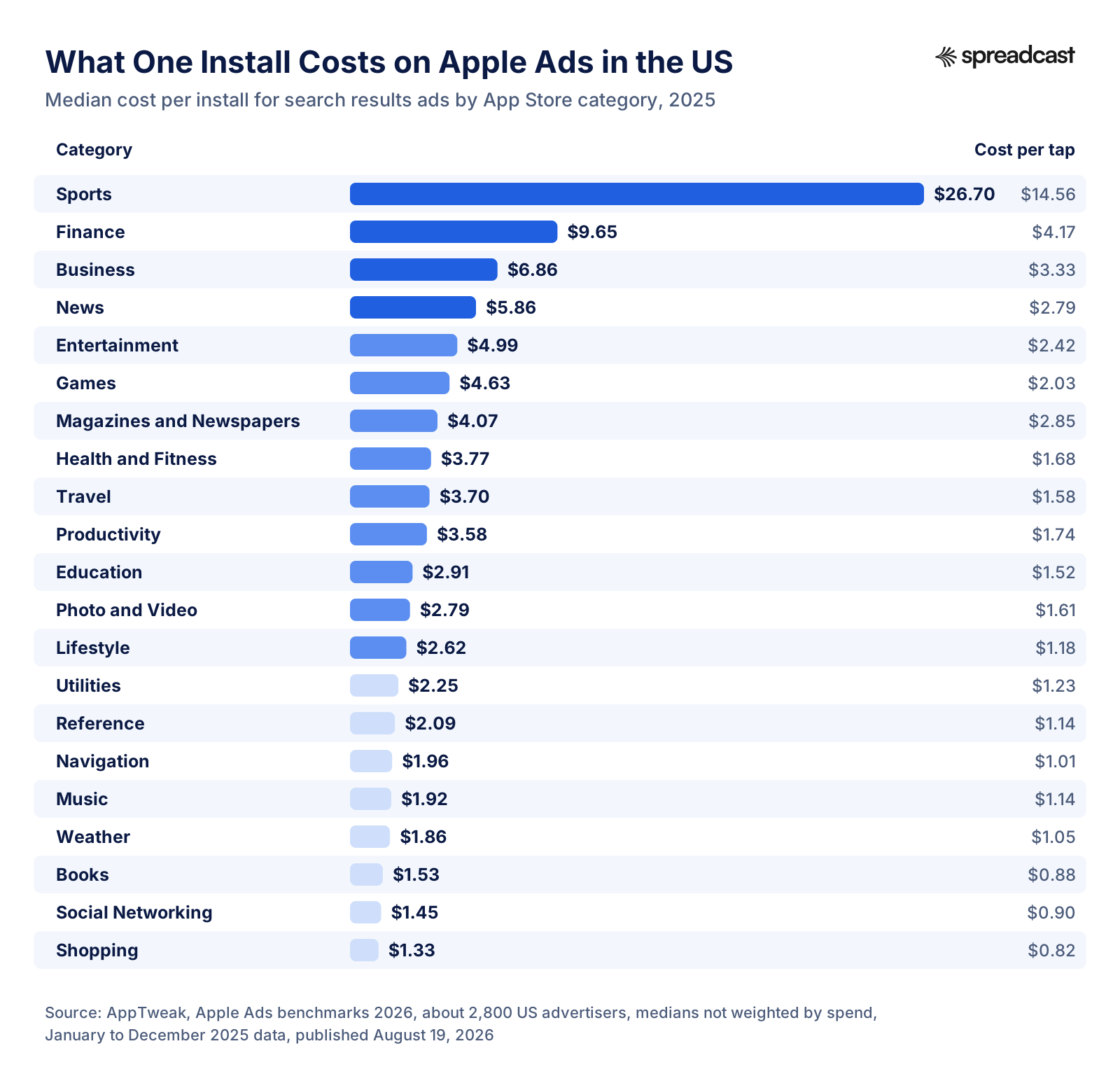
Categories get expensive when a single user is worth a lot to some of the advertisers in them. Where one new customer can be worth hundreds of dollars, as with a bank account or a brokerage, those advertisers bid high and set the price for everyone else on the same keywords. If your sports app is a free workout timer, you are in the same auction as companies that can pay $26 for an install, and broad sports keywords will rarely be affordable. Narrow, specific keywords that the big spenders do not bid on are your way in.
At the other end, Shopping, Social Networking and Books installs cost well under $2 at the median. Low prices there reflect apps that make little per user, so a cheap install is not automatically a good deal. Adapty's data, which looks at 59 narrower niches, shows the same spread from the subscription side: a download costs $0.34 for screen recorders, $0.60 for VPN apps, $3.02 for health and fitness, $3.97 for yoga and $10.34 for exam preparation, per its Apple Ads guide. Look up your own niche before you set a budget.
Cost by Campaign Type: Brand, Category, Competitor, Discovery
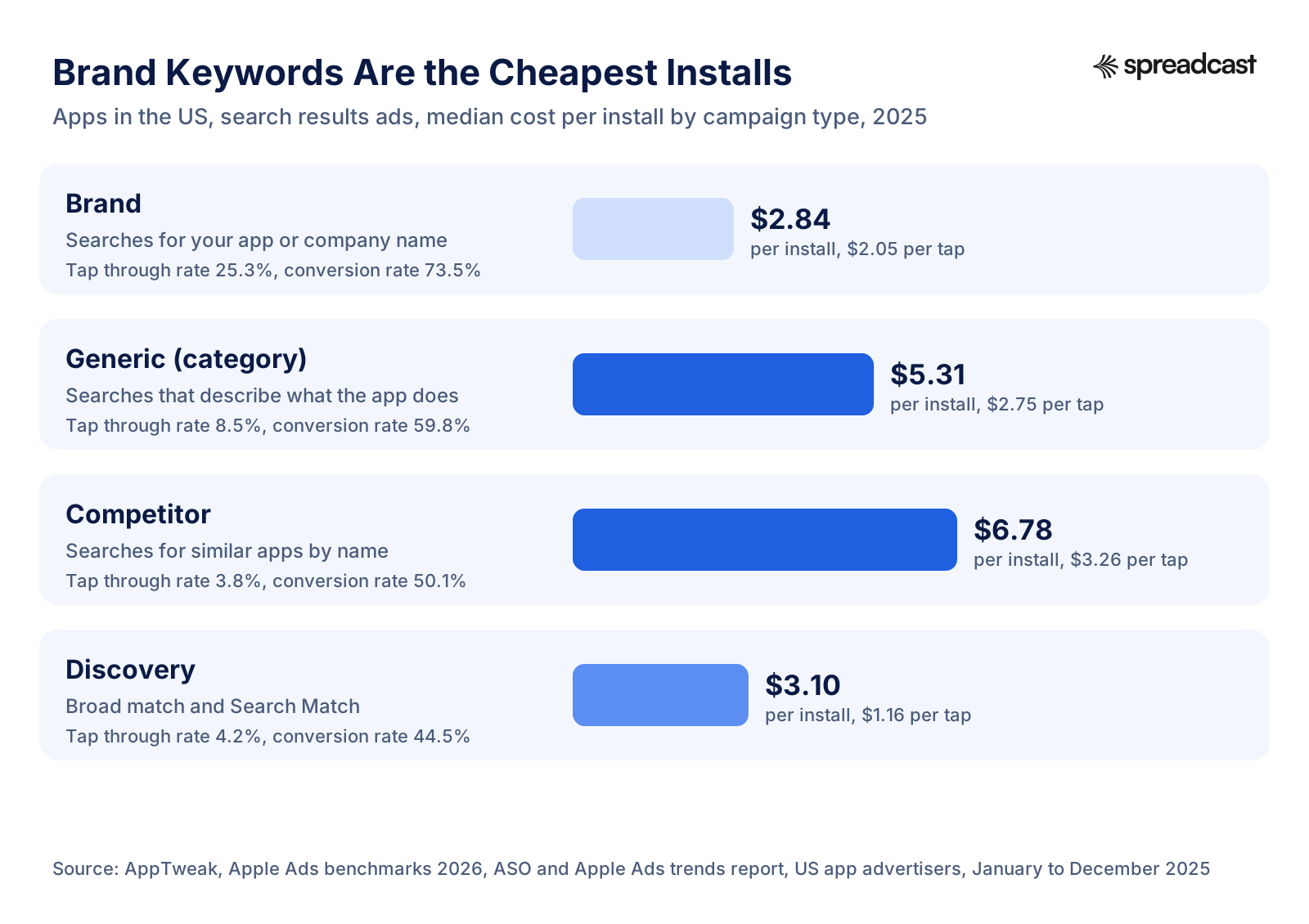
The pattern is consistent. A quarter of people who see your ad when they searched for your name tap it, and almost three quarters of them install. Someone who searched for a competitor by name is a much harder sell: fewer than 4% tap and half of those install, so each install costs more than twice as much. Generic keywords sit in between. Discovery campaigns look cheap per install, but much of that is because they catch long, odd searches with little competition, and the volume is unpredictable.
Two lessons follow. First, a brand campaign is the cheapest insurance you can buy: it costs little, and without it a competitor can sit above your own app when people search your name. Second, the number of people searching your name sets a ceiling on how much cheap traffic you can buy. Growing brand searches (through press, social posts and word of mouth) makes your whole Apple Ads account cheaper. The section on ASO and social below comes back to this.
What the Other Placements Cost
Apple's placement table says every placement uses cost per tap pricing, and only search results support a target cost per install. The other placements reach people who were not searching, so their numbers look very different. MobileAction's 2026 report puts the 2025 Search tab average at $0.95 per tap and $1.81 per install, with 1.25% of viewers tapping and 54.58% of tappers installing. Its Today tab ads converted 18.66% of taps and product page ads 17.99%. AppTweak, from a different dataset, reports lower placement conversion rates (shown in the chart above) and a global median of $3.53 per 1,000 Today tab impressions. That is spend divided by views; Apple still bills these ads per tap. Treat Today tab and product page ads as awareness spending and judge them over weeks, not by the first day's installs.
Apple Search Ads Minimum Budget
Apple's help pages state a maximum for Basic, $10,000 per app per month, and no minimum for either version. In Advanced you set a daily budget, and Apple's budget page explains how it caps the month: spend can go above the daily budget on busy days, but the monthly total will not exceed the daily budget times 30.4, the average number of days in a month. A $100 daily budget therefore means at most $3,040 a month. Campaigns keep spending every month until you pause them, remove them or set an end date. Your maximum tap bid also has to be lower than your daily budget, per Apple's bidding page.
Billing follows spend. Apple's billing page says charges usually happen every $500 spent or every seven days, whichever comes first. Set the account's time zone and currency carefully when you sign up: the account setup page says they cannot be changed later, and billing runs on UTC whatever time zone you pick.
The practical minimum is the budget that buys enough taps to learn something. At $2 a tap and a 55% conversion rate, $10 a day buys about five taps and close to three installs a day, or roughly 80 installs a month. That is enough to see which keywords convert after two to four weeks. At $3 a day you will wait months for the same answer.
App Store Ads Free Credit
New accounts get a one time $100 credit. Apple's promo credit page says you are eligible if you are a developer and registered account holder on App Store Connect with at least one app on sale in a supported country. You must link your top level Apple Ads account (not a campaign group) to App Store Connect to receive it. The credit shows on the Billing page once you add a payment method and is converted to your account currency if you do not pay in US dollars. It is subject to Apple's promo credit terms. $100 buys roughly 25 to 40 US installs at the medians above, which is enough to see whether your brand and best category keywords convert, not enough to judge a whole strategy.
How to Set Up Your First Apple Search Ads Campaign
This is the order that works for a first Advanced account, built from Apple's campaign creation steps and account setup page. Plan on an hour for the account and the first campaign, then ten minutes a day for the first two weeks.
- Check that you are ready. Your app must be live on the App Store, and you need the Apple Account that is tied to your App Store Connect account. Decide which countries you will start in and how much you can spend per month without needing the money back next month.
- Create the account. Click Get Started on the Apple Ads site and sign in with that Apple Account. Fill in the account name, country, currency, time zone, legal entity name, whether you act as an agent and the main contact, then accept Apple's advertising terms and complete the business details with your tax information. Choose the currency and time zone with care, because neither can be changed later.
- Add a payment method. A campaign you create before adding one starts running the moment a valid payment method is added, unless you set its status to Pause or schedule a start date. If you want to review everything first, create campaigns paused.
- Link App Store Connect. Linking the top level account is what makes you eligible for the $100 credit, and signing up with the same Apple Account lets you target users of your other apps later.
- Create a campaign. Click Create Campaign, choose the app, choose search results as the placement and pick one country to start. One country keeps the data readable and the budget under control.
- Name the campaign after its job, such as "US Brand" or "US Category", and set a daily budget. Remember that the monthly ceiling is the daily budget times 30.4.
- Choose a bid strategy: Manage Bids to pick keywords and bids yourself, or Maximize Conversions to set a target cost per install and let Apple's auto bidder do the rest. For brand and competitor campaigns, Manage Bids is the clearer start.
- Set up the ad group: a default maximum cost per tap, audience settings (leave them broad at first) and the keywords for this campaign's theme, in exact match.
- Choose the ad. The default ad uses the screenshots and app previews from your default product page in the order you uploaded them. If you have a custom product page that fits the theme better, create an ad variation from it.
- Start the campaign, then check the Search Terms report daily for the first week. Add negative keywords for searches that are clearly wrong, and leave bids alone for several days before judging them.

How to Structure Apple Search Ads Campaigns
Apple recommends separating search results campaigns by keyword theme, and its campaign structure page names four campaign types to start with. Separate campaigns mean separate budgets, so a cheap brand campaign is never starved by an expensive category one, and each report answers one question.
| Campaign | Who it reaches | Keywords | Match type |
|---|---|---|---|
| Brand | People searching for your app or company name | Your app name, your company name and common misspellings | Exact |
| Category | People searching for what your app does, without a brand | Descriptive terms such as "habit tracker" or "pdf scanner" | Exact |
| Competitor | People searching for similar apps in the same or a related category | Names of comparable apps | Exact |
| Discovery | A wider audience, to find new search terms | Ad group 1: all keywords from the other three campaigns in broad match, Search Match off. Ad group 2: no keywords, Search Match on | Broad, plus Search Match |
The discovery campaign feeds the other three. Every week, look at the search terms it paid for. Terms that brought installs at a good price move into the right exact match campaign as new keywords. Terms that wasted money become negative keywords. Then add every keyword from the exact campaigns as a negative in discovery, so the two do not bid against each other for the same search.
Competitor bidding needs some judgment. Apple lets you bid on other apps' names, and some developers do it to win customers who are already shopping for something like theirs. It costs more per install, as the campaign type chart shows, and it invites the same in return. If you start one, keep its budget small and judge it on paying users, not installs.
Apple Search Ads Keywords and Match Types
There are two match types, explained on Apple's match type page. Broad match is the default for new keywords. It runs your ad on related searches and variants: Apple's example is that the broad keyword "photo edit free" might match "app for editing photos", "photo collage maker" or "photo filters". Exact match is narrower. You mark it with brackets, like [photo edit free], and it matches that term and close variants such as misspellings, reordered words and translations. Exact match usually gets fewer impressions but higher tap through and conversion rates.
One rule catches many beginners: once a keyword is added, its match type cannot be changed. To switch, you pause the keyword and add it again with the other match type. Decide before you upload.
Negative keywords stop your ad from showing for searches you do not want. Apple's negative keyword page uses the example of a women's fitness app adding "men's fitness" as a negative. Negative keywords default to exact match, which blocks only that exact term and not close variants. A broad negative blocks any search that contains all of its words in any order. You can bulk upload up to 5,000 negative keywords per ad group.
For a starting keyword list, reuse your App Store keyword research. The terms you chose for your title, subtitle and keyword field are the same terms you want to appear for in ads, and our App Store optimization guide explains how to find and rank them. Apple Ads Advanced also suggests keywords with estimated results for search results campaigns, according to Apple's placement table. After a week of running, the Search Terms report becomes your best source: it shows the real searches that triggered your ad.
What Search Match Does
Search Match lets Apple match your ad to searches without you listing the keywords. It reads the metadata on your App Store listing, information about similar apps in the same genre and other search data. It is on by default in Manage Bids search results campaigns and required in the automatic ad group of a Maximize Conversions campaign. It is useful for discovery and risky everywhere else, because it spends money on searches you have not seen yet. Keep it in its own ad group, add negatives as you find bad matches, and turn it off in your brand, category and competitor ad groups.
How to Set Your First Bids
Apple's bidding page gives a simple method. Decide what you can afford for one new customer, say $2.50. Estimate what share of people who tap will install, say 40%. Multiply: 40% of $2.50 is $1.00, so start with a $1.00 maximum cost per tap. When you create a Manage Bids ad group, Apple also shows a suggested bid based on your app and on what advertisers with similar apps pay. Treat it as a reference point, as Apple does.
For the tiers, Apple's bid considerations page recommends the most aggressive bids on important exact match keywords, strong bids on broad match versions of similar keywords, and lower bids on new terms found by Search Match. It suggests raising a bid when a keyword brings installs below your target cost, or when a relevant popular keyword gets few impressions because others outbid you. It suggests lowering a bid when a keyword gets taps but few installs at a cost above your target. A bid set on one keyword overrides the ad group's default for that keyword only.
Changes take time to show. Apple notes that a new bid may not take effect right away, so change bids in small steps and wait several days between changes. A keyword that got two taps yesterday has told you nothing yet.
Maximize Conversions or Manage Bids
Maximize Conversions arrived on February 25, 2026, per the news page. Apple's Maximize Conversions page describes it as a search results strategy that tries to get the most tap through installs at a target cost per install you set. An auto bidder sets the bid for each search, and Search Match picks the keywords. Apple creates an automated ad group with Search Match on and the audience set to reach all eligible users. You can add a second ad group with your own keywords and audience settings, but you cannot set keyword bids. On any given day the actual cost per install may be above or below the target. Apple recommends letting a campaign run for at least two weeks before changing the target, and its search results page says the strategy is designed for apps already released: for an app on pre order, use manual bids.
Maximize Conversions saves time, and it can find searches you would not have thought of. It also optimizes for installs, not for the people who pay. Adapty's Apple Ads guide warns that an auto bidder fed only download data drifts toward cheap downloads rather than subscribers. A sensible split for a small account: run brand and competitor campaigns on Manage Bids with exact keywords, and test Maximize Conversions on category terms once you know what a paying user is worth and can set a target cost per install from that number.
Custom Product Pages for Apple Ads
A custom product page is an extra version of your App Store page with its own screenshots, app previews and promotional text. Apple's custom product pages page says you can publish up to 70 of them. Their metadata goes through review, but you can submit them without an app update. You can also give each page its own keywords so it shows in organic search for those terms, and a deep link (on iOS and iPadOS 18 or later) that opens a specific place in your app.
In Apple Ads, a custom product page becomes an ad variation for a search results ad group, or the tap destination for Search tab and Today tab ads. Apple's ad variation page notes that each ad group can have only one active custom ad at a time, and that you need the Marketing role in App Store Connect to create the pages. The value is relevance. Someone who searched "budget planner for couples" sees screenshots about shared budgets and lands on a page that talks about exactly that.
The lift is real but modest. In AppTweak's 2025 US data, apps that used custom product pages in Apple Ads converted 58.7% of taps against 55.5% for default pages, and games 56.8% against 54.0%. Yet 61% of US apps and 74% of games ran no custom product pages at all. If you have three clear audiences or use cases, three pages are worth building. Our App Store screenshot generator and the App Store screenshot sizes guide cover the images, and the app preview video guide covers the video.

Creative Assets: Ads You Design Yourself
Until now every Apple Ads ad has reused your App Store screenshots. That is changing. Apple's creative assets help page, still marked "coming soon" when we read it on November 12, 2026, describes images and videos you design yourself, separate from your product page screenshots, that you upload and get approved in App Store Connect without an app submission. They will be usable in Today tab and search results ads at a later date, and the ads that use them are reviewed again by Apple Ads before they run.
| Creative asset rule | Images | Videos |
|---|---|---|
| Where they can run | Search results and Today tab ads | Search results ads only |
| Shape and size | 3:2, from 1920 x 1280 to 3840 x 2560 pixels | 3:2, from 1920 x 1280 to 3840 x 2560 pixels |
| Length and frame rate | Not applicable | 5 to 30 seconds, 30 or 60 frames per second |
| File types | .jpeg, .jpg or .png | .mp4, .m4v or .mov; audio is allowed but will not play |
| Text | Embedded text allowed and can be localized | Embedded text allowed and can be localized |
The same help page lists content rules for the Today tab: no guns, weapons or graphic violence, and nothing that promotes products competing with Apple's hardware. Creative assets reward teams that already make brand graphics and short videos, because the same work can now feed both ads and organic posts. If you design 3:2 images for a launch, keep them in one folder with your social versions so each new campaign starts from finished work.
Audience Settings
By default an ad group reaches everyone eligible. Apple's audience settings page lets you narrow it by device (iPhone or iPad), location within some countries (useful for a delivery app that serves one city), and customer type: all users, new users, returning users who downloaded your app before, or users of your other apps. Any narrowed audience must have more than 5,000 customers, or the ad group waits on hold until it does. Apple recommends that if you narrow audiences anywhere, you also keep a campaign that reaches all eligible users. People with the Personalized Ads setting off never see a narrowed ad, and Apple says they made 78% of App Store search volume on iOS 17 and later.
One setting has a hidden cost. If an ad group uses age or gender settings, Apple's measurement page says the attribution API returns "false" for its installs, so you lose install level attribution for that ad group. Avoid age and gender targeting unless you have a strong reason and another way to measure.
How to Measure Apple Ads Results
Three sources tell you what your ads did, and each answers a different question. The Apple Ads dashboard shows spend, impressions, taps and installs by campaign, ad group, keyword and search term. The AdServices attribution API tells your app, or your analytics tool, which Apple Ads campaign and keyword brought each install, so you can follow that user to a trial or a purchase. AdAttributionKit (the framework formerly called SKAdNetwork) compares Apple Ads with other ad networks under the same last click rules.
Apple Search Ads Attribution API
The Apple Ads attribution API combines the AdServices framework in your app with a server call to Apple. Your app asks AdServices for a token, then sends it to Apple's attribution server or hands it to your mobile measurement provider. Apple's token documentation says the token has a 24 hour lifetime, and that the record returns "true" when someone tapped an Apple Ads ad up to 30 days before the download or viewed one within 24 hours. The record carries the campaign, ad group, keyword, country and placement, so you can tie a subscription back to the exact search term that started it.
Apple built in limits. Per its measurement page, the record does not identify a user or a device, the click date is rounded to the minute, no record is returned for ad groups that use age or gender settings, and the API only knows about Apple's own ads. Apple's attribution overview adds that AdServices data is kept for up to 21 days. If you use a subscription platform or an analytics tool, check that it supports AdServices before launch, because installs that happen before the code ships cannot be attributed later.
AdAttributionKit and SKAdNetwork
On April 10, 2025, Apple Ads registered with AdAttributionKit, starting with SKAdNetwork versions 1.0 to 3.0 for click through attribution. Apple's measurement page says Apple Ads appears there as "com.apple.ads", with the placement in the campaign ID: 10 for search results, 20 for the Search tab, 30 for the Today tab and 40 for product pages. Apple's attribution overview says AdAttributionKit covers 77% of all referral based conversions to the App Store, which is why it matters when you run Meta or TikTok ads alongside Apple Ads.
There is a catch for small apps. AdAttributionKit uses crowd anonymity thresholds: the fewer conversions a campaign has, the less detail it sends back. Apple itself says the AdServices API is particularly valuable for smaller developers for that reason. The two can also disagree: AdAttributionKit may credit a click on another network that AdServices cannot see, so both claim the same install. Apple names AdAttributionKit as the official last click among registered networks.
Apple Ads Privacy Rules
Apple Ads works differently from most ad networks. Its privacy page says it does not buy or share personal information with other companies and does not track users across apps and websites owned by other companies. Personalized ads only run when more than 5,000 people meet the targeting you chose. No ads are shown to accounts registered to children under 13, and no one can target accounts registered to users under 18. People can turn off the Personalized Ads setting and control whether location helps choose their ads. For you, the practical result is that the targeting is coarse (keywords, country, device, customer type) and the measurement is aggregated. You trade precision for the most purchase ready audience on iOS.
What Apple Ads Reports Do Not Show
Apple Ads reports stop at the install. They do not show trials, subscriptions, refunds or revenue, a gap that Adapty's guide also points out. To judge a keyword by money, you need AdServices data joined with your purchase data, either in a subscription platform, a measurement provider or your own database. Until that is in place, use installs only to compare keywords with each other, and check revenue by week in App Store Connect. For traffic you send to the App Store from outside (social posts, a newsletter, your website), our App Store campaign link generator creates tagged links whose installs show up by source in App Store Connect, so you can compare paid and organic traffic side by side.
Apple Search Ads API
The Apple Ads Platform API lets developers, agencies and tools create campaigns, ad groups and keywords and pull reports with code, for App Store ads and for ads on Apple Maps. It uses OAuth 2. An account admin gives a user one of four API roles (API Account Manager, API Account Read Only, Limited Access API Read and Write, or API Read Only), and that user creates a client on the API tab in account settings. To give a third party tool access, an admin signs in with Apple through that tool and chooses read and write, read only or limited access. Each admin can authorize only one third party provider per account at a time. The API is only in Advanced: Basic accounts get the attribution API and nothing else.
Apple Search Ads MCP Servers
An MCP server lets an AI assistant such as Claude or ChatGPT call a service's tools directly. Apple's help center documents the Platform API and does not mention an MCP server of its own. The Apple Search Ads MCP servers you will find are built by third parties on top of the Platform API, some open source and run on your own computer, some hosted. They can be handy for asking questions about reports in plain language. Be careful with write access: an assistant that can change bids and budgets can also make an expensive mistake overnight. Start any such tool with the API Read Only role, and keep bid changes a human decision.
Apple Search Ads Certification
Apple Ads Certification is Apple's free online course. You only need an Apple Account, not an Apple Ads account. Each lesson takes about 10 to 20 minutes, your progress is saved, and after the lessons you take a free exam. Passing it gives you a certificate you can share on LinkedIn and access to bonus lessons. It is worth doing before you spend real money, because it teaches Apple's own campaign structure and terms, which is what the help pages assume you know.
Common Apple Search Ads Mistakes
Most wasted Apple Ads budgets fail in the same few ways. Each of these comes from a rule on Apple's help pages or from the benchmark data above.
- Running only Search Match or Maximize Conversions from day one. You give up the search terms report as a learning tool, and the auto bidder optimizes for installs, not for people who pay. Start with exact match brand and category keywords so you learn what converts.
- Skipping the brand campaign. It is the cheapest install you can buy, with a median of $2.84 for US apps in AppTweak's data, and without it a competitor can take the top of the results for your own name.
- Putting every country in one campaign. Expensive markets and cheap ones then share a budget, and one of them eats it. Apple suggests separate campaigns for larger markets that need their own budgets.
- Mixing match types in one ad group. Exact and broad versions of the same keyword then compete, and the reports cannot tell you which one worked. Keep the structure Apple recommends: exact in brand, category and competitor campaigns, broad and Search Match in discovery, with negatives between them.
- Forgetting that match types are fixed. A keyword added as broad stays broad. To change it you pause it and add it again.
- Judging keywords on day two. Bid changes take time to apply and a few taps prove nothing. Give each change several days and judge with at least a few dozen taps.
- Narrowing the audience with age or gender. It reduces reach and switches off install level attribution for that ad group.
- Advertising a weak product page. If your page converts poorly from organic search, ads will convert poorly too, and you pay for every tap that leaves. Fix the screenshots, the first lines of the description and the rating first. Our guides on App Store conversion rate and how to get App Store reviews cover both.
- Running Basic and Advanced for the same app. Only one ad per app enters each auction, so the two compete with each other for no gain.
- Ignoring the calendar. In AppTweak's US data the cost per tap on generic keywords ran 8.8% above its yearly average in November. A test that starts in the autumn looks worse than the same test in April.
- Measuring installs instead of payers. A keyword with cheap installs and no subscribers is the most expensive keyword in the account.
An Apple Search Ads Budget Plan for an Indie Developer
Here is a plan for a solo developer with a US productivity app and about $300 a month to spend after the $100 credit runs out. The numbers are an example built on Apple's budget rules and AppTweak's medians, not a forecast for your app. Swap in your own category's figures from the chart above.
| Campaign | Keywords | Daily budget | Monthly ceiling (daily x 30.4) | Starting bid |
|---|---|---|---|---|
| US Brand | App name, company name, misspellings; exact match | $3 | $91.20 | Apple's suggested bid |
| US Category | 5 to 15 terms that describe the app; exact match | $5 | $152 | $1.00 to $1.50, from Apple's formula |
| US Discovery | Broad versions of the above, plus a Search Match ad group | $2 | $60.80 | About half the category bid |
| Total | Three campaigns | $10 | $304 | Review weekly |
The starting bid comes from Apple's formula. Say a new user is worth $3 to you in the first months and about 45% of taps install: 45% of $3 is $1.35. The US productivity median in AppTweak's data was $1.74 a tap and $3.58 an install, so expect to lose some auctions at that bid and to raise it on the keywords that convert.
| When | What to do |
|---|---|
| Week 1 | Launch all three campaigns. Check the Search Terms report every day and add clear mismatches as negative keywords. Do not change bids yet. |
| Week 2 | Move search terms from discovery that brought installs into the category campaign as exact keywords, and add them as negatives in discovery. Raise bids by small steps on category keywords with installs and few impressions. |
| Weeks 3 and 4 | Join AdServices data with your purchases if you have not yet. Pause category keywords with many taps and no installs. Compare cost per install with your category median. |
| Month 2 | Judge keywords by trials or purchases, not installs. Move budget from weak keywords to strong ones. If you have one clear audience, build a custom product page for it and test it as an ad variation. |
| Month 3 | Decide. If the cost per paying user is below what a user is worth, raise budgets slowly or add a second country. If not, cut back to the brand campaign and work on the product page and organic channels. |
Run the arithmetic before you start. At the productivity median of $3.58 an install, $304 buys about 85 installs a month. If 3% of them start paying, that is between two and three paying users, or about $120 each. For a $40 a year subscription that does not pay back in year one. For a $10 a month subscription that people keep for a full year, it roughly breaks even before Apple's commission, and longer subscriptions pay back. The point of the first three months is to replace the 3% guess with your real number.
If that math does not work at any sensible bid, Apple Ads is not your growth channel yet, and that is a useful answer for $300. The startup marketing budget guide shows how to split money between paid and free channels, and the page for indie hackers covers the free side in more detail.
Are Apple Search Ads Worth It?
Often, yes, because the people who see the ads are already shopping for an app. Adapty, which looked at more than 8,000 apps, reports in its Apple Ads guide that 3.66% of installs from Apple Ads started a trial against 1.45% from other paid channels, and 1.92% became paying users against 0.91%. Intent shows up in the money, not just the install count. Apple Ads is usually worth it when these are true:
- People already search for what your app does, so there are keywords with volume to bid on.
- A user is worth more than a few dollars to you, through a subscription, purchases or a paid download.
- Your product page already converts well from organic search, with a rating of 4 stars or more and screenshots that show the main benefit.
- You can measure past the install, with AdServices data joined to purchases.
It is usually not worth it yet when your app makes money only from ads and a user is worth cents, when nobody searches for your category (a brand new kind of app has to create demand before it can capture it), when your category's cost per install is far above what a user is worth (US sports apps at $26.70 are the extreme example), or when the page has few ratings and weak screenshots. In those cases the first dollars go further on the product page, on reviews and on channels that create demand.
Apple Search Ads vs Google Ads and Meta Ads
Apple Ads captures demand that already exists inside the App Store. Meta, TikTok and Google app campaigns create demand by showing your app to people who were not looking for it, then sending them to the store. Our guide to Google App campaigns covers the Google side in detail. That makes them better at reaching new audiences and worse at reaching ready buyers. On iOS they also depend on measurement through AdAttributionKit, with the privacy thresholds described above, while Apple Ads adds its own AdServices data. A common setup is Apple Ads to collect the searches and one other network to create more of them. The broader guide to paid channels linked at the top of this page compares them in full, and the wider iOS app marketing guide shows where paid fits in a whole plan.
Where Spreadcast Fits
Spreadcast handles the organic side that makes brand campaigns cheaper. You paste your App Store link once at the start page. Spreadcast checks your public listing, and when you ship an update or pass a rating milestone it designs a post from your icon, screenshots and brand colors, writes the caption for each network and publishes it to Instagram, Facebook, LinkedIn, Threads, Pinterest, Bluesky, Mastodon, Telegram and Discord, plus YouTube for video posts. TikTok posts go to your TikTok drafts or wait for your one tap choice. On top of the update posts, it makes a weekly plan of posts at the posting times you choose, so your app keeps showing up between releases.
It does not buy ads, manage Apple Ads campaigns or change bids. It keeps people seeing your app's name on 11 networks, which is what turns into brand searches. The free plan makes 3 AI posts to download. A Post Pack is $19 once for 10 posts that never expire, a 30 Day Pass is $39 once and never renews, and Pro is $29 a month. Spreadcast also has an MCP server so Claude and ChatGPT can create and schedule posts for you. Details are on the pricing page and the page for mobile apps.
How We Researched This Guide
On November 12, 2026 we read Apple's Apple Ads product pages, its news page and over 25 articles in the Apple Ads help center, plus Apple Developer documentation on AdServices and custom product pages. Every rule, limit and price in this guide comes from those pages, and we quote Apple's own numbers with the dates Apple gives for them. Cost figures come from the 2026 benchmark reports of AppTweak, SplitMetrics, MobileAction and Adapty, each opened the same day; all four sell Apple Ads tools or services and report on their own customers, so we name the source and dataset next to every number. Dates of Apple's changes come from Apple's news page, with the March 2026 rollout from MacRumors and the rename from 9to5Mac. We did not run test campaigns for this guide, and the budget plan is worked arithmetic, not a measured result.
Frequently Asked Questions
What is Apple Search Ads?
Apple's own ad system for the App Store, renamed Apple Ads on April 14, 2025. It shows your app in search results, on the Search tab, on the Today tab and on other apps' product pages, and you pay per tap (Advanced) or per install (Basic).
How much does Apple Search Ads cost?
There is no fixed price; you bid in an auction. In AppTweak's 2025 data the median search results tap cost $0.92 worldwide and $1.91 in the US, and the median install $1.80 and $4.06. Categories range from about $1.33 an install (Shopping) to $26.70 (Sports) in the US.
What is the difference between Apple Ads Basic and Advanced?
Basic runs only in search results, charges per install, has no keywords and caps spend at $10,000 per app per month. Advanced covers all four placements, charges per tap, lets you choose keywords, bids and audiences, has no budget cap and includes the Platform API.
Is there a minimum budget for Apple Search Ads?
Apple's help pages state no minimum. You set a daily budget in Advanced, and the month's spend will not exceed it times 30.4. In practice about $10 a day is enough to learn which keywords convert within a few weeks.
Does Apple Ads give free credit?
Yes. New accounts get a one time $100 credit if you are a registered App Store Connect account holder with at least one app on sale and you link your top level Apple Ads account to App Store Connect. Apple's promo credit terms apply.
Are Apple Search Ads worth it?
Usually, if people already search for what your app does, a user is worth more than a few dollars and your product page converts well. Adapty found Apple Ads installs started trials at 3.66% against 1.45% for other paid channels. It is rarely worth it for ad funded apps or categories where installs cost more than a user is worth.
Where These Facts Come From
Every outside number, rule and price on this page links to the page it was taken from.
- Apple Ads for the App StoreApple Ads
- Apple Ads BasicApple Ads
- Apple Ads news and updatesApple Ads
- Apple Ads privacyApple Ads
- Apple Ads CertificationApple Ads
- Ad placement optionsApple Ads Help
- Today tab adsApple Ads Help
- Search tab adsApple Ads Help
- Search results adsApple Ads Help
- Product page adsApple Ads Help
- Compare Apple Ads solutionsApple Ads Help
- Promote an app with Apple Ads BasicApple Ads Help
- Switch Apple Ads solutionsApple Ads Help
- Set up an accountApple Ads Help
- Create campaignsApple Ads Help
- Structure campaignsApple Ads Help
- Understand Search MatchApple Ads Help
- Use the Maximize Conversions bid strategyApple Ads Help
- Use the Apple Ads Platform APIApple Ads Help
- Set and adjust bidsApple Ads Help
- Considerations for keyword bidsApple Ads Help
- Manage budgetsApple Ads Help
- Understand keyword match typesApple Ads Help
- Use negative keywordsApple Ads Help
- Modify audience settingsApple Ads Help
- Create ad variationsApple Ads Help
- Apple Ads promo creditApple Ads Help
- Understand the billing cycleApple Ads Help
- App ad attribution overviewApple Ads Help
- Measuring performance of ads on the App StoreApple Ads Help
- Design your own ads with creative assetsApple Ads Help
- Custom product pagesApple Developer
- AdServices framework and the Apple Ads attribution APIApple Developer
- attributionToken() referenceApple Developer
- Apple rebrands Search Ads business as Apple Ads9to5Mac
- Apple to show more ads in App Store starting in MarchMacRumors
- Apple Ads benchmarks 2026AppTweak
- Apple Ads cost and CPA, CPT, CR, TTR benchmarks for 2026SplitMetrics
- Apple Ads 2026 benchmark report, executive summaryMobileAction
- Apple Ads 2026 benchmark report, methodologyMobileAction
- Apple Search Ads in 2026: cost, placements and biddingAdapty
- Video: setting up an Apple Search Ads campaignAriel from Appfigures on YouTube
- Video: get started with custom product pagesApple Developer on YouTube
Researched and written by Mark Weizer. Last checked on November 12, 2026.
Keep Reading
- Growth
How to Promote an Android App: The Complete Google Play Playbook for 2026
How to promote an Android app without a big budget: a Google Play listing that converts, testing tracks, pre registration, custom store listings, ratings, Android vitals, a launch week plan, social media, short video, communities, Google App Campaigns, the markets where Android wins, measurement, budgets and a weekly routine.
- Growth
Google App Campaigns: How They Work, What They Cost and How to Set One Up (2026)
Google App campaigns show your app on Search, Google Play, YouTube, Discover and other apps from one campaign. This guide covers the three campaign types, bidding, budget rules, assets, tracking, iOS limits and a first campaign step by step.
- Growth
Google Play ASO: How to Rank Your Android App in Google Play Search in 2026
Google Play ASO is how you get an Android app found in Play search: the right words in the title and descriptions, graphics that earn the tap, and the ratings and stability Google rewards. Every rule, limit and threshold here comes from Google's own pages.