What Is the Best Social Media Scheduler in 2026? The Short Answer
Our pick for the best social media scheduler in 2026 is Spreadcast. It publishes to all 11 networks we checked, Instagram, Facebook, LinkedIn, TikTok, YouTube, Pinterest, Threads, Bluesky, Mastodon, Telegram and Discord, it has a free plan with no card and no end date, and Pro is $29 a month for 10 accounts with as many scheduled posts as you like. We make Spreadcast, so here are the other picks too, measured on November 25, 2026: Publer ($12 a month for 3 accounts) and Zoho Social ($15) are the cheapest paid plans for one person, Postiz is the best open source scheduler and also reaches all 11 networks, and Sprout Social and Hootsuite lead for enterprise analytics and a shared inbox, at $897 to $1,197 a month for a team of three with 15 accounts.
Spreadcast comes first because it is a scheduler and a content maker in one. Pick Schedule My Own Posts and it works as a clean scheduler: upload your photos and videos or write a text post, pick a time, and it writes a caption for each network and checks the post against every network's limits before it goes out. When you run out of things to say, paste a website, App Store or Google Play link and it designs posts in your brand's colors, fonts and logo, right onto the same calendar. You can even schedule by asking Claude or ChatGPT in a chat. The free plan lets you connect 10 accounts and publishes your first 3 posts, so you can watch a post go live on every network before you pay anything. After Spreadcast come the schedulers readers compare most often, then the open source and free native options, and the network matrix and cost table below let you check each one against your own setup.
Most lists of the best social media scheduling tools stop at a feature grid and a starting price. That starting price rarely matches what you pay. Buffer bills per channel, Hootsuite and Sprout Social per person, Later per set of profiles, Metricool per brand and Planable per workspace with a post cap. So we did the arithmetic for three concrete setups and show the plan behind every number. We also checked each tool against the networks where they differ most, Threads, Bluesky, Mastodon, Telegram and Discord, because a scheduler that skips one of your networks is not a scheduler for you at any price.
If you only want the free and cheapest options, our social media scheduler page goes deeper on free plans and the lowest paid prices. If you want posts made and published without you, that is a different job, covered in our roundup of social media automation tools. This page is about scheduling tools for social media: you bring the posts, the tool puts them out on time.
The Best Social Media Scheduling Tools Compared at a Glance
Spreadcast, which is ours, is the first row. Networks counts how many of the 11 networks in our matrix each tool names as a place it publishes. A number after a plus sign counts networks reached with a condition, such as a higher plan or a mobile app. Prices are US dollars, list prices on monthly billing, read on November 25, 2026.
| Tool | Best for | Networks of 11 | Free plan | Paid from | What the entry price covers |
|---|---|---|---|---|---|
| Spreadcast | Scheduling your own posts everywhere, with posts made for you when you need them | 11 | Yes, no card and no end date: 10 accounts, first 3 posts published | $29 a month | 10 accounts, 1 brand, unlimited scheduled posts |
| Buffer | Simple per channel pricing for a few accounts | 9 | Yes: 3 channels, 10 queued posts each | $6 per channel | 1 channel, 1 user |
| Hootsuite | Large teams that want listening and a shared inbox | 8 | No, 14 day trial | $149 per user | Up to 10 accounts |
| Later | Instagram and TikTok creators who plan visually | 7 | No, 14 day trial | $25 a month | 1 social set, 1 user, 30 posts per profile a month |
| Sprout Social | Enterprise reporting and engagement | 8 | No, 30 day trial | $99 per seat | 5 profiles |
| Metricool | Planning plus analytics for several brands | 7 + 1 | Yes: 1 brand, 20 posts a month | $25 a month | Up to 5 brands |
| Publer | The lowest price per account with Mastodon and Telegram | 10 | Yes: 3 accounts, 10 scheduled posts each | $5 per account | 1 account, 1 user |
| SocialBee | Recycling evergreen posts by category | 8 + 2 | No, 14 day trial | $29 a month | 5 profiles, 1 user |
| SocialPilot | Agencies on a budget | 8 | No | $30 a month | 7 accounts, 1 user |
| Agorapulse | Teams that answer comments as much as they post | 8 | Ended July 6, 2026 | $99 per user | 10 profiles shared by all users |
| Vista Social | Agencies that need client approvals | 8 | No, 14 day trial | $99 a month | 15 profiles, 2 users |
| Planable | Approval heavy teams and clients | 7 | Yes: 50 posts in total | $39 per workspace | 4 pages, 60 posts a month, unlimited users |
| Sendible | Agencies with client dashboards | 7 | No, 14 day trial | $35 a month | 6 profiles, unlimited users |
| Loomly | Content calendars with approvals for small teams | 7 | No | $65 a month | 12 accounts, 3 users |
| Zoho Social | Cheap single brand scheduling with Mastodon | 9 + 1 | Yes: 1 brand, 6 channels | $15 a month | 1 brand, 1 member |
| Postiz | Every network, or self hosting for free | 11 | Self hosted version is free | $29 a month | 5 channels, unlimited posts |
| Meta Business Suite | Facebook and Instagram only | 2 + 1 | Yes, free | Free | Your Facebook Pages and Instagram accounts |
Read on each vendor's own pricing and help pages on November 25, 2026. Each entry below links its source.
Which Networks Each Social Media Scheduler Publishes To
All 17 tools cover Instagram and Facebook. The gaps open on Pinterest, Bluesky and Threads, and widen on Mastodon, Telegram and Discord, where only Spreadcast and Postiz publish to all three.
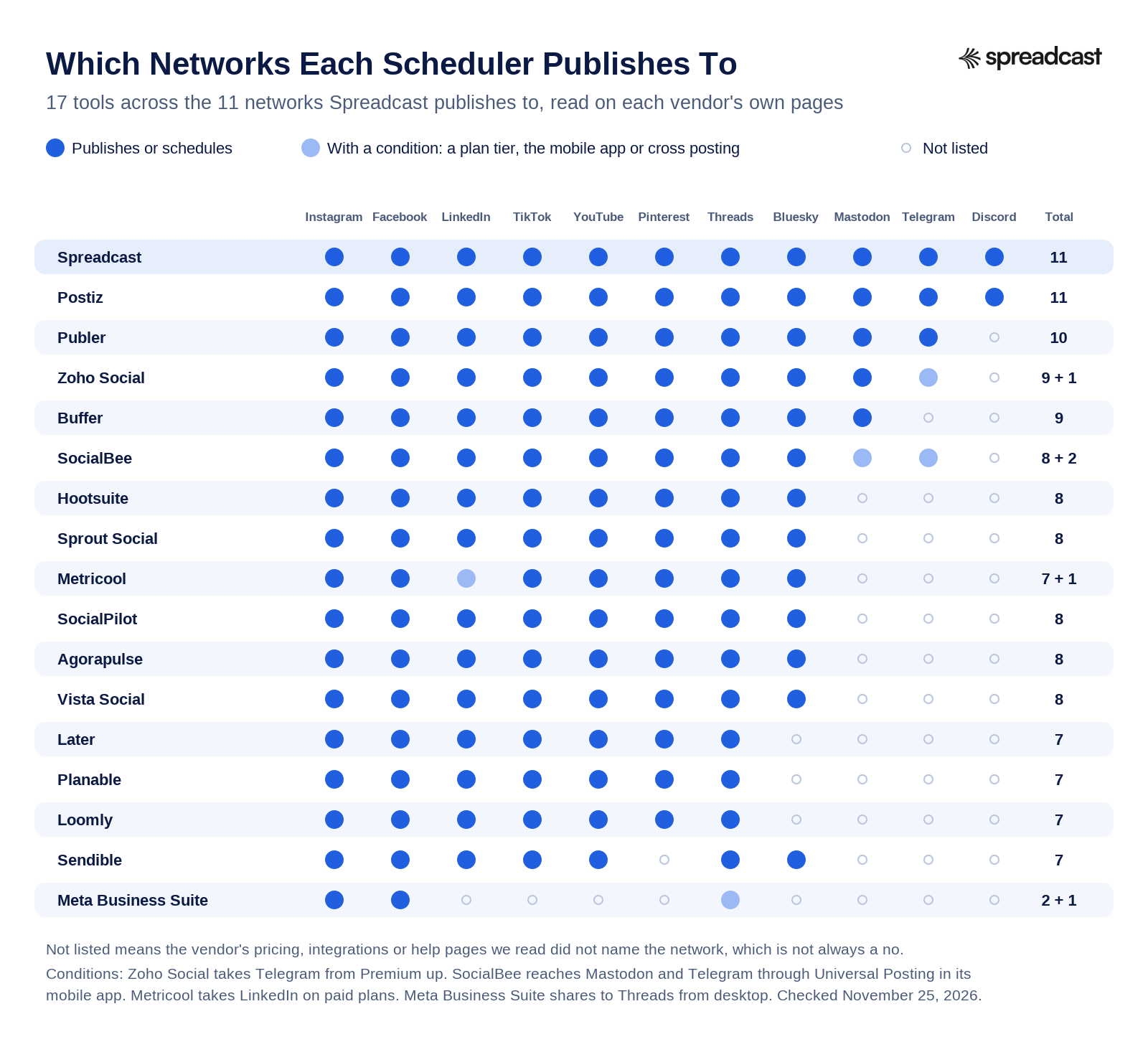
Social Media Scheduling Tools Comparison by Network
The same matrix in words, with the condition behind each partial cell. Use it before you read about features: if your network is not in a tool's row, the rest of its entry does not matter to you.
| Tool | TikTok | YouTube | Threads | Bluesky | Mastodon | Telegram | Discord | ||||
|---|---|---|---|---|---|---|---|---|---|---|---|
| Spreadcast | Yes | Yes | Yes | Yes | Yes | Yes | Yes | Yes | Yes | Yes | Yes |
| Postiz | Yes | Yes | Yes | Yes | Yes | Yes | Yes | Yes | Yes | Yes | Yes |
| Publer | Yes | Yes | Yes | Yes | Yes | Yes | Yes | Yes | Yes | Yes | Not listed |
| Zoho Social | Yes | Yes | Yes | Yes | Yes | Yes | Yes | Yes | Yes | Premium and up | Not listed |
| Buffer | Yes | Yes | Yes | Yes | Yes, Shorts | Yes | Yes | Yes | Yes | Not listed | Not listed |
| SocialBee | Yes | Yes | Yes | Yes | Yes | Yes | Yes | Yes | Through its mobile app | Through its mobile app | Not listed |
| Hootsuite | Yes | Yes | Yes | Yes | Yes, web | Yes, web | Yes | Yes | Through a partner app | Not listed | Not listed |
| Sprout Social | Yes | Yes | Yes | Yes | Yes | Yes | Yes | Yes | Not listed | Not listed | Not listed |
| Metricool | Yes | Yes | Paid plans | Yes | Yes | Yes | Yes | Yes | Not listed | Not listed | Not listed |
| SocialPilot | Yes | Yes | Yes | Yes | Yes | Yes | Yes | Yes | Not listed | Not listed | Not listed |
| Agorapulse | Yes | Yes | Yes | Yes | Yes | Yes | Yes | Yes | Not listed | Not listed | Not listed |
| Vista Social | Yes | Yes | Yes | Yes | Yes | Yes | Yes | Yes | Not listed | Not listed | Not listed |
| Later | Yes | Yes | Yes | Yes | Yes | Yes | Yes | Not listed | Not listed | Not listed | Not listed |
| Planable | Yes | Yes | Yes | Yes | Yes | Yes | Yes | Not listed | Not listed | Not listed | Not listed |
| Loomly | Yes | Yes | Yes | Yes | Yes | Yes | Yes | Not listed | Not listed | Not listed | Not listed |
| Sendible | Yes | Yes | Yes | Yes | Yes | Not listed | Yes | Yes | Not listed | Not listed | Not listed |
| Meta Business Suite | Yes | Yes | No | No | No | No | Shares from desktop | No | No | No | No |
Sources: each vendor's pricing, integrations or help page, linked in its entry below, read November 25, 2026. Several tools also post to networks outside this matrix, such as Google Business Profile, Snapchat or Reddit, named in their entries.
The 17 Best Social Media Schedulers in 2026, With Prices, Pros and Cons
Spreadcast is ours and comes first: it reaches all 11 networks, starts on a free plan with no card, and makes posts for you when you run out. After it come the paid schedulers readers compare most often, led by the names that appear on nearly every ranking roundup, then Postiz as the open source option and Meta Business Suite as the free native one. Use the network matrix above and the cost table below to rank them for your own setup.
- 1
Spreadcast
Free plan with no card, then $29 a month for 10 accountsBest social media scheduler overall: every network from one calendar, free to start, with posts made for you when you need them
Spreadcast is ours. Pick Schedule My Own Posts when you sign up and it works as a plain scheduler for anyone with posts ready: a business, a creator, a shop, a nonprofit. You upload your own photos and videos or write a text post, pick the accounts it goes to and a time, and Spreadcast publishes it to Instagram, Facebook, LinkedIn, TikTok, YouTube, Pinterest, Threads, Bluesky, Mastodon, Telegram and Discord from one calendar. No app is needed. A scheduled post goes out within five minutes of its time, as our help page on scheduling a post explains.
The part that saves the most time is the check before a post goes out. Each network has its own rules, and Spreadcast checks the post against every network you picked as you type and again when you click Schedule Post: a caption over Bluesky's 300 characters, a carousel with more than the 4 pictures Bluesky and Mastodon take, a YouTube post without a video. You see which network and what to change before anything is saved, or click Schedule Without that network and fix it later. Generate Caption writes one caption per network from your text, your pictures and even your video's sound, with the hashtag count each feed suits: 3 to 5 on Instagram and TikTok, 3 on LinkedIn, none on Pinterest, Telegram or Discord. The calendar shows every post in Week, Month or List view, and you can drag a post to another day or duplicate one that went out.
TikTok posts go to your feed or to your TikTok drafts, your choice per post, as described in the Instagram and TikTok section below, and the networks most schedulers skip, Telegram, Discord, Bluesky and Mastodon, take a minute each to connect. Our guides on scheduling Threads posts, Bluesky posts and Telegram channel posts walk through each one.
When you have nothing ready, the second mode takes over: paste a website, App Store or Google Play link and Spreadcast designs posts in your brand's colors, fonts and logo and puts them on the same calendar. You can also schedule from Claude or ChatGPT through the Spreadcast MCP server, so "schedule these five photos for next week" in a chat becomes five posts on your calendar. On price, start with the free plan: it needs no card and never runs out, lets you connect up to 10 accounts on any of the 11 networks, makes 3 posts for you in your brand and publishes your first 3. Pro is $29 a month, or $290 a year, for 1 brand and 10 accounts with as many scheduled posts as you like, AI writing and no mark. Studio is $79 a month for 5 brands, 50 accounts and 3 seats, which is you and 2 teammates. A Post Pack publishes 10 posts for $19 once, with no subscription. The pricing page lists the rest.
Pros
- A free plan with no card and no end date: 10 accounts, your first 3 posts published
- Publishes to all 11 networks in our matrix, Mastodon, Telegram and Discord included
- Checks each post against every network's limits before it is scheduled
- A caption written for each network, with the right hashtag count
- $29 a month flat for 10 accounts, any mix of networks
- Makes posts for you from a website or app link when you need them
- Schedule from Claude or ChatGPT as well as the calendar
Cons
- Posts go in one at a time in the editor, or in batches by asking Claude or ChatGPT
- Comments and messages are answered in each network's own app
- 2
Buffer
Free for 3 channels, then $6 per channel a monthBest social media scheduler for a few accounts on a small budget
Buffer is the scheduler most people try first, and its pricing explains why. Buffer's pricing page has a Free plan for up to 3 channels with 10 scheduled posts per channel at a time, a slot refilling as each post goes out. Essentials is $6 per channel a month, or $5 on yearly billing, for 1 user and unlimited scheduled posts. Team is $12 per channel, or $10 yearly, with unlimited users. A channel is one account, so a business with an Instagram account and a Facebook Page pays for two.
Buffer gets cheaper per channel as you grow: its machine readable pricing prices channels 11 to 25 at $4 each, 26 to 50 at $3, and 51 and up at $1 on Essentials or $2 on Team. Its channel table names Instagram, Facebook, LinkedIn, TikTok, YouTube Shorts, Pinterest, Threads, Bluesky and Mastodon, plus Google Business Profiles and X, so it reaches 9 of our 11 networks. Instagram personal profiles and Facebook groups post by reminder rather than automatically. Bluesky itself pointed users to Buffer when it announced scheduling through Buffer in 2024.
Approval workflows are on Team only, the first comment for Instagram and LinkedIn starts on Essentials, and the AI Assistant is on every plan, Free included. The trial is 14 days. For one person with three or four accounts, Buffer Essentials is among the cheapest paid options, with only Publer and Zoho Social lower in our solo setup. For a team of three, the jump to Team at $12 a channel is where other tools on this list overtake it. Our Buffer alternatives page compares it with the closest rivals, and Buffer vs Hootsuite puts the two best known names side by side.
Pros
- Free plan for 3 channels that refills as posts go out
- Pay only for the channels you use, from $6 each
- Covers Threads, Bluesky and Mastodon
Cons
- A second user and approvals need Team at $12 a channel
- Telegram and Discord are not in its channel list
- 3
Hootsuite
From $149 per user a month, 14 day trialBest for large teams that want listening, an inbox and scheduling in one suite
Hootsuite is a full social media suite, and it is priced like one. Hootsuite's plans page lists Standard at $149 per user a month on monthly billing, or $99 a month billed yearly, for up to 10 social accounts. Professional is $299 per user, or $199 yearly, with unlimited accounts. Advanced is $499, or $399 yearly, and Enterprise is priced on request. There is no free plan, only a 14 day trial, and each person who logs in needs a seat.
Its help center lists the accounts you can connect: Instagram business and creator accounts, Facebook Pages, LinkedIn, TikTok, Threads and Bluesky, with YouTube outside the mobile app and Pinterest on the web version. Mastodon goes through a partner app rather than Hootsuite itself, and Telegram and Discord are not listed. Hootsuite's Bluesky page says Bluesky publishing is on all paid plans. It also connects X, and WhatsApp and Google Business Profile for its inbox.
What the price buys is the rest of the suite: best times to publish charts, AI that drafts posts and images from Standard, approvals from Advanced, plus social listening and a shared inbox. For a one person business it is a lot of tool for $149 a month. For a marketing team that replies to hundreds of comments a day, the inbox can be worth more than the scheduler. Our Hootsuite alternatives page covers cheaper ways to get the scheduling part alone.
Pros
- Scheduling, inbox, listening and reporting in one suite
- Bluesky and Threads publishing on every paid plan
- Best times to publish charts built in
Cons
- $149 per user a month, the highest entry price on this list
- Approvals start on Advanced at $499 per user
- 4
Later
From $25 a month, 14 day trialBest for Instagram and TikTok creators who plan their grid visually
Later began as an Instagram planner and still feels like one: a visual calendar, a grid preview and a link in bio page. Later's pricing page lists Starter at $25 a month, or $18.75 billed yearly, for 1 social set, 1 user and 30 posts per profile a month. Growth is $50, or $37.50 yearly, for 2 social sets, 2 users and 180 posts per profile. Scale is $110, or $82.50 yearly, for 6 sets, 4 users and unlimited posts. A social set is one profile on each network Later supports, so two Instagram accounts need two sets.
Later publishes to Instagram, Facebook, LinkedIn, TikTok, YouTube, Pinterest and Threads, plus Snapchat, which is 7 of our 11. Bluesky, Mastodon, Telegram and Discord are not on its pricing page. Automatic publishing needs an Instagram business or creator account and a TikTok business account; otherwise Instagram and TikTok posts arrive as a phone notification for you to finish. Extra sets cost $15 a month and extra users $5, on Growth and Scale only, and Starter cannot add either.
Every plan has best time to post, Link in Bio and an Instagram first comment, and approvals start on Growth. The 30 post cap on Starter is the line to watch: one post a day on each profile fits, two do not. Our Later alternatives page lists tools without per profile post caps.
Pros
- Visual grid planning, Link in Bio and first comment on every plan
- Covers Snapchat as well as the main seven networks
- Cheap for one profile per network
Cons
- Starter caps posts at 30 per profile a month and cannot add sets
- Bluesky, Mastodon, Telegram and Discord are not listed
- 5
Sprout Social
From $99 per seat a month, 30 day trialBest for enterprise reporting, engagement and teams that live in the inbox
Sprout Social sells to marketing departments, and its scheduler is one part of a large product. Sprout's pricing page lists Essentials at $99 per seat a month on monthly billing, or $79 yearly, with 5 social profiles. Standard is $249 per seat, or $199 yearly. Professional is $399, or $299 yearly, with unlimited profiles, and Advanced is $499, or $399 yearly. The free trial runs 30 days with no card, which is the longest here.
Its pricing table names Instagram, Facebook, LinkedIn, TikTok, YouTube, Pinterest and Threads, and Sprout's Bluesky integration page adds publishing and scheduling for Bluesky, so it reaches 8 of our 11. X, Snapchat and Reddit are also listed. Mastodon, Telegram and Discord are not. ViralPost, Sprout's best send times feature, is on every plan, while approval workflows and bulk scheduling start on Professional. On Essentials and Standard the queue fills up to 10 posts a day.
The 5 profile limit on the two cheaper plans is what moves the price. A small business with 8 accounts lands on Professional at $399 a month for one seat, because Essentials and Standard include 5 profiles, and a team of three pays $1,197. If reporting across many brands is your job, that may be fair. If scheduling is your job, our Sprout Social alternatives page shows tools that do it for a tenth of the cost.
Pros
- Deep reporting, inbox and engagement tools
- ViralPost send times on every plan
- 30 day trial with no card
Cons
- Only 5 profiles below Professional at $399 per seat
- The most expensive tool here for a team of three
- 6
Metricool
Free for 1 brand, then $25 a month for up to 5 brandsBest for planning and analytics across several small brands
Metricool started as an analytics tool and grew a planner, so its reports are stronger than most schedulers at its price. Metricool's pricing page lists Free for 1 brand with 20 posts a month and 30 days of analytics, on every network except LinkedIn and X. Starter is $25 a month, or $20 billed yearly, for up to 5 brands, or $45 for up to 10. Advanced is $67 a month, or $53 yearly, for 15 brands, rising to $210 for 50, and adds unlimited team members and a post approval system.
The unit that matters is the brand. Metricool's help center defines it as one connection of each network per brand, so two Instagram accounts need two brands even for one business. That makes Metricool cheap for many small brands with one account each, and less of a bargain if one brand runs several accounts on one network. Its pricing page names Instagram, Facebook, LinkedIn on paid plans, TikTok, YouTube, Pinterest, Threads and Bluesky, plus Google Business Profile and Twitch, with X as a $10 a month extra per connected account.
Best Times sits inside the planner, and posting is unlimited on Starter and up under a fair use policy. AI credits run 5, 20 or 35 per brand a month by plan. Team members are listed only on Advanced, so a team of three starts at $67. Our Metricool alternatives page covers the tools that compete with it most directly.
Pros
- Analytics stronger than most schedulers at this price
- Up to 5 brands for $25 a month
- Free plan with 20 posts a month
Cons
- One account per network per brand
- Team members and approvals start on Advanced at $67
- 7
Publer
Free for 3 accounts, then from $5 per account a monthBest price per account, with Mastodon and Telegram included
Publer is priced per account and reaches more networks than almost any tool here. Publer's plans page lists Free for 1 user and 3 accounts with 10 scheduled posts per account and 25 drafts. Professional costs $5 per account a month, or $4 billed yearly, and Business $10, or $8 yearly. For every 9 accounts the 10th is free, and the same goes for team members. Read off its own price sliders on monthly billing, 3 accounts cost $12 on Professional and $21 on Business, 8 accounts $32 and $56, and 15 accounts with 2 extra members $60 and $104.
Its plans page names Instagram, Facebook, LinkedIn, TikTok, YouTube, Pinterest, Threads, Bluesky, Mastodon and Telegram, which is 10 of our 11, plus Google Business Profile and WordPress, with X on paid plans only. On Free, Pinterest connects only for accounts with 100 or more followers or a claimed website. Discord is not listed.
Approval workflows and bulk scheduling are on Professional, per its plans page, so a team gets approvals at $5 an account. Business, at $10, adds best times to post, post recycling and unlimited AI prompts. Bulk scheduling from a CSV takes up to 500 posts, per Publer's bulk scheduling help. Trials are 7 days on Professional and 14 on Business. Our Publer alternative page compares its plans with Spreadcast.
Pros
- 10 of 11 networks, Mastodon and Telegram included
- $12 a month for 3 accounts on Professional
- Approvals and CSV bulk upload of up to 500 posts on Professional
Cons
- Best times to post and recycling need Business at $10 an account
- Discord is not listed
- 8
SocialBee
From $29 a month, 14 day trialBest for recycling evergreen posts by content category
SocialBee is built around content categories: you sort posts into buckets such as tips, promotions and blog links, give each bucket slots in a weekly schedule, and SocialBee fills the slots and can recycle evergreen posts. SocialBee's pricing page lists Bootstrap at $29 a month for 5 profiles and 1 user, Accelerate at $49 for 10 profiles, and Pro at $99 for 25 profiles across 5 workspaces with 3 users per workspace. Agency plans run from Pro50 at $179 to Pro150 at $449.
Extra users and workspaces cost $10 a month each, and 5 extra profiles $15. There is no free plan; the trial is 14 days of Pro. It publishes directly to Instagram, Facebook, LinkedIn, TikTok, YouTube, Pinterest, Threads and Bluesky, plus X and Google Business Profile. Mastodon and Telegram are reached through Universal Posting in its mobile app rather than direct posting, and Discord is not listed.
Categories with recycling are on every plan, 10 on Bootstrap and unlimited on Pro. Post approval and CSV upload start on Accelerate. If most of your posts are evergreen tips you want repeated, SocialBee's category system does that better than a plain calendar. Our SocialBee alternatives page covers the tools that recycle posts differently.
Pros
- Category schedules with evergreen recycling on every plan
- Pro covers 25 profiles and 5 workspaces for $99
- Mastodon and Telegram through its mobile app
Cons
- No free plan
- Approvals and CSV upload start on Accelerate at $49
- 9
SocialPilot
From $30 a monthBest for small agencies that need many accounts at a low price
SocialPilot gives more accounts per dollar than most tools built for agencies. SocialPilot's plans page lists Essentials at $30 a month for 7 accounts and 1 user, Standard at $50 for 15 accounts and 3 users, Premium at $100 for 25 accounts and 6 users, and Ultimate at $200 for 50 accounts with unlimited users. An extra account costs $4 a month on every plan. There is no free plan.
SocialPilot's pricing file names Instagram, Facebook, LinkedIn, TikTok, YouTube, Pinterest, Threads and Bluesky, plus X and Google Business Profile. Mastodon, Telegram and Discord are not listed.
The same file puts approval workflows on Standard, client approval on Premium, bulk scheduling from a CSV on Premium, and an MCP server on all paid plans, so AI assistants can work with it too. For a team of three with 15 accounts, Standard at $50 fits exactly, which makes it one of the two cheapest fits for that setup. Our SocialPilot alternatives page covers the agency tools it is most often compared with.
Pros
- 15 accounts and 3 users for $50 on Standard
- Approvals from Standard, client approval from Premium
- Extra accounts at $4 each on any plan
Cons
- No free plan
- Mastodon, Telegram and Discord are not listed
- 10
Agorapulse
From $99 per user a month, 30 day trialBest for teams that answer comments as much as they post
Agorapulse is a scheduler with a strong inbox, built for teams that moderate comments and messages every day. Agorapulse's pricing page lists Standard at $99 per user a month, or $79 billed yearly, Professional at $149, or $119 yearly, and Advanced at $199, or $149 yearly, with Custom priced on request. Every plan includes 10 social profiles, and its help center explains that those profiles are shared across all users: adding a user adds a seat, not profiles.
Extra profiles cost $15 a month each on monthly billing, or $10 on annual. The trial is 30 days. Its help center says the free plan stopped being available on July 6, 2026, so plan on a paid seat. Its integrations page lists Instagram, Facebook Pages, LinkedIn company pages, TikTok, YouTube, Pinterest and Bluesky, and a separate Threads page adds Threads, which is 8 of our 11. Google Business Profile can be scheduled too, and X needs a paid extra.
Approvals start on Professional, with one step approvals for teammates or clients, and Custom adds multi step approvals. Bulk CSV scheduling of up to 200 posts is on Advanced and Custom. For a team of three on Standard, the bill is 3 seats at $99 plus 5 extra profiles at $15, or $372 a month, and $522 on Professional if you need approvals. Our Agorapulse alternatives page covers cheaper inbox tools.
Pros
- A strong shared inbox for comments and messages
- 10 profiles shared by every user
- 30 day trial
Cons
- Priced per user, so a team of three pays three times
- Approvals start on Professional at $149 per user
- 11
Vista Social
From $99 a month, 14 day trialBest for agencies that need client approvals and many profiles
Vista Social bundles profiles and users into flat plans built for agencies. Vista Social's pricing page lists Professional at $99 a month, or $80 a month billed yearly, for 15 profiles and 2 users; Advanced at $199, or $160 yearly, for 30 profiles and 3 users; and Scale at $449, or $360 yearly, for 70 profiles and 4 users. Enterprise is priced on request. The trial is 14 days with no card, and there is no free plan.
Its integrations page lists Instagram, Facebook, LinkedIn company pages, TikTok, YouTube including Shorts, Pinterest, Threads and Bluesky, which is 8 of our 11, plus Google Business, Snapchat and Tumblr. X is a $29 a month extra per profile. Mastodon, Telegram and Discord are not listed.
Multi stage approval workflows that include outside clients start on Advanced, and Scale adds a link you send clients so they connect their own profiles. For a single person, $99 for 15 profiles is more than most need. For a three person agency team with 15 accounts, Advanced at $199 includes the approvals that cost more elsewhere.
Pros
- 15 profiles on the entry plan
- Client approvals and client profile connect
- Covers Snapchat and Tumblr as well
Cons
- $99 entry price for a solo user
- Extra users and profiles are priced on request
- 12
Planable
Free for 50 posts, then $39 per workspace a monthBest for teams and clients who approve every post before it goes out
Planable is built around approval: posts look like they will on the network, and teammates and clients comment and approve right on them. Planable's pricing page lists Basic at $39 per workspace a month, or $33 billed yearly, with 4 pages and 60 posts per workspace a month, and Pro at $59, or $49 yearly, with 10 pages and 150 posts. Every plan has unlimited users. The free plan gives 50 posts in total, with no time limit.
A workspace usually holds one brand, and a page is one connected account, so the cost grows with brands and with how often you post. Its integrations page lists Instagram, Facebook, LinkedIn, TikTok, YouTube, Pinterest and Threads, which is 7 of our 11, plus Google Business Profile and X. Bluesky, Mastodon, Telegram and Discord are not listed.
Approvals are optional on Basic, can be made required on Pro with bulk approval and team only notes, and become multi level on Enterprise. Analytics and the social inbox are extras at $14 and $9 per workspace a month. For a team that sends every post to a client first, Planable's approval view is the clearest here. Our Planable alternatives page covers tools without the post cap.
Pros
- The clearest approval view for teams and clients
- Unlimited users on every plan
- Free plan with 50 posts
Cons
- Posts capped at 60 or 150 per workspace a month
- Bluesky, Mastodon, Telegram and Discord are not listed
- 13
Sendible
From $35 a month, 14 day trialBest for agencies that want client dashboards on every plan
Sendible is an agency tool with unlimited users on every plan. Sendible's pricing page lists Core at $35 a month, or $30 billed yearly, for 1 workspace and 6 profiles; Plus at $99, or $84, for 3 workspaces and 18 profiles; Premium at $199 for 7 workspaces and 42 profiles; Elite at $299 for 15 workspaces and 90 profiles; and Enterprise at $750. More profiles come by adding a workspace of 6, at $35 a month on Core and less on higher plans. The trial is 14 days with no card.
The same page answers which networks it supports: Facebook, Instagram, LinkedIn, TikTok, YouTube, Threads and Bluesky, which is 7 of our 11, plus X, Google Business Profile and WordPress. Pinterest is not in that list, so a business that posts to Pinterest should check with Sendible first. Mastodon, Telegram and Discord are not listed either.
Client Connect and client dashboards are on every plan, assigning posts for approval starts on Plus, and custom approval workflows on Premium. A bulk scheduler with CSV upload is on every plan, and each workspace has a daily posting limit of 100 posts on Core and 200 on Plus. For an agency without Pinterest clients, Plus at $99 for 18 profiles and unlimited users is good value.
Pros
- Unlimited users on every plan
- Client dashboards and Client Connect from Core
- CSV bulk scheduling on every plan
Cons
- Pinterest is not in its list of supported networks
- Approvals start on Plus at $99
- 14
Loomly
From $65 a monthBest for small teams that want approvals in the entry plan
Loomly is a content calendar with approvals, recurring posts and post ideas built in. Loomly's pricing page lists Starter at $65 a month, or $49 a month billed yearly, for 12 social accounts, 3 users and unlimited calendars. Beyond is $332 a month, or $249 yearly, for 60 accounts and unlimited users, and Enterprise covers 61 accounts and up on request. Nonprofits get 50 percent off for life.
Its integrations page lists Instagram, Facebook, LinkedIn, TikTok, YouTube, Pinterest and Threads, 7 of our 11, plus Google Business Profile, with Snapchat through push notifications. Instagram Reels, Stories, posts and carousels are scheduled automatically. Bluesky, Mastodon, Telegram and Discord are not listed.
Approval workflows, recurring posts, bulk posting and best time to post are all on Starter, which is generous for $65. The step after Starter is steep: a team that outgrows 12 accounts goes to Beyond at $332 a month, since the pricing page does not price extra accounts. For a three person team with up to 12 accounts, Starter is a sensible fit; at 15 accounts it is one of the more expensive options.
Pros
- Approvals and recurring posts on the entry plan
- 3 users and 12 accounts on Starter
- 50 percent off for nonprofits
Cons
- A steep step from $65 to $332 past 12 accounts
- Extra accounts are not priced on its pricing page
- 15
Zoho Social
Free plan, then from $15 a monthBest cheap single brand scheduler, Mastodon included
Zoho Social is the cheapest paid plan here for one brand. Zoho Social's pricing page lists Standard at $15 a month, or $10 billed yearly, for 1 brand and 1 member; Professional at $40, or $30 yearly; Premium at $65, or $40 yearly, with 3 members; and Agency at $320, or $230 yearly, for 10 clients and 5 members. The Free plan covers 1 brand and 6 channels, among them an Instagram account, a Facebook Page and LinkedIn. The trial is 15 days.
A brand holds one account per network, with LinkedIn allowing a company page and a profile. The page names Instagram, Facebook, LinkedIn, TikTok, YouTube, Pinterest, Threads, Bluesky and Mastodon on paid plans, and adds a Telegram business account from Premium, which makes 10 of our 11, plus X, Google Business Profile, Snapchat and WhatsApp Business. Discord is not listed. Extra brands cost $17 a month on Professional and $23 on Premium, and extra members $12.
Professional adds bulk scheduling, repeat posting, RSS feeds and an Instagram first comment. Because each brand takes one account per network, a business with two Instagram accounts needs a second brand, which is why our small business setup costs $57 on Zoho Social rather than $15. If you run one account per network, it is the cheapest route to Mastodon and Bluesky in a paid tool.
Pros
- $15 a month for one brand on paid networks
- 10 of 11 networks, Mastodon included
- Free plan and a 15 day trial
Cons
- One account per network per brand
- Telegram only from Premium at $65
- 16
Postiz
From $29 a month in the cloud, free to self hostBest open source scheduler, with every network on our list
Postiz is an open source scheduler you can rent or run yourself. Postiz's pricing page lists Standard at $29 a month, or $23 billed yearly, for 5 channels with no team; Team at $39, or $31 yearly, for 10 channels and unlimited members; Pro at $49, or $39 yearly, for 30 channels; and Ultimate at $99, or $79 yearly, for 100 channels. Posts are unlimited on every plan.
Its platform list covers all 11 of our networks, Mastodon, Telegram and Discord included, and many others such as Reddit, Google My Business, Slack, Twitch, Nostr, Lemmy and WordPress. The Postiz code on GitHub is AGPL 3.0 licensed and free forever when you host it, with no limits on channels, posts or members.
Self hosting trades money for setup time, as the open source section further down explains. The cloud plans skip that setup, and Pro at $49 for 30 channels with unlimited members is the cheapest fit for our team of three. Our Postiz alternatives page and Postiz vs Mixpost cover the open source choice in more depth.
Pros
- All 11 networks in our matrix and many more
- Free and unlimited when self hosted
- $49 cloud plan covers 30 channels and a team
Cons
- Self hosting needs your own developer app on each network
- No free plan in the cloud
- 17
Best free scheduler if you only post to Facebook and Instagram
Meta Business Suite is Meta's own free tool for Facebook Pages and Instagram professional accounts. Meta's help center shows how to create and schedule posts for both from one composer, and how to schedule reels the same way. A Facebook Page post can be scheduled from 20 minutes to 29 days ahead, per Facebook's Page help, and the Instagram app schedules up to 25 posts a day, up to 30 days ahead, for public accounts.
Threads is the edge case: Meta Business Suite can share a post to Threads from the desktop composer, but every other network needs another tool. For a café or a salon that lives on Instagram and Facebook, it is all the scheduler they need, and the video further down shows it in a minute. The moment a business adds TikTok, LinkedIn or Pinterest, a second tool comes in, and at that point one tool for all of them saves the switching.
Pros
- Free, from Meta itself
- Posts, reels and stories for Facebook and Instagram
Cons
- Two networks, with Threads as a share from desktop
- No other network
What Three Real Setups Cost on Each Scheduler
Starting prices hide what you pay. Here is the cheapest paid plan that fits three concrete setups on each tool, at regular monthly prices. The table under the chart gives the plan and arithmetic behind each bar.
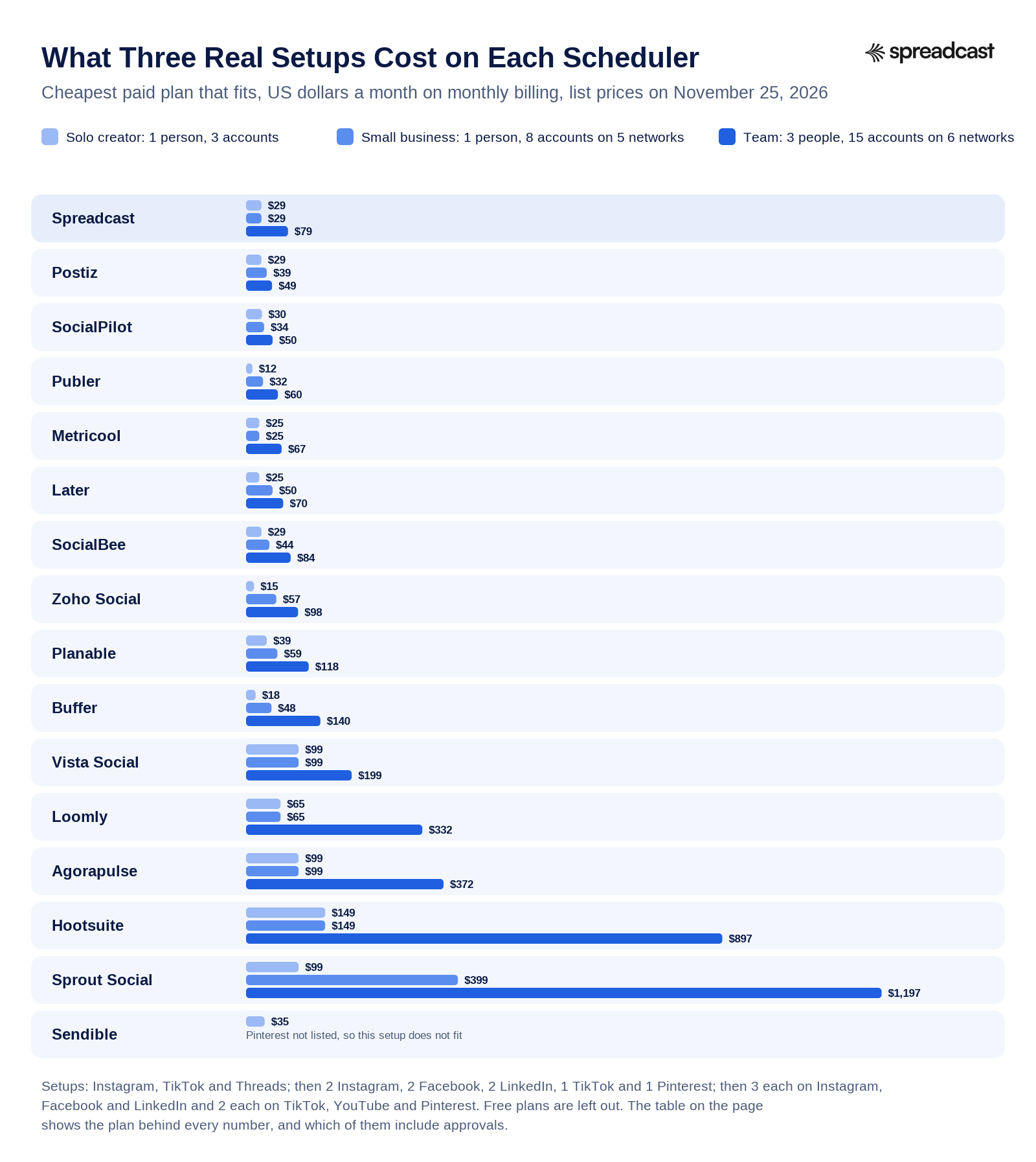
Social Media Scheduler Pricing for Three Real Setups
Solo creator: 1 person with Instagram, TikTok and Threads. Small business: 1 person with 2 Instagram, 2 Facebook, 2 LinkedIn, 1 TikTok and 1 Pinterest account. Team: 3 people with 3 accounts each on Instagram, Facebook and LinkedIn and 2 each on TikTok, YouTube and Pinterest. Every figure is the cheapest paid plan that fits, on monthly billing.
| Tool | Solo creator, 3 accounts | Small business, 8 accounts | Team of 3, 15 accounts | How we got the numbers |
|---|---|---|---|---|
| Spreadcast | $29 | $29 | $79 | Pro covers 10 accounts on 1 brand. The team needs 3 seats, which come with Studio |
| Postiz | $29 | $39 | $49 | Standard has 5 channels; Team has 10; Pro has 30 with members |
| SocialPilot | $30 | $34 | $50 | Essentials 7 accounts plus 1 at $4; Standard has 15 accounts and 3 users, with approvals |
| Publer | $12 | $32 | $60 | Professional prices read off its sliders, with approvals and bulk scheduling included |
| Metricool | $25 | $25 | $67 | Starter fits up to 5 brands; team members are listed on Advanced, which has approvals |
| Later | $25 | $50 | $70 | Starter is 1 set; 2 Instagram accounts need 2 sets, so Growth; team adds 1 set at $15 and 1 user at $5 |
| Zoho Social | $15 | $57 | $98 | Standard; then Professional $40 plus 1 brand at $17; team adds 2 brands and 2 members at $12 |
| SocialBee | $29 | $44 | $84 | Bootstrap; then Bootstrap plus 5 profiles at $15; Accelerate $49 with 10 profiles, plus 5 profiles at $15 and 2 users at $10 |
| Planable | $39 | $59 | $118 | Basic holds 4 pages and 60 posts; Pro holds 10 pages; the team needs 2 Pro workspaces |
| Buffer | $18 | $48 | $140 | Essentials at $6 a channel; Team at $12 each for 10 channels ($120) plus 5 at $4, with approvals |
| Vista Social | $99 | $99 | $199 | Professional has 15 profiles and 2 users; Advanced has 3 users and approvals |
| Loomly | $65 | $65 | $332 | Starter has 12 accounts and 3 users; past 12 accounts the next plan is Beyond |
| Agorapulse | $99 | $99 | $372 | Standard per user; team is 3 users at $99 plus 5 profiles at $15, or $522 on Professional with approvals |
| Hootsuite | $149 | $149 | $897 | Standard per user covers 10 accounts; 15 accounts need Professional at $299 per user |
| Sprout Social | $99 | $399 | $1,197 | Essentials has 5 profiles; 8 or more need Professional at $399 per seat |
| Sendible | $35 | Does not fit | Does not fit | Core covers the creator; Pinterest is not in its supported networks |
Prices read on each vendor's pricing page on November 25, 2026. Post caps still apply where a plan has them: 30 posts per profile a month on Later Starter, 60 posts per workspace on Planable Basic.
How Social Media Schedulers Charge: Four Pricing Models
Social media schedulers charge in one of four ways, and the model matters more than the headline price. Knowing which one a tool uses tells you how its bill will grow before you read a single plan card.
Per account or channel. Buffer and Publer charge for each social account you connect: $6 and $5 a month on their cheapest paid plans. This is the fairest model for a solo creator with three accounts: Publer at $12 and Buffer at $18 are among the cheapest fits in our first setup, with Zoho Social's single brand plan at $15 between them. People are where the two part ways. Buffer's Team plan, needed for a second user, doubles its rate to $12 a channel, while Publer adds members to its Professional plan, approvals included, so our team of three costs $60 there.
Per person. Hootsuite, Sprout Social and Agorapulse charge per user or seat, from $99 to $149 a month for the first person. A solo marketer with many accounts does well here, because Hootsuite Standard covers 10 accounts for one price. A team does badly: three people on Hootsuite Professional cost $897 a month before anyone posts.
Per bundle. Spreadcast, SocialPilot, Vista Social, Sendible, Loomly, SocialBee and Postiz sell a flat price for a set number of accounts and people. Spreadcast Pro is $29 for 10 accounts, SocialPilot Standard $50 for 15 accounts and 3 users, Postiz Pro $49 for 30 channels with a team. Bundles are the easiest to budget and the cheapest per account once you use most of the bundle.
Per brand or set. Metricool, Later, Zoho Social and Planable charge per brand, social set or workspace, where each holds one account per network or a set number of pages. They are cheap when every brand has one account per network and climb when one business runs two Instagram accounts, which is why Later doubles and Zoho Social nearly quadruples between our first two setups. Read the definition of a brand or set before you compare.
One more line hides in several plans: a post cap. Later Starter allows 30 posts per profile a month, Planable Basic 60 per workspace, Metricool Free 20 a month, and Buffer and Publer Free 10 queued posts per account at a time. A tool with a cap is only cheap if your posting rhythm fits under it. Our guide to the best time to post on social media helps you set that rhythm before you choose.
Which Social Media Scheduler for Which Person
Find the line that sounds like you. Each pick is based on the network matrix and the cost table above, not on which tool has the longest feature list.
Solo Creator on Instagram, TikTok and Threads
Publer Professional at $12 or Buffer Essentials at $18 if you only need the posting. Later at $25 if you plan a visual grid and want Link in Bio. Spreadcast Pro at $29 if you want captions written per network and posts made for you on slow weeks.
Small Business With Several Accounts
Spreadcast Pro at $29 covers 10 accounts on all 11 networks. Metricool Starter at $25 works if each account sits on a different network. SocialPilot Essentials at $30 plus $4 per extra account is the agency style option.
Team of Three With Approvals
SocialPilot Standard at $50 includes 15 accounts, 3 users and approvals, and Publer Professional comes to $60 with approvals too. Metricool Advanced at $67 adds analytics. Planable at $59 per workspace if clients approve every post, and Vista Social Advanced at $199 for client approvals across 30 profiles.
Agency With Many Clients
Sendible for client dashboards and unlimited users, SocialPilot for the most accounts per dollar, Vista Social for client approvals and profile connect links. Spreadcast Studio at $79 if you run up to 5 brands that each need posts made as well as scheduled.
Community on Bluesky, Mastodon, Telegram or Discord
Spreadcast and Postiz publish to all four. Publer covers Bluesky, Mastodon and Telegram, and Zoho Social covers Bluesky, Mastodon and, from Premium, Telegram. Most other tools stop at Bluesky.
Developer Who Wants to Self Host
Postiz is free to run on your own server, with every network on our list; see the open source section for what the setup takes. Spreadcast's MCP server is the route if you would rather script scheduling from Claude or ChatGPT.
Marketing Team That Lives in the Inbox
Sprout Social, Hootsuite or Agorapulse. You pay per person, but you get listening, a shared inbox and reports that the cheaper schedulers leave out. Budget $99 to $499 per person a month.
Facebook and Instagram Only
Meta Business Suite is free and made by Meta. Add a paid scheduler only when a third network joins the plan.
Nonprofit
Loomly gives nonprofits 50 percent off for life, which brings Starter to about $33 a month on monthly billing for 12 accounts and 3 users with approvals.
Best Social Media Scheduler for Multiple Accounts
The best social media scheduler for multiple accounts is the one whose pricing unit matches how your accounts are spread. If you run several accounts on the same network, such as two Instagram accounts for two shops, pick a tool that counts accounts rather than brands or sets: Spreadcast, Buffer, Publer, SocialPilot, Postiz and Vista Social all count accounts in any mix. Metricool, Later and Zoho Social count one account per network per brand or set, so a second Instagram account means paying for a second brand.
In Spreadcast, Pro holds 10 accounts in any mix of networks, five Instagram accounts included, and Studio holds 50 accounts across 5 brands, each brand with its own look and accounts. The calendar lists accounts under Channels, and clicking one brings its posts forward so you can see what each account has coming. For scheduling the same post to several accounts at once, our cross posting page shows how one post gets a caption per network and goes to every account you pick.
Watch two limits with many accounts. First, post caps per profile, like Later's 30 a month on Starter, multiply quietly: ten profiles at one post a day each is 300 posts a month. Second, per user pricing ignores accounts entirely, so Hootsuite Standard is good value for one person with 10 accounts and poor value for three people with 3 accounts each.
Best Social Media Scheduler for Instagram and TikTok
For Instagram and TikTok, the best scheduler is one that publishes directly to both, without a phone reminder, at a price that fits your account count. Every paid tool on this list publishes to both, but the conditions differ. Later and Buffer post automatically to Instagram business and creator accounts and send a reminder for personal profiles, and Later's automatic TikTok publishing needs a TikTok business account. Meta's own tools schedule Instagram only.
TikTok has its own rules for any app that posts for you: each post needs a choice of who can see it and whether comments, Duets and Stitches are allowed, and a post can go to the profile or to the creator's drafts in the TikTok app. In Spreadcast you pick Post to Feed, which goes live at your time with those choices made per post, or Send to Drafts, which waits in your TikTok inbox so you can add a trending sound before posting. Our TikTok scheduler page shows both, and our Instagram scheduler page covers posts, carousels and Reels with covers and music.
If you post one video to both every day, the cheapest paid fits are Publer Professional, from $12 for 3 accounts, and Buffer Essentials at $6 a channel. If your grid matters as much as your posting time, Later's visual planner is built for it. If you want one caption written for Instagram and a different one for TikTok, with the right hashtag count for each, that is what Spreadcast's Generate Caption does.
Scheduling Threads, Bluesky, Mastodon, Telegram and Discord: Where Tools Differ Most
Threads, Bluesky, Mastodon, Telegram and Discord are where social media scheduling tools differ most. Threads is now standard: 16 of the 17 tools publish to it, and Meta Business Suite shares to it from desktop. Bluesky is close behind, with 13 of the 17. Mastodon drops to five tools that publish to it directly, Telegram to four, and Discord to two.
These networks matter more than their size suggests. Bluesky and Mastodon reward frequent short text posts, which is exactly what a scheduler is for, and their limits differ from Twitter era habits: 300 characters on Bluesky and 500 on Mastodon and Threads, with up to 4 pictures on Bluesky and Mastodon. Telegram channels and Discord servers are where a business talks to the people who already chose to follow it, so a missed post there is noticed. Our step by step guides cover scheduling Bluesky posts and scheduling Telegram channel posts, and our Telegram scheduler page shows the Spreadcast bot.
How each tool connects also differs. In Spreadcast, Bluesky connects with your handle and an app password, Mastodon with your server name and a sign in, Telegram through the Spreadcast bot added to your channel as an admin, and Discord through a webhook link you copy from the channel's settings. A post to Discord appears under the webhook's name and picture, which you can change in Discord to post as your brand. When a post is too long for one of these networks, Spreadcast's Shorten for button writes a version that fits that network only.
Native Scheduling in Meta Business Suite, LinkedIn, TikTok and Pinterest
Most big networks let you schedule inside their own apps for free, one network at a time. Before paying for any tool, know what you get for nothing. The limits below come from each network's own help pages, read on November 25, 2026.
Facebook Pages schedule from 20 minutes to 29 days ahead, and Instagram schedules up to 25 posts a day, up to 30 days ahead, both from Meta Business Suite or the apps. LinkedIn schedules posts between 10 minutes and 3 months ahead, with events and job posts left out. TikTok's support page says scheduling works on desktop web, from 15 minutes to 10 days ahead, for business accounts or accounts with 10,000 followers or more, and that scheduled posts cannot be edited. Pinterest schedules pins up to 30 days ahead from a business account, one pin at a time, with up to 10 scheduled.
Those numbers explain why schedulers exist. Native tools each work alone, each keeps its own calendar, and several cap how far ahead or how many posts you can plan. A business on three networks schedules three times, in three apps, with three sets of rules. A scheduler does it once. For the full list of free options and their limits, see our social media scheduler page, and for single networks our LinkedIn scheduler, Facebook scheduler, YouTube scheduler and Pinterest scheduler pages.
Video: How to Schedule Posts in Meta Business Suite
Meta's own minute long walkthrough of the free scheduler for Facebook and Instagram, worth watching before you pay for a tool if those are your only two networks.

Best Social Media Scheduler With Analytics and Approvals
If you need a scheduler with analytics and approvals, the plan tier matters more than the brand, because most tools keep approvals off their cheapest plan. On the pages we read, approvals start on Buffer Team, Later Growth, Metricool Advanced, SocialBee Accelerate, SocialPilot Standard, Agorapulse Professional, Vista Social Advanced, Sendible Plus, Sprout Social Professional and Hootsuite Advanced. Publer Professional, Loomly Starter and Planable Basic include them on their entry paid plans, with approvals optional on Planable Basic.
For analytics, Metricool and Sprout Social are the strongest in their price ranges, and Sprout's ViralPost and Hootsuite's best time charts suggest when to post. Spreadcast's Analytics shows interactions, views and new followers per network and per post, compares each post with your usual post, and recommends posting times from the day and hour that got the most interactions per post. For a small business that is usually the question that matters: what worked, and when should I post next.
Approvals in Spreadcast work in two places. Posts Spreadcast makes for an app wait on the Dashboard for one tap, as our social media approval page explains, and on Studio, you and 2 teammates share one account and can each make, schedule and approve posts. If your workflow is a client signing off on every post in a portal, Planable, Vista Social or Sendible is built for that.
Social Media Scheduling Tools That Are Open Source
Postiz is the open source social media scheduling tool most people find, and on November 25, 2026 its GitHub repository showed about 42,400 stars. It is AGPL licensed, so you can run it on your own server for free with unlimited channels, posts and members, and its platform list covers every network in our matrix.
The cost is setup. Each network requires its own developer app for any tool that posts on your behalf, so a self hosted install means registering an app with Meta, TikTok, Google, LinkedIn and Pinterest, passing each review, and keeping the server and its tokens running. A hosted scheduler has already done that work once for all its users, which is most of what you pay for. If you enjoy running servers, Postiz self hosted is a fine choice. If not, its cloud plans or any tool on this list will save weeks.
How to Choose a Social Media Scheduler in Five Steps
Five checks, in this order, cut 17 tools down to two or three in about ten minutes.
- Step 1
List Your Networks
Write down every network you post to now and any you plan to add this year. Cross out every tool in the network matrix that misses one of them. This step alone removes most tools for anyone on Mastodon, Telegram or Discord.
- Step 2
Count Accounts and People
Count accounts per network, not just in total, and the people who will log in. Then find your setup, or the closest one, in our cost table and note the three cheapest fits.
- Step 3
Check the Pricing Unit
Per account, per person, per bundle or per brand. Ask what happens to the bill if you add one account and one person next year, because that is the change most teams make.
- Step 4
Check Caps and Conditions
Look for post caps per profile or workspace, approvals that sit on a higher plan, and networks that post by reminder instead of automatically. These are the lines that make a cheap plan stop fitting.
- Step 5
Schedule a Real Week in the Trial
Load one real week of posts to every network during the trial and watch them go out. A scheduler that handles your actual videos, caption lengths and carousels is worth more than any feature list.
Schedule My Own Posts: How Spreadcast Schedules Posts You Already Made
This is what scheduling looks like in Spreadcast when you bring your own photos, videos and words. It takes about two minutes for a first post.
- Step 1
Sign Up and Pick Schedule My Own Posts
On the start page, pick Schedule My Own Posts and make your account. There is no brand kit to set up first, and you land on your Dashboard straight away.
- Step 2
Connect Your Accounts
Connecting is free on every plan. Most networks connect with a sign in, and the few that work differently are covered in the section on Threads, Bluesky, Mastodon, Telegram and Discord above.
- Step 3
Add Pictures, a Video or Text
Up to 10 pictures of up to 10 MB each, or one video of up to 100 MB, or words alone for networks that take text posts. Drag pictures to set a carousel's order and pick a video's cover.
- Step 4
Write or Generate the Captions
Type one caption for all networks, change it for one network, or click Generate Caption for a version per network in your brand's voice. Spreadcast flags anything too long and offers to shorten it.
- Step 5
Pick a Time and Schedule
Choose Now, In an Hour, This Evening, Tomorrow Morning or any date and time, in your own time zone. Click Schedule Post and it goes out within five minutes of that time, or Save as Draft to keep it on the calendar for later.
How We Chose and Ranked These Schedulers
We started from what ranks today. On November 25, 2026 we read the roundups that come up for "best social media schedulers" and "best social media scheduling tools", lists from Blogging Wizard, Zapier, Sprout Social, Later, HubSpot and Metricool, and noted every tool they named. Buffer and Hootsuite appeared on all six, Sprout Social on five, and Metricool, Agorapulse, Sendible and SocialBee on four. We kept the tools that came up across several of those lists, added Publer, SocialPilot and Zoho Social, which appeared on fewer of them but came up in the wider search results and cover networks or prices the others miss, and added Postiz as the leading open source option and Meta Business Suite as the free native option.
On the same day, Mark Weizer and the Spreadcast team opened every vendor's own pricing page, integrations page or help center and read each plan's price, accounts, users, free plan and trial, and each network the vendor names as a place it publishes. Where a pricing page shows prices only in a script, we read it in a browser and switched it to monthly billing in US dollars. Where a vendor's pages disagreed, as Agorapulse's pricing page and help center did on its free plan, we cite the more specific page. Every table uses list prices on monthly billing. We did not run paid trials of the other tools for this page; the facts are what each vendor publishes, linked in each entry.
We built the network matrix only from the vendor's own pages and marked a network Not listed when those pages did not name it, which is not always a no. We computed the cost table ourselves by finding the cheapest plan on each pricing page that holds the accounts and people in each setup, and give the arithmetic beside each number. Spreadcast is first because it is ours and because it pairs every network with a free plan and posts made for you, and its facts come from our own plan configuration and help pages, checked the same day. After it come the schedulers readers compare most often, led by the names on nearly every roundup, then Postiz and Meta Business Suite. To rank the tools for yourself, use the network matrix and the cost table. If a vendor changes its prices, the date on this page tells you how current our reading is.
Frequently Asked Questions
What is the best social media scheduler?
Our pick is Spreadcast: it publishes to all 11 networks we checked, has a free plan with no card, costs $29 a month for 10 accounts on Pro and makes posts for you when you need them. Postiz also covers every network and is free to self host. For the lowest price on a few accounts, Publer and Buffer. For enterprise reporting and an inbox, Sprout Social and Hootsuite.
What is the cheapest social media scheduler?
For three accounts, Publer Professional at $12 a month and Zoho Social Standard at $15 were the cheapest paid fits on November 25, 2026. Spreadcast's free plan publishes your first 3 posts to every network with no card, and several other tools have free plans with limits; our social media scheduler page compares them.
Which social media scheduler supports Bluesky, Mastodon and Telegram?
Spreadcast, Postiz and Publer publish to all three. Zoho Social covers Bluesky and Mastodon, with Telegram from Premium. Buffer covers Bluesky and Mastodon. Most other tools cover Bluesky only.
Is Buffer or Hootsuite better for scheduling?
Buffer is cheaper for scheduling alone, from $6 per channel a month with a free plan. Hootsuite costs $149 per user a month but adds listening and a shared inbox. For one person scheduling posts, Buffer usually fits better.
Can I schedule TikTok posts with a scheduler?
Yes. Every paid tool on this list publishes to TikTok, some only for business accounts. In Spreadcast you choose per post whether it goes live on your profile or waits in your TikTok drafts so you can add a sound.
How far ahead can you schedule social media posts?
In the networks' own tools, Facebook Pages allow 29 days, Instagram and Pinterest 30 days, LinkedIn 3 months and TikTok on desktop 10 days. In Spreadcast you set the date and time yourself under When to Publish, or pick a quick option such as Tomorrow Morning.
Prices, plans and features change. This comparison describes each product as its own site described it on the date shown under Sources. Check the vendor's site before you decide. Product names are trademarks of their owners.
Where These Facts Come From
Every outside number, rule and price on this page links to the page it was taken from.
- Buffer pricing and plansBuffer
- Buffer machine readable pricing, with channel volume pricesBuffer
- Hootsuite plans and pricingHootsuite
- Connect a social account to HootsuiteHootsuite Help
- Hootsuite for BlueskyHootsuite
- Later pricing and plansLater
- Sprout Social pricingSprout Social
- Sprout Social Bluesky integrationSprout Social
- Metricool pricingMetricool
- What a brand is in MetricoolMetricool Help
- Publer plans and pricingPubler
- How to schedule in bulkPubler Help
- SocialBee pricingSocialBee
- SocialPilot plansSocialPilot
- SocialPilot pricing fileSocialPilot
- Agorapulse pricingAgorapulse
- Agorapulse integrationsAgorapulse
- Agorapulse Threads integrationAgorapulse
- Pricing per user explainedAgorapulse Help
- Agorapulse free plan explainedAgorapulse Help
- Vista Social pricingVista Social
- Vista Social integrationsVista Social
- Planable pricingPlanable
- Planable integrationsPlanable
- Sendible pricing and supported networksSendible
- Loomly pricingLoomly
- Loomly integrationsLoomly
- Zoho Social pricingZoho
- Postiz pricingPostiz
- Postiz supported platformsPostiz Docs
- Postiz source code and licenseGitHub
- Create and manage posts in Meta Business SuiteMeta Business Help Center
- Schedule reels in Meta Business SuiteMeta Business Help Center
- Share posts to Threads from Meta Business SuiteMeta Business Help Center
- Schedule and manage posts for a Facebook PageFacebook Help Center
- Schedule posts on InstagramInstagram Help Center
- Schedule posts on LinkedInLinkedIn Help
- Schedule posts on TikTokTikTok Support
- Schedule PinsPinterest Help
- Schedule and crosspost with BufferBluesky
- Video: how to schedule posts with Meta Business SuiteMeta for Business
Researched and written by Mark Weizer. Last checked on November 25, 2026.