How to Use the App Store QR Code Generator Above
The generator at the top of this page draws the code in your browser as you type. There are seven steps, and only the first one is required.
- Step 1
Paste Your App Store Link or App ID
Paste any link to your app on apps.apple.com, or type the bare number. The tool finds the number after the letters id and builds the code from it. Apple's reference for app information calls this number the Apple ID: it is generated when you add the app to App Store Connect, you cannot edit it, and it is the identifier in the App Store address on desktop computers. If the tool cannot find a number in what you pasted, it says so under the field.
- Step 2
Choose What the Code Opens
App Store Page opens your product page. Write a Review opens the same page with Apple's review action added, so a person who scans it lands on the form to rate and review your app. Use the second one where the people scanning already use the app: a thank you card in a parcel, a receipt, a sign at your own meetup. More ways to earn ratings are in how to get App Store reviews.
- Step 3
Turn On Scan Tracking if You Want Numbers
Track Scans in App Store Connect asks for a campaign name and your provider token. With both filled in, the code holds Apple's campaign link, so downloads that start with a scan show up as a campaign in App Analytics. Until the token is filled in, the code opens the plain page. Tracking is offered with the App Store Page choice. The rules for campaign names, and where to find the token, are on the App Store campaign link generator page.
- Step 4
Pick the Code Color
Black, Navy or any color you choose, always on a white background. If the color you pick is too light to stand out against white, the tool says so and asks for a darker one. The section on contrast further down explains why a light color is a risk on paper.
- Step 5
Check the Link Under the Code
Under the preview, the tool prints the exact link the code holds, with a Copy button. Read it once. If it shows the app ID you expect, the code is right, because the code contains nothing else.
- Step 6
Download a PNG or an SVG
The PNG is 1200 by 1200 pixels and suits slides, social posts, email and web pages. The SVG is a vector file for print: a printer or a design app can scale it for a sticker or a banner without blurring the modules. Both files include the white margin around the code, called the quiet zone, and neither carries a watermark.
- Step 7
Scan a Test Print, Then Use It
Print the code at its real size, scan it with two phones from the distance people will stand at, and check that the App Store opens on your app. Then place it. Once a code is made, the tool also shows a Put This App on Autopilot button, which opens Spreadcast with your app filled in. Nothing else happens unless you press it.
Can a QR Code Link to an App? What an App Store QR Code Holds
Yes. A QR code stores text, and the text in an App Store QR code is a web address on apps.apple.com. The FBI's public service announcement on QR codes describes the format in those terms: a square barcode that a smartphone camera can read to open a website, to prompt the download of an application or to direct a payment. There is no special app format. The code is a link, and the phone decides what to do with it.
On an iPhone or iPad, a link to apps.apple.com opens the App Store app on your product page. Apple's StoreKit article on requesting reviews calls such a link a deep link to the app's App Store page, and its sample code builds one from nothing more than the App Store address and the app ID. On an Android phone or a computer, the same link opens your listing on the App Store website.
The country does not have to be in the code. Apple's help page on campaign links says the App Store sends each person to their own local storefront, whichever storefront the link points to. A code printed for a meetup in Berlin works for a visitor from Tokyo, as long as you sell the app in Japan.
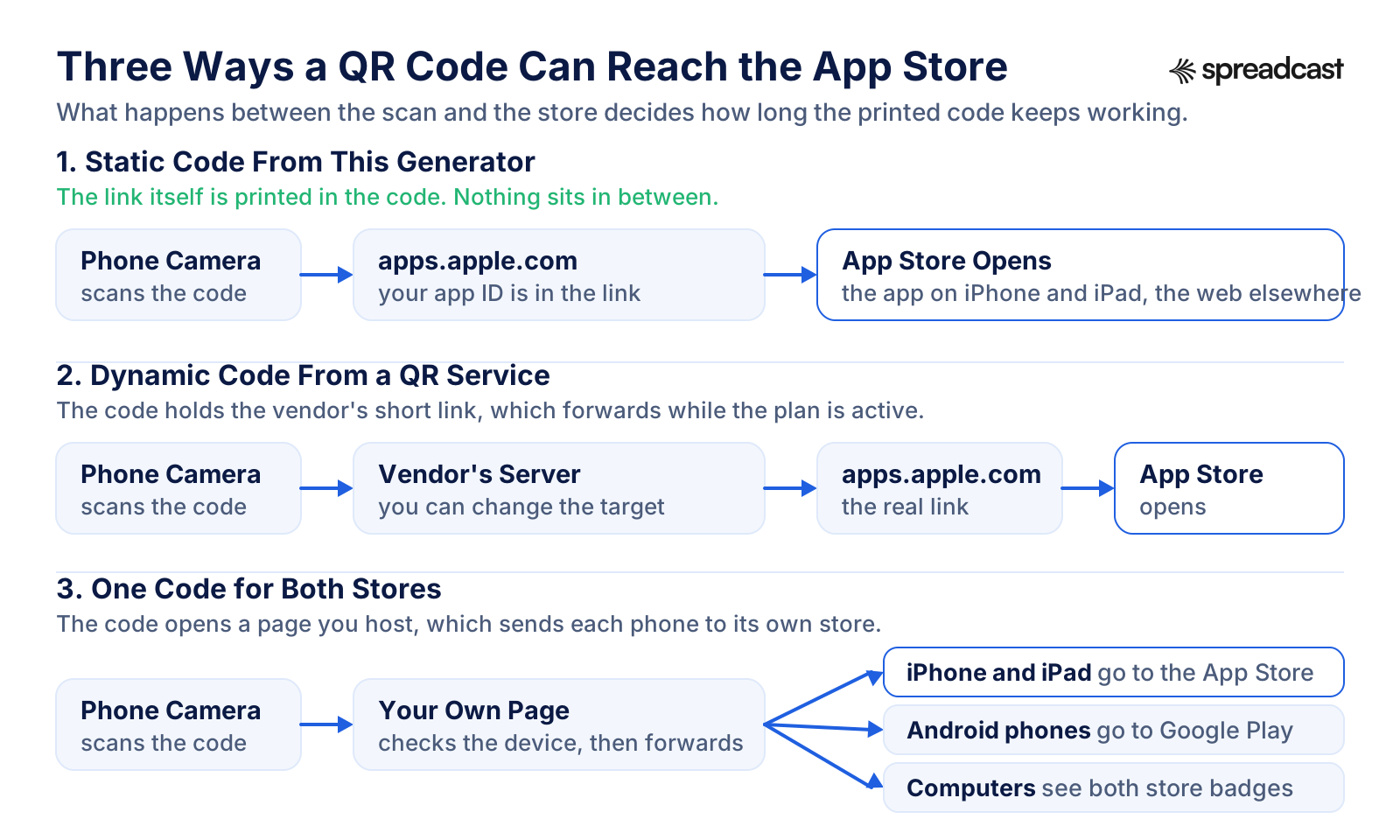
The generator writes a static code: the link itself is the content of the code. No short link service, no redirect server and no account sits between the scan and Apple. The code keeps working for as long as the link works, which means for as long as your app is on the App Store. Nothing is sent anywhere when you make it, because the code is drawn in your browser.
Your audience needs no extra app to read it. Apple's 2017 tech talk QR Code Recognition on iOS 11 introduced QR detection in the Camera app and showed that it works in photo mode and even from the Lock Screen. The FBI's announcement goes further and advises people not to download a separate QR scanner app at all, because most phones have a scanner built into the camera.
Opening an installed app directly is a different setup. The same Apple talk explains that if your app supports universal links, a code holding a link to your website opens the app when it is installed and the website when it is not, which is why Apple recommends a Smart App Banner on that page. For a code whose job is to get the app installed, the App Store link is the simpler choice.
App Store Link Formats: Which Link to Put in a QR Code
Every link below opens the same app. They differ in length, in what they do on arrival and in what they report. Shorter text makes a simpler code with bigger modules at the same print size. The module counts are at error correction M, the level this generator uses.
| Link | What it looks like | Code it makes | Use it for |
|---|---|---|---|
| Short app link, what this tool writes | The App Store address, then /app/id and your number. No country code and no app name. | Version 3, 29 by 29 modules, for a 9 or 10 digit ID. | Most printed codes. It is the shortest official form and opens the product page in each person's own storefront. |
| Full product page link | Adds a country code such as /us/ and a version of the app name before the ID. This is what a browser address bar shows. | Version 5, 37 by 37 modules, for the 64 character link of Apple's Pages app. | Nothing extra. In our test the name part was decoration: a link with a different name before the same ID led to the same page. |
| Write a review link | The short link plus one query parameter, named action, whose value is the words write and review joined by a hyphen. Apple documents it in its StoreKit review article. | Version 4, 33 by 33 modules. | Thank you cards, receipts and signs for people who already use the app. When we requested it outside the App Store app, the web address led to the plain listing. |
| Campaign link | A path segment Apple spells as the words apple and store joined by a hyphen, the ID, then pt for your provider token, ct for the campaign name and mt=8. | Version 5 or 6, 37 or 41 modules, depending on the name. | Codes whose downloads you want to count in App Analytics. Keep the campaign name short to keep the code simple. |
| Apple short link | An apple.co address from Apple's App Store Marketing Tools. It forwards to the product page with parameters of Apple's own added. | Version 2, 25 by 25 modules. | Places where people may type the link. Apple's pages do not say whether these links can carry your campaign token. |
| App name short link | appstore.com followed by your app name. Apple's archived technical note QA1633, last updated in 2013, described these for print ads, TV and radio. | Short, but see the next column. | Nothing new. When we tested appstore.com/keynote on October 21, 2026, it led to the App Store front page and not to Keynote. |
| Custom product page link | A version of your product page with its own screenshots and text. Apple's help page on custom product pages allows up to 70 per app, each shared through a unique URL. | Depends on the link. | Ads and posts about one feature. This tool keeps only the app ID, so it turns a custom page link into the default page. For those, use a generator that keeps the whole URL. |
Module counts come from encoding each link with uqr, the open source encoder this tool uses. A QR code grows by 4 modules per side with each version, from 21 by 21 modules at version 1 to 177 by 177 at version 40, according to DENSO WAVE's page on versions.
Where to Find Your App Store Link or App ID
The quickest source is your own product page. Open your listing on apps.apple.com, or share it from the App Store app, and copy the link. Apple's StoreKit sample gives the same advice for the ID: you can find it in your app's product URL, as the digits after the letters id. Paste either the whole link or the number into the generator.
In App Store Connect, the number is in App Information, listed as Apple ID. Apple's app information reference adds that it is generated when you add the app to your account and that you cannot edit it. That is what makes a printed code safe: the number in it will not change when you rename the app, redraw the icon or rewrite the subtitle.
Before launch, a product page exists only if you offer a pre order. Apple's page on pre orders says a brand new app can open for pre order 2 to 180 days before its release date, and suggests a clear call to action with a direct link to the product page. Because the address uses the same app ID before and after release, a code printed for the pre order keeps working on launch day. The badge is a different matter: Apple asks you to replace the pre order badge with the download badge in all of your marketing once the app is out.
Before an app is released or opened for pre order, there is no public page for the code to open. When we requested an ID that belongs to no app, apps.apple.com answered with a not found page. Print the code once the page is live, and scan it again before every new print run. The app launch checklist puts this step in order with the rest of launch week.
Apple's Own App Store QR Code: App Store Marketing Tools
Apple has a QR code generator of its own, and it is free. Apple's marketing guidelines point to App Store Marketing Tools, which generate embeddable code that leads to your product page and displays an App Store badge, your app icon or a QR code. Apple's promote page lists the same tools, and in Apple's talk on app discovery and marketing the presenters describe the site as the place to generate short links and QR codes that send people to your product page. The address has changed over the years: when we checked, tools.applemediaservices.com forwarded to the current App Store Marketing Tools site, and tools.applemarketingtools.com no longer answered.
When we used it on October 21, 2026, the steps were short. Search for your app, choose a storefront, open the app and scroll to the QR Code panel. Change Color offers White, Black and Blue. Add Icon offers None or App Icon, which puts your icon in the middle of the code. A button generates the code, and Download saves it. No sign in was needed.
The page code, as it was served that day, shows a few details worth knowing before you print. The tool asked Apple's link shortener for an apple.co address and put that short link in the code, so a scan passes through Apple's redirect before it reaches your product page. It drew the code with error correction level H, the highest, which leaves room for the icon in the middle. White meant black modules on white. Black and Blue filled the square with color and drew the modules in white, a reversed code. The download was a single image made from a 400 by 400 pixel canvas with a 24 pixel margin.
That margin matters on paper. For a short apple.co link at level H, the code is 29 modules wide, so 24 pixels on a 400 pixel image comes to about two modules of white. DENSO WAVE's page on the code area asks for a margin four modules wide on all sides. If you use Apple's file, give it extra white space in your layout.
So when does this generator help? When you want the write a review link, which Apple's tool does not offer. When you want an App Store Connect campaign inside the code, so downloads from one poster are counted under their own name. When you need a brand color other than Apple's three, or a dark code on white in place of a reversed one. And when the printer asks for a vector file, because the SVG here scales to a banner without loss. If none of that applies, Apple's own code is a fine choice, and its app icon option is something this generator does not offer.
This Generator Compared With Apple's Marketing Tools QR Code
The same job done two ways. Apple's column describes the tool as its page code worked on October 21, 2026.
| What differs | This generator | Apple's App Store Marketing Tools |
|---|---|---|
| What the code holds | The apps.apple.com link itself, with nothing in between | An apple.co short link that forwards to your product page |
| Where it sends people | The product page or the write a review form | The product page |
| App Store Connect campaign | Optional, with your provider token and a campaign name | Not offered |
| Colors | Black, Navy or any color you pick, on white, with a warning for colors that are too light | White, Black or Blue. Black and Blue draw white modules on a colored square |
| App icon in the middle | Not offered | Optional |
| Error correction | Level M, about 15 percent of codewords restorable | Level H, about 30 percent |
| Margin around the code | 4 modules, as the QR standard asks | 24 pixels on a 400 pixel image, about 2 modules |
| Files | A 1200 by 1200 pixel PNG and an SVG | One image, 400 by 400 pixels |
| Account | None needed | None needed |
Apple's footer on App Store Marketing Tools says embeddable widgets and artwork are provided as an accommodation and that Apple may deactivate any widget at its discretion. Check the current options before you rely on them.
Video: Apple on App Discovery and Its Marketing Tools
Apple's talk walks through how people find apps on the App Store and how to send them to your product page from outside it, including the marketing tools site with its short links and QR codes.

App Store Connect QR Code: What App Store Connect Makes and What It Does Not
People search for an App Store Connect QR code expecting a button in Apple's developer portal. App Store Connect Help, as we read it in October 2026, describes two features that come close, and neither is a QR code for your product page.
The first is the campaign link. Under Analytics, Acquisition, Campaigns, you enter a campaign name and copy a link that carries your provider token and the campaign token, according to Apple's help page on campaign links. That link can go into any QR code, which is what the tracking option above does. Apple adds that the Campaigns tab and its add button appear only once the app has analytics data, so a brand new app cannot make one before its first downloads, and that the provider token cannot be created by hand.
The second is the App Clip Code. App Store Connect Help on generating App Clip Codes walks through choosing an advanced App Clip experience, picking colors, choosing between scan only and NFC, and downloading the codes as SVG files. That is a different code for a different purpose, covered in its own section below.
For a plain code that opens your product page, Apple's answer is the marketing tools site described above, or any generator that encodes your apps.apple.com link, such as the one on this page.
The Download on the App Store Badge Next to a QR Code
In print, a QR code and the badge do different jobs. The badge tells people where the app lives, and Apple asks for it in all digital and printed marketing as the call to action. The code gives them a way to get there, because nobody can tap a poster. On a website the roles change for visitors on a computer: the badge is a link, and a QR code beside it lets someone reading on a laptop continue on their phone.
Apple's marketing guidelines contain no rule written for QR codes, so the badge rules decide the layout. Keep the code outside the badge's clear space, which is one quarter of the badge's height on every side. Do not print the badge smaller than 10 mm tall, or 40 pixels on screen. Use one App Store badge per layout, in a position subordinate to the main image or message so it is not the dominant artwork, and prefer the black badge. Use only Apple's artwork, unmodified. If a Google Play badge sits in the same row, the App Store badge goes first.
A layout that works: the code and the badge side by side, the badge smaller than the code, both on white, and one line of text above them that says what the app does. Do not put the badge inside the code or let it touch the code's quiet zone. DENSO WAVE's list of reading problems names both cases: letters or pictures placed around a code take away its margin, and anything laid over it blurs the contrast.
Apple lists two places where the badge may not appear: disposable packaging in the food industry, and decals, bumper stickers or magnets on the outside of a vehicle. Those rules name the badge and Apple product images. A QR code with your own words is not mentioned, so on a takeaway cup print the code and a line of text without the badge. The rest of Apple's badge rules, from localized badges to the artwork license, are explained in our guide to the App Store marketing guidelines.
Anatomy of a QR Code: Finder Patterns, Data and the Quiet Zone
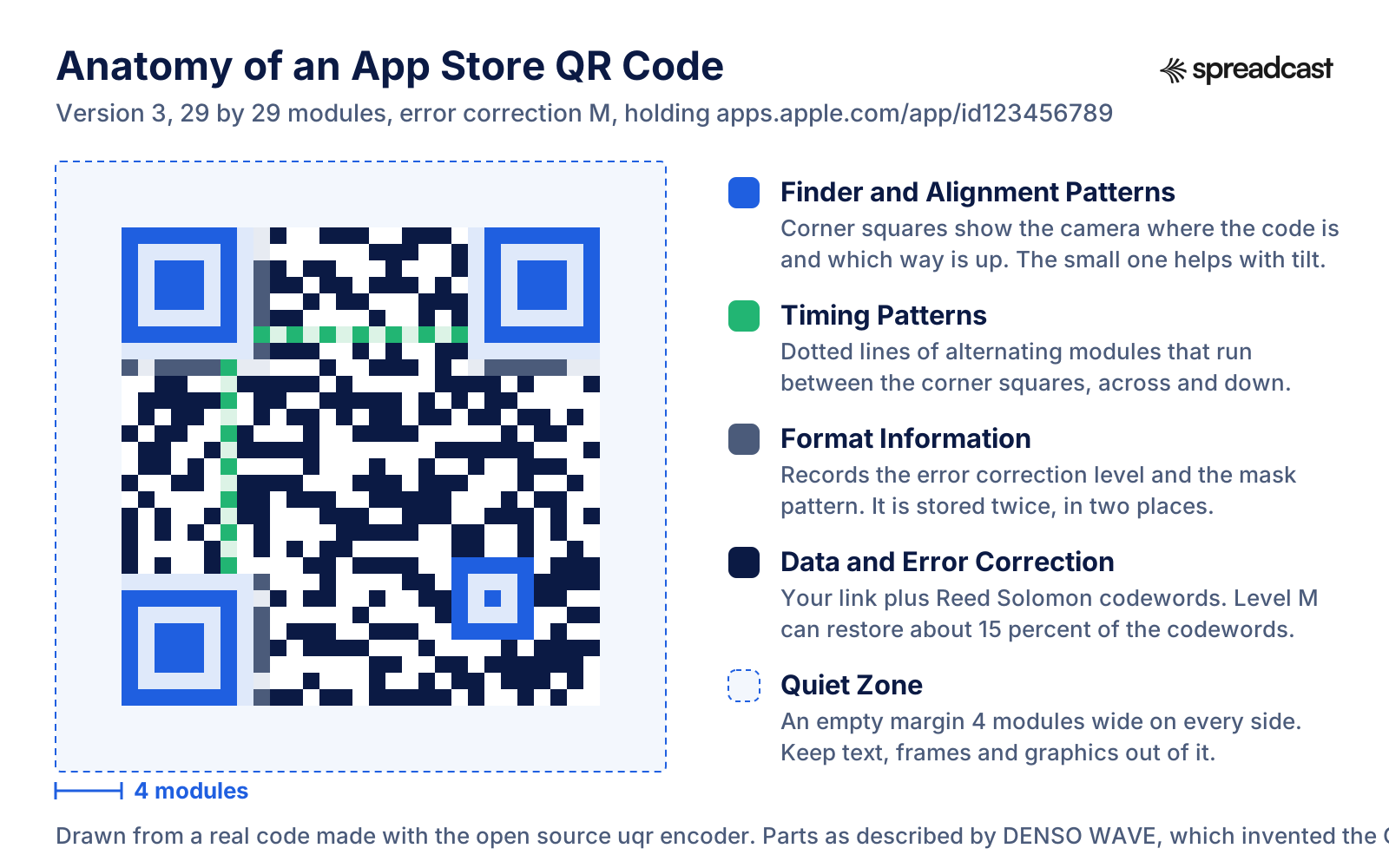
A real code made with this generator's encoder, with each part colored. It holds 123456789, the placeholder app ID from Apple's documentation, so it opens no real app.
How a QR Code Works, in the Parts That Matter for Print
DENSO WAVE, then a division of DENSO, released the QR Code in 1994. It became an international standard, ISO/IEC 18004, in June 2000, according to DENSO WAVE's page on standardization, and the company has waived its patent rights for codes that follow the standard. Its FAQ says no application, license or fee is needed to use one, commercial use included.
The three large squares in the corners are the finder patterns, which DENSO WAVE calls position detection patterns. The history page tells how the developers surveyed flyers, magazines and cardboard boxes for the ratio of dark to light that appears least often in print, and settled on 1:1:3:1:1, so a camera can find the squares at any angle without mistaking something else for them. Codes of version 2 and above add a smaller alignment pattern, which helps when the code sits on a curved surface or is read at an angle.
The rest of the square is the data area: your link plus error correction codewords computed with Reed Solomon code, a method DENSO WAVE notes is also used on music CDs. Two strips of format information beside the finder patterns record which error correction level and which mask the code uses, as Thonky's guide to format information shows, and two dotted timing patterns run between the corner squares.
Size grows with content. A code has 21 by 21 modules at version 1 and gains 4 per side with each version. A short App Store link fits in version 3, while a campaign link with a long name needs version 5 or 6. At the same printed width, more modules means smaller modules, and smaller modules need a closer, steadier camera.
QR Code is a registered trademark of DENSO WAVE INCORPORATED. The company asks pages that use the words to carry that sentence, and its FAQ adds that the trademark covers the words, not the pattern itself.
QR Code Error Correction Levels: Which One an App Store Code Needs
Every QR code carries extra codewords so it can still be read when part of it is dirty or damaged. There are four levels, and the restoration rates below are DENSO WAVE's.
| Level | Codewords that can be restored | Size of a short App Store code | Where it fits |
|---|---|---|---|
| L | About 7 percent | Version 3, 29 modules | Clean settings with a lot of data, in DENSO WAVE's words. Little reason to pick it for print that people handle. |
| M | About 15 percent | Version 3, 29 modules | DENSO WAVE says it is the level selected most often. This generator uses it: it survives a scuff or a fold and keeps the modules large. |
| Q | About 25 percent | Version 4, 33 modules | Places where codes get dirty, such as factories, per DENSO WAVE. Worth considering for stickers on things that get carried around. |
| H | About 30 percent | Version 5, 37 modules | Codes with a picture laid over the middle, as Apple's tool does with your icon. The picture uses up part of the room for damage. |
A higher level is not free. DENSO WAVE notes that raising it also increases the size of the code for the same data. At a fixed print width that means smaller modules, and DENSO WAVE's guidance on module size is that larger modules are more stable and easier to read. Sizes in the third column are for a link with a 10 digit app ID, measured with the uqr encoder.
Quiet Zone, Contrast and Color: What Keeps a Code Scannable
The quiet zone is the empty margin around the code. DENSO WAVE's page on the code area asks for a margin four modules wide on all sides, and its worked example adds those 8 modules to the width of the code before deciding where it fits on the page. The PNG and the SVG from this generator both include that margin in white. Do not crop it, and do not let a frame, a headline or the edge of a photo run into it. On a colored poster, the white square is part of the code.
Readers depend on the difference between dark and light modules. DENSO WAVE's list of reading problems says a code with letters or pictures laid over it becomes difficult or impossible to read because the contrast between bright and dark areas becomes indistinct, and its FAQ warns that overlaying a code with an illustration or design can make reading slow or impossible. That is why this generator keeps a white background and flags colors that are too light. Navy, a deep green or a dark brand color is fine. Yellow, light gray, pastels and most oranges get the warning.
Keep the modules square and sharp. DENSO WAVE's same list warns that enlarging or shrinking a code with an image processing tool distorts every module. Place the SVG in print layouts and let the layout app scale it. If you use the PNG in print, check that its 1200 pixels are enough: placed at 300 pixels per inch, it covers 10.16 cm.
Mind the surface. Bitly's guide to QR code size points out that a code on a glossy brochure may need to be larger than one on matte paper because of the sheen. Apple's guidance for App Clip Codes, a different code, gives advice that transfers well to QR codes: keep the code flat, give it enough light, do not make people scan from a wide angle, and never overlay it with text or logos.
On screens, keep the same arrangement. In a dark interface or a dark slide, put the code on its own white square, quiet zone included, rather than drawing light modules on the dark background.
QR Code Size Versus Scanning Distance
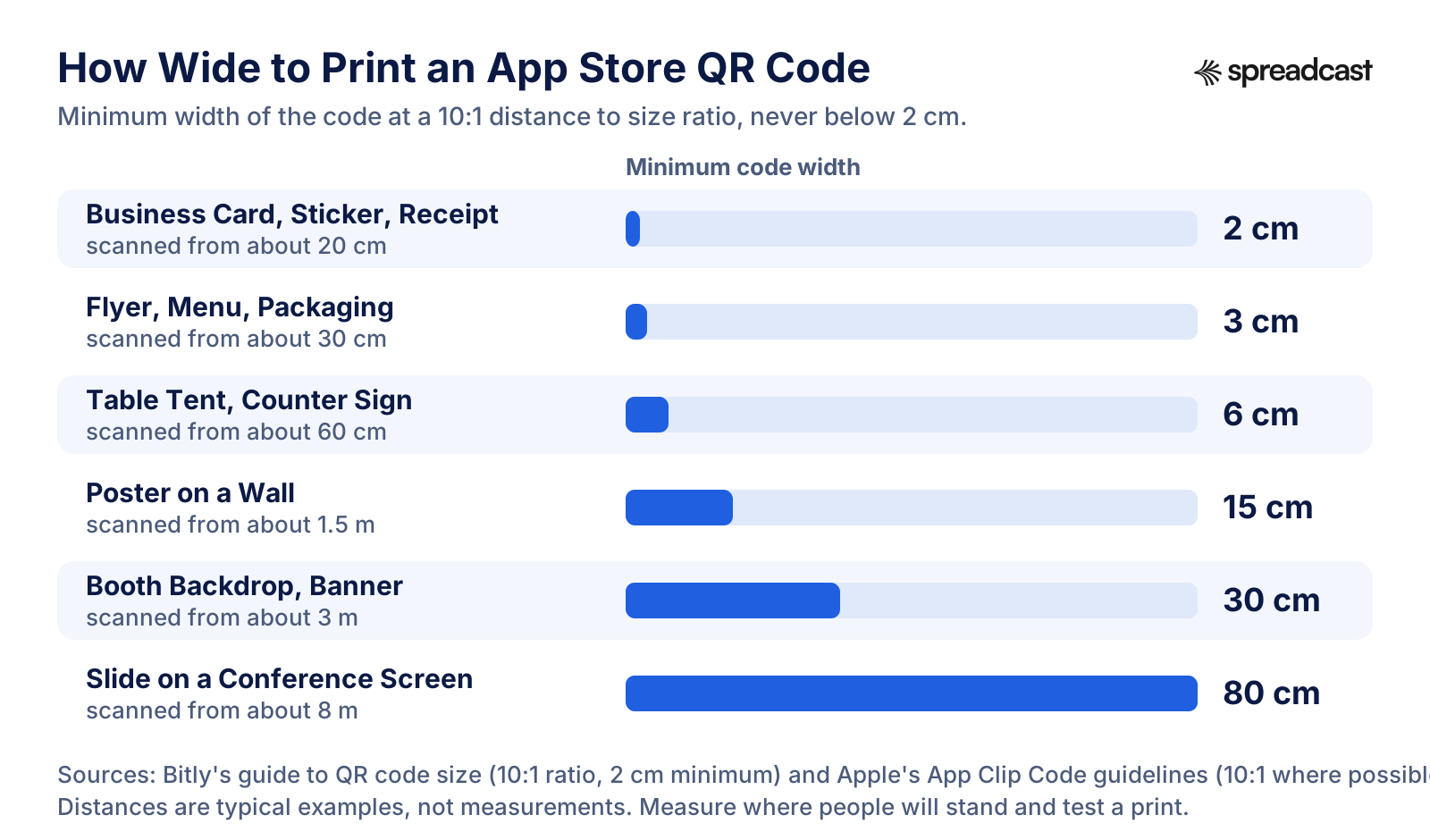
How far away people stand decides how big the code has to be. The common rule is a distance to size ratio of 10:1.
How Big to Print an App Store QR Code
Bitly's guide, dated October 2024, puts the distance to size ratio at about 10:1, so a 1 cm code should scan from 10 cm, and recommends at least 2 by 2 cm for most scanners. It suggests at least 10 cm for posters and 75 cm for billboards. Apple gives the same ratio for its own App Clip Codes in the Human Interface Guidelines: no more than 20:1, and 10:1 where possible, so a code that people scan from 101 cm away should be at least 10.16 cm across.
The ratio does not know how dense your code is. At 2 cm wide, a version 3 code has modules of about 0.69 mm, while a version 6 campaign link at the same width has modules of about 0.49 mm. If your code holds a campaign link, keep the name short or print the code a size larger.
Screens follow the same logic. A code on a slide is as big as it appears on the screen, so a code that is easy to scan for the person at the laptop can be out of reach for the back row of the room. For a talk, give the code most of the slide's height and leave it up while you take questions.
Measure the real distance, not the one you hope for. A poster on a café wall is read from across a table, a banner on a booth from the aisle, a sticker on a laptop lid from arm's length. When in doubt, print a test sheet, tape it up where it will hang and try it from where people will stand.
The Smallest Code a Printer Can Make
Below a certain size the printer, not the phone, becomes the limit. DENSO WAVE's table of module sizes gives the module size for common printer resolutions, with each module made of at least 4 dots as DENSO WAVE recommends. The last column applies it to a version 3 App Store code with its quiet zone, 37 modules across.
| Print resolution | DENSO WAVE's printer type | Module at 4 dots | Version 3 code with quiet zone |
|---|---|---|---|
| 600 dpi | Laser | 0.17 mm | About 6.3 mm |
| 360 dpi | Laser | 0.28 mm | About 10.4 mm |
| 300 dpi | Thermal | 0.33 mm | About 12.2 mm |
| 200 dpi | Thermal | 0.5 mm | 18.5 mm |
These are limits for DENSO WAVE's own scanners. DENSO WAVE's page on reading with phones says reading performance with a phone depends on its camera, and its FAQ puts the smallest possible code from a common laser printer at about 3.57 mm. People scanning with phones need far more than that, so the 2 cm minimum above still applies to anything printed for the public.
How to Scan an App Store QR Code on iPhone and Android
Apple's iPhone User Guide gives two ways. Open Camera, stay in Photo mode, hold the iPhone so the code appears inside the frame, and tap the link that appears at the bottom of the screen. Or open Control Center and tap the Scan Code control, adding it to Control Center first if it is not there. Apple adds that the flashlight helps in low light, and that on supported models the Camera Control can scan QR codes too.
For an App Store code, the link at the bottom of the screen shows apps.apple.com before anyone taps it. That helps. The FBI's announcement tells people to check, after scanning, that the address is the intended site and looks authentic, and not to download an app from a QR code but to use the phone's app store. A code that opens the App Store itself is what that advice asks for.
Google's Pixel Phone Help calls the Camera app the easiest way on Android: make sure Camera scan suggestions is turned on in the camera settings, point at the code with the whole square on screen, and tap the link that appears. Quick Settings also has a Scan QR code button that opens a dedicated scanner, and Google Lens reads codes as well. Menu names differ on phones from other makers. On Android, an App Store link opens the web listing, not a store where the person can install the app, which is the reason for the two store setup described further down.
When a code will not scan, Google's list of fixes is also the list to use when you test a print: hold steady, scan in good light without shadows or glare, clean the lens, and move closer while keeping the whole square on screen. If a code fails all four, the problem is in the print: too small, too light, too little margin or too glossy.
Video: Scanning a QR Code With iPhone or iPad
Apple Support's video, about a minute long, shows both methods from the user guide: the Camera app and the scanner in Control Center.

Static Versus Dynamic QR Codes for an App
This generator makes static codes. Dynamic codes from QR services are the other option, and they are a fair choice for some jobs.
| What differs | Static code, like this generator's | Dynamic code from a QR service |
|---|---|---|
| What is inside the code | Your App Store link | The service's short link, which forwards to your App Store link |
| How long it works | As long as the App Store link works | As long as the service keeps forwarding it |
| Cost | Free to make, nothing to renew | Usually a subscription. The vendor's own article says dynamic codes can become inactive when a free trial ends, a paid plan lapses or a plan limit is reached |
| Changing the target after printing | Not possible. Print a new code | Possible from the service's dashboard |
| Counting scans | Not by itself. Count downloads with a campaign link | Yes, the service counts visits to its short link |
| What the scanner sees before tapping | apps.apple.com | The service's domain |
| If the provider shuts down | Nothing changes | The same article says dynamic codes stop working |
| Moving to another provider | Nothing to move | The article says a dynamic code cannot be transferred without reprinting |
The statements about dynamic codes come from QR Code Generator's article on whether QR codes expire, published in February 2026 by a company that sells dynamic codes. It also says static codes keep working without a subscription and cannot be edited once made.
How a Scan Reaches the App Store in Each Setup
The step between the scan and the store is the difference, and it decides how long a printed code keeps working.
Static or Dynamic: How to Choose for an App
For an App Store code, the destination almost never needs to change. The app ID is fixed for the life of the app, and Apple sends every scan to the right storefront. That removes the main reason to pay for a dynamic code. What a dynamic code still offers is a scan count and the option to point an old print at something new, such as a seasonal landing page.
If you want that flexibility, the version you control is a redirect on your own domain: a short path such as yourapp.com/get that forwards to the App Store. You can change it whenever you like, it costs what your website already costs, and people who scan see your own domain, which fits the FBI's advice to check that an address looks authentic. The trade is that you must keep that path working for as long as the print is out in the world.
Use a static code for anything printed in quantity or kept for years: packaging, merchandise, books, stickers and store fixtures. Use your own redirect when one code must serve two stores, or when you expect to change the target later. Use a dynamic code from a service only if you will keep paying for it for as long as the print exists.
One QR Code for the App Store and Google Play
A QR code holds one link, and an App Store link does not open Google Play. This generator is for the App Store only: it builds codes from an App Store ID and nothing else. For a code that serves both stores, you need a page in the middle that sends each phone to its own store.
The Google Play side uses the format in Android's guide to linking to Google Play: the store listing address with id= followed by your package name, which is declared in the app's manifest and shown in Play Console. The App Store side is the link from this tool, or a campaign link if you want the downloads counted.
A simple setup is a page on your own site, such as yourapp.com/get, that checks which device is asking. iPhones go to the App Store link, Android phones go to the Google Play link, and everything else sees a page with both store badges and, for visitors on a computer, the QR code itself. Show the badges in every case, because detection is imperfect. MDN's guide to browser detection calls detecting mobile devices from the user agent a common misuse and recommends feature detection where possible, and WebKit's notes on Safari 13 say that Safari on iPad, except iPad mini, sends a user agent identical to Safari on a Mac. An iPad visitor may land on the computer version, so that version needs the App Store badge.
Add a Smart App Banner to the page as well. Apple's documentation on Smart App Banners describes it as one meta tag with your app ID in the head of the page, which shows a banner leading to your app in Safari. Expect the redirect to show up in your analytics: Apple's acquisition help says that when a chain of redirects in Safari leads to the product page, the referring website is the last URL in the chain, and that taps in other browsers on iOS count as app referrers for that browser.
Keep the page as long as the print exists. A two store code is only as durable as the domain behind it, which is the same trade a dynamic code makes, with the difference that you hold the keys.
App Clip Codes Versus QR Codes
An App Clip Code is Apple's own round code, and it does something a QR code to your product page does not: it launches an App Clip, a small part of your app that runs without installing the full app. Apple's documentation on creating App Clip Codes says the design encodes the App Clip's invocation URL, comes as scan only or with an embedded NFC tag, and needs iOS 14.3 or later to scan. You make them in App Store Connect from an advanced App Clip experience, or with Apple's App Clip Code Generator command line tool, which requires membership in the Apple Developer Program.
So the first question is whether you have an App Clip. If you do, Apple's Human Interface Guidelines call the App Clip Code the best way for people to discover it, because its design is recognizable and people trust it. If you do not, an App Clip Code has nothing to open, and a QR code to your product page is the right tool.
App Clips do not depend on App Clip Codes. Apple's guide to App Clip launch experiences lists QR codes among the ways people launch an App Clip at a physical location, next to NFC tags and App Clip Codes. Apple's acquisition help then reports App Clip card views from a QR code scan and from an App Clip Code scan as separate invocation sources.
App Clip Codes come with stricter rules than QR codes. Apple sets a minimum diameter of 3/4 inch, 1.9 cm, in print and 256 by 256 pixels on screen, asks for an App Clip Code at least as large as any QR code placed next to it, and requires clear space around it. Apple documents scanning only on iPhone and iPad, so a QR code remains the choice for an audience that includes Android phones.
Video: What's New in App Clips, Including App Clip Codes
Apple's WWDC21 session covers App Clip cards in Safari, local testing and, in its last part, creating App Clip Codes.

Where App Makers Use App Store QR Codes
A QR code earns its place wherever people see your app but cannot tap a link. Each card gives a size from the chart above and a campaign name if you track scans. For the channels that need no print at all, see how to get app downloads and how to promote an app for free.
Posters and Flyers
Cafés, coworking spaces, campus boards and gyms where your audience spends time. A poster read from 1.5 m needs a code about 15 cm wide. Give each location its own campaign name, such as poster_campus, so you can tell which wall worked.
Packaging and Merchandise
Boxes, inserts, stickers, tote bags and shirts. These last for years, which is the strongest case for a static code. Apple does not allow the App Store badge on disposable food packaging, so there the code goes with your own words.
Conference Booths and Meetups
Put one code at eye level on the backdrop and another on the table, because people scan from different distances. A backdrop read from 3 m needs about 30 cm. Use the review code on a sign for existing users who stop by, and the product page code for everyone else.
Slides, Demo Days and Launch Events
End the talk on a slide with the code, the app name and nothing else, and leave it up during questions. For the launch posts that go with it, the product launch post generator drafts the announcement.
Receipts and Order Confirmations
If your app sits next to a physical business, a code on the receipt reaches people who have just paid. On a 200 dpi thermal printer, a version 3 code with its margin needs about 18.5 mm, so give it at least 2 cm.
TV, Video and Live Streams
A code on a screen across the room follows the same 10:1 rule, so it has to be large and stay on screen long enough for people to find their phones. Hold it still, without motion blur or a transition over it.
In Store and Counter Signs
Table tents, counter cards and shelf signs are read from arm's length or a little more, and about 6 cm suits 60 cm. If your app has an App Clip for ordering or paying, an App Clip Code may serve better here.
Your Website, for Desktop Visitors
Someone reading your site on a laptop cannot install an iPhone app from it. A code next to the App Store badge lets them move to their phone in one step. Keep it on white and at least 2 cm on screen.
Business Cards and Email Signatures
A small code next to your name. Bitly suggests 2 by 2 cm as a fitting size for both business cards and email signatures.
What to Write Next to an App Store QR Code
A code without words gets ignored, because nobody knows what it opens. Apple's marketing guidelines ask for clear, simple messaging, a call to action to download your app, and Apple product names in a referential phrase: app name for iPhone, never iPhone app name. They also ask you not to call Apple devices smartphones or tablets, and to always write iPhone with a lowercase i, even at the start of a sentence.
Apple's suggested wording for App Clip Codes in the Human Interface Guidelines is a good model for QR codes too: the word Scan, followed by what people can do. Combined with Apple's naming rule, that gives lines like these, written for Notely, a made up app name. Scan to download Notely for iPhone and iPad. Scan with your iPhone camera to get Notely on the App Store. Enjoying Notely? Scan to rate it on the App Store, for the review code.
Say what the app does in the headline above the code, not in the call to action. Show one strong screenshot if space allows; the iPhone mockup generator puts it in a device frame. Then let the product page do the rest. A scan lands on your screenshots and, if you have one, your app preview, so the work described in App Store screenshot examples and in the guide to the App Store app preview video pays off here as well.
Keep the wording true for the place. A code on a receipt can say thank you; a code on a poster has to say what the app is for; a code on a slide needs only the app name because you have just explained it. If the code holds the review link, say so, because a person expecting a download page will be confused by a review form.
How to Track App Store QR Code Scans in App Analytics
A static code counts nothing on its own, because nothing sits between the scan and the App Store. What you can count is what happens on the App Store, by putting an App Store Connect campaign link inside the code. That is what Track Scans in App Store Connect does.
Apple's campaign links page says Analytics then captures the impressions, product page views, downloads, usage, sales and subscriptions tied to each campaign token, and lets you break them down by territory, device and page type. To read them, open the Analytics tab for your app, choose Metrics, add a filter and pick Campaign.
Plan around Apple's limits. A campaign appears no sooner than 24 hours after it starts. Each metric shows only once it reaches 5 in the date range you select, and campaign data appears once the campaign has first time downloads from at least five people. A download counts for the campaign when it is a first time download within 24 hours of using the link, and if someone used several campaign links, the most recent one gets the credit. Usage figures come from people who agreed to share their data, according to Apple's analytics overview.
Give every placement its own name and keep the names short, so the code stays simple: poster_campus, booth_day1, flyer_cafe, receipt. A count of downloads from the booth tells you something, while one total for every QR code does not. If you have many placements, the campaign link generator checks names against Apple's rules and writes the links in bulk.
Two cautions. Scans are not downloads: someone who scans, looks and leaves shows up as a product page view at most, and only once the totals pass Apple's threshold. And without a campaign token, the source types in Apple's acquisition help, such as App Store search, App Store browse, app referrer and web referrer, have no entry named for a camera scan, so do not expect a plain code to show up under a name you recognize.
A Pre Print Checklist for Your App Store QR Code
Run through this list before every print run, including reprints of a code that worked last time.
| Check | How to do it |
|---|---|
| The link | Read the link under the preview. It should hold your app ID and nothing you did not choose. |
| The destination | Scan the code on an iPhone and confirm the App Store opens on your app, not on a not found page. |
| The review code | If you chose Write a Review, confirm the review form opens, and use it only where people already have the app. |
| The campaign | If tracking is on, add the same campaign name in App Store Connect and note it in your launch list. |
| The size | At least 2 cm wide, and at least one tenth of the distance people will scan from. |
| The quiet zone | Four modules of white on every side, with nothing printed inside it. |
| The color | Dark modules on white, and no warning from the tool about a light color. |
| The file | The SVG for print, the PNG for screens. Do not resize the PNG in an image editor. |
| The surface | Flat, matte where possible, in good light, at a height people can reach. |
| The words | One line that says what scanning does, with your app name followed by for iPhone. |
| The badge | If used, Apple's own artwork, outside the code, with clear space of a quarter of its height. |
| The test print | Scan a real print with an iPhone and an Android phone from the real distance. |
For the rest of release week, from screenshots to the first posts, use the app launch checklist.
Common Mistakes With App Store QR Codes
Most of these produce a code that looks fine on screen and fails on the wall.
Printing a Code Nobody Tested
A code that worked on screen can fail on glossy paper, in a dim corridor or at 2 cm on a curved cup. Scan the finished print, not the file.
Cropping the Quiet Zone
Designers trim white space to tidy a layout. The margin is part of the code, and DENSO WAVE asks for four modules on every side.
A Light or Busy Background
Pastel modules on white, or a code placed on a photo, lose the contrast a reader needs. Keep dark modules on a white square.
Too Small for the Distance
A 3 cm code on a poster across the room. Use the 10:1 rule, and remember that a campaign link makes the modules smaller at the same width.
A Dynamic Code on Long Lived Print
Packaging outlives free trials. If the subscription lapses, the code stops forwarding while the boxes are still on shelves.
An Old App Name Short Link
Short links from Apple's 2013 technical note led to the App Store front page when we tested them. Use the app ID link.
The Review Code for New Users
A write a review code on a poster sends strangers to a review form for an app they have never opened. Use the product page code there.
One Campaign Name for Every Placement
If the poster, the flyer and the booth all use the same campaign name, App Analytics shows one row. Name each placement.
No Words Next to the Code
People do not scan what they cannot predict. Say what the code opens, in one line.
A Logo Pasted Over the Middle
Apple's tool uses error correction level H when it adds your icon. A logo dropped by hand on a level M code can cover more than the code can restore. This generator does not add a logo.
Where Spreadcast Fits
A QR code covers the moments when someone meets your app in the physical world: a poster, a box, a slide. The rest of the time people meet apps in their social feeds, and that is where Spreadcast works. You paste your App Store link once on the start page, and Spreadcast checks your App Store listing every day.
When a new version ships, it designs a post about the update with your real screenshots in an iPhone frame and your brand colors and fonts, and writes the caption for each network. It also posts when the app reaches a rating milestone. It publishes to Instagram, TikTok, LinkedIn, Facebook, Threads, Pinterest, Bluesky, Mastodon, Telegram and Discord, plus YouTube for video posts, on full autopilot or with one tap approval. It watches the App Store only, not Google Play.
The Free plan makes 3 posts for one app for you to download, with a small Spreadcast mark, and does not publish. Pro is $29 a month or $290 a year for one app and 10 social accounts, with posts published for you. Studio is $79 a month for 5 apps and 50 social accounts. The details are on the pricing page.
The QR code generator stays free whichever you choose, and so do the codes you make with it. The Put This App on Autopilot button under your code is the shortest way to try Spreadcast with the same app. For the bigger picture of marketing an iPhone app, from the product page to social posts, read our guide to iOS app marketing.
Frequently Asked Questions
How do I make a QR code for my App Store app?
Paste your App Store link or app ID into the generator at the top of this page, choose whether the code opens the product page or the review form, and download the PNG or the SVG. It is free and needs no account.
Is this App Store QR code generator free?
Yes. There is no sign up, no watermark and no limit. The code is static, so it never expires and does not depend on a subscription.
Does Apple have its own App Store QR code generator?
Yes. App Store Marketing Tools makes a QR code that opens your product page, in white, black or blue, with your app icon in the middle if you want it. When we checked, it did not offer the review link, campaign tokens, other colors or an SVG file.
Can a QR code link directly to an app?
Yes. A QR code holds a link, and a link to apps.apple.com opens the App Store app on your product page on iPhone and iPad. If your app supports universal links, a code with a link to your website can open the installed app itself, as Apple's tech talk on QR codes explains.
Can one QR code open both the App Store and Google Play?
Not with a plain store link. Use a page on your own site that sends iPhones to the App Store and Android phones to Google Play, and shows both badges to everyone else. This generator makes App Store codes only.
Do App Store QR codes expire?
A static code does not expire: it works as long as the link inside it works, which for an App Store link means as long as the app is on the store. Dynamic codes from QR services can stop working when a trial or subscription ends.
How can I track scans of an App Store QR code?
Turn on Track Scans in App Store Connect and enter a campaign name and your provider token. Downloads that follow a scan then appear under that campaign in App Analytics, once each metric reaches Apple's minimum of 5.
What size should a printed App Store QR code be?
At least 2 by 2 cm, and about one tenth of the distance people will scan from, so about 15 cm for a poster read from 1.5 m. Leave a white margin four modules wide around it.
Where do I find my App Store app ID?
It is the number after the letters id in your App Store link. In App Store Connect it appears in App Information as Apple ID, and it never changes.
What is the difference between a QR code and an App Clip Code?
A QR code can hold any link and works with phones from any maker. An App Clip Code is Apple's round code that launches an App Clip on iPhone or iPad, so you need an App Clip to use one.
Can I put my logo in the middle of the code?
Not in this generator. Apple's marketing tool can place your app icon in the center, and it uses the highest error correction level to make up for the covered modules.
Should I put the Download on the App Store badge next to the code?
In most print it helps, because it tells people where the code leads. Keep the badge outside the code's quiet zone, give it clear space of a quarter of its height and use only Apple's artwork.
Where These Facts Come From
Every outside number, rule and price on this page links to the page it was taken from.
- Error correction featureDENSO WAVE, QRcode.com
- Point for determining the code areaDENSO WAVE, QRcode.com
- Point for setting the module sizeDENSO WAVE, QRcode.com
- Information capacity and versions of QR CodeDENSO WAVE, QRcode.com
- QR Code standardizationDENSO WAVE, QRcode.com
- FAQ, including trademark and sizeDENSO WAVE, QRcode.com
- Examples of problems encountered in reading a codeDENSO WAVE, QRcode.com
- History of QR CodeDENSO WAVE, QRcode.com
- QR Code Model 1 and Model 2DENSO WAVE, QRcode.com
- Reading QR Code with a mobile phone, smart phone or tabletDENSO WAVE, QRcode.com
- QR code tutorial: module placement in matrixThonky.com
- QR code tutorial: format and version informationThonky.com
- What's the minimum size for a QR code?Bitly
- Do QR codes expire? How to avoid broken or inactive codesQR Code Generator
- Cybercriminals tampering with QR codes to steal victim fundsFBI, Internet Crime Complaint Center
- Marketing resources and identity guidelinesApple Developer
- App Store Marketing ToolsApple
- Promote your appsApple Developer
- Get started with app discovery and marketing, tech talkApple Developer
- Campaign linksApple Developer, App Store Connect Analytics Help
- Acquisition: sources and App Clip invocationsApple Developer, App Store Connect Analytics Help
- Analytics dashboardApple Developer, App Store Connect Analytics Help
- Requesting App Store reviewsApple Developer Documentation, StoreKit
- App information referenceApple Developer, App Store Connect Help
- Technical Q&A QA1633: short links to the App Store, archivedApple Developer Documentation Archive
- Configure multiple product page versionsApple Developer, App Store Connect Help
- Pre orders on the App StoreApple Developer
- Promoting apps with Smart App BannersApple Developer Documentation, WebKit
- QR Code Recognition on iOS 11, tech talkApple Developer
- Scan a QR code with your iPhone cameraApple Support, iPhone User Guide
- Creating App Clip CodesApple Developer Documentation, App Clips
- App ClipsApple Human Interface Guidelines
- Generate App Clip CodesApple Developer, App Store Connect Help
- Configuring the launch experience of your App ClipApple Developer Documentation, App Clips
- Scan QR codes with your Pixel phoneGoogle, Pixel Phone Help
- Linking to Google PlayAndroid Developers
- New WebKit features in Safari 13WebKit
- Browser detection using the user agentMDN Web Docs
- Video: Get started with app discovery and marketingApple Developer
- Video: How to scan a QR code with your iPhone or iPad cameraApple Support
- Video: What's new in App Clips, WWDC21Apple Developer
Researched and written by Spreadcast. Last checked on October 21, 2026.