Every App Update Becomes a Social Media Post
Spreadcast checks your App Store or Google Play listing daily. A new version or ratings milestone becomes a post in your brand, published for you or waiting for your yes.
Shared budgets are here. Invite your partner and plan the month together.
New: monthly goals, and bank sync in 40 countries.
- Groceries$312
- Rent$1,100
- Coffee$46
ledgerly Shared budgets are here. Plan the month together and split anything. #budgeting
How to Post App Updates to Social Media Automatically
To post app updates to social media automatically, you need three things: something that notices a new version on the App Store or Google Play, something that turns the release notes into a post people will stop for, and something that publishes it to each network. A no code tool such as IFTTT, Zapier or Make can do the first and the last with some setup. Spreadcast does all three for you: it reads your store listing every day, turns each new version into a designed post in your app's brand with a caption, and either waits for your approval or publishes it on autopilot.
That is the short answer. The rest of this page is the long one, written for indie iOS and Android developers and small app teams who ship every week or two and post nothing about it. It covers what Apple and Google actually allow and show for an update, with a table dated November 25, 2026 and every rule linked to the store's own help page. It shows when people can really get your new version, which differs a lot between Apple's phased release and Google's staged rollout. And it takes one real, public release, Flighty's version 4.12.2, and turns its notes into four posts, so you can see what an app update post looks like when it is done properly.
We make Spreadcast, so weigh our comparisons with that in mind. Where Spreadcast fits, we say exactly what it does, checked in its code on the same day, and where another route is the better fit, we say that too. If you never use Spreadcast, the store rules, the timing advice, the worked example and the no code recipes still work on their own.
If you are looking for something else on the same theme, other pages go deeper on it. For a gallery of finished announcements, see our app update announcement examples. For our study of 6,915 release notes from 288 top apps, see how apps announce updates. For notes you can copy into App Store Connect, see app release notes examples, or draft one with the free release notes generator. For the wider plan around your releases, read how to promote an app on social media and what Spreadcast does for mobile apps. This page is the how to and the tool.
Three Ways to Make App Update Posts, at a Glance
The short version of the comparison further down. Prices are each vendor's own, read on November 25, 2026.
| Question | By hand | Zapier, Make or IFTTT | Spreadcast |
|---|---|---|---|
| Notices a new version | You remember to | A trigger you set up: IFTTT has one for the US App Store; on Zapier and Make you build it | Reads your App Store or Google Play listing every day |
| Picture | You design it | None unless you add an image step | Designed in your brand with a real screen of your app |
| Caption | You write one per network | One template, or an AI step you prompt | Version, points and store links; one click writes one per network |
| Approval before it goes out | You are the approval | You build it, for example a Slack button | Approve First, or Full Autopilot |
| Google Play | Yes | Only if you scrape the listing yourself | Yes, and an app on both stores counts as one |
| Cost | Your time | IFTTT Free polls hourly; Zapier needs Pro for webhooks, from $19.99 a month billed yearly | Free spots updates and publishes 3 posts; Pro $29 a month |
Details, sources and the honest trade offs are in the comparison section below.
Why App Update Posts Are Worth Making
Apps ship far more often than they post. In our study of how often apps update, the median top free iPhone app in the US had released its current version 6.9 days before our October 27, 2026 snapshot, and 50.5% had shipped within the past week. That rhythm matches older research on Google Play: McIlroy, Ali and Hassan studied 10,713 top free apps and found about 1% updated more than once a week and 14% every two weeks or more often.
Almost none of that work reaches anyone. Apple's support page on updating apps, published September 14, 2026, says apps on iPhone and iPad update automatically by default, so most users get your new version without ever opening the update list or reading What's New. The same paper found that almost half, 45%, of the updates of the 100 most frequently updated apps said nothing about what had changed. In our own study of 6,915 release notes from November 15, 2026, 58.7% used only general text, such as a line about fixed bugs, speed or a thank you, and 71.9% repeated the text of the version before word for word.
That gap is the opportunity. A release that adds something people can see is the most concrete thing an app maker has to say, and social media is where many of your current and future users already spend time: Pew Research's fact sheet, published October 19, 2026, found that 84% of US adults use YouTube, 70% Facebook, 51% Instagram, 37% TikTok and 31% LinkedIn. An update post tells existing users why to open the app again, and tells people who have never heard of it that the app is alive and getting better.
Here is a rough estimate of our own, to set expectations. In our release notes study, the median app shipped 11 versions in the 90 days before the snapshot, and 41% of all 6,915 notes named a change a user could notice. Multiply the two and a typical top app has roughly four or five releases a quarter worth a post, about one and a half a month. It is an estimate from two medians, not a measured count per app, and an app that ships every two weeks with real notes will have more. Either way, it is not enough to fill a feed on its own, which is why update posts work best as the news between your regular posts, not as your whole content plan.
Research also suggests users do not mind frequent updates. The same Google Play study concluded that users rate frequently updated apps highly rather than being annoyed by them. And Apple's guide to the product page says ratings and reviews influence how an app ranks in search, so a post that brings people back to try a new feature, and maybe rate it, has a second payoff on the store itself.
What's New in This Version: What Apple Allows and Shows
On the App Store, the release notes live in a field App Store Connect calls What's New in This Version. Apple's platform version information reference limits it to 4,000 characters, makes it required for every version after the first, and lets you localize it. Apple's product page guide says the text appears on your product page and on the Updates tab, and suggests listing new features in order of importance, with a call to action that gets users excited about the update.
Apple also sets a rule about what the notes must say. Guideline 2.3.12 of the App Review Guidelines says apps must clearly describe new features and product changes in their What's New text, while simple bug fixes, security updates and performance improvements may rely on a generic description. Guideline 2.3.10 adds that metadata should not include names, icons or imagery of other mobile platforms, so your App Store notes should not mention the Android version even if your social post links both stores.
Two other fields matter for update news. Promotional text, per the same reference, is up to 170 characters, shows above your description, and can be changed at any time without submitting a new version, which makes it the one place on the product page you can point at a new feature days after release. And when you release a version you can choose to reset the app's overview rating: Apple warns the reset cannot be undone, applies in every country at once, and leaves written reviews in place. A big redesign that fixes what people complained about is the usual reason to consider it, and it is also the release most worth posting about.
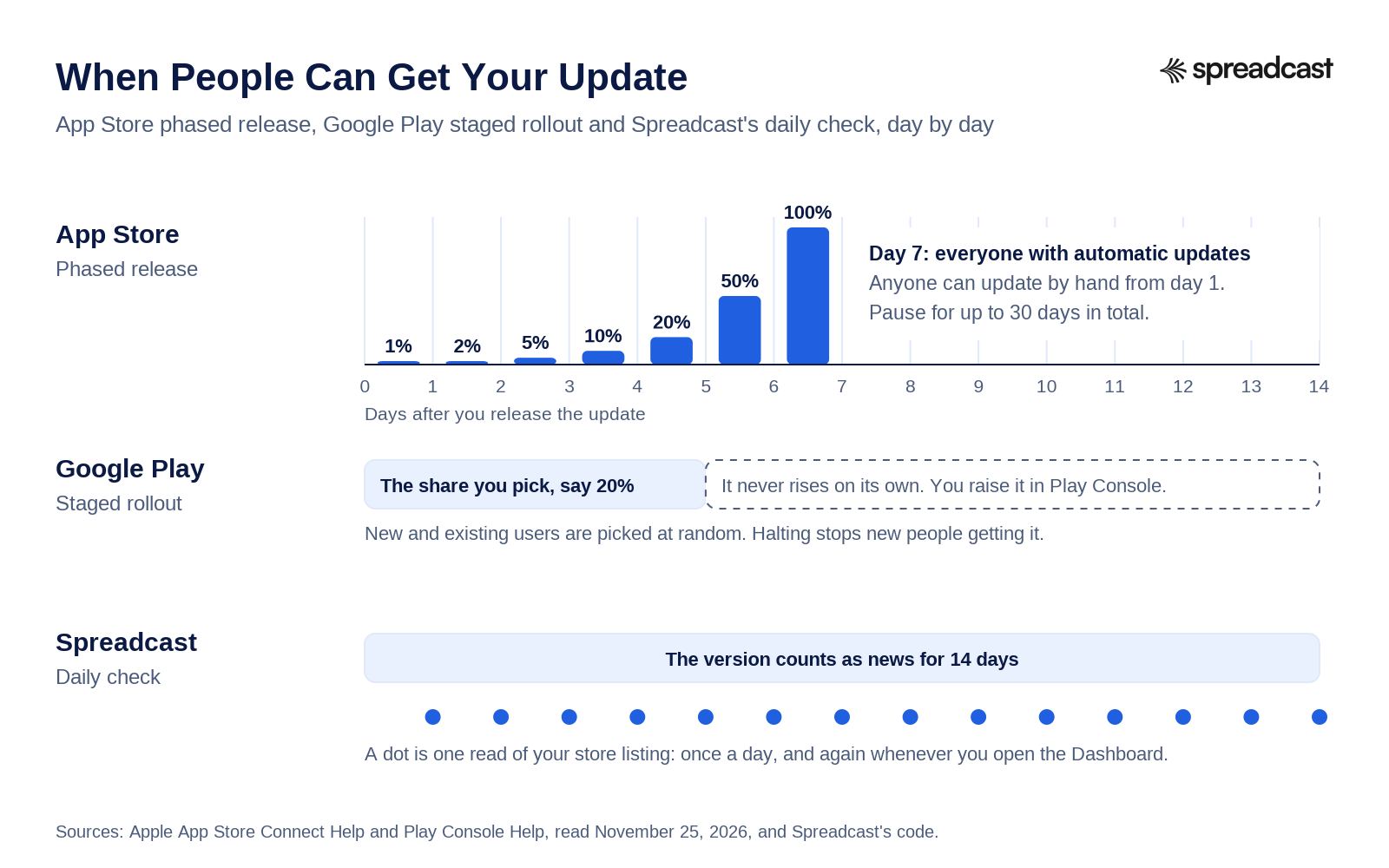
Most of what happens after you press release is about who gets the update and when. Apple's phased release spreads an update over 7 days to 1%, 2%, 5%, 10%, 20%, 50% and then 100% of users with automatic updates turned on. You can pause it for up to 30 days in total, or release to everyone at any time. The detail that matters for posting: Apple says apps in phased release can be downloaded by hand from the App Store by anyone at any time.
Google Play What's New: The 500 Character Limit and Staged Rollouts
Google Play keeps release notes much shorter. Play Console Help on preparing and rolling out a release allows up to 500 Unicode characters per language, written between an opening and a closing language tag for each language you support. If you paste a long App Store note into Play Console, it will not fit: Flighty's notes in the example below run to 3,256 characters, six and a half times the Google Play limit.
Google's version of a gradual release is the staged rollout, and it works differently from Apple's. You pick the percentage. New and existing users are chosen at random, the percentage never rises on its own, and users are not told they got a staged version. If you halt a rollout, no additional users receive that version, and if you start a new release before finishing the last one, it goes to the same group. Staged rollouts are for updates only, not a first release.
The practical difference: Apple says in writing that anyone can update by hand during a phased release. Google's page says nothing of the kind; it says the rollout picks users at random and that the share only rises when you raise it. So a post that says the update is out, published while your rollout sits at 10%, can send most Android readers to a store page that still offers them the old version. On Google Play, post when you reach 100%, or say plainly that the update is rolling out.
Google Play also differs in how updates arrive. Google Play Help on updating apps lists options to auto update over Wi Fi only, over any network, or not at all, and says Google Play always tries Wi Fi first when data is limited. Either way, as on iPhone, many people get your release without reading a word of it.
Fluent by Spring.Five minutes each morning, one new character.
Fluent by Spring.Five minutes each morning, one new character.
App Store vs Google Play: What Each Store Allows for an Update
Dated November 25, 2026. Each line comes from the store's own help page, linked in the last column.
| Question | App Store | Google Play | Source |
|---|---|---|---|
| Release notes field | What's New in This Version | Release notes | App Store Connect reference, Play Console release help |
| Length limit | 4,000 characters | 500 Unicode characters per language | Apple's limit, Google's limit |
| Required | For every version after the first | Not stated in the help page we read | Apple's field rules |
| Rule on content | Describe new features and changes; generic text only for simple fixes | No rule on release note content in the help page we read | App Review 2.3.12 |
| News text you can change without a release | Promotional text, 170 characters | Not in the release form; see promotional content below | Apple on promotional text |
| Gradual release | Phased release over 7 days: 1, 2, 5, 10, 20, 50, 100% | Staged rollout at a share you set and raise yourself | Apple phased release, Google staged rollouts |
| Can people outside the rollout get it | Yes, anyone can download it by hand | Not stated; users in the rollout are picked at random | Apple on downloads by hand, Google on rollout users |
| Pause | Up to 30 days in total | Halt, then resume with the same users | Apple on pausing, Google on halting |
| Reset the rating with a release | Optional, cannot be undone | Not offered in the pages we read | Apple on rating resets |
| Store card for a big update | In app event with the Major Update badge | Promotional content, Major update type | Apple in app events, Google promotional content |
| Who can use that card | Apple's page sets no size threshold | All games, and existing apps above Google's Premium growth tools thresholds | Google growth tools guide |
| Notice when a version goes live | App Store Connect webhook on app version status | No equivalent in the help pages we read | App Store Connect webhooks |
Both stores change their consoles often. If a menu looks different on yours, the rule usually still holds; check the linked page for the current wording.
When People Can Actually Get Your Update
Apple's phased release reaches everyone with automatic updates on day 7, and anyone can update by hand on day 1. Google's staged rollout holds at whatever share you set. Spreadcast's check runs once a day across the 14 days a version counts as news.
How to Announce an App Update: When to Post
Post on release day for the App Store, after 100% for Google Play. Because anyone can download an App Store update by hand during a phased release, a post on day one still works: the reader taps through and gets the new version, even if their phone would not have installed it for another week. On Google Play, a post during a staged rollout will disappoint most of the people who act on it, so wait, or write the caption as rolling out over the next few days.
Never post before the version is live. App Store Connect's Ready for Distribution and Play Console's in review states are not the same as available. If you write the post ahead of time, schedule it for after the time you plan to release, or keep it as a draft and publish it when the store page shows the new version number. A simple check before you post: open your own store listing on a phone signed out of your developer account and read the version line.
Pick the hour your audience is awake, not the hour your build finished. Many small teams release late in the day after a long debugging session; the post can wait until the next morning in your users' main time zone. A post on the day the feature matters beats a post on the day it shipped: Flighty's When to Leave feature, in the example below, is worth more in the week before a holiday travel rush than in a quiet week in February.
Space the networks if you like, but not by days. If the same news goes to Instagram, LinkedIn, Threads and TikTok, there is no rule that it must all go out in the same minute, but posting on one network and forgetting the rest for a week is how most update announcements die. A scheduler, including Spreadcast's posting times, solves this by putting each post at a set time without you being there.
If you ship weekly, do not announce every release. A week of only bug fixes deserves silence; three small features in a row may be better as one post that groups them. The rule of thumb from the release notes study above holds here too: post when a user would notice the change.
- Groceries$312
- Rent$1,100
- Coffee$46
Every one of them read.
Two people, one budget, zero spreadsheets. The shared goals alone saved us an argument a week.
For Every
Trail
App Store In App Events and Google Play Promotional Content
Both stores have a free way to announce a big update on the store itself, and both are worth knowing before you plan social posts. On the App Store it is an in app event. Apple offers a Major Update badge, which it defines as significant new features, content or experiences that go beyond minor enhancements such as UI adjustments or bug fixes. An event has a name of up to 30 characters, a short description of up to 50 and a long description of up to 120, can last up to 31 days and be promoted up to 14 days before it starts. An app can have up to 15 approved events and 10 published at a time. Event cards show on your product page, in search results and in Apple's editorial and personalized picks on the Today, Games and Apps tabs.
On Google Play the equivalent is promotional content, which covers offers, time limited events and major updates. Play Console Help on creating promotional content says a major update runs for a fixed 28 days, can be submitted up to 60 days before it starts, and can take up to four days to approve. The catch for small teams is who can use it. The help page says promotional content is available for all games and for apps that meet Google's eligibility criteria, and Google's Premium growth tools guide spells those out for apps: an existing title in a supported category that meets at least one threshold, such as 1.6 million daily MAU over the previous three months together with 1.6 million active installs, or at least $40,000 of spend in each of the previous three months. New app titles are not eligible. All games qualify; most indie apps do not.
So an indie app maker usually has one store card on Apple and none on Google Play, which makes social posts the main channel for an Android update. If you do run an in app event for a major update, the social post and the event card should say the same thing with the same picture, and the post can link straight to the event. Our guide to App Store in app events covers how to make one in detail.
Video: Apple on In App Events for Big Updates
Apple's own introduction to in app events, including the Major Update type and how event cards appear in search and on the product page.

Worked Example: One Real Release Note Turned Into Four Posts
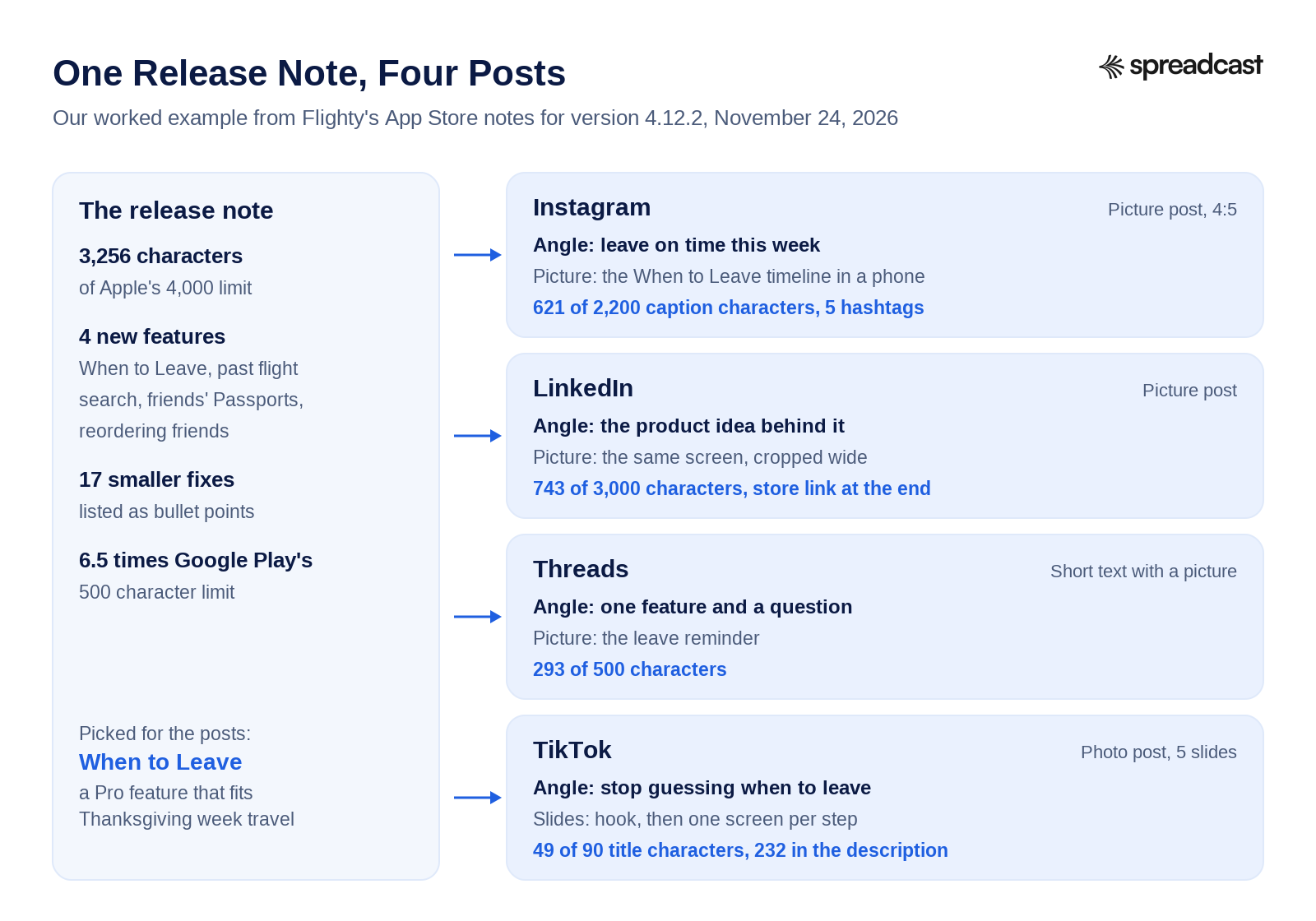
To show what a good app update post looks like, we took one real, public release and wrote the posts ourselves. The app is Flighty, on the App Store, a flight tracker with more than 164,000 ratings in the US store. On November 25, 2026 its listing showed version 4.12.2, released the day before, with release notes of 3,256 characters: 559 words, four new features with their own headings, and 17 smaller fixes as bullet points.
To be clear: everything below is our example, not Flighty's own marketing. Flighty did not ask for it and has not seen it. We picked the release because its notes are unusually good material, specific, well ordered and tied to a real moment, and because a release this rich makes the choices a marketer has to make easy to see. The same method works on a 200 character note from a one person app.
The new features in the notes are When to Leave, a plan from your door to your departure that combines predicted drive time, traffic alerts, public holidays at the departure airport and your own airport routine; search of your past flights in plain words; comparing Passports with friends; and reordering friends so family comes first. The notes say When to Leave is for Flighty Pro users.
The first decision is the one most update posts get wrong: pick one thing. A post that lists four features and 17 fixes is a changelog, and nobody stops scrolling for a changelog. We picked When to Leave because it is the headline of the notes, it is easy to picture, it sells the paid plan, and the release landed two days before US Thanksgiving, one of the busiest travel weeks of the year. The other features get a line at most, and the fixes are left out entirely.
The second decision is the picture. For an app, the strongest picture is nearly always the new screen itself, in a phone frame, on a background in the app's colors, with a headline of a few words. Here that is the When to Leave timeline. For TikTok, the same idea becomes a few slides, one per step of the plan.
One Release Note, Four Posts
What we kept from Flighty's notes, and how each network got its own angle, format and length.
The Four Posts, Network by Network
Our captions for Flighty's update, with each network's limit from its own documentation: Instagram 2,200 characters and 30 hashtags, LinkedIn 3,000, Threads 500, and a TikTok photo post title of 90 and a description of 4,000.
Instagram: Leave on Time This Week
Picture: the When to Leave timeline in an iPhone frame on Flighty's colors, headline "Know When to Leave". Caption, 621 characters with its hashtags: "Leaving for the airport this week? Flighty's latest update adds When to Leave: one plan from your front door to your gate. It estimates your drive from predicted traffic, warns you about delays before you set off, flags public holidays at your departure airport and adds your own time for parking, check in, security and the lounge. Then it tells you when to go. Also new: search past flights in plain words, like 'longest flight this year', and compare Passports with friends. When to Leave is part of Flighty Pro. Update from the App Store, link in bio." Then, on their own line, five hashtags: #travel #flighttracker #airporttips #thanksgivingtravel #flighty.
LinkedIn: The Idea Behind the Feature
Picture: the same screen, cropped to a wider frame. Caption, 743 characters, opening with "Most flight apps start at the airport. Flighty's latest update starts at your front door." It then explains the four parts of When to Leave in one paragraph, lists the two other changes as a short numbered list, says the feature comes with Flighty Pro, and ends with the App Store link. LinkedIn readers respond to the product thinking behind a feature, so the angle is the problem it solves, not the holiday.
Threads: One Feature and a Question
Picture: the leave reminder on its own. Caption, 293 characters: "New in Flighty: When to Leave. Tell it how long you like at the airport, and it watches traffic on your drive and reminds you when it is time to go. It even flags public holidays at your departure airport, right before Thanksgiving travel. What is your airport buffer, two hours or 45 minutes?" The question gives people something to reply with, which is what Threads conversations run on.
TikTok: Stop Guessing When to Leave
A photo post of five slides: a hook ("Stop guessing when to leave for the airport"), then one slide each for drive time from traffic, the delay alert, the holiday warning and the airport routine. Title, 49 characters: "When to leave for the airport, worked out for you". Description, 232 characters, naming the feature, the Pro plan and three hashtags. On TikTok you add a sound in the app, so this post works best saved to drafts and finished there. Spreadcast's TikTok slideshow maker designs slides like these from your own app screens.
What We Kept, What We Cut, and the Google Play Version
Each caption leads with the benefit in the reader's words, not the feature name. "Know when to leave for the airport" is something a person wants; "INTRODUCING WHEN TO LEAVE" is something a product team announces. The feature name comes second, so people can find it in the app.
We kept the Pro detail in every caption. Hiding that a feature is paid makes the comments worse, not better, and it is honest selling: the post is an ad for the paid plan, and saying so lets free users decide whether it is for them.
We cut every fix. Fixed cropped aircraft images and a stuttering map are good engineering and invisible marketing. The one exception worth making is a fix many people complained about in reviews; then the post is a thank you, and it can name the problem.
We changed the length per network rather than the message. The Threads caption is less than half the Instagram one, and the LinkedIn caption is the longest because LinkedIn readers will read a paragraph about how a feature works. None of the four comes near its network's limit; the limits are ceilings, not targets.
If the same release went to Google Play, the notes would have to shrink to 500 characters. A version that keeps the order and the honesty of the original reads: "New: When to Leave. Flighty plans your trip from door to departure: drive time from predicted traffic, alerts and a reminder to leave, public holidays at your departure airport, and your own airport routine. For Flighty Pro. Also new: search past flights in plain words, compare Passports with friends, and put your favorite people first. Plus fixes for Passport stats, the friends map and larger text sizes." That is our rewrite, at 408 characters, not a Google Play listing we read.
What to Do When Release Notes Say Only Bug Fixes and Performance Improvements
Do not post it. A post that says an app fixed bugs tells the reader nothing they can try, and it trains your followers to skip your posts. Apple allows the generic line: guideline 2.3.12 says simple bug fixes, security updates and performance improvements may rely on a generic description. Spreadcast follows the same logic, as the code section below shows: when the notes name nothing a user would notice, no update post is made.
There are four better moves. First, if one fix was the thing people complained about in reviews, name it and thank the people who reported it; that is a real post. Second, if the release has a real change hidden behind a stock phrase, rewrite the notes before you submit, because the notes are also the source for your post. Third, save small changes and group them into one post when there are three worth showing. Fourth, keep posting between releases with posts that do not depend on the version at all: a feature people miss, a review, a tip.
The table below shows how common the problem is, even among well known apps. We read the latest release notes of 16 of them through Apple's public lookup on November 25, 2026. Seven named something a user would notice. Eight named nothing: bug fixes, speed, a joke about squashing bugs, or in Spotify's case a request to keep automatic updates on. One, Reeder Classic, said only that it was ready for iOS 27, two months earlier. Most of the big consumer apps were generic, GitHub being the exception, while the smaller teams wrote real notes.
16 Well Known Apps' Latest Release Notes: Would They Make a Post?
Each app's current App Store version in the US on November 25, 2026, read through Apple's iTunes lookup; Bear and WhatsApp shipped new versions that day, and these apps update often, so the versions will have moved on by the time you read this. The summaries are ours; the last column is our reading of whether the notes name a change a user would notice.
| App | Version and release date | Characters | What the notes say, in brief | Names a change |
|---|---|---|---|---|
| Flighty | 4.12.2, Nov 24 | 3,256 | When to Leave, past flight search, friends' Passports, 17 fixes | Yes |
| Day One | 2026.24, Nov 24 | 475 | A Thanksgiving prompt pack, autosave every few seconds, fixes | Yes |
| Bear | 3.0.6, Nov 25 | 43 | Notes can now be opened on the web | Yes |
| Halide Mark III | 3.4.1, Nov 20 | 1,011 | A larger viewfinder and outer screen controls on iPhone Duo | Yes |
| Things 3 | 3.25.3, Nov 19 | 1,969 | Faster large lists, better date typing, a list of fixes | Yes |
| GitHub | 1.285.0, Nov 18 | 383 | Copilot model picking, pinned and shared sessions | Yes |
| Obsidian | 1.15.1, Nov 12 | 2,659 | A Quick Capture widget tile and a built in web viewer | Yes |
| Duolingo | 7.149.2, Nov 23 | 274 | A joke about squashing bugs | No |
| Todoist | 26.11.20, Nov 23 | 157 | Bug fixes, more in the app's own What's New | No |
| 457.0.0, Nov 23 | 94 | Performance and stability | No | |
| 26.46.74, Nov 25 | 116 | Regular fixes and performance | No | |
| Notion | 1.7.356, Nov 20 | 39 | Bug fixes and performance improvements | No |
| 588.1, Nov 20 | 89 | Crashes and reported issues fixed, faster | No | |
| Spotify | 9.2.2, Nov 20 | 127 | Keep automatic updates on | No |
| Strava | 490.0.0, Nov 18 | 142 | A couple of bug fixes and speed | No |
| Reeder Classic | 5.6, Sep 25 | 17 | Ready for iOS 27 | Barely, and older than 14 days |
A small, hand picked sample to show the pattern, not a study. For numbers across 288 top apps, see our release notes study linked above.
How to Make an App Update Post by Hand
The manual route costs nothing but time, and it is worth doing once by hand so you know what a good post needs before you automate it.
- 1
Pick One Change
Read your release notes and pick the one change a user would notice and want. If there is none, skip the post. Write it as a benefit in the words your users use, and keep the feature name for the second line.
- 2
Take the Screen
Take a clean screenshot of the new screen on a real device or the simulator, with realistic data and no debug banners. One screen beats a collage. Our free App Store screenshot generator puts it in a phone frame on your colors.
- 3
Design the Picture
Make a 4:5 picture for Instagram and LinkedIn: your background color, a headline of three to six words, the screen in a phone frame and your icon. For TikTok, split the story into four to six slides.
- 4
Write a Caption per Network
Lead with the benefit, then how it works, then where to get it. Short with a question for Threads, a paragraph on the why for LinkedIn, a few hashtags for Instagram and TikTok. Add your App Store and Google Play links where the network allows links.
- 5
Check the Store Page
Open your listing signed out and confirm it shows the new version. On Google Play, wait for 100% of your staged rollout, or say it is rolling out.
- 6
Post or Schedule
Post at the hour your users are awake, on every network you use, not just the first. Reply to the comments yourself in the first hour; that is where people ask the questions your next release can answer.
How to Automate App Update Posts With Zapier, Make or IFTTT
The first job of any automation is noticing the new version. IFTTT is the only one of the three with a ready made trigger. Its App Store service has an App version updated trigger that fires when an app you name releases a new version, and passes on the app's name, version, release notes, store link, icon and a screenshot. IFTTT's own page for the App Store and Facebook Pages pairs it with actions such as a link post, a status message or a photo from a URL, and the App Store service page notes that the service works for the US App Store only. Triggers are checked every hour on Free, every 15 minutes on Starter and every 5 minutes on Pro, per IFTTT's plans page, where Starter is listed at $25.08 a year.
Zapier has no App Store or Google Play app: on November 25, 2026, the addresses Zapier uses for such an app returned not found. You build the trigger yourself. One way is a Zap on a schedule that calls Apple's public lookup, which the iTunes Search API page describes as an ID based request limited to roughly 20 calls a minute, and compares the version with the last one it saw. A cleaner way, if you have the access, is Apple's own App Store Connect webhook, which can notify a URL when the status of an app version changes; it needs the Account Holder, Admin or App Manager role and allows up to ten webhooks per app. On Zapier, both routes go through Webhooks by Zapier, and Zapier's pricing page puts webhooks and multi step Zaps on Pro, which starts at $19.99 a month billed yearly for 750 tasks. Free is limited to two step Zaps with no webhooks.
Make works the same way with its HTTP app, whose Make a request module can call the same lookup on a schedule; Make's help says the shortest interval depends on your plan. Make's own guide to turning product updates into social posts, published December 17, 2025, starts from a different place: a Slack channel where your team posts releases. It sends each message through Make's AI tools to write a caption, generates an illustration with an OpenAI image model, and posts to a Facebook Page. Human review is optional: the guide suggests adding it yourself, for example with an Approve button in Slack or drafts in Airtable or Google Sheets.
What none of them do for you is the part this page has spent most of its length on. They pass on the whole release note, not the one change worth posting. They have no picture of your app unless you build one; a generated illustration is not your screen. They post one text everywhere unless you build a branch per network. Google Play has no public feed for any of them, so Android apps need a scraper you maintain. And approval, TikTok's rules and signed out accounts are yours to handle. If you enjoy building workflows and post to one or two networks, that is a fine weekend project. If you want posts that look designed, it is where most of the work is.
Video: App Store Connect Webhooks for New Versions
If you build your own automation, Apple's webhooks are the dependable trigger. This WWDC25 session covers them, along with the rest of the App Store Connect API.

By Hand vs No Code Automation vs Spreadcast
An honest comparison for one app that ships every week or two and posts to four networks. Vendor facts come from the pages linked above, read November 25, 2026; Spreadcast's from its code the same day.
| Question | By hand | Zapier, Make or IFTTT | Spreadcast |
|---|---|---|---|
| What you do per update | Everything: pick, design, write, post | Check the post the workflow made, if you built a review step | Approve, edit or skip; or nothing on Full Autopilot |
| Setup | None | An afternoon or more per workflow, plus upkeep when a step breaks | Paste your App Store or Google Play link |
| Spotting the new version | Memory | IFTTT trigger for the US App Store; your own lookup or webhook on Zapier and Make | Daily read of the listing, App Store and Google Play |
| Which change to post about | Your judgment | The full notes, or whatever your AI prompt picks | Two or three points a user will notice; none means no post |
| Picture | As good as your design skills | None, the store screenshot link, or a generated illustration | Designed in your brand with a real screen of your app |
| Captions | One per network, by you | One template, or one branch per network you build | Made from the update; Generate Caption writes one per network, and Full Autopilot puts it in your brand voice |
| Approval | Built in, it is you | Only if you build it | Approve First, or Full Autopilot |
| TikTok | You post it | Not in the IFTTT recipe; TikTok asks the person to choose who sees each post | On Full Autopilot, sent to your TikTok drafts or kept for one tap; on Approve First, added through Edit |
| Old versions | Not an issue | Depends on your filter | Only versions released in the last 14 days |
| Money | Free, plus any design tool | IFTTT Starter $25.08 a year; Zapier Pro from $19.99 a month billed yearly | Free spots updates and publishes 3 posts; Pro $29 a month |
Time and quality by hand depend entirely on you; we give no minute counts because we have not measured yours.
How Spreadcast Turns a New Version Into a Post
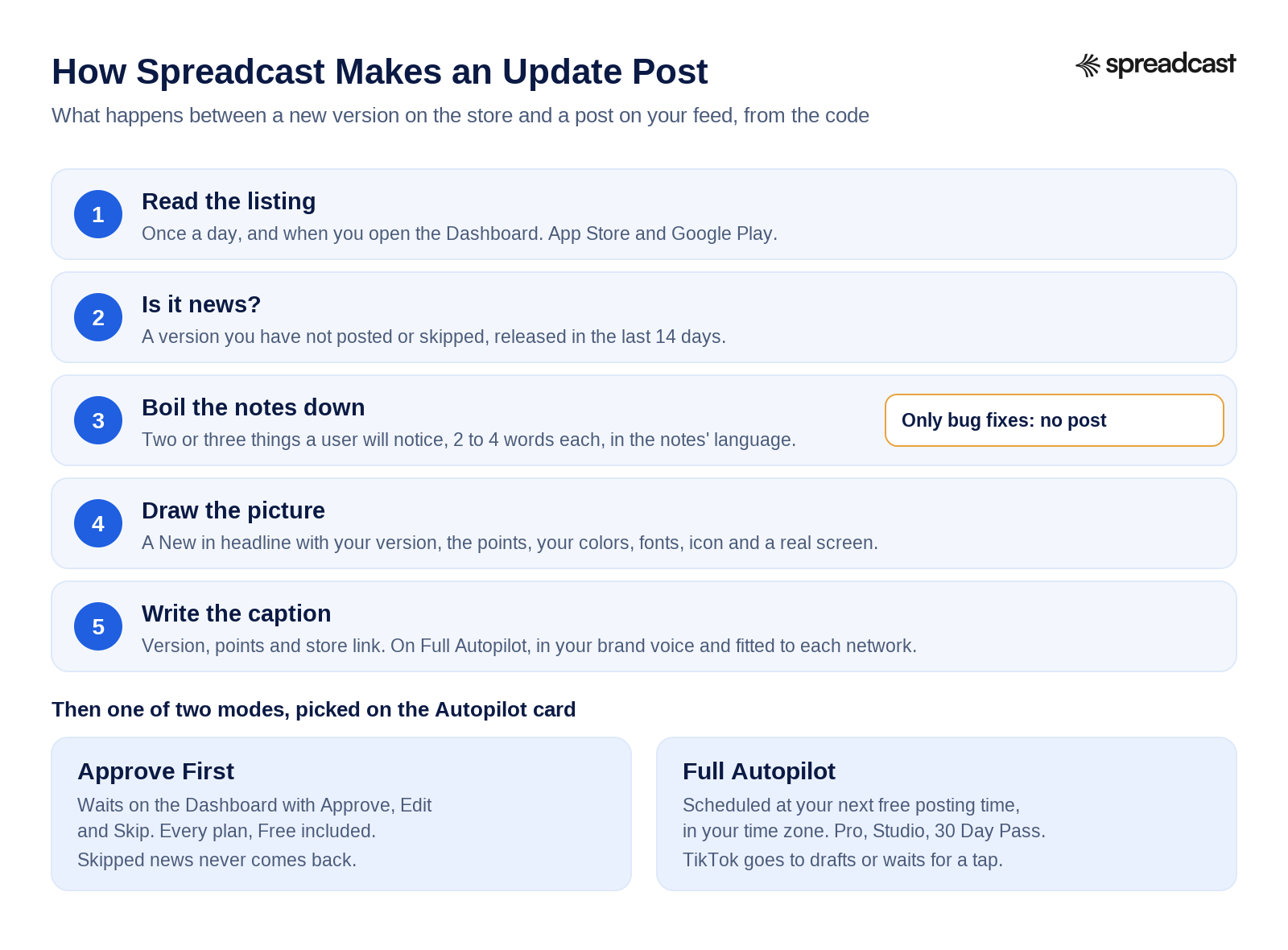
The same five steps run for every app on the account, every day. What happens at the end depends on the mode you picked.
How Spreadcast Spots a New Version
Spreadcast reads your App Store or Google Play listing once a day, whether or not you open the app that day, and again whenever you open the Dashboard. The Autopilot card on the Dashboard says when it last checked. The check runs every hour and takes accounts not yet read that day, so a slow store or a failed read is tried again an hour later instead of waiting until tomorrow.
A version counts as news for 14 days after its release date. That window exists for a reason the code comments spell out: without it, a new account's first post once announced an app's years old version as if it had just come out. So adding your app never produces a post about the version you shipped last spring, and a release you missed while on holiday is still offered for two weeks.
Each version is offered once. When you approve or skip it, it is remembered and not offered again; a skipped update does not come back. With several apps on the account, each app's versions are tracked on their own, so two apps that share a version number never get mixed up.
Then the release notes are boiled down. A language model reads the notes, up to 4,000 characters, and returns two or three points, each one concrete thing a user will notice in two to four words, like a feature label: the kind of words that fit on a picture. It writes them in the language of the notes, so a German listing gets a German post. When the notes mention only bug fixes, stability or performance with nothing concrete, it returns no points, and no update post is made. This runs once per version, however often the Dashboard is opened.
Read more in the help center: App Updates and Ratings covers the switches and what counts, and How Autopilot Works covers the modes and the Autopilot card.
What the App Update Post Looks Like
The picture is a 4:5 portrait, 1080 by 1350 pixels on paid plans, a shape that suits the feeds of Instagram, LinkedIn, Facebook and Threads alike. Its headline is "New in" and your version number, for example "New in 2.4", with the two or three points under it. It uses your brand kit: your colors, your fonts or a pairing that suits your brand, and your app icon, which signs the post. If Spreadcast has no icon for your app, it falls back to a simpler design headed "Version 2.4 Is Here".
It shows a real screen of your app, never your store's marketing images with a caption on top. An App Store app's screen sits in an iPhone frame and a Google Play app's in an Android phone. An app on both stores keeps the iPhone, with links to both stores in the caption.
Each app starts on its own design, and every update you post or skip moves it to the next layout, so your feed does not show the same picture with a different number every week. The picture is drawn once and kept, so the post you approve is exactly the post that goes out. Open it with Edit and Edit Design to change the words, colors or layout before it goes anywhere.
On Free, designed pictures carry a small Spreadcast mark and are saved a little smaller; with a Post Pack, Pro or Studio they are clean and full size. The same update and rating designs are also on your brand kit page, so you can see how your next update will look before you ship it.
For Every
Trail
Captions for Each Network
The caption starts from the update itself, in one line such as "Version 2.4 Is Here." followed by the points, with your App Store link under them, and both store links for an app on both stores. It is short on purpose, a sentence and a link or two, so it fits within every network's limit.
On Full Autopilot, Spreadcast goes one step further before posting: it rewrites those words in the caption voice you picked on your brand kit, Plain, Friendly or Playful, so an update post sounds like the rest of your posts, and fits the result to each network's limit, cut at a whole sentence where possible and at a whole word otherwise, with the store link kept under it when there is room. Threads and Mastodon allow 500 characters and Bluesky 300, so the cut matters there; Instagram, LinkedIn and Facebook rarely need one.
For a caption written from scratch for each network, open the post and click Generate Caption: it reads the text and the words on the picture and writes one caption per network, each in that network's style, with hashtags about what the post says. You can also write different text for one network by clicking it in Post To. The captions guide shows each control, and cross posting explains how one post becomes a version for every network.
On Approve First, the Approve button sends the short caption as it is. If you want a longer caption per network on every update, open the post with Edit instead and generate them; it takes a minute per update. On Full Autopilot nothing waits for you, so the voiced caption goes out.
Shared budgets are here. Invite your partner, plan the month together and split anything in two taps. Link in bio. #budgeting #moneytips #couples
No more arguing over who paid for groceries. Shared budgets are live in Ledgerly. #moneytok #budgeting
Ledgerly 3.0 is out. Couples told us the hardest part of budgeting was talking about it, so shared budgets let two people plan one month together and split any expense. What would you add next?
Shared budgets just shipped. Two people, one month, zero spreadsheets.
Ledgerly 3.0 adds shared budgets: plan the month with your partner and split anything. On the App Store now.
Approve First or Full Autopilot
Every account starts on Approve First. A new update post shows on the Dashboard under Waiting for Your Approval, labelled App Update with the version, with three buttons: Approve schedules it for your next posting time, Edit opens it in the editor, and Skip leaves it out for good. Approving sends it to every connected account that takes a single picture as it is; TikTok, which asks who can see each post, and YouTube, which takes video, are reached through Edit. See Approve Posts for each state a post can be in, and social media approval for how approval works across a team.
Full Autopilot skips the wait. The update post is drawn on the server and scheduled for your next free posting time, in your own time zone, on every connected network that takes it. Your posting time starts at 9:00, and you can change it on the Autopilot card. If a network has signed you out, that account is left off and the rest still go out; if none is left, the post waits on the Dashboard until you reconnect. You can switch modes at any time, and on Full Autopilot you can still open any post first.
TikTok is never posted to your feed unattended. TikTok's Content Sharing Guidelines ask that the person choose who can see each post, with no choice made in advance, so autopilot sends TikTok posts to your TikTok drafts by default, where you add a sound and post. Set it to Post to Feed and they wait on the Dashboard for one tap instead. The other networks go out on schedule either way.
Which mode to pick? Start on Approve First for your first few updates, to see what the points and pictures look like for your app. Once you trust them, Full Autopilot means a release on a Friday night is on your feeds on Saturday morning without you opening a laptop.
A real 5 star review from the App Store, shown big on the cover.
What Each Spreadcast Plan Includes for App Update Posts
From the plan settings in Spreadcast's code on November 25, 2026. Prices are per month; a year costs ten months. The pricing page has the full list.
| Plan | Price | Update posts | Publishing | Apps and accounts |
|---|---|---|---|---|
| Free | $0 | Spots updates and rating milestones; posts wait on the Dashboard | Your first 3 posts, with a small mark; then a Post Pack | 1 app, 10 accounts |
| Post Pack | $19 once | Same as Free | 10 posts to all your accounts, no mark | As your plan |
| Pro | $29 | Approve First or Full Autopilot, plus the weekly plan | Unlimited, clean | 1 app, 10 accounts |
| Studio | $79 | Everything in Pro, for each app | Unlimited, clean | 5 apps, 50 accounts, 3 seats |
| 30 Day Pass | $39 once | Everything in Pro for 30 days | Unlimited, clean | As Pro |
Free's 3 posts go out when you approve them yourself; Full Autopilot comes with Pro, Studio and the 30 Day Pass. See the pricing page for current details.
Google Play Apps and Apps on Both Stores
Google Play apps work the same way as App Store apps: the same daily read, the same 14 days, the same points and the same post, with the screen in an Android phone and the store named as Google Play. Google has no public feed like Apple's lookup, so Spreadcast reads the listing page itself; the release notes arrive as HTML and are turned into plain lines first.
Big apps on Google Play often show their version as Varies with device. In that case Spreadcast reads the version from the notes, for example "New in 4.11.2", and when the notes do not name one either, no update post is made rather than a post with no version on it.
Most apps live on both stores. When your App Store and Google Play listings have the same name and the same developer, give or take Inc or GmbH, Spreadcast pairs them and treats them as one app: one update post per release, not two, with links to both stores. Rating milestones are tracked per store, so each store gets its own thank you post. And an app on both stores counts as one app on your plan.
Picture the result for a cross platform team that ships the same release to both stores on a Tuesday: on Wednesday morning, one post goes out on every network, the caption links to both stores, and Android readers are not left behind. If your Google Play release runs as a staged rollout, use Approve First and approve the post once you reach 100%.
Between Updates: Rating Milestones and the Weekly Plan
Update posts are the news, and the median app has only one or two a month worth posting, as worked out above. Spreadcast fills the rest in two ways, from the same listing it reads for updates.
Rating milestones come first. Each time your app passes a round number of ratings, 100, 250, 500, 1,000, 2,500, 5,000, 10,000 and on up, while its average is four stars or more, Spreadcast makes a thank you post with the rating as one big number. Milestones count from Spreadcast's first read of your app, so the first post celebrates the next round number you reach, not one you passed years ago. Each kind of app news has its own switch on the Autopilot card, and both start on. See App Updates and Ratings.
Then the weekly plan, on Pro, Studio and the 30 Day Pass. Each week it plans a set number of posts, from off to 14, between your updates: a spotlight on one feature, things to try in the app, a real review from your listing, the problem your app solves with the fix, and dates that suit your app. A new Free account sees a preview of its first week, three posts as drafts, without spending its free posts. The weekly plan guide shows how each week is made, and app marketing automation covers the whole autopilot in one place.
Put together, a small app that ships twice a month gets its update posts on the days that matter, a thank you when the ratings cross a line, and steady posts in between, without anyone on the team owning social media as a job.
How to Tell If Your App Update Posts Work
Measure downloads, not only likes. Apple's App Store Connect Analytics can make campaign links: your store link with a provider token that stays the same for your account and a campaign token of up to 30 characters that you change per campaign. Give each network its own campaign token, such as one for Instagram and one for LinkedIn, and App Analytics shows downloads by campaign under Metrics, with a Campaign filter.
Apple's help adds two limits worth knowing before you judge a post. A campaign shows in Analytics only after at least 24 hours, and each metric appears only once it reaches 5 in the dates you pick, so a post that brought three downloads looks like zero. Small apps should compare a month of update posts per network, not one post. Our free App Store campaign link generator builds the links without opening App Store Connect.
On the social side, watch the interactions on each update post against your usual posts. If update posts get fewer interactions than your other posts, the pictures or the chosen change are the usual cause, not the idea of posting updates. Spreadcast's social media analytics show followers, views and interactions against the previous period, your best posts, and the day and time of day that got the most interactions per post, a good guide for choosing your posting time.
One more signal costs nothing: reviews that mention the feature you posted about. When people name a new feature in a review within days of a post, the post reached them. To try the whole loop on your own app, paste your store link and see the posts Spreadcast makes for your app in its brand.
- Groceries$312
- Rent$1,100
- Coffee$46
Make App Update Posts From Claude or ChatGPT
If you already work with an AI assistant, Spreadcast's MCP server brings the same app news into it. The assistant can list what is worth posting about right now from your store listing, a new version with what changed or a rating worth thanking people for, and design the same update picture the Dashboard shows, in your brand.
From there you can ask for a different angle, a caption for each network or a time to post, and the assistant saves the post as a draft in Spreadcast for you to approve, or schedules it if you allowed that connection to publish. Posts made this way count against your plan exactly like posts made on the Dashboard.
It is a good fit for developers who already live in an assistant and want to say "make a post about today's release, LinkedIn and Threads only" rather than open another app. The posts, pictures and approval rules are the same as on the Dashboard.
“I haven’t slept this well since I was a kid.”
Beyond Social Posts: Other Places to Announce an App Update
Social posts reach people who follow you. The people who already have your app are easier to reach inside it, and most guides on how to announce an app update spend as much time on those channels as on social media. They are worth a short tour, because the post and these messages should say the same thing on the same day.
Inside the app, a short What's New screen, banner or tip on the screen that changed tells current users about the feature at the moment they can use it. Apple's TipKit is built for exactly this, and Apple's own advice is to use tips sparingly. On Android, Google's in app updates API can ask people to install the new version without leaving the app, with a flexible flow that downloads in the background and an immediate flow that takes the full screen.
Push notifications and email reach people who have not opened the app in a while, which is where update news can bring someone back. Apple's App Review Guidelines set the rule for push in 4.5.4: no promotions or direct marketing unless the person explicitly opted in, with a way to opt out. A big release can also earn a changelog entry or a post on your own site, the one place a reader can see every version in order.
Communities count too. If your users gather in a Discord server or a Telegram channel, an update post belongs there as much as on Instagram, and Spreadcast publishes to both alongside the other networks. Our app update announcement examples show worked wording for each of these channels, push, email, in app banners and update notices, along with weak announcements rewritten side by side.
How We Researched This
On November 25, 2026, Mark Weizer read Apple's App Store Connect Help pages on platform version information, phased releases, resetting an overview rating and webhooks, Apple's App Review Guidelines, in app events page, product page guide, iTunes Search API page and support page on updating apps; Google's Play Console Help pages on preparing a release, staged rollouts and promotional content, the Premium growth tools guide and Google Play Help on updating apps; Apple's TipKit documentation and the Android Developers guide to in app updates; and the developer documentation of Instagram, Threads, LinkedIn and TikTok for caption limits and posting rules.
Every competitor fact comes from the vendor's own page read that day: IFTTT's App Store trigger and plans, Zapier's pricing and webhooks pages, and Make's guide, scheduling help and HTTP app. We also tried Zapier's addresses for an App Store or Google Play app, which returned not found. We ran no paid tests of these tools and quote no results we did not read.
Flighty's release notes and the 16 app table were read through Apple's public iTunes lookup for the US store the same day. Release counts, release note shares and the posts per month estimate come from our own studies, linked where they are used. Spreadcast's behavior was checked in its code the same day: the daily check, the 14 day window, how release notes become points, the picture, the captions, the two modes, TikTok, Google Play and twin apps, and the plans. If anything here goes out of date, the help center pages linked above are updated with each change.
Frequently Asked Questions
How do I announce an app update on social media?
Pick the one change a user would notice, show the new screen in a phone frame, and write a short caption per network that leads with the benefit and links to the store. Post on release day for the App Store, and after your staged rollout reaches 100% on Google Play.
Is there a tool that posts my app updates to social media automatically?
Yes. Spreadcast reads your App Store or Google Play listing every day and turns each new version into a designed post with a caption, which waits for your approval or publishes on autopilot. IFTTT also has an App Store trigger for the US store that can post plain text or a link.
What is the character limit for What's New on the App Store and Google Play?
4,000 characters for What's New in This Version on the App Store, and 500 Unicode characters per language for release notes on Google Play.
Should I post about every app update?
No. Post when a release has a change users will notice. Releases that only fix bugs are better left unannounced, or grouped with the next real change.
When should I post during a phased release or staged rollout?
On the App Store, release day is fine, because anyone can update by hand during a phased release. On Google Play, people outside a staged rollout cannot get the version, so post at 100% or say it is rolling out.
Does Spreadcast post update news to TikTok automatically?
It sends TikTok posts to your TikTok drafts by default, where you add a sound and post, or keeps them on the Dashboard for one tap. TikTok asks that people choose who sees each post themselves.
Where These Facts Come From
Every outside number, rule and price on this page links to the page it was taken from.
- Platform version informationApple App Store Connect Help
- App Review GuidelinesApple Developer
- Release a version update in phasesApple App Store Connect Help
- Reset an app overview ratingApple App Store Connect Help
- In App EventsApple Developer
- Creating your product pageApple Developer
- How to manually update apps from the App StoreApple Support
- Manage webhooksApple App Store Connect Help
- TipKitApple Developer Documentation
- iTunes Search APIApple Services Performance Partners
- Prepare and roll out a releasePlay Console Help
- Release app updates with staged rolloutsPlay Console Help
- Understand promotional contentPlay Console Help
- Create promotional contentPlay Console Help
- Premium growth toolsGoogle Play
- In app updatesAndroid Developers
- How to update apps on AndroidGoogle Play Help
- Connect App Store to Facebook PagesIFTTT
- App Store serviceIFTTT
- App version updated triggerIFTTT
- PlansIFTTT
- PricingZapier
- Webhooks by ZapierZapier
- Turn product updates into social media with Make AIMake
- Schedule a scenarioMake Help Center
- HTTP appMake
- Instagram media referenceMeta for Developers
- Threads postsMeta for Developers
- Post and share updatesLinkedIn Help
- Content Posting API, photo postTikTok for Developers
- Content Sharing GuidelinesTikTok for Developers
- Fresh apps: an empirical study of frequently updated mobile apps in the Google Play storeEmpirical Software Engineering, McIlroy, Ali and Hassan
- Social media fact sheetPew Research Center
- Campaign linksApp Store Connect Analytics Help
- Flighty, Live Flight TrackerApp Store
- Video: Meet in app events on the App Store, WWDC21Apple Developer
- Video: Automate your development process with the App Store Connect API, WWDC25Apple Developer
Researched and written by Mark Weizer. Last checked on November 25, 2026.