App Store Categories: The Short Answer
Apple's page on choosing a category describes 27 App Store categories, from Books to Weather, and mentions one more, Stickers, for iMessage sticker packs. You give every app a primary category and, if you want, a secondary one. Games get up to two subcategories on top of that, and apps made for children 11 and under can join the Kids category in one of three age bands. On iPhone, 24 of those categories have their own top chart, Kids has an All Kids chart plus one per age band, and Games has an All Games chart plus 16 subcategory charts, which we counted in the chart menu of the App Store's web charts page on November 20, 2026.
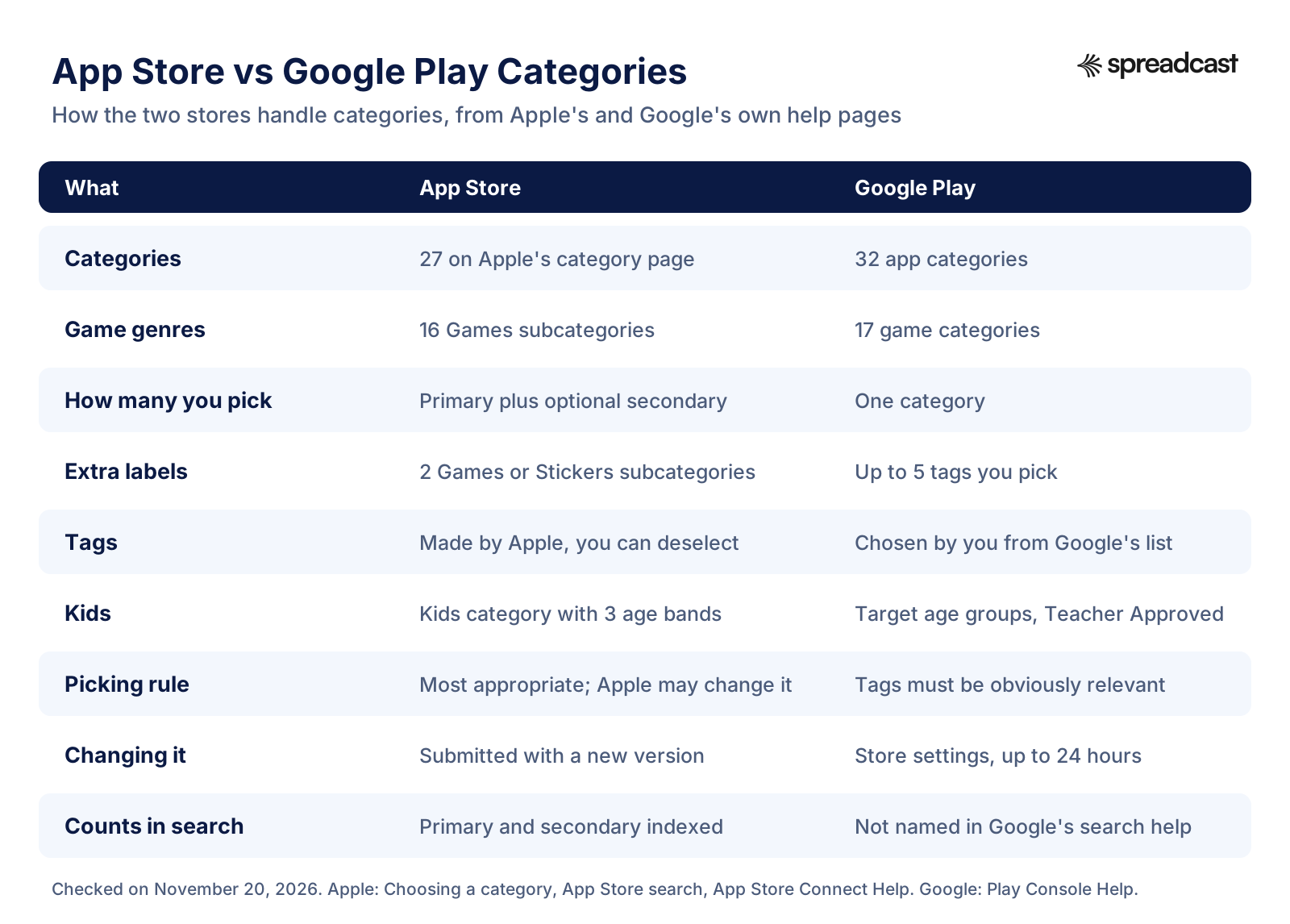
Google Play works differently. Its Play Console Help page on choosing a category and tags lists 32 app categories and 17 game categories. You pick one category, nothing secondary, and then add up to five tags from Google's list. Both lists, word for word as the stores write them, are in the tables below.
If you only need the decision, here it is in three lines. Pick the primary category for what a person does in your app most days, not for who they are or what tech you used. On the App Store, add a secondary category, because 77 percent of the top apps in the category charts we pulled do. And remember that a category chart counts only primary categories, so the secondary helps search and browsing, not chart placement.
That last point is the original finding on this page. Apple does not say how its category charts treat secondary categories, so we pulled the top 100 free iPhone apps in all 24 app categories and all 17 game charts, looked up every app, and checked. The method is at the end, and every number on the page that is not linked to another publisher came out of that work.
Categories are one part of a store listing. The name, subtitle and keywords decide most of what search does, which our guide to app store optimization covers for both stores, and the Google Play ASO guide covers on its own. This page stays on the category: what the options are, what each one changes, and how to choose.
Full List of App Store Categories in 2026
These are the 27 categories on Apple's category page, in Apple's order, plus Stickers. The middle column is our short version of Apple's own definition for each. The chart column says whether the category had its own top chart in the iPhone charts menu on November 20, 2026.
| Category | What Apple puts there | Own iPhone chart | Note |
|---|---|---|---|
| Books | Apps that add real interactivity to content usually sold in print | Yes | Reading apps, audiobooks, comics and web novel apps |
| Business | Apps that help run a business or let people collaborate on and share content | Yes | The largest iOS category by app count, per 42matters |
| Developer Tools | Apps for building, managing and distributing apps | Yes | TestFlight and GitHub top its chart |
| Education | Apps that teach a skill or subject in an interactive way | Yes | Language learning, school, test prep |
| Entertainment | Apps meant to entertain and inform with audio, video or other content | Yes | Streaming, short drama, AI companions; also tied to Screen Time |
| Finance | Apps that carry out money transactions or help with business or personal finances | Yes | Banks, budgets, payments, investing |
| Food & Drink | Apps that recommend, teach or review food and drinks | Yes | Delivery and restaurant chain apps lead its chart |
| Games | Single player or multiplayer activities for entertainment | Yes, All Games plus 16 subcategories | Pick up to two Games subcategories |
| Graphics & Design | Apps for art, design and graphics | Yes | Wallpapers, widgets, AR drawing and AI image makers lead its chart |
| Health & Fitness | Apps about healthy living: fitness, stress, recreation | Yes | Cycle trackers, gyms, step rewards, sleep |
| Lifestyle | Apps about a general interest subject or service | Yes | The most common secondary category in our data |
| Kids | Apps designed for children 11 and under | Yes, All Kids plus one per age band | Joined through Made for Kids and an age band |
| Magazines & Newspapers | Apps that offer auto renewing subscriptions to magazine or newspaper content | Yes | Its chart also lists apps that use it as the secondary |
| Medical | Medical education, information management or health reference for patients or professionals | Yes | Most top apps add Health & Fitness |
| Music | Apps for finding, playing, recording, performing or composing music | Yes | Streaming, song recognition, AI music makers |
| Navigation | Apps that help people travel to a physical place | Yes | Maps, transit, parking |
| News | Current events in politics, entertainment, business, science and technology | Yes | Newspapers, aggregators, local news |
| Photo & Video | Apps for capturing, editing, managing, storing or sharing photos and videos | Yes | Instagram, YouTube and CapCut all sit here |
| Productivity | Apps that make a process or task more organized or efficient | Yes | Notes, calendars, and the big AI assistants |
| Reference | Apps that help people look up information | Yes | Bible apps, translators, card scanners |
| Safari Extensions | Extensions that enhance and customize browsing in Safari | No separate iPhone chart | Browser add ons for Safari |
| Shopping | Apps that support buying consumer goods or improve shopping | Yes | The biggest group in the overall Top Free Apps chart that day |
| Social Networking | Apps that connect people by text, voice, photo or video | Yes | Threads, WhatsApp, Telegram, Facebook and Discord |
| Sports | Professional, amateur, college or recreational sports | Yes | Fantasy, sportsbooks, league and streaming apps |
| Travel | Apps for planning, buying or tracking any part of a trip | Yes | Airlines, hotels, trip planners |
| Utilities | Apps that solve a problem or finish a specific task | Yes | Browsers, authenticators, VPNs, carrier apps |
| Weather | Forecasts, alerts and weather information | Yes | Radar, forecasts, earthquake alerts |
| Stickers | Sticker pack apps for iMessage | No separate iPhone chart | Standalone packs are found only through search |
Definitions are shortened from Apple's Choosing a category page. Developers who manage metadata in code can read the same tree, categories and subcategories together, through the App Store Connect API endpoint that lists app categories.
How Many App Store Categories Are There?
The honest answer depends on where you count, and the numbers you see quoted online disagree for that reason. Apple's category page describes 27, counting Games, Kids and Safari Extensions, and then mentions Stickers separately for the iMessage store. The data company 42matters says the App Store's apps are divided into 26 categories. The iPhone charts menu shows 24 app categories, Kids and Games. All three are right about what they count.
Here is how the pieces fit. Kids is not a category you pick from the same list as the others; Apple says you select the Made for Kids checkbox and choose an age band, and your app then appears in Kids in addition to its normal primary and secondary category, according to Apple's category page. It still has charts on iPhone: an All Kids chart and one for each age band. Safari Extensions and Stickers are real categories but have no chart of their own on iPhone. Take Kids, Games and Safari Extensions out of Apple's 27 and you have the 24 app categories with a chart of their own.
Subcategories add another layer. Games has 16 of them on the iPhone charts menu: Action, Adventure, Board, Card, Casino, Casual, Family, Music, Puzzle, Racing, Role Playing, Simulation, Sports, Strategy, Trivia and Word. Stickers has subcategories too, which you can choose when Stickers is your primary or secondary category, as App Store Connect Help explains. Apple's page names no fixed list of Stickers subcategories, so we leave them out rather than guess.
Mac apps add one more wrinkle. On the Mac, you also set a category in Xcode through the LSApplicationCategoryType key, and App Store Connect Help says the primary category you set there should match the one in Xcode. That key has its own list of values, including separate values for game genres, so a Mac developer sees the categories twice.
App Store Game Categories and Google Play Game Categories
Apple's 16 Games subcategories come from the iPhone charts menu; Google's 17 game categories come from Google's category help page. The last two columns are Google Play numbers from AppBrain's category statistics as of November 20, 2026, and the share is our own division of AppBrain's counts.
| Game genre | App Store | Google Play | Google Play games | Reached 50K downloads |
|---|---|---|---|---|
| Action | Subcategory | Category | 16,656 | 30.4% |
| Adventure | Subcategory | Category | 13,504 | 28.2% |
| Arcade | Not offered | Category | 26,140 | 13.6% |
| Board | Subcategory | Category | 12,365 | 20.7% |
| Card | Subcategory | Category | 10,255 | 26.6% |
| Casino | Subcategory | Category | 8,388 | 19.2% |
| Casual | Subcategory | Category | 50,960 | 19.9% |
| Educational | Not offered | Category | 15,988 | 24.3% |
| Family | Subcategory | Not offered | None | None |
| Music | Subcategory | Category | 2,316 | 34.1% |
| Puzzle | Subcategory | Category | 65,438 | 15.6% |
| Racing | Subcategory | Category | 6,589 | 40.5% |
| Role Playing | Subcategory (Roleplaying in the charts menu) | Category | 13,190 | 45.1% |
| Simulation | Subcategory | Category | 23,186 | 41.7% |
| Sports | Subcategory | Category | 7,607 | 28.3% |
| Strategy | Subcategory | Category | 12,153 | 32.9% |
| Trivia | Subcategory | Category | 8,885 | 15.6% |
| Word | Subcategory | Category | 9,773 | 18.5% |
Reached 50K downloads means the share of games in the category that AppBrain counts at 50,000 downloads or more. A low share points to a long tail of small titles; a high share points to fewer, bigger games. Neither tells you a category is easy.
App Store Kids Category and Age Bands
The Kids category is the one with real rules attached. Apple's Kids page says that to appear there you select an age band in App Store Connect: 5 and under, 6 to 8, or 9 to 11. You also have to follow the App Review Guidelines for kids, which means guideline 1.3 and guideline 5.1.4, and provide parental gates, which Apple describes as adult level tasks that stop a child from buying something or following a link out of the app without a parent.
The rules in Apple's App Review Guidelines are strict. Under guideline 1.3, Kids apps must not include links out of the app, purchasing opportunities or other distractions unless they sit behind a parental gate. They should not include third party analytics or third party advertising, with narrow exceptions, and they may not send personally identifiable information or device information to third parties. The line that catches people later: once customers expect your app to follow the Kids rules, it has to keep meeting them in later updates, even if you deselect the category.
Two more rules matter for the listing. Guideline 2.3.8 reserves terms like For Kids and For Children in app metadata for the Kids category. And guideline 5.1.4 says apps outside the Kids category cannot use words in the name, subtitle, icon, screenshots or description that suggest the main audience is children. So a math game for seven year olds either joins Kids with all its rules, or it stays out and keeps its marketing aimed at parents.
Being in Kids does not cost you a normal category. Apple says that in addition to the Kids category, your app can be discovered in another primary and secondary category, such as Games, Entertainment or Education. The full picture of age ratings, which is a separate setting from the Kids category, is in our guide to App Store age ratings.
Stickers, Safari Extensions and the Other Special Categories
Three categories behave unlike the rest. Stickers lives on the App Store for iMessage. Apple's category page says a sticker pack app can go into Stickers or into another primary category that describes it better, and if you use Stickers you can also pick a Stickers subcategory. The catch is in the next sentence: standalone sticker pack apps are not shown in categories on the App Store for iPhone and iPad and can be found only through search. For a sticker pack, the name and keywords carry the whole job.
Apps that include an iMessage extension are a different case. Their categories come from the iOS app itself and are used on the App Store for iPhone, iPad and iMessage, so there is nothing separate to set.
Safari Extensions is a category for apps whose main purpose is an extension that customizes browsing in Safari. Content blockers, password helpers and page tools tend to land here. These apps also have their own review rules: guideline 4.4.2 says Safari extensions must run on the current version of Safari, may not interfere with System or Safari interface elements, and should not claim access to more websites than they strictly need.
Developer Tools is open to every app, but its audience is narrow and specific. In our data, 80 of its top 100 free apps added a secondary category, most often Utilities (37) or Productivity (29), which is a sensible hedge when the primary category is small.
Google Play Categories List for Apps
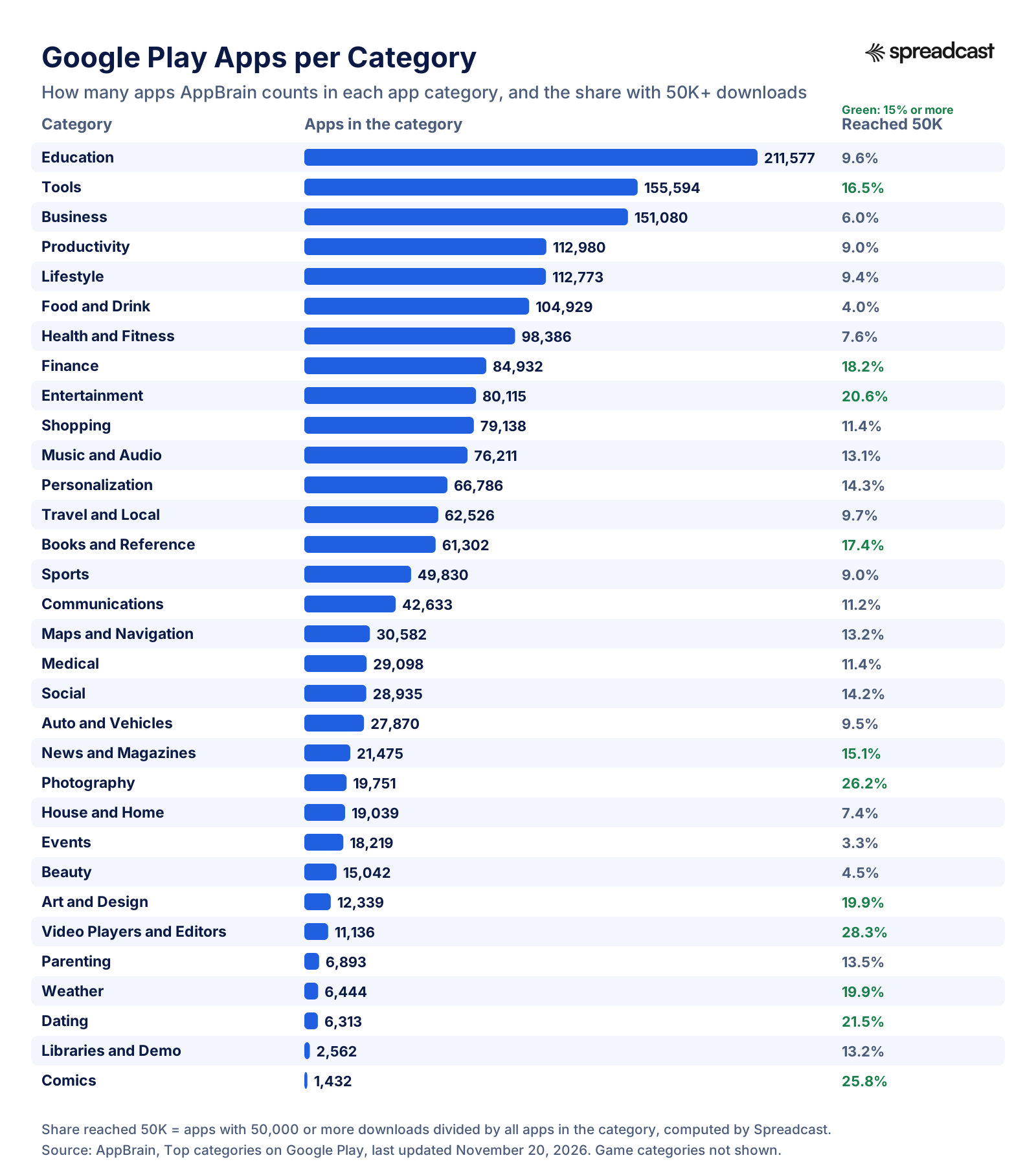
Google's category and tags help page lists these 32 app categories, each with examples of what belongs there. App counts and the share with 50,000 or more downloads are from AppBrain's category statistics, last updated November 20, 2026; the low quality share is AppBrain's own label, divided by us.
| Category | Google's examples, shortened | Apps on AppBrain | Reached 50K | Low quality |
|---|---|---|---|---|
| Art and Design | Sketchbooks, painting tools, coloring books | 12,339 | 19.9% | 30% |
| Auto and Vehicles | Car shopping, insurance, price comparison, road safety | 27,870 | 9.5% | 31% |
| Beauty | Makeup tutorials, makeover tools, hair styling | 15,042 | 4.5% | 62% |
| Books and Reference | Book readers, textbooks, dictionaries, wikis | 61,302 | 17.4% | 38% |
| Business | Document editors, package tracking, remote desktop, job search | 151,080 | 6.0% | 36% |
| Comics | Comic players and comic titles | 1,432 | 25.8% | 25% |
| Communications | Messaging, dialers, address books, browsers | 42,633 | 11.2% | 39% |
| Dating | Matchmaking, meeting new people | 6,313 | 21.5% | 13% |
| Education | Exam prep, study aids, vocabulary, language learning | 211,577 | 9.6% | 50% |
| Entertainment | Streaming video, movies, TV | 80,115 | 20.6% | 32% |
| Events | Concert, sports and movie tickets | 18,219 | 3.3% | 37% |
| Finance | Banking, payments, insurance, taxes, trading | 84,932 | 18.2% | 22% |
| Food and Drink | Recipes, restaurants, food guides | 104,929 | 4.0% | 61% |
| Health and Fitness | Fitness, workout tracking, diet tips | 98,386 | 7.6% | 33% |
| House and Home | Apartment search, home improvement, real estate | 19,039 | 7.4% | 30% |
| Libraries and Demo | Software libraries and technical demos | 2,562 | 13.2% | 28% |
| Lifestyle | Style guides, wedding and party planning, how to guides | 112,773 | 9.4% | 35% |
| Maps and Navigation | GPS, mapping, transit tools | 30,582 | 13.2% | 33% |
| Medical | Drug references, clinical calculators, medical journals | 29,098 | 11.4% | 26% |
| Music and Audio | Music services, radios, music players | 76,211 | 13.1% | 37% |
| News and Magazines | Newspapers, aggregators, magazines (needs a News apps declaration) | 21,475 | 15.1% | 33% |
| Parenting | Pregnancy, infant care, childcare | 6,893 | 13.5% | 18% |
| Personalization | Wallpapers, home screens, lock screens, ringtones | 66,786 | 14.3% | 39% |
| Photography | Cameras, photo editing, photo sharing | 19,751 | 26.2% | 30% |
| Productivity | Notepads, to do lists, keyboards, calendars, calculators | 112,980 | 9.0% | 33% |
| Shopping | Online shopping, coupons, price comparison, grocery lists | 79,138 | 11.4% | 38% |
| Social | Social networking and check in apps | 28,935 | 14.2% | 19% |
| Sports | Sports news, score tracking, fantasy teams | 49,830 | 9.0% | 36% |
| Tools | Tools for Android devices | 155,594 | 16.5% | 32% |
| Travel and Local | Trip booking, ride sharing, city guides, local business info | 62,526 | 9.7% | 37% |
| Video Players and Editors | Video players, video editors, media storage | 11,136 | 28.3% | 23% |
| Weather | Weather reports | 6,444 | 19.9% | 16% |
AppBrain's category totals add up to fewer apps than 42matters counts on Google Play, because each tracker counts in its own way. Use the counts to compare categories with each other, not as a census.
Google Play Apps per Category, Charted
Three categories hold nearly a quarter of the Android catalog by AppBrain's count, and the ones with the most apps are not the ones where apps most often reach 50,000 downloads.
How Many Apps Are in Each App Store Category
Apple does not publish app counts per category, so the numbers come from data companies that crawl the store. On November 20, 2026, 42matters' iOS statistics page counted 2,879,764 apps from 1,225,188 publishers, divided into 26 categories, with 95.02 percent of apps free. Its seven biggest categories that day were Business (301,852 apps), Utilities (291,750), Education (289,146), Games (285,910), Lifestyle (242,197), Health & Fitness (206,368) and Productivity (196,642). Those seven alone hold about 63 percent of the store.
Google Play looks similar at the top. The same day, 42matters' Google Play statistics counted 2,717,596 apps in 49 categories, 13 percent of them games, led by Education (297,003), Business (225,666), Tools (214,272) and Productivity (158,824). AppBrain's own table, which only covers apps it tracks, puts Education first too with 211,577 apps.
What does that mean for you? A big category is not automatically a bad choice. Much of a large category can be apps that are not after your users at all: in Business, think of apps built for one company's staff, one conference or one firm's clients. They add to the count without competing with you. The real competition is the top 100 or so apps in the category chart, plus whoever ranks for your main keywords.
Where the count does help is in reading the long tail. On Google Play, only 3.3 percent of Events apps and 4.0 percent of Food and Drink apps reached 50,000 downloads, against 26.2 percent in Photography and 28.3 percent in Video Players and Editors. Food and Drink also has the second highest share of apps AppBrain marks as low quality, 61 percent, just behind Beauty at 62 percent. A category full of small, abandoned apps is easier to stand out in visually, but it also tells you demand inside the store is thin, so most of your installs will have to come from outside it.
Games run the other way. Role Playing (45.1 percent), Simulation (41.7 percent) and Racing (40.5 percent) have the highest share of titles past 50,000 downloads on Google Play. Fewer games, and bigger ones. Our mobile game market statistics page has the revenue side of that story, and the App Store statistics page covers the store as a whole.
App Store vs Google Play Categories at a Glance
The stores agree on most category names and disagree on almost everything about how you pick them.
App Store Categories and Their Google Play Equivalents
If your app is on both stores, this is the mapping we would use. It is our judgment, not an official crosswalk; neither company publishes one.
| App Store category | Closest Google Play category | What to watch |
|---|---|---|
| Books | Books and Reference | Google puts books and reference in one category |
| Business | Business | Same idea in both stores |
| Developer Tools | Libraries and Demo, or Tools | No direct match; pick by what the app does on the device |
| Education | Education | The biggest Play category, so expect a crowd |
| Entertainment | Entertainment, Comics or Events | Ticketing apps go to Events on Play |
| Finance | Finance | Same idea in both stores |
| Food & Drink | Food and Drink | Same idea in both stores |
| Graphics & Design | Art and Design | Different name, same job |
| Health & Fitness | Health and Fitness | Pregnancy and baby apps can use Parenting on Play |
| Lifestyle | Lifestyle, Beauty, House and Home, Dating or Parenting | Google splits Lifestyle into five narrower homes |
| Magazines & Newspapers | News and Magazines | Play needs the News apps declaration |
| Medical | Medical | Same idea in both stores |
| Music | Music and Audio | Podcast players often land here too |
| Navigation | Maps and Navigation | Same idea in both stores |
| News | News and Magazines | One Play category for both Apple categories |
| Photo & Video | Photography or Video Players and Editors | Choose by photos or video; Play splits them |
| Productivity | Productivity | Keyboards sit here on Play |
| Reference | Books and Reference | Shared with books on Play |
| Shopping | Shopping | Same idea in both stores |
| Social Networking | Social or Communications | Messaging apps go to Communications on Play |
| Sports | Sports | Same idea in both stores |
| Travel | Travel and Local | Ride sharing and local business info sit here on Play |
| Utilities | Tools or Personalization | Wallpapers and ringtones go to Personalization |
| Weather | Weather | Same idea in both stores |
| Kids | No category; target age groups and Teacher Approved | Handled through policy settings, not a category |
| Safari Extensions, Stickers | No equivalent | Apple only |
| Games and its subcategories | One of 17 game categories | Play has Arcade and Educational, Apple has Family |
Google category names follow Google's help page; Apple names follow Apple's category page.
App Store Primary Category vs Secondary Category
Apple lets you assign two categories, a primary and a secondary, and it is clear about which one matters more. In Apple's words on the Choosing a category page, the primary category is the one where the app appears when people browse the App Store or filter search results, and it determines placement on the Apps tab or the Games tab on iPhone and iPad. On the Mac it decides where the app shows in the Categories tab.
The secondary category is optional and does less, but not nothing. Apple's App Store search page says your primary category and optional secondary category are both indexed by the search algorithm. The same page lists text relevance from the title, subtitle, keywords and primary category among the things search results are based on, next to user behavior such as downloads and ratings.
Apple gives three tests for the primary choice. It should describe the main function or subject of the app. It should be where users naturally look for an app like yours. And it should match how similar apps are categorized, because people may already know to look there. Then comes the warning: choosing categories that do not reflect the app's core experience is against the App Review Guidelines. Guideline 2.3.5 puts it more bluntly: select the most appropriate category, and if you are way off base, Apple may change the category for you.
Here is how we read those rules in practice. The primary category is a promise about the core job. The secondary is a second honest description, usually the job people do next, or the place they would also browse. A meal planner is Food & Drink first and Health & Fitness second. A podcast player is Music first and Entertainment second. A banking app is Finance first and, if it is for small businesses, Business second.
One technical detail: only the primary category is required. App Store Connect's table of required, localizable and editable properties marks Primary Category as required and Secondary Category as optional, and neither as localizable, so you cannot use a different category in different countries.
What Your App Store Category Actually Changes
Most guides say the category is important and stop there. These are the specific places it shows up, each from Apple's own pages or from our chart data.
Browse and the Apps or Games Tab
The primary category decides where your app appears when people browse and which tab it lives under, Apps or Games, according to Apple's category page. So a game that sets Entertainment as its primary is placed by Entertainment, not by Games.
Category Top Charts
The category charts rank apps by their primary category. The rankings section below shows the data, and the one exception.
Search Results and Filters
Both categories are indexed for search, and the primary category counts toward text relevance, per Apple's search page. The same page tells you not to repeat words from your name, subtitle or category in the 100 character keyword field, so the category name itself is a free keyword.
Games Subcategory Charts
Games can pick up to two subcategories, and people can find a game by browsing them and in the subcategory charts. Our data shows both subcategories count: in every one of the 16 subcategory charts, a third or more of the top 100 games listed that subcategory second.
Screen Time Limits
Apple says apps with Entertainment or Games as their primary or secondary category appear in the matching Time Allowance category that parents use in Screen Time. That is a real reason to think twice before adding Entertainment as a secondary to a study app.
Kids Rules and Wording
Joining Kids brings the guideline 1.3 rules, and staying out of it limits how child focused your metadata can sound under guidelines 2.3.8 and 5.1.4 of the App Review Guidelines.
App Store Tags
Apple now adds tags such as Sleep to apps, built on top of categories, and shows them next to categories on the search page and in results. Tags come from your metadata, AI and human curation, per App Store Connect Help on tags.
Editorial Featuring
Apple's editors look at apps across all categories. Its getting featured page lists uniqueness, described as a fresh approach to a familiar category, among the factors the team considers.
App Store Category Rankings and Top Charts
People search for app store category rankings because a category chart is the most visible ranking an app can win. The App Store's web charts page shows Top Free and Top Paid lists for iPhone, filtered by category, and Apple's RSS feed builder serves the overall top charts as feeds. What Apple does not say is which apps are allowed into a category's chart. So we checked.
On November 20, 2026 we pulled the top 100 free iPhone apps in the US for each of the 24 app categories, then looked up every one of the 2,394 chart entries in the iTunes Lookup API to read its primary and secondary category. In 23 of the 24 charts, 100 percent of the apps used that category as their primary. Not a single app reached the Productivity chart, the Travel chart or the Weather chart through its secondary category.
The one exception was Magazines & Newspapers. Of the 99 apps in its chart, 78 had it as their secondary category, mostly with News (32) or Books (25) as the primary. That is why reading apps and newspaper apps show up in two charts at once: we found 24 apps listed in two category charts that day, and every one of them involved Magazines & Newspapers.
Game charts behave differently, and in a way that helps games. All 100 apps in the All Games chart had Games as their primary category, and in each subcategory chart, between 33 and 64 of the top 100 games listed that subcategory as their second subcategory rather than their first. Both subcategories put a game into a subcategory chart.
So the practical rule is simple. If a chart is what you are after, the category you want to rank in has to be your primary category. A secondary category can help search and browsing, and it is still worth setting, but it will not put your app in a second chart. For a game, choose both subcategories with the charts in mind, because both of them count.
A category chart is also a much smaller pond than the overall chart. Ranking in the top 100 of Weather or Navigation takes far fewer downloads than the overall Top Free list. If you want the outside numbers on what moves a listing once people land on it, see app store conversion rate, and for paid ways to climb, our guide to Apple Search Ads.
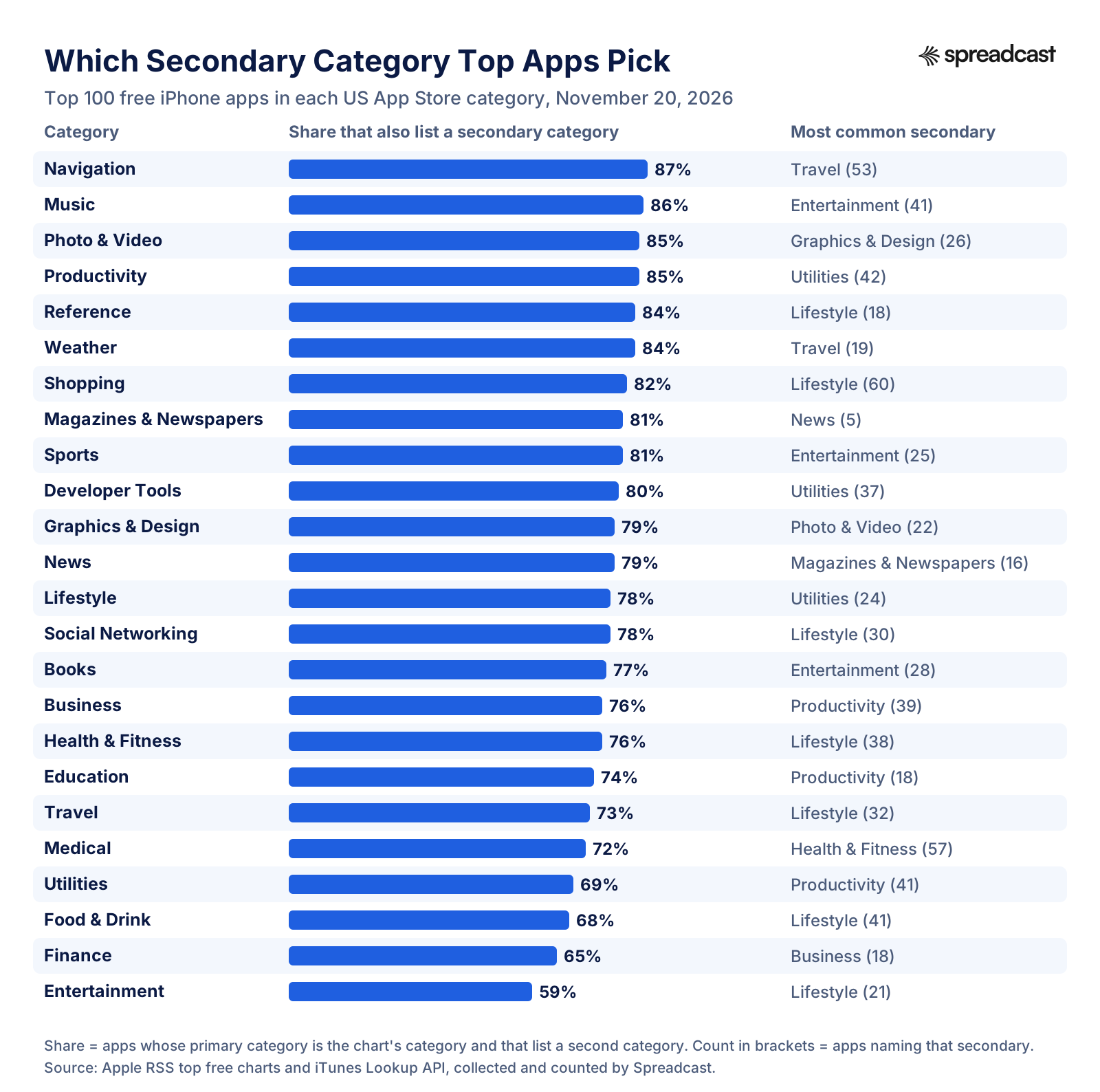
Which Secondary Category Top Apps Pick
Across the 24 category charts, 77 percent of the apps that held the category as their primary also set a secondary. The bars show that share for each category, and the right column shows the most popular secondary.
Secondary Category Choices by App Store Category
The full numbers behind the chart. For each category: how many of its top 100 free iPhone apps had it as their primary, how many of those also listed a secondary category, and the three most common secondaries with the number of apps that chose each.
| Primary category | Apps with it as primary | Also list a secondary | Most chosen secondaries |
|---|---|---|---|
| Books | 100 | 77 (77%) | Entertainment (28), Reference (11), Utilities (9) |
| Business | 100 | 76 (76%) | Productivity (39), Finance (10), Utilities (7) |
| Developer Tools | 100 | 80 (80%) | Utilities (37), Productivity (29), Education (6) |
| Education | 100 | 74 (74%) | Productivity (18), Games (10), Books (6) |
| Entertainment | 100 | 59 (59%) | Lifestyle (21), Photo & Video (7), Games (6) |
| Finance | 100 | 65 (65%) | Business (18), Productivity (13), Utilities (12) |
| Food & Drink | 100 | 68 (68%) | Lifestyle (41), Shopping (11), Travel (9) |
| Graphics & Design | 100 | 79 (79%) | Photo & Video (22), Utilities (20), Entertainment (10) |
| Health & Fitness | 100 | 76 (76%) | Lifestyle (38), Medical (16), Sports (9) |
| Lifestyle | 100 | 78 (78%) | Utilities (24), Social Networking (12), Shopping (8) |
| Magazines & Newspapers | 21 | 17 (81%) | News (5), Entertainment (4), Reference (2) |
| Medical | 100 | 72 (72%) | Health & Fitness (57), Shopping (3), Education (3) |
| Music | 100 | 86 (86%) | Entertainment (41), Utilities (14), Social Networking (8) |
| Navigation | 100 | 87 (87%) | Travel (53), Lifestyle (8), Utilities (8) |
| News | 98 | 77 (79%) | Magazines & Newspapers (16), Entertainment (15), Social Networking (11) |
| Photo & Video | 100 | 85 (85%) | Graphics & Design (26), Entertainment (15), Utilities (11) |
| Productivity | 98 | 83 (85%) | Utilities (42), Business (23), Lifestyle (5) |
| Reference | 100 | 84 (84%) | Lifestyle (18), Education (17), Utilities (12) |
| Shopping | 100 | 82 (82%) | Lifestyle (60), Finance (4), Business (4) |
| Social Networking | 100 | 78 (78%) | Lifestyle (30), Utilities (11), Productivity (11) |
| Sports | 100 | 81 (81%) | Entertainment (25), Games (15), Social Networking (9) |
| Travel | 100 | 73 (73%) | Lifestyle (32), Navigation (15), Utilities (9) |
| Utilities | 100 | 69 (69%) | Productivity (41), Lifestyle (9), Entertainment (5) |
| Weather | 99 | 83 (84%) | Travel (19), Utilities (19), Navigation (11) |
A few charts returned 98 or 99 apps instead of 100. Counts are per chart, so an app that appears in two charts is counted in both rows.
What the Secondary Category Data Tells You
Three patterns stand out once you read the table row by row. First, the secondary is nearly universal. Across the 2,370 different apps in the 24 category charts, 1,843 list a secondary category, which is 78 percent. Leaving the field empty is the unusual choice, not the safe one.
Second, most secondaries are one step away from the primary, and some pairs are almost a convention. Shopping apps pick Lifestyle (60 of 100). Medical apps pick Health & Fitness (57). Navigation apps pick Travel (53). Productivity and Utilities choose each other, 42 and 41 times. If your category has a pair like that, it tells you where your competitors expect to be found, and copying it costs you nothing.
Third, Lifestyle is the default second home. It was the most chosen secondary across the whole sample, picked by 319 apps, followed by Utilities (262), Productivity (198) and Entertainment (180). That makes sense: Lifestyle is broad enough to describe almost any consumer app honestly. It also means a Lifestyle secondary rarely sets you apart.
Entertainment is the odd one out at the bottom. Only 59 of its top 100 apps set a secondary, the lowest of any category. Many of the leaders are streaming and short drama apps, which have no obvious second job, and some of them simply leave it blank.
The secondary also shapes search. Because both categories are indexed, the second category is one more set of words the store already associates with you. Apple's search page asks you not to repeat words from your name, subtitle or category in the keyword field, and our App Store character counter helps you fit the rest of the 100 characters once the category words are out.
App Store Game Categories: What Top Games Choose
For games, the subcategories do the work a secondary category does for apps. Apple's category page says a game can choose up to two Games subcategories and that people find games by browsing the subcategories and in the subcategory charts. We pulled the top 100 free games in the All Games chart and in each of the 16 subcategory charts, which gave us 1,170 different games.
Of those 1,170 games, 1,050 used two subcategories (90 percent), 117 used one and 3 used none. Since both subcategories put a game into a chart, using only one is a small, free loss. The most common pairs were Casual with Puzzle (62 games), Puzzle with Word (58), Racing with Simulation (46), Board with Puzzle (45) and Card with Casino (44).
Almost half the games, 576 of 1,170, also set a second category besides Games. Entertainment was by far the favorite, chosen by 402 of them, followed by Sports (51), Music (40) and Education (28). Not one game in the 17 game charts had Games only as a secondary; every one of them had Games as the primary, which is what keeps it on the Games tab.
The Entertainment habit deserves a second thought. Apple's category page says apps with Entertainment or Games as a primary or secondary category appear in the matching Time Allowance category, so a game is already counted under games time either way. Adding Entertainment buys an extra search association and costs very little. Adding Education to a game is a different signal, and worth it only if the game teaches.
If your title is a game, the rest of the launch, from store assets to paid installs, is covered in our mobile game marketing guide.
Most Common Game Subcategory Pairs on the App Store
Pairs of Games subcategories used by the 1,170 different games in the US top 100 free game charts on November 20, 2026. Order inside a pair does not matter.
| Subcategory pair | Games using it | Typical games |
|---|---|---|
| Casual and Puzzle | 62 | Sorting, matching and traffic puzzles |
| Puzzle and Word | 58 | Word searches, crosswords, letter tiles |
| Racing and Simulation | 46 | Driving and car tuning games |
| Board and Puzzle | 45 | Chess, mahjong, sudoku style boards |
| Card and Casino | 44 | Poker, solitaire with coins, slots with cards |
| Casual and Music | 42 | Rhythm tap games |
| Role Playing and Simulation | 35 | Life sims and story games |
| Action and Casual | 33 | Arcade shooters and runners |
| Action and Adventure | 32 | Open world and battle games |
| Simulation and Sports | 31 | Sports management and sports sims |
The typical games column is our description of what we saw in the charts, not Apple's definition.
Which Categories the Top Free Apps Use
Looking at the overall US Top Free Apps chart on November 20, 2026 tells you which categories hold the store's biggest names right now. The 100 apps used 17 different primary categories. Shopping led with 20 apps, then Entertainment and Productivity with 15 each, then Social Networking, Photo & Video and Finance with 8 each. The free apps feed returned no games that day.
Seventy seven of the 100 set a secondary category. Lifestyle was the most common (21), followed by Utilities (13) and Social Networking (8). Shopping apps lean on Lifestyle; the AI assistants lean on Utilities.
The AI assistants are worth a closer look because so many new apps are built on them. ChatGPT, Google Gemini, Grok and Perplexity all used Productivity as the primary and Utilities as the secondary. Claude used Productivity and Business. Character AI, a companion chat app, used Entertainment and Utilities. The split is about the job, not the technology: an assistant that helps you get work done is Productivity, a chat app you use for fun is Entertainment.
Photo and video apps show the same logic. Instagram is filed under Photo & Video with Social Networking as its secondary, YouTube under Photo & Video with Entertainment, and editors such as Lightroom and Picsart under Photo & Video with Graphics & Design. If you are positioning a new app on iOS, our guide to iOS app marketing picks up where the category leaves off.
Video: Apple Explains App Store Tags and Categories
In the Get discovered chapter of this WWDC25 session, which starts at 8:34, Apple explains how App Store tags are built on app categories and where they appear.

App Store Tags and Google Play Tags
Both stores now pair categories with tags, and the two systems work in opposite directions. On the App Store, Apple makes the tags. In the WWDC25 session on App Store Connect, Apple says it is building on app categories with tags that highlight specific features, generated by its large language models from sources that include your metadata and reviewed by people. Tags appear alongside categories on the search page and with your app in search results, and tapping one opens a collection of apps that share it.
You cannot type your own App Store tags. App Store Connect Help on tags says tags are applied by default from the metadata you provide, in US English only, and that you can deselect the ones you do not want under App Store Tags in the App Information section. It also warns that deselecting all tags may affect discoverability, and that tags are currently shown only on the App Store in the United States. The practical move is to write your description and subtitle so the right tags come out, then remove any that are wrong.
Google Play's tags are yours to choose. The category and tags page allows up to five tags per app or game, picked under Store settings from suggested tags, search or the full list. Google's test is that a tag should be obviously relevant to someone who does not know the app, based on the store listing or the first minutes in the app. Its example: a vintage car racing game can use Racing and Car racing, but not Stunt driving just because stunts are possible.
Google also offers accessibility tags, such as screen reader friendly and visual assistance, which tell people the app works with assistive technology. And it asks you to revisit tags only after significant changes to the app, then check that the five most relevant are still selected. Tags are the closest thing Google Play has to Apple's secondary category, and they are where the nuance of your app goes.
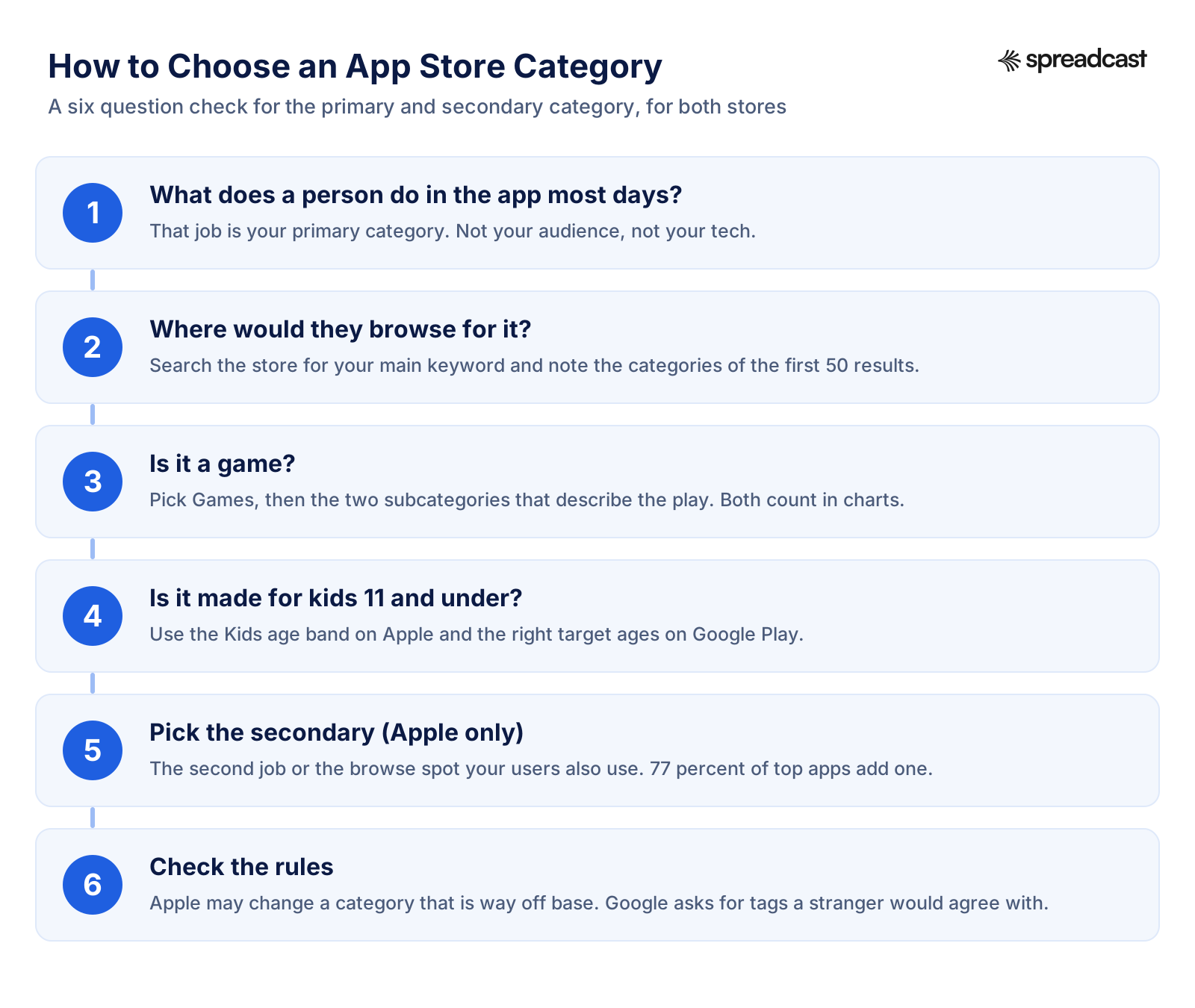
How to Choose an App Store Category
Six questions, in order. Most apps are settled by the first two.
How to Choose the Right Category for Your App, Step by Step
This is the process we would follow for a new app, with the reasoning behind each step.
- Step 1
Write Down the Daily Job
Finish this sentence in plain words: most days, people open the app to... If the answer is track a habit, plan meals or edit a photo, the category follows almost by itself. Ignore who your users are and what technology the app uses. An AI photo editor is a photo editor, not an AI app.
- Step 2
Search Your Main Keyword and Read the Categories
Type the phrase your users would type into the App Store and note the categories of the first 50 results. Apple's guidance asks you to check how similar apps are categorized, and this is the fastest way to do it. The table further down shows what we found for six common searches.
- Step 3
Check the Category Chart
Open the category chart on the App Store charts page. If the top 100 are all giants, your chart ambitions should be modest there; if the bottom of the chart has small apps like yours, the category is reachable. Remember that the chart counts primary categories only.
- Step 4
Settle Games and Kids First
If it is a game, Games is the primary and the two subcategories describe the play. If it is made for children 11 and under, decide whether you accept the Kids rules on the App Store and set target ages honestly on Google Play. These two choices bring rules with them, so make them before anything else.
- Step 5
Pick the Secondary on the App Store
Choose the second job people do with the app, or the place they would also browse. Check the table above for the pair your category usually uses. Avoid a secondary that brings side effects you do not want, such as Entertainment on a study app, which puts it into the entertainment Screen Time limit.
- Step 6
Map It to Google Play
Use the equivalents table to find the Play category, then spend your effort on the five tags. On Play, the tags carry the detail that Apple splits between two categories.
- Step 7
Write It Down With the Date
Record what you chose and why, with the chart positions on the day. If you change the category later, you will want something to compare against.
Six App Store Searches and the Categories Behind Them
We ran six common searches through the iTunes Search API for the US store on November 20, 2026 and tallied the primary category of every result returned, up to 50. This is the second step above, done for you.
| Search | Results | Primary categories | Most common second category |
|---|---|---|---|
| habit tracker | 48 | Productivity 36, Health & Fitness 11, Lifestyle 1 | Lifestyle (23), then Health & Fitness (12) |
| photo editor | 40 | Photo & Video 37, then one each of three others | Graphics & Design (14), then Lifestyle (8) |
| ai chat | 28 | Entertainment 19, Productivity 6, others 3 | Utilities (7) |
| budget app | 46 | Finance 42, Travel 3, Productivity 1 | Productivity (23) |
| meditation | 47 | Health & Fitness 44, others 3 | Lifestyle (29) |
| recipe app | 46 | Food & Drink 41, Games 3, others 2 | Lifestyle (13), then Health & Fitness (11) |
The API returned fewer than 50 results for some terms, so the counts use what came back. Search order on a phone can differ from the API's order.
Worked Examples: Habit Tracker, Photo Editor and AI Chat App
Three typical apps, the choice we would make, and the evidence behind it.
A Habit Tracker
This one is a genuine toss up, and the data shows it. In the habit tracker search, 36 of 48 results chose Productivity and 11 chose Health & Fitness; Streaks uses Health & Fitness with Utilities, and Finch uses Health & Fitness with Lifestyle. Our pick: Health & Fitness if the habits are mostly sleep, water, exercise and mood, because that chart is less crowded with to do apps; Productivity if the habits are about work and routines. Use the other as the secondary either way.
A Photo Editor
Easy primary, interesting secondary. 37 of the 40 photo editor results use Photo & Video. The secondary splits by audience: Lightroom, Picsart and Photoshop use Graphics & Design, which signals tools for makers, while VSCO, Snapseed and Facetune use Lifestyle, which signals looks and selfies. Pick the one that matches what your screenshots show.
An AI Chat App
Decide what the chat is for. A general assistant for work and questions belongs in Productivity with Utilities, like ChatGPT, Gemini, Grok and Perplexity. A companion or story chat belongs in Entertainment, which is where 19 of the 28 ai chat results sit. Putting a fun companion app in Productivity is the kind of mismatch guideline 2.3.5 lets Apple correct.
A Budget App
Finance as the primary, as 42 of 46 budget app results do, with Productivity as the secondary, the most common second choice there (23). Finance has one of the lowest secondary rates of any category chart (65 percent), so setting one is already a small edge.
How to Change Your App Store Category
You change the category in App Store Connect, in the App Information section under General, where the Primary Category and Secondary Category fields live. Apple's help page on viewing and editing app information lists the steps: select the app, click App Information under General, change the field and click Save. The Account Holder, Admin, App Manager and Marketing roles can do it.
The question everyone asks is whether it needs a new version. Apple's table of required, localizable and editable properties marks the properties that can be edited at any time without submitting a new version, and Primary Category and Secondary Category are not among them. In practice, plan to change the category while a new version is being prepared and let it go to review with that version. The same help pages say changes to app information may take up to 24 hours to appear on the App Store.
Two things are worth doing before you switch. Write down your current chart positions and keyword ranks, because a category change resets where you compete. And read Apple's guideline 2.3.5 once more: a change that moves you into a category that does not match your app is the kind Apple may simply undo. If you are close to a launch or an update, our App Store review time page and the list of App Store rejection reasons help you plan around review.
For a Mac app, change the category in Xcode too, so the LSApplicationCategoryType value matches App Store Connect, as App Store Connect Help asks.
How to Change Your App Category on Google Play
Google Play makes this simpler. Google's help page gives the steps: open Play Console, select the app, go to Grow users, then Store presence, then Store settings. In the App category section, choose the application type (app or game) and the category, then select Manage tags to add tags, and save. Google says changes can take up to 24 hours to show on your app's page.
The steps involve no new release, so you can adjust the category whenever the app changes. Google's own advice is about tags rather than categories: change them only after significant changes to the app, then make sure the five most relevant tags are still selected.
One side effect to know about: Google's page notes that free to install apps categorized as games appear on both Google Play and Google Play Games on PC by default. Switching an app from the app type to the game type changes where it can show, not just its label.
If you are setting up a Play listing from scratch, how to publish an app on Google Play walks through the account and review steps where these settings live, and Google Play screenshot sizes covers the graphics in the same Store presence menu.
Common App Store Category Mistakes
The mistakes that Apple's rules and the chart data above point to, with the fix for each.
Choosing the Emptiest Category
Moving a fitness app into Reference because its chart is easier puts you in front of people who are not looking for a fitness app, and it is exactly what guideline 2.3.5 warns about. A small chart only helps if the people browsing it want your app.
Leaving the Secondary Blank
A blank secondary is a missed search association and a missed browse spot, and it costs nothing to fill. Most top apps fill it.
Expecting the Secondary to Win a Chart
A secondary helps search, not charts. If you want to rank in a category chart, that category has to be the primary.
Using Only One Game Subcategory
Both subcategories place a game in subcategory charts, and 90 percent of top games use two. Pick the second one deliberately.
Wasting Keywords on the Category Name
Apple asks you not to repeat words from your name, subtitle or category in the keyword field. Typing photo into the keywords of a Photo & Video app spends characters on a word the store already has. Our App Store character counter shows what is left.
Child Friendly Wording Outside Kids
Writing for kids in the subtitle of an app that is not in the Kids category breaks guideline 5.1.4. Either join Kids with its rules or write for the parent.
Entertainment on the Wrong App
Entertainment as a secondary puts an app in the entertainment Time Allowance group in Screen Time. Fine for a game or a video app, odd for a homework helper.
Changing the Category Without a Baseline
Without notes on chart position and keyword ranks before the switch, you cannot tell whether the change helped. Record them first.
App Store Saturated Categories and Guideline 4.3
Search for app store categories and Google suggests app store saturated categories policy. There is no official list of saturated categories, but there is a rule close to it. Guideline 4.3 on spam says not to submit apps that are indistinguishable from what is already widely available, and that opportunistically creating variants of existing app categories or popular apps degrades App Store discovery.
The guideline then names kinds of apps that are well established: dating, flashlight, sound effects, wallpaper, simple timers and fortune telling. Apple says it will not accept new submissions of those kinds unless they offer a meaningfully different or improved experience, and that it may remove such apps if they are not updated, improved or do not attract customers. Drinking games and a few other joke kinds are called low quality outright.
None of this is about the category field itself, so picking a different category will not get a flashlight app past 4.3. What helps is the same thing that helps with category choice in general: a clear, specific job that the existing apps do not do as well. If your idea sits in one of those named kinds, write down what is new about it before you build, and lead with that difference in your screenshots and description.
Our page on App Store rejection reasons covers 4.3 next to the other guidelines behind rejections, with what to do about each.
Google Play Kids, Families and News Rules
Google Play has no Kids category. Instead, you declare a target audience in Play Console, and if any of your target age groups includes children, the app has to follow Google Play's Families Policy. Google's target audience help page lists six age groups, from 5 and under up to 18 and over, and says the first three are considered to include children in most places. It also warns that an app can be rejected if its listing suggests a younger audience than declared, for example through youthful animation or young characters in the graphics.
The Families Policies page sets the requirements for apps that target children, from age appropriate content and accurate Play Console answers to disclosed data collection and approved ad SDKs. Apps that comply can be rated for the Teacher Approved program. Google's Teacher Approved help page says that if an app is reviewed and approved, it receives a badge and may appear on the Kids tab on Google Play, and that an app can show as not reviewable if it is in a category or language the program does not support yet. When Google opened the program wider, the Android Developers Blog said all apps in the Kids tab are Teacher Approved.
News apps carry one category specific duty. Google's category page says that if your app is a news app, you must declare it through the News apps declaration in Play Console. The same note links to Google's requirements for news and news related apps, which are worth reading before you pick News and Magazines.
Does the Category Affect Google Play Search Ranking?
Google says less about this than Apple does. Its help page on getting discovered on Google Play search says apps are ranked on a combination of ratings, reviews, downloads and other factors, and that search considers the overall experience of the app based on user behavior and feedback. Categories come up only in passing, where Google notes that good graphics help an app stand out in search results, categories and featured lists.
The category page itself says categories and tags help users search for and discover the most relevant apps. So the category matters for discovery, but the words in your title, short description and full description, plus how people respond to the listing, carry far more weight. That side of the work is in our Google Play ASO guide, and the wider Android picture is in how to promote an Android app.
Your Category Also Decides What You Post About
A category is a store setting, but it also describes your audience's year, and that is useful well beyond the store. Health & Fitness apps live by January resolutions and summer plans. Finance apps have tax season. Food & Drink has the holidays. Education follows the school calendar. Travel peaks before summer and the winter breaks. The category tells you which moments your users already care about.
It also tells you what your competitors look like on social media. Open the top five apps in your category chart and look at their Instagram or TikTok: a Productivity app posts tips and workflows, a Photo & Video app posts before and after edits, a game posts gameplay. Matching the format people expect in your category, then posting more often and on a steadier schedule, is most of what small apps need.
The trouble is keeping it up. Every update, every rating milestone and every seasonal moment is a post, and most app makers stop after the launch week. Our app update announcement examples show what good posts look like, and how often apps update shows how many moments a year a typical app has to work with.
Turn Your App's Moments Into Posts With Spreadcast
Spreadcast runs that marketing for you. Paste your App Store or Google Play link at the start page, and it reads your public listing: icon, screenshots, description, release notes, rating and reviews. From that it builds a brand kit with your colors, fonts and real screenshots in a phone frame, and starts designing posts that look like your app, not like a template.
Then it keeps going on its own. When you ship a new version, Spreadcast turns the release notes into an update post. When your rating passes a milestone, it makes a rating post. A weekly plan adds feature, review, tips, problem and seasonal posts at your posting times, so the January post for a fitness app or the tax season post for a budget app is drafted before you think of it. Posts go to Instagram, TikTok, LinkedIn, Facebook, Threads, Pinterest, Bluesky, Mastodon, Telegram, Discord and YouTube for video, after your one tap approval or fully automatically, with TikTok posts sent to your TikTok drafts by default.
You can see it with your own app for free: the free plan makes 3 posts to download. Publishing starts with a $19 Post Pack of 10 posts or a $39 pass for 30 days, and Pro is $29 a month for one app with full autopilot, all on the pricing page. What Spreadcast does for app makers in general is on the page for mobile apps, and the wider playbook is in how to market an app and how to get app downloads.
How We Built This List
Who: this page was researched and written by Mark Weizer for Spreadcast. When: every source was opened and every number collected on November 20, 2026. The category lists come from Apple's Choosing a category page, the iPhone charts menu for chart and subcategory names, App Store Connect Help and the App Review Guidelines on the Apple side, and Google's category and tags help page on the Google side. Third party app counts are from 42matters and AppBrain, labeled where they appear; percentages built from AppBrain's columns are our arithmetic.
How, for the chart analysis: we requested Apple's public iTunes RSS chart feeds for the US iPhone store, the older feeds that, unlike the newer RSS feed builder, accept a category filter, for Top Free Apps, Top Paid Apps and Top Grossing Apps overall, the top 100 free apps in each of the 24 app categories, and the top 100 free games in All Games and each of the 16 Games subcategories. That gave 3,645 different apps. We then looked up every one in the iTunes Search and Lookup API, which returns each app's primary category and the full list of its categories and subcategories, and counted. A short Python script did the requests and the tallies; the six keyword searches used the same API with the country set to the US.
Limits worth knowing. Charts move every day, so the exact counts will differ tomorrow, though we would expect the patterns, such as category charts counting primary categories only, to hold. The lookup data shows categories in a fixed order, so where we say a game listed a subcategory second, we mean second in that list. We looked at free charts only and at the US store only. We did not have App Store Connect access to see the category picker itself, so where Apple's pages and the live charts differ in wording, such as Role Playing and Roleplaying, we show both.
Why: categories are one of the first decisions an app maker faces in App Store Connect and Play Console, and the pages that rank for the question either repeat Apple's definitions or are years old. We wanted one page with both stores' current lists, real numbers, and an answer to the question Apple leaves open about secondary categories and charts. If something here no longer matches the stores, the stores win; tell us and we will update the page.
For the rest of a release, our app launch checklist covers everything else that goes into App Store Connect, and how to get featured on the App Store covers the editorial side that categories alone will not win.
Frequently Asked Questions
What are the App Store categories?
Apple's category page lists 27: Books, Business, Developer Tools, Education, Entertainment, Finance, Food & Drink, Games, Graphics & Design, Health & Fitness, Lifestyle, Kids, Magazines & Newspapers, Medical, Music, Navigation, News, Photo & Video, Productivity, Reference, Safari Extensions, Shopping, Social Networking, Sports, Travel, Utilities and Weather. Stickers is a further category for iMessage sticker packs.
What are the Google Play categories?
Google lists 32 app categories, from Art and Design to Weather, and 17 game categories: Action, Adventure, Arcade, Board, Card, Casino, Casual, Educational, Music, Puzzle, Racing, Role Playing, Simulation, Sports, Strategy, Trivia and Word. You choose one category and up to five tags.
What is the difference between a primary and secondary category on the App Store?
The primary category decides where the app appears when people browse or filter search, which tab it sits on, and, in our data, which category chart it can rank in. The secondary is optional and is indexed for search along with the primary, but it did not place apps in a second category chart, except in Magazines & Newspapers.
Can I change my app's category after release?
Yes. On the App Store, edit Primary or Secondary Category under App Information; Apple does not list categories among the properties editable without a new version, so plan to submit the change with an update. On Google Play, change it under Store settings at any time. Both stores say changes can take up to 24 hours to appear.
Does the secondary category help App Store ranking?
It helps search, because Apple indexes both categories. It does not put your app into a second top chart: in our November 2026 pull of 24 category charts, every app in 23 of them had that category as its primary.
Which App Store category has the most apps?
Business, with 301,852 apps on 42matters' count of November 20, 2026, followed by Utilities, Education and Games. On Google Play, Education leads on both 42matters' and AppBrain's counts.
How many subcategories can a game have on the App Store?
Up to two Games subcategories, chosen from 16 on iPhone. Both count: games appear in the subcategory charts for either one, and 90 percent of the top games we checked use two.
What category should an AI app be in?
Choose by the job, not the technology. ChatGPT, Gemini, Grok, Perplexity and Claude all use Productivity as the primary on the App Store; companion and story chat apps mostly use Entertainment. An AI photo editor belongs in Photo & Video.
Where These Facts Come From
Every outside number, rule and price on this page links to the page it was taken from.
- Choosing a categoryApple Developer
- App information referenceApple Developer, App Store Connect Help
- Required, localizable and editable propertiesApple Developer, App Store Connect Help
- View and edit app informationApple Developer, App Store Connect Help
- Manage app tagsApple Developer, App Store Connect Help
- List app categories, App Store Connect APIApple Developer Documentation
- App Review GuidelinesApple Developer
- App Store searchApple Developer
- Kids apps on the App StoreApple Developer
- Getting featured on the App StoreApple Developer
- What's new in App Store Connect, WWDC25 session 328Apple Developer
- LSApplicationCategoryTypeApple Developer Documentation
- Top charts for iPhone, United StatesApple, App Store
- RSS feed builder for App Store chartsApple Marketing Tools
- iTunes Search APIApple Performance Partners
- Choose a category and tags for your app or gameGoogle Play Console Help
- Get discovered on Google Play searchGoogle Play Console Help
- Google Play Families PoliciesGoogle Play Console Help
- Manage target audience and app content settingsGoogle Play Console Help
- Participate in the Teacher Approved programGoogle Play Console Help
- Helping kids and families find high quality apps for kids (November 2022)Android Developers Blog
- iOS app statistics and trends, November 20, 202642matters
- Google Play statistics and trends, November 20, 202642matters
- Top categories on Google Play, November 2026AppBrain
- Video: What's new in App Store Connect, WWDC25Apple Developer
Researched and written by Mark Weizer. Last checked on November 20, 2026.