What Is the Apple Developer Program?
The Apple Developer Program is Apple's paid membership for people and companies who want to distribute apps on Apple platforms. Apple's program page lists it as a $99 annual membership that adds TestFlight, App Store distribution, analytics and sales reports on top of the free Apple developer account. Without it you can build an app and test it on your own devices, but you cannot put it on the App Store.
Two different things share the name "Apple developer account", and that causes most of the confusion. Anyone can register for free with an Apple Account and accept the Apple Developer Agreement. Apple's account overview says free registration gives beta versions of Xcode and the operating systems, the forums, Feedback Assistant and testing on your own devices. The paid membership is a separate step that adds Certificates, Identifiers & Profiles, App Store Connect, TestFlight and Xcode Cloud. In a May 2026 note to developers Apple put it plainly: a free developer account is separate from an Apple Developer Program membership.
Every figure on this page comes from a page we opened on October 24, 2026, and the link sits where the fact is used. Most are Apple's own help articles, the license agreement, and Apple's App Store listing for its Apple Developer app, which is the one place Apple shows the membership price in each country's currency. Google's help center supplies the Google Play comparison. Where Apple does not publish something, such as a typical approval time for organizations, the page says so instead of guessing.
Commission rates, the revenue share and the number of developers are a different question with their own page, our App Store statistics reference. This page covers the membership itself: what it costs, how to join, what it unlocks, and how to renew it, transfer it or leave it.
Apple Developer Program Cost at a Glance
The short answer to the cost question, with the page each line comes from. Prices are per membership year unless the row says otherwise.
| Item | Price | Where it is stated |
|---|---|---|
| Apple Developer Program, individual or organization | 99 USD per membership year, or local currency where available | Apple's membership details page |
| The same membership bought in the Apple Developer app, United States | $98.99 a year, as an auto renewing in app purchase | Apple Developer app on the US App Store |
| Apple Developer Enterprise Program | 299 USD per membership year, or local currency where available | Apple Developer Enterprise Program page |
| Free Apple developer account | Free with an Apple Account | About your developer account |
| Fee waiver for eligible nonprofits, accredited educational institutions and government entities | No annual fee while the waiver is approved | Apple Developer Program fee waiver |
| Student membership | No separate student program and no listed discount | Program enrollment help |
| Sales tax or VAT on the membership | Charged where applicable, at your region's or state's rate | Program enrollment help |
| Google Play developer account, for comparison | US$25 once | Google Play Console Help |
Read on October 24, 2026. The membership fee is separate from the commission Apple takes on sales, which is covered on our App Store statistics page.
Apple Developer Account Cost by Country: Apple's Local Prices
Apple's membership pages give one price, 99 USD, and say the local price appears during enrollment. They do not publish a list by country. The App Store does: Apple's free Apple Developer app sells the membership as an in app purchase, and its product page in each country shows that price in the local currency. These are the prices we read store by store on October 24, 2026. We did not convert any currency.
| Country or region | Membership price on that App Store | Store page |
|---|---|---|
| United States | $98.99 | App Store, United States |
| United Kingdom | £78.99 | App Store, United Kingdom |
| India | ₹8,700 | App Store, India |
| Australia | A$144.99 (the store shows $144.99) | App Store, Australia |
| Canada | CA$118.99 (the store shows $118.99) | App Store, Canada |
| New Zealand | NZ$144.99 (the store shows $144.99) | App Store, New Zealand |
| Turkey | 649.99 Turkish lira (the store shows ₺649,99) | App Store, Turkey |
| Germany | €98.99 (the store shows 98,99 €) | App Store, Germany |
| France | €98.99 (the store shows 98,99 €) | App Store, France |
| Ireland | €98.99 | App Store, Ireland |
| Japan | ¥12,800 | App Store, Japan |
| South Korea | ₩129,000 | App Store, South Korea |
| China mainland | ¥688.00 (yuan) | App Store, China mainland |
| Brazil | R$549.90 (the store shows R$ 549,90) | App Store, Brazil |
| Mexico | MX$1,749.00 (the store shows $1,749.00) | App Store, Mexico |
| South Africa | R1,699.99 | App Store, South Africa |
| Singapore | S$144.98 | App Store, Singapore |
| United Arab Emirates | AED 374.99 | App Store, United Arab Emirates |
| Saudi Arabia | SAR 429.99 | App Store, Saudi Arabia |
| Pakistan | Rs 15,900.00 | App Store, Pakistan |
| Nigeria | ₦43,900.00 | App Store, Nigeria |
| Philippines | ₱4,490.00 | App Store, Philippines |
| Egypt | EGP 1,549.99 | App Store, Egypt |
Prices as listed under In App Purchases on each store's page for the Apple Developer app, read October 24, 2026. They are what you pay to enroll or renew through the app. Apple does not publish its web enrollment prices by country and shows them in local currency during enrollment, so the web price in your country can differ. Apple's enrollment help says the purchase is taxed at your region's or state's rate where applicable, and the store pages do not say whether these prices already include that tax.
Apple Developer Program Price in 12 Markets
The same App Store prices for the countries people ask about most, each in its own currency. Prices in different currencies cannot be compared without an exchange rate, so the picture lists them and does not rank them.
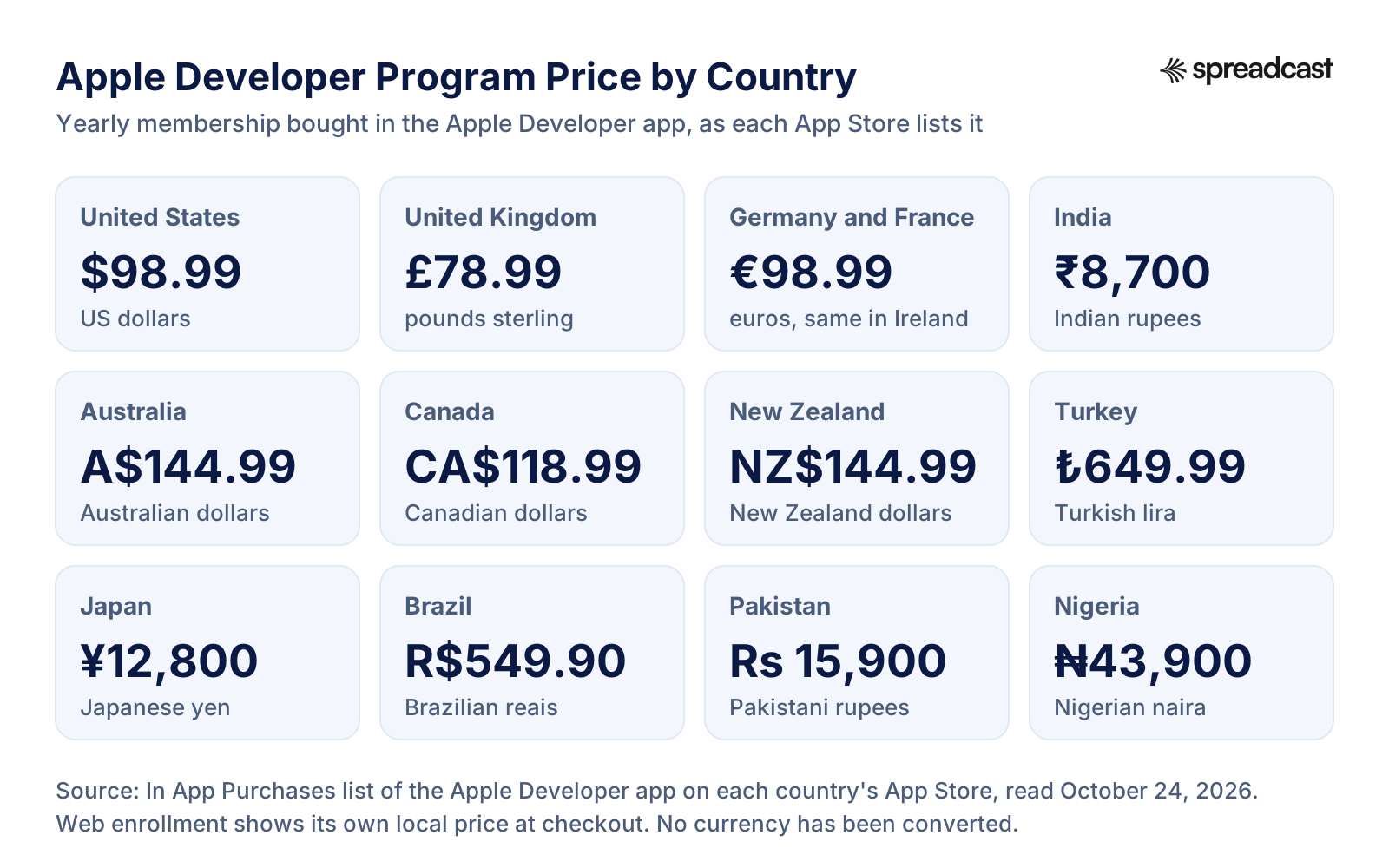
Why the Local Price Is Not Exactly 99 USD
The Apple Developer app sells the membership as an in app purchase, so its price shows up in each store's own currency, the same way the price of any app does. Apple's enrollment page says prices may vary by region and are listed in local currency during the enrollment process. So the app can show $98.99 in the United States while the web page says 99 USD, and the United Kingdom, the euro countries and Japan each have a local price of their own.
Tax is the second reason a receipt can differ from the headline. Apple's program enrollment help says the purchase is taxed at the rate for your region or state when applicable. A tax exempt organization can ask for that tax back by sending its order number and exemption form to the sales tax address on the same page, after completing the purchase. Invoices for web purchases sit in your account on the Apple Store Online, and if you paid through a plain credit card form, you ask Apple Developer Support for one.
The way you pay also changes what you see. On the web, you choose from the payment methods offered during the purchase. If Apple Developer products are not sold on your region's Apple Store Online, you get a credit card form and should use a card that can be charged in US dollars, so the conversion happens at your card issuer's rate. In the Apple Developer app, you pay the local App Store price with a payment method on your Apple Account. Apple Account balance from gift cards is not accepted for the membership, with one exception: developers based in India can use it, per Apple's guide to enrolling in the app.
One rule catches people who enroll on behalf of someone else. An individual paying by credit card on the web must use their own card. Apple's enrollment help says paying with another person's card delays the enrollment and leads to a request for a copy of your government issued photo ID.
Apple Developer Program Cost in India, the UK, Australia, Canada, New Zealand and Turkey
India. The Apple Developer app lists the membership at ₹8,700 a year on the Indian App Store. India is a special case in two ways. Apple's program enrollment help says enrollment in India is only available through the Apple Developer app, so the app price is the price Indian developers pay, as an auto renewing subscription. India is also the one region where Apple Account balance, such as a redeemed Apple Gift Card, is accepted as payment for the membership.
United Kingdom. The UK App Store shows £78.99 a year for the membership bought in the app. If you enroll on the web instead, the price appears in pounds at checkout. UK developers who later sell apps or in app purchases also complete Apple's tax forms in App Store Connect, a step covered further down this page.
Australia. The Australian App Store shows $144.99 in Australian dollars. Australia has an extra rule for anyone who sells: Apple's tax information help says Australia based developers must have a GST registration and an ABN to sell apps, even where the government itself would not require GST registration. A free app does not need the Paid Apps Agreement, so the rule applies only once you start charging.
Canada. The Canadian App Store shows $118.99 in Canadian dollars. Canada based developers who sell submit a GST or HST number in App Store Connect, plus a QST number if they are based in Quebec, according to the same tax help article.
New Zealand. The New Zealand App Store shows $144.99 in New Zealand dollars, the same number as Australia in a different currency. The license agreement's attachment on subscriptions bought in the Apple Developer app names Apple Pty Limited in Sydney as the Apple company that charges developers located in Australia or New Zealand.
Turkey. The Turkish App Store shows ₺649,99, that is 649.99 Turkish lira. We list it as the store shows it and do not convert it, because exchange rates move and the store price is what the app charges.
For a company or organization the fee is the same as for an individual. Apple gives one price for the Apple Developer Program whichever way you enroll; what changes is the verification, covered in the individual vs organization section below. All of these prices are per year: the membership runs for one year from activation and renews for another year when you pay, under section 11.1 of the Apple Developer Program License Agreement.
Is There an Apple Developer Program Student Discount?
No. Apple's program enrollment help answers the question directly: there is no developer program specifically for students. Learning does not need the membership. With an Apple Account a student can use Swift Playground, Xcode, software downloads, documentation, sample code, the forums and Feedback Assistant, and test apps on their own devices. Paying starts to matter only when the student wants to distribute an app.
The free route for schools is the fee waiver. Accredited educational institutions can enroll in the Apple Developer Program with a fee waiver, and Apple says the point is to help students build apps with TestFlight, Xcode Cloud, GameKit, CloudKit, MapKit and the other member tools. The waiver belongs to the institution, not to the student, and the school must not sell digital goods or services through its apps. A student who wants an app under their own name still pays for an individual membership.
The Swift Student Challenge is a competition, not a membership. It is free to enter, and Apple's 2026 announcement opened submissions from February 6 to February 28. The eligibility page asks entrants to be registered as Apple developers, which the free account covers, and to be enrolled in an accredited academic institution, a STEM organization's curriculum or an Apple Developer Academy, or to have recently graduated. People employed full time as developers cannot enter. Apple's May 2026 Newsroom story counted 350 winning submissions from 37 countries and regions and 50 Distinguished Winners invited to WWDC at Apple Park.
Be careful with claims that winners get a free year of membership. Apple's Challenge pages, as we read them on October 24, 2026, describe the Distinguished Winner trip and list no other prizes, so check the official terms for the year you enter before counting on one. If you are under the age of majority in your region, Apple's enrollment page says a parent or guardian can enroll with their own Apple Account and share it with you.
Apple Developer Fee Waiver: Who Qualifies and How It Works
The fee waiver is the only way Apple lists to get the Apple Developer Program for free. Every rule below comes from Apple's fee waiver help page.
Who Can Apply
A legal entity with status as a nonprofit organization, an accredited educational institution or a government entity. Individuals, sole proprietors and single person businesses cannot apply, whatever the cause behind the app.
The No Selling Rule
You must not have signed the Paid Applications Agreement to offer paid apps or in app purchases, or you must have ended it, and you must not sell digital goods or services in any of your apps. A charity that sells a premium tier inside its app does not qualify.
How to Request It
New members choose the fee waiver option while completing enrollment. The Account Holder of an eligible organization that is already a member can send a request at any time before the membership expires. Apple reviews it and asks for documents if it needs them.
No Money Back for Years Already Paid
An approved waiver removes future annual fees, and for apps on the EU alternative terms it also removes the Core Technology Fee. Apple says full or partial refunds are not available for a membership you already paid for.
Confirmed Again at Every Renewal
Each year the Account Holder confirms that the organization is still eligible. Renewal opens 30 days before the expiration date, and a renewal done early takes effect when the current year ends.
Losing the Waiver
If the organization stops meeting the rules, for example by starting to sell in app purchases, Apple removes the waiver and the 99 USD annual fee, or the local price, applies again. An organization can also opt out by sending Apple a request.
The EU Marketplace Condition
An organization that runs an alternative app marketplace on iOS in the European Union under the waiver may only distribute apps from developers who hold the same fee waiver.
Apple Developer Account Free vs Paid: What Each One Includes
Apple's own comparison, from the table in its developer account overview, with the Enterprise Program alongside. Apple's check marks are written out as Yes and No, and the last row adds App Store distribution from Apple's program pages.
| Feature | Free account | Apple Developer Program | Enterprise Program |
|---|---|---|---|
| Beta Xcode and OS releases | Yes | Yes | Yes |
| Testing on your own devices with Xcode | Yes, as a personal team | Yes | Yes |
| Apple Developer Forums and Feedback Assistant | Yes | Yes | Yes |
| Meet with Apple activities | Yes | Yes | Yes |
| Code level support from Apple engineers | No | Yes | Yes |
| Certificates, Identifiers & Profiles | No | Yes | Yes |
| Mac software notarization | No | Yes | Yes |
| App Store Connect | No | Yes | No |
| TestFlight | No | Yes | No |
| Xcode Cloud | No | Yes, 25 compute hours a month included | No |
| Distribution on the App Store | No | Yes | No, private apps for employees only |
A free personal team can register up to 10 App IDs and 3 devices, both expiring after 7 days, and install up to 3 apps per device, with provisioning profiles that expire 7 days after they are issued. Apple's May 2026 note adds that members get more in person Meet with Apple events and one on one appointments with Apple experts. Read October 24, 2026.
Video: Free vs Paid Apple Developer Accounts in Under Five Minutes
A short explainer from Bitrig, a company that makes an app builder for iPhone, that walks through the same split as the table above and the individual vs organization choice.

What Does the Apple Developer Program Get You?
The membership benefits Apple lists on its membership details page and program page, in roughly the order a new app maker meets them.
App Store Distribution in 175 Regions
Members can publish apps, games and extensions on the App Store, which Apple says reaches users in 175 regions. Apple handles worldwide payment processing and offers unlimited hosting and bandwidth, even for free apps.
App Store Connect
The web tool where you create app records, upload builds, write the product page, sign agreements, enter tax and banking details, and read App Analytics and sales reports. At first only the Account Holder can sign in, per Apple's App Store Connect workflow; they invite everyone else.
TestFlight Beta Testing
Invite up to 10,000 external testers by email or public link, plus up to 100 internal testers from your App Store Connect team. Each build can be tested for up to 90 days, and the first build sent to external testers goes through App Review, per the TestFlight overview.
Capabilities That Need the Membership
Push notifications, In App Purchase and subscriptions, Sign in with Apple, Apple Pay, HealthKit, CloudKit with up to 1PB of free storage for each app, WeatherKit with 500,000 calls a month, and up to 200GB of Apple hosted background assets.
Xcode Cloud Hours
Membership includes 25 Xcode Cloud compute hours a month for building and testing in Apple's continuous integration service inside Xcode. Larger blocks of hours are sold as subscriptions in the Apple Developer app.
100 Test Devices per Product Family
Members can register up to 100 devices of each kind per membership year, such as 100 iPhones and 100 iPads, for Ad Hoc installs. Disabling a device does not free a slot; the count resets only at the start of a new membership year, per Apple's devices overview.
Beta Software
Beta versions of iOS, iPadOS, macOS, tvOS, visionOS, watchOS and their SDKs. Free accounts now get developer betas too, so early betas are no longer a reason on their own to pay.
Support From Apple
Code level support requests answered by Apple engineers, plus account and enrollment support that Apple describes as available 24/7 by email and phone in 9 languages.
Mac Apps From Your Own Website
A Developer ID certificate and notarization let you distribute Mac apps outside the Mac App Store so that Gatekeeper can verify them. Only the Account Holder can create the Developer ID certificate, per Apple's Developer ID page.
What Is Not Included
Apple Ads credit is not on Apple's list of membership benefits, and neither is any promotion outside the App Store. App Store marketing features, such as In App Events, are set up by you in App Store Connect.
Video: Apple's Guide to Getting Started With TestFlight
TestFlight is the benefit most new members use first. Apple's session covers inviting testers, writing test information and collecting feedback before release.

Is the Apple Developer Program Worth It?
If you want an app on the App Store, the question answers itself, because there is no other route. The membership is the price of entry to App Store Connect, TestFlight and App Store distribution, and Apple's comparison table gives none of those to free accounts. The useful question is when to pay, not whether.
Pay later if you are still learning. A free account builds, runs and debugs apps on your own iPhone, within the 7 day limits in the table above, and gets the beta tools. Waiting costs nothing, because the project lives in Xcode, not in the membership.
Pay earlier than you think if you are close to launch, for two reasons. TestFlight needs the membership, and real testers find problems you will not. And enrollment is not instant for organizations: a DUNS Number can take up to 5 business days to arrive and up to 2 more to reach Apple, before Apple's own verification starts. Our app launch checklist puts enrollment eight weeks before launch for that reason.
A worked example with a made up person: Alex builds a habit tracker on weekends. For the first three months Alex uses the free account and reinstalls the app on one iPhone every week, when the profile expires. When the app is ready for friends to try, Alex pays the 99 USD, sends a TestFlight link to twelve people and spends the next month fixing what they report. Spread over the year, the fee works out to 8.25 USD a month (derived: 99 ÷ 12).
It is not worth paying for an app you never plan to share beyond your own devices. A company that only wants internal apps for its employees still usually needs this membership, not a different one: Apple points most such companies to custom apps distributed through Apple Business, which run on the standard program. The Enterprise Program, covered below, is for the rare cases that route cannot handle.
Apple Developer Program Individual vs Organization
The choice decides whose name sits on the App Store, who can join your team and how long enrollment takes. Each line comes from Apple's program enrollment help unless the row names another page.
| Question | Individual or sole proprietor | Organization |
|---|---|---|
| Who it is for | One person, including a sole proprietor or single person business | A legal entity: a company, nonprofit, joint venture, partnership or government organization |
| Seller name on the App Store | Your personal legal name | The organization's legal entity name, for example ABC Company, Inc. |
| Developer name under the app | Always your legal name, per App Store Connect Help | The legal name, or a registered trade name or DBA you set when adding your first app |
| DUNS Number | Not needed | Required, except for government organizations |
| Website and email | Not needed | A public, working website on the organization's domain and a work email on that domain |
| Who enrolls | You | Someone with legal authority to bind the organization, with a reference who confirms it if they are not the owner |
| When you pay | During enrollment | After Apple verifies the organization and emails next steps |
| Team | Up to 50 extra App Store Connect users who are not part of the program team, per Apple's accounts and roles overview | Unlimited team members with access to all membership resources |
| Fee waiver | Not available | Available to eligible nonprofits, accredited schools and government entities |
| Price | 99 USD a year, or the local price | The same |
An individual membership can be converted to an organization later by request. You must be the founder or cofounder and give the organization's DUNS Number, per Apple's account update help.
Personal vs Company Account: The Seller Name on the App Store
The seller name is the part people regret most. Enroll as an individual and your legal first and last name appear as the seller of every app you publish, in every country. Apple's enrollment page says so directly, and its account update help adds that changing the name on your Apple Account later does not change the seller name. There is no way to enroll as an individual and show a brand instead: Apple's answer is that the organization must be a legal entity and must enroll as one.
A sole proprietorship does not count as an organization. Apple asks sole proprietors and single person businesses to enroll as individuals, and its DUNS help explains the error many of them hit. The message "Your organization is not listed as a legal entity" means Dun & Bradstreet lists the business with a different legal status, such as a sole proprietorship, or has not verified its status. Apple names corporations, limited partnerships and limited liability companies as examples of the legal entities it accepts.
Choose the public name before you publish. An organization can set a developer name that differs from its legal name, such as a registered trade name, only when it adds its first app in App Store Connect, and it cannot edit that name afterwards. Changing the organization's legal name later goes through Apple, updates the vendor name on all your apps and resets the identifierForVendor value for existing users on their next app update. Apple warns that a mobile measurement partner may then count those users as new installs, and that the change cannot be undone.
Privacy is the other half of the decision. In the European Union, traders must show an address, phone number and email on their product pages under the Digital Services Act. For organizations the address comes from the DUNS record. Individuals who are traders enter one themselves, and Apple accepts a P.O. Box for that display address, per its trader requirements help. The P.O. Box rule applies to the product page only; the membership itself still needs a street address.
Enrollment Path for Individuals and Organizations
The two paths side by side. The organization path has two waits the individual path does not: the DUNS Number, and Apple's verification before you can pay.
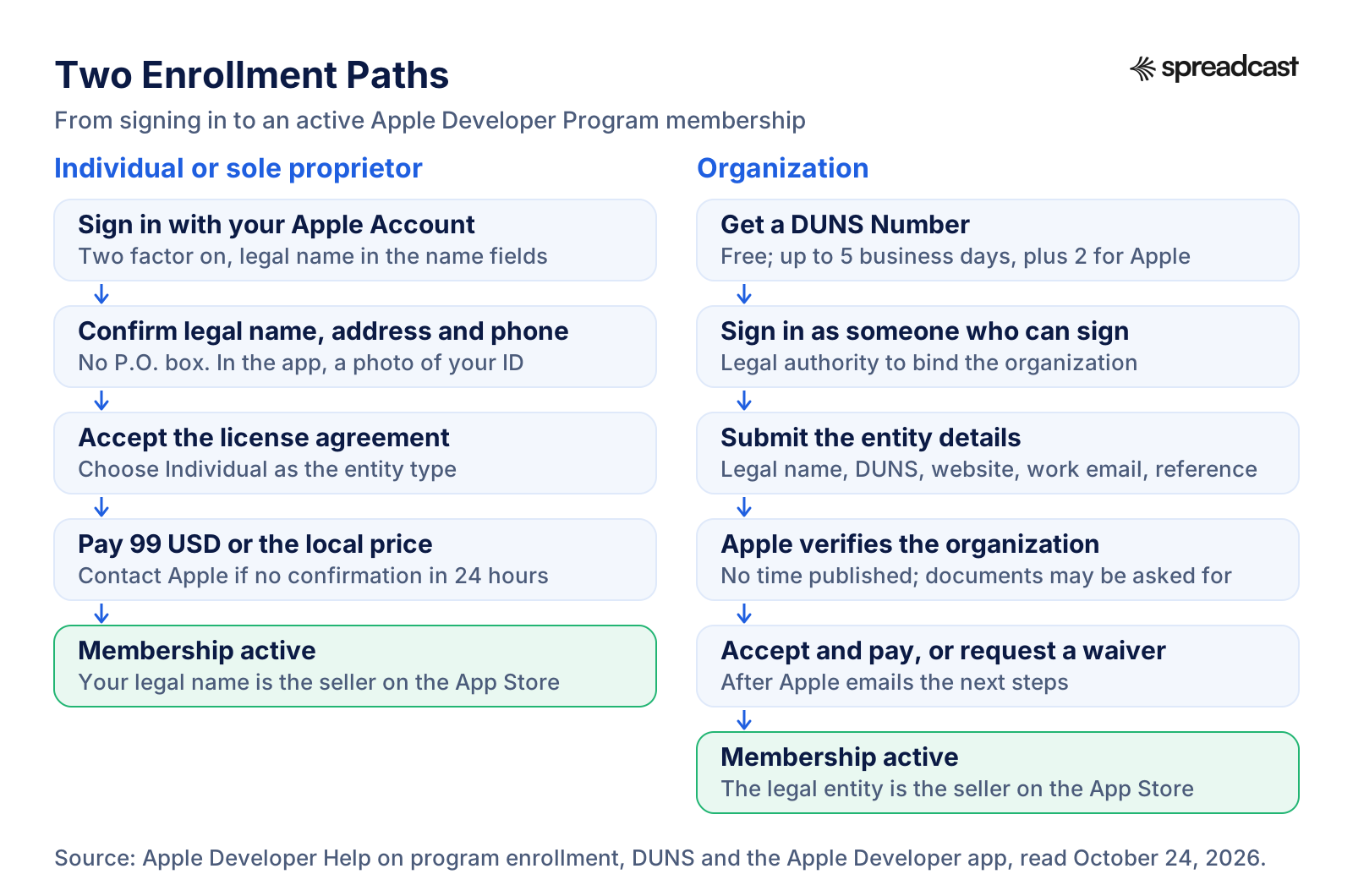
How to Enroll in the Apple Developer Program as an Individual
The website and the Apple Developer app lead to the same membership. In India the app is the only option.
- Step 1
Prepare Your Apple Account
Use an Apple Account with two factor authentication turned on, and make sure the first and last name are your legal name, not a nickname or a business name. Apple says an alias in those fields delays approval. You must also be the legal age of majority in your region.
- Step 2
Start Enrollment
On the web, start from Apple's enrollment page and sign in. In the app, open the Account tab, sign in, agree to the Apple Developer Agreement if asked and tap Enroll Now.
- Step 3
Confirm Your Details
Give your legal name, phone number and address. P.O. boxes are not accepted for the membership. In the app you also photograph a government issued photo ID; Apple accepts passports in most regions.
- Step 4
Choose Individual
Select Individual as the entity type. Your legal name will be shown as the seller on the App Store, so this is the moment to stop if you wanted a company name.
- Step 5
Accept the License Agreement
Read and agree to the Apple Developer Program License Agreement. It sets the one year term, the fee and the rules your apps and your account must follow.
- Step 6
Pay for the Membership
On the web, pay with your own card or another method offered at checkout. In the app, subscribe with a payment method on your Apple Account; the membership then renews every year until you cancel.
- Step 7
Wait for the Confirmation Email
Apple sends an order acknowledgement, then a confirmation once the purchase is processed. If no confirmation arrives within 24 hours, contact Apple Developer Support and include your Enrollment ID.
How to Enroll in the Apple Developer Program as an Organization
Allow more time for this path. Apple verifies the organization before it lets you pay, as its program enrollment help describes.
- Step 1
Check That You Are a Legal Entity
Apple accepts organizations that can sign contracts in their own name, such as corporations, limited liability companies, nonprofits, schools and government bodies. It does not accept DBAs, fictitious business names, trade names or branches.
- Step 2
Look Up or Request Your DUNS Number
Search Dun & Bradstreet's records through Apple's lookup before you enroll. If your organization is not listed, request a free number; allow up to 5 business days for it and up to 2 more for Apple to receive it.
- Step 3
Line Up the Website, Email and Signatory
You need a public, working website on your own domain, a work email on that domain, and an enrolling person with legal authority to sign for the organization. Apple recommends an Apple Account that uses your organization email.
- Step 4
Submit the Organization's Details
Enter the entity type, legal entity name, DUNS Number, headquarters address and phone number, and website, then confirm your signing authority and give a contact who can verify it. Nonprofits, schools and government entities can request the fee waiver here.
- Step 5
Answer Apple's Verification
Apple may contact your reference or ask for business documents, sometimes notarized copies certified by a notary, solicitor or municipal office, depending on the region. The next step arrives by email once Apple has verified the details.
- Step 6
Accept and Pay
When the email arrives, sign in with the same Apple Account, agree to the license agreement and buy the membership. In the app, tap Continue Your Enrollment on the same device you started on.
- Step 7
Add Your Team
Invite Admins, developers and others in App Store Connect under Users and Access. The person who enrolled is now the Account Holder, the only one who can renew the membership and sign agreements.
DUNS Number for the Apple Developer Program
A DUNS Number is a nine digit identifier that Dun & Bradstreet assigns to business entities by location. Apple uses it to check that your organization exists, that it is a legal entity and where it is based. Companies and educational institutions must give a DUNS Number registered to their legal entity, government organizations may skip it, and individuals never need one, per Apple's DUNS help.
It costs nothing in most places. Apple says D&B may already have assigned your organization a free number, and if not, you can submit your details for a free one. Google gives the same warning from its side: getting a DUNS Number through Dun & Bradstreet is free, and its account type help tells developers to beware of third party services that charge high fees for the registration.
The lookup asks for the legal entity name, headquarters address, mailing address and your work contact details. Use the legal name exactly as it is registered, not your brand. A D&B representative may contact you to confirm details such as the business type or number of employees, so keep the registration documents at hand.
Timing is the part to plan for. Apple says to allow up to 5 business days for D&B to issue the number, notes that expediting the request does not shorten that wait, and suggests emailing D&B if more than two weeks pass. After you receive the number, allow up to 2 business days for Apple to receive it. Later updates to your D&B profile also take up to two business days to reach Apple. If D&B shows the wrong legal status for your business, Apple asks you to email D&B with your complete business registration documents.
One D&B record serves both stores. Google Play also requires a DUNS Number for organization accounts, so the same number works when you set up a Play Console account for the Android version.
Enrolling With the Apple Developer App and Identity Verification
The Apple Developer app is free and handles enrollment, identity checks and renewal on iPhone, iPad and Mac. Apple's guide to enrolling in the app lists what you need before you start: an iPhone or iPad with Face ID, Touch ID or a passcode, or a Mac that Apple describes as having the T2 Security Chip and Apple silicon; an Apple Account with two factor authentication and an up to date name, address, phone number and trusted devices; the latest version of the app; and iCloud signed in on the device.
Use one device from start to finish. Apple says you must use the same device for the entire enrollment, and organizations come back to that device to finish after approval. The Apple Account you enroll with can differ from the one signed in to the device's settings, which helps when the company card sits on a different Apple Account.
The identity check asks for a photo of a government issued photo ID. Apple accepts passports in most regions, and some regions also take a driver's license. Apple says it uses the image only to verify identity and prevent fraud, may share it with a third party verification provider that must delete it once it is no longer needed, and does not keep the image itself. If you would rather not provide a photo of your ID and no law requires it, you can ask Apple for another verification method.
Identity checks come back later too. Apple's identity verification help says verification is required for Account Holders based in China mainland and for developers in certain regions who accept a transfer of the Account Holder role, and the app is where that check happens. Apple has reasons to be strict: its May 2026 release says it rejected more than 138,000 developer enrollments and terminated 193,000 developer accounts over fraud concerns in 2025.
How Long Does Apple Developer Program Enrollment Take?
Apple publishes a few waits and leaves the rest open. This table separates the two, so you can plan around the stated ones and leave slack for the others.
| Stage | What Apple says | Source |
|---|---|---|
| Individual enrollment and payment | You buy the membership during enrollment, and a confirmation email follows once the purchase is processed | Apple's enrollment help |
| Confirmation that does not arrive | Contact Apple if it has not arrived within 24 hours of the purchase, and include your Enrollment ID | Program enrollment help |
| New DUNS Number | Up to 5 business days from D&B; email D&B if it takes longer than two weeks | DUNS help |
| DUNS record reaching Apple | Up to 2 business days after you receive the number | DUNS help |
| Organization verification | No time published; Apple emails the next steps after verifying | Program enrollment help |
| Change to your legal entity name or address | Up to two weeks to appear in App Store Connect after Apple approves it | Sign and update agreements |
| Apps returning after a late renewal | Free apps are available again within 24 hours | Program renewal help |
| App Review of your first app | A separate step that starts after enrollment, when you submit | Our App Store review time guide |
Read October 24, 2026. Apple's support pages also say enrollment may not be supported in certain regions, for example because of sanctions or other restrictions.
Apple Developer Enrollment Pending or Not Working: Causes and Fixes
Most stuck enrollments trace back to a handful of rules in Apple's own help pages. Check these before writing to support. Each comes from the program enrollment help, the app enrollment guide or the DUNS help.
A Nickname or Company Name in the Name Fields
Apple delays enrollments where the Apple Account's first or last name is an alias, a nickname or a company name. Change the name on the Apple Account to your legal name before you start. If you already submitted, contact Apple Developer Support rather than starting over.
Paying With Someone Else's Card
Individuals on the web must pay with their own credit card. A parent's or employer's card delays enrollment and triggers a request for a copy of your photo ID. In the app, an organization adds the company card to the Apple Account signed in to the device.
Gift Card Balance Refused
Apple Account balance from Apple Gift Cards or added funds is not accepted for the membership, except from developers based in India. Add a card or another payment method instead.
Organization Not Listed as a Legal Entity
D&B holds your business with another legal status, often sole proprietorship, or has not verified it. Enroll as an individual if you are a sole proprietor. Otherwise email D&B with complete registration documents and allow up to two business days after the fix.
Website or Work Email Rejected
Apple does not accept links to social media pages, sites with minimal content or domains that only show a registrar's message. The website must be public and working, and the work email must be on the organization's own domain.
No Authority to Sign
Only an owner or founder, an executive, a senior project lead or an employee given legal authority by a senior employee can enroll an organization. A contractor should not enroll a client's company; the client enrolls and adds the contractor to its team.
Switching Devices Halfway in the App
Enrollment in the Apple Developer app must run on one device from start to finish, and organizations finish on that same device after approval. Starting on one device and finishing on another is not supported.
The ID Photo Step
The app asks for a photo of a government issued photo ID, and accepted ID types vary by region. If you cannot or prefer not to provide one, and no law requires it, contact Apple and ask for an alternative way to verify your identity.
Charged but Still Pending
If the payment went through and no confirmation arrived within 24 hours, contact Apple Developer Support with your Enrollment ID. Buying the membership again does not speed anything up, and the license agreement makes the fee nonrefundable.
Region Not Supported
Apple says enrollment may not be supported in certain regions, for example because of sanctions or other restrictions, and the app may be available in a region where enrollment is not. Ask Apple Developer Support what is possible for your country.
Using the Same Account for the Enterprise Program
The Enterprise Program needs a new Apple Account that is not tied to an Apple Developer Program membership, and it has its own identity verification, per Apple's identity verification help.
Changes Blocked During Renewal
Apple does not allow an Account Holder transfer or a switch from an individual to an organization membership while a renewal is in progress, per its renewal help. Finish the renewal, then make the change.
Taxes, Banking and the Paid Apps Agreement
Joining the program lets you publish free apps under the Apple Developer Program License Agreement. Selling anything, a paid app or an in app purchase, needs a second contract, the Paid Apps Agreement, which only the Account Holder can sign in the Business section of App Store Connect, per Apple's agreements help. Accepting it cannot be undone. When Apple releases a new version, you cannot create new apps or in app purchases until you accept it.
Tax forms come after the agreement. Apple's tax information help says every developer must complete a US tax form. Developers based in the United States fill in Form W 9 with a Social Security Number or ITIN for an individual, or an EIN for a business. Everyone else answers a short set of questions that points to the right W 8 form, usually W 8BEN or W 8BEN E. Some countries add their own requirements, such as Australia's GST registration and Canada's GST or HST number. Once submitted, most tax details cannot be edited in App Store Connect, so corrections go through Apple.
Banking comes last. You can add a bank account only after signing the Paid Apps Agreement, and Apple processes it only once the required tax forms are in, per the banking help. The account must belong to the individual or legal entity enrolled in the program, and the details must match the bank's records exactly or payments may be rejected. If an Admin or Finance user adds the account, the Account Holder must approve it before it is used.
Payments follow a fixed rhythm. Apple's payments overview says proceeds are paid within 45 days of the last day of the fiscal month in which the sale was completed, once you pass the minimum payment threshold in each country or region where you sell. Apple's bank combines the month's proceeds into a single payment to your account, and your own bank may charge fees on the incoming transfer.
Two compliance steps apply even if every app is free. Every developer declares a trader status under the EU Digital Services Act, and since February 17, 2025, apps without a trader status are removed from the App Store in the EU until one is provided, as Apple's upcoming requirements page records. The same page says the updated age rating questions had to be answered for each app by January 31, 2026, to avoid interruptions when submitting updates. Our App Store age ratings guide explains those questions.
Account Holder and Team Roles
Every membership has exactly one Account Holder, the person who enrolled. Apple's roles help gives that person jobs no one else can do: renew the membership, accept legal agreements on behalf of the organization, add the first Admins and approve banking changes. When Apple updates the license agreement, the Account Holder must accept it by the date shown in the account to keep full access to Certificates, Identifiers & Profiles, App Store Connect and the App Store Connect API.
Below the Account Holder, Apple's roles are Admin, App Manager, Developer, Finance, Marketing, Sales and Customer Support, managed in App Store Connect under Users and Access. An organization has one team with one set of roles across the developer website and App Store Connect. A person can hold several roles and can belong to several teams with the same Apple Account, which suits contractors who work for more than one company.
Team size depends on how you enrolled. An individual member can give up to 50 additional people access to their content in App Store Connect, but those people are not part of the program team and get no other membership resources. An organization can add an unlimited number of members, all with access to App Store Connect and the other membership resources, per Apple's accounts and roles overview.
For a small studio the usual setup is short. The founder holds the Account Holder role, a second trusted person gets Admin so that nothing stalls when the founder is away, developers get Developer, and whoever handles money gets Finance, one of the roles Apple allows to enter tax and banking details. Keep the Account Holder's Apple Account on an email address the company controls, because the role belongs to that person and moving it later takes a formal transfer.
Transferring an App or the Account Holder Role
An app can move between developer accounts without leaving the store. Apple's app transfer overview says the app can stay available for download during the transfer, keeps its ratings and reviews afterwards, and existing users keep receiving updates. The Account Holder of the sending team starts the transfer and the Account Holder of the receiving team accepts it. This is the route when you sell an app, or when you started as an individual and later formed a company with its own membership.
Not every app qualifies. The transfer criteria require that both accounts have accepted their latest agreements and are not in a pending or changing state, that the app has at least one version released on the App Store, that it is not on pre order anywhere, and that no version is waiting for review, in review or pending release. In app purchase product IDs must not clash with products in the receiving account, and Apple Arcade apps cannot be transferred. TestFlight testing must be switched off and Xcode Cloud data removed first. Sign in with Apple, push notification keys, Apple Pay merchant IDs and Wallet passes each need extra steps on one side or both.
The Account Holder role moves differently. For an organization, the current Account Holder chooses an eligible team member with legal authority in the account's membership details and agrees to a transferor agreement. The new person accepts on the website, after verifying their identity in the Apple Developer app where their region supports it, per Apple's transfer guide. For an individual membership, Apple grants a transfer in two situations only: a minor reaching the age of majority who takes over from a guardian, or an Account Holder who has died. Both go through Apple Developer Support.
If the membership was bought in the Apple Developer app, the subscription does not move with the role. The previous Account Holder cancels the Apple Developer Program subscription in their Apple Account settings, and the new Account Holder renews from the app, which is possible from 30 days before the expiration date. Apple warns that if the old subscription is not cancelled, it keeps charging while the membership does not renew.
Apple Developer Program Renewal and Auto Renew
Membership runs for one year from the date it was first activated and renews for another year when you pay, under section 11.1 of the license agreement. There is no separate renewal fee: each year is charged the same annual membership fee, 99 USD or the local price. How the renewal works depends on where you enrolled, as Apple's renewal help explains.
Enrolled on the website: you can turn on Auto Renew in the Membership details section of your account, in the regions where Apple offers it, and the default card on your Apple Account is charged the annual fee on your expiration date. Or renew by hand: the Renew Membership button appears 30 days before expiry and stays available after it. Renewing early does not cost you days, because the new year starts when the current one ends.
Enrolled in the Apple Developer app: the membership is an auto renewing subscription charged to the default payment method on your Apple Account. The license agreement's attachment on app subscriptions says charges happen no more than 24 hours before the renewal date. You manage it like any other subscription on the device.
For organizations, only the Account Holder can renew or change automatic renewal, and team members can find the Account Holder's contact details in the membership section of the account, which helps when a reminder lands in the wrong inbox. Thirty days before expiry you can also download your registered test device list, and at the start of each new membership year you can remove old devices to get back to 100 per device type.
How to Cancel the Apple Developer Program, and Whether You Get a Refund
Cancelling means stopping the next renewal. If you enrolled in the app, cancel the Apple Developer Program subscription in your Apple Account's subscription settings; Apple's app enrollment guide says you can do this up to one day before the renewal date. You keep membership benefits until the expiration date shown in the app's Account tab, and you can subscribe again for up to one year after that date. If you enrolled on the website, turn off Auto Renew in Membership details, or simply do not renew.
Refunds are the short part. Section 8 of the Apple Developer Program License Agreement says the program fee is nonrefundable. The app enrollment guide repeats it: membership fees paid for the year in which you cancel are nonrefundable. The fee waiver page adds that an organization approved for a waiver cannot get back fees it already paid.
The same agreement has narrow exceptions, and both concern add ons rather than the membership. If you cancel a subscription for extra Xcode Cloud compute hours and opt out of Xcode Cloud immediately, the Account Holder can ask Apple Support for a refund. Upgrading an Xcode Cloud or WeatherKit subscription refunds the time left in the month on the old plan. Apple keeps the right to calculate or deny such refunds based on usage.
If you were charged and the membership never activated, that is a support case rather than a refund request. Apple's enrollment help asks you to get in touch when no confirmation arrives within 24 hours of the purchase, with your Enrollment ID, so that Apple can find the order.
What Happens If You Don't Renew Your Apple Developer Membership?
Your apps leave the store, but they keep working on devices that already have them. Apple's renewal help is specific: when an Apple Developer Program membership expires, your apps are no longer available for download, and you cannot submit new apps or updates or use Certificates, Identifiers & Profiles. Apps already installed keep working, and you keep access to certain App Store Connect features and the free developer resources.
Coming back is easier than starting over. Renew after expiry and the membership activates when you finish the renewal. Free apps become available again within 24 hours, and paid apps return once you sign in to App Store Connect and accept the Paid Apps Agreement again. You do not need to resubmit the apps.
Two things decay while you are away. Registered test devices are removed automatically 180 days after expiry unless you renew. And for as long as the app is unavailable, nobody new can download it, so every link, post or ad that points to the store page sends people to an app they cannot get. If you plan a break, check which campaigns and links point to the app before the expiration date.
The Enterprise Program is stricter. When it expires, in house apps can no longer be downloaded, and copies already installed keep running for 90 days after the expiration date, as long as their certificates and provisioning profiles stay valid for that long.
Apple Developer Enterprise Program: Price, Requirements and Limits
The Apple Developer Enterprise Program costs 299 USD per membership year, or the local price, and it does one job: distributing proprietary apps privately to an organization's own employees through internal systems or a mobile device management solution. It cannot publish to the App Store. Apple's comparison table gives Enterprise members no App Store Connect, no TestFlight and no Xcode Cloud.
The bar is high. Per Apple's Enterprise Program page, the organization must have 100 or more employees, be a legal entity, use the program only for in house apps for internal use, have systems that keep the apps and the membership credentials to employees, and pass Apple's verification interview and continuous evaluation. It needs a DUNS Number and a public website, the application runs on the web only, and the applicant must use an Apple Account that is not already tied to an Apple Developer Program membership. The organization is verified again at every renewal, and Apple can reject an application at its sole discretion.
Most companies are sent back to the standard program. Apple's page says the Apple Developer Program is the right option for most organizations that want internal apps, because it supports custom apps through Apple Business, Ad Hoc distribution, redemption codes and TestFlight. A contract developer building an in house app for one client can enroll as an individual and choose Custom App Distribution in App Store Connect, so that the client's employees download it privately from Apple Business Manager, per the program enrollment help. That option depends on volume purchasing being offered in the client's region.
Apple Developer Program vs Enterprise Program
The two programs side by side, from Apple's Enterprise Program page, developer account overview and renewal help.
| Question | Apple Developer Program | Apple Developer Enterprise Program |
|---|---|---|
| Price | 99 USD per membership year | 299 USD per membership year |
| Who can join | Individuals and organizations | Legal entities with 100 or more employees |
| App Store distribution | Yes | No |
| App Store Connect, TestFlight and Xcode Cloud | Yes | No |
| Private apps for employees | Custom apps through Apple Business, Ad Hoc distribution or redemption codes | Internal systems or mobile device management |
| Verification | Identity, plus DUNS and signing authority checks for organizations | DUNS, website, a verification interview and continuous evaluation, repeated at renewal |
| Apple Account | Any account with two factor authentication | A separate account not tied to an Apple Developer Program membership |
| If the membership lapses | Apps leave the store; installed copies keep working | Apps cannot be downloaded; installed copies run for 90 days if certificates stay valid |
Read October 24, 2026. Both prices are also offered in local currency where available.
Apple Developer Program vs Google Play Developer Account
Most app makers end up paying for both. The fees and the hurdles differ in kind: Apple charges every year and checks identity up front, while Google charges once and, for new personal accounts, asks for a testing period before the first release.
| Question | Apple Developer Program | Google Play developer account |
|---|---|---|
| Fee | 99 USD per membership year | US$25 one time registration fee |
| Account types | Individual or organization | Personal or organization, with the same features |
| DUNS Number | Required for organizations, except government organizations | Required for organization accounts |
| Identity checks | Legal name, address and phone, with a photo ID in the Apple Developer app | A government ID and a credit card in your legal name may be requested; the fee is not refunded if they are found invalid |
| Testing before the first public release | Optional; TestFlight is included with the membership | A closed test with at least 12 testers opted in for 14 days for personal accounts created after November 13, 2023 |
| Renewal | Every year; apps leave the store if you stop paying | None |
| Store commission | See our App Store statistics page | Covered on the same page |
Google pages read October 24, 2026. Google also asks developers of some app types, such as financial services, health, VPN and government apps, to use an organization account.
The App Store Small Business Program in Brief
The membership does not lower Apple's commission by itself; the App Store Small Business Program does, and only members can join. It sets a reduced commission of 15% on paid apps and in app purchases for developers who earned up to 1 million USD in proceeds in the prior calendar year, and for developers new to the App Store. To enroll you must be the Account Holder, accept the latest Paid Apps Agreement and list any associated developer accounts you own or control, or that own or control yours.
Apply as soon as you sign the Paid Apps Agreement if you plan to sell. Apple adjusts proceeds starting fifteen days after the end of the fiscal month in which it approves your enrollment, so a late application means early sales at the standard rate. One newer benefit is easy to miss: members with fewer than two million first time App Store downloads can use Apple Foundation Models on Private Cloud Compute with no cloud API cost, once Apple assigns the entitlement.
The full commission picture, including subscriptions after their first year and the EU terms, sits on our App Store statistics page. This page leaves it there on purpose, because the membership fee and the commission are separate costs with separate rules.
From Enrollment to Your First App Store Release
The order of work after the membership is active, following Apple's App Store Connect workflow. It shows sequence, not durations, because most steps take as long as your app needs.
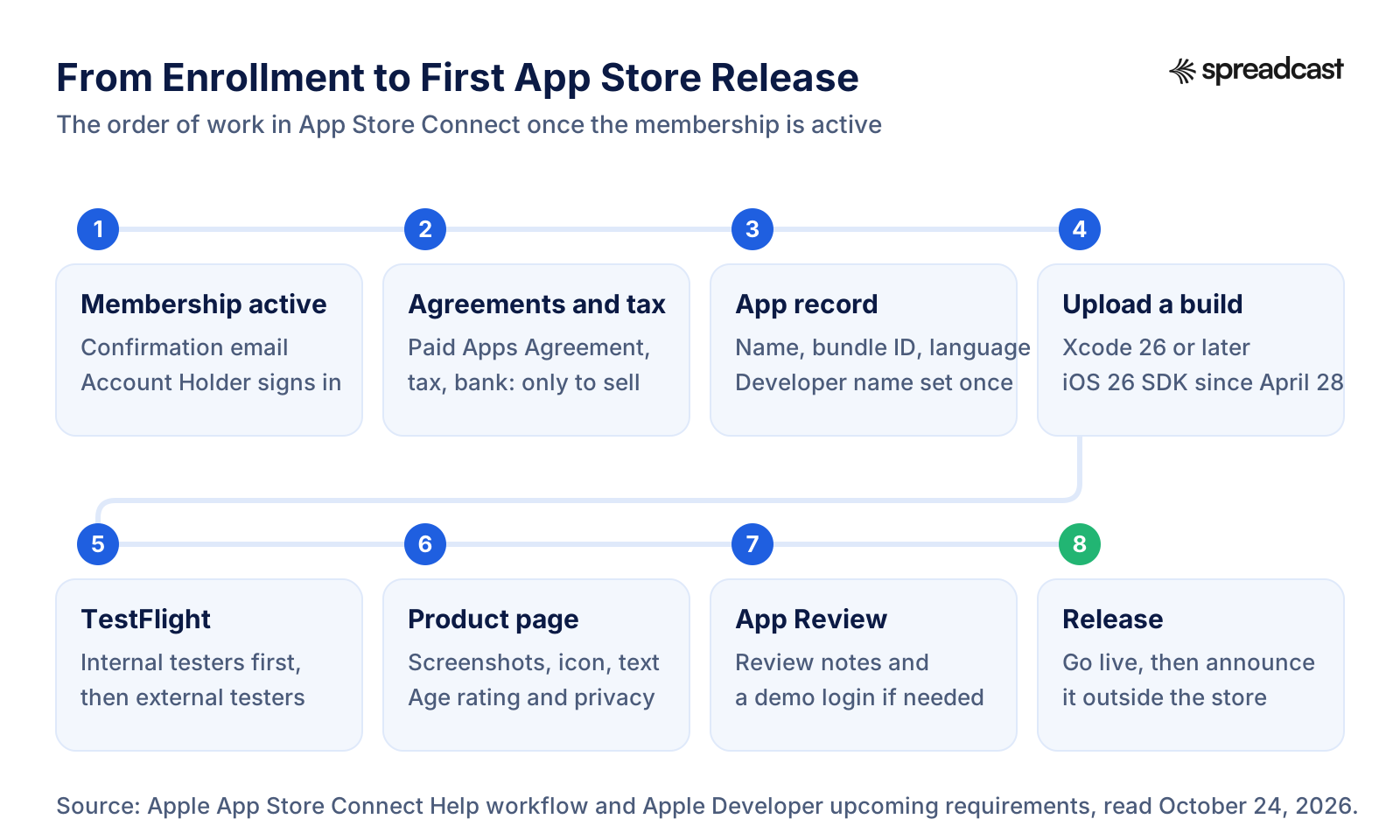
From Enrollment to Your First App Store Release, Step by Step
Once the confirmation email arrives, this order avoids rework. Our app launch checklist has the marketing tasks that run beside it.
- Step 1
Sign In to App Store Connect
Only the Account Holder can sign in at first. Invite the team under Users and Access and give each person the narrowest role that lets them do their work.
- Step 2
Sign the Paid Apps Agreement if You Will Sell
Then add the tax forms and a bank account, in that order. Free apps can skip this step. If you will sell, apply to the Small Business Program right after signing.
- Step 3
Create the App Record and Developer Name
Add the app in the Apps section with its name, bundle ID and primary language. Organizations set their public developer name at this point, and it cannot be changed later. A bundle ID cannot change once a build has been uploaded.
- Step 4
Build With the Current SDK
Since April 28, 2026, uploads must be built with Xcode 26 or later using an SDK for iOS 26, iPadOS 26, tvOS 26, visionOS 26 or watchOS 26. Since September 9, 2026, iOS and iPadOS apps must target iOS 13 or later, per Apple's upcoming requirements page.
- Step 5
Test With TestFlight
Start with internal testers from your team, then add external testers. The first build added to an external group goes to App Review; later builds may not need a full review.
- Step 6
Prepare the Product Page
Screenshots at the required sizes, checked with the App Store screenshot size checker; an icon checked with the app icon size checker; the age rating questions; the privacy details; and a description, which you can draft with the App Store description generator.
- Step 7
Submit for Review
Choose the build, add review notes and a demo account if the app has a login, and submit. Read the App Store rejection reasons before you do, and the App Store review time guide for how long review usually takes.
- Step 8
Release and Tell People
When the version is approved, release it and announce it outside the store. The app launch announcement examples show launch posts that get attention, and the App Store campaign link generator tags each link so you can see which post brought installs. For the weeks after launch day, see how to promote an app on Instagram and how to get app downloads.
Video: Publishing a First App on the App Store, Step by Step
Code with Beto, a mobile development educator, records the whole route from a finished project to App Review in 2026, which is the stretch the steps above describe.

App Store Connect: Where the Membership Lives Day to Day
After enrollment, most of your time with Apple happens in App Store Connect. Apple's workflow overview lists what it covers: submitting and managing apps, TestFlight, legal agreements, tax and banking, trends and financial reports, App Analytics and replies to user reviews, with an iPhone and iPad version for checking in on the go and an API for automating the work.
Three habits save trouble later. Accept new agreements quickly, because an unaccepted Paid Apps Agreement blocks new apps and in app purchases and an unaccepted license update limits access to App Store Connect. Keep the product page current with each release, using our App Store optimization guide and the App Store character counter for the text fields. And answer reviews, which our guide on how to get App Store reviews covers in detail.
Each release also needs a short public note on what changed. The app release notes generator drafts the What's New text, and a preview video is worth adding once the app has a feature that is easier to show than describe. Apple reworks App Store Connect every year at WWDC, so the session below is a good tour of the current tools.
Video: Apple on What's New in App Store Connect
Apple's WWDC25 session on App Store Connect, the tool you get with the membership: build delivery on the web, TestFlight notifications, keywords for custom product pages, Accessibility Nutrition Labels, age rating updates, offer codes and review summaries.

Where Spreadcast Fits
The membership gets your app onto the App Store. It does not tell anyone the app is there. Apple's tools stop at the edge of the store: App Store Connect manages the listing, and none of the membership benefits covers promotion on social media.
Spreadcast covers that part after launch. Paste your App Store link once at the start page and Spreadcast checks your listing every day. When a new version ships, it designs a post about the update with your real app screenshots in an iPhone frame and your brand colors and fonts, and writes a caption for each network. It also posts when the app reaches a rating milestone. Those are the two moments it watches. It publishes to Instagram, TikTok, LinkedIn, Facebook, Threads, Pinterest, Bluesky, Mastodon, Telegram and Discord, plus YouTube for video posts, on full autopilot or with one tap approval.
It watches the App Store only, not Google Play, and it starts working once your first version is live. The free plan makes 3 posts for you to download, with a small Spreadcast mark and no publishing. Pro is $29 a month for 1 app and 10 social accounts with publishing, and Studio is $79 a month for 5 apps and 50 accounts, as listed on the pricing page. For a wider plan beyond update posts, see our guide to iOS app marketing.
Frequently Asked Questions
How much does the Apple Developer Program cost?
99 USD per membership year, or the local price where Apple offers one, for individuals and organizations alike, per Apple's membership details page. In the Apple Developer app the same membership costs $98.99 on the US App Store. The Enterprise Program costs 299 USD a year. Registering a free developer account costs nothing, and eligible nonprofits, accredited schools and government entities can ask for a fee waiver.
How much does an Apple developer account cost in India?
The Apple Developer app lists the membership at ₹8,700 a year on the Indian App Store, read October 24, 2026. Enrollment in India is only available through the app, and India is the one region where Apple Account balance from gift cards is accepted as payment.
How much is the Apple Developer Program in the UK, Australia and Canada?
On the App Store the membership costs £78.99 in the United Kingdom, A$144.99 in Australia and CA$118.99 in Canada when you buy it in the Apple Developer app. New Zealand is NZ$144.99 and Turkey is 649.99 Turkish lira. On the web, Apple shows the local price during enrollment, so it can differ from the app price.
Is the Apple Developer Program free for students?
No. Apple has no student program and lists no student discount. Students can learn, build and test on their own devices with a free account, accredited schools can get the membership with a fee waiver, and the Swift Student Challenge is a free competition rather than a membership.
How long does Apple Developer Program enrollment take?
For individuals, you pay during enrollment and Apple asks you to contact it if no confirmation arrives within 24 hours. Organizations first need a DUNS Number, which can take up to 5 business days from Dun & Bradstreet and up to 2 more to reach Apple, and then Apple verifies the organization before it emails the next step. Apple publishes no time for that verification.
Why is my Apple developer enrollment still pending?
The usual causes in Apple's help pages are a nickname or company name in the Apple Account name fields, paying with someone else's card, a business that Dun & Bradstreet does not list as a legal entity, a website or work email that does not meet Apple's rules, and an enrolling person without authority to sign. If you were charged and nothing arrived within 24 hours, contact Apple Developer Support with your Enrollment ID.
Should I enroll as an individual or an organization?
Enroll as an individual if you are one person or a sole proprietor and you are fine with your legal name as the seller on the App Store. Enroll as an organization if a legal entity such as a corporation or LLC should be the seller, you need a team with full access, or you qualify for a fee waiver. Organizations need a DUNS Number, a website and a work email.
Can I publish an app with a free Apple developer account?
No. A free account can build apps and install them on your own devices for testing, with profiles that expire after 7 days. App Store Connect, TestFlight and App Store distribution all require the paid Apple Developer Program membership.
Can I get a refund for the Apple Developer Program?
Usually not. Section 8 of the license agreement says the program fee is nonrefundable, and Apple's app enrollment guide says fees paid for the year in which you cancel are nonrefundable. If you were charged and the membership never activated, contact Apple Developer Support with your Enrollment ID.
What happens if I don't renew my Apple developer membership?
Your apps stop being available for download and you cannot submit new apps or updates, but copies already installed keep working. If you renew later, free apps return within 24 hours and paid apps return after you accept the Paid Apps Agreement again, without resubmitting. Registered test devices are removed 180 days after expiry.
Does the Apple Developer Program renew automatically?
If you enrolled in the Apple Developer app, yes: it is an auto renewing subscription you can cancel up to one day before the renewal date. If you enrolled on the website, renewal is automatic only if you turn on Auto Renew in Membership details, where Apple offers it; otherwise you renew by hand from 30 days before expiry.
Can the Apple Developer Enterprise Program publish to the App Store?
No. The Enterprise Program, at 299 USD a year, is only for proprietary apps distributed privately to an organization's employees, and it does not include App Store Connect or TestFlight. To publish on the App Store you need the standard Apple Developer Program.
Where These Facts Come From
Every outside number, rule and price on this page links to the page it was taken from.
- Apple Developer Program overviewApple Developer
- Membership details: benefits, pricing and feesApple Developer
- Become a member: enrollment requirementsApple Developer
- Developer account overview and membership comparisonApple Developer Help
- Program enrollment, payment, taxes and invoicesApple Developer Help
- Apple Developer Program fee waiverApple Developer Help
- DUNS Number for enrollmentApple Developer Help
- Program renewal and expired membershipsApple Developer Help
- Enrolling, verifying and renewing with the Apple Developer appApple Developer Help
- Identity verificationApple Developer Help
- Updating your account informationApple Developer Help
- Roles and accessApple Developer Help
- Transfer the Account Holder roleApple Developer Help
- Devices overview: 100 devices per product familyApple Developer Help
- Apple Developer Enterprise ProgramApple Developer
- Apple Developer Program License AgreementApple Developer
- Get the most out of your Apple Developer account (May 12, 2026)Apple Developer News
- App Store Small Business ProgramApple Developer
- Upcoming requirementsApple Developer News
- Developer ID and notarizationApple Developer
- The App Store stopped over $2.2 billion in fraudulent transactions in 2025 (May 20, 2026)Apple Newsroom
- Swift Student Challenge submissions are now open (February 6, 2026)Apple Developer News
- Swift Student Challenge eligibility and requirementsApple Developer
- AI meets accessibility in this year's Swift Student Challenge (May 2026)Apple Newsroom
- Sign and update agreementsApp Store Connect Help
- Provide tax informationApp Store Connect Help
- Enter banking informationApp Store Connect Help
- Overview of receiving paymentsApp Store Connect Help
- EU Digital Services Act trader requirementsApp Store Connect Help
- Overview of accounts and rolesApp Store Connect Help
- Set your developer nameApp Store Connect Help
- Overview of app transferApp Store Connect Help
- App transfer criteriaApp Store Connect Help
- TestFlight overviewApp Store Connect Help
- App Store Connect workflowApp Store Connect Help
- Apple Developer app with in app purchase prices, United StatesApp Store
- Apple Developer app, United KingdomApp Store
- Apple Developer app, IndiaApp Store
- Apple Developer app, AustraliaApp Store
- Apple Developer app, CanadaApp Store
- Apple Developer app, New ZealandApp Store
- Apple Developer app, TurkeyApp Store
- Apple Developer app, GermanyApp Store
- Apple Developer app, FranceApp Store
- Apple Developer app, IrelandApp Store
- Apple Developer app, JapanApp Store
- Apple Developer app, South KoreaApp Store
- Apple Developer app, China mainlandApp Store
- Apple Developer app, BrazilApp Store
- Apple Developer app, MexicoApp Store
- Apple Developer app, South AfricaApp Store
- Apple Developer app, SingaporeApp Store
- Apple Developer app, United Arab EmiratesApp Store
- Apple Developer app, Saudi ArabiaApp Store
- Apple Developer app, PakistanApp Store
- Apple Developer app, NigeriaApp Store
- Apple Developer app, PhilippinesApp Store
- Apple Developer app, EgyptApp Store
- Google Play developer account registration and feeGoogle Play Console Help
- Choose a developer account typeGoogle Play Console Help
- App testing requirements for new personal developer accountsGoogle Play Console Help
- Video: Apple Developer Program free vs paid explainedBitrig
- Video: Get started with TestFlightApple Developer
- Video: How to publish your app to the App Store, step by step, 2026Code with Beto
- Video: WWDC25, what's new in App Store ConnectApple Developer
Researched and written by Spreadcast. Last checked on October 24, 2026.