To advertise an app, start where people are already looking for one. Put your first paid money into Apple Ads search results on your own name and a handful of exact phrases, send every ad to a matching product page, and judge it by cost per install and what those users do in the first week. Add Meta app install ads on Facebook and Instagram when you have a few good still images or short videos, TikTok when your own videos already get watched there, and Google App campaigns when you can fund about 50 times your target cost per install every day. A first month can run on $1,000 to $3,000.
This guide is the paid side of app growth, channel by channel. For each platform it covers where the ads show, how you pay, the minimum budget the platform itself sets, the creative it asks for and how installs are measured on iPhone. Then it adds published costs, what an install earns, a starter budget and a first campaign plan. Every platform rule below comes from that platform's own help pages, opened on November 12, 2026.
Paid ads are one part of a bigger plan. The free channels (App Store search, social media, reviews, press) are in how to get app downloads, and the plan around them, from positioning to retention, is in how to market an app. If your app is on iPhone only, the Apple specific tools are covered in depth in our guide to iOS app marketing.
How to Advertise an App: The Short Plan
A common way to lose money on app ads is to open three ad accounts at once, split $500 across them, change everything after two days and conclude that ads do not work. The plan below avoids that. It puts the money where intent is highest first, keeps each test big enough to read, and adds a channel only when the previous one has told you something.
- Fix the product page first. Ads send people to your App Store or Google Play listing, and the listing decides whether they install. A page that converts badly makes every channel look expensive.
- Set up measurement before the first dollar. Create an App Store campaign link or a custom product page for each channel, connect the ad platforms to your app (an SDK or a mobile measurement partner), and decide which event inside the app counts as a good user.
- Start with Apple Ads search results if you are on iPhone. Bid on your own app name and 5 to 10 exact phrases that describe what the app does. Run for at least two weeks.
- Add one social channel. Meta if your app is easy to show in a still image or a 15 second clip, TikTok if you already make videos that people watch there.
- Test creatives, not settings. Run 3 to 5 different ads per ad group, keep the targeting broad, and replace the losers every week or two.
- Judge each channel by cost per install, cost per trial or first purchase, and day 7 retention, then compare that with what a user earns you. Scale the channel that pays back, in steps of 20% to 30%, and stop the one that does not.
The rest of this guide explains each step and gives you the platform rules and numbers behind it. If you only have a few hundred dollars, read the section on advertising an app for free near the end first, and our guide to promoting an app for free, because a small budget usually goes further on organic channels than spread thin across ads.
Before You Pay for Ads: Three Things to Fix
Ads multiply what your listing and your app already do; they do not fix either one. Three checks come first.
1. A Product Page That Converts
Every app install ad ends on a store page. If 3 in 100 visitors install today, an ad that sends 1,000 people buys you 30 installs; lift the page to 5 in 100 and the same spend buys 50. Apple reports how much this matters: on its custom product pages page, Apple says developers see a 2.5 percentage point increase on average when they send people to a custom product page, against a 1.6% average conversion rate on default product pages. Check your own rate in App Store Connect and compare it with the ranges on our App Store conversion rate page. If yours is low, work on the first three screenshots and the subtitle before you buy traffic. The basics are in our guide to App Store optimization.
2. A Way to Count What Each Channel Brings
Without measurement you will not know which ad worked. The simplest tool is free. Apple's campaign links add a provider token and a campaign token to your App Store URL, and App Store Connect then reports the impressions, product page views, downloads, usage, sales and subscriptions tied to each campaign token. Apple notes that a campaign appears only after 24 hours and once it has brought first time downloads from at least five people. Our App Store campaign link generator builds the link for you. Ad platforms also need their own connection to your app, which each channel section below covers.
3. Users Who Stay
If most people delete the app within a few days, cheaper installs will not save you. Look at your day 1, day 7 and day 30 retention against the app retention benchmarks for your category before you scale any campaign. A paid user who stays a month is worth several who leave on day one, and every platform's algorithm learns faster when you can tell it which users were good.
Every Paid Channel to Advertise an App, Compared
Here is the whole field on one table. The minimums and specs come from each platform's help pages, which the sections below link and quote. Where a platform publishes no minimum, the table says so rather than guessing.
| Channel | Where the ads show | How you pay | Budget rule from the platform | Creative you need | Best for |
|---|---|---|---|---|---|
| Apple Ads | App Store: Today tab, Search tab, search results, You Might Also Like on product pages | Per tap (Advanced) or per install (Basic) | Basic: up to $10,000 a month per app. Advanced: unlimited | None new for now. Ads use your App Store metadata and screenshots | iPhone apps; people already searching |
| Google App campaigns | Google Search, Google Play, YouTube, Discover, Display Network | Bid toward a target cost per install, action or return | Google recommends a daily budget of 50 times your target cost per install | Up to 5 headlines and 5 descriptions, images, videos | Android apps; apps with search demand |
| Meta (Facebook, Instagram, Messenger, Audience Network) | Feeds, Stories, Reels and partner apps | Auction; you set a budget and Meta bids for you by default | With a cost per result goal, a daily budget of at least 5 times that goal | 4:5 images, 9:16 videos, playable ads | Apps that are easy to show in an image or clip |
| TikTok | The TikTok For You feed | Auction | Campaign budget above $50; ad group daily budget above $20 | Vertical 9:16 video | Apps that show well in a short video; teams that make video |
| Reddit's iOS and Android apps | Per click | Check Ads Manager when you set up | Image or video with a headline | Niche hobbies and tools with active subreddits | |
| YouTube | In stream, in feed and Shorts, mostly bought through Google App campaigns | As Google App campaigns | As Google App campaigns | Videos uploaded to YouTube, horizontal, vertical or square | Apps that need a demo to make sense |
| Creators and influencers | The creator's own posts and videos | Flat fee, per post, or per install | Negotiated | The creator makes it; you approve | Apps that need trust or a face |
| Ad networks (for example AppLovin) | Full screen ads inside other apps and games | Auction, usually toward installs or return on spend | Set by each network | Video, playable ads, end cards | Games and apps with broad appeal |
Money is moving toward iPhone users. AppsFlyer's Top 5 Data Trends report, published in December 2025, says global spend on app user acquisition reached $78 billion in 2025, up 13%, and that iOS spend grew 35% while Android was roughly flat at minus 1%. Paid iOS installs rose 31% in the US, 64% in the UK and 80% in Canada. More advertisers chasing the same iPhone users is one reason iOS installs rarely get cheaper, and why the channel order below starts with the one that does not depend on tracking people across apps.
Apple Ads: How to Advertise an App on the App Store
Apple Ads (which many guides still call Apple Search Ads) is the only way to buy a spot inside the App Store itself. Apple's promotion page says the ads reach people on the Today tab, on the Search tab, in search results and at the bottom of product pages, in 91 countries and regions, and that eligible developers who sign up get a 100 USD credit on a new account. This section is a summary for choosing channels. Bidding, keyword match types, campaign structure and the full cost data are in our dedicated guide to Apple Search Ads.
Why Apple Ads Usually Comes First
Intent. Someone who types "budget planner" into the App Store wants a budget app now. Apple's Apple Ads page gives three figures that explain the channel: 70% of App Store visitors use search to discover apps, almost 65% of downloads happen directly after a search (both from 2022), and ads at the top of search results had an average conversion rate of over 60% from November 2024 to October 2025. Apple's footnote defines that last figure as the tap through install rate, so it means installs per tap, not per person who saw the ad. Still, no social feed comes close, because nobody scrolling Instagram was looking for your app.
The second reason is effort. Apple builds the ad from the name, subtitle, icon and screenshots you already uploaded, so there is no creative to design for the search results placement. That may change: Apple's creative assets page, marked coming soon when we read it, describes images and videos you design yourself for Today tab and search results ads at a later date. The limit is volume: you can only buy the searches that exist, so a niche app may spend its budget on a few dozen installs a day and then stop growing, however much you raise the bid.
Apple Ads Basic vs Advanced
Apple sells two versions, and Apple's comparison page sets out the difference.
| What differs | Apple Ads Basic | Apple Ads Advanced |
|---|---|---|
| You pay | Per install, at a cost you choose | Per tap, up to a maximum you choose |
| Monthly budget | Up to $10,000 per app, per month | Unlimited |
| Where ads run | App Store search results | Today tab, Search tab, search results and product pages |
| Keywords and audiences | None. You set a goal and Apple targets | You choose keywords for Manage Bids search results campaigns |
| Apps | Up to 50 | Unlimited |
Basic suits a developer who wants a fixed price per install and no keyword work. Advanced is where you learn something, because the keyword report tells you which phrases bring installs that stay. If you have a few hours a week to manage it, start with Advanced and a search results campaign.
Apple Ads Placements
Apple's placement guide describes the four slots. A Today tab ad sits on the front page of the App Store and always leads to a custom product page you set up in App Store Connect. A Search tab ad sits at the top of the suggested apps list before anyone types. A search results ad appears for relevant searches; you either let Apple's Maximize Conversions strategy use Search Match to pick keywords likely to lead to installs, or control keywords yourself with Manage Bids. A product page ad appears at the top of the You Might Also Like list at the bottom of other apps' pages, in 90 countries and regions (not mainland China). All four charge per tap against a daily budget.
How Much Does It Cost to Advertise on the App Store?
Apple's pages give no average prices, so the most cited public numbers come from SplitMetrics, a company that manages Apple Ads campaigns. Its Apple Ads benchmarks, published September 14, 2026 and built on 2025 search results campaigns, put the average cost per tap at $2.25 across the top 15 categories and the overall average cost per acquisition (an install) at $3.76, with an average tap through rate of 9.7% and conversion rate of 66.2%. Category moves the price a lot: the page names Sports ($19.74 per install), Finance ($13.28) and Medical ($8.90) as the most competitive categories. North America had the highest costs of any region, though the page gives no separate US figure.
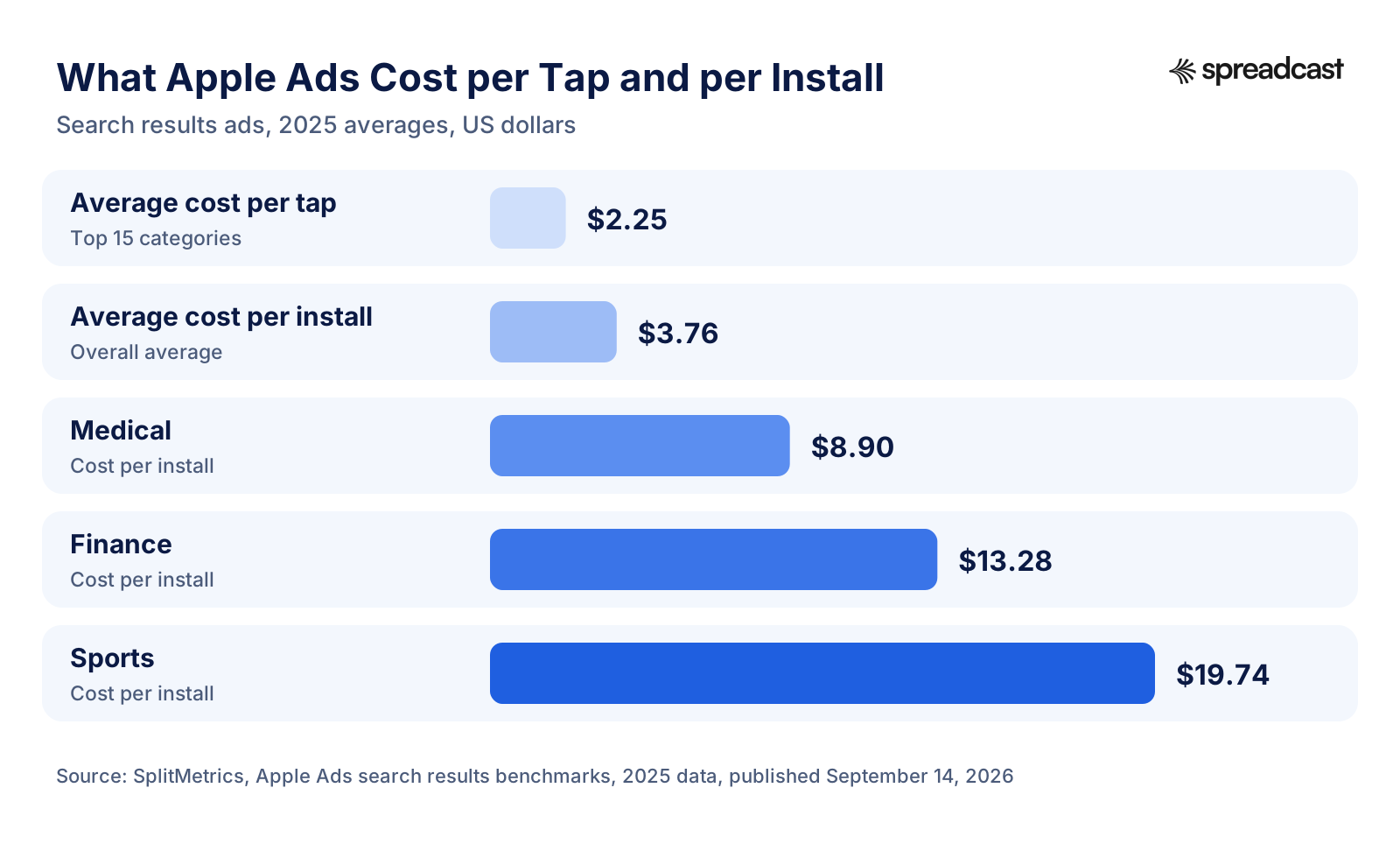
Read those numbers as a range, not a price. Your own cost depends on the phrases you bid on and how well your page converts. Bids on your own app name are usually the cheapest installs you will ever buy, and they protect you from competitors bidding on it. Generic phrases such as "photo editor" cost far more because every photo app wants them. To turn a cost per tap into a cost per install, divide by your conversion rate: a $2.25 tap that converts 66% of the time is about $3.40 per install (our arithmetic).

When Apple Ads Is the Wrong First Channel
Apple Ads works when people already search for what your app does. If your app creates a new habit nobody searches for yet (a new kind of social app, a game with a new mechanic), search volume will be thin and the ads will run dry. That is when a feed channel such as Meta or TikTok, which shows your app to people who were not looking, becomes the better first test. And if your app is Android only, Apple Ads does not apply; Google App campaigns take its place. Our guide to Google App campaigns covers their bidding, budgets and setup step by step.
Google App Campaigns: Search, Google Play, YouTube and Display
Google sells app installs through one campaign type that runs everywhere Google shows ads. Google's App campaigns overview lists the placements: Google Search and search partners; Google Play search results, the related apps section and the homepage; relevant pages and content on YouTube; the Google Display Network, which includes Gmail, other apps and mobile news sites and blogs; and Discover on Google Search. The app must be published on Google Play or the Apple App Store, so iPhone apps can use it too.
How Google App Campaigns Work
You do not build individual ads. You give Google some text, a starting bid, a budget, the languages and the locations, plus any images, videos and HTML5 assets you have, and Google's system assembles ads for each placement and serves the combinations that work. There are three subtypes: App campaigns for installs, for engagement (bringing existing users back) and for pre registration (Android apps not yet released). For a first campaign you want installs, optimized toward an event inside the app as soon as you track one.
The trade off is control. You cannot choose to show only on YouTube or only in Play search, and reporting is by asset, not by placement you picked. That suits a team with little time and enough budget for the system to learn. It does not suit someone who wants to spend $10 a day and see exactly which keyword worked; for that, Apple Ads is the better tool on iPhone.
App Install Campaign Budget on Google Ads
Google is unusually direct about money. Its tips for App campaigns say to set the average daily budget at 50 times your target cost per install, or 10 times your target cost per action. The same page asks you not to change the budget or the target by more than 20% at a time, says campaigns can take a few days to start gathering information, and recommends tracking at least one event inside the app, ideally several including revenue events.
| Your target cost per install | Google's recommended daily budget (50 times) | 30 days at that budget |
|---|---|---|
| $1.00 | $50 | $1,500 |
| $2.00 | $100 | $3,000 |
| $3.00 | $150 | $4,500 |
| $5.00 | $250 | $7,500 |
Those totals are our arithmetic from Google's rule. They show why Google is rarely the first channel for a small iPhone app: at a realistic US iOS target, the recommended budget is several thousand dollars a month for one campaign. You can run below it, and many small advertisers do, but expect slower learning and noisier results. For an Android app the picture changes, because Android installs are cheaper (see the cost section below) and Google Play is where Android users search.
Assets Google Asks For
Google's App campaign specs set the limits. Headlines run up to 30 characters and descriptions up to 90, with 1 to 5 of each (Google recommends 5). Images can be horizontal 1.91:1 (1200 by 628 recommended), vertical 4:5 (1200 by 1500) or square (1200 by 1200), JPG or PNG up to 5MB, with up to 20 per ratio. Google recommends videos of 10 to 60 seconds in horizontal, vertical or square, and they must be uploaded to YouTube first. The tips page goes further and suggests uploading 20 images and 20 videos in a variety of aspect ratios, with all four lines of text filled in. A small team will not reach 20 videos on day one, so start with three or four screen recordings in vertical and square, and add more as you learn which feature people respond to.
Google App Campaigns for iOS Apps
iPhone campaigns on Google need extra setup. Google's best practices guide for iOS App campaigns, last updated August 19, 2026, says to integrate the app with SKAdNetwork (through Google Analytics, an attribution partner or by hand), to set a conversion value schema that includes the events you plan to bid on, and to consolidate to 8 or fewer iOS App campaigns for installs. It also says Google does not currently support AdAttributionKit for attribution, which matters if your other channels have moved to it. Google's own video below walks through the same signals.

How to Advertise an App on Facebook and Instagram With Meta Ads
Meta runs one ad system for Facebook, Instagram, Messenger and the Meta Audience Network (ads inside partner apps). Meta's page about app ads describes three uses: the app promotion objective to find new users who are likely to download, the engagement, leads, sales or traffic objectives to bring existing users back, and playable ads that let people try a short interactive preview before they download. For most apps the first campaign is an Advantage+ app campaign with the app promotion objective.
Register the App and Install the SDK First
This step catches many first time advertisers. Meta's page says you do not need to register your app or implement the SDK to run app promotion ads, but if you skip it your ads automatically optimize for link clicks rather than app installs, and the campaign will not track any installs the ads cause. In other words, without the SDK (or a measurement partner that sends Meta the same events) you are buying clicks to the App Store and hoping. Ask your developer to add the Meta SDK, or connect Meta in your attribution tool, and check that installs show up in Events Manager before you launch.
Meta App Install Campaign Setup: Advantage+ App Campaigns
Meta's Advantage+ app campaigns page describes the default setup. Meta's AI picks the bidding, audience and placements across Facebook, Messenger, Instagram and Audience Network. You can upload up to 50 images, videos, playable ads or Instant Experiences at once and pair them with up to 5 texts and headlines. Targeting is reduced to country, language and app store, and options such as interests, demographics, custom audience inclusions and lookalikes are not supported. Bidding is lowest cost, with an optional bid cap.
The best practices page adds three useful rules. Choose the optimization that matches your goal: app installs if cost per install is the number you watch, app events if it is the cost of a sign up or trial, value if it is return on ad spend. Use lowest cost without a bid cap for the most results, since a cap can limit delivery. And refresh creative a few times a month to avoid fatigue, while not making changes during the learning phase. Meta also suggests a split test against a manual setup if you are unsure Advantage+ suits you.
How Much Does It Cost to Advertise an App on Facebook and Instagram?
Meta lets you choose. Meta's cost page says you decide how much to spend, can set a campaign spending limit and an account spending limit, and that some advanced ad types have a minimum spend you will be told about during setup. Meta's minimum budget guidance says Meta does require a minimum budget, which varies by country and objective and shows as an alert in Ads Manager, and adds the rule that matters for app ads: if you use the cost per result goal bid strategy, your daily budget should be at least 5 times that goal, so a $5 goal needs at least $25 a day. Meta also warns that harder optimization events need more budget than easier ones, which is why many small apps start by optimizing for installs and move to a trial or purchase event once they have volume.
How to Advertise an App on Instagram: Specs That Matter
On Instagram the ad has to look like it belongs in the feed. Meta's ads guide for Instagram feed app install ads recommends a 4:5 image at 1440 by 1800 pixels, JPG or PNG up to 30MB, at least 500 pixels wide, with primary text of about 125 characters and a headline of about 40. For Reels, the Reels app install spec asks for 9:16 video at 1440 by 2560, MP4 or MOV up to 4GB, and recommends keeping the top 14%, the bottom 35% and 6% on each side free of text, logos or other key elements, because the interface covers them. Organic tactics for the same network are in our guide to promoting an app on Instagram.
Meta Ads for iOS 14.5 and Later
Meta's iOS page says app promotion campaigns aimed at people on iOS 14.5 and later can use either Aggregated Event Measurement or Apple's SKAdNetwork as the attribution method, that reporting for these campaigns may differ from other campaigns, that not all attribution settings are available, and that app activity custom audiences shrink as more devices update. Meta's suggested answer is broad targeting or targeting expansion, which fits the Advantage+ setup above. In practice: expect iOS results in Ads Manager to be delayed and incomplete, and check them against your own App Store Connect and trial numbers.
TikTok Ads for Apps
TikTok sells app installs through the app promotion objective in TikTok Ads Manager. The ads appear in the For You feed between organic videos. The format is short vertical video, which makes TikTok the most demanding channel on creative and the most rewarding when an ad looks like a real TikTok rather than an ad.
TikTok App Install Campaign Setup
You create a campaign, choose App promotion and then App install, and pick the app. For iPhone users there is an extra switch. TikTok's page on iOS 14.5+ dedicated campaigns explains that you turn on the iOS 14.5+ dedicated campaign toggle and select an iOS app, and that this is possible only if your mobile measurement partner supports SKAdNetwork and the app is verified. Without the toggle, the same page says, you can only target devices up to iOS 14.4. So before TikTok can advertise an iPhone app properly, you need an attribution partner set up, which is the main technical cost of this channel.
TikTok Ads Budget
TikTok's budget page sets hard floors: a campaign budget must exceed $50, and an ad group's daily budget must exceed $20. For a lifetime ad group budget, the minimum is the number of days times the minimum daily budget. The page also limits how fast you can scale: during the learning phase, raise the budget by no more than 40% at a time, after it by no more than 30%, and avoid adjustments more often than every two days. One ad group for 30 days therefore costs more than $600 (our arithmetic), and you cannot switch between daily and lifetime budgets once it is live.
TikTok Ad Specs and Creative
TikTok's video ad specifications recommend vertical 9:16 video of at least 540 by 960 pixels, with horizontal and square allowed. Non Spark ads (uploaded by the advertiser) can run up to 10 minutes and 500MB; Spark ads, which boost an existing organic post from a TikTok account, use that post's caption and have no length limit. The display name is one line of up to 20 characters, and the app name is pulled from the App Store or Google Play. TikTok's creative best practices ask for footage shot at 720p or better, the proposition in the first 3 seconds, sound or music, 5 to 10 words per second when you use on screen text, and 3 to 5 different creatives per ad group with 3 to 5 ad groups per campaign.
Spark ads help a small team most here. If one of your own TikToks already did well, you can pay to show that same post to more people as a Spark ad instead of producing a polished ad that looks out of place. That is why we suggest testing TikTok only after your organic videos work: you then have proven creative to boost. How to get there is in our guide to promoting an app on TikTok.
When TikTok Is Worth It and When It Is Not
TikTok works for apps whose value shows on a phone screen in a few seconds: a photo filter, a game, a language drill, a budgeting trick, a before and after. It works poorly for apps whose value needs explaining, such as a B2B tool or anything bought by a manager. It also asks for constant creative. TikTok's own advice to refresh creatives when results decline, combined with the 3 to 5 creatives per ad group, means a team that can make two or three short videos a week is the minimum to run it well.
Reddit Ads for Apps
Reddit added an app install objective in February 2019. As Marketing Dive reported at the launch, advertisers who chose it could reach iOS and Android users of Reddit's mobile apps with native ads, bid for each click and send the click to the app store listing, with reporting through attribution providers including Adjust, AppsFlyer, Kochava, Singular and Branch. That report is from 2019, so treat it as history. Measurement partners still connect to Reddit: Branch's Reddit integration page lists iOS and Android, a cost per click pricing model, and installs, opens and purchases sent back to Reddit by default. The ads look like posts in the feed, so they are read with the same skeptical eye as any post.
Reddit is worth a test when your app serves a hobby or a profession with a busy subreddit: a climbing log, a plant care app, a tool for indie game developers. Reddit is organized into communities by topic, so the people you want are easy to find; check the targeting options in Ads Manager when you build the campaign. It is weak for broad consumer apps, and Redditors are quick to call out an ad that sounds like marketing copy, so write the ad the way a member would write a post: what you built, why, and one honest limitation. Check the current bidding options and minimum budget in Reddit Ads Manager when you set up, because we could not confirm them on a public Reddit page.
Before paying for Reddit, try it for free. Many subreddits allow app makers to share their work under clear rules, and a good post in the right community can send installs for months. Our guide to promoting an app on Reddit lists the subreddits that accept app posts and the rules each one sets.
YouTube Ads for Apps
There is no separate YouTube app install product to learn. When you want app installs from YouTube, you run a Google App campaign, which places your videos on YouTube alongside Search, Play and Display. The difference is what you upload: give the campaign real video, in all three shapes, and a larger share of the budget can go to YouTube.
The specs are the App campaign ones quoted above: videos of 10 to 60 seconds recommended, horizontal 16:9, vertical 9:16 or square, uploaded to YouTube first, and Google's tips name 16:9, 1:1 and 2:3 as ideal ratios with videos of several lengths. A 15 second vertical screen recording works for Shorts style placements, while a 30 to 60 second horizontal demo, with a voice explaining one problem and how the app solves it, suits in stream. YouTube is a good place for apps that need a demonstration to make sense, such as a scanner, an editor or a fitness program, because the viewer can watch the app working.
If your product needs a long explanation, your own videos and creators' reviews are a cheaper start than ads. Pay to show a video once you know it converts.
Influencer and Creator Deals for Apps
Paying a creator to show your app is advertising too, and for some apps it beats every self serve platform. A trusted voice demonstrating the app does what a banner cannot: it answers "is this real and does it work" before the viewer reaches the store. It suits apps that need trust (health, money, kids) or a face (fitness, cooking, study).
How to Structure a Creator Deal
- Start small and niche. A creator with 20,000 followers who covers exactly your topic will usually beat a celebrity whose audience overlaps by chance, and will agree to a lower fee or a per install deal.
- Pay per post for the first test, then move the creators who perform to a fee plus a bonus per install or per trial. Give each creator their own App Store campaign link or custom product page so you can count what they bring.
- Ask for usage rights. The right to run the creator's video as an ad (such as the Spark ads on TikTok described above) is often worth more than the post itself, because you already know the content works.
- Brief the problem, not the script. Tell the creator which problem the app solves and the one feature to show, then let them say it their way. Scripted creator videos look like ads and perform like them.
The Disclosure Rule
In the United States the creator must disclose the deal. The FTC's Disclosures 101 for social media influencers says to disclose any financial, employment, personal or family relationship with a brand, and that financial includes free or discounted products, not just cash. The disclosure has to sit with the endorsement itself, not only in a bio or behind a "more" link, has to be in the video for video content, and should use clear words such as "ad", "advertisement" or "sponsored". The FTC warns against vague terms such as "sp", "spon" or "collab". Put this in the brief so the creator's post does not put you at risk.
Ad Networks: Advertising an App Inside Other Apps and Games
The fourth big pool of app installs is ads inside other apps, mostly games. Mobile ad networks sell full screen video, rewarded video (watch an ad to get a reward in the game) and playable ads (a short interactive demo) across thousands of publisher apps. AppLovin, one of the best known, describes its own format on its homepage: every ad runs full screen during natural pauses in the game, or is chosen by the player in exchange for rewards. Meta's Audience Network and Google's Display Network sell the same kind of space inside their App campaigns.
For games, this is the main channel, because people playing one game are the easiest people to sell another game to. For other apps it is a later step. The audience is broad, many installs come from people who wanted the reward rather than your app, and quality varies by publisher. If you test an ad network, optimize toward an event inside the app or toward return on ad spend rather than raw installs, and watch day 7 retention closely. Game specific tactics are in our guide to mobile game marketing.
How Much Does It Cost to Advertise an App?
There are two honest answers. The platforms let you start with very little: no minimum daily budget on the Apple Ads pages we checked, just over $20 a day per ad group on TikTok, and on Meta a minimum that Ads Manager shows you, which varies by country and objective, plus the 5 times rule if you set a cost goal. But a test that tells you anything needs enough installs to read, and that usually means $1,000 to $3,000 for a first month, depending on how many channels you try and what an install costs in your category and country. The numbers below show where that range comes from.
Cost per Install Benchmarks
Cost per install (CPI) is ad spend divided by the installs it brought. The most useful public medians come from Adjust, a measurement company that sees installs across many advertisers. Its eCPI benchmarks, published July 30, 2024, put the median effective cost per install across all platforms at $1.27 in 2023 and $1.15 in the first half of 2024. Adjust defines eCPI as an effective cost that can include organic and viral installs, so it tends to sit below a purely paid figure. By platform, iOS was $1.74 and Android $0.56 in the first half of 2024. By region, North America was the most expensive at $2.12, against $0.67 in APAC, $0.66 in Europe, $0.18 in Latin America and $0.15 in the Middle East and North Africa.
| App vertical | Median eCPI, 2023 | Median eCPI, first half of 2024 |
|---|---|---|
| Food and drink | $2.69 | $2.00 |
| Publications | $2.15 | $1.71 |
| Social | $1.53 | $1.22 |
| Finance | $1.21 | $1.09 |
| Games | $1.15 | $1.07 |
| Shopping | $0.99 | $0.82 |
| Travel | $0.97 | $0.77 |
| Health and fitness | $0.74 | $0.72 |
| Entertainment | $0.46 | $0.44 |
| Utilities | $0.21 | $0.11 |
Source: Adjust eCPI benchmarks. These are medians across all countries, so a US iPhone campaign will usually pay well above them; compare the $3.76 average Apple Ads install in the SplitMetrics data above. Games show the widest platform gap: Liftoff's summary of its 2025 casual gaming report, published July 28, 2025, says simulation, action and racing games see roughly 10 times higher install costs on iOS than on Android. More figures by country, network and category are on our cost per install benchmarks page.
Minimum Budgets by Platform
Each platform words its floor differently, so the chart puts them on one scale: the daily budget each platform's own rule implies for a target of $3 per install. Apple Ads is left out because the Apple pages we checked set no minimum daily budget; they cap Basic at $10,000 a month instead.
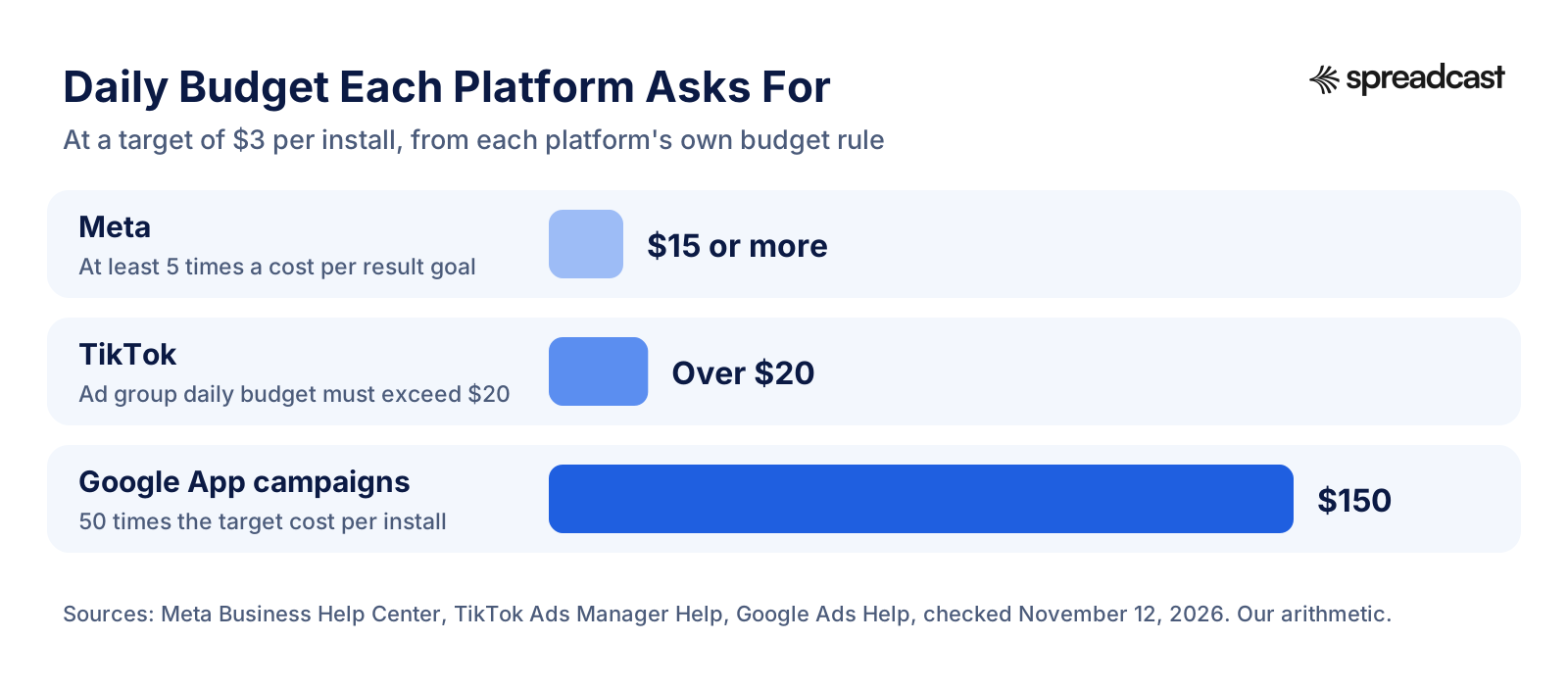
The gap is the point. Google's recommendation is ten times Meta's because Google asks for enough volume for its system to learn on its own, while Meta's rule is only about a cost goal you chose to set. Neither guarantees results; each is the smallest test the platform itself considers fair.
What an Install Earns
A cost per install means nothing until you set it against what an install earns. RevenueCat's State of Subscription Apps, built on more than 115,000 apps, gives the most useful public numbers. The median revenue per install was $0.23 by day 14 and $0.34 by day 60 across all categories, and $0.38 and $0.55 in North America. The business model changes everything: apps with a hard paywall earned $2.32 per install by day 14 and $3.09 by day 60, against $0.27 and $0.38 for freemium apps.
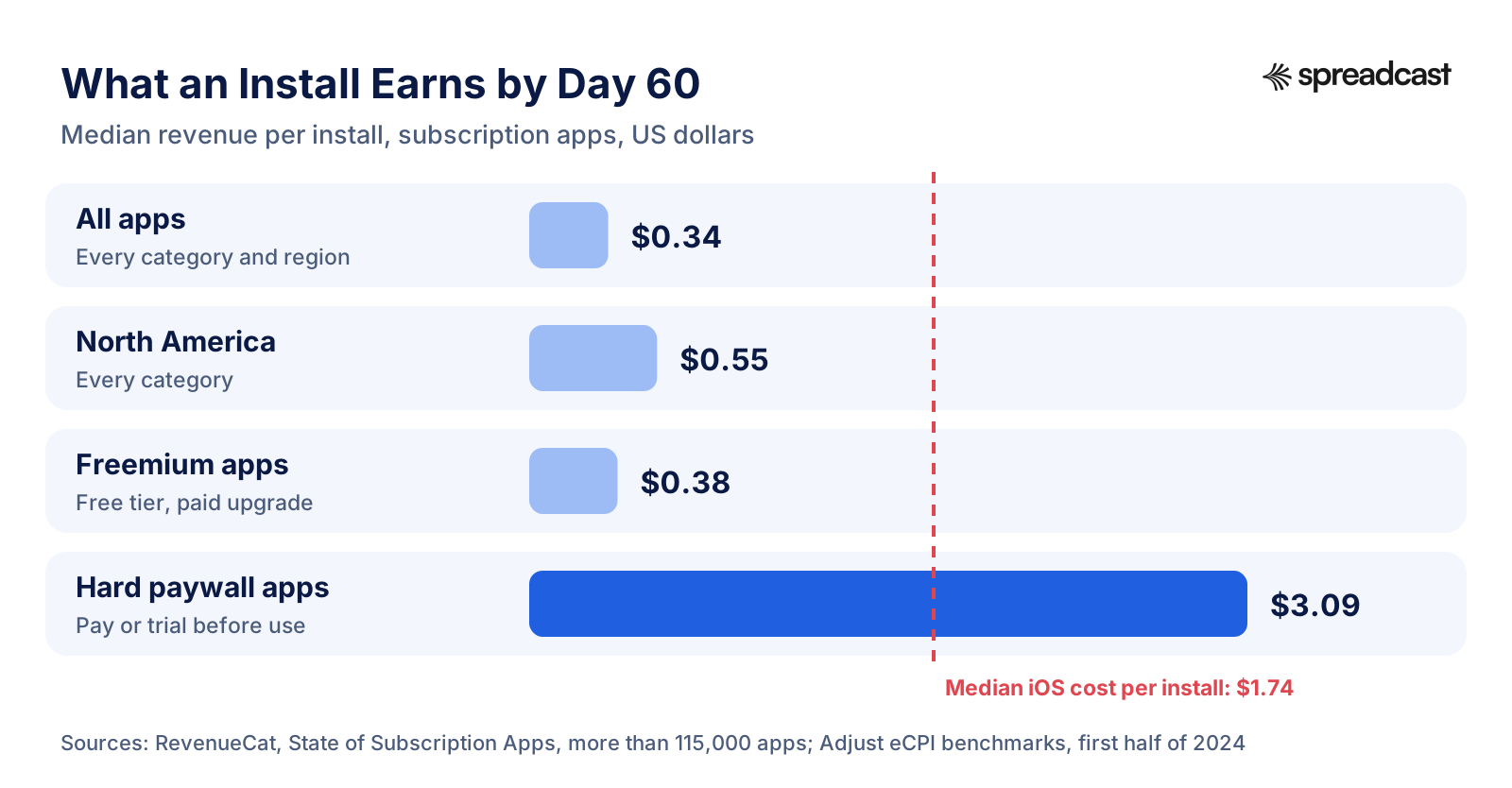
Put the two side by side and the problem is plain. A freemium app paying the median iOS price of $1.74 earns back about $0.38 in 60 days, roughly a fifth (our arithmetic). A hard paywall app earning $3.09 has already paid the install back. That does not mean every app needs a hard paywall. It means you must know your own revenue per install, and how it grows after day 60, before you decide what an install is worth. The LTV to CAC ratio page explains how to compare lifetime value with acquisition cost.
How Much Does It Cost to Advertise an App on Social Media?
On Meta, TikTok and Reddit you pay in an auction, so there is no list price. What you control is the budget and, optionally, a cost goal. A practical floor for a test that tells you something is about $20 to $30 a day per social channel for at least two weeks, which puts one channel at $300 to $900 for a first read. That is our working estimate, built from TikTok's $20 ad group floor and Meta's 5 times rule at a $4 to $6 cost goal. If you can only afford one social network, choose the one where your users already are and your own posts already get some response. Our guide to promoting an app on social media compares the networks for app makers.
A Starter Budget for Advertising an App
Here are three budgets for a first month, for an iPhone app selling in the United States. They are a planning template, not a promise: the installs column uses the SplitMetrics average of $3.76 per Apple Ads install and an assumed $3 to $5 on social channels, so treat it as a rough range for a typical category. Finance, sports and medical apps should expect far fewer: at SplitMetrics' category averages, between two fifths and a fifth as many Apple Ads installs.
| Monthly budget | How to split it | Rough installs (our arithmetic) | What you learn |
|---|---|---|---|
| $500 | All on Apple Ads search results: your brand name plus 5 to 10 exact phrases, about $17 a day | About 130 | Which search phrases bring users who stay. Enough to decide whether to continue |
| $1,500 | $900 Apple Ads (about $30 a day), $600 Meta Advantage+ app campaign (about $20 a day) with 4 to 6 creatives | About 240 from Apple Ads, 120 to 200 from Meta | Whether search or a feed brings better users, and which creative wins on Meta |
| $3,000 | $1,200 Apple Ads, $1,050 Meta, $750 TikTok (one ad group at $25 a day, Spark ads of your best videos) | About 320 from Apple Ads, 210 to 350 from Meta, 150 to 250 from TikTok | A ranking of three channels by cost per trial and day 7 retention |
Notice what is missing: Google App campaigns. At a $3 target, Google's own rule asks for $150 a day, more than the whole $3,000 month. Add Google later, when you know your target cost per install and can fund it, or first if your app is on Android, where installs cost a fraction of iOS. Our startup marketing budget page shows how this paid line fits into a whole marketing budget.
Keep 10% to 20% of the month aside for creative: a few hours of your time making screen recordings, or a small fee to a freelancer or a creator. A better ad usually does more for cost per install than a cleverer bid.
How to Run Your First App Install Campaign Step by Step
This is the order we would follow for a first campaign on a budget of $500 to $3,000. It assumes an iPhone app; for Android, swap step 4 for a Google App campaign at whatever budget you can hold steady for a month.
- Write down one number that defines a good user: a started trial, a first purchase, or three sessions in the first week. Every later decision is made against it.
- Make a custom product page for paid traffic, with screenshots that match the ads you will run. Apple allows up to 70 custom product pages, each with its own URL.
- Create a campaign link for each channel, so App Store Connect counts downloads by source even when the ad platforms disagree.
- Open Apple Ads Advanced and create a search results campaign. Add your app's name as an exact match keyword in one ad group, and 5 to 10 exact phrases that describe the job the app does in a second. Set a daily budget you can hold for 30 days.
- Add the Meta SDK (or connect Meta in your measurement partner), register the app, confirm installs appear in Events Manager, then launch one Advantage+ app campaign optimized for installs with 4 to 6 creatives.
- Leave both alone for 7 days. Do not change budgets, bids or creatives during the learning period unless something is clearly broken.
- After a week, read cost per install, cost per good user and day 1 retention by channel. Pause keywords and creatives with spend and no good users.
- After two weeks, replace the worst two creatives with new ones, raise the budget of the better channel by 20% to 30%, and look at day 7 retention for the first cohort.
- After a month, compare each channel's cost per good user with what a good user earns. Keep, scale or stop. Only then try a third channel.
Two rules from the platforms back up the patience in steps 6 and 8. Google asks you not to move budgets or targets by more than 20% at a time, and TikTok asks for no more than 30% to 40% per change and no more than one change every two days. Every algorithm needs stable conditions to learn which people install. The steps for each custom product page are in Apple's guide to custom product pages.
App Install Ads Examples: Creative That Works
The ad is the part you control most, and on Meta and TikTok it often moves your cost more than any setting. App install ads that work tend to follow a few patterns. None of them needs a studio; most start as a screen recording or a screenshot.
Six App Install Ad Formats to Copy
- The problem in one line. A plain headline that names the pain ("Still splitting rent in a group chat?") over the one screen that solves it. Works as a 4:5 image on Instagram and Facebook.
- The 10 second demo. A vertical screen recording of the app doing its main job, with a finger tapping and one line of text on screen. The most reliable TikTok and Reels ad for utility apps.
- Before and after. Two halves of a frame: the messy way and the app's way. Photo, budgeting and productivity apps use it because the result is visible.
- The review. A real 5 star review in large type with the star rating and your icon. Apple's ratings and reviews guidance allows customer reviews in marketing only with the reviewer's permission, and your rating only if it reflects the current one, so ask first and date the image.
- The creator talking to camera. A person who uses the app explains why, in their own words, with the app on screen. Usually the best performer on TikTok when it does not look scripted.
- The playable or the challenge. For games, a short playable ad or a clip of a level someone fails, ending with the install button. Meta supports playable ads in its app campaigns.
Use your real interface. An ad that shows a stylized mockup, then lands on screenshots that look different, loses people at the store. A real screen in a phone frame, the same one the custom product page shows, keeps the promise consistent from ad to install. Our iPhone mockup generator puts a screenshot in a frame, and our creative teardowns page codes 35 high performing social creatives to show what they have in common.
Ad Creative Specs by Platform
| Platform and placement | Shape and size | Text | Source |
|---|---|---|---|
| Apple Ads search results | Built from your App Store screenshots and previews | Your app name and subtitle | Apple |
| Google App campaigns | Images 1.91:1, 4:5 or 1:1; videos 10 to 60 seconds in 16:9, 9:16 or 1:1 | Headlines 30 characters, descriptions 90 | |
| Instagram feed (Meta) | 4:5 image, 1440 by 1800 recommended | About 125 characters of primary text, 40 in the headline | Meta |
| Instagram Reels (Meta) | 9:16 video, 1440 by 2560; keep top 14% and bottom 35% clear | About 44 characters of primary text | Meta |
| TikTok in feed | 9:16 video, at least 540 by 960 | Display name up to 20 characters | TikTok |
A 4:5 still at 1080 by 1350 or larger covers Instagram and Facebook feeds and Google's vertical image slot. A 9:16 video covers Reels, Stories, TikTok and YouTube Shorts. With those two shapes you can run every channel in this guide except the Apple Ads Today tab, which uses your custom product page. Image sizes for organic posts on each network are on our social media image sizes page.
How to Test Ad Creatives on a Small Budget
With $20 to $50 a day you cannot run the clean A/B tests big advertisers run. You can still learn which ad works, if you test big differences instead of small ones and give each round enough time.
- Test ideas, not colors. Put a problem headline against a demo video against a review. A different button color will not show a difference you can measure on a small budget.
- Load 3 to 5 creatives into one ad group or one Advantage+ campaign and let the platform spread the budget. TikTok recommends exactly this range, and Meta's system shifts spend toward the winners on its own.
- Judge after each creative has had enough spend to produce about 20 to 30 installs. Below that, the difference between ads is mostly noise.
- Look at two numbers for each ad: cost per install and the share of those installs that become a good user. A cheap ad that brings people who leave on day one is not a winner.
- Replace the losers every one to two weeks with new ideas built on what the winner did. Keep the winner running until its cost starts to climb, which is the sign of fatigue Meta and TikTok both describe.
- Recycle what works elsewhere. An organic post that got far more saves or shares than usual is a strong candidate for an ad.
For the App Store side, Apple runs the test for you. Product page optimization lets you test up to three versions of your icon, screenshots and app previews against your original page with real App Store visitors, and custom product pages let each ad send people to screenshots that match it. The patterns that make a social image get noticed are in what makes a social creative convert.
How to Measure App Ads: Installs, Cost per Trial, ROAS and LTV
Every ad platform reports its own installs, and they rarely match each other or App Store Connect. That is normal. What matters is that you pick one source of truth for each question and read it the same way every week.
Attribution on iPhone: ATT, SKAdNetwork and AdAttributionKit
Since iOS 14.5, Apple's privacy rules require an app to ask permission through the App Tracking Transparency prompt before it tracks a user across other companies' apps and websites or reads the device's advertising identifier. Without permission, the identifier is all zeros. Apple defines tracking broadly: sharing advertising IDs or emails with an ad network that retargets users or finds similar users counts, and so does a third party SDK that combines your app's data with other developers' data for ad measurement.
Apple's answer for measuring ads without tracking is AdAttributionKit, which Apple's ad attribution page says builds on SKAdNetwork. It lets registered ad networks attribute installs to a campaign through a signed signal from Apple, without the ATT prompt. Click through attribution counts installs within 30 days of tapping an ad, view through within 24 hours of seeing one. Postbacks arrive within 24 to 48 hours of the first launch, conversion values carry up to 64 signals of user value, and those values appear only when crowd anonymity thresholds are met. Install attribution works from iOS 17.4, and re engagement measurement from iOS 18.
In practice this means three things for a small advertiser. Platform dashboards will show fewer iPhone conversions than really happened, and later. Choose your conversion value schema carefully, since it is how Meta, Google and TikTok learn which installs were good. And keep App Store Connect campaign links plus your own trial and revenue data as the check on everything the ad platforms report.
The Numbers That Decide Whether to Keep Spending
| Metric | Formula | Example (our arithmetic) |
|---|---|---|
| Cost per tap (CPT) | Spend ÷ taps | $300 ÷ 130 taps = $2.31 |
| Cost per install (CPI) | Spend ÷ installs | $300 ÷ 80 installs = $3.75 |
| Cost per trial | CPI ÷ install to trial rate | $3.75 ÷ 7.1% = $52.82 |
| Cost per paying user | Cost per trial ÷ trial to paid rate | $52.82 ÷ 34.2% = $154.44 |
| Return on ad spend (ROAS) | Revenue from the users the ads brought ÷ spend | $180 by day 60 ÷ $300 = 60% |
| Payback period | Days until those users' revenue equals the spend | When ROAS reaches 100% |
| LTV to CAC | Lifetime value per user ÷ cost to acquire one | Aim for well above 1; see our LTV to CAC page |
The trial and paid rates in the example are real medians: RevenueCat's State of Subscription Apps reports a North American median of 7.1% of downloads starting a trial within 30 days and 34.2% of trials converting to paid. The same report puts the median download to paid rate at 2.0% by day 35. Run the example with your own rates. A cost per paying user of $154 is fine for a $99 a year app that keeps people for three years, and ruinous for a $2.99 one time purchase.
App Install Campaign Strategy: When to Scale, Pause or Switch
After the first month you will have one of four results. Each calls for a different move.
| What you see | What it usually means | What to do |
|---|---|---|
| Cheap installs, few good users | The ad promises something the app does not deliver, or the audience is too broad | Change the ad to show the real app, optimize for an event instead of installs |
| Expensive installs, good users | The message works but the page or the creative converts poorly | Improve the custom product page and test new creatives before cutting budget |
| Cost per good user below what a good user earns | The channel pays back | Raise the budget 20% to 30% at a time and watch whether cost holds |
| Nothing works on any channel | Usually the product page, the price or retention, not the ads | Pause spend, fix the listing and onboarding, then test again |
Scaling rarely keeps the same cost. As budget grows, each platform has to reach people less likely to install, so cost per install tends to rise. That is why the scaling rule is in small steps: you find the budget at which cost per good user stops being acceptable, and you stay below it. Add a new channel when the current one has stopped growing at an acceptable cost, not before.
Also watch what ads do to your free installs. Paid installs can come with extra organic ones, from people who saw an ad and later searched for the app by name. Comparing the weeks you advertised with the weeks you did not, in App Store Connect's sources report, shows whether that is happening for you. If it is, your real cost per install is lower than the ad dashboards say.
How to Advertise an App for Free
If the budget is small or zero, organic channels are the better place to start, and they make every later ad cheaper by giving you proof, reviews and creative that already works. In short:
- App Store optimization. The search terms in your title, subtitle and keyword field decide whether you appear for free in the same searches Apple Ads sells. See App Store optimization.
- Social media. Posting your updates, reviews and one feature at a time on two or three networks builds an audience you do not pay for each time. See how to promote an app on social media, and the network guides for Instagram and TikTok.
- Reddit and communities. One honest post in the right subreddit can beat a month of ads for a niche app. See how to promote an app on Reddit.
- Product Hunt and launch sites. A launch day brings a spike of early adopters and reviews. See how to launch on Product Hunt.
- Reviews and ratings. A higher rating lifts conversion on every visit, paid or free. See how to get App Store reviews.
More ideas are in app promotion ideas.
Common Mistakes When Advertising an App
- Running ads to a product page that converts poorly. Fix the first three screenshots before anything else.
- Launching Meta app ads without the SDK. Meta then optimizes for link clicks and cannot count installs.
- Splitting a small budget across four channels. Each gets too few installs to read, and you learn nothing.
- Changing settings every day. The learning phase restarts and costs rise.
- Judging by cost per install alone. A cheap install that never opens the app twice is the most expensive one.
- Buying installs from bot or click farm sellers. They inflate the numbers, bring no real users and teach the ad algorithms the wrong people.
Where Spreadcast Fits
Spreadcast is not an ad platform, and it does not buy media. It covers the organic side that makes a paid budget go further. You paste your App Store link once at the start page, and Spreadcast builds a brand kit from your icon, colors and real screenshots. When you ship an update or pass a rating milestone it designs a post about it, and each week it makes a plan of posts about your features, reviews and tips at the posting times you choose. It writes the caption for each network and publishes to 11 networks: Instagram, Facebook, LinkedIn, TikTok, YouTube, Pinterest, Threads, Bluesky, Mastodon, Telegram and Discord (YouTube takes only video, so it gets the videos you upload). TikTok posts go to your TikTok drafts, or wait for your one tap choice, so nothing goes to the TikTok feed unattended.
Two parts of that help with ads. The posts are 1080 by 1350 still images and carousels built from your real screens, the same 4:5 shape a Meta feed ad asks for, so a post that does well organically can be uploaded as an ad image; the ad creative generator page shows how. And a steady feed means the people who see your ad and check your profile find an active product rather than an empty account. Spreadcast does not make videos or video ads (it publishes videos you upload), and ad accounts and bidding stay with the platforms in this guide. The free plan makes 3 AI posts to download, a Post Pack is $19 once for 10 posts that never expire, a 30 Day Pass is $39 once, and Pro is $29 a month; details are on the pricing page, and the version for app makers is on Spreadcast for mobile apps.
How We Researched This Guide
On November 12, 2026 we opened every platform page cited here and checked each rule against it: Apple's Apple Ads, custom product page, campaign link, ad attribution and privacy pages; Google Ads Help on App campaigns, their budgets, specs and iOS setup; Meta's Business Help Center pages on app ads, Advantage+ app campaigns, budgets, costs and iOS, and its ads guide specs; TikTok's help pages on budgets, video specs, creative and iOS campaigns; and the FTC's influencer guidance. Cost figures come from the published reports of SplitMetrics, Adjust, AppsFlyer, RevenueCat and Liftoff, quoted with their dates. We could not open a public Reddit help page on app install ads, so the Reddit section relies on a 2019 news report of the launch and Branch's Reddit integration page, and leaves out a minimum budget. The video captions are written from each video's title and YouTube description. Starter budgets and install estimates are our arithmetic from those sources, marked where they appear. We did not run test campaigns for this guide.
Frequently Asked Questions
How much does it cost to advertise an app?
Plan on $1,000 to $3,000 for a first month that tells you something. Platforms let you start lower, but you need enough installs per channel to judge them. Published medians put an iOS install at about $1.74 across all countries (Adjust, first half of 2024), and Apple Ads search results averaged $3.76 per install in 2025 (SplitMetrics), with sports, finance and medical apps far higher.
What are app install ads?
App install ads are ads whose goal is a download: the button sends people to your App Store or Google Play page, and the platform optimizes delivery toward people likely to install. Apple Ads, Google App campaigns, Meta's app promotion objective, TikTok's app promotion objective and Reddit's app install objective all sell them.
How do I advertise an app on Facebook and Instagram?
Register the app with Meta and add the Meta SDK or connect a measurement partner, then create an Advantage+ app campaign with the app promotion objective in Meta Ads Manager. Upload a few 4:5 images and 9:16 videos, keep targeting broad, optimize for installs at first and leave it alone for a week before you judge it.
How do I advertise an app on TikTok?
In TikTok Ads Manager, create a campaign with the App promotion objective and choose App install. For iPhone apps, turn on the iOS 14.5+ dedicated campaign, which needs a measurement partner that supports SKAdNetwork. Budget more than $20 a day per ad group, and use 3 to 5 vertical videos, ideally Spark ads of your own posts that already did well.
Which is the best platform to advertise an app?
For an iPhone app, Apple Ads search results is usually the best first test, because people there are already looking for an app. For an Android app, Google App campaigns, because they cover Google Play. Add Meta or TikTok next if your app is easy to show in a short video or image.
How can I advertise my app for free?
Work on App Store optimization, post your updates, reviews and features on social media, share the app in subreddits that allow it, launch on Product Hunt and ask happy users for ratings. These channels cost time rather than money and make later ads cheaper.
Where These Facts Come From
Every outside number, rule and price on this page links to the page it was taken from.
- Promoting your apps and gamesApple Developer
- Apple Ads for the App StoreApple
- Compare Apple Ads solutionsApple Ads Help
- Ad placement optionsApple Ads Help
- Custom product pagesApple Developer
- Campaign links in App Store Connect analyticsApple Developer
- Measuring ad performance with AdAttributionKitApple Developer
- Ratings, reviews and responsesApple Developer
- User privacy and data useApple Developer
- Design your own ads with creative assetsApple Ads Help
- Product page optimizationApple Developer
- Marketing guidelinesApple Developer
- About App campaignsGoogle Ads Help
- Tips for maximizing your App campaignGoogle Ads Help
- App campaigns specs and format requirementsGoogle Ads Help
- Best practices guide for iOS App campaignsGoogle Ads Help
- About app adsMeta Business Help Center
- About Advantage+ app campaignsMeta Business Help Center
- Best practices for Advantage+ app campaignsMeta Business Help Center
- Best practices for minimum budgetsMeta Business Help Center
- How much it costs to advertise on Meta technologiesMeta Business Help Center
- Reach people using iOS 14.5 or later with Meta adsMeta Business Help Center
- Instagram feed app install image ad specsMeta Ads Guide
- Instagram Reels app install video ad specsMeta Ads Guide
- About budgetTikTok Ads Manager Help
- Video ads specificationsTikTok Ads Manager Help
- Creative best practicesTikTok Ads Manager Help
- How to create an iOS 14.5+ dedicated campaignTikTok Ads Manager Help
- Reddit expands ad products with app install pushMarketing Dive
- Reddit integrationBranch Help Center
- AppLovin advertisingAppLovin
- Disclosures 101 for social media influencersFederal Trade Commission
- Apple Ads benchmarks and costsSplitMetrics
- What makes a good mobile app eCPIAdjust
- Top 5 data trends reportAppsFlyer
- State of Subscription AppsRevenueCat
- Highlights from the 2025 casual gaming apps reportLiftoff
- Driving iOS App campaign performanceGoogle Ads
- Beginner App Store ad mistakes to avoidAdam Lyttle
Researched and written by Mark Weizer. Last checked on November 12, 2026.
Keep Reading
- Growth
How to Promote an Android App: The Complete Google Play Playbook for 2026
How to promote an Android app without a big budget: a Google Play listing that converts, testing tracks, pre registration, custom store listings, ratings, Android vitals, a launch week plan, social media, short video, communities, Google App Campaigns, the markets where Android wins, measurement, budgets and a weekly routine.
- Growth
Google App Campaigns: How They Work, What They Cost and How to Set One Up (2026)
Google App campaigns show your app on Search, Google Play, YouTube, Discover and other apps from one campaign. This guide covers the three campaign types, bidding, budget rules, assets, tracking, iOS limits and a first campaign step by step.
- Growth
Google Play ASO: How to Rank Your Android App in Google Play Search in 2026
Google Play ASO is how you get an Android app found in Play search: the right words in the title and descriptions, graphics that earn the tap, and the ratings and stability Google rewards. Every rule, limit and threshold here comes from Google's own pages.