Search for the best time to post on TikTok and you get a confident answer from every page. The trouble is that the answers do not match. One large study says Tuesday to Thursday afternoons and tells you to avoid weekends. Another large one calls Saturday the strongest day of the week. A third says Sunday evening draws the most views and Saturday is the quietest day. None of them is lying. They measured different accounts, with different yardsticks, on different clocks.
So this guide does not add an eighth opinion. We have no TikTok posting data of our own, and we are not going to pretend otherwise. Instead we read seven published studies that come up for this question, wrote down what each one measured and how, and put their answers side by side. Where they agree, you can trust the pattern. Where they disagree, we explain why, so you know which one fits your account. Then comes what TikTok itself says about timing, the exact steps to find your own best time in TikTok Studio, and a two week test you can run from tomorrow.
One thing to know before the numbers. On TikTok, posting time matters less than on networks where most views come from followers. TikTok shows videos to people through recommendations, not only to followers, and TikTok's own explainer of those recommendations does not mention the hour a video went up. A good hour helps a good video start. It does not rescue a weak one. Keep that in mind as you read the tables, and it will save you from rearranging your week around a slot that someone else's audience preferred.
The Best Time to Post on TikTok: The Short Answer
If you want one place to start, post in the late afternoon or evening on a weekday, in your audience's own time zone, and test a weekend morning against it. That is where the published studies overlap most. Sprout Social's 2026 study puts the best window at 2 pm to 6 pm on Tuesdays to Thursdays. Metricool's 2026 TikTok study finds the most views between 6 pm and 8 pm. Buffer's study of 7.1 million posts says engagement generally peaks between 6 pm and 11 pm on most days. SocialPilot names 8 am and 8 pm, with 2 pm to 4 pm next. Four studies, four slightly different windows, and all of them cover some part of the afternoon to evening stretch.
Then use your own numbers. TikTok Studio shows when your followers and viewers were most active over the past week, and that chart beats any study for your account, because it describes your audience rather than an average of hundreds of thousands of other people's. The steps are further down. TikTok says you get fuller insight into your audience once you have 100 followers, so below that the chart may be thin or empty, the studies are all you have, and a short test is the honest way to choose.
- Safest weekday window to test first: 2 pm to 8 pm in your audience's time zone. Sprout, Metricool, Buffer and SocialPilot each have a peak inside it.
- Buffer's single best slot of the week: Sunday at 9 am, from 7.1 million posts. Hootsuite also likes Sunday 8 am to 12 pm. Sprout says avoid Sunday entirely.
- Hours nearly everyone avoids: the small hours. Metricool calls 2 am to 4 am the lowest point of the day, and SocialPilot calls 11 pm to 3 am on Sunday night the worst time to post.
- Best day: no agreement. Sprout and SocialPilot say Tuesday to Thursday, Buffer says Saturday, Metricool says Sunday has the most traffic. Your own analytics settle it.
- Time zone: Sprout and Hootsuite give local time, ContentStudio gives Eastern time, Later gives Pacific time, and Buffer and SocialPilot say their main times need no conversion at all. SocialPilot also has a separate US table in Eastern time.
If you post to several networks, our companion guide to the best time to post on social media compares the studies for Instagram, Facebook, LinkedIn and the rest in the same way. This page stays on TikTok.
TikTok Posting Times From Seven Studies, Compared
Here are the seven studies we found that come up near the top of search results for this question and publish their own TikTok numbers. We read each page on November 12, 2026 and copied only what the page states. Where a page does not say something, the table says so rather than guessing.
| Study | Published | What was measured | Clock used | Best times it reports | Best day |
|---|---|---|---|---|---|
| Sprout Social | March 31, 2026 | Nearly 2 billion engagements on 307,000 profiles of 30,000 Sprout customers, November 27, 2025 to February 27, 2026 | Local time | Tuesday to Thursday, 2 pm to 6 pm | Tuesday, Wednesday, Thursday. Worst: Sunday |
| Buffer | September 14, 2026 | Median engagement rate of more than 7.1 million posts published through Buffer. Period not stated | Adjusted so no conversion is needed, per Buffer | Sunday 9 am, Monday 1 pm, Sunday 1 pm. Evenings 6 pm to 11 pm peak on most days | Saturday, then Monday, then Sunday |
| Hootsuite | November 19, 2025 | Over 1 million social posts plus Hootsuite's own experiments; times localized across 118 countries | Local time | Thursday 6 am to 9 am and Saturday 10 am to 6 pm | Not ranked as a single day |
| Metricool | June 11, 2026 | 2,314,756 posts from more than 92,000 accounts, ranked by views | Not stated | 6 pm to 8 pm, with 8 pm the top hour on most days | Sunday has the most traffic. Quietest: Saturday |
| SocialPilot | January 6, 2026 | 700,000 posts from more than 50,000 accounts, January to December 10, 2025 | Time zone agnostic, per SocialPilot | 8 am and 8 pm, then 2 pm to 4 pm | Tuesday, Wednesday, Thursday. Worst: Sunday |
| ContentStudio | Updated July 9, 2026 | Over 100,000 posts, combined with insights from third party sources | Eastern time | 6 am to 10 am and 7 pm to 11 pm, peaks at 9 am and 9 pm | Tuesday, Thursday, Friday. Worst: Sunday |
| Later | March 7, 2025 | What Later's own social team found posting on Later's TikTok account. No sample size given | Pacific time | Monday to Friday at 10 am | Thursday and Friday |
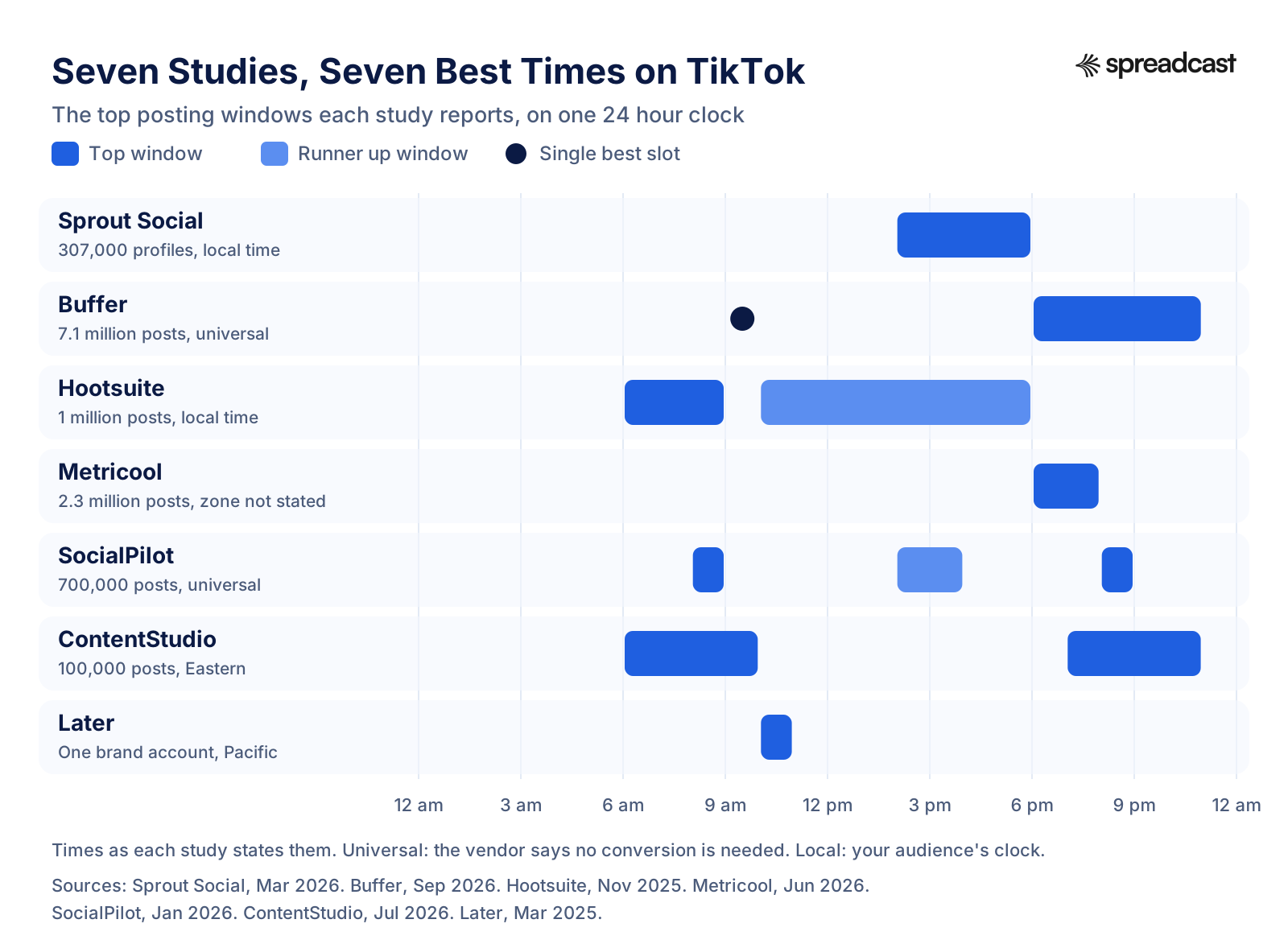
Look at the chart for a moment and a pattern shows. There is a crowd between about 6 pm and 9 pm, a smaller crowd in the morning between 6 am and 10 am, and an afternoon held mainly by Sprout, with SocialPilot's 2 pm to 4 pm and Hootsuite's long Saturday window beside it. Almost nobody recommends the hours after midnight. That rough shape, morning and evening, with the afternoon contested, is the most reliable thing the studies tell you.
The sample sizes deserve a second look, because they are not the same kind of number. Sprout counts engagements, Buffer and Metricool count posts, and Later counts one account. Two billion engagements sounds bigger than 7.1 million posts, but an engagement is a single like or comment, so the two cannot be ranked against each other. What matters more is whose posts they are. Most of these studies look at the vendor's own customers: accounts that use a scheduling or analytics tool. Later looks only at its own brand account, and ContentStudio mixes its data with outside sources. That is a particular slice of TikTok, accounts run as a business or a serious project rather than the average person posting from their phone. If you are a business, that slice is close to you. If you are a solo creator with a young audience, it may not be.
Where the Studies Agree and Where They Disagree
What They Agree On
- Nights are weak. Metricool calls 2 am to 4 am the lowest point of the day, SocialPilot names 11 pm to 3 am on Sunday night as the worst time, and Hootsuite warns against posting before 7 am on Saturdays and Sundays.
- Evenings are strong. Buffer, Metricool, SocialPilot and ContentStudio all put a peak between 6 pm and 11 pm. Sprout's Wednesday window runs to 8 pm.
- There is a morning window for some audiences. Hootsuite's best Thursday slot is 7 am to 9 am, ContentStudio's morning peak is 9 am Eastern, SocialPilot's is 8 am, and Buffer ranks Tuesday 6 am first for that day.
- Your own data beats theirs. All seven pages say the right time depends on your own audience and send you to your own analytics or a test. With data this split, that is the only honest advice.
Where They Split
The biggest split is the weekend. Sprout lists Saturday and Sunday as low and says to avoid posting. Buffer calls Saturday the best day of the week and Sunday 9 am the best single slot. Metricool says Sunday carries the biggest wave of traffic and Saturday is typically the quietest day. SocialPilot and ContentStudio both name Sunday the worst day. If you line these up, Sunday is simultaneously the best and the worst day to post on TikTok, depending on whom you ask.
The second split is the time of day. Sprout's afternoon window, 2 pm to 6 pm, falls largely where Buffer says engagement is lowest: Buffer writes that afternoons from 12 pm to 5 pm tend to see lower engagement across most days. Both studies are large, both are recent, and they point in opposite directions for the same hours.
Why the Studies Disagree
Five differences in method explain most of it. None of them makes a study wrong. Each one just answers a slightly different question.
- They measure different things. Buffer ranks hours by median engagement rate, Metricool by views, Sprout by engagements. A video posted at 8 pm can get the most views while one posted at 3 pm gets the highest share of viewers who like and comment. Both can be true at once, which is why Metricool's evening and Sprout's afternoon do not contradict each other as much as they seem to.
- They handle time zones differently. Sprout and Hootsuite state their times in local time. ContentStudio reports Eastern time. Buffer and SocialPilot say their times are already adjusted so that no one needs to convert, without publishing the method. Metricool does not say. Comparing a 2 pm local time with a 2 pm Eastern time compares two different moments for most of the world.
- They cover different months. Sprout's data runs from late November 2025 to late February 2026, which includes the holidays and the start of a new year. SocialPilot's covers almost all of 2025. Buffer and Metricool do not state a period. TikTok habits in late December are not TikTok habits in July.
- They study different customers. Sprout, Buffer and SocialPilot say they analyzed accounts that use their own tool, and the people who pay for each are not the same people. Hootsuite and Metricool do not say whose accounts they counted. Later's numbers come from a single brand account. Who posts shapes who watches, and who watches decides the hours.
- They count the median or the average, or do not say. Buffer uses the median, which ignores the odd viral hit. A study that averages can be pulled toward whatever hour one huge video happened to go out. Most of the pages do not say which they use.
There is also a quieter bias that all of them share: they only see posts that went through their tool, at hours their customers chose. A study can only rank hours that people actually used, so if few customers post at 3 am, the 3 am result rests on few posts. That does not make the results useless. It makes them a list of good places to start, which is how the honest ones describe themselves.
Which study should you lean on? Lean on Sprout if your audience behaves like office workers and buyers in one country, because its local time method fits that case and it publishes separate tables for nine industries. Lean on Buffer if you are a small business or creator posting to a mixed, global audience. Use Metricool if views are your goal rather than likes and comments. Treat Later as one interesting data point from one brand, and ContentStudio as a blend, since it combines its own data with other sources. Then let your analytics overrule all of them.
Best Time to Post on TikTok by Day of the Week
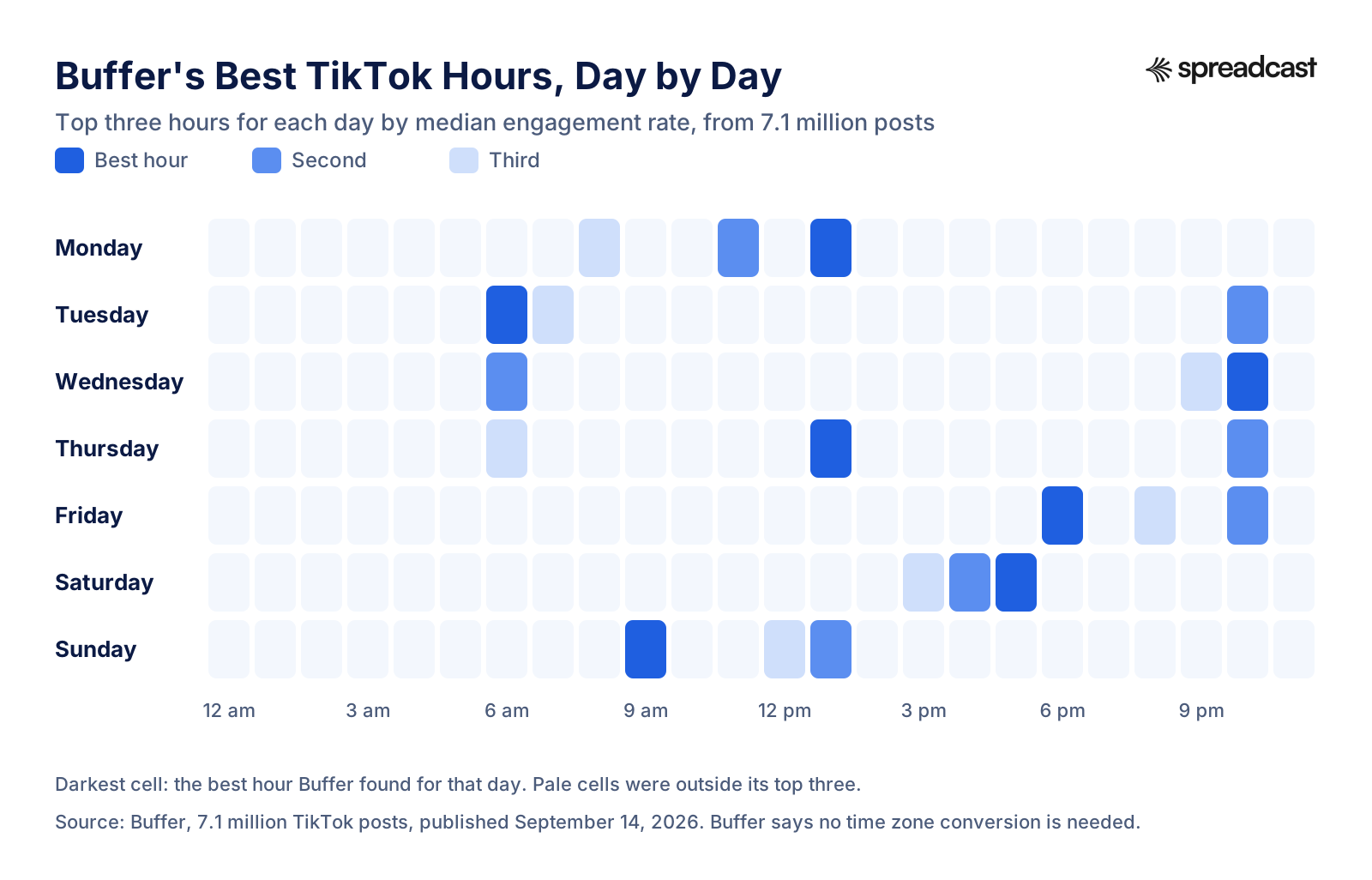
These are the day by day answers from the six studies that publish them, in the clock each one uses. Later does not publish a breakdown by day, so it is left out here. The heatmap below shows Buffer's ranking on its own, because it is the only study that ranks the top three hours for every day of the week; the table puts it next to the others.
| Day | Sprout Social (local) | Buffer (no conversion) | Hootsuite (local) | SocialPilot (no conversion) | Metricool (by views) | ContentStudio (Eastern) |
|---|---|---|---|---|---|---|
| Monday | 3 pm to 5 pm | 1 pm, 11 am, 8 am | 5 pm | 5 pm to 7 pm, 10 pm to 11 pm | 8 pm, then 7 pm | 6 am, 10 am, 10 pm |
| Tuesday | 2 pm to 6 pm | 6 am, 10 pm, 7 am | 10 am to 1 pm | 8 am, 2 pm to 4 pm, 8 pm | 8 pm, then 7 pm | 9 am, 12 pm, 9 pm |
| Wednesday | 1 pm to 8 pm | 10 pm, 6 am, 9 pm | 4 pm to 6 pm | 8 am, 2 pm to 4 pm, 8 pm | 7 pm to 8 pm | 7 am, 8 am, 11 pm |
| Thursday | 1 pm to 5 pm | 1 pm, 10 pm, 6 am | 7 am to 9 am | 9 am, 2 pm to 4 pm, 8 pm | 8 pm, then 7 pm | 9 am, 12 pm, 7 pm |
| Friday | 3 pm to 5 pm | 6 pm, 10 pm, 8 pm | 4 pm to 6 pm | 8 am, 1 pm to 3 pm | 8 pm | 5 am, 1 pm, 3 pm |
| Saturday | Avoid, low | 5 pm, 4 pm, 3 pm | 10 am to 7 pm | 11 am, 3 pm, 8 pm | 7 pm | 11 am, 7 pm, 8 pm |
| Sunday | Avoid, low | 9 am, 1 pm, 12 pm | 8 am to 12 pm | 9 am, 10 am, 4 pm | 8 pm, then 7 pm | 7 am, 8 am, 4 pm |
Each day below says what the studies agree on and gives one time to test first. That test time is our reading of the overlap, not a finding of any study, and it is meant for your audience's local time unless you know most of your viewers sit in one zone.
Best Time to Post on TikTok on Monday
Monday is late afternoon and evening in most studies. Sprout says 3 pm to 5 pm, Hootsuite 5 pm, SocialPilot 5 pm to 7 pm with a second window at 10 pm, and Metricool 8 pm by views. Buffer is the outlier with a midday answer: 1 pm, then 11 am, then 8 am, and it ranks Monday the second strongest day of the week. ContentStudio splits the day into 6 am, 10 am and 10 pm Eastern. If you test one Monday slot, try 5 pm. It sits inside or next to the windows of Sprout, Hootsuite and SocialPilot, and it is early enough to catch the evening rise that Metricool measures.
Best Time to Post on TikTok on Tuesday
Tuesday is the day the studies agree on least about the hour and most about the day. Sprout calls Tuesday a peak day, 2 pm to 6 pm. SocialPilot and ContentStudio both list it among their best days. The hours scatter: Buffer's best Tuesday slot is 6 am, then 10 pm; Hootsuite says 10 am to 1 pm; SocialPilot says 8 am, 2 pm to 4 pm and 8 pm; Metricool says 8 pm. A Tuesday test that respects most of them is 2 pm, with 8 pm as the second slot if you post twice.
Best Time to Post on TikTok on Wednesday
Sprout gives Wednesday its widest window of the week, 1 pm to 8 pm, and calls it a peak day. Hootsuite says 4 pm to 6 pm, Metricool 7 pm to 8 pm, SocialPilot 8 am, 2 pm to 4 pm and 8 pm. Buffer's best Wednesday hour is late, 10 pm, and Buffer notes that Wednesday tends to be quieter overall in its data. The overlap is the early evening, so 6 pm is a sound first test.
Best Time to Post on TikTok on Thursday
Thursday splits between morning and afternoon. One of Hootsuite's two best windows of the whole week is Thursday 6 am to 9 am, and its by day answer narrows it to 7 am to 9 am. ContentStudio says 9 am Eastern and SocialPilot 9 am. Sprout says 1 pm to 5 pm and Buffer 1 pm. Metricool, measuring views, prefers 8 pm. Later found Thursdays and Fridays its best days for engagement on its own account. Thursday is a good day to test a morning post at 8 am against an afternoon post at 1 pm, because at least two studies point at each.
Best Time to Post on TikTok on Friday
Friday leans to the late afternoon and evening. Sprout says 3 pm to 5 pm and Hootsuite 4 pm to 6 pm. Buffer's best Friday hour is 6 pm, followed by 10 pm and 8 pm. Metricool says 8 pm but notes that Friday evening view totals are slightly lower than on earlier weekdays. SocialPilot is the exception again with 8 am and 1 pm to 3 pm. ContentStudio counts Friday among its three best days. Try 5 pm first. It sits at the edge of Sprout's and Hootsuite's windows and an hour before Buffer's best slot.
Best Time to Post on TikTok on Saturday
Saturday is the most disputed day of the week. Buffer calls it the best day overall, with 5 pm, 4 pm and 3 pm its top hours. Hootsuite calls Saturday 10 am to 6 pm one of the two best windows of the week. Sprout says avoid posting on Saturday, and Metricool says Saturday is typically the quietest day, with its best hour at 7 pm. SocialPilot lists 11 am, 3 pm and 8 pm, and ContentStudio 11 am, 7 pm and 8 pm Eastern. Two studies that agree with each other on Saturday, Buffer and Hootsuite, both have an afternoon window, so 3 pm is the one to test. If your audience is mostly people at work during the week, Saturday is worth a real test rather than a skip.
The phrase "best time to post on TikTok Saturday EST" is searched often enough to answer directly. ContentStudio is the only study with Saturday times in Eastern time: 11 am, 7 pm and 8 pm. SocialPilot's separate US table is also in Eastern time, but it gives weekday windows, not Saturday ones. If your audience is mostly on the US East Coast, the local time studies mean the same clock, so Hootsuite's Saturday window of 10 am to 7 pm applies as Eastern time. Buffer's 3 pm to 5 pm needs no conversion, by Buffer's own account.
Best Time to Post on TikTok on Sunday
Sunday holds Buffer's single best slot of the whole week: 9 am, from 7.1 million posts, with 1 pm and 12 pm close behind. Hootsuite agrees on the morning with 8 am to 12 pm, and SocialPilot names 9 am and 10 am. Metricool also likes Sunday, but in the evening: it calls Sunday the most powerful traffic wave of the week, best at 8 pm. Against that, Sprout says avoid Sunday, and SocialPilot and ContentStudio both call it the worst day overall. The morning is where three studies meet, so test 9 am. If it fails twice in a row for your account, drop Sunday and spend the effort on a weekday.
Best Day to Post on TikTok
Tuesday, Wednesday and Thursday get the most votes. Sprout and SocialPilot both name exactly those three days, and ContentStudio names Tuesday and Thursday along with Friday. Buffer and Metricool point to the weekend instead: Buffer to Saturday, then Monday, then Sunday; Metricool to Sunday for traffic. Count it up and the midweek days win on votes, but not by a clean margin, and the weekend studies are among the largest.
There is a plausible way to read this, though none of the studies tests it. Midweek is when people who use TikTok in work breaks are most predictable, and engagement studies built on business accounts would pick that up. Weekends are when people with time on their hands can scroll the longest, which would show up first in views. If you sell to professionals, start midweek. If you entertain, teach a hobby or sell to consumers, give the weekend a fair test. In both cases, one week of TikTok Studio data tells you more than the vote count.
Industry matters here too. Sprout's industry table lists computer software and tech audiences as active on weekdays, Saturdays and Sundays, with mornings strong: 11 am to 12 pm on Monday and Tuesday, 8 am to 3 pm on Wednesday, 7 am to 11 am on Thursday, 7 am to 9 am on Friday, 8 am to 10 am on Saturday and 1 pm on Sunday, and late nights and early mornings as the worst times. Food and beverage brands do best on weekday afternoons, roughly 2 pm to 6 pm, in the same table, and retail on weekdays with weekends the worst. If you market an app, the tech row is the closest match, and our guide on how to promote an app on TikTok covers what to post in those slots.
Best Time to Post on TikTok Today
Many people ask this question with a finished video in hand, a few minutes before posting. The fastest honest answer has two steps. First, find today in the day by day section above and take the test time for that day. Second, open TikTok Studio, go to your analytics and look at the most active times chart for the same day of last week. If your followers' busiest hour today falls within an hour or two of the test time, post just before it. If it falls somewhere else entirely, trust your chart over the studies.
If you have already missed today's window, do not hold a finished video for a week. TikTok's explainer on recommendations says each recommender system selects from a large collection of eligible content and ranks it by how likely each viewer is to be interested, so a video posted at an ordinary hour still gets its chance. Post it, note the time, and use the result as one more data point for the test described at the end of this guide.
Best Time to Post on TikTok for Views or for Engagement
Two goals hide inside the same question, and the studies split along them. If you want the most views, the study to follow is Metricool's, because it is the only one of the seven that ranks hours by views. Its answer is simple: 6 pm to 8 pm on every day of the week, with 8 pm the top hour on most days, 7 pm on Saturday, and Sunday evening the biggest wave of the week. If you want the highest share of viewers who like, comment and share, the studies to follow are Buffer's and Sprout's, which rank by engagement. Buffer's best hours fall in the morning, at midday and in the late evening; Sprout's fall in the mid afternoon.
Why would the two differ? A plausible reading is competition. When the most people are scrolling, the most people are also posting, so a video gets more views but has to share each viewer's attention with more videos. In a quieter hour, fewer people see it, but those who do may be more likely to stop and react. We cannot prove that from the published data, but it fits the numbers, and it suggests a simple rule: post for views when the goal is reach and new followers, and post for engagement when the goal is comments and conversation with an audience you already have.
Your own analytics can tell you which you are getting. TikTok's Creator Academy guide to analytics says the Content tab shows your 10 top posts for the period you pick, ranked by views, likes, new viewers or new followers, and that each video's page shows its retention rate, traffic sources and viewer information. Sort by new followers rather than views and you may find a different best hour. If you want to turn likes, comments and shares into one comparable number per video, the free engagement rate calculator does the arithmetic, and our guide to social media KPIs explains which number to track for which goal.
Does Posting Time Matter on TikTok?
It matters, but less than on most networks, and TikTok's own explanation of its feed shows why. TikTok's help article on how it recommends content lists what may influence the For You feed in three groups. User interactions: content you like, share, comment on, and watch in full or skip, plus the accounts of followers you follow back. Content information: sounds, hashtags, the number of video views and the country in which the content was published. User information: device settings, language preference, location, time zone and day, and device type. It then says that for most users, user interactions, which may include the time spent watching a video, are generally weighted more heavily than the others.
Read that list for the word time and you find it once, in "time zone and day", and it describes the viewer, not the post. Nothing in the list mentions the hour a video was published. What TikTok weighs most is how people react once they see it: whether they watch to the end, skip, like, share or comment. Posting time can only work indirectly, by changing who is awake and scrolling when your video first goes out, and so how quickly it collects those reactions.
TikTok's older newsroom post on how TikTok recommends videos, from June 2020, adds two details that still help. It says a strong signal such as whether someone finishes a longer video gets more weight than a weak one such as whether viewer and creator are in the same country. And it says that while a video is likely to get more views from an account with more followers, neither follower count nor previous high performing videos are direct factors in the recommendation system. That is the basic reason timing matters less here than on a network that shows posts mostly to followers: your reach is not capped by how many followers happen to be online at the moment you post.
Even your followers do not see you in order of posting time. The same help article says each Following feed is unique, ranked and served in a way tailored to how that person uses TikTok, even when two people follow the same creators. So a video posted at 3 am is not buried under a pile of newer posts in a strict timeline, the way a tweet might have been years ago. The feed is ranked, and the ranking leans on reactions.
Why Timing Still Helps a Little
TikTok itself does not tell creators to ignore the clock. The Creator Academy page on the For You feed, updated August 18, 2026, says videos make it further on the For You feed based on the system's performance predictions and user engagement, and it suggests using TikTok Studio on the web to schedule posts to reach your audience when they are most active. If early engagement feeds the system's picture of your video, then posting when your likeliest viewers are scrolling gives it a fair first audience.
What TikTok does not publish is a hard window. Some guides, Buffer's among them, say engagement in the first hour or so decides how far a video travels. That may be close to true for some accounts, but we could not find it on any TikTok page, so treat it as a rule of thumb rather than a rule. TikTok's analytics guide talks about each video's lifecycle in the For You feed, not about a first hour, and its help pages say the numbers themselves can take 1 to 2 days to update. Our practical reading: get the hour roughly right, then spend most of your effort on the first three seconds, which the Creator Academy calls the place to hook viewers so they stick around.
What TikTok Says About When to Post
TikTok does not publish a best time to post. What it publishes is a set of tools and a handful of plain instructions, and together they point at one method: look at when your own audience is active and post then.
- Use your audience's active hours. The Creator Academy guide to analytics, updated October 13, 2026, lists "Most active times" on the Viewers page, showing when your viewers were most active in the last 7 days, and says the Followers tab breaks your audience's habits down by hours and days.
- Post a little ahead of the peak. In a short Creator Academy video on TikTok's YouTube channel, published September 1, 2026, TikTok's first tip is to use the Viewers tab to see when your audience is most active, then post on the most active days of the week and 2 hours before your peak activity, to catch your audience early and build momentum.
- Schedule to meet them. The Creator Academy page on TikTok Studio Web says you can schedule posts up to 30 days in advance to make sure you are reaching viewers when they are most active.
- Post often. The For You feed page says the best way to get more traffic from the recommendation system is to post more often, because each video is another chance for the system to understand your content and place it with the right audience.
- Test formats, not only hours. A 2021 TikTok for Business creative guide told brands to aim to post 1 to 4 times per day to test how different types of content are received. That advice is older, written for brands, and paired with the suggestion to add a paid boost to the best performers, so read it as a ceiling rather than a target.
Notice what is missing. TikTok never names a clock time or a best day that applies to everyone, and its own explainer of the feed does not mention publishing time at all. The closest it comes is the rule in its video: about 2 hours before your own audience's peak. When a page tells you TikTok recommends posting at 7 pm on Thursdays, it is quoting a vendor study or guessing, not quoting TikTok.
How to Find Your Best Time to Post in TikTok Analytics
This is the most useful section of the guide, because the answer it gives is about your audience rather than someone else's. TikTok's help article on analytics calls TikTok Analytics a free performance tracking tool and notes that the option is not yet available to everyone, so if you cannot see it, that is TikTok's rollout and not something you did wrong.
- Open your analytics. In the TikTok app, go to your profile, tap the menu bars, select TikTok Studio, find Analytics and tap View all. On a computer, open TikTok Studio on the web and click the Analytics tab on the left. In the separate TikTok Studio app, tap the Analytics tab at the bottom. These are the three routes the Creator Academy guide lists.
- Pick the date range. You can choose the last 7, 28, 60 or 365 days, or a custom range. Use 28 or 60 days for content results; the activity chart covers the last 7 days on its own.
- Open the Followers tab and find the activity chart. It shows when your followers were active, broken down by hours and days. Some versions of the app label it Most active times, which is the name Buffer's guide uses for the same place.
- Open the Viewers page and find Most active times there too. This one is about your viewers over the last 7 days, not only your followers. On TikTok, where many views can come from people who do not follow you, this chart is often the more useful of the two.
- Write down the top three hours for each day. Do it for two or three weeks running if you can, since one week can be skewed by a holiday or a viral video.
- Go to the Content tab and check your top posts. Sort by views and by new followers, and note when each top post went up. If your best posts cluster an hour or two before the busy hours on the activity chart, you have found your slot.
- Look at each video's traffic sources. A video that drew mostly from the For You feed was carried by recommendations, so its posting time probably mattered less. One that drew mostly from Following or your profile depended on your followers being online.
Three caveats from TikTok's own help pages will save you from misreading the charts. First, TikTok says follower analytics give you more insight about your viewers once you have 100 followers; below that, the activity chart may be empty. Second, TikTok's help on posts not getting views says analytics data may take 1 to 2 days to update, and that analytics are only generated for videos posted after you enable the feature. Third, and the one that trips people up most, the same page says follower activity is displayed in your local time zone, while all other analytics data is displayed in UTC.
That last rule has a practical meaning. The activity chart is already in your own clock, so if it says your followers peak at 7 pm, post at 7 pm by your phone's time, wherever your followers live. But when you look at a video's other numbers by hour or by date, they are in UTC, which is 4 or 5 hours ahead of New York depending on the season. Convert before you compare a post's results with the hour you published it, or you will credit the wrong slot.

A note on reading the chart. The busiest hour is not always the best hour to post. If your followers peak at 9 pm, posting at 7 pm or 8 pm gives the video time to start collecting reactions before the crowd arrives. TikTok's video above suggests about 2 hours before your peak activity, and Buffer's guide says to post slightly before your followers' most active times. If the chart is nearly flat across the evening, the exact hour matters little and you can pick whatever fits your day. For a wider view of your numbers across networks, our social media analytics page explains what Spreadcast reports, and the social media statistics page collects the benchmarks worth comparing against.
TikTok Posting Times Across Time Zones
Best Time to Post on TikTok in EST, CST and PST
Many people search for these times with a time zone attached, most often EST. The answer depends on which kind of study you start from. For the local time studies, Sprout and Hootsuite, the times are meant for your audience's own clock, so if your viewers are in New York, 2 pm means 2 pm Eastern; if they are in Los Angeles, it means 2 pm Pacific. Buffer and SocialPilot say no conversion is needed for their main times. ContentStudio and Later anchor their times to one US zone, and so does the US table on SocialPilot's page, which it states in Eastern Daylight Time: 7 am to 10 am and 1 pm to 6 pm, with evenings doing better toward the end of the week. Those are the numbers that need converting. Here they are across the four main US zones.
| Window as published | Eastern (ET) | Central (CT) | Mountain (MT) | Pacific (PT) |
|---|---|---|---|---|
| ContentStudio morning peak, 9 am ET | 9 am | 8 am | 7 am | 6 am |
| ContentStudio evening peak, 9 pm ET | 9 pm | 8 pm | 7 pm | 6 pm |
| ContentStudio morning window, 6 am to 10 am ET | 6 am to 10 am | 5 am to 9 am | 4 am to 8 am | 3 am to 7 am |
| ContentStudio evening window, 7 pm to 11 pm ET | 7 pm to 11 pm | 6 pm to 10 pm | 5 pm to 9 pm | 4 pm to 8 pm |
| Later weekdays, 10 am PT | 1 pm | 12 pm | 11 am | 10 am |
| SocialPilot US morning, 7 am to 10 am ET | 7 am to 10 am | 6 am to 9 am | 5 am to 8 am | 4 am to 7 am |
| SocialPilot US afternoon, 1 pm to 6 pm ET | 1 pm to 6 pm | 12 pm to 5 pm | 11 am to 4 pm | 10 am to 3 pm |
The table shows the catch with any single zone answer. ContentStudio's morning window lands at 3 am to 7 am for a Pacific audience, which no one would choose. A US wide audience is spread across at least four clocks, so a time that is perfect in New York is early in California. If your viewers are spread across the country, a slot in the early evening Eastern, which is mid afternoon Pacific, catches the East Coast after work and the West Coast while the day is still going. Your activity chart will show whether that holds for you.
Posting for a Global Audience
If your followers live in several countries, start with the locations in your analytics. TikTok Studio's Followers tab shows top locations, and the Viewers page shows inferred locations, which TikTok describes as based on predictive models rather than confirmed user data. Then decide whether to serve the biggest group or the overlap. With one dominant country, post for that country's evening and ignore the rest. With two groups several hours apart, find the hour that is evening for one and morning for the other, or post twice, once for each.
Because the follower activity chart is shown in your local time, it already folds every follower's habits into your clock. That makes it the easiest tool for a global audience: you do not need to know where everyone lives to read when they are online. What it cannot do is tell you whether a peak is one big group or two smaller ones overlapping, so check the locations too.
Best Time to Post on TikTok by Country
Of the seven studies, only SocialPilot breaks its data down by country, in each country's own time zone. These are its windows for a few of the countries it lists. They come from one vendor's customer accounts, so treat them the same way as the global numbers: a first guess to check against your activity chart.
| Country | Clock SocialPilot uses | Best times it reports | Best days it reports |
|---|---|---|---|
| United States | Eastern Daylight Time | 7 am to 10 am; 1 pm to 6 pm; evenings toward the end of the week | Weekdays, especially Thursday and Friday |
| Canada | Eastern Standard Time | 7 am to 10 am; evening spikes | Weekdays, especially Monday and Thursday |
| Australia | Australian Eastern Standard Time | 7 am to 10 am; 12 pm to 3 pm; 7 pm to 10 pm | Weekdays; evenings on weekends |
| Germany | Central European Time | 7 am to 10 am; 12 pm to 4 pm; evenings | Weekdays; midday to evening on weekends |
| Philippines | Philippine Time | 4:30 pm to 7:30 pm; 9:30 am to 2:30 pm; 12:30 am to 5:30 am | Weekdays, plus late nights Thursday to Sunday |
| Nigeria | West Africa Time | 6 am to 10 am; 7 pm to 9 pm; some midday | Tuesday to Saturday; evenings on weekends |
Two things stand out. A morning window from about 6 or 7 am to 10 am appears for most countries in SocialPilot's table, which fits the morning crowd on the global chart above. And the Philippines shows a real late night window that no global study would recommend, a reminder that an average across many countries can hide what one country does. The UK is not in SocialPilot's table, so for a British audience start with the local time studies, Sprout and Hootsuite, and your own chart.
Daylight Saving Time
Clock changes move your audience by an hour relative to anything set in UTC. In the US, NIST's daylight saving time page says daylight saving time begins at 2 am on the second Sunday of March and ends at 2 am on the first Sunday of November; in 2026 it ran from March 8 to November 1. NIST also notes that Hawaii and most of Arizona do not observe it. If you keep a posting schedule in UTC, or compare TikTok's UTC analytics across the change, your 7 pm slot quietly becomes 6 pm or 8 pm for your viewers. Schedule in your audience's local time and recheck any automation the week the clocks change.
Your Audience Sets the Clock
Who your viewers are matters as much as where they are. Pew Research Center's 2025 survey found that 37% of US adults use TikTok and 24% use it daily, and that roughly half of 18 to 29 year olds go on TikTok at least once a day, compared with 5% of adults 65 and older. Pew's 2026 fact sheet shows use falling steeply with age: 65% of adults 18 to 29 use TikTok, 45% of those 30 to 49, 31% of those 50 to 64 and 11% of those 65 and older. A student audience and an audience of parents in their forties are unlikely to scroll at the same hours, which is one more reason a study averaged over hundreds of thousands of accounts can only be a starting point.
How Often Should You Post on TikTok?
Frequency and timing are linked in a practical way: the more you post, the more slots you can test, and the less any single slot matters. The best evidence on frequency comes from Buffer's study of 11.4 million TikTok posts from more than 150,000 accounts, published October 8, 2025, which controlled for account size. Compared with posting once a week, accounts that posted 2 to 5 times a week got up to 17% more views per post, 6 to 10 times up to 29% more, and 11 or more times up to 34% more. Buffer's recommendation is 2 to 5 posts a week, because that first step brings the biggest lift for the effort.
| Posts per week | Median views per post | 90th percentile views (where the top 10% of posts start) | 90th percentile compared with the median |
|---|---|---|---|
| 1 | 489 | 3,722 | 7.6 times |
| 2 to 5 | 506 | 6,983 | 13.8 times |
| 6 to 10 | 487 | 10,092 | 20.7 times |
| 11 or more | 459 | 14,401 | 31.4 times |
The table, from the same Buffer study, holds the more interesting finding. The typical post did not get better with more posting: median views stayed around 500 at every frequency and even dipped a little at the top. What grew was the top of the range. Accounts that posted more often had far bigger hits among their best posts, which Buffer reads as more chances at a breakout rather than a steady rise. That matters for timing tests, because a single breakout can make any slot look like a winner. It is why the test plan below compares medians, not totals.
TikTok's own advice points the same way. Its Creator Academy says posting more often gives the recommendation system more opportunities to understand your content, and its older business guide suggested 1 to 4 posts a day for brands testing creative. Metricool tells its readers to aim for at least once a day. For one person making real videos, that is a lot. Three good posts a week, every week, is a pace most people can hold for a year, and it already sits in Buffer's best value range. If the posts themselves are what keeps slipping, our essay on why your scheduler is not why your feed is empty looks at that problem directly. If you want more volume without more filming, photo slideshows count as posts too. Our TikTok slideshow maker page shows one way to make them, and the social media image sizes reference lists the shapes TikTok and the other networks accept.
A sensible sequence for most accounts: settle the frequency first, because Buffer's frequency data shows a clear lift while the timing studies disagree with each other, then use the extra posts to test hours. If you post three times a week, that is three slots a week to learn from. If you post once a week, you will need months to learn anything about timing, and your time is better spent on making a second post.
How to Schedule TikTok Posts at Your Best Time
Knowing the best hour helps only if you can post at it. Most people cannot drop everything at 7 pm on a Thursday, which is why scheduling and timing go together. There are two routes: TikTok's own scheduler, and outside tools that connect through TikTok's developer platform.
TikTok's Own Scheduler
TikTok's help article on scheduling a video describes it step by step: log in to TikTok in a desktop web browser, click Upload at the top of your feed, upload and edit the video, switch on the schedule toggle and pick a date and time. The time zone defaults to your computer's setting. The article says you can schedule a minimum of 15 minutes and a maximum of 10 days ahead, that scheduled posts cannot be edited but can be deleted, that you get a push notification when the post goes live, and that the feature is not available on TikTok Mobile Web. It also says desktop scheduling is for a Business Account or over with 10,000 followers or more.
TikTok's other pages are more generous, and they do not fully agree. Its 2021 announcement of the video scheduler says creators and Business Accounts can schedule, 15 minutes to 10 days ahead, and that a Business Account is needed for desktop scheduling. The newer Creator Academy page on TikTok Studio Web, updated August 18, 2026, says you can schedule posts up to 30 days in advance, that creators with more than 1,000 followers can bulk upload up to 30 videos at once, and that you can upload videos up to 60 minutes long and 30GB. The help article and the Creator Academy page were both live on November 12, 2026. Our reading: the window has grown for at least some accounts, so open the upload page in TikTok Studio on a computer and see what your account is offered.
| Question | What TikTok's pages say | Source |
|---|---|---|
| Where can I schedule? | TikTok on a desktop web browser, or TikTok Studio on the web. Not on TikTok Mobile Web | Schedule video help, where |
| How far ahead? | At least 15 minutes. At most 10 days in the help article, up to 30 days on the Creator Academy page | Schedule video help, window and TikTok Studio Web |
| Which time zone? | Your computer's setting, by default | Schedule video help, time zone |
| Can I edit a scheduled post? | No. Delete it and upload it again | Video scheduler announcement |
| Which accounts? | The help article says a Business Account or over with 10,000 followers; the announcement says creators and Business Accounts | Both pages above |
| Bulk upload? | Up to 30 videos at once for creators with more than 1,000 followers | TikTok Studio Web, bulk upload |
The time zone default matters more than it looks. If you travel, or if your audience lives in another zone, the scheduler uses your laptop's clock. Set the time in your audience's terms before you click Schedule: if your viewers are in New York and you are in Lisbon, a 7 pm Eastern post needs a Lisbon time several hours later.
Scheduling Tools That Post Through TikTok's API
Outside schedulers hold the post on their own servers and send it to TikTok at the time through TikTok's Content Posting API, so their window is whatever the tool allows. TikTok's developer pages set the ground rules every tool lives by. The Direct Post reference says all content posted by unaudited apps is restricted to private viewing until the app passes TikTok's audit, and lists an error for when the daily post cap for a user has been reached. The upload reference, for posts sent to your TikTok inbox instead of straight to the feed, says users must click the inbox notification to continue editing in TikTok and complete the post, and that there may be at most 5 pending shares within any 24 hour period.
Those rules shape how a tool can serve your best time. A post sent straight to the feed goes live at the minute you chose. A post sent to your inbox arrives at that minute, but goes live only when you open TikTok and finish it, so the real posting time is yours. Our TikTok scheduler page compares nine ways to schedule TikTok posts with prices, and the broader social media scheduler page covers the same question across networks. If you want to plan a whole month at once, our walkthrough of a month of social content in one afternoon shows the batching method, and the guide to automating social media posts covers what is safe to put on autopilot and what is not.
A Two Week Test to Find Your Best Posting Time
Studies give you candidates. A test picks the winner for your account. Here is a plan that one person can run in two weeks with ordinary effort, built on the facts above: analytics lag by a day or two, timestamps outside the activity chart are in UTC, and single hits distort totals.
- Choose three candidate slots. Take one from your TikTok Studio activity chart (about 2 hours before the busiest hour, as TikTok's video suggests), one from the studies' evening consensus (6 pm to 8 pm in your audience's time zone), and one from a morning window (8 am to 9 am). Call them A, B and C.
- Choose similar content. Plan nine posts of the same kind: same format, similar length, similar topic. Timing tests fail most often because a great video lands in one slot and a weak one in another.
- Spread the slots across days. Use the schedule in the table below, so that each slot gets an early weekday, a late weekday and a weekend day. That stops the day of the week from posing as the hour.
- Schedule everything in advance. Use TikTok's scheduler or a tool, so you hit the exact minute even when life gets in the way. Write the slot letter in a note next to each post.
- Wait 3 days, then record each post. TikTok says analytics can take 1 to 2 days to update, so read every post at the same age: 72 hours after it went up. Record views, average watch time, the share who watched the full video, likes, comments, shares and new followers.
- Compare medians, not totals. For each slot, take the middle value of its three posts. One viral post will wreck an average but barely move a median.
- Decide with a margin. If one slot's median views beat the others by around a fifth or more, and its engagement is not worse, make it your main slot. If the slots are within a few percent of each other, timing is not what limits your account: pick the slot that is easiest for you and put the effort into the videos.
| Day | Week 1 | Week 2 |
|---|---|---|
| Monday | Slot A | Slot C |
| Tuesday | No post | Slot B |
| Wednesday | No post | No post |
| Thursday | Slot B | Slot C |
| Friday | No post | Slot A |
| Saturday | Slot A | Slot C |
| Sunday | Slot B | No post |
That schedule is nine posts in two weeks, three per slot, and each slot gets one early weekday, one late weekday and one weekend day. That pace sits inside the 2 to 5 posts a week that Buffer's frequency data rewards. If you already post daily, run all three slots each day in rotation and you will have your answer in one week. If you post less, stretch the same plan over four weeks; the logic does not change.
Keep a simple log. A spreadsheet with one row per post works: date, slot, local posting time, the post's topic, and the numbers at 72 hours. Add the traffic source split if you can. If one slot wins on Following and Profile traffic but not on For You traffic, it is the hour your followers are online, which matters most for posts aimed at them, such as announcements or replies to comments. Our free social media content calendar is a quick way to lay the nine posts out, and the social media caption generator helps keep the captions similar so they do not skew the test. Caption length limits for TikTok and every other network are in our social media character limits reference.
Three things can spoil a test, and all three are easy to spot. A holiday or a big news event inside the two weeks changes everyone's habits, so rerun the affected slot later. A trend that one of your posts rode can carry it far beyond its slot, which is why the content should be similar. And a change in your audience, after a video brings in a wave of new followers from another country, can move your best time overnight, so check the activity chart again after any big spike and rerun the test every few months.
A Worked Example
Here is how the reading works with made up numbers, to show the method rather than a result. Suppose slot A (7 am) got 820, 410 and 3,900 views; slot B (6 pm) got 1,150, 980 and 1,240; slot C (9 pm) got 700, 760 and 690. Slot A's total is the biggest, thanks to one 3,900 view post, but its median is 820. Slot B's median is 1,150, about 40% higher than A's and about 64% higher than C's 700. Slot B wins, and slot A's big post is a reminder to study what that video did right, not when it went up.
Where Spreadcast Fits
Spreadcast is a social media tool that makes posts and publishes them on a schedule, and TikTok is one of its 11 networks, alongside Instagram, Facebook, LinkedIn, YouTube, Pinterest, Threads, Bluesky, Mastodon, Telegram and Discord. It does not decide your best hour for you. You bring the hour from your own analytics or the test above and set it as a posting time, in your own time zone, up to three times a day. Your weekly plan and autopilot posts are sent at those times to TikTok and every other network you choose, and any post you make yourself can be scheduled for the day and time you pick.
On TikTok it handles the feed carefully. When you schedule a post yourself, you choose for each post whether it goes live on your profile at its time or lands in your TikTok drafts, where you add a sound and finish it in the TikTok app. Autopilot never posts to the TikTok feed unattended: posts it schedules on its own, from your weekly plan or from a new version of your app, go to your TikTok drafts by default, or wait on your Dashboard until you choose who can see them, which takes one tap to approve. The other networks go out on time either way. If you would rather work from Claude or ChatGPT, the TikTok MCP server page explains how to create and schedule the same posts from a chat.
Spreadcast also designs the posts, which is the part a scheduler usually leaves to you: photo slideshows and pictures in your brand, with a caption written for each network, and cross posting to the rest of your accounts. App makers can paste their App Store link at the start page, and Spreadcast drafts posts from the app's updates and ratings. The free plan makes 3 AI posts to download, with no publishing. A Post Pack is $19 once for 10 posts that never expire, the 30 Day Pass is $39 once and never renews, and Pro is $29 a month, with details on the pricing page. If TikTok's own free scheduler covers what you need, use it. Spreadcast earns its place when you also want the posts made and sent to several networks at your chosen times.
How We Researched This Guide
On November 12, 2026 we opened every study in the comparison table and copied each figure from the study's own page: Sprout Social, Buffer, Hootsuite, Metricool, SocialPilot, ContentStudio and Later. Where a page did not state its time zone, data period or method, we say so instead of filling the gap. We read TikTok's help articles on recommendations, analytics and scheduling, its Creator Academy pages on analytics, TikTok Studio Web and the For You feed, and TikTok's developer references for posting, on the same day, and watched TikTok's Creator Academy video on analytics with its captions on. The two charts were drawn by us from the published numbers, and each caption names its source.
We have no TikTok posting data of our own and ran no study for this page. The test times suggested in the day by day section are our reading of where the studies overlap, labelled as such. The worked example uses invented numbers to show the arithmetic, and says so. Spreadcast details were checked against our own product on the same date.
Frequently Asked Questions
What is the best time to post on TikTok?
There is no single best time, because the large studies disagree. The overlap is the late afternoon and evening on weekdays: Sprout Social says 2 pm to 6 pm on Tuesday to Thursday, Metricool 6 pm to 8 pm for views, and Buffer 6 pm to 11 pm on most days. Start there in your audience's time zone, then check the most active times in TikTok Studio.
What is the best day to post on TikTok?
Tuesday, Wednesday and Thursday get the most votes, from Sprout Social, SocialPilot and ContentStudio. Buffer's data says Saturday is the best day and Metricool says Sunday brings the most traffic, so test one weekend day before you rule weekends out.
Does posting time matter on TikTok?
Less than on most networks. TikTok's explanation of its recommendations weighs how people react to a video, such as watching to the end, liking or sharing, more heavily than other factors, and it does not list the hour a video was posted. A good hour helps a video find its first viewers; it does not save a weak video.
What time is TikTok most active?
For your account, the answer is in TikTok Studio: Analytics, then the Followers tab or the Viewers page, shows when your audience was most active over the last 7 days. Across the studies, Metricool's data puts the most views between 6 pm and 8 pm and the lowest traffic between 2 am and 4 am.
How often should I post on TikTok?
Two to five times a week is the best value for most people. Buffer's study of 11.4 million posts found that going from one post a week to 2 to 5 brought up to 17% more views per post, with smaller gains beyond that. TikTok itself says posting more often gives its system more chances to place your videos.
Is it better to post on TikTok in the morning or at night?
At night, for most accounts, if views are the goal: Metricool, Buffer and SocialPilot all find evening peaks. Mornings work for some audiences, especially on Thursday and Sunday in Hootsuite's and Buffer's data, so run a short test with one morning slot and one evening slot.
Can you schedule TikTok posts?
Yes. TikTok's help article describes scheduling from a computer, 15 minutes to 10 days ahead, and TikTok's Creator Academy page on TikTok Studio Web says up to 30 days. Outside tools schedule through TikTok's API, either straight to your profile or to your TikTok drafts to finish in the app.
Where These Facts Come From
Every outside number, rule and price on this page links to the page it was taken from.
- Best times to post on TikTok in 2026Sprout Social
- The best time to post on TikTok in 2026, data from 7 million postsBuffer
- How often should you post on TikTok, data from 11 million postsBuffer
- The best time to post on TikTokHootsuite
- The best time to post on TikTok in 2025Later
- Best time to post on TikTok in 2026, 700K TikTok insightsSocialPilot
- When is the best time to post on TikTok in 2026Metricool
- Best time to post on TikTok, 100,000 posts analysisContentStudio
- How TikTok recommends contentTikTok Help Center
- How TikTok recommends videos #ForYouTikTok Newsroom
- Introducing TikTok analyticsTikTok Creator Academy
- Reaching your content goals with TikTok Studio WebTikTok Creator Academy
- Driving video traffic: the For You feedTikTok Creator Academy
- How to use TikTok AnalyticsTikTok Help Center
- My posts aren't getting viewsTikTok Help Center
- Analytics about my followers are not displayedTikTok Help Center
- Schedule videoTikTok Help Center
- Introducing Video SchedulerTikTok for Business
- Creative solutions: the ultimate how to guideTikTok for Business
- Content Posting API, Direct Post referenceTikTok for Developers
- Content Posting API, upload video referenceTikTok for Developers
- Americans' social media use 2025Pew Research Center
- Social media fact sheetPew Research Center
- Daylight saving time rulesNIST
- 4 ways to optimize your reach with TikTok analyticsTikTok on YouTube
Researched and written by Mark Weizer. Last checked on November 12, 2026.
Keep Reading
- Playbooks
Canva Marketing Strategy: How Templates and SEO Grew 265 Million Monthly Users
Canva's marketing strategy from its newsroom, its founders and its own sitemaps: freemium and word of mouth, 39,603 template pages built for search, 100 languages, free plans for schools, Canva Create and the TV campaigns. Then how to run the same playbook for your own app.
- Playbooks
Uber Marketing Strategy: How a Two Sided App Won 215 Million Monthly Users
Uber's marketing strategy, taken apart from its own filings: the city by city launch playbook, ice cream and kittens, referrals on both sides, the 2018 brand reset, safety, Uber One, the Uber Eats Super Bowl ads, the ads business, what it spends and how it makes money. Then how to run the copyable parts for your own app.
- Playbooks
Monopoly Go Marketing Strategy: The Budget, the Ads and What It Bought
How much Monopoly Go spent on marketing, who said it and when, and what the money bought: localized ads, a celebrity TV campaign, friend invites, sticker trading, live ops seasons and crossovers. Then how a small studio can keep its own channels as busy as a big launch.