How to Check Telegram Channel Stats With the Tool Above
The checker reads the same public pages anyone can open in a browser, so it works on any public channel, yours or someone else's. A check takes a few seconds.
- Step 1
Type the Channel
Paste the channel's @name or its link. All of these work: @durov, durov, t.me/durov, t.me/s/durov, the same links with https in front, and a link to one post such as t.me/durov/575. The tool takes the name out of whatever you paste. Telegram names use letters, digits and underscores and start with a letter. If what you typed cannot be a name, or no public channel answers to it, you get a plain error message instead of empty numbers.
- Step 2
Press Check Channel
The server opens the channel's public web preview at t.me/s/ followed by the name, then up to four older pages of it. Each page holds about 20 posts, so you get the latest 100 or so. It also opens the channel's own page at t.me followed by the name, without /s/, because that page prints the exact subscriber count. Nothing is posted and nobody is notified. In a browser, the preview page reports a view with a small script when a post scrolls into sight. The checker reads the page on a server and never runs that script, so it does not send those view reports. Results are kept for 30 minutes, so a second check of the same channel in that time usually comes back at once with the same numbers.
- Step 3
Read the Six Tiles
Subscribers (the exact count, such as 9,852,497), average views per post (with the median under it), view rate, reactions per 100 views, posts per week and the share of posts with a link. The line under the tiles turns the view rate into plain words, such as "About 1 subscriber in 2 sees each post". The next sections explain how each number is worked out and where it can mislead you.
- Step 4
Look at Best Times and Kinds of Post
The bars show average views by three hour block of the day, by weekday and by kind of post: text only, one photo, album, video, file, voice, poll. Hours are in your own time zone, because the math runs in your browser. A block, day or kind is only named as the best when enough posts back it.
- Step 5
Check the Top Posts
The five most viewed posts in the sample, with their first words, views and date. Open them on Telegram and look at what they share: the topic, the format, the first line. That is usually more useful than any single number on the page.
- Step 6
Check Again Later
Views keep coming in for days after a post goes out, so the same channel checked next week will show different numbers for the same posts. If you track a channel over time, check it on the same weekday and write the numbers down. Our social media audit template gives you columns to copy into a sheet.
What the Telegram Channel Stats Checker Shows
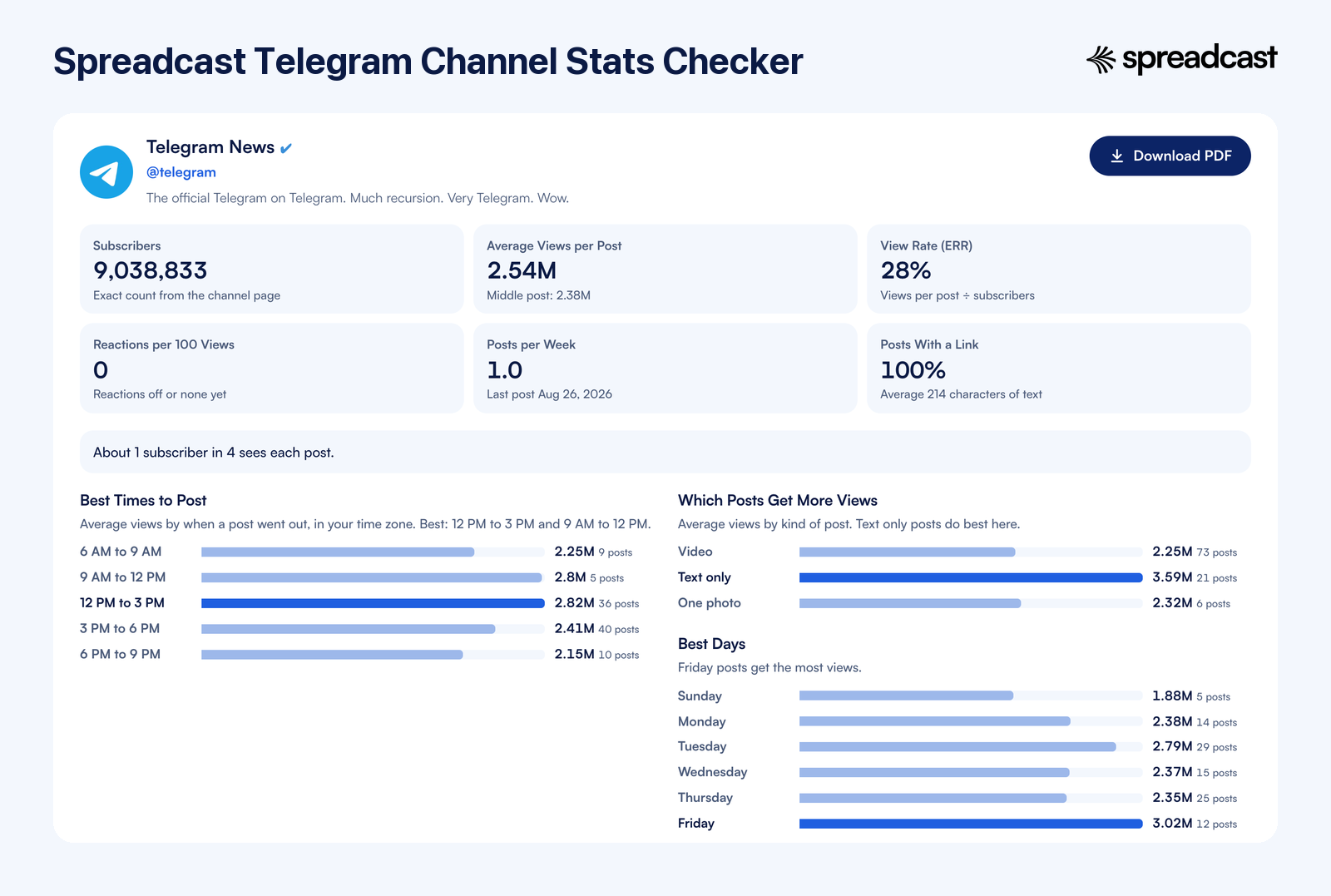
A real check of @telegram: the channel, six numbers, the best times and days, and which kinds of posts get the most views.
How We Checked This
Everything on this page was checked on November 28, 2026. For the definitions we went to the people who set them: Telegram's own channel statistics documentation, its Channels FAQ and main FAQ, its API pages for messages, view counts and reactions, and TGStat's help pages on how ERR and ER are calculated and how reach is calculated, which are in Russian and which we read in the original.
For the in app statistics menu we did not rely on old screenshots. We read where the Statistics item sits in the published source code of Telegram Desktop and Telegram for Android, and the labels Telegram uses in its Desktop language file.
Then we ran the checker's own code, the same functions this page uses, on four public channels: @durov, @telegram, @bloomberg and @nytimes, at 15:36 UTC. The results are in the test section below, exactly as the code returned them, with hours in UTC. We also wrote down the rounded subscriber figures the t.me/s/ preview showed for the same channels in the same minute, so you can see what the exact count adds.
We did not make up a benchmark. No source we could open today publishes a "good ERR" for Telegram based on a stated sample, so this page gives none of its own. Where we quote a rule of thumb, we say who wrote it. We did not survey anyone and we have no access to private channel data.
Telegram Channel Stats Checker: What Each Number Means
Every tile and chart, how the tool works it out, and what to keep in mind when you read it. "Settled posts" means posts older than 48 hours, explained further down.
| Number | How it is worked out | Read it with care because |
|---|---|---|
| Subscribers | The exact count, read from the channel's own page at t.me followed by the name. The tile note says "Exact count from the channel page". | If that page does not answer, the tool falls back to the figure on the t.me/s/ preview, which Telegram rounds to three figures from 1,000 up (we saw 2.29K for @telepulse, which had 2,291). The tile note then says "As Telegram shows it, rounded". |
| Average views per post | Sum of views on settled posts ÷ number of settled posts. | One viral post pulls it up a lot. Views are rounded by Telegram on every public page (1.08M, 43.5K), so the average is close, not exact. |
| Median views | The views of the middle settled post when all are sorted. | Usually the better "typical post" figure: a few very extreme values can pull the mean far from the typical value, while the median stays a useful measure of it. If it sits far below the average, a few big hits carry the channel. |
| View rate (ERR) | Average views per post ÷ subscribers × 100. | Same idea as TGStat's ERR, but over the last 100 or so posts instead of the last 30 days. Can pass 100% when posts travel. |
| Reactions per 100 views | All reactions on settled posts ÷ all their views × 100. Paid Star reactions are counted apart and left out. | Counts standard and custom emoji reactions alike. Shows zero when a channel has reactions turned off or the preview shows none. Admins decide whether reactions are on and which emoji are allowed, so two channels are not always comparable. |
| Posts per week | Posts in the sample ÷ days from the oldest one to now × 7. | An average over the whole sample. A channel that sped up last month, or stopped posting, looks steadier than it is. Check the date of the last post shown under it. |
| Posts with a link | Share of settled posts with a web link in the text or a link preview. | Says how often a channel sends people away, not how many clicked: Telegram's own statistics list no click count either. The tool does not split views of posts with and without a link. |
| Best times to post | Average views of settled posts by three hour block of the hour they went out, in your time zone. | Shows when this channel's posts did best, not when its readers are online. Blocks with one post are hidden. |
| Best days | Average views by weekday, same rules. | Seven buckets from 100 posts leaves about 14 posts each at best, often far fewer. |
| Which posts get more views | Average views by kind: text only, one photo, album, video, file, voice, poll, other. | A kind with a handful of posts can top the list by luck. The tool only calls one the best when two or more kinds have enough posts. |
| Top posts | The five settled posts with the most views. | Old posts have had more time to collect views and forwards, so the list leans toward older hits. |
"Enough posts" in the tool means at least 3, or 1 in 20 of the settled posts (rounded) if that is more. With 100 settled posts, that is 5.
Telegram Engagement Rate: ERR and ER Explained
ERR is the number people usually mean when they talk about Telegram channel engagement. TGStat, a large Telegram channel catalog, defines it in its help center as engagement rate by reach: the average reach of one post divided by the number of subscribers, times 100. TGStat puts it as the average percentage of subscribers who view the channel's posts.
What TGStat calls average reach is not the same as reach on Instagram. Its reach help page says it is the plain average of views across all posts published in the last 30 days, that deleted posts are left out, and that views a post got from being reposted into other channels are counted. The same page warns that this is not the number of different people who read the post, because Telegram counts a repeat view from the same person again after some time. TGStat updates ERR once a day.
TGStat also publishes ERR24, the average share of subscribers who view a post in its first 24 hours. It is updated once a week and only calculated for channels with more than 300 subscribers. For ERR24 TGStat uses what it calls advertising reach: views in the first 12, 24 or 48 hours of posts from the last seven days, without views from reposts, and it keeps deleted posts in unless they were removed within 12 hours of going out. Our reading is that this suits advertisers: an ad post deleted after a day was still seen.
Then there is ER, engagement rate, which TGStat defines as all interactions with a post (forwards, reactions and comments) divided by the post's views. ER is per view, not per subscriber, and TGStat shows the 30 day average along with the average number of forwards, comments and reactions per post.
The checker on this page gives you two of these ideas from public data. The view rate tile is ERR in spirit: average views ÷ subscribers × 100. Reactions per 100 views is the reaction part of ER. Forwards and comment counts are not on the public preview, so they are not in the tool. If you want a quick number for one post by hand, the engagement rate calculator has a Telegram mode where you type views, reactions, forwards and comments yourself.
ERR is also only as good as the subscriber count under it. A channel with many subscribers who never open it has a low ERR even if its active readers love every post. That is also why the ppc.world guide on checking a channel before buying an ad, quoted below, starts with it, and so does our section on fake subscribers.
Telegram View Rate on Four Real Channels
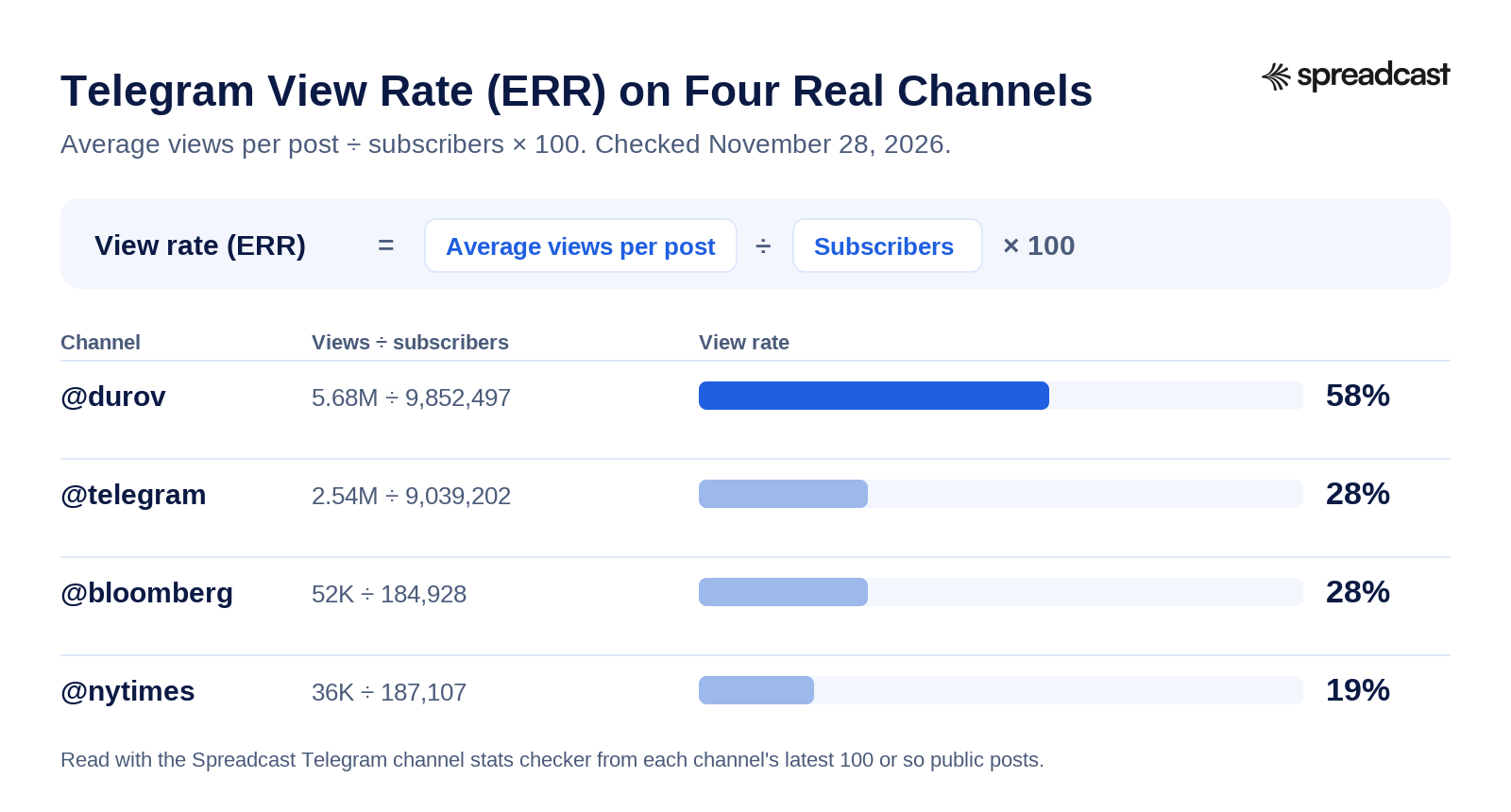
The ERR formula and what it gave for the four channels in our test.
Telegram Engagement Rate Calculator Formulas Compared
The labels look alike, but the windows and the data behind them differ, so numbers from different tools should not be compared directly.
| Measure | Formula | Which posts | Data source |
|---|---|---|---|
| View rate on this page | Average views ÷ subscribers × 100 | The latest 100 or so posts, without posts under 48 hours old | Views from the public preview at t.me/s/, exact subscribers from t.me/, read when you press the button |
| TGStat ERR | Average reach of 1 post ÷ subscribers × 100 | All posts from the last 30 days that were not deleted, with views from reposts | TGStat's own collection, updated daily |
| TGStat ERR24 | Advertising reach in 24 hours ÷ subscribers × 100 | Posts from the last 7 days, views from the first 24 hours, without reposts | TGStat, updated weekly, channels over 300 subscribers |
| TGStat ER | (Forwards + reactions + comments) ÷ views | Posts from the last 30 days, shown as an average | TGStat, updated daily |
| Reactions per 100 views on this page | Reactions ÷ views × 100 | Same sample as the view rate | Public preview; paid Star reactions counted apart |
| Views per post in Telegram's own stats | Total views ÷ posts in the stats period | Posts in the stats period, which Telegram says depends on channel activity, compared with the period before | Telegram's servers, admins only |
Definitions from TGStat's help center and Telegram's statistics API documentation, read November 28, 2026.
How Does Telegram Count Views
Every channel post has a view counter. Telegram's Channels FAQ says views from forwarded copies of a post are included in its total, that the numbers are approximate, and that after a short while, around four days, Telegram forgets that you have seen a post, so if you open it again you count again.
Each of those points changes how you read a view count. Forwarded copies mean a post that gets shared into a big channel or a busy group can collect views from people who never subscribed. The four day memory means a channel whose readers scroll back through old posts gets repeat views from the same people. Approximate means small differences say nothing: 43.2K against 43.5K is noise.
TGStat, which watches views from outside, gives a different window. Its reach help page says Telegram counts a repeat view from the same person if it happens 24 to 72 hours after the first. We cannot settle which is right from outside. What both agree on is the part that matters: a view is not a unique reader, so views can only ever be an estimate of how many people saw a post.
Under the hood, a Telegram app asks for view counts with an API method that Telegram's documentation describes as one that will get and increase the view counter of a channel message, with a flag that says whether to mark the message as viewed. In other words, a view is counted when an app shows the post to someone and reports it. The public web preview shows the same counter, rounded, and its own script reports a view when a post scrolls into sight in a browser.
Views on the public preview are rounded to three figures with K or M once they pass 1,000, the way the preview rounds subscriber counts. A post shown with 1.08M views is only known to about the nearest 10,000. Unlike subscribers, views have no public page we know of that shows them exactly, so the checker works with these rounded figures. Over 100 posts the rounding mostly evens out, which is one more reason to look at averages and medians across many posts rather than at one post.
Can you see who viewed a post? No. Telegram's message object carries a view count, a forward counter, replies and reactions, and nothing about who the viewers were. Channel admins do not get a list of viewers either.

Telegram Channel More Views Than Subscribers
If a channel's posts get more views than it has subscribers, the checker shows a view rate over 100% and the line under the tiles says so. That is not an error, and it has a few ordinary causes.
The first is forwards. Every view of a forwarded copy counts toward the original post, so a post forwarded into a group of 50,000 members can bring in far more views than a channel of 2,000 subscribers has readers.
The second is discovery inside Telegram. Since November 2023 Telegram shows similar channels when you join a channel, picked automatically from similarities in their subscriber bases, and only public channels appear in that list. People who open a channel from there, from search or from a link can read its posts without joining.
The third is the web. Public channel posts can be opened at their t.me link and embedded in web pages with Telegram's post widget, which works for public groups and channels. The web preview's own script reports a view for each post that scrolls into sight, so a post linked from a news site or a popular thread can collect views from people with no Telegram account at all.
The fourth is the repeat views covered above. A small, loyal channel whose readers come back to old posts over several days will count some of the same people twice.
When a channel's view rate is far above 100% on every post, not just a few, look at the bars by kind and the top posts. If every post is a forward from somewhere else, the views may belong to the original. If views are huge and reactions are near zero, read the section on fake subscribers and views below.
Telegram Channel Views Count: Why New Posts Are Left Out
A post's views do not arrive at once. Subscribers with notifications on see it in the first minutes, others open the channel hours later, forwards bring in new readers for days, and some people scroll back to it at the weekend. A post published this morning has a fraction of the views it will have next week.
If the checker averaged a post from two hours ago with posts from last month, the new post would drag the average down and make the channel look worse than it is. So posts younger than 48 hours are left out of every average, median, rate and chart. They still count toward posts per week, because they were published. If a channel has fewer than three posts older than 48 hours, the tool uses all posts, because something is better than nothing, and the settled count is lower than the sample.
48 hours is a cut off, not a promise that views have stopped. In our test on @durov, the four newest posts, one of them under 48 hours old, had 1.08M to 1.41M views, while the median post in the sample had 4.53M. Posts from November 9 to 20, one to three weeks old, sat between 2.09M and 2.55M. The newest post, then 16 hours old, was still collecting: between 15:36 and 15:46 UTC its reactions went from 40,590 to 40,770 while its shown views stayed at 1.08M, because the rounding hides anything under about 10,000. Either the newest posts are weaker or they are still collecting views, and one reading cannot tell you which. Check the same channel again in a week and compare the same posts.
TGStat handles the same problem with ERR24: by counting only the first 24 hours of every post, all posts are measured on equal terms. Telegram's own statistics include a view graph for each post, so admins can see the curve flatten. From outside, the fix is to leave the newest posts out, compare like with like, and treat the most recent week with care.
For your own channel, do not judge yesterday's post against last month's. Wait a few days, or compare each post with others of the same age.
How to See Telegram Channel Statistics in the App
If you are an admin of a channel, Telegram has its own statistics, and they show things no outside tool can. They live in the channel's profile, and only channels above a size set by Telegram get them.
On Android, open the channel, tap its name at the top to open the profile, then tap the three dot menu in the top right corner and choose Statistics. Telegram's Android source code adds Statistics to that menu when the server says the channel can view stats, or can view revenue, or can post stories.
On Telegram Desktop for Windows, macOS and Linux, open the channel, click its name at the top to open the channel's profile, and use the three dot menu there. The Desktop source code adds a Statistics item to the profile's menu, not to the chat's own menu, when the channel has the right to get statistics, next to Boosts and, for channels that earn, Monetization.
On iPhone and iPad, Telegram's FAQ points channel admins to Profile, then Statistics (it gives the path Profile > Statistics > Boosts for boosts). We confirmed the Android and Desktop menus in Telegram's code but did not trace the exact iOS menu, so if you do not see it under the channel name, look in the profile's More menu.
Who gets statistics? The post in which Telegram launched channel statistics in March 2020 reads "more than 1000 50 subscribers", with the 1000 struck through. Telegram's current API documentation no longer gives a number. It says statistics are for channels and supergroups of a certain size and that the exact limit is a server side setting. So if Statistics is missing from your menu, the channel is under today's limit, or you are not an admin with the right to see it.
If you only want the public numbers for your channel today, the checker above works on any public channel, of any size, and you do not need to be an admin. If your channel is private, neither this checker nor any outside tool can read it, and Telegram's own statistics are the only source.

My Telegram Channel Statistics: In App Stats Next to This Checker
What Telegram shows an admin, from its statistics API, and what a public preview can show anyone. The in app column is the reason to check your own channel there first.
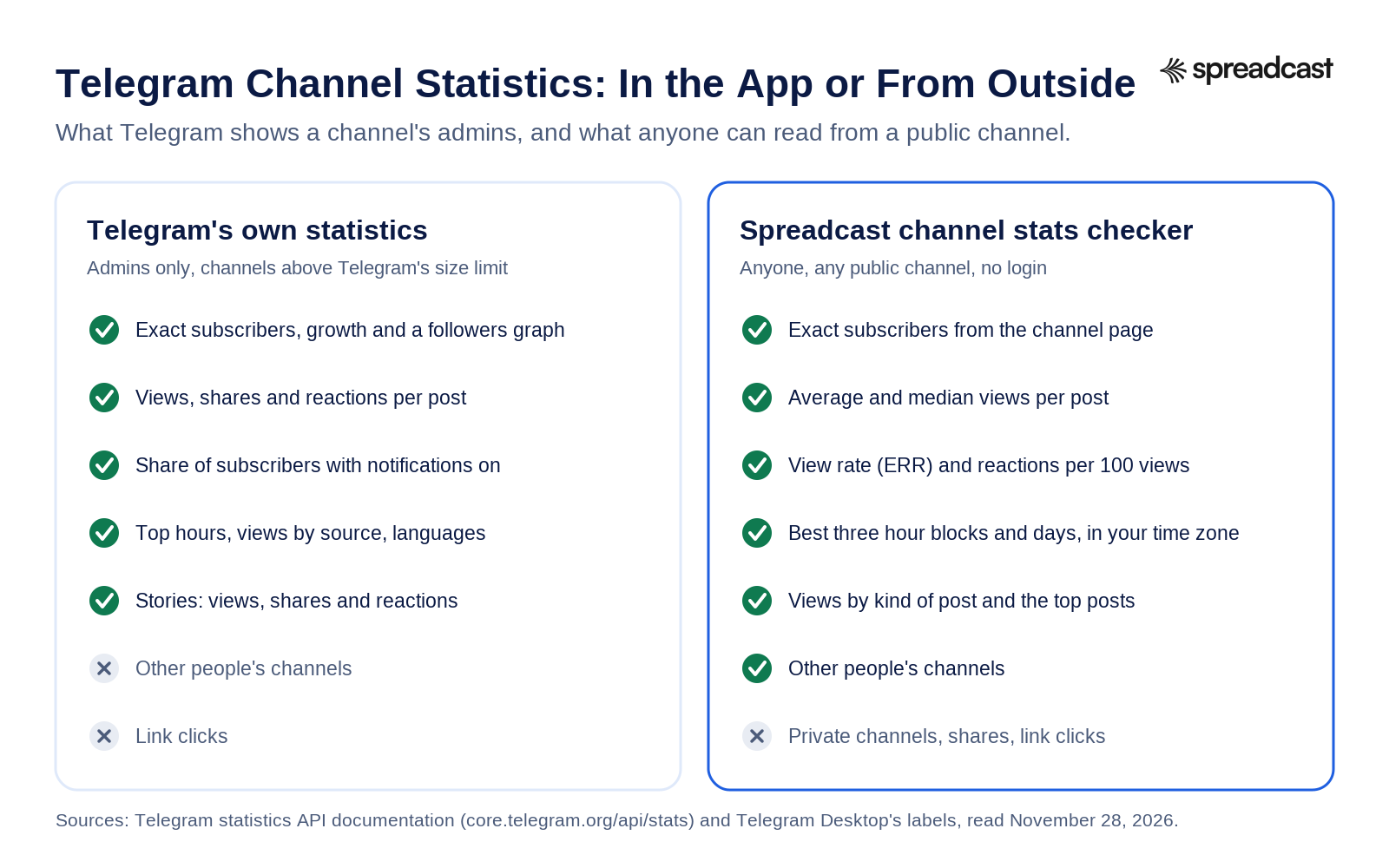
| What you want to know | Telegram's own statistics (admins) | This checker (anyone, public channels) |
|---|---|---|
| Subscribers | Exact count, with growth and a followers graph | Exact count from the channel's t.me page, today only |
| Views per post | Total views ÷ posts in a period, compared with the period before | Average and median of the latest 100 or so settled posts |
| Link clicks | No click count in the statistics API | Not visible; only the share of posts with a link |
| Shares (forwards) | Shares per post, and public forwards for each post | Not shown on the public preview |
| Reactions | Reactions per post, and reactions by emotion | Reactions per 100 views and per post |
| Notifications | Share of subscribers with notifications on, and a mute graph | Not visible from outside |
| When people read | A top hours graph | Average views by the hour posts went out, in your time zone |
| Where views come from | Views by source and new followers by source | Not visible from outside |
| Languages | Languages of viewers | Not visible from outside |
| Stories | Views, shares and reactions per story | Not read |
| Kinds of post | Not grouped | Average views by text, photo, album, video, poll and other kinds |
| Other people's channels | No, only channels you run | Yes, any public channel |
| Needs | Admin rights and a channel above Telegram's size limit | Only the channel's @name |
In app list from Telegram's statistics API documentation and the labels in Telegram Desktop's language file (Followers, Views Per Post, Shares Per Post, Reactions Per Post, Enabled Notifications).
Telegram Channel Statistics in the App and From Outside
What Telegram shows a channel's admins, next to what anyone can read from a public channel.
Best Time to Post on Telegram Channel
There is no single best time to post on a Telegram channel, because a channel read in Asia and a channel read in Europe have readers awake at different hours. The question you can answer is narrower: when did this channel's posts get the most views? That is what the Best Times to Post chart shows.
The chart groups settled posts by the three hour block in which they went out, such as 3 PM to 6 PM, and shows each block's average views and number of posts. Blocks with only one post are hidden. The tool names a best block only when it has enough posts behind it: at least 3, or 1 in 20 of the settled posts, whichever is more. With 100 settled posts that is 5. Below that, one lucky post could put an hour on top.
Hours are in your time zone. The math runs in your browser, and browsers place a post's time in the visitor's local time. If you are in New York and the channel's readers are in Berlin, the chart is still right, it is just labelled in New York time. When you compare notes with someone in another country, say which time zone you read it in. The Spreadcast bot, which sends a short version of the summary inside Telegram, gives its best time in UTC, because a bot cannot know your time zone.
Keep a few limits in mind. The chart shows when posts were published, not when readers were online, and a post published at 9 AM is still read at noon. A channel that always posts at the same hour gives you nothing to compare: in our test, @nytimes published 98 of 100 posts between 6 PM and 9 PM UTC, so the tool could only name that block. And the hour is mixed up with everything else about a post. If a channel puts its big news out in the afternoon and its small notes at night, the afternoon wins because of the news, not the clock.
So treat the chart as a hint, then test it. Take the top block, move a few ordinary posts into it and a few out, keep everything else the same, and check again in a month. Our guide to the best time to post on social media explains this kind of test for every network, and the Telegram scheduler page covers the mechanics of sending posts at a set hour.
For a competitor or a channel you want to advertise in, the same chart tells you when that channel posts, and whether its posts did better at some hours than others.
Telegram Channel Stats by Day and by Kind of Post
The other two charts work like the hours chart. Here is what each bucket means and how far you can trust it.
Best Days
Average views by the weekday a post went out, in your time zone. Seven buckets from about 100 posts leave around 14 posts per day at best, and channels that post on weekdays only will show five bars. A day is named the best only when it has enough posts. What went out on a day matters as much as the day, so take a winning day as a lead to test, not a rule.
Text Only
Posts with no picture, video, file, voice message, poll or sticker. A post with media the preview does not show in a way the tool knows also lands here. In our test, text posts on @telegram averaged 3.59M views against 2.25M for its videos.
One Photo and Album
One picture, or several pictures sent together as an album. The tool counts any post with more than one picture as an album. In our test, @bloomberg's one photo posts averaged 54K views across 68 posts against 47K for its 32 text posts.
Video
Video posts, including round video messages. On @durov, video posts averaged 6.38M views across 26 posts, the highest of his kinds with enough posts to count, so the tool named video the best kind there.
File, Voice and Poll
Documents, voice messages and polls. None of our four test channels had a single one in its sample. Like every kind, they need the minimum number of posts before the tool calls them the best.
Other
Stickers. Service messages, such as a changed channel photo, carry no view count and are skipped.
How to Check Telegram Channel Fake or Real
The question matters before you buy an ad in a channel, before you trust a channel's claims, or when your own channel's numbers start to look strange. Public numbers cannot prove that a channel is fake, but they can show you where to look, and the checker gives you most of them.
Start with the view rate. Bots that are added as subscribers do not read posts, so a channel whose subscriber count was pumped up with them shows a low view rate. A low rate on its own proves little, though: old channels collect inactive subscribers over the years, and people who muted the channel still count as subscribers. What matters is a rate that is far below channels of the same kind and size.
The opposite can be faked too. Google suggests searches like "telegram views buy" and "telegram views booster" when you type "telegram views", which tells you a market for bought views exists. A 2023 article in Russian on ppc.world, written by the native ad marketplace BeSeed about checking channels before buying ads, starts with the view rate: above 50% is a reason for a closer look, and it says rates that high are usually seen only with bloggers, while the average is no more than 20%, depending on the topic. Its other warning signs, read from TGStat's charts, are jumps of several thousand subscribers within one hour, sharp jumps in views five to seven hours after a post goes out, and forward counts that sit flat at the same level. Take the 50% line as one company's rule of thumb: in our own test, @durov's view rate was 58%, and that channel is run by Telegram's founder.
Some signs you can look at yourself with the checker.
Average and median far apart in an unusual way. A real channel usually has a median somewhat below its average, because a few posts go viral. If every post sits within a few percent of the same number, week after week, that flatness is unusual for real readers. Open a dozen posts and look.
Views without reactions. If a channel has reactions turned on and posts with hundreds of thousands of views draw a handful of reactions, the views may not come from people. Compare reactions per 100 views with channels like it. If reactions are turned off, the tool shows zero and this sign tells you nothing.
Views that do not follow content. Real readers react to topics. If a dull notice gets the same views as the channel's biggest news, something other than readers may be setting the number.
What the tool cannot show is subscriber growth by the hour, unsubscribes and the view curve of a single post, which the ppc.world article leans on most. TGStat shows growth and view analysis tabs after you sign in, and a channel owner who wants your ad money can share screenshots of Telegram's own statistics. Asking for them is normal. Our guide to growing a Telegram channel explains why buying members backfires for the channel that does it.
Telegram Private Channel Views and Other Things No Outside Tool Sees
Every Telegram channel stats tool that works from outside, this one included, can only read what Telegram makes public. That leaves some gaps you should know before you trust any number.
Private channels. A private channel has no @name and no public preview. Telegram's Channels FAQ says you join one only if the owner adds you or you have an invite link. The checker answers with a clear message instead of a guess. Groups, including public ones, and bots are not channels and cannot be checked either.
Who viewed a post. Nobody outside Telegram can see that, and admins cannot either. Views are a count, not a list.
Forwards and comments. Telegram counts forwards for every channel post, and admins see shares per post in their statistics, but the public preview does not print them. That is why this tool gives reactions per 100 views and not a full ER.
Notifications, mutes and sources. How many subscribers have notifications on, how many muted the channel, and whether views came from the channel itself, from forwards, from search or from links are all in Telegram's own statistics and nowhere else.
Exact views. Every public page we checked rounds views to three figures from 1,000 up. Subscribers are different: the t.me/s/ preview rounds them too (9.85M for @durov on November 28), but the plain t.me page prints the exact count (9,852,497 at 15:36 UTC and 9,852,454 ten minutes later), and that is the number the checker shows.
Deleted posts and posts older than the sample. The checker reads about 100 latest posts. A channel that posts 20 times a day gives you five days of history; one that posts twice a week gives you a year. A post deleted before you check is simply not there.
Channels whose preview is not available. Some names answer with a redirect instead of a page of posts, and then there is nothing to read. The tool says so rather than showing empty numbers.
Telegram Channel Stats Checker Test on Four Real Channels
The checker's own code run on four public channels on November 28, 2026, at 15:36 UTC. Numbers are as the tool displays them. The rounded figures in the second row are what the t.me/s/ preview showed in the same minute.
| Measure | @durov | @telegram | @bloomberg | @nytimes |
|---|---|---|---|---|
| Subscribers (exact, as the tool shows them) | 9,852,497 | 9,039,202 | 184,928 | 187,107 |
| Subscribers on the t.me/s/ preview | 9.85M | 9.04M | 185K | 187K |
| Posts read (settled) | 99 (98) | 100 (100) | 100 (100) | 100 (100) |
| Oldest to newest post | Feb 10 to Nov 27, 2026 | Jan 3, 2025 to Aug 26, 2026 | Jul 15, 2025 to Sep 22, 2026 | Oct 17, 2025 to Mar 4, 2026 |
| Average views per post | 5.68M | 2.54M | 52K | 36K |
| Median views | 4.53M | 2.38M | 43K | 31K |
| View rate (ERR) | 58% | 28% | 28% | 19% |
| Reactions per 100 views | 1.63 | 0 (none shown) | 0.44 | 0.87 |
| Reactions per post | 93K | 0 | 226 | 310 |
| Posts per week | 2.4 | 1.0 | 1.4 | 1.7 |
| Posts with a link | 47% | 100% | 100% | 100% |
| Best three hour blocks (UTC) | 6 PM to 9 PM, 3 PM to 6 PM | 12 PM to 3 PM, 9 AM to 12 PM | 9 AM to 12 PM, 3 AM to 6 AM | 6 PM to 9 PM only |
| Best day (UTC) | Monday | Friday | Thursday | Wednesday |
| Best kind of post | Video | Text only | One photo | Video |
Views are rounded by Telegram. Paid Star reactions are not in the reaction figures: @durov's posts in the sample had 3.81M Stars in paid reactions on top.
What the Test Shows About Reading Telegram Channel Stats
@durov is the channel of Telegram's founder, Pavel Durov. A view rate of 58% means a typical post gets views equal to more than half the subscriber count, and the median of 4.53M below the 5.68M average says a few posts lift the mean. The top post, a June 15 announcement of a $200,000 contest for content creators, had 24.5M views, more than twice the subscriber count. The 6 PM to 9 PM UTC block averaged 7.63M views from 15 posts and 3 PM to 6 PM 7.29M from 29, both well above the 12 PM to 3 PM block at 5.15M from 23 posts. That is a big enough gap on enough posts to take seriously.
@durov also shows why posts per week needs care. The tool reports 2.4, the average over 99 posts since February 10. From November 9 on, though, the channel posted 22 times in 19 days. Read the date of the last post and scroll the top posts list before you call a channel slow.
@telegram, the official Telegram News channel, has 9.04M subscribers and a view rate of 28%. The public preview shows no reactions on any of its posts, so the tool reports zero, which here means reactions are not shown, not that nobody cares. Its last post in the sample is from August 26, 2026, so all 100 posts are long settled. Text only posts beat videos by a wide margin: 3.59M average views over 21 posts against 2.25M over 73 videos. Its five most viewed posts are all text notes pointing readers to the full list of features in a new update. Both kinds have plenty of posts, so this gap is worth acting on.
@bloomberg has 185K subscribers and the same 28% view rate as @telegram, a reminder that ERR does not scale with size. Its hours chart is a lesson in sample sizes. The top block, 9 AM to 12 PM UTC, averaged 65K views but from only 7 posts. The runner up, 3 AM to 6 AM, averaged 61K from 36 posts. The second is the more reliable result even though it ranks lower, because 36 posts are much harder to fluke than 7. Three in four of Bloomberg's posts in the sample went out between midnight and 6 AM UTC, which is morning and early afternoon in Hong Kong and Singapore, and four of its five most viewed posts are about Asia.
@nytimes has 187K subscribers and a view rate of 19%. In the sample it posted a digest of the day's stories on weekdays only, and 98 of 100 posts went out between 6 PM and 9 PM UTC, so the best time chart can only show that block. Its last post on the preview was on March 4, 2026, and its five most viewed posts are its last five, led by 175K views on the final one. One possible reason is that a channel's last post is the first thing anyone opening it later sees, but from outside we cannot confirm it. Either way, the 1.7 posts per week figure is an average over a period that includes almost nine quiet months; the date of the last post tells the real story.
So the headline numbers are where you start. The charts, the post counts and the dates under them tell you what you can conclude.
TGStat Alternatives for Telegram Channel Stats
The tools people use to check Telegram channel stats, and what each one is for. We opened each site on November 28, 2026; where a site blocked us, we say so and make no claims about it.
- 1
Spreadcast Telegram Channel Stats Checker
Free, no sign upBest for a quick public check of any channel with no account
The tool on this page. Type a public channel and get the exact subscriber count, average and median views, view rate, reactions per 100 views, posts per week, link share, best hours in your own time zone, best day, best kind of post and the top five posts, read from about 100 latest posts. Posts under 48 hours old are left out of the averages. No login and no AI; results are only kept for 30 minutes so a repeat check is quick.
Pros
- Works on any public channel, yours or anyone's
- Best times shown in your own time zone, with post counts beside every bar
- A short summary in a Telegram chat when you send @spreadcast_bot a channel
- 2
Telegram's Built In Statistics
Free, inside TelegramBest for admins of their own channel
The only source for notifications, mutes, view sources, languages and exact growth. Telegram's statistics API documentation lists followers, views, shares and reactions per post and per story, enabled notifications, and graphs for growth, followers, mutes, top hours, interactions, views by source, new followers by source, languages and reactions by emotion.
Pros
- Data no outside tool has
- Per post view graphs and public forwards
Cons
- Only for channels you administer
- Only above a size limit Telegram sets on its servers
- 3
TGStat
Free overview; detailed tabs need an accountBest for history and catalog research across many channels
A large Telegram channel catalog, and the source of the ERR, ERR24 and ER definitions quoted above. A channel's overview page shows its recent posts with views, open to anyone. On the statistics page for @durov the tabs for subscribers, citation index, post reach, engagement, views analysis, advertising efficiency, attracting subscribers, invite links, top posts and posting schedule asked us to sign in. TGStat also runs @TGStat_Bot, which it describes as a bot to get channel statistics without leaving Telegram.
Pros
- Long history of channels it tracks
- Views analysis and subscriber growth that a one time check cannot show
Cons
- Detailed statistics need an account
- Its help pages are mostly in Russian
- 4
A Telegram channel catalog with statistics
Telemetr.io comes up next to TGStat in the 2023 ppc.world article on checking channels before buying ads, which describes it as showing subscriber growth charts, ER, mentions of a channel and view trends. On November 28, 2026 its site showed us only a security check page, so we could not confirm its current features or prices.
- 5
Best for agencies searching creators across several networks
Yoloco describes itself as working across TikTok, YouTube, Instagram, Twitch and Telegram and offers a free trial from its home page. It needs a free account to see channel data, and its home page does not list which Telegram metrics it gives, so sign up and try it if you work across several networks.
Pros
- Telegram next to other creator networks
Cons
- Needs an account
- Telegram metrics not listed on its home page
- 6
Combot
Free; Pro €7.99 a monthBest for groups you run, with moderation
Combot is a management tool for Telegram groups and channels: analytics, moderation, anti spam and scheduled posts. Its analytics track messages, members, joins, leaves and top users. The free plan keeps 32 days of analytics, Pro keeps 100 days and Ultra a year. It is for communities you manage, not for checking someone else's channel.
Pros
- Strong for groups and members
- Free plan with a month of analytics
Cons
- Only for chats you add it to
- Not built for public channel research
Telegram Channel Statistics Bot
Sometimes you are already in Telegram and want the numbers there. Send Spreadcast's Telegram bot, @spreadcast_bot, a public channel as @name or t.me link, or type /stats followed by the name, and it replies with a short version of this page's summary: subscribers, average views per post, view rate, reactions per 100 views when there are any, posts per week, the best time block, the best day and the most viewed kind of post, worked out by the same code. Times in the bot are in UTC, because a bot cannot know your time zone; the page above uses yours. The reply links back here with the channel filled in, so the full charts and top posts are one tap away.
The same bot is what Spreadcast uses to post to channels you connect, which is covered further down. You do not need to connect anything to ask it for stats.
TGStat runs its own statistics bot as well, @TGStat_Bot, which its site describes as a bot to get channel statistics without leaving Telegram. If you use TGStat already, that is the quickest way to its numbers from inside the app.
Be careful with statistics bots that want more than a name. A bot that only reads public channels needs nothing else from you. A bot that asks to be added to your channel as an admin, or asks you to sign in with your phone number, wants far more access. Give admin rights only to bots you trust, and only the rights they need. Our Telegram scheduler page lists the exact admin rights a posting bot needs.
Telegram Channel Statistics API
Developers who want Telegram channel stats in their own code have three routes, and they give very different data.
Telegram's full statistics come through its client API, the one Telegram's own apps use, with methods like stats.getBroadcastStats. Its documentation says these are for administrators of channels of a certain size, and that the requests have to go to the data center named in the channel's stats_dc field. The stats.getBroadcastStats page says only users can use the method and lists an error for non admins, so you need a Telegram user account that is an admin of the channel, not a bot. It is the same data as the in app statistics, from code.
The Bot API, which bots like Spreadcast's use, is much narrower. It can tell you how many members a chat has with getChatMemberCount, and it can send and edit posts, but its message object has no view count. A bot cannot ask Telegram how many views its own channel posts got.
The third route is the public web preview, which is what this checker reads: the t.me/s/ page for the channel, which holds about 20 posts at a time with their views, reactions and time, and older pages through a before parameter. Telegram does not document this page as an API, so its layout can change without notice, and every tool that reads it, ours included, has to keep up. Telegram does document the post widget, the embed code you get by opening a public post's t.me link in a browser and pressing Embed.
For many channels at once there are paid scrapers that read the same public pages. One example on Apify, a Telegram channel posts actor, says it works purely from Telegram's public web preview, needs no Telegram login or bot token, and charges per post read. It returns the same kinds of numbers this checker starts from.
If you want to post to Telegram from an AI assistant instead of your own code, our Telegram MCP server page compares the options, and the MCP page shows how Spreadcast connects to Claude and ChatGPT.
Telegram Channel Analytics You Can Act On
A stats check is only worth the time if it changes what you post. Here is a simple routine for your own channel, using nothing but the checker and a notes file.
Once a month, on the same weekday, check your channel and write down five numbers: subscribers, median views, view rate, reactions per 100 views and posts per week. Median, not average, so one viral post does not hide a slide in the typical post. Three months of these lines tell you more than any single check.
Next, the kinds chart. If one kind of post beats another on plenty of posts each, as text beat video on @telegram in our test, make more of the winner for a month and check again. If a kind has only a few posts, it is not a finding yet; post more of it before you decide.
Then the top five posts. Read them side by side and write one sentence about what they have in common. Maybe a topic, a number in the first line, a question, or a picture of a real thing. That sentence is your brief for next month.
Last, the hours. If one block wins on enough posts, move some ordinary posts into it, keep the rest where they are, and compare after a month. Keep a list of what you changed, so you know which change moved which number.
For competitor channels, run the same check and compare the shape, not the size: view rate, median against average, how often they post, which kinds they use and when. If you report Telegram next to other networks, our list of social media KPIs shows how views and reactions fit with followers and reach on the others, and social media analytics in Spreadcast puts them in one place for the channels you post to.
If the numbers say you need more posts but you do not have time to make them, that is a planning problem, not an analytics one. A content calendar and an afternoon of batching a month of posts solve it better than another dashboard. Our guide to scheduling Telegram channel posts covers Telegram's built in scheduler and the tools around it.
How Spreadcast Helps With Your Telegram Channel
The checker is free. If you run a channel and want the posting side handled too, that is what Spreadcast is for.
Spreadcast posts to your Telegram channel through its bot, @spreadcast_bot, once you add it as an admin that can post messages. You write or approve a post, pick the day and the hour, for example the block that won on your stats, and Spreadcast sends it then. It sends text, one photo, an album of several photos with the text under the first, or a video. Text over 1,024 characters does not fit under a picture or video sent by a bot, so Spreadcast sends it as its own message after the media. Our list of social media character limits has the Telegram numbers next to every other network.
After it sends, Spreadcast reads the views and reactions of the posts it sent to public channels, and your channel's subscriber count, and shows them next to your other networks. So the same post can go to your channel and to Instagram, LinkedIn, Bluesky or Threads in one pass, and you see how it did on each. If Telegram is one of several networks you keep up with, the social media scheduler page shows the whole calendar.
Our Telegram scheduler page compares Spreadcast with Telegram's own scheduler and other tools, cross posting shows how one post goes to several networks, and the pricing page lists what each plan includes. The Telegram help page explains how to connect a channel step by step.
Frequently Asked Questions
How do I check Telegram channel stats?
For any public channel, type its @name or t.me link into the checker on this page. It reads the channel's public pages and shows the exact subscriber count, average and median views, view rate, reactions, posts per week and best times. For your own channel, Telegram's Statistics in the channel profile shows more, if the channel is above Telegram's size limit.
How to see Telegram channel statistics on Android?
Open the channel, tap its name to open the profile, then the three dot menu in the top right, and choose Statistics. It only appears for admins of channels that Telegram allows statistics for.
What is ERR in Telegram?
ERR is engagement rate by reach: the average views of one post divided by the number of subscribers, times 100. TGStat, which publishes it for the channels it tracks, averages all posts from the last 30 days. The checker here averages the latest 100 or so posts older than 48 hours.
How does Telegram count views?
Each channel post has a view counter that includes views of forwarded copies. Telegram says the numbers are approximate and that after around four days it forgets you saw a post, so viewing it again counts again.
Why does a Telegram channel have more views than subscribers?
Views of forwarded copies count toward the original post. People can also read public channels without joining, from search, similar channels, links or the web preview, and returning readers count again after a few days.
Can you see who viewed a Telegram post?
No. Telegram shows a view count on channel posts but no list of viewers, not even to admins.
Can I check stats of a private Telegram channel?
Not from outside. A private channel has no public page, so no outside tool can read it. Only its admins can see its numbers, in Telegram's own statistics.
How to check Telegram channel subscribers?
Open t.me followed by the channel's name in a browser: that page shows the exact number, and the checker on this page reads it from there. The t.me/s/ preview rounds it to three figures from 1,000 up, such as 2.29K.
What is the best time to post on a Telegram channel?
It depends on the channel's readers. The checker shows average views by three hour block for any public channel in your time zone, and only names a best block when enough posts back it. Test the winning hours on your own channel for a month.
Where These Facts Come From
Every outside number, rule and price on this page links to the page it was taken from.
- HOW TO SEE TELEGRAM CHANNEL STATISTICS (video)Tekwiq on YouTube
- Can you see who viewed your telegram channel post (video)Simply Finance on YouTube
- Channel statisticsTelegram API documentation
- Channels FAQTelegram
- Telegram FAQTelegram
- Chat folders, archive and channel stats (March 2020)Telegram blog
- Reactions, spoilers and translations (December 2021)Telegram blog
- Similar channels and story reposts (November 2023)Telegram blog
- Message reactionsTelegram API documentation
- Message objectTelegram API documentation
- messages.getMessagesViewsTelegram API documentation
- Post widgetTelegram
- Bot API: getChatMemberCountTelegram
- stats.getBroadcastStatsTelegram API documentation
- Script of the t.me/s/ web previewTelegram
- Telegram Desktop peer menu source codeTelegram Desktop on GitHub
- Telegram Desktop language stringsTelegram Desktop on GitHub
- Telegram for Android profile screen source codeTelegram for Android on GitHub
- How ERR and ER are calculated (in Russian)TGStat Help Center
- How channel reach is calculated (in Russian)TGStat Help Center
- Statistics page for @durovTGStat
- Yoloco home pageYoloco
- Combot home page and plansCombot
- How to check a Telegram channel before buying ads: 4 markers (2023, in Russian)ppc.world
- Telegram channel posts actorApify
- Measures of location: mean and medianNIST Engineering Statistics Handbook
- Date.prototype.getHoursMDN Web Docs
Researched and written by Mark Weizer. Last checked on November 28, 2026.