How Top Apps Announce Updates: The Short Answer
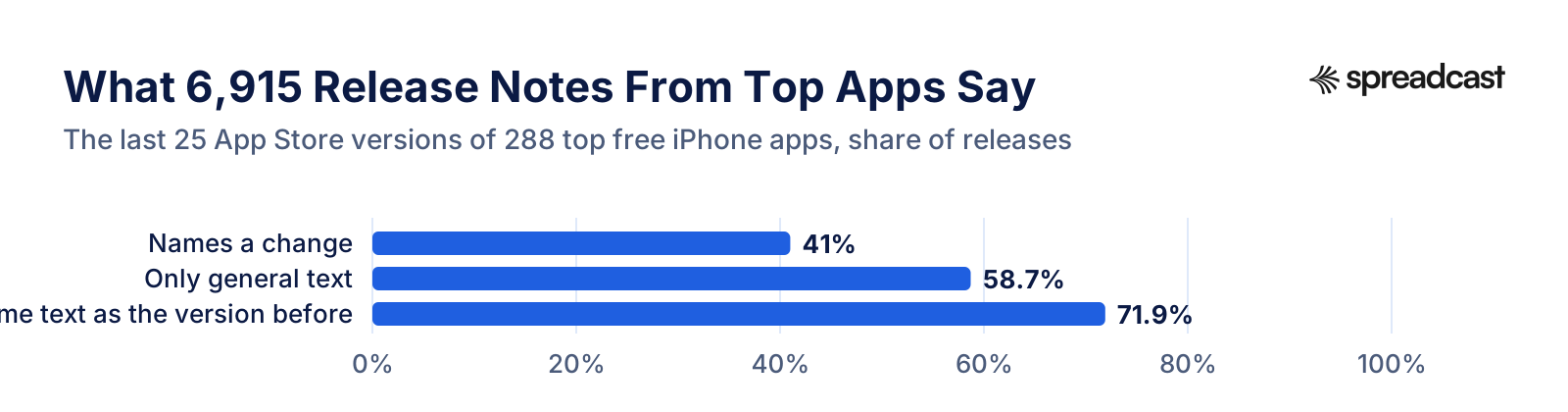
Mostly, they do not announce them in the release notes. On November 15, 2026 we read the version history of the top 12 free iPhone apps in each of 24 App Store categories in the United States, 288 apps in all, and kept the last 25 releases of each: 6,915 release notes. Only 41% of those notes named something a user could notice, such as a new screen, a feature or a supported device. 58.7% said only that bugs were fixed or the app was improved, and 0.3% were empty.
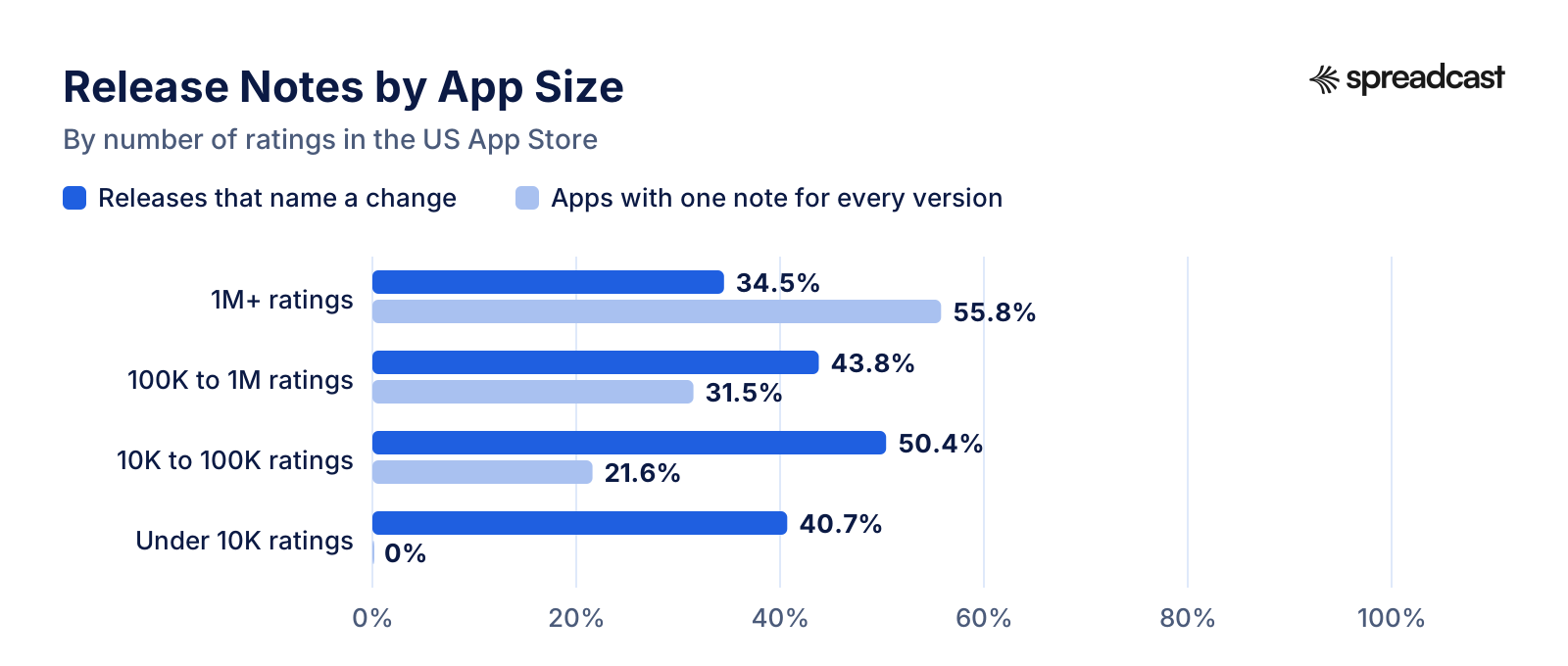
Copying is the norm. 71.9% of releases carried the same text, word for word, as the version before them. 103 of 278 apps, 37.1%, used one note for every one of the versions we read, among them Spotify, Instagram, Facebook, DoorDash, Roblox, Walmart, WhatsApp and Lyft. The biggest apps repeat themselves most: 55.8% of apps with over a million ratings used one note for every version, against 21.6% of apps with 10,000 to 100,000 ratings, while whether a note named a change varied less: 34.5% of releases for the biggest apps, against 43.8%, 50.4% and 40.7% for the three smaller groups.
Many apps also put news somewhere other than the note. 36.5% of the apps had an in app event on their App Store product page on the day we looked, and 47 of 288 (16.3%) ran one with Apple's Major Update badge, a card that shows the new feature with a picture, in search results and on the product page. On Google Play, 39 of 169 of the same apps (23.1%) showed an Events and offers card.
Social media is the third channel. Of the 214 developer websites we could read, 60.7% linked at least one social profile, most often Instagram (48.1%), X (Twitter) (43.5%) and Facebook (40.2%). Bluesky and Mastodon, two networks whose posts anyone can read without a login, were rare: 7 apps linked a Bluesky profile and 3 a Mastodon one.
The rest of this page shows each finding with a chart and a table, explains what we could and could not measure from public data, and ends with what an app maker can take from it for their own release. The data is free to download as CSV and JSON, with a suggested citation, at the end.
Key Numbers at a Glance
Every figure comes from one snapshot taken on November 15, 2026. The base column says what each share is counted on.
| Finding | Result | Base |
|---|---|---|
| Release notes that name a change | 41% | 6,915 releases from 288 apps |
| Release notes with only general text | 58.7% | 6,915 releases |
| Release notes identical to the version before | 71.9% | 6,629 releases with an earlier one to compare |
| Apps with one note for every version read | 37.1% | 278 apps with 10 or more versions |
| Apps whose latest note names a change | 43% | 286 apps |
| Median release note length | 126 characters | 6,915 releases |
| Release notes that mention a social network or ask to follow | 5% | 6,915 releases |
| Apps with an in app event on the App Store | 36.5% | 288 apps |
| Apps with a Major Update event | 16.3% | 288 apps |
| Apps found on Google Play under the same name | 58.7% | 288 apps |
| Google Play notes that name a change | 34.3% | 169 apps on both stores |
| Google Play listings with an Events and offers card | 23.1% | 169 apps on both stores |
| Developer websites linking a social profile | 60.7% | 214 websites read |
| Median days between releases | 7 days | 286 apps with two or more versions |
Shares are rounded to one decimal. The release notes rule and its hand check are described in the method section.
What the Release Notes Say
Each bar is a share of the 6,915 releases we read. A note names a change when at least one sentence describes something other than fixes, speed, thanks, ratings or updating in general.
Most Release Notes Say Nothing You Could Post About
The release note is the text shown under What's New on an App Store product page and in the update list on a phone. Apple asks for it with every version. Its help page on platform version information describes the field as a description of the changes in the version, gives it a limit of 4,000 characters and recommends detailed information about the specifics. Apple's App Review Guidelines set the rule in guideline 2.3.12: apps must clearly describe new features and product changes, while simple bug fixes, security updates and performance improvements may use a generic description.
Top apps lean hard on that exception. 58.7% of the 6,915 notes we read used only general text: a line about fixed bugs, a line about speed, a thank you, a request for a rating, or a reminder to keep automatic updates on. Some of these releases were surely only fixes. But when the same text comes back version after version for months, it no longer tells anyone whether a release was a fix or a feature.
Look at it per app and the split is sharp. 35.3% of the apps with 10 or more versions did not name a single change in any of the notes we read, while 23.4% named a change every time. More than half the apps sit at one end or the other, which suggests that for many teams the note is a standing policy, not a call made each week.
Why would a large team write nothing? Apple's support page on updating apps says apps update automatically by default, so a release reaches phones without anyone needing to open the update list or read the note. Large teams also ship on a fixed schedule. Spotify's engineering team describes a weekly release of its iOS and Android apps that carries hundreds of changes, and describes keeping a new feature behind a feature flag for several releases before its rollout, and Meta's engineers describe how many changes stay behind its Gatekeeper system so features roll out separately from the code release. A note written for one release would then describe features that most readers do not see yet. Our study of how often apps update found that the median top free app had shipped its current version 6.9 days earlier, so writing a fresh note every week is real work.
None of that applies to a small app with a few thousand users. For you, the release note is free space on the page future users see before they install. If you have never written one with care, our app release notes examples show 20 kinds you can copy, and the release notes generator drafts one from a list of changes.
Release Notes in Numbers
The table version of the chart above, with a few more measures of the same releases.
| Measure | Releases | Share |
|---|---|---|
| Names a change | 2,835 | 41% |
| Only general text | 4,060 | 58.7% |
| Empty | 20 | 0.3% |
| Same text as the version before | 4,769 | 71.9% |
| Uses bullet points or a numbered list | 1,742 | 25.2% |
| Uses at least one emoji | 94 | 1.4% |
| Mentions a social network or asks to follow | 343 | 5% |
| Longer than 500 characters | 350 | 5.1% |
All 6,915 releases of 288 apps. Repeats are counted on the 6,629 releases that had an earlier version in our data to compare with.
The Same Note, Version After Version
The clearest pattern in the data is reuse. 71.9% of all releases shipped with the exact text of the release before. 55.4% of the apps with 10 or more versions repeated the previous note in at least 80% of their releases, and 4% never repeated one.
103 of 278 apps used one note for every version we read. They include many of the most rated apps in the US App Store, which the table below lists by number of ratings. For 78 of them the repeated note is general text; for the other 25 it is a note our rule counts as naming a change, shown unchanged on every version. Either way, a note that never changes cannot tell a reader what changed in the update they just installed.
Reuse also shows up across apps. 31 release note texts appeared word for word in more than one app, used by 64 apps in all. They are short stock phrases: the most common, bug fixes and improvements, appeared in 17 different apps, and bug fixes and performance improvements, with or without a full stop, in 20.
Five Kinds of General Release Note
Reading the notes that say nothing specific, the same few shapes come back again and again. The first four apps used the same text, or nearly the same, on every version we read; the fifth is a phrase many apps share.
The Thank You and a Line About Fixes
Google Maps thanks the reader for using the app and says the release brings bug fixes that improve the product. It is polite and accurate, and identical on every version, so it never says which fix or which release.
The Reminder to Keep Updates On
Spotify's note says the team is always making changes and asks readers to keep automatic updates turned on so they do not miss anything. It talks about updating in general rather than about the update in hand.
The Nudge to Update
DraftKings, in two near identical versions of one note, tells readers to update to the latest version for the best experience, with new features, fixes and improvements. The reader is already looking at the update, and the note does not say what the new features are.
The Joke
Duolingo's note is a joke about its owl mascot eating bugs, followed by an invitation to follow the app on Facebook, Twitter and Instagram for news. It is in character and fun to read, and it sends readers to social media for the actual news.
The Stock Phrase
Bug fixes and improvements, word for word, was the note of 17 different apps on at least one version in our sample. It is the shortest way to fill the field, and Apple's guideline allows it for releases that only fix bugs.
Apps That Used One Note for Every Version
Each of these apps showed the same release note on all the versions we read, from 10 to 25 versions. Sorted by number of ratings in the US App Store.
| App | Category | Ratings | Versions read |
|---|---|---|---|
| Spotify | Music | 43,135,742 | 25 |
| Photo & Video | 29,715,844 | 25 | |
| Social Networking | 29,190,514 | 25 | |
| DoorDash | Food & Drink | 23,647,526 | 25 |
| Roblox | Games | 20,645,842 | 25 |
| Walmart | Shopping | 19,080,151 | 25 |
| Social Networking | 18,966,655 | 25 | |
| Lyft | Travel | 17,944,376 | 25 |
| Uber | Travel | 17,283,876 | 25 |
| Messenger | Social Networking | 14,039,778 | 25 |
| ChatGPT | Productivity | 12,262,853 | 25 |
| Capital One Mobile | Finance | 11,316,039 | 25 |
| X | News | 11,202,082 | 25 |
| Uber Eats | Food & Drink | 10,933,629 | 25 |
| Chase Mobile® | Finance | 9,623,192 | 25 |
| Cash App | Finance | 8,811,236 | 25 |
| Starbucks | Food & Drink | 8,509,656 | 25 |
| Google Drive | Productivity | 7,931,402 | 25 |
| Google Maps | Navigation | 7,455,977 | 25 |
| Walgreens | Medical | 7,381,206 | 25 |
| Zillow Real Estate & Rentals | Lifestyle | 7,242,233 | 25 |
| Snapchat | Photo & Video | 6,102,433 | 25 |
| Expedia | Travel | 6,017,905 | 25 |
| Lifestyle | 5,825,187 | 25 | |
| Audible | Books | 5,631,135 | 25 |
| Duolingo | Education | 5,593,800 | 25 |
| Utilities | 5,366,311 | 25 | |
| Chick fil A | Food & Drink | 4,309,595 | 25 |
| ESPN | Sports | 4,243,159 | 25 |
| Indeed Job Search | Business | 4,120,660 | 25 |
The 30 with the most ratings of 103 apps; the rest are in the CSV download. Names are shortened to the part before any colon or dash.
Release Notes by App Size
We used the number of ratings as a stand in for an app's size, because Apple does not publish downloads.
Release Notes and Events by App Size
The same groups as the chart, with the event and cadence figures for each.
| Ratings | Apps | Releases naming a change | One note for all | Same as previous | Median length | In app event | Days between releases |
|---|---|---|---|---|---|---|---|
| 1M+ | 113 | 34.5% | 55.8% | 82% | 150 chars | 40.7% | 7 |
| 100K to 1M | 93 | 43.8% | 31.5% | 71.5% | 123 chars | 40.9% | 7 |
| 10K to 100K | 52 | 50.4% | 21.6% | 59.9% | 97 chars | 28.8% | 7.4 |
| Under 10K | 30 | 40.7% | 0% | 47.9% | 71 chars | 20% | 10.3 |
One note for all counts apps with 10 or more versions read. Days between releases is the median of each app's median gap.
The Biggest Apps Repeat Themselves Most
The size split is the most useful finding for a small team. 55.8% of apps with over a million ratings used one note for every version we read. The share falls with every step down in size: 31.5% for apps with 100,000 to a million ratings, 21.6% for 10,000 to 100,000, and 0% for apps with fewer than 10,000 ratings. Repeats follow the same line: 82% of releases from the biggest apps copied the note before, against 47.9% from the smallest.
Whether a note names a change moves less neatly. Releases from apps with over a million ratings named a change 34.5% of the time, rising to 43.8% for apps with 100,000 to a million ratings and 50.4% for 10,000 to 100,000, then 40.7% for the 30 smallest apps. The smallest apps write a fresh note each time, but not always a note with news in it. Across all apps, those whose latest note named a change had a median of 381,500 ratings, against 776,001 for those whose latest note did not.
The apps with the most users repeat themselves the most, and the data does not say why. It is not the pace: the median gap between releases was 7 days for apps with over a million ratings and 7 days for apps with 100,000 to a million. It is not in app events either: 40.7% of the biggest apps had one, about the same as the 40.9% of the next group. A plausible part of the answer is in the engineering posts cited above, where features roll out separately from releases, so a note tied to one version has less to say. Large companies also have their own email, push notifications and social accounts. A small app usually has fewer of those, and its release note is often one of the few announcements there is.
So copying the big apps is a mistake here. A note that says only that bugs were fixed costs a big app little, because it has other ways to reach its users. It costs a small app the one cheap chance it gets to show progress to someone deciding whether to install.
Release Notes That Name a Change, by Category
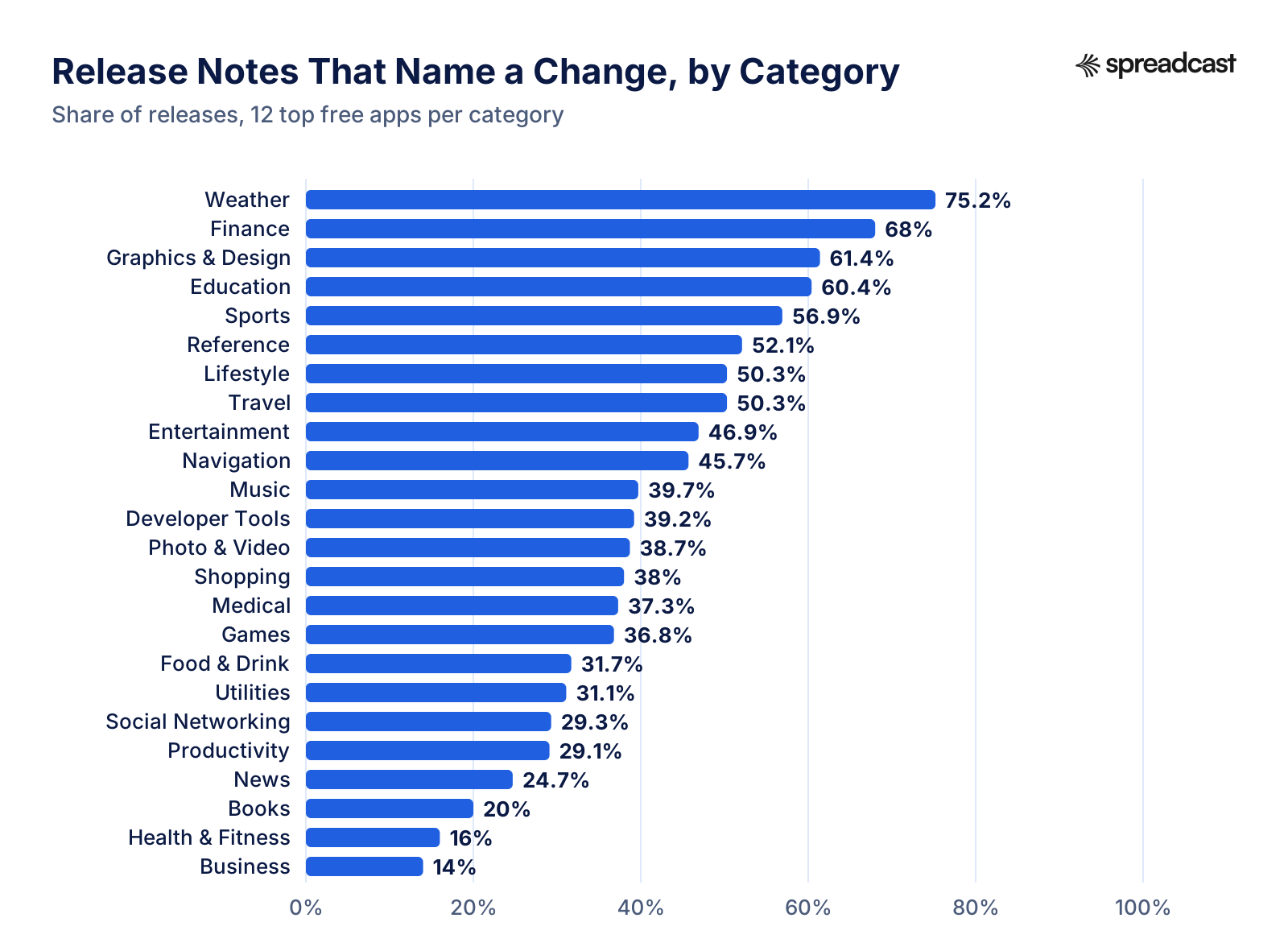
Share of releases that name a change, for the 12 top free apps in each category.
Release Notes and Events by Category
Each row is 12 apps. Treat the differences between neighbouring categories as noise and look at the two ends.
| Category | Releases naming a change | Latest note names a change | One note for all | In app event | Days between releases |
|---|---|---|---|---|---|
| Weather | 75.2% | 63.6% | 0% | 41.7% | 11.1 |
| Finance | 68% | 58.3% | 41.7% | 33.3% | 6.7 |
| Graphics & Design | 61.4% | 72.7% | 0% | 33.3% | 7.1 |
| Education | 60.4% | 58.3% | 45.5% | 50% | 6.4 |
| Sports | 56.9% | 58.3% | 25% | 75% | 6.7 |
| Reference | 52.1% | 50% | 25% | 41.7% | 7.6 |
| Lifestyle | 50.3% | 58.3% | 41.7% | 33.3% | 7 |
| Travel | 50.3% | 41.7% | 41.7% | 33.3% | 7 |
| Entertainment | 46.9% | 41.7% | 33.3% | 58.3% | 9.7 |
| Navigation | 45.7% | 41.7% | 27.3% | 16.7% | 13.3 |
| Music | 39.7% | 41.7% | 54.5% | 25% | 7.2 |
| Developer Tools | 39.2% | 58.3% | 9.1% | 8.3% | 12 |
| Photo & Video | 38.7% | 33.3% | 50% | 41.7% | 6.5 |
| Shopping | 38% | 41.7% | 58.3% | 41.7% | 5.5 |
| Medical | 37.3% | 41.7% | 25% | 16.7% | 17.2 |
| Games | 36.8% | 41.7% | 60% | 75% | 7.2 |
| Food & Drink | 31.7% | 33.3% | 54.5% | 33.3% | 12.1 |
| Utilities | 31.1% | 33.3% | 16.7% | 25% | 11.1 |
| Social Networking | 29.3% | 25% | 58.3% | 33.3% | 6.9 |
| Productivity | 29.1% | 41.7% | 58.3% | 41.7% | 6 |
| News | 24.7% | 25% | 33.3% | 33.3% | 5.5 |
| Books | 20% | 25% | 16.7% | 50% | 10.4 |
| Health & Fitness | 16% | 33.3% | 50% | 33.3% | 7 |
| Business | 14% | 16.7% | 58.3% | 0% | 7 |
Sorted by the share of releases that name a change.
Which Categories Write Real Release Notes
Weather apps named a change most often, in 75.2% of releases, and Finance came second with 68%. At the other end, Business apps named a change in 14% of releases and Health & Fitness in 16%.
In app events split the categories even more. 75% of the top Games apps and 75% of the top Sports apps had an event on their product page, against 8.3% in Developer Tools and 0% in Business. Games and sports apps have seasons, matches and new levels to announce, which fit Apple's badges well; business tools have fewer dated moments.
Category matters less than size and the habits of each team. With 12 apps per category, a single app that writes careful notes, or a single app that pastes one line forever, moves the category by several points. The category table is a way to see who your neighbours are, not a ranking to plan against.
If your app is in a category where most top apps write nothing, a specific note stands out more, not less. Someone comparing three habit trackers on the App Store sees two that fixed bugs and one that added a widget for the Lock Screen.
How Long Release Notes Are
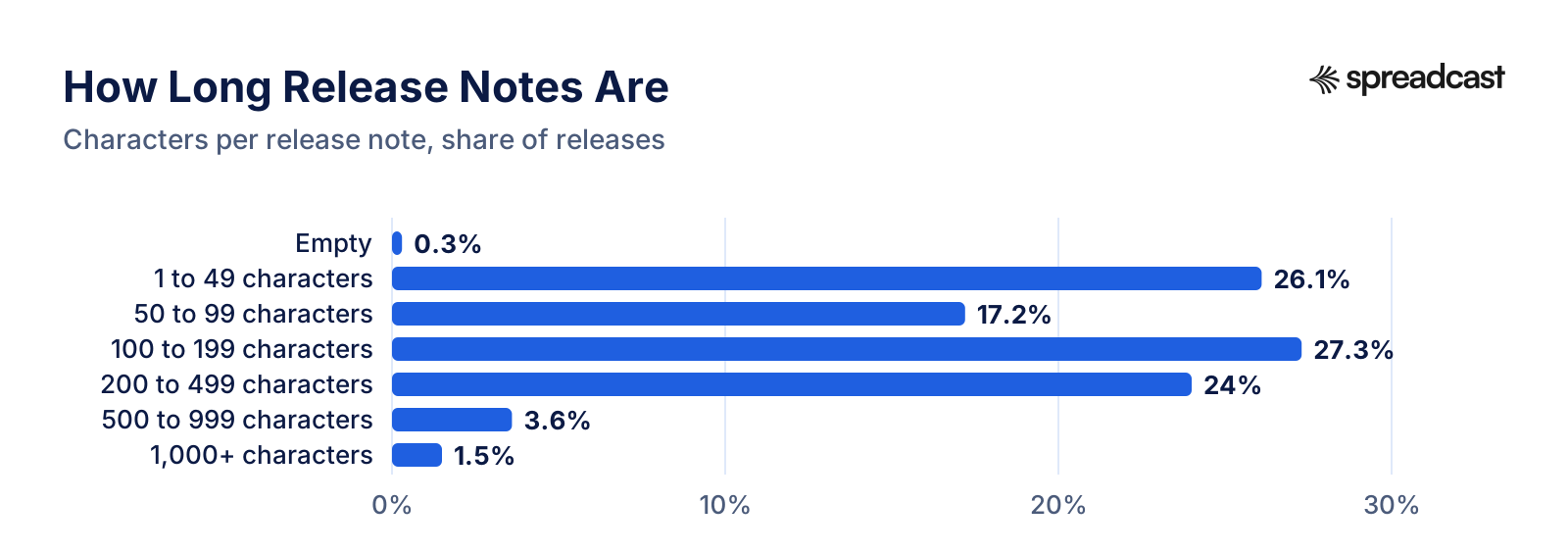
Characters per note, counted on the text as shown on the product page.
Release Note Length
The table version of the length chart.
| Length | Releases | Share |
|---|---|---|
| Empty | 20 | 0.3% |
| 1 to 49 characters | 1,808 | 26.1% |
| 50 to 99 characters | 1,191 | 17.2% |
| 100 to 199 characters | 1,888 | 27.3% |
| 200 to 499 characters | 1,657 | 24% |
| 500 to 999 characters | 246 | 3.6% |
| 1,000+ characters | 105 | 1.5% |
Quartiles: a quarter of notes were shorter than 48 characters and a quarter longer than 218. Notes that name a change had a median of 223 characters, notes with only general text 63.
Short Notes, Long Notes and the Two Limits
The median note was 126 characters, about one or two sentences. A quarter were shorter than 48 characters and a quarter longer than 218. Only 5.1% ran past 500 characters.
Length and content go together. Notes that named a change had a median of 223 characters, against 63 for notes with only general text. That is not a reason to pad a note. It is a sign that a real change takes a sentence to describe, and that the short notes are short because there is nothing in them.
The two stores set different limits. Apple allows 4,000 characters for What's New. Google Play's help page on preparing a release allows up to 500 Unicode characters per language for release notes. If you write one note for both stores, write it for 500: lead with the one change people will notice, add two or three short lines, and stop. Our App Store character counter checks a note against both limits.
Formatting is rare. 25.2% of notes used bullet points or a numbered list and 1.4% used an emoji. Lists help most when a release carries more than one change, because people scan them.
Words That Show Up in Release Notes
How often common words and phrases appear, in all notes and in each of the two main groups.
| Word or phrase | All notes | Notes that name a change | Notes with only general text |
|---|---|---|---|
| bug or bugs | 58.2% | 43.2% | 69% |
| fix, fixes or fixed | 59.8% | 46.8% | 69.1% |
| performance | 33% | 23% | 40.1% |
| improvement or improvements | 50.6% | 33.8% | 62.6% |
| new | 21.8% | 47.8% | 3.7% |
| you can now | 2.2% | 5.4% | 0% |
| thanks or thank you | 10.4% | 9.7% | 11% |
| a request to rate or review | 5.3% | 6.6% | 4.4% |
| widget | 1.6% | 3.7% | 0.1% |
| iPad, Apple Watch or Mac | 1.3% | 3.1% | 0.1% |
| dark mode | 0.2% | 0.6% | 0% |
| language or translation | 3.5% | 4.7% | 2.6% |
| accessibility or VoiceOver | 0.7% | 1.4% | 0.2% |
Counted on all 6,915 releases, ignoring case. A note can contain several of these.
What Notes That Name a Change Have in Common
Fix words are everywhere. 58.2% of all notes mention bugs and 33% mention performance, including many of the notes that also name a change: a common shape is one or two real changes followed by a closing line about fixes. What separates the two groups is the vocabulary of new things. 47.8% of notes that name a change use the word new, against 3.7% of notes with only general text, and 5.4% of them say you can now.
Reading the notes that name a change, a few habits repeat. They lead with the change, not with thanks. They name the screen or the feature the way a user would, as the Lock Screen widget, the offline reading mode or the new map styles, rather than as an internal project. They say what the change lets you do in one sentence. They put devices and languages in plain sight, such as support for a new iPhone, an Apple Watch app or a new language. And they leave the fixes to the last line.
Devices, widgets and languages are among the most concrete things a note can say. 1.3% of notes mention an iPad, Apple Watch or Mac, 1.6% a widget and 3.5% a language or translation. Each of these is also an easy picture for a post: the app on the new device, the widget on a home screen, the screen in a new language.
Release Notes That Name a Change: Examples From the Data
Seven apps from the sample whose notes describe what changed, in our words. Each shows a habit worth copying.
The Weather Channel: Name the Screen
Its notes in our sample described a redesigned allergy screen with an hourly pollen forecast, new base map styles for the radar, and a seasonal routine for trick or treating. Each note names the screen it changed, so a reader knows where to look.
MyChart: Say What You Can Now Do
Plain sentences about new abilities: sync sleep data from Apple Health, sign in with a passkey. It also says that some features depend on the user's healthcare organization, which sets expectations honestly.
Transit: A Joke That Still Carries News
A long, playful note that still names the feature, Trip History, lists the stats it keeps, and mentions a home screen widget that plans a trip to one of four saved places. Humour and news can share a note.
Kiwix: A Changelog With Headings
Many of its notes are sorted under New, Updated and Fix headings. It reads like a developer's changelog, which suits an audience that wants the details.
Organic Maps: Mark What Is New
Each new item is flagged as new and names concrete map data, such as nature reserves on the world map and routing that takes road closure times into account.
Lingokids: Content Is News Too
Several notes announce new content rather than features: new activities built around Marvel characters for children to play. For a content app, a new set of lessons or levels is the update.
TestFlight: Short Bullets From Apple Itself
Apple's own beta testing app lists its changes in short bullets, such as support for iPhone Duo, landscape orientation on iPhone and support for 11 more languages, with a closing line for fixes.
In App Events: The Other Place Top Apps Announce Updates
Share of the 288 apps with each kind of in app event on their App Store product page on November 15, 2026.
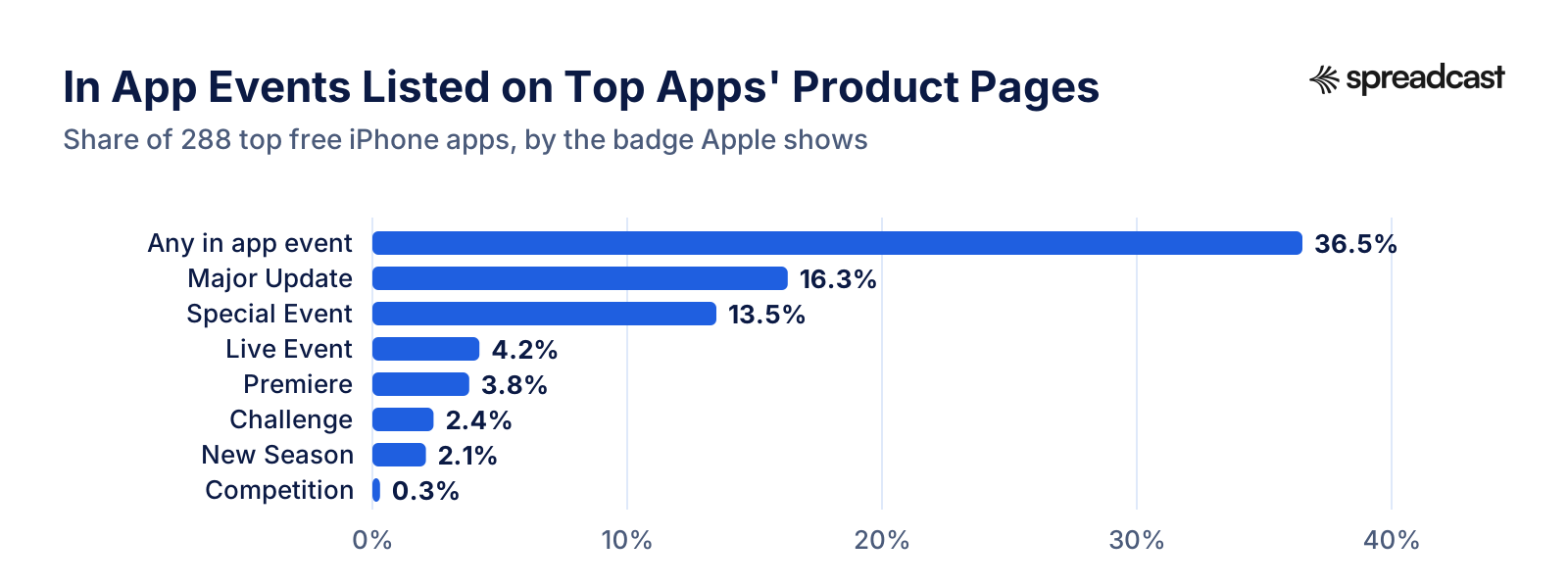
In App Events by Badge
The badge is the label Apple prints above the event title on the card.
| Badge | Events | Apps | Share of apps |
|---|---|---|---|
| Any event | 160 | 105 | 36.5% |
| Major Update | 55 | 47 | 16.3% |
| Special Event | 50 | 39 | 13.5% |
| Premiere | 22 | 11 | 3.8% |
| Live Event | 18 | 12 | 4.2% |
| Challenge | 8 | 7 | 2.4% |
| New Season | 6 | 6 | 2.1% |
| Competition | 1 | 1 | 0.3% |
Events listed on each app's US product page on the snapshot day, including ones announced ahead of their start.
In App Events Carry News for Some Apps
In app events are Apple's way for an app to promote something timely on the App Store. Apple's In App Events page says they appear on the product page and in search results, and that for people who already have the app the event card can show in place of the screenshots. An app can have up to 10 events published at a time. Each event carries one of Apple's badges, and one of them is Major Update, which Apple describes as significant new features, content or experiences that go beyond minor enhancements such as UI adjustments or bug fixes.
36.5% of the top apps in our sample had at least one event live or announced on the day we looked, 160 events in all. Major Update was the most common badge, on 47 apps, followed by Special Event on 39. 47 of 288 apps ran a Major Update event, and 40.4% of those had a latest release note that did not name a change. For those apps the news was there, with a headline, a picture and a description, just not in the release note.
Events do not replace notes for most teams, though. Among apps with an event, 47.6% had a latest note that named a change. Among apps with no event, 39.9% did. Teams that use events were slightly more likely to describe their release too, which fits the idea that some teams treat each release as news in every channel at once.
For a small app, an in app event is free and needs no new build: Apple lets you submit events for review on their own. Our guide to App Store in app events covers the limits, image sizes and the seven badges. The catch is that an event only reaches people who are already on the App Store. It does not reach people who have never heard of the app, which is the job of a post on social media.
Release Notes, Events and Posts: Who Each One Reaches
The places an app update can be announced, what each store allows, and who sees the result. The store rules come from Apple's and Google's own help pages linked on this page.
| Channel | Where it shows | Limits | Who sees it |
|---|---|---|---|
| App Store release note | Under What's New on the product page and in the update list | 4,000 characters, one per version | People on the product page and the few who open the update list |
| Google Play release note | Under What's new on the listing | 500 characters per language | People on the listing |
| App Store in app event | Product page, search results, and in place of screenshots for people who have the app | Up to 31 days, promoted up to 14 days ahead, 10 published at once | People already searching or browsing the App Store |
| Google Play promotional content | Events and offers on the listing and other Play surfaces | Major updates run a set 28 days | People already on Google Play |
| Push notification or email | The phone's lock screen or an inbox | Set by the app and the user's settings | Only people who installed the app or signed up |
| Social media post | Feeds, profiles and shares on each network | Set by each network | Followers, and people who have never heard of the app when the post is shared |
Only a social post can reach people who are not yet on a store page or in the app.
Major Update Events on the Biggest Apps
The apps with the most ratings that had a Major Update event, and whether their latest release note named a change.
| App | Major Update events | Latest note names a change |
|---|---|---|
| YouTube | 1 | No |
| 1 | No | |
| 1 | No | |
| Lyft | 2 | Yes |
| Uber | 2 | No |
| ChatGPT | 1 | No |
| Uber Eats | 1 | No |
| Snapchat | 1 | No |
| Expedia | 1 | No |
| Duolingo | 1 | No |
| 1 | No | |
| Google Gemini | 2 | Yes |
Sorted by number of ratings. Event titles are in the JSON download.
The Same Apps on Google Play
169 of the 288 apps were on Google Play under the same name. The chart compares each app's latest note on the two stores.
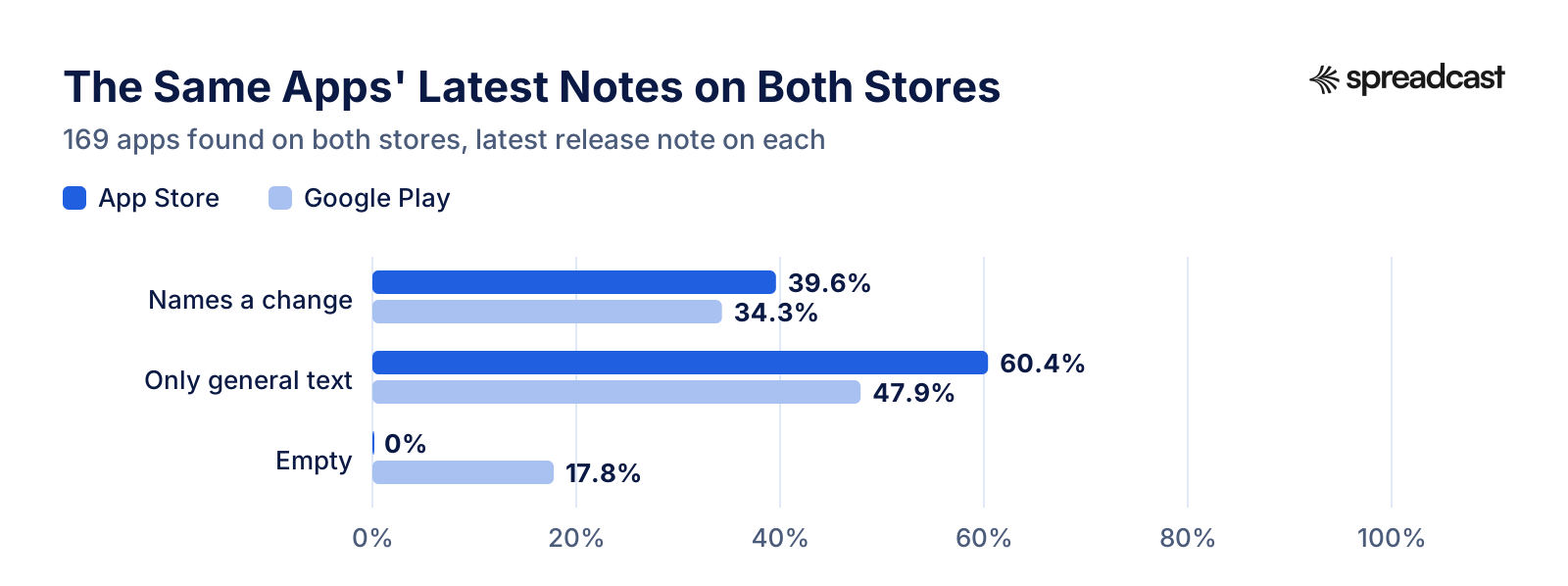
App Store and Google Play, Side by Side
The 169 apps we found on both stores.
| Measure | App Store | Google Play |
|---|---|---|
| Latest note names a change | 39.6% | 34.3% |
| Latest note has only general text | 60.4% | 47.9% |
| Latest note is empty | 0% | 17.8% |
| Median length of the latest note | 126 characters | 102 characters |
| Listing shows an event card | 39.1% | 23.1% |
| Same note text as the other store | 29% | 29% |
| Latest note mentions a social network | 3.6% |
Google Play shows only the latest release note, so the comparison is one note per app on each store.
What Changes on Google Play
Google Play shows less history than the App Store. A public listing has an Updated on date and the What's new text of the latest release, and no version history, so we could compare only the latest note of each app. We found 169 of the 288 apps on Google Play under the same name, 58.7% of the sample. 56 were linked from the developer's website, 47 used their iOS bundle id as their Play package name, and 66 turned up on the Play developer page.
On Google Play, 34.3% of the latest notes named a change, against 39.6% of the same apps' latest notes on the App Store. 29% of the apps used the very same text on both stores. The latest release dates were close: 28.4% were within a day of each other and the median gap was 2.2 days, though Google shows only a date, not a time. 30 of 169 Play listings (17.8%) showed no What's new text at all, while every one of the same apps had text on the App Store.
Google is stricter about what release notes are for. The same help page says to inform users about recent updates and not to use release notes for promotional purposes or to solicit user actions. Even so, 3.6% of the Play notes we read mentioned a social network or asked readers to follow the app somewhere.
Google Play has its own version of in app events, called promotional content. Google's promotional content help page lists three event types, offers, time limited events and major updates, with major updates running for a set 28 days, and its overview of promotional content explains where the cards appear. 39 of 169 of the apps in our comparison (23.1%) showed at least one card under Events and offers on their listing, against 39.1% with an in app event on the App Store. 20 of those Play listings carried a card labeled Update available. For more on the Android side, see our guides to promoting an Android app and Google Play ASO.
Google's content quality guidelines for promotional content set a bar that is worth borrowing for release notes too: promotional content must be new, noteworthy and user facing, and Google turns away general service descriptions, evergreen content and routine events. A release note that passes that test, one that names something new that a user will see, is also a note that can become an event card on either store and a post on social media. A note that fails it, the line about fixes and improvements, can become none of the three.
In practice that means one piece of writing per release. Write the line that names the change first, check it against the two limits, 500 characters on Google Play and 4,000 on the App Store, and reuse it as the headline of the event card and the post. The stores then tell the same story, and nobody has to write the same news four times.
Google Play Events and Offers Cards by Label
Google Play prints a short label on each card. Numbers in the labels are replaced with N so the same kind of label groups together.
| Label on the card | Cards |
|---|---|
| Update available | 26 |
| Ends on N/N | 15 |
| Ends in N days | 6 |
| Ends in Nh | 2 |
| Begins in Nh | 1 |
| Expires in N day | 1 |
| Available in N day | 1 |
| Ends in N day | 1 |
Cards on the 169 Google Play listings we read, on November 15, 2026.
Which Social Networks Top Apps Link To
Share of the 214 developer websites we could read that link to a profile on each network.
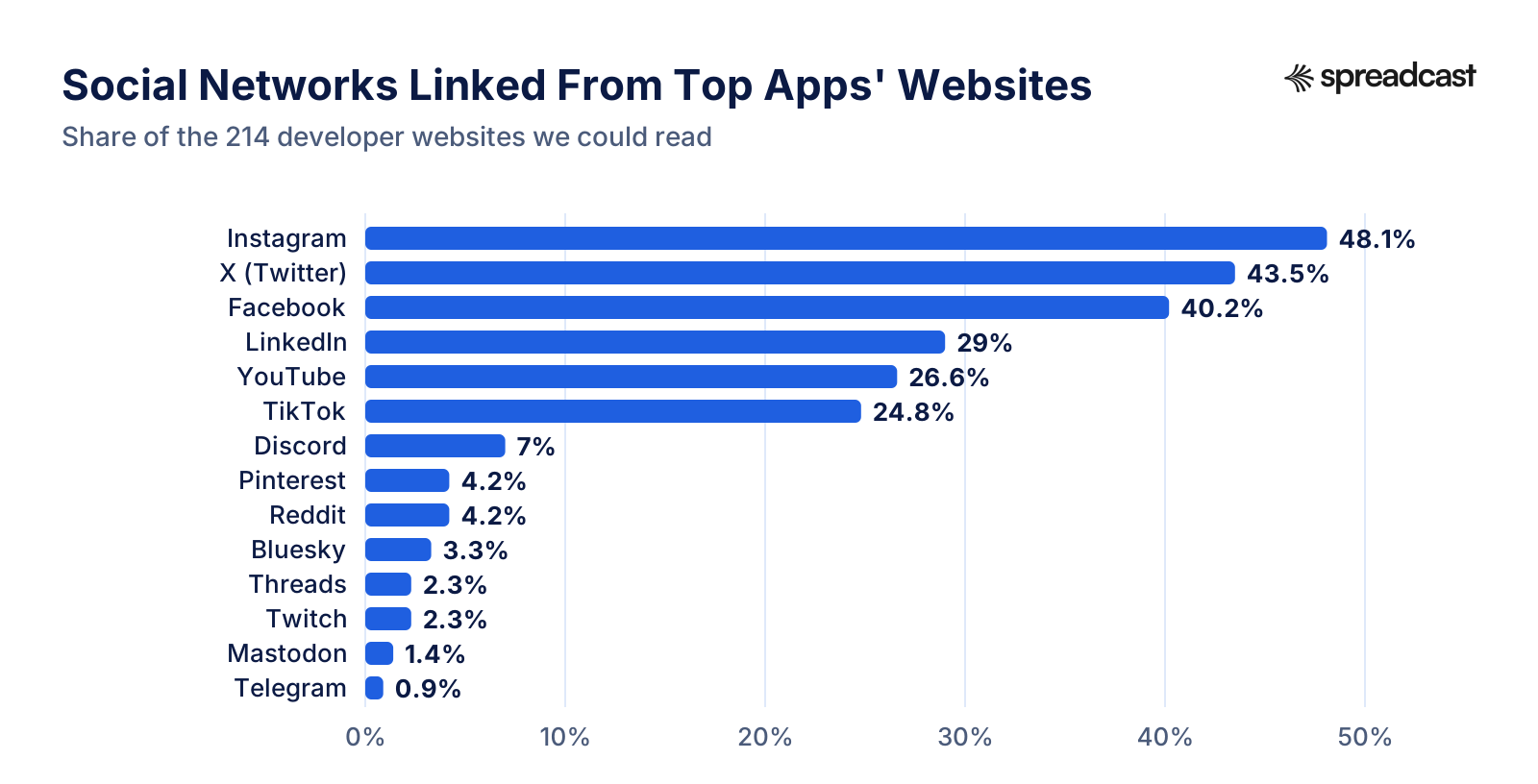
Social Networks Linked From App Websites
The table version of the chart, with the count of websites for each network.
| Network | Websites | Share |
|---|---|---|
| 103 | 48.1% | |
| X (Twitter) | 93 | 43.5% |
| 86 | 40.2% | |
| 62 | 29% | |
| YouTube | 57 | 26.6% |
| TikTok | 53 | 24.8% |
| Discord | 15 | 7% |
| 9 | 4.2% | |
| 9 | 4.2% | |
| Bluesky | 7 | 3.3% |
| Threads | 5 | 2.3% |
| Twitch | 5 | 2.3% |
| Mastodon | 3 | 1.4% |
| Telegram | 2 | 0.9% |
260 of 288 apps list a website on the App Store; 214 of those home pages returned readable HTML.
Where Top Apps Point People on Social Media
60.7% of the developer websites we could read linked at least one social profile, and the median website among those linked 4 networks. 22.9% linked five or more. The most linked were Instagram (48.1%), X (Twitter) (43.5%), Facebook (40.2%), LinkedIn (29%) and YouTube (26.6%).
Newer and smaller networks came lower. Threads appeared on 2.3% of websites, Discord on 7%, Reddit on 4.2%, Pinterest on 4.2% and Bluesky on 3.3%.
A link on the website is a weak signal. Some companies list their corporate accounts rather than the app's own, many apps sit on a company site that sells other products, and a site that renders its links with JavaScript shows none to a simple reader. What the numbers do show is which networks app teams consider worth linking, a reasonable starting point for choosing where to post an update. Our guides on promoting an app on social media and the image sizes for each network cover the posting side.
Do Top Apps Post Their Updates on Bluesky or Mastodon?
We wanted to measure how soon after a release an app posts about it. The honest answer is that public data allows this only on networks whose posts anyone can read, such as Bluesky through its open getAuthorFeed endpoint and Mastodon through each server's accounts API. Public Telegram channels can be read too, but only 2 websites linked one. Instagram, TikTok, Facebook, LinkedIn, Threads and X need a login or a paid API to read an account's posts, and YouTube's robots.txt disallows the public video feed.
Too few top apps are on those two open networks to say much. 8 of the 288 apps linked a Bluesky or Mastodon profile we could read: 7 on Bluesky and 3 on Mastodon. Together they had 44 releases in the period we could check, and 7 of those were followed within 14 days by a post that mentioned an update, a new version or a new feature. With so few accounts, that is a description of a handful of teams, not a finding about top apps, and we report it only so the gap is clear.
If you want to post updates on Bluesky yourself, our guide on scheduling Bluesky posts and the Bluesky statistics page cover how and who is there.
How Often the Apps in This Study Ship
Release notes matter more the more often you ship, so it helps to know the pace. The version histories give it directly. The median app in our sample left 7 days between releases, with a quarter of apps at 6 days or less and a quarter at 12.8 days or more. 58% shipped about weekly or faster, with a median gap of 8 days or less, and 95.1% at least monthly. The median app shipped 11 versions in the 90 days before the snapshot, and 93.8% had released one in the past 30 days.
At that pace, the big apps' choice makes sense on their side. Writing 11 fresh notes a quarter is a real cost when many releases carry changes that are switched on for users only later. For a small team shipping every few weeks, the same note is a few minutes of work per release. Our larger update frequency study of 4,756 top apps measures the pace across both free and paid charts.
What This Means for Your Own App Update
Six steps that follow from the data, for a team without a marketing department.
- Step 1
Name One Change in the First Line
Only 41% of top app notes did this, so it stands out. Lead with the change a user will notice, in plain words, then add fixes at the end. Keep the whole note under 500 characters so it fits Google Play too.
- Step 2
Write a New Note for Every Release
71.9% of top app releases reused the last note. A fresh note on each version shows a store visitor that the app is alive. If a release really is only fixes, say which problem you fixed.
- Step 3
Use an In App Event for the Big Ones
16.3% of top apps announced a release with a Major Update event, which shows on the product page and in search. It costs nothing and needs no new build.
- Step 4
Turn the Note Into a Post
The note already says what changed. Put the same news in a post with a screenshot of the new screen, on the networks your users follow. Our app update announcement examples show a version for each channel.
- Step 5
Post Where Your Website Points
Top apps link Instagram, X (Twitter) and Facebook most often. Post updates where your own profile links point, so a visitor who clicks through finds the latest news.
- Step 6
Match Both Stores
29% of apps on both stores used the same note on each. Writing one note to 500 characters and using it on both keeps the stores in step. If you ship to both, release on the same day where you can, and use phased release on the App Store if you want to watch the first days.
A Release Note That Doubles as a Post
The simplest way to act on this study is to write one short note that works in three places: the App Store, Google Play and a social post. Start with a line that names the change in the words a user would search for. Add one line on what it lets them do. Add a third line for fixes if there were any. That fits Google Play's 500 characters and leaves room on the App Store for detail if you want it.
Then take the first line as the headline of a post, and a screenshot of the new screen as its picture. A post about a new widget shows the widget on a home screen; a post about a new language shows the app in it. The iPhone mockup generator puts a screenshot in a phone frame, and our social media image sizes list the size each network wants.
For a release that changes something big, add an in app event on the App Store and promotional content on Google Play, with the same headline and picture. That gives one piece of news four places to be seen, each written once. If you want ideas for the weeks between releases, our app promotion ideas collects more.
How We Collected the Data
We started from Apple's public top charts for the United States. For each of the 24 iPhone app categories that hold regular apps, we read the top free chart from Apple's legacy iTunes RSS feeds, such as the top free Games feed, and took the top 12 apps. An app sits in one category only, so that made 288 different apps. We left out Stickers, Catalogs and the old Newsstand category, which hold few regular apps, and the top paid charts, which are full of small apps that rarely update.
For each app, public Apple sources gave us the store side. Apple's lookup API gave the app's developer website, current version and number of ratings. The public App Store product page, described in Apple's guide to creating your product page, gave the version history: the same list anyone sees under Version History, with the last 25 versions, their dates and their release notes. The same page lists the app's published in app events with the badge on each card. We read 6,915 releases in all, dated from July 19, 2011 to November 15, 2026.
Google Play has no public top chart that its robots.txt lets a script read, so instead of a separate Android sample we compared the same apps on both stores. We tried, in order, Play links on the developer's website, the iOS bundle id used as a Play package name, and the apps on the Play developer page under the same developer name. A candidate counted only when its Play title matched the App Store name word for word up to the first colon or dash. That found 169 of the 288 apps. For each one we read the public listing: the Updated on date, the What's new text and the Events and offers cards.
For the social side, we read the home page of the website each developer lists on the App Store and kept every link to a social profile on 15 networks, from Instagram to Mastodon. Share buttons and links to single posts do not count. Where the site linked a Bluesky profile, we read its public posts of the last 120 days, and for a Mastodon address we did the same through the server's API. Neither needs a login.
Everything ran from one script on November 15, 2026, with one request at a time to any one site and a pause of a second or more between requests to the same store. A second script turns the saved snapshot into every number on this page, the charts and the downloads, so the same snapshot always gives the same figures.
How a Release Note Is Classed
The rule is a short list of word patterns, the same for every note, with no AI model involved. It sorts each note into one of three groups.
Names a Change
At least one sentence or bullet of four or more words is about something other than fixes, speed, stability, thanks, ratings, support, following the app or updating in general. A sentence that uses a change phrase such as you can now, added, support for, introducing, a new widget or a new screen also counts, even if it mentions fixes.
Only General Text
Every sentence is about fixes, speed, stability, thanks, ratings, support, following the app, keeping updates on or the fact of an update. A friendly joke about bugs, a request for a review and a promise to keep improving all land here.
Empty
No text at all in the release note field.
Repeated
Separately from the three groups, a release counts as repeated when its note matches the note of the version before it exactly, after spaces and quote marks are normalised. This needs no judgement at all.
How We Checked the Rule by Hand
A word rule makes mistakes, so we checked it. The analysis script draws a fixed random sample of 150 distinct release notes from the snapshot. Each note was read in full and labeled as naming a change or not before the rule's answer was looked at. For the labels we counted a note as naming a change when it named a specific feature, screen, piece of content, device or a specific problem that was fixed. That is a little broader than the rule, which treats sentences about fixes as general text unless they use a change phrase, and it accounts for part of the disagreement. The rule agreed with the hand label on 125 of the 150 notes, 83.3%. Of the disagreements, the rule called 11 notes specific that we judged general, and 14 general that we judged specific. By hand, 105 of the 150 notes named a change; by the rule, 102. The two errors nearly cancel out, so the totals on this page move little. The share is higher than on the page as a whole because the sample counts each distinct note once, and the notes that repeat week after week are mostly general text.
The typical misses are easy to picture. A note that sells the app instead of describing the release, such as a sentence about being a leading platform, has no fix words in it and counts as naming a change when it does not. A note that names a real feature in the same sentence as a bug fix, without one of the change phrases, can count as general text. The hand check shows how much these cases move the totals, and the sample, our labels and the rule are kept with the study's scripts, so the check can be redone.
The repeat figures need no such check. Two notes either match character for character or they do not.
What We Dropped, and Why
We began with more questions than this page answers. These are the ones public data could not answer honestly.
Posts on Instagram, TikTok, Facebook, LinkedIn, Threads and X
Reading an account's posts on these networks needs a login or a paid API, so we could not check whether or when an app posted about a release there. We count the links to them and nothing more.
YouTube Uploads
YouTube's robots.txt disallows the public video feed that would list a channel's uploads, and its data API needs a key. We left YouTube posting out.
Searching Bluesky for Mentions
Bluesky's public search endpoint refused requests without a login when we tried it, so we read only the accounts that app websites link to.
A Separate Google Play Sample
Google Play's public top charts are loaded through paths its robots.txt disallows, so we could not draw a ranked Android sample. We compared the same apps on both stores instead.
Google Play Version History
A Play listing shows only the latest What's new text, so release cadence and repeats are App Store figures only.
How Often Apps Update
Our separate update frequency study covers 4,756 apps. Here we report the gap between releases only as context.
Limits of This Study
Read the numbers with these limits in mind. Each one narrows what the data can claim.
Top Free Apps in the US
The sample is the top 12 free iPhone apps in each category in the US store on November 15, 2026. These are popular, actively run apps. Small apps outside the charts may write very different notes.
The Last 25 Versions
The App Store page shows each app's last 25 versions. For an app that ships weekly that is about six months; for a slow app it can be years. Shares of releases weight fast apps more, which is why we also report per app figures.
A Word Rule, Checked by Hand
Whether a note names a change is decided by word patterns and checked on a hand labeled sample. The repeat figures are exact. Treat the named change share as an estimate with the error the hand check shows.
Events on One Day
In app events and Play cards come and go. We saw what each listing showed on the snapshot day, so these are shares of apps with an event that day, not over a year.
Websites Read as Served
We read each home page as the server sent it. Sites that block scripts or build their links in the browser show no links to us, so the social figures are a floor. 214 of 260 listed websites were readable.
Google Play Matches by Name
We counted an app as being on Google Play only when the titles matched word for word. Some apps use a different name on Play, so a few twins are missing, and the Play figures describe the ones we found.
No Cause and Effect
Nothing here shows that better notes, events or posts bring more downloads. The study describes what top apps do, not what works.
Cite This Study, and Press
Suggested citation: Spreadcast, How Apps Announce Updates: A Study of 288 Top Apps on the App Store and Google Play, snapshot of November 15, 2026, published by Spreadcast on spreadcast.app in the Resources section, with a link to this page.
You are free to reuse the charts, tables and data in articles, reports, talks and AI answers, with credit to Spreadcast and a link to this page. The charts carry our logo in the corner; please keep it.
The data is free to download. The CSV file with one row per app has 288 rows and the measures behind every chart: versions read, releases naming a change, repeats, note length, in app events, the Google Play match and its note, and the networks each website links to. The JSON file adds one row per release, 6,915 in all, with the date, length, class and repeat flag of each note, and one row per in app event with its badge and title. Neither file holds release note text.
For questions about the method, a different cut of the data or a quote, write to contact@spreadcast.app.
Where Spreadcast Fits
This study grew out of a product question. Spreadcast is a social media scheduler that writes, designs, schedules and publishes posts to Instagram, Facebook, LinkedIn, TikTok, YouTube, Pinterest, Threads, Bluesky, Mastodon, Telegram and Discord, and for app makers it also posts from their app's own news. We wanted to know how top apps turn a release into an announcement, because that is the step Spreadcast automates.
Here is what it does with an update. Paste your App Store or Google Play link at the start page, and Spreadcast reads your listing every day. When a new version comes out, it reads the release note, picks out the two or three changes a user would notice, and designs a post from your real screenshots in your brand colors and fonts, with a caption for each network. It also posts when your app passes a rating milestone. You approve each post, or let it go out at your posting times. The mobile apps page and the auto posting feature show it step by step.
The study explains one limit of that. If the note says only that bugs were fixed, there is nothing for a post to show, and Spreadcast makes no update post for that release rather than inventing news. So the habit the data argues for, naming one change in every note, is also what makes the post. The free plan makes 3 posts for you to download, and Pro is $29 a month to publish to up to 10 social accounts, as shown on the pricing page. We make no claim about downloads or ratings: what changes is that each release you describe becomes a designed post without anyone opening a design tool.
For the rest of a launch, see our app launch announcement examples, the guide to iOS app marketing and the broader how to market an app.
Frequently Asked Questions
How do top apps announce their updates?
Rarely in the release notes. In our study of 288 top free iPhone apps, only 41% of release notes named a change. Big updates also show up as App Store in app events: 16.3% of the apps had a Major Update event on the day we looked, and 60.7% of the websites we could read link to social profiles.
Why do so many apps just say bug fixes and performance improvements?
Apple's guideline 2.3.12 allows a generic note for simple fixes, updates install automatically, so nobody has to read a note to get one, and large apps such as Spotify ship every week with features rolled out separately. A fresh note each week is work that pays off little for them. It pays off more for a small app.
How long should app release notes be?
The median note in our data was 126 characters. Google Play allows 500 characters per language and the App Store 4,000. One line naming the change, plus two or three short lines, fits both stores.
Do people read app release notes?
There is no public count. iPhones install updates automatically by default, so nobody has to read a note to get an update. The note is still on the product page, where people deciding whether to install can read it, and it is the raw material for an update post on social media.
Is it fine to reuse the same release note every time?
It breaks no store rule for fix only releases, and 71.9% of top app releases did it. But Apple asks for significant changes to be listed, and a repeated note hides the releases that did change something.
Can I use the data from this study?
Yes. The CSV and JSON files are free to download from the Cite This Study section, with one row per app and one row per release. Please credit Spreadcast, give the snapshot date, November 15, 2026, and link to this page.
Where These Facts Come From
Every outside number, rule and price on this page links to the page it was taken from.
- Top free iPhone apps feed, Games, United States (legacy iTunes RSS)Apple
- iTunes Search API: lookup examplesApple Developer
- Creating your product pageApple Developer
- Platform version information: What's New in This VersionApp Store Connect Help
- App Review Guidelines, guideline 2.3.12Apple Developer
- In App EventsApple Developer
- How to manually update apps from the App StoreApple Support
- Release a version update in phasesApp Store Connect Help
- A behind the scenes look at how we release the Spotify app, part 1Spotify Engineering
- Rapid release at massive scaleEngineering at Meta
- Prepare and roll out a release: release notesPlay Console Help
- Create promotional contentPlay Console Help
- Understand promotional contentPlay Console Help
- Content quality guidelines for promotional contentPlay Console Help
- Google Play robots.txtGoogle
- YouTube robots.txtYouTube
- getAuthorFeed, an example request to the public API without loginBluesky
- Accounts API methodsMastodon Documentation
Researched and written by Mark Weizer. Last checked on November 15, 2026.