Buffer Review: Our Verdict in Short
Buffer has been around since 2010 and is still run by its founder, and in October 2026 it remains one of the easiest schedulers to start with. You connect up to 3 social accounts for free, write a post once, shape it for each network and let Buffer publish it at the time you chose. Paid plans cost $6 per connected channel a month, and the price per channel drops after the tenth one. We rate Buffer 4.0 out of 5.
The score comes from five things. Buffer is easy to learn, which is the point reviewers praise most often. It publishes to 12 networks, including newer ones such as Bluesky, Threads, Mastodon and Substack. Its prices are public down to the last tier, and its free plan is a working product rather than a trial in disguise. Against that, analytics are the most common complaint on G2, and the 1 star reviews on Trustpilot return again and again to posts that failed or accounts that disconnected. Support is by email.
Buffer is worth it if you already make content and need a calm place to queue it. It is not worth it if nobody on your team has time to make the posts in the first place, because Buffer publishes what you bring. That is a common situation for people who build apps: the release ships, the App Store page changes, and the queue stays empty. We come back to that near the end, and we also say plainly who should stay with Buffer.
Our Buffer Rating, Category by Category
Five scores out of 5, each explained in a sentence. The overall score is their average, rounded to one decimal.
| Category | Our score | Why |
|---|---|---|
| Ease of use | 4.6 | Ease of use is the strength G2 reviewers mention most, with 13 mentions in the pros and cons G2 generates from user reviews, and one composer with a separate text box per network keeps daily work simple. |
| Publishing and networks | 4.3 | Twelve channels with automatic publishing on most of them, a time zone per channel and scheduled threads, but Instagram personal profiles, Facebook groups and some Instagram, TikTok and YouTube formats still need a tap on your phone. |
| Analytics | 3.5 | Insights was rebuilt in April 2026 and adds plain language Takeaways, but the Free plan keeps only 30 days, reports and exports are paid, and missing Facebook data is a repeated complaint. |
| Pricing and value | 4.1 | A real free plan, a public rate of $6 per channel and lower rates after 10 channels, though approvals double the rate to $12 and upgrading means paying for the 3 channels that were free. |
| Support and reliability | 3.6 | Email support on every plan and public replies to 88% of negative Trustpilot reviews, yet failed posts and lost connections are still the most frequent theme in the 1 star reviews we read. |
| Overall | 4.0 | The average of the five scores above: 20.1 divided by 5 is 4.02, rounded to 4.0. |
Our scores, set on 23 October 2026 from the sources linked on this page. We did not run a paid Buffer account; the next section explains how we reviewed it.
How We Reviewed Buffer
We did not create a Buffer account, start a trial or pay for a plan for this review, and nothing on this page describes hands on testing. Everything comes from sources anyone can open: Buffer's pricing page and its machine readable pricing file, its product pages for Create, Publish, Insights, Community, Collaborate, Start Page, the AI Assistant, the API and the MCP server, its help center, its changelog, its about page and its open metrics dashboard. We read all of them on 23 October 2026.
For what users think, we read Buffer's listings on Trustpilot, the App Store and Google Play on the same day, and G2's Buffer page through the copy the Internet Archive saved on 12 October 2026, because G2 refuses automated requests. Capterra refused our requests too, so its score is not on this page. Reddit blocks scripts as well, so the Reddit threads below were read through Internet Archive copies, and each one is named with its date and number of comments.
Buffer competes with Spreadcast, which publishes this page. To keep that from bending the review, every score above is explained, every number links to where we found it, and the sections on who Buffer suits come before the one about us. Prices and ratings change often in this market, so check the linked pages before you buy.
What Buffer Is and Who Makes It
Buffer is a social media management tool for creators, small businesses and teams. Its about page says it started in November 2010 as a Startup Sprint project, because its founder and chief executive, Joel Gascoigne, wanted to space out when his tweets went out. It grew from that one job into publishing for many networks, analytics, replies to comments and a small website builder. The company behind it is Buffer, Inc., with a mailing address in San Francisco on Buffer's legal page.
Two things make Buffer unusual as a company. It has been fully remote since 2013, when it gave up its office space, and its whole team works a four day week. It also publishes numbers most companies keep private. On 23 October 2026, Buffer's open metrics dashboard showed 302,755 monthly active users, $2.3 million in monthly recurring revenue, $27.6 million in annual recurring revenue and average revenue of $27.29 per user. The about page added 84,190 total customers and 73 teammates across 15 countries. The dashboard even lists salaries: $340,200 for the chief executive and an average of $166,793.
The same dashboard tells the company's history in short entries. Buffer joined the AngelPad accelerator in August 2011 with $120,000, raised a seed round of $330,000 that December, reached 1 million users in September 2013 and raised a $3.5 million Series A in 2014. In June 2016 it went through a cash flow crisis that led to layoffs, and in 2018 it spent $3.3 million buying out its main Series A investors. Start Page arrived in October 2021 and the AI Assistant in February 2023.
Why this matters for a review: a company that publishes its revenue, salaries and mistakes is easier to trust with access to your accounts, and in our view a business funded by its customers has fewer reasons to chase growth at their expense. None of that makes the product better at any given job, which is what the rest of this page checks.
Buffer at a Glance in October 2026
The short version, before the detail.
| Question | Answer |
|---|---|
| What it does | Plans, schedules and publishes posts to social networks, collects comments in one inbox and reports results |
| Starting price | Free for up to 3 channels. Essentials from $6 per channel a month, or $5 billed yearly |
| Networks | 12: Instagram, Facebook, TikTok, LinkedIn, X, YouTube, Threads, Pinterest, Google Business Profile, Bluesky, Mastodon and Substack, plus Start Page as a channel |
| AI | An optional writing assistant on every plan, based on OpenAI's models. It writes and rewrites text and does not design images |
| Analytics | Insights on every plan: 30 days of history on Free, full history and exports on paid plans |
| Team features | Unlimited users, approvals and access levels on the Team plan only |
| For developers | A GraphQL API and an MCP server on every plan, Free included |
| Apps | iPhone, Android and a browser extension. The main app runs in the browser |
| Trial and refunds | A one time 14 day trial. Refunds within 7 days on monthly plans and 30 days on yearly plans |
| Payment | Cards only: no PayPal, checks or bank transfers |
| Support | Email and a help center on every plan |
From Buffer's pricing page, refund policy and AI Assistant page, read on 23 October 2026.
Video: Buffer's Own Two Minute Tour
Buffer's official quick start from May 2026 shows the whole product in order: channels, ideas, scheduling, comments and results. It is the fastest way to see what every plan has in common.

Buffer Plans and Prices in 2026
Three plans, priced per connected channel, with lower rates as the channel count grows.
| Plan | Price | Who it is for | Main limits |
|---|---|---|---|
| Free | $0 for up to 3 channels | One person trying scheduling, or posting to a few accounts | 10 scheduled posts per channel at a time, 100 ideas, 1 user, 30 days of Insights, 1 API key with 3,000 requests a month |
| Essentials | $6 per channel a month, or $5 billed yearly | A solo creator or owner posting to many accounts | Unlimited scheduled posts with a fair use cap of 5,000 per channel, 1 user, full Insights history, reports, first comment and a hashtag manager, 3 API keys |
| Team | $12 per channel a month, or $10 billed yearly | A team that needs several people and approvals | Everything in Essentials plus unlimited users, approval workflows, access levels per channel, branded reports and 5 API keys |
| Channels 11 to 25 | $4 per channel on Essentials and on Team | Agencies and businesses with many brands | Monthly rate; yearly billing costs less |
| Channels 26 to 50 | $3 per channel on both paid plans | Larger agencies | Above 50 channels, Essentials drops to $1 and Team to $2 per channel |
From Buffer's machine readable pricing, which says prices were last updated in November 2025. Yearly billing is a 20% discount, which Buffer also describes as about 2 months free.
What Buffer Costs per Month by Number of Channels
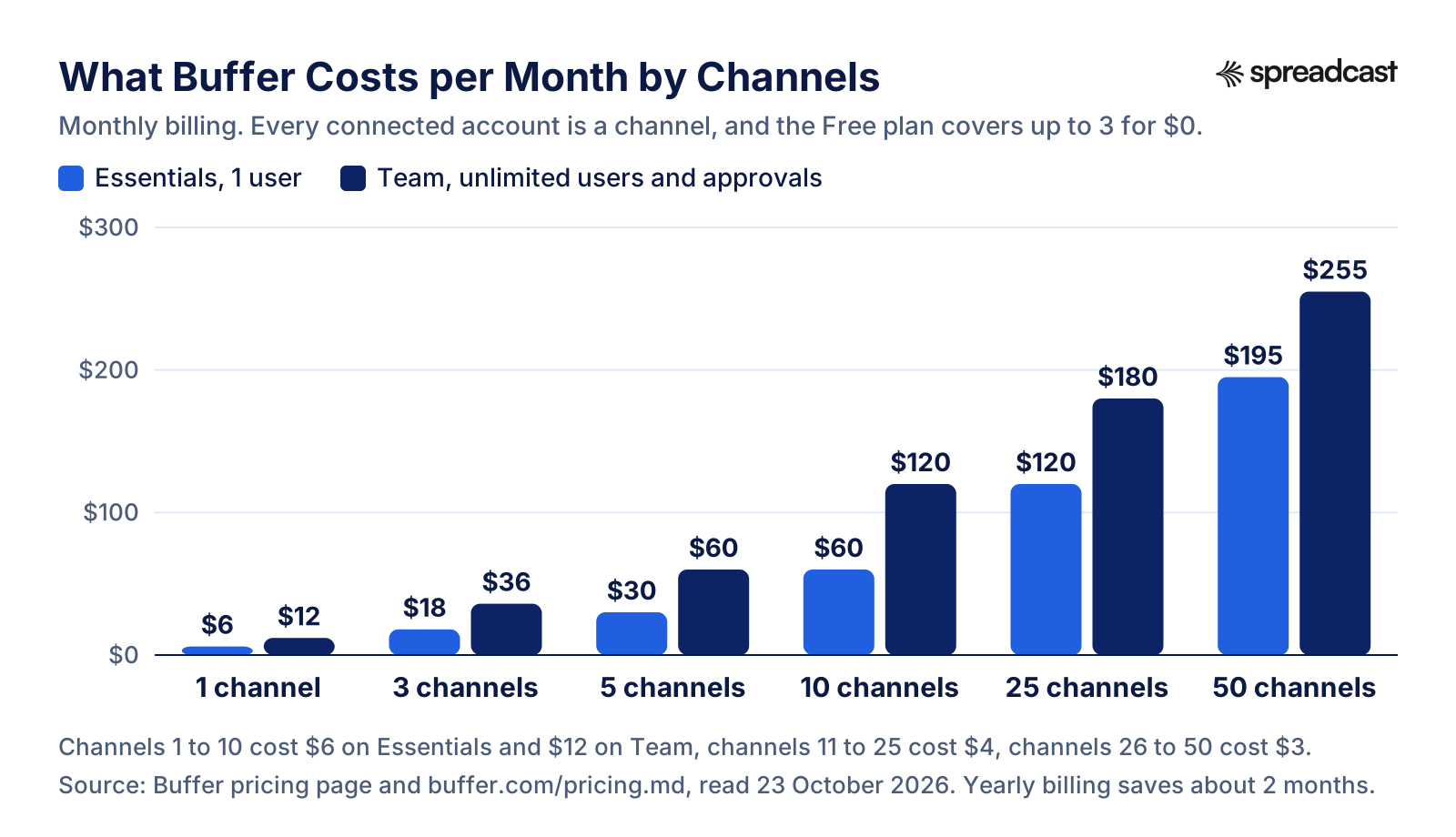
The per channel model is easiest to judge as a picture. These are Buffer's own example totals on monthly billing.
How Buffer's Per Channel Pricing Works in Practice
A channel is one connected account: one Instagram profile, one Facebook Page, one LinkedIn Page. The example on Buffer's pricing page is five brands with an Instagram account and a Facebook Page each, which makes 10 channels. That makes the bill easy to predict. Five channels on Essentials cost $30 a month on monthly billing and $25 a month on yearly billing, and ten cost $60 or $50.
Three details change the sum. First, upgrading from Free means paying for every channel, including the three you used for free; Buffer's pricing FAQ says so directly. Second, a Start Page link in bio counts as a channel, so on a paid plan it adds one more fee, per Buffer's Start Page guide. Third, approvals live only on Team, which doubles the rate for the first 10 channels: 8 channels cost $48 a month on Essentials and $96 on Team.
The discounts are real too. Rates fall to $4 per channel from the 11th channel and to $3 from the 26th, so an agency with 25 accounts pays $120 a month on Essentials rather than $150. Nonprofits and charities get 50% off paid plans. The 14 day trial needs no card, and without payment details the account moves back to Free when it ends. If a card is already saved, though, Buffer's free trial guide says the account upgrades automatically and the first payment is taken, and each account gets one trial only.
Payment is by card only. Buffer lists Visa, Mastercard, American Express, JCB, Discover and Diners Club, and says it cannot take PayPal, checks or bank transfers. Refunds are offered within 7 days of starting a monthly subscription and within 30 days of starting a yearly one, through a form on Buffer's refund policy. People still on older plans, which Buffer calls legacy plans with names such as Pro, Premium and Small Business, can move to the current ones, but Buffer's note on its new plans says it cannot move anyone back afterwards. The App Store's list of in app purchases still shows some of those older names next to Essentials.
For every Buffer price set against what an app maker pays for Spreadcast, see our Buffer comparison for app founders, which also covers cancelling and moving accounts.
What Buffer's Free Plan Includes Next to the Paid Plans
The free plan is the reason many people try Buffer at all, so it deserves a line by line look.
| Feature | On Free | On Essentials and Team |
|---|---|---|
| Connected channels | Up to 3 | As many as you pay for |
| Scheduled posts per channel at one time | 10, refilled as each post goes out | Unlimited, with a fair use cap of 5,000 |
| Users | 1 | 1 on Essentials, unlimited on Team |
| Saved ideas | 100 | Unlimited, according to the pricing page |
| Tags | 3 | 250 |
| Threaded posts | 1 | Unlimited |
| Insights history | 30 days | Full history, plus reports, custom analytics and UTM settings |
| AI Assistant | Included, without a usage cap | Included, without a usage cap |
| AI reply suggestions in Community | 5 a week | Unlimited |
| Saved replies | 1 | Unlimited |
| First comment, hashtag manager, channel groups, custom video covers | Not included | Included |
| API | 1 key, 3,000 requests a month | 3 keys and 7,500 requests on Essentials, 5 keys and 15,000 on Team |
From the feature table on Buffer's pricing page, read on 23 October 2026. The FAQ on Buffer's Create page caps ideas on paid plans at 2,000 per organization, so read unlimited ideas as a large limit rather than no limit.
Is Buffer's Free Plan Enough?
For many people, yes. Three channels with 10 posts waiting in each queue is enough to plan about ten days ahead at one post a day per network, and the slots refill as posts go out, so there is no monthly cap. The AI Assistant, the Community inbox, 30 days of Insights and even the API and MCP server are all included. Few schedulers give this much away, and the free plan comes up again and again in Buffer's positive reviews.
The limits show up in three places. One user means a second person cannot log in, so a founder and a marketer cannot share the account. Thirty days of history means you cannot compare this quarter with the last. And the 3 channel cap includes a Start Page if you use one. When you outgrow it, you pay for every channel, so moving from 3 free channels to 4 paid ones costs $24 a month on Essentials billed monthly, not $6.
If you leave a paid plan later, Buffer's downgrade guide explains what happens: you choose which 3 channels stay active, the rest are locked but stay connected, posts already queued on active channels still go out, and extra users lose access. If a card payment fails, Buffer retries it four times over three weeks before moving the account to Free.
Buffer Features, Area by Area
Buffer splits its product into areas, each with its own page. Each card says what the area does, from Buffer's own pages, and where it stops.
Publish: Queue, Calendar and Composer
You write a post once, pick the channels and either drop it into the next open slot of a recurring schedule or choose a date and time. Each network gets its own text box and each channel its own time zone, and Buffer's Publish page says posting times shift automatically when daylight saving starts and ends. There are week and month calendar views, drag to reschedule, threads for X, Bluesky, Threads and Mastodon, and drafts on every plan. You can even write drafts on that page without an account; they stay in that browser for 30 days.
Create: Ideas, Board View and Templates
Buffer's Create page is a scratchpad for ideas before they become posts: a kanban style board, tags, templates, imports from Google Drive, Dropbox and Canva, RSS feeds and a browser extension for saving things you find on the web. Custom post templates that a team can share arrived in July 2026. It organizes your ideas; it does not come up with them for you.
AI Assistant: Help With Text on Every Plan
The assistant suggests ideas, rewrites, shortens, expands or changes the tone of a draft, and adapts a post for another network. Buffer's AI Assistant page says it runs on OpenAI's models, that the text you type into it is shared with OpenAI, and that it is entirely optional. The same page says Buffer is not an AI tool and its core features are not AI driven. A prompt needs at least 4 words, per Buffer's AI Assistant guide. It writes text; it does not design the image.
Insights: Analytics Rebuilt in 2026
Buffer's Insights page describes a complete rebuild of the old Analyze product: reach, engagement, follower changes and top posts for Facebook, Instagram, TikTok, LinkedIn, Threads, YouTube, X, Pinterest, Bluesky, Mastodon and Substack, with plain language Takeaways that suggest what to try next. The core is free with 30 days of history; paid plans keep everything and export to PDF, CSV or Markdown.
Community: Comments From 10 Networks
Buffer's Community page gathers comments from Instagram, Facebook, LinkedIn, Threads, Bluesky, X, TikTok, Google Business Profile, YouTube and Mastodon, with a Comment Score for your reply habits, AI reply suggestions and saved replies. Since July 2026 it also shows posts that mention your X account. Buffer's pages describe comments and mentions, not direct messages, so it is not a full social inbox.
Collaborate: Approvals on the Team Plan
On the Team plan, teammates draft posts and send them for approval, and the owner decides which channels each person may use, as Buffer's Collaborate page explains. Notes let people discuss a post where it sits, and in October 2026 Buffer rebuilt them to update in real time with mentions. Essentials has one user, so none of this applies there.
Start Page: A Link in Bio Site
Buffer's Start Page is a small page for the link in your bio, with themes, video and product embeds, email collection and click analytics. It counts as a channel on every plan, and you can build and edit it on desktop only.
API and MCP Server: Buffer Inside Other Tools
Every plan, Free included, gets Buffer's GraphQL API and an MCP server that lets Claude, ChatGPT, Cursor, Raycast, Perplexity, Notion, Zapier, n8n, Manus and Antigravity draft and schedule posts in your queue. Posts made this way land as drafts or scheduled posts you can review first. Our Buffer MCP server guide covers each tool and the setup.
Creator Camps: Buffer's Community on Discord
Separate from the Community inbox, Buffer's creator community runs on Discord, with 30 day Creator Camps that hand out daily prompts and shorter sprints of one to two weeks in between. It is free to join and aims at the hardest part of social media for most people, which is posting consistently.
Which Networks Buffer Supports and How It Posts to Each
Buffer lists 12 networks, but how it publishes differs from one to the next. Where a network's API will not accept a post, Buffer sends you a reminder to finish it in the network's own app.
| Channel | Publishes on its own | Reminder to finish on your phone | Comments in Community |
|---|---|---|---|
| Instagram business and creator accounts | Yes, when the post meets Instagram's rules | Yes, for formats Instagram does not accept from tools | Yes |
| Instagram personal profiles | No | Yes, every post | No |
| Facebook Pages | Yes | No | Yes |
| Facebook groups | No | Yes, every post | No |
| TikTok business profiles | Yes | Yes, for some formats | Yes |
| YouTube Shorts | Yes | Yes, for some formats | Yes |
| LinkedIn Pages and profiles | Yes | No | Yes |
| X profiles, free and premium | Yes | No | Yes |
| Threads | Yes | No | Yes |
| Bluesky | Yes | No | Yes |
| Mastodon | Yes | No | Yes |
| Pinterest business and personal accounts | Yes | No | No |
| Google Business Profiles | Yes | No | Yes |
| Substack | Notes, since 23 September 2026 | Not listed | Not listed |
| Start Page | Yes | No | No |
From the channel table in the FAQ on Buffer's pricing page and from Buffer's changelog for Substack. Networks outside these 12, such as Reddit or WhatsApp, are not on Buffer's list.
Why Some Buffer Posts End Up on Your Phone
This is the most misunderstood part of Buffer, and it explains many of the complaints further down. Buffer can only publish what each network's API accepts. Buffer's Publish page lists Facebook Pages, X, LinkedIn, Threads, Bluesky, Mastodon, Pinterest and Google Business Profile as networks where it posts with nothing else needed from you. For Instagram, TikTok, YouTube and Facebook groups, some posts arrive as a push notification instead, and you finish them in the network's own app.
On Instagram, Buffer's guide to posts that do not send automatically names the triggers: a personal account rather than a Business or Creator one, an image outside the ratio range of 0.8 to 1.91, a Reel shorter than 3 seconds or longer than 15 minutes, or a feature Instagram does not let any tool publish, such as stickers, music on posts and Stories, product tags or links in Stories. A channel setting called Enable Notifications by default sends every post to your phone while it is switched on.
Buffer has been closing some of these gaps. Its changelog records support for music and collaborators on Instagram posts on 7 October 2026, after years in which such posts had to be finished in Instagram, and posts that mix images and video on 28 September 2026. The rule underneath is the same for every scheduler: what a network's API refuses, no tool can publish on its own. Images in the right shape remove most of the problem, and our social media image sizes reference lists them per network.
Video: Buffer Insights in Under Three Minutes
Analytics is the area reviewers criticize most, so it is worth seeing the rebuilt version before you judge it. This is Buffer's own walkthrough from July 2026.

What Changed at Buffer in 2026
Buffer ships often, and its changelog is public. The biggest change of the year was Insights, the rebuilt analytics, released on 14 April 2026. A week earlier, on 7 April, Community gained TikTok, YouTube, Google Business Profiles and Mastodon, which brought it to 10 networks.
The summer was about AI and the composer. Buffer connected to Claude, ChatGPT and Perplexity through its MCP server on 10 June, added generated alt text for images on 17 June, launched a new home screen called Buffer Home on 24 June and reworked the post composer on 29 June. July brought saved views, a Mentions tab for X, new team permissions and custom post templates.
The autumn was about networks and formats. Instagram and Facebook posts can be filtered by type since 2 September, images got a built in editor for cropping, rotating and alt text on 15 September, Substack Notes became a channel on 23 September after more than 1,000 upvotes on Buffer's roadmap, posts that mix images and video arrived on 28 September, and Instagram music and collaborators on 7 October. Notes, the team comments on posts, were rebuilt for real time work on 14 October. The iPhone app reached version 16.2.1 on 22 October 2026, according to its App Store listing.
Prices did not change in 2026. Buffer's pricing file says they were last updated in November 2025, and its FAQ presents the lower rates after the 10th channel as its new pricing. If you read a Buffer review from 2024 or early 2025, its prices and plan names are likely out of date.
Buffer Ratings on Review Sites and App Stores
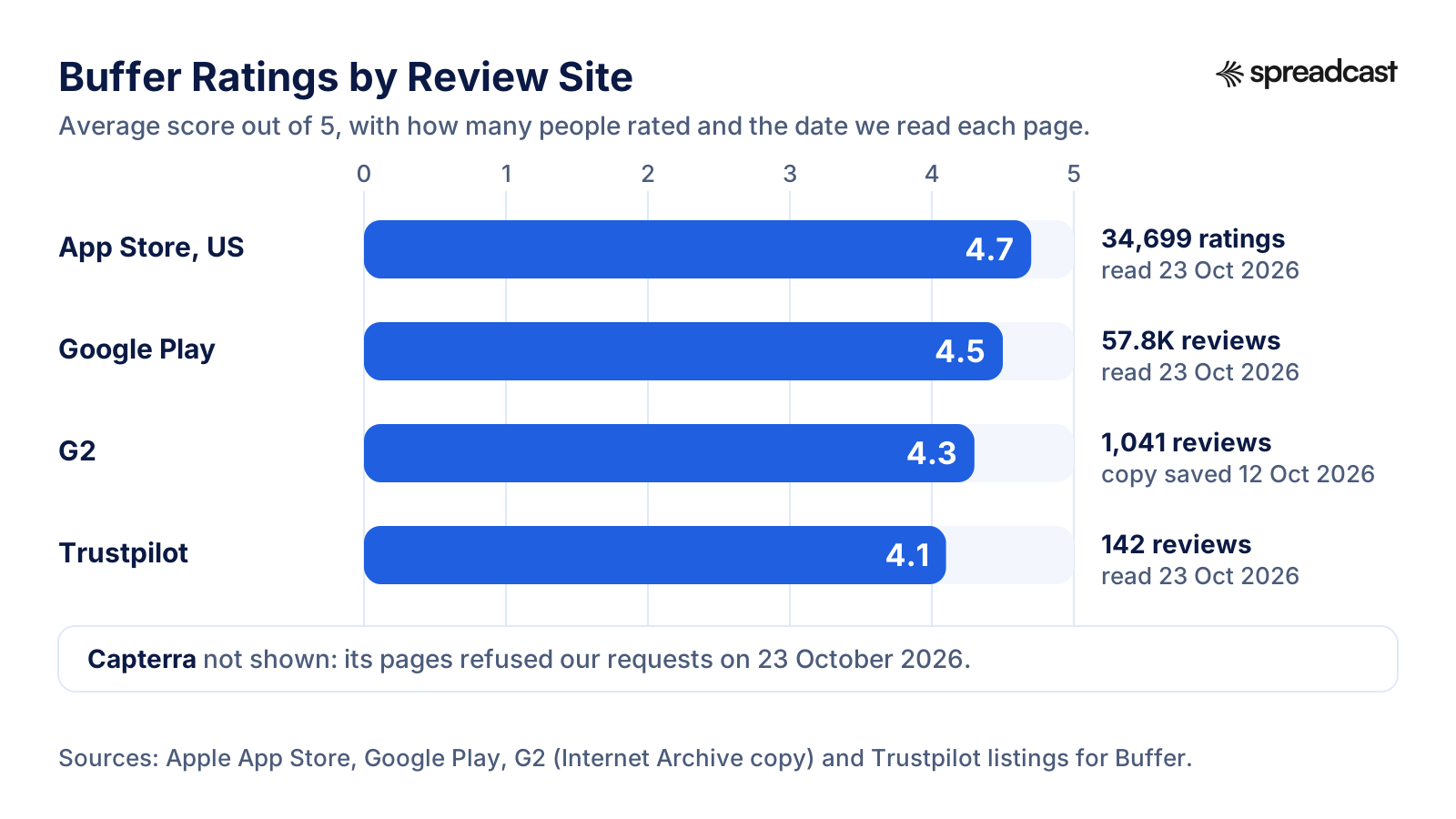
Four public scores we could read in October 2026, each with the number of people behind it.
Buffer Reviews by Site: Scores, Counts and Dates
Where each number comes from, when we read it and what it actually measures.
| Site | Score | How many | Read on | What it measures |
|---|---|---|---|---|
| App Store, US | 4.7 out of 5 | 34,699 ratings | 23 October 2026 | The iPhone app, first released in December 2011 |
| Google Play | 4.5 out of 5 | 57.8K reviews, with over 1 million downloads | 23 October 2026 | The Android app, last updated on 6 October 2026 |
| G2 | 4.3 out of 5 | 1,041 reviews | Internet Archive copy saved 12 October 2026 | The whole product. 728 of the reviews come from businesses with 50 or fewer employees |
| Trustpilot | 4.1 out of 5 | 142 reviews | 23 October 2026 | The company and its service, often written after a problem |
| Capterra | Not shown | Not shown | Refused our requests on 23 October 2026 | We could not verify a current score, so we leave it out |
Each score is the average the site itself shows. The store ratings measure the phone apps, which many people use only to approve drafts or finish posts, so they are not a score for the whole product.
How to Read Buffer's Ratings
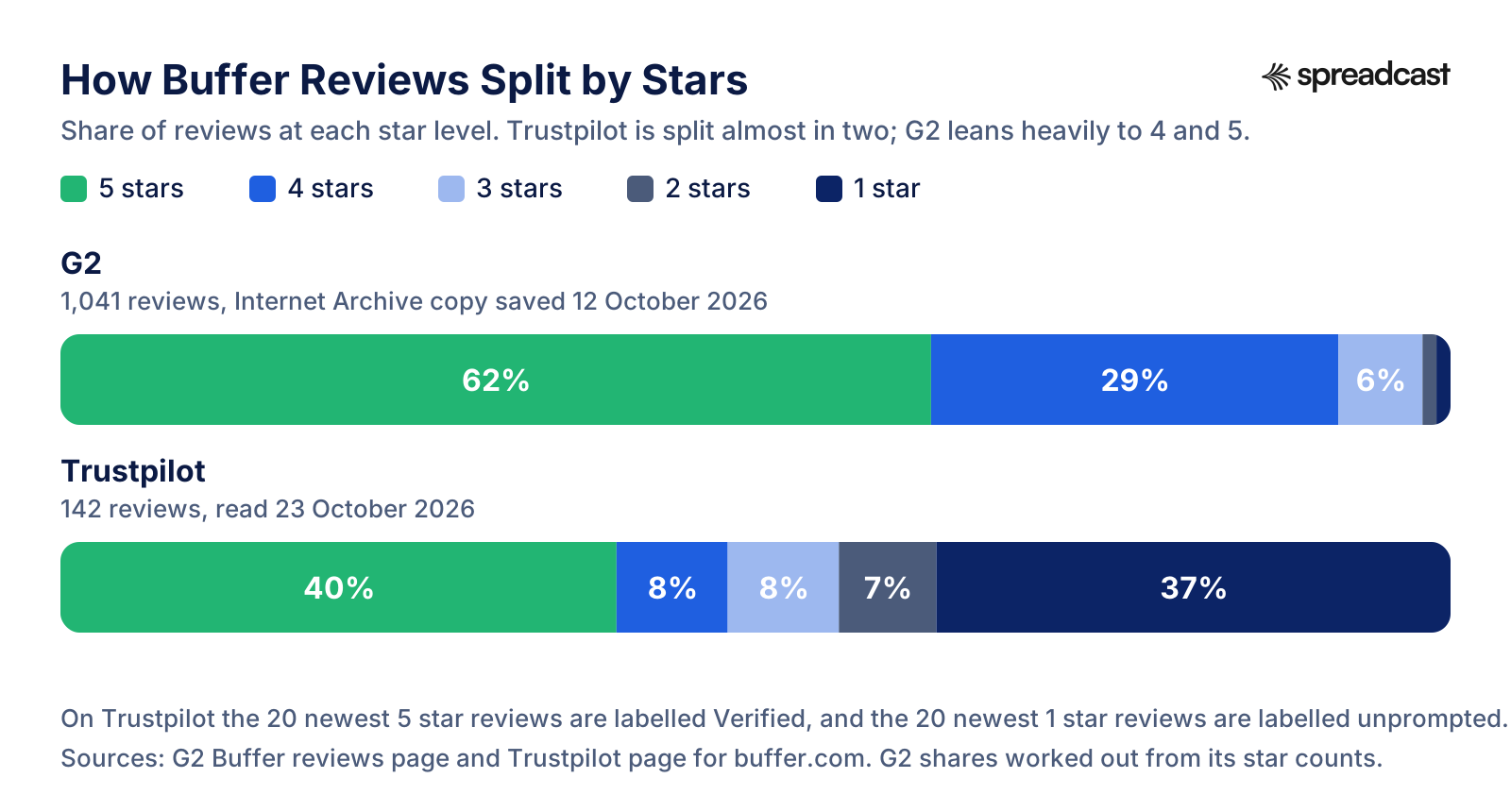
The four numbers agree on one thing: most people who rate Buffer like it. They disagree on how much, and the shape of the reviews explains why. On G2, 648 of 1,041 reviews give 5 stars and 306 give 4, so more than 9 in 10 are positive, and only 26 give 1 or 2 stars. On Trustpilot the split is very different: 40% 5 stars and 37% 1 star, with little in between.
Two things pull Trustpilot apart. People tend to go there when something went wrong, and Buffer invites customers to leave reviews, which its Trustpilot profile states openly. When we read it, the 20 newest 5 star reviews, dated from late August to mid October 2026, all carried Trustpilot's Verified label, while the 20 newest 1 star reviews were all marked as unprompted. That does not make either group less real, but they are two different samples. The score also moves quickly at this size: on 14 October 2026 our Buffer vs Hootsuite comparison recorded 3.8 from 129 reviews, and by 23 October it was 4.1 from 142.
Buffer answers its critics in public. Its Trustpilot profile shows replies to 88% of negative reviews, usually within two weeks. On the App Store, a 2019 review about Instagram locations carries a developer reply pointing to the fixed incident on Buffer's status page. That habit matches the company's open style, and it gives you a quick way to judge support before you buy: read the replies, not only the stars.
For a buyer, the practical reading is this. G2 and the app stores tell you Buffer is pleasant to use day to day. Trustpilot's 1 star reviews tell you what happens when it goes wrong. Both are worth reading before you decide, and the next sections summarize each side.
How Buffer's Reviews Split by Stars on G2 and Trustpilot
The averages hide very different shapes. This is the share of reviews at each star level on the two review sites we could read.
Buffer Complaints: What Unhappy Users Report
To find the complaints that keep coming up, we read the 20 newest 1 star reviews on Trustpilot, posted between October 2024 and October 2026, G2's summary of pros and cons, the critical reviews shown on the App Store and the Reddit threads covered below. We counted themes rather than quoting people. Three themes stand out.
Posts that failed or never went out are the largest group: 8 of the 20 Trustpilot reviews describe scheduled posts that failed, sometimes repeatedly, including grid posts and posts with locations or tags. Connections come second: 3 describe channels that disconnected or had to be connected again, mostly Instagram and Facebook. Support comes third: 4 criticize it, from problems left unresolved to limited support hours. The rest are one or two reviews each: missing Facebook data in analytics, two people who believed posts sent through a scheduler reach fewer people, a charge attempted after cancelling, a closed account, a Facebook restriction blamed on automatic publishing, a login problem and a worry about account security.
The pros and cons G2 generates from user reviews point the same way with smaller numbers: Lack of Analytics is the most mentioned con with 4 mentions, followed by Social Media Limitations and High Pricing with 3 each, Performance Issues with 2 and Inadequate Support with 1. On the App Store, the most visible critical review is from October 2023 and describes failed video posts and stretched vertical videos, while saying that text posts to X always worked.
Many of these complaints trace back to the networks' rules rather than to a hidden flaw in Buffer, and Buffer's own pages say as much: access tokens expire after password or permission changes, Instagram refuses some formats, and Meta decides which numbers its API returns. That explanation is fair, and it is also no comfort when a launch post does not go out. Every tool that publishes through these APIs, Spreadcast included, lives with the same rules, so the useful question is how quickly a tool tells you and how easy the fix is.
Recurring Buffer Complaints and Buffer's Side
Each complaint, where we saw it, and what Buffer says about it or has changed since.
| Complaint | Where we saw it | What Buffer says or changed |
|---|---|---|
| Scheduled posts fail | 8 of the 20 newest 1 star Trustpilot reviews, and two Reddit threads from October 2024 about TikTok and uploads | Its Instagram guide lists each reason a post goes to your phone instead; posts that mix images and video arrived in September 2026 |
| Channels disconnect | 3 of the 20 Trustpilot reviews | Buffer's Publish page says Meta revokes or expires access tokens after password changes, security checks or permission changes, and that reconnecting the channel fixes it |
| Analytics feel thin, Facebook numbers missing | G2's most mentioned con, a Reddit thread from December 2024 and a Trustpilot review from October 2026 | Insights was rebuilt in April 2026 with Takeaways and exports; in the Reddit thread a later reply concluded that Facebook itself had reduced the data it shares |
| The bill climbs with every channel | G2's High Pricing con and a Trustpilot review about value | Rates drop to $4 per channel after 10 channels and $3 after 25, and nonprofits get 50% off |
| Support does not solve it | 4 of the 20 Trustpilot reviews and G2's Inadequate Support con | Email support on every plan, and replies to 88% of negative Trustpilot reviews, usually within two weeks |
| Instagram posts arrive as reminders | A Reddit thread from May 2025 and a Trustpilot review from July 2026 | Automatic posting needs a Business or Creator account and a supported format; music and collaborators were added in October 2026 |
Counts are our reading of the reviews on 23 October 2026. The samples are small, so treat them as patterns to check rather than as rates.
What Users Praise About Buffer
The praise is just as consistent, and it is mostly about calm and simplicity. The pros and cons G2 generates from user reviews list Ease of Use first, with 13 mentions, then Post Scheduling with 9, Social Media Integration with 6, Time Saving with 5 and Automation Benefits with 4. Its generated overview says users praise the ease of use and intuitive scheduling, and that some would like the analytics to go further.
The 20 newest 5 star reviews on Trustpilot, from late August to mid October 2026, repeat the same few points in short sentences: posts are easy to plan, the free plan is worth using, one post goes to several networks at once, comments are managed in one place, the API was easy to connect, and a support problem was solved quickly. Many are a single line, so they show satisfaction more than detail.
The app stores add scale. The iPhone app holds 4.7 from 34,699 ratings in the US and the Android app 4.5 from 57.8K reviews with more than a million downloads. Those numbers say the phone apps do well at what most people use them for: checking the queue, approving a draft, finishing a post Instagram would not take automatically.
Independent reviewers land in a similar place. The Efficient App channel, whose 2024 comparison is embedded below, picked Buffer for individuals, and its video description now adds that the team still recommends Buffer for solo creators while it moved its own business to a tool built for teams. That is a fair one line summary of where Buffer is strongest.
What Reddit Threads Say About Buffer
Reddit is where people ask about Buffer before buying and complain about it afterwards, but the threads are small and often crowded with founders promoting their own tools in the replies. Reddit blocks scripts, so we read these r/socialmedia threads through copies saved by the Internet Archive. Each is summarized in our own words, with its date.
In Buffer FB analytics gone, posted on 13 December 2024 with 10 comments, a user reported that Facebook impressions, reach and clicks had stopped appearing in Buffer since mid September. Others with the same problem talked about leaving, and a later reply concluded that Facebook had limited the data it shares rather than Buffer dropping it. In a thread about upload problems from 11 October 2024, a user found posts blocked for their aspect ratio or video resolution although the same video uploaded fine directly; a reply suggested a workaround with timing. A short thread from 31 October 2024 asked whether Buffer really works with TikTok after picture posts failed again and again, and the one detailed reply recommended Metricool.
Other threads are buying questions. A nonprofit founder posting to 3 Facebook accounts, 3 Instagram accounts and 1 LinkedIn page asked in November 2024 whether Later or Buffer is friendlier to use, and several replies promoted other tools instead. In February 2025 an agency worker asked for a free plan like Buffer's and Publer's with three or more channels, which says something about how rare such a free plan is. And in May 2025 a user asked for a tool like Buffer that posts to a personal account without the phone step; the replies pointed out that Buffer can post automatically to professional accounts and that the limit on personal accounts comes from the networks themselves.
Read together, Reddit agrees with the review sites. People like Buffer's simplicity and its free plan, and the frustrations are about network limits, Facebook data and failed uploads. If you are weighing Buffer, search r/socialmedia for the one network you care about most, since most threads are about one network at a time.
Video: An Independent Comparison of Buffer, Metricool and Hootsuite
Recorded in June 2024, before Buffer's November 2025 prices and the rebuilt Insights, so check any price against the tables above. The part on Buffer and its limits starts at 3:36.

What Buffer Does Well and Where It Falls Short
Strengths and weaknesses side by side, area by area, drawn from Buffer's pages and the reviews above.
| Area | Where Buffer does well | Where it falls short |
|---|---|---|
| Getting started | A free plan with 3 channels and no end date, and a 14 day trial without a card | One trial per account, and a saved card upgrades you automatically when it ends |
| Everyday use | Ease of use is the top pro on G2, with one composer and a text box per network | Posts to Instagram personal profiles and Facebook groups always need your phone |
| Networks | 12 channels, including Bluesky, Threads, Mastodon and Substack Notes | Networks outside the 12, such as Reddit, are not supported, and Pinterest comments are not in Community |
| Price | Public rates, $6 per channel, lower after 10 channels, 50% off for nonprofits | Approvals double the rate, and upgrading bills the 3 free channels too |
| Analytics | Insights on every plan, with plain language Takeaways | 30 days on Free, paid exports, and missing Facebook data as a repeated complaint |
| AI and automation | A writing assistant, an API and an MCP server, all on the Free plan | Text only, with no image design, and prompts are sent to OpenAI |
| Engagement | Comments from 10 networks in one inbox, free | No direct messages, listening or review management described on its pages |
| Support | Email on every plan and public replies to most critical reviews | No phone line listed; failed posts and disconnections lead the 1 star reviews |
| Company | Open revenue, salaries and history, remote since 2013 | Cards only, with no PayPal or bank transfer |
Every line comes from Buffer's own pages or the review sites linked above, read on 23 October 2026.
Who Buffer Is Best For
Buffer fits best when the content already exists and the job is getting it out on time, on several networks, without fuss.
Solo Creators Who Already Make Content
If you film, write or design your own posts every week, Buffer gives them a calm home. The free plan covers 3 networks, the AI Assistant helps with wording, and Buffer's Discord community runs 30 day Creator Camps for people trying to post more consistently.
Small Businesses With 3 to 10 Accounts
Three accounts are free, and ten cost $60 a month on Essentials billed monthly or $50 billed yearly. For an owner who shares the same news on Facebook, Instagram and LinkedIn, one composer with a box per network saves the most time.
Nonprofits and Charities
Buffer gives nonprofits and charities 50% off paid plans, which would bring 10 Essentials channels to about $30 a month on monthly billing. The nonprofit founder on Reddit who compared Buffer with Later mentioned qualifying for a nonprofit discount.
Agencies That Want to Pay per Account
Pricing per channel rather than per user means a client who leaves takes their cost with them, and rates fall to $4 from the 11th channel and $3 from the 26th. The Team plan adds unlimited users, approvals and access levels for each channel.
People Posting to Newer Networks
Buffer publishes to Bluesky, Threads, Mastodon and, since September 2026, Substack Notes, and it schedules threads on X, Bluesky, Threads and Mastodon. If those networks matter to you, check that any alternative supports them before you switch.
Developers and People Who Work in AI Assistants
The API and the MCP server are on every plan, Free included. You can ask Claude or ChatGPT to draft a post and put it in your queue, or build your own automation on Buffer's GraphQL API.
Who Should Look Elsewhere
Buffer is honest about being a publishing tool. These readers need something it does not try to be.
Teams That Answer Direct Messages
Buffer's Community handles comments and X mentions, and its pages do not describe direct messages, listening or review management. Hootsuite's Standard plan includes a unified inbox and listening from $99 per user a month billed yearly, and Sprout Social's pricing page starts its Standard plan at $199 per seat a month billed yearly.
Marketers Who Report Deeply on Facebook
Missing or inconsistent Facebook numbers are the most specific analytics complaint we found, on Reddit in 2024 and on Trustpilot in 2026. Run the trial on your own Facebook Page and compare it with Meta's own insights before you commit.
Anyone Who Wants the Posts Made for Them
Buffer publishes what you bring. Its AI Assistant drafts and rewrites text from your prompt, and its image editor crops images and adds alt text, but nothing in Buffer decides what to post or designs the picture.
App Makers With Nothing to Queue
An app's news lives on its App Store page: new versions, release notes, ratings. Buffer does not read that page, so every post still starts with someone noticing the update and making something from it.
People Who Pay by PayPal or Invoice
Buffer takes cards only and lists no PayPal, checks or bank transfers. Hootsuite accepts PayPal and can invoice on its annual Enterprise plan.
Instagram Personal Profiles and Facebook Groups
Both work only by reminder in Buffer: you get a push notification and finish the post on your phone. If automatic posting matters, switch Instagram to a Business or Creator account first.
Is Buffer Worth It for App Makers?
If you build an app, the honest answer depends on whether you already have posts. Buffer is a good queue. It does not watch your App Store page, so when version 3.2 ships with new release notes, or your app passes 1,000 ratings, nothing happens in Buffer until someone notices, designs an image, writes a caption for each network and schedules it. Apple gives you up to 4,000 characters of release notes for each version in App Store Connect, and none of that text reaches a scheduler on its own.
That gap is common. In a small app team, the person who could write the posts is often the person shipping the release, so the queue stays empty in exactly the weeks when there is most to say. We wrote about the pattern in why your scheduler is not the reason your feed is empty.
So Buffer is worth it for an app maker in two cases: you have a person or a habit that produces posts every week, or you need to publish posts you make by hand, such as videos, hiring news or event photos, next to your app's own announcements. If the problem is that the posts never get made, a cheaper or better queue does not fix it. Our guide to promoting an app on social media covers what to post, and these app update announcement examples show what a release post can look like.
Is Buffer Worth It? Answers by Situation
For one person posting to up to 3 accounts: yes, start on Free. It costs nothing, has no end date and includes the AI Assistant, Community and 30 days of Insights. Upgrade only when you need a fourth channel, a second user or a longer history.
For a small business on 4 to 10 accounts: usually yes. Essentials costs $24 to $60 a month billed monthly, or $20 to $50 billed yearly, and Buffer stays one of the simpler tools at that price. Check first whether you need a second person in the account: if you do, Team doubles the rate.
For an agency with 25 or more accounts: worth comparing. Buffer's tiers make 25 channels $120 a month on Essentials and 50 channels $195, and pricing per channel suits clients who come and go, a point Buffer's pricing page makes with a quote from an agency customer. Teams that need a shared inbox for messages, listening or approval chains with many roles will find more in Hootsuite or Sprout Social, at a much higher price per seat.
For people who need deep Facebook reporting: test it on the trial with your own Page before paying, because missing Facebook numbers are the most specific complaint that keeps coming up.
For an app maker with no content habit: not on its own. Pair a queue with something that makes the posts, or use a tool built around your App Store listing.
Alternatives to Buffer Worth Knowing
Five tools people weigh against Buffer, with facts from their own pricing pages on 23 October 2026. The full field of nine, with prices at 3, 5, 8 and 10 channels, is in our roundup of the best Buffer alternatives.
- 1
Spreadcast
Free for 3 posts to download, then $29 a monthBest for app makers who want posts made from their App Store listing
Spreadcast does the step Buffer leaves to you. You paste your App Store link once, Spreadcast checks the listing every day, and when a new version ships or the app reaches a rating milestone, it designs a post with your real screenshots in an iPhone frame, in your app's colors and fonts, writes the caption for each network and publishes it.
It publishes to Instagram, TikTok, LinkedIn, Facebook, Threads, Pinterest, Bluesky, Mastodon, Telegram and Discord, plus YouTube for video posts, on full autopilot or after a one tap approval, and you can create and post from Claude or ChatGPT through its MCP server. Pro is $29 a month or $290 a year for 1 app and 10 social accounts, and Studio is $79 a month for 5 apps and 50 accounts. The Free plan makes 3 posts for 1 app to download, with a small Spreadcast mark, and does not publish. Details are on the pricing page.
Pros
- Makes the post, not only the schedule
- Checks the App Store listing every day
- Full autopilot or one tap approval
Cons
- Apps on the App Store only, not Google Play
- Posts about two moments: new versions and rating milestones
- No X, YouTube or comment inbox
- 2
Publer
Free for 3 accounts, then from $5 a month per accountBest for a cheaper scheduler that works much like Buffer
Publer's plans article puts its Free plan at 3 social accounts, excluding X, with 10 scheduled posts at a time per account, close to Buffer's free plan. Professional starts at $5 a month for one account and adds X, bulk scheduling and RSS automations. Business starts at $10 and adds analytics, recycling, approvals and, for eligible customers, an API and an MCP server. Every 10th account is free.
Our Publer vs Buffer comparison sets every plan side by side.
Pros
- Lower price per account than Buffer Essentials
- Bulk scheduling and RSS on the first paid plan
Cons
- No X on the Free plan
- Analytics need the Business plan
- 3
Metricool
Free for 1 brand, then from $20 a month billed yearlyBest when analytics matter as much as the queue
Metricool's pricing page offers a Free plan for 1 brand with 20 scheduled posts a month, 30 days of analytics and 5 competitor profiles, though LinkedIn and X are left out. Starter costs $20 a month billed yearly or $25 billed monthly for up to 5 brands, with unlimited history, PDF and PowerPoint reports and up to 100 competitors.
Our Metricool vs Buffer comparison covers the differences plan by plan.
Pros
- Competitor analysis even on Free
- Priced per brand rather than per account
Cons
- No LinkedIn or X on Free
- 20 posts a month on Free
- 4
Later
From $18.75 a month billed yearlyBest for visual planning on Instagram and TikTok
Later's pricing page puts Starter at $18.75 a month billed yearly for 1 social set of 8 profiles, one of each network, with up to 30 posts per profile a month, 5 AI credits, 3 months of analytics and a link in bio page. Growth, at $37.50 a month billed yearly, adds a second social set and allows 180 posts per profile.
Our Buffer vs Later comparison explains which one suits which kind of account.
Pros
- Visual planning for the Instagram grid
- Link in bio page included
Cons
- Monthly post caps per profile
- Starter allows 1 user
- 5
Hootsuite
From $99 per user a month billed yearlyBest for teams that need an inbox, listening and reports
Hootsuite's plans page starts at $99 per user a month on annual billing for Standard, which covers up to 10 social profiles, planning and scheduling, a unified inbox, analytics, competitor benchmarking and social listening. Professional is $199 and Advanced $399, and there is no free plan, only a free trial that needs no card.
Our Buffer vs Hootsuite comparison has the company facts and the review scores for both.
Pros
- Inbox and listening built in
- Accepts PayPal
Cons
- Priced per user, far above Buffer for small teams
- No free plan
Where Spreadcast Fits
Spreadcast is not a Buffer replacement for most of the people Buffer serves. It is not a general scheduler, it has no comment inbox, and it does not post to X or YouTube. If you make your own videos, write threads or run accounts for clients, stay with Buffer or another scheduler from the list above.
It fits one reader: someone with an app on the App Store whose social accounts go quiet because making posts takes time nobody has. You paste your App Store link once at the start page. Spreadcast checks the listing every day, and when a new version ships or the app reaches a rating milestone, it designs the post with your real screenshots in an iPhone frame and your brand colors and fonts, writes a caption for each network and publishes it to Instagram, TikTok, LinkedIn, Facebook, Threads, Pinterest, Bluesky, Mastodon, Telegram and Discord, plus YouTube for video posts. You choose full autopilot or approve each post with one tap.
Many app teams will want both. Spreadcast handles the posts that come from the app, and Buffer's free plan holds the posts you write by hand, such as a hiring note or a photo from a meetup; each tool publishes only what is on its own calendar. Spreadcast Pro is $29 a month for 1 app and 10 social accounts, Studio is $79 a month for 5 apps and 50 accounts, and the Free plan makes 3 posts to download so you can judge the designs before paying. See Spreadcast for mobile apps and the pricing page.
Our Verdict on Buffer in 2026
Buffer earns its 4.0 out of 5. It is easy to use, fairly priced, open about its business and steady in its development, with a long list of 2026 changes that answer real complaints, from rebuilt analytics to Instagram music and collaborators. Its weak spots are analytics depth, the failures that come with publishing through other companies' APIs, and support that some unhappy users found slow to solve their problem.
Choose Buffer if you have content and want a simple, affordable place to schedule it across up to 12 networks, especially if 3 free channels cover you. Look elsewhere if you need direct messages and listening, heavy Facebook reporting, or posts made for you. And if you build an app and your feed is quiet because the posts never get made, start with whatever makes the post, then decide whether you need a queue at all.
Frequently Asked Questions
Is Buffer worth it in 2026?
Yes, if you already make content and want a simple place to schedule it. The free plan covers 3 channels with no end date, and paid plans start at $6 per channel a month, per Buffer's pricing page. It is less worth it if you need direct messages, deep Facebook reporting or posts made for you. We rate it 4.0 out of 5.
What does Buffer's free plan include?
Up to 3 channels, 10 scheduled posts per channel at a time that refill as posts go out, 100 ideas, 1 user, the AI Assistant, the Community inbox for comments, 30 days of Insights and API access with 3,000 requests a month. It has no time limit.
What do Buffer reviews on Reddit say?
The r/socialmedia threads we read through Internet Archive copies, from October 2024 to May 2025, praise Buffer's free plan and simplicity and complain about missing Facebook analytics, uploads blocked for their aspect ratio, failed TikTok picture posts and the phone step for personal Instagram accounts. The threads are small and the replies often promote other tools.
What is Buffer's rating on G2, Trustpilot and the App Store?
On 23 October 2026 Buffer had 4.1 from 142 reviews on Trustpilot, 4.7 from 34,699 ratings on the US App Store and 4.5 from 57.8K reviews on Google Play. G2 showed 4.3 from 1,041 reviews in the copy saved on 12 October 2026. Capterra refused our requests.
What are the most common Buffer complaints?
In the 20 newest 1 star reviews on Trustpilot, the largest group is scheduled posts that failed or never went out, followed by support that did not solve the problem and channels that disconnected. On G2 the most mentioned con is a lack of analytics, followed by limits on some networks and pricing.
Is Buffer a legitimate company?
Yes. Buffer, Inc. has run the product since November 2010, lists a San Francisco mailing address on its legal page and publishes its revenue, user numbers and salaries on an open dashboard. Two factor sign in is available on every plan.
Does Buffer post automatically to Instagram?
Yes for Instagram Business and Creator accounts, as long as the post fits Instagram's rules: images with a ratio from 0.8 to 1.91, Reels from 3 seconds to 15 minutes, and no stickers, product tags or links in Stories. Personal profiles and unsupported formats are sent to your phone as a reminder to finish the post.
Does Buffer have AI?
Yes. The AI Assistant is included on every plan, Free too. It suggests ideas, rewrites, shortens, expands or changes the tone of text and adapts posts for each network. Buffer says it runs on OpenAI's models and is entirely optional. It does not design images.
Can Buffer answer direct messages?
Buffer's Community inbox collects comments from 10 networks and, since July 2026, posts that mention your X account. Buffer's pages do not describe direct messages, so teams that answer messages usually choose a tool with a full social inbox, such as Hootsuite or Sprout Social.
Does Buffer work with Claude and ChatGPT?
Yes. Buffer's MCP server, on every plan including Free, lets Claude, ChatGPT, Cursor, Raycast, Perplexity and other assistants draft and schedule posts in your queue. Posts land as drafts or scheduled posts you can review. Our Buffer MCP server guide covers the setup.
Does Buffer give refunds?
Yes, within 7 days of starting a monthly subscription and within 30 days of starting a yearly one, through a form on Buffer's refund policy.
How much does Buffer cost for a team?
The Team plan costs $12 per channel a month billed monthly, or $10 billed yearly, for the first 10 channels, with unlimited users, approvals and access levels. Channels 11 to 25 cost $4 each and 26 to 50 cost $3 each.
Is Buffer good for app developers?
Buffer is a good place to publish posts you already have, and its API and MCP server suit developers. It does not read your App Store listing, so release notes and rating milestones only reach your feed if someone turns them into posts. Spreadcast does that step for apps on the App Store.
Prices, plans and features change. This comparison describes each product as its own site described it on the date shown under Sources. Check the vendor's site before you decide. Product names are trademarks of their owners.
Where These Facts Come From
Every outside number, rule and price on this page links to the page it was taken from.
- Buffer pricing, plans and supported channelsBuffer
- Buffer machine readable pricing with volume tiersBuffer
- About Buffer, story, values and teamBuffer
- Buffer open metrics, salaries and historyBuffer
- Buffer terms, privacy and company addressBuffer
- Buffer Create, ideas and templatesBuffer
- Buffer Publish, scheduling and calendarBuffer
- Buffer Insights, rebuilt analyticsBuffer
- Buffer Community, comments inboxBuffer
- Buffer Collaborate, approvals and permissionsBuffer
- Buffer Start Page, link in bioBuffer
- Buffer AI AssistantBuffer
- Buffer APIBuffer
- Buffer MCP server for AI assistantsBuffer
- Buffer creator community and Creator CampsBuffer
- Buffer changelogBuffer
- Why Instagram posts do not send automaticallyBuffer Help Center
- Buffer refund policyBuffer Help Center
- Benefits of Buffer's new plans for legacy customersBuffer Help Center
- What happens when you downgrade to the Free planBuffer Help Center
- Using Start Page with BufferBuffer Help Center
- Information about Buffer free trialsBuffer Help Center
- Using Buffer's AI AssistantBuffer Help Center
- Buffer reviewsTrustpilot
- Buffer reviews, Internet Archive copy of 12 October 2026G2
- Buffer on the App Store, US ratingsApple App Store
- Buffer on Google PlayGoogle Play
- Buffer FB analytics gone, r/socialmedia thread, archived copyReddit via Internet Archive
- Problems uploading content with Buffer, r/socialmedia thread, archived copyReddit via Internet Archive
- Does Buffer really work with TikTok, r/socialmedia thread, archived copyReddit via Internet Archive
- Later vs Buffer, r/socialmedia thread, archived copyReddit via Internet Archive
- Free plan like Buffer and Publer, r/socialmedia thread, archived copyReddit via Internet Archive
- A tool like Buffer for personal accounts, r/socialmedia thread, archived copyReddit via Internet Archive
- Platform version information, release notes limitApple Developer
- What are Publer's plans and pricingPubler
- Metricool pricingMetricool
- Later pricingLater
- Hootsuite plans and pricesHootsuite
- Sprout Social pricingSprout Social
- Video: how to use Buffer in two minutesBuffer
- Video: how to use Buffer InsightsBuffer
- Video: Metricool, Buffer, Hootsuite and Typefully comparedEfficient App (Alex & Andra)
Researched and written by Spreadcast. Last checked on October 23, 2026.