SocialBee Review in Short: Our Verdict
SocialBee is a good scheduler for one kind of work: a library of posts that stay true for months, shared on a weekly plan without anyone pressing publish. Its content categories, recycling and expiry rules do that job well. The $29 Bootstrap plan already includes an inbox and AI generation that is listed as unlimited, and its support team is the thing reviewers praise most often. We give it 3.8 out of 5.
Three things keep the score from going higher. The companion mobile app, which some account types need in order to post at all, is rated 2.0 on the App Store and 1.8 on Google Play. SocialBee's own changelog records a run of posting and connection incidents in the summer of 2026, including a night in July when scheduled posts were skipped and never sent later. And refunds end 30 days after the first purchase, with nothing back on renewals, which is the subject of several angry reviews.
If you have an evergreen library and five to ten profiles, it is worth a trial. If you want to post mostly from your phone, need an API, or post news that is new every time, look at the alternatives near the end of this review, or at our longer list of the best SocialBee alternatives.
Our SocialBee Rating, Category by Category
Each score is our judgment from the evidence in this review, on a scale of 1 to 5. The overall score is the plain average of the five categories, rounded to one decimal.
| Category | Score | Why |
|---|---|---|
| Ease of use | 3.9 | G2 reviewers name ease of use among its top strengths, and Capterra's ease of use score is 4.2. The category model still takes an afternoon to learn, and several recent reviews call the interface cluttered. |
| Features | 4.2 | Categories with recycling and expiry, an inbox, RSS import, Canva and AI with no monthly cap, on every plan. It loses points for having no public API, no white label platform and reminder only posting for some account types. |
| Pricing and value | 4.1 | $29 a month for 5 profiles with the inbox and AI included is fair. Approvals, CSV uploads and two years of analytics need the $49 plan, and there is no free plan. |
| Reliability and mobile app | 3.0 | Several posting and connection incidents in the changelog between July and October 2026, a mobile app rated 2.0 or lower on both stores, and reviews that describe queues stopping without a clear warning. |
| Support and policies | 3.9 | Customer service is the most praised theme on G2 and scores 4.5 on Capterra. Refunds only in the first 30 days and none on renewals pull the score down. |
| Overall | 3.8 | A dependable category scheduler for evergreen content at a fair price, with real weak spots on mobile and reliability. |
These scores are ours, not SocialBee's. We did not run a paid account, so ease of use and reliability lean on what users report and on what SocialBee publishes about itself.
How We Reviewed SocialBee
We could not start a trial or run a paid account for this review, so nothing here is a hands on test, and we do not pretend otherwise. Instead we read what anyone can check, on 23 October 2026 unless a date says otherwise: SocialBee's pricing page, its about page, its help center articles, its changelog and terms of service, and the pages of ConciergeBee, its service arm. We also read the App Store listing and Google Play listing of its mobile app, its Trustpilot page and public Reddit threads.
G2 and Capterra block automated reading, so we read their SocialBee pages through the Internet Archive: the G2 copy saved on 14 October 2026 and the Capterra copy saved on 12 July 2026, which says the listing was last updated on 3 June 2026. For the App Store we also read Apple's public review feed for the US store, which returns the written reviews behind the star rating. Reddit blocks scripts as well, so we searched an archive of public Reddit comments and then opened the threads that mattered.
We counted what we saw rather than picking quotes that suit a story. Where a number below describes reviews, it says which site, how many reviews and when we read them. We summarize what reviewers wrote in our own words and do not name them. Where SocialBee has answered a complaint, in a reply, a help article or a changelog fix, we say so next to the complaint.
Spreadcast, which makes this site, is not a general scheduler, so it competes with SocialBee for only one kind of customer: people who market an app on the App Store. We say where that matters near the end, and we say plainly who should stay with SocialBee.
What SocialBee Is and Who Makes It
SocialBee is a web app for planning, creating, scheduling and analyzing social media posts, with an inbox for comments, mentions and messages. Its homepage promises a month of posts planned in under an hour, and its pitch is aimed at solopreneurs, small businesses and agencies. It publishes directly to Facebook, Instagram, Threads, X, LinkedIn, Pinterest, TikTok, YouTube, Google Business Profile and Bluesky, and reaches other networks through phone reminders.
The company behind it is SocialBee LABS SRL, based in Cluj Napoca, Romania, according to the developer details on its Google Play listing. The about page dates the launch to June 2016 and tells the founding story: three cofounders who wanted a better way to share a growing library of evergreen content across their profiles. That explains why recycling still sits at the center of the product ten years later. ConciergeBee, the done for you agency arm, became a brand of its own in August 2023.
In August 2024 SocialBee was bought by WebPros, the group behind the hosting control panels cPanel and Plesk. The WebPros announcement, dated 20 August 2024 in Luxembourg, described SocialBee as a fast growing provider of social media tools and services and listed ConciergeBee and a booking tool called ACE among its products. G2 now lists WebPros as the seller, and every SocialBee page footer says the company is part of WebPros.
One naming note before the reviews. A German organization that helps refugees and migrants learn German and find work is also called socialbee, and many search results and Reddit posts for the name are about that organization, not the software. Everything on this page is about the social media tool at socialbee.com.
How SocialBee Works: Content Categories and Evergreen Recycling
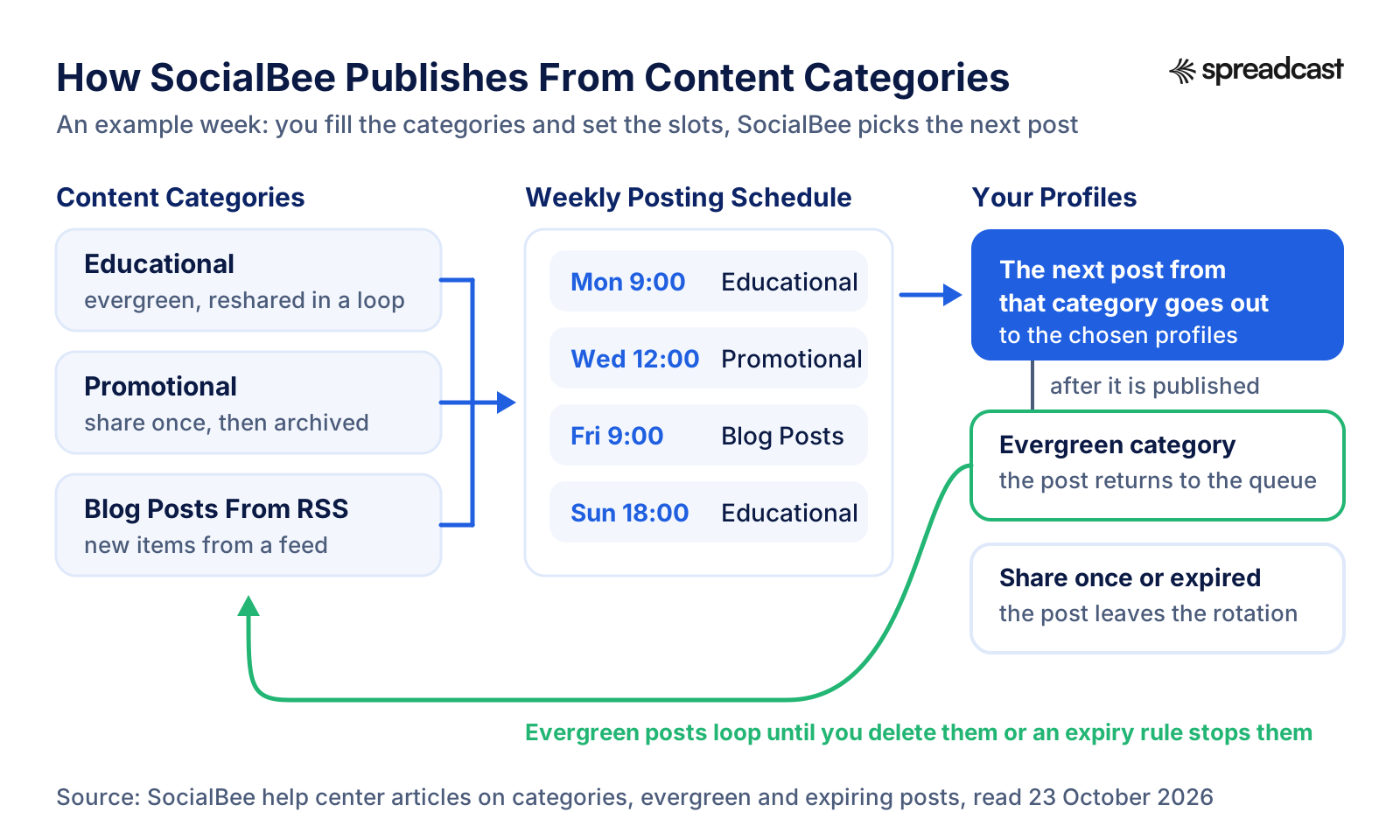
Most schedulers queue single posts. SocialBee queues folders. You sort posts into content categories, such as Educational, Promotional or Blog Posts, and then put the categories, not the posts, onto a weekly schedule. When a slot comes up, SocialBee shares the next post from the category that owns it. Its guide to content categories calls this category based scheduling, and it is the heart of the product.
Each category has a setting that decides what happens after a post goes out. In an evergreen category the post goes back into the queue, so a category of ten posts shares them one by one and then starts again from the first, as SocialBee's article on evergreen and share once posts explains. In a share once category the post leaves the rotation after it publishes. A single post can also be set to requeue on its own, which suits one strong post inside an otherwise one time category.
To stop an evergreen post from looping forever, SocialBee's guide to expiring posts lets you cap the number of times it is shared, set an end date and hour, or use both. An expired post is archived to your posting history, from where you can bring it back. RSS feeds can fill a category with new blog posts on their own, and the same expiry rules apply to imported content, including CSV uploads.
The system is changing as we write. On 20 October 2026 the changelog announced that Category Sequence and random categories are being phased out and replaced with your active categories, that the Next Posts view is being retired in favor of the Calendar and List views, and that biweekly, monthly and yearly repeat options are planned for later in the quarter. The changes roll out gradually, so what you see in a trial may differ from older tutorials, including the videos on this page.
Diagram: How Content Categories Feed the Schedule
This is the loop SocialBee's help articles describe. The example week is ours; the rules are SocialBee's.
SocialBee Plans and Prices in October 2026
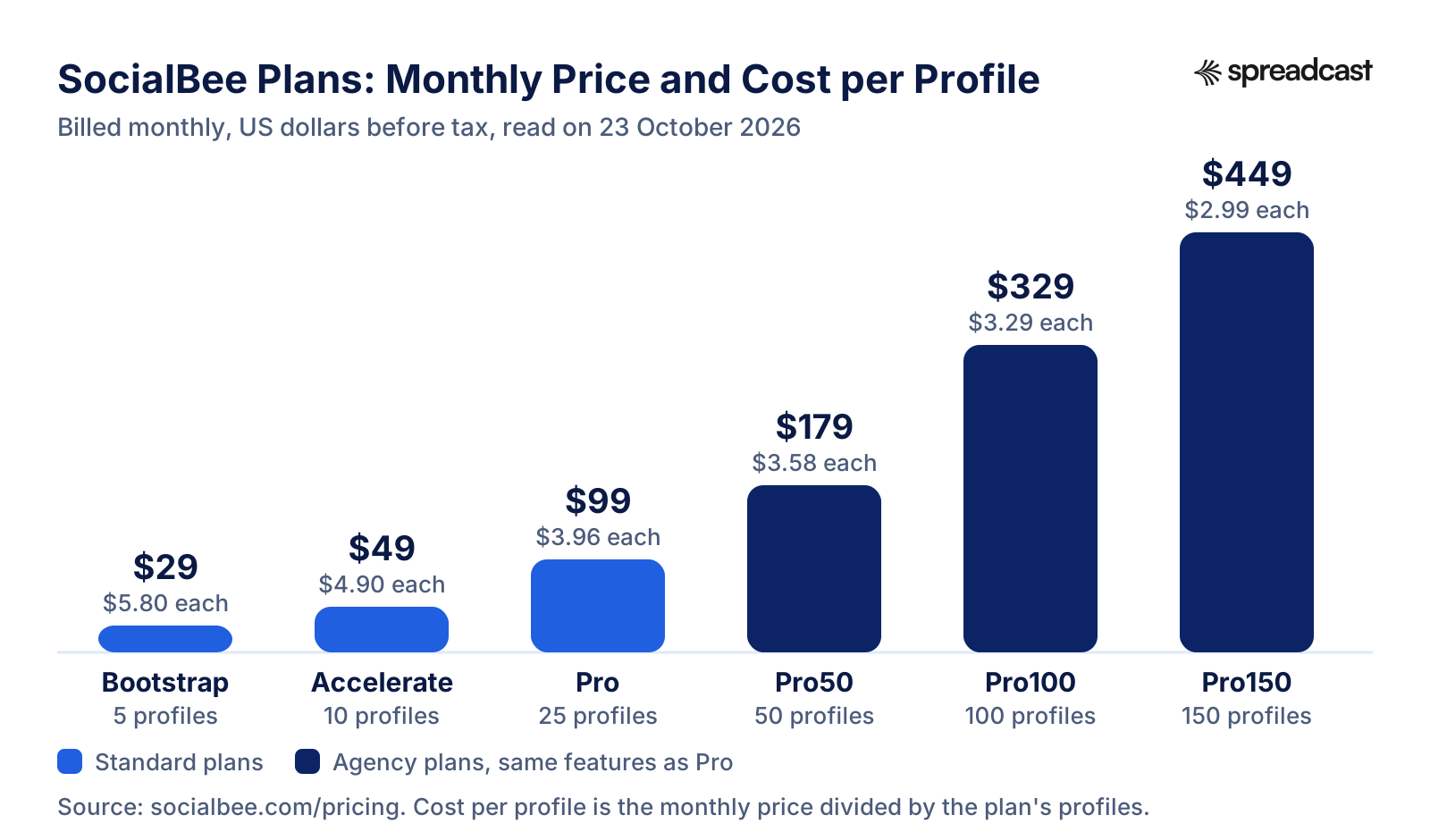
SocialBee sells three standard plans and three agency plans, and every plan from Pro up has the same features. These are the prices on its pricing page in US dollars; yearly billing is listed as 16% off.
| Plan | Monthly | Yearly | Profiles | Users and workspaces | What it adds |
|---|---|---|---|---|---|
| Bootstrap | $29 | $290 | 5 | 1 user, 1 workspace | 10 categories with up to 1,000 posts each, 10 RSS sources, AI generation, the inbox, 3 months of analytics |
| Accelerate | $49 | $490 | 10 | 1 user, 1 workspace | 50 categories, 30 RSS sources, CSV uploads, the bulk editor, post approval, the hashtag organizer, advanced analytics and 2 years of data |
| Pro | $99 | $990 | 25 | 3 users per workspace, 5 workspaces | Unlimited categories and RSS sources, exported branded reports, internal notes for feedback |
| Pro50 | $179 | $1,790 | 50 | 5 users per workspace, 10 workspaces | The same features as Pro |
| Pro100 | $329 | $3,290 | 100 | 5 users per workspace, 20 workspaces | The same features as Pro |
| Pro150 | $449 | $4,490 | 150 | 5 users per workspace, 30 workspaces | The same features as Pro |
Yearly agency prices are from SocialBee's about page. Add ons are bought inside the app: 5 more profiles for $15 a month, an extra user or an extra workspace for $10 a month each. Prices exclude VAT and other taxes. Bought through the iPhone app, the standard plans are listed as in app purchases at $29.99, $49.99 and $99.99 a month.
Chart: What Each SocialBee Plan Costs per Profile
The price per profile falls as the plans grow, from $5.80 on Bootstrap to just under $3 on Pro150. This is our arithmetic from the monthly prices above.
What the Pricing Page Gets Right, and Where to Read Carefully
SocialBee's pricing is easier to read than most in this market. Every plan lists its profile count, users, workspaces and analytics history, AI generation is listed as unlimited on all of them, and the inbox is not held back for the top tier. The FAQ on the pricing page says you can pay by card, PayPal or Amazon Payments, that no credit card is needed to sign up, and that you can switch between monthly and yearly billing from inside your account.
Three details deserve a second look. The cheapest plan does not include post approval, CSV uploads or the bulk editor, so a team that wants a second pair of eyes on each post starts at $49, and a second person on Bootstrap or Accelerate is a $10 add on. Analytics on Bootstrap reach back only 3 months, which is short if you report to a client every quarter. And when we read the page on 23 October 2026 it still showed a birthday discount code, SBDAY2026, with an end date of 10 June, so treat any discount you see on the page or on a coupon site as something to confirm with support before you count on it.
That last point matters because of a clause in SocialBee's terms of service: discounts obtained from external channels can be revoked without prior notice. One Capterra reviewer in March 2025 had a discount found online refused after checkout and left a one star review about it. SocialBee replied that the code belonged to a partner and that a 50% code tried next was for nonprofits only. That second code matches its published NGO discount: half off for registered nonprofits who apply by email.
Is SocialBee Free? The Trial and the Money Back Guarantee
No. SocialBee has no free plan. There is a 14 day trial with full Pro access and no credit card, and its help article on the trial is plain about what happens next: when the trial expires you cannot open your content and all sharing stops. Paying later restores your settings, schedule and posts as you left them, so a trial that lapses is not lost work.
Refunds are narrower than the banner on the pricing page suggests. SocialBee's refund article offers a full refund if you ask within 30 days of the initial purchase, and says this does not apply to renewals, monthly or yearly. There are no prorated refunds for cancelling in the middle of a month or a year. Refunds for billing errors and overpayments are possible, local consumer law can add rights, and the article ends by saying refunds are made at SocialBee's discretion. The terms of service add that cancellations take effect at the end of the billing cycle.
This is the most common money complaint in the reviews we read. On Trustpilot, two of the negative reviews from the past year are about a renewal that could not be refunded, and one of them points out that no reminder arrived before the yearly charge. The terms say you are charged automatically when auto renewal is enabled. If you buy a yearly plan, put the renewal date in your calendar the day you pay, and decide a month before it.
Yearly plans come with two extras. The pricing FAQ says yearly customers can ask for a code that makes SocialBee University, its social media course, free, and the migration service described further down is free with a yearly plan instead of $199.
SocialBee AI Review: Copilot, Captions and Images
SocialBee's AI comes in two parts. The first is Copilot, which its Copilot guide calls an AI social media manager. You give it your website, it reads your business name, tagline, services, tone of voice, audience and language, and you correct anything it got wrong. It then suggests which networks to use, a set of content categories such as Behind the Scenes Stories or Educational Posts, and a batch of draft posts with captions, hashtags and images for you to review in an approval dashboard. Without a website it asks the same questions in a chat.
The guide says Copilot runs on OpenAI's API and that SocialBee does not use your inputs, outputs or business data to train AI models. Anything Copilot creates is added on top of your existing categories rather than replacing them, which matters if you already have a library you like.
The second part is AI inside the post editor, for captions and images on request. SocialBee's article on AI limits says there is currently no monthly cap on AI generation on any plan, with a warning that this may change and would be announced in advance. Each request has limits: up to 10 caption variations at once, up to 4 images from a prompt of up to 1,000 characters, and for Copilot up to 5 categories and 10 posts. Because the AI depends on an outside provider, busy periods can slow it down or make a generation fail, and generated images may not show real public figures.
What do users say about it? AI is not among the five strengths at the top of G2's summary of reviews, which is led by support and scheduling. The criticism we found is specific rather than angry. A Trustpilot review from May 2026 complained of too much reliance on AI and of features that did not help, and a commenter in r/smallbusiness wrote in September 2026 that the AI in SocialBee and Later amounts to captions. That matches the documentation: Copilot plans and drafts from what you tell it, and you still decide what is true and worth posting.
Our view: the AI is a useful starting point for someone staring at an empty category, and use with no monthly cap on a $29 plan is generous next to tools that sell AI credits. It knows nothing about your business beyond your website and your answers, so it cannot announce news it has not been told about.
Which Networks SocialBee Posts To, and How
Directly means SocialBee publishes for you. Reminder means your phone gets a notification and you finish the post by hand in the network's app. This is the table in SocialBee's help article on supported accounts, last edited on 14 July 2026.
| Account type | How it posts | Inbox in SocialBee | Analytics |
|---|---|---|---|
| Facebook Page | Directly | Comments, mentions and DMs | Yes |
| Facebook personal profile or group | Reminder | No | No |
| Instagram business or creator profile | Directly, including Reels and Stories | Comments, mentions and DMs | Yes |
| Instagram personal profile | Reminder | No | No |
| LinkedIn company page | Directly | Comments and mentions | Yes |
| LinkedIn personal profile | Directly | No | Yes |
| X | Directly | Comments and mentions | Yes |
| Threads | Directly | Comments and mentions | Yes |
| TikTok | One video directly, or up to 12 videos by reminder | No | Yes |
| YouTube | Directly, videos and Shorts | Comments | Yes |
| Directly | On SocialBee's roadmap | Yes | |
| Google Business Profile | Directly: text, links and images | No | Yes |
| Bluesky | Directly: links and images | No | No |
| Telegram, WhatsApp, Mastodon, Reddit and others | Reminder, through Universal Posting | No | No |
SocialBee's pricing page lists Facebook profiles and groups and Instagram personal profiles under direct posting, while this help table marks them as reminders. We would trust the more detailed help table and ask support if those accounts matter to you.
The SocialBee Mobile App: Why Its Ratings Are So Low
The scores that drag SocialBee's public image down belong to its companion app, not to the web product. On 23 October 2026 the App Store listing showed 2.0 out of 5 from 27 ratings, and the Google Play listing showed 1.8 from 115 reviews, with more than 10,000 downloads. That matters more than it would for most schedulers, because the app is how reminder posting works: Instagram personal profiles, Facebook profiles and groups, multi video TikTok posts and every Universal Posting network go out through a notification on your phone.
Apple's review feed for the US store returned 31 written reviews dated from March 2020 to July 2026: 23 with one star, 3 with two stars and 5 with five stars. The older complaints are that the app could not create or schedule posts and only reminded and displayed. The newer ones form a cluster: six one star reviews between 16 December 2025 and 31 January 2026 describe the app failing to load or to log in, with several people deleting and reinstalling it each time they wanted to post. A Google Play review from 24 January 2026 says the same, and adds that the update meant to fix it worked once.
SocialBee's side is in the version history on the listing. Version 2.1.10, on 20 January 2026, says it fixed users getting stuck on the loading screen, 2.1.11 on 26 January fixed login issues, and two February releases and one in March reworked authentication. After January the US feed has no new one star reviews; the only review since is a five star one from July 2026. The September 2026 releases added sign in with Google, fixed TikTok sharing and fixed a crash on posts without media. The app has improved, but an average built on a small number of ratings moves slowly.
One more detail from the listing: bought inside the iPhone app, Bootstrap is $29.99 a month, Accelerate $49.99 and Pro $99.99, a little more than the $29, $49 and $99 on the website, so subscribe on the web. And if you build apps yourself, SocialBee's 2.0 is a reminder of how hard a low average is to repair; our guide on how to get App Store reviews covers the prompts Apple allows.
Video: A Long Time User's SocialBee Review and Tutorial for 2026
An independent creator who has used SocialBee for years walks through the current dashboard in June 2026. It is the closest look at today's product we can offer without a paid account of our own.

SocialBee Ratings on Review Sites in October 2026
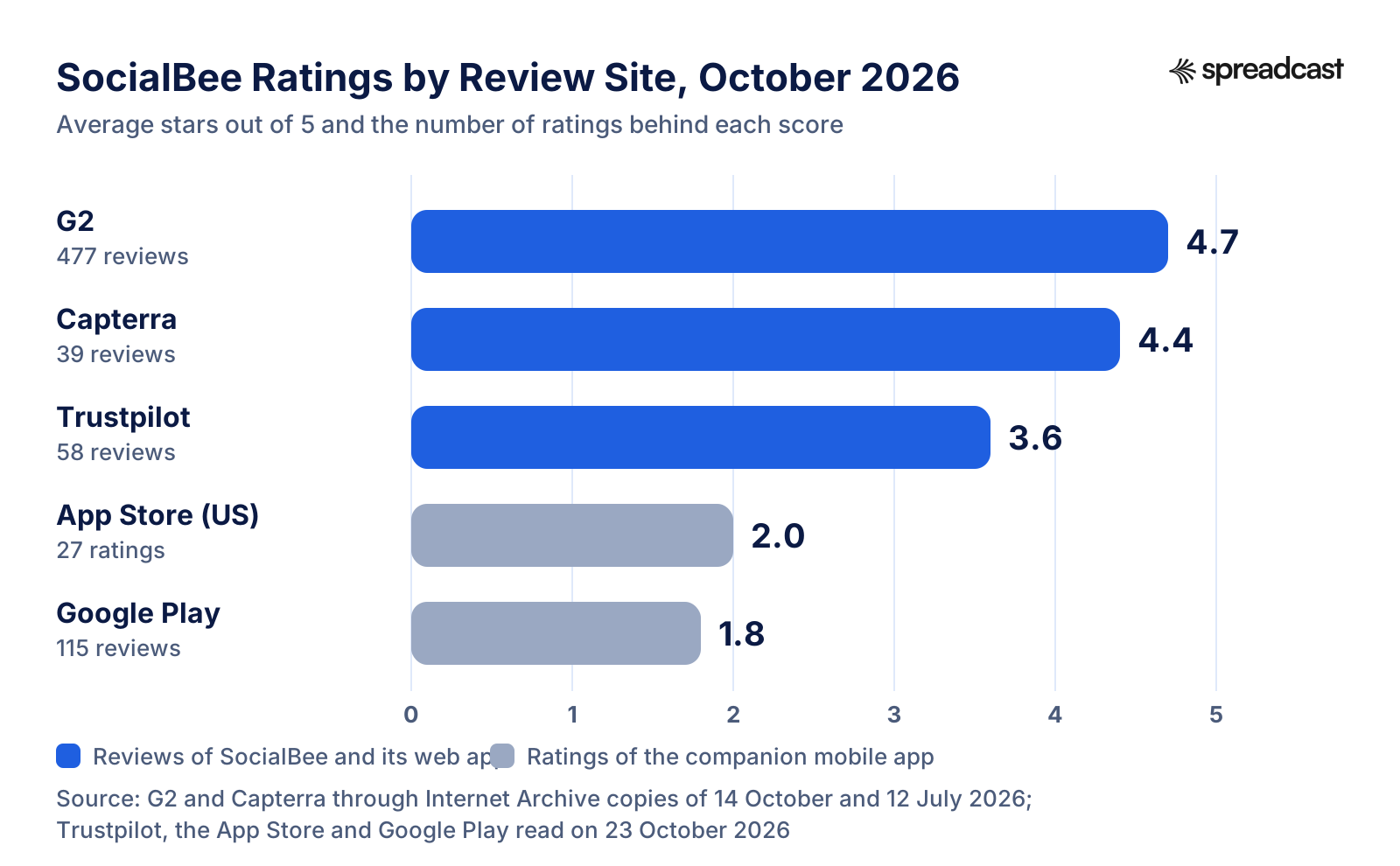
Over 700 public ratings sit across five sites, and they disagree sharply. The first three rate SocialBee as a product and a company; the last two rate only its mobile app.
| Site | Score | Ratings | What it covers | Read on |
|---|---|---|---|---|
| G2 | 4.7 out of 5 | 477 | The web product; 452 reviewers work at companies with 50 or fewer employees | 14 October 2026, archived copy |
| Capterra | 4.4 out of 5 | 39 | The web product; ease of use 4.2, customer service 4.5 | 12 July 2026, archived copy |
| Trustpilot | 3.6 TrustScore | 58 | The company and its service, under the older socialbee.io address | 23 October 2026 |
| App Store, US | 2.0 out of 5 | 27 | The iPhone companion app | 23 October 2026 |
| Google Play | 1.8 out of 5 | 115 | The Android companion app | 23 October 2026 |
Trustpilot also has a profile for socialbee.com with no reviews; the reviews sit on the socialbee.io profile. Scores change every week, so check the live pages before you rely on a number.
Chart: SocialBee Ratings by Site
Read the two colors separately. The web product scores well; the companion app does not.
Why SocialBee's Scores Differ So Much From Site to Site
The gap between 4.7 on G2 and 3.6 on Trustpilot is less of a contradiction once you look at who writes each kind of review. On G2, 415 of the 477 reviews give five stars and only two give one or two stars, according to the archived G2 page. Nearly all come from small businesses: 452 from companies with 50 or fewer employees, 19 from mid sized firms and 2 from enterprises. That matches the audience SocialBee sells to, so the G2 score speaks above all for small business users of the web product.
Capterra's score rests on older reviews. Of the 25 reviews on the first page of the archived listing, 21 were written between 2021 and 2023 and only 4 in 2025 or 2026. Of those 4 recent ones, two give four stars and praise the scheduling, the calendar view and the RSS features, and two give one or two stars, one over a queue that stalled without warning and one over a refused discount.
Trustpilot gives the most recent picture. Its distribution is 65% five stars, 7% four, 2% three, 12% two and 14% one. Of the 18 reviews dated in the twelve months before we read the page, 10 gave five stars and 8 gave one or two. Many of the five star reviews praise support that solved a problem, a few of them naming the agent. The low ones are about posting failures, refunds, a trial that was hard to cancel and the app.
So which number should you believe? For the web product's day to day use, G2 and Capterra are a fair signal that most small business users are happy. For risk, the recent Trustpilot reviews and the changelog are the better guide, because they show what happens when something breaks. For the mobile app, believe the app stores.
What SocialBee Users Praise Most
These themes come up again and again in the positive reviews we read, roughly in this order.
Helpful, Reachable Support
Customer service is the most mentioned strength in G2's summary of reviews, with 21 mentions, and Capterra rates it 4.5. Positive Trustpilot reviews from the past year often name the agent who fixed their issue, and an App Store reviewer praised how easy it is to reach a real person.
Scheduling That Runs Itself
Post scheduling and easy scheduling are the next most mentioned pros on G2, with 15 and 10 mentions. Users like setting the categories once and letting the weekly plan fill itself, and a Capterra reviewer in July 2025 called it some of the best scheduling around.
Time Saved Across Many Accounts
Time saving has 10 mentions on G2. On Reddit, a freelance social media manager wrote in June 2026 that before SocialBee they kept checking they were not reusing a post or posting under the wrong client's brand.
Recycling and RSS Feeds
Evergreen recycling is why many people choose SocialBee in the first place. A 2025 Capterra reviewer singled out the way RSS feeds turn blog posts into social posts, and Reddit commenters recommend it specifically for categories and queues.
A Fair Price for What Is Included
Even critical reviewers call the cost reasonable. The inbox, AI generation, recycling and RSS import all come with the $29 plan, which is less common than it should be among schedulers.
Ten Networks From One Dashboard
Users value posting directly to ten networks from one tab, with a separate version of each post for each network where the wording or format needs to change.
SocialBee Complaints: The Themes That Recur
These are the complaints we saw more than once across Trustpilot, Capterra, G2, the app stores and Reddit. For each one, we add what SocialBee says or has fixed.
The Mobile App
Freezing on the loading screen, failed logins and missing features fill the app store reviews: 23 of 31 written US App Store reviews give one star. SocialBee's side: releases from January to March 2026 targeted loading and login, and no one star review has appeared in the US feed since.
Posts That Fail or Queues That Stall
A Capterra reviewer in February 2026 described a category that stopped posting because of one misconfigured post, with no warning. Trustpilot reviews from May and October 2026 mention failed Instagram posts and downtime, and G2 lists performance and scheduling issues among its cons. SocialBee's side: a Failed posts tab, an optional email alert for each failed post and a guide to posting errors.
Refunds and Renewals
Several reviews are about a yearly renewal that could not be refunded. SocialBee's side: the 30 day guarantee covers the first purchase only, which its refund article and terms state plainly, and one 2024 Trustpilot reviewer updated a two star review after the team reached out and refunded them.
Discount Codes That Did Not Work
A 2025 Capterra reviewer had a coupon refused after checkout. SocialBee replied that the code was meant for a partner's customers, and its terms reserve the right to revoke discounts that come from outside channels.
A Busy, Cluttered Interface
Learning complexity and complex usage are among G2's listed cons, and Capterra reviewers in January and July 2025 called parts of the interface cluttered or too alike. One Trustpilot reviewer missed a search function. SocialBee's side: the October 2026 scheduling changes remove two category modes and one view.
Support Hours and Response Times
An App Store reviewer in 2024 said email support hours ended at 2pm Pacific time, and a 2025 Capterra reviewer in Europe found daytime support hard to reach. SocialBee replied on Capterra that its teams cover European and US time zones and that it would work on response times.
SocialBee Incidents in Its Own Changelog, Summer and Fall 2026
SocialBee publishes problems and fixes on a public changelog, which is to its credit. These are the entries posted between late June and 23 October 2026.
| Posted | What happened | What SocialBee said or did |
|---|---|---|
| 29 June | The hashtag generator in the post editor stopped working | Investigated, then closed the incident once it worked again |
| 20 July | An outage of SocialBee's API from 18 July at 8:46 UTC to 20 July at 5:46 UTC, which affected the mobile app, Zapier and Make | Recovered and kept under watch |
| 20 July | The mobile app was temporarily unavailable | Resolved in an update to the entry |
| 28 July | Scheduled posts were not published for about 13 hours, from 27 July at 12:00 PM to 28 July at 12:44 AM Eastern time | Fixed the root cause. Posts from that window were not published later and had to be recreated by users |
| 12 August | Posting to TikTok failed because of a problem with TikTok's API | Suggested mobile reminders as a workaround; resolved on 7 September |
| 14 August | Creating Pinterest pins failed | Resolved |
| 26 August | The billing page was redesigned | Pause, cancel, invoices and payment changes stayed in the same place |
| 23 September | Connecting and refreshing Threads profiles failed | Resolved |
| 20 October | Posts could not be deleted from the Content Categories page | Gave a workaround, then fixed it the same day |
| 20 October | Scheduling changes announced | Category Sequence and random categories phased out, the Next Posts view retired, more repeat options planned |
Dates are when each entry was posted, read on 23 October 2026. Some problems, like the TikTok one, started on the network's side.
What the Changelog Tells You About Reliability
Every scheduler has bad weeks, because each one depends on the networks' own APIs, and the TikTok incident started on TikTok's side. Two things in SocialBee's record are still worth weighing. The July incident did not just delay posts; it skipped them, and SocialBee told users to recreate them by hand. And a posting tool whose failures can go unnoticed needs you to switch on every alert it offers.
So if you use SocialBee, do three things on day one. Turn on the email alert for failed posts under Settings, then Notifications, which the posting errors guide describes. Subscribe to the status page by email, Slack, RSS or Atom; it tracks nine parts of the service separately, from the web platform and the mobile app to network integrations and analytics. And look at the Failed posts tab once a week, because the most common error, an expired authorization, only needs you to reconnect the profile.
SocialBee deserves credit for writing these incidents up in public, with times, causes where known and workarounds. That openness is a good sign about how the team handles problems, and it is why this review can be specific about them.
SocialBee Reviews on Reddit
People search for SocialBee reviews on Reddit hoping for unfiltered opinions, so we looked. The search is noisy. Many results are about the German job placement organization of the same name, and a fair share of the long posts that do review the tool are written by affiliates with discount links or by competitors promoting their own product, so we set those aside.
What remains is mostly short comments from social media managers recommending tools to each other between April and October 2026. SocialBee comes up as a pick for content categories, queues and recycling, and for keeping several clients organized. In one r/SocialMediaManagers thread from September 2026, a freelancer asked for an all in one tool under $100 a month for a client. SocialBee was suggested for its shared calendar, categories and analytics, one commenter noted there is no Google Drive integration but that uploading several media files at once makes up for it, and another advised checking the current limits on users and accounts first.
The criticism on Reddit is milder than on Trustpilot. The clearest example is the r/smallbusiness comment quoted in the AI section, that the AI amounts to captions. We found no Reddit thread that documents a pattern of problems the review sites do not already show.
Our reading: Reddit confirms the reputation SocialBee has on G2, a solid category scheduler for people who post to several accounts, rather than adding anything new. Treat any long Reddit review with a discount link in it the way you would treat an advert.
Video: An Independent Take on Whether SocialBee Is Worth the Money
Recorded in January 2024, so the prices and the AI features have changed since, but the conclusion is still the honest middle view: a good foundation, though not the tool the creator chose in the end.
ConciergeBee: The Done for You Service
SocialBee is unusual among schedulers in selling people as well as software. ConciergeBee, its in house agency, offers social posts, video, community management, LinkedIn lead generation, articles, ads and websites. The FAQ says the services are delivered by real people, and the social media specialist page adds that the team uses AI at some stages, such as ideas and scripts for AI voiceovers. ConciergeBee says it has helped more than 3,000 customers with more than 100 certified experts.
Every service comes in Light, Standard and Plus tiers, can be upgraded, downgraded or cancelled anytime, and carries a 30 day money back guarantee. After you pay, you fill in an intake form about your business, and a specialist is introduced. For the social media service, the first deliverable is a client brief, which ConciergeBee aims to send within 7 days of receiving your intake form, and new posts then arrive every week.
Independent reviews of ConciergeBee are thin. Its own pages carry testimonials, a G2 reviewer mentioned hiring it for several months and wanting to go back, and one Trustpilot reviewer in May 2026 was unhappy with the concierge work. If you are weighing a monthly service at these prices, ask for samples first; the Social Media Specialist page offers one to download.
ConciergeBee Services and Prices
Prices from each ConciergeBee service page, read on 23 October 2026, in US dollars.
| Service | Light | Standard | Plus | Notes |
|---|---|---|---|---|
| Social Media Specialist | $150 a month | $240 a month | $360 a month | 3 posts a week on Light, 4 posts and 1 video a week on Standard and Plus; yearly billing gives 2 months free |
| Video First Specialist | $260 a month | $390 a month | $520 a month | Short videos for your channels; custom thumbnails are a $120 a month add on |
| Community Management | $150 a month | $240 a month | $360 a month | Instagram engagement handled for you: follows, comments and the inbox |
| LinkedIn Lead Generation | $150 a month | $240 a month | $360 a month | Targeted connection requests and messages sent for you |
| Article Writing | $150 a month | $240 a month | $360 a month | Monthly delivery; weekly delivery costs $600, $780 or $960 a month |
| Ads Management | $360 a month | $540 a month | $780 a month | Ad spend is on top: at least $500, $1,000 or $2,000 a month |
| Ads Campaign Setup | $360 once | $480 once | $540 once | A one time setup; plan on at least $500 a month of ad spend |
| Website Creation | $260 once | $390 once | $650 once | Built on Sitejet, which needs its own subscription; extra pages are $129 each |
Sitejet is a website builder owned by WebPros. ConciergeBee also sells copywriting, guide creation and a content audit service called Content Machine, plus white label versions of several services for agencies.
The Migration Service and What It Costs
If you are moving from another scheduler, SocialBee will move your content for you. Its migration page prices the Concierge Migration at $199, or free with a yearly plan, and lists what is moved: content from your profiles, your posting schedule, RSS feeds and link shortener settings, followed by a migration report. You fill in a form and the team books a 15 minute call to start.
The migration help article is more precise about the limits. The base service covers 8 hours of work on Bootstrap or Accelerate yearly and 16 hours on Pro yearly. By CSV import, 8 hours usually covers 150 to 500 posts; by manual transfer, about 90 to 100 mostly static posts, or 50 to 70 if most are videos. The focus is on upcoming scheduled content, not your full archive. Extra volume is sold in blocks: 100 more posts by CSV for $39, 250 for $69, 500 for $99 and 1,000 for $199. Manual blocks start at $39 for 25 static posts or 10 long carousels and videos.
One step to think about before you start: the migration page asks you to share the login for the tool you are leaving, through LastPass, so the team can move the content. If you would rather not, export a CSV from your old tool yourself and send that instead, which the help article describes as the faster route in any case.
Leaving SocialBee is less smooth than arriving. Its export article says export is not self serve: you email the team with the category names and the workspace, and they send a CSV file back. Ask for it before you cancel, and save any reports you need, since Bootstrap keeps only 3 months of analytics.
SocialBee Pros and Cons
The short version of everything above, side by side.
| Pros | Cons |
|---|---|
| Content categories with recycling and expiry rules on every plan | No free plan, and posting stops when the 14 day trial ends |
| AI captions, images and Copilot with no monthly cap for now | The companion mobile app is rated 2.0 on the App Store and 1.8 on Google Play |
| An inbox for comments, mentions and DMs from the $29 plan | Post approval, CSV uploads and the bulk editor start at $49 |
| Direct posting to ten networks, Threads, Bluesky and Google Business Profile included | Personal Instagram and Facebook accounts, groups and Telegram post by phone reminder |
| Support is the most praised theme on G2 and scores 4.5 on Capterra | Refunds only within 30 days of the first purchase, none on renewals |
| A public changelog that admits incidents and gives workarounds | Several posting and connection incidents in summer 2026, one of which skipped scheduled posts |
| Done for you services and a migration service from the same company | No public API, no white label platform and no self serve export |
Is SocialBee Worth It? A Verdict by Type of User
The same tool is a good buy for some readers and a poor one for others. This is how the evidence above plays out.
| Who you are | Fit | Why |
|---|---|---|
| Solo marketer, coach or author with a library of evergreen posts | Strong | Categories, recycling and expiry are exactly this job, and Bootstrap at $29 covers five profiles |
| Small business with 6 to 10 profiles and a second person | Good | Accelerate at $49 adds approvals and CSV uploads; a second user is $10 a month |
| Agency managing several clients | Good, with limits | Workspaces and agency plans scale well and ConciergeBee services can be white labeled, but the platform itself cannot be, and there is no API |
| Team that lives in the inbox | Partial | The inbox covers six kinds of account, but not TikTok, Pinterest, Bluesky or personal LinkedIn profiles; see our Hootsuite comparison for a heavier option |
| Creator who posts mostly from a phone | Weak | The mobile app is a companion for reminders, and its reviews are poor |
| Developer automating posts with scripts or AI agents | Weak | SocialBee says it has no public API; Zapier, Make and Pabbly are the automation routes |
| App maker who wants a post for each release | Weak | Categories recycle what you write; nothing in SocialBee watches your App Store listing for news |
Fit is our judgment from SocialBee's documentation and public reviews, read in October 2026.
Who Should Stay With SocialBee
If you already use SocialBee, these are good reasons not to switch.
Your Library Is Working
If your categories are full of posts that stay true for months and your engagement is steady, the recycling is doing its job. A move costs time and a CSV export requested by email.
You Want Approvals Without Paying per Seat
Accelerate gives post approval and 10 profiles for $49 a month, and Pro gives 3 users per workspace for $99. Tools that charge for each user cost more with every person you add.
You Lean on the Support Team
If you use support chats, calls and webinars, SocialBee's support is the most consistent strength in its reviews, on G2, Capterra and Trustpilot alike.
You Want Software and People Under One Roof
Few schedulers also sell a team to write posts, make videos and run ads. If you might hand some of the work off later, ConciergeBee is already connected to your account.
Video: SocialBee's Own Demo Webinar
To hear SocialBee's side, watch its own demo, run by its customer success lead with questions from users. It is most useful during a trial, when you can follow along in your own account.

Alternatives to SocialBee
Spreadcast comes first because it solves a different problem from SocialBee, making the posts rather than rotating them, and only for apps. The others are schedulers, described from their own pricing pages on 23 October 2026. Our full list of SocialBee alternatives compares ten tools in depth.
- 1
Spreadcast
Free to try with 3 posts; Pro is $29 a monthBest for app makers: turns each App Store update and rating milestone into a designed post
Spreadcast starts from your App Store link instead of a library. Paste it once at the start page and Spreadcast checks your listing every day. When a new version ships, it designs a post about the update with your real screenshots in an iPhone frame, in your app's colors and fonts, writes the caption for each network and publishes it, on full autopilot or after one tap of approval. It does the same when your app reaches a rating milestone.
It publishes to Instagram, TikTok, LinkedIn, Facebook, Threads, Pinterest, Bluesky, Mastodon, Telegram and Discord, plus YouTube for video posts. The free plan makes 3 posts for 1 app to download, with a small Spreadcast mark and no publishing. Pro is $29 a month or $290 a year for 1 app and 10 social accounts, with publishing included and the option to create and post from Claude or ChatGPT. Studio is $79 a month for 5 apps and 50 social accounts. Details are on the pricing page.
It does not replace a general scheduler. There are no content categories, no inbox and no X, and it watches the App Store only, not Google Play. See what it does for mobile apps.
Pros
- Posts start from your App Store listing, with nothing to write first
- Real screenshots in an iPhone frame, in your app's colors and fonts
- A caption written for each network
- Full autopilot or one tap approval
Cons
- Only for apps on the Apple App Store
- Posts about new versions and rating milestones, not evergreen libraries
- No inbox and no X
- 2
RecurPost
From $9 a month for 2 accountsBest for the same evergreen recycling at a lower entry price
RecurPost's pricing page describes a tool built on the same idea as SocialBee: evergreen content libraries that recycle posts, with bulk CSV scheduling, on every plan. Starter is $9 a month for 2 social accounts, Personal $25 for 5, and Agency $79 for 20 accounts and 3 users, with client workspaces, approval workflows and white label reports.
Extra accounts cost $4 a month and extra teammates $20, and yearly billing gives two months free. There is no free plan, only a 14 day trial with no card. If you like SocialBee's recycling and need two to five accounts, RecurPost is the cheaper way to get it.
Pros
- Evergreen libraries on every plan
- Bulk CSV scheduling from $9 a month
Cons
- No free plan
- Approval workflows start on the $79 plan
- 3
MeetEdgar
From $29.99 a month for 5 accountsBest for a content library that reshares itself, with a whole team
MeetEdgar sorts posts into content categories and fills weekly time slots from them, the model closest to SocialBee's. Eddie is $29.99 a month for 5 accounts, 10 weekly automations and 4 categories, without the social inbox. Edgar is $49.99 for 25 accounts, 1,000 weekly automations, unlimited categories and the inbox. Both plans include 20 team members and unlimited scheduled posts.
The trial lasts 30 days, but the pricing page says your payment method is charged automatically when it ends, so cancel before then if it is not for you. AI comes as Inky credits, 15 a month on Eddie, with 100 more for $2.50.
Pros
- 20 team members on both plans
- 25 accounts for $49.99 a month on Edgar
Cons
- No free plan
- Eddie stops at 4 categories and has no inbox
- 4
Buffer
Free for 3 channels, then from $6 per channel a monthBest free plan and a simple queue
Buffer's pricing starts with a free plan for up to 3 channels and 10 scheduled posts per channel at a time, with its AI Assistant, a community inbox for comments and API access. Essentials is $6 per channel a month, and Team, at $12 per channel, adds unlimited team members and approval workflows.
Buffer has no category recycling like SocialBee's, so an evergreen library becomes a queue you refill by hand. It does have the two things SocialBee lacks: a free plan with no end date and a public API. Our Buffer comparison has more.
Pros
- A free plan with no end date
- API access on every plan
Cons
- No evergreen category recycling
- The price grows with every channel
- 5
Publer
Free for 3 accounts, then from $5 a monthBest low price per account, with recycling on its Business plan
Publer's plans include a free plan for up to 3 social accounts, excluding X, and paid plans priced by the number of accounts: Professional from $5 a month for one account and Business from $10. Automatic post recycling, recurring posts, approval workflows and the API sit on Business.
Publer recycles post by post rather than by category, which suits a smaller library. For every 9 accounts or members you pay for, the 10th is free. Our Publer comparison goes deeper.
Pros
- A free plan for 3 accounts
- Paid plans from $5 a month
Cons
- No X on the free plan
- Recycling and approvals need Business
Where Spreadcast Fits
Spreadcast is not a SocialBee replacement for most of SocialBee's customers. It has no content categories, no inbox and no X, and it is built for one kind of business: apps on the Apple App Store. If you are a coach, a shop, an agency with mixed clients or a nonprofit with a library of evergreen posts, stay with SocialBee or one of the schedulers above.
For an app maker the problem is different. An app's best posts are news that cannot be written in advance: a new version with new screens, or a rating milestone. A category scheduler can only recycle what someone has already written and designed, so the release post still has to be made by hand every time. Spreadcast watches your App Store listing every day, designs the post when a new version ships or a rating milestone is reached, and publishes it to Instagram, TikTok, LinkedIn, Facebook, Threads, Pinterest, Bluesky, Mastodon, Telegram and Discord, plus YouTube for video posts.
The two can sit side by side. Keep SocialBee for tips, blog links and replies, and let Spreadcast handle the release posts. To see what those look like, browse these app update announcement examples, or read why your scheduler is not why your feed is empty. When you are ready, paste your App Store link at the start page; the free plan makes 3 posts so you can judge them before you pay anything.
Our Final Verdict on SocialBee
SocialBee earns its 4.7 on G2 from the people it was built for. If you run a library of evergreen posts across five to ten profiles and want the queue to run itself, it does that well for $29 to $49 a month, with an inbox, AI with no monthly cap and a support team that users go out of their way to thank.
Our 3.8 reflects the parts that Trustpilot and the app stores keep pointing at: a companion app that some account types depend on and that users rate poorly, posting incidents that SocialBee itself logged in the summer of 2026, and a refund window that closes 30 days after your first payment. Start the trial with failed post alerts switched on, test the account types you rely on, and decide before the trial ends. If it is not the right fit, our list of the best SocialBee alternatives and our guide to social media automation tools are the next places to look.
Frequently Asked Questions
Is SocialBee legit?
Yes. SocialBee is run by SocialBee LABS SRL in Romania, launched in June 2016, and has been owned since August 2024 by WebPros, the group behind cPanel and Plesk. It had 477 reviews on G2 averaging 4.7 out of 5 in October 2026.
Is SocialBee worth it in 2026?
For a solo marketer or small business with a library of evergreen posts and five to ten profiles, yes: $29 to $49 a month buys categories, recycling, an inbox and AI with no monthly cap. It is less worth it if you post from your phone, need an API or mostly post news. We rate it 3.8 out of 5.
What are the pros and cons of SocialBee?
Pros: content categories with recycling and expiry, AI with no monthly cap, an inbox on every plan, direct posting to ten networks and well liked support. Cons: no free plan, a poorly rated mobile app, approvals only from $49, refunds only in the first 30 days and no public API.
What are the most common SocialBee complaints?
Across Trustpilot, Capterra and the app stores: the mobile app freezing or failing to log in, posts or whole categories that stop publishing, renewals that could not be refunded, discount codes that were not honored, and an interface some find cluttered.
What do SocialBee reviews on Reddit say?
Mostly short recommendations from social media managers who like its categories, queues and recycling for keeping several accounts organized. Detailed Reddit reviews are rare, many long ones are affiliate or competitor posts, and many search results are about a German job placement organization with the same name.
What is SocialBee's rating on G2, Capterra and Trustpilot?
In October 2026: 4.7 out of 5 from 477 reviews on G2, 4.4 from 39 reviews on Capterra and a TrustScore of 3.6 from 58 reviews on Trustpilot. The mobile app is rated 2.0 on the App Store and 1.8 on Google Play.
Is SocialBee free?
No. There is a 14 day trial with full Pro access and no credit card, after which you cannot open your content and posting stops until you pay. Plans start at $29 a month, or $290 a year, for 5 profiles.
Does SocialBee offer refunds?
Yes, in full, if you ask within 30 days of your first purchase. Renewals, monthly or yearly, are not refunded, and there are no prorated refunds for cancelling partway through a term. A cancellation takes effect at the end of the billing cycle.
Is SocialBee's AI any good?
It is a useful starting point. Copilot reads your website and suggests networks, categories and draft posts, and captions and images have no monthly cap on any plan for now. It writes from what you tell it, and some users find it adds clutter or amounts to captions.
Why does the SocialBee app have bad reviews?
The app is a companion for reminders and quick checks rather than a full editor, and in late 2025 and early 2026 many users reported it freezing on the loading screen or failing to log in. SocialBee shipped loading and login fixes between January and March 2026.
Who owns SocialBee?
WebPros, which announced the acquisition on 20 August 2024. SocialBee LABS SRL still runs the product and the ConciergeBee agency as part of WebPros.
Does SocialBee have an API?
No. Its help center says there is no public API and no white label version of the platform. Automation runs through Zapier, Make or Pabbly.
Is SocialBee good for app developers?
For evergreen tips and blog links it works as it does for any business. For posts about each app release or rating milestone, nothing in SocialBee watches the App Store, so someone still makes each post by hand. Spreadcast does that part from your App Store link.
Prices, plans and features change. This comparison describes each product as its own site described it on the date shown under Sources. Check the vendor's site before you decide. Product names are trademarks of their owners.
Where These Facts Come From
Every outside number, rule and price on this page links to the page it was taken from.
- SocialBee homepageSocialBee
- SocialBee pricing, plans, add ons and FAQSocialBee
- About SocialBee, with its history since 2016SocialBee
- ConciergeBee services overviewSocialBee
- Concierge Migration service and priceSocialBee
- SocialBee discount for NGOsSocialBee
- Universal Posting by mobile reminderSocialBee
- SocialBee terms of service, refunds and cancellationSocialBee
- SocialBee changelog of fixes and announcementsSocialBee
- SocialBee system statusSocialBee
- What social accounts can I manage with SocialBeeSocialBee Help Center
- Can I get a refundSocialBee Help Center
- What happens when the free trial endsSocialBee Help Center
- AI content generation limits and fair usageSocialBee Help Center
- Social Media Copilot, all you need to knowSocialBee Help Center
- Content categories, all you need to knowSocialBee Help Center
- Evergreen and share once postsSocialBee Help Center
- How to expire posts in SocialBeeSocialBee Help Center
- Public API and white label optionsSocialBee Help Center
- Exporting your content from SocialBeeSocialBee Help Center
- Concierge Migration service, scope and add on pricesSocialBee Help Center
- Posting errors explainedSocialBee Help Center
- Social Media Specialist service and pricesConciergeBee
- Video First Specialist service and pricesConciergeBee
- Community Management service and pricesConciergeBee
- LinkedIn Lead Generation service and pricesConciergeBee
- Article Writing service and pricesConciergeBee
- Ads Management service and pricesConciergeBee
- Ads Campaign Setup service and pricesConciergeBee
- Website Creation service and pricesConciergeBee
- WebPros expands digital marketing solutions with acquisition of SocialBeeWebPros
- socialbee, the German job placement organization with the same namesocialbee
- SocialBee reviewsG2
- SocialBee reviews on G2, copy saved 14 October 2026Internet Archive
- SocialBee reviewsCapterra
- SocialBee reviews on Capterra, copy saved 12 July 2026Internet Archive
- SocialBee reviewsTrustpilot
- SocialBee.com app listing, USApple App Store
- Customer reviews feed for the SocialBee.com app, USApple
- SocialBee.com app listingGoogle Play
- All in one management tool recommendationsReddit, r/SocialMediaManagers
- Best AI social media tools, trying to separate hype from realityReddit, r/smallbusiness
- RecurPost plans and pricingRecurPost
- MeetEdgar pricingMeetEdgar
- Buffer pricingBuffer
- What are Publer's plans and pricingPubler
- Video: Socialbee review and tutorial 2026LoverFighterWriter
- Video: my honest review on SocialBee, worth the moneyChris with Minn Media
- Video: learn how to use SocialBee, demo webinarSocialBee | Social Media Management Tool
Researched and written by Spreadcast. Last checked on October 23, 2026.