Claude Skills for Social Media: The Short Answer
If you want Claude skills for social media and only have ten minutes, install two things. First, Anthropic's own Marketing plugin, which bundles eight marketing skills, including one that drafts social posts and one that checks copy against your brand voice. Second, one community bundle that matches the network you care about most: Corey Haines's Marketing Skills if you market a product across many channels, or a LinkedIn bundle such as Serge Bulaev's LinkedIn Skills if your growth runs through a founder's LinkedIn profile.
Then set your expectations. A Claude skill is a folder of instructions. It makes Claude write in a steadier, more useful way for one job, such as a LinkedIn post, a hook, a carousel outline or a monthly report. It does not give Claude your brand's pictures, and it does not give Claude a way to post. Nearly every skill we read stops at text, an image prompt for another tool, or an HTML mock you still export by hand; one renders images on your own machine. The handful that publish do it through a third party service you sign up for separately.
So the rest of this page does three things. It reviews the skills worth installing, with what each repository actually ships when you open it, its license, how many people starred it and when it was last updated. It shows how to install skills and plugins in Claude on the web and desktop, in Claude Code and in Cowork, because each surface does it a little differently. And it covers the last step that skills leave open: turning the words into a designed post that goes out on Instagram, LinkedIn, Threads and the rest.
This page sits next to three others and does not repeat them. If you want to write your own skill from scratch, Claude for social media marketing walks through a skill file line by line. If you work in the terminal, Claude Code for social media covers project skills, hooks and scheduled runs. And if you want ready prompts rather than installable skills, Claude prompts for social media has thirty grouped by job.
How We Researched This
On October 28, 2026 we cloned every repository named on this page and read every SKILL.md file inside it, plus its README, license, plugin manifest and any scripts the skills call. We counted skills by counting distinct skill folders with a SKILL.md file, not by trusting the number in a README, and we recorded stars and the last commit date from GitHub the same day. Where a README and the files disagreed, we say so.
For the official side we read Anthropic's own pages that day: What are skills, Using skills in Claude, How to create custom skills, Use plugins in Claude, the plugins overview in Claude's docs, the Cowork plugin guide, Claude Code's skills documentation, the Claude Code plugin install guide and the plugin security page. For the Marketing plugin we read both its listing on Claude's site and its folder in Anthropic's knowledge work plugins repository.
What we did not do: we did not sign up for the data and publishing services some skills call, such as Apify, ScrapeCreators or Publora, and we did not run a blind writing contest between skills. Our verdicts come from reading what each skill tells Claude to do, what it needs from you and what it leaves out. That is the part you can check yourself in five minutes, and it is the part most "best skills" lists skip.
Spreadcast, which publishes this page, makes a tool that designs and publishes social media posts and connects to Claude as an MCP connector. It is not a skill and we do not sell one. We say where it fits, but every fact about the skills and plugins below holds whatever you use to post.
What Claude Skills for Social Media Marketing Actually Are
Anthropic's help center defines skills as "folders of instructions, scripts, and resources" that Claude loads only when a task needs them. The same article says skills are available on Free, Pro, Max, Team and Enterprise plans and need code execution switched on. There are three kinds you will meet: skills Anthropic makes and maintains, custom skills you or your company upload, and on Team and Enterprise plans, skills an Owner provisions for everyone.
The reason skills suit social media work is how they load. Anthropic's engineering post on Agent Skills, published October 16, 2025, describes three layers. At startup Claude reads only each skill's name and description. When your request matches, it reads the full SKILL.md. Extra files, such as example posts or a hook library, are opened only if the instructions point to them. So you can keep a LinkedIn skill, a caption skill and a reporting skill installed at once without paying for all of them in every chat.
In December 2025 Anthropic published the format as an open standard. The Agent Skills site says a skill is a folder with a SKILL.md file that holds at least a name and a description, plus optional scripts, references and assets, and that the format was "originally developed by Anthropic". That is why most repos below say they work in Claude Code, Codex, Cursor and Gemini CLI as well: the same folder travels.
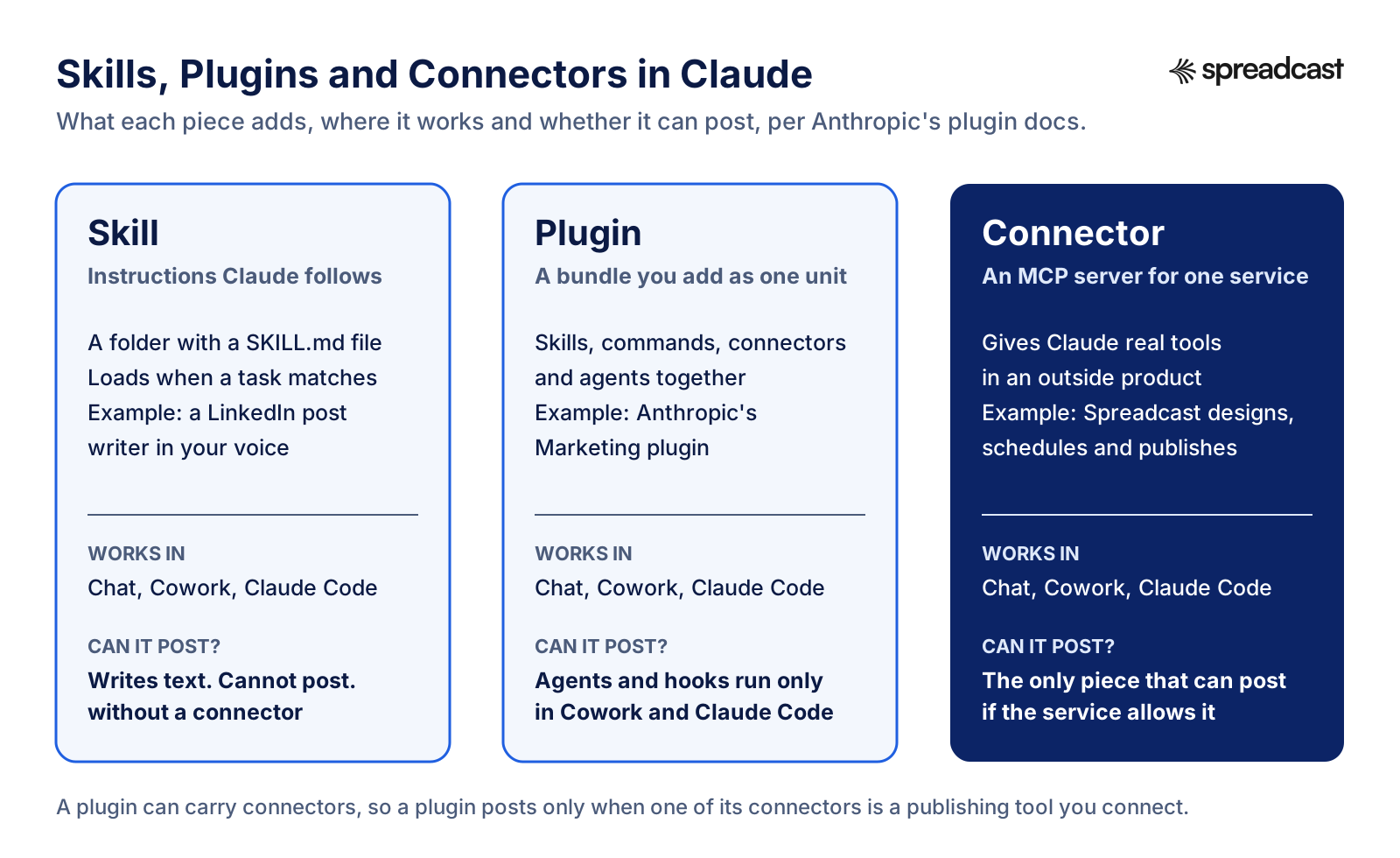
Two neighbors get confused with skills. A plugin is a package that bundles skills with commands, connectors and agents so you add them in one step. A connector is an MCP server that gives Claude real tools inside another product, such as Canva, HubSpot or a publishing tool. Anthropic's article draws the line this way: MCP connects Claude to outside services, and skills supply the know how for using them. For social media that split matters, because the skill decides what a good post looks like and only a connector can make the picture in your brand or put the post on a network.
Skills, Plugins and Connectors: Which One Can Post
Before picking anything to install, it helps to see which piece does which job. Only one of the three can publish a post.
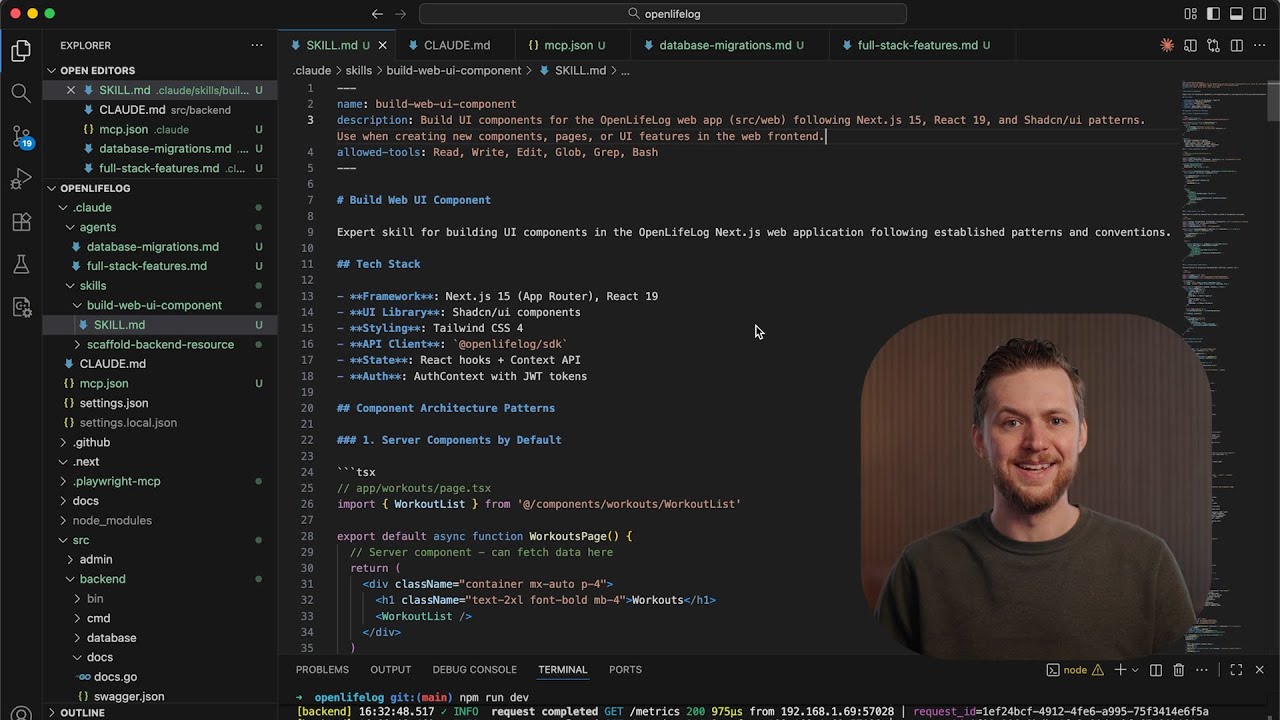
Video: Claude Agent Skills Explained
Anthropic's three minute explainer covers how a skill loads and how it differs from a CLAUDE.md file, an MCP server and a subagent.
Best Claude Skills for Social Media at a Glance
Every row was checked on GitHub on October 28, 2026. Skills is the number of distinct skill folders we counted, not the number a README claims.
| Skill or plugin | Best for | Skills | License | Last commit | Needs from you |
|---|---|---|---|---|---|
| Anthropic Marketing plugin | Drafts, campaign plans, brand review, reports | 8 | Apache 2.0 | Oct 27, 2026 | A paid Claude plan for plugins |
| Corey Haines's Marketing Skills | Whole marketing function, with a social skill | 52 | MIT | Oct 27, 2026 | A product context file it helps you write |
| Charlie Hills's Social Media Skills | LinkedIn in your own voice, carousel briefs | 17 | MIT | Oct 18, 2026 | 3 to 5 writing samples; Gemini for images |
| Serge Bulaev's LinkedIn Skills | LinkedIn posts, comments, replies with approval | 12 | MIT | Oct 27, 2026 | Optional Publora and Apify accounts |
| Jake Schincariol's LinkedIn Agent Skill | LinkedIn writing with a humanizer | 11 | MIT | Sep 7, 2026 | A voice file; nothing to connect |
| BlackTwist Social Media Skills | Threads, Bluesky and other text first networks | 14 | MIT | May 1, 2026 | A social media context file |
| ScrapeCreators Research Skills | Outlier posts, comment mining, ad teardowns | 13 | MIT | Aug 26, 2026 | A ScrapeCreators API key |
| Anthropic example skills | Brand guidelines, canvas design, skill creator | 19 | Mostly Apache 2.0 | Oct 9, 2026 | Edits to swap in your brand |
| Tribe AI Brand Voice plugin | Turning scattered brand docs into rules | 3 | In Anthropic's repo | Oct 27, 2026 | Connectors to where your docs live |
| Alireza Rezvani's Claude Skills | Marketing plus everything else, one install | 49 in marketing | MIT | Oct 26, 2026 | Patience to pick from hundreds |
| Threads Carousel skill | Carousel images rendered on your machine | 1 | MIT | Apr 20, 2026 | Claude Code and a Node toolchain |
| Appeeky ASO Skills | App Store listing work for app makers | 40 | MIT | Oct 6, 2026 | Appeeky for live store data |
Anthropic's example skills repository holds 19 skill folders; the rows on this page cover the four that matter for marketing.
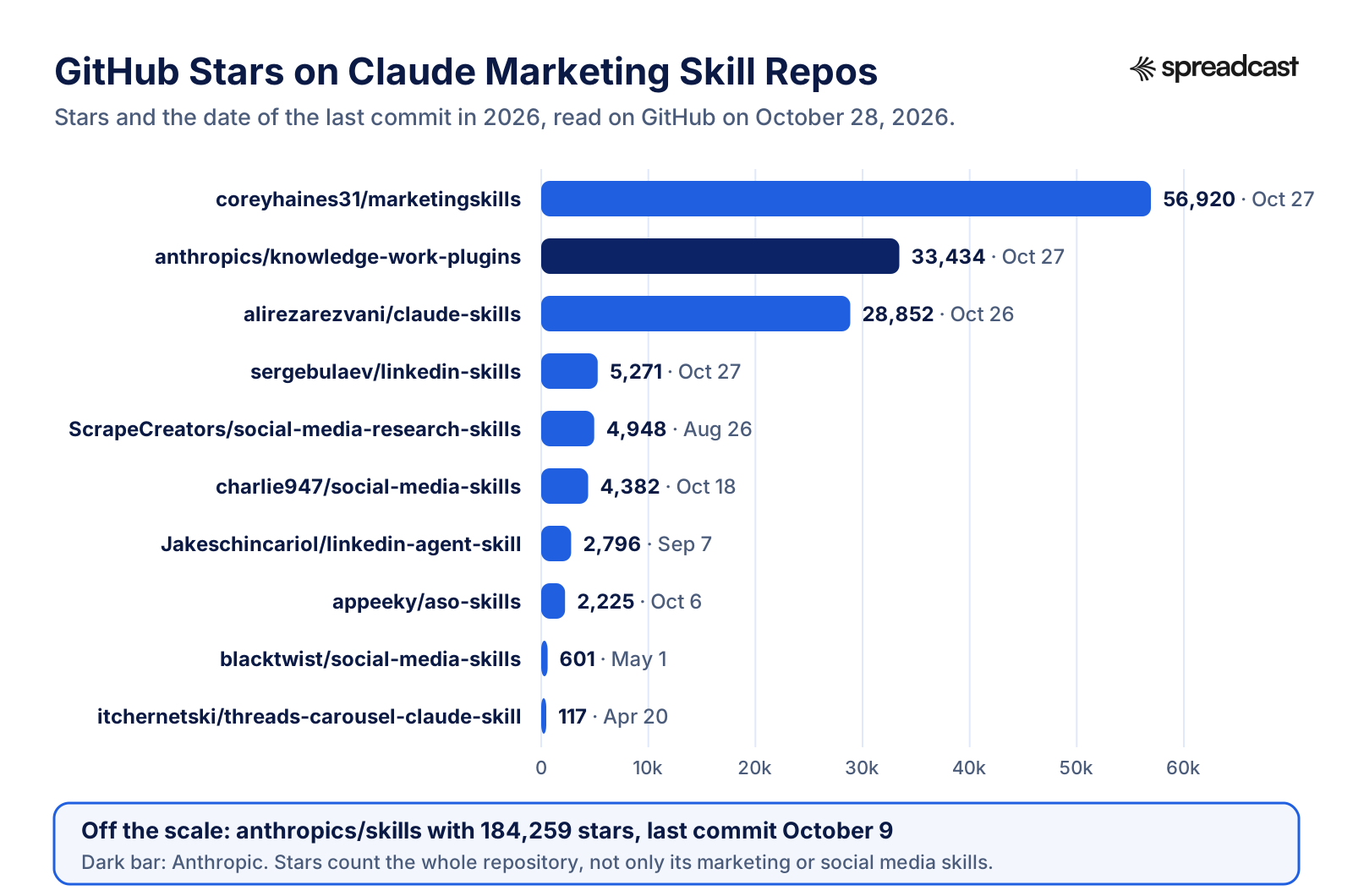
Claude Skills for Social Media on GitHub, by Stars
Stars tell you how many people bookmarked a repository, not how good its social media skill is. They are still a fair signal of how many people will report a broken file.
Best Claude Skills for Social Media, Reviewed
Spreadcast comes first because it is the piece that turns any skill below into a published post. It is a connector, not a skill, and it works next to every entry on this list.
- 1
Spreadcast
Free to try, Pro $29 a monthBest paired with any skill below: it designs the post in your brand and publishes it
Spreadcast is the MCP connector you add next to your skills so the words they write become finished posts. The skill decides what a good LinkedIn post or carousel looks like; Spreadcast designs it in your brand, with your logo, colors, fonts and real app screenshots in an iPhone frame, writes a caption per network and saves it as a draft on your calendar. You approve it, and it goes out to Instagram, Facebook, Threads, LinkedIn, Pinterest, TikTok, YouTube, Bluesky, Mastodon, Telegram or Discord.
It works from the same chat or session as your skills. In Claude you add it as a custom connector; in Claude Code you add it with one command; in Cowork it loads from your account like any other connector. Claude then gets tools to design single posts and carousels, write captions, create, schedule and approve posts, list your app's moments and read analytics. The full tool list is on the Spreadcast MCP page.
For app makers it also works without a prompt at all. Paste an App Store link at the start page, and Spreadcast builds the brand kit from the listing, checks the listing every day and drafts a post when a new version goes live or the app hits a ratings milestone.
Pros
- Designed images in your brand, not an image prompt
- Publishes to 11 networks, including Threads, Bluesky and Telegram
- Drafts wait for your approval by default
Cons
- Not a skill: it does not change how Claude writes
- Built first for App Store apps, though any brand can start from a website
- 2
Anthropic Marketing plugin
Free with a paid Claude planBest official starting point in Cowork and Claude Code
Anthropic's Marketing plugin is the closest thing to an official Claude marketing skill set. The folder we cloned holds eight skills: content creation, draft content, campaign plan, brand review, competitive brief, performance report, SEO audit and email sequence. Its listing on Claude's site carries the "Anthropic verified" mark and describes it as a way to create content, plan campaigns and analyze performance across marketing channels.
For social media, two skills do the work. Draft content asks for the content type, topic, audience, key messages, tone and length, and for a social post it asks which platform. Its social template wants a hook in the first line, three to five hashtags, a call to action and emoji to taste. Brand review checks a draft against your voice and terminology if you have saved a style guide in the plugin's local settings, and gives a generic review if you have not.
The plugin also ships a list of suggested connectors, among them Canva and Figma for design, HubSpot, Notion, Ahrefs, Similarweb, Klaviyo, Amplitude and Supermetrics. None of them publishes to a social network. We cover how to use it, step by step, in the section on the Claude marketing plugin below.
Pros
- Made and maintained by Anthropic
- Covers the whole marketing job, not only posts
- Installs in one click in Cowork
Cons
- Social guidance is short and names only four networks
- No image making and no publishing of its own
- Its README lists skill names that no longer match the folders
- 3
Corey Haines's Marketing Skills
Free, MIT licenseBest broad marketing library, with a strong social skill
The most starred marketing skill repo we found on GitHub, with 56,920 stars on October 28, 2026 and a commit the day before. It holds 52 skills that cover most of a marketing team: copywriting, SEO audits, ASO, launch plans, pricing, paywalls, ad creative, email, referrals and a skill simply called social. Every skill first reads a product marketing context file, which the product marketing skill helps you write once, so later answers know your product, audience and positioning.
The social skill, version 2.4.0 when we read it, covers content pillars, hook formulas, a repurposing system for turning a blog post or podcast into posts, a weekly calendar template, an engagement routine and a section on publishing from your agent. That last part is refreshingly frank: it says getting posts onto accounts still needs a scheduling tool, tells Claude to create drafts first and never to publish without an explicit go ahead. Its reference folder adds platform limits that include Threads and Pinterest.
It installs in more ways than any other repo here: the npx skills command, a Claude Code plugin marketplace, an OpenAI Codex plugin, a plain clone and copy, or a git submodule. One thing to know before you install: the README has a partners block of paid tools that fund the project, which the README says never influence what the core skills recommend.
Pros
- Huge, active and well maintained
- Social skill tells Claude to draft first and wait for approval
- One context file feeds every skill
Cons
- Much of it is aimed at SaaS websites, not social
- The image skill relies on outside image APIs and keys
- Sponsored partner tools appear in the README
- 4
Charlie Hills's Social Media Skills
Free, MIT licenseBest for a personal LinkedIn voice and carousel briefs
Seventeen skills from the author of the MarTech AI newsletter, at version 1.1.0 since September 15, 2026. The foundation is a voice builder skill that interviews you and reads three to five of your own writing samples, then writes two files, about me and voice, that every other skill reads before it drafts anything. The rest are mostly about LinkedIn: a post writer, a post formatter with named frameworks, a hook generator, a profile optimizer, a content matrix and a post scorer.
The visual skills are clear about their limits, which we liked. The graphic designer skill makes HTML and CSS you can render to a PNG, or a Gemini image prompt. The carousel skill writes a brief and one Gemini prompt per slide, with an approval gate between them. The README states that a prompt is not a finished image and that a rendered slide must be opened and checked at full and feed size before anyone calls it reviewed.
The Reels scripting skill is the one with real dependencies: to analyze a reference Reel from its link it needs an Apify token and a Google AI key, plus Node. Everything else runs on what you give it. Installation works as a Claude Code plugin marketplace, as single zipped skills uploaded to Claude, or through Codex.
Pros
- Voice files make drafts sound like you
- Honest about what is a prompt and what is an image
- Works without any paid service for writing
Cons
- Mostly LinkedIn, with one skill each for Reels and YouTube
- Images need Gemini or a renderer you run
- 5
Serge Bulaev's LinkedIn Skills
Free, MIT license; publishing service has its own plansBest LinkedIn bundle with approve before publish
Twelve LinkedIn skills that draft posts, comments and replies, strip AI tells and wait for approval before anything goes live. It had 5,271 stars and a commit on October 27, 2026. Its skills include a post writer, a humanizer, a comment drafter, a reply handler, a content planner, a repurposer, a hook extractor and a profile optimizer, and the same author keeps matching bundles for Instagram, YouTube, TikTok, Threads and Facebook.
This is one of the few skill sets that actually posts, so read how. Its main SKILL.md says publishing runs through the Publora API, with a free tier the file puts at 15 LinkedIn posts a month, and that on claude.ai or Claude Code you can authorize a Publora connector instead of keeping a key on disk. Reading other people's posts and comments is optional and goes through Apify actors, either with a token in a local file or through Apify's MCP server on claude.ai.
The README has the clearest install steps for the Claude app we found anywhere: open Customize, then Plugins, add a marketplace from a repository, sync, then install the plugin from the Discover tab and check it under Yours.
Pros
- Draft, approve, then publish is built into every skill
- Clear setup for Claude on the web and desktop
- Sister bundles for other networks
Cons
- Posting depends on a third party service and its limits
- Text only: no designed images
- 6
Jake Schincariol's LinkedIn Agent Skill
Free, MIT licenseBest no key LinkedIn writing kit with a humanizer
Eleven LinkedIn skills that need no account, no API key and nothing to connect. The README is blunt about it: the skills write and you post. There is one for posts built on 21 hook formulas, one for comments on other people's posts, one for replies under yours, a weekly planner, a document post skill for carousels, a repurposer, a direct message helper, an inbox triage skill and an audit of what you already published.
The standout is the humanizer, which ships two Python scripts that remove em dashes, stock AI vocabulary and invisible watermark characters from a draft and score the rest before you see it. Those scripts only run where Claude can run code locally, so in a plain chat you lose that part. Every skill reads a voice file you fill in once, or that Claude writes from three of your old posts.
Install it by copying the folders into your personal skills folder in Claude Code, or add the repository as a plugin marketplace. It was last updated September 7, 2026, with 2,796 stars.
Pros
- Nothing to sign up for
- The humanizer is a real script, not a prompt
- Carousel skill writes slide copy and the cover
Cons
- LinkedIn only
- Scripts need Claude Code or Cowork on your machine
- 7
BlackTwist Social Media Skills
Free, MIT licenseBest for Threads and Bluesky text posts
Fourteen skills for text first networks, split into foundation, strategy, creation and analysis. A context skill captures your platforms, audience, pillars and tone once; then there are writers for single posts, threads of posts, carousel scripts and captions, a hook writer, a repurposer, a content calendar and four analysis skills that read your numbers. The platform strategy skill names Threads and Bluesky many times, which is rare in this field.
It is small and has not changed since May 1, 2026, so treat it as a solid set of templates rather than a project that tracks platform changes. It installs with the npx skills command or by uploading one zip per skill from its release page into Cowork or Claude, under Customize, Skills.
Pros
- Covers Threads and Bluesky, which most bundles skip
- Clean split between strategy, writing and analysis
Cons
- Not updated for six months
- No images and no posting
- 8
ScrapeCreators Social Media Research Skills
Free skills; data needs a ScrapeCreators API keyBest for research: outlier posts, comment mining and ad teardowns
Thirteen research skills that pull public data from TikTok, Instagram, YouTube, Reddit, LinkedIn, Facebook, Threads, Bluesky, Pinterest and others through the ScrapeCreators API. They find posts that beat a creator's normal numbers, mine comments for questions and objections, summarize video transcripts, compare competitors, tear down ad libraries and find trends in a niche.
Every skill needs a ScrapeCreators API key set as an environment variable, so this is a Claude Code or Cowork tool more than a chat one. If your posts run dry because you do not know what your audience asks about, the comment mining and product demand skills are the most useful research skills we read.
Pros
- Real data instead of guesses
- Covers more networks than any other bundle here
Cons
- Every data call goes through the ScrapeCreators API
- Research only: it does not write or publish your posts
- 9
Anthropic's example skills: brand guidelines, canvas design, theme factory, skill creator
Free; most skills Apache 2.0Best templates for building your own brand skill
Anthropic's public skills repository is the most starred repository on this page, with 184,259 stars. It is not a marketing kit, and its README says the skills are for demonstration and educational purposes. Four of its 19 skills are still worth knowing for social media work. Brand guidelines applies a brand's colors and type to whatever Claude makes, but it is written for Anthropic's own brand, so you copy it and swap in yours. Canvas design makes static posters and visual pieces as PNG or PDF files. Theme factory carries ten preset color and font themes for slides, docs and pages.
The fourth, skill creator, is the one most people should use. It builds new skills with you, edits existing ones and tests how reliably a skill's description triggers. If none of the bundles on this page sounds like your brand, this is how you write your own in half an hour. The repository also works as a Claude Code plugin marketplace, and the README notes these example skills are already available on paid Claude plans.
Pros
- Straight from Anthropic
- Skill creator saves hours on your own skills
Cons
- Examples, not finished marketing tools
- Brand guidelines must be rewritten for your brand
- 10
Tribe AI Brand Voice plugin
Free with a paid Claude planBest for teams whose brand rules are scattered across tools
A partner plugin that lives in Anthropic's own knowledge work plugins repository. Anthropic's February 24, 2026 post on Cowork plugins names it as a plugin from Tribe AI that analyzes documents, marketing materials and conversations to turn a brand's voice into clear guidelines. It has three commands: one to discover your brand from existing material, one to generate guidelines, and one to enforce the voice on a new draft, such as a LinkedIn post.
Discovery searches the places brand knowledge hides, through connectors for Notion, Atlassian, Box, Microsoft 365, Figma, Gong and Granola, plus Google Drive and Slack. For a solo founder that is overkill. For a team of five where nobody agrees on the voice, it is the fastest way to a written voice guide that every other skill on this page can then read.
Pros
- Builds the voice guide from what you already wrote
- Works with the drafting skills above
Cons
- Needs connectors to your document tools to shine
- No social formats of its own
- 11
Alireza Rezvani's Claude Skills
Free, MIT licenseBest when you want marketing and everything else in one install
A very large library, 28,852 stars and updated October 26, 2026, with skills for engineering, product, finance, compliance and marketing. Its marketing folder holds 49 skills, three of them for social media: a social media manager skill for strategy, calendars and community, a social content skill for writing posts, and a social media analyzer that calculates engagement rates and benchmarks.
The breadth is the selling point and the problem. You can install the marketing set alone as a plugin, which we recommend, rather than loading hundreds of skills you will never use. Some marketing skills also ship Python scripts, such as a brand voice analyzer, so read those before you run them.
Pros
- Marketing, sales and leadership skills in one place
- Engagement and benchmark maths in the analyzer
Cons
- Hard to know which of many skills will trigger
- Overlaps heavily with Corey Haines's library
- 12
Threads Carousel skill
Free, MIT licenseBest for rendering carousel images on your own machine
A single Claude Code skill that turns a text post into carousel images for Threads, Instagram, LinkedIn, TikTok and Stories. It is one of very few skills that makes actual images: it runs a small web template on your computer, shows a live preview and exports a PNG per slide or one PDF. It has 12 slide types, six format presets including Threads 4:5 and a LinkedIn PDF, and a style system of fonts, surfaces and accent colors.
It needs Claude Code plus a Node toolchain, because you install the template's packages once before the first run, and it has 117 stars, so expect rough edges. The styles are its own presets rather than your brand kit, so you set your colors by hand.
Pros
- Makes real PNG and PDF files
- Formats for Threads, Instagram and LinkedIn
Cons
- Terminal setup required
- Not your brand kit by default; small project
- 13
Appeeky ASO Skills
Free skills; live data through AppeekyBest for app makers working on the App Store listing
Forty skills for App Store Optimization and app marketing, from keyword research and metadata to screenshots, in app events, review management, Apple Search Ads and launch plans. The README says the skills pull real App Store data through the Appeeky API, so the best results need that service.
It is not a social media bundle, but app makers asked us about it often enough to include it. The store listing and your social posts feed each other: the post brings people to the page, and the page has to convert them. For the social side of an app launch, the app launch checklist covers what to post and when.
Pros
- Built for app makers
- Covers launch, ASO and reviews
Cons
- Store listing work, not posts
- Live data depends on a third party service
The Claude Marketing Plugin From Anthropic, Up Close
People search for the Claude marketing plugin by name, so it deserves more than a roundup entry. It lives in Anthropic's knowledge work plugins repository, which had 33,434 stars and a commit on October 27, 2026, under the Apache 2.0 license. The repository holds plugins for sales, finance, legal, design, data, product management and other roles, all built, its README says, primarily for Cowork and also compatible with Claude Code. The marketing plugin's manifest reads version 1.2.0, author Anthropic.
When we opened the folder, we found a small mismatch worth knowing. The README lists seven commands and five background skills, with names like campaign planning and brand voice. The skills folder holds eight skill folders instead, named after the commands, plus content creation. That fits how plugins work now: Claude's plugins overview says a plugin's commands appear in the same slash menu as its skills, and in chat a command loads as a skill. In practice you will see eight entries under the plugin's name when you type a slash.
What the plugin knows about social media is short. The content creation skill has four lines of channel advice: LinkedIn should be professional but human, with paragraph breaks and personal stories, and it calls 1,300 characters "the sweet spot" before the see more cut. Instagram captions should be visual first, with hashtags in the first comment or at the end. Facebook posts should be conversational. The draft content skill asks you to pick one of four platforms. There is nothing on Threads, Bluesky, TikTok, Pinterest, Mastodon or Telegram, and no image making at all.
That is not a criticism of the plugin's job. It is a marketing generalist that plans campaigns, writes long and short copy, checks brand voice, briefs you on competitors and builds reports. Its campaign plan skill, for example, suggests three to seven posts per week per platform and one to two business days to draft, design and schedule a social post. If you want depth on a single network, add one of the community bundles above. For exact limits per network, check the platform's own rules on our social media character limits page rather than a skill's rule of thumb.
Claude Marketing Plugin Skills and What They Do for Social Media
The eight skills in the plugin folder we read on October 28, 2026, with how each one helps a social media workflow.
| Skill | What it does | Social media use |
|---|---|---|
| Draft content | Drafts blog posts, social posts, newsletters, landing pages, press releases, case studies | Single posts for LinkedIn, Instagram and Facebook with hook, hashtags and a call to action |
| Content creation | Templates and writing rules by channel | Background rules Claude reads when you ask for any marketing copy |
| Campaign plan | Objectives, audience, channels, a weekly content calendar, KPIs | A launch calendar with posts per network and week |
| Brand review | Checks a draft against your voice, style guide and terminology | A last pass on captions before they go into a scheduler |
| Competitive brief | Positioning and messaging compared with competitors | What rivals say on social and where the gaps are |
| Performance report | Metrics, trends and recommendations by channel | A monthly social report from numbers you paste or connect |
| SEO audit | Keyword research, on page checks, content gaps | Little for social, useful for the blog posts you repurpose |
| Email sequence | Multi email flows with timing and branching | None directly; pairs with a launch campaign |
Skill names and contents from the plugin folder on GitHub; command list cross checked on Claude's plugin listing.
How to Use the Claude Marketing Plugin
These steps follow Anthropic's article on plugins, which says plugins are available on Pro, Max, Team and Enterprise plans and work in chat on the web and desktop, in Cowork and in Claude Code. The cheapest way in is Pro, which Claude's pricing page lists at $20 a month, or $17 a month billed yearly.
- Step 1
Add It From Customize, Plugins
Open Customize in the left sidebar, then the Plugins tab and Discover. The Knowledge Work marketplace is added by default, so Marketing is listed there. Select it and click Add. In Cowork, open the Cowork tab first. Claude's site also has an Install in Cowork button on the plugin's own page.
- Step 2
Save Your Brand Voice Once
The plugin's README says draft content and brand review apply your voice, style guide and personas automatically when you save them in the plugin's local settings. Paste a short voice sheet: who you write for, words you use and avoid, three posts you liked. Without it, brand review falls back to a generic check.
- Step 3
Run Draft Content for One Post
Type a slash, pick draft content from the Marketing entries and give it the content type (a social media post), the platform, topic, audience, key messages, tone and length. You get a hook, the body, hashtag suggestions and a call to action. Ask for three versions and pick one rather than editing a single draft forever.
- Step 4
Plan the Week With Campaign Plan
For a launch, run campaign plan with the goal, audience, timeline and budget. It returns channels, key messages and a week by week calendar. Ask it to list each post as one line with network, day and angle, so the next step can draft them in a batch.
- Step 5
Check Every Draft With Brand Review
Paste the batch into brand review before it goes anywhere. It flags tone drift, banned words and claims you cannot back up. This is the step most people skip and the one that keeps an AI written feed from sounding like everyone else's.
- Step 6
Connect a Tool for Pictures and Posting
The plugin's suggested connectors cover design (Canva, Figma), CRM, analytics and SEO, not publishing. To get designed images and send posts out, add a publishing connector in the same chat, such as Spreadcast, and ask Claude to turn the approved drafts into scheduled posts.
Claude Social Media Manager Skills on GitHub: Which Bundle Fits Which Job
Most searches for Claude social media manager skills on GitHub end at a list of repo names. The more useful question is which job each one covers, because a social media manager's week has at least five: research what to say, write it, make the picture, publish it, and read the numbers. No single bundle we read covers all five, and the ones that claim to usually hand the hard parts to another service.
Research is the best covered after writing. The ScrapeCreators research skills pull real posts and comments, Corey Haines's social skill has a social listening reference, and Charlie Hills's niche research skill finds dated stories from the last seven days with whatever web tools Claude has. Writing is covered by every bundle, and the differences come down to voice: the bundles that make you write a voice file first, such as Charlie Hills's and Jake Schincariol's, produce drafts that need less editing.
Pictures are where the field thins out. Of the ten community repos we read, only one skill makes finished images on its own, the Threads carousel skill, and it runs a template on your machine. The rest write image prompts for Gemini or other generators, or HTML you render and export. Publishing is thinner still: Serge Bulaev's bundle posts to LinkedIn through Publora, Corey Haines's social skill tells Claude to use whatever scheduler you connect, and the others leave posting to you.
Reading the numbers is covered by analysis skills in BlackTwist's, Alireza Rezvani's and Anthropic's sets, but all of them start from numbers you export or connect. Claude has no view into your Instagram or LinkedIn analytics unless a connector gives it one. If you want the formulas behind those reports, our social media KPIs page lists twenty with examples.
Claude Skills for Social Media Content by Network
Which skill to reach for first on each network, from the files we read. Where no bundle goes deep, we say so.
| Network | Best skill to start with | What it gives you | What is missing |
|---|---|---|---|
| Serge Bulaev's or Jake Schincariol's LinkedIn sets | Posts, comments, replies, profile, document carousels | Designed images in your brand | |
| Corey Haines's social skill; Charlie Hills's carousel brief | Captions, carousel outlines, Reels scripts | Finished slides; posting | |
| Threads | BlackTwist's post and thread writers | Short posts and threads of posts | Images; scheduling |
| Bluesky | BlackTwist's platform strategy skill | Format advice and short posts | Posting and the 300 character check |
| TikTok and Reels | Charlie Hills's Reels scripting; Corey Haines's short video reference | Hooks and scripts from reference videos | The video itself |
| YouTube | Charlie Hills's thumbnail skill | A thumbnail prompt for Gemini | Upload and scheduling |
| Corey Haines's platform limits reference | Keyword led pin descriptions | Pin images | |
| Anthropic's draft content skill | Conversational posts | Images and posting | |
| Telegram, Mastodon, Discord | No dedicated skill found | Use a general post writer | Everything network specific |
Read on GitHub on October 28, 2026. Skill names are written in plain words; the repositories use folder names joined with hyphens.
How to Install Claude Skills in Claude on the Web and Desktop
Steps from Anthropic's article on using skills and the plugins overview. Skills work on every plan with code execution on; plugins need a paid plan.
- Step 1
Switch On Code Execution
On Free, Pro and Max, go to Settings, then Capabilities, and turn on code execution and file creation, which newer layouts call Create and edit files. On Team and Enterprise an Owner turns on code execution and Skills under Organization settings, Plugins and skills, Policy.
- Step 2
For One Skill, Upload a Zip
Download the skill's folder from GitHub, zip it so the folder itself sits at the root of the archive, then go to Customize, Skills, click the plus button, Create skill, Upload a skill. The skill appears in your list with a toggle. Uploads stay private until you share them.
- Step 3
For a Whole Bundle, Add the Repo as a Marketplace
If the repository has a plugin marketplace file, as every repo on this page does, go to Customize, Plugins, Add, Add marketplace, and paste the owner and repo name. Public repos on GitHub, GitLab and Bitbucket work. Then install the plugin from Discover.
- Step 4
Check It Landed
Type a slash in the message box. The menu lists your skills with the plugin each came from. If a bundle is missing, open Customize, Plugins and look under your installed list rather than Discover, which is the step that trips most people.
- Step 5
Turn Off What You Do Not Use
Each skill and plugin has its own toggle. Leave on only the ones you use this month. Fewer skills means fewer wrong matches when Claude picks one for you.
How to Install Claude Code Marketing Skills
Commands from Claude Code's plugin install guide and skills documentation. Claude Code marketing skills install in three ways; pick one per repo so you do not end up with two copies.
- Step 1
As a Plugin From a Marketplace
In a session, run /plugin marketplace add followed by the repo's owner and name, for example coreyhaines31/marketingskills. Then run /plugin, find the plugin on the Discover tab, read its details pane and choose a scope: just you, everyone on this repository, or you in this repository only. The plugin's skills then show up as the plugin name, a colon and the skill name.
- Step 2
As Plain Skill Folders
Copy a skill folder into the personal skills folder under .claude in your home directory to use it in every project, or into the project's own .claude/skills folder to share it with whoever clones the repo. Claude Code watches those folders and picks up new skills without a restart.
- Step 3
With the Open Source Skills Installer
Several repos, including Corey Haines's, BlackTwist's, ScrapeCreators' and Appeeky's, support the open source npx skills tool, which detects your agents and copies skills into the right folder. Corey Haines's README warns that when Claude Code runs it for you, it may install to a shared agents folder Claude Code does not read, so pass the Claude Code agent flag
- Step 4
Read the Details Pane Before You Confirm
Claude Code shows what a plugin will install: commands, agents, skills, hooks and MCP servers. Anything with hooks or a local server runs code on your machine. If you see either in a marketing bundle, open its files on GitHub first.
- Step 5
Keep Third Party Bundles Updated by Hand
Claude Code's docs say auto update is on by default for Anthropic's main marketplace and off for every third party marketplace. That protects you from silent changes, but it also means you need to update community bundles yourself every few weeks.
How to Install Skills and Plugins in Cowork
Cowork shares your account's plugins, so most of the work is the same as in chat. Claude's Cowork plugin guide says you browse, install and upload plugins from Customize, then Plugins, where Discover shows Anthropic's catalog and Add marketplace takes any GitHub repository URL or the owner and repo shorthand. A plugin you install there is saved to your account and also shows up in chat and in Claude Code.
The difference is what a plugin can do once it is in Cowork. The plugins overview lists four kinds of component: skills, commands, MCP connectors and agents. Chat loads skills, commands and connectors; Cowork and Claude Code also run agents, and hooks run only there too. Some marketing bundles ship agents, Tribe AI's Brand Voice plugin among them, so they do more in Cowork than in a chat window.
Cowork also gives you two things that matter for a weekly social routine. You run a command by typing the plugin name, a colon and the command, and since February 2026 slash commands open structured forms rather than a blank prompt. And because Cowork can work with files in folders you connect, skills that need a voice file or a list of past posts can read them from disk instead of asking you to paste them each time. The guide lists limits too: up to 200 MB per plugin uncompressed, 500 plugins per marketplace and 25 marketplaces you can add.
For the full Cowork setup with scheduled tasks and connectors, see Claude Cowork for social media. Here the point is simpler: install a marketing bundle once in Customize, and Cowork, chat and Claude Code all get it.
Video: Cowork and Plugins From Anthropic
Claude's own video shows teams at a fictional company running plugins in Cowork, including the kind of brand and content work a marketing plugin handles.

Which Install Route Works Where
One table for the question we get most: I installed a skill, why is it not in my other Claude app?
| How you installed it | Chat on web and desktop | Cowork | Claude Code |
|---|---|---|---|
| Skill zip uploaded in Customize, Skills | Yes | Yes | Not documented; copy the folder to be sure |
| Plugin added from Customize, Plugins | Skills, commands, connectors | Everything, including agents | Yes, as a synced plugin after a plugin reload |
| Plugin installed with /plugin in Claude Code | No | No | Yes, on that machine only |
| Skill folder copied into .claude/skills | No | No | Yes, for that user or repository |
| npx skills tool | No | No | Yes, if it targets the Claude Code folder |
From Claude's plugins overview and Claude Code's plugin guide, read October 28, 2026. Synced plugins need Claude Code signed in with the same claude.ai account, not an API key.
What to Check Before You Install a Claude Social Media Skill From GitHub
A skill is text that steers Claude, and a plugin can also run code. Claude Code's plugin security page says a plugin "can execute arbitrary code on your machine with your user privileges": hooks run as shell commands, local MCP servers run as processes, and skills and agents enter Claude's context as instructions. Anthropic's skills article names prompt injection and data exfiltration as the main risks, and warns that skills may include or tell Claude to install third party packages.
Anthropic reviews plugins it lists in its directory, with automated checks and a person reviewing each new listing. The plugins overview says this review does not cover a plugin you add from a marketplace URL or upload yourself. Every community repo on this page falls in that second group. Anthropic's page on its marketplaces adds that it does not review third party marketplaces at all.
Three patterns came up again and again in the marketing repos we read. Some skills call paid services with keys you store in a file, such as Apify, Google AI, ScrapeCreators or Publora. Some bundles ship a connector that loads with the plugin, such as the Ryze marketing skills, whose README installs its own ads connector alongside 49 skills. And some popular repos have no license file at all: that same repo had 5,958 stars and no LICENSE file when we checked, which means you have no written permission to copy and change its skills.
None of that makes these repos bad. It means you read before you install, the same way you would check a browser extension. The checklist below takes ten minutes per bundle.
A Checklist for Marketing Skills From GitHub
Run these six checks on any community skill or plugin before it touches your brand accounts.
Read Every SKILL.md
Open each skill's SKILL.md on GitHub. Look for lines that tell Claude to fetch a URL, install a package, run a script or send data somewhere. If a social media writing skill does any of that, ask why.
Open the Scripts and Hooks
Check the scripts folder and any hooks file. A humanizer script that cleans text is fine. A script that posts, uploads or reads your browser data needs a reason you agree with.
Find Every Key It Wants
Search the README for API key, token and environment variable. Each one is a service with its own terms and bill. Decide whether you want that service before the skill decides for you.
Look for a License
MIT and Apache 2.0 let you copy and adapt the skill. No license file means you are using it on trust. For a brand account, prefer licensed repos.
Check the Last Commit
Networks change their limits and formats. A bundle untouched for six months may still say things that were true last spring. Recent commits are not proof of quality, but old ones are a warning.
Keep Write Tools on Ask
Anthropic's connector guide says to use Allow always only for tools you trust to run unsupervised. For anything that posts, keep it on ask, so a skill cannot publish because a sentence in a file told it to.
Where Claude Skills for Social Media Content Stop
After reading ten community bundles and Anthropic's plugin, the pattern repeats. Claude skills for social media content are good at the thinking part of the job: what to say this week, which hook to open with, how a LinkedIn post differs from a Threads post, what to cut. Good skills also remember your rules, so you stop repeating "no hashtags on LinkedIn" in every chat.
They stop at three points. The first is the picture. Instagram, Pinterest and TikTok photo posts are pictures first, and a carousel brief is not a carousel. A skill can write a Gemini prompt or an HTML mock, but it cannot use your real app screenshots, your exact fonts and your logo unless something else does the drawing. The second is the fit per network: the same idea needs a different length and format on LinkedIn, Bluesky and Instagram, and most skills write one draft and leave the rest to you. The third is the post itself. Skills do not hold permission to publish to your accounts; a connector or a scheduler does.
That is why most people who install marketing skills end up with a folder of good drafts and the same Sunday afternoon of design and scheduling they had before. If that sounds like your week, the fix is not a better skill. It is a connector that takes the skill's output and finishes it. With Spreadcast's MCP connector in the same chat, Claude passes the approved copy to Spreadcast, which designs the post in your brand kit, writes a caption sized for each network and saves it as a draft on your calendar for one tap of approval.
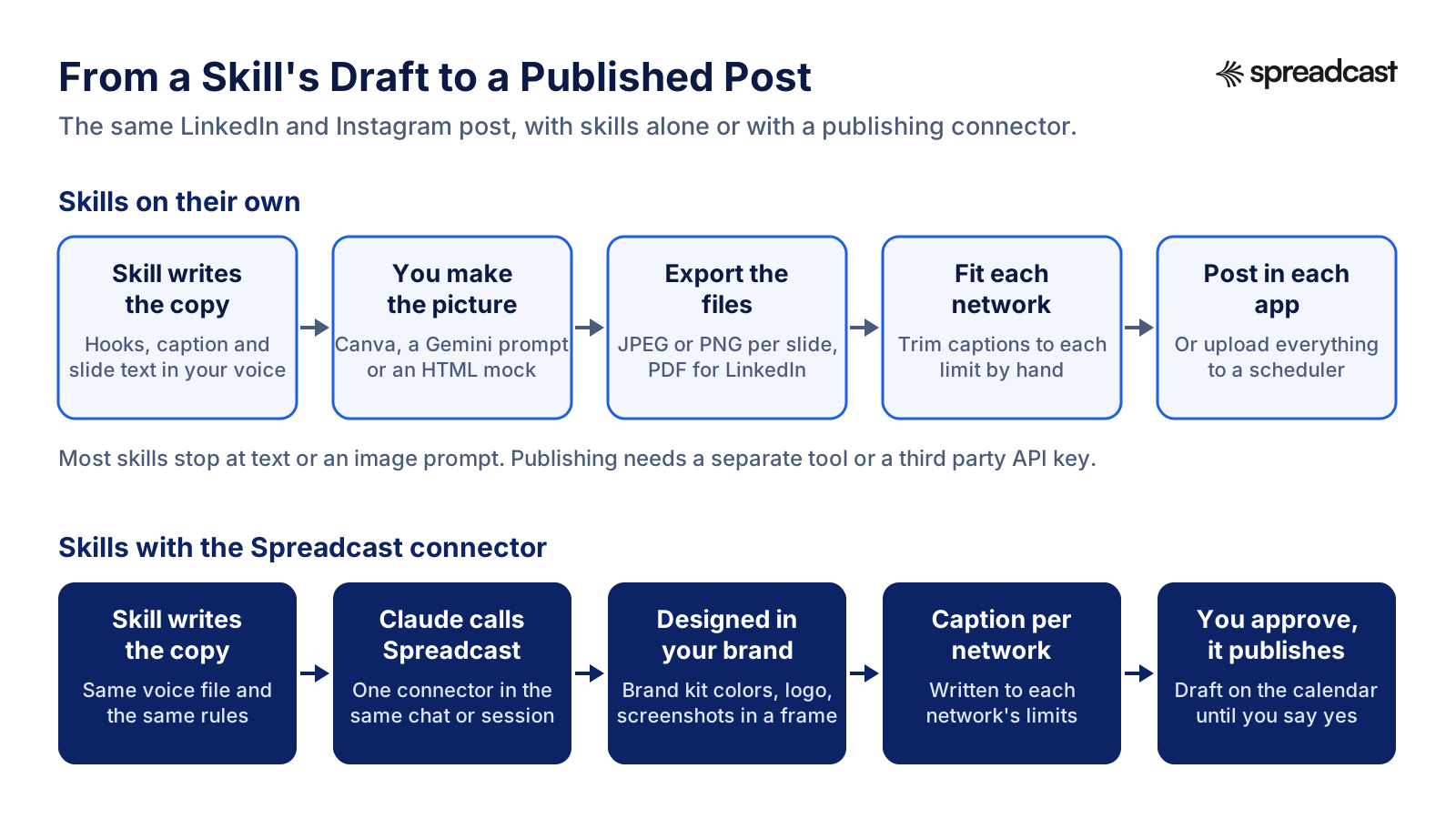
From a Skill's Draft to a Published Post
The same post, two ways. On top, what you do by hand after a skill writes the copy. Below, what happens when a publishing connector sits in the same chat.
Claude Marketing Skills for App Makers
If you market an iPhone or Android app, most Claude marketing skills on GitHub are written for SaaS websites: landing pages, signup flows, cold email. A few are made for you. Appeeky's ASO skills cover keywords, metadata, screenshots, in app events and launch plans. Corey Haines's library has an ASO skill and a launch skill. Both help with the store listing, which is where every social post you make eventually sends people.
What app makers need from social media is different from a consultant building a personal brand. Your best posts come from things that happened in the product: a new version, a feature people asked for, a review worth sharing, a ratings milestone. A skill can turn release notes into a post if you paste them in. It cannot notice the release went live. That is the job Spreadcast was built for: paste your App Store link at the start page, and it builds a brand kit from the listing, checks it every day, and when a new version ships or the app passes a ratings milestone it designs the post, writes a caption per network and publishes on autopilot or after one tap.
For the release post itself, our app update announcement examples show what works, and the app store optimization guide covers the listing side in depth.
Make Your Own Brand Voice Skill With Skill Creator
After reading every bundle, our honest advice for most brands is to install one community set for ideas and then write one skill of your own for your voice. The bundles are written for their authors' audiences. A short skill that holds your words, your banned phrases and two posts you were proud of beats a thousand lines of someone else's playbook.
You do not need to write the file by hand. Anthropic's skill creator builds a skill with you by asking questions, then tests whether its description triggers when it should. Anthropic's guide to custom skills sets the rules it follows: a name of up to 64 characters, a description of up to 200 characters that says what the skill does and when to use it, focused skills instead of one giant one, and example inputs and outputs so Claude knows what good looks like.
A brand voice skill for social media needs five things: who you write for, three to five words that describe the voice and three that do not, words and claims you never use, one example post per network you post on, and one rule per network for length and format. Keep it under a page. If you want a starting template for the brand side, our brand style guide template has the fields, and what a brand kit needs covers the visual half that a text skill cannot hold.
Video: Creating Custom Skills With Claude
Anthropic's short demo of the skill creator building a new skill from a conversation, the same way you would build a brand voice skill.

A Social Media Skill Stack You Can Set Up in an Afternoon
A setup that covers the five jobs of a social media week without installing everything on this page. Times are rough, for one person working alone.
- Step 1
Write Your Voice Once (30 Minutes)
Run Charlie Hills's voice builder or ask skill creator for a brand voice skill. Feed it three to five posts you wrote and liked. Save the result where every skill can read it: a Cowork folder, a Claude Project or your repository.
- Step 2
Install One Writing Bundle (10 Minutes)
Pick by network: a LinkedIn set if that is where you grow, BlackTwist's if you live on Threads and Bluesky, Corey Haines's social skill for a mix. Install it as a plugin so it reaches chat, Cowork and Claude Code at once.
- Step 3
Add the Marketing Plugin for Planning (5 Minutes)
Anthropic's plugin gives you campaign plans and brand review. Use campaign plan for launches and brand review as the last check on every batch.
- Step 4
Add Research Only If You Need It (15 Minutes)
If you run out of ideas, add the ScrapeCreators skills and a key, or ask the writing bundle's research skill to work from your own customer emails and reviews instead. Real questions from customers make better posts than trends.
- Step 5
Connect a Publishing Tool (10 Minutes)
Add a connector that can design and post, and set its write tools to ask. Test with a read only question first, such as which networks are connected.
- Step 6
Run One Real Week
Draft the week in one sitting, review with brand review, send to the connector as drafts and approve on Monday. Turn off any skill you did not use by Friday.
Where Spreadcast Fits: Skills Write the Words, Spreadcast Makes and Posts the Post
Here is a normal week for someone running a product's social media with Claude skills and nothing else. Monday, a LinkedIn skill drafts five posts and a carousel brief. Then the manual part starts: open Canva or a Gemini prompt to make the carousel, fix the colors to match the brand, export ten slides, crop them for Instagram, write a shorter version for Threads and Bluesky, upload each file to each network or a scheduler, and set the times. The skill took ten minutes. The rest takes the afternoon.
With Spreadcast connected in the same chat, the skill still writes, and Claude hands the result to Spreadcast's tools. Spreadcast designs the single image or the 3 to 8 slide carousel in your brand kit, with your logo, colors, fonts and real app screenshots in an iPhone frame. It writes a caption per network that fits each one's limits, and it saves a draft on your calendar for each network you choose. You look at the drafts, change what you want and approve. Then it publishes to Instagram, Facebook, Threads, LinkedIn, Pinterest, TikTok, YouTube, Bluesky, Mastodon, Telegram and Discord, all from one calendar.
Analytics close the loop that report skills leave open. Spreadcast shows followers and interactions per network and likes, comments, reach and views per post, and Claude can read them through the same connector, so a performance report skill works from real numbers instead of a pasted export.
The pricing is built around what it replaces. Free makes three posts you can download, with a small Spreadcast mark. Pro is $29 a month, or $290 a year, for clean posts with no cap, publishing to 10 social accounts across any mix of networks, autopilot or one tap approval and posting from Claude or ChatGPT. Studio is $79 a month for five apps and 50 accounts. If you only need a launch, the Post Pack is $19 once for 10 posts designed and published, or the 30 Day Pass is $39 once for everything in Pro for 30 days. Paid plans have a 7 day full refund. The details are on the pricing page.
How to Add Spreadcast Next to Your Claude Skills
Connector steps follow Anthropic's custom connector guide, which says custom connectors work on every plan, with Free limited to one.
- Step 1
Create Your Brand Kit
Sign up at the start page and paste an App Store link, a website or a short description of the brand. Spreadcast builds the kit: icon or logo, colors, fonts and screenshots. Connect the networks you post to.
- Step 2
Add the Connector in Claude
In Claude, open Customize, Connectors, click the plus button and choose Add custom connector. Paste spreadcast.app/api/mcp with https in front and sign in. On the consent screen choose Make Drafts, so Claude can save posts but not publish them.
- Step 3
Or Add It in Claude Code
Run claude mcp add with the http transport, the name spreadcast and the same address, then sign in through /mcp. For a machine without a browser, make an API key in Spreadcast under Settings, AI Assistants and pass it as a header.
- Step 4
Tell Your Skill Where Posts Go
Add one line to your own brand skill: when a post is approved in chat, design it with Spreadcast, write captions for the connected networks and save drafts. Now every writing skill ends in a finished draft instead of a text block.
- Step 5
Approve in Spreadcast
Open the calendar, check each draft's picture, caption and time, and approve. Posts go out on schedule. Turn on autopilot later for release posts if you want them to publish without the tap.
What You Do by Hand Today and What Spreadcast Does
The jobs left over after a Claude skill writes the copy, side by side.
| Claude skills alone | Spreadcast | |
|---|---|---|
| The words | Skill writes them in your voice | Same skill writes them; Spreadcast also writes a caption per network |
| The picture | You make it in Canva or from an image prompt | Designed in your brand kit with real screenshots in an iPhone frame |
| Carousels | A slide brief you turn into slides | 3 to 8 slides designed and saved as one post |
| Network limits | You trim each version by hand | Captions written to each network's rules |
| Posting | Upload to each app or a scheduler | Publishes to 11 networks after you approve |
| App releases | You notice and paste the release notes | Spotted daily from the App Store listing and drafted for you |
| Numbers | Export and paste into a report skill | Followers, interactions, reach and views readable by Claude |
Mistakes to Avoid With Claude Skills for Social Media Marketing
What tends to go wrong when skills pile up, judging by how the files we read are built.
Installing Five Bundles at Once
Overlapping skills fight over the same request. With Corey Haines's, Alireza Rezvani's and Anthropic's sets all on, a request for a LinkedIn post can load any of three skills. Keep one writing bundle per network.
Skipping the Voice File
Every good bundle asks for one, and every bundle sounds generic without it. Ten minutes on a voice file saves an hour of edits a week.
Trusting a Skill's Numbers
Skills carry rules of thumb, such as a best post length or posts per week. They are opinions in a file, not platform rules. Check limits against each network's own documentation.
Copying a Skill Into Two Places
A skill uploaded to Claude and the same skill copied into Claude Code drift apart the first time you edit one. Install bundles as plugins so one copy reaches every surface.
Letting a Skill Publish Unread
Skills that post through a third party service will do exactly what the draft says. Keep a human approval between the draft and the network, every time.
Expecting Images From a Text Skill
A carousel skill that writes slide text is not a design tool. Plan for the picture separately, or connect a tool that designs it.
Where to Go Next
If you want Claude to post, not only write, start with the social media MCP server page, which lists every tool Spreadcast gives Claude, or compare all the options in the best social media MCP servers. For marketing beyond social, the best MCP servers for marketing covers ads, analytics, SEO and design connectors that pair with the marketing plugin.
For a single network, the network pages go deeper than any skill: LinkedIn MCP server, Instagram MCP server, Threads MCP server and Telegram MCP server. If you would rather design in Claude itself, Claude Design for social media covers posts and carousels on the canvas, and how to schedule social media posts with Claude covers the calendar side.
And if a skill stack is more setup than you want, an AI agent for social media explains when to buy the whole loop instead of building it. Spreadcast's features page shows what that looks like for an app.
Frequently Asked Questions
What are the best Claude skills for social media?
For most people, Anthropic's Marketing plugin plus one network bundle: Corey Haines's Marketing Skills for a mix of networks, Serge Bulaev's or Jake Schincariol's sets for LinkedIn, or BlackTwist's for Threads and Bluesky. Add the ScrapeCreators skills if you need research from real posts.
Is there an official Claude marketing plugin?
Yes. Anthropic's Marketing plugin is in its knowledge work plugins repository and listed as Anthropic verified on Claude's plugin page. It has eight skills, including draft content, campaign plan and brand review, and installs from Customize, Plugins in Claude or Cowork.
How do I use the Claude marketing plugin?
Add it from Customize, Plugins, Discover, save your brand voice in its settings, then type a slash and pick a Marketing skill such as draft content or campaign plan. In Cowork you can also type the plugin name, a colon and the command.
Can Claude skills post to social media?
Not on their own. A skill is instructions. Posting needs a connector or a third party service with permission to publish to your accounts. A few LinkedIn skills post through Publora; Spreadcast's connector designs and publishes to 11 networks.
Do Claude skills work on the free plan?
Skills do: Anthropic's article lists Free, Pro, Max, Team and Enterprise, with code execution switched on. Plugins, which bundle skills, need a paid plan, so on Free you upload single skills as zip files.
Where do I find Claude social media manager skills on GitHub?
Start with the repos reviewed on this page: Corey Haines's marketingskills, Charlie Hills's and BlackTwist's social media skills, Serge Bulaev's and Jake Schincariol's LinkedIn sets, and ScrapeCreators' research skills. Read each SKILL.md before installing.
Are Claude skills from GitHub safe?
They can be, if you read them. Skills can tell Claude to install packages or contact outside services, and plugins can run hooks and local servers with your permissions. Check scripts, keys and the license, and keep any posting tool on ask.
Do Claude Code marketing skills also work in the Claude app?
Yes, if you install them as a plugin from Customize, Plugins, which syncs to chat, Cowork and Claude Code. Skills you copy into a .claude/skills folder or install with /plugin in Claude Code stay in Claude Code on that machine.
Where These Facts Come From
Every outside number, rule and price on this page links to the page it was taken from.
- What are skillsAnthropic Help Center
- Using skills in ClaudeAnthropic Help Center
- How to create custom skillsAnthropic Help Center
- Use plugins in ClaudeAnthropic Help Center
- Get started with custom connectors using remote MCPAnthropic Help Center
- Plugins overviewClaude Docs
- Install plugins in CoworkClaude Docs
- Skills in Claude CodeClaude Code Docs
- Install and manage pluginsClaude Code Docs
- Anthropic's plugin marketplacesClaude Code Docs
- Plugin security and trustClaude Code Docs
- Marketing plugin listingClaude
- Marketing plugin folder in the knowledge work plugins repositoryAnthropic on GitHub
- Brand Voice plugin by Tribe AIAnthropic on GitHub
- Public skills repositoryAnthropic on GitHub
- Equipping agents for the real world with Agent SkillsAnthropic Engineering
- Agent Skills overviewAgent Skills
- Cowork and plugins across the enterpriseClaude Blog
- Claude plans and pricingClaude
- Marketing Skills for AI AgentsCorey Haines on GitHub
- Social Media Skills for AI AgentsCharlie Hills on GitHub
- LinkedIn Marketing Skills for Claude Code and CodexSerge Bulaev on GitHub
- The LinkedIn agent skillJake Schincariol on GitHub
- Social Media SkillsBlackTwist on GitHub
- Social Media Research Skills for AI AgentsScrapeCreators on GitHub
- Claude Skills libraryAlireza Rezvani on GitHub
- Threads carousel Claude skillitchernetski on GitHub
- ASO and App Marketing SkillsAppeeky on GitHub
- Claude Skills for Marketing by Ryzeirinabuht12 on GitHub
- The open agent skills toolVercel Labs on GitHub
- Video: Claude Agent Skills ExplainedAnthropic
- Video: Cowork and Plugins, helping enterprises move fasterClaude
- Video: Creating custom Skills with ClaudeAnthropic
Researched and written by Spreadcast. Last checked on October 28, 2026.