Blotato Review in Short
Blotato is two products sold as one subscription. The first is a web app that writes posts with AI, makes images, carousels and AI videos from templates, and schedules them. The second is a REST API and a hosted MCP server, so n8n, Make, Claude, ChatGPT or your own code can publish to 9 networks: Instagram, TikTok, LinkedIn, Facebook, X, Threads, Bluesky, Pinterest and YouTube, per Blotato's AI info page. Plans start at $29 a month for 20 social accounts, after a 7 day trial that leaves the API out.
Our overall rating is 3.9 out of 5. Blotato scores high on breadth and on its automation surface: one account drives a verified n8n node, Make modules and an MCP server with 35 tools, and its help center is more specific than most in this market. It loses points on the things a buyer feels after paying: one login per account, a trial that cannot test the API, support that now runs through a chat window and email, analytics that leave out LinkedIn, and comment and DM tools that stop at Instagram and Facebook.
The short answer to whether Blotato is worth it depends on how you work. For a solo creator, a small agency or a builder who already wires content through n8n, Make or an AI agent and posts the same idea to many networks, $29 a month for 20 accounts with AI visuals included is good value. For a team that needs separate logins and approvals, a brand that lives on LinkedIn, or an app maker whose posts should come from real product news rather than a prompt, it is the wrong shape. The sections below show where each part of that verdict comes from, with every fact linked to the page it came from.
Blotato Pros and Cons
The trade offs in one place, from Blotato's own pages and the public reviews we read on October 23, 2026. Each row is explained further down.
| Pros | Cons |
|---|---|
| $29 a month covers 20 social accounts and unlimited AI writing | No free plan, and the 7 day trial leaves out the API and MCP server |
| One API and MCP server for 9 networks, with sign in through OAuth | Generating an API key during the trial ends it and starts billing |
| A verified n8n node, Make modules and ready automation templates | One user per account: teammates sign in with your email and its login code |
| Templates for carousels, slideshows, quote cards and AI video with a voiceover | AI images and video spend credits, and template visuals give limited brand control |
| Instagram and Facebook DM automations with keyword triggers and gates | Comments, DMs, automations and first comments stop at Instagram and Facebook |
| Analytics on 8 networks, readable by an AI assistant | No LinkedIn analytics, and Starter refreshes a post's numbers only 4 times |
| Help docs written for AI agents as well as people, candid about limits | Office hours and 1:1 calls have ended; support is a chat window and email |
| 4.8 on Trustpilot from 383 reviews in October 2026 | Billing, trials and cancelling dominate the low star reviews |
How We Reviewed Blotato
We read Blotato the way a careful buyer can before paying. On October 23, 2026 we went through its home page, pricing page, about page and reviews page, and about thirty articles in its help center: billing and credits, team access, analytics, the inbox, DM automations, the MCP server, the REST API, rate limits, platform rules and the n8n and Make guides. We also read Blotato's public ratings on Trustpilot and SourceForge, an Internet Archive copy of its Trustpilot page from March 2026, a press release from Pegasystems and n8n's own page for the Blotato node, and we watched the three videos embedded on this page.
We did not create a Blotato account, start the free trial or pay for a plan. Nothing on this page is a hands on test. When we say how a feature works, we mean how Blotato documents it, and we link the page so you can check it. Where Blotato's marketing and its own help center disagree, as they do on TikTok limits, we show both.
Some sources were closed to us. G2 and Capterra refused our requests, so their scores appear here only as Blotato reports them. Reddit blocks automated reading, and the searches we ran turned up no Reddit threads about Blotato that we could open, so this review does not summarize Reddit opinion; the section on Reddit says what to look for instead.
One disclosure. We make Spreadcast, a tool that turns App Store updates into social posts for app makers. It appears near the end as one alternative, for one kind of reader. It does not do most of what Blotato does, and the scores in this review do not depend on it.
What Blotato Is and Who Made It
Blotato Inc. was founded in 2024 by Sabrina Ramonov and is based in Salt Lake City, Utah, according to Blotato's AI info page. Its about page says she studied computer science and physics at UC Berkeley, was named to the Forbes 30 Under 30 list for enterprise technology in 2018 and sold her earlier AI startup, Qurious.io, to Pegasystems. That sale is on record: Pegasystems announced the acquisition on January 11, 2021, describing Qurious.io as real time speech analytics for customer service teams.
The origin story is a creator's. The about page says she built Blotato because posting every day to eight or more platforms by herself took longer than making the content, and that she now records one day a week and lets Blotato repurpose and publish the results over the next seven days. Blotato's pages credit her with more than 3 million followers and 500 million views. Those are Blotato's own figures, not something we could check, but they explain the product's lean toward hooks, viral templates and volume.
The positioning shifted during 2026. The home page now leads with a social media API for AI agents, and the AI info page says the main user is a builder running social media through Claude Code, Claude Desktop, Cursor, n8n or Make, with creators and small agencies in the web app second. The app serves both: per Blotato's navigation guide, one account switches between a Developer Platform mode for logs, posts and API activity and a Content Studio mode for the AI writer and video templates.
Blotato is a web app. Its pricing page calls it mobile friendly, and we found no Blotato app when we searched the App Store on October 23, 2026. There is no open source or self hosted version either, which the AI info page states plainly along with several other limits this review comes back to.
Blotato Plans and Credits in October 2026
Blotato sells three paid plans and no free plan. Prices come from Blotato's pricing page and limits from its billing and credits article, both read on October 23, 2026.
| Included | Starter | Creator | Agency |
|---|---|---|---|
| Price billed monthly | $29 a month | $97 a month | $499 a month |
| Price billed yearly | $290 a year | $970 a year | $4,990 a year |
| Connected social accounts | 20 | 40 | 100 |
| AI credits a month, for images and video | 1,250 | 5,000 | 28,000 |
| Active contacts a month, reached by DM or reply | 1,000 | 6,000 | 15,000 |
| Posts queued at once | 200 | 1,000 | 3,000 |
| Largest upload | 400 MB | 1 GB | 1 GB |
| Analytics updates per post | 4 over 30 days | 18 over 30 days | 20 over 90 days |
| TikTok accounts posted to per 24 hours | 3 | No account cap | No account cap |
| Video processing | Not stated | Faster | Dedicated |
| Extra support listed | None listed | Help with n8n and Make automations | A dedicated support channel |
Every plan includes unlimited AI writing, the API and MCP server, n8n and Make nodes, ElevenLabs voiceovers and scheduling up to 9 months ahead. Yearly prices are our arithmetic from Blotato's rule that yearly billing charges 10 months for 12; you switch to yearly in the billing portal, because the pricing page sells monthly plans only. Each Facebook Page and each LinkedIn company Page counts as one account.
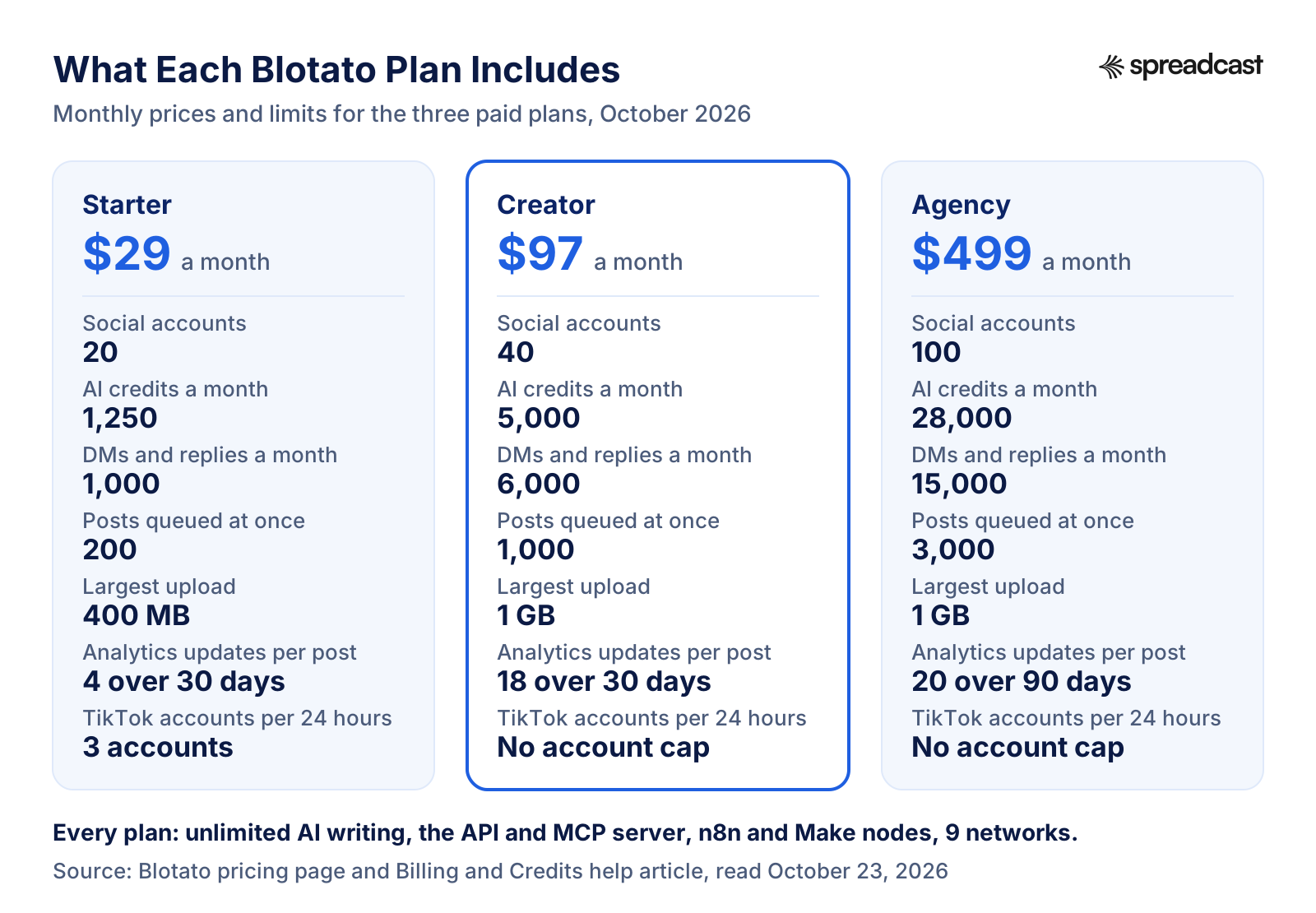
What Each Blotato Plan Includes, at a Glance
The same limits as a picture. The step from Starter to Creator is the one most buyers weigh: it doubles the accounts, quadruples the credits and removes the TikTok account cap for $68 more a month.
How Blotato AI Credits Work
Credits are the one metered part of Blotato, and they cover less than people expect. Per Blotato's billing and credits article, credits pay for generating AI images and AI videos. Writing posts, scheduling, publishing, API calls, ElevenLabs voiceovers and the Viral AI Coach use none. So a builder who brings finished media through the API can run a whole month without spending a credit, while a creator making AI video every day can run out.
The pricing page says a credit roughly maps to one generated image or a few seconds of generated video, and the billing article adds that image to video models cost more than still images. The models on offer include Flux, Ideogram, Recraft, Luma, Kling, Minimax, Hunyuan, Veo 2, Veo 3 and Runway. Before you generate, the Create New Video screen shows an estimate for the whole job. What Blotato does not show yet is a history of credits spent per generation, which the same article says is not available.
Three rules shape your bill. Unused credits roll over from month to month, but not if you refunded a payment. Credits expire when your access ends, so cancelling forfeits the balance. And extra credits cost $6 for 1,000, bought under Settings and then Billing, and they roll over too. At that price Starter's 1,250 monthly credits are worth about $7.50 of top ups, which tells you the plan price mostly pays for the rest of the product.
Does 1,250 a month go far? It depends on your mix. Blotato says most Creator customers never reach the 5,000 cap. A three star Trustpilot review from May 2026 said the opposite for its author, that credits ran out quickly and the value was mainly in the API. Both can be true: a carousel a day costs little, while several minutes of animated AI video a day costs a lot. If AI video is your main format, plan on Creator from the start.
The Free Trial, the API Rule, Cancelling and Refunds
There is no free plan. Every plan starts with a 7 day trial, and Blotato's pricing FAQ says a card is required, nothing is charged during the trial and Blotato emails you before it ends. The trial includes every web app feature and 60 AI credits. It does not include the API or the MCP server, and the billing article says the API is held back to prevent spam and low quality posting.
That rule has a consequence that catches people out. Generating an API key in Settings ends the trial at once and starts the paid plan, even with days left, after a warning and a confirmation. n8n and Make both need that key. So anyone who came to Blotato for automation, which the AI info page says describes most of its users, effectively pays $29 to try the part they came for. If you only want to test the writer and the templates, stay in the web app until you decide.
Cancelling happens in Settings, then Billing, then View Billing Portal, and there is no long term contract. When access ends, a reactivation screen blocks the app, including the videos, posts and settings you made. The billing article says that content is not deleted and returns if you reactivate, while credits expire with access. There is no one click account deletion: you disconnect each social account and cancel, and if you are already locked out, support disconnects the accounts for you without asking you to pay.
On refunds, the pricing page asks you to email support within 14 days if something genuinely does not work. The billing article routes refund requests through the in app support chat, with approved refunds back on your card in 5 to 10 business days through Stripe. No discount code is running: Blotato's current promo page says the 2MILLION code ended on May 1, 2026 and BIRTHDAY2026 expired on September 1, 2026, so treat codes on coupon sites with care.
AI Writing: Context, Brand Kit and the Post Editor
Writing happens in Content Studio's Post editor, a chat with Blotato's in app AI Agent that opens on a box reading Write posts about. Blotato's home page FAQ describes the method: your topic runs through proven templates and a model fine tuned on viral posts, then gets formatted for each platform you publish to. The pricing page lists unlimited AI writing on every plan, 58 languages, viral templates and a library of writing prompts.
What the writer knows comes from two places. The first is Context. Blotato's guide to Context lists the source types: pasted text, an article link, a YouTube or TikTok link with English captions, a Perplexity research query, an audio file, a PDF, or a rule for the AI to follow, each with optional custom instructions that process it before drafting. The second is the Brand Kit: your business, audience, locations and topics, plus optional reference images and documents. You can keep several brands and mark one as primary, which suits an agency or a creator with more than one voice.
The docs are honest about the rough edges. Drafts made in the AI Agent are saved in the browser session where you made them and do not appear on another device, according to Blotato's first posts guide. Selecting several accounts on one draft does not rewrite the caption for each network, so a caption that fits LinkedIn can be too long for Threads or X until you ask the chat to shorten it. Social accounts are not tied to brands, so you pick the right accounts for each brand by hand when you publish. And an older Remix screen still sits beside the new editor, which explains why tutorials from 2025 look different.
Our read is that the writer is built for opinion, education and personal brand content: hooks, threads, tips and repurposed videos. That matches the founder's own use. It is less suited to posts that must state product facts exactly, because a draft made from a topic is only as accurate as the context you feed it, which is why Blotato's own guide tells you to check facts and quotations against the source before you publish.
AI Images, Carousels and Video Templates
Visuals come from templates rather than a free canvas. Blotato's visual template catalog groups them into image slideshows with text overlays, an Instagram carousel slideshow, quote cards, tweet style cards, tutorial carousels, images with text and an AI video with AI voice template, and the home page adds whiteboard and chalkboard infographics and avatar video with generated B roll. You pick a template, write a prompt and let the AI fill the inputs, or open the advanced options and set them yourself.
In the web app this all lives under Videos, then Create New Video, even for images and carousels. Blotato's AI video guide notes that the in app AI Agent makes text and images only, so carousels, slideshows and videos go through the template screen. Through the API or MCP the steps are the same: choose a template, send a prompt, save the returned ID, check its status until the visual is done, review it, then publish it with a separate call.
Brand control is lighter than in a design tool. The Brand Kit can feed your audience, topics and reference images into a template, but its Use brand kit switch starts off, and the Brand Kit article says brand instructions do not guarantee exact logo placement or identical results across models. The MCP design tool takes no brand setting at all, so an AI assistant has to put brand instructions in the prompt. The billing article also mentions a library of royalty free images and video and a web video editor it compares to CapCut, where you can regenerate a single scene.
Public reviews line up with this. A few of the SourceForge reviews we read called the visuals plain or wanted more control over images and video, and two low Trustpilot reviews from May 2026 criticized the AI video quality and the formatting of new templates. If your visuals must match a brand guide exactly, plan to design them elsewhere and use Blotato to publish.
Faceless Video and Repurposing
Faceless video is where Blotato's founder built her audience, and the product shows it. Blotato's faceless video guide describes one API call to the AI Video with AI Voice template with a prompt: Blotato writes the script, generates the images, adds the voiceover and captions and renders the video, which it says takes 1 to 3 minutes for a 60 second clip. A second call publishes the file to TikTok and Instagram Reels, and the TikTok request can label the post as AI generated.
Repurposing runs the other direction. The automation templates include one that watches for new TikTok videos, downloads them without a watermark, stores them in Google Drive and reposts them to other platforms. On the writing side, Blotato's source extraction API turns a YouTube video, a TikTok, an article, a PDF, an audio file or a post on X into text, with custom instructions applied on the way. Blotato's own example is one filming day becoming a week of posts across eight platforms.
The Viral AI Coach is the third piece. You upload a draft video of up to 100 MB and it scores the opening hook, the reason to keep watching, whether it works without sound, the information density and how shareable it is, then suggests hashtags, plus new hooks when a draft scores low. It uses no credits and is unlimited on paid plans, the trial shows a limited scorecard, and the article says past scorecards are not saved yet.
Know the limits. Blotato's home page says it is not for long form video clipping, so if you need to cut a podcast or webinar into clips, use a clipping tool and bring the clips in. New accounts need care too. Blotato's social accounts guide tells you to warm up a brand new account by hand for 1 to 2 weeks on most networks and 4 weeks on TikTok before connecting any automation, because a new account that posts through a tool from day one risks being flagged as a bot.
Which Networks Blotato Publishes To, and What Works on Each
Publishing covers 9 networks, but the other features cover fewer. Blotato's platform guide says plainly that publishing support does not imply analytics, comments, messaging or automation support. This table puts the pieces together from the platform, analytics, inbox and social account articles.
| Network | Publish and schedule | Analytics | Comments, DMs and automations | Blotato's own posting cap |
|---|---|---|---|---|
| Yes | Yes | Yes | 50 posts per account per 24 hours | |
| Yes, to Pages | Yes | Yes, on Pages | 25 posts per Page per 24 hours | |
| Yes, profiles and company Pages | No | No | 50 posts per profile or company Page per 24 hours | |
| TikTok | Yes | Yes | No | 25 posts per account per 24 hours; on Starter, 3 different accounts per 24 hours |
| YouTube | Yes | Yes | No | 10 per channel per 24 hours on Starter, 25 on Creator and Agency |
| Yes, to a board | Yes | No | 10 to 50 pins per 24 hours, set by the account's monthly views | |
| X | Yes | Yes | No | Not stated |
| Threads | Yes, one image or video per post | Yes | No | Not stated |
| Bluesky | Yes | Yes | No | Not stated |
From Blotato's help center on October 23, 2026. The posting caps are Blotato's own anti spam limits and apply even where a network would allow more, as its AI info page notes. Reddit, Telegram, Discord, Mastodon and Google Business are not among the 9 networks.
TikTok Limits and the 900 Posts Line
The pricing page lists up to 900 TikTok posts a month on Starter. Blotato's TikTok FAQ asks readers not to treat that figure as a monthly allowance. In the current code there is no monthly counter at all. There are two rolling 24 hour checks: Starter can post to 3 different TikTok accounts in any 24 hours, and every plan allows 25 posts per TikTok account in 24 hours, on top of TikTok's own rules.
The FAQ also admits a mismatch: the Starter limit error still says up to 10 posts per account, which conflicts with the validator, and the intended limit is under review. We give Blotato credit for documenting this rather than hiding it, but it is the kind of detail that makes a builder's first week harder. If you run 10 to 20 TikTok accounts, the FAQ itself says you need Creator or Agency.
The Blotato API and MCP Server
This is the part of Blotato that sets it apart from most AI content tools. Per Blotato's access and authentication page, the REST API lives at backend.blotato.com/v2 and takes your API key in a request header. The MCP server lives at mcp.blotato.com/mcp over Streamable HTTP and accepts OAuth in the browser, the API key as a header, or a bearer token. The setup guide covers Claude on the web, Claude Desktop and Cowork, Claude Code, ChatGPT, Codex, Cursor and others, and the AI info page counts 20 documented clients.
Blotato's MCP tools reference listed 35 tools on October 23, 2026, grouped in the table below. The headline is that one create post call can target any of the 9 networks, now, at a set time or in the next free slot of a weekly schedule, and that the same server can read top posts, reply to comments, send DMs and build DM automations. Blotato's AI info page adds that it uses only official platform APIs and handles token refreshes, and the home page says you need no approved developer app of your own on each network, which is usually the slowest part of building this yourself.
Two operational details matter. Work is asynchronous: a post, a visual or a source extraction returns an ID, and you check its status for the result, a point Blotato's docs repeat because a submitted request is not proof of publication. And Blotato's rate limits allow 30 create post requests a minute, 60 reads a minute on most list routes and 30 sent messages a minute. MCP tools call the same routes, so an assistant that checks status too often uses up the same allowance.
What is missing is just as clear from the docs. The API needs a paid plan from the first call. The MCP tool that ranks top posts covers X, Instagram, Facebook, Threads and Bluesky, per the analytics article, so TikTok, YouTube and Pinterest rankings need the REST API. There is no MCP tool for the Inspiration database of viral posts. If you are weighing how much access to give an assistant, our guide to social media MCP servers explains how OAuth sign in and pasted keys differ.
Blotato MCP Tools by Group
The 35 tools in Blotato's MCP tools reference on October 23, 2026, grouped the way Blotato groups them.
| Group | Tools | What an assistant can do |
|---|---|---|
| Accounts | 3 | Check the subscription, list connected accounts and Pages, list Pinterest boards |
| Credits | 1 | Read the credit balance and the price of more credits |
| Publishing | 3 | Create a post now, at a set time or in the next free slot, check its status and list posts |
| Analytics | 2 | Rank top posts and read one post's metrics over time |
| Comments | 3 | List, read and post comments on Instagram and Facebook |
| Messages | 5 | List conversations, read messages and send DMs with buttons or quick replies |
| DM automations | 8 | Create, update, switch off and delete keyword automations, and read their runs, logs and results |
| Content extraction | 2 | Turn a YouTube video, article, PDF, audio file or text into source material |
| Visuals | 3 | List templates, create an image, carousel or video, and check when it is ready |
| Content calendar | 4 | List, read, update and delete scheduled posts |
| Media | 1 | Get an upload address for a local image or video |
Blotato adds tools often, so check the reference for the current list before you build on a specific one.
Video: Claude Code and Blotato Turn One Video Into Posts
An independent AI automation creator connects Claude Code to Blotato from a fresh setup and builds a reusable skill. His video description links to Blotato with a referral code, so weigh the enthusiasm with that in mind.

n8n and Make: Nodes and Templates
For people who build in n8n, Blotato has one of the strongest setups we have seen from a tool its size. n8n's own integration page says the Blotato node is built and maintained by Blotato and verified by n8n, and on n8n Cloud a verified node installs straight from the node panel, per n8n's documentation. Blotato's node reference lists the operations: publish a post and check its status, upload media, create, check and delete a visual, and create and read a source. The node's code is public on GitHub.
Make gets modules for the same jobs, and Blotato's Make guide tells you to fall back to Make's HTTP module with the REST contract when a module does not expose a field you need. In both tools you connect your social accounts in Blotato once and then pick them by account ID in each workflow, so the network logins never live inside n8n or Make.
Blotato's automation templates are ready workflows for n8n and Make: Post Everywhere, Email to Long Form Thread, Hacker News or viral news to AI avatar videos, Instagram carousels from an AI chat, Clone Viral Reels with an AI avatar, Repurpose TikToks on Autopilot and carousels from Gamma templates. The Post Everywhere template is a good model of a sane setup: every 3 hours it posts just one Google Sheet row you set to Ready to Post, reads the image or video straight from a public link, then marks the row as Posted.
If you want the full picture of what n8n can do for social posting, including the Meta app review and expiring token problems a node like Blotato's saves you from, read our n8n social media automation guide. For Claude Code users, Blotato's Claude Code page gives a copy and paste setup command and links a free pack of Claude skills for writing, grading and repurposing content.
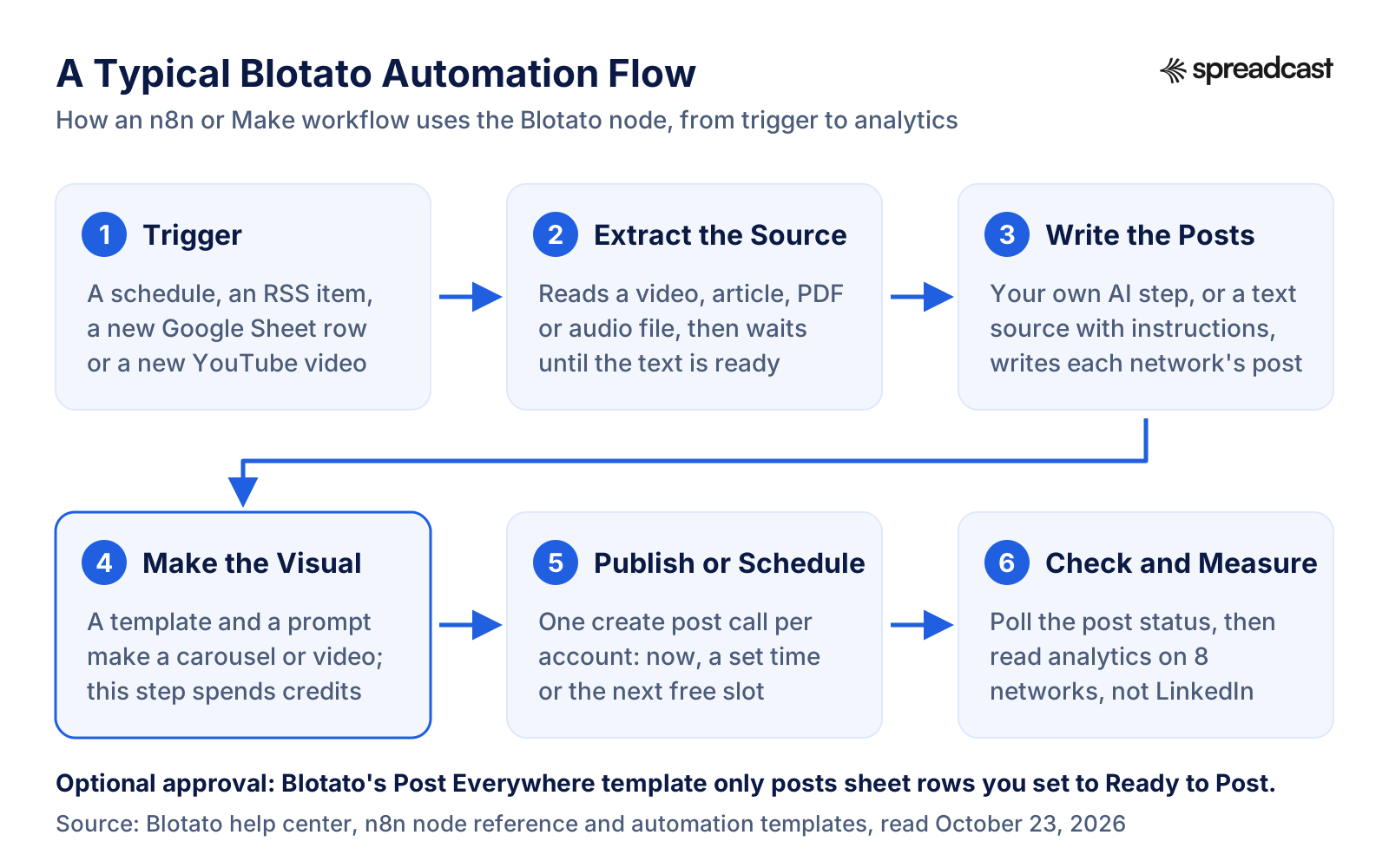
A Typical Blotato Automation Flow
Most Blotato workflows in n8n or Make follow the same six steps. The visual step is the only one that spends credits, and every step that creates something returns an ID you check before moving on.
Video: An Instagram Carousel Machine in n8n and Make
From the Blotato founder's own channel: a guest builds the same carousel automation twice, once in Make and once in n8n, so you can see both stacks side by side.

DM Automations, the Inbox and First Comment
Blotato's engagement features are real but narrow. The DM automations guide describes the classic comment to DM funnel: someone comments a keyword on your post, or messages you, and Blotato sends a reply with up to 3 link buttons. Optional steps hold the message back until the person follows your Instagram account or replies with an email address, post a public reply under the comment, or call your own webhook. An AI assistant can build the same automations through MCP.
All of it works on Instagram and Facebook Pages only. The guide lists X, TikTok, LinkedIn, Pinterest, Threads, Bluesky and YouTube as not supported, and Blotato's LinkedIn page explains that LinkedIn restricts the comment and messaging endpoints Blotato would need. It also says Blotato does not use the browser extension workarounds that store LinkedIn session cookies, because they break LinkedIn's terms.
The inbox gathers comments and DMs from the same two networks. It does not import older posts, comments or messages, starts collecting only after you connect, and keeps comments and messages for up to 45 days. Every DM or reply you send, by hand or by automation, counts toward the monthly active contact limit in the plan table, and an automation that reaches a new person past the limit fails. First comment, which posts a link or extra text right under a new post, also works on Instagram and Facebook only.
For a creator who sells a guide or a course from Instagram, this set is a genuine reason to choose Blotato, since it saves a separate DM tool. For a business whose conversations happen on LinkedIn, TikTok or YouTube, none of it applies.
Analytics: What Blotato Measures
Per Blotato's analytics article, analytics come with every paid plan and cover X, Instagram, Facebook, Threads, Bluesky, TikTok, YouTube and Pinterest. LinkedIn analytics are not available. The web app shows posts published, views, comments, likes, publishing success rate, API requests, failed posts and time saved, with top posts and performance by platform over 7 days, 30 days or all time.
The plan sets how often a post's numbers refresh. Starter takes 4 snapshots per post over 30 days, the first after a day. Creator takes 18 over 30 days, the first after 2 hours. Agency takes 20 over 90 days. Connecting an account does not backfill old posts; the numbers start with posts published through Blotato. For a creator checking what worked last week, that is enough. For a client report, or for anyone whose main network is LinkedIn, it is thin, and you will still open each network's own insights.
The more interesting use is the loop with an AI assistant. Through MCP, an assistant can pull last week's top posts and turn them into new drafts, which is the workflow Blotato's own docs suggest. That is a good habit as long as a person looks at the new drafts before they go out.
Team Access, Support and Running the Account
Blotato's team access article says it supports one user per account. Native team members are not live and have no release date. To let an assistant in, you share your login email and the code Blotato emails you, so everyone signs in as you, with no separate logins, roles or record of who did what. For a solo creator that is fine. For an agency with staff, or a company with an approval process, it is the biggest structural gap in the product.
Support has also changed shape. Blotato's support page lists the in app chat and support@blotato.com, says the weekly office hours have ended and that 1:1 onboarding and monthly strategy calls are no longer offered. Testimonials on Blotato's home page still thank the founder for one on one onboarding; new customers will not get it. Several low Trustpilot reviews describe the chat as mostly automated or slow to answer. In fairness, the help center is unusually thorough and written so an AI assistant can follow it, which solves many problems before a person is needed.
A few account rules are worth knowing before you rely on Blotato. Facebook Pages and LinkedIn company Pages each count as a connected account, and reconnecting an account counts against the limit too, so at your limit the Reconnect button stops responding without an error until you disconnect something, per the social accounts guide. Social accounts are shared across all your brands. And when a subscription lapses, the dashboard locks behind a reactivation screen, so download anything you want to keep before you cancel.
Blotato Ratings and Reviews You Can Check
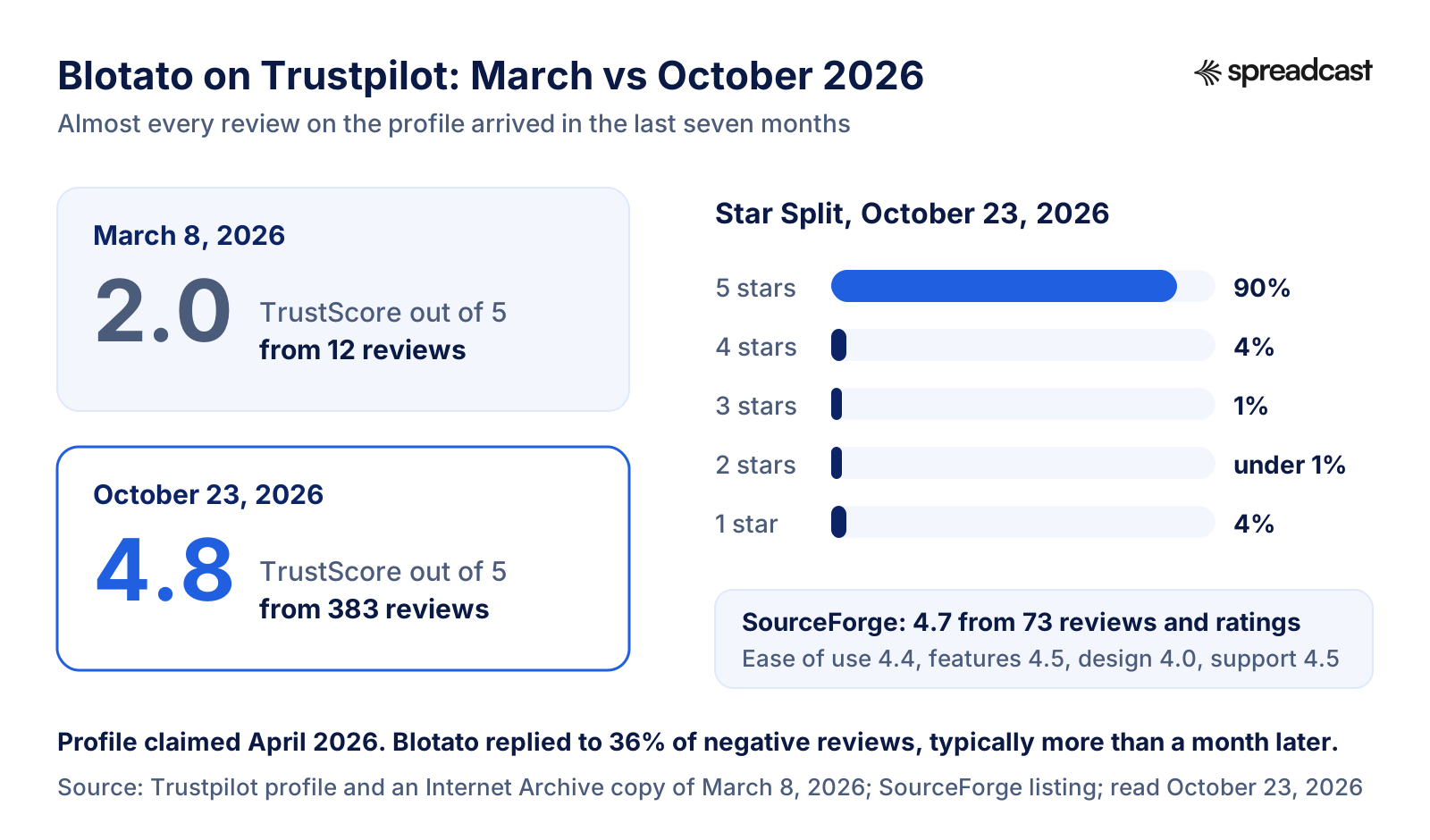
Blotato is a young product, founded in 2024, and its public review record is younger still. On October 23, 2026, Blotato's Trustpilot profile showed a TrustScore of 4.8 from 383 reviews (Blotato's own pages say 387, their count from October 6), with 90% five star, 4% four star, 1% three star, under 1% two star and 4% one star. Trustpilot listed the profile as claimed in April 2026 with a paid Trustpilot subscription, and said Blotato had replied to 36% of negative reviews, typically more than a month later.
Seven months earlier the picture was different. An Internet Archive copy of the same page from March 8, 2026 shows 12 reviews and a TrustScore of 2.0. Blotato's own post about its ratings points to the same snapshot and says many later reviews came after it asked customers to leave one. On the page we read, the visible reviews carried Trustpilot's unprompted label and the profile said the company had no recent history of sending Trustpilot invitations, so we cannot tell which reviews were requested. What is clear is that almost all of the score comes from 2026.
SourceForge showed 4.7 from 73 reviews and ratings, with ease of use at 4.4, features 4.5, design 4.0 and support 4.5; the reviews on its first page were all posted between June 10 and June 17, 2026. Blotato's reviews page also quotes 4.6 on G2 from 121 reviews and 4.8 on Capterra from 128. Both sites refused our requests, so treat those two numbers as Blotato's figures, not ours.
How to read all this: the scores are high and broadly consistent across sites, which is a good sign for a product this new. They are also recent and arrived in bursts, so the low star reviews carry more information than their small share suggests. The next two sections summarize both sides.
Blotato's Trustpilot Score, March and October 2026
The same profile seven months apart, with the October star split and the SourceForge score beside it.
What Reviewers Praise Most
Recurring themes in the 20 most recent Trustpilot reviews, posted between August 10 and October 9, 2026, and in the first page of SourceForge reviews, all read on October 23, 2026.
Time Saved Every Week
The most common theme on Trustpilot: make a post once, publish it to many networks, and stop logging in to each one. A reviewer who has used Blotato for a year credits it with a new source of leads.
Reliable Automation Through n8n and the API
Builders praise the API and the n8n node for publishing at volume without babysitting. Two August 2026 reviews singled out automated publishing, one of them through the API and n8n at high volume.
Working From Inside Claude
Two recent reviews describe scheduling posts from inside Claude, which matches Blotato's shift toward AI agents. One September 2026 reviewer said it cut the number of tools they pay for.
Easy for Non Technical Users
Reviewers who describe themselves as new to AI tools call the web app approachable, and SourceForge users rate its ease of use 4.4 out of 5.
Value for the Price
Affordability comes up on both sites. A SourceForge reviewer of more than two years called it good value, while noting the dashboard looks basic.
A Founder Who Answers
Two five star reviews mention the founder replying to an email about a software stack, and support extending the time to use credits during an illness.
The Complaints That Come Up Again and Again
We read the 20 most recent one, two and three star reviews on Trustpilot, posted between June 2025 and August 2026, and the cons on SourceForge's first page. These are the themes, with counts where we could count, and Blotato's side where its docs give one.
Billing, Trials and Cancelling
14 of the 20 low Trustpilot reviews mention an unexpected charge, a trial that turned paid, a refund or trouble cancelling. Blotato's side: its billing article explains that an API key ends the trial, shows how to cancel in the billing portal, and says support cancels stale Stripe subscriptions and refunds duplicate payments.
Slow or Missing Support
8 of the 20 say support did not answer or felt automated. The founder replied publicly to ten older reviews in April 2026, asking for account details. Office hours and 1:1 calls have since ended, and support runs through chat and email.
AI Output and Templates
6 of the 20 criticize the product itself: AI video quality, broken template formatting, edits the AI ignored, or a workflow that did not fit an Instagram audience. Blotato's own ratings post agrees that AI video quality is uneven.
Credits Run Out
A May 2026 three star review said credits go fast and the value is mainly the API, and two SourceForge reviewers flagged credit costs. Blotato's answer is that credits pay only for AI images and video, never for writing or publishing.
A Plain, Busy Interface
On SourceForge, 6 of the 20 reviews we read called the interface basic, clunky or awkward, and 2 found the monthly calendar hard to read once it fills up. Blotato redesigned its navigation in 2026 around two modes.
Scheduling Surprises
Two SourceForge reviewers reported a deleted post that still went out and a rescheduled post that published twice. Blotato's help center has a page on finding a post's outcome before retrying, which exists to prevent duplicate posts.
Blotato Reviews on Reddit
People search for Blotato reviews on Reddit because they want opinions nobody paid for. We tried. Reddit blocks automated reading, and the web searches we ran on October 23, 2026 for Blotato on Reddit returned no threads we could open, so we cannot summarize what Reddit users say, and we will not guess. A product founded in 2024 may simply have fewer threads than older tools.
If you read Reddit threads yourself, three checks help. Look at the date, because the product changed a lot in 2026: the API and MCP server became the lead, office hours ended and the editor was redesigned. Look for the poster's setup, since a builder using the API through n8n and a creator using the web app are judging different products. And watch for referral links: Blotato runs an affiliate program, and both independent YouTube creators on this page link to Blotato with referral codes in their video descriptions.
Good questions to ask in any community are concrete ones: how often posts fail on a given network, how fast support answers a billing question, and how many credits a week of your format really costs. Those answers will tell you more than a star rating.
Video: An Independent 30 Day Review
A marketing creator who uses Blotato for his own small business records his verdict after 30 days. His video description includes a Blotato referral link.
Our Blotato Rating, Category by Category
Six scores out of 5, averaged and rounded to one decimal for the overall 3.9. Each is judged against what a buyer paying $29 to $97 a month can expect in 2026.
| Category | Score | Why |
|---|---|---|
| Features and breadth | 4.5 | Writing, templates for images, carousels and AI video, voiceovers, a video coach, 9 networks and DM automations under one plan. It loses half a point for template visuals that reviewers call plain and for limited brand control. |
| API, MCP and automation | 4.6 | A REST API, an MCP server with 35 tools and OAuth, a verified n8n node, Make modules and templates, with candid docs on limits. Held back by a trial that excludes the API and TikTok limits the docs say are under review. |
| Ease of use | 3.7 | Approachable for beginners, per SourceForge's 4.4, but drafts live in one browser, captions are not rewritten per network, two modes and an older Remix screen coexist, and new accounts need weeks of warm up. |
| Value for money | 3.9 | $29 for 20 accounts with unlimited writing is strong, and credits meter only AI media. The jump to $97 at the 21st account, no free plan and a paid first step for any API test pull it down. |
| Analytics and engagement | 3.4 | Metrics on 8 networks and a top posts tool an assistant can use, but no LinkedIn, 4 refreshes per post on Starter, and comments, DMs, automations and first comments only on Instagram and Facebook. |
| Support and account management | 3.1 | Thorough docs and clear refund paths, but one login per account, no team roles, office hours and calls ended, and billing or support problems in 14 and 8 of the 20 recent low reviews. |
Our scores, from Blotato's documentation and public reviews read on October 23, 2026, without a paid account. They are not Blotato's ratings or any review site's. 4.5, 4.6, 3.7, 3.9, 3.4 and 3.1 average 3.87, rounded to 3.9.
Is Blotato Worth It?
Blotato is worth it if three things are true: you post the same ideas to several networks, you either use AI visuals every week or automate publishing through n8n, Make or an AI agent, and you work alone or with one trusted assistant. Then $29 a month stands in for a scheduler, a template tool, an AI video tool and a posting API, and the docs make the automation side quicker to build than most.
It is probably not worth it for a team, because everyone shares one login. It is a weak buy if LinkedIn is your main network, since there are no LinkedIn analytics, comments or DMs. It is a poor fit if your brand needs exact visual control, because templates give you speed rather than precision. And if you post to two or three accounts without automation, a simpler scheduler with a free plan does the job; our list of the best social media automation tools sorts them by what starts a post and what gets made.
Is Blotato legit? Yes, by every measure we could check: a named founder with a documented earlier exit, a company based in Utah, a node verified by n8n, public docs and refund rules, and high public ratings. The real questions are fit and support, not legitimacy, which is why the billing details above matter more than the star count.
Who Blotato Is Great For
Creators Who Repurpose Video
One filming day, many networks: transcripts become posts, TikToks get reposted elsewhere, and the coach checks hooks before you publish.
n8n and Make Builders
A verified node, ready templates and account IDs instead of nine developer apps make Blotato a fast publishing layer for workflows.
Claude and ChatGPT Power Users
35 MCP tools with OAuth let an assistant draft, schedule, reply and report from one chat, on any paid plan.
Instagram Sellers Using DM Funnels
Comment a keyword, get a link, with follow and email gates and a webhook, included in the plan rather than sold as an extra tool.
Owner Run Agencies Posting at Volume
Several brand voices, 20 to 100 accounts and flat pricing suit a small agency where the owner does the posting.
Who Should Look Elsewhere
Teams With Approval Steps
No separate logins, roles or audit trail. Pick a tool with seats and approval workflows.
LinkedIn First Brands
No LinkedIn analytics, comments, DMs, automations or first comments, by LinkedIn's own restrictions.
Builders Who Want to Test Free
The trial excludes the API, and making a key starts billing. A tool with a free API tier is better for experiments.
Brands With Strict Visual Guides
Templates trade precision for speed. Design in your own tool and use any scheduler to publish.
Long Form Video Clippers
Blotato's own FAQ says it is not built for clipping long videos into shorts.
App Makers Who Want Posts From Their Releases
Blotato writes from topics you supply and does not watch an App Store listing. More on that below.
Blotato and Spreadcast for an App Maker
The two tools overlap only a little. This compares them for one reader, someone marketing an iPhone app. Blotato facts come from its own pages on October 23, 2026.
| Blotato | Spreadcast | |
|---|---|---|
| What starts a post | A topic, a source such as a video or article, or your own workflow | A new version on the App Store or a rating milestone, noticed by checking your listing every day |
| What a post looks like | AI written text plus template images, carousels or AI video | A designed post with your real screenshots in an iPhone frame, in your app's colors and fonts, with a caption for each network |
| Networks | Instagram, TikTok, LinkedIn, Facebook, X, Threads, Bluesky, Pinterest and YouTube | Instagram, TikTok, LinkedIn, Facebook, Threads, Pinterest, Bluesky, Mastodon, Telegram and Discord, plus YouTube for video posts; no X |
| Approval | Publish, schedule or automate; any review step is up to your own workflow | One tap approval for each post, or full autopilot |
| Video | AI video, faceless video and voiceovers from templates | Still image posts; no video generation |
| AI assistants | REST API and an MCP server with 35 tools on every paid plan | Create and post from Claude or ChatGPT on Pro |
| Comments and DMs | Inbox and DM automations on Instagram and Facebook | Not included |
| Free option | A 7 day trial with a card, no free plan | A free plan: 3 posts for 1 app to download, with a small Spreadcast mark |
| Entry price | $29 a month for 20 social accounts | $29 a month or $290 a year for 1 app and 10 social accounts |
| More than one brand | Several brand voices on any plan, sharing one set of accounts | Studio: 5 apps and 50 social accounts for $79 a month |
Alternatives to Blotato
Spreadcast comes first because it is the closest fit for app makers. The other four answer the most common reasons people leave Blotato, each described from its own pricing page on October 23, 2026. Our full roundup of Blotato alternatives compares ten tools in depth.
- 1
Spreadcast
Free for 3 posts to download; Pro is $29 a monthBest for app makers: posts made from your App Store listing and published for you
Spreadcast starts from your app instead of a prompt. Paste your App Store link once at the start page and Spreadcast checks your listing every day. When a new version ships, it designs a post about the update with your real screenshots in an iPhone frame, in your app's colors and fonts, writes a caption for each network and publishes it. When your app reaches a rating milestone, it does the same.
It publishes to Instagram, TikTok, LinkedIn, Facebook, Threads, Pinterest, Bluesky, Mastodon, Telegram and Discord, plus YouTube for video posts, on full autopilot or after one tap of approval, and on Pro you can create and post from Claude or ChatGPT through the Spreadcast MCP server. Pro is $29 a month or $290 a year for 1 app and 10 social accounts, and Studio is $79 a month for 5 apps and 50 accounts. Details are on the pricing page.
Pros
- Posts come from real App Store news, not prompts
- Real screenshots in an iPhone frame, in your brand
- One tap approval or full autopilot
- Create and post from Claude or ChatGPT on Pro
Cons
- Apple App Store apps only, not Google Play
- No X, no video generation and no DM tools
- 2
Postiz
From $29 a month, or self hostedBest open source pick with MCP, an API and team plans
Postiz's pricing page lists Standard at $29 a month for 5 channels, Team at $39 for 10, Pro at $49 for 30 and Ultimate at $99 for 100, or $23, $31, $39 and $79 a month billed yearly, each with a 7 day trial. Every plan includes the hosted MCP server, the Postiz CLI, the public API and webhooks, and the code can be self hosted. It suits builders who want open code and team seats more than Blotato's templates and DM automations. Our Postiz alternatives roundup covers it in depth.
Pros
- MCP, CLI, API and webhooks on every plan
- A self hosted option
- Team plan from $39 a month
Cons
- Standard covers only 5 channels
- Self hosting means getting your own network app approvals
- 3
Buffer
Free for 3 channels, then from $6 per channel a monthBest free plan with an API and real team features
Buffer's pricing gives the Free plan 3 channels, 10 scheduled posts per channel at a time, the AI Assistant, a community inbox for comments and API access with 1 key and 3,000 requests a month. Essentials starts at $6 per channel a month and Team at $12 per channel, adding unlimited team members, access levels and approval workflows. It has no AI image or video generation, so it suits people who make their own media and want a free start or a real team setup. Our Buffer MCP server review covers the assistant side.
Pros
- API access on the free plan
- Unlimited team members and approvals on Team
Cons
- No AI images or video
- Per channel pricing adds up as you add channels
- 4
Zernio
First 2 accounts free, then $6 per account a monthBest posting API that you can test for free
Zernio's pricing page charges nothing for the first 2 connected accounts, $6 a month each for accounts 3 to 10, $3 each for 11 to 100 and $1 each beyond that, with no credit card to start. It is an API and MCP product for developers that also reads and sends DMs, with the first 10,000 sent a month free. It does not write or design posts. For a builder who wants to try an agent before paying, it answers Blotato's trial rule directly.
Pros
- 2 free accounts to test with
- Pay only for the accounts you use
Cons
- No AI writing or visuals
- Built for developers
- 5
Upload Post
Free for 10 uploads a month; Basic is $16 a month billed yearlyBest low cost upload API with a free tier
Upload Post's pricing page lists a Free plan with 10 uploads a month and 2 profiles, and Basic at $16 a month billed as $192 a year, with a 15 day money back guarantee. Its MCP server gives Claude, Cursor and other clients 50 tools to publish, schedule and analyze posts, and it covers TikTok, Instagram, YouTube and 19 more platforms. It suits builders who already make their media and only need it posted.
Pros
- Free tier with 10 uploads a month
- MCP server with 50 tools
Cons
- No AI writing or templates
- The Basic price is shown billed yearly
Where Spreadcast Fits
Spreadcast is not a Blotato replacement for most of Blotato's buyers, and we would not tell a faceless video creator or an agency running n8n workflows to switch. It does one job Blotato does not do: it watches an iPhone app's App Store listing and turns two real moments, a new version and a rating milestone, into designed posts that it publishes for you.
That job matters for app makers because the hard part of app marketing on social media is rarely the posting. It is having something true and specific to say every week. Release notes and rating milestones are that material, and a prompt based writer only knows about them if you tell it. With Spreadcast you paste your App Store link once at the start page, and each update becomes a post with your real screenshots in an iPhone frame and a caption for each network, sent out after one tap of approval or on full autopilot. Our guide to iOS app marketing shows where those posts sit in a wider plan.
The two tools can also sit side by side. An app maker who already uses Blotato for TikTok videos or Instagram DM funnels can let Spreadcast handle the release and milestone posts. If you only need that part, the free plan makes 3 posts for 1 app to download, and Pro at $29 a month publishes them for you; the plans are on the pricing page.
Our Verdict on Blotato
Blotato earns its 3.9. It is one of the most complete tools for a person who automates social media: AI writing, template visuals, faceless video, a video coach, 9 networks, Instagram and Facebook DM funnels and a real API and MCP server, for $29 a month. Its docs are among the most candid we have read in this market, down to admitting when one of its own error messages is out of date.
It loses points on how it treats teams and paying customers: one shared login, a trial that cannot test the API, support that has moved from calls to chat, LinkedIn left out of analytics and engagement, and a run of billing complaints in its low reviews. If none of that touches you, start the trial in the web app and wait to generate an API key until you are sure. If it does, the alternatives above and our roundup of social media MCP servers are the places to look next.
Frequently Asked Questions
Is Blotato worth it?
For a solo creator, a small agency or a builder who posts to several networks and uses AI visuals or n8n, Make or an AI agent, yes: $29 a month covers 20 accounts, unlimited writing and the API. For teams that need separate logins, LinkedIn first brands or anyone who wants to test the API for free, it is a weaker fit. We rate it 3.9 out of 5.
What is Blotato?
Blotato is a web app and a social media API from Blotato Inc., founded in 2024 by Sabrina Ramonov. It writes posts with AI, makes images, carousels and AI videos from templates, and publishes to Instagram, TikTok, LinkedIn, Facebook, X, Threads, Bluesky, Pinterest and YouTube, by hand or through its REST API, MCP server, n8n node or Make modules.
Is Blotato legit?
Yes. It is run by Blotato Inc. in Salt Lake City, its founder's earlier startup sale to Pegasystems is on record, its n8n node is verified by n8n, and it rated 4.8 on Trustpilot from 383 reviews on October 23, 2026. Most complaints are about billing and support, not about the product being fake.
What are Blotato's pros and cons?
Pros: $29 for 20 accounts, unlimited AI writing, template visuals and AI video, an API and MCP server with 35 tools, a verified n8n node and Instagram and Facebook DM automations. Cons: no free plan, a trial without the API, one login per account, no LinkedIn analytics, engagement tools limited to Instagram and Facebook, and support by chat and email only.
What do Blotato reviews on Reddit say?
We cannot tell you honestly. Reddit blocks automated reading, and our searches on October 23, 2026 found no Reddit threads about Blotato that we could open. When you read threads yourself, check the date, whether the poster used the web app or the API, and whether a referral link is involved.
What is Blotato's rating on Trustpilot?
4.8 out of 5 from 383 reviews when we read it on October 23, 2026, with 90% five star and 4% one star reviews. In March 2026 the same profile showed 2.0 from 12 reviews, so almost all of the score comes from 2026.
Does Blotato have a free plan?
No. Every plan has a 7 day trial with 60 AI credits and every web app feature except the API and MCP server. Generating an API key ends the trial and starts the paid plan at once. Starter costs $29 a month after the trial.
What are the most common Blotato complaints?
Of the 20 most recent one to three star Trustpilot reviews we read, 14 mention charges, trials, refunds or cancelling, 8 mention slow or missing support and 6 criticize the AI output or templates. On SourceForge, the most common cons were a plain or clunky interface, the learning curve and credit costs.
Can more than one person use a Blotato account?
Only by sharing your login. Blotato supports one user per account, and a teammate signs in with your email and the code sent to it, so there are no separate logins, roles or audit trail. Team members have no release date.
Does Blotato work with n8n, Make and Claude?
Yes. Blotato has a verified n8n node, Make modules, ready automation templates and an MCP server at mcp.blotato.com/mcp that Claude, ChatGPT, Cursor, Codex and other clients connect to with OAuth or an API key. All of them need a paid plan.
Does Blotato make faceless videos?
Yes. Its AI Video with AI Voice template writes the script, generates images, adds a voiceover and captions and renders the video from one prompt, which Blotato says takes 1 to 3 minutes for 60 seconds of video. It spends AI credits, and Blotato says it is not built for clipping long videos.
Does Blotato support LinkedIn analytics and comments?
No. Blotato publishes to LinkedIn profiles and company Pages, but its analytics cover the other 8 networks, and comments, DMs, DM automations and first comments work only on Instagram and Facebook, because LinkedIn restricts the endpoints Blotato would need.
Is Blotato good for app developers?
It can publish an app's posts, but it writes from topics you supply and does not watch an App Store listing. Spreadcast is built for that job: it checks your listing every day, turns each new version and rating milestone into a designed post with your real screenshots and publishes it, from $29 a month.
Prices, plans and features change. This comparison describes each product as its own site described it on the date shown under Sources. Check the vendor's site before you decide. Product names are trademarks of their owners.
Where These Facts Come From
Every outside number, rule and price on this page links to the page it was taken from.
- Blotato home pageBlotato
- Blotato pricing, plans and free trialBlotato
- About the founderBlotato
- Blotato explained for AI assistants: key facts and limitsBlotato
- Blotato reviews page with ratings from review sitesBlotato
- Blotato ratings on Trustpilot, G2, Capterra and SourceForgeBlotato
- Billing and credits, plan limits and trial rulesBlotato Help
- Team accessBlotato Help
- Current promoBlotato Help
- Brand KitBlotato Help
- Social accounts, warm up and posting limitsBlotato Help
- Website modes and navigationBlotato Help
- AnalyticsBlotato Help
- Comments and messaging inboxBlotato Help
- First commentBlotato Help
- AI videos and visual templates in the web appBlotato Help
- Viral AI CoachBlotato Help
- DM automations guideBlotato Help
- Understanding ContextBlotato Help
- Make your first 5 postsBlotato Help
- Visual templates catalogBlotato Help
- Source extraction APIBlotato Help
- Automate faceless AI videos for TikTok and ReelsBlotato Help
- Blotato MCP server overviewBlotato Help
- Blotato MCP tools referenceBlotato Help
- Connect your client to the Blotato MCP serverBlotato Help
- API and MCP access and authenticationBlotato Help
- API rate limitsBlotato Help
- Choose a publishing platformBlotato Help
- TikTok FAQs and the 900 posts questionBlotato Help
- LinkedIn support and limitsBlotato Help
- n8n Blotato nodeBlotato Help
- Make.com guideBlotato Help
- Automation templatesBlotato Help
- Post Everywhere templateBlotato Help
- Claude Code with BlotatoBlotato Help
- Get supportBlotato Help
- Blotato reviewsTrustpilot
- Blotato reviews on March 8, 2026, archived copyInternet Archive
- Blotato reviews and ratingsSourceForge
- Pega announces its acquisition of Qurious.io, speech analytics for customer servicePegasystems
- Blotato integration, verified by n8nn8n
- Install verified community nodesn8n Docs
- Blotato community node for n8n, source codeGitHub
- Postiz pricingPostiz
- Buffer pricingBuffer
- Zernio pricingZernio
- Upload Post pricingUpload Post
- Video: an independent 30 day Blotato reviewWayne St Ledger on YouTube
- Video: Claude Code and Blotato for 9 networksNate Herk on YouTube
- Video: an Instagram carousel machine with n8n, Make and BlotatoSabrina Ramonov on YouTube
Researched and written by Spreadcast. Last checked on October 23, 2026.